
Ask AI
— answers from the official manualAnswers from the official manual.
Common questions
Common Questions
12 totalWhat browser requirements are needed to view the Akko 3068b manual?
Your browser must have Images, JavaScript, and Cookies enabled to properly access and view the product manual. Ensure all three of these features are enabled in your browser settings before attempting to access the documentation.
What should I check if the manual won't load properly in my browser?
Verify that your browser has Images, JavaScript, and Cookies enabled, as all three are required for proper manual display. If these are enabled and the manual still won't load, try clearing your browser cache or using a different browser.
What is a Ray ID and why is it shown in the error message?
A Ray ID is a unique identifier assigned to your specific request and is used by technical support for diagnostics and troubleshooting purposes. You can provide this ID to Manuals+ support to help them investigate access issues more efficiently.
蓝牙连接时蓝灯怎么闪烁?
长按 Fn+E/R/T 键会进入蓝牙匹配模式,此时E、R或T键的蓝色LED将快速闪烁。(Page 23)
如何启用键盘背光和调节灯光效果?
按住 Fn+L可以开启或关闭灯光。要浏览不同灯光模式,可在有线模式下使用软件中定制。(Page 21)
当有多组蓝牙设备时如何快速切换?
在已经配对的4种蓝牙设备间可以短按 Fn+E / Fn+R / Fn+T 来快速切换。(Page 24)
Show 6 more questions
Full Manual
24 pages
B 三模
Multi-modes
用户手册
User Manual
目录
3068B规格参数 3068B组合键功能 3068B系统功能(Windows) 3068B系统功能(Mac) 3068B背光调节 3068B蓝牙使用指南
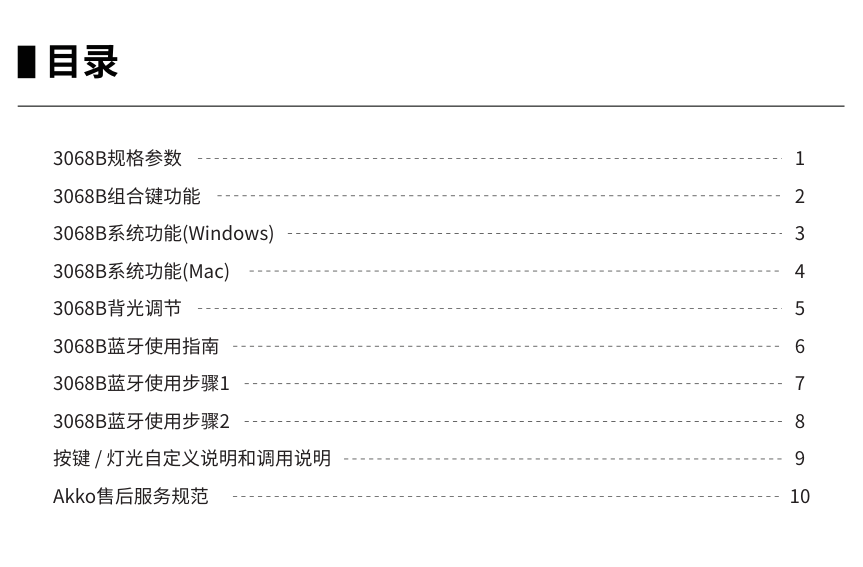
#### Menu
3068B Technical Specifications 3068B HotKeys 3068B System Commands (Windows) 3068B System Commands (Mac) 3068B Backlight Settings 3068B Bluetooth Feature Overview 3068B Bluetooth Setup Instruction 1 3068B Bluetooth Setup Instruction 2 Key/Lighting Effects Customization Instruction Akko Warranty and Service Statement
11 12 13 14 15 16 17 18 19 20
13068B规格参数
尺寸
约316*107*39mm
重量 产地 类型
约0.64kg 中国 机械键盘
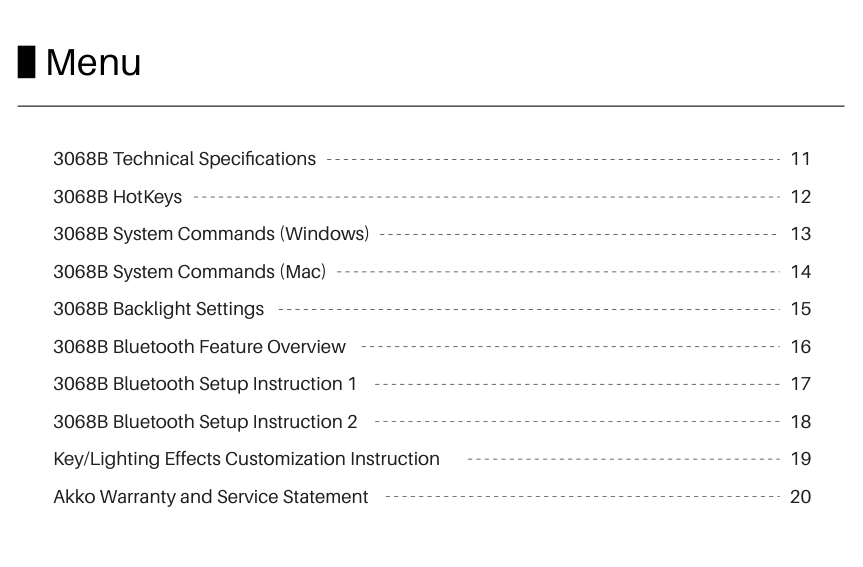
键帽 连接方式
蓝牙 / 无线 / 有线
PBT材质
多媒体键 全键无冲
支持 支持
连接线
Type-C To USB
电池容量
1800mAh
按键/灯光自定义
键盘需在有线模式下配合驱动进行自定义
23068B组合键功能
1 - 0 = PgUp PgDn
F1 - F10
Fn+
=
I P C M <
Insert Prtsc 计算器 静音 音量减小
Fn+
=
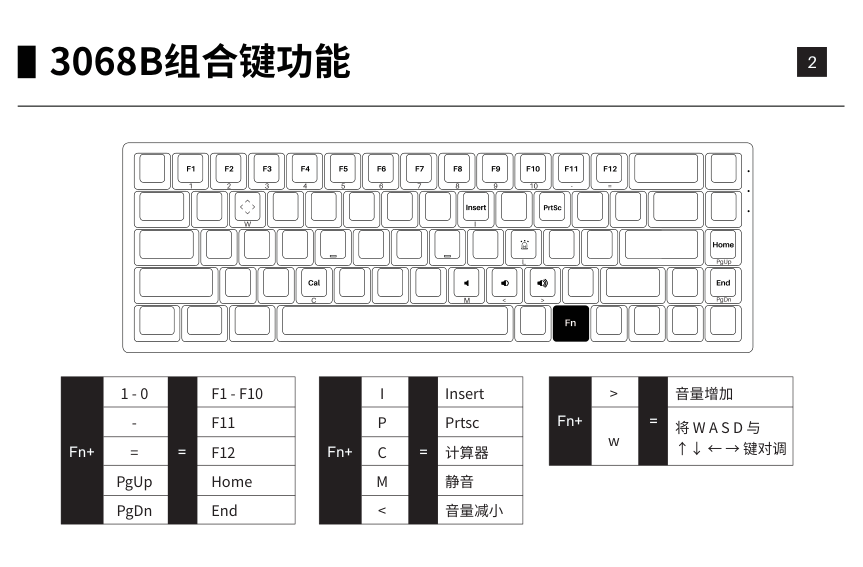
音量增加 Fn+
>
= 将 W A S D 与 ↑↓ ← → 键对调
w
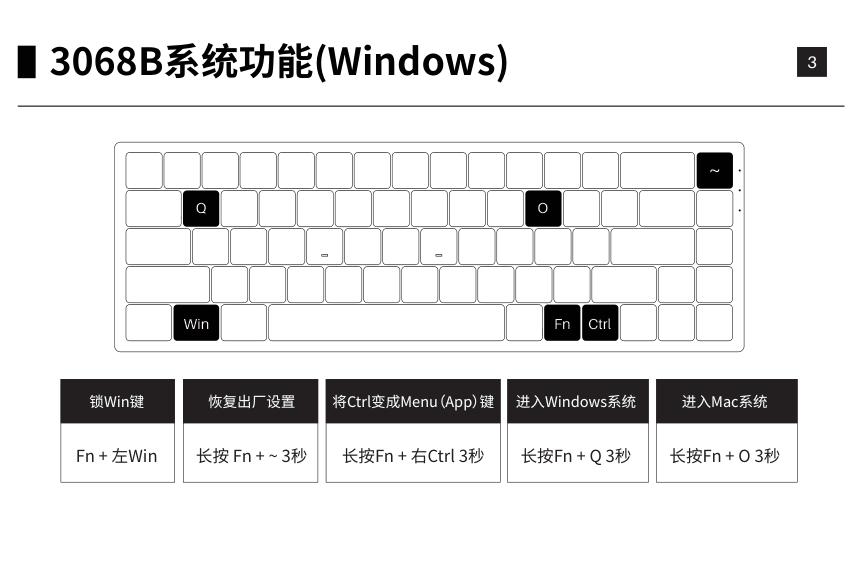
33068B系统功能(Windows)
Q O
~
~
Win
Fn
Fn
Fn
Ctrl
锁Win键
恢复出厂设置
将Ctrl变成Menu(App)键
进入Windows系统
进入Mac系统
Fn + 左Win
长按 Fn + ~ 3秒
长按Fn + 右Ctrl 3秒
长按Fn + Q 3秒
长按Fn + O 3秒
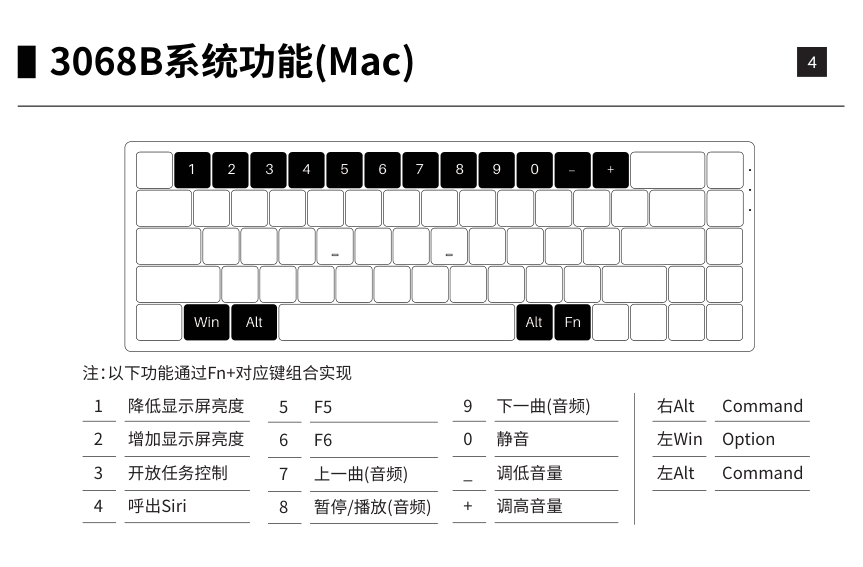
43068B系统功能(Mac)
1 2 3 4 5 6 7 8 9 0
_ +
FnWinAltAlt
注:以下功能通过Fn+对应键组合实现
降低显示屏亮度 增加显示屏亮度 开放任务控制 呼出Siri
9 0 _ +
下一曲(音频) 静音 调低音量 调高音量
右Alt 左Win 左Alt
Command Option Command
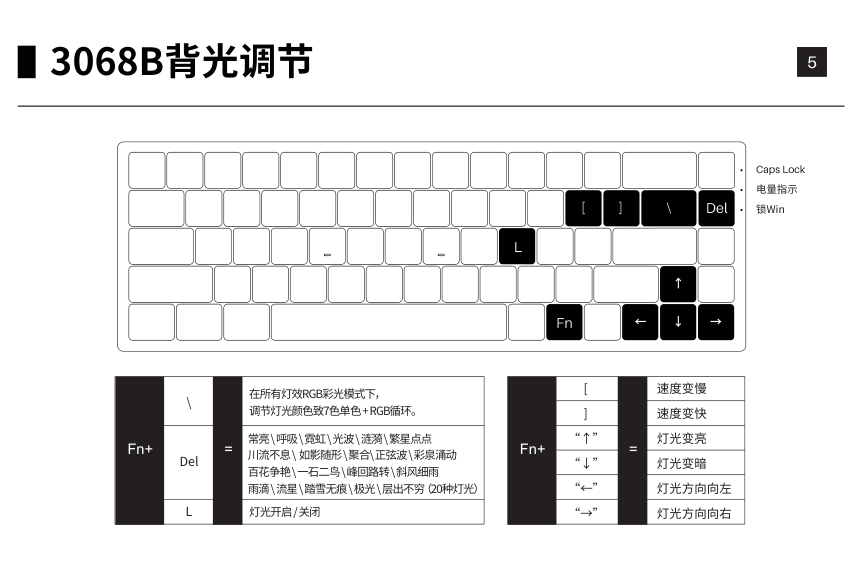
53068B背光调节
L
\[]
Del
Caps Lock 电量指示 锁Win
Fn
在所有灯效RGB彩光模式下, 调节灯光颜色致7色单色 + RGB循环。
\
常亮 \ 呼吸 \ 霓虹 \ 光波 \ 涟漪 \ 繁星点点 川流不息 \ 如影随形 \ 聚合\ 正弦波 \ 彩泉涌动 百花争艳 \ 一石二鸟 \ 峰回路转 \ 斜风细雨 雨滴 \ 流星 \ 踏雪无痕 \ 极光 \ 层出不穷( 20种灯光)
Fn+ =
Del
L 灯光开启 / 关闭
[ ]
速度变慢 速度变快 灯光变亮 灯光变暗 灯光方向向左 灯光方向向右
“↑” “↓” “←” “→”
Fn+ =
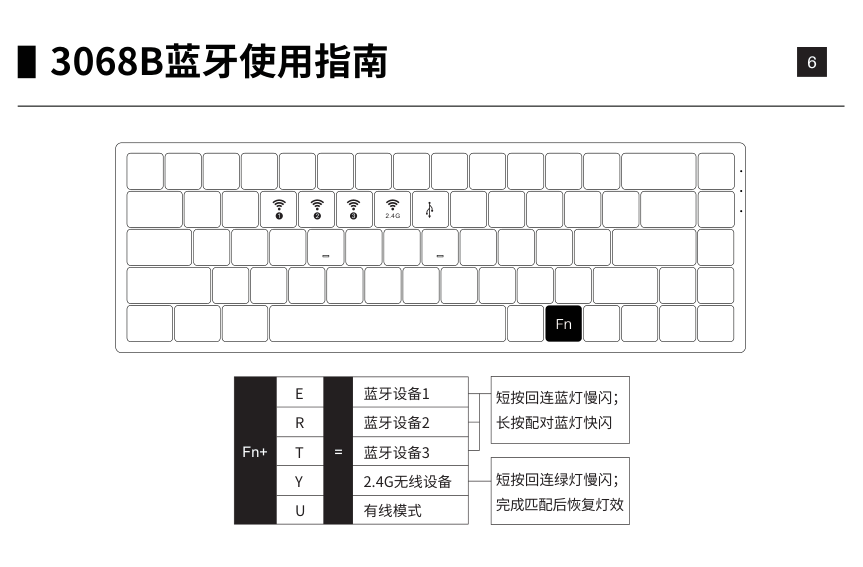
63068B蓝牙使用指南
2.4G321
Fn
E R
=
Fn+
短按回连蓝灯慢闪; 长按配对蓝灯快闪
短按回连绿灯慢闪; 完成匹配后恢复灯效
73068B蓝牙使用步骤1
使用您的PC、 PAD、 手机等设备,开启蓝牙进行匹配,第一次匹配过程中您所使用的设备会搜索出 AKK0 3068 BT3.0(蓝牙3.0) Akko 3068 ‒ 1(蓝牙5.0)两组。请根据您的喜好选择键盘的蓝牙组。
(注:部分设备只能搜索到蓝牙5.0:)
83068B蓝牙使用步骤2
键盘在不使用的时候,关闭背面开关电源,可节省电量;键盘空闲15分钟之后,进入休眠模式,可按任意键唤 醒。 注:使用Windows系统,开启省电模式会影响蓝牙设备的休眠唤醒时间。
如忘记设备,或者蓝牙连接出现混乱的情况,如需重新连接蓝牙设备时,需要删除电脑中原有的3068蓝牙 设备记忆。
9按键 / 灯光自定义说明和调用说明
10Akko 售后服务规范
注意 事项
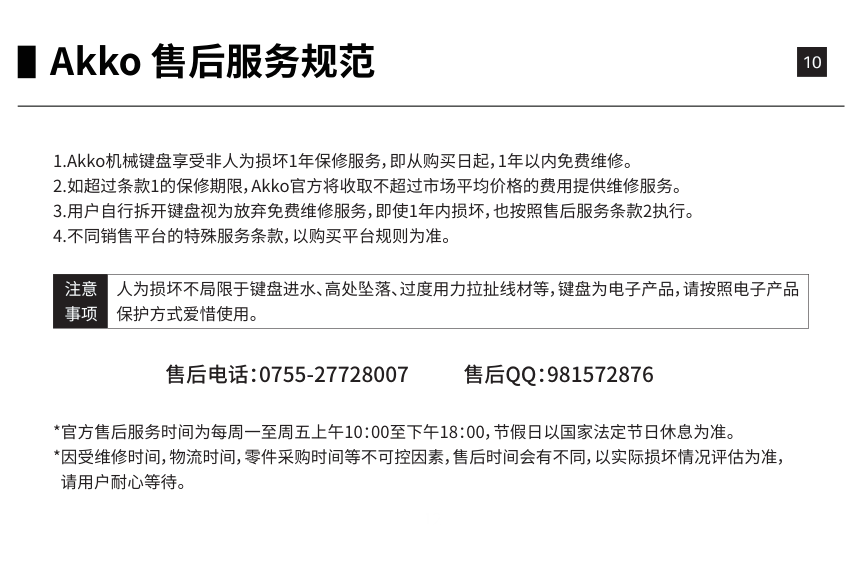
人为损坏不局限于键盘进水、高处坠落、过度用力拉扯线材等,键盘为电子产品,请按照电子产品 保护方式爱惜使用。
售后电话:0755-27728007
售后QQ:981572876
#### 113068B Technical Specifications
######## Dimensions
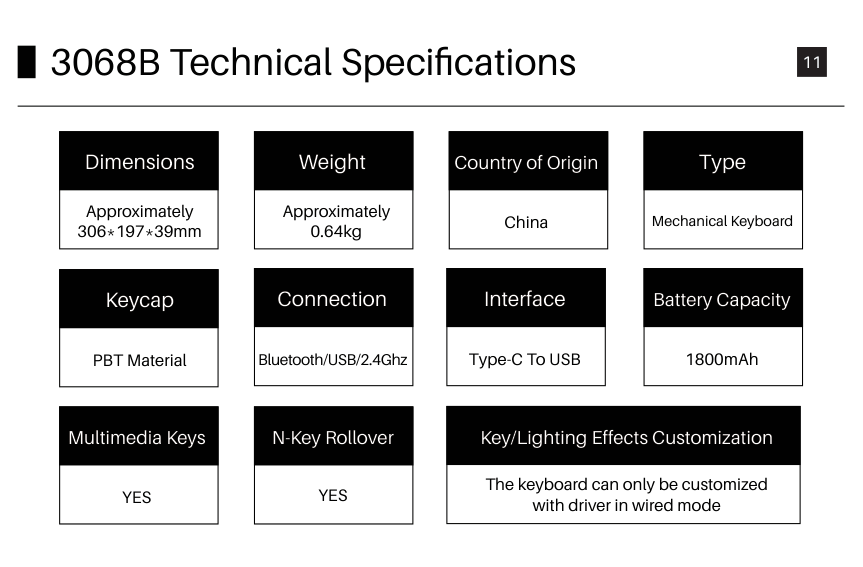
Approximately 306*197*39mm
######## Weight Country of Origin Type
Approximately 0.64kg
China Mechanical Keyboard
######## Keycap Connection
Bluetooth/USB/2.4Ghz
PBT Material
Multimedia Keys N-Key Rollover
YES YES
######## Interface
Type-C To USB
######### Battery Capacity
1800mAh
######### Key/Lighting Effects Customization
The keyboard can only be customized with driver in wired mode
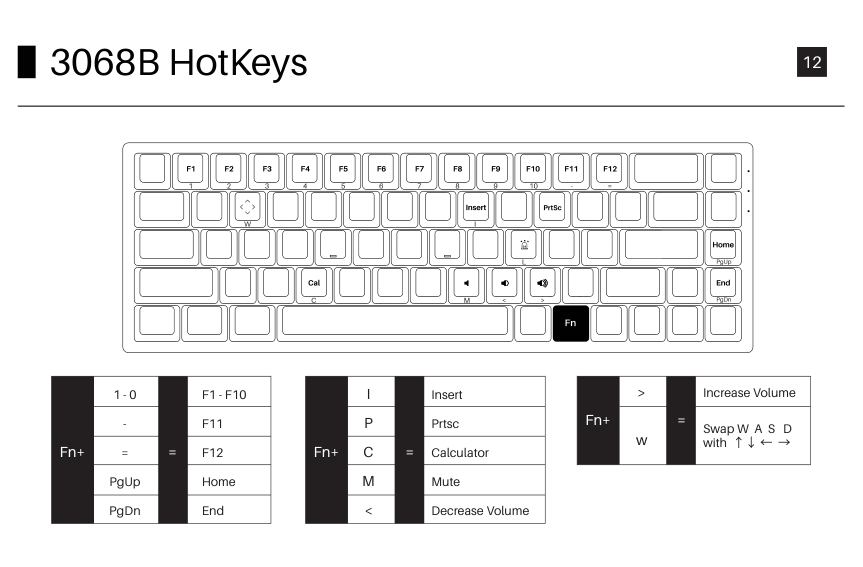
#### 123068B HotKeys
Fn
CtrlFn
1 - 0
F1 - F10 F11 F12 Home End
Fn+
=
= PgUp PgDn
I P C M <
Insert Prtsc Calculator Mute Decrease Volume
=
Fn+
>
Increase Volume Fn+
= Swap W A S D with ↑↓ ← →w
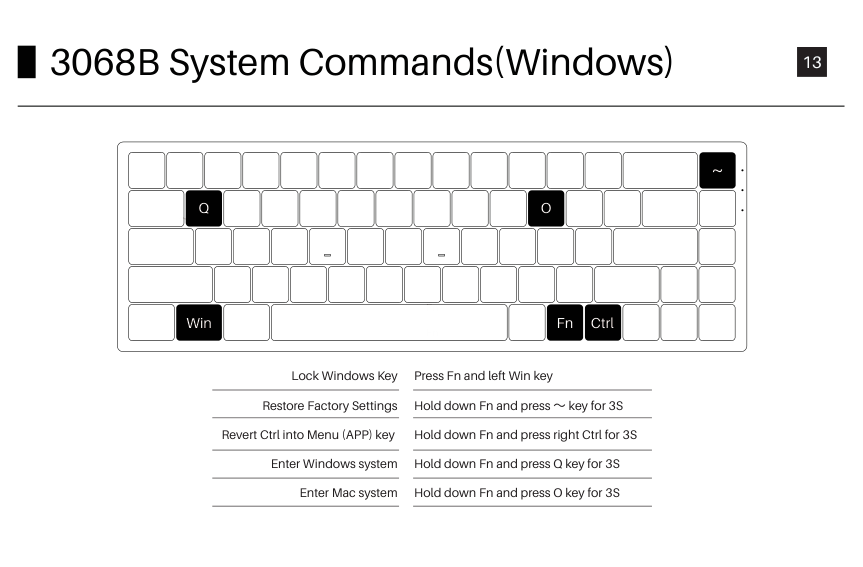
#### 133068B System Commands(Windows)
Q O
~
Win
Fn
Fn
Ctrl
Lock Windows Key
Restore Factory Settings Revert Ctrl into Menu (APP) key
Enter Windows system Enter Mac system
Press Fn and left Win key Hold down Fn and press ~ key for 3S Hold down Fn and press right Ctrl for 3S Hold down Fn and press Q key for 3S Hold down Fn and press O key for 3S
~
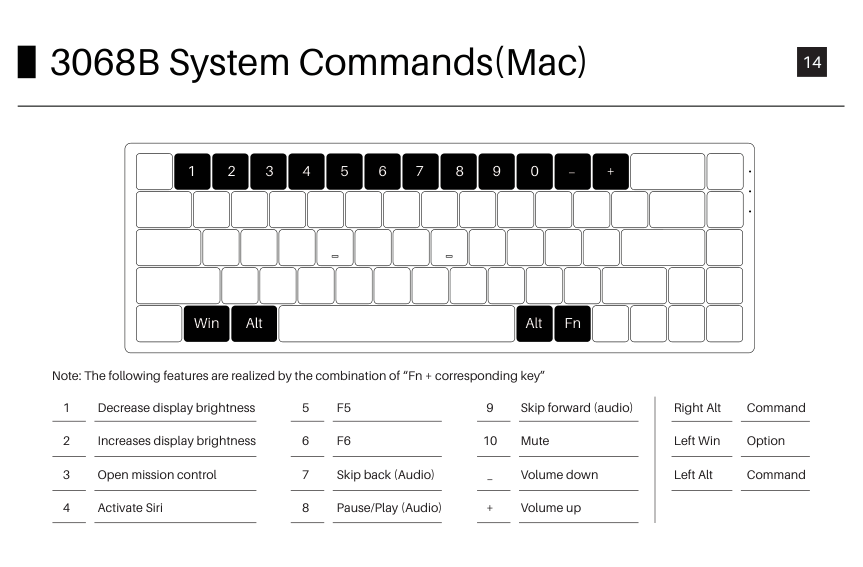
#### 143068B System Commands(Mac)
1 2 3 4 5 6 7 8 9 0
+
FnWinAltAlt
Note: The following features are realized by the combination of “Fn + corresponding key”
Decrease display brightness
Increases display brightness
Open mission control
Activate Siri
Skip back (Audio)
Pause/Play (Audio)
Skip forward (audio)
Mute
Volume down
_
Volume up
+
Command
Right Alt
Option
Left Win
Command
Left Alt
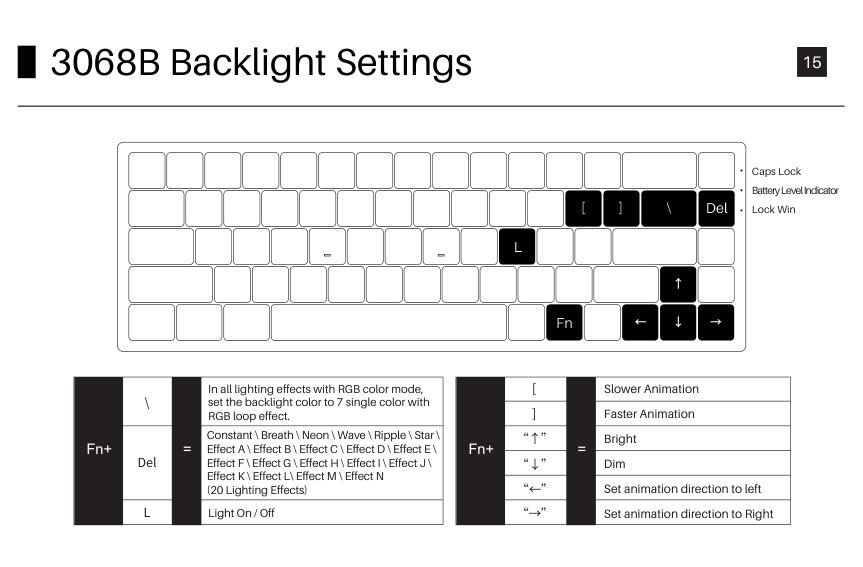
#### 153068B Backlight Settings
\[]
Del
Caps Lock Battery Level Indicator Lock Win
L
In all lighting effects with RGB color mode, set the backlight color to 7 single color with RGB loop effect.
\
Constant \ Breath \ Neon \ Wave \ Ripple \ Star \ Effect A \ Effect B \ Effect C \ Effect D \ Effect E \ Effect F \ Effect G \ Effect H \ Effect I \ Effect J \ Effect K \ Effect L\ Effect M \ Effect N (20 Lighting Effects)
Fn+ =
Del
L Light On / Off
Fn
[ ]
Slower Animation Faster Animation Bright Dim Set animation direction to left Set animation direction to Right
“↑” “↓” “←” “→”
Fn+ =
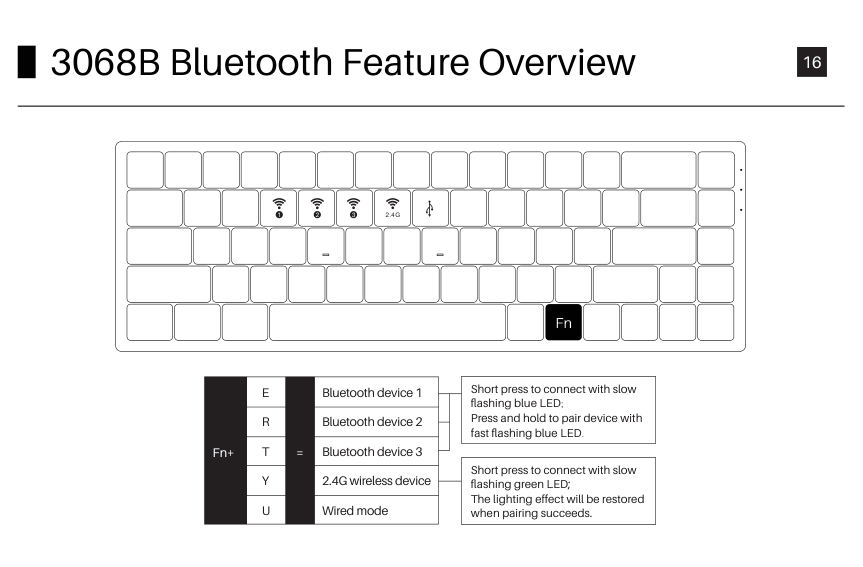
#### 163068B Bluetooth Feature Overview
2.4G321
Fn
E R T Y U
Bluetooth device 1 Bluetooth device 2 Bluetooth device 3 2.4G wireless device Wired mode
Fn+
=
Short press to connect with slow flashing blue LED; Press and hold to pair device with fast flashing blue LED.
Short press to connect with slow flashing green LED; The lighting effect will be restored when pairing succeeds.
##### 173068B Bluetooth Setup Instruction 1
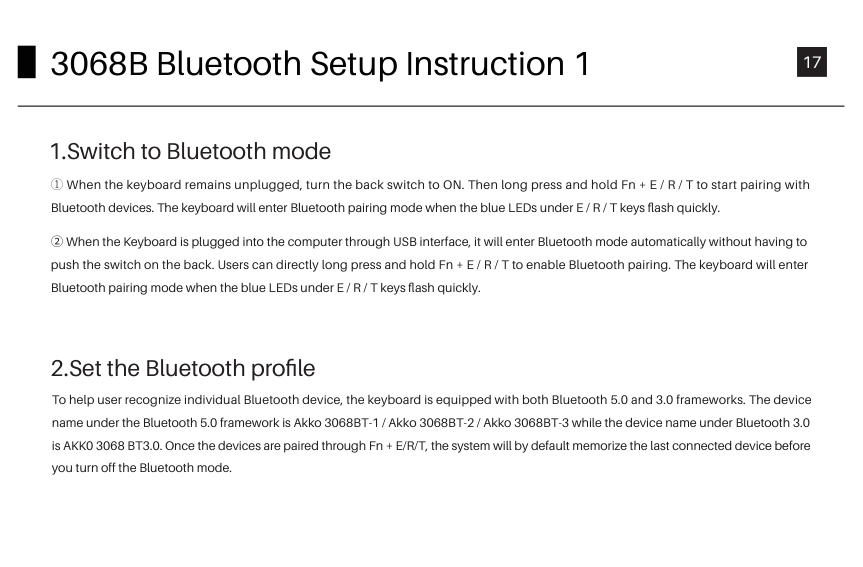
To help user recognize individual Bluetooth device, the keyboard is equipped with both Bluetooth 5.0 and 3.0 frameworks. The device name under the Bluetooth 5.0 framework is Akko 3068BT-1 / Akko 3068BT-2 / Akko 3068BT-3 while the device name under Bluetooth 3.0 is AKK0 3068 BT3.0. Once the devices are paired through Fn + E/R/T, the system will by default memorize the last connected device before you turn off the Bluetooth mode.
##### 183068B Bluetooth Setup Instruction 2
The keyboard can be paired with PC, Pad, smartphone and other devices with Bluetooth turned on. When you first try to search Bluetooth devices, two groups of device names shall appear with Akko 3098 BT3.0 (Bluetooth 3.0) and Akko 3098-1 (Bluetooth 5.0). Select a Bluetooth group based on your preferences (Note: some devices can only search for the Bluetooth 5.0 group).

####### 4.Switch the Bluetooth device
After 4 Bluetooth devices have been paired with the keyboard, press Fn+E / Fn+R / Fn+T / Fn+Y for at least 3 seconds to quickly switch between them.
####### 5.Shut off the keyboard
Turn the power off on the keyboard back panel while unused for power saving; If the keyboard remains unused for over 10 mins, it would go to sleep mode and you can activate it by pressing any key. Note: The battery saver mode for Windows system would affect/delay the sleep activation time of the keyboard.
####### 6.Reset the keyboard
If you forgot the specific paired front-end device or if there remains disorder in Bluetooth connection and communication, you'll need to clear the computer’s Bluetooth cache by removing the 3068 keyboard from the list of connected device.
##### 19Key/Lighting Effects Customization Instruction
1.The key/lighting effects customization must be completed in wired mode with Akko driver. 2. In wired mode, the lighting effects can also achieve music rhythm effects with Akko driver. 3. Please download the Akko Cloud driver on our website.
##### 20Akko Warranty and Service Statement
Precautions Man-made damage is not limited to immersion, falling off, and pulling off the wires with excessive forces, etc.
###### www.akkogear.com
| | |---|

instagram.com/akkogear

facebook.com/akkogear
扫描关注官方微博扫描关注官方微信