
Ask AI
— answers from the official manualAnswers from the official manual.
Common questions
Common Questions
10 totalHow do I clear a fault if my PowerFlex 525 is showing F002 Auxiliary Input?
Press the Stop key if P045 [Stop Mode] is set to a value between 0...3, cycle power, or change A551 [Fault Clear] to 1 or 2. If these steps do not work, use digital input control according to t062, t063, t065...t068 [DigIn TermBlk xx]. (Page 59)
How can I troubleshoot the motor overload fault F007 in my PowerFlex 525 drive?
Reduce the load so that the drive output current does not exceed the setting in parameter P033 [Motor OL Current]. Verify and adjust A530 [Boost Select] if necessary. Address any excessive motor loads causing this fault, such as overhauling conditions. (Page 61)
What should I do if my PowerFlex 525 shows the F048 Parameter Defaults fault?
Clear the fault or cycle power to restore default settings. Then program your drive parameters as needed to configure it properly for operation. (Page 63)
How can I reset my PowerFlex 525 to its factory defaults?
Set parameter P053 [Reset to Defaults] to either of the options given for a factory reset. This is necessary when encountering faults like F100 Parameter Checksum or F101 External Storage issues. (Page 64)
What are the mounting clearances required between two PowerFlex 525 drives if they need to be vertically stacked?
For vertical stacking, there is no clearance required between frames A through D. However, for frame E, a minimum of 95 mm (3.7 in) clearance from sides must be maintained when the Fan Kit is installed. Additionally, an extra 12 mm clearance around specific components as noted on page 4 should be ensured. (Page 4)
What safety precautions need to be followed during installation of PowerFlex 525 drives?
Ensure the drive is installed upright and protected from dust or metallic particles near the cooling fan. Avoid corrosive environments, moisture exposure, and direct sunlight which could damage electronics inside. Always mount it on a flat, level surface for even ventilation (Page 1)
Show 4 more questions
How do I configure digital control inputs in Source mode for PowerFlex 525?
What is the correct way to install power wiring for PowerFlex 525?
What are the Ambient Operating Temperature Limits for a PowerFlex 525?
How do I identify that PowerFlex 525 is successfully connected to the network through Ethernet?
Full Manual
2 pages
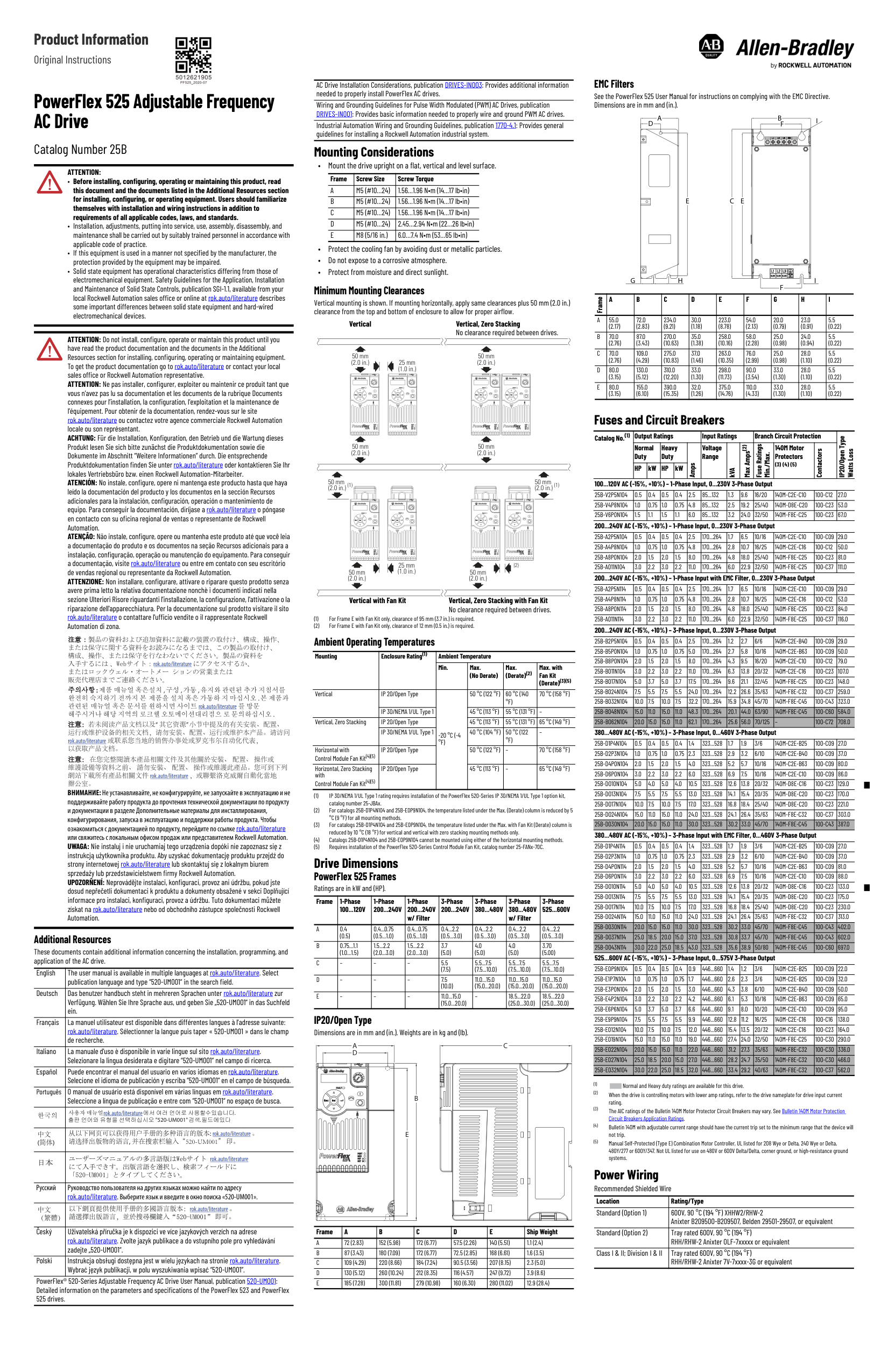
Product Information

Original Instructions
PowerFlex 525 Adjustable Frequency AC Drive Catalog Number 25B
ATTENTION:
ATTENTION: Do not install, configure, operate or maintain this product until you have read the product documentation and the documents in the Additional Resources section for installing, configuring, operating or maintaining equipment. To get the product documentation go to rok.auto/literature or contact your local sales office or Rockwell Automation representative. ATTENTION: Ne pas installer, configurer, exploiter ou maintenir ce produit tant que vous n’avez pas lu sa documentation et les documents de la rubrique Documents connexes pour l’installation, la configuration, l’exploitation et la maintenance de l’équipement. Pour obtenir de la documentation, rendez-vous sur le site rok.auto/literature ou contactez votre agence commerciale Rockwell Automation locale ou son représentant. ACHTUNG: Für die Installation, Konfiguration, den Betrieb und die Wartung dieses Produkt lesen Sie sich bitte zunächst die Produktdokumentation sowie die Dokumente im Abschnitt “Weitere Informationen” durch. Die entsprechende Produktdokumentation finden Sie unter rok.auto/literature oder kontaktieren Sie Ihr lokales Vertriebsbüro bzw. einen Rockwell Automation-Mitarbeiter. ATENCIÓN: No instale, configure, opere ni mantenga este producto hasta que haya leído la documentación del producto y los documentos en la sección Recursos adicionales para la instalación, configuración, operación o mantenimiento de equipo. Para conseguir la documentación, diríjase a rok.auto/literature o póngase en contacto con su oficina regional de ventas o representante de Rockwell Automation. ATENÇÃO: Não instale, configure, opere ou mantenha este produto até que você leia a documentação do produto e os documentos na seção Recursos adicionais para a instalação, configuração, operação ou manutenção do equipamento. Para conseguir a documentação, visite rok.auto/literature ou entre em contato con seu escritório de vendas regional ou representante da Rockwell Automation. ATTENZIONE: Non installare, configurare, attivare o riparare questo prodotto senza avere prima letto la relativa documentazione nonchè i documenti indicati nella sezione Ulteriori Risore riguardanti l'installazione, la configurazione, l'attivazione o la riparazione dell'apparecchiatura. Per la documentazione sul prodotto visitare il sito rok.auto/literature o contattare l'ufficio vendite o il rappresentate Rockwell Automation di zona.
rok.auto/literature
주의사항주의사항 ::제품 매뉴얼 혹은설치 , 구성 , 가동 , 유지와 관련된 추가 지침서를 완전히 숙지하기 전까지 본 제품을 설치 혹은 가동하 지 마십시오 . 본 제품과 관련된 매뉴얼 혹은 문서를 원하시면 사이트 rok.auto/literature 를 방문 해주시거나 해당 지역의 로크웰 오토메이션대리점으 로 문의하십시오 .
注意注意:若未阅读产品文档以及“ 其它资源” 小节中提及的有关安装、配置、 运行或维护设备的相关文档,请勿安装、配置、运行或维护本产品。请访问 rok.auto/literature 或联系您当地的销售办事处或罗克韦尔自动化代表, 以获取产品文档。 注意:注意: 在您完整閱讀本產品相關文件及其他關於安裝、 配置、 操作或 維護設備等資料之前、 請勿安裝、 配置、 操作或維護此產品。您可到下列 網站下載所有產品相關文件 rok.auto/literature,或聯繫洛克威爾自動化當地 辦公室。
ВНИМАНИЕ:Не устанавливайте, не конфигурируйте, не запускайте в эксплуатацию и не поддерживайте работу продукта до прочтения технической документации по продукту и документации в разделе Дополнительные материалы для инсталлирования, конфигурирования, запуска в эксплуатацию и поддержки работы продукта. Чтобы ознакомиться с документацией по продукту, перейдите по ссылкеrok.auto/literature или свяжитесь с локальным офисом продаж или представителем Rockwell Automation. UWAGA: Nie instaluj i nie uruchamiaj tego urządzenia dopóki nie zapoznasz się z instrukcją użytkownika produktu. Aby uzyskać dokumentację produktu przejdź do strony internetowej rok.auto/literature lub skontaktuj się z lokalnym biurem sprzedaży lub przedstawicielstwem firmy Rockwell Automation. UPOZORŇENÍ: Neprovádějte instalaci, konfiguraci, provoz ani údržbu, pokud jste dosud nepřečetli dokumentaci k produktu a dokumenty obsažené v sekci Doplňující informace pro instalaci, konfiguraci, provoz a údržbu. Tuto dokumentaci můžete získat na rok.auto/literature nebo od obchodního zástupce společnosti Rockwell Automation.
Additional Resources These documents contain additional information concerning the installation, programming, and application of the AC drive.
|English|The user manual is available in multiple languages at rok.auto/literature. Select publication language and type “520-UM001“ in the search field.
| |---|---| |Deutsch|Das benutzer handbuch steht in mehreren Sprachen unter rok.auto/literature zur Verfügung. Wählen Sie Ihre Sprache aus, und geben Sie „520-UM001“ in das Suchfeld ein.
| |Français|La manuel utilisateur est disponible dans différentes langues à l’adresse suivante: rok.auto/literature. Sélectionner la langue puis taper « 520-UM001 » dans le champ de recherche.
| |Italiano|La manuale d'uso è disponibile in varie lingue sul sito rok.auto/literature. Selezionare la lingua desiderata e digitare “520-UM001“ nel campo di ricerca.
| |Español|Puede encontrar el manual del usuario en varios idiomas en rok.auto/literature. Selecione el idioma de publicación y escriba “520-UM001“ en el campo de búsqueda.
| |Português|O manual de usuário está disponível em várias línguas em rok.auto/literature. Seleccione a língua de publicação e entre com “520-UM001“ no espaço de busca.
| |한국의|rok.auto/literature .
"520-UM001" .
| |中文 (简体)|从以下网页可以获得用户手册的多种语言的版本: rok.auto/literature。 请选择出版物的语言, 并在搜索栏输入“520-UM001” 印。
| | |rok.auto/literature
| |Русский|Руководство пользователя на других языках можно найти по адресу rok.auto/literature. Выберите язык и введите в окно поиска «520-UM001».
| |中文 (繁體)|以下網頁提供使用手册的多國語言版本:rok.auto/literature。 請選擇出版語言,並於搜尋欄鍵入 即可。
| |Český|Uživatelská příručka je k dispozici ve více jazykových verzích na adrese rok.auto/literature. Zvolte jazyk publikace a do vstupního pole pro vyhledávání zadejte „520-UM001“.
| |Polski|Instrukcja obsługi dostępna jest w wielu językach na stronie rok.auto/literature. Wybrać język publikacji, w polu wyszukiwania wpisać “520-UM001”.
|
PowerFlex® 520-Series Adjustable Frequency AC Drive User Manual, publication 520-UM001: Detailed information on the parameters and specifications of the PowerFlex 523 and PowerFlex 525 drives.
AC Drive Installation Considerations, publication DRIVES-IN003: Provides additional information needed to properly install PowerFlex AC drives. Wiring and Grounding Guidelines for Pulse Width Modulated (PWM) AC Drives, publication
DRIVES-IN001: Provides basic information needed to properly wire and ground PWM AC drives. Industrial Automation Wiring and Grounding Guidelines, publication 1770-4.1: Provides general guidelines for installing a Rockwell Automation industrial system.
Mounting Considerations
|Frame|Screw Size|Screw Torque| |---|---|---| |A|M5 (#10…24)|1.56…1.96 N•m (14…17 lb•in)| |B|M5 (#10…24)|1.56…1.96 N•m (14…17 lb•in)| |C|M5 (#10…24)|1.56…1.96 N•m (14…17 lb•in)| |D|M5 (#10…24)|2.45…2.94 N•m (22…26 lb•in)| |E|M8 (5/16 in.)|6.0…7.4 N•m (53…65 lb•in)|
Minimum Mounting Clearances Vertical mounting is shown. If mounting horizontally, apply same clearances plus 50 mm (2.0 in.) clearance from the top and bottom of enclosure to allow for proper airflow.
######## Vertical Vertical, Zero Stacking
No clearance required between drives.
50 mm (2.0 in.)
50 mm (2.0 in.)
25 mm (1.0 in.)
Esc Sel Esc Sel
Esc Sel Esc Sel
50 mm (2.0 in.)
50 mm (2.0 in.)
50 mm (2.0 in.) (1)
50 mm (2.0 in.) (1)
Esc SelEscSelEscSel
Esc Sel
25 mm (1.0 in.)
(2)
50 mm (2.0 in.)
50 mm (2.0 in.)
######## Vertical with Fan Kit
Vertical, Zero Stacking with Fan Kit No clearance required between drives.
##### Ambient Operating Temperatures
|Mounting|Enclosure Rating(1)|Ambient Temperature|Ambient Temperature|Ambient Temperature|Ambient Temperature| |---|---|---|---|---|---| |Mounting|Enclosure Rating(1)|Min.|Max. (No Derate)|Max. (Derate)(2)|Max. with Fan Kit (Derate)(3)(5)| |Vertical|IP 20/Open Type|-20 °C (-4 °F)|50 °C (122 °F)|60 °C (140 °F)|70 °C (158 °F)| |Vertical|IP 30/NEMA 1/UL Type 1|-20 °C (-4 °F)|45 °C (113 °F)|55 °C (131 °F)|–| |Vertical, Zero Stacking|IP 20/Open Type|-20 °C (-4 °F)|45 °C (113 °F)|55 °C (131 °F)|65 °C (149 °F)| |Vertical, Zero Stacking|IP 30/NEMA 1/UL Type 1|-20 °C (-4 °F)|40 °C (104 °F)|50 °C (122 °F)|–| |Horizontal with Control Module Fan Kit(4)(5)|IP 20/Open Type|-20 °C (-4 °F)|50 °C (122 °F)|–|70 °C (158 °F)| |Horizontal, Zero Stacking with Control Module Fan Kit(4)(5)|IP 20/Open Type|-20 °C (-4 °F)|45 °C (113 °F)|–|65 °C (149 °F)|
Drive Dimensions PowerFlex 525 Frames Ratings are in kW and (HP).
|Frame|1-Phase 100...120V|1-Phase 200...240V|1-Phase 200...240V w/ Filter|3-Phase 200...240V|3-Phase 380...480V|3-Phase 380...480V w/ Filter|3-Phase 525...600V| |---|---|---|---|---|---|---|---| |A|0.4 (0.5)|0.4...0.75 (0.5...1.0)|0.4...0.75 (0.5...1.0)|0.4...2.2 (0.5...3.0)|0.4...2.2 (0.5...3.0)|0.4...2.2 (0.5...3.0)|0.4...2.2 (0.5...3.0)| |B|0.75...1.1 (1.0...1.5)|1.5...2.2 (2.0...3.0)|1.5...2.2 (2.0...3.0)|3.7 (5.0)|4.0 (5.0)|4.0 (5.0)|3.70 (5.00)| |C|–|–|–|5.5 (7.5)|5.5...7.5 (7.5...10.0)|5.5...7.5 (7.5...10.0)|5.5...7.5 (7.5...10.0)| |D|–|–|–|7.5 (10.0)|11.0...15.0 (15.0...20.0)|11.0...15.0 (15.0...20.0)|11.0...15.0 (15.0...20.0)| |E|–|–|–|11.0...15.0 (15.0...20.0)|–|18.5...22.0 (25.0...30.0)|18.5...22.0 (25.0...30.0)|
IP20/Open Type Dimensions are in mm and (in.). Weights are in kg and (lb).
A C
D
| | | |---|---| | | | | | |
B
Esc Sel
E
|Frame|A|B|C|D|E|Ship Weight| |---|---|---|---|---|---|---| |A|72 (2.83)|152 (5.98)|172 (6.77)|57.5 (2.26)|140 (5.51)|1.1 (2.4)| |B|87 (3.43)|180 (7.09)|172 (6.77)|72.5 (2.85)|168 (6.61)|1.6 (3.5)| |C|109 (4.29)|220 (8.66)|184 (7.24)|90.5 (3.56)|207 (8.15)|2.3 (5.0)| |D|130 (5.12)|260 (10.24)|212 (8.35)|116 (4.57)|247 (9.72)|3.9 (8.6)| |E|185 (7.28)|300 (11.81)|279 (10.98)|160 (6.30)|280 (11.02)|12.9 (28.4)|

EMC Filters See the PowerFlex 525 User Manual for instructions on complying with the EMC Directive. Dimensions are in mm and (in.).
B
A D
I
F
E
CE
| | | | | | | |---|---|---|---|---|---| | | | | | | |
GH I
F
|Frame|A|B|C|D|E|F|G|H|I| |---|---|---|---|---|---|---|---|---|---| |A|55.0 (2.17)|72.0 (2.83)|234.0 (9.21)|30.0 (1.18)|223.0 (8.78)|54.0 (2.13)|20.0 (0.79)|23.0 (0.91)|5.5 (0.22)| |B|70.0 (2.76)|87.0 (3.43)|270.0 (10.63)|35.0 (1.38)|258.0 (10.16)|58.0 (2.28)|25.0 (0.98)|24.0 (0.94)|5.5 (0.22)| |C|70.0 (2.76)|109.0 (4.29)|275.0 (10.83)|37.0 (1.46)|263.0 (10.35)|76.0 (2.99)|25.0 (0.98)|28.0 (1.10)|5.5 (0.22)| |D|80.0 (3.15)|130.0 (5.12)|310.0 (12.20)|33.0 (1.30)|298.0 (11.73)|90.0 (3.54)|33.0 (1.30)|28.0 (1.10)|5.5 (0.22)| |E|80.0 (3.15)|155.0 (6.10)|390.0 (15.35)|32.0 (1.26)|375.0 (14.76)|110.0 (4.33)|33.0 (1.30)|28.0 (1.10)|5.5 (0.22)|
Fuses and Circuit Breakers
|Catalog No.(1)|Output Ratings|Output Ratings|Output Ratings|Output Ratings|Output Ratings|Input Ratings|Input Ratings|Input Ratings|Branch Circuit Protection|Branch Circuit Protection|Branch Circuit Protection|IP20/Open Type
Watts Loss| |---|---|---|---|---|---|---|---|---|---|---|---|---| |Catalog No.(1)|Normal Duty|Normal Duty|Heavy Duty|Heavy Duty|Amps|Voltage Range|kVA|Max Amps(2)|Fuse Ratings
Min./Max.|140M Motor Protectors (3) (4) (5)|Contactors|IP20/Open Type
Watts Loss| |Catalog No.(1)|HP|kW|HP|kW|Amps|Voltage Range|kVA|Max Amps(2)|Fuse Ratings
Min./Max.|140M Motor Protectors (3) (4) (5)|Contactors|IP20/Open Type
Watts Loss|
100...120V AC (-15%, +10%) – 1-Phase Input, 0...230V 3-Phase Output
|25B-V2P5N104|0.5|0.4|0.5|0.4|2.5|85...132|1.3|9.6|16/20|140M-C2E-C10|100-C12|27.0| |---|---|---|---|---|---|---|---|---|---|---|---|---| |25B-V4P8N104|1.0|0.75|1.0|0.75|4.8|85...132|2.5|19.2|25/40|140M-D8E-C20|100-C23|53.0| |25B-V6P0N104|1.5|1.1|1.5|1.1|6.0|85...132|3.2|24.0|32/50|140M-F8E-C25|100-C23|67.0|
200...240V AC (-15%, +10%) – 1-Phase Input, 0...230V 3-Phase Output
|25B-A2P5N104|0.5|0.4|0.5|0.4|2.5|170...264|1.7|6.5|10/16|140M-C2E-C10|100-C09|29.0| |---|---|---|---|---|---|---|---|---|---|---|---|---| |25B-A4P8N104|1.0|0.75|1.0|0.75|4.8|170...264|2.8|10.7|16/25|140M-C2E-C16|100-C12|50.0| |25B-A8P0N104|2.0|1.5|2.0|1.5|8.0|170...264|4.8|18.0|25/40|140M-F8E-C25|100-C23|81.0| |25B-A011N104|3.0|2.2|3.0|2.2|11.0|170...264|6.0|22.9|32/50|140M-F8E-C25|100-C37|111.0|
200...240V AC (-15%, +10%) – 1-Phase Input with EMC Filter, 0...230V 3-Phase Output
|25B-A2P5N114|0.5|0.4|0.5|0.4|2.5|170...264|1.7|6.5|10/16|140M-C2E-C10|100-C09|29.0| |---|---|---|---|---|---|---|---|---|---|---|---|---| |25B-A4P8N114|1.0|0.75|1.0|0.75|4.8|170...264|2.8|10.7|16/25|140M-C2E-C16|100-C12|53.0| |25B-A8P0N114|2.0|1.5|2.0|1.5|8.0|170...264|4.8|18.0|25/40|140M-F8E-C25|100-C23|84.0| |25B-A011N114|3.0|2.2|3.0|2.2|11.0|170...264|6.0|22.9|32/50|140M-F8E-C25|100-C37|116.0|
200...240V AC (-15%, +10%) – 3-Phase Input, 0...230V 3-Phase Output
|25B-B2P5N104|0.5|0.4|0.5|0.4|2.5|170...264|1.2|2.7|6/6|140M-C2E-B40|100-C09|29.0| |---|---|---|---|---|---|---|---|---|---|---|---|---| |25B-B5P0N104|1.0|0.75|1.0|0.75|5.0|170...264|2.7|5.8|10/16|140M-C2E-B63|100-C09|50.0| |25B-B8P0N104|2.0|1.5|2.0|1.5|8.0|170...264|4.3|9.5|16/20|140M-C2E-C10|100-C12|79.0| |25B-B011N104|3.0|2.2|3.0|2.2|11.0|170...264|6.3|13.8|20/32|140M-C2E-C16|100-C23|107.0| |25B-B017N104|5.0|3.7|5.0|3.7|17.5|170...264|9.6|21.1|32/45|140M-F8E-C25|100-C23|148.0| |25B-B024N104|7.5|5.5|7.5|5.5|24.0|170...264|12.2|26.6|35/63|140M-F8E-C32|100-C37|259.0| |25B-B032N104|10.0|7.5|10.0|7.5|32.2|170...264|15.9|34.8|45/70|140M-F8E-C45|100-C43|323.0| |25B-B048N104|15.0|11.0|15.0|11.0|48.3|170...264|20.1|44.0|63/90|140M-F8E-C45|100-C60|584.0| |25B-B062N104|20.0|15.0|15.0|11.0|62.1|170...264|25.6|56.0|70/125|–|100-C72|708.0|
380...480V AC (-15%, +10%) – 3-Phase Input, 0...460V 3-Phase Output
|25B-D1P4N104|0.5|0.4|0.5|0.4|1.4|323...528|1.7|1.9|3/6|140M-C2E-B25|100-C09|27.0| |---|---|---|---|---|---|---|---|---|---|---|---|---| |25B-D2P3N104|1.0|0.75|1.0|0.75|2.3|323...528|2.9|3.2|6/10|140M-C2E-B40|100-C09|37.0| |25B-D4P0N104|2.0|1.5|2.0|1.5|4.0|323...528|5.2|5.7|10/16|140M-C2E-B63|100-C09|80.0| |25B-D6P0N104|3.0|2.2|3.0|2.2|6.0|323...528|6.9|7.5|10/16|140M-C2E-C10|100-C09|86.0| |25B-D010N104|5.0|4.0|5.0|4.0|10.5|323...528|12.6|13.8|20/32|140M-D8E-C16|100-C23|129.0| |25B-D013N104|7.5|5.5|7.5|5.5|13.0|323...528|14.1|15.4|20/35|140M-D8E-C20|100-C23|170.0| |25B-D017N104|10.0|7.5|10.0|7.5|17.0|323...528|16.8|18.4|25/40|140M-D8E-C20|100-C23|221.0| |25B-D024N104|15.0|11.0|15.0|11.0|24.0|323...528|24.1|26.4|35/63|140M-F8E-C32|100-C37|303.0| |25B-D030N104|20.0|15.0|15.0|11.0|30.0|323...528|30.2|33.0|45/70|140M-F8E-C45|100-C43|387.0|
380...480V AC (-15%, +10%) – 3-Phase Input with EMC Filter, 0...460V 3-Phase Output
|25B-D1P4N114|0.5|0.4|0.5|0.4|1.4|323...528|1.7|1.9|3/6|140M-C2E-B25|100-C09|27.0| |---|---|---|---|---|---|---|---|---|---|---|---|---| |25B-D2P3N114|1.0|0.75|1.0|0.75|2.3|323...528|2.9|3.2|6/10|140M-C2E-B40|100-C09|37.0| |25B-D4P0N114|2.0|1.5|2.0|1.5|4.0|323...528|5.2|5.7|10/16|140M-C2E-B63|100-C09|81.0| |25B-D6P0N114|3.0|2.2|3.0|2.2|6.0|323...528|6.9|7.5|10/16|140M-C2E-C10|100-C09|88.0| |25B-D010N114|5.0|4.0|5.0|4.0|10.5|323...528|12.6|13.8|20/32|140M-D8E-C16|100-C23|133.0| |25B-D013N114|7.5|5.5|7.5|5.5|13.0|323...528|14.1|15.4|20/35|140M-D8E-C20|100-C23|175.0| |25B-D017N114|10.0|7.5|10.0|7.5|17.0|323...528|16.8|18.4|25/40|140M-D8E-C20|100-C23|230.0| |25B-D024N114|15.0|11.0|15.0|11.0|24.0|323...528|24.1|26.4|35/63|140M-F8E-C32|100-C37|313.0| |25B-D030N114|20.0|15.0|15.0|11.0|30.0|323...528|30.2|33.0|45/70|140M-F8E-C45|100-C43|402.0| |25B-D037N114|25.0|18.5|20.0|15.0|37.0|323...528|30.8|33.7|45/70|140M-F8E-C45|100-C43|602.0| |25B-D043N114|30.0|22.0|25.0|18.5|43.0|323...528|35.6|38.9|50/80|140M-F8E-C45|100-C60|697.0|
525...600V AC (-15%, +10%) – 3-Phase Input, 0...575V 3-Phase Output
|25B-E0P9N104|0.5|0.4|0.5|0.4|0.9|446...660|1.4|1.2|3/6|140M-C2E-B25|100-C09|22.0| |---|---|---|---|---|---|---|---|---|---|---|---|---| |25B-E1P7N104|1.0|0.75|1.0|0.75|1.7|446...660|2.6|2.3|3/6|140M-C2E-B25|100-C09|32.0| |25B-E3P0N104|2.0|1.5|2.0|1.5|3.0|446...660|4.3|3.8|6/10|140M-C2E-B40|100-C09|50.0| |25B-E4P2N104|3.0|2.2|3.0|2.2|4.2|446...660|6.1|5.3|10/16|140M-C2E-B63|100-C09|65.0| |25B-E6P6N104|5.0|3.7|5.0|3.7|6.6|446...660|9.1|8.0|10/20|140M-C2E-C10|100-C09|95.0| |25B-E9P9N104|7.5|5.5|7.5|5.5|9.9|446...660|12.8|11.2|16/25|140M-C2E-C16|100-C16|138.0| |25B-E012N104|10.0|7.5|10.0|7.5|12.0|446...660|15.4|13.5|20/32|140M-C2E-C16|100-C23|164.0| |25B-E019N104|15.0|11.0|15.0|11.0|19.0|446...660|27.4|24.0|32/50|140M-F8E-C25|100-C30|290.0| |25B-E022N104|20.0|15.0|15.0|11.0|22.0|446...660|31.2|27.3|35/63|140M-F8E-C32|100-C30|336.0| |25B-E027N104|25.0|18.5|20.0|15.0|27.0|446...660|28.2|24.7|35/50|140M-F8E-C32|100-C30|466.0| |25B-E032N104|30.0|22.0|25.0|18.5|32.0|446...660|33.4|29.2|40/63|140M-F8E-C32|100-C37|562.0|
Power Wiring
Recommended Shielded Wire
|Location|Rating/Type| |---|---| |Standard (Option 1)|600V, 90 °C (194 °F) XHHW2/RHW-2 Anixter B209500-B209507, Belden 29501-29507, or equivalent| |Standard (Option 2)|Tray rated 600V, 90 °C (194 °F) RHH/RHW-2 Anixter OLF-7xxxxx or equivalent| |Class I & II; Division I & II|Tray rated 600V, 90 °C (194 °F) RHH/RHW-2 Anixter 7V-7xxxx-3G or equivalent|
Power Terminal Block
######## Frame A, B, C and D Frame E
T2/VL3/TL2/SL1/R T1/U T3/W
| | | | | | | | | | | | |---|---|---|---|---|---|---|---|---|---|---| | | | | | | | | | | | | | | | | | | | | | | | | | | | | | | | | | | | |
T2/VL3/TL2/SL1/R T1/U T3/W
| | | | | | | | | | |---|---|---|---|---|---|---|---|---| | | | | | | | | | | | | | | | | | | | |
BR+ BR-DC- DC+ BR+ BR-DC-DC+
|Terminal|Description| |---|---| |L1/R, L2/S, L3/T|Input Line Voltage Connection| |T1/U, T2/V, T3/W
|Motor Phase Connection
=
Switch any two motor leads to change forward direction.| |DC+, DC-|DC Bus Connection| |BR+, BR-|Dynamic Brake Resistor Connection| | |Safety Ground – PE|
IMPORTANT Terminal screws may become loose during shipment. Ensure that all terminal screws are tightened to the recommended torque before applying power to the drive.
Power Terminal Block Specifications
|Frame|Maximum Wire Size(1)|Minimum Wire Size(1)|Torque| |---|---|---|---| |A|5.3 mm2 (10 AWG)|0.8 mm2 (18 AWG)|1.76...2.16 Nm (15.6...19.1 lb-in.)| |B|8.4 mm2 (8 AWG)|2.1 mm2 (14 AWG)|1.76...2.16 Nm (15.6...19.1 lb-in.)| |C|8.4 mm2 (8 AWG)|2.1 mm2 (14 AWG)|1.76...2.16 Nm (15.6...19.1 lb-in.)| |D|13.3 mm2 (6 AWG)|5.3 mm2 (10 AWG)|1.76...2.16 Nm (15.6...19.1 lb-in.)| |E|26.7 mm2(3 AWG)|8.4 mm2 (8 AWG)|3.09...3.77 Nm (27.3...33.4 lb-in.)|
(1) Maximum/minimum sizes that the terminal block will accept – these are not recommendations.
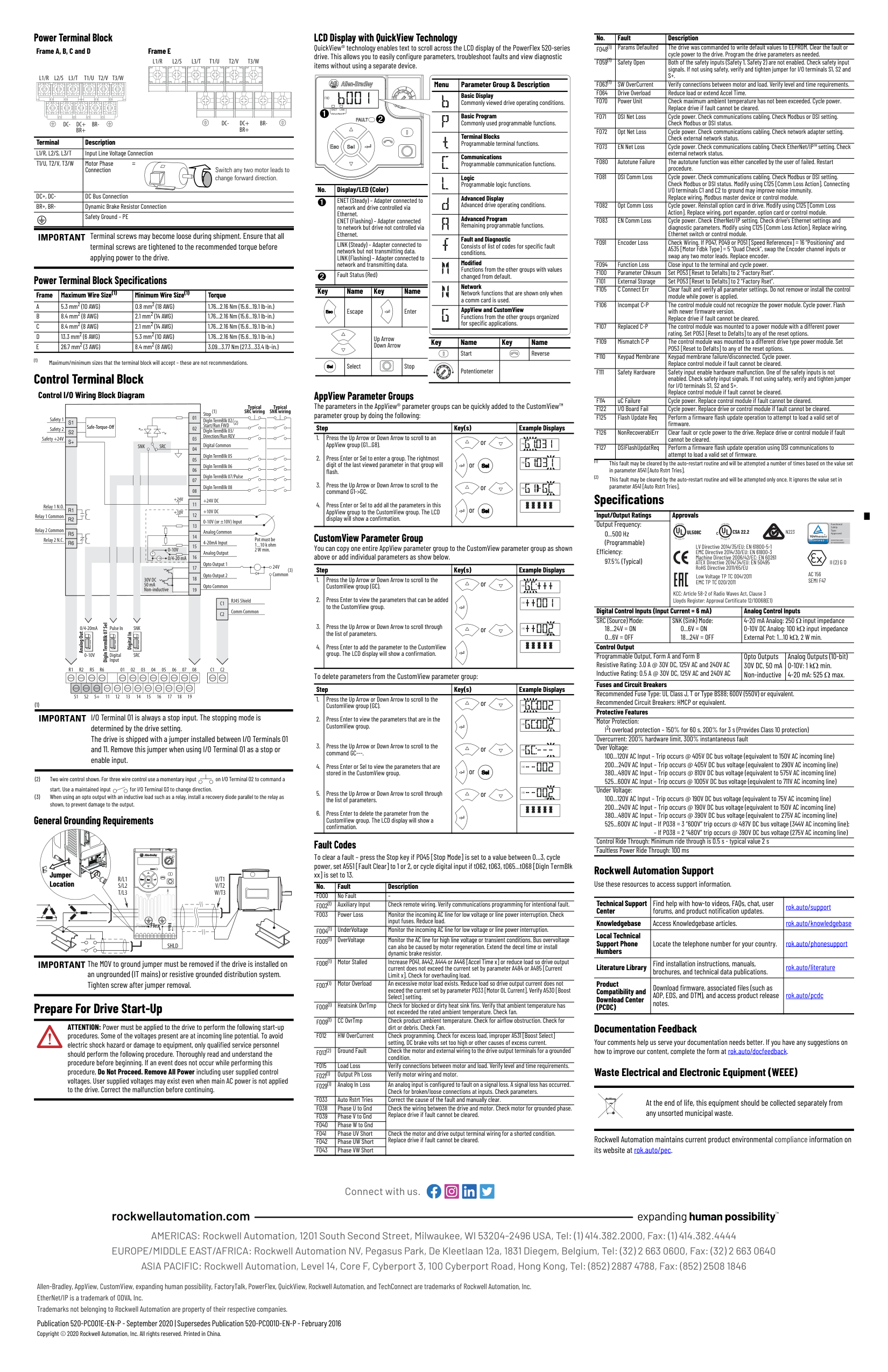
Control Terminal Block
###### Control I/O Wiring Block Diagram
Safe-Torque-Off
Digital Common
Stop
(1)
Start/Run FWD
(2)
Relay 1 N.O.
+24V DC +10V DC 0-10V (or ±10V) Input Analog Common 4-20mA Input Analog Output
+24V
+10V
Safety +24V
Typical SNK wiring
Typical SRC wiring
R2 R5 R6 01 02 03 04 05 06 07 08 C1 C2
30V DC 50 mA Non-inductive
Common
24V
(3)
Pot must be 1...10 k ohm
2 W min.0-10V 0/4-20 mA
SNK
Digital In
DigIn TermBlk 07 Sel
Analog Out
Pulse In
SRCDigital Input
0/4-20mA
0-10V
SRCSNK
|C1|RJ45 Shield| |---|---| |C1|Comm Common| |C2|Comm Common| |C2| |
| | | | | | | | | | | | | | | | | | | | | | | | | | | |---|---|---|---|---|---|---|---|---|---|---|---|---|---|---|---|---|---|---|---|---|---|---|---|---|---| | | | | | | | | | | | | | | | | | | | | | | | | | | |
| | | |---|---|
IMPORTANT I/O Terminal 01 is always a stop input. The stopping mode is determined by the drive setting. The drive is shipped with a jumper installed between I/O Terminals 01 and 11. Remove this jumper when using I/O Terminal 01 as a stop or enable input.
General Grounding Requirements
Jumper Location
Esc Sel

| | | |---|---| | | |

SHLD
IMPORTANT The MOV to ground jumper must be removed if the drive is installed on an ungrounded (IT mains) or resistive grounded distribution system. Tighten screw after jumper removal.
Prepare For Drive Start-Up
ATTENTION: Power must be applied to the drive to perform the following start-up procedures. Some of the voltages present are at incoming line potential. To avoid electric shock hazard or damage to equipment, only qualified service personnel should perform the following procedure. Thoroughly read and understand the procedure before beginning. If an event does not occur while performing this procedure, Do Not Proceed. Remove All Power including user supplied control voltages. User supplied voltages may exist even when main AC power is not applied to the drive. Correct the malfunction before continuing.
LCD Display with QuickView Technology QuickView® technology enables text to scroll across the LCD display of the PowerFlex 520-series drive. This allows you to easily configure parameters, troubleshoot faults and view diagnostic items without using a separate device.
|Menu|Parameter Group & Description| |---|---| | |Basic Display Commonly viewed drive operating conditions.| | |Basic Program Commonly used programmable functions.| | |Terminal Blocks Programmable terminal functions.| | |Communications Programmable communication functions.| | |Logic Programmable logic functions.| | |Advanced Display Advanced drive operating conditions.| | |Advanced Program Remaining programmable functions.| | |Fault and Diagnostic Consists of list of codes for specific fault conditions.| | |Modified Functions from the other groups with values changed from default.| | |Network Network functions that are shown only when a comm card is used.| | |AppView and CustomView Functions from the other groups organized for specific applications.|
|FWD| |---|
EtherNet/IP➊
ENET LINK
#### ➋
Esc Sel
|No.|Display/LED (Color)| |---|---| |➊|ENET (Steady) – Adapter connected to network and drive controlled via Ethernet. ENET (Flashing) – Adapter connected to network but drive not controlled via Ethernet.| |➊|LINK (Steady) – Adapter connected to network but not transmitting data. LINK (Flashing) – Adapter connected to network and transmitting data.| |➋|Fault Status (Red)|
|Key|Name|Key|Name| |---|---|---|---| |Esc|Escape| |Enter| | | |Up Arrow Down Arrow|Up Arrow Down Arrow| |Sel|Select| |Stop|
|Key|Name|Key|Name| |---|---|---|---| | |Start| |Reverse| | |Potentiometer| | |
AppView Parameter Groups The parameters in the AppView® parameter groups can be quickly added to the CustomView™ parameter group by doing the following:
|Step|Step|Key(s)|Example Displays| |---|---|---|---| |1.
2.
3.
4.
|Press the Up Arrow or Down Arrow to scroll to an AppView group (G1...G8).
Press Enter or Sel to enter a group. The rightmost digit of the last viewed parameter in that group will flash.
Press the Up Arrow or Down Arrow to scroll to the command G1->GC.
Press Enter or Sel to add all the parameters in this AppView group to the CustomView group. The LCD display will show a confirmation.|or
Selor
or
Selor||FWD
| |---|
|FWD
| |---|
FWD
| | |---| |
CustomView Parameter Group You can copy one entire AppView parameter group to the CustomView parameter group as shown above or add individual parameters as show below.
|Step|Step|Key(s)|Example Displays| |---|---|---|---| |1.
2.
3.
4.
|Press the Up Arrow or Down Arrow to scroll to the CustomView group (GC).
Press Enter to view the parameters that can be added to the CustomView group.
Press the Up Arrow or Down Arrow to scroll through the list of parameters.
Press Enter to add the parameter to the CustomView group. The LCD display will show a confirmation.|or
or
|FWD
|FWD
| |---|
PROGRAM
FWD
| | |---| |
To delete parameters from the CustomView parameter group:
|Step|Step|Key(s)|Example Displays| |---|---|---|---| |1.
2.
3.
4.
5.
6.
|Press the Up Arrow or Down Arrow to scroll to the CustomView group (GC).
Press Enter to view the parameters that are in the CustomView group.
Press the Up Arrow or Down Arrow to scroll to the command GC---.
Press Enter or Sel to view the parameters that are stored in the CustomView group.
Press the Up Arrow or Down Arrow to scroll through the list of parameters.
Press Enter to delete the parameter from the CustomView group. The LCD display will show a confirmation.|or
or
Selor
or
|FWD
FWD
|FWD
| |---|
|FWD
| |---|
PROGRAM
FWD
| | |---| |
Fault Codes To clear a fault – press the Stop key if P045 [Stop Mode] is set to a value between 0...3, cycle power, set A551 [Fault Clear] to 1 or 2, or cycle digital input if t062, t063, t065...t068 [DigIn TermBlk xx] is set to 13.
|No.|Fault|Description| |---|---|---| |F000|No Fault|–| |F002(1)|Auxiliary Input|Check remote wiring. Verify communications programming for intentional fault.| |F003|Power Loss|Monitor the incoming AC line for low voltage or line power interruption. Check input fuses. Reduce load.| |F004(1)|UnderVoltage|Monitor the incoming AC line for low voltage or line power interruption.| |F005(1)|OverVoltage|Monitor the AC line for high line voltage or transient conditions. Bus overvoltage can also be caused by motor regeneration. Extend the decel time or install dynamic brake resistor.| |F006(1)|Motor Stalled|Increase P041, A442, A444 or A446 [Accel Time x] or reduce load so drive output current does not exceed the current set by parameter A484 or A485 [Current Limit x]. Check for overhauling load.| |F007(1)|Motor Overload|An excessive motor load exists. Reduce load so drive output current does not exceed the current set by parameter P033 [Motor OL Current]. Verify A530 [Boost Select] setting.| |F008(1)|Heatsink OvrTmp|Check for blocked or dirty heat sink fins. Verify that ambient temperature has not exceeded the rated ambient temperature. Check fan.| |F009(1)|CC OvrTmp|Check product ambient temperature. Check for airflow obstruction. Check for dirt or debris. Check Fan.| |F012|HW OverCurrent|Check programming. Check for excess load, improper A531 [Boost Select] setting, DC brake volts set too high or other causes of excess current.| |F013(2)|Ground Fault|Check the motor and external wiring to the drive output terminals for a grounded condition.| |F015|Load Loss|Verify connections between motor and load. Verify level and time requirements.| |F021(1)|Output Ph Loss|Verify motor wiring and motor.| |F029(1)|Analog In Loss|An analog input is configured to fault on a signal loss. A signal loss has occurred. Check for broken/loose connections at inputs. Check parameters.| |F033|Auto Rstrt Tries|Correct the cause of the fault and manually clear.| |F038
F039
|Phase U to Gnd
Phase V to Gnd
|Check the wiring between the drive and motor. Check motor for grounded phase. Replace drive if fault cannot be cleared.| | | |Check the wiring between the drive and motor. Check motor for grounded phase. Replace drive if fault cannot be cleared.| |F040|Phase W to Gnd|Check the wiring between the drive and motor. Check motor for grounded phase. Replace drive if fault cannot be cleared.| |F041
F042
|Phase UV Short
Phase UW Short
|Check the motor and drive output terminal wiring for a shorted condition. Replace drive if fault cannot be cleared.| | | |Check the motor and drive output terminal wiring for a shorted condition. Replace drive if fault cannot be cleared.| |F043|Phase VW Short|Check the motor and drive output terminal wiring for a shorted condition. Replace drive if fault cannot be cleared.|
|No.|Fault|Description| |---|---|---| |F048(1)|Params Defaulted|The drive was commanded to write default values to EEPROM. Clear the fault or cycle power to the drive. Program the drive parameters as needed.| |F059(1)|Safety Open|Both of the safety inputs (Safety 1, Safety 2) are not enabled. Check safety input signals. If not using safety, verify and tighten jumper for I/O terminals S1, S2 and S+.| |F063(1)|SW OverCurrent|Verify connections between motor and load. Verify level and time requirements.| |F064|Drive Overload|Reduce load or extend Accel Time.| |F070|Power Unit|Check maximum ambient temperature has not been exceeded. Cycle power. Replace drive if fault cannot be cleared.| |F071|DSI Net Loss|Cycle power. Check communications cabling. Check Modbus or DSI setting. Check Modbus or DSI status.| |F072|Opt Net Loss|Cycle power. Check communications cabling. Check network adapter setting. Check external network status.| |F073|EN Net Loss|Cycle power. Check communications cabling. Check EtherNet/IP™ setting. Check external network status.| |F080|Autotune Failure|The autotune function was either cancelled by the user of failed. Restart procedure.| |F081|DSI Comm Loss|Cycle power. Check communications cabling. Check Modbus or DSI setting. Check Modbus or DSI status. Modify using C125 [Comm Loss Action]. Connecting I/O terminals C1 and C2 to ground may improve noise immunity. Replace wiring, Modbus master device or control module.| |F082|Opt Comm Loss|Cycle power. Reinstall option card in drive. Modify using C125 [Comm Loss Action]. Replace wiring, port expander, option card or control module.| |F083|EN Comm Loss|Cycle power. Check EtherNet/IP setting. Check drive’s Ethernet settings and diagnostic parameters. Modify using C125 [Comm Loss Action]. Replace wiring, Ethernet switch or control module.| |F091|Encoder Loss|Check Wiring. If P047, P049 or P051 [Speed Referencex] = 16 “Positioning” and A535 [Motor Fdbk Type] = 5 “Quad Check”, swap the Encoder channel inputs or swap any two motor leads. Replace encoder.| |F094|Function Loss|Close input to the terminal and cycle power.| |F100|Parameter Chksum|Set P053 [Reset to Defalts] to 2 “Factory Rset”.| |F101|External Storage|Set P053 [Reset to Defalts] to 2 “Factory Rset”.| |F105|C Connect Err|Clear fault and verify all parameter settings. Do not remove or install the control module while power is applied.| |F106|Incompat C-P|The control module could not recognize the power module. Cycle power. Flash with newer firmware version. Replace drive if fault cannot be cleared.| |F107|Replaced C-P|The control module was mounted to a power module with a different power rating. Set P053 [Reset to Defalts] to any of the reset options.| |F109|Mismatch C-P|The control module was mounted to a different drive type power module. Set P053 [Reset to Defalts] to any of the reset options.| |F110|Keypad Membrane|Keypad membrane failure/disconnected. Cycle power. Replace control module if fault cannot be cleared.| |F111|Safety Hardware|Safety input enable hardware malfunction. One of the safety inputs is not enabled. Check safety input signals. If not using safety, verify and tighten jumper for I/O terminals S1, S2 and S+. Replace control module if fault cannot be cleared.| |F114|uC Failure|Cycle power. Replace control module if fault cannot be cleared.| |F122|I/O Board Fail|Cycle power. Replace drive or control module if fault cannot be cleared.| |F125|Flash Update Req|Perform a firmware flash update operation to attempt to load a valid set of firmware.| |F126|NonRecoverablErr|Clear fault or cycle power to the drive. Replace drive or control module if fault cannot be cleared.| |F127|DSIFlashUpdatReq|Perform a firmware flash update operation using DSI communications to attempt to load a valid set of firmware.|
Specifications
|Input/Output Ratings Output Frequency:|Approvals UL®
L
I
S
T
E
D
9
6
6
T
E
UL508C UL®
L
I
S
T
E
D
9
6
6
X
I
N
O
N
T
E
C CSA 22.2
LV Directive 2014/35/EU: EN 61800-5-1 EMC Directive 2014/30/EU: EN 61800-3 Machine Directive 2006/42/EC: EN 60261 ATEX Directive 2014/34/EU: EN 50495 RoHS Directive 2011/65/EU
N223
AC 156
KCC: Article 58-2 of Radio Waves Act, Clause 3 Lloyds Register: Approval Certificate 12/10068(E1)
SEMI F47
Low Voltage TP TC 004/2011 EMC TP TC 020/2011
II (2) G D


Functional Safety Type Approved
www.tuv.com ID 0600000000|Approvals UL®
L
I
S
T
E
D
9
6
6
T
E
UL508C UL®
L
I
S
T
E
D
9
6
6
X
I
N
O
N
T
E
C CSA 22.2
LV Directive 2014/35/EU: EN 61800-5-1 EMC Directive 2014/30/EU: EN 61800-3 Machine Directive 2006/42/EC: EN 60261 ATEX Directive 2014/34/EU: EN 50495 RoHS Directive 2011/65/EU
N223
AC 156
KCC: Article 58-2 of Radio Waves Act, Clause 3 Lloyds Register: Approval Certificate 12/10068(E1)
SEMI F47
Low Voltage TP TC 004/2011 EMC TP TC 020/2011
II (2) G D


Functional Safety Type Approved
www.tuv.com ID 0600000000| |---|---|---| |0...500 Hz (Programmable)
Efficiency: 97.5% (Typical)|Approvals UL®
L
I
S
T
E
D
9
6
6
T
E
UL508C UL®
L
I
S
T
E
D
9
6
6
X
I
N
O
N
T
E
C CSA 22.2
LV Directive 2014/35/EU: EN 61800-5-1 EMC Directive 2014/30/EU: EN 61800-3 Machine Directive 2006/42/EC: EN 60261 ATEX Directive 2014/34/EU: EN 50495 RoHS Directive 2011/65/EU
N223
AC 156
KCC: Article 58-2 of Radio Waves Act, Clause 3 Lloyds Register: Approval Certificate 12/10068(E1)
SEMI F47
Low Voltage TP TC 004/2011 EMC TP TC 020/2011
II (2) G D


Functional Safety Type Approved
www.tuv.com ID 0600000000|Approvals UL®
L
I
S
T
E
D
9
6
6
T
E
UL508C UL®
L
I
S
T
E
D
9
6
6
X
I
N
O
N
T
E
C CSA 22.2
LV Directive 2014/35/EU: EN 61800-5-1 EMC Directive 2014/30/EU: EN 61800-3 Machine Directive 2006/42/EC: EN 60261 ATEX Directive 2014/34/EU: EN 50495 RoHS Directive 2011/65/EU
N223
AC 156
KCC: Article 58-2 of Radio Waves Act, Clause 3 Lloyds Register: Approval Certificate 12/10068(E1)
SEMI F47
Low Voltage TP TC 004/2011 EMC TP TC 020/2011
II (2) G D


Functional Safety Type Approved
www.tuv.com ID 0600000000| |Digital Control Inputs (Input Current = 6 mA)|Digital Control Inputs (Input Current = 6 mA)|Analog Control Inputs| |SRC (Source) Mode: 18...24V = ON 0...6V = OFF|SNK (Sink) Mode: 0...6V = ON 18...24V = OFF|4-20 mA Analog: 250 input impedance 0-10V DC Analog: 100 k input impedance External Pot: 1...10 k, 2 W min.|
Control Output Programmable Output, Form A and Form B Resistive Rating: 3.0 A @ 30V DC, 125V AC and 240V AC Inductive Rating: 0.5 A @ 30V DC, 125V AC and 240V AC
Opto Outputs 30V DC, 50 mA Non-inductive
Analog Outputs (10-bit) 0-10V: 1 k min. 4-20 mA: 525 max.
Fuses and Circuit Breakers Recommended Fuse Type: UL Class J, T or Type BS88; 600V (550V) or equivalent. Recommended Circuit Breakers: HMCP or equivalent. Protective Features Motor Protection:
I2t overload protection – 150% for 60 s, 200% for 3 s (Provides Class 10 protection) Overcurrent: 200% hardware limit, 300% instantaneous fault Over Voltage:
100...120V AC Input – Trip occurs @ 405V DC bus voltage (equivalent to 150V AC incoming line) 200...240V AC Input – Trip occurs @ 405V DC bus voltage (equivalent to 290V AC incoming line) 380...480V AC Input – Trip occurs @ 810V DC bus voltage (equivalent to 575V AC incoming line) 525...600V AC Input – Trip occurs @ 1005V DC bus voltage (equivalent to 711V AC incoming line)
Under Voltage: 100...120V AC Input – Trip occurs @ 190V DC bus voltage (equivalent to 75V AC incoming line) 200...240V AC Input – Trip occurs @ 190V DC bus voltage (equivalent to 150V AC incoming line) 380...480V AC Input – Trip occurs @ 390V DC bus voltage (equivalent to 275V AC incoming line) 525...600V AC Input – If P038 = 3 “600V” trip occurs @ 487V DC bus voltage (344V AC incoming line);
– If P038 = 2 “480V” trip occurs @ 390V DC bus voltage (275V AC incoming line) Control Ride Through: Minimum ride through is 0.5 s - typical value 2 s Faultless Power Ride Through: 100 ms
Rockwell Automation Support Use these resources to access support information.
|Technical Support Center|Find help with how-to videos, FAQs, chat, user forums, and product notification updates.|rok.auto/support
| |---|---|---| |Knowledgebase|Access Knowledgebase articles.|rok.auto/knowledgebase
| |Local Technical Support Phone Numbers|Locate the telephone number for your country.|rok.auto/phonesupport
| |Literature Library|Find installation instructions, manuals, brochures, and technical data publications.|rok.auto/literature
| |Product Compatibility and Download Center (PCDC)|Download firmware, associated files (such as AOP, EDS, and DTM), and access product release notes.|rok.auto/pcdc|
##### Documentation Feedback
Your comments help us serve your documentation needs better. If you have any suggestions on how to improve our content, complete the form at rok.auto/docfeedback.
##### Waste Electrical and Electronic Equipment (WEEE)
####### At the end of life, this equipment should be collected separately from any unsorted municipal waste.
Rockwell Automation maintains current product environmental compliance information on its website at rok.auto/pec.
| | | | | |---|---|---|---|
Connect with us.
Allen-Bradley, AppView, CustomView, expanding human possibility, FactoryTalk, PowerFlex, QuickView, Rockwell Automation, and TechConnect are trademarks of Rockwell Automation, Inc. EtherNet/IP is a trademark of ODVA, Inc. Trademarks not belonging to Rockwell Automation are property of their respective companies.
Publication 520-PC001E-EN-P - September 2020 | Supersedes Publication 520-PC001D-EN-P - February 2016 Copyright © 2020 Rockwell Automation, Inc. All rights reserved. Printed in China.