
Ask AI
— answers from the official manualAnswers from the official manual.
Common questions
Common Questions
9 totalHow do I connect the AirPods Pro to my iPhone or iPad?
Open the case and hold it near your device to set up; Apple devices signed in to iCloud will pair automatically (Page 2).
How do I connect AirPods Pro to other Bluetooth-enabled devices?
With the AirPods Pro in open case, press the button on the back until the light blinks; then choose them from your device's Bluetooth settings (Page 2).
How do I change ear tips?
Pull firmly to remove the tip and align it with the nozzle, then push until you hear a click. Additional sizes are available inside the box (Page 2).
How can I charge my AirPods Pro case?
Place the case status light up on an Apple Watch, MagSafe, or Qi-certified charger. You can also use a Lightning connector for charging (Page 2).
How do I switch between Active Noise Cancellation and Transparency mode?
Press and hold the AirPods Pro until you see an on-screen prompt to switch modes in your device's settings or control center (Page 1).
What does the LED light on my AirPods Pro case indicate?
The LED light blinks when connecting or pairing with a device using Bluetooth settings. It also indicates charging status, such as solid green for charging and solid white for full charge (Page 2).
Full Manual
2 pages
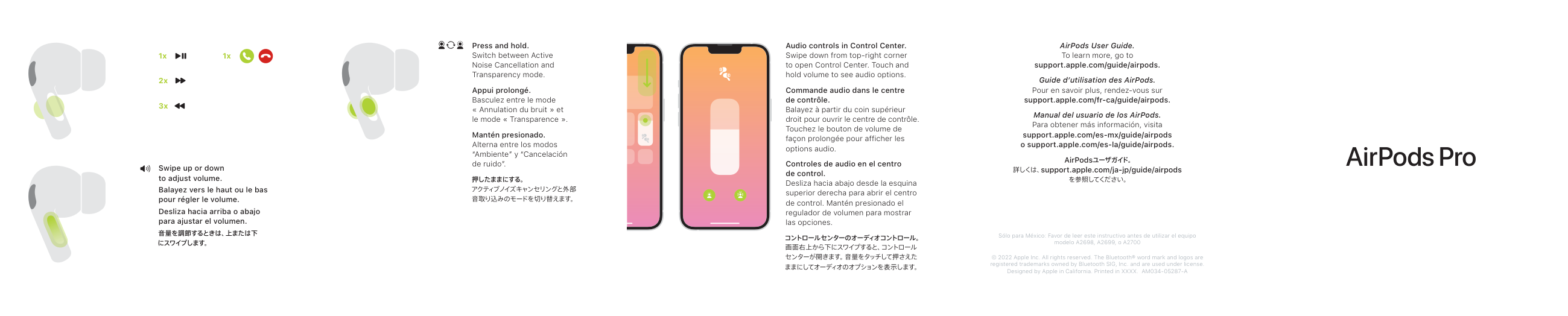
Swipe up or down to adjust volume. Balayez vers le haut ou le bas pour régler le volume. Desliza hacia arriba o abajo para ajustar el volumen.
Press and hold.
Switch between Active Noise Cancellation and Transparency mode.
Appui prolongé. Basculez entre le mode « Annulation du bruit » et le mode « Transparence ».
Mantén presionado. Alterna entre los modos “Ambiente” y “Cancelación de ruido”.
Audio controls in Control Center. Swipe down from top-right corner to open Control Center. Touch and hold volume to see audio options. Commande audio dans le centre de contrôle. Balayez à partir du coin supérieur droit pour ouvrir le centre de contrôle. Touchez le bouton de volume de façon prolongée pour afficher les options audio.
Controles de audio en el centro de control. Desliza hacia abajo desde la esquina superior derecha para abrir el centro de control. Mantén presionado el regulador de volumen para mostrar las opciones.
AirPods User Guide. To learn more, go to support.apple.com/guide/airpods.
Guide d’utilisation des AirPods. Pour en savoir plus, rendez-vous sur support.apple.com/fr-ca/guide/airpods.
Manual del usuario de los AirPods. Para obtener más información, visita support.apple.com/es-mx/guide/airpods o support.apple.com/es-la/guide/airpods.
Sólo para México: Favor de leer este instructivo antes de utilizar el equipo modelo A2698, A2699, o A2700
© 2022 Apple Inc. All rights reserved. The Bluetooth® word mark and logos are registered trademarks owned by Bluetooth SIG, Inc. and are used under license. Designed by Apple in California. Printed in XXXX. AM034-05287-A
100%
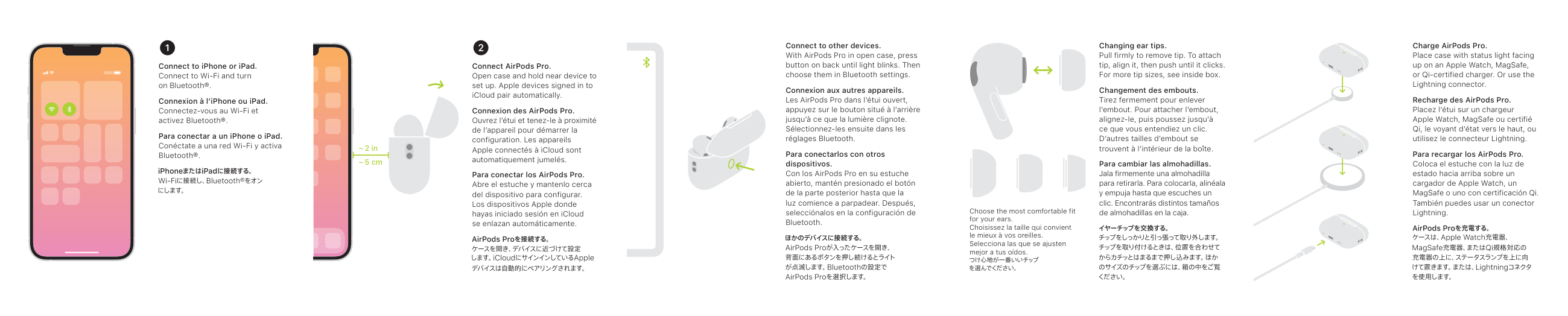
Connect to iPhone or iPad. Connect to Wi-Fi and turn on Bluetooth®.
Connexion à l’iPhone ou iPad. Connectez-vous au Wi-Fi et activez Bluetooth®.
Para conectar a un iPhone o iPad. Conéctate a una red Wi-Fi y activa Bluetooth®.
~ 2 in ~ 5 cm
Connect AirPods Pro. Open case and hold near device to set up. Apple devices signed in to iCloud pair automatically.
Connexion des AirPods Pro. Ouvrez l’étui et tenez-le à proximité de l’appareil pour démarrer la configuration. Les appareils Apple connectés à iCloud sont automatiquement jumelés.
Para conectar los AirPods Pro. Abre el estuche y mantenlo cerca del dispositivo para configurar. Los dispositivos Apple donde hayas iniciado sesión en iCloud se enlazan automáticamente.
Connect to other devices. With AirPods Pro in open case, press button on back until light blinks. Then choose them in Bluetooth settings.
Connexion aux autres appareils. Les AirPods Pro dans l’étui ouvert, appuyez sur le bouton situé à l’arrière jusqu’à ce que la lumière clignote. Sélectionnez-les ensuite dans les réglages Bluetooth.
Para conectarlos con otros dispositivos. Con los AirPods Pro en su estuche abierto, mantén presionado el botón de la parte posterior hasta que la luz comience a parpadear. Después, selecciónalos en la configuración de Bluetooth.
Changing ear tips. Pull firmly to remove tip. To attach tip, align it, then push until it clicks. For more tip sizes, see inside box.
Changement des embouts. Tirez fermement pour enlever l’embout. Pour attacher l’embout, alignez-le, puis poussez jusqu’à ce que vous entendiez un clic. D’autres tailles d’embout se trouvent à l’intérieur de la boîte.
Para cambiar las almohadillas. Jala firmemente una almohadilla para retirarla. Para colocarla, alinéala y empuja hasta que escuches un clic. Encontrarás distintos tamaños
de almohadillas en la caja.Choose the most comfortable fit for your ears. Choisissez la taille qui convient le mieux à vos oreilles. Selecciona las que se ajusten mejor a tus oídos.
Charge AirPods Pro. Place case with status light facing up on an Apple Watch, MagSafe, or Qi-certified charger. Or use the Lightning connector.
Recharge des AirPods Pro. Placez l’étui sur un chargeur Apple Watch, MagSafe ou certifié Qi, le voyant d’état vers le haut, ou utilisez le connecteur Lightning.
Para recargar los AirPods Pro. Coloca el estuche con la luz de estado hacia arriba sobre un cargador de Apple Watch, un MagSafe o uno con certificación Qi. También puedes usar un conector Lightning.