
Ask AI
— answers from the official manualAnswers from the official manual.
Common questions
Common Questions
7 totalWhat happens if I long-press the '0' key?
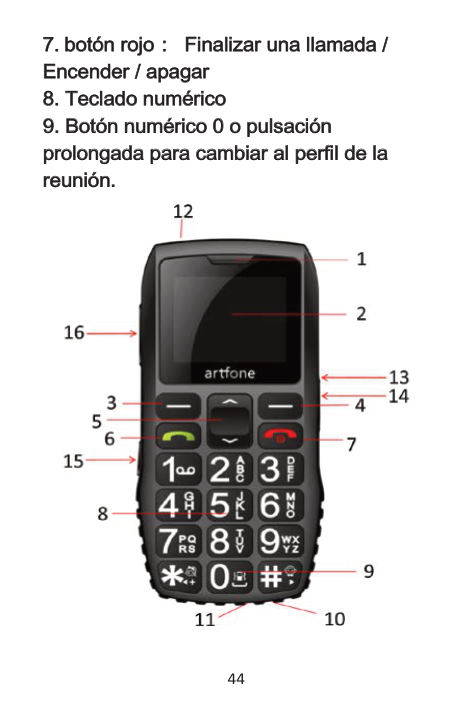
Long press the number '0' key or side button to switch to meeting mode.
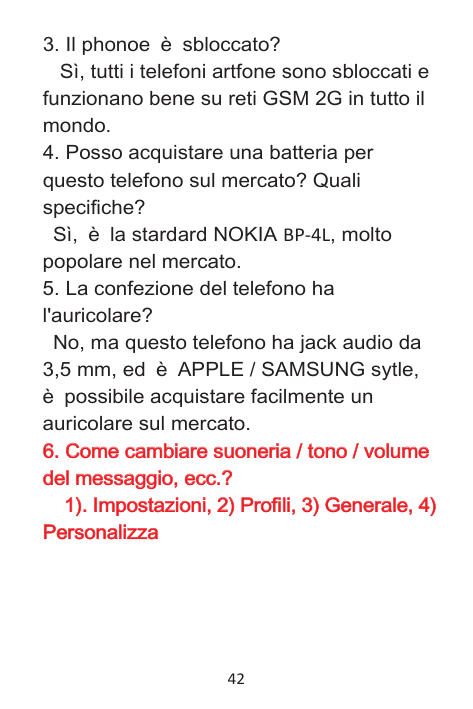
How do I factory reset my Artfone C1?
Press and hold the Power button for 10 seconds until the LED flashes red. This clears all settings and returns the device to factory defaults.
How do I make an emergency call using SOS function?
Press the SOS button for two seconds to initiate pre-set emergency numbers. Up to five contacts can be set in the SOS settings menu.
How do I power on the Artfone C1?
Press and hold the red button for 2.5 seconds until the screen lights up.
How do I change ringtone volumes in my phone settings?
Adjust profiles, general settings then customize options from Settings menu. Choose profile type (Normal/Silent etc.) for sound settings and volume adjustments.
What kind of battery does the Artfone C1 use?
The phone uses a standard Nokia BP-4L battery, which is widely available in markets.
Show 1 more questions
Full Manual
52 pages
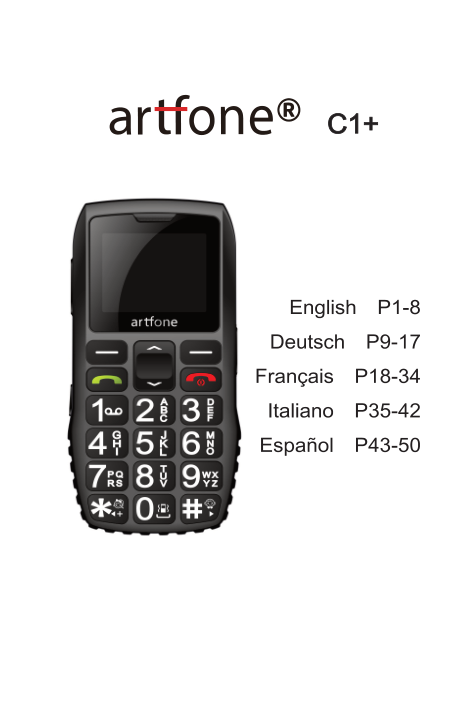

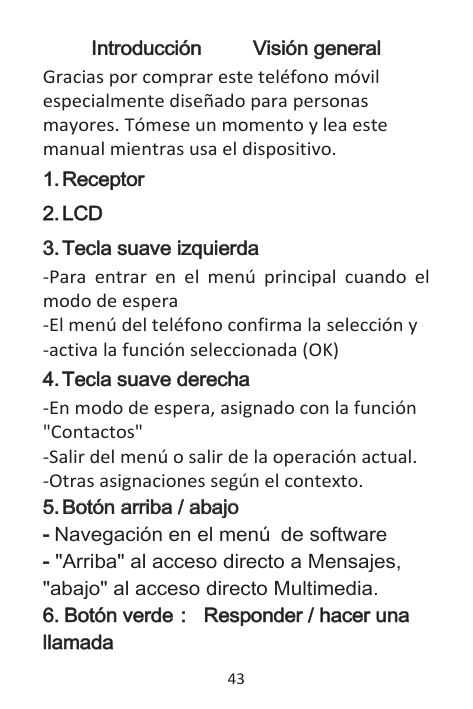
| | |---|
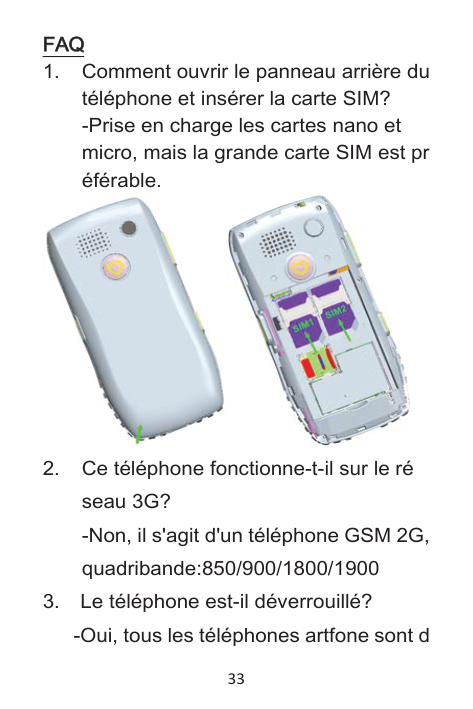
Recei
| | |---|
ver
| | |---|
LCD
| | |---|
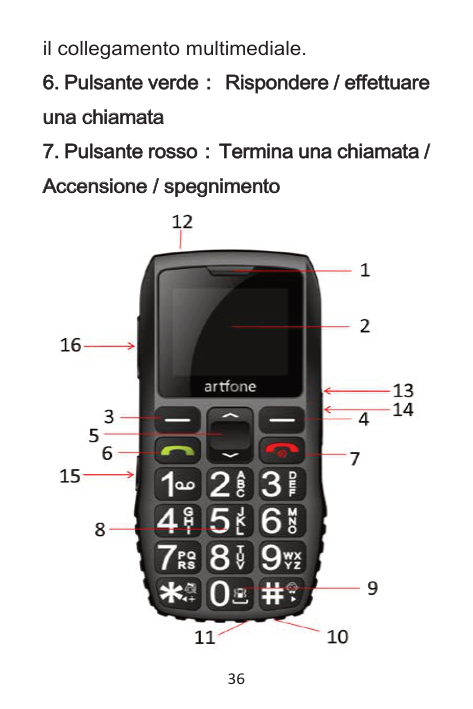
Left soft key
| | |---|
Ri
| | |---|
ght soft key:
| | |---|
Up/down button:
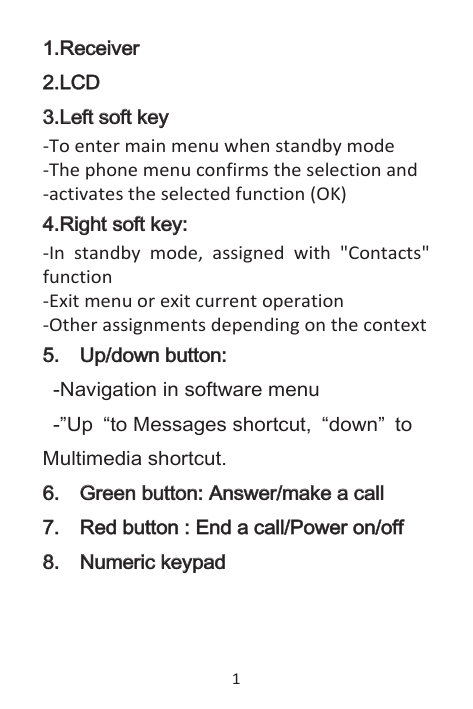
Multimedia shortcut.
| | |---|
Green button: Answer/make a cal
| | |---|
l
| | |---|
| | |---|
Red button : End a cal
| | |---|
l
| | |---|
/Power on/off
| | |---|
Numeri
c keypad
| | |---|

| | |---|
Numeri
| | |---|
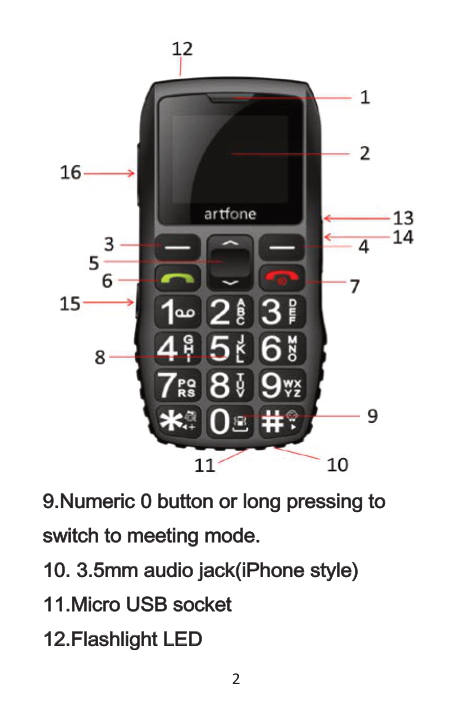
c 0 button or l
| | |---|
ong pressi
| | |---|
ng to swi
| | |---|
tch to meeti
| | |---|
ng mode.
| | |---|
| | |---|
5mm audi
| | |---|
o jack(i
| | |---|
Phone styl
| | |---|
e)
| | |---|
Mi
| | |---|
cro USB socket
Fl
ashl
i
ght LED
| | |---|
| | |---|
| | |---|
| | |---|
| | |---|
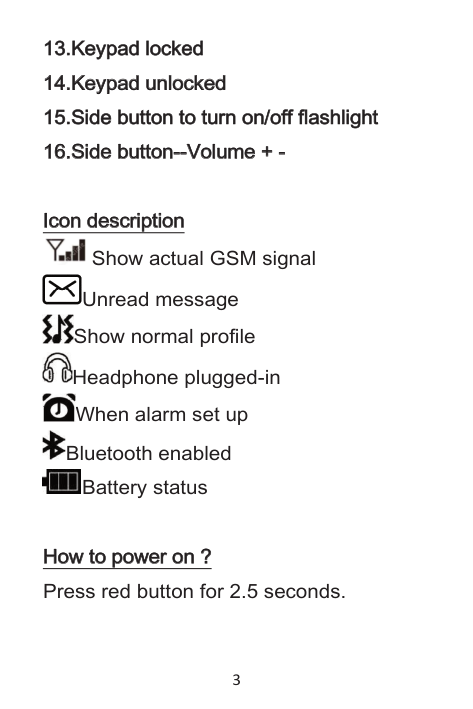
Keypad l
| | |---|
ocked
| | |---|
Keypad unl
| | |---|
ocked
| | |---|
Si
| | |---|
de button to turn on/off fl
| | |---|
ashl
| | |---|
i
| | |---|
ght
Si
de button--Vol
ume +
| | | |---|---| | | |
| | |---|
| | |---|
I
con descri
on Show actual GSM signal
pti
| | |---|
| | |---|
| | |---|


Unread message Show normal profile Headphone plugged-in When alarm set up


Bluetooth enabled Battery status

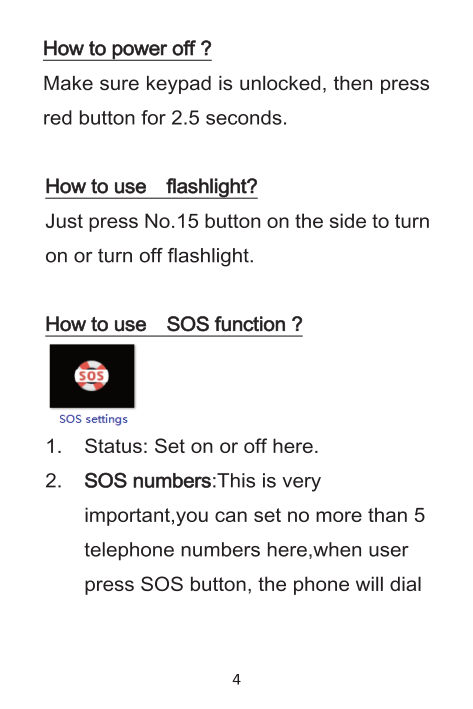
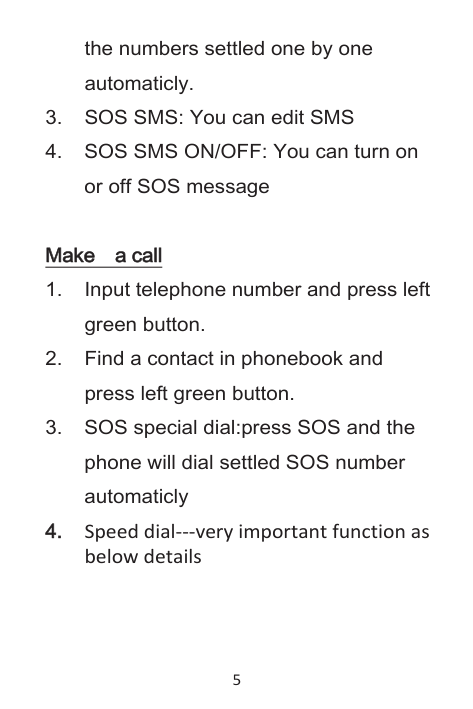
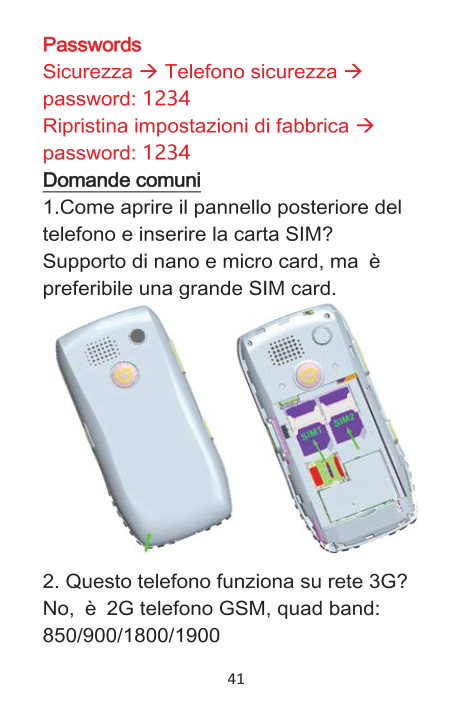
How to power on ? Press red button for 2.5 seconds.

the numbers settled one by one automaticly.
Make a cal
l
| | |---|
| | |---|
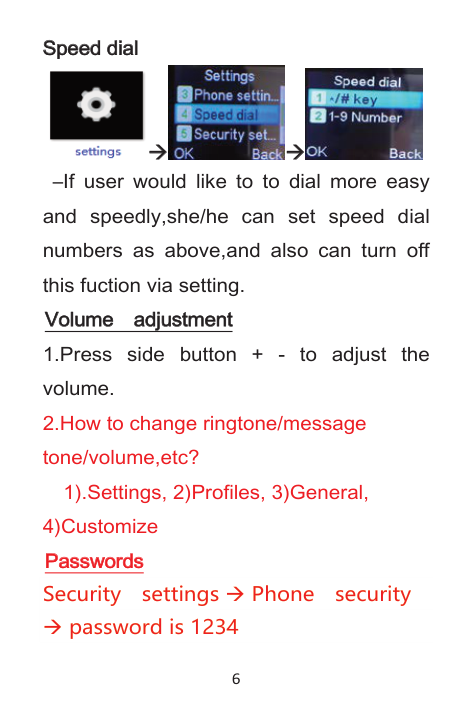
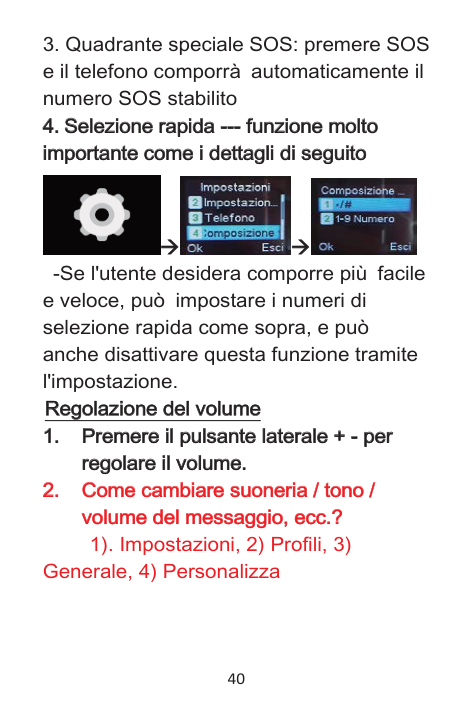
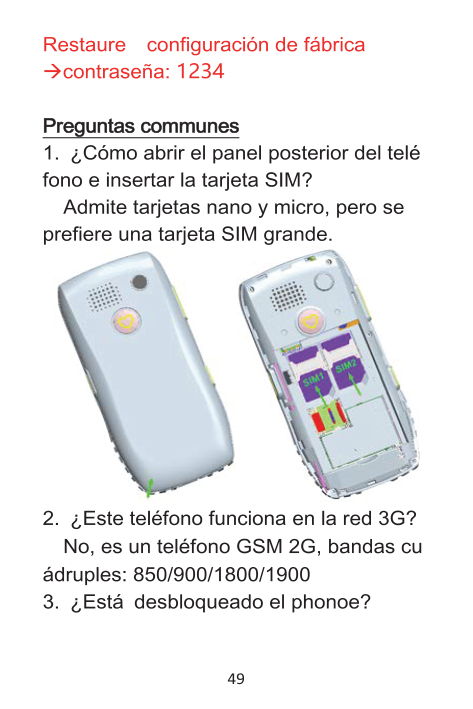
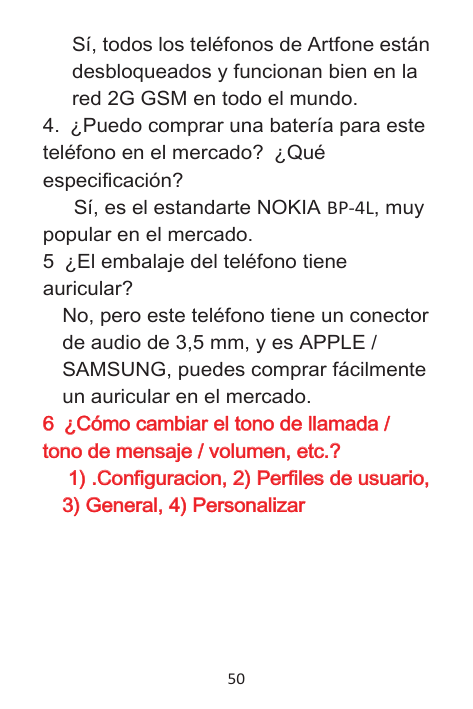
Speed dial---very important function as below details
| | |---|
Speed di
al
| | |---|
| | |---|


–If user would like to to dial more easy and speedly,she/he can set speed dial numbers as above,and also can turn off this fuction via setting. Vol
ume adjustment
| | |---|
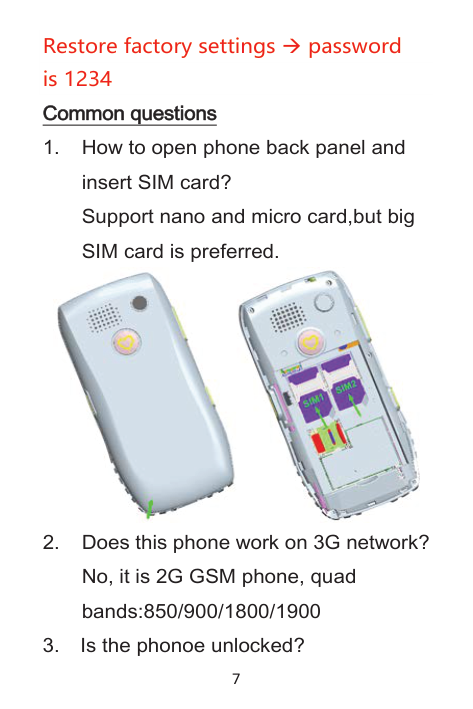
1).Settings, 2)Profiles, 3)General, 4)Customize Passwords Security settings Phone security
password is 1234
Restore factory settings password is 1234 Common questi
ons
| | |---|

Yes, it is NOKIA BP-4L stardard,very popular in the market.
No, but this phone has 3.5mm audio jack,and it is APPLE/SAMSUNG sytle, you can buy one earphone in the market easily.
ngtone/message tone/vol
How to change ri
| | |---|
| | |---|
ume,etc? 1).
| |
|---|
, 4)Customi
Setti
ngs, 2)Profi
l
es, 3)General
| | |---|
| | |---|
| | |---|
| | |---|
| | |---|
ze
| | |---|
Ei
nführung Überbl
i
ck
| | |---|
| | |---|
| | |---|
Vielen Dank für den Kauf dieses speziell entwickelten Mobiltelefons für ältere Menschen. Bitte nehmen Sie sich einen Moment Zeit und lesen Sie dieses Handbuch, während Sie das Gerät verwenden.
| | |---|
Empfänger
| | |---|
LCD
| | |---|
Li
| | |---|
nker Softkey
Rechter Softkey:
| | |---|
-Andere Zuweisungen je nach Kontext

| | |---|
Grüner Knopf Beantworten Si
| | |---|
e ei
| |
|---|
nen Anruf
| | |---|
roter Knopf Beenden ei
| | |---|
nes Anrufs / Ei
| | |---|
n- / Ausschal
| | |---|
ten
| | |---|
Zi
| | |---|
ffernbl
| | |---|
ock
| | |---|
Numeri
| | |---|
sche 0-Taste oder l
| | |---|
anges Drü cken, um zum Meeti
| | |---|
ng-Profi
| | |---|
l
| | |---|
zu wechsel
| | |---|
n.
| | |---|
| | |---|
3,5-mm-Audi
| | |---|
obuchse (i
| | |---|
Phone-Sti
| | |---|
l
| | |---|
)
| | |---|
Mi
| | |---|
cro-USB-Buchse
| | |---|
Taschenl
| | |---|
ampe LED
| | |---|
Tastatur gesperrt
| | |---|
Tastatur ni
| | |---|
cht gesperrt
| | |---|
Sei
| | |---|
tentaste zum Ei
| | |---|
n- und Ausschal
| | |---|
ten ampe
| | |---|
Si
de-Taste - Lautstärke +
| | |---|
| | |---|
Symbol
beschrei
bung Aktuelles GSM-Signal anzeigen
| | |---|
| | |---|


So verwenden Si
e di
e SOS-Funkti
on?
| | |---|
| | |---|
| | |---|

-Telefon automatisch die jeweils gewählten Nummern.
Ei
nen Anruf täti
gen
| | |---|
| | |---|
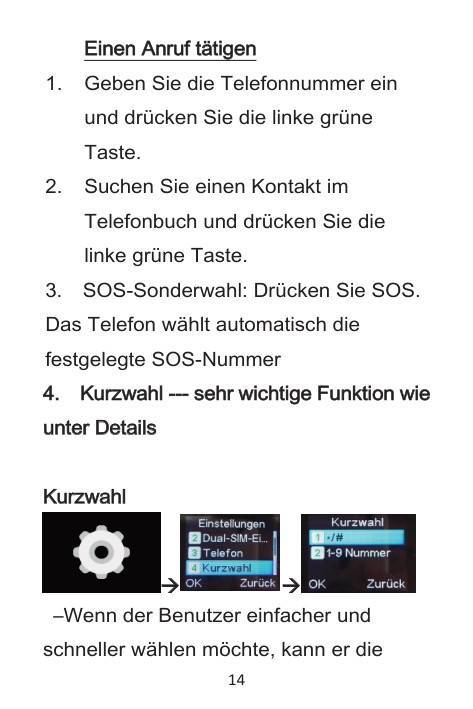
e unter Detai
Kurzwahl
--- sehr wi
chti
ge Funkti
on wi
| | |---|
| | |---|
| | |---|
| |
|---|
| | |---|
| | |---|
l
s
| | |---|
| | |---|
Kurzwahl
| | |---|


–Wenn der Benutzer einfacher und schneller wählen möchte, kann er die
Kurzwahlnummern wie oben einstellen und diese Funktion auch über die Einstellung deaktivieren.
Lautstärke ei
nstel
l
en
| | |---|
| | |---|
| | |---|
| | |---|
Drücken Si
| | |---|
e di
| | |---|
e Sei
| | |---|
tentaste +
| | | |---|---| | | |
-, um di
| | |---|
e Lautstärke ei
| | |---|
nzustel
| | |---|
l
| | |---|
en.
| | |---|
ton, den Nachri
Wi
e kann man den Kl
i
ngel
| |
|---|
| | |---|
| | |---|
| | |---|
| | |---|
e Lautstärke usw. ändern?
chtenton, di
| | |---|
| | |---|
| | |---|
1) .Einstellungen, 2) Benutzerprofile, 3) Allgemein, 4) Anpassen Passwort/code: Sicherheitseinstellungen Telefonsicherheit passwort/code: 1234 Einstellungen wiederherstellen passwort/code: 1234
Häufi
ge Fragen
| | |---|
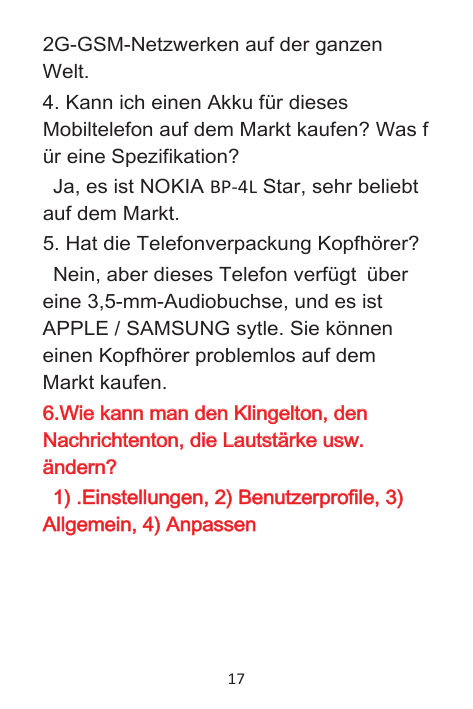
Support Nano- und Mikrokarte, aber große SIM-Karte wird bevorzugt.
Quad-Bänder: 850/900/1800/1900

freigeschaltet und funktionieren in
2G-GSM-Netzwerken auf der ganzen Welt.
Ja, es ist NOKIA BP-4L Star, sehr beliebt auf dem Markt.
eine 3,5-mm-Audiobuchse, und es ist APPLE / SAMSUNG sytle. Sie können einen Kopfhörer problemlos auf dem Markt kaufen.
ton, den Nachri
Wi
e kann man den Kl
i
ngel
| | |---|
| | |---|
| | |---|
| | |---|
| | |---|
e Lautstärke usw. ändern?
chtenton, di
| | |---|
| | |---|
| | |---|
e, 3) Al
1) .
Ei
nstel
l
ungen, 2) Benutzerprofi
l
| | |---|
| | |---|
| | |---|
| | |---|
| | |---|
| | |---|
l
gemei
n, 4) Anpassen
| | |---|
| | |---|
| | |---|
Présentati
on Panorama
| | |---|
Veuillez prendre un moment pour lire ce manuel avant d’utiliser l’appareil.
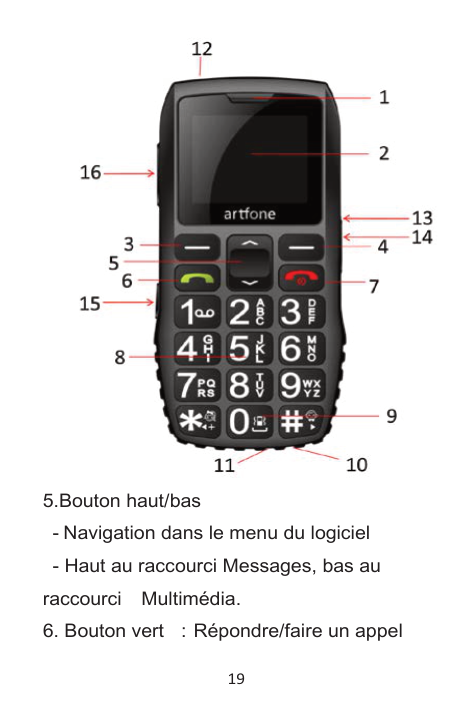

5.Bouton haut/bas
raccourci Multimédia.
6. Bouton vert Répondre/faire un appel
Descri
pti
cône afficher la gamme GSM actuelle Vous avez un message non lu
on de l
'i
| | |---|
| | |---|
| | |---|
| | |---|


Afficher le profil sonore actuel

les écouteurs sont branchés lorsque l'icône du réveil est configurée


Interface Bluetooth activée État de la batterie

umer Appuyez sur le bouton rouge FIN D'APPEL pendant 3 secondes. Commentétei
Comment al
l
| | |---|
| | |---|
ndre Assurez-vous que le clavier est déverrouillé, puis appuyez sur le bouton FIN D'APPEL pendant 3 secondes. Comment uti
| | |---|
ampe de poche Appuyez simplement sur le bouton n ° 15 sur le côté pour allumer ou éteindre la lampe de poche. Comment uti
l
i
ser l
a l
| | |---|
| | |---|
| | |---|
| | |---|
| | |---|
on SOS. Si vous souhaitez effectuer un appel défini
l
i
ser l
a foncti
| | |---|
| | |---|
| | |---|
| | |---|
| | |---|
| | |---|
en tant que numéro SOS (le numéro 112 est défini par défaut), appuyez le bouton SOS pendant 2 secondes. Fai
re des appel
s
| | |---|
| | |---|
mportante comme ci
Appel
rapi
d --- foncti
on très i
| | |---|
| | |---|
| | |---|
| | |---|
| | |---|
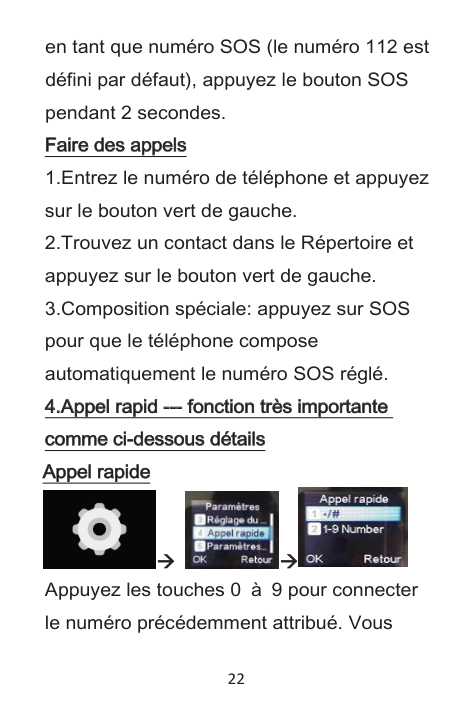
s Appel
-dessous détai
l
| | |---|
| | |---|
| | |---|
rapi
de
| | |---|
| | |---|


Appuyez les touches 0 à 9 pour connecter le numéro précédemment attribué. Vous
pouvez également enregistrer le numéro attribué aux Boutons* et #. Lorsque l'écran d'accueil est affiché, vous pouvez appuyer sur Bouton Gauche pour accéder au Répertoi
que, utiliser les boutons Haut/Bas pour sélectionner un contact, puis appuyer sur R é pondre un Appel pour composer le numéro. Lorsque l'écran d'accueil est affiché, vous pouvez utiliser le clavier numérique et entrer l
re Tél
éphoni
| | |---|
| | |---|
| | |---|
ement à composer, puis appuyer sur le bouton Répondre un Appel pour vous connecter. Pour mettre finàl'appel, appuyez sur le bouton FIN D'APPEL. Remarque! Le bouton FIN D'APPEL fonctionneégalement commereprendre l'é cran d'accueil.
e numéro manuel
l
| | |---|
| | |---|
| | |---|
Contrôl
e du vol
ume
| | |---|
| | |---|
| | |---|
Appuyez sur l
| | |---|
e bouton l
| | |---|
atéral
| | |---|
+
| | | |---|---| | | |
| | |---|
er l
| | |---|
e vol
| |
|---|
ume.
| | |---|
Comment changer l
t é du message / l
a sonneri
e / l
a tonal
i
| | |---|
| | |---|
| | |---|
| | |---|
| | |---|
| | |---|
? 1). Paramètres, 2) Profils, 3) Général, 4) Personnaliser
e vol
ume, etc.
| | |---|
| | |---|
| | |---|
on du menu Utilisez Bouton Gauche ou Droit pour ouvrir les fonctions des boutonsci-dessus. Utilisez Haut/ Bas pour naviguer, vous pouvez é galement utiliser les boutons * (gauche) et # (droit).
Uti
l
i
sati
| | |---|
| | |---|
| | |---|
| | |---|
tructure du menu Répertoi
que Ajouter nouveau contact Image de l’appelant Item1, Item2 ...
re Tél
éphoni
| | |---|
| | |---|
| | |---|
Ici, vous pouvez gérer les contacts, modifier, supprimer, ajouter, envoyer
Messages Écrire un message Boîte de réception Brouillons Boîte de sortie, Messages envoyés, Effacerles messages, Modèles SMS,Ré glage SMS Centre d’appel
s Historique des appels Paramètres d'appel- Paramètres avancés: Liste noire, Rappel automatique, Rappel de
| | |---|
l'heure d'appel, Moderéponse Organi
sateur EN Calendrier (voir le calendrier, ajouter des événements), Calculatrice Alarme (vous pouvez configurer jusqu'à 5
| | |---|
réveils différents), Silencieux
Planification l’énergie On/ Off, Boîteà outils SIM1, Boîteà outils SIM2
a (fonctions n é cessitent une carte microSD) Visualiser d’image, Lecteur vidéo, Lecteur audio, Enregistreur de son, Radio FM, Gestionnaire de fichiers Paramètres
Mul
ti
m é di
| | |---|
| | |---|
| | |---|
Profi
l
s uti
l
i
sateur
| | |---|
| | |---|
| | |---|
| | |---|
| | |---|
Général / Silencieux / Réunion ParamètresDual
M Régl
SI
| | |---|
| | |---|
age du tél
éphone
| | |---|
| | |---|
réelles)
menu)
lectionnez la méthode de saisie préférée, telle que ABC, abc, Abc, PL, pl etc.)
er haut/ bas(l'utilisateur peut changer les raccourcis par défaut, Haut – Messages, Bas – liste de contactphoto)
Raccourci
cl
avi
| | |---|
| | |---|
| | |---|
LCD rétro-éclairage
Appel
rapi
de
| | |---|
| | |---|
Paramètres de sécuri
té SécuritéTéléphone: 1. Verrrouillage télé phone 2. Modifier le mot de pass
| | |---|
Connecti
vi
té
| | |---|
| | |---|
Activation/ Désactivation du Bluetooth, Activation/ Désactivation de la visibilité Mon appareil, Changer le nom d’appareil
Restaurer l
ages Restaurer les Paramètres d'usine, le mot de passe par défaut est:1234
es régl
| | |---|
| | |---|
■ Paramètres SOS

Statut: Activez ou désactivez ici. Numéros SOS (vous pouvez définir jusqu' à 5 numéros de téléphones) Remarque! Lorsque cette fonction est activ ée, chaque numéro de la liste est appelé jusqu'àla connexion réussie. Il composera tous les numéros respectivement en trois tours. Message SOS: Vous pouvez éditer des SMS
SOS SMS ON/OFF: Vous pouvez activer ou désactiver le message SOS
Consei
l
s uti
l
es
| | |---|
| | |---|
| |
|---|
| | |---|
Allez dans menu/ paramètres/ profils/ gén éral/ options/ personnaliser/ SIM1 Sonnerie/ Modifier/ sélectionner à partir d’un fichier/carte mémoire/ sélectionnez fichier et cliquez sur OK, puis sélectionnez ENREGISTRER pour confirmer et quitter.
Nom et descendez, entrez Numéro, cliquez sur options/ sélectionnez ENREGISTRER.
message/ entrer un SMS/ cliquer sur options/ envoyer à/ entrez manuellement le numéro ou sélectionnez le numéro dans le répertoire/ cliquez sur OK/ cliquez sur options/ cliquez sur Envoyer.
FAQ
-Prise en charge les cartes nano et micro, mais la grande carte SIM est pr éférable.
-Non, il s'agit d'un téléphone GSM 2G, quadribande:850/900/1800/1900

-Oui, tous les téléphones artfone sont d
éverrouillés et fonctionnent bien sur le réseau GSM 2G dans le monde entier.
-Oui, il s'agit de la norme NOKIA BP-4L, très populaire sur le marché.
-Non, mais ce téléphone a une prise audio de 3,5 mm, et il est de style APPLE / SAMSUNG, vous pouvez acheter un é couteur sur le marché facilement.
té de message / vol
Comment changer de sonneri
e / tonal
i
| |
|---|
| | |---|
| | |---|
| | |---|
? 1).
ume, etc.
| | |---|
| | |---|
, 4) Personnal
Paramètres, 2) Profi
l
s, 3) Général
| | |---|
| | |---|
| | |---|
| | |---|
i
ser
| | |---|
| | |---|
ca Grazie per aver acquistato questo telefono cellulare appositamente progettato per le persone anziane. Si prega di prendere un momento e leggere questo manuale durante l'utilizzo del dispositivo.
I
ntroduzi
one Panorami
| | |---|
| | |---|
| | |---|
| | |---|
Ri
| | |---|
cevi
| | |---|
tore
| | |---|
LCD
| | |---|
Tasto funzi
| | |---|
one si
| | |---|
ni
| | |---|
stro
-Per accedere al menu principale in modalità standby
| | |---|
Tasto di
| | |---|
scel
| | |---|
ta destro:
Pul
sante su / gi
ù
| | |---|
| | |---|
| | |---|
| | |---|
Pul
| | |---|
sante verde Ri
| | |---|
spondere / effettuare una chi
| | |---|
amata
amata / Accensi
Pul
sante rosso Termi
na una chi
| | |---|
| | |---|
| | |---|
| | |---|
one / spegni
mento
| | |---|
| | |---|


Cuffie collegate Quando viene impostato l'allarme


Bluetooth abilitato Stato della batteria

Come accendere Premere il tasto rosso per 2,5 secondi. Come spegnere Assicurarsi che la tastiera sia sbloccata, quindi premere il pulsante rosso per 2,5 secondi. Come usare l
ca Basta premere il pulsante No.15 sul lato per accendere o spegnere la torcia.
a torci
a el
ettri
| | |---|
| | |---|
| | |---|
| | |---|
Come usare l
a funzi
one SOS
| | |---|
| | |---|

Effettuare una chi
amata
| | |---|
to i
Sel
ezi
one rapi
da --- funzi
one mol
| | |---|
| | |---|
| | |---|
| | |---|
| | |---|
| | |---|
mportante come i
dettagl
i
di
segui
to
| | |---|
| | |---|
| | |---|
| | |---|
| | |---|
| | |---|


-Se l'utente desidera comporre più facile e veloce, può impostare i numeri di selezione rapida come sopra, e può anche disattivare questa funzione tramite l'impostazione. Regol
azi
one del
vol
ume
| | |---|
| | |---|
| | |---|
| | |---|
| | |---|
Premere i
| | |---|
l
| | |---|
pul
| | |---|
sante l
| | |---|
ateral
| | |---|
e +
| | | |---|---| | | |
| | |---|
are i
| | |---|
l
| | |---|
vol
| | |---|
ume.
| | |---|
Come cambi
a / tono / vol
are suoneri
| | |---|
| | |---|
| |
|---|
ume del
messaggi
o, ecc.
?
| | |---|
| | |---|
| | |---|
| | |---|
1). Impostazioni, 2) Profili, 3) Generale, 4) Personalizza

funzionano bene su reti GSM 2G in tutto il mondo.
Sì, è la stardard NOKIA BP-4L, molto popolare nel mercato.
No, ma questo telefono ha jack audio da 3,5 mm, ed è APPLE / SAMSUNG sytle, è possibile acquistare facilmente un auricolare sul mercato.
ume del
Come cambi
are suoneri
a / tono / vol
| | |---|
| | |---|
| | |---|
| | |---|
? 1).
messaggi
o, ecc.
| | |---|
| | |---|
| | |---|
e, 4) Personal
I
mpostazi
oni
, 2) Profi
l
i
, 3) General
| | |---|
| | |---|
| | |---|
| | |---|
| | |---|
| | |---|
| | |---|
| | |---|
i
zza
| | |---|
| | |---|
ón general Gracias por comprar este teléfono móvil especialmente diseñado para personas mayores. Tómese un momento y lea este manual mientras usa el dispositivo.
I
ntroducci
ón Vi
si
| | |---|
| | |---|
| | |---|
| | |---|
| | |---|
| | |---|
Receptor
| | |---|
LCD
| | |---|
Tecl
| | |---|
a suave i
| | |---|
zqui
| | |---|
erda
| | |---|
Tecl
| | |---|
a suave derecha
| | |---|
Botón arri
| | |---|
ba / abajo
Botón verde Responder / hacer una amada
| | |---|
| | |---|
| | |---|
| | |---|
botón rojo Fi
| | |---|
nal
| | |---|
i
| | |---|
zar una l
| | |---|
l
| | |---|
amada / Encender / apagar
| | |---|
Tecl
| | |---|
ado numéri
| | |---|
co
ón prol
Botón numéri
co 0 o pul
saci
| | |---|
| | |---|
| | |---|
| | |---|
a reuni
ongada para cambi
ar al
perfi
l
de l
| | |---|
| | |---|
| | |---|
| | |---|
| | |---|
| | |---|
ón.
| | |---|
| | |---|

| | |---|
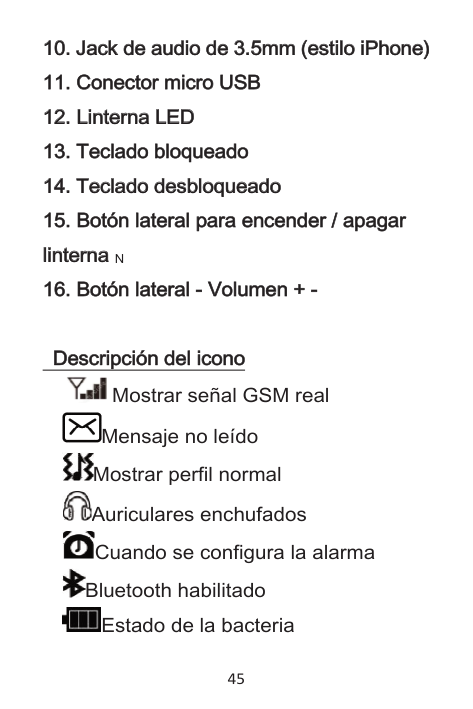
Jack de audi
| | |---|
o de 3.
| | |---|
5mm (esti
| | |---|
l
| | |---|
o i
| | |---|
Phone)
| | |---|
Conector mi
| | |---|
cro USB
| | |---|
Li
| | |---|
nterna LED
| | |---|
Tecl
| | |---|
ado bl
| | |---|
oqueado
| | |---|
Tecl
| | |---|
ado desbl
| | |---|
oqueado
| | |---|
Botón l
| | |---|
ateral
| | |---|
para encender / apagar l
| | |---|
i
| | |---|
nterna N
Botón l
ateral
umen +
| | |---|
| | |---|
| | | |---|---| | | |
| | |---|
Descri
pci
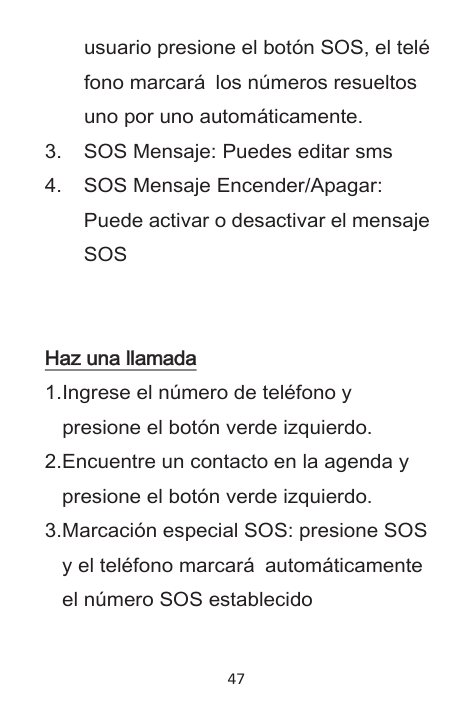
cono Mostrar señal GSM real
ón del
i
| | |---|
| | |---|
| | |---|
| | |---|


Mensaje no leído Mostrar perfil normal Auriculares enchufados Cuando se configura la alarma


Bluetooth habilitado Estado de la bacteria

Cómo encender ? Pulse el botón rojo durante 2,5 segundos. Cómo apagar? Asegúrese de que el teclado esté desbloqueado, luego presione el botón rojo durante 2.5 segundos. Cómo usar l
nterna ? Simplemente presione el botón No.15 en el lateral para encender o apagar la linterna.
a l
i
| | |---|
| | |---|
| | |---|
Cómo uti
l
i
zar l
a funci
ón SOS ?
| | |---|
| | |---|
| | |---|
| |
|---|
| | |---|

Haz una l
l
amada
| | |---|
| | |---|
Marcaci
ón muy i
ón rápi
da --- funci
| | |---|
| | |---|
| | |---|
| | |---|
mportante como detal
l
es a conti
nuaci
ón
| | |---|
| | |---|
| | |---|
| | |---|
| | |---|


–Si el usuario desea marcar de manera más fácil y rápida, puede configurar los nú meros de marcaci ó n r á pida como se indica arriba y también puede desactivar esta función mediante la configuración. Ajuste de vol
umen
| | |---|
| | |---|
Presi
| | |---|
one el
| | |---|
botón l
| | |---|
ateral
| | |---|
+
| | | |---|---| | | |
| | |---|
vol
| | |---|
umen.
| | |---|
Cómo cambi
amada / tono de mensaje / vol
ar el
tono de l
l
| | |---|
| | |---|
| | |---|
| | |---|
| | |---|
umen, etc.
?
| | |---|

| | |---|
1) .Configuracion, 2) Perfiles de usuario, 3) General, 4) Personalizar
Contraseña Configuraciones de seguridad Seguridad del teléfono contraseña: 1234

Sí, todos los teléfonos de Artfone están desbloqueados y funcionan bien en la red 2G GSM en todo el mundo.
Sí, es el estandarte NOKIA BP-4L, muy popular en el mercado.
No, pero este teléfono tiene un conector de audio de 3,5 mm, y es APPLE / SAMSUNG, puedes comprar fácilmente un auricular en el mercado.
amada / tono de mensaje / vol
ar el
tono de l
l
| | |---|
| | |---|
| | |---|
| | |---|
umen, etc.
?
| | |---|
| | |---|
1) .
Confi
guraci
on, 2) Perfi
l
es de usuari
o,
| | |---|
| | |---|
| | |---|
| | |---|
| | |---|
| | |---|
3) General
, 4) Personal
i
zar
| | |---|
| | |---|
| | |---|