
Ask AI
— answers from the official manualAnswers from the official manual.
Common questions
Common Questions
27 totalWhat should I do if the light is not turning on?
If the light is not turning on, it is likely due to insufficient sunlight, so place it in a sunnier location. Ensure the solar panel has received at least 6-8 hours of direct sunlight, try charging via USB, and check that the power switch is in the ON position. (Pages 5, 7, 9)
How do I set up and install the Brightown HLS-W-XXXWW-S LED Solar Firefly Light?
To set up the light, turn on the power switch, choose a location with direct sunlight, assemble the LED bulbs onto the flexible stems if needed, and firmly press the stake into soft soil. Then adjust the 120-degree tiltable solar panel to face the sun directly and select your preferred lighting mode. (Page 5)
How do I maintain and clean the solar panel for best performance?
For optimal performance, wipe the solar panel once a week with a moist cloth. You should also avoid placing the panel in shaded areas and adjust its position seasonally as the sun's path changes to ensure maximum sun exposure. (Page 6)
What should I do if the lights are flickering or the app is not responding?
Flickering lights are typically caused by loose connections, so check and secure the wiring. If the app is not responding, the issue is likely due to Bluetooth/Wi-Fi problems, and you should restart the app and reconnect. For mode switching issues, reset and re-sync with the app. (Page 7)
Can the Brightown HLS-W-XXXWW-S be charged without sunlight?
Yes, the light features USB connectivity that enables backup charging in the event of prolonged inclement weather. The manual recommends using USB charging on lengthy, overcast days to maintain battery performance. (Pages 4, 6)
What warranty does the Brightown HLS-W-XXXWW-S LED Solar Firefly Light come with?
The Brightown HLS-W-XXXWW-S LED Solar Firefly Light comes with a 1-year limited warranty covering manufacturing defects and performance issues. To make a warranty claim, contact Brightown's customer service with proof of purchase. (Page 8)
Show 21 more questions
Is the Brightown HLS-W-XXXWW-S LED Solar Firefly Light waterproof?
How do I set up the Brightown HLS-W-XXXWW-S LED Solar Firefly Light?
What should I do if the Brightown HLS-W-XXXWW-S LED Solar Firefly Light won't turn on?
What do I do if the lights are flickering or appear dim?
How do I care for and clean the solar panel on the Brightown HLS-W-XXXWW-S?
What should I do if the app is not responding or the mode switching isn't working?
What is the warranty on the Brightown HLS-W-XXXWW-S LED Solar Firefly Light?
What backup charging option is available if there is not enough sunlight?
Why are my lights flickering?
How long does the Brightown HLS-W-XXXWW-S LED Solar Firefly Light need to charge before first use?
How long does the battery last on a full charge and how long does it take to charge?
What are the two lighting modes available on this solar firefly light?
What should I do if water accumulates inside the bulbs?
How long should I charge the solar lights before first use?
What should I do if my lights are not turning on?
How often should I clean the solar panel?
Can I use these lights during severe weather?
How can I adjust the solar panel for maximum charging?
What should I do if the lights are dim or not bright enough?
What is the battery runtime for these solar lights?
How do I fix the app control if the lights are not responding?
Full Manual
11 pages
☰ Home » Brightown » Brightown HLS-W-XXXWW-S LED Solar Firefly Light User Manual Contents [ hide ] 1 Brightown HLS-W-XXXWW-S LED Solar Firefly Light
2 Introduction
3 Specifications
4 What’S In The Box
5 Features
6 Setup Guide
7 Care & Maintenance
8 Troubleshooting
9 Pros & Cons
10 Warranty
11 Frequently Asked Questions
12 Video – Product Overview
13 References Brightown HLS-W-XXXWW-S LED Solar Firefly Light Manuals+ Brightown-logo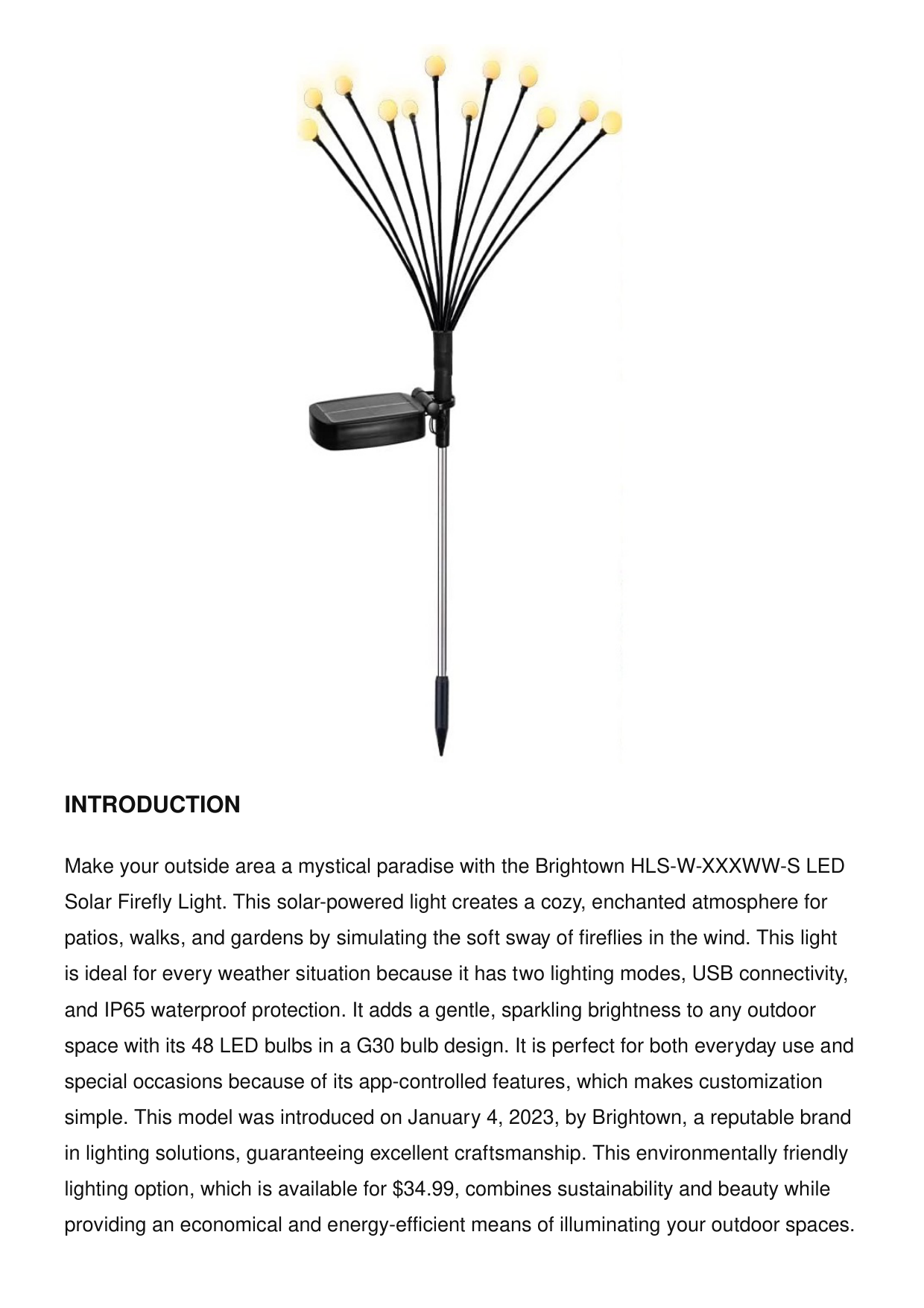
Introduction
Make your outside area a mystical paradise with the Brightown HLS-W-XXXWW-S LED Solar Firefly Light. This solar-powered light creates a cozy, enchanted atmosphere for patios, walks, and gardens by simulating the soft sway of fireflies in the wind. This light is ideal for every weather situation because it has two lighting modes, USB connectivity, and IP65 waterproof protection. It adds a gentle, sparkling brightness to any outdoor space with its 48 LED bulbs in a G30 bulb design. It is perfect for both everyday use and special occasions because of its app-controlled features, which makes customization simple. This model was introduced on January 4, 2023, by Brightown, a reputable brand in lighting solutions, guaranteeing excellent craftsmanship. This environmentally friendly lighting option, which is available for $34.99, combines sustainability and beauty while providing an economical and energy-efficient means of illuminating your outdoor spaces.
Specifications
Brand Brightown Price $34.99 Special Features 2 Lighting Modes, Sway with Breeze, IP65 Waterproof Light Source TypeLed
Connectivity TechnologyUsb
Number of Light Sources 48 Voltage 1.2 Volts Bulb Shape SizeG30
Wattage 5 Watts Item Weight 16 ounces Control Method App Product Dimensions 1 x 1 x 29 inches Item Model NumberHls-W-Xxxww-S
Date First Available January 4, 2023 Manufacturer BrightownWhat’S In The Box
LED Solar Firefly Light User ManualFeatures
The lights may sway naturally thanks to flexible stems, like fireflies dancing in the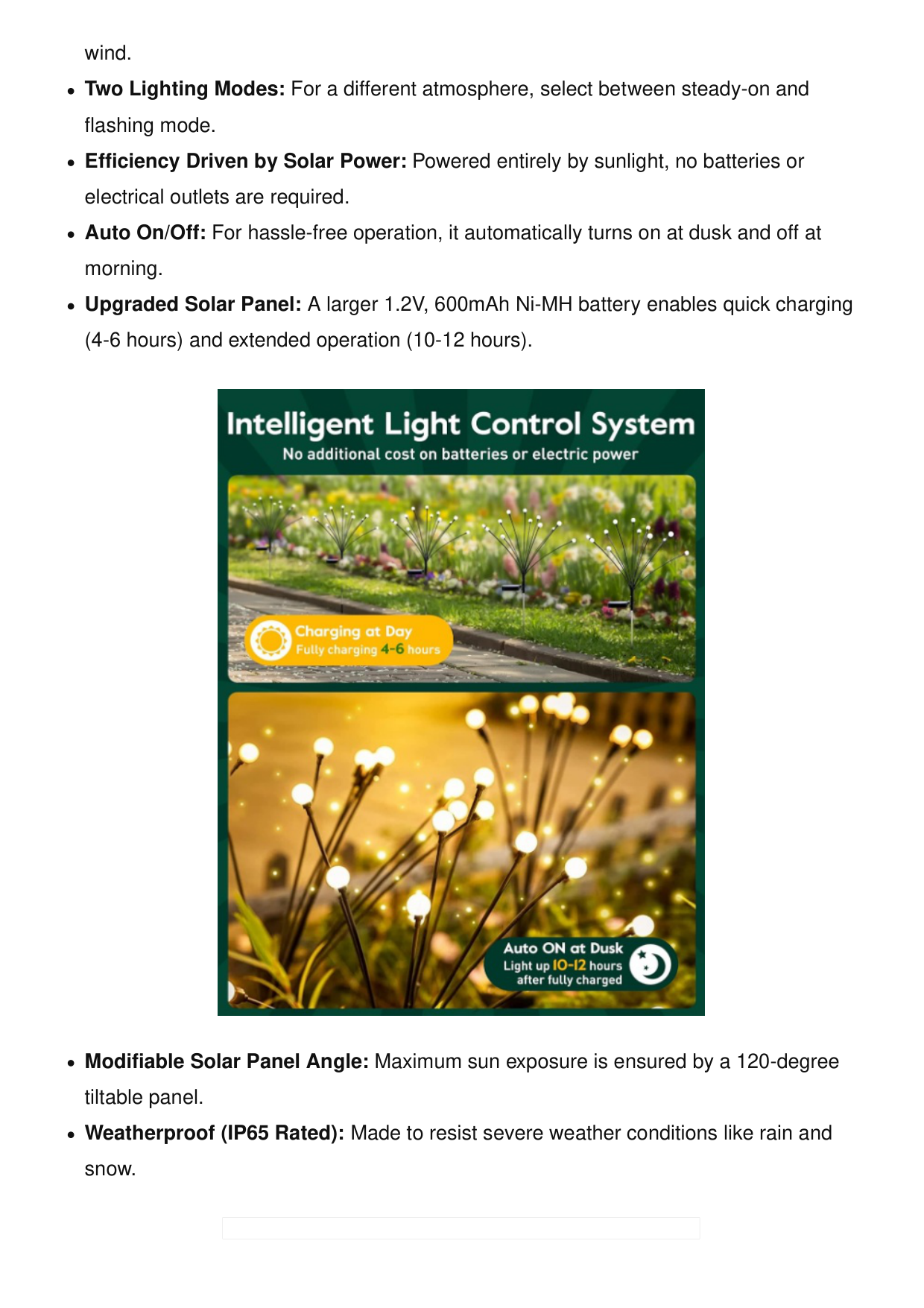
wind. Two Lighting Modes: For a different atmosphere, select between steady-on and flashing mode. Efficiency Driven by Solar Power: Powered entirely by sunlight, no batteries or electrical outlets are required. Auto On/Off: For hassle-free operation, it automatically turns on at dusk and off at morning. Upgraded Solar Panel: A larger 1.2V, 600mAh Ni-MH battery enables quick charging (4-6 hours) and extended operation (10-12 hours). Modifiable Solar Panel Angle: Maximum sun exposure is ensured by a 120-degree tiltable panel. Weatherproof (IP65 Rated): Made to resist severe weather conditions like rain and snow.
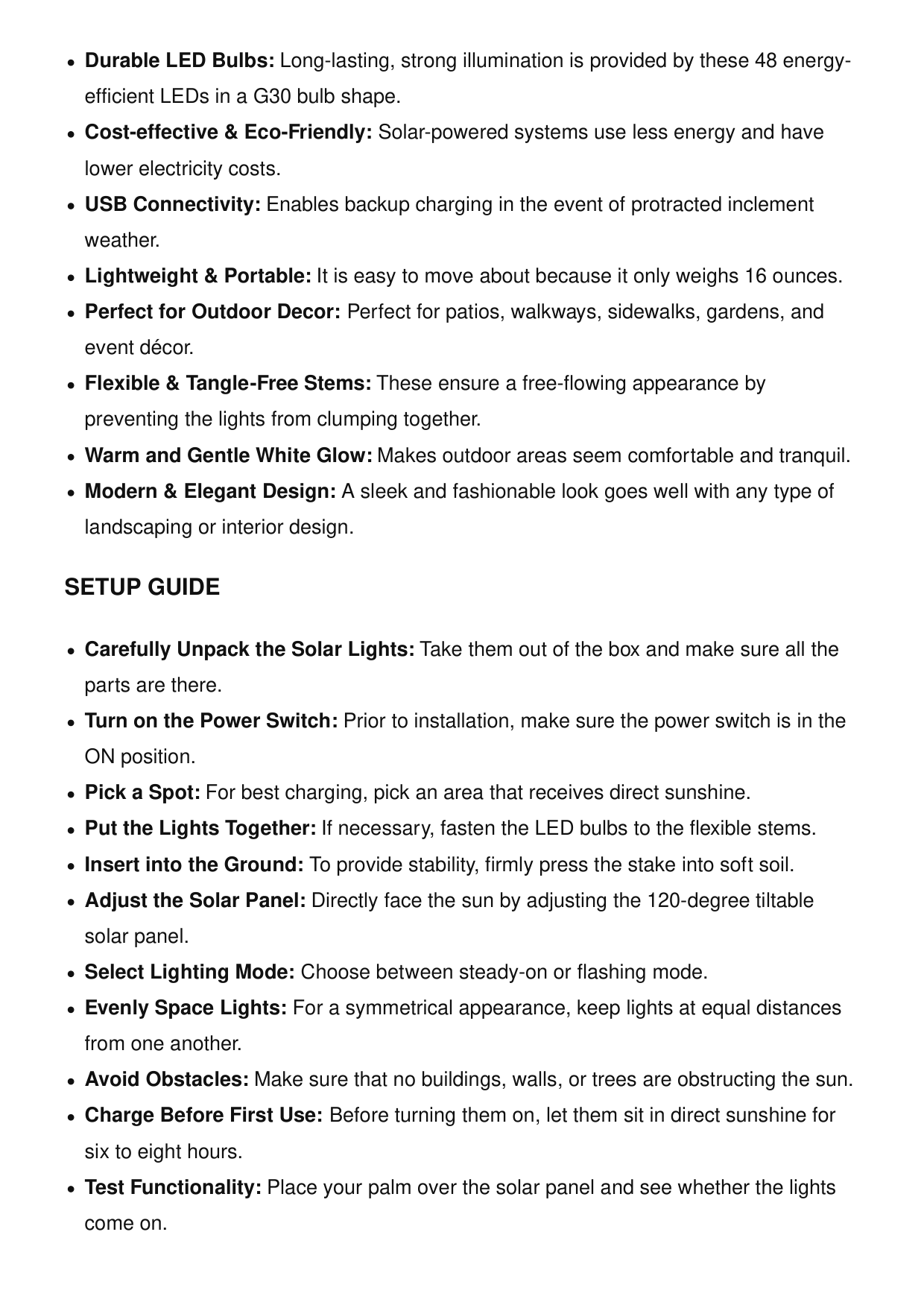
Durable LED Bulbs: Long-lasting, strong illumination is provided by these 48 energy- efficient LEDs in a G30 bulb shape. Cost-effective & Eco-Friendly: Solar-powered systems use less energy and have lower electricity costs. USB Connectivity: Enables backup charging in the event of protracted inclement weather. Lightweight & Portable: It is easy to move about because it only weighs 16 ounces. Perfect for Outdoor Decor: Perfect for patios, walkways, sidewalks, gardens, and event décor. Flexible & Tangle-Free Stems: These ensure a free-flowing appearance by preventing the lights from clumping together. Warm and Gentle White Glow: Makes outdoor areas seem comfortable and tranquil. Modern & Elegant Design: A sleek and fashionable look goes well with any type of landscaping or interior design.
Setup Guide
Carefully Unpack the Solar Lights: Take them out of the box and make sure all the parts are there. Turn on the Power Switch: Prior to installation, make sure the power switch is in the ON position. Pick a Spot: For best charging, pick an area that receives direct sunshine. Put the Lights Together: If necessary, fasten the LED bulbs to the flexible stems. Insert into the Ground: To provide stability, firmly press the stake into soft soil. Adjust the Solar Panel: Directly face the sun by adjusting the 120-degree tiltable solar panel. Select Lighting Mode: Choose between steady-on or flashing mode. Evenly Space Lights: For a symmetrical appearance, keep lights at equal distances from one another. Avoid Obstacles: Make sure that no buildings, walls, or trees are obstructing the sun. Charge Before First Use: Before turning them on, let them sit in direct sunshine for six to eight hours. Test Functionality: Place your palm over the solar panel and see whether the lights come on.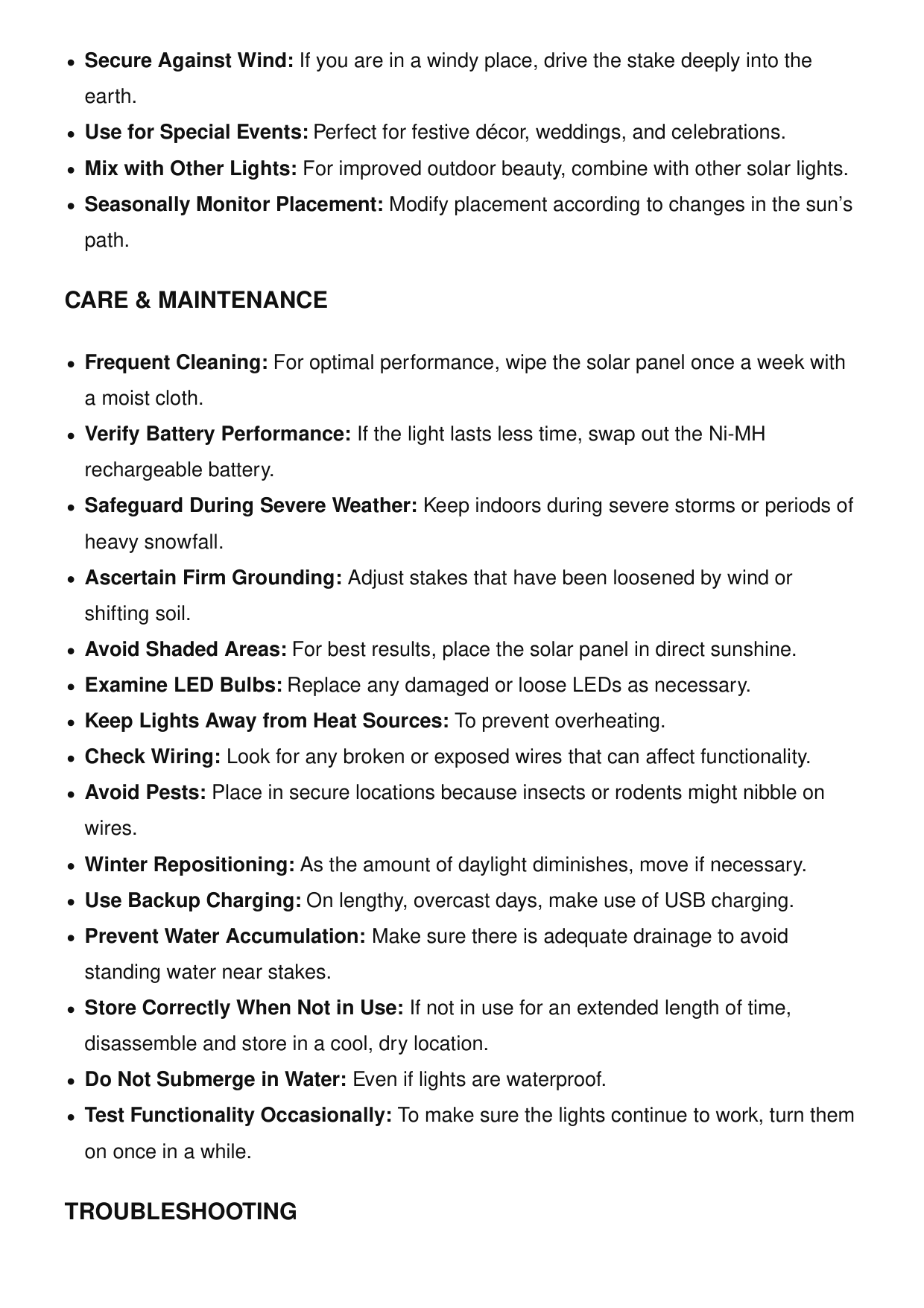
Secure Against Wind: If you are in a windy place, drive the stake deeply into the earth. Use for Special Events: Perfect for festive décor, weddings, and celebrations. Mix with Other Lights: For improved outdoor beauty, combine with other solar lights. Seasonally Monitor Placement: Modify placement according to changes in the sun’s path.
Care & Maintenance
Frequent Cleaning: For optimal performance, wipe the solar panel once a week with a moist cloth. Verify Battery Performance: If the light lasts less time, swap out the Ni-MH rechargeable battery. Safeguard During Severe Weather: Keep indoors during severe storms or periods of heavy snowfall. Ascertain Firm Grounding: Adjust stakes that have been loosened by wind or shifting soil. Avoid Shaded Areas: For best results, place the solar panel in direct sunshine. Examine LED Bulbs: Replace any damaged or loose LEDs as necessary. Keep Lights Away from Heat Sources: To prevent overheating. Check Wiring: Look for any broken or exposed wires that can affect functionality. Avoid Pests: Place in secure locations because insects or rodents might nibble on wires. Winter Repositioning: As the amount of daylight diminishes, move if necessary. Use Backup Charging: On lengthy, overcast days, make use of USB charging. Prevent Water Accumulation: Make sure there is adequate drainage to avoid standing water near stakes. Store Correctly When Not in Use: If not in use for an extended length of time, disassemble and store in a cool, dry location. Do Not Submerge in Water: Even if lights are waterproof. Test Functionality Occasionally: To make sure the lights continue to work, turn them on once in a while.Troubleshooting
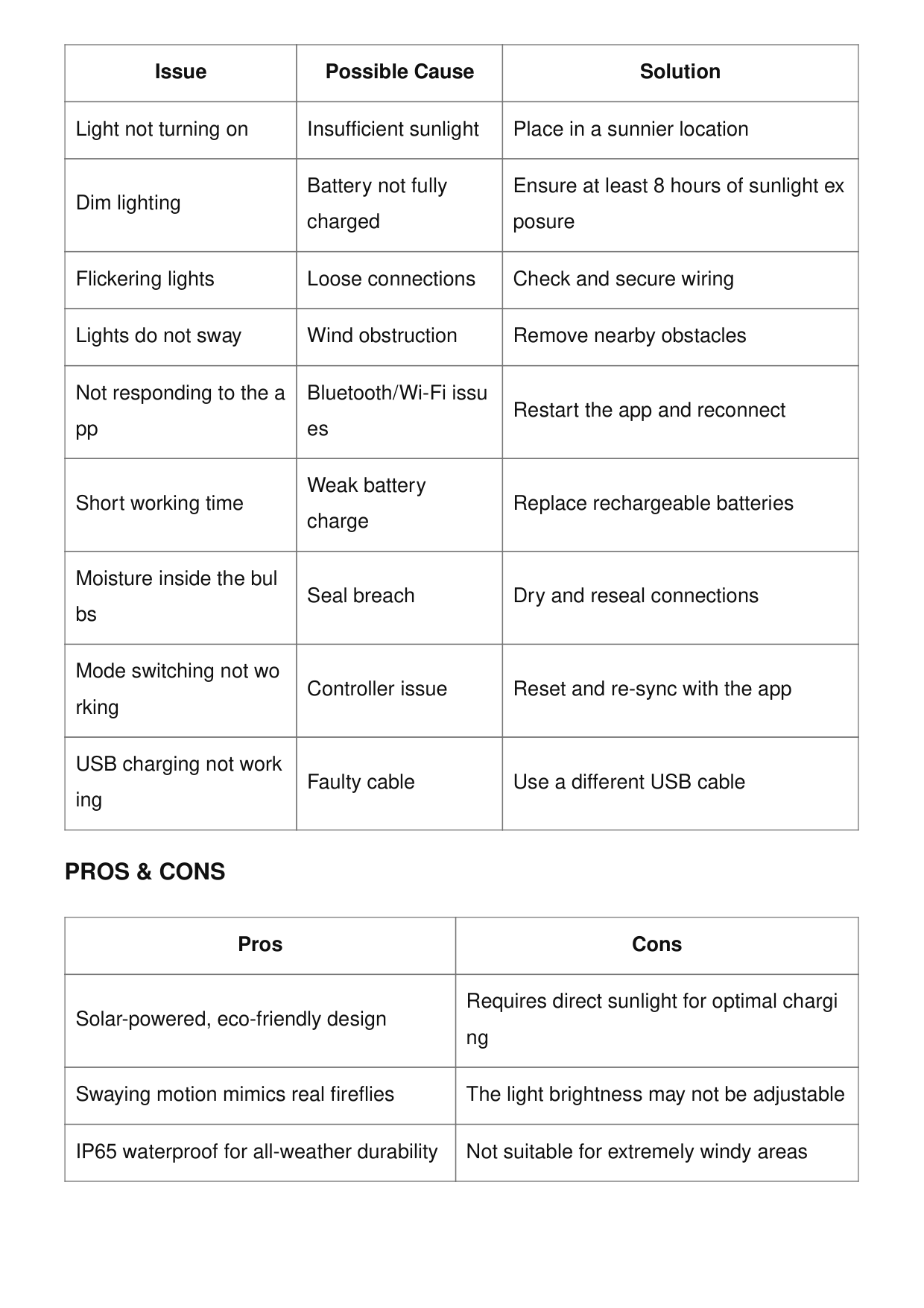
Issue Possible Cause Solution Light not turning on Insufficient sunlight Place in a sunnier location Dim lighting Battery not fully charged Ensure at least 8 hours of sunlight ex posure Flickering lights Loose connections Check and secure wiring Lights do not sway Wind obstruction Remove nearby obstacles Not responding to the a pp Bluetooth/Wi-Fi issu es Restart the app and reconnect Short working time Weak battery charge Replace rechargeable batteries Moisture inside the bul bs Seal breach Dry and reseal connections Mode switching not wo rking Controller issue Reset and re-sync with the app USB charging not work ing Faulty cable Use a different USB cable
Pros & Cons
Pros Cons Solar-powered, eco-friendly design Requires direct sunlight for optimal chargi ng Swaying motion mimics real fireflies The light brightness may not be adjustable IP65 waterproof for all-weather durability Not suitable for extremely windy areas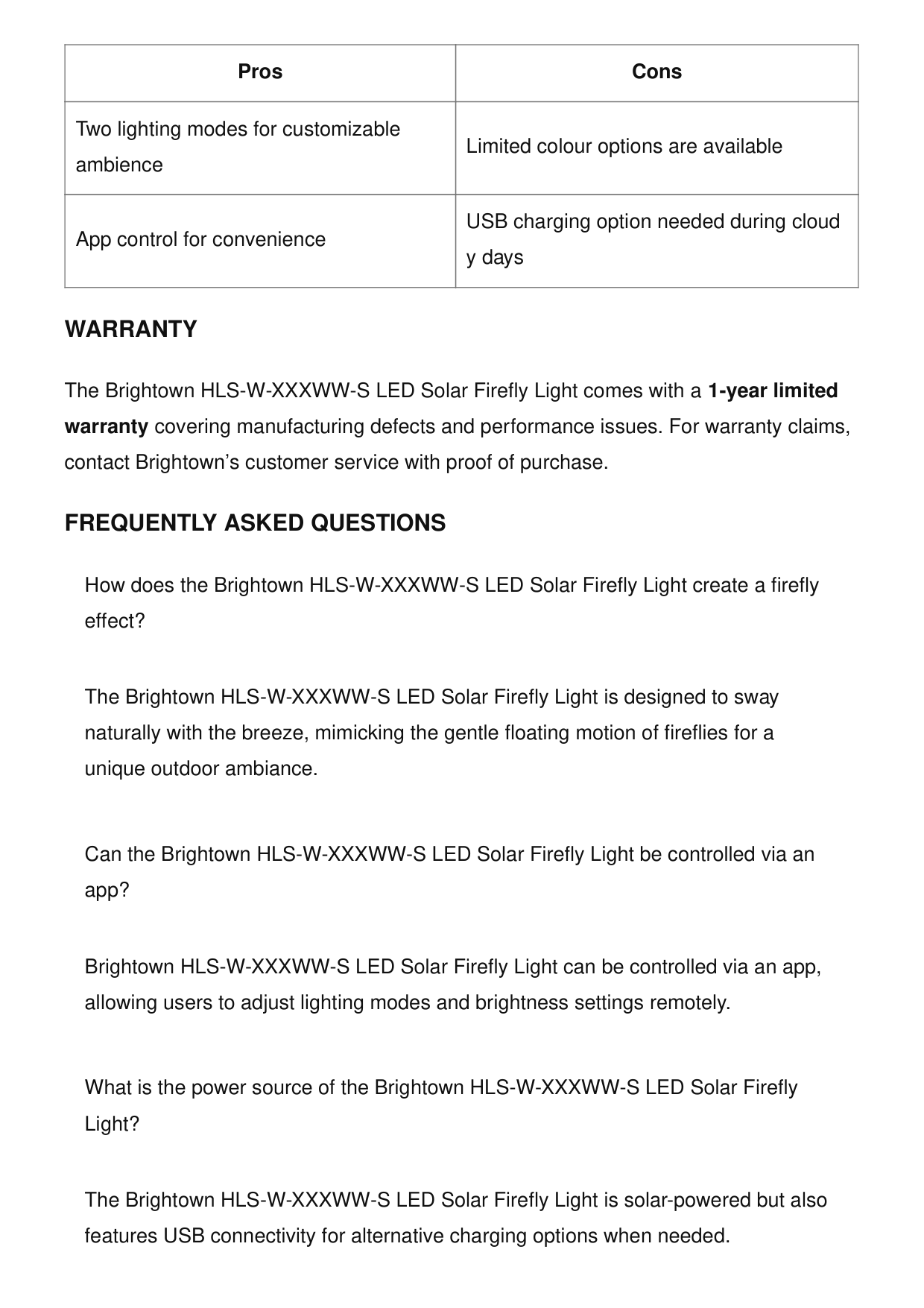
Two lighting modes for customizable ambience Limited colour options are available App control for convenience USB charging option needed during cloud y days Pros Cons
Warranty
The Brightown HLS-W-XXXWW-S LED Solar Firefly Light comes with a 1-year limited warranty covering manufacturing defects and performance issues. For warranty claims, contact Brightown’s customer service with proof of purchase.Frequently Asked Questions
How does the Brightown HLS-W-XXXWW-S LED Solar Firefly Light create a firefly effect? The Brightown HLS-W-XXXWW-S LED Solar Firefly Light is designed to sway naturally with the breeze, mimicking the gentle floating motion of fireflies for a unique outdoor ambiance. Can the Brightown HLS-W-XXXWW-S LED Solar Firefly Light be controlled via an app? Brightown HLS-W-XXXWW-S LED Solar Firefly Light can be controlled via an app, allowing users to adjust lighting modes and brightness settings remotely. What is the power source of the Brightown HLS-W-XXXWW-S LED Solar Firefly Light? The Brightown HLS-W-XXXWW-S LED Solar Firefly Light is solar-powered but also features USB connectivity for alternative charging options when needed.
How many LED bulbs are included in the Brightown HLS-W-XXXWW-S LED Solar Firefly Light? The Brightown HLS-W-XXXWW-S LED Solar Firefly Light includes 48 LED bulbs shaped in a G30 bulb design, providing soft and decorative illumination. Does the Brightown HLS-W-XXXWW-S LED Solar Firefly Light have different lighting modes? Brightown HLS-W-XXXWW-S LED Solar Firefly Light offers two lighting modes, allowing users to switch between static and dynamic glow effects for varied ambiance. Why is my Brightown HLS-W-XXXWW-S LED Solar Firefly Light not turning on? Ensure that the solar panel is placed in direct sunlight for at least 6-8 hours. If it still does not turn on, try charging it via USB and check if the power button is activated. Why does my Brightown HLS-W-XXXWW-S LED Solar Firefly Light not sway in the breeze? The swaying effect may be affected by placement and wind conditions. Try installing the Brightown HLS-W-XXXWW-S LED Solar Firefly Light in an open area with natural airflow to enhance the firefly effect. Why is my Brightown HLS-W-XXXWW-S LED Solar Firefly Light dim or flickering? A low battery charge can cause dimming or flickering. Ensure the solar panel is clean and receiving sufficient sunlight, or charge it using USB for better performance.
Video – Product Overview
W-XXXWW-S-LED-Solar-Firefly-Light-User-Manual.mp4 References User Manual Brightown B0BRMWBJKH, Brightown, Brightown HLS-W-XXXWW-S, HLS-W-XXXWW-S, LED Solar Firefly Light, user manual Leave a comment Your email address will not be published. Required fields are marked * Comment * Name Email Website Save my name, email, and website in this browser for the next time I comment. Post Comment
Search: e.g. whirlpool wrf535swhz
Search This website is an independent publication and is neither affiliated with nor endorsed by any of the trademark owners. The "Bluetooth®" word mark and logos are registered trademarks owned by Bluetooth SIG, Inc. The "Wi-Fi®" word mark and logos are registered trademarks owned by the Wi-Fi Alliance. Any use of these marks on this website does not imply any affiliation with or endorsement.