
Ecovacs Deebot N20 Pro Plus Robot Vacuum Cleaner
Ask AI
— answers from the official manualAnswers from the official manual.
Common questions
Common Questions
7 totalWhat should I do if my Deebot N20 Pro Plus doesn't connect to Wi-Fi?
Ensure that your mobile phone is connected to a stable 2.4GHz Wi-Fi network, the robot's power switch is on and its Wi-Fi indicator light is slowly blinking in white.
How do I troubleshoot when the cleaning cloth stops working during mopping?
Uninstall and reinstall the dust bin and reservoir, ensuring no hair or debris obstructs their movement. Check that water is added correctly to the reservoir.
What should I do if my Deebot N20 Pro Plus keeps getting error code E65?
Error code E65 typically indicates an issue with charging station placement or compatibility. Ensure there is no obstruction between the robot and docking station, and the docking station is on a stable power source.
How often should I replace the side brushes on my Deebot N20 Pro Plus?
The main brush and side brushes should ideally be replaced every six months, but visually inspect them monthly for debris accumulation which could affect performance.
How do I clean the microfiber cleaning cloth on the Deebot?
To wash the microfiber cloth, detach it from the robot and place it in a mild detergent solution, then air dry. Wash once every 2-4 weeks or as needed.
What safety precautions should I take before operating my Deebot N20 Pro Plus?
Ensure that no one under age eight or individuals lacking the ability and experience is around when using it. Remove small objects from floor, secure rug fringes and lift curtains off ground.
Show 1 more questions
Full Manual
15 pages
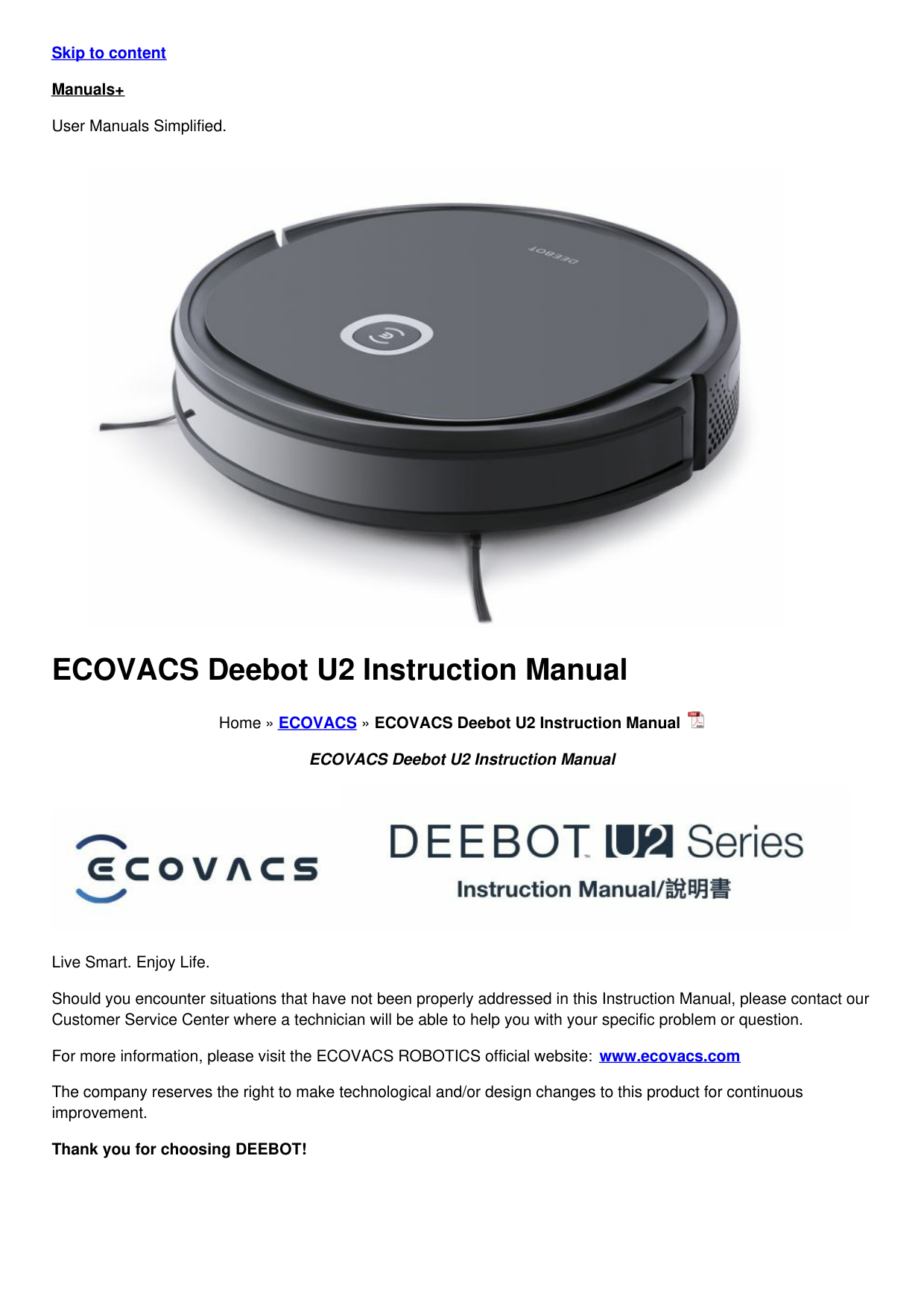
Skip to content Manuals+ User Manuals Simplified.

ECOVACS Deebot U2 Instruction Manual

Home » ECOVACS » ECOVACS Deebot U2 Instruction Manual
ECOVACS Deebot U2 Instruction Manual


Live Smart. Enjoy Life. Should you encounter situations that have not been properly addressed in this Instruction Manual, please contact our Customer Service Center where a technician will be able to help you with your specific problem or question. For more information, please visit the ECOVACS ROBOTICS official website: www.ecovacs.com The company reserves the right to make technological and/or design changes to this product for continuous improvement. Thank you for choosing DEEBOT!
Contents [ hide
Important Safety Instructions When using an electrical Appliance, basic precautions should always be followed, including the following: READ ALL INSTRUCTIONS BEFORE USING THIS APPLIANCE
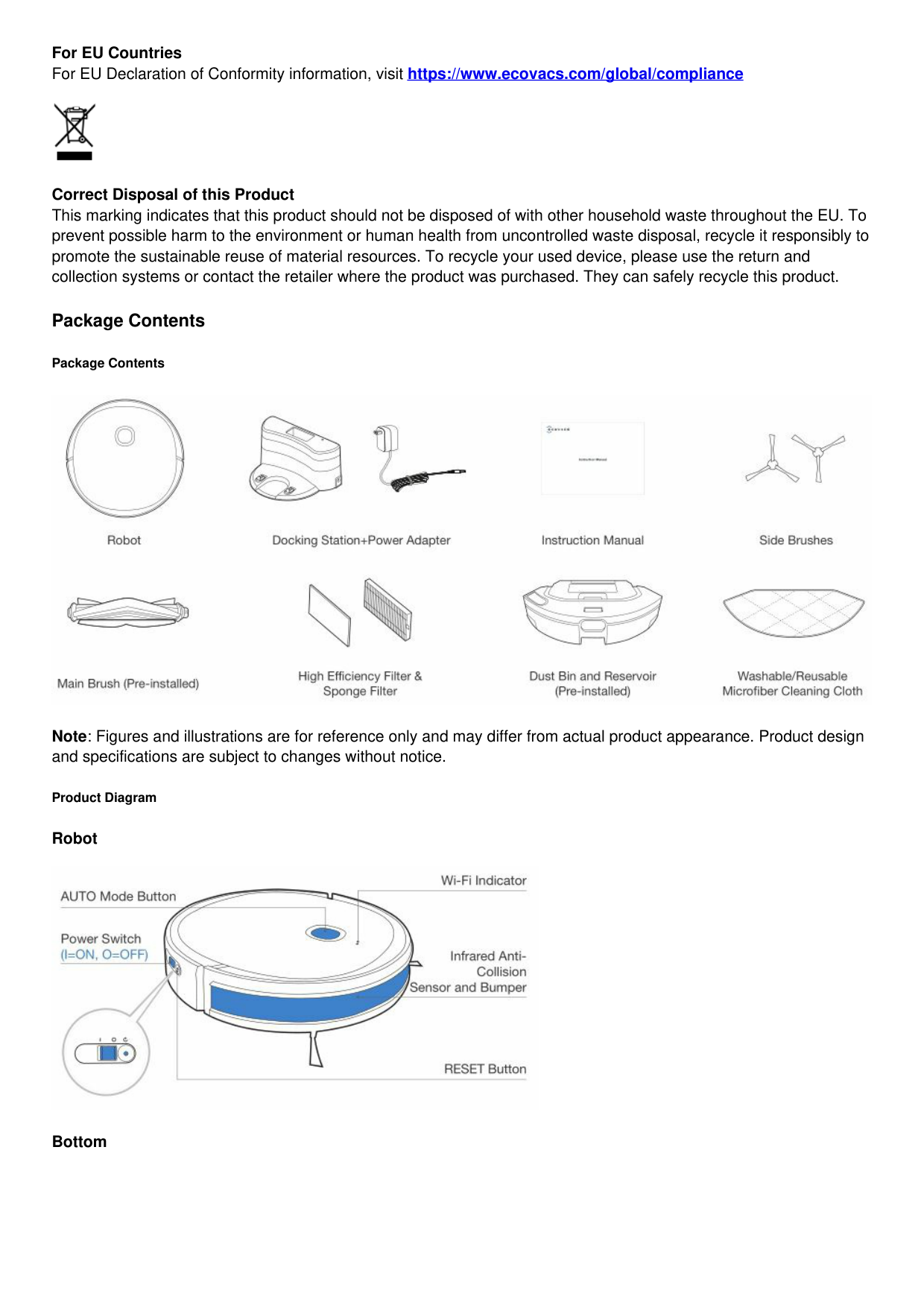
To satisfy RF exposure requirements, a separation distance of 20 cm or more should be maintained between this device and persons during device operation.
To ensure compliance, operations at closer than this distance is not recommended. The antenna used for this transmitter must not be co-located in conjunction with any other antenna or transmitter.

For EU Countries For EU Declaration of Conformity information, visit https://www.ecovacs.com/global/compliance

Correct Disposal of this Product This marking indicates that this product should not be disposed of with other household waste throughout the EU. To prevent possible harm to the environment or human health from uncontrolled waste disposal, recycle it responsibly to promote the sustainable reuse of material resources. To recycle your used device, please use the return and collection systems or contact the retailer where the product was purchased. They can safely recycle this product.
Package Contents
Package Contents

Note: Figures and illustrations are for reference only and may differ from actual product appearance. Product design and specifications are subject to changes without notice.
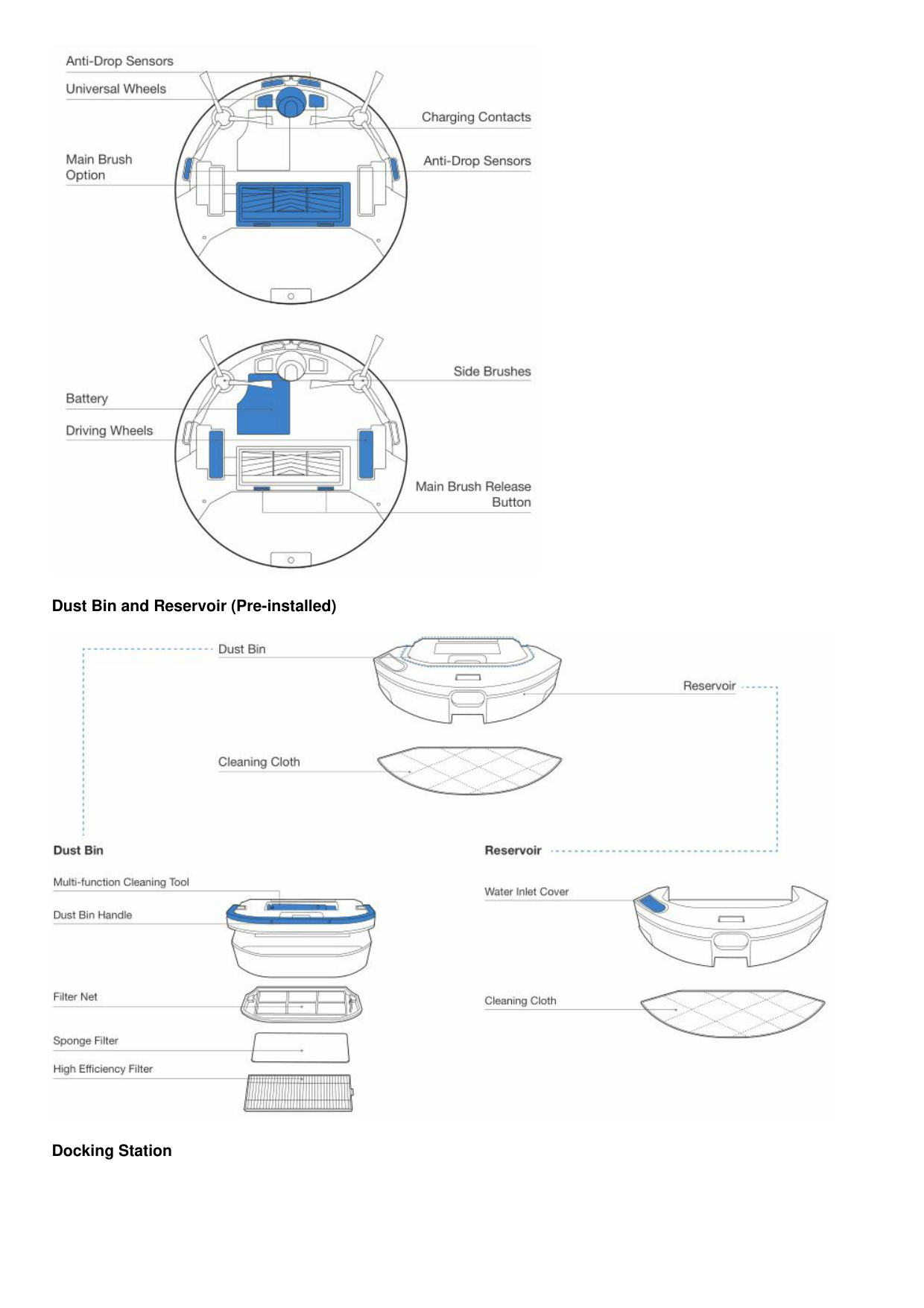
Product Diagram
Robot

Bottom

Dust Bin and Reservoir (Pre-installed)

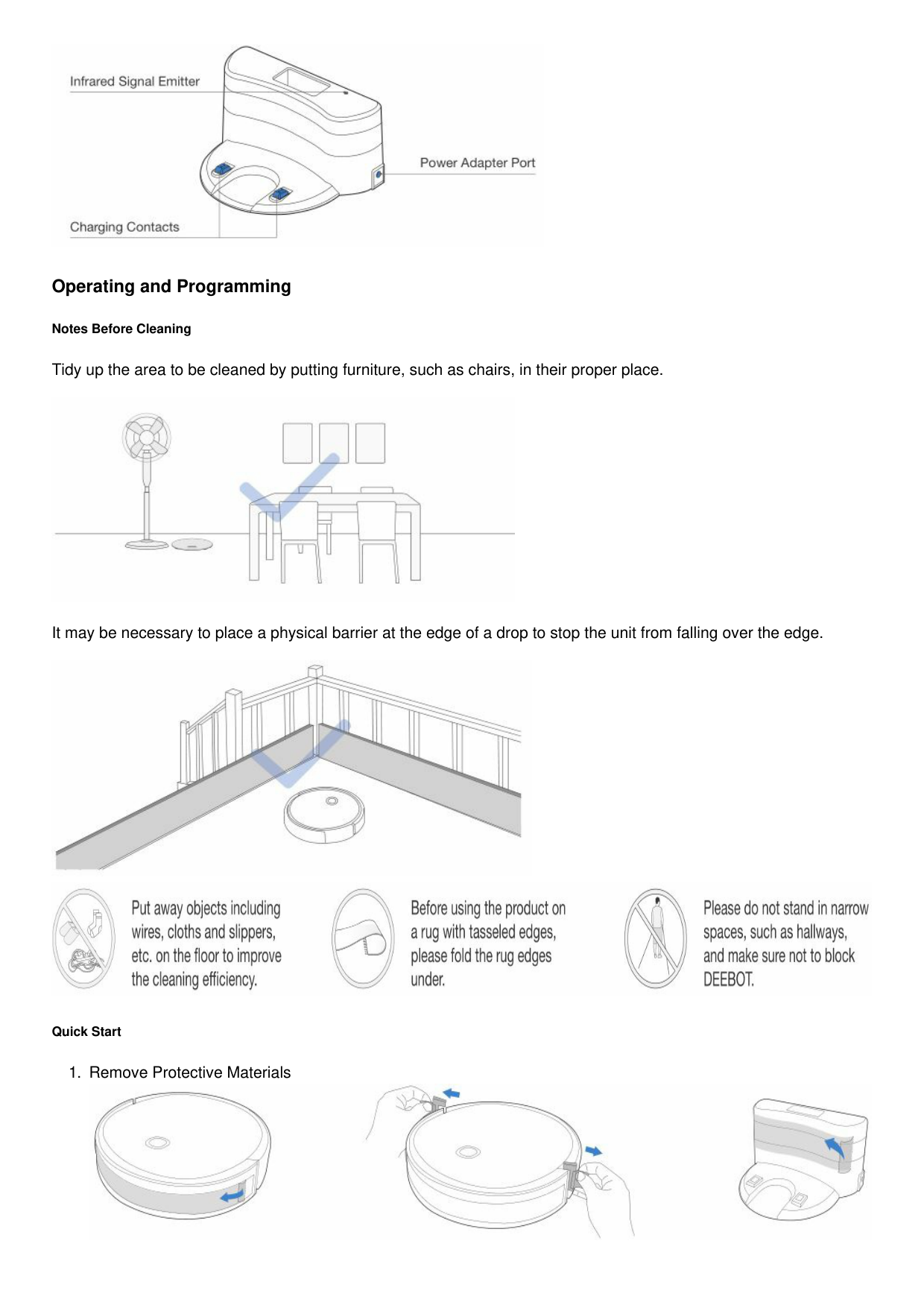
Docking Station

Operating and Programming
Notes Before Cleaning
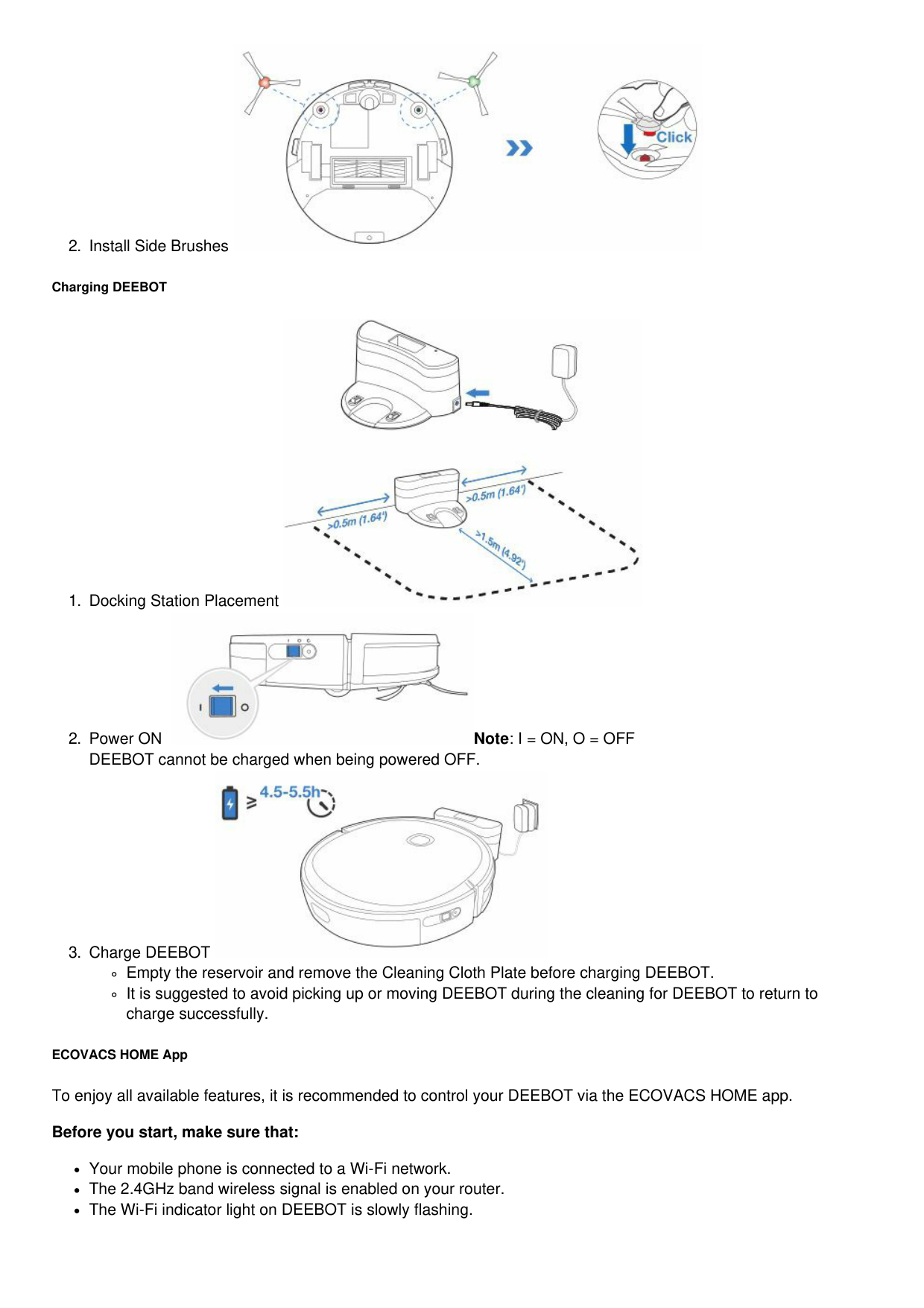
Tidy up the area to be cleaned by putting furniture, such as chairs, in their proper place.

It may be necessary to place a physical barrier at the edge of a drop to stop the unit from falling over the edge.


Quick Start


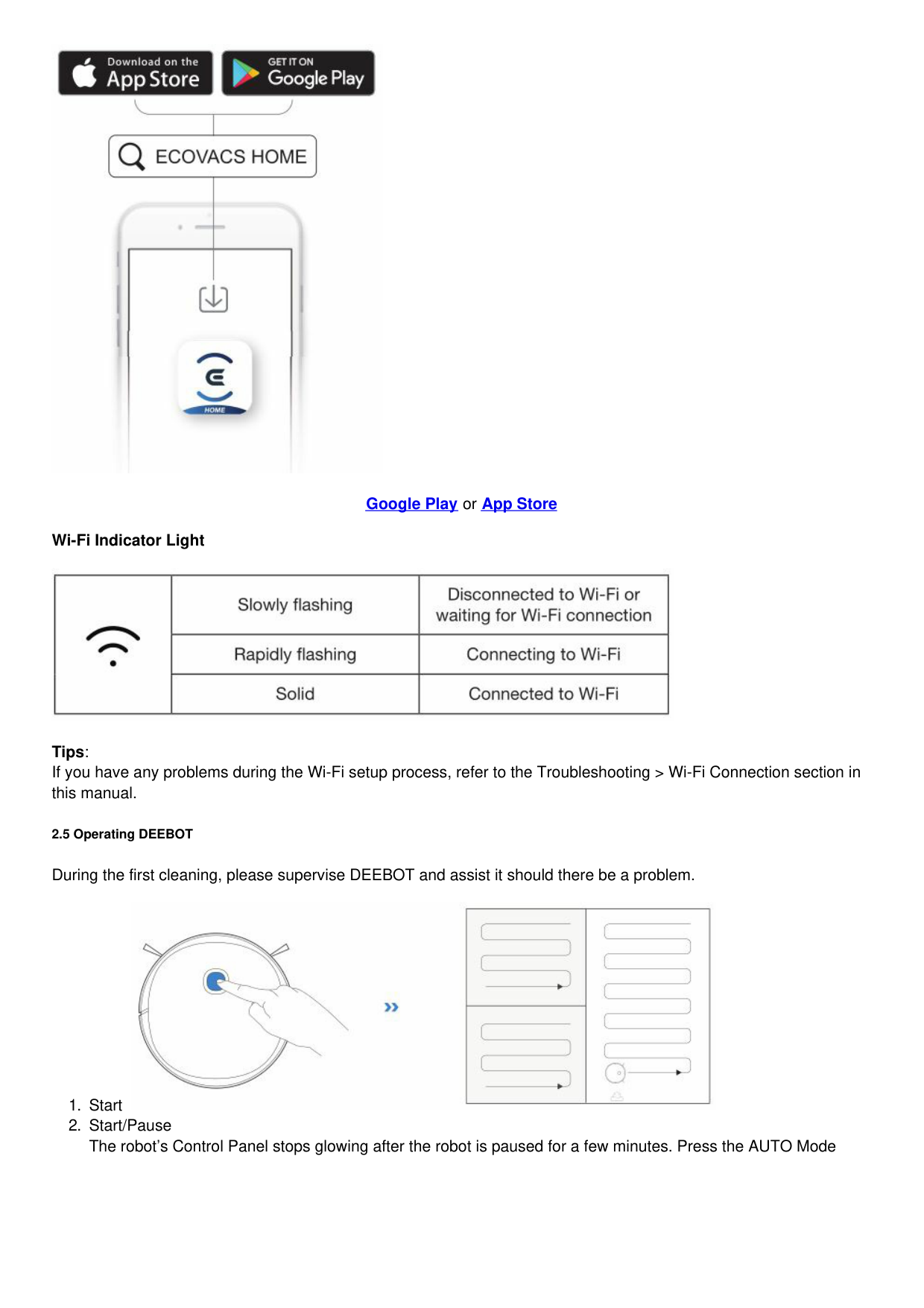
Charging DEEBOT


Empty the reservoir and remove the Cleaning Cloth Plate before charging DEEBOT.
It is suggested to avoid picking up or moving DEEBOT during the cleaning for DEEBOT to return to charge successfully.
ECOVACS HOME App To enjoy all available features, it is recommended to control your DEEBOT via the ECOVACS HOME app. Before you start, make sure that:
Your mobile phone is connected to a Wi-Fi network.
The 2.4GHz band wireless signal is enabled on your router.
The Wi-Fi indicator light on DEEBOT is slowly flashing.

Google Play or App Store Wi-Fi Indicator Light

Tips: If you have any problems during the Wi-Fi setup process, refer to the Troubleshooting > Wi-Fi Connection section in this manual.
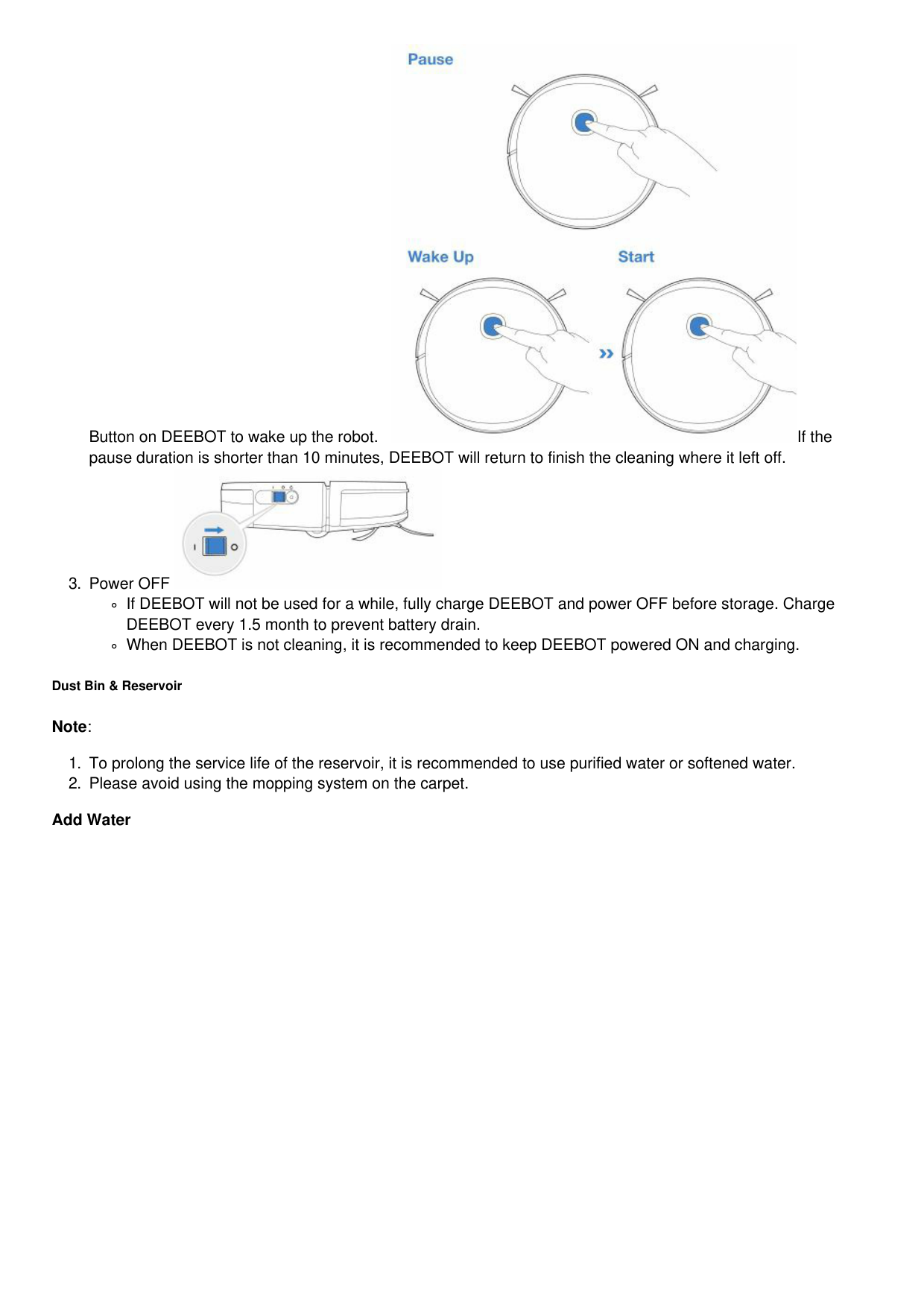
2.5 Operating DEEBOT
During the first cleaning, please supervise DEEBOT and assist it should there be a problem.

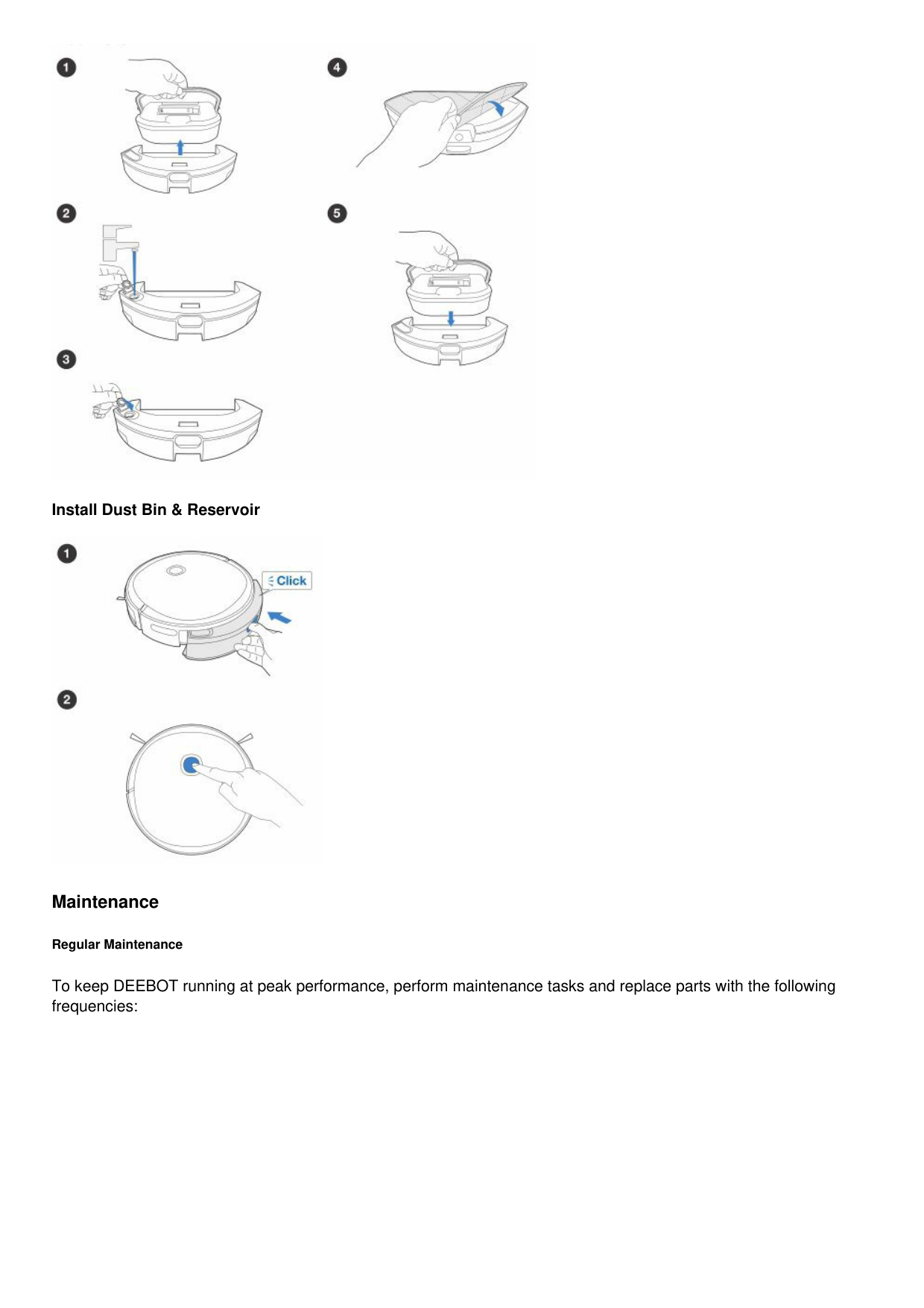


If DEEBOT will not be used for a while, fully charge DEEBOT and power OFF before storage. Charge DEEBOT every 1.5 month to prevent battery drain.
When DEEBOT is not cleaning, it is recommended to keep DEEBOT powered ON and charging.
Dust Bin & Reservoir
Note:
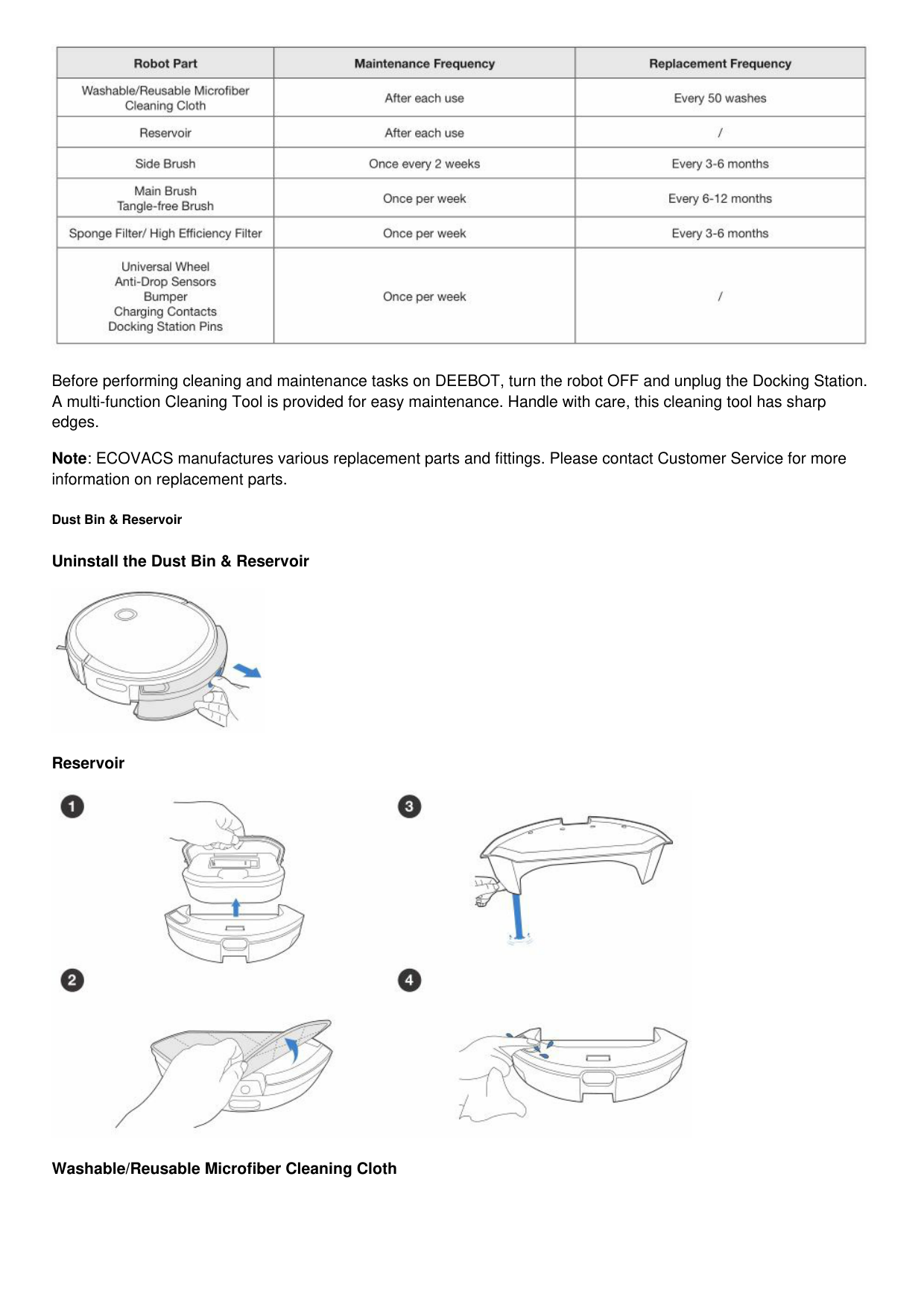
Add Water

Install Dust Bin & Reservoir

Maintenance
Regular Maintenance
To keep DEEBOT running at peak performance, perform maintenance tasks and replace parts with the following frequencies:

Before performing cleaning and maintenance tasks on DEEBOT, turn the robot OFF and unplug the Docking Station. A multi-function Cleaning Tool is provided for easy maintenance. Handle with care, this cleaning tool has sharp edges.
Note: ECOVACS manufactures various replacement parts and fittings. Please contact Customer Service for more information on replacement parts.
Dust Bin & Reservoir
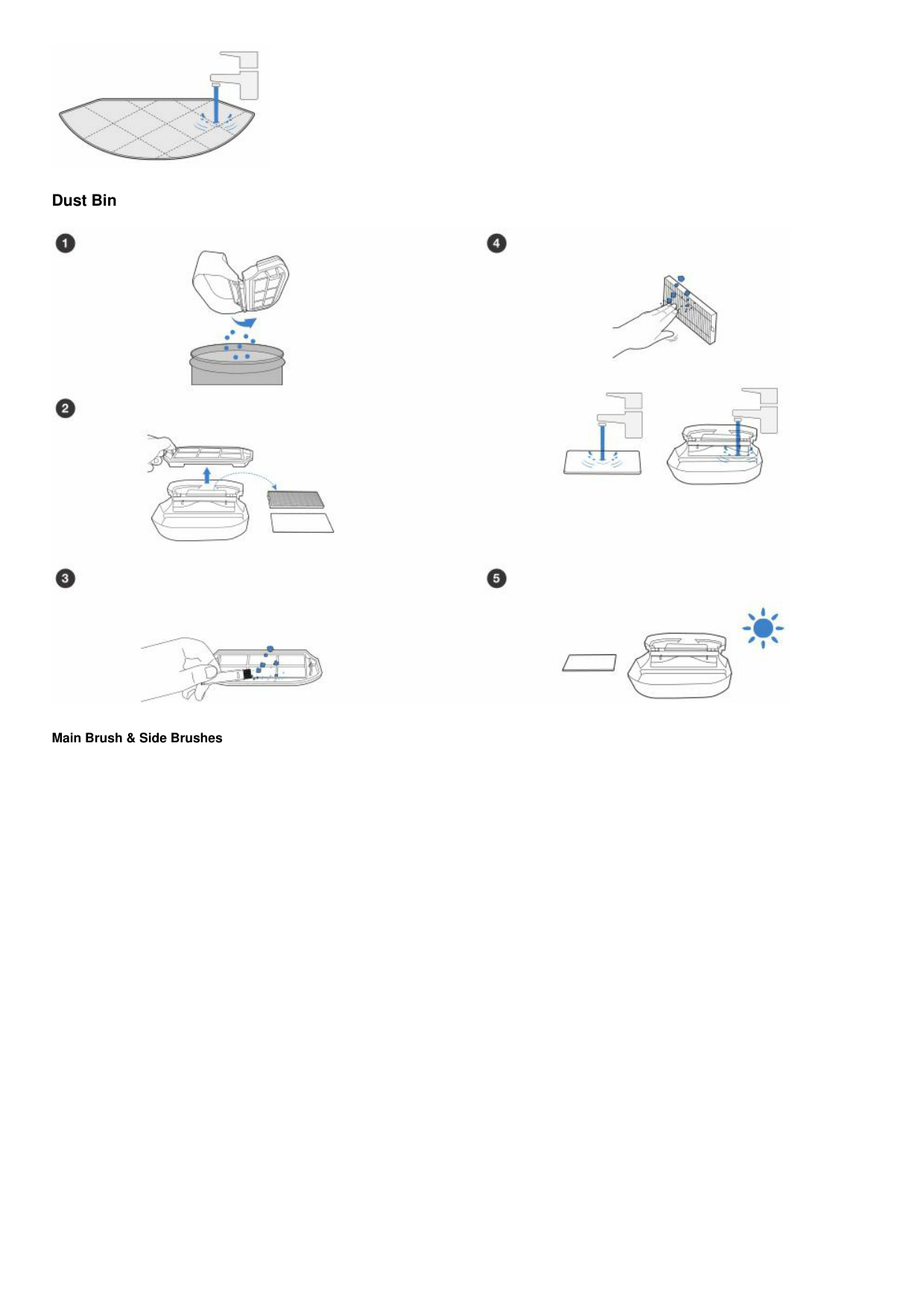
Uninstall the Dust Bin & Reservoir

Reservoir

Washable/Reusable Microfiber Cleaning Cloth

Dust Bin

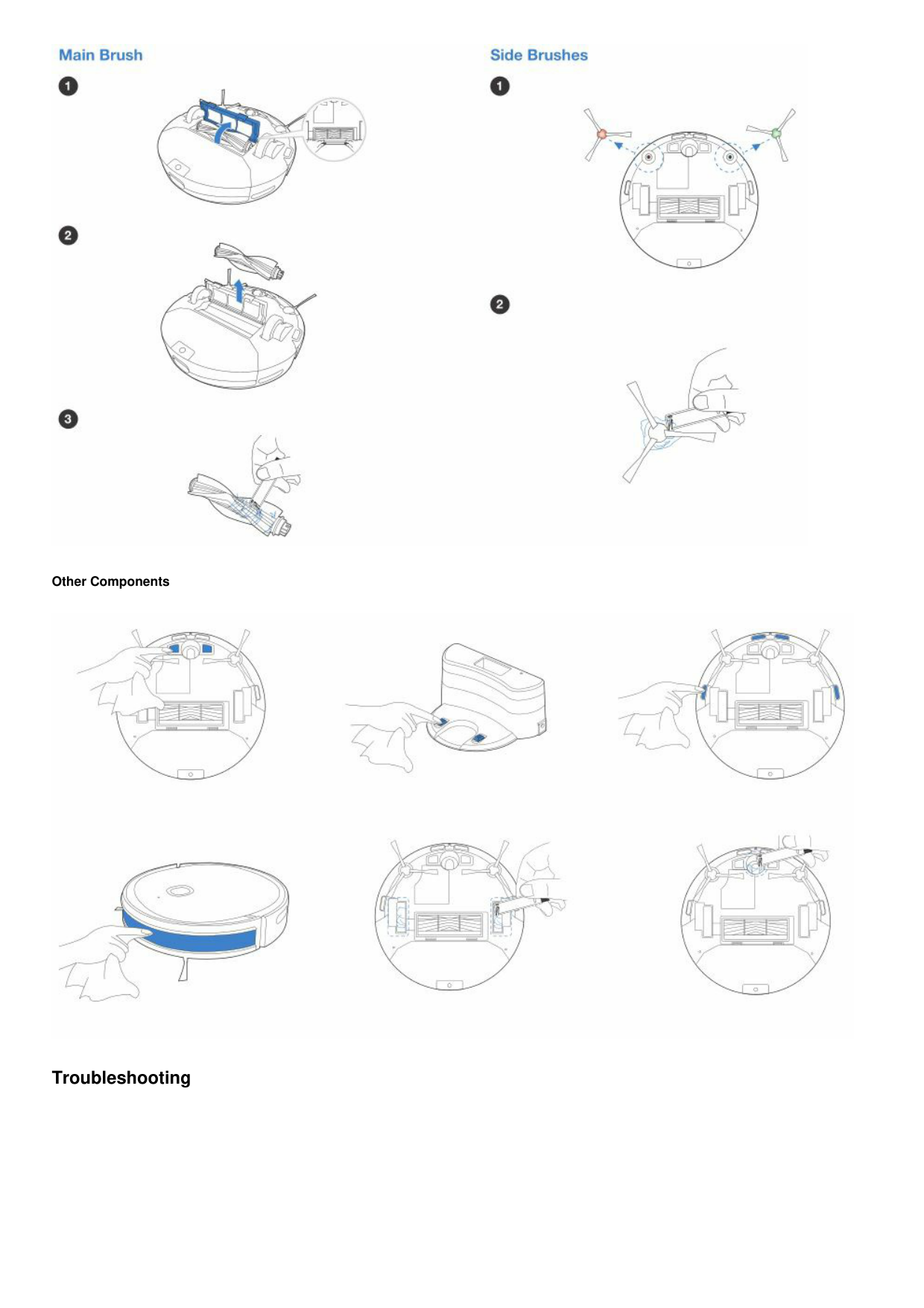
Main Brush & Side Brushes

Other Components

Troubleshooting


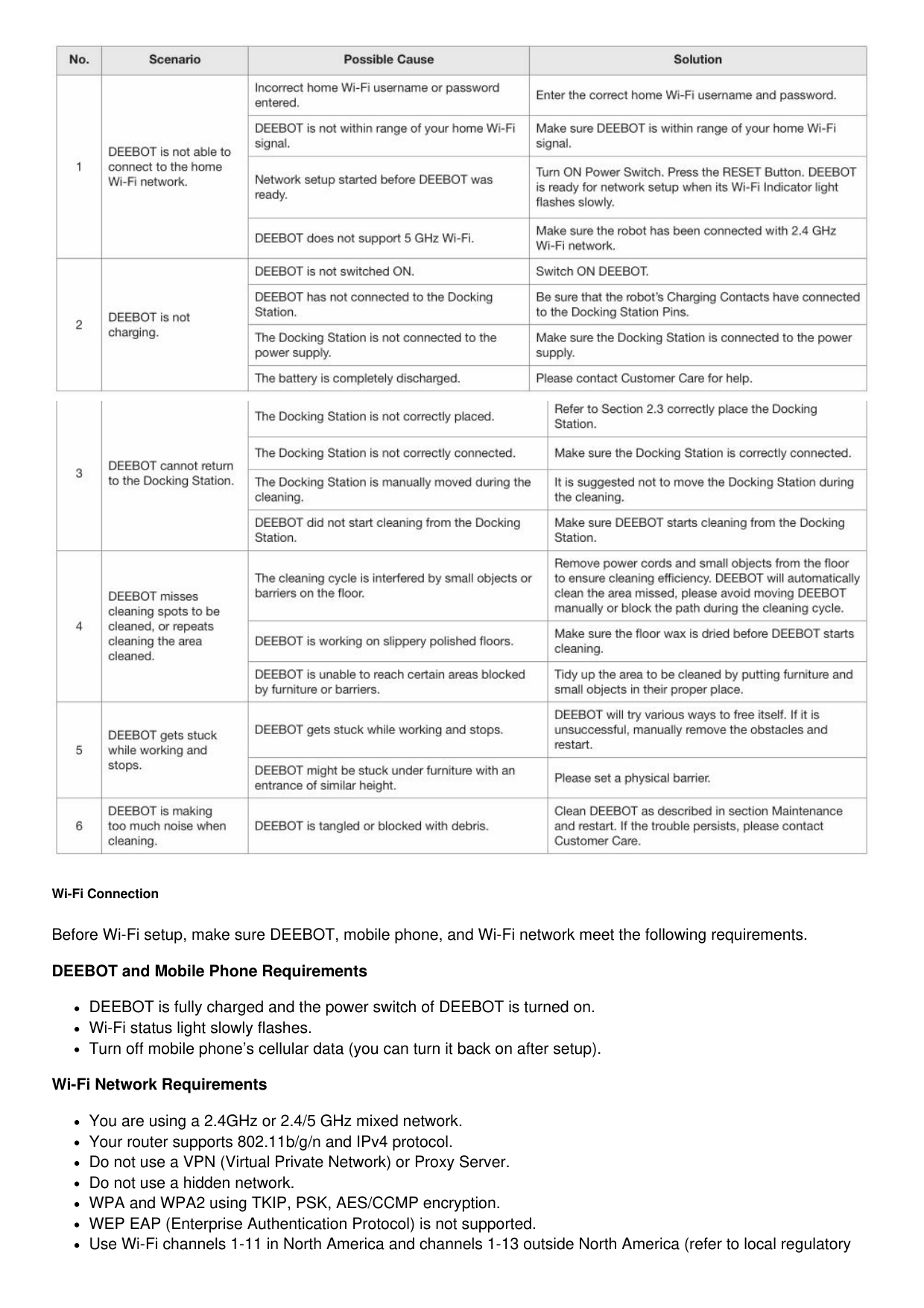
Wi-Fi Connection Before Wi-Fi setup, make sure DEEBOT, mobile phone, and Wi-Fi network meet the following requirements. DEEBOT and Mobile Phone Requirements
DEEBOT is fully charged and the power switch of DEEBOT is turned on.
Wi-Fi status light slowly flashes.
Turn off mobile phone’s cellular data (you can turn it back on after setup). Wi-Fi Network Requirements
You are using a 2.4GHz or 2.4/5 GHz mixed network.
Your router supports 802.11b/g/n and IPv4 protocol.
Do not use a VPN (Virtual Private Network) or Proxy Server.
Do not use a hidden network.
WPA and WPA2 using TKIP, PSK, AES/CCMP encryption.
WEP EAP (Enterprise Authentication Protocol) is not supported.
Use Wi-Fi channels 1-11 in North America and channels 1-13 outside North America (refer to local regulatory
agency).
If you are using a network extender/repeater, the network name (SSID) and password are the same as your primary network.
Product Specifications

Ecovacs Robotics Co., Ltd. No. 18 You Xiang Road, Wuzhong District, Suzhou City, Jiangsu Province, P.R.China
File Downloads

Instruction Manual Deebot U2
Download [optimized] Download
References

Robot Vacuum Cleaners | Auto Cleaning Robots - ECOVACS Product Compliance - ECOVACS Website
