Fisher Paykel Myairvo 2 Humidified High Flow Generator System manual
Generators · 10 Q&As

Fisher Paykel Myairvo 2 Humidified High Flow Generator System

Ask AI

— answers from the official manual

Answers from the official manual.

Common questions

Common Questions

10 total
Show 4 more questions

Full Manual

33 pages
Page 1

AIRVO™2

Technical Manual

![image 1](FQWdOL4c2kWuO1IW_images/imageFile1.png)

############### This page has intentionally been left blank.

BEFORE YOU START

This Technical Manual is intended for clinical engineering / technical personnel. It defines the technical specifications, setup, servicing and troubleshooting information, for the AIRVO 2 humidifier. It applies to all lot numbers from 140910 and above.

######### OTHER REFERENCES

  • • Refer to the AIRVO 2 User Manual for detailed instructions for use.
  • • Watch the AIRVO 2 DVD to learn how to set up and use the AIRVO 2. Also available on YouTube.
  • • Download the AIRVO 2 Simulator App to learn how to use the AIRVO 2. You can change settings, simulate faults and test your skills. Available from the Apple, Google Play and Windows App stores.
  • • Visit the Fisher & Paykel education & resources website (https://www.fphcare.co.nz/education/) to find self-paced online courses and local training events.
  • • If the unit is ever used by multiple patients, the unit must be cleaned and disinfected between patients according to instructions in the Disinfection Kit Manual (900PT600).
  • • For further assistance, please contact your Fisher & Paykel Healthcare representative.
  • ![image 2](FQWdOL4c2kWuO1IW_images/imageFile2.png)

    TABLE OF CONTENTS

  • 1. General information ................................................................................................................................. 4 Package contents ....................................................................................................................................................................... 4 AIRVO 2 and accessories ........................................................................................................................................................ 5
  • 2. Setting up AIRVO 2 for first use ......................................................................................................... 6 Advanced settings ..................................................................................................................................................................... 8
  • 3. Acceptance/performance checks ...................................................................................................... 13
  • 4. Servicing ...................................................................................................................................................... 15
  • 5. Spare Parts .................................................................................................................................................. 16
  • Appendix A: IEC 60601-1-2 EMC tables ................................................................................................ 19
  • Appendix B: User interface flow charts ................................................................................................ 21
  • Appendix C: Default values ........................................................................................................................ 23
  • Appendix D: Troubleshooting Guide ...................................................................................................... 24
  • Appendix E: Tube and Chamber Kit labels .......................................................................................... 30
  • Appendix F: Error Flowchart ..................................................................................................................... 30
  • 1. GENERAL INFORMATION

    The AIRVO 2 is a humidifier with integrated flow generator that delivers warmed and humidified respiratory gases to spontaneously breathing patients through a variety of patient interfaces.

    ######### PACKAGE CONTENTS

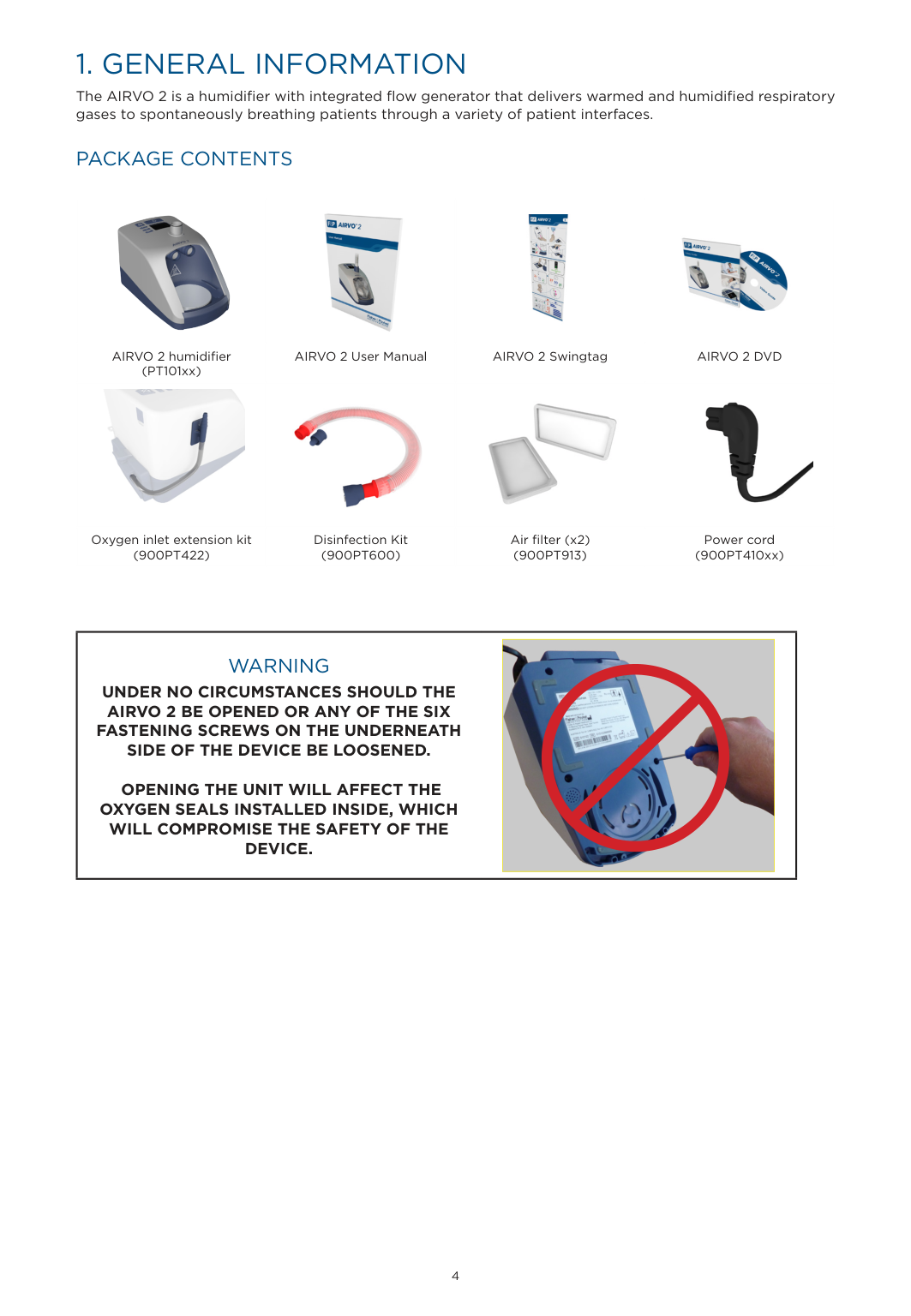
    |![image 3](FQWdOL4c2kWuO1IW_images/imageFile3.png)|![image 4](FQWdOL4c2kWuO1IW_images/imageFile4.png)|![image 5](FQWdOL4c2kWuO1IW_images/imageFile5.png)|![image 6](FQWdOL4c2kWuO1IW_images/imageFile6.png)| |---|---|---|---| |AIRVO 2 humidifier (PT101xx)|AIRVO 2 User Manual|AIRVO 2 Swingtag|AIRVO 2 DVD| |![image 7](FQWdOL4c2kWuO1IW_images/imageFile7.png)|![image 8](FQWdOL4c2kWuO1IW_images/imageFile8.png)|![image 9](FQWdOL4c2kWuO1IW_images/imageFile9.png)|![image 10](FQWdOL4c2kWuO1IW_images/imageFile10.png)| |Oxygen inlet extension kit (900PT422)|Disinfection Kit (900PT600)|Air filter (x2) (900PT913)|Power cord (900PT410xx)|

    |WARNING UNDER NO CIRCUMSTANCES SHOULD THE AIRVO 2 BE OPENED OR ANY OF THE SIX FASTENING SCREWS ON THE UNDERNEATH SIDE OF THE DEVICE BE LOOSENED.

    OPENING THE UNIT WILL AFFECT THE OXYGEN SEALS INSTALLED INSIDE, WHICH WILL COMPROMISE THE SAFETY OF THE DEVICE.

    |![image 11](FQWdOL4c2kWuO1IW_images/imageFile11.png)| |---| | |---|

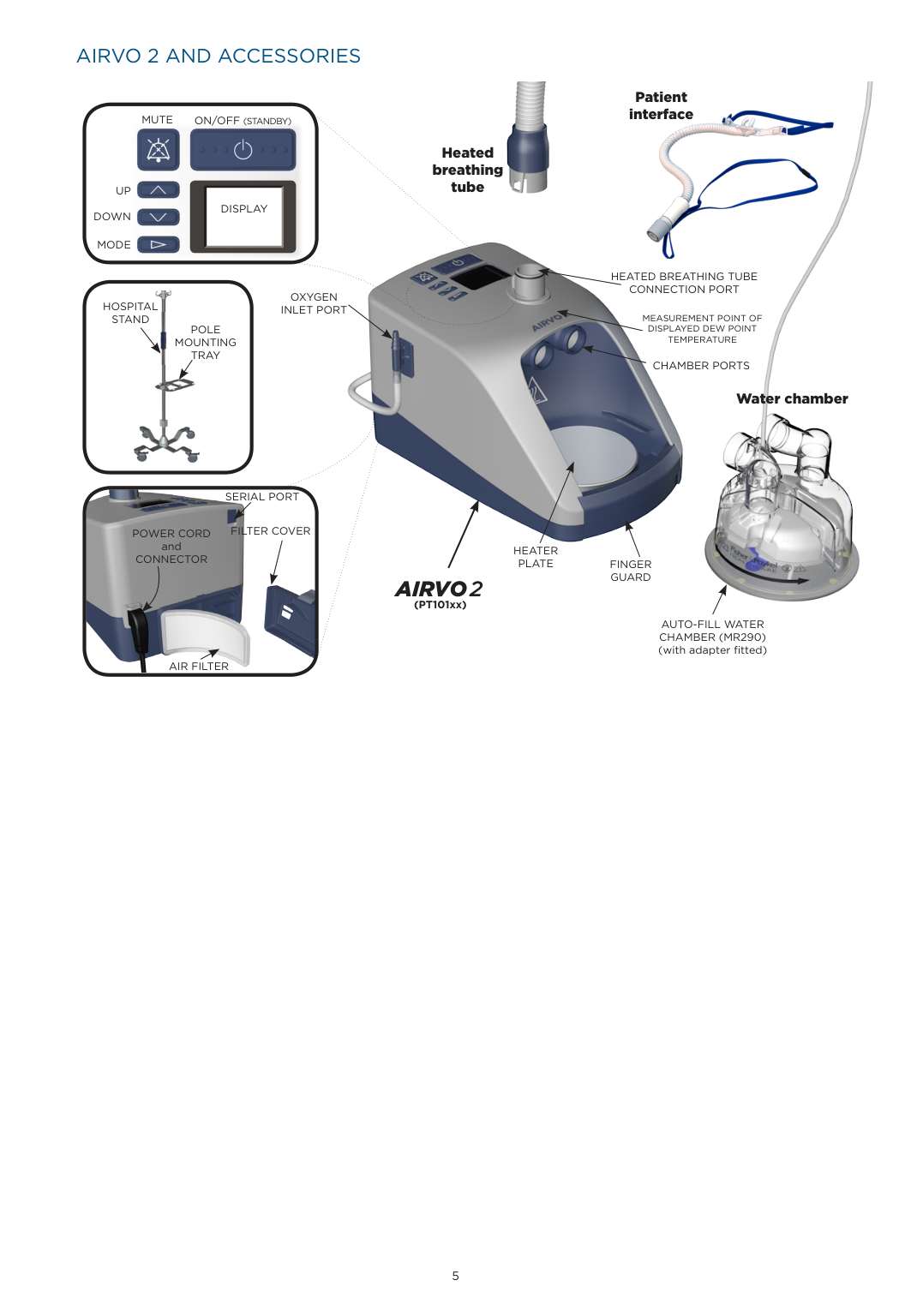
    ######### AIRVO 2 AND ACCESSORIES

    Page 2

    ![image 12](FQWdOL4c2kWuO1IW_images/imageFile12.png)

    ![image 13](FQWdOL4c2kWuO1IW_images/imageFile13.png)

    Patient interfaceON/OFF(STANDBY)MUTE

    ![image 14](FQWdOL4c2kWuO1IW_images/imageFile14.png)

    Heated breathing tube

    UP DOWN

    DISPLAY

    MODE

    HEATED BREATHING TUBE CONNECTION PORT

    ![image 15](FQWdOL4c2kWuO1IW_images/imageFile15.png)

    OXYGEN INLET PORT

    HOSPITAL STAND

    ![image 16](FQWdOL4c2kWuO1IW_images/imageFile16.png)

    MEASUREMENT POINT OF DISPLAYED DEW POINT TEMPERATURE

    POLE MOUNTING TRAY

    CHAMBER PORTS

    Water chamber

    ![image 17](FQWdOL4c2kWuO1IW_images/imageFile17.png)

    SERIAL PORT

    FILTER COVERPOWER CORD

    and CONNECTOR

    HEATER

    PLATE FINGER GUARD

    ####### AIRVO2

    (PT101xx)

    AUTO-FILL WATER CHAMBER (MR290) (with adapter fitted)

    AIR FILTER

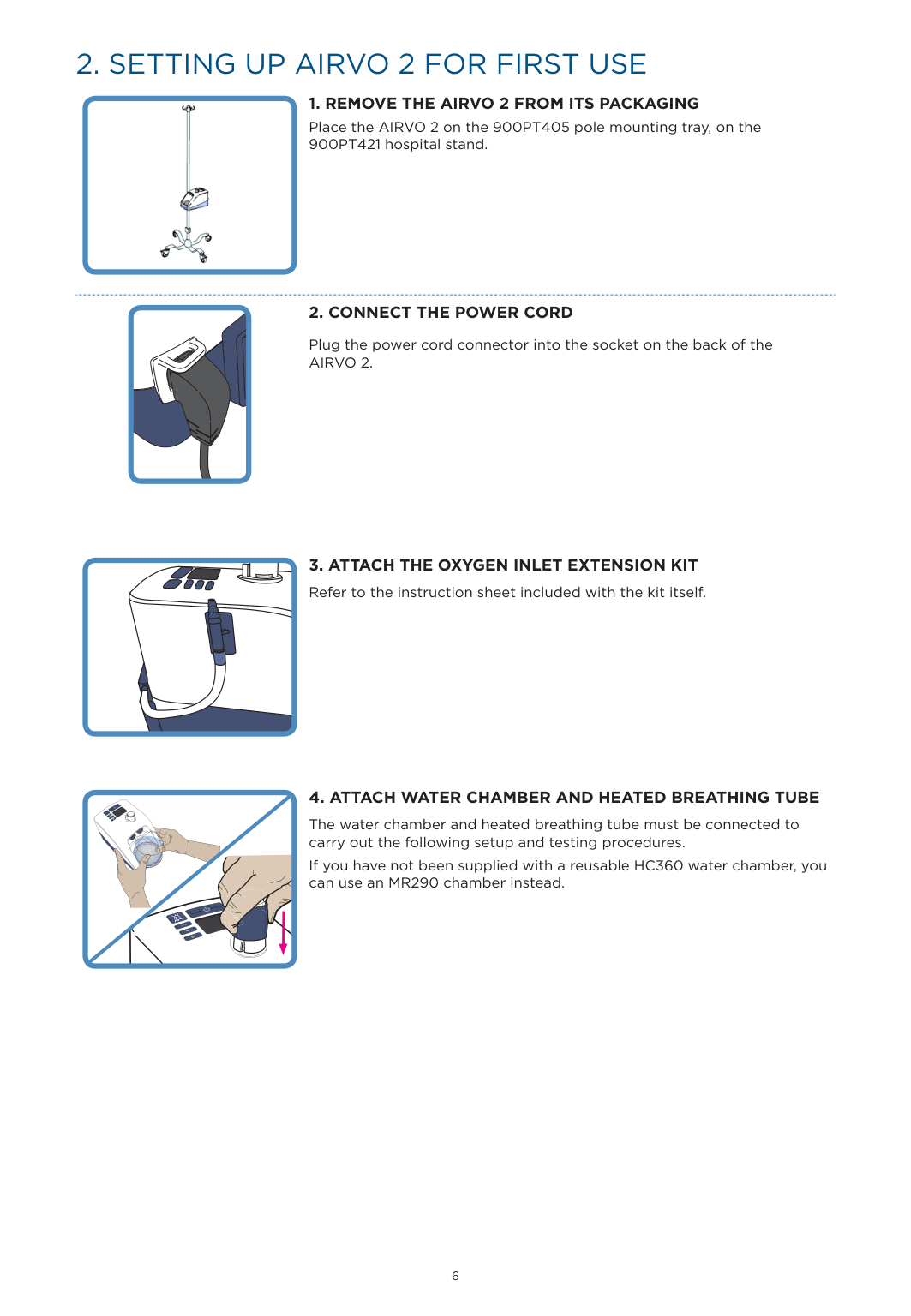
    2. SETTING UP AIRVO 2 FOR FIRST USE

  • 1. REMOVE THE AIRVO 2 FROM ITS PACKAGING
  • Place the AIRVO 2 on the 900PT405 pole mounting tray, on the 900PT421 hospital stand.
    Page 3

  • 2. CONNECT THE POWER CORD
  • Plug the power cord connector into the socket on the back of the AIRVO 2.

  • 3. ATTACH THE OXYGEN INLET EXTENSION KIT Refer to the instruction sheet included with the kit itself.
  • 4. ATTACH WATER CHAMBER AND HEATED BREATHING TUBE
  • ![image 18](FQWdOL4c2kWuO1IW_images/imageFile18.png)

    The water chamber and heated breathing tube must be connected to carry out the following setup and testing procedures. If you have not been supplied with a reusable HC360 water chamber, you can use an MR290 chamber instead.

    |![image 19](FQWdOL4c2kWuO1IW_images/imageFile19.png)| |---|

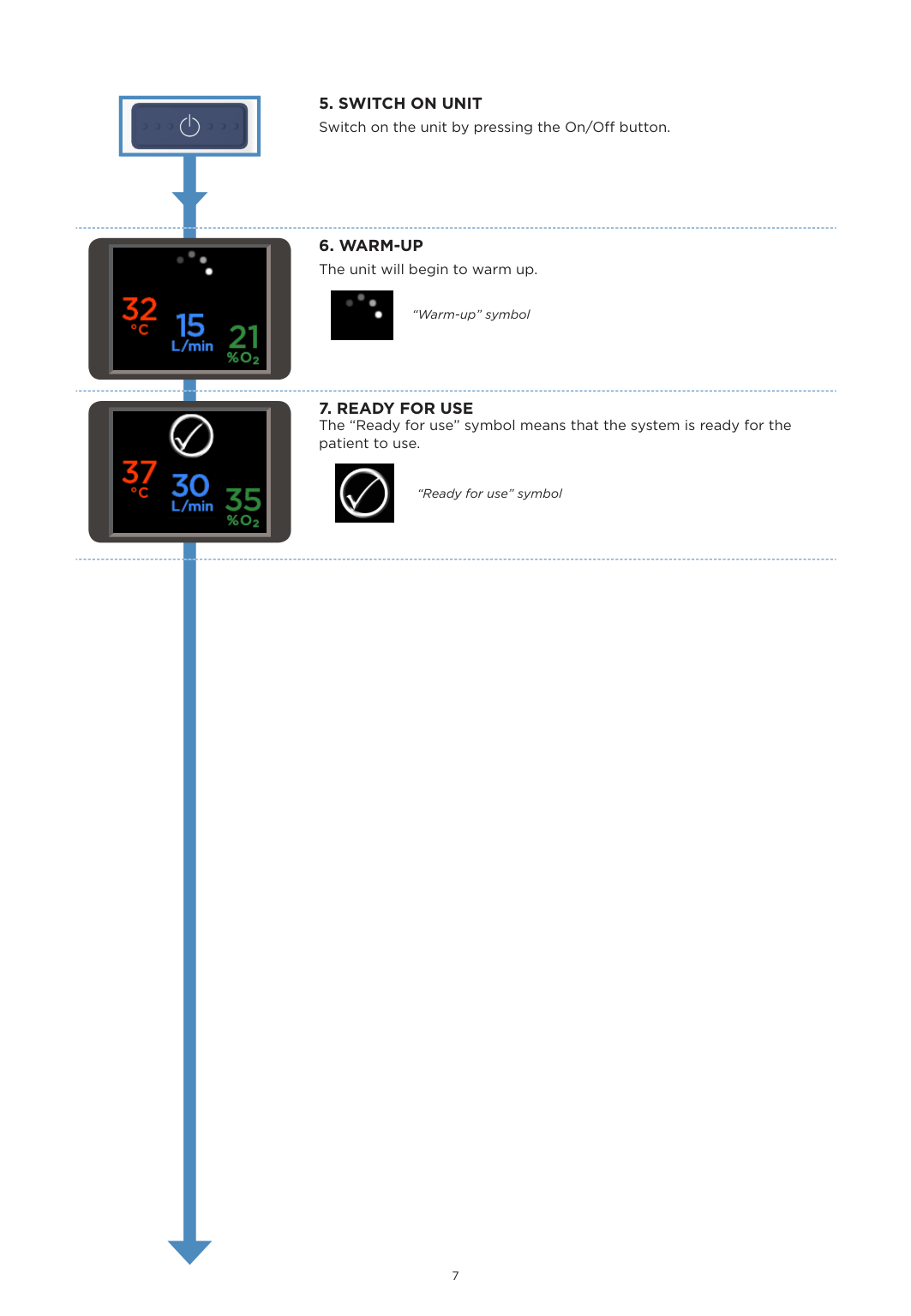
  • 5. SWITCH ON UNIT Switch on the unit by pressing the On/Off button.
  • ![image 20](FQWdOL4c2kWuO1IW_images/imageFile20.png)

  • 6. WARM-UP The unit will begin to warm up.
  • ![image 21](FQWdOL4c2kWuO1IW_images/imageFile21.png)

    “Warm-up” symbol

    ![image 22](FQWdOL4c2kWuO1IW_images/imageFile22.png)

  • 7. READY FOR USE The “Ready for use” symbol means that the system is ready for the patient to use.
  • ![image 23](FQWdOL4c2kWuO1IW_images/imageFile23.png)

    “Ready for use” symbol

    ![image 24](FQWdOL4c2kWuO1IW_images/imageFile24.png)

    | | |---|

    ![image 25](FQWdOL4c2kWuO1IW_images/imageFile25.png)

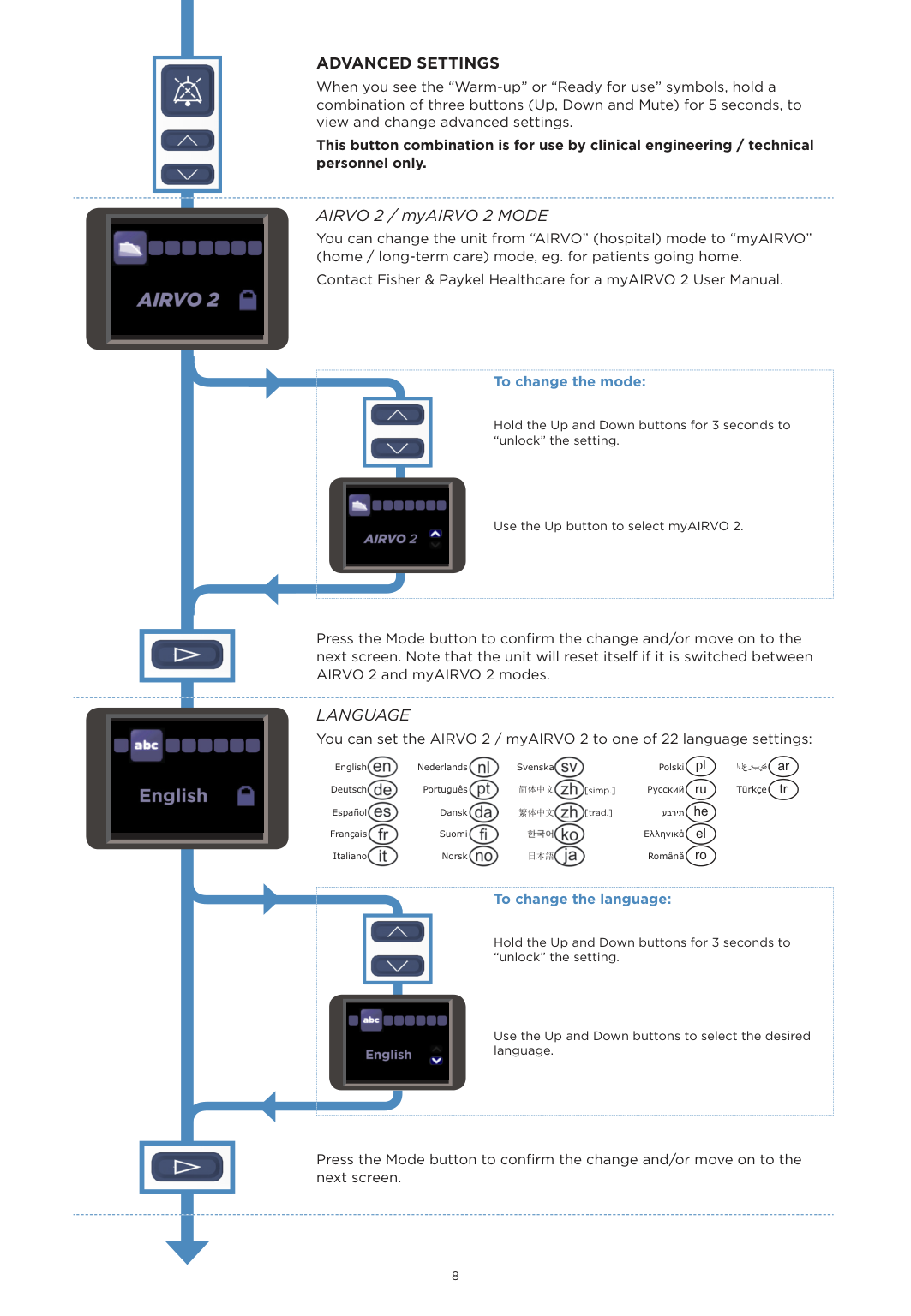
    ADVANCED SETTINGS When you see the “Warm-up” or “Ready for use” symbols, hold a combination of three buttons (Up, Down and Mute) for 5 seconds, to view and change advanced settings.

    This button combination is for use by clinical engineering / technical personnel only.

    AIRVO 2 / myAIRVO 2 MODE You can change the unit from “AIRVO” (hospital) mode to “myAIRVO” (home / long-term care) mode, eg. for patients going home. Contact Fisher & Paykel Healthcare for a myAIRVO 2 User Manual.

    | | | |---|---| | |![image 26](FQWdOL4c2kWuO1IW_images/imageFile26.png)|

    ![image 27](FQWdOL4c2kWuO1IW_images/imageFile27.png)

    ############## To change the mode:

    Hold the Up and Down buttons for 3 seconds to “unlock” the setting.
    Page 4

    Use the Up button to select myAIRVO 2.

    ![image 28](FQWdOL4c2kWuO1IW_images/imageFile28.png)

    | | |---|

    ![image 29](FQWdOL4c2kWuO1IW_images/imageFile29.png)

    Press the Mode button to confirm the change and/or move on to the next screen. Note that the unit will reset itself if it is switched between AIRVO 2 and myAIRVO 2 modes.

    LANGUAGE You can set the AIRVO 2 / myAIRVO 2 to one of 22 language settings:

    ![image 30](FQWdOL4c2kWuO1IW_images/imageFile30.png)

    ![image 31](FQWdOL4c2kWuO1IW_images/imageFile31.png)

    ![image 32](FQWdOL4c2kWuO1IW_images/imageFile32.png)

    English Nederlands Svenska Polski pl العربية ar Deutsch Português 简体中文 [simp.] Русский ru Türkçe tr Español Dansk 繁体中文 [trad.] עברית he Français Suomi Ελληνικά el

    ![image 33](FQWdOL4c2kWuO1IW_images/imageFile33.png)

    ![image 34](FQWdOL4c2kWuO1IW_images/imageFile34.png)

    ![image 35](FQWdOL4c2kWuO1IW_images/imageFile35.png)

    ![image 36](FQWdOL4c2kWuO1IW_images/imageFile36.png)

    ![image 37](FQWdOL4c2kWuO1IW_images/imageFile37.png)

    ![image 38](FQWdOL4c2kWuO1IW_images/imageFile38.png)

    ![image 39](FQWdOL4c2kWuO1IW_images/imageFile39.png)

    ![image 40](FQWdOL4c2kWuO1IW_images/imageFile40.png)

    ![image 41](FQWdOL4c2kWuO1IW_images/imageFile41.png)

    ![image 42](FQWdOL4c2kWuO1IW_images/imageFile42.png)

    ![image 43](FQWdOL4c2kWuO1IW_images/imageFile43.png)

    ![image 44](FQWdOL4c2kWuO1IW_images/imageFile44.png)

    ![image 45](FQWdOL4c2kWuO1IW_images/imageFile45.png)

    Italiano Norsk 日本語 Română ro

    | | | |---|---| |![image 46](FQWdOL4c2kWuO1IW_images/imageFile46.png)| |

    ![image 47](FQWdOL4c2kWuO1IW_images/imageFile47.png)

    ############## To change the language:

    Hold the Up and Down buttons for 3 seconds to “unlock” the setting.
    Page 5

    Use the Up and Down buttons to select the desired language.

    ![image 48](FQWdOL4c2kWuO1IW_images/imageFile48.png)

    | | |---|

    Press the Mode button to confirm the change and/or move on to the next screen.

    ![image 49](FQWdOL4c2kWuO1IW_images/imageFile49.png)

    ############## 95

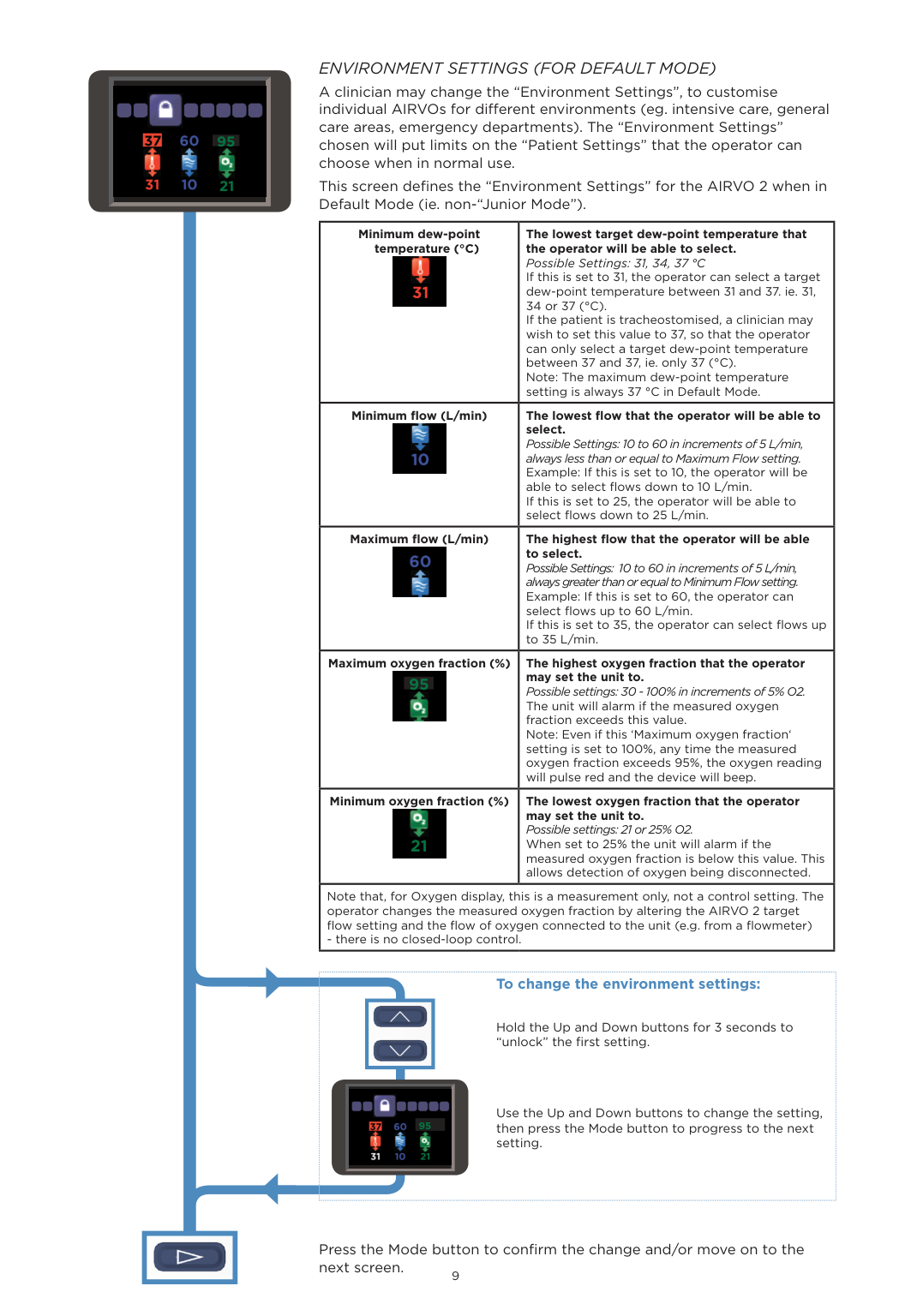
    ENVIRONMENT SETTINGS (FOR DEFAULT MODE) A clinician may change the “Environment Settings”, to customise individual AIRVOs for different environments (eg. intensive care, general care areas, emergency departments). The “Environment Settings” chosen will put limits on the “Patient Settings” that the operator can choose when in normal use. This screen defines the “Environment Settings” for the AIRVO 2 when in Default Mode (ie. non-“Junior Mode”).

    |Minimum dew-point temperature (°C)

    ![image 50](FQWdOL4c2kWuO1IW_images/imageFile50.png)|The lowest target dew-point temperature that the operator will be able to select. Possible Settings: 31, 34, 37 °C If this is set to 31, the operator can select a target dew-point temperature between 31 and 37. ie. 31, 34 or 37 (°C). If the patient is tracheostomised, a clinician may wish to set this value to 37, so that the operator can only select a target dew-point temperature between 37 and 37, ie. only 37 (°C). Note: The maximum dew-point temperature setting is always 37 °C in Default Mode.| |---|---| |Minimum flow (L/min)

    ![image 51](FQWdOL4c2kWuO1IW_images/imageFile51.png)|The lowest flow that the operator will be able to select. Possible Settings: 10 to 60 in increments of 5 L/min, always less than or equal to Maximum Flow setting. Example: If this is set to 10, the operator will be able to select flows down to 10 L/min. If this is set to 25, the operator will be able to select flows down to 25 L/min.| |Maximum flow (L/min)

    ![image 52](FQWdOL4c2kWuO1IW_images/imageFile52.png)|The highest flow that the operator will be able to select. Possible Settings: 10 to 60 in increments of 5 L/min, always greater than or equal to Minimum Flow setting. Example: If this is set to 60, the operator can select flows up to 60 L/min. If this is set to 35, the operator can select flows up to 35 L/min.| |Maximum oxygen fraction (%) 95

    ![image 53](FQWdOL4c2kWuO1IW_images/imageFile53.png)

    |The highest oxygen fraction that the operator may set the unit to. Possible settings: 30 - 100% in increments of 5% O2. The unit will alarm if the measured oxygen fraction exceeds this value. Note: Even if this ‘Maximum oxygen fraction‘ setting is set to 100%, any time the measured oxygen fraction exceeds 95%, the oxygen reading will pulse red and the device will beep.| |Minimum oxygen fraction (%)

    ![image 54](FQWdOL4c2kWuO1IW_images/imageFile54.png)|The lowest oxygen fraction that the operator may set the unit to. Possible settings: 21 or 25% O2. When set to 25% the unit will alarm if the measured oxygen fraction is below this value. This allows detection of oxygen being disconnected.| |Note that, for Oxygen display, this is a measurement only, not a control setting. The operator changes the measured oxygen fraction by altering the AIRVO 2 target flow setting and the flow of oxygen connected to the unit (e.g. from a flowmeter)

    - there is no closed-loop control.|Note that, for Oxygen display, this is a measurement only, not a control setting. The operator changes the measured oxygen fraction by altering the AIRVO 2 target flow setting and the flow of oxygen connected to the unit (e.g. from a flowmeter)

    - there is no closed-loop control.|

    | | | |---|---| | |![image 55](FQWdOL4c2kWuO1IW_images/imageFile55.png)

    95|

    ![image 56](FQWdOL4c2kWuO1IW_images/imageFile56.png)

    ############## To change the environment settings:

    Hold the Up and Down buttons for 3 seconds to “unlock” the first setting.

    Use the Up and Down buttons to change the setting, then press the Mode button to progress to the next setting.

    ![image 57](FQWdOL4c2kWuO1IW_images/imageFile57.png)

    | | |---|

    Press the Mode button to confirm the change and/or move on to the next screen.

    ![image 58](FQWdOL4c2kWuO1IW_images/imageFile58.png)

    ############# 95

    100

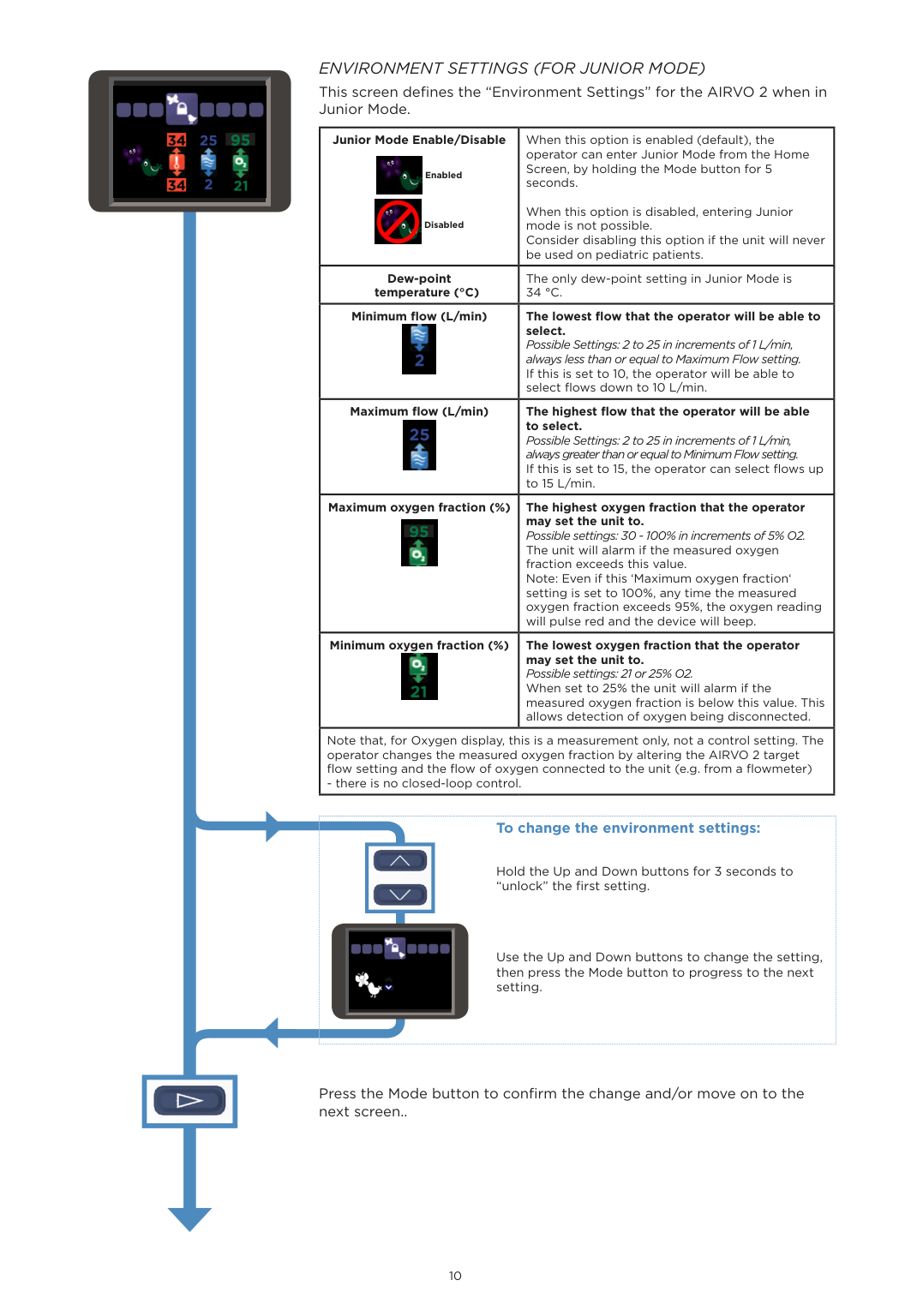
    ENVIRONMENT SETTINGS (FOR JUNIOR MODE) This screen defines the “Environment Settings” for the AIRVO 2 when in Junior Mode.

    |Junior Mode Enable/Disable

    ![image 59](FQWdOL4c2kWuO1IW_images/imageFile59.png)

    Enabled

    ![image 60](FQWdOL4c2kWuO1IW_images/imageFile60.png)

    Disabled|When this option is enabled (default), the operator can enter Junior Mode from the Home Screen, by holding the Mode button for 5 seconds.

    When this option is disabled, entering Junior mode is not possible. Consider disabling this option if the unit will never be used on pediatric patients.| |---|---| |Dew-point temperature (°C)|The only dew-point setting in Junior Mode is 34 °C.| |Minimum flow (L/min)

    ![image 61](FQWdOL4c2kWuO1IW_images/imageFile61.png)|The lowest flow that the operator will be able to select. Possible Settings: 2 to 25 in increments of 1 L/min, always less than or equal to Maximum Flow setting. If this is set to 10, the operator will be able to select flows down to 10 L/min.| |Maximum flow (L/min)

    ![image 62](FQWdOL4c2kWuO1IW_images/imageFile62.png)|The highest flow that the operator will be able to select. Possible Settings: 2 to 25 in increments of 1 L/min, always greater than or equal to Minimum Flow setting. If this is set to 15, the operator can select flows up to 15 L/min.| |Maximum oxygen fraction (%) 95

    ![image 63](FQWdOL4c2kWuO1IW_images/imageFile63.png)

    |The highest oxygen fraction that the operator may set the unit to. Possible settings: 30 - 100% in increments of 5% O2. The unit will alarm if the measured oxygen fraction exceeds this value. Note: Even if this ‘Maximum oxygen fraction‘ setting is set to 100%, any time the measured oxygen fraction exceeds 95%, the oxygen reading will pulse red and the device will beep.| |Minimum oxygen fraction (%)

    ![image 64](FQWdOL4c2kWuO1IW_images/imageFile64.png)|The lowest oxygen fraction that the operator may set the unit to. Possible settings: 21 or 25% O2. When set to 25% the unit will alarm if the measured oxygen fraction is below this value. This allows detection of oxygen being disconnected.|
    Page 6

    |Note that, for Oxygen display, this is a measurement only, not a control setting. The operator changes the measured oxygen fraction by altering the AIRVO 2 target flow setting and the flow of oxygen connected to the unit (e.g. from a flowmeter)

    - there is no closed-loop control.|Note that, for Oxygen display, this is a measurement only, not a control setting. The operator changes the measured oxygen fraction by altering the AIRVO 2 target flow setting and the flow of oxygen connected to the unit (e.g. from a flowmeter)

    - there is no closed-loop control.|

    | | | |---|---| |![image 65](FQWdOL4c2kWuO1IW_images/imageFile65.png)| |

    ![image 66](FQWdOL4c2kWuO1IW_images/imageFile66.png)

    ############## To change the environment settings:

    Hold the Up and Down buttons for 3 seconds to “unlock” the first setting.

    Use the Up and Down buttons to change the setting, then press the Mode button to progress to the next setting.

    ![image 67](FQWdOL4c2kWuO1IW_images/imageFile67.png)

    | | |---|

    Press the Mode button to confirm the change and/or move on to the next screen..

    ![image 68](FQWdOL4c2kWuO1IW_images/imageFile68.png)

    ########## 25

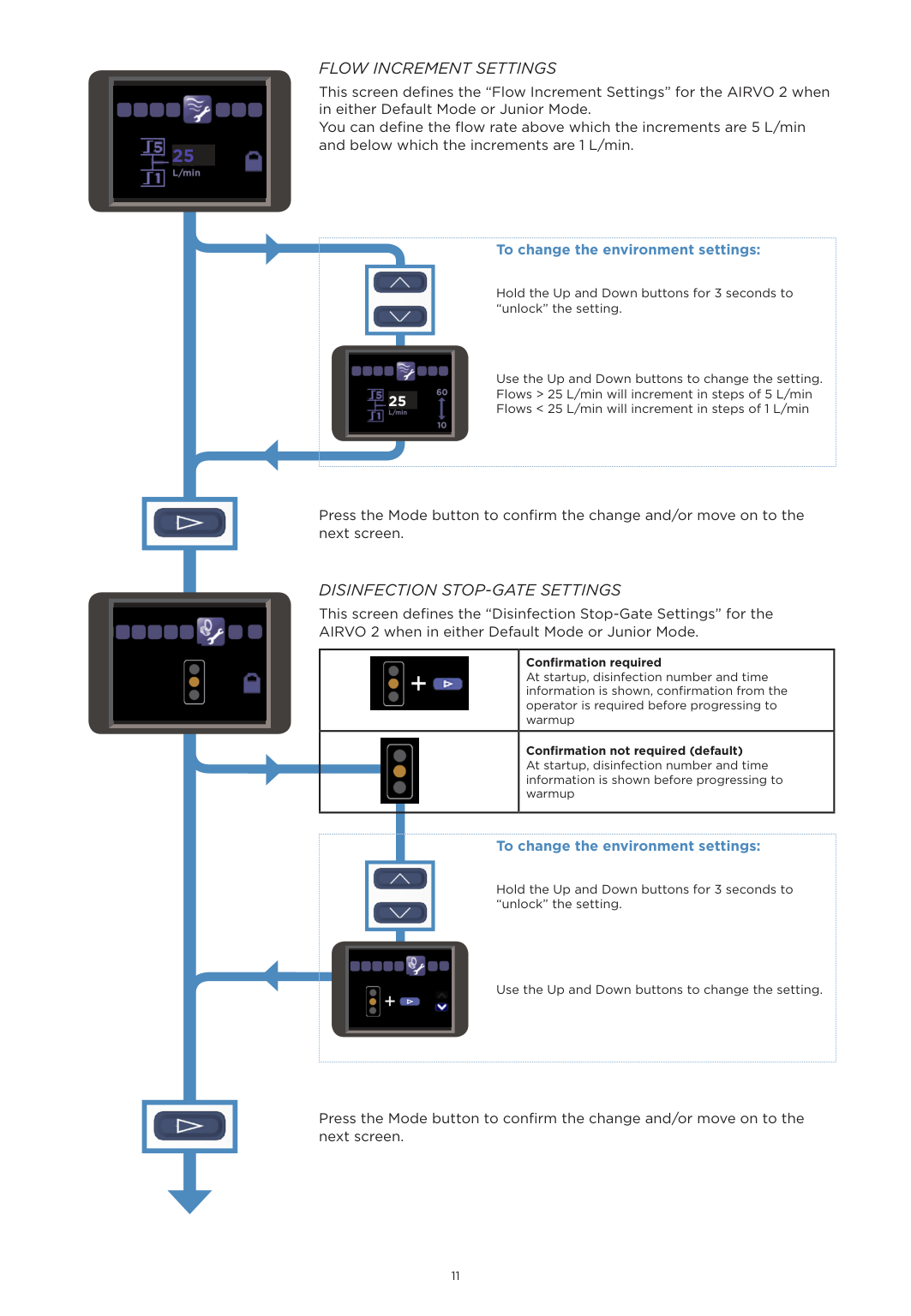
    FLOW INCREMENT SETTINGS This screen defines the “Flow Increment Settings” for the AIRVO 2 when in either Default Mode or Junior Mode. You can define the flow rate above which the increments are 5 L/min and below which the increments are 1 L/min.

    | | | |---|---| |2|![image 69](FQWdOL4c2kWuO1IW_images/imageFile69.png)

    |

    ![image 70](FQWdOL4c2kWuO1IW_images/imageFile70.png)

    ############## To change the environment settings:

    Hold the Up and Down buttons for 3 seconds to “unlock” the setting.

    Use the Up and Down buttons to change the setting. Flows > 25 L/min will increment in steps of 5 L/min Flows < 25 L/min will increment in steps of 1 L/min

    ![image 71](FQWdOL4c2kWuO1IW_images/imageFile71.png)

    | | |---|

    ![image 72](FQWdOL4c2kWuO1IW_images/imageFile72.png)

    ![image 73](FQWdOL4c2kWuO1IW_images/imageFile73.png)

    ![image 74](FQWdOL4c2kWuO1IW_images/imageFile74.png)

    ![image 75](FQWdOL4c2kWuO1IW_images/imageFile75.png)

    ![image 76](FQWdOL4c2kWuO1IW_images/imageFile76.png)

    Press the Mode button to confirm the change and/or move on to the next screen.
    Page 7

    DISINFECTION STOP-GATE SETTINGS This screen defines the “Disinfection Stop-Gate Settings” for the AIRVO 2 when in either Default Mode or Junior Mode.

    ![image 77](FQWdOL4c2kWuO1IW_images/imageFile77.png)

    ![image 78](FQWdOL4c2kWuO1IW_images/imageFile78.png)

    Confirmation required At startup, disinfection number and time information is shown, confirmation from the operator is required before progressing to warmup

    Confirmation not required (default) At startup, disinfection number and time information is shown before progressing to warmup

    ![image 79](FQWdOL4c2kWuO1IW_images/imageFile79.png)

    ![image 80](FQWdOL4c2kWuO1IW_images/imageFile80.png)

    ![image 81](FQWdOL4c2kWuO1IW_images/imageFile81.png)

    ############## To change the environment settings:

    Hold the Up and Down buttons for 3 seconds to “unlock” the setting.

    Use the Up and Down buttons to change the setting.

    ![image 82](FQWdOL4c2kWuO1IW_images/imageFile82.png)

    | | |---|

    Press the Mode button to confirm the change and/or move on to the next screen.

    ![image 83](FQWdOL4c2kWuO1IW_images/imageFile83.png)

    ![image 84](FQWdOL4c2kWuO1IW_images/imageFile84.png)

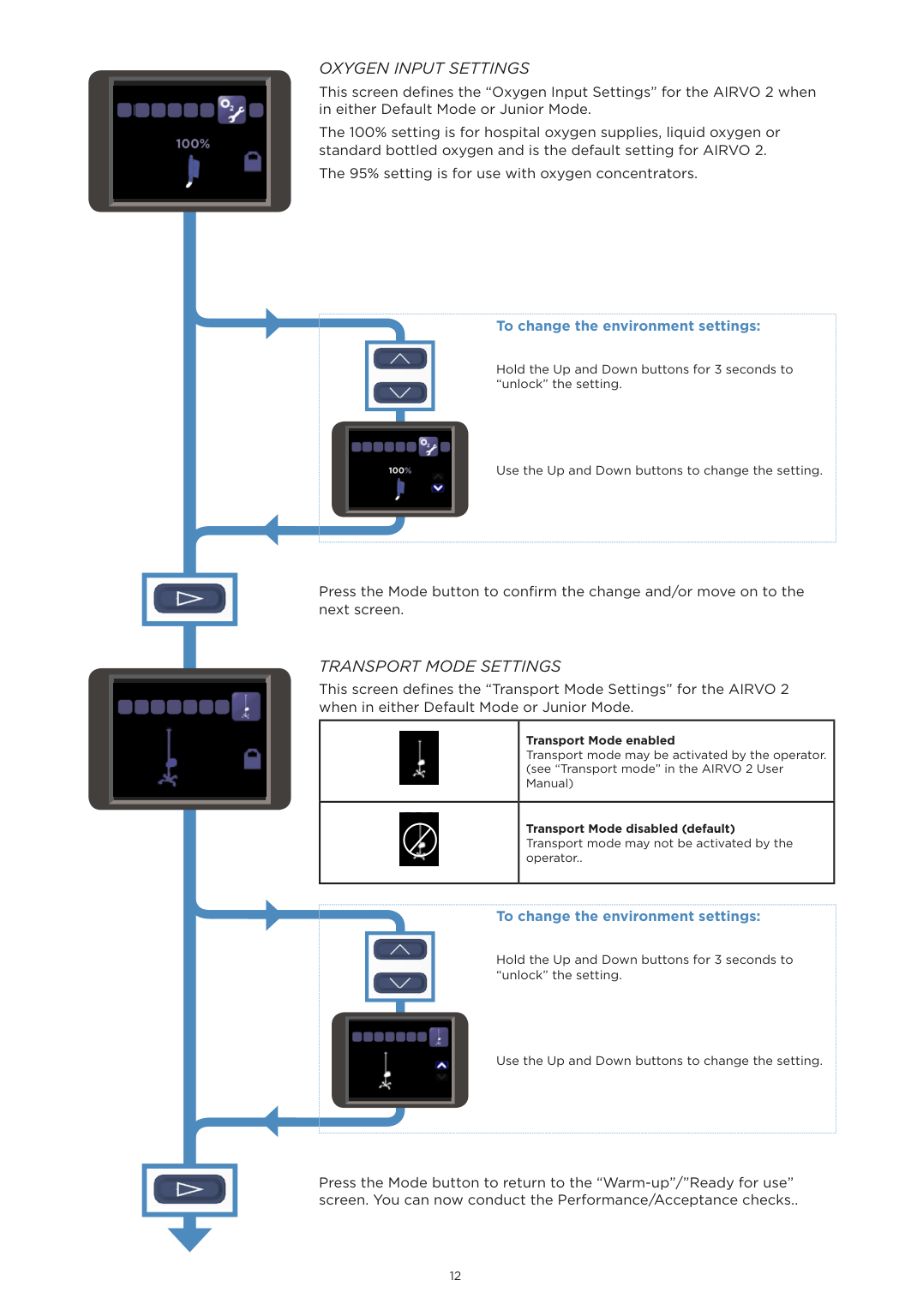
    OXYGEN INPUT SETTINGS This screen defines the “Oxygen Input Settings” for the AIRVO 2 when in either Default Mode or Junior Mode. The 100% setting is for hospital oxygen supplies, liquid oxygen or standard bottled oxygen and is the default setting for AIRVO 2. The 95% setting is for use with oxygen concentrators.

    | | | |---|---| | |![image 85](FQWdOL4c2kWuO1IW_images/imageFile85.png)

    ![image 86](FQWdOL4c2kWuO1IW_images/imageFile86.png)|

    ![image 87](FQWdOL4c2kWuO1IW_images/imageFile87.png)

    ############## To change the environment settings:

    Hold the Up and Down buttons for 3 seconds to “unlock” the setting.

    Use the Up and Down buttons to change the setting.

    ![image 88](FQWdOL4c2kWuO1IW_images/imageFile88.png)

    | | |---|

    ![image 89](FQWdOL4c2kWuO1IW_images/imageFile89.png)

    Press the Mode button to confirm the change and/or move on to the next screen.

    TRANSPORT MODE SETTINGS This screen defines the “Transport Mode Settings” for the AIRVO 2 when in either Default Mode or Junior Mode.

    Page 8

    |![image 90](FQWdOL4c2kWuO1IW_images/imageFile90.png)|Transport Mode enabled Transport mode may be activated by the operator. (see “Transport mode” in the AIRVO 2 User Manual)| |---|---| |![image 91](FQWdOL4c2kWuO1IW_images/imageFile91.png)|Transport Mode disabled (default) Transport mode may not be activated by the operator..|

    | | | |---|---| |![image 92](FQWdOL4c2kWuO1IW_images/imageFile92.png)| |

    ![image 93](FQWdOL4c2kWuO1IW_images/imageFile93.png)

    ############## To change the environment settings:

    Hold the Up and Down buttons for 3 seconds to “unlock” the setting.

    Use the Up and Down buttons to change the setting.

    ![image 94](FQWdOL4c2kWuO1IW_images/imageFile94.png)

    | | |---|

    Press the Mode button to return to the “Warm-up”/”Ready for use” screen. You can now conduct the Performance/Acceptance checks..

    3. ACCEPTANCE/PERFORMANCE CHECKS

    This section contains performance checks which can be carried out on the AIRVO 2, however there is no manufacturer requirement to carry out these checks on a routine basis. These checks test the basic functions of the unit, the operation of the flow sensor and the audible alarm signal.

    ########### SENSOR CHECKS

    |To ensure quality and patient safety, Fisher & Paykel Healthcare undertakes stringent testing to each and every unit manufactured. The AIRVO 2’s sensors, measuring temperature, flow and oxygen, have been carefully designed to exacting criteria, and are calibrated and tested in our controlled work environment to strict limits. Furthermore, the AIRVO 2 itself carries out regular self-checks during normal use, comparing sensor readings against expected values.

    Do not perform additional tests of internal sensor accuracy, as these often produce erroneous results due to limitations of the external test environment and equipment used, particularly given the temperature, humidity content and/or flow of the gases being delivered by the AIRVO 2.| |---|

    ACCEPTANCE/PERFORMANCE CHECKS The acceptance/performance checks should be conducted under the following ambient conditions: Temperature: 22 ± 2°C, Humidity: 50 ± 5% RH.

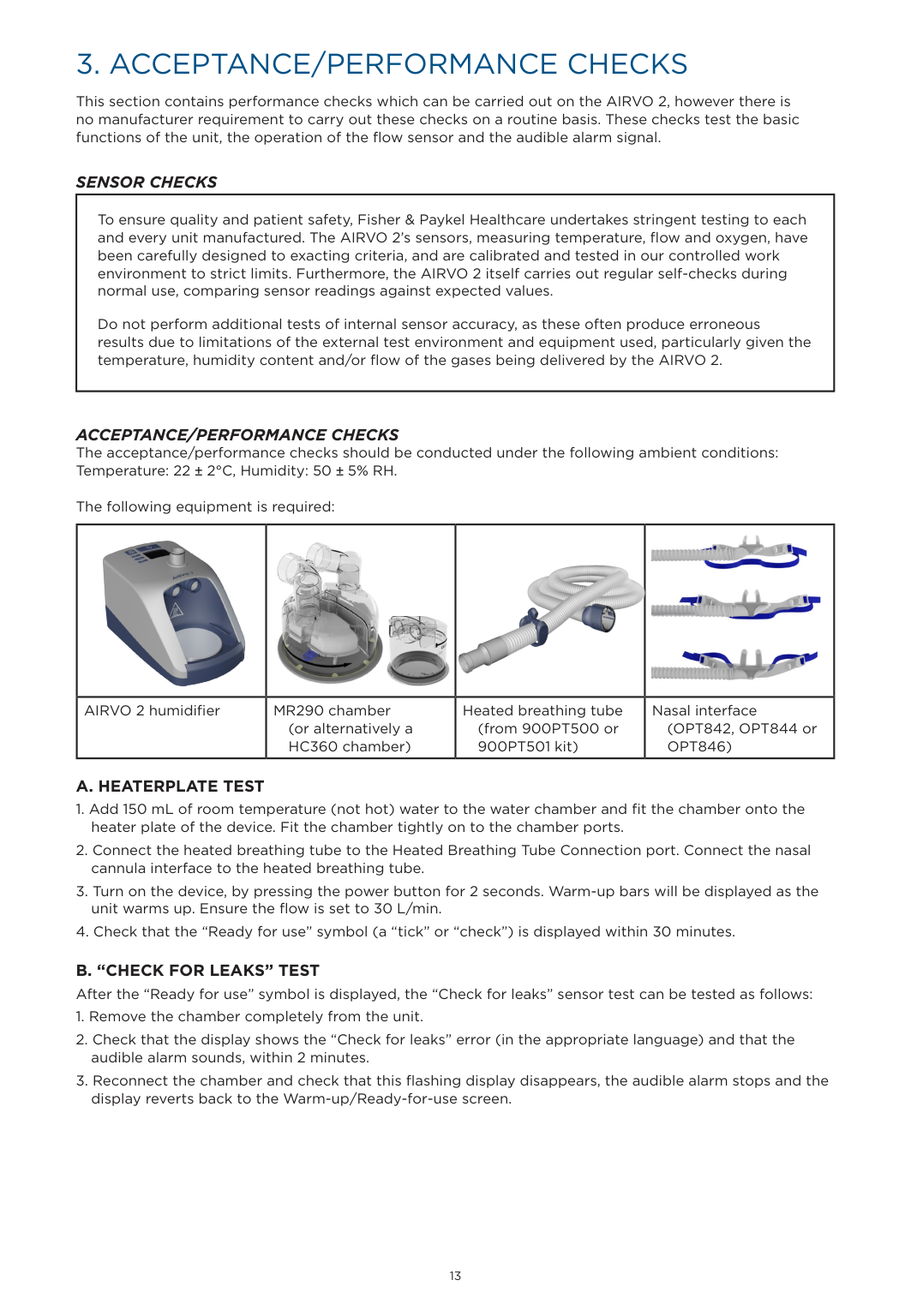
    The following equipment is required:

    |![image 95](FQWdOL4c2kWuO1IW_images/imageFile95.png)|![image 96](FQWdOL4c2kWuO1IW_images/imageFile96.png)

    ![image 97](FQWdOL4c2kWuO1IW_images/imageFile97.png)| |![image 98](FQWdOL4c2kWuO1IW_images/imageFile98.png)

    ![image 99](FQWdOL4c2kWuO1IW_images/imageFile99.png)| |---|---|---|---| |AIRVO 2 humidifier|MR290 chamber

    (or alternatively a HC360 chamber)|Heated breathing tube (from 900PT500 or 900PT501 kit)|Nasal interface (OPT842, OPT844 or OPT846)|

    ########### A. HEATERPLATE TEST

  • 1. Add 150 mL of room temperature (not hot) water to the water chamber and fit the chamber onto the heater plate of the device. Fit the chamber tightly on to the chamber ports.
  • 2. Connect the heated breathing tube to the Heated Breathing Tube Connection port. Connect the nasal cannula interface to the heated breathing tube.
  • 3. Turn on the device, by pressing the power button for 2 seconds. Warm-up bars will be displayed as the unit warms up. Ensure the flow is set to 30 L/min.
  • 4. Check that the “Ready for use” symbol (a “tick” or “check”) is displayed within 30 minutes.
  • ############ B. “CHECK FOR LEAKS” TESTAfter the “Ready for use” symbol is displayed, the “Check for leaks” sensor test can be tested as follows:
  • 1. Remove the chamber completely from the unit.
  • 2. Check that the display shows the “Check for leaks” error (in the appropriate language) and that the audible alarm sounds, within 2 minutes.
  • 3. Reconnect the chamber and check that this flashing display disappears, the audible alarm stops and the display reverts back to the Warm-up/Ready-for-use screen.
  • C. “CHECK FOR BLOCKAGES” TEST After completing the “Check for leaks” test, the “Check for blockages” test can be tested as follows:
  • Page 9

  • 1. Disconnect the cannula from the Heated Breathing Tube.
  • 2. Completely block the end of the Heated Breathing Tube with your hand.
  • 3. Check that the display shows the “Check for blockages” error (in the appropriate language) and that the audible alarm sounds, within 30 seconds.
  • 4. Unblock the end of tube and check that this flashing display disappears, the audible alarm stops and the display reverts back to the previous display.
  • 5. Reconnect the cannula to the Heated Breathing Tube.
  • D. “CHECK TUBE” TEST After completing the above flow tests, the Tube Missing alarm can be tested as follows:
  • 1. Remove the Heated Breathing Tube (pull the blue sleeve up first).
  • 2. Check that within 10 seconds the display flashes the Breathing Tube symbol and the alarm sounds.
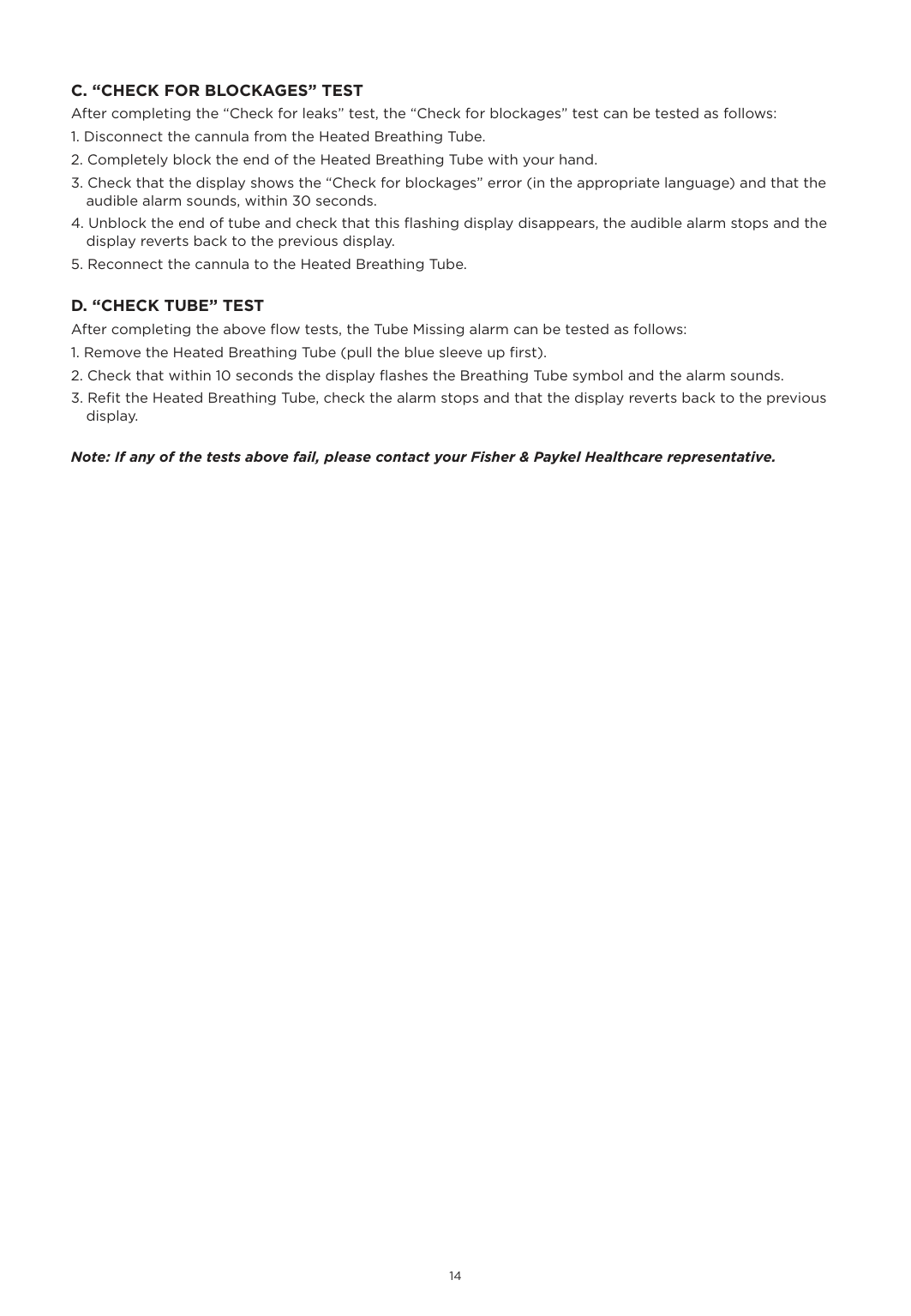
  • 3. Refit the Heated Breathing Tube, check the alarm stops and that the display reverts back to the previous display.
  • ############## Note: If any of the tests above fail, please contact your Fisher & Paykel Healthcare representative.

    4. SERVICING

    AIRVO 2 and myAIRVO 2 humidifiers do NOT require routine servicing or calibration. The only checks that can be carried out are the Acceptance/Performance Checks in the previous section, and the Electrical Safety Test detailed below.

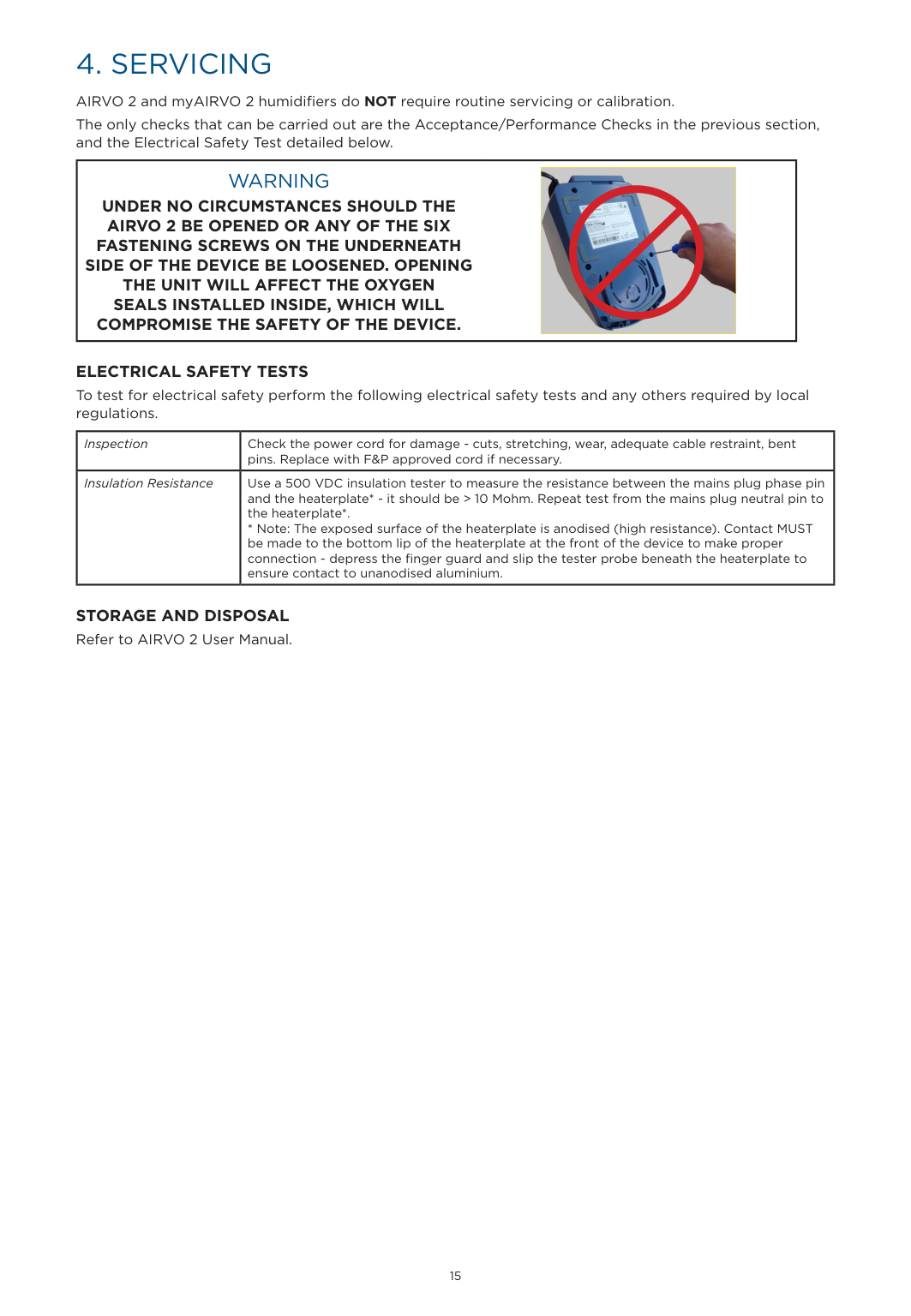
    |WARNING UNDER NO CIRCUMSTANCES SHOULD THE AIRVO 2 BE OPENED OR ANY OF THE SIX FASTENING SCREWS ON THE UNDERNEATH SIDE OF THE DEVICE BE LOOSENED. OPENING THE UNIT WILL AFFECT THE OXYGEN SEALS INSTALLED INSIDE, WHICH WILL COMPROMISE THE SAFETY OF THE DEVICE.

    |![image 100](FQWdOL4c2kWuO1IW_images/imageFile100.png)| |---| | |---|

    ELECTRICAL SAFETY TESTS To test for electrical safety perform the following electrical safety tests and any others required by local regulations.

    |Inspection|Check the power cord for damage - cuts, stretching, wear, adequate cable restraint, bent pins. Replace with F&P approved cord if necessary.| |---|---| |Insulation Resistance|Use a 500 VDC insulation tester to measure the resistance between the mains plug phase pin and the heaterplate* - it should be > 10 Mohm. Repeat test from the mains plug neutral pin to the heaterplate*.

    * Note: The exposed surface of the heaterplate is anodised (high resistance). Contact MUST be made to the bottom lip of the heaterplate at the front of the device to make proper connection - depress the finger guard and slip the tester probe beneath the heaterplate to ensure contact to unanodised aluminium.|

    STORAGE AND DISPOSAL Refer to AIRVO 2 User Manual.

    5. SPARE PARTS

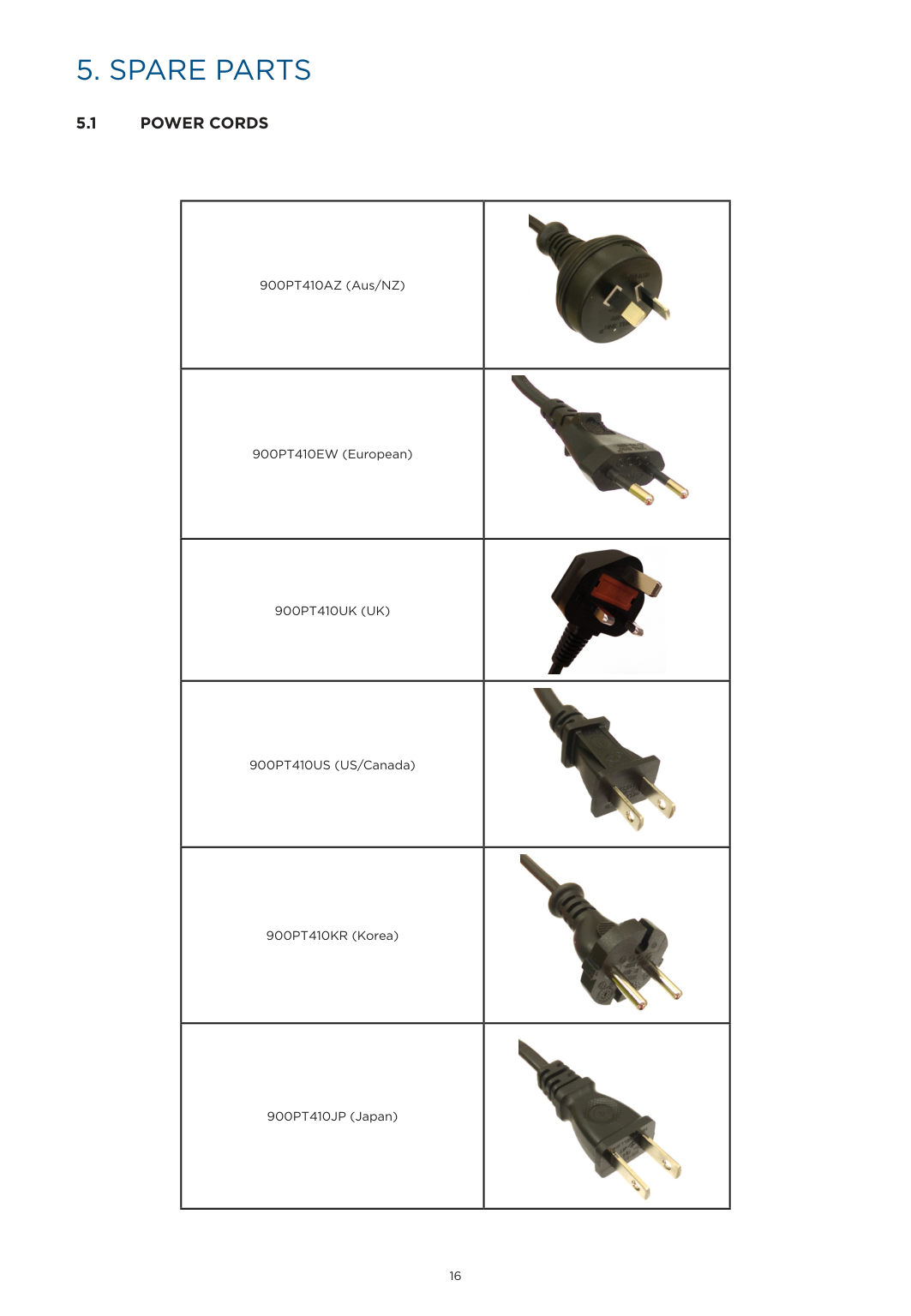
  • 5.1 POWER CORDS
  • |900PT410AZ (Aus/NZ)|![image 101](FQWdOL4c2kWuO1IW_images/imageFile101.png)| |---|---| |900PT410EW (European)|![image 102](FQWdOL4c2kWuO1IW_images/imageFile102.png)| |900PT410UK (UK)|![image 103](FQWdOL4c2kWuO1IW_images/imageFile103.png)| |900PT410US (US/Canada)|![image 104](FQWdOL4c2kWuO1IW_images/imageFile104.png)| |900PT410KR (Korea)|![image 105](FQWdOL4c2kWuO1IW_images/imageFile105.png)| |900PT410JP (Japan)|![image 106](FQWdOL4c2kWuO1IW_images/imageFile106.png)|

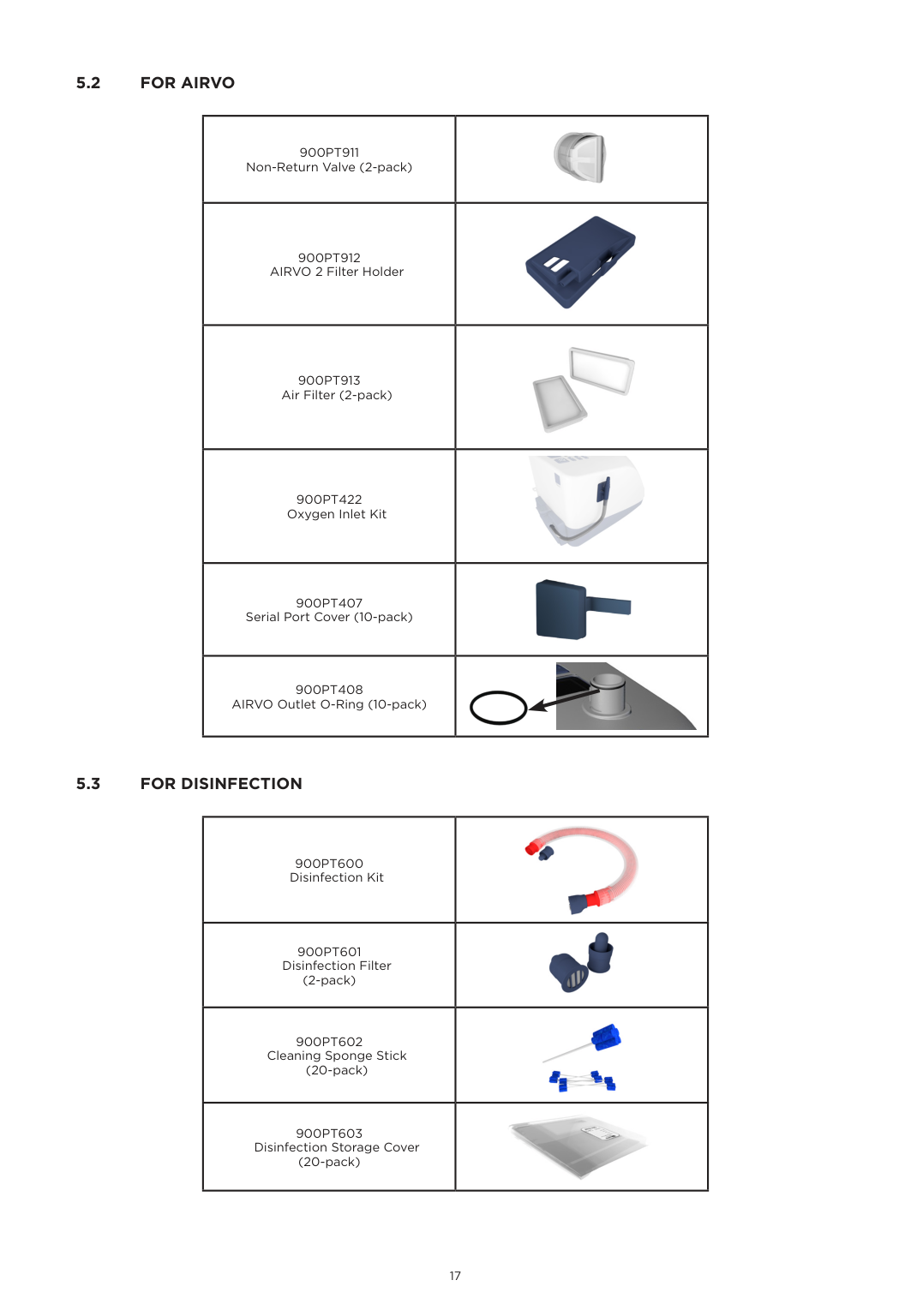
    ########### 5.2 FOR AIRVO

    |900PT911 Non-Return Valve (2-pack)|![image 107](FQWdOL4c2kWuO1IW_images/imageFile107.png)| |---|---| |900PT912 AIRVO 2 Filter Holder|![image 108](FQWdOL4c2kWuO1IW_images/imageFile108.png)| |900PT913 Air Filter (2-pack)|![image 109](FQWdOL4c2kWuO1IW_images/imageFile109.png)| |900PT422 Oxygen Inlet Kit|![image 110](FQWdOL4c2kWuO1IW_images/imageFile110.png)| |900PT407 Serial Port Cover (10-pack)|![image 111](FQWdOL4c2kWuO1IW_images/imageFile111.png)| |900PT408 AIRVO Outlet O-Ring (10-pack)|![image 112](FQWdOL4c2kWuO1IW_images/imageFile112.png)

    ![image 113](FQWdOL4c2kWuO1IW_images/imageFile113.png)

    |

    Page 10

    ########### 5.3 FOR DISINFECTION

    |900PT600 Disinfection Kit|![image 114](FQWdOL4c2kWuO1IW_images/imageFile114.png)| |---|---| |900PT601 Disinfection Filter (2-pack)|![image 115](FQWdOL4c2kWuO1IW_images/imageFile115.png)| |900PT602

    Cleaning Sponge Stick (20-pack)|![image 116](FQWdOL4c2kWuO1IW_images/imageFile116.png)| |900PT603 Disinfection Storage Cover (20-pack)|![image 117](FQWdOL4c2kWuO1IW_images/imageFile117.png)|

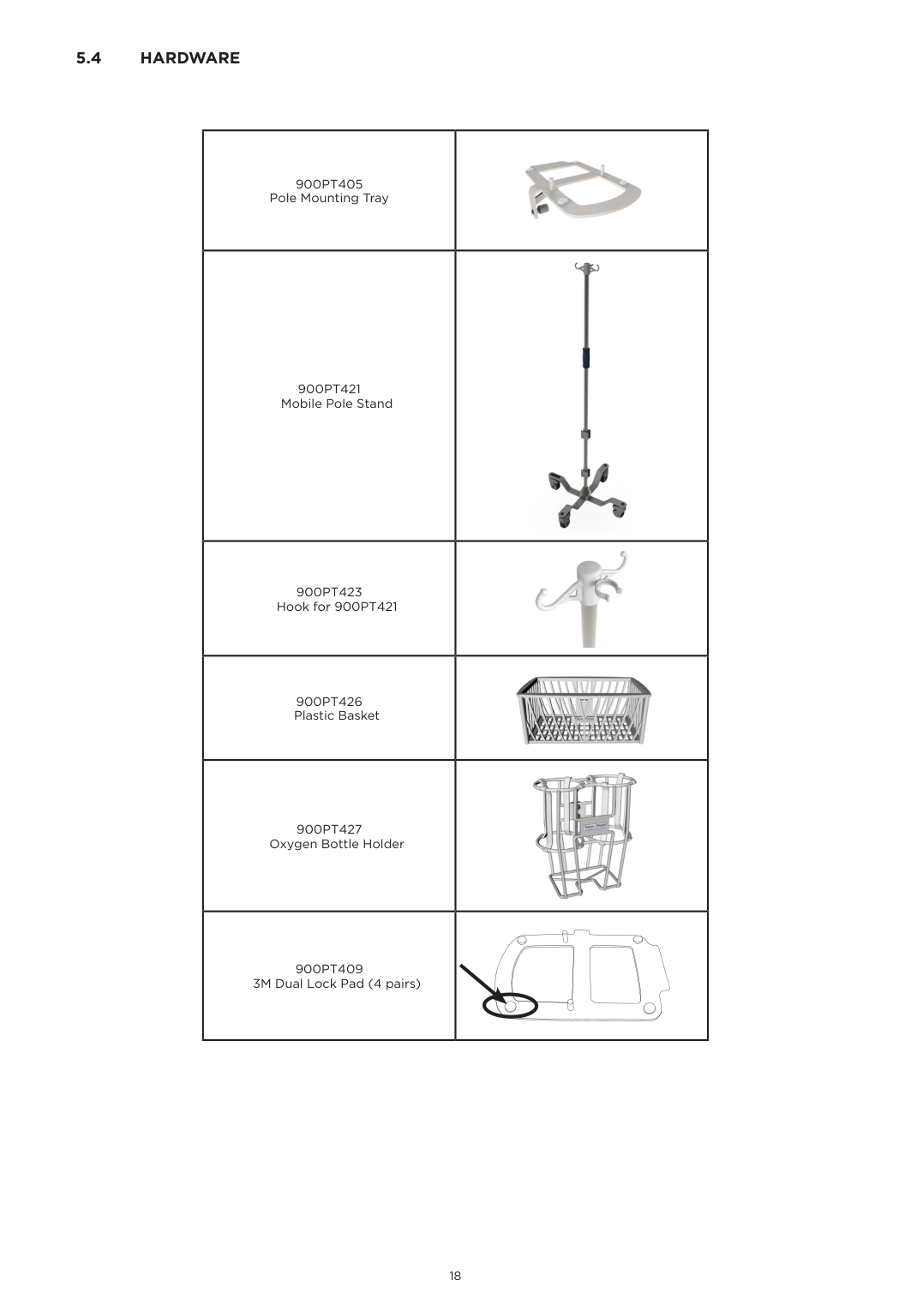
    ########### 5.4 HARDWARE

    |900PT405 Pole Mounting Tray|![image 118](FQWdOL4c2kWuO1IW_images/imageFile118.png)| |---|---| |900PT421 Mobile Pole Stand|![image 119](FQWdOL4c2kWuO1IW_images/imageFile119.png)| |900PT423 Hook for 900PT421|![image 120](FQWdOL4c2kWuO1IW_images/imageFile120.png)| |900PT426 Plastic Basket|![image 121](FQWdOL4c2kWuO1IW_images/imageFile121.png)

    | |900PT427 Oxygen Bottle Holder|![image 122](FQWdOL4c2kWuO1IW_images/imageFile122.png)| |900PT409 3M Dual Lock Pad (4 pairs)| |

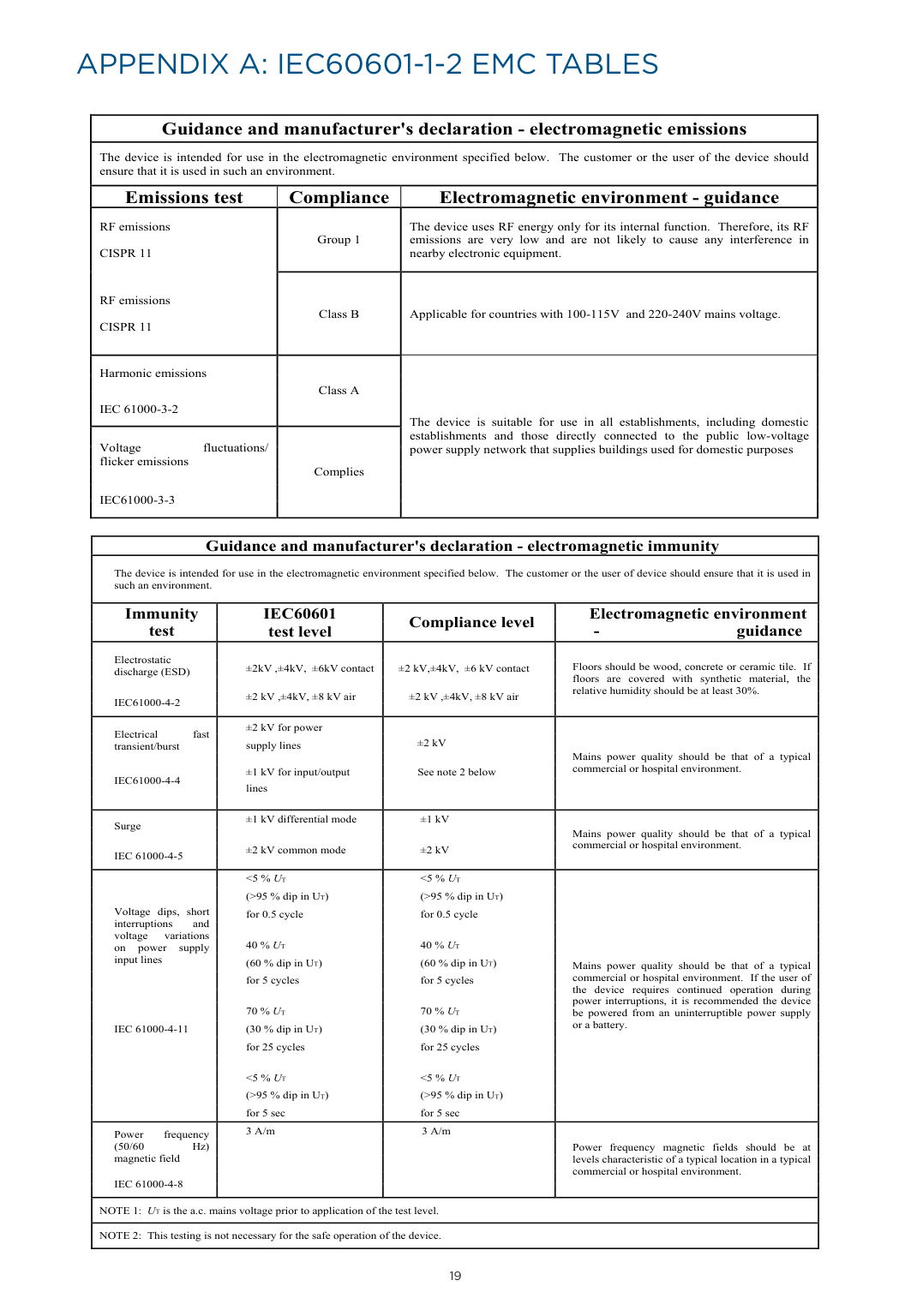
    APPENDIX A: IEC60601-1-2 EMC TABLES

    |Guidance and manufacturer's declaration - electromagnetic emissions|Guidance and manufacturer's declaration - electromagnetic emissions|Guidance and manufacturer's declaration - electromagnetic emissions| |---|---|---| |The device is intended for use in the electromagnetic environment specified below. The customer or the user of the device should ensure that it is used in such an environment.|The device is intended for use in the electromagnetic environment specified below. The customer or the user of the device should ensure that it is used in such an environment.|The device is intended for use in the electromagnetic environment specified below. The customer or the user of the device should ensure that it is used in such an environment.| |Emissions test|Compliance|Electromagnetic environment - guidance| |RF emissions CISPR 11

    RF emissions CISPR 11

    |Group 1|The device uses RF energy only for its internal function. Therefore, its RF emissions are very low and are not likely to cause any interference in nearby electronic equipment.| |RF emissions CISPR 11

    RF emissions CISPR 11

    |Class B|Applicable for countries with 100-115V and 220-240V mains voltage.| |Harmonic emissions

    IEC 61000-3-2|Class A|The device is suitable for use in all establishments, including domestic establishments and those directly connected to the public low-voltage power supply network that supplies buildings used for domestic purposes

    | |Voltage fluctuations/ flicker emissions

    IEC61000-3-3|Complies|The device is suitable for use in all establishments, including domestic establishments and those directly connected to the public low-voltage power supply network that supplies buildings used for domestic purposes

    |

    |Guidance and manufacturer's declaration - electromagnetic immunity|Guidance and manufacturer's declaration - electromagnetic immunity|Guidance and manufacturer's declaration - electromagnetic immunity|Guidance and manufacturer's declaration - electromagnetic immunity| |---|---|---|---| |The device is intended for use in the electromagnetic environment specified below. The customer or the user of device should ensure that it is used in such an environment.|The device is intended for use in the electromagnetic environment specified below. The customer or the user of device should ensure that it is used in such an environment.|The device is intended for use in the electromagnetic environment specified below. The customer or the user of device should ensure that it is used in such an environment.|The device is intended for use in the electromagnetic environment specified below. The customer or the user of device should ensure that it is used in such an environment.| |Immunity test|IEC60601 test level|Compliance level

    |Electromagnetic environment - guidance| |Electrostatic discharge (ESD)

    IEC61000-4-2|±2kV ,±4kV, ±6kV contact

    ±2 kV ,±4kV, ±8 kV air|±2 kV,±4kV, ±6 kV contact

    ±2 kV ,±4kV, ±8 kV air

    |Floors should be wood, concrete or ceramic tile. If floors are covered with synthetic material, the relative humidity should be at least 30%.| |Electrical fast transient/burst

    IEC61000-4-4|±2 kV for power supply lines

    ±1 kV for input/output lines

    |±2 kV

    See note 2 below|Mains power quality should be that of a typical commercial or hospital environment.| |Surge

    IEC 61000-4-5|±1 kV differential mode
    ±2 kV common mode
    |±1 kV
    ±2 kV
    |Mains power quality should be that of a typical commercial or hospital environment.

    | |Voltage dips, short interruptions and voltage variations on power supply input lines

    IEC 61000-4-11|A

    <5 % UT (>95 % dip in UT) for 0.5 cycle

    40 % UT (60 % dip in UT) for 5 cycles

    70 % UT (30 % dip in UT) for 25 cycles

    <5 % UT (>95 % dip in UT) for 5 sec|irvoTM Series Humidifier

    <5 % UT (>95 % dip in UT) for 0.5 cycle

    40 % UT (60 % dip in UT) for 5 cycles

    70 % UT (30 % dip in UT) for 25 cycles

    <5 % UT (>95 % dip in UT) for 5 sec|Mains power quality should be that of a typical commercial or hospital environment. If the user of the device requires continued operation during power interruptions, it is recommended the device be powered from an uninterruptible power supply or a battery.

    | |Power frequency (50/60 Hz) magnetic field

    IEC 61000-4-8|Technical M3 A/m|Models PT101 and PT100 nual Rev D (Part Numbe3 A/m|185044926)Power frequency magnetic fields should be at levels characteristic of a typical location in a typical commercial or hospital environment.

    | |NOTE 1: UT is the a.c. mains voltage prior to application of the test level.|NOTE 1: UT is the a.c. mains voltage prior to application of the test level.|NOTE 1: UT is the a.c. mains voltage prior to application of the test level.|NOTE 1: UT is the a.c. mains voltage prior to application of the test level.| |NOTE 2: This testing is not necessary for the safe operation of the device.|NOTE 2: This testing is not necessary for the safe operation of the device.|NOTE 2: This testing is not necessary for the safe operation of the device.|NOTE 2: This testing is not necessary for the safe operation of the device.|

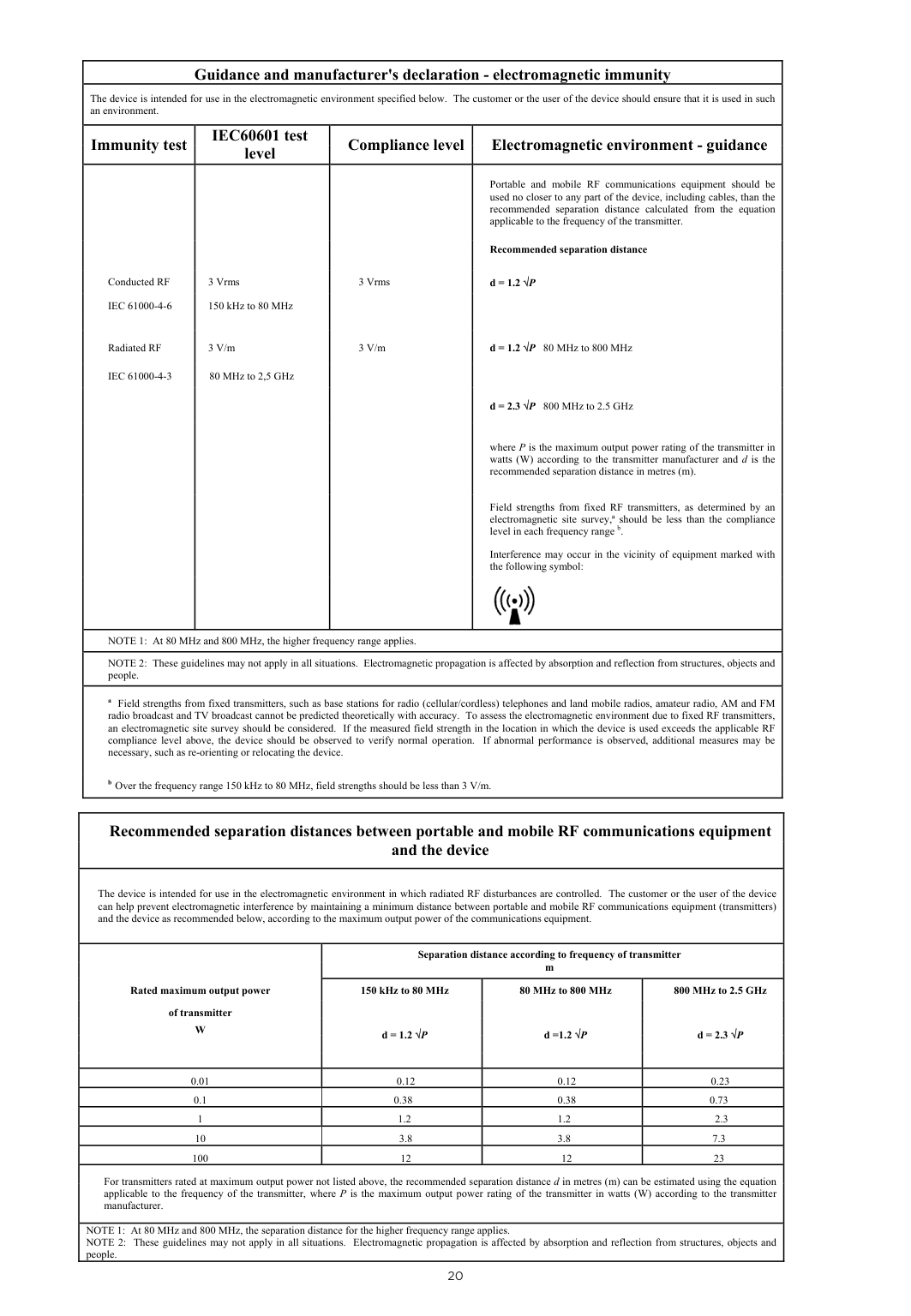
    |Guidance and manufacturer's declaration - electromagnetic immunity|Guidance and manufacturer's declaration - electromagnetic immunity|Guidance and manufacturer's declaration - electromagnetic immunity|Guidance and manufacturer's declaration - electromagnetic immunity| |---|---|---|---| |The device is intended for use in the electromagnetic environment specified below. The customer or the user of the device should ensure that it is used in such an environment.|The device is intended for use in the electromagnetic environment specified below. The customer or the user of the device should ensure that it is used in such an environment.|The device is intended for use in the electromagnetic environment specified below. The customer or the user of the device should ensure that it is used in such an environment.|The device is intended for use in the electromagnetic environment specified below. The customer or the user of the device should ensure that it is used in such an environment.| |Immunity test|IEC60601 test level|Compliance level

    |Electromagnetic environment - guidance| |Conducted RF IEC 61000-4-6

    Radiated RF

    IEC 61000-4-3|3 Vrms 150 kHz to 80 MHz

    3 V/m

    80 MHz to 2,5 GHz|3 Vrms

    3 V/m|Portable and mobile RF communications equipment should be used no closer to any part of the device, including cables, than the recommended separation distance calculated from the equation applicable to the frequency of the transmitter.

    Recommended separation distance

    d = 1.2 √P

    d = 1.2 √P 80 MHz to 800 MHz

    d = 2.3 √P 800 MHz to 2.5 GHz


    where P is the maximum output power rating of the transmitter in watts (W) according to the transmitter manufacturer and d is the recommended separation distance in metres (m).

    Field strengths from fixed RF transmitters, as determined by an electromagnetic site survey,ª should be less than the compliance level in each frequency range b.

    Interference may occur in the vicinity of equipment marked with the following symbol:

    ![image 123](FQWdOL4c2kWuO1IW_images/imageFile123.png)| |NOTE 1: At 80 MHz and 800 MHz, the higher frequency range applies.|NOTE 1: At 80 MHz and 800 MHz, the higher frequency range applies.|NOTE 1: At 80 MHz and 800 MHz, the higher frequency range applies.|NOTE 1: At 80 MHz and 800 MHz, the higher frequency range applies.| |NOTE 2: These guidelines may not apply in all situations. Electromagnetic propagation is affected by absorption and reflection from structures, objects and people.|NOTE 2: These guidelines may not apply in all situations. Electromagnetic propagation is affected by absorption and reflection from structures, objects and people.|NOTE 2: These guidelines may not apply in all situations. Electromagnetic propagation is affected by absorption and reflection from structures, objects and people.|NOTE 2: These guidelines may not apply in all situations. Electromagnetic propagation is affected by absorption and reflection from structures, objects and people.| |a Field strengths from fixed transmitters, such as base stations for radio (cellular/cordless) telephones and land mobile radios, amateur radio, AM and FM radio broadcast and TV broadcast cannot be predicted theoretically with accuracy. To assess the electromagnetic environment due to fixed RF transmitters, an electromagnetic site survey should be considered. If the measured field strength in the location in which the device is used exceeds the applicable RF compliance level above, the device should be observed to verify normal operation. If abnormal performance is observed, additional measures may be necessary, such as re-orienting or relocating the device.

    b Over the frequency range 150 kHz to 80 MHz, field strengths should be less than 3 V/m.17 of 17


    |a Field strengths from fixed transmitters, such as base stations for radio (cellular/cordless) telephones and land mobile radios, amateur radio, AM and FM radio broadcast and TV broadcast cannot be predicted theoretically with accuracy. To assess the electromagnetic environment due to fixed RF transmitters, an electromagnetic site survey should be considered. If the measured field strength in the location in which the device is used exceeds the applicable RF compliance level above, the device should be observed to verify normal operation. If abnormal performance is observed, additional measures may be necessary, such as re-orienting or relocating the device.

    b Over the frequency range 150 kHz to 80 MHz, field strengths should be less than 3 V/m.17 of 17


    |a Field strengths from fixed transmitters, such as base stations for radio (cellular/cordless) telephones and land mobile radios, amateur radio, AM and FM radio broadcast and TV broadcast cannot be predicted theoretically with accuracy. To assess the electromagnetic environment due to fixed RF transmitters, an electromagnetic site survey should be considered. If the measured field strength in the location in which the device is used exceeds the applicable RF compliance level above, the device should be observed to verify normal operation. If abnormal performance is observed, additional measures may be necessary, such as re-orienting or relocating the device.

    b Over the frequency range 150 kHz to 80 MHz, field strengths should be less than 3 V/m.17 of 17


    |a Field strengths from fixed transmitters, such as base stations for radio (cellular/cordless) telephones and land mobile radios, amateur radio, AM and FM radio broadcast and TV broadcast cannot be predicted theoretically with accuracy. To assess the electromagnetic environment due to fixed RF transmitters, an electromagnetic site survey should be considered. If the measured field strength in the location in which the device is used exceeds the applicable RF compliance level above, the device should be observed to verify normal operation. If abnormal performance is observed, additional measures may be necessary, such as re-orienting or relocating the device.

    b Over the frequency range 150 kHz to 80 MHz, field strengths should be less than 3 V/m.17 of 17


    |

    |Recommended separation distances between portable and mobile RF communications equipment and the device

    |Recommended separation distances between portable and mobile RF communications equipment and the device

    |Recommended separation distances between portable and mobile RF communications equipment and the device

    |Recommended separation distances between portable and mobile RF communications equipment and the device

    | |---|---|---|---| |The device is intended for use in the electromagnetic environment in which radiated RF disturbances are controlled. The customer or the user of the device can help prevent electromagnetic interference by maintaining a minimum distance between portable and mobile RF communications equipment (transmitters) and the device as recommended below, according to the maximum output power of the communications equipment.|The device is intended for use in the electromagnetic environment in which radiated RF disturbances are controlled. The customer or the user of the device can help prevent electromagnetic interference by maintaining a minimum distance between portable and mobile RF communications equipment (transmitters) and the device as recommended below, according to the maximum output power of the communications equipment.|The device is intended for use in the electromagnetic environment in which radiated RF disturbances are controlled. The customer or the user of the device can help prevent electromagnetic interference by maintaining a minimum distance between portable and mobile RF communications equipment (transmitters) and the device as recommended below, according to the maximum output power of the communications equipment.|The device is intended for use in the electromagnetic environment in which radiated RF disturbances are controlled. The customer or the user of the device can help prevent electromagnetic interference by maintaining a minimum distance between portable and mobile RF communications equipment (transmitters) and the device as recommended below, according to the maximum output power of the communications equipment.| |TechnRated maximum output power

    of transmitter W

    |Series Humidifiers Models PT101 and PT100

    Separation distance according to frequency of transmitter m|Series Humidifiers Models PT101 and PT100

    Separation distance according to frequency of transmitter m|Series Humidifiers Models PT101 and PT100

    Separation distance according to frequency of transmitter m| |TechnRated maximum output power

    of transmitter W

    |cal Manual Rev D (Part Num150 kHz to 80 MHz

    d = 1.2 √P

    |er 185044926)80 MHz to 800 MHz

    d =1.2 √P

    |800 MHz to 2.5 GHz

    d = 2.3 √P

    |
    Page 11

    |0.01|0.12|0.12|0.23| |0.1|0.38|0.38|0.73| |1|1.2|1.2|2.3| |10|3.8|3.8|7.3| |100|12|12|23| |For transmitters rated at maximum output power not listed above, the recommended separation distance d in metres (m) can be estimated using the equation applicable to the frequency of the transmitter, where P is the maximum output power rating of the transmitter in watts (W) according to the transmitter manufacturer.

    |For transmitters rated at maximum output power not listed above, the recommended separation distance d in metres (m) can be estimated using the equation applicable to the frequency of the transmitter, where P is the maximum output power rating of the transmitter in watts (W) according to the transmitter manufacturer.

    |For transmitters rated at maximum output power not listed above, the recommended separation distance d in metres (m) can be estimated using the equation applicable to the frequency of the transmitter, where P is the maximum output power rating of the transmitter in watts (W) according to the transmitter manufacturer.

    |For transmitters rated at maximum output power not listed above, the recommended separation distance d in metres (m) can be estimated using the equation applicable to the frequency of the transmitter, where P is the maximum output power rating of the transmitter in watts (W) according to the transmitter manufacturer.

    | |NOTE 1: At 80 MHz and 800 MHz, the separation distance for the higher frequency range applies.
    NOTE 2: These guidelines may not apply in all situations. Electromagnetic propagation is affected by absorption and reflection from structures, objects and people.
    |NOTE 1: At 80 MHz and 800 MHz, the separation distance for the higher frequency range applies.
    NOTE 2: These guidelines may not apply in all situations. Electromagnetic propagation is affected by absorption and reflection from structures, objects and people.
    |NOTE 1: At 80 MHz and 800 MHz, the separation distance for the higher frequency range applies.
    NOTE 2: These guidelines may not apply in all situations. Electromagnetic propagation is affected by absorption and reflection from structures, objects and people.
    |NOTE 1: At 80 MHz and 800 MHz, the separation distance for the higher frequency range applies.
    NOTE 2: These guidelines may not apply in all situations. Electromagnetic propagation is affected by absorption and reflection from structures, objects and people.
    |

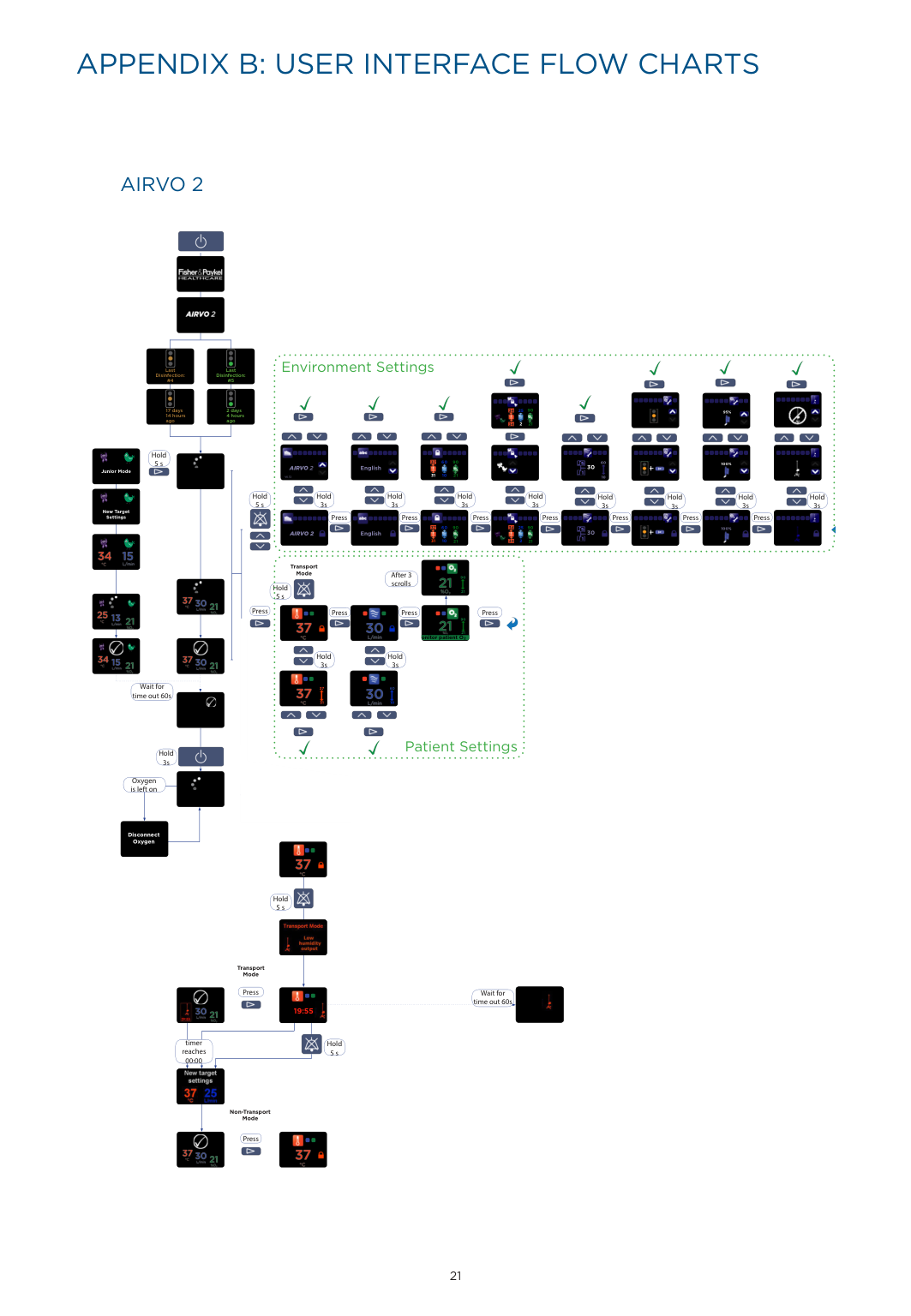
    APPENDIX B: USER INTERFACE FLOW CHARTS

    ######### AIRVO 2

    ![image 124](FQWdOL4c2kWuO1IW_images/imageFile124.png)

    | |![image 125](FQWdOL4c2kWuO1IW_images/imageFile125.png)

    ![image 126](FQWdOL4c2kWuO1IW_images/imageFile126.png)| |---|---| |17 days 14 hours|17 days 14 hours| | | |

    ![image 127](FQWdOL4c2kWuO1IW_images/imageFile127.png)

    ![image 128](FQWdOL4c2kWuO1IW_images/imageFile128.png)

    Environment Settings

    ![image 129](FQWdOL4c2kWuO1IW_images/imageFile129.png)

    ![image 130](FQWdOL4c2kWuO1IW_images/imageFile130.png)

    ![image 131](FQWdOL4c2kWuO1IW_images/imageFile131.png)

    ![image 132](FQWdOL4c2kWuO1IW_images/imageFile132.png)

    Last Disinfection: #4

    Last Disinfection: #5

    ![image 133](FQWdOL4c2kWuO1IW_images/imageFile133.png)

    ![image 134](FQWdOL4c2kWuO1IW_images/imageFile134.png)

    ![image 135](FQWdOL4c2kWuO1IW_images/imageFile135.png)

    ![image 136](FQWdOL4c2kWuO1IW_images/imageFile136.png)

    ![image 137](FQWdOL4c2kWuO1IW_images/imageFile137.png)

    ![image 138](FQWdOL4c2kWuO1IW_images/imageFile138.png)

    ![image 139](FQWdOL4c2kWuO1IW_images/imageFile139.png)

    ![image 140](FQWdOL4c2kWuO1IW_images/imageFile140.png)

    ![image 141](FQWdOL4c2kWuO1IW_images/imageFile141.png)

    ![image 142](FQWdOL4c2kWuO1IW_images/imageFile142.png)

    ![image 143](FQWdOL4c2kWuO1IW_images/imageFile143.png)

    Page 12

    ![image 144](FQWdOL4c2kWuO1IW_images/imageFile144.png)

    ![image 145](FQWdOL4c2kWuO1IW_images/imageFile145.png)

    ![image 146](FQWdOL4c2kWuO1IW_images/imageFile146.png)

    ![image 147](FQWdOL4c2kWuO1IW_images/imageFile147.png)

    ![image 148](FQWdOL4c2kWuO1IW_images/imageFile148.png)

    ![image 149](FQWdOL4c2kWuO1IW_images/imageFile149.png)

    ![image 150](FQWdOL4c2kWuO1IW_images/imageFile150.png)

    ![image 151](FQWdOL4c2kWuO1IW_images/imageFile151.png)

    ![image 152](FQWdOL4c2kWuO1IW_images/imageFile152.png)

    ![image 153](FQWdOL4c2kWuO1IW_images/imageFile153.png)

    ![image 154](FQWdOL4c2kWuO1IW_images/imageFile154.png)

    ![image 155](FQWdOL4c2kWuO1IW_images/imageFile155.png)

    ![image 156](FQWdOL4c2kWuO1IW_images/imageFile156.png)

    ![image 157](FQWdOL4c2kWuO1IW_images/imageFile157.png)

    ![image 158](FQWdOL4c2kWuO1IW_images/imageFile158.png)

    ![image 159](FQWdOL4c2kWuO1IW_images/imageFile159.png)

    ![image 160](FQWdOL4c2kWuO1IW_images/imageFile160.png)

    ![image 161](FQWdOL4c2kWuO1IW_images/imageFile161.png)

    ![image 162](FQWdOL4c2kWuO1IW_images/imageFile162.png)

    ![image 163](FQWdOL4c2kWuO1IW_images/imageFile163.png)

    ![image 164](FQWdOL4c2kWuO1IW_images/imageFile164.png)

    ![image 165](FQWdOL4c2kWuO1IW_images/imageFile165.png)

    ![image 166](FQWdOL4c2kWuO1IW_images/imageFile166.png)

    ![image 167](FQWdOL4c2kWuO1IW_images/imageFile167.png)

    ![image 168](FQWdOL4c2kWuO1IW_images/imageFile168.png)

    ![image 169](FQWdOL4c2kWuO1IW_images/imageFile169.png)

    ![image 170](FQWdOL4c2kWuO1IW_images/imageFile170.png)

    ![image 171](FQWdOL4c2kWuO1IW_images/imageFile171.png)

    ![image 172](FQWdOL4c2kWuO1IW_images/imageFile172.png)

    ![image 173](FQWdOL4c2kWuO1IW_images/imageFile173.png)

    ![image 174](FQWdOL4c2kWuO1IW_images/imageFile174.png)

    Page 13

    ![image 175](FQWdOL4c2kWuO1IW_images/imageFile175.png)

    2 days 4 hours

    90

    25

    34

    ![image 176](FQWdOL4c2kWuO1IW_images/imageFile176.png)

    ![image 177](FQWdOL4c2kWuO1IW_images/imageFile177.png)

    95%

    ![image 178](FQWdOL4c2kWuO1IW_images/imageFile178.png)

    ![image 179](FQWdOL4c2kWuO1IW_images/imageFile179.png)

    ![image 180](FQWdOL4c2kWuO1IW_images/imageFile180.png)

    ![image 181](FQWdOL4c2kWuO1IW_images/imageFile181.png)

    ![image 182](FQWdOL4c2kWuO1IW_images/imageFile182.png)

    ![image 183](FQWdOL4c2kWuO1IW_images/imageFile183.png)

    ![image 184](FQWdOL4c2kWuO1IW_images/imageFile184.png)

    ![image 185](FQWdOL4c2kWuO1IW_images/imageFile185.png)

    ![image 186](FQWdOL4c2kWuO1IW_images/imageFile186.png)

    ![image 187](FQWdOL4c2kWuO1IW_images/imageFile187.png)

    ![image 188](FQWdOL4c2kWuO1IW_images/imageFile188.png)

    ![image 189](FQWdOL4c2kWuO1IW_images/imageFile189.png)

    agoago

    ![image 190](FQWdOL4c2kWuO1IW_images/imageFile190.png)

    2

    21

    34

    ![image 191](FQWdOL4c2kWuO1IW_images/imageFile191.png)

    ![image 192](FQWdOL4c2kWuO1IW_images/imageFile192.png)

    ![image 193](FQWdOL4c2kWuO1IW_images/imageFile193.png)

    ![image 194](FQWdOL4c2kWuO1IW_images/imageFile194.png)

    ![image 195](FQWdOL4c2kWuO1IW_images/imageFile195.png)

    Page 14

    ![image 196](FQWdOL4c2kWuO1IW_images/imageFile196.png)

    ![image 197](FQWdOL4c2kWuO1IW_images/imageFile197.png)

    ![image 198](FQWdOL4c2kWuO1IW_images/imageFile198.png)

    ![image 199](FQWdOL4c2kWuO1IW_images/imageFile199.png)

    ![image 200](FQWdOL4c2kWuO1IW_images/imageFile200.png)

    ![image 201](FQWdOL4c2kWuO1IW_images/imageFile201.png)

    ![image 202](FQWdOL4c2kWuO1IW_images/imageFile202.png)

    ![image 203](FQWdOL4c2kWuO1IW_images/imageFile203.png)

    ![image 204](FQWdOL4c2kWuO1IW_images/imageFile204.png)

    ![image 205](FQWdOL4c2kWuO1IW_images/imageFile205.png)

    ![image 206](FQWdOL4c2kWuO1IW_images/imageFile206.png)

    ![image 207](FQWdOL4c2kWuO1IW_images/imageFile207.png)

    ![image 208](FQWdOL4c2kWuO1IW_images/imageFile208.png)

    ![image 209](FQWdOL4c2kWuO1IW_images/imageFile209.png)

    ![image 210](FQWdOL4c2kWuO1IW_images/imageFile210.png)

    ![image 211](FQWdOL4c2kWuO1IW_images/imageFile211.png)

    ![image 212](FQWdOL4c2kWuO1IW_images/imageFile212.png)

    ![image 213](FQWdOL4c2kWuO1IW_images/imageFile213.png)

    Hold 5 s

    ![image 214](FQWdOL4c2kWuO1IW_images/imageFile214.png)

    ![image 215](FQWdOL4c2kWuO1IW_images/imageFile215.png)

    ![image 216](FQWdOL4c2kWuO1IW_images/imageFile216.png)

    ![image 217](FQWdOL4c2kWuO1IW_images/imageFile217.png)

    ![image 218](FQWdOL4c2kWuO1IW_images/imageFile218.png)

    ![image 219](FQWdOL4c2kWuO1IW_images/imageFile219.png)

    ![image 220](FQWdOL4c2kWuO1IW_images/imageFile220.png)

    ![image 221](FQWdOL4c2kWuO1IW_images/imageFile221.png)

    ![image 222](FQWdOL4c2kWuO1IW_images/imageFile222.png)

    ![image 223](FQWdOL4c2kWuO1IW_images/imageFile223.png)

    ![image 224](FQWdOL4c2kWuO1IW_images/imageFile224.png)

    ![image 225](FQWdOL4c2kWuO1IW_images/imageFile225.png)

    Page 15

    ![image 226](FQWdOL4c2kWuO1IW_images/imageFile226.png)

    ![image 227](FQWdOL4c2kWuO1IW_images/imageFile227.png)

    ![image 228](FQWdOL4c2kWuO1IW_images/imageFile228.png)

    ![image 229](FQWdOL4c2kWuO1IW_images/imageFile229.png)

    ![image 230](FQWdOL4c2kWuO1IW_images/imageFile230.png)

    ![image 231](FQWdOL4c2kWuO1IW_images/imageFile231.png)

    ![image 232](FQWdOL4c2kWuO1IW_images/imageFile232.png)

    ![image 233](FQWdOL4c2kWuO1IW_images/imageFile233.png)

    ![image 234](FQWdOL4c2kWuO1IW_images/imageFile234.png)

    ![image 235](FQWdOL4c2kWuO1IW_images/imageFile235.png)

    ![image 236](FQWdOL4c2kWuO1IW_images/imageFile236.png)

    ![image 237](FQWdOL4c2kWuO1IW_images/imageFile237.png)

    ![image 238](FQWdOL4c2kWuO1IW_images/imageFile238.png)

    ![image 239](FQWdOL4c2kWuO1IW_images/imageFile239.png)

    ![image 240](FQWdOL4c2kWuO1IW_images/imageFile240.png)

    ![image 241](FQWdOL4c2kWuO1IW_images/imageFile241.png)

    ![image 242](FQWdOL4c2kWuO1IW_images/imageFile242.png)

    ![image 243](FQWdOL4c2kWuO1IW_images/imageFile243.png)

    ![image 244](FQWdOL4c2kWuO1IW_images/imageFile244.png)

    ![image 245](FQWdOL4c2kWuO1IW_images/imageFile245.png)

    ![image 246](FQWdOL4c2kWuO1IW_images/imageFile246.png)

    ![image 247](FQWdOL4c2kWuO1IW_images/imageFile247.png)

    ![image 248](FQWdOL4c2kWuO1IW_images/imageFile248.png)

    ![image 249](FQWdOL4c2kWuO1IW_images/imageFile249.png)

    ![image 250](FQWdOL4c2kWuO1IW_images/imageFile250.png)

    ![image 251](FQWdOL4c2kWuO1IW_images/imageFile251.png)

    ![image 252](FQWdOL4c2kWuO1IW_images/imageFile252.png)

    ![image 253](FQWdOL4c2kWuO1IW_images/imageFile253.png)

    ![image 254](FQWdOL4c2kWuO1IW_images/imageFile254.png)

    ![image 255](FQWdOL4c2kWuO1IW_images/imageFile255.png)

    Page 16

    ![image 256](FQWdOL4c2kWuO1IW_images/imageFile256.png)

    ![image 257](FQWdOL4c2kWuO1IW_images/imageFile257.png)

    ![image 258](FQWdOL4c2kWuO1IW_images/imageFile258.png)

    ![image 259](FQWdOL4c2kWuO1IW_images/imageFile259.png)

    ![image 260](FQWdOL4c2kWuO1IW_images/imageFile260.png)

    ![image 261](FQWdOL4c2kWuO1IW_images/imageFile261.png)

    ![image 262](FQWdOL4c2kWuO1IW_images/imageFile262.png)

    ![image 263](FQWdOL4c2kWuO1IW_images/imageFile263.png)

    ![image 264](FQWdOL4c2kWuO1IW_images/imageFile264.png)

    ![image 265](FQWdOL4c2kWuO1IW_images/imageFile265.png)

    ![image 266](FQWdOL4c2kWuO1IW_images/imageFile266.png)

    ![image 267](FQWdOL4c2kWuO1IW_images/imageFile267.png)

    ![image 268](FQWdOL4c2kWuO1IW_images/imageFile268.png)

    ![image 269](FQWdOL4c2kWuO1IW_images/imageFile269.png)

    ![image 270](FQWdOL4c2kWuO1IW_images/imageFile270.png)

    ![image 271](FQWdOL4c2kWuO1IW_images/imageFile271.png)

    ![image 272](FQWdOL4c2kWuO1IW_images/imageFile272.png)

    60

    90

    37

    ![image 273](FQWdOL4c2kWuO1IW_images/imageFile273.png)

    60

    ![image 274](FQWdOL4c2kWuO1IW_images/imageFile274.png)

    ![image 275](FQWdOL4c2kWuO1IW_images/imageFile275.png)

    ![image 276](FQWdOL4c2kWuO1IW_images/imageFile276.png)

    ![image 277](FQWdOL4c2kWuO1IW_images/imageFile277.png)

    ![image 278](FQWdOL4c2kWuO1IW_images/imageFile278.png)

    ![image 279](FQWdOL4c2kWuO1IW_images/imageFile279.png)

    100%

    ![image 280](FQWdOL4c2kWuO1IW_images/imageFile280.png)

    ![image 281](FQWdOL4c2kWuO1IW_images/imageFile281.png)

    Page 17

    ![image 282](FQWdOL4c2kWuO1IW_images/imageFile282.png)

    30

    ![image 283](FQWdOL4c2kWuO1IW_images/imageFile283.png)

    AIRVO 2

    ![image 284](FQWdOL4c2kWuO1IW_images/imageFile284.png)

    English

    ![image 285](FQWdOL4c2kWuO1IW_images/imageFile285.png)

    ![image 286](FQWdOL4c2kWuO1IW_images/imageFile286.png)

    ![image 287](FQWdOL4c2kWuO1IW_images/imageFile287.png)

    ![image 288](FQWdOL4c2kWuO1IW_images/imageFile288.png)

    ![image 289](FQWdOL4c2kWuO1IW_images/imageFile289.png)

    Junior Mode

    ![image 290](FQWdOL4c2kWuO1IW_images/imageFile290.png)

    31

    10

    21

    10

    V6.72

    ![image 291](FQWdOL4c2kWuO1IW_images/imageFile291.png)

    ![image 292](FQWdOL4c2kWuO1IW_images/imageFile292.png)

    ![image 293](FQWdOL4c2kWuO1IW_images/imageFile293.png)

    ![image 294](FQWdOL4c2kWuO1IW_images/imageFile294.png)

    ![image 295](FQWdOL4c2kWuO1IW_images/imageFile295.png)

    ![image 296](FQWdOL4c2kWuO1IW_images/imageFile296.png)

    ![image 297](FQWdOL4c2kWuO1IW_images/imageFile297.png)

    ![image 298](FQWdOL4c2kWuO1IW_images/imageFile298.png)

    Hold 3s

    Hold 3s

    Hold 3s

    Hold 3s

    Page 18

    Hold

    Hold 3s

    Hold 3s

    Hold 3s

    Hold 3s

    5 s New Target Settings

    ![image 299](FQWdOL4c2kWuO1IW_images/imageFile299.png)

    ![image 300](FQWdOL4c2kWuO1IW_images/imageFile300.png)

    ![image 301](FQWdOL4c2kWuO1IW_images/imageFile301.png)

    ![image 302](FQWdOL4c2kWuO1IW_images/imageFile302.png)

    ![image 303](FQWdOL4c2kWuO1IW_images/imageFile303.png)

    Press

    Press Press Press Press PressPress

    ![image 304](FQWdOL4c2kWuO1IW_images/imageFile304.png)

    ![image 305](FQWdOL4c2kWuO1IW_images/imageFile305.png)

    ![image 306](FQWdOL4c2kWuO1IW_images/imageFile306.png)

    ![image 307](FQWdOL4c2kWuO1IW_images/imageFile307.png)

    ![image 308](FQWdOL4c2kWuO1IW_images/imageFile308.png)

    ![image 309](FQWdOL4c2kWuO1IW_images/imageFile309.png)

    ![image 310](FQWdOL4c2kWuO1IW_images/imageFile310.png)

    ![image 311](FQWdOL4c2kWuO1IW_images/imageFile311.png)

    ![image 312](FQWdOL4c2kWuO1IW_images/imageFile312.png)

    ![image 313](FQWdOL4c2kWuO1IW_images/imageFile313.png)

    ![image 314](FQWdOL4c2kWuO1IW_images/imageFile314.png)

    ![image 315](FQWdOL4c2kWuO1IW_images/imageFile315.png)

    ![image 316](FQWdOL4c2kWuO1IW_images/imageFile316.png)

    ![image 317](FQWdOL4c2kWuO1IW_images/imageFile317.png)

    ![image 318](FQWdOL4c2kWuO1IW_images/imageFile318.png)

    ![image 319](FQWdOL4c2kWuO1IW_images/imageFile319.png)

    ![image 320](FQWdOL4c2kWuO1IW_images/imageFile320.png)

    ![image 321](FQWdOL4c2kWuO1IW_images/imageFile321.png)

    Page 19

    ![image 322](FQWdOL4c2kWuO1IW_images/imageFile322.png)

    ![image 323](FQWdOL4c2kWuO1IW_images/imageFile323.png)

    ![image 324](FQWdOL4c2kWuO1IW_images/imageFile324.png)

    ![image 325](FQWdOL4c2kWuO1IW_images/imageFile325.png)

    ![image 326](FQWdOL4c2kWuO1IW_images/imageFile326.png)

    ![image 327](FQWdOL4c2kWuO1IW_images/imageFile327.png)

    ![image 328](FQWdOL4c2kWuO1IW_images/imageFile328.png)

    ![image 329](FQWdOL4c2kWuO1IW_images/imageFile329.png)

    ![image 330](FQWdOL4c2kWuO1IW_images/imageFile330.png)

    ![image 331](FQWdOL4c2kWuO1IW_images/imageFile331.png)

    ![image 332](FQWdOL4c2kWuO1IW_images/imageFile332.png)

    ![image 333](FQWdOL4c2kWuO1IW_images/imageFile333.png)

    ![image 334](FQWdOL4c2kWuO1IW_images/imageFile334.png)

    ![image 335](FQWdOL4c2kWuO1IW_images/imageFile335.png)

    ![image 336](FQWdOL4c2kWuO1IW_images/imageFile336.png)

    ![image 337](FQWdOL4c2kWuO1IW_images/imageFile337.png)

    ![image 338](FQWdOL4c2kWuO1IW_images/imageFile338.png)

    ![image 339](FQWdOL4c2kWuO1IW_images/imageFile339.png)

    ![image 340](FQWdOL4c2kWuO1IW_images/imageFile340.png)

    ![image 341](FQWdOL4c2kWuO1IW_images/imageFile341.png)

    ![image 342](FQWdOL4c2kWuO1IW_images/imageFile342.png)

    ![image 343](FQWdOL4c2kWuO1IW_images/imageFile343.png)

    ![image 344](FQWdOL4c2kWuO1IW_images/imageFile344.png)

    ![image 345](FQWdOL4c2kWuO1IW_images/imageFile345.png)

    ![image 346](FQWdOL4c2kWuO1IW_images/imageFile346.png)

    ![image 347](FQWdOL4c2kWuO1IW_images/imageFile347.png)

    ![image 348](FQWdOL4c2kWuO1IW_images/imageFile348.png)

    ![image 349](FQWdOL4c2kWuO1IW_images/imageFile349.png)

    ![image 350](FQWdOL4c2kWuO1IW_images/imageFile350.png)

    ![image 351](FQWdOL4c2kWuO1IW_images/imageFile351.png)

    Page 20

    ![image 352](FQWdOL4c2kWuO1IW_images/imageFile352.png)

    ![image 353](FQWdOL4c2kWuO1IW_images/imageFile353.png)

    ![image 354](FQWdOL4c2kWuO1IW_images/imageFile354.png)

    ![image 355](FQWdOL4c2kWuO1IW_images/imageFile355.png)

    ![image 356](FQWdOL4c2kWuO1IW_images/imageFile356.png)

    ![image 357](FQWdOL4c2kWuO1IW_images/imageFile357.png)

    ![image 358](FQWdOL4c2kWuO1IW_images/imageFile358.png)

    ![image 359](FQWdOL4c2kWuO1IW_images/imageFile359.png)

    ![image 360](FQWdOL4c2kWuO1IW_images/imageFile360.png)

    ![image 361](FQWdOL4c2kWuO1IW_images/imageFile361.png)

    ![image 362](FQWdOL4c2kWuO1IW_images/imageFile362.png)

    ![image 363](FQWdOL4c2kWuO1IW_images/imageFile363.png)

    ![image 364](FQWdOL4c2kWuO1IW_images/imageFile364.png)

    ![image 365](FQWdOL4c2kWuO1IW_images/imageFile365.png)

    ![image 366](FQWdOL4c2kWuO1IW_images/imageFile366.png)

    ![image 367](FQWdOL4c2kWuO1IW_images/imageFile367.png)

    ![image 368](FQWdOL4c2kWuO1IW_images/imageFile368.png)

    ![image 369](FQWdOL4c2kWuO1IW_images/imageFile369.png)

    ![image 370](FQWdOL4c2kWuO1IW_images/imageFile370.png)

    ![image 371](FQWdOL4c2kWuO1IW_images/imageFile371.png)

    ![image 372](FQWdOL4c2kWuO1IW_images/imageFile372.png)

    ![image 373](FQWdOL4c2kWuO1IW_images/imageFile373.png)

    60 25

    90 90

    37

    34

    ![image 374](FQWdOL4c2kWuO1IW_images/imageFile374.png)

    ![image 375](FQWdOL4c2kWuO1IW_images/imageFile375.png)

    ![image 376](FQWdOL4c2kWuO1IW_images/imageFile376.png)

    100%

    ![image 377](FQWdOL4c2kWuO1IW_images/imageFile377.png)

    Page 21

    ![image 378](FQWdOL4c2kWuO1IW_images/imageFile378.png)

    ![image 379](FQWdOL4c2kWuO1IW_images/imageFile379.png)

    ![image 380](FQWdOL4c2kWuO1IW_images/imageFile380.png)

    ![image 381](FQWdOL4c2kWuO1IW_images/imageFile381.png)

    ![image 382](FQWdOL4c2kWuO1IW_images/imageFile382.png)

    30

    ![image 383](FQWdOL4c2kWuO1IW_images/imageFile383.png)

    ![image 384](FQWdOL4c2kWuO1IW_images/imageFile384.png)

    AIRVO 2

    English

    ![image 385](FQWdOL4c2kWuO1IW_images/imageFile385.png)

    ![image 386](FQWdOL4c2kWuO1IW_images/imageFile386.png)

    ![image 387](FQWdOL4c2kWuO1IW_images/imageFile387.png)

    ![image 388](FQWdOL4c2kWuO1IW_images/imageFile388.png)

    ![image 389](FQWdOL4c2kWuO1IW_images/imageFile389.png)

    ![image 390](FQWdOL4c2kWuO1IW_images/imageFile390.png)

    ![image 391](FQWdOL4c2kWuO1IW_images/imageFile391.png)

    ![image 392](FQWdOL4c2kWuO1IW_images/imageFile392.png)

    ![image 393](FQWdOL4c2kWuO1IW_images/imageFile393.png)

    ![image 394](FQWdOL4c2kWuO1IW_images/imageFile394.png)

    31

    10 2

    34

    21

    21

    ![image 395](FQWdOL4c2kWuO1IW_images/imageFile395.png)

    ![image 396](FQWdOL4c2kWuO1IW_images/imageFile396.png)

    Transport Mode

    ![image 397](FQWdOL4c2kWuO1IW_images/imageFile397.png)

    ![image 398](FQWdOL4c2kWuO1IW_images/imageFile398.png)

    Page 22

    ![image 399](FQWdOL4c2kWuO1IW_images/imageFile399.png)

    After 3 scrolls

    ![image 400](FQWdOL4c2kWuO1IW_images/imageFile400.png)

    90

    ![image 401](FQWdOL4c2kWuO1IW_images/imageFile401.png)

    ![image 402](FQWdOL4c2kWuO1IW_images/imageFile402.png)

    ![image 403](FQWdOL4c2kWuO1IW_images/imageFile403.png)

    ![image 404](FQWdOL4c2kWuO1IW_images/imageFile404.png)

    Hold 5 s

    21

    ![image 405](FQWdOL4c2kWuO1IW_images/imageFile405.png)

    Press

    Press

    Press

    Press

    ![image 406](FQWdOL4c2kWuO1IW_images/imageFile406.png)

    ![image 407](FQWdOL4c2kWuO1IW_images/imageFile407.png)

    ![image 408](FQWdOL4c2kWuO1IW_images/imageFile408.png)

    ![image 409](FQWdOL4c2kWuO1IW_images/imageFile409.png)

    ![image 410](FQWdOL4c2kWuO1IW_images/imageFile410.png)

    ![image 411](FQWdOL4c2kWuO1IW_images/imageFile411.png)

    ![image 412](FQWdOL4c2kWuO1IW_images/imageFile412.png)

    ![image 413](FQWdOL4c2kWuO1IW_images/imageFile413.png)

    ![image 414](FQWdOL4c2kWuO1IW_images/imageFile414.png)

    ![image 415](FQWdOL4c2kWuO1IW_images/imageFile415.png)

    ![image 416](FQWdOL4c2kWuO1IW_images/imageFile416.png)

    90

    ![image 417](FQWdOL4c2kWuO1IW_images/imageFile417.png)

    ![image 418](FQWdOL4c2kWuO1IW_images/imageFile418.png)

    ![image 419](FQWdOL4c2kWuO1IW_images/imageFile419.png)

    ![image 420](FQWdOL4c2kWuO1IW_images/imageFile420.png)

    Page 23

    ![image 421](FQWdOL4c2kWuO1IW_images/imageFile421.png)

    ![image 422](FQWdOL4c2kWuO1IW_images/imageFile422.png)

    ![image 423](FQWdOL4c2kWuO1IW_images/imageFile423.png)

    ![image 424](FQWdOL4c2kWuO1IW_images/imageFile424.png)

    ![image 425](FQWdOL4c2kWuO1IW_images/imageFile425.png)

    ![image 426](FQWdOL4c2kWuO1IW_images/imageFile426.png)

    21 onitor patient O2

    ![image 427](FQWdOL4c2kWuO1IW_images/imageFile427.png)

    ![image 428](FQWdOL4c2kWuO1IW_images/imageFile428.png)

    ![image 429](FQWdOL4c2kWuO1IW_images/imageFile429.png)

    ![image 430](FQWdOL4c2kWuO1IW_images/imageFile430.png)

    ![image 431](FQWdOL4c2kWuO1IW_images/imageFile431.png)

    ![image 432](FQWdOL4c2kWuO1IW_images/imageFile432.png)

    ![image 433](FQWdOL4c2kWuO1IW_images/imageFile433.png)

    Hold 3s

    Hold 3s

    ![image 434](FQWdOL4c2kWuO1IW_images/imageFile434.png)

    ![image 435](FQWdOL4c2kWuO1IW_images/imageFile435.png)

    ![image 436](FQWdOL4c2kWuO1IW_images/imageFile436.png)

    ![image 437](FQWdOL4c2kWuO1IW_images/imageFile437.png)

    ![image 438](FQWdOL4c2kWuO1IW_images/imageFile438.png)

    ![image 439](FQWdOL4c2kWuO1IW_images/imageFile439.png)

    Wait for time out 60s

    ![image 440](FQWdOL4c2kWuO1IW_images/imageFile440.png)

    ![image 441](FQWdOL4c2kWuO1IW_images/imageFile441.png)

    37 60

    ![image 442](FQWdOL4c2kWuO1IW_images/imageFile442.png)

    ![image 443](FQWdOL4c2kWuO1IW_images/imageFile443.png)

    ![image 444](FQWdOL4c2kWuO1IW_images/imageFile444.png)

    31 10

    Page 24

    ![image 445](FQWdOL4c2kWuO1IW_images/imageFile445.png)

    ![image 446](FQWdOL4c2kWuO1IW_images/imageFile446.png)

    ![image 447](FQWdOL4c2kWuO1IW_images/imageFile447.png)

    ![image 448](FQWdOL4c2kWuO1IW_images/imageFile448.png)

    ![image 449](FQWdOL4c2kWuO1IW_images/imageFile449.png)

    ![image 450](FQWdOL4c2kWuO1IW_images/imageFile450.png)

    Patient Settings

    ![image 451](FQWdOL4c2kWuO1IW_images/imageFile451.png)

    ![image 452](FQWdOL4c2kWuO1IW_images/imageFile452.png)

    ![image 453](FQWdOL4c2kWuO1IW_images/imageFile453.png)

    Hold 3s

    Oxygen is left on

    ![image 454](FQWdOL4c2kWuO1IW_images/imageFile454.png)

    ![image 455](FQWdOL4c2kWuO1IW_images/imageFile455.png)

    ![image 456](FQWdOL4c2kWuO1IW_images/imageFile456.png)

    Disconnect Oxygen

    ![image 457](FQWdOL4c2kWuO1IW_images/imageFile457.png)

    ![image 458](FQWdOL4c2kWuO1IW_images/imageFile458.png)

    ![image 459](FQWdOL4c2kWuO1IW_images/imageFile459.png)

    ![image 460](FQWdOL4c2kWuO1IW_images/imageFile460.png)

    ![image 461](FQWdOL4c2kWuO1IW_images/imageFile461.png)

    ![image 462](FQWdOL4c2kWuO1IW_images/imageFile462.png)

    Hold 5 s

    ![image 463](FQWdOL4c2kWuO1IW_images/imageFile463.png)

    Transport Mode

    Press

    ![image 464](FQWdOL4c2kWuO1IW_images/imageFile464.png)

    Wait for time out 60s

    ![image 465](FQWdOL4c2kWuO1IW_images/imageFile465.png)

    ![image 466](FQWdOL4c2kWuO1IW_images/imageFile466.png)

    ![image 467](FQWdOL4c2kWuO1IW_images/imageFile467.png)

    Page 25

    ![image 468](FQWdOL4c2kWuO1IW_images/imageFile468.png)

    ![image 469](FQWdOL4c2kWuO1IW_images/imageFile469.png)

    ![image 470](FQWdOL4c2kWuO1IW_images/imageFile470.png)

    ![image 471](FQWdOL4c2kWuO1IW_images/imageFile471.png)

    ![image 472](FQWdOL4c2kWuO1IW_images/imageFile472.png)

    19:55 19:23

    ![image 473](FQWdOL4c2kWuO1IW_images/imageFile473.png)

    timer reaches 00:00

    Hold 5 s

    ![image 474](FQWdOL4c2kWuO1IW_images/imageFile474.png)

    Non-Transport Mode

    ![image 475](FQWdOL4c2kWuO1IW_images/imageFile475.png)

    ![image 476](FQWdOL4c2kWuO1IW_images/imageFile476.png)

    Press

    ![image 477](FQWdOL4c2kWuO1IW_images/imageFile477.png)

    ![image 478](FQWdOL4c2kWuO1IW_images/imageFile478.png)

    ![image 479](FQWdOL4c2kWuO1IW_images/imageFile479.png)

    ![image 480](FQWdOL4c2kWuO1IW_images/imageFile480.png)

    ![image 481](FQWdOL4c2kWuO1IW_images/imageFile481.png)

    ![image 482](FQWdOL4c2kWuO1IW_images/imageFile482.png)

    21

    | | | |---|---| | | |

    ![image 483](FQWdOL4c2kWuO1IW_images/imageFile483.png)

    ![image 484](FQWdOL4c2kWuO1IW_images/imageFile484.png)

    ![image 485](FQWdOL4c2kWuO1IW_images/imageFile485.png)

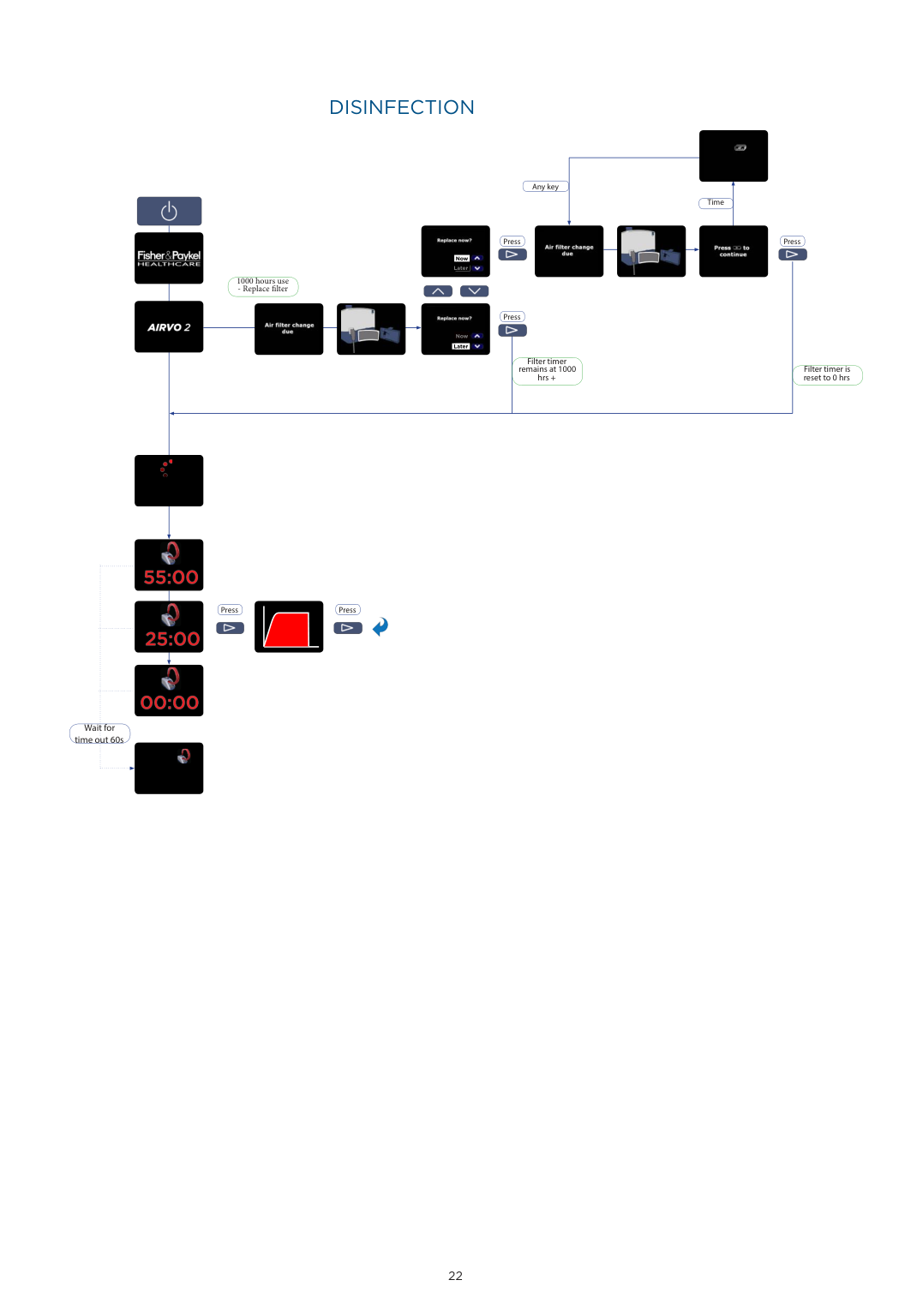
    ######### DISINFECTION

    Any key

    ![image 486](FQWdOL4c2kWuO1IW_images/imageFile486.png)

    Time

    Page 26

    1000 hours use - Replace filter

    ![image 487](FQWdOL4c2kWuO1IW_images/imageFile487.png)

    ![image 488](FQWdOL4c2kWuO1IW_images/imageFile488.png)

    ![image 489](FQWdOL4c2kWuO1IW_images/imageFile489.png)

    ![image 490](FQWdOL4c2kWuO1IW_images/imageFile490.png)

    ![image 491](FQWdOL4c2kWuO1IW_images/imageFile491.png)

    ![image 492](FQWdOL4c2kWuO1IW_images/imageFile492.png)

    Press Press

    ![image 493](FQWdOL4c2kWuO1IW_images/imageFile493.png)

    ![image 494](FQWdOL4c2kWuO1IW_images/imageFile494.png)

    Now

    Later

    ![image 495](FQWdOL4c2kWuO1IW_images/imageFile495.png)

    ![image 496](FQWdOL4c2kWuO1IW_images/imageFile496.png)

    ![image 497](FQWdOL4c2kWuO1IW_images/imageFile497.png)

    Press

    ![image 498](FQWdOL4c2kWuO1IW_images/imageFile498.png)

    Now

    Later

    Filter timer remains at 1000 hrs +

    Filter timer is reset to 0 hrs

    ![image 499](FQWdOL4c2kWuO1IW_images/imageFile499.png)

    ![image 500](FQWdOL4c2kWuO1IW_images/imageFile500.png)

    ![image 501](FQWdOL4c2kWuO1IW_images/imageFile501.png)

    ![image 502](FQWdOL4c2kWuO1IW_images/imageFile502.png)

    Press Press

    ![image 503](FQWdOL4c2kWuO1IW_images/imageFile503.png)

    ![image 504](FQWdOL4c2kWuO1IW_images/imageFile504.png)

    ![image 505](FQWdOL4c2kWuO1IW_images/imageFile505.png)

    ![image 506](FQWdOL4c2kWuO1IW_images/imageFile506.png)

    Page 27

    ![image 507](FQWdOL4c2kWuO1IW_images/imageFile507.png)

    ![image 508](FQWdOL4c2kWuO1IW_images/imageFile508.png)

    Wait for time out 60s

    ![image 509](FQWdOL4c2kWuO1IW_images/imageFile509.png)

    | | | |---|---| | | |

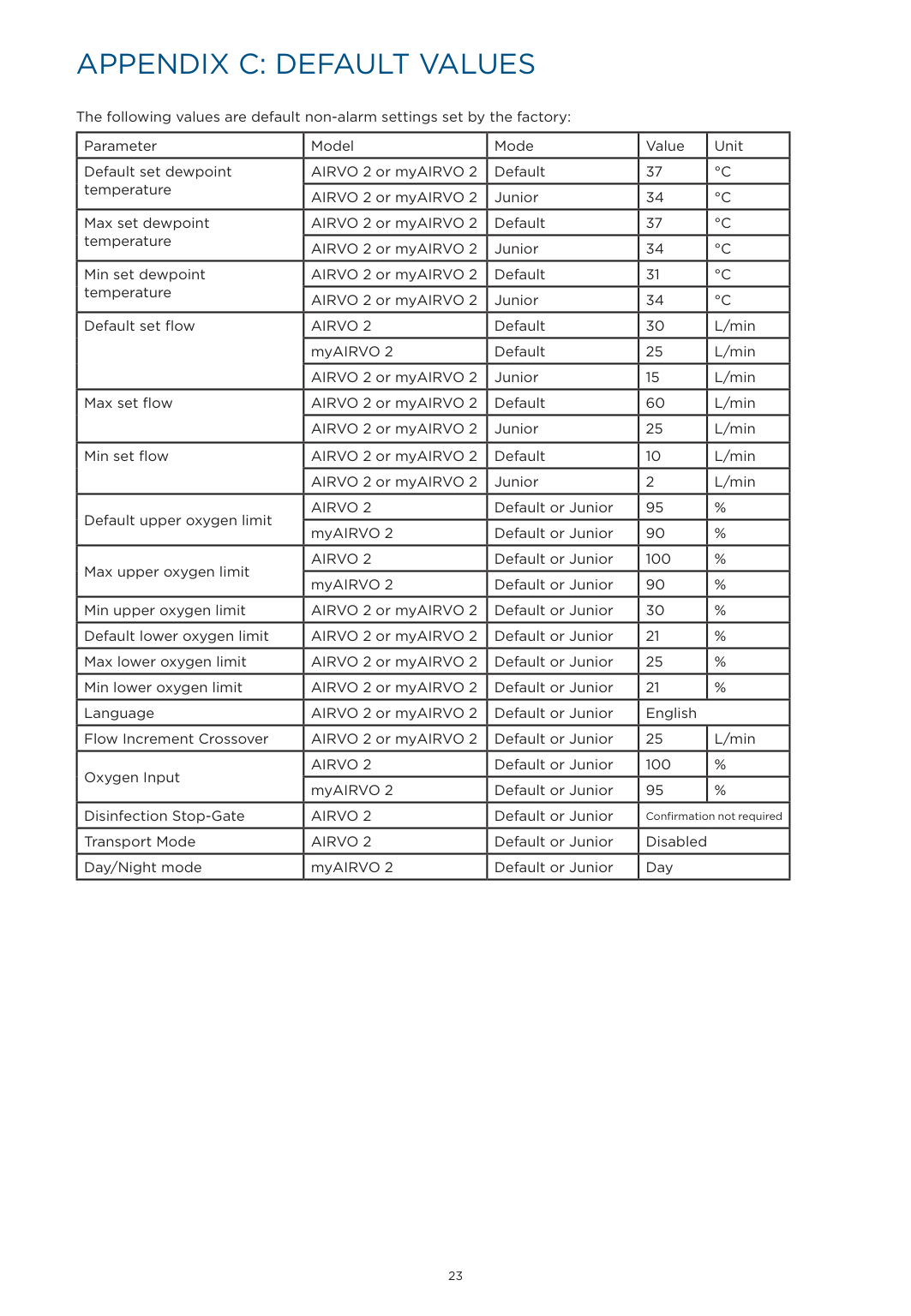
    APPENDIX C: DEFAULT VALUES

    The following values are default non-alarm settings set by the factory:

    |Parameter|Model|Mode|Value|Unit| |---|---|---|---|---| |Default set dewpoint temperature|AIRVO 2 or myAIRVO 2|Default|37|°C| |Default set dewpoint temperature|AIRVO 2 or myAIRVO 2|Junior|34|°C| |Max set dewpoint temperature|AIRVO 2 or myAIRVO 2|Default|37|°C| |Max set dewpoint temperature|AIRVO 2 or myAIRVO 2|Junior|34|°C| |Min set dewpoint temperature|AIRVO 2 or myAIRVO 2|Default|31|°C| |Min set dewpoint temperature|AIRVO 2 or myAIRVO 2|Junior|34|°C| |Default set flow|AIRVO 2|Default|30|L/min| |Default set flow|myAIRVO 2|Default|25|L/min| |Default set flow|AIRVO 2 or myAIRVO 2|Junior|15|L/min| |Max set flow|AIRVO 2 or myAIRVO 2|Default|60|L/min| |Max set flow|AIRVO 2 or myAIRVO 2|Junior|25|L/min| |Min set flow|AIRVO 2 or myAIRVO 2|Default|10|L/min| |Min set flow|AIRVO 2 or myAIRVO 2|Junior|2|L/min| |Default upper oxygen limit|AIRVO 2|Default or Junior|95|%| |Default upper oxygen limit|myAIRVO 2|Default or Junior|90|%| |Max upper oxygen limit|AIRVO 2|Default or Junior|100|%| |Max upper oxygen limit|myAIRVO 2|Default or Junior|90|%| |Min upper oxygen limit|AIRVO 2 or myAIRVO 2|Default or Junior|30|%| |Default lower oxygen limit|AIRVO 2 or myAIRVO 2|Default or Junior|21|%| |Max lower oxygen limit|AIRVO 2 or myAIRVO 2|Default or Junior|25|%| |Min lower oxygen limit|AIRVO 2 or myAIRVO 2|Default or Junior|21|%| |Language|AIRVO 2 or myAIRVO 2|Default or Junior|English|English| |Flow Increment Crossover|AIRVO 2 or myAIRVO 2|Default or Junior|25|L/min| |Oxygen Input|AIRVO 2|Default or Junior|100|%| |Oxygen Input|myAIRVO 2|Default or Junior|95|%| |Disinfection Stop-Gate|AIRVO 2|Default or Junior|Confirmation not required|Confirmation not required| |Transport Mode|AIRVO 2|Default or Junior|Disabled|Disabled| |Day/Night mode|myAIRVO 2|Default or Junior|Day|Day|

    | | | |---|---| | | |

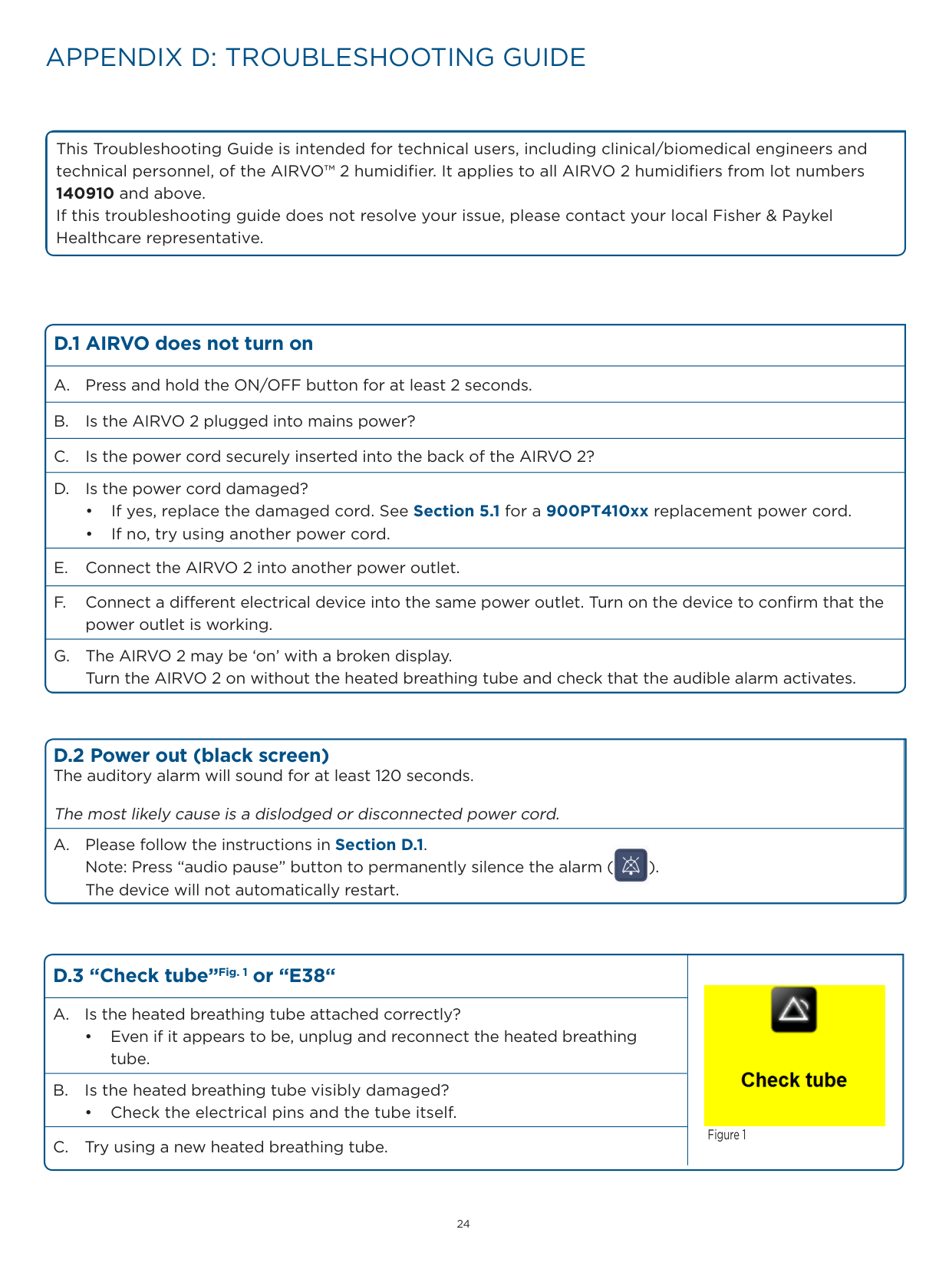
    APPENDIX D: TROUBLESHOOTING GUIDE

    This Troubleshooting Guide is intended for technical users, including clinical/biomedical engineers and technical personnel, of the AIRVO™ 2 humidifier. It applies to all AIRVO 2 humidifiers from lot numbers 140910 and above.

    If this troubleshooting guide does not resolve your issue, please contact your local Fisher & Paykel Healthcare representative.

    ###### D.1 AIRVO does not turn on
    Page 28

  • A. Press and hold the ON/OFF button for at least 2 seconds.
  • B. Is the AIRVO 2 plugged into mains power?
  • C. Is the power cord securely inserted into the back of the AIRVO 2?
  • D. Is the power cord damaged?
  • • If yes, replace the damaged cord. See Section 5.1 for a 900PT410xx replacement power cord.
  • • If no, try using another power cord.
  • E. Connect the AIRVO 2 into another power outlet.
  • F. Connect a different electrical device into the same power outlet. Turn on the device to confirm that the power outlet is working.
  • G. The AIRVO 2 may be ‘on’ with a broken display. Turn the AIRVO 2 on without the heated breathing tube and check that the audible alarm activates.
  • ######## D.2 Power out (black screen)The auditory alarm will sound for at least 120 seconds.

    The most likely cause is a dislodged or disconnected power cord. A. Please follow the instructions in Section D.1.

    ![image 510](FQWdOL4c2kWuO1IW_images/imageFile510.png)

    Note: Press “audio pause” button to permanently silence the alarm ( ). The device will not automatically restart.

    |D.3 “Check tube”Fig. 1 or “E38“|![image 511](FQWdOL4c2kWuO1IW_images/imageFile511.png)

    Figure 1| |---|---| |A. Is the heated breathing tube attached correctly?

    • Even if it appears to be, unplug and reconnect the heated breathing tube.|![image 511](FQWdOL4c2kWuO1IW_images/imageFile511.png)

    Figure 1| |B. Is the heated breathing tube visibly damaged?

    • Check the electrical pins and the tube itself.|![image 511](FQWdOL4c2kWuO1IW_images/imageFile511.png)

    Figure 1| |C. Try using a new heated breathing tube.|![image 511](FQWdOL4c2kWuO1IW_images/imageFile511.png)

    Figure 1|

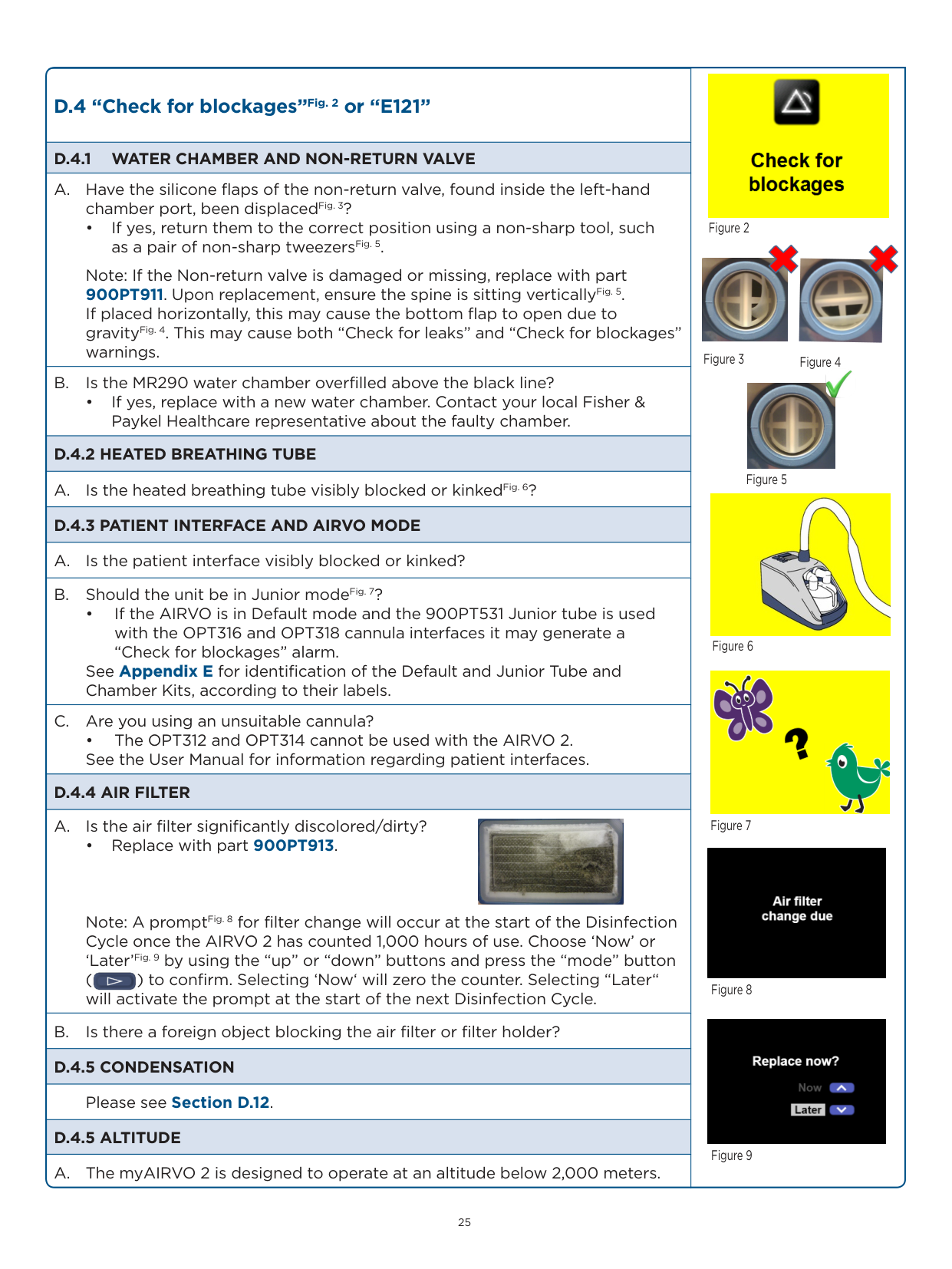
    |D.4 “Check for blockages”Fig. 2 or “E121”|![image 512](FQWdOL4c2kWuO1IW_images/imageFile512.png)

    ![image 513](FQWdOL4c2kWuO1IW_images/imageFile513.png)

    ![image 514](FQWdOL4c2kWuO1IW_images/imageFile514.png)

    ![image 515](FQWdOL4c2kWuO1IW_images/imageFile515.png)

    Figure 2

    ![image 516](FQWdOL4c2kWuO1IW_images/imageFile516.png)

    ![image 517](FQWdOL4c2kWuO1IW_images/imageFile517.png)

    ![image 518](FQWdOL4c2kWuO1IW_images/imageFile518.png)

    Figure 3 Figure 4


    ![image 519](FQWdOL4c2kWuO1IW_images/imageFile519.png)

    Figure 7

    ![image 520](FQWdOL4c2kWuO1IW_images/imageFile520.png)

    Figure 8

    ![image 521](FQWdOL4c2kWuO1IW_images/imageFile521.png)

    Figure 9


    Figure 5

    ![image 522](FQWdOL4c2kWuO1IW_images/imageFile522.png)

    Figure 6| |---|---| |D.4.1 WATER CHAMBER AND NON-RETURN VALVE|![image 512](FQWdOL4c2kWuO1IW_images/imageFile512.png)

    ![image 513](FQWdOL4c2kWuO1IW_images/imageFile513.png)

    ![image 514](FQWdOL4c2kWuO1IW_images/imageFile514.png)

    ![image 515](FQWdOL4c2kWuO1IW_images/imageFile515.png)

    Figure 2

    ![image 516](FQWdOL4c2kWuO1IW_images/imageFile516.png)

    ![image 517](FQWdOL4c2kWuO1IW_images/imageFile517.png)

    ![image 518](FQWdOL4c2kWuO1IW_images/imageFile518.png)

    Figure 3 Figure 4


    ![image 519](FQWdOL4c2kWuO1IW_images/imageFile519.png)

    Figure 7

    ![image 520](FQWdOL4c2kWuO1IW_images/imageFile520.png)

    Figure 8

    ![image 521](FQWdOL4c2kWuO1IW_images/imageFile521.png)

    Figure 9


    Figure 5

    ![image 522](FQWdOL4c2kWuO1IW_images/imageFile522.png)

    Figure 6| |A. Have the silicone flaps of the non-return valve, found inside the left-hand chamber port, been displacedFig. 3?

    • If yes, return them to the correct position using a non-sharp tool, such as a pair of non-sharp tweezersFig. 5.

    Note: If the Non-return valve is damaged or missing, replace with part 900PT911. Upon replacement, ensure the spine is sitting verticallyFig. 5. If placed horizontally, this may cause the bottom flap to open due to gravityFig. 4. This may cause both “Check for leaks” and “Check for blockages” warnings.|![image 512](FQWdOL4c2kWuO1IW_images/imageFile512.png)

    ![image 513](FQWdOL4c2kWuO1IW_images/imageFile513.png)

    ![image 514](FQWdOL4c2kWuO1IW_images/imageFile514.png)

    ![image 515](FQWdOL4c2kWuO1IW_images/imageFile515.png)

    Figure 2

    ![image 516](FQWdOL4c2kWuO1IW_images/imageFile516.png)

    ![image 517](FQWdOL4c2kWuO1IW_images/imageFile517.png)

    ![image 518](FQWdOL4c2kWuO1IW_images/imageFile518.png)

    Figure 3 Figure 4


    ![image 519](FQWdOL4c2kWuO1IW_images/imageFile519.png)

    Figure 7

    ![image 520](FQWdOL4c2kWuO1IW_images/imageFile520.png)

    Figure 8

    ![image 521](FQWdOL4c2kWuO1IW_images/imageFile521.png)

    Figure 9


    Figure 5

    ![image 522](FQWdOL4c2kWuO1IW_images/imageFile522.png)

    Figure 6| |B. Is the MR290 water chamber overfilled above the black line?

    • If yes, replace with a new water chamber. Contact your local Fisher & Paykel Healthcare representative about the faulty chamber.|![image 512](FQWdOL4c2kWuO1IW_images/imageFile512.png)

    ![image 513](FQWdOL4c2kWuO1IW_images/imageFile513.png)

    ![image 514](FQWdOL4c2kWuO1IW_images/imageFile514.png)

    ![image 515](FQWdOL4c2kWuO1IW_images/imageFile515.png)

    Figure 2

    ![image 516](FQWdOL4c2kWuO1IW_images/imageFile516.png)

    ![image 517](FQWdOL4c2kWuO1IW_images/imageFile517.png)

    ![image 518](FQWdOL4c2kWuO1IW_images/imageFile518.png)

    Figure 3 Figure 4


    ![image 519](FQWdOL4c2kWuO1IW_images/imageFile519.png)

    Figure 7

    ![image 520](FQWdOL4c2kWuO1IW_images/imageFile520.png)

    Figure 8

    ![image 521](FQWdOL4c2kWuO1IW_images/imageFile521.png)

    Figure 9


    Figure 5

    ![image 522](FQWdOL4c2kWuO1IW_images/imageFile522.png)

    Figure 6| |D.4.2 HEATED BREATHING TUBE|![image 512](FQWdOL4c2kWuO1IW_images/imageFile512.png)

    ![image 513](FQWdOL4c2kWuO1IW_images/imageFile513.png)

    ![image 514](FQWdOL4c2kWuO1IW_images/imageFile514.png)

    ![image 515](FQWdOL4c2kWuO1IW_images/imageFile515.png)

    Figure 2

    ![image 516](FQWdOL4c2kWuO1IW_images/imageFile516.png)

    ![image 517](FQWdOL4c2kWuO1IW_images/imageFile517.png)

    ![image 518](FQWdOL4c2kWuO1IW_images/imageFile518.png)

    Figure 3 Figure 4


    ![image 519](FQWdOL4c2kWuO1IW_images/imageFile519.png)

    Figure 7

    ![image 520](FQWdOL4c2kWuO1IW_images/imageFile520.png)

    Figure 8

    ![image 521](FQWdOL4c2kWuO1IW_images/imageFile521.png)

    Figure 9


    Figure 5

    ![image 522](FQWdOL4c2kWuO1IW_images/imageFile522.png)

    Figure 6| |A. Is the heated breathing tube visibly blocked or kinkedFig. 6?|![image 512](FQWdOL4c2kWuO1IW_images/imageFile512.png)

    ![image 513](FQWdOL4c2kWuO1IW_images/imageFile513.png)

    ![image 514](FQWdOL4c2kWuO1IW_images/imageFile514.png)

    ![image 515](FQWdOL4c2kWuO1IW_images/imageFile515.png)

    Figure 2

    ![image 516](FQWdOL4c2kWuO1IW_images/imageFile516.png)

    ![image 517](FQWdOL4c2kWuO1IW_images/imageFile517.png)

    ![image 518](FQWdOL4c2kWuO1IW_images/imageFile518.png)

    Figure 3 Figure 4


    ![image 519](FQWdOL4c2kWuO1IW_images/imageFile519.png)

    Figure 7

    ![image 520](FQWdOL4c2kWuO1IW_images/imageFile520.png)

    Figure 8

    ![image 521](FQWdOL4c2kWuO1IW_images/imageFile521.png)

    Figure 9


    Figure 5

    ![image 522](FQWdOL4c2kWuO1IW_images/imageFile522.png)

    Figure 6| |D.4.3 PATIENT INTERFACE AND AIRVO MODE|![image 512](FQWdOL4c2kWuO1IW_images/imageFile512.png)

    ![image 513](FQWdOL4c2kWuO1IW_images/imageFile513.png)

    ![image 514](FQWdOL4c2kWuO1IW_images/imageFile514.png)

    ![image 515](FQWdOL4c2kWuO1IW_images/imageFile515.png)

    Figure 2

    ![image 516](FQWdOL4c2kWuO1IW_images/imageFile516.png)

    ![image 517](FQWdOL4c2kWuO1IW_images/imageFile517.png)

    ![image 518](FQWdOL4c2kWuO1IW_images/imageFile518.png)

    Figure 3 Figure 4


    ![image 519](FQWdOL4c2kWuO1IW_images/imageFile519.png)

    Figure 7

    ![image 520](FQWdOL4c2kWuO1IW_images/imageFile520.png)

    Figure 8

    ![image 521](FQWdOL4c2kWuO1IW_images/imageFile521.png)

    Figure 9


    Figure 5

    ![image 522](FQWdOL4c2kWuO1IW_images/imageFile522.png)

    Figure 6| |A. Is the patient interface visibly blocked or kinked?|![image 512](FQWdOL4c2kWuO1IW_images/imageFile512.png)

    ![image 513](FQWdOL4c2kWuO1IW_images/imageFile513.png)

    ![image 514](FQWdOL4c2kWuO1IW_images/imageFile514.png)

    ![image 515](FQWdOL4c2kWuO1IW_images/imageFile515.png)

    Figure 2

    ![image 516](FQWdOL4c2kWuO1IW_images/imageFile516.png)

    ![image 517](FQWdOL4c2kWuO1IW_images/imageFile517.png)

    ![image 518](FQWdOL4c2kWuO1IW_images/imageFile518.png)

    Figure 3 Figure 4


    ![image 519](FQWdOL4c2kWuO1IW_images/imageFile519.png)

    Figure 7

    ![image 520](FQWdOL4c2kWuO1IW_images/imageFile520.png)

    Figure 8

    ![image 521](FQWdOL4c2kWuO1IW_images/imageFile521.png)

    Figure 9


    Figure 5

    ![image 522](FQWdOL4c2kWuO1IW_images/imageFile522.png)

    Figure 6| |B. Should the unit be in Junior modeFig. 7?

    • If the AIRVO is in Default mode and the 900PT531 Junior tube is used with the OPT316 and OPT318 cannula interfaces it may generate a “Check for blockages” alarm.

    See Appendix E for identification of the Default and Junior Tube and Chamber Kits, according to their labels.

    |![image 512](FQWdOL4c2kWuO1IW_images/imageFile512.png)

    ![image 513](FQWdOL4c2kWuO1IW_images/imageFile513.png)

    ![image 514](FQWdOL4c2kWuO1IW_images/imageFile514.png)

    ![image 515](FQWdOL4c2kWuO1IW_images/imageFile515.png)

    Figure 2

    ![image 516](FQWdOL4c2kWuO1IW_images/imageFile516.png)

    ![image 517](FQWdOL4c2kWuO1IW_images/imageFile517.png)

    ![image 518](FQWdOL4c2kWuO1IW_images/imageFile518.png)

    Figure 3 Figure 4


    ![image 519](FQWdOL4c2kWuO1IW_images/imageFile519.png)

    Figure 7

    ![image 520](FQWdOL4c2kWuO1IW_images/imageFile520.png)

    Figure 8

    ![image 521](FQWdOL4c2kWuO1IW_images/imageFile521.png)

    Figure 9


    Figure 5

    ![image 522](FQWdOL4c2kWuO1IW_images/imageFile522.png)

    Figure 6| |C. Are you using an unsuitable cannula?

    • The OPT312 and OPT314 cannot be used with the AIRVO 2. See the User Manual for information regarding patient interfaces.|![image 512](FQWdOL4c2kWuO1IW_images/imageFile512.png)

    ![image 513](FQWdOL4c2kWuO1IW_images/imageFile513.png)

    ![image 514](FQWdOL4c2kWuO1IW_images/imageFile514.png)

    ![image 515](FQWdOL4c2kWuO1IW_images/imageFile515.png)

    Figure 2

    ![image 516](FQWdOL4c2kWuO1IW_images/imageFile516.png)

    ![image 517](FQWdOL4c2kWuO1IW_images/imageFile517.png)

    ![image 518](FQWdOL4c2kWuO1IW_images/imageFile518.png)

    Figure 3 Figure 4


    ![image 519](FQWdOL4c2kWuO1IW_images/imageFile519.png)

    Figure 7

    ![image 520](FQWdOL4c2kWuO1IW_images/imageFile520.png)

    Figure 8

    ![image 521](FQWdOL4c2kWuO1IW_images/imageFile521.png)

    Figure 9


    Figure 5

    ![image 522](FQWdOL4c2kWuO1IW_images/imageFile522.png)

    Figure 6| |D.4.4 AIR FILTER|![image 512](FQWdOL4c2kWuO1IW_images/imageFile512.png)

    ![image 513](FQWdOL4c2kWuO1IW_images/imageFile513.png)

    ![image 514](FQWdOL4c2kWuO1IW_images/imageFile514.png)

    ![image 515](FQWdOL4c2kWuO1IW_images/imageFile515.png)

    Figure 2

    ![image 516](FQWdOL4c2kWuO1IW_images/imageFile516.png)

    ![image 517](FQWdOL4c2kWuO1IW_images/imageFile517.png)

    ![image 518](FQWdOL4c2kWuO1IW_images/imageFile518.png)

    Figure 3 Figure 4


    ![image 519](FQWdOL4c2kWuO1IW_images/imageFile519.png)

    Figure 7

    ![image 520](FQWdOL4c2kWuO1IW_images/imageFile520.png)

    Figure 8

    ![image 521](FQWdOL4c2kWuO1IW_images/imageFile521.png)

    Figure 9


    Figure 5

    ![image 522](FQWdOL4c2kWuO1IW_images/imageFile522.png)

    Figure 6| |A. Is the air filter significantly discolored/dirty?

    • Replace with part 900PT913.

    Note: A promptFig. 8 for filter change will occur at the start of the Disinfection Cycle once the AIRVO 2 has counted 1,000 hours of use. Choose ‘Now’ or ‘Later’Fig. 9 by using the “up” or “down” buttons and press the “mode” button ( ) to confirm. Selecting ‘Now‘ will zero the counter. Selecting “Later“ will activate the prompt at the start of the next Disinfection Cycle.

    ![image 523](FQWdOL4c2kWuO1IW_images/imageFile523.png)

    ![image 524](FQWdOL4c2kWuO1IW_images/imageFile524.png)|![image 512](FQWdOL4c2kWuO1IW_images/imageFile512.png)

    ![image 513](FQWdOL4c2kWuO1IW_images/imageFile513.png)

    ![image 514](FQWdOL4c2kWuO1IW_images/imageFile514.png)

    ![image 515](FQWdOL4c2kWuO1IW_images/imageFile515.png)

    Figure 2

    ![image 516](FQWdOL4c2kWuO1IW_images/imageFile516.png)

    ![image 517](FQWdOL4c2kWuO1IW_images/imageFile517.png)

    ![image 518](FQWdOL4c2kWuO1IW_images/imageFile518.png)

    Figure 3 Figure 4


    ![image 519](FQWdOL4c2kWuO1IW_images/imageFile519.png)

    Figure 7

    ![image 520](FQWdOL4c2kWuO1IW_images/imageFile520.png)

    Figure 8

    ![image 521](FQWdOL4c2kWuO1IW_images/imageFile521.png)

    Figure 9


    Figure 5

    ![image 522](FQWdOL4c2kWuO1IW_images/imageFile522.png)

    Figure 6| |B. Is there a foreign object blocking the air filter or filter holder?|![image 512](FQWdOL4c2kWuO1IW_images/imageFile512.png)

    ![image 513](FQWdOL4c2kWuO1IW_images/imageFile513.png)

    ![image 514](FQWdOL4c2kWuO1IW_images/imageFile514.png)

    ![image 515](FQWdOL4c2kWuO1IW_images/imageFile515.png)

    Figure 2

    ![image 516](FQWdOL4c2kWuO1IW_images/imageFile516.png)

    ![image 517](FQWdOL4c2kWuO1IW_images/imageFile517.png)

    ![image 518](FQWdOL4c2kWuO1IW_images/imageFile518.png)

    Figure 3 Figure 4


    ![image 519](FQWdOL4c2kWuO1IW_images/imageFile519.png)

    Figure 7

    ![image 520](FQWdOL4c2kWuO1IW_images/imageFile520.png)

    Figure 8

    ![image 521](FQWdOL4c2kWuO1IW_images/imageFile521.png)

    Figure 9


    Figure 5

    ![image 522](FQWdOL4c2kWuO1IW_images/imageFile522.png)

    Figure 6| |D.4.5 CONDENSATION|![image 512](FQWdOL4c2kWuO1IW_images/imageFile512.png)

    ![image 513](FQWdOL4c2kWuO1IW_images/imageFile513.png)

    ![image 514](FQWdOL4c2kWuO1IW_images/imageFile514.png)

    ![image 515](FQWdOL4c2kWuO1IW_images/imageFile515.png)

    Figure 2

    ![image 516](FQWdOL4c2kWuO1IW_images/imageFile516.png)

    ![image 517](FQWdOL4c2kWuO1IW_images/imageFile517.png)

    ![image 518](FQWdOL4c2kWuO1IW_images/imageFile518.png)

    Figure 3 Figure 4


    ![image 519](FQWdOL4c2kWuO1IW_images/imageFile519.png)

    Figure 7

    ![image 520](FQWdOL4c2kWuO1IW_images/imageFile520.png)

    Figure 8

    ![image 521](FQWdOL4c2kWuO1IW_images/imageFile521.png)

    Figure 9


    Figure 5

    ![image 522](FQWdOL4c2kWuO1IW_images/imageFile522.png)

    Figure 6| |Please see Section D.12.|![image 512](FQWdOL4c2kWuO1IW_images/imageFile512.png)

    ![image 513](FQWdOL4c2kWuO1IW_images/imageFile513.png)

    ![image 514](FQWdOL4c2kWuO1IW_images/imageFile514.png)

    ![image 515](FQWdOL4c2kWuO1IW_images/imageFile515.png)

    Figure 2

    ![image 516](FQWdOL4c2kWuO1IW_images/imageFile516.png)

    ![image 517](FQWdOL4c2kWuO1IW_images/imageFile517.png)

    ![image 518](FQWdOL4c2kWuO1IW_images/imageFile518.png)

    Figure 3 Figure 4


    ![image 519](FQWdOL4c2kWuO1IW_images/imageFile519.png)

    Figure 7

    ![image 520](FQWdOL4c2kWuO1IW_images/imageFile520.png)

    Figure 8

    ![image 521](FQWdOL4c2kWuO1IW_images/imageFile521.png)

    Figure 9


    Figure 5

    ![image 522](FQWdOL4c2kWuO1IW_images/imageFile522.png)

    Figure 6| |D.4.5 ALTITUDE|![image 512](FQWdOL4c2kWuO1IW_images/imageFile512.png)

    ![image 513](FQWdOL4c2kWuO1IW_images/imageFile513.png)

    ![image 514](FQWdOL4c2kWuO1IW_images/imageFile514.png)

    ![image 515](FQWdOL4c2kWuO1IW_images/imageFile515.png)

    Figure 2

    ![image 516](FQWdOL4c2kWuO1IW_images/imageFile516.png)

    ![image 517](FQWdOL4c2kWuO1IW_images/imageFile517.png)

    ![image 518](FQWdOL4c2kWuO1IW_images/imageFile518.png)

    Figure 3 Figure 4


    ![image 519](FQWdOL4c2kWuO1IW_images/imageFile519.png)

    Figure 7

    ![image 520](FQWdOL4c2kWuO1IW_images/imageFile520.png)

    Figure 8

    ![image 521](FQWdOL4c2kWuO1IW_images/imageFile521.png)

    Figure 9


    Figure 5

    ![image 522](FQWdOL4c2kWuO1IW_images/imageFile522.png)

    Figure 6| |A. The myAIRVO 2 is designed to operate at an altitude below 2,000 meters.|![image 512](FQWdOL4c2kWuO1IW_images/imageFile512.png)

    ![image 513](FQWdOL4c2kWuO1IW_images/imageFile513.png)

    ![image 514](FQWdOL4c2kWuO1IW_images/imageFile514.png)

    ![image 515](FQWdOL4c2kWuO1IW_images/imageFile515.png)

    Figure 2

    ![image 516](FQWdOL4c2kWuO1IW_images/imageFile516.png)

    ![image 517](FQWdOL4c2kWuO1IW_images/imageFile517.png)

    ![image 518](FQWdOL4c2kWuO1IW_images/imageFile518.png)

    Figure 3 Figure 4


    ![image 519](FQWdOL4c2kWuO1IW_images/imageFile519.png)

    Figure 7

    ![image 520](FQWdOL4c2kWuO1IW_images/imageFile520.png)

    Figure 8

    ![image 521](FQWdOL4c2kWuO1IW_images/imageFile521.png)

    Figure 9


    Figure 5

    ![image 522](FQWdOL4c2kWuO1IW_images/imageFile522.png)

    Figure 6|

    ###### D.5 “Check for leaks”Fig. 10 or “E122”

    The most likely cause is a missing water chamber or the existing chamber has not been pushed into place correctly.

    ########## D.5.1 WATER CHAMBER

    A. Is the water chamber fitted correctly? Even if it appears to be:
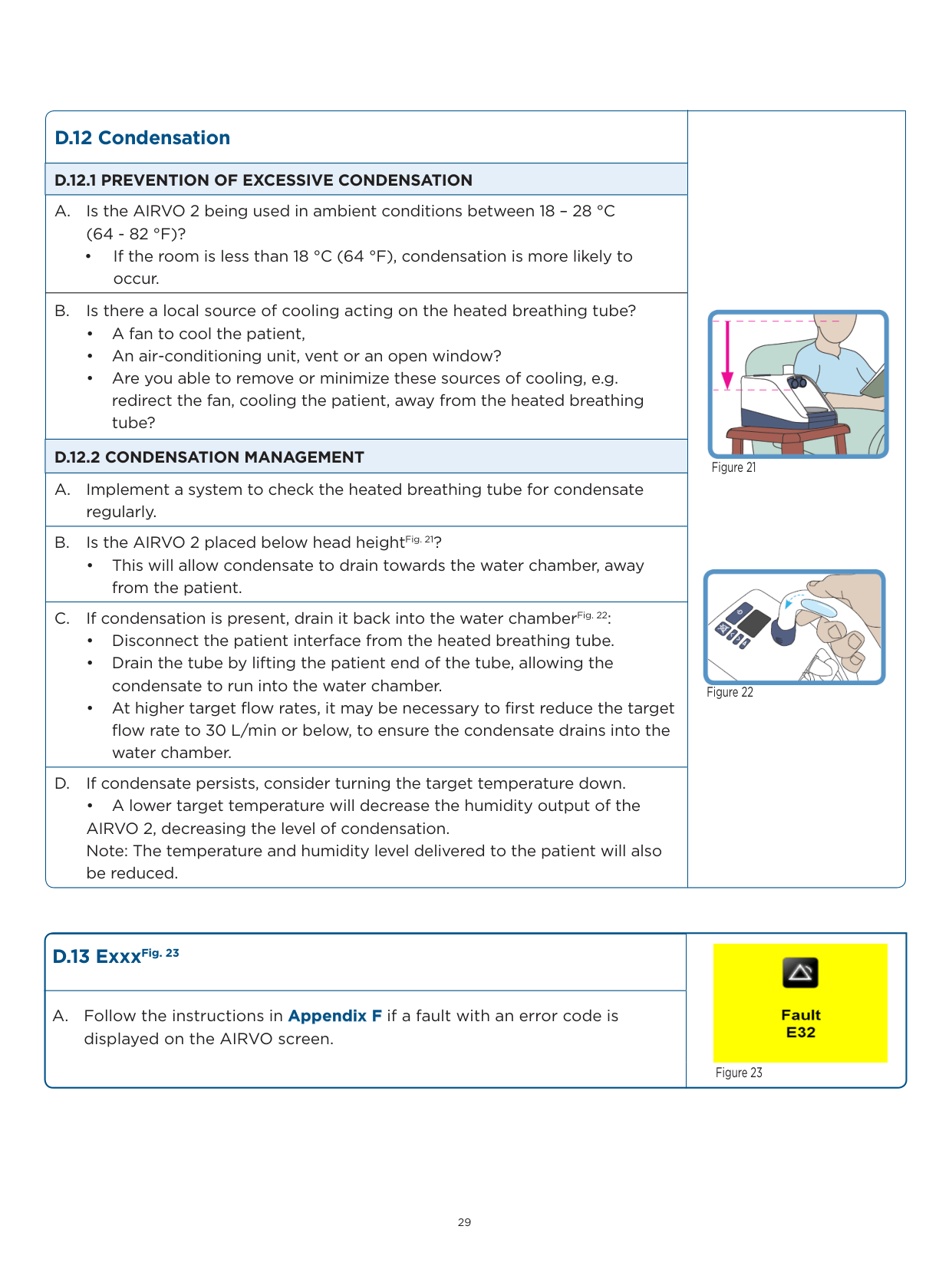
  • • Remove the water chamber.
  • • Push the chamber on firmly, until the finger guard “clicks” into placeFig. 11.
  • Page 29

    Warning: The heater-plate and base of the water chamber may be hot.

    ########## D.5.2 HEATED BREATHING TUBE

  • A. Is the heated breathing tube attached to the device correctly? Even if it appears to be:
  • • Disconnect the heated breathing tube.
  • • Check that the black O-ring is in placeFig.12. If the O-ring is damaged or missing, replace with part 900PT408.
  • • Reconnect the heated breathing tube.
  • B. Confirm that the heated breathing tube is not visibly damaged.
  • ########## D.5.3 PATIENT INTERFACE

  • A. Is the patient interface correctly fitted to the heated breathing tube?
  • • Even if it appears to be, disconnect and reconnect the patient interface. It should make a “click” sound when it is connected properly.

  • B. Should the unit be in Default (adult) mode?
  • • If the AIRVO is in Junior mode and the 900PT501 Default tube is used with the OPT842/44/46/70 or RT013 interfaces, it may generate a “Check for leaks” alarm.

    See Appendix E for identification of the Default and Junior Tube and Chamber Kits, according to their labels.

    ########## D.5.4 AIR FILTER & FILTER COVER

    A. Is the air filter and filter cover (at the back of the device) correctly fitted, as per the User Manual?

    ![image 525](FQWdOL4c2kWuO1IW_images/imageFile525.png)

    ![image 526](FQWdOL4c2kWuO1IW_images/imageFile526.png)

    ![image 527](FQWdOL4c2kWuO1IW_images/imageFile527.png)

    Figure 10

    ![image 528](FQWdOL4c2kWuO1IW_images/imageFile528.png)

  • Figure 11
  • ![image 529](FQWdOL4c2kWuO1IW_images/imageFile529.png)

  • Figure 12
  • ######## D.6 “O2 too low”Fig. 13The measured oxygen level has fallen below the allowed limit.

  • A. Adjust the level of oxygen from the oxygen source as necessary, i.e. increase the oxygen flow rate through the oxygen flow meter.
  • B. Is the oxygen source (wall or cylinder flow meter) turned on?
  • C. Is the oxygen source empty or faulty?
  • D. Is the “AIRVO 2 oxygen inlet kit”Fig. 14 installed correctly, as per the instructions included with part 900PT422 and confirmed that there are no kinks in the “AIRVO 2 oxygen inlet kit” oxygen tubing?
  • E. Is the oxygen source tubing correctly and securely fitted to the AIRVO 2?
  • F. Allow the device to sufficiently warm up; rapid changes in temperature can affect the sensor.
  • G. Is the minimum oxygen limit set to 25%?
  • • A prompt will appear with an option to change this lower limit to 21 %. Select “Yes” or “No” by using the “Up“ and “Down” buttons. Press the “mode” button ( ) to confirm selectionFig. 15. See Section 2 - Advanced Settings to change this lower oxygen limit.
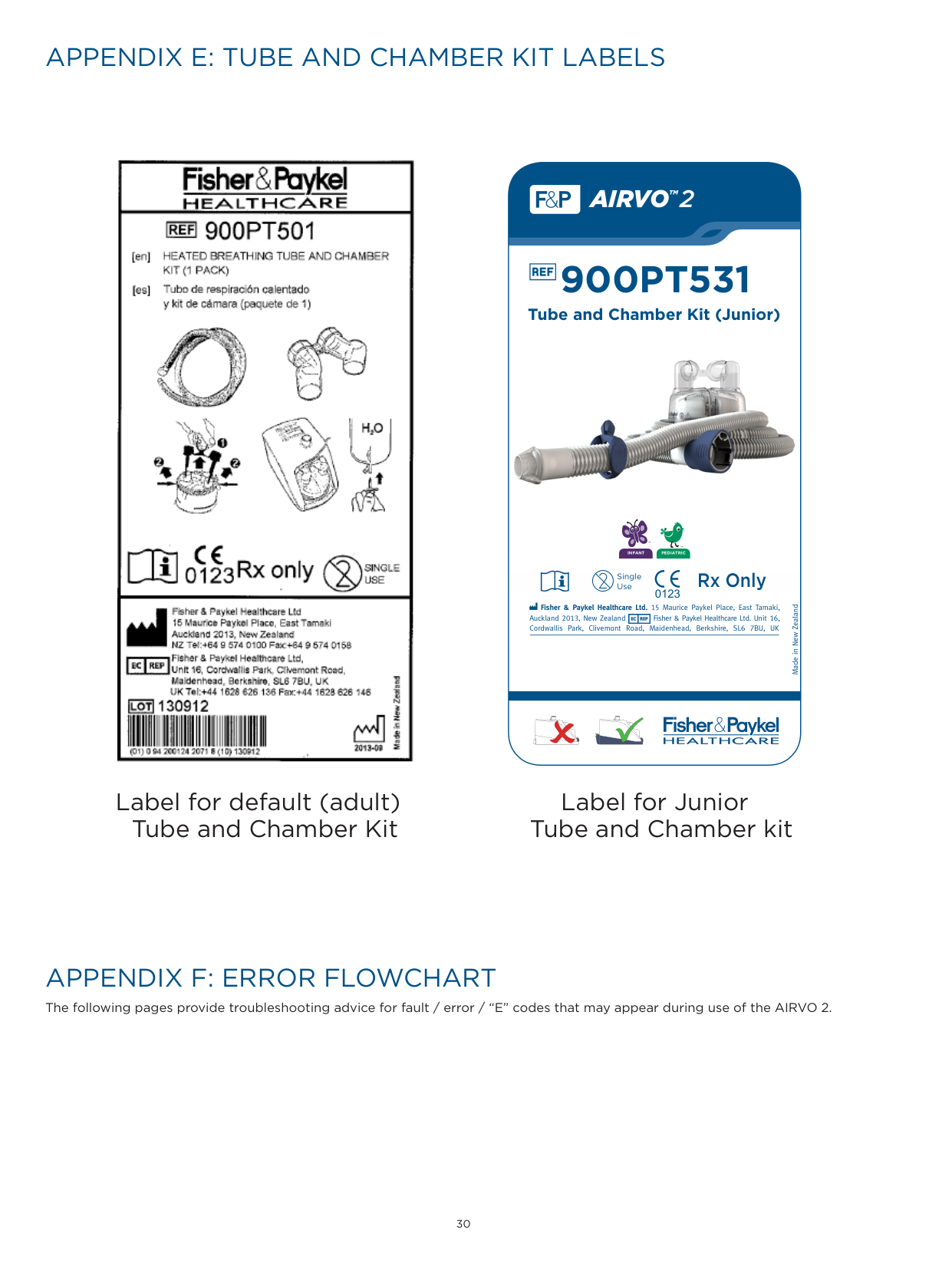
    Page 30

    ![image 530](FQWdOL4c2kWuO1IW_images/imageFile530.png)

    ![image 531](FQWdOL4c2kWuO1IW_images/imageFile531.png)

    Figure 13

  • Figure 14
  • ![image 532](FQWdOL4c2kWuO1IW_images/imageFile532.png)

    ![image 533](FQWdOL4c2kWuO1IW_images/imageFile533.png)

  • Figure 15
  • ######## D.7 “O2 too high”Fig. 16The measured oxygen level has risen above the allowed limit.

    ![image 534](FQWdOL4c2kWuO1IW_images/imageFile534.png)

  • A. Adjust the level of oxygen from the oxygen source as necessary, i.e. decrease the oxygen flow rate through the oxygen flow meter.
  • B. See Section 2 - Advanced Settings to change this lower oxygen limit. Figure 16
  • |D.8 “Cannot reach target flow” Fig. 17|![image 535](FQWdOL4c2kWuO1IW_images/imageFile535.png)

    Figure 17| |---|---| |A. Press the “mode” button ( ) to continue normal operation at a lower (maximum achievable) flow rate.

    ![image 536](FQWdOL4c2kWuO1IW_images/imageFile536.png)|![image 535](FQWdOL4c2kWuO1IW_images/imageFile535.png)

    Figure 17| |B. Is the target flow setting too high for the patient interface?

    • Check the swing tag/User Manual for the appropriate flow range for each

    patient interface. Note: If the AIRVO 2 cannot reach the target flow setting, it will automatically select a maximum achievable flow rate and prompt the user to press the “mode” button ( ) to confirm.

    ![image 537](FQWdOL4c2kWuO1IW_images/imageFile537.png)|![image 535](FQWdOL4c2kWuO1IW_images/imageFile535.png)

    Figure 17| |C. Follow steps in Section D.4 — “Check for blockages”.|![image 535](FQWdOL4c2kWuO1IW_images/imageFile535.png)

    Figure 17| |D. Is the altitude above 2,000 m? The AIRVO 2 is designed to operate at an altitude below 2,000 meters.|![image 535](FQWdOL4c2kWuO1IW_images/imageFile535.png)

    Figure 17|

    |D.9 “Cannot reach target temperature”Fig. 18 The most likely cause is operating the AIRVO 2 at a high flow rate in a cold room. Consider decreasing the target flow setting.|![image 538](FQWdOL4c2kWuO1IW_images/imageFile538.png)

    Figure 18| |---|---| |A. Press “mode” button ( ) to continue. Note: The humidity level may be compromised.

    ![image 539](FQWdOL4c2kWuO1IW_images/imageFile539.png)|![image 538](FQWdOL4c2kWuO1IW_images/imageFile538.png)

    Figure 18| |B. Is the ambient room temperature below 18 °C (64 °F)?

    • If yes, proactive management of condensation may be required. See Section D.12 on prevention and management of condensation.|![image 538](FQWdOL4c2kWuO1IW_images/imageFile538.png)

    Figure 18|

    |D.10 “Check water”Fig. 19|![image 540](FQWdOL4c2kWuO1IW_images/imageFile540.png)

    Figure 19| |---|---| |A. Is the water bag empty? If yes, refill or replace the water bag and press the “mode” button ( ) to reset the alarm.

    ![image 541](FQWdOL4c2kWuO1IW_images/imageFile541.png)|![image 540](FQWdOL4c2kWuO1IW_images/imageFile540.png)

    Figure 19| |B. Is the water chamber empty?

    • If yes, replace the water chamber as it may be damaged.

    Warning: The heater-plate and base of the water chamber may be hot.|![image 540](FQWdOL4c2kWuO1IW_images/imageFile540.png)

    Figure 19| |C. Is there a kink in the fluid line, preventing water from flowing into the chamber?|![image 540](FQWdOL4c2kWuO1IW_images/imageFile540.png)

    Figure 19| |D. Open the vent cap near the water bag spike. This allows the pressure to equalize, letting the water flow into the water chamber.|![image 540](FQWdOL4c2kWuO1IW_images/imageFile540.png)

    Figure 19|

    |D.11 “Check operating conditions” Fig. 20 This alarm may be caused by a sudden change in ambient room temperature, e.g. storing the unit in a cold place, then using it in a warm place.|![image 542](FQWdOL4c2kWuO1IW_images/imageFile542.png)

    Figure 20| |---|---| |A. Is the ambient room temperature less than 10 °C (50 °F) or greater than 30 °C (86 °F)?|![image 542](FQWdOL4c2kWuO1IW_images/imageFile542.png)

    Figure 20| |B. Leave the unit running for 30 minutes. Switch the unit off, then restart.|![image 542](FQWdOL4c2kWuO1IW_images/imageFile542.png)

    Figure 20|

    |D.12 Condensation|![image 543](FQWdOL4c2kWuO1IW_images/imageFile543.png)

    Figure 21

    ![image 544](FQWdOL4c2kWuO1IW_images/imageFile544.png)

    Figure 22
    | |---|---| |D.12.1 PREVENTION OF EXCESSIVE CONDENSATION|![image 543](FQWdOL4c2kWuO1IW_images/imageFile543.png)

    Figure 21

    ![image 544](FQWdOL4c2kWuO1IW_images/imageFile544.png)

    Figure 22
    | |A. Is the AIRVO 2 being used in ambient conditions between 18 – 28 °C (64 - 82 °F)?

    • If the room is less than 18 °C (64 °F), condensation is more likely to occur.|![image 543](FQWdOL4c2kWuO1IW_images/imageFile543.png)

    Figure 21

    ![image 544](FQWdOL4c2kWuO1IW_images/imageFile544.png)

    Figure 22
    | |B. Is there a local source of cooling acting on the heated breathing tube?

    • A fan to cool the patient,
    • An air-conditioning unit, vent or an open window?
    • Are you able to remove or minimize these sources of cooling, e.g. redirect the fan, cooling the patient, away from the heated breathing tube?
    |![image 543](FQWdOL4c2kWuO1IW_images/imageFile543.png)

    Figure 21

    ![image 544](FQWdOL4c2kWuO1IW_images/imageFile544.png)

    Figure 22
    | |D.12.2 CONDENSATION MANAGEMENT|![image 543](FQWdOL4c2kWuO1IW_images/imageFile543.png)

    Figure 21

    ![image 544](FQWdOL4c2kWuO1IW_images/imageFile544.png)

    Figure 22
    | |A. Implement a system to check the heated breathing tube for condensate regularly.|![image 543](FQWdOL4c2kWuO1IW_images/imageFile543.png)

    Figure 21

    ![image 544](FQWdOL4c2kWuO1IW_images/imageFile544.png)

    Figure 22
    | |B. Is the AIRVO 2 placed below head heightFig. 21?

    • This will allow condensate to drain towards the water chamber, away from the patient.|![image 543](FQWdOL4c2kWuO1IW_images/imageFile543.png)

    Figure 21

    ![image 544](FQWdOL4c2kWuO1IW_images/imageFile544.png)

    Figure 22
    | |C. If condensation is present, drain it back into the water chamberFig. 22:

    • Disconnect the patient interface from the heated breathing tube.
    • Drain the tube by lifting the patient end of the tube, allowing the condensate to run into the water chamber.
    • At higher target flow rates, it may be necessary to first reduce the target flow rate to 30 L/min or below, to ensure the condensate drains into the water chamber.
    |![image 543](FQWdOL4c2kWuO1IW_images/imageFile543.png)

    Figure 21

    ![image 544](FQWdOL4c2kWuO1IW_images/imageFile544.png)

    Figure 22
    |

    Page 31

    |D. If condensate persists, consider turning the target temperature down.

    • A lower target temperature will decrease the humidity output of the AIRVO 2, decreasing the level of condensation. Note: The temperature and humidity level delivered to the patient will also be reduced.|![image 543](FQWdOL4c2kWuO1IW_images/imageFile543.png)

    Figure 21

    ![image 544](FQWdOL4c2kWuO1IW_images/imageFile544.png)

    Figure 22
    |

    ###### D.13 ExxxFig. 23

    A. Follow the instructions in Appendix F if a fault with an error code is displayed on the AIRVO screen.

    ![image 545](FQWdOL4c2kWuO1IW_images/imageFile545.png)

    Figure 23

  • APPENDIX E: TUBE AND CHAMBER KIT LABELS
  • APPENDIX F: ERROR FLOWCHART
  • ![image 546](FQWdOL4c2kWuO1IW_images/imageFile546.png)

    #### AIRVO

    2

    TM

    900PT531

    ![image 547](FQWdOL4c2kWuO1IW_images/imageFile547.png)

    Tube and Chamber Kit (Junior)

    ![image 548](FQWdOL4c2kWuO1IW_images/imageFile548.png)

    ################### PEDIATRICINFANT

    ##### Rx Only

    Single Use

    0123

    Fisher & Paykel Healthcare Ltd. 15 Maurice Paykel Place, East Tamaki, Auckland 2013, New Zealand Fisher & Paykel Healthcare Ltd. Unit 16, Cordwallis Park, Clivemont Road, Maidenhead, Berkshire, SL6 7BU, UK

    Made in New Zealand

    ![image 549](FQWdOL4c2kWuO1IW_images/imageFile549.png)

    | | | |---|---| | | |

    | | | |---|---| | | |

    Label for default (adult) Tube and Chamber Kit

    Label for Junior Tube and Chamber kit

    The following pages provide troubleshooting advice for fault / error / “E” codes that may appear during use of the AIRVO 2.
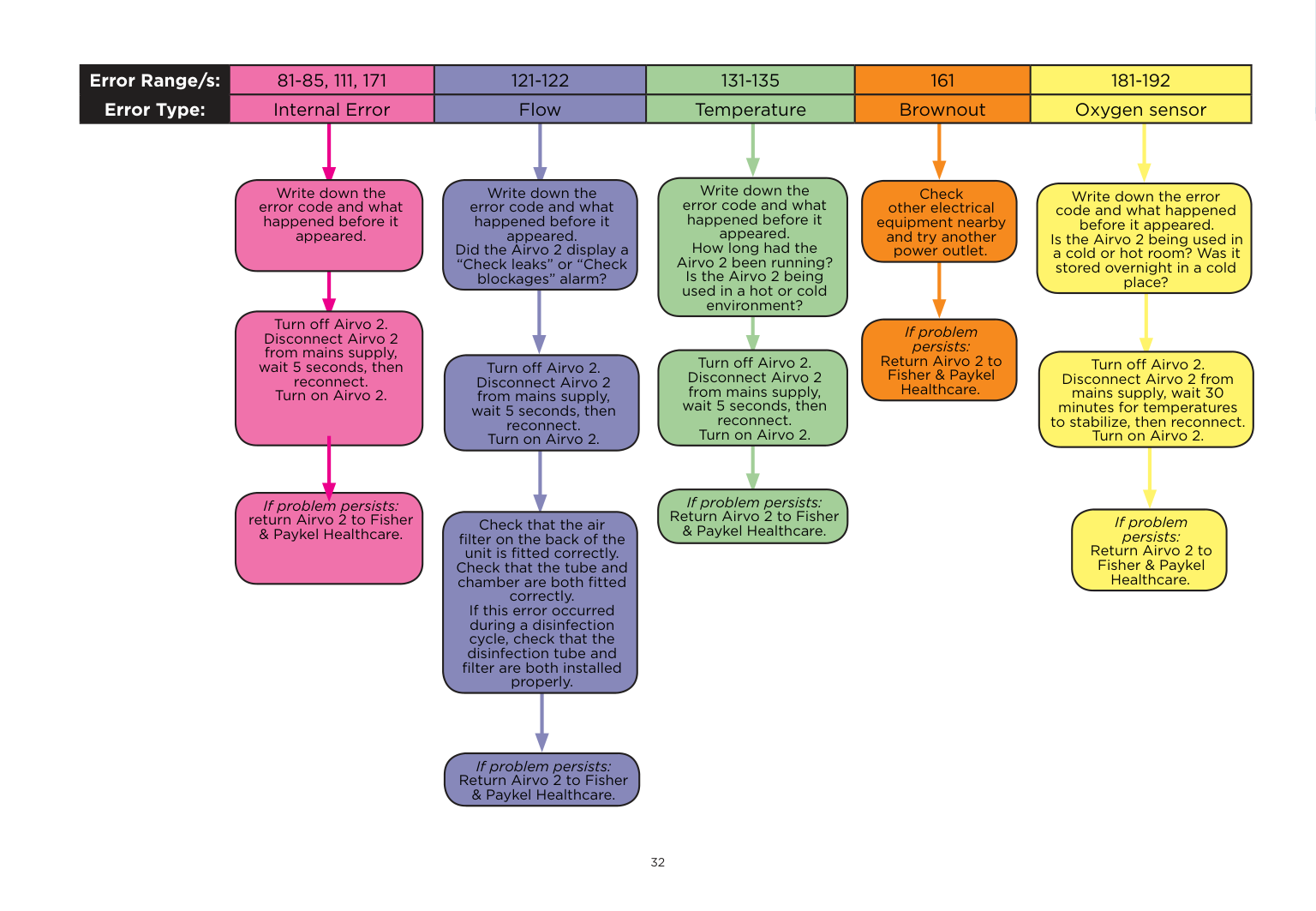
    Page 32

    |Error Range/s:|1-10|1-10|11-33, 38-41, 44-50, 141-157|11-33, 38-41, 44-50, 141-157|34-37, 42-43, 70-73, 75-78|61-69, 74, 91-106|61-69, 74, 91-106| |---|---|---|---|---|---|---|---| |Error Type:|Mot|r|Heated breathing tube|Heated breathing tube|Disinfection tube|Chamber|Chamber| | | | | | | | | |

    Write down the error code and what happened before it appeared. Had the user just connected or replaced the breathing tube? Was there a “Check tube” error shown?

    Write down the error code and what happened before it appeared. How far through the disinfection cycle was the user? Was anything changed (filter, tube, etc) half-way through?

    Write down the error code and what happened before it appeared. Is the Airvo 2 being used in a cold or hot room? Was it stored overnight in a cold place? Did the user add hot water to the chamber instead of roomtemperature water?

    Write down the error code and what happened before it appeared. Was the unit dropped, shaken or wet?

    Check that the tube is connected properly.

    Turn off Airvo 2. Disconnect Airvo 2 from mains supply, wait 5 seconds, then reconnect. Turn on Airvo 2.
    Check that the chamber is connected properly to the Airvo 2, that it isn’t overfilled and that hot water hasn’t been added.

    Check that the tube, disinfection filter and air filter on back of the unit are connected properly.

    Turn off Airvo 2. Disconnect Airvo 2 from mains supply, wait 5 seconds, then reconnect. Turn on Airvo 2.

    Turn off Airvo 2. Disconnect Airvo 2 from mains supply, wait 5 seconds, then reconnect. Turn on Airvo 2 (ie. start the disinfection cycle again).

    Turn off Airvo 2. Disconnect Airvo 2 from mains supply, wait 30 minutes for temperatures to stabilize, then reconnect. Turn on Airvo 2.

    If problem persists: return Airvo 2 to Fisher & Paykel Healthcare.

    If problem persists: Repeat this process with a new tube.

    If problem persists: Return Airvo 2 to Fisher & Paykel Healthcare.

    If problem persists: Repeat this process with another tube.

    If problem solved: return faulty tube to Fisher & Paykel Healthcare.

    If problem solved: return faulty disinfection tube to Fisher & Paykel Healthcare.

    If problem persists: Return Airvo 2 to Fisher & Paykel Healthcare.

    If problem persists: Return Airvo 2 to Fisher & Paykel Healthcare.

    |Error Range/s:|81-85, 111, 171|81-85, 111, 171|121-122|121-122|131-135|131-135|161|161|181-192|181-192| |---|---|---|---|---|---|---|---|---|---|---| |Error Type:|Internal Error|Internal Error|Flow|Flow|Temperature|Temperature|Brownout|Brownout|Oxygen sensor|Oxygen sensor| | | | | | | | | | | | |

    Write down the error code and what happened before it appeared. How long had the Airvo 2 been running? Is the Airvo 2 being used in a hot or cold environment?

    Write down the error code and what happened before it appeared.

    Write down the error code and what happened before it appeared. Did the Airvo 2 display a “Check leaks” or “Check blockages” alarm?

    Check other electrical equipment nearby and try another power outlet.

    Write down the error code and what happened before it appeared. Is the Airvo 2 being used in a cold or hot room? Was it stored overnight in a cold place?

    Turn off Airvo 2. Disconnect Airvo 2 from mains supply, wait 5 seconds, then reconnect. Turn on Airvo 2.

    Page 33

    If problem persists: Return Airvo 2 to Fisher & Paykel Healthcare.

    Turn off Airvo 2. Disconnect Airvo 2 from mains supply, wait 5 seconds, then reconnect. Turn on Airvo 2.

    Turn off Airvo 2. Disconnect Airvo 2 from mains supply, wait 30 minutes for temperatures to stabilize, then reconnect. Turn on Airvo 2.

    Turn off Airvo 2. Disconnect Airvo 2 from mains supply, wait 5 seconds, then reconnect. Turn on Airvo 2.

    If problem persists: Return Airvo 2 to Fisher & Paykel Healthcare.

    If problem persists: return Airvo 2 to Fisher & Paykel Healthcare.

    If problem persists: Return Airvo 2 to Fisher & Paykel Healthcare.

    Check that the air filter on the back of the unit is fitted correctly. Check that the tube and chamber are both fitted correctly. If this error occurred during a disinfection cycle, check that the disinfection tube and filter are both installed properly.

    If problem persists: Return Airvo 2 to Fisher & Paykel Healthcare.

    For more information please contact your local Fisher & Paykel Healthcare representative

    REF 185047911 REV E © 2014-11 Fisher & Paykel Healthcare Limited

    Manufacturer Fisher & Paykel Healthcare Ltd 15 Maurice Paykel Place East Tamaki, Auckland 2013

    PO Box 14 348, Panmure Auckland 1741 New Zealand

    Tel: +64 9 574 0100 Fax: +64 9 574 0158 Email: info@fphcare.com Web: www.fphcare.com

    Australia Fisher & Paykel Healthcare Pty Limited 36-40 New Street, PO Box 167 Ringwood, Melbourne Victoria 3134, Australia Tel: +61 3 9879 5022 Fax: +61 3 9879 5232 Austria Tel: 0800 29 31 23 Fax: 0800 29 31 22 Benelux Tel: +31 40 216 3555 Fax: +31 40 216 3554 China

    Tel: +86 20 3205 3486 Fax: +86 20 3205 2132

    France Tel: +33 1 6446 5201 Fax: +33 1 6446 5221

    Germany Tel: +49 7181 98599 0 Fax: +49 7181 98599 66

    ############## India

    Tel: +91 80 4284 4000 Fax: +91 80 4123 6044

    Irish Republic Tel: 1800 409 011

    Italy Tel: +39 06 7839 2939 Fax: +39 06 7814 7709

    Spain Tel: +34 902 013 346 Fax: +34 902 013 379

    Sweden Tel: +46 8 564 76 680 Fax: +46 8 36 63 10

    Switzerland Tel: 0800 83 47 63 Fax: 0800 83 47 54

    Taiwan Tel: +886 2 8751 1739 Fax: +886 2 8751 5625

    Turkey Fisher Paykel Sağlık Ürünleri Ticaret Limited Şirketi, Alinteri Bulvari 1161/1 Sokak No. 12-14, P.O. Box 06371 Ostim, Ankara, Turkey

    Tel: +90 312 354 34 12 Fax: +90 312 354 31 01

    UK Fisher & Paykel Healthcare Ltd Unit 16, Cordwallis Park Clivemont Road, Maidenhead Berkshire SL6 7BU, UK

    Tel: +44 1628 626 136 Fax: +44 1628 626 146

    ############## USA/Canada

    Tel: +1 800 446 3908 or +1 949 453 4000 Fax: +1 949 453 4001

    0123

    www.fphcare.com

    More from Fisher Paykel

    Similar Generators