Gree Yap1f IR Remote Control manual
Remote Controls · 20 Q&As

Gree Yap1f IR Remote Control

Ask AI

— answers from the official manual

Answers from the official manual.

Common questions

Common Questions

20 total
1

What type of batteries does the YAP1F remote controller require and how do I replace them?

The YAP1F remote controller requires two 7# (AAA 1.5V) dry batteries. To replace them, lift the cover along the direction of the arrow, take out the old batteries, insert the new ones ensuring correct + and - polarity, then reinstall the cover. When replacing batteries, do not use old or different types of batteries as this may cause malfunction. (Page 7)

2

What should I do first when using the YAP1F remote controller for the very first time?

When using the remote controller for the first time or after replacing batteries, you must set the system clock to the current time. Press the CLOCK button until the time blinks, press the up or down button to adjust the time, then press CLOCK again to confirm. (Page 2)

3

What is the temperature range I can set on the YAP1F remote controller?

The settable temperature range is from 16°C to 30°C. Press the up button to increase the temperature and the down button to decrease it. Note that under auto mode, manual temperature adjustment is not needed. (Page 3)

4

How do I activate the child lock on the YAP1F remote controller to prevent accidental button presses?

Press the up and down buttons simultaneously to lock all buttons on the remote controller, and the lock icon will be displayed. Press the same combination again to unlock the buttons. If buttons are locked, the lock icon will blink 3 times when any button is pressed and the operation will be invalid. (Page 6)

5

What does the X-FAN function do and when can it be used?

The X-FAN function blows away water on the evaporator after the unit is turned off in order to avoid mildew. It can only be activated in cool or dry mode by pressing the X-FAN button. When the icon is displayed, X-FAN is on; when it is not displayed, X-FAN is off. (Page 4-5)

6

My YAP1F remote controller is not working properly — what troubleshooting steps should I take?

If the remote controller does not operate normally, remove the batteries and reinsert them after 30 seconds. If it still cannot operate properly, replace the batteries entirely. Also ensure you do not mix old or different types of batteries, as this may cause malfunction. (Page 8)

Show 14 more questions

Full Manual

26 pages
Page 1

![image 1](YAP1F-YV1L1-YAD1F_infr_C3_A1s_t_C3_A1vir_C3_A1ny_C3_ADt_C3_B3_images/imageFile1.png)

User’s Manual of Remote Controller

#### Owner's Manual Air Conditioners

Thank you for choosing Air Conditioners, please read this owner’s manual carefully before operation and retain it for future reference.If you have lost the Owner’s Manual, please contact the local agent or visit www.gree.com or sent email to global@gree.com.cn or electronic version.

GREE reserves the right to interpret this manual which will be subject to any change due to product improvement without further notice.

GREE Electric Appliances, Inc. of Zhuhai reserves the final right to interpret this manual.

Preface

For correct installation and operation, please read all instructions carefully. Before reading the instructions, please be aware of the following items:

  • (1) For the safe operation of this unit, please read and follow the instructions
  • carefully.

  • (2) During operation, total capacity of indoor units should not exceed the total
  • capacity of outdoor units. Otherwise, poor effect of cooling or heating may result.

  • (3) Direct operators or maintainers should well keep this manual.
  • (4) If this unit fails to operate normally, please contact our service center as soon
  • as possible and provide the following information:
  • ● Content on the nameplate(model number, cooling capacity, production code, ex-factory date).
  • ● Malfunction details(before and after the malfunction occurs).
  • Page 2

  • (5) Each unit has been strictly tested and proved to be qualified before ex-factory.
  • In order to prevent units from being damaged or operating normally because of improper disassembly, please do not disassemble the unit by yourself. If you need to disassemble and check units, please contact our service center. We will send specialists to guide the disassembly.

  • (6) All graphics in this manual is only for your reference. For sales or production
  • reasons, these graphics are subject to change by manufacturer without prior notice.

    Contents
  • 1 Remote Controller YAP1F··············································· 1
  • 1.1 Button name and function introduction ·································1
  • 1.2 Preparation before operation ·············································2
  • 1.3 Introduction of operation function········································2
  • 1.4 Introduction of special functions ·········································6
  • 1.5 Replacing batteries in remote controller and notes··················7
  • 2 Remote Controller YV1L1 ··············································· 8
  • 2.1 Preparation before operation ·············································9
  • 2.2 Introduction of operation function········································9
  • 2.3 Introduction of special functions ·······································14
  • 2.4 Basic operation instructions·············································15
  • 2.5 Replacing batteries in remote controller and notes················15
  • 3 Remote Controller YAD1F··············································16
  • 3.1 Button name and function introduction (outside)···················17
  • 3.2 Button name and function introduction (inside)·····················17
  • Page 3

  • 3.3 Preparation before operation ···········································17
  • 3.4 Introduction of operation functions ····································18
  • 3.5 Introduction of special functions Setting child lock ················20
  • 3.6 Replacing batteries in remote controller and notes················21
  • 1 Remote Controller YAP1F

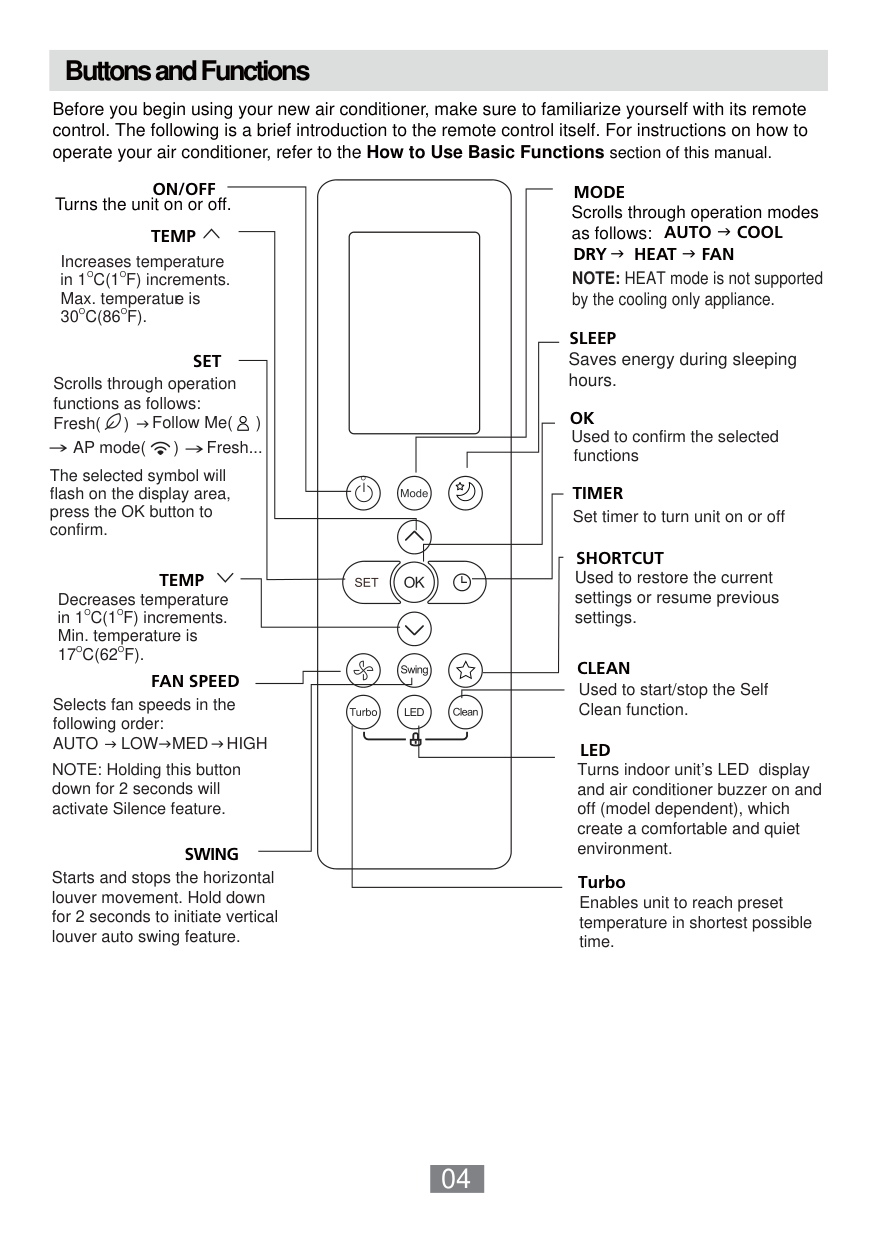
  • 1.1 Button name and function introduction
  • ![image 2](YAP1F-YV1L1-YAD1F_infr_C3_A1s_t_C3_A1vir_C3_A1ny_C3_ADt_C3_B3_images/imageFile2.png)

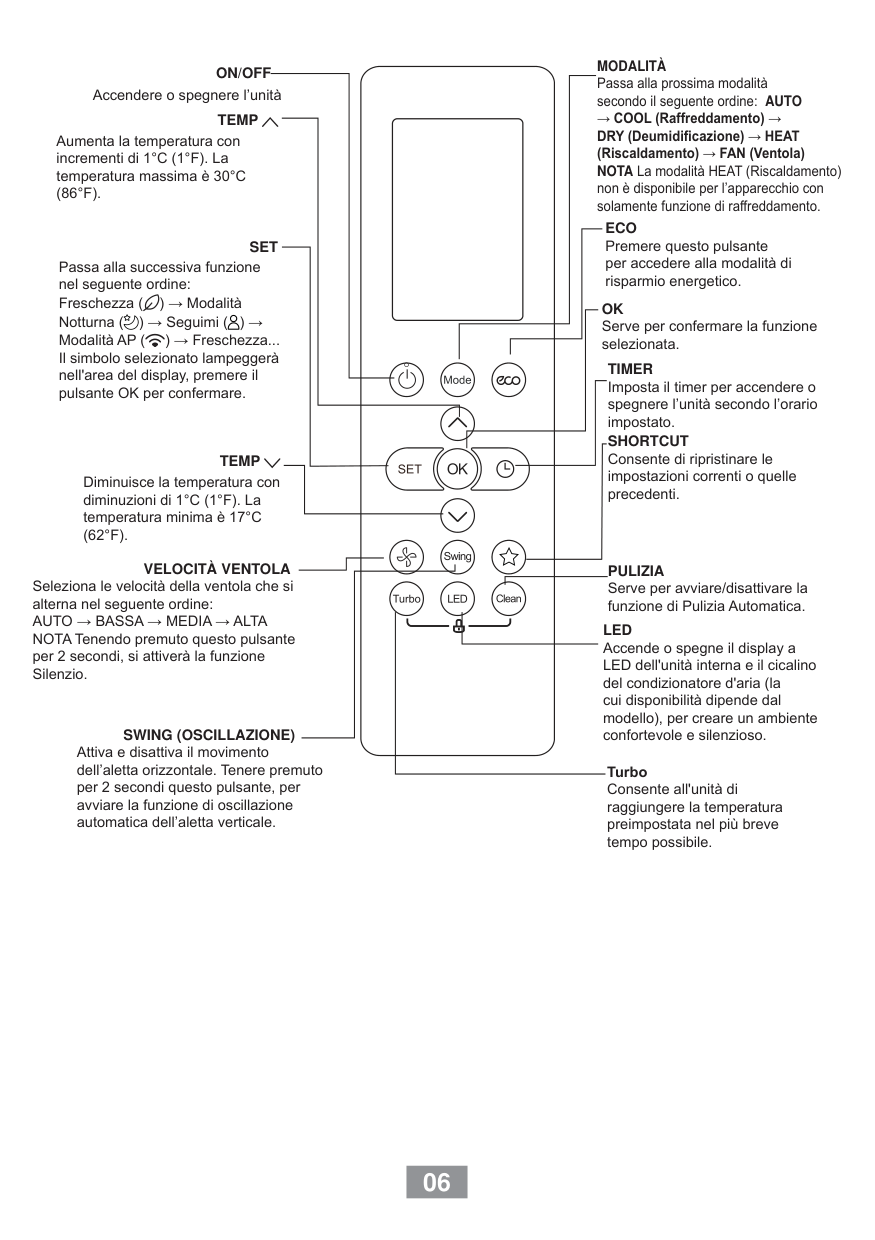
    |No.|Button name|Function| |---|---|---| |1|ON/OFF|Turn on or turn off the unit| |2|TURBO|Set turbo function| |3|MODE|Set operation mode| |4|![image 3](YAP1F-YV1L1-YAD1F_infr_C3_A1s_t_C3_A1vir_C3_A1ny_C3_ADt_C3_B3_images/imageFile3.png)|Set up&down swing status| |5|I FEEL|Set I FEEL function| |6|TEMP|Switch temperature displaying type on the unit’s display| |7|![image 4](YAP1F-YV1L1-YAD1F_infr_C3_A1s_t_C3_A1vir_C3_A1ny_C3_ADt_C3_B3_images/imageFile4.png)|Set health function and air function| |8|LIGHT|Set light function| |9|X-FAN|Set X-FAN function| |10|SLEEP|Set sleep function| |11|CLOCK|Set clock of the system| |12|TOFF|Set timer off function| |13|TON|Set timer on function| |14|![image 5](YAP1F-YV1L1-YAD1F_infr_C3_A1s_t_C3_A1vir_C3_A1ny_C3_ADt_C3_B3_images/imageFile5.png)|Set left&right swing status| |15|FAN|Set fan speed| |16|![image 6](YAP1F-YV1L1-YAD1F_infr_C3_A1s_t_C3_A1vir_C3_A1ny_C3_ADt_C3_B3_images/imageFile6.png)

    /|Set temperature and time|

    1.2 Preparation before operation
    Page 4

    When using the remote controller for the first time or after replacing the batteries, please set the time of the system according to current time in the following steps:

  • (1). Pressing CLOCK button, is blinking.
  • (2). Pressing or button, the clock time will increase or decrease rapidly.
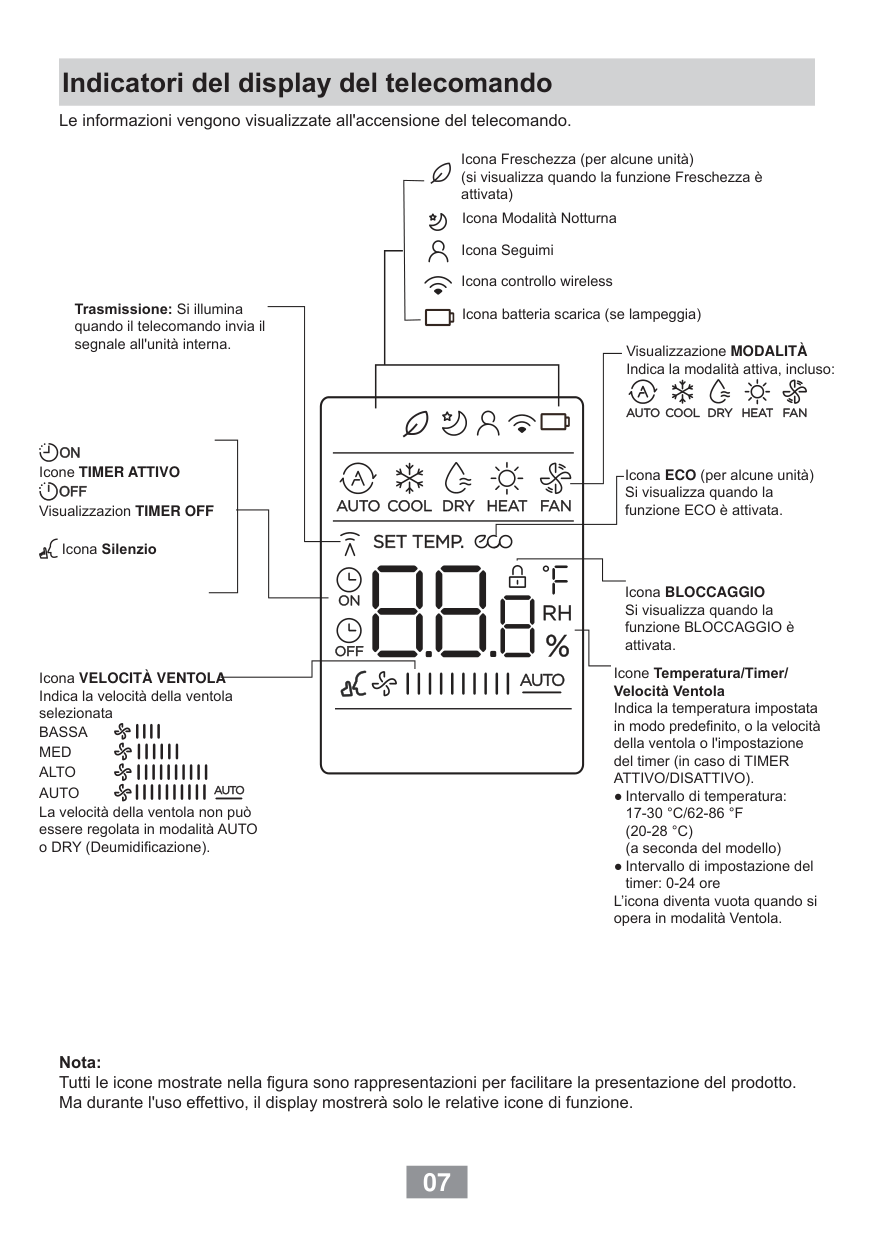
  • ![image 7](YAP1F-YV1L1-YAD1F_infr_C3_A1s_t_C3_A1vir_C3_A1ny_C3_ADt_C3_B3_images/imageFile7.png)

    ![image 8](YAP1F-YV1L1-YAD1F_infr_C3_A1s_t_C3_A1vir_C3_A1ny_C3_ADt_C3_B3_images/imageFile8.png)

  • (3). Press CLOCK button again to confirm the time and return to display current time.
  • 1.3 Introduction of operation function

    (1). Selecting operation mode

    In unit on status, press MODE button to select operation mode in following sequence:

    ![image 9](YAP1F-YV1L1-YAD1F_infr_C3_A1s_t_C3_A1vir_C3_A1ny_C3_ADt_C3_B3_images/imageFile9.png)

    (2). Setting temperature

    ![image 10](YAP1F-YV1L1-YAD1F_infr_C3_A1s_t_C3_A1vir_C3_A1ny_C3_ADt_C3_B3_images/imageFile10.png)

    ![image 11](YAP1F-YV1L1-YAD1F_infr_C3_A1s_t_C3_A1vir_C3_A1ny_C3_ADt_C3_B3_images/imageFile11.png)

    In unit on status, press button to increase setting temperature and press button to decrease setting temperature. The range of temperature is from 16℃ to 30℃. Note: Under auto mode, manual adjustment of temperature is not needed.

    (3). Adjusting fan speed In unit on status, press FAN button to adjust fan speed in following sequence:

    ![image 12](YAP1F-YV1L1-YAD1F_infr_C3_A1s_t_C3_A1vir_C3_A1ny_C3_ADt_C3_B3_images/imageFile12.png)

    ###### Notes:

    Page 5

  • ①. When operation mode changes, fan speed is memoried;
  • ②. Under dry mode, fan speed is low and can not be adjusted.
  • (4). Setting swing function  Setting left&right swing

  • 1). Under simple swing status, press button to adjust left&right swing status;
  • ![image 13](YAP1F-YV1L1-YAD1F_infr_C3_A1s_t_C3_A1vir_C3_A1ny_C3_ADt_C3_B3_images/imageFile13.png)

  • 2). Under fixed-angle swing status, press button to adjust left&right swing angle circularly as below:
  • ![image 14](YAP1F-YV1L1-YAD1F_infr_C3_A1s_t_C3_A1vir_C3_A1ny_C3_ADt_C3_B3_images/imageFile14.png)

    ![image 15](YAP1F-YV1L1-YAD1F_infr_C3_A1s_t_C3_A1vir_C3_A1ny_C3_ADt_C3_B3_images/imageFile15.png)

    Note: operate continuously left&right swing in 2 seconds, swing states will change according to above-mentioned order, or switch closed state and state.

    ![image 16](YAP1F-YV1L1-YAD1F_infr_C3_A1s_t_C3_A1vir_C3_A1ny_C3_ADt_C3_B3_images/imageFile16.png)

     Setting up&down swing

  • 1). Under simple swing status, press button to adjust up&down swing status;
  • ![image 17](YAP1F-YV1L1-YAD1F_infr_C3_A1s_t_C3_A1vir_C3_A1ny_C3_ADt_C3_B3_images/imageFile17.png)

  • 2). Under fixed-angle swing status, press button to adjust up&down swing angle circularly as below:
  • ![image 18](YAP1F-YV1L1-YAD1F_infr_C3_A1s_t_C3_A1vir_C3_A1ny_C3_ADt_C3_B3_images/imageFile18.png)

    ![image 19](YAP1F-YV1L1-YAD1F_infr_C3_A1s_t_C3_A1vir_C3_A1ny_C3_ADt_C3_B3_images/imageFile19.png)

    Page 6

    Note: operate continuously left&right swing in 2 seconds, swing states will change according to above-mentioned order, or switch closed state and state;

    ![image 20](YAP1F-YV1L1-YAD1F_infr_C3_A1s_t_C3_A1vir_C3_A1ny_C3_ADt_C3_B3_images/imageFile20.png)

    (5). Setting turbo function Under cool or heat mode, press TURBO button to set turbo function. When is displayed, turbo function is on. When is not displayed, turbo function is off. When turbo function is on, the unit operates in super high speed to achieve quick

    ![image 21](YAP1F-YV1L1-YAD1F_infr_C3_A1s_t_C3_A1vir_C3_A1ny_C3_ADt_C3_B3_images/imageFile21.png)

    ![image 22](YAP1F-YV1L1-YAD1F_infr_C3_A1s_t_C3_A1vir_C3_A1ny_C3_ADt_C3_B3_images/imageFile22.png)

    cooling or heating. When turbo function is off, the unit operates in setting fan speed.

    (6). Setting light function

    The light on the receiver light board will display present operation status. If you want to turn off the light, please press LIGHT button. Press this button again to turn on the light.

    (7). Viewing ambient temperature

    In unit on status, receiver light board or wired controller is defaulted to display setting temperature. Press TEMP button to view indoor or outdoor ambient temperature.

    When is displayed, it means the displayed temperature is setting temperature. When is displayed, it means the displayed temperature is indoor ambient

    ![image 23](YAP1F-YV1L1-YAD1F_infr_C3_A1s_t_C3_A1vir_C3_A1ny_C3_ADt_C3_B3_images/imageFile23.png)

    temperature.

    ![image 24](YAP1F-YV1L1-YAD1F_infr_C3_A1s_t_C3_A1vir_C3_A1ny_C3_ADt_C3_B3_images/imageFile24.png)

    When is displayed, it means the displayed temperature is outdoor ambient temperature. Note: setting temperature is always displayed in Remote Controller.

    (8). Setting X-FAN function In cool or dry mode, press X-FAN button to set X-FAN function. When is displayed, X-FAN function is on. When is not displayed, X-FAN function is off. When X-FAN function is on, the water on the evaporator will be blown away until

    turning off the unit to avoid mildew. (9). Setting health function In unit on status, press button to set health function. When is displayed, health function is on. When is not displayed, health function is off. Health function is available when the unit is equipped with anion generator. When

    Page 7

    ![image 25](YAP1F-YV1L1-YAD1F_infr_C3_A1s_t_C3_A1vir_C3_A1ny_C3_ADt_C3_B3_images/imageFile25.png)

    health function is on, the anion generator will start operation, adsorbing the dusts and

    killing the bacteria in the room. (10). Setting air function Press button until is displayed, then air function is turned on. Press button until is disappeared, then air function is turned off. When the indoor unit is connected with fresh air valve, air function setting can

    ![image 26](YAP1F-YV1L1-YAD1F_infr_C3_A1s_t_C3_A1vir_C3_A1ny_C3_ADt_C3_B3_images/imageFile26.png)

    ![image 27](YAP1F-YV1L1-YAD1F_infr_C3_A1s_t_C3_A1vir_C3_A1ny_C3_ADt_C3_B3_images/imageFile27.png)

    ![image 28](YAP1F-YV1L1-YAD1F_infr_C3_A1s_t_C3_A1vir_C3_A1ny_C3_ADt_C3_B3_images/imageFile28.png)

    ![image 29](YAP1F-YV1L1-YAD1F_infr_C3_A1s_t_C3_A1vir_C3_A1ny_C3_ADt_C3_B3_images/imageFile29.png)

    control the connection of fresh air valve, which can control the fresh air volume and improve the air quality inside the room.

    (11). Setting sleep function In unit on status, press SLEEP button to turn on or turn off sleep function.

     When is displayed, sleep function is on.

     When is not displayed, sleep function is off. Notes:

  • ①. Sleep function can not be set in auto and fan mode;
  • ②. When turning off the unit or switching mode, sleep function is cancelled;
  • (12). Setting I FEEL function In unit on status, press I FEEL button to turn on or turn off I FEEL function. When is displayed, I FEEL function is on. When is not displayed, I FEEL function is off.

    ![image 30](YAP1F-YV1L1-YAD1F_infr_C3_A1s_t_C3_A1vir_C3_A1ny_C3_ADt_C3_B3_images/imageFile30.png)

    ![image 31](YAP1F-YV1L1-YAD1F_infr_C3_A1s_t_C3_A1vir_C3_A1ny_C3_ADt_C3_B3_images/imageFile31.png)

    When I FEEL function is turned on, the unit will adjust temperature according to the temperature detected by the remote controller to achieve the best air-conditioning effect. In this case, you should place the remote controller within the valid receiving range.

    Page 8

    (13). Setting timer

    You can set the operation time of unit as you need. You can also set timer on and timer off in combination.

    Before setting, check if the time of the system is the same as the current time. If not, please set the time according to current time.

    1). Setting timer off

  • ①. Pressing TOFF button, “OFF” is blinking and time displaying zone displays the timer time of last setting.
  • ②. Press or button to adjust the timer time.
  • ![image 32](YAP1F-YV1L1-YAD1F_infr_C3_A1s_t_C3_A1vir_C3_A1ny_C3_ADt_C3_B3_images/imageFile32.png)

    ![image 33](YAP1F-YV1L1-YAD1F_infr_C3_A1s_t_C3_A1vir_C3_A1ny_C3_ADt_C3_B3_images/imageFile33.png)

  • ③. Press TOFF button again to confirm setting. OFF is displayed and time displaying zone resumes to display current time.
  • ④. Press TOFF button again to cancel timer and OFF is not displayed. 2). Setting timer on
  • ①. Pressing TON button, “ON” is blinking and time displaying zone displays the timer time of last setting.
  • ②. Press or button to adjust the timer time.
  • ![image 34](YAP1F-YV1L1-YAD1F_infr_C3_A1s_t_C3_A1vir_C3_A1ny_C3_ADt_C3_B3_images/imageFile34.png)

    ![image 35](YAP1F-YV1L1-YAD1F_infr_C3_A1s_t_C3_A1vir_C3_A1ny_C3_ADt_C3_B3_images/imageFile35.png)

  • ③. Press TON button again to confirm setting. ON is displayed and time displaying zone resumes to display current time.
  • ④. Press TON button again to cancel timer and ON is not displayed.
  • 1.4 Introduction of special functions

    Page 9

    (1). Setting child lock

    ![image 36](YAP1F-YV1L1-YAD1F_infr_C3_A1s_t_C3_A1vir_C3_A1ny_C3_ADt_C3_B3_images/imageFile36.png)

    ![image 37](YAP1F-YV1L1-YAD1F_infr_C3_A1s_t_C3_A1vir_C3_A1ny_C3_ADt_C3_B3_images/imageFile37.png)

    Press and button simultaneously to lock the buttons on remote controller and is displayed.

    ![image 38](YAP1F-YV1L1-YAD1F_infr_C3_A1s_t_C3_A1vir_C3_A1ny_C3_ADt_C3_B3_images/imageFile38.png)

    ![image 39](YAP1F-YV1L1-YAD1F_infr_C3_A1s_t_C3_A1vir_C3_A1ny_C3_ADt_C3_B3_images/imageFile39.png)

    ![image 40](YAP1F-YV1L1-YAD1F_infr_C3_A1s_t_C3_A1vir_C3_A1ny_C3_ADt_C3_B3_images/imageFile40.png)

    Press and button simultaneously again to unlock the buttons on remote controller and is not displayed.

    ![image 41](YAP1F-YV1L1-YAD1F_infr_C3_A1s_t_C3_A1vir_C3_A1ny_C3_ADt_C3_B3_images/imageFile41.png)

    If the buttons are locked, blinks 3 times when pressing the button and any operation on the button is invalid.

    (2). Switching temperature scale

    In unit off status, press MODE button and button simultaneously to switch temperature scale between ℃ and ℉. (3). Setting energy-saving function

    ![image 42](YAP1F-YV1L1-YAD1F_infr_C3_A1s_t_C3_A1vir_C3_A1ny_C3_ADt_C3_B3_images/imageFile42.png)

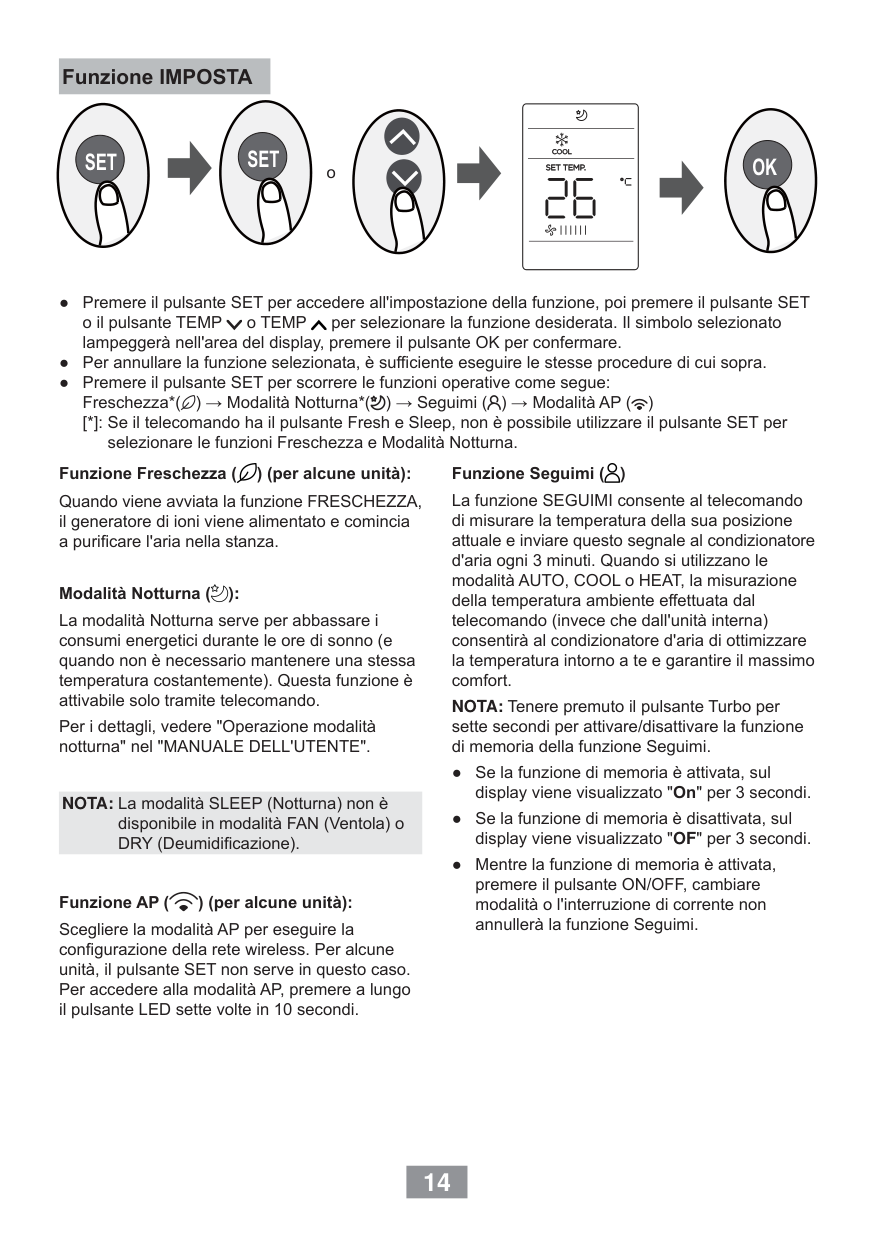
    In unit on status and under cool mode, press CLOCK and TEMP button simultaneously to enter energy-saving mode.

     When is displayed, energy-saving function is on.

     When is not displayed, energy-saving function is off. If you want to turn off the energy-saving function, press CLOCK and TEMP button

    and is not displayed. Note: energy-saving function is only available in cooling mode and it will be exited when switching mode or setting sleep function.

    Page 10

    (4). Absence function In unit on status and under heat mode, press CLOCK and TEMP button

    simultaneously to enter absence function. Temperature displaying zone displays 8 and is displayed.

    ![image 43](YAP1F-YV1L1-YAD1F_infr_C3_A1s_t_C3_A1vir_C3_A1ny_C3_ADt_C3_B3_images/imageFile43.png)

    Press CLOCK and TEMP button simultaneously again to exit absence function. Temperature displaying zone resumes previous display and is not displayed.

    In winter, absence function can keep the indoor ambient temperature above 0℃ to avoid freezing. Note: Absence function is only available in heating mode and it will be exited when switching mode or setting sleep function.

    1.5 Replacing batteries in remote controller and notes

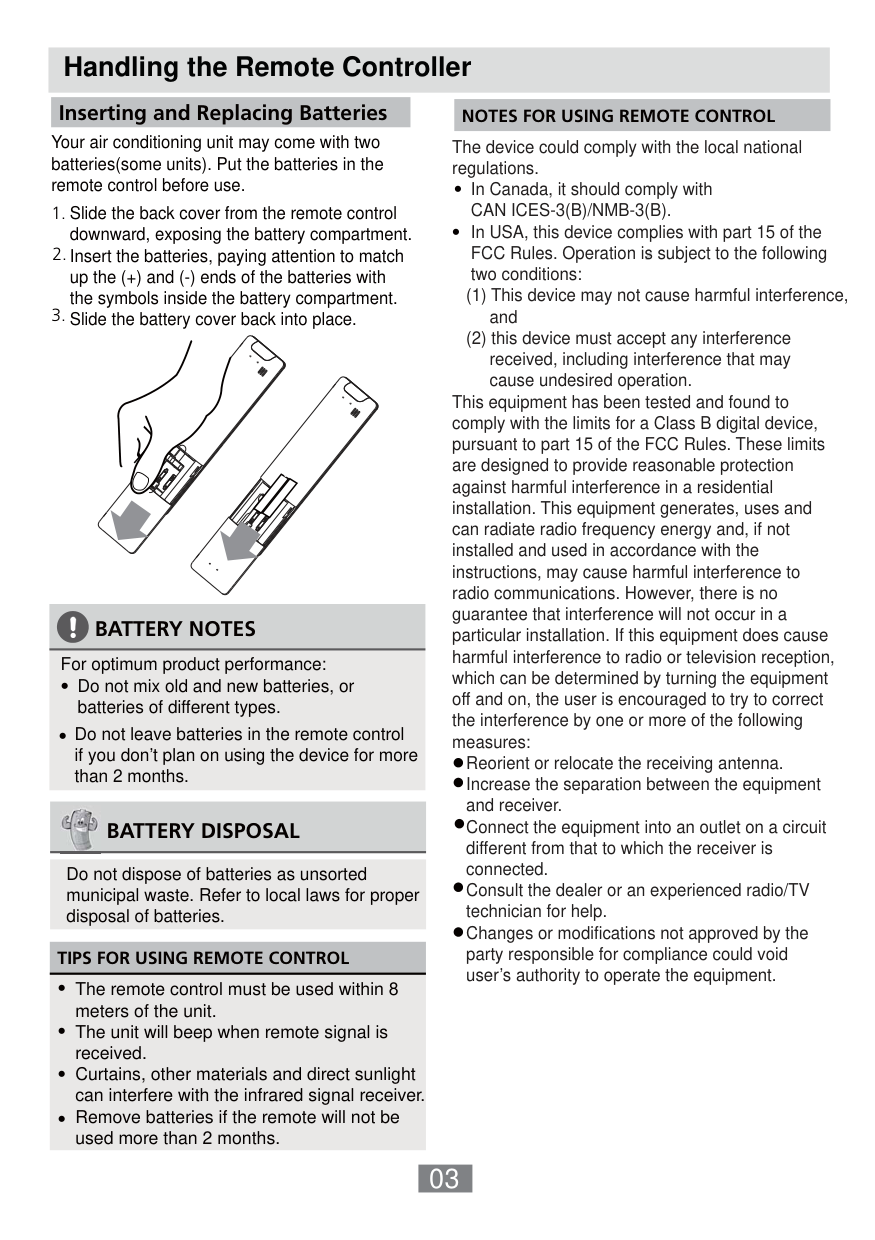
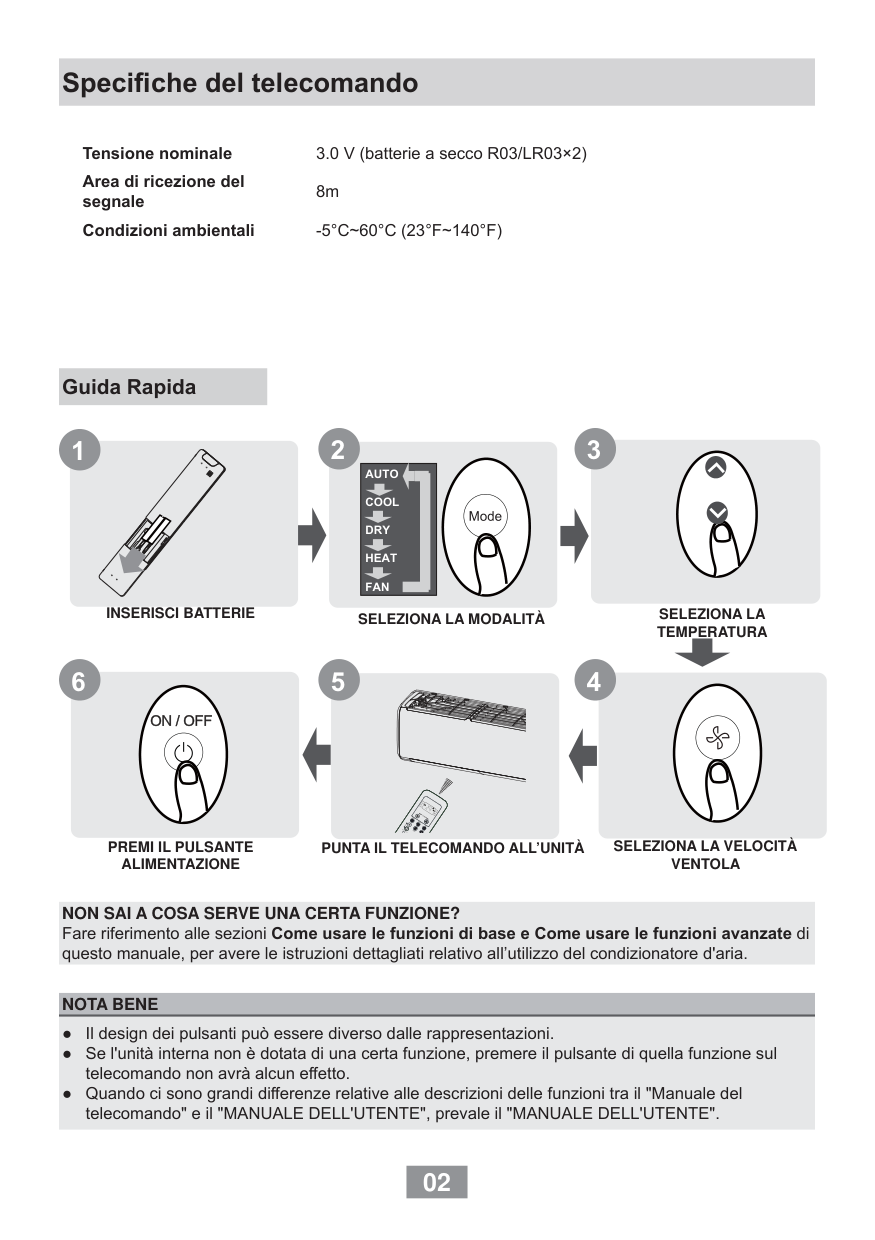
  • (1). Lift the cover along the direction of arrow (as shown in Fig 1①).
  • (2). Take out the original batteries (as shown in Fig 1②).
  • (3). Place two 7# (AAA 1.5V) dry batteries, and make sure the position of “+” polar and “-” polar is correct (as shown in Fig 2③).
  • (4). Reinstall the cover (as shown in Fig 2④).
  • ![image 44](YAP1F-YV1L1-YAD1F_infr_C3_A1s_t_C3_A1vir_C3_A1ny_C3_ADt_C3_B3_images/imageFile44.png)

    Fig.1 Fig.2 Notes:

  • ①. The remote controller should be placed 1m away from the TV set or stereo sound sets.
  • ②. The operation of remote controller should be performed within its receiving range.
  • ③. If you need to control the main unit, please point the remote controller at the signal receiving window of the main unit to improve the receiving sensibility of main unit.
  • ④. When the remote controller is sending signal, “ ” icon will be blinking for 1 second. When the main unit receives valid remote control signal, it will give out a sound.
  • ![image 45](YAP1F-YV1L1-YAD1F_infr_C3_A1s_t_C3_A1vir_C3_A1ny_C3_ADt_C3_B3_images/imageFile45.png)

  • ⑤. If the remote controller does not operate normally, please take the batteries out and reinsert them after 30 seconds. If it still can't operate properly, replace the batteries.
  • ⑥. When replacing the batteries, do not use old or different types of batteries, otherwise, it may cause malfunction.
  • ⑦. When you won’t use the remote controller for a long time, please take out the batteries.
  • Page 11

    2 Remote Controller YV1L1

    ![image 46](YAP1F-YV1L1-YAD1F_infr_C3_A1s_t_C3_A1vir_C3_A1ny_C3_ADt_C3_B3_images/imageFile46.png)

    Button name and function introduction

    |No.|Button name|Function| |---|---|---| |1|ON/OFF|Turn on or turn off the unit| |2|FAN|Set fan speed| |3|▲/▼|Set temperature and time| |4|MODE|Set operation mode| |5|![image 47](YAP1F-YV1L1-YAD1F_infr_C3_A1s_t_C3_A1vir_C3_A1ny_C3_ADt_C3_B3_images/imageFile47.png)|Set quiet function| |6|![image 48](YAP1F-YV1L1-YAD1F_infr_C3_A1s_t_C3_A1vir_C3_A1ny_C3_ADt_C3_B3_images/imageFile48.png)|Set health function and air function| |7|![image 49](YAP1F-YV1L1-YAD1F_infr_C3_A1s_t_C3_A1vir_C3_A1ny_C3_ADt_C3_B3_images/imageFile49.png)|Set left&right swing status|

    |8|![image 50](YAP1F-YV1L1-YAD1F_infr_C3_A1s_t_C3_A1vir_C3_A1ny_C3_ADt_C3_B3_images/imageFile50.png)|Set up&down swing status| |---|---|---| |9|X-FAN|Set X-FAN function| |10|TIMER ON|Set timer on function| |11|TIMER OFF|Set timer off function| |12|SAVE|Set energy-saving function| |13|SLEEP|Set sleep function| |14|LIGHT|Set light function| |15|CLOCK|Set clock of the system| |16|I FEEL|Set I FEEL function| |17|TEMP|Switch temperature displaying type on the unit’s display|

    2.1 Preparation before operation

    When using the remote controller for the first time or after replacing the batteries, please set the time of the system according to current time in the following steps:

    Page 12

  • (1). Pressing CLOCK button, is blinking.
  • ![image 51](YAP1F-YV1L1-YAD1F_infr_C3_A1s_t_C3_A1vir_C3_A1ny_C3_ADt_C3_B3_images/imageFile51.png)

  • (2). Pressing ▲ or ▼ button, the clock time will increase or decrease rapidly.
  • (3). Press CLOCK button again to confirm the time and return to display current time.
  • 2.2 Introduction of operation function

    (1). Selecting operation mode

    In unit on status, press MODE button to select operation mode in following sequence:

    ![image 52](YAP1F-YV1L1-YAD1F_infr_C3_A1s_t_C3_A1vir_C3_A1ny_C3_ADt_C3_B3_images/imageFile52.png)

     Floor heating, quick heating and heat supply modes are valid only with specialized remote controller.

     If change to specialized remote controller, press MODE button and TEMP button simultaneously, and then will blink for three times.

    ![image 53](YAP1F-YV1L1-YAD1F_infr_C3_A1s_t_C3_A1vir_C3_A1ny_C3_ADt_C3_B3_images/imageFile53.png)

     If change to normal remote controller, press MODE button and TEMP button

    ![image 54](YAP1F-YV1L1-YAD1F_infr_C3_A1s_t_C3_A1vir_C3_A1ny_C3_ADt_C3_B3_images/imageFile54.png)

    simultaneously, and then will blink for three times.

    (2). Setting temperature

    In unit on status, press ▲ button to increase set temperature and press ▼ button to decrease setting temperature.

    Note: Under auto mode and when absence function is on, temperature adjustment is invalid.

    Page 13

    (3). Adjusting fan speed In unit on status, press FAN button to adjust fan speed in following sequence:

    ![image 55](YAP1F-YV1L1-YAD1F_infr_C3_A1s_t_C3_A1vir_C3_A1ny_C3_ADt_C3_B3_images/imageFile55.png)

    ![image 56](YAP1F-YV1L1-YAD1F_infr_C3_A1s_t_C3_A1vir_C3_A1ny_C3_ADt_C3_B3_images/imageFile56.png)

    When is set, the whole unit operates in super high speed to achieve quick cooling or heating. Notes:

  • ① Under auto, dry and fan modes or when quiet function is on, turbo function is invalid;
  • ② Under dry mode, fan speed is low and can not be adjusted.
  • (4). Setting swing function  Setting left&right swing

  • 1). Under simple swing status, press button to adjust left&right swing status;
  • ![image 57](YAP1F-YV1L1-YAD1F_infr_C3_A1s_t_C3_A1vir_C3_A1ny_C3_ADt_C3_B3_images/imageFile57.png)

  • 2). Under fixed-angle swing status, press button to adjust left&right swing angle circularly as below:
  • ![image 58](YAP1F-YV1L1-YAD1F_infr_C3_A1s_t_C3_A1vir_C3_A1ny_C3_ADt_C3_B3_images/imageFile58.png)

    ![image 59](YAP1F-YV1L1-YAD1F_infr_C3_A1s_t_C3_A1vir_C3_A1ny_C3_ADt_C3_B3_images/imageFile59.png)

    ![image 60](YAP1F-YV1L1-YAD1F_infr_C3_A1s_t_C3_A1vir_C3_A1ny_C3_ADt_C3_B3_images/imageFile60.png)

    In unit off status, press ▲ button and button to switch between simple swing mode and fixed-angle swing mode. on the remote controller will be blinking for 2 seconds during switching.

    ![image 61](YAP1F-YV1L1-YAD1F_infr_C3_A1s_t_C3_A1vir_C3_A1ny_C3_ADt_C3_B3_images/imageFile61.png)

     Setting up&down swing

    Page 14

  • 1). Under simple swing status, press button to adjust up&down swing status;
  • ![image 62](YAP1F-YV1L1-YAD1F_infr_C3_A1s_t_C3_A1vir_C3_A1ny_C3_ADt_C3_B3_images/imageFile62.png)

  • 2). Under fixed-angle swing status, press button to adjust up&down swing angle circularly as below:
  • ![image 63](YAP1F-YV1L1-YAD1F_infr_C3_A1s_t_C3_A1vir_C3_A1ny_C3_ADt_C3_B3_images/imageFile63.png)

    ![image 64](YAP1F-YV1L1-YAD1F_infr_C3_A1s_t_C3_A1vir_C3_A1ny_C3_ADt_C3_B3_images/imageFile64.png)

    ![image 65](YAP1F-YV1L1-YAD1F_infr_C3_A1s_t_C3_A1vir_C3_A1ny_C3_ADt_C3_B3_images/imageFile65.png)

    In unit off status, press ▲ button and button to switch between simple swing mode and fixed-angle swing mode. on the remote controller will be blinking for 2 seconds during switching.

    ![image 66](YAP1F-YV1L1-YAD1F_infr_C3_A1s_t_C3_A1vir_C3_A1ny_C3_ADt_C3_B3_images/imageFile66.png)

    (5). Setting quiet function In unit on status, press button to adjust quiet status in following sequence:

    ![image 67](YAP1F-YV1L1-YAD1F_infr_C3_A1s_t_C3_A1vir_C3_A1ny_C3_ADt_C3_B3_images/imageFile67.png)

    ![image 68](YAP1F-YV1L1-YAD1F_infr_C3_A1s_t_C3_A1vir_C3_A1ny_C3_ADt_C3_B3_images/imageFile68.png)

    ![image 69](YAP1F-YV1L1-YAD1F_infr_C3_A1s_t_C3_A1vir_C3_A1ny_C3_ADt_C3_B3_images/imageFile69.png)

    ![image 70](YAP1F-YV1L1-YAD1F_infr_C3_A1s_t_C3_A1vir_C3_A1ny_C3_ADt_C3_B3_images/imageFile70.png)

    : auto quiet function is on; : quiet function is on.

    When quiet function is set, fan speed of indoor unit will be decreased to the lowest speed in order to reduce the noise of indoor unit. Notes:

  • ①. Quiet function is not available in dry, fan and floor heating modes;
  • ②. Quiet mode will be exited automatically when changing fan speed;
  • ③. When turbo function is set, setting auto quiet function will cancel turbo function.
  • Page 15

    (6). Setting health function In unit on status, press button to turn on or turn off health function.

    ![image 71](YAP1F-YV1L1-YAD1F_infr_C3_A1s_t_C3_A1vir_C3_A1ny_C3_ADt_C3_B3_images/imageFile71.png)

  • 1). When is displayed, health function is on.
  • 2). When is not displayed, health function is off.
  • Health function is available when the unit is equipped with anion generator. When health function is on, the anion generator will start operation, adsorbing the dusts and killing the bacteria in the room. (7). Setting air function

     Turning on air function:

  • 1). Press button until is blinking. Set temperature displaying zone displays the last air function level.
  • ![image 72](YAP1F-YV1L1-YAD1F_infr_C3_A1s_t_C3_A1vir_C3_A1ny_C3_ADt_C3_B3_images/imageFile72.png)

    ![image 73](YAP1F-YV1L1-YAD1F_infr_C3_A1s_t_C3_A1vir_C3_A1ny_C3_ADt_C3_B3_images/imageFile73.png)

  • 2). Press ▲/▼ button to adjust air function level. If there is no operation within 5 seconds, the setting will be exited automatically.
  • 3). Pressing button, is displayed and air function is turned on.
  • ![image 74](YAP1F-YV1L1-YAD1F_infr_C3_A1s_t_C3_A1vir_C3_A1ny_C3_ADt_C3_B3_images/imageFile74.png)

    ![image 75](YAP1F-YV1L1-YAD1F_infr_C3_A1s_t_C3_A1vir_C3_A1ny_C3_ADt_C3_B3_images/imageFile75.png)

    ![image 76](YAP1F-YV1L1-YAD1F_infr_C3_A1s_t_C3_A1vir_C3_A1ny_C3_ADt_C3_B3_images/imageFile76.png)

    ![image 77](YAP1F-YV1L1-YAD1F_infr_C3_A1s_t_C3_A1vir_C3_A1ny_C3_ADt_C3_B3_images/imageFile77.png)

    Press button until is disappeared, then air function is turned off.

    Page 16

    When the indoor unit is connected with fresh air valve, air function setting can control the connection of fresh air valve, which can control the fresh air volume and improve the air quality inside the room.

    (8). Setting X-FAN function In unit on status, press X-FAN button to turn on or turn off X-FAN function. When is displayed, X-FAN function is on. When is not displayed, X-FAN function is off. When X-FAN function is on, the water on the evaporator will be blown away after

    ![image 78](YAP1F-YV1L1-YAD1F_infr_C3_A1s_t_C3_A1vir_C3_A1ny_C3_ADt_C3_B3_images/imageFile78.png)

    ![image 79](YAP1F-YV1L1-YAD1F_infr_C3_A1s_t_C3_A1vir_C3_A1ny_C3_ADt_C3_B3_images/imageFile79.png)

    turning off the unit to avoid mildew.

    (9). Setting timer

    You can set the operation time of unit as you need. You can also set timer on and timer off in combination.

    Before setting, check if the time of the system is the same as the current time. If not, please set the time according to current time.

     Setting timer off

  • 1). Pressing TIMER OFF button, OFF is blinking and time displaying zone displays the timer time of last setting.
  • 2). Press ▲ or ▼ button to adjust the timer time.
  • 3). Press TIMER OFF button again to confirm setting. OFF is displayed and time displaying zone resumes to display current time.
  • Press TIMER OFF button again to cancel timer and OFF is not displayed.

     Setting timer on

  • 1). Pressing TIMER ON button, ON is blinking and time displaying zone displays the timer time of last setting.
  • 2). Press ▲ or ▼ button to adjust the timer time.
  • 3). Press TIMER ON button again to confirm setting. ON is displayed and time displaying zone resumes to display current time.
  • Press TIMER ON button again to cancel timer and ON is not displayed.

    Page 17

    (10). Setting energy-saving function

     If you want to turn on energy-saving function:

    ![image 80](YAP1F-YV1L1-YAD1F_infr_C3_A1s_t_C3_A1vir_C3_A1ny_C3_ADt_C3_B3_images/imageFile80.png)

  • 1). When the unit is operating, will be blinking if SAVE button is pressed. Under cool or dry mode, is displayed. Under heat, floor heating, quick heating and heat supply modes, is displayed and temperature displaying
  • zone displays the limiting value set in last time.
  • 2). Press ▲ or ▼ button to adjust the energy-saving limiting value to preset value.
  • 3). Pressing SAVE button again, energy-saving function is turned on. is displayed while or is not displayed.
  • ![image 81](YAP1F-YV1L1-YAD1F_infr_C3_A1s_t_C3_A1vir_C3_A1ny_C3_ADt_C3_B3_images/imageFile81.png)

    When energy-saving function is turned on, set temperature can only be adjusted within the energy-saving limiting value.

    ![image 82](YAP1F-YV1L1-YAD1F_infr_C3_A1s_t_C3_A1vir_C3_A1ny_C3_ADt_C3_B3_images/imageFile82.png)

    If you want to turn off the energy-saving function, press SAVE button and is not displayed.

    Note: Under auto and fan modes, energy-saving function is invalid.

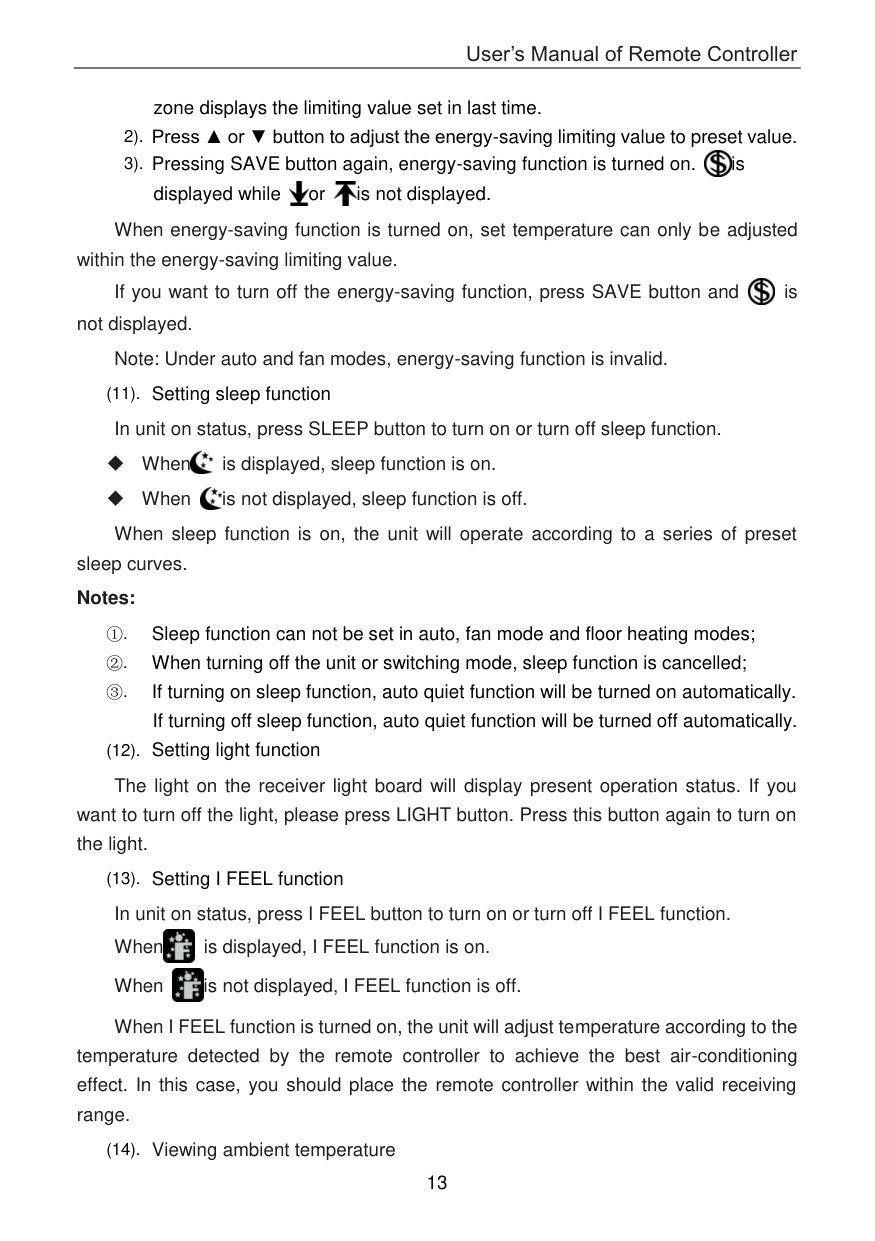
    (11). Setting sleep function In unit on status, press SLEEP button to turn on or turn off sleep function.

     When is displayed, sleep function is on.

     When is not displayed, sleep function is off.

    When sleep function is on, the unit will operate according to a series of preset sleep curves. Notes:

  • ①. Sleep function can not be set in auto, fan mode and floor heating modes;
  • ②. When turning off the unit or switching mode, sleep function is cancelled;
  • Page 18

  • ③. If turning on sleep function, auto quiet function will be turned on automatically. If turning off sleep function, auto quiet function will be turned off automatically.
  • (12). Setting light function

    The light on the receiver light board will display present operation status. If you want to turn off the light, please press LIGHT button. Press this button again to turn on the light.

    (13). Setting I FEEL function In unit on status, press I FEEL button to turn on or turn off I FEEL function. When is displayed, I FEEL function is on. When is not displayed, I FEEL function is off.

    ![image 83](YAP1F-YV1L1-YAD1F_infr_C3_A1s_t_C3_A1vir_C3_A1ny_C3_ADt_C3_B3_images/imageFile83.png)

    ![image 84](YAP1F-YV1L1-YAD1F_infr_C3_A1s_t_C3_A1vir_C3_A1ny_C3_ADt_C3_B3_images/imageFile84.png)

    When I FEEL function is turned on, the unit will adjust temperature according to the temperature detected by the remote controller to achieve the best air-conditioning effect. In this case, you should place the remote controller within the valid receiving range.

    (14). Viewing ambient temperature

    In unit on status, receiver light board or wired controller is defaulted to display set temperature. Press TEMP button to view indoor or outdoor ambient temperature.

    When is displayed, it means the displayed temperature is indoor ambient temperature.

    When is displayed, it means the displayed temperature is outdoor ambient temperature.

    Ambient temperature displaying will be exited after 5s and then set temperature will be displayed.

    2.3 Introduction of special functions

  • (1). Setting child lock
  • 1). Press ▲ and ▼ button simultaneously to lock the buttons on remote controller and is displayed.
  • 2). Press ▲ and ▼ button simultaneously again to unlock the buttons on remote controller and is not displayed.
  • ![image 85](YAP1F-YV1L1-YAD1F_infr_C3_A1s_t_C3_A1vir_C3_A1ny_C3_ADt_C3_B3_images/imageFile85.png)

    Page 19

  • 3). If the buttons are locked, blinks 3 times when pressing the button and any operation on the button is invalid.
  • ![image 86](YAP1F-YV1L1-YAD1F_infr_C3_A1s_t_C3_A1vir_C3_A1ny_C3_ADt_C3_B3_images/imageFile86.png)

  • (2). Setting low-temperature dehumidifying Under dry mode and when set temperature is16℃, press ▼ button twice to enter
  • low-temperature dehumidifying function and set temperature is displayed as 12℃. If low-temperature dehumidifying function has been set, press ▲ button to exit low-temperature dehumidifying function and set temperature is displayed as 16℃.

    Note: If energy-saving function is turned on, low-temperature dehumidifying function is invalid.

    (3). Absence function

  • 1). Press CLOCK and TEMP button simultaneously to enter absence function. Temperature displaying zone displays 8.
  • 2). Press CLOCK and TEMP button simultaneously again to exit absence function. Temperature displaying zone resumes previous display.
  • 3). In winter, absence function can keep the indoor ambient temperature above 0℃ to avoid freezing.
  • Note: Absence function is only available in heating mode and it will be exited when switching mode.

  • (4). Setting of master mode indoor unit In fan mode, set master mode indoor unit through ▲ and ▼ button:
  • 1). Adjust set temperature to 30℃;
  • 2). Within 5 seconds, press ▼ button and then press ▲ button repeatedly for three times;
  •  After finishing setting, “UC” is displayed on receiver light board for 5 seconds and “MASTER” icon is displayed on wired controller.

  • (5). Switching temperature scale
  • In unit off status, press MODE button and ▼ button simultaneously to switch temperature scale between ℃ and ℉.

    Page 20

    2.4 Basic operation instructions

  • (1). When the main unit is energized, press ON/OFF button on the remote controller to turn on the unit.
  • (2). Press MODE button to select the desired operation mode.
  • (3). Press ▲ or ▼ button to set the desired temperature (temperature setting is not needed in auto mode).
  • (4). Press FAN button to set fan speed in auto, low, medium and high speed.
  • 2.5 Replacing batteries in remote controller and notes

  • (1). Slightly press the place with OPEN, and then push out the back cover of remote controller along the direction of arrow (as shown in Fig 3①).
  • (2). Take out the original batteries (as shown in Fig 3②).
  • (3). Place two 7# (AAA 1.5V) dry batteries, and make sure the position of + polar and - polar is correct (as shown in Fig 4③).
  • (4). Reinstall the cover (as shown in Fig 4④)
  • ![image 87](YAP1F-YV1L1-YAD1F_infr_C3_A1s_t_C3_A1vir_C3_A1ny_C3_ADt_C3_B3_images/imageFile87.png)

    Fig.3 Fig.4 Notes:

  • ①. When replacing the batteries, do not use old or different types of batteries, otherwise, it may cause malfunction.
  • ②. When you won’t use the remote controller for a long time, please take out the
  • batteries.
  • ③. The operation of remote controller should be performed within its receiving range.
  • ④. The remote controller should be placed 1m away from the TV set or stereo sound sets.
  • ⑤. If the remote controller does not operate normally, please take the batteries out and reinsert them after 30 seconds. If it still can't operate properly, replace the batteries.
  • ⑥. If you need to control the main unit, please point the remote controller at the signal receiving window of the main unit to improve the receiving sensibility of main unit.
  • ⑦. When the remote controller is sending signal, “ ” icon will be blinking for 1 second. When the main unit receives valid remote control signal, it will give out a sound.
  • ![image 88](YAP1F-YV1L1-YAD1F_infr_C3_A1s_t_C3_A1vir_C3_A1ny_C3_ADt_C3_B3_images/imageFile88.png)

    Page 21

    3 Remote Controller YAD1F

    ![image 89](YAP1F-YV1L1-YAD1F_infr_C3_A1s_t_C3_A1vir_C3_A1ny_C3_ADt_C3_B3_images/imageFile89.png)

  • 3.1 Button name and function introduction (outside)
  • |No.|Button name|Function| |---|---|---| |1|ON/OFF|Turn on or turn off the unit| |2|FAN|Set fan speed| |3|▲/▼|Set temperature and time| |4|COOL|Set cooling function| |5|HEAT|Set heating function| |6|SWING|Set swing status| |7|TURBO|Set turbo function|

  • 3.2 Button name and function introduction (inside)
  • |No.|Button name|Function| |---|---|---| |1|MODE|Set operation mode| |2|TIMER ON|Set timer on function| |3|TIMER OFF|Set timer off function| |4|LIGHT|Set light function| |5|I FEEL|Set I FEEL function| |6|X-FAN|Set X-FAN function| |7|TEMP|Switch temperature displaying type on the unit’s display| |8|HEALTH|Set health function| |9|CLOCK|Set clock of the system| |10|SLEEP|Set sleep function|

    Page 22

  • 3.3 Preparation before operation
  • When using the remote controller for the first time or after replacing the batteries, please set the time of the system according to current time in the following steps:

  • (1). Pressing CLOCK button, is blinking.
  • ![image 90](YAP1F-YV1L1-YAD1F_infr_C3_A1s_t_C3_A1vir_C3_A1ny_C3_ADt_C3_B3_images/imageFile90.png)

  • (2). Pressing ▲ or ▼ button, the clock time will increase or decrease rapidly.
  • (3). Press CLOCK button again to confirm the time.
  • 3.4 Introduction of operation functions

    (1). Selecting operation mode

    In unit on status, press MODE button to select operation mode in following sequence:

    ![image 91](YAP1F-YV1L1-YAD1F_infr_C3_A1s_t_C3_A1vir_C3_A1ny_C3_ADt_C3_B3_images/imageFile91.png)

  • 1). Pressing COOL button, the unit will operate under cool mode.
  • 2). Pressing HEAT button, the unit will operate under heat mode.
  • (2). Setting temperature

    In unit on status, press ▲ button to increase set temperature and press ▼ button to decrease setting temperature.

    Note: Under auto mode, manual adjustment of temperature is not needed.

    Page 23

  • (3). Adjusting fan speed In unit on status, press FAN button to adjust fan speed in following sequence:
  • ![image 92](YAP1F-YV1L1-YAD1F_infr_C3_A1s_t_C3_A1vir_C3_A1ny_C3_ADt_C3_B3_images/imageFile92.png)

    Note: Under dry mode, fan speed is low and can not be adjusted.

  • (4). Setting swing function In unit on status, press SWING button to set swing status in following sequence:
  • ![image 93](YAP1F-YV1L1-YAD1F_infr_C3_A1s_t_C3_A1vir_C3_A1ny_C3_ADt_C3_B3_images/imageFile93.png)

  • (5). Setting turbo function Under cool or heat mode, press TURBO button to set turbo function.
  • When is displayed, turbo function is on. When is not displayed, turbo function is off.

    When turbo function is on, the unit operates in super high speed to achieve quick cooling or heating. When turbo function is off, the unit operates in set fan speed.

    (6). Setting light function

    The light on the receiver light board will display present operation status. If you want to turn off the light, please press LIGHT button. Press this button again to turn on the light.

    (7). Viewing ambient temperature

    In unit on status, receiver light board or wired controller is defaulted to display setting temperature. Press TEMP button to view indoor or outdoor ambient temperature.

    ![image 94](YAP1F-YV1L1-YAD1F_infr_C3_A1s_t_C3_A1vir_C3_A1ny_C3_ADt_C3_B3_images/imageFile94.png)

    is displayed, it means the displayed temperature is indoor ambient temperature.

    When is displayed, it means the displayed temperature is outdoor ambient temperature.

    Ambient temperature displaying will be exited after 5s and then set temperature will be displayed.

    (8). Setting X-FAN function In cool or dry mode, press X-FAN button to set X-FAN function. When is displayed, X-FAN function is on. When is not displayed, X-FAN function is off. When X-FAN function is on, the water on the evaporator will be blown away after

    Page 24

    turning off the unit to avoid mildew. (9). Setting health function In unit on status, press HEALTH button to set health function. When is displayed, health function is on. When is not displayed, health function is off. Health function is available when the unit is equipped with anion generator. When
    health function is on, the anion generator will start operation, adsorbing the dusts and killing the bacteria in the room.

    (10). Setting sleep function In unit on status, press SLEEP button to turn on or turn off sleep function. When sleep function is on, the unit will operate according to a series of preset

    sleep curves.

    Sleep function can not be set in fan mode and auto mode. After entering sleep mode, auto quiet function will be turned on automatically. You can also choose different quiet statuses or turning off quiet function.

    (11). Setting I FEEL function

    In unit on status, press I FEEL button to turn on or turn off I FEEL function. When is displayed, I FEEL function is on. When is not displayed, I FEEL function is off.

    ![image 95](YAP1F-YV1L1-YAD1F_infr_C3_A1s_t_C3_A1vir_C3_A1ny_C3_ADt_C3_B3_images/imageFile95.png)

    ![image 96](YAP1F-YV1L1-YAD1F_infr_C3_A1s_t_C3_A1vir_C3_A1ny_C3_ADt_C3_B3_images/imageFile96.png)

    When I FEEL function is turned on, the unit will adjust temperature according to the temperature detected by the remote controller to achieve the best air-conditioning effect. In this case, you should place the remote controller within the valid receiving range.
    (12). Setting timer

    You can set the operation time of unit as you need. You can also set timer on and timer off in combination.

    Before setting, check if the time of the system is the same as the current time. If not, please set the time according to current time.

    1). Setting timer off

  • ① Pressing TIMER OFF button, OFF is blinking and time displaying zone displays the timer time of last setting.
  • ② Press ▲ or ▼ button to adjust the timer time.
  • ③ Press TIMER OFF button again to confirm setting. OFF is displayed and time displaying zone resumes to display current time.
  • Page 25

    Press TIMER OFF button again to cancel timer and OFF is not displayed. 2). Setting timer on

  • ① Pressing TIMER ON button, ON is blinking and time displaying zone displays the timer time of last setting.
  • ② Press ▲ or ▼ button to adjust the timer time.
  • ③ Press TIMER ON button again to confirm setting. ON is displayed and time displaying zone resumes to display current time.
  • Press TIMER ON button again to cancel timer and ON is not displayed.

    3.5 Introduction of special functions Setting child lock

    (1). Setting child lock

    Press ▲ and ▼ button simultaneously to lock the buttons on remote controller and is displayed.

    ![image 97](YAP1F-YV1L1-YAD1F_infr_C3_A1s_t_C3_A1vir_C3_A1ny_C3_ADt_C3_B3_images/imageFile97.png)

    Press ▲ and ▼ button simultaneously again to unlock the buttons on remote controller and is not displayed.

    ![image 98](YAP1F-YV1L1-YAD1F_infr_C3_A1s_t_C3_A1vir_C3_A1ny_C3_ADt_C3_B3_images/imageFile98.png)

    If the buttons are locked, blinks 3 times when pressing the button and any

    operation on the button is invalid.

    (2). Absence function

    Press CLOCK and TEMP button simultaneously to enter absence function. Temperature displaying zone displays 8 and is displayed.

    ![image 99](YAP1F-YV1L1-YAD1F_infr_C3_A1s_t_C3_A1vir_C3_A1ny_C3_ADt_C3_B3_images/imageFile99.png)

    Press CLOCK and TEMP button simultaneously again to exit absence function. Temperature displaying zone resumes previous display and is not displayed.

    ![image 100](YAP1F-YV1L1-YAD1F_infr_C3_A1s_t_C3_A1vir_C3_A1ny_C3_ADt_C3_B3_images/imageFile100.png)

    Page 26

    In winter, absence function can keep the indoor ambient temperature above 0℃ to avoid freezing. Note: Absence function is only available in heating mode and it will be exited when switching mode.

    (3). Setting of master mode indoor unit In fan mode, set master mode indoor unit through ▲ and ▼ button:

  • 1). Adjust set temperature to 30℃;
  • 2). Within 5 seconds, press ▼ button and then press ▲ button repeatedly for three times;
  • After finishing setting, “UC” is displayed on receiver light board for 5 seconds and “MASTER” icon is displayed on wired controller.

    (4). Switching temperature scale

    In unit off status, press MODE button and ▼ button simultaneously to switch temperature scale between ℃ and ℉.

    3.6 Replacing batteries in remote controller and notes

  • (1). Lift the cover along the direction of arrow (as shown in Fig 5①).
  • (2). Take out the original batteries (as shown in Fig 5②).
  • (3). Place two 7# (AAA 1.5V) dry batteries, and make sure the position of “+” polar and “-” polar is correct (as shown in Fig 6③).
  • (4). Reinstall the cover (as shown in Fig 6④).
  • ![image 101](YAP1F-YV1L1-YAD1F_infr_C3_A1s_t_C3_A1vir_C3_A1ny_C3_ADt_C3_B3_images/imageFile101.png)

    Fig.5 Fig.6

    ###### Notes:

  • ①. The remote controller should be placed 1m away from the TV set or stereo sound sets.
  • ②. The operation of remote controller should be performed within its receiving range.
  • ③. If you need to control the main unit, please point the remote controller at the signal receiving window of the main unit to improve the receiving sensibility of main unit.
  • ④. When the remote controller is sending signal, “ ” icon will be blinking for 1 second. When the main unit receives valid remote control signal, it will give out a sound.
  • ![image 102](YAP1F-YV1L1-YAD1F_infr_C3_A1s_t_C3_A1vir_C3_A1ny_C3_ADt_C3_B3_images/imageFile102.png)

  • ⑤. If the remote controller does not operate normally, please take the batteries out and reinsert them after 30 seconds. If it still can't operate properly, replace the batteries.
  • ⑥. When replacing the batteries, do not use old or different types of batteries, otherwise, it may cause malfunction.
  • ⑦. When you won’t use the remote controller for a long time, please take out the batteries.
  • ######## GREE ELECTRIC APPLIANCES, INC. OF ZHUHAI

    Add: West Jinji Rd, Qianshan, Zhuhai, Guangdong, China, 519070 Tel: (+86-756) 8522218 Fax: (+86-756) 8669426 E-mail: gree@gree.com.cn www.gree.com

    ![image 103](YAP1F-YV1L1-YAD1F_infr_C3_A1s_t_C3_A1vir_C3_A1ny_C3_ADt_C3_B3_images/imageFile103.png)

    Similar Remote Controls