
Hoover H Wash 500 Washing Machine Instructions
Ask AI
— answers from the official manualAnswers from the official manual.
Common questions
Common Questions
10 totalHow do I adjust the upper basket for different plate sizes?
To adjust: pull out the upper basket, grasp both sides, lift it upwards to remove or place back downward gently into correct position according to loading requirements.
How do I set the water softener level?
Press and hold the 'PROGRAMME SELECTION' button while turning on the dishwasher. Keep holding for at least 5 seconds until a brief audible signal sounds, then press again to cycle through the water softener settings from d0 to d7 (d4 is factory default). Turn off the dishwasher to confirm the new setting.
What should I do if my dishes have white marks after washing?
Check your rinse aid level and adjust it for better performance. If issues persist, reduce water hardness by lowering the softener setting or increase rinse aid usage.
Why won't my dishwasher start a new program after an interruption?
Before starting again, ensure there is still detergent in the dispenser. If not, add more detergent before selecting and starting your chosen program.
What is the 'SUPER ECO' button used for?
The 'SUPER ECO' button reduces wash time and energy use by adjusting temperature and drying settings, suitable for lightly soiled dishes. Leaving the door ajar after cycle can enhance air circulation.
What items are not recommended in dishwashers?
Avoid washing thermoplastic materials, cutlery with wooden or plastic handles, aluminum and crystal unless specified safe. Also refrain from washing leaded glass, some decorative items that may fade.
Full Manual
17 pages
User instructionsEN

®
HLSI 500GT
DISHWASHER
CONTENTS Safety advice Setting up, installation Water softener unit Loading the salt Adjusting the upper basket Loading the dishes Information for test laboratories Loading the detergent Types of detergent Loading the rinse aid Cleaning the filters Some practical hints Routine cleaning and maintenance Description of the control panel Technical data Programme selection and special functions The Watercontrol system Programme guide Identifying minor faults Your guarantee
Please read the instructions in this booklet carefully because they contain important information on how to install, use and maintain your dishwasher safely as well as containing useful tips on how to make the most of it.
Keep this booklet safe for future reference.
######### SAFETY INSTRUCTIONS
There are certain basic safety rules which are valid for any domestic appliance.
########## Installation
Safety
Children should be supervised to ensure that they do not play with the appliance.
4
|WARNING !
Knives and other utensils with sharp points must be loaded in the basket with their points down or placed in a horizontal position.| |---|
Daily use
Disposal
######### INSTALLATION (Technical notes)
|IMPORTANT When the appliance is located on a carpet floor, attention must be paid to ensure that there is no obstruction to the bottom vents.
Make sure that the plug on the appliance remains accessible after installation.| |---|
########### Electrical connection
Plug your dishwasher into the power socket.
If the plug we supply does not fit :
You can't use it on other appliances, and the exposed wires could be dangerous if anyone plugged it in.
|Connect to the terminal in the plug|Connect to the terminal in the plug| |---|---| |Green and yellow wire|Marked with the letter E, OR marked with the Earth symbol, OR coloured green, OR coloured green and yellow.
| |Blue wire|Marked N, OR coloured black.| |Brown wire|Marked L, OR coloured red.|
|WARNING! THIS APPLIANCE MUST BE EARTHED.| |---|
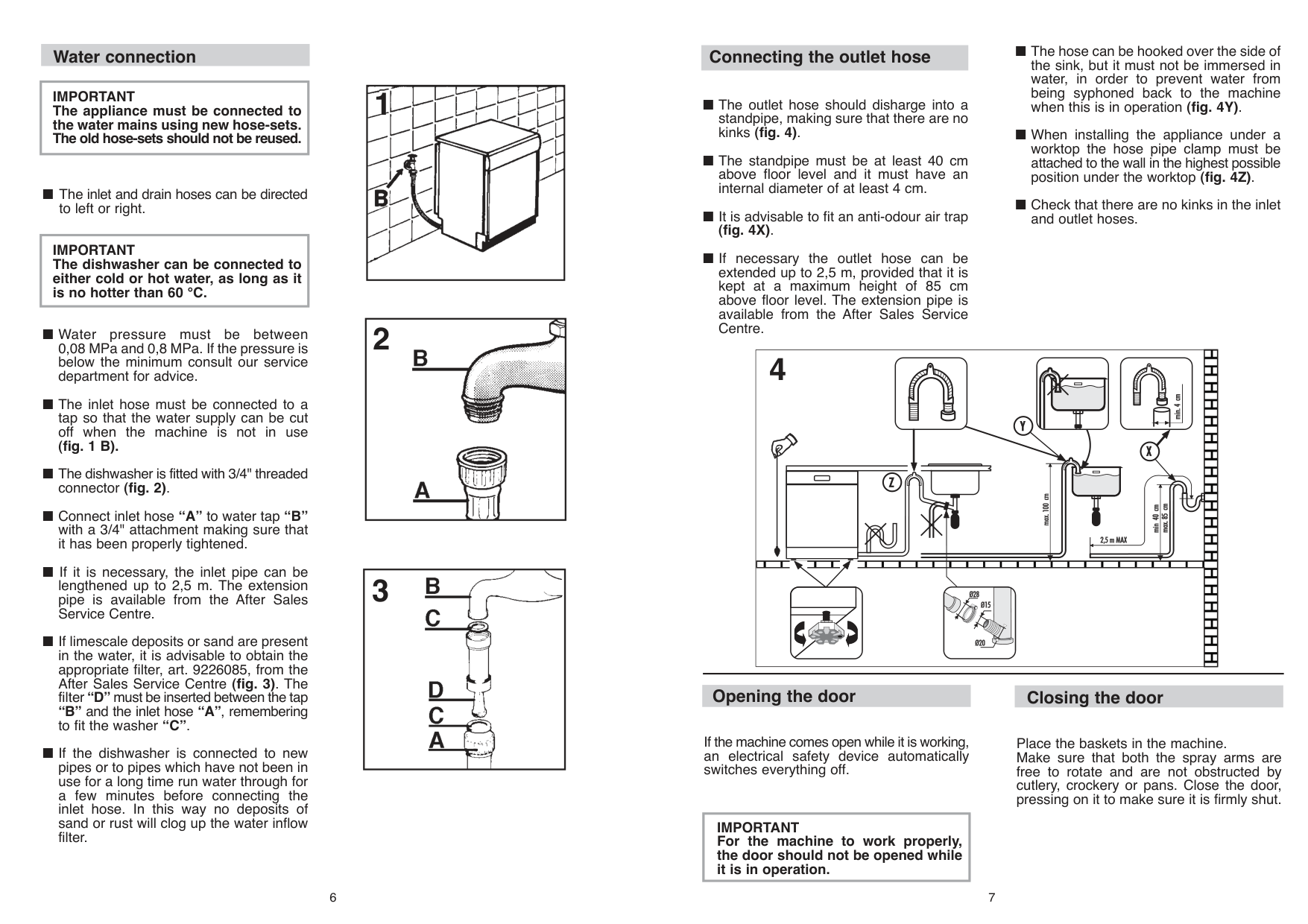
########## Water connection
|IMPORTANT The appliance must be connected to the water mains using new hose-sets. The old hose-sets should not be reused.| |---|
|IMPORTANT The dishwasher can be connected to either cold or hot water, as long as it is no hotter than 60 °C.| |---|


6
########## Connecting the outlet hose

4
########## Opening the door
If the machine comes open while it is working, an electrical safety device automatically switches everything off.
|IMPORTANT For the machine to work properly, the door should not be opened while it is in operation.| |---|
######### WATER SOFTENER UNIT
Depending on the source of the supply, water contains varying amounts of limestone and minerals which are deposited on the dishes leaving whitish stains and marks. The higher the level of these minerals present in the water, the harder the water is. The dishwasher is fitted with a water softener unit which, through the use of special regenerating salt, supplies softened water for washing the dishes. The degree of hardness of your water can be obtained from your water supply company.
########## Regulating the water softener
The water softener can treat water with a hardness level of up to 90°fH (French grading) or 50°dH (German grading) through 8 settings.
The settings are listed in the table below:
|Level|Water hardness|Water hardness|Use of
regenerating
salt|Water
softener
setting| |---|---|---|---|---| |Level|°fH
(French)|°dH
(German)|Use of
regenerating
salt|Water
softener
setting| |0|0-5|0-3|NO|d0| |1|6-10|4-6|YES|d1| |2|11-20|7-11|YES|d2| |3|21-30|12-16|YES|d3| |*4|31-40|17-22|YES|d4| |5|41-50|23-27|YES|d5| |6|51-60|28-33|YES|d6| |7|61-90|34-50|YES|d7|
############# * The softener unit is set in the factory at level 4 (d4) as this satisfies the requirements of the majority of users.
Regulate the setting of your water softener unit according to the degree of hardness of your water as follows:
|IMPORTANT The dishwasher must be ALWAYS off before start this procedure.| |---|
|WARNING!
If any problem occurs, turn the dishwasher off by pressing the "ON/OFF" button and start the procedure again from the beginning (STEP 1).| |---|
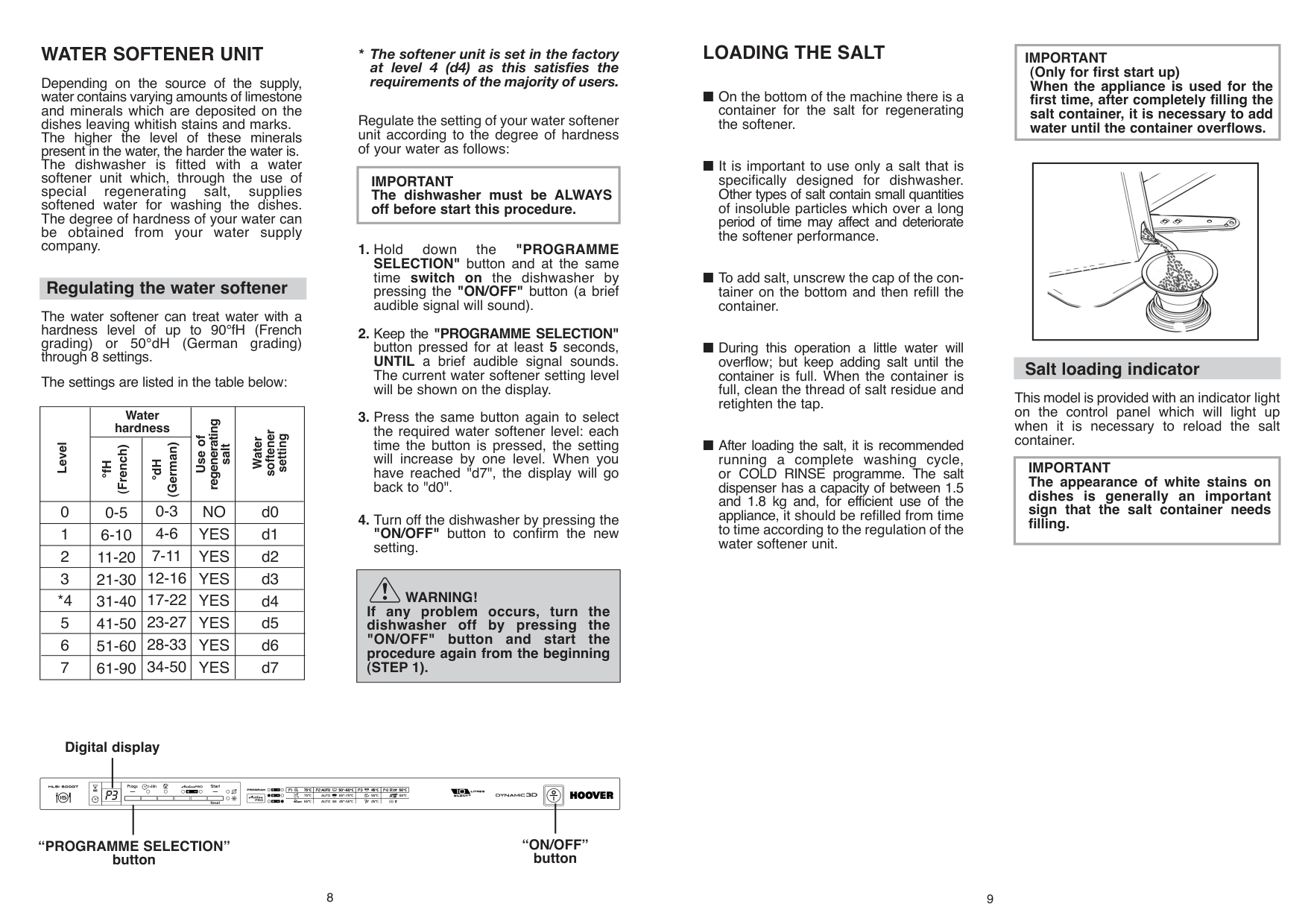
Digital display
| | | | | | | | |
|---|---|---|---|---|---|---|---| | | | | | | | | | | | | | | | | | | | | | | | | | | |
“ON/OFF” button
“PROGRAMME SELECTION” button
8
######### LOADING THE SALT
######### ADJUSTMENT OF THE UPPER BASKET
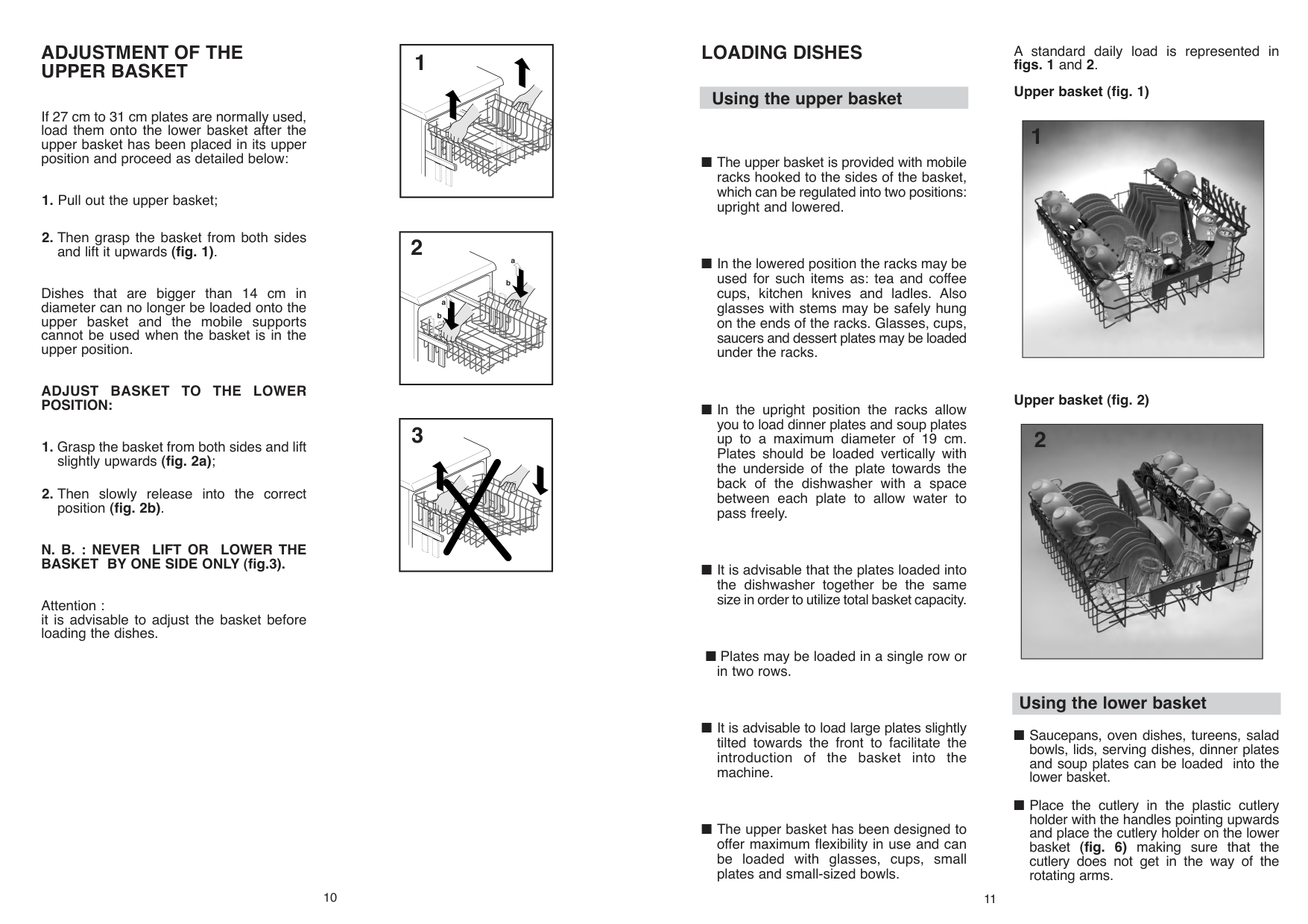
If 27 cm to 31 cm plates are normally used, load them onto the lower basket after the upper basket has been placed in its upper position and proceed as detailed below:
Dishes that are bigger than 14 cm in diameter can no longer be loaded onto the upper basket and the mobile supports cannot be used when the basket is in the upper position.
############# ADJUST BASKET TO THE LOWER POSITION:
############# N. B. : NEVER LIFT OR LOWER THE BASKET BY ONE SIDE ONLY (fig.3).
Attention : it is advisable to adjust the basket before loading the dishes.
|1| |---|
|a
b
a
b
2| |---|
|3| |---|
10
######### LOADING DISHES
########## Using the upper basket
|
3
A
B| |---|
|
4 C
| |---|
For normal or large plates the flap must be in the position ("A").
|WARNING!
If the small plates are placed in the basket with the support flap in the incorrect position, the plates will interfere with the lower spraying arm preventing it to rotate.| |---|
12
|
5
A B| |---|
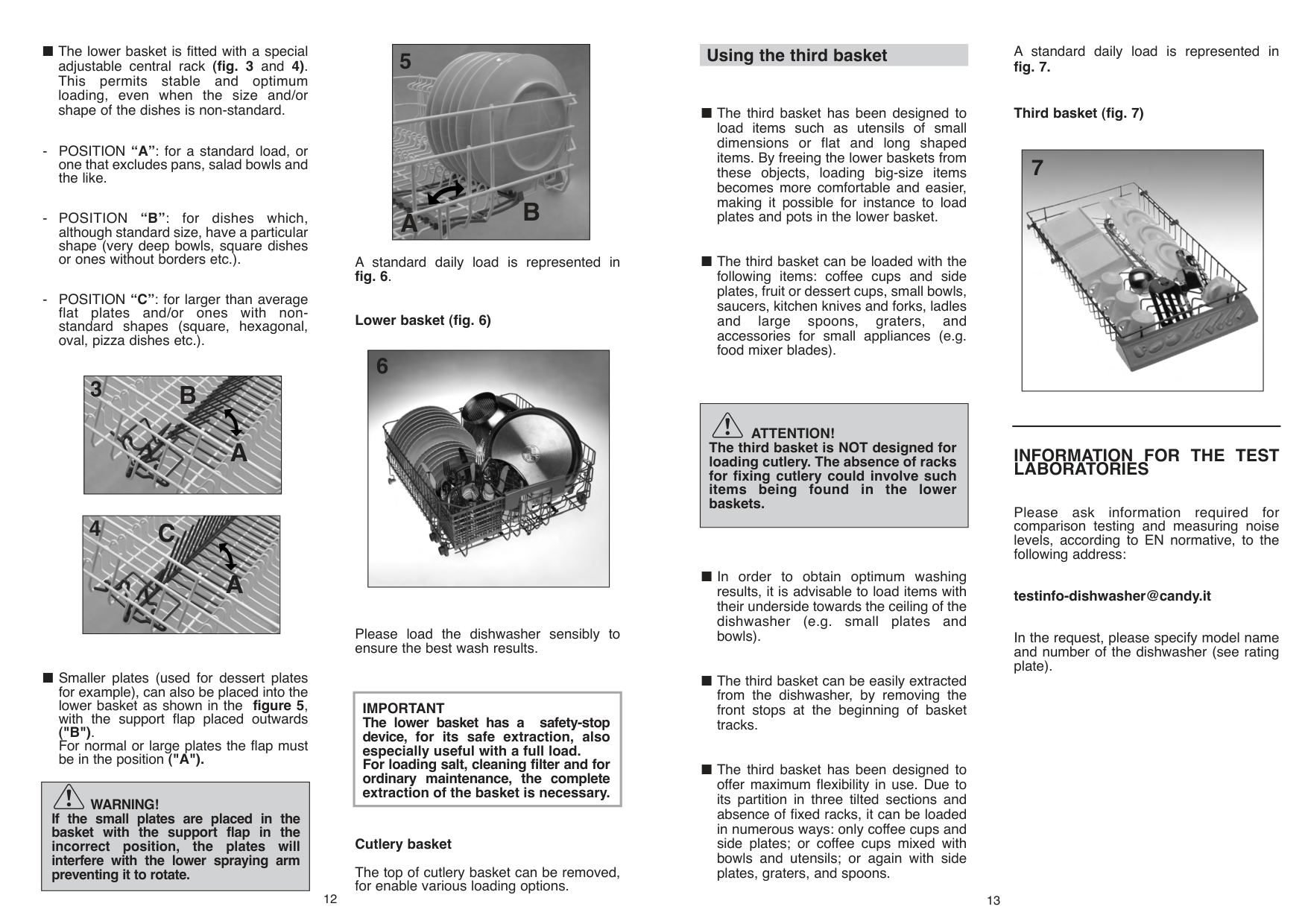
A standard daily load is represented in fig. 6.
############# Lower basket (fig. 6)
|
6| |---|
Please load the dishwasher sensibly to ensure the best wash results.
|IMPORTANT The lower basket has a safety-stop device, for its safe extraction, also especially useful with a full load. For loading salt, cleaning filter and for ordinary maintenance, the complete extraction of the basket is necessary.| |---|
Cutlery basket
The top of cutlery basket can be removed, for enable various loading options.
Using the third basket
|ATTENTION!
The third basket is NOT designed for loading cutlery. The absence of racks for fixing cutlery could involve such items being found in the lower baskets.| |---|
|
B| |---|
######### LOADING THE DETERGENT
########## The detergent
|IMPORTANT It is essential to use a detergent that is specifically designed for dishwashers either in powder, liquid or tablet form.| |---|
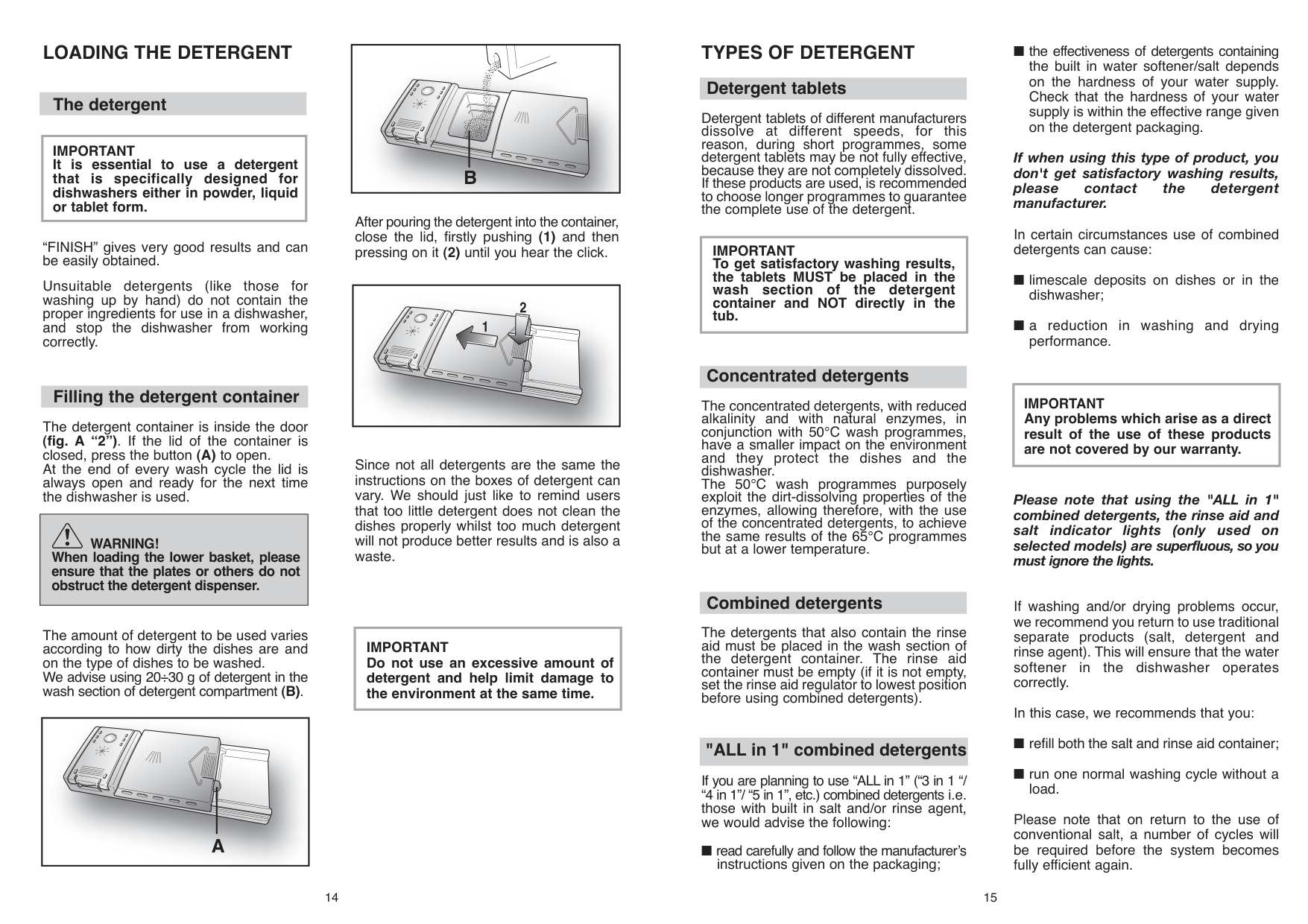
After pouring the detergent into the container, close the lid, firstly pushing (1) and then pressing on it (2) until you hear the click.
“FINISH” gives very good results and can be easily obtained.
Unsuitable detergents (like those for washing up by hand) do not contain the proper ingredients for use in a dishwasher, and stop the dishwasher from working correctly.
|| |---|
########## Filling the detergent container
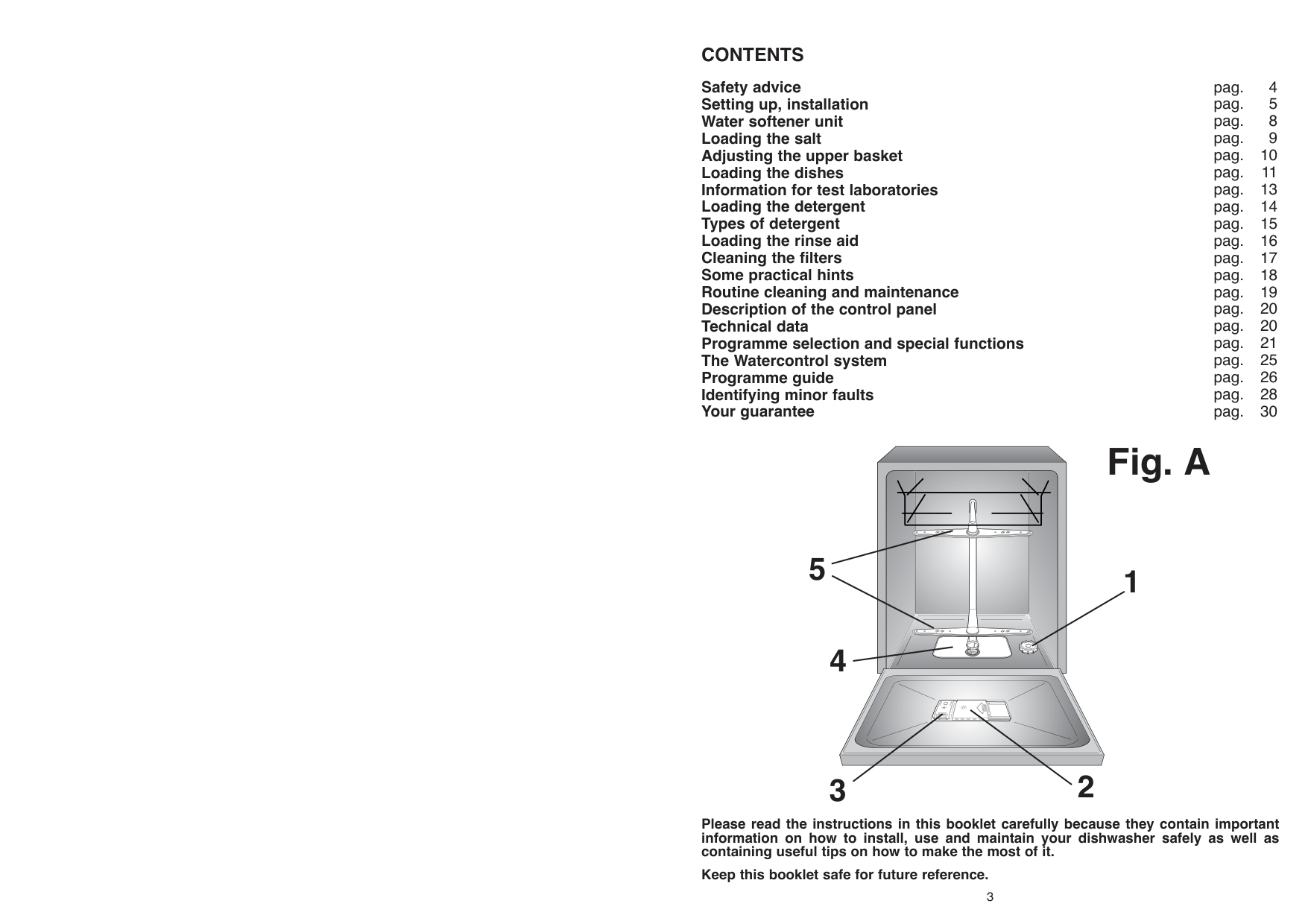
The detergent container is inside the door (fig. A “2”). If the lid of the container is closed, press the button (A) to open. At the end of every wash cycle the lid is always open and ready for the next time the dishwasher is used.
Since not all detergents are the same the instructions on the boxes of detergent can vary. We should just like to remind users that too little detergent does not clean the dishes properly whilst too much detergent will not produce better results and is also a waste.
|WARNING!
When loading the lower basket, please ensure that the plates or others do not obstruct the detergent dispenser.| |---|
|IMPORTANT Do not use an excessive amount of detergent and help limit damage to the environment at the same time.| |---|
The amount of detergent to be used varies according to how dirty the dishes are and on the type of dishes to be washed. We advise using 20÷30 g of detergent in the wash section of detergent compartment (B).
|
A| |---|
14
######### TYPES OF DETERGENT
########## Detergent tablets
Detergent tablets of different manufacturers dissolve at different speeds, for this reason, during short programmes, some detergent tablets may be not fully effective, because they are not completely dissolved. If these products are used, is recommended to choose longer programmes to guarantee the complete use of the detergent.
|IMPORTANT To get satisfactory washing results, the tablets MUST be placed in the wash section of the detergent container and NOT directly in the tub.| |---|
########## Concentrated detergents
The concentrated detergents, with reduced alkalinity and with natural enzymes, in conjunction with 50°C wash programmes, have a smaller impact on the environment and they protect the dishes and the dishwasher. The 50°C wash programmes purposely exploit the dirt-dissolving properties of the enzymes, allowing therefore, with the use of the concentrated detergents, to achieve the same results of the 65°C programmes but at a lower temperature.
########## Combined detergents
The detergents that also contain the rinse aid must be placed in the wash section of the detergent container. The rinse aid container must be empty (if it is not empty, set the rinse aid regulator to lowest position before using combined detergents).
########## "ALL in 1" combined detergents
If you are planning to use “ALL in 1” (“3 in 1 “/ “4 in 1”/ “5 in 1”, etc.) combined detergents those with built in salt and/or rinse agent, we would advise the following:
■ read carefully and follow the manufacturer’s
instructions given on the packaging;
######### LOADING THE RINSE AID
########## The rinse aid
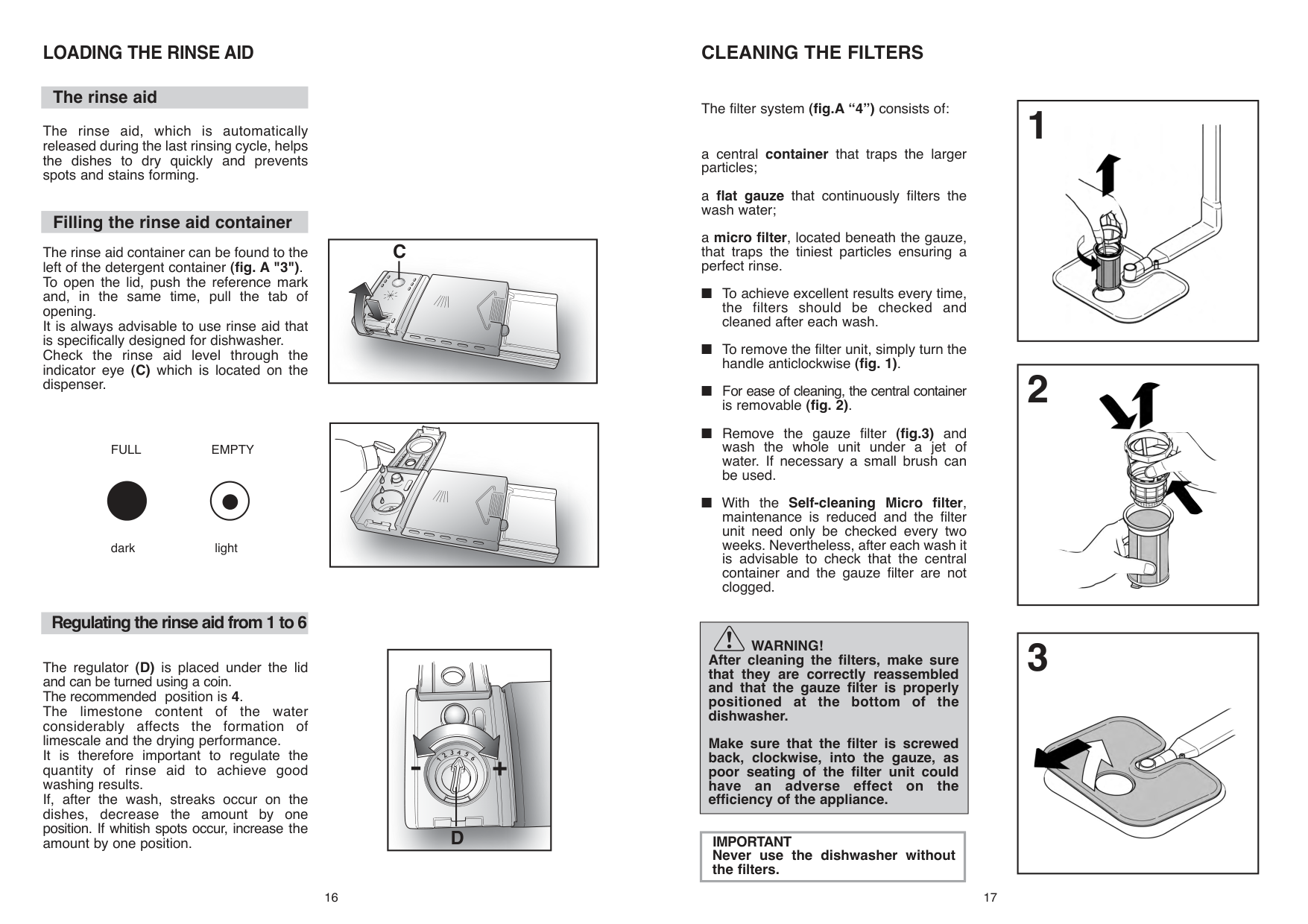
The rinse aid, which is automatically released during the last rinsing cycle, helps the dishes to dry quickly and prevents spots and stains forming.
########## Filling the rinse aid container
The rinse aid container can be found to the left of the detergent container (fig. A "3"). To open the lid, push the reference mark and, in the same time, pull the tab of opening. It is always advisable to use rinse aid that is specifically designed for dishwasher. Check the rinse aid level through the indicator eye (C) which is located on the dispenser.
FULL EMPTY
dark light
########## Regulating the rinse aid from 1 to 6
The regulator (D) is placed under the lid and can be turned using a coin. The recommended position is 4. The limestone content of the water considerably affects the formation of limescale and the drying performance. It is therefore important to regulate the quantity of rinse aid to achieve good washing results. If, after the wash, streaks occur on the dishes, decrease the amount by one position. If whitish spots occur, increase the amount by one position.
|
C| |---|
|| |---|
|


D
| |---|
16
######### CLEANING THE FILTERS
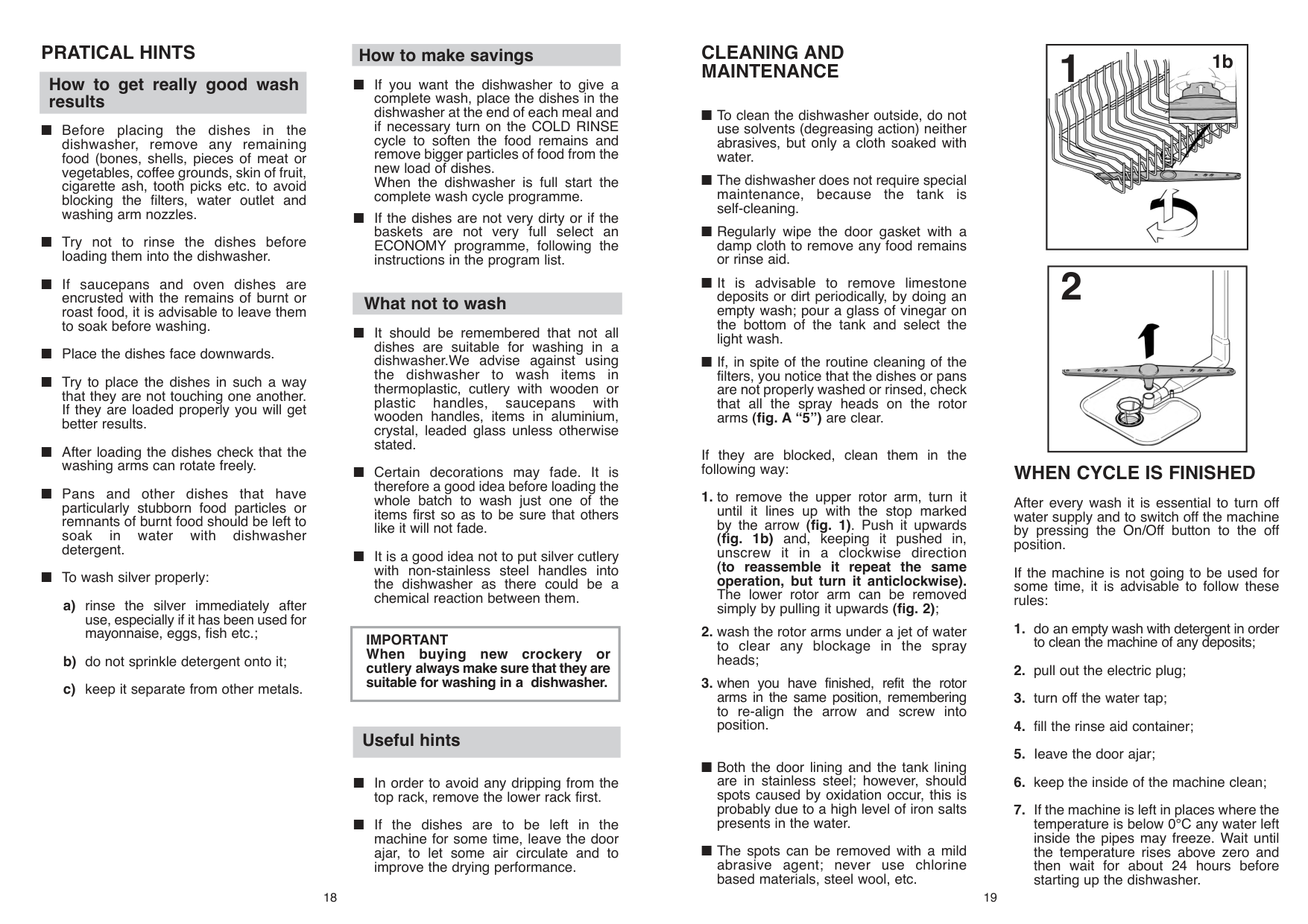
The filter system (fig.A “4”) consists of:
a central container that traps the larger particles;
a flat gauze that continuously filters the wash water;
a micro filter, located beneath the gauze, that traps the tiniest particles ensuring a perfect rinse.
|WARNING!
After cleaning the filters, make sure that they are correctly reassembled and that the gauze filter is properly positioned at the bottom of the dishwasher.
Make sure that the filter is screwed back, clockwise, into the gauze, as poor seating of the filter unit could have an adverse effect on the efficiency of the appliance.| |---|
|IMPORTANT Never use the dishwasher without the filters.| |---|
######### PRATICAL HINTS
########## How to get really good wash results
########## How to make savings
What not to wash
|IMPORTANT When buying new crockery or cutlery always make sure that they are suitable for washing in a dishwasher.| |---|
Useful hints
18
######### CLEANING AND MAINTENANCE
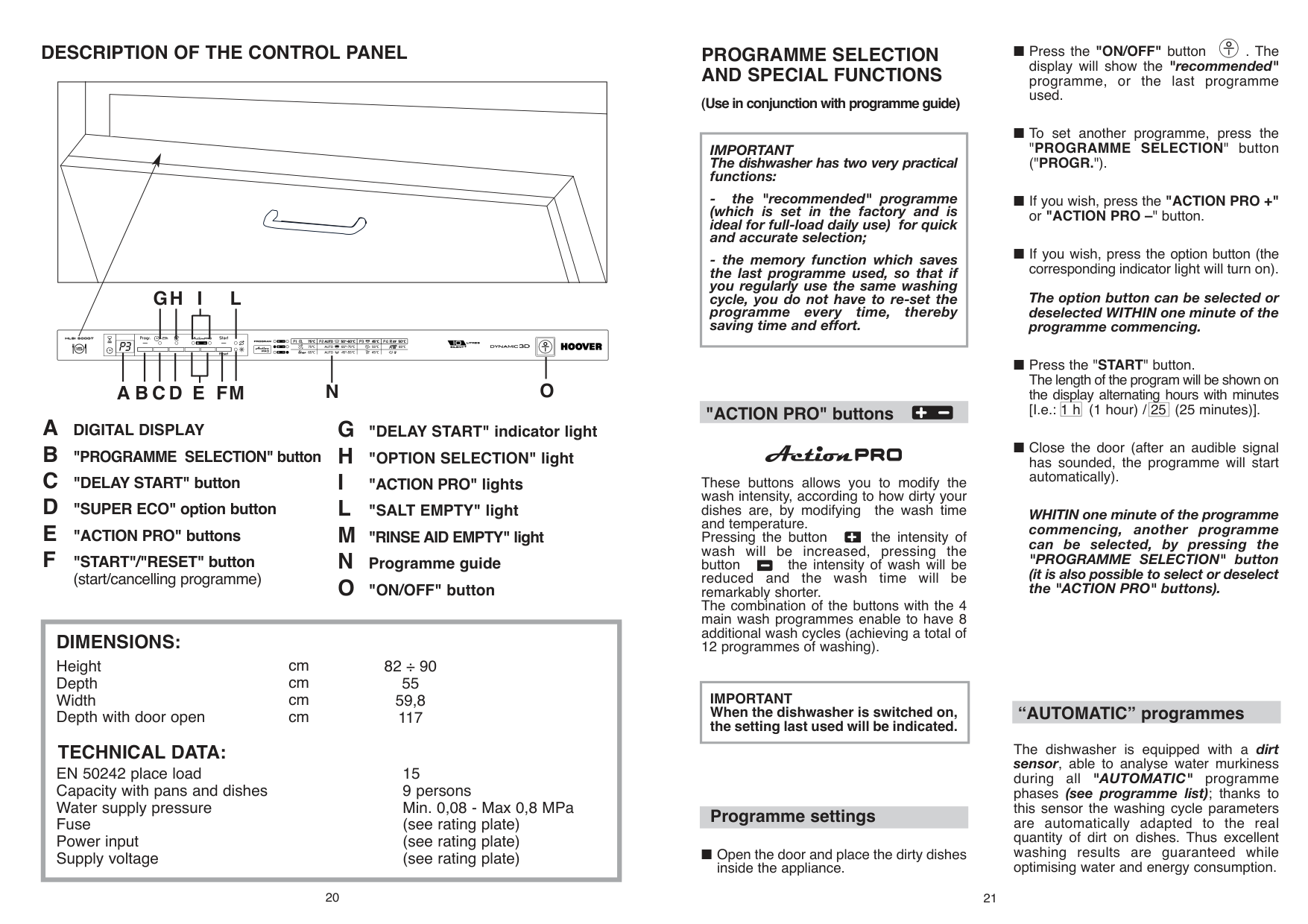
If they are blocked, clean them in the following way:
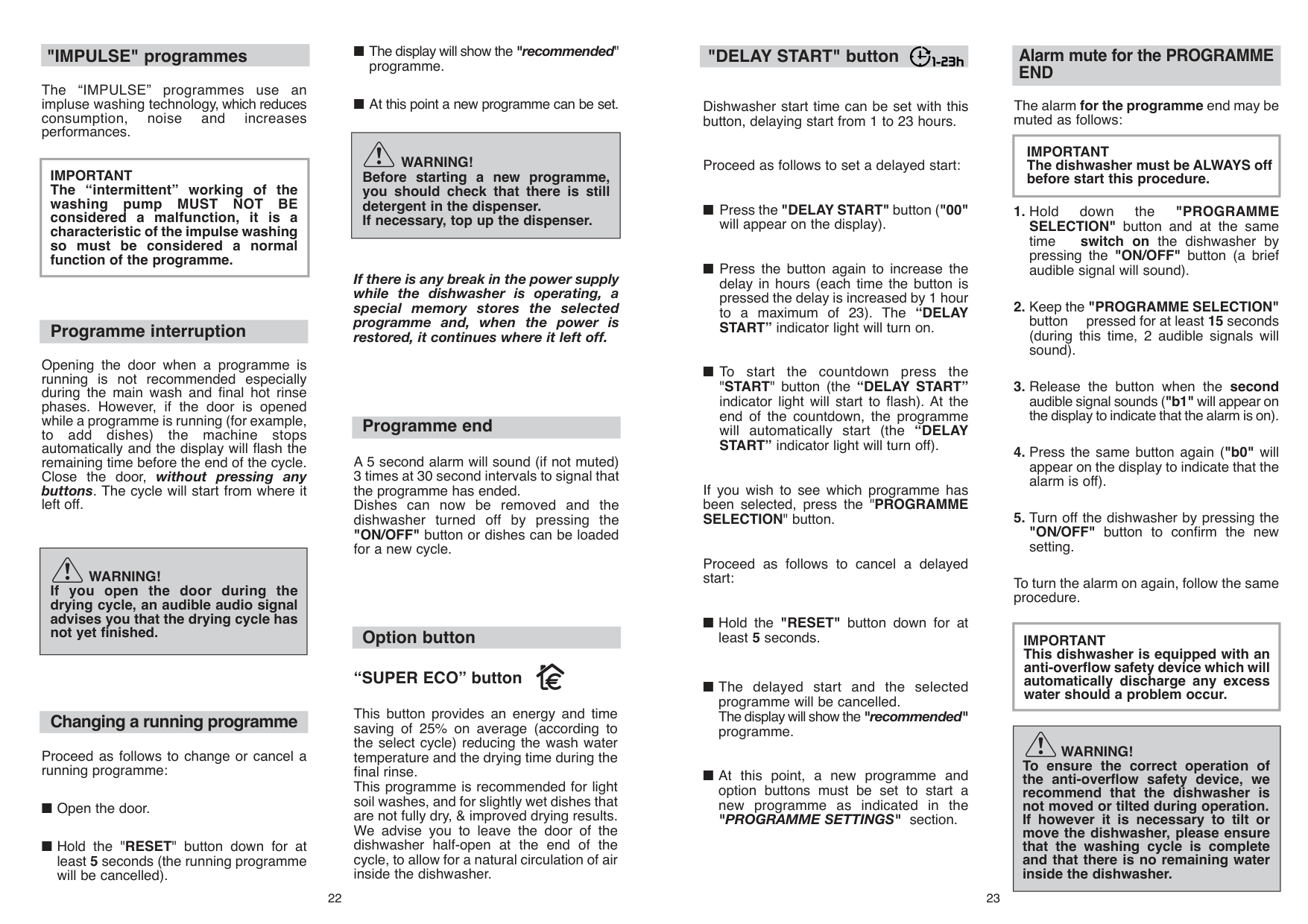
######### DESCRIPTION OF THE CONTROL PANEL
######### LGHI
######### ABCD E FM N O
(start/cancelling programme)
|EN 50242 place load Capacity with pans and dishes Water supply pressure Fuse Power input Supply voltage
15 9 persons Min. 0,08 - Max 0,8 MPa (see rating plate) (see rating plate) (see rating plate)
TECHNICAL DATA:
DIMENSIONS:
Height Depth Width Depth with door open
cm cm cm cm
82 ÷ 90 55 59,8 117| |---|
20
######### PROGRAMME SELECTION AND SPECIAL FUNCTIONS
(Use in conjunction with programme guide)
|IMPORTANT The dishwasher has two very practical functions:
- the "recommended" programme (which is set in the factory and is ideal for full-load daily use) for quick and accurate selection;
- the memory function which saves the last programme used, so that if you regularly use the same washing cycle, you do not have to re-set the programme every time, thereby saving time and effort.
| |---|
########## "ACTION PRO" buttons
These buttons allows you to modify the wash intensity, according to how dirty your dishes are, by modifying the wash time and temperature. Pressing the button the intensity of wash will be increased, pressing the button the intensity of wash will be reduced and the wash time will be remarkably shorter. The combination of the buttons with the 4 main wash programmes enable to have 8 additional wash cycles (achieving a total of 12 programmes of washing).
|IMPORTANT When the dishwasher is switched on, the setting last used will be indicated.| |---|
########## Programme settings
■ Open the door and place the dirty dishes
inside the appliance.
########## "IMPULSE" programmes
The “IMPULSE” programmes use an impluse washing technology, which reduces consumption, noise and increases performances.
|IMPORTANT The “intermittent” working of the washing pump MUST NOT BE considered a malfunction, it is a characteristic of the impulse washing so must be considered a normal function of the programme.| |---|
########## Programme interruption
Opening the door when a programme is running is not recommended especially during the main wash and final hot rinse phases. However, if the door is opened while a programme is running (for example, to add dishes) the machine stops automatically and the display will flash the remaining time before the end of the cycle. Close the door, without pressing any buttons. The cycle will start from where it left off.
|WARNING!
If you open the door during the drying cycle, an audible audio signal advises you that the drying cycle has not yet finished.| |---|
|WARNING! Before starting a new programme, you should check that there is still detergent in the dispenser. If necessary, top up the dispenser.| |---|
If there is any break in the power supply while the dishwasher is operating, a special memory stores the selected programme and, when the power is restored, it continues where it left off.
########## Programme end
A 5 second alarm will sound (if not muted) 3 times at 30 second intervals to signal that the programme has ended. Dishes can now be removed and the dishwasher turned off by pressing the "ON/OFF" button or dishes can be loaded for a new cycle.
########## Option button
########### “SUPER ECO” button
########## Changing a running programme
Proceed as follows to change or cancel a running programme:
22
This button provides an energy and time saving of 25% on average (according to the select cycle) reducing the wash water temperature and the drying time during the final rinse. This programme is recommended for light soil washes, and for slightly wet dishes that are not fully dry, & improved drying results. We advise you to leave the door of the dishwasher half-open at the end of the cycle, to allow for a natural circulation of air inside the dishwasher.
########## "DELAY START" button
Dishwasher start time can be set with this button, delaying start from 1 to 23 hours.
Proceed as follows to set a delayed start:
If you wish to see which programme has been selected, press the "PROGRAMME SELECTION" button.
Proceed as follows to cancel a delayed start:
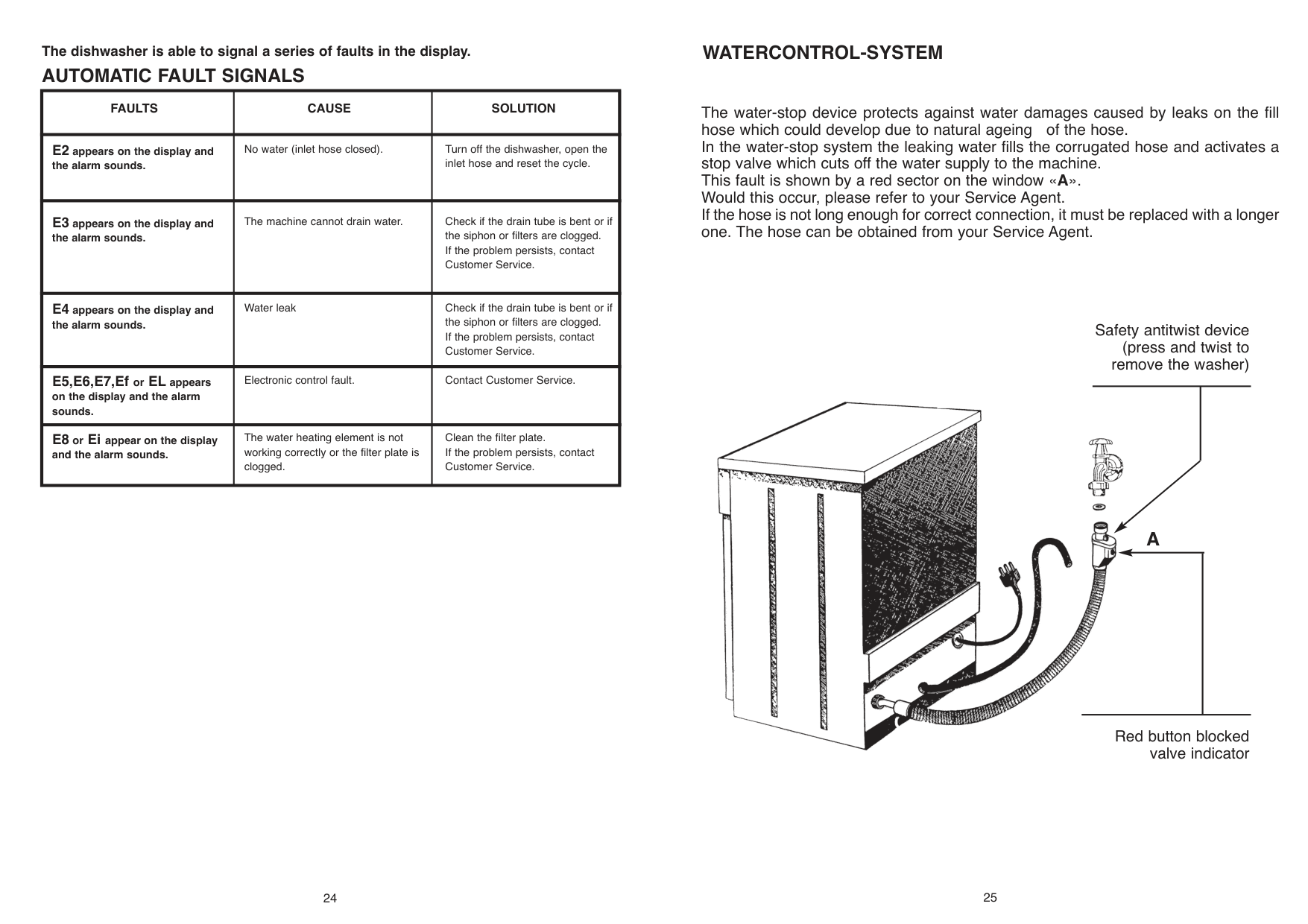
The dishwasher is able to signal a series of faults in the display.
AUTOMATIC FAULT SIGNALS
|FAULTS|CAUSE|SOLUTION| |---|---|---| |E2 appears on the display and the alarm sounds.|No water (inlet hose closed).|Turn off the dishwasher, open the inlet hose and reset the cycle.| |E3 appears on the display and the alarm sounds.|The machine cannot drain water.|Check if the drain tube is bent or if the siphon or filters are clogged. If the problem persists, contact Customer Service.| |E4 appears on the display and the alarm sounds.|Water leak|Check if the drain tube is bent or if the siphon or filters are clogged. If the problem persists, contact Customer Service.| |E5,E6,E7,Ef or EL appears on the display and the alarm sounds.|Electronic control fault.|Contact Customer Service.| |E8 or Ei appear on the display and the alarm sounds.|The water heating element is not working correctly or the filter plate is clogged.|Clean the filter plate. If the problem persists, contact Customer Service.|
######### WATERCONTROL-SYSTEM
The water-stop device protects against water damages caused by leaks on the fill hose which could develop due to natural ageing of the hose. In the water-stop system the leaking water fills the corrugated hose and activates a stop valve which cuts off the water supply to the machine. This fault is shown by a red sector on the window « Would this occur, please refer to your Service Agent. If the hose is not long enough for correct connection, it must be replaced with a longer one. The hose can be obtained from your Service Agent.

24
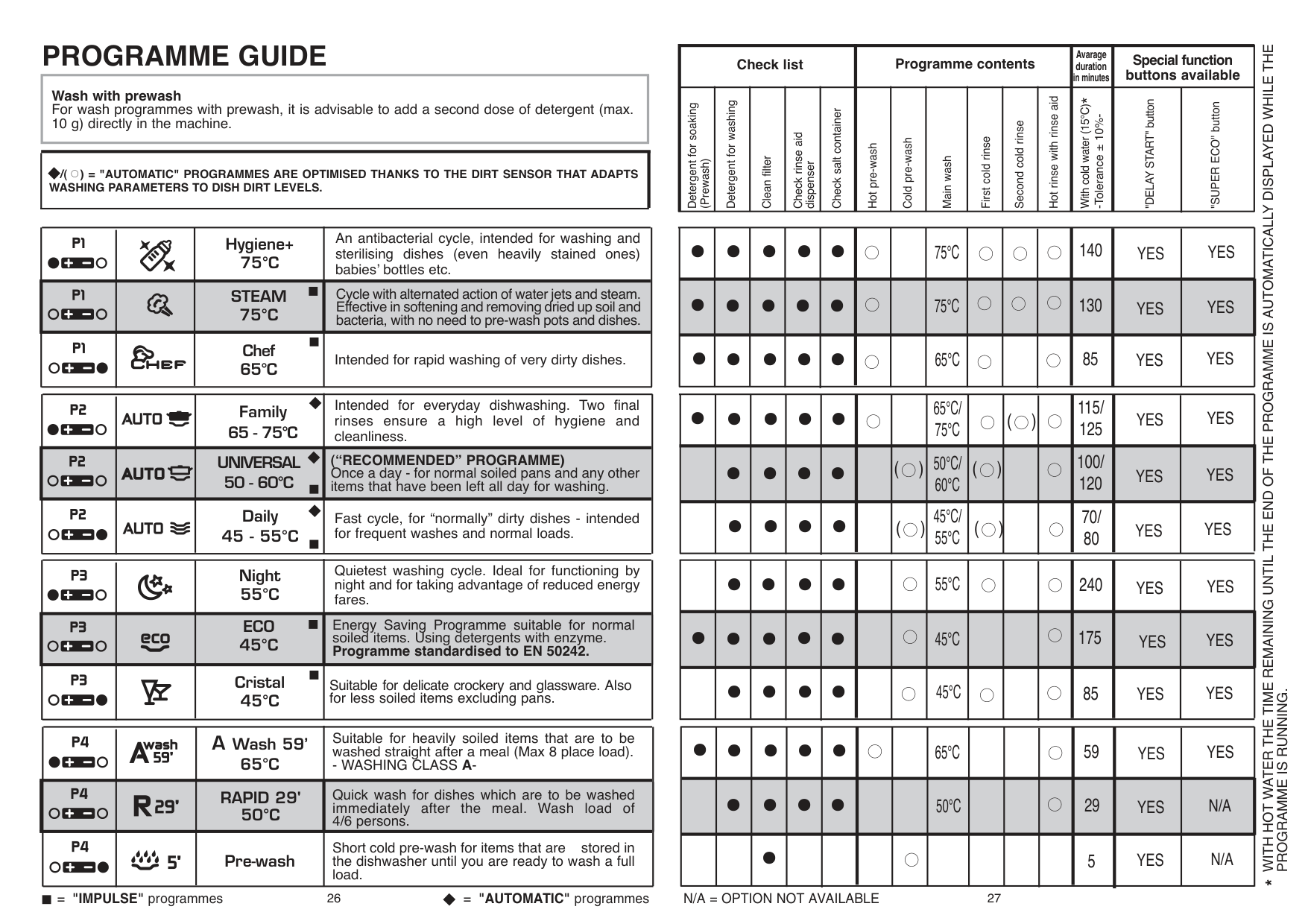
#### PROGRAMME GUIDE
|Wash with prewash For wash programmes with prewash, it is advisable to add a second dose of detergent (max. 10 g) directly in the machine.| |---|
|/( ) = "AUTOMATIC" PROGRAMMES ARE OPTIMISED THANKS TO THE DIRT SENSOR THAT ADAPTS WASHING PARAMETERS TO DISH DIRT LEVELS.
•
| |---|
|Check list|Check list|Check list|Check list|Check list|Programme contents|Programme contents|Programme contents|Programme contents|Programme contents|Programme contents| | | | |---|---|---|---|---|---|---|---|---|---|---|---|---|---| |Detergent for soaking
(Prewash)|Detergent for washing|Clean filter|Check rinse aid
dispenser|Check salt container|Hot pre-wash|Cold pre-wash| | | | | | | |
| | |Hygiene+ 75°C|An antibacterial cycle, intended for washing and sterilising dishes (even heavily stained ones) babies’ bottles etc.| |---|---|---|---| | | |STEAM 75°C|Cycle with alternated action of water jets and steam. Effective in softening and removing dried up soil and bacteria, with no need to pre-wash pots and dishes.| | | |Chef 65°C|Intended for rapid washing of very dirty dishes.|
|•|•|•|•|•| | | | | | | | | | |---|---|---|---|---|---|---|---|---|---|---|---|---|---| |•|•|•|•|•| | | | | | | | | | |•|•|•|•|•| | | | | | | | | |
| | |Family 65 - 75°C|Intended for everyday dishwashing. Two final rinses ensure a high level of hygiene and cleanliness.| |---|---|---|---| | | |UNIVERSAL 50 - 60°C|(“RECOMMENDED” PROGRAMME) Once a day - for normal soiled pans and any other items that have been left all day for washing.|
| | |Daily 45 - 55°C|Fast cycle, for “normally” dirty dishes - intended for frequent washes and normal loads.|
|•|•|•|•|•| | | | | | | | | | |---|---|---|---|---|---|---|---|---|---|---|---|---|---| | |•|•|•|•| |( )
| | | | | | | | | |•|•|•|•| |( )
| | | | | | | |
| |•|•|•|•| | | | | | | | | | |---|---|---|---|---|---|---|---|---|---|---|---|---|---| |•|•|•|•|•| | | | | | | | | | | |•|•|•|•| | | | | | | | | |
Quietest washing cycle. Ideal for functioning by night and for taking advantage of reduced energy fares.
Night 55°C
ECO 45°C
Energy Saving Programme suitable for normal soiled items. Using detergents with enzyme. Programme standardised to EN 50242.
Cristal 45°C
Suitable for delicate crockery and glassware. Also for less soiled items excluding pans.
| | |A Wash 59’ 65°C|Suitable for heavily soiled items that are to be washed straight after a meal (Max 8 place load). - WASHING CLASS A-| |---|---|---|---| | | |RAPID 29' 50°C|Quick wash for dishes which are to be washed immediately after the meal. Wash load of 4/6 persons.| | | |Pre-wash|Short cold pre-wash for items that are stored in the dishwasher until you are ready to wash a full load.|
|•|•|•|•|•| | | | | | | | | | |---|---|---|---|---|---|---|---|---|---|---|---|---|---| | |•|•|•|•| | | | | | | | | | | | |•| | | | | | | | | | | |
= "AUTOMATIC" programmes N/A = OPTION NOT AVAILABLE="IMPULSE"programmes
26
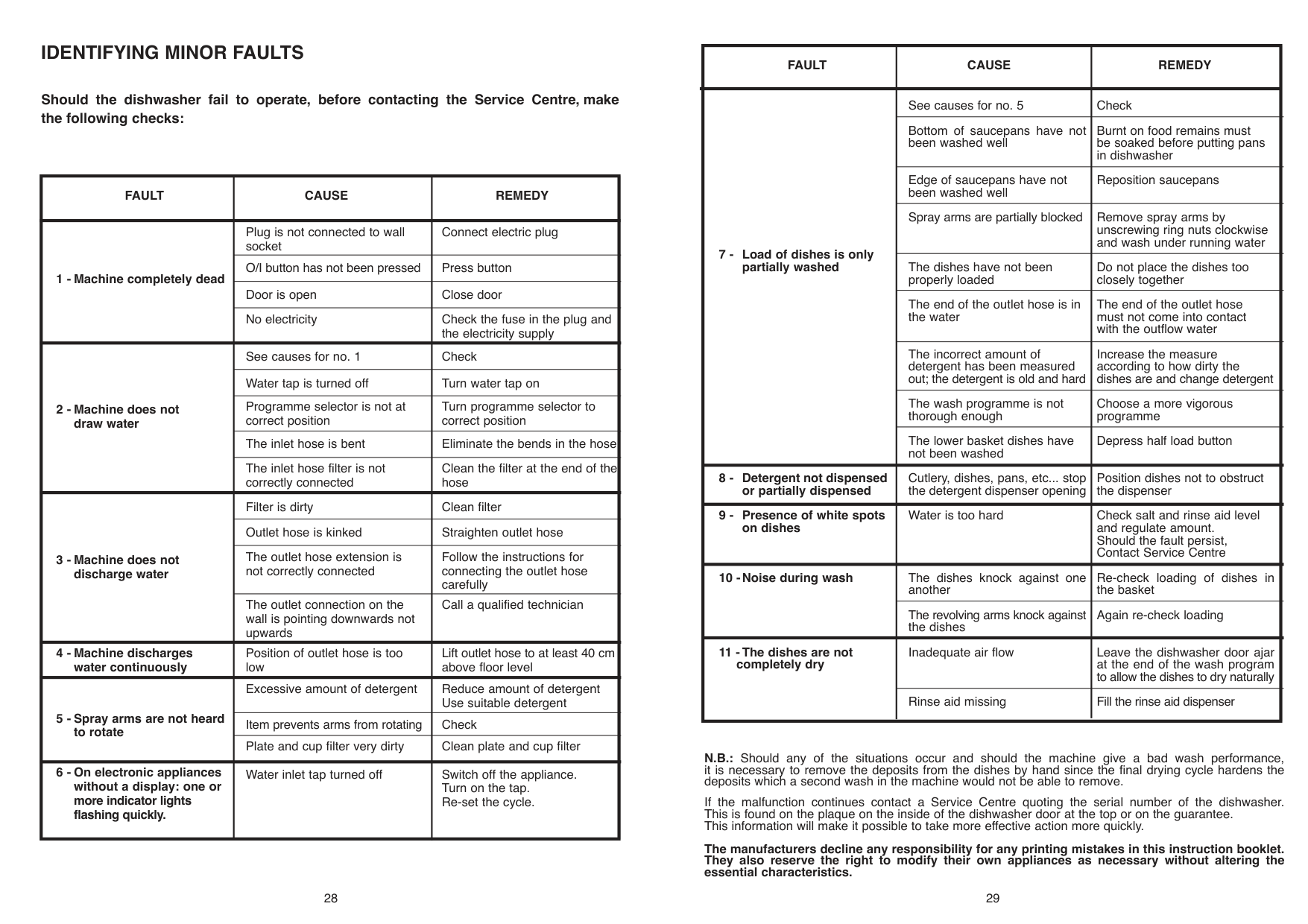
######### IDENTIFYING MINOR FAULTS
############# Should the dishwasher fail to operate, before contacting the Service Centre, make the following checks:
|FAULT|CAUSE|REMEDY| |---|---|---|
|1 - Machine completely dead|Plug is not connected to wall socket|Connect electric plug| |1 - Machine completely dead|O/I button has not been pressed|Press button| |1 - Machine completely dead|Door is open|Close door| |1 - Machine completely dead|No electricity|Check the fuse in the plug and the electricity supply| |2 - Machine does not draw water|See causes for no. 1|Check| |2 - Machine does not draw water|Water tap is turned off|Turn water tap on| |2 - Machine does not draw water|Programme selector is not at correct position|Turn programme selector to correct position| |2 - Machine does not draw water|The inlet hose is bent|Eliminate the bends in the hose| |2 - Machine does not draw water|The inlet hose filter is not correctly connected|Clean the filter at the end of the hose| |3 - Machine does not discharge water|Filter is dirty|Clean filter| |3 - Machine does not discharge water|Outlet hose is kinked|Straighten outlet hose| |3 - Machine does not discharge water|The outlet hose extension is not correctly connected|Follow the instructions for connecting the outlet hose carefully| |3 - Machine does not discharge water|The outlet connection on the wall is pointing downwards not upwards|Call a qualified technician| |4 - Machine discharges water continuously|Position of outlet hose is too low|Lift outlet hose to at least 40 cm above floor level| |5 - Spray arms are not heard to rotate|Excessive amount of detergent|Reduce amount of detergent Use suitable detergent| |5 - Spray arms are not heard to rotate|Item prevents arms from rotating|Check| |5 - Spray arms are not heard to rotate|Plate and cup filter very dirty|Clean plate and cup filter| |6 - On electronic appliances without a display: one or more indicator lights flashing quickly.|Water inlet tap turned off|Switch off the appliance. Turn on the tap. Re-set the cycle.|
28
|FAULT|CAUSE|REMEDY| |---|---|---| |7 - Load of dishes is only partially washed|See causes for no. 5| | |7 - Load of dishes is only partially washed|Bottom of saucepans have not been washed well| | |7 - Load of dishes is only partially washed|Edge of saucepans have not been washed well| | |7 - Load of dishes is only partially washed|Spray arms are partially blocked| | |7 - Load of dishes is only partially washed|The dishes have not been properly loaded| | |7 - Load of dishes is only partially washed|The end of the outlet hose is in the water| | |7 - Load of dishes is only partially washed|The incorrect amount of detergent has been measured out; the detergent is old and hard| | |7 - Load of dishes is only partially washed|The wash programme is not thorough enough| | |7 - Load of dishes is only partially washed|The lower basket dishes have not been washed| | |8 - Detergent not dispensed or partially dispensed|Cutlery, dishes, pans, etc... stop the detergent dispenser opening| | |9 - Presence of white spots on dishes|Water is too hard| | |10 -Noise during wash|The dishes knock against one another| | |10 -Noise during wash|The revolving arms knock against the dishes| | |11 - The dishes are not completely dry|Inadequate air flow| | |11 - The dishes are not completely dry|Rinse aid missing| |
N.B.: Should any of the situations occur and should the machine give a bad wash performance, it is necessary to remove the deposits from the dishes by hand since the final drying cycle hardens the deposits which a second wash in the machine would not be able to remove.
If the malfunction continues contact a Service Centre quoting the serial number of the dishwasher. This is found on the plaque on the inside of the dishwasher door at the top or on the guarantee. This information will make it possible to take more effective action more quickly.
The manufacturers decline any responsibility for any printing mistakes in this instruction booklet. They also reserve the right to modify their own appliances as necessary without altering the essential characteristics.

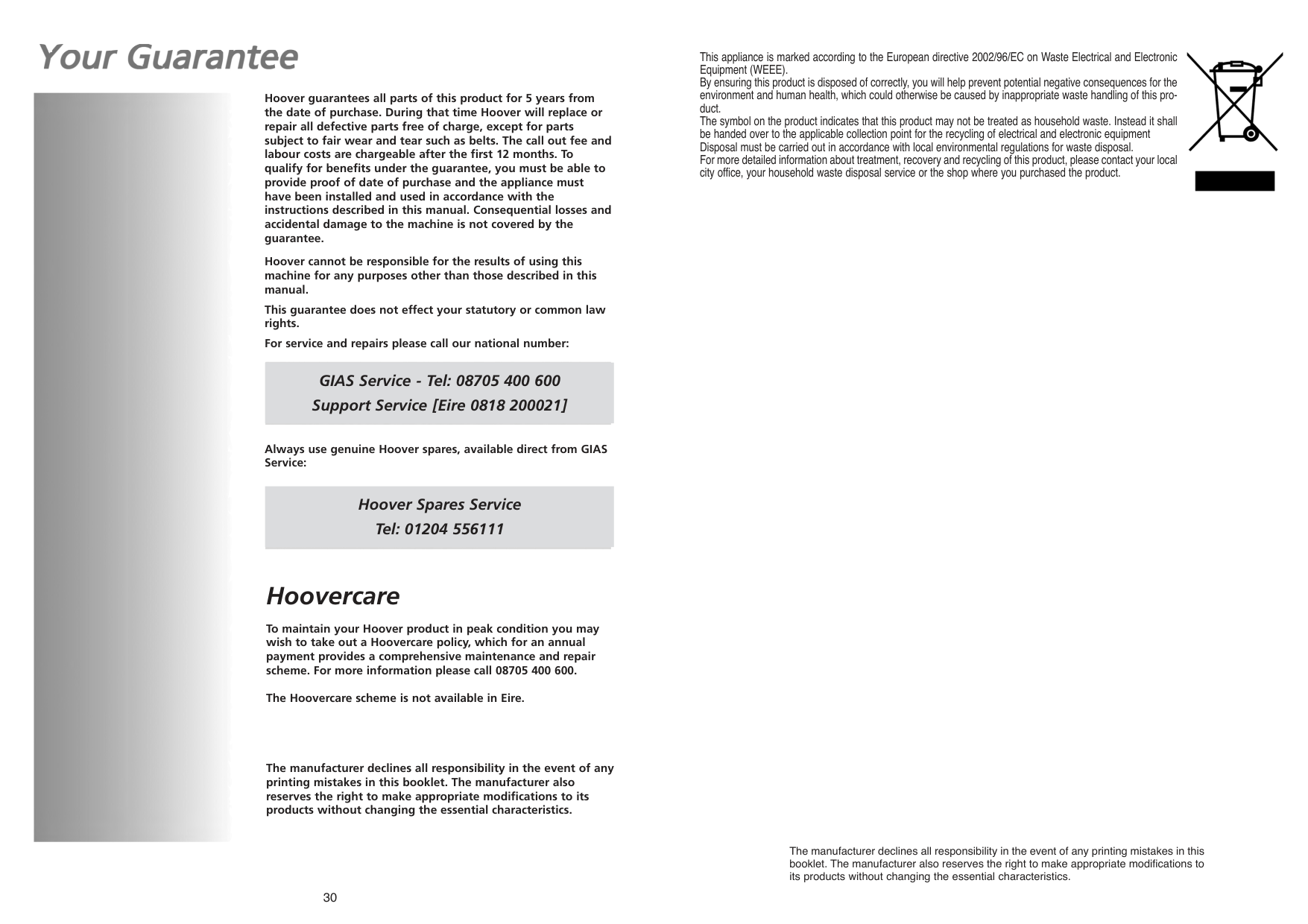
Hoover guarantees all parts of this product for 5 years from the date of purchase. During that time Hoover will replace or repair all defective parts free of charge, except for parts subject to fair wear and tear such as belts. The call out fee and labour costs are chargeable after the first 12 months. To qualify for benefits under the guarantee, you must be able to provide proof of date of purchase and the appliance must have been installed and used in accordance with the instructions described in this manual. Consequential losses and accidental damage to the machine is not covered by the guarantee.
Hoover cannot be responsible for the results of using this machine for any purposes other than those described in this manual.
This guarantee does not effect your statutory or common law rights.
For service and repairs please call our national number:
GIAS Service - Tel: 08705 400 600 Support Service [Eire 0818 200021]
Always use genuine Hoover spares, available direct from GIAS Service:
Hoover Spares Service Tel: 01204 556111
###### Hoovercare
To maintain your Hoover product in peak condition you may wish to take out a Hoovercare policy, which for an annual payment provides a comprehensive maintenance and repair scheme. For more information please call 08705 400 600.
The Hoovercare scheme is not available in Eire.
The manufacturer declines all responsibility in the event of any printing mistakes in this booklet. The manufacturer also reserves the right to make appropriate modifications to its products without changing the essential characteristics.
30
This appliance is marked according to the European directive 2002/96/EC on Waste Electrical and Electronic Equipment (WEEE). By ensuring this product is disposed of correctly, you will help prevent potential negative consequences for the environment and human health, which could otherwise be caused by inappropriate waste handling of this product. The symbol on the product indicates that this product may not be treated as household waste. Instead it shall be handed over to the applicable collection point for the recycling of electrical and electronic equipment Disposal must be carried out in accordance with local environmental regulations for waste disposal. For more detailed information about treatment, recovery and recycling of this product, please contact your local city office, your household waste disposal service or the shop where you purchased the product.
The manufacturer declines all responsibility in booklet. The manufacturer also reserves the right to make appropriate modifications to its products without changing the essential characteristics.
##### HOOVER SERVICE
############ FOR YOUR LOCAL ENGINEER PLEASE CALL OUR NATIONAL NUMBER
08705-400600

######## EIRE 0818 200021
Areas covered by HOOVER SERVICE DEALERS Also Channel Islands, Scilly Isles, Orkney, Shetlands See local telephone directory
Hoover policy is one of continuous development and for this reason we reserve the right to change specifications without prior notice
EN
10.10 - 41034648 - www.graficaestampa.it - Printed in Italy - Imprimé en Italie

HOOVER LIMITED DRAGONPARC ABERCANAID MERTHYR TYDFIL MID-GLAMORGAN CF48 1PQ