
Ask AI
— answers from the official manualAnswers from the official manual.
Common questions
Common Questions
10 totalHow do I perform an initial cleansing brew?
First, plug the Power Cord into a grounded outlet and press the Power Button. The Add Water Indicator will flash blue. Lift up the Cold Water Reservoir Lid and pour water anywhere within the reservoir to reach your desired level (up to 10 oz.). Lower the lid and lift the Handle. Place a cup on the Drip Tray, but do not insert a K-Cup® pack. Press the flashing blue BREW Button until it turns red and then dispenses hot water into the mug.
What should I do if my brewer does not have power?
Ensure that the Power Button is pressed and the Add Water Indicator flashes blue. Check the power outlet for secure connection, try a different outlet, or reset your home circuit breaker if necessary. Contact Customer Service if the issue persists.
How do I clean the K-Cup® Pack Holder Assembly?
Unplug the brewer before cleaning. Lift the Handle to open, then grasp the top of the K-Cup® Pack Holder and push up on the bottom until it releases. Separate the Funnel by pulling until it snaps free. Clean the Exit Needle from below with a paper clip if clogged. Reassemble parts and replace the Funnel.
How often should I de-scale my brewer?
De-scaling every 3 to 6 months is recommended or when visible white deposits appear in the Cold Water Reservoir. Perform the process in three steps: a first and second vinegar rinse with undiluted white vinegar, followed by a fresh water rinse.
What do I need to do before storing my brewer?
Empty the Internal Hot Water Tank, discard any excess water in the Drip Tray, and make sure the Cold Water Reservoir is empty. Store upright in a dry place away from frost.
Why isn't my device brewing when inserted with K-Cups®?
Firstly ensure you are connected to power, the Power Button has been pressed and there is a minimum of 6 oz. water added in the reservoir. Make sure that no K-Cup® packs are obstructing operation within the brewer.
Full Manual
11 pages

####### Owner’s manual
Keurig® K-Cup™ K10 MINI Plus Brewer
Important SafeguardS Safe Operation & Use
########## When using electrical appliances, basic safety precautions should be followed, including the following:
##### SAvE THESE INSTRUCTIONS.
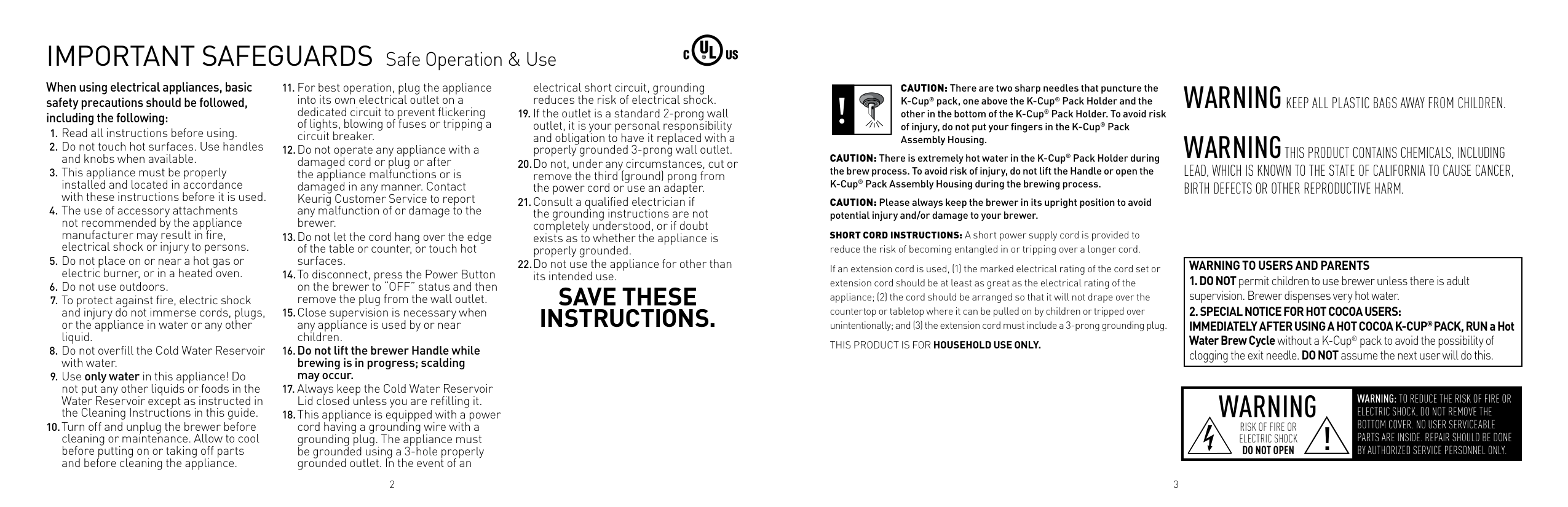
CAUTION: There are two sharp needles that puncture the K-Cup® pack, one above the K-Cup® Pack Holder and the other in the bottom of the K-Cup® Pack Holder. To avoid risk of injury, do not put your fingers in the K-Cup® Pack Assembly Housing.
| | | |---|---|
CAUTION: There is extremely hot water in the K-Cup® Pack Holder during the brew process. To avoid risk of injury, do not lift the Handle or open the K-Cup® Pack Assembly Housing during the brewing process.
CAUTION: Please always keep the brewer in its upright position to avoid potential injury and/or damage to your brewer.
SHORT CORD INSTRUCTIONS: A short power supply cord is provided to reduce the risk of becoming entangled in or tripping over a longer cord.
If an extension cord is used, (1) the marked electrical rating of the cord set or extension cord should be at least as great as the electrical rating of the appliance; (2) the cord should be arranged so that it will not drape over the countertop or tabletop where it can be pulled on by children or tripped over unintentionally; and (3) the extension cord must include a 3-prong grounding plug.
THIS PRODUCT IS FOR HOUSEHOLD USE ONLY.
WARNINGKEEP ALL PLASTIC BAgS AwAY FROM CHILDREN. WARNINGTHIS PRODUCT CONTAINS CHEMICALS, INCLUDINg LEAD, wHICH IS KNOwN TO THE STATE OF CALIFORNIA TO CAUSE CANCER, BIRTH DEFECTS OR OTHER REPRODUCTIVE HARM.
|WARNING TO USERS AND PARENTS
1. DO NOTpermit children to use brewer unless there is adult supervision. Brewer dispenses very hot water.
2. SPECIAL NOTICE FOR HOT COCOA USERS: IMMEDIATELY AFTER USING A HOT COCOA K-CUP®PACK, RUN a Hot Water Brew Cycle without a K-Cup®pack to avoid the possibility of clogging the exit needle. DO NOT assume the next user will do this.
| |---|
|WARNING
WARNING: TO REDUCE THE RISK OF FIRE OR ELECTRIC SHOCK, DO NOT REMOVE THE BOTTOM COVER. NO USER SERVICEABLE PARTS ARE INSIDE. REPAIR SHOULD BE DONE BY AUTHORIZED SERVICE PERSONNEL ONLY.
RISK OF FIRE OR ELECTRIC SHOCK DO NOT OPEN
!
| |---|
2 3
table of ContentS
KEURIG® GOURMET SINGLE CUP HOME BREWING SYSTEM K10 MINI Plus Brewer — Using Your Brewer
############# Record your Brewer Serial Number here.
Removing the serial number label from the brewer will void warranty.
#### SeCtIon 1 Brewer Overview
J
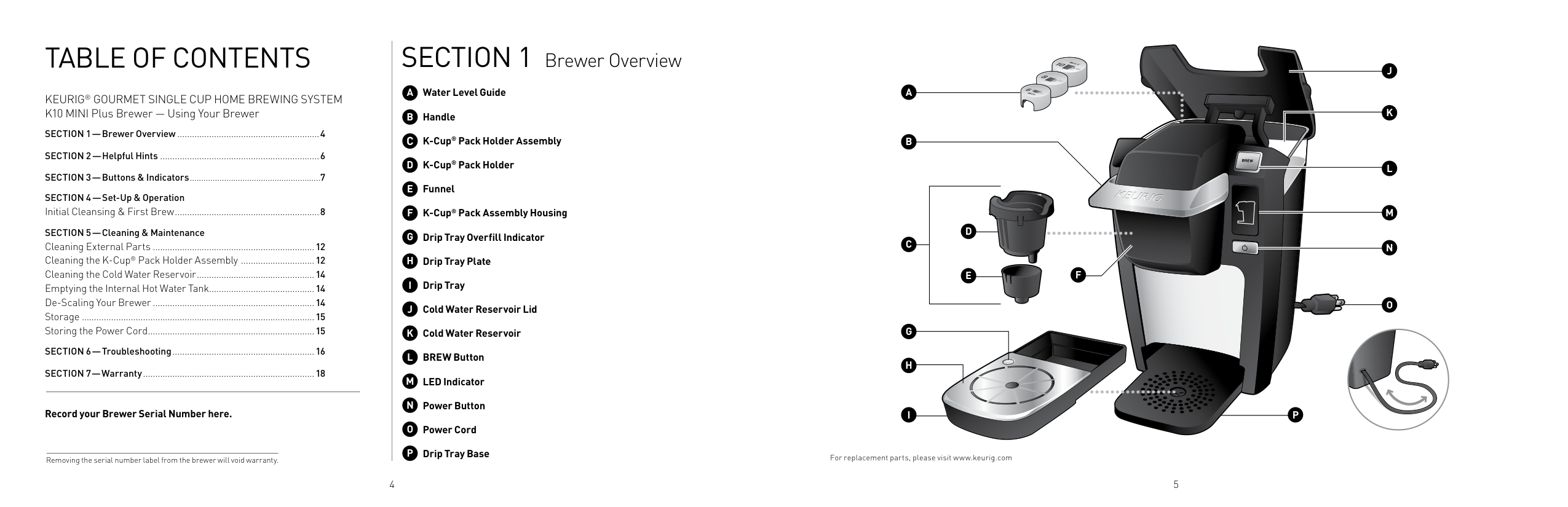
Water Level Guide Handle K-Cup® Pack Holder Assembly K-Cup® Pack Holder Funnel K-Cup® Pack Assembly Housing Drip Tray Overfill Indicator Drip Tray Plate Drip Tray Cold Water Reservoir Lid Cold Water Reservoir BREW Button LED Indicator Power Button Power Cord Drip Tray Base
P
F
O
N
J
I
B
K
L
M
C
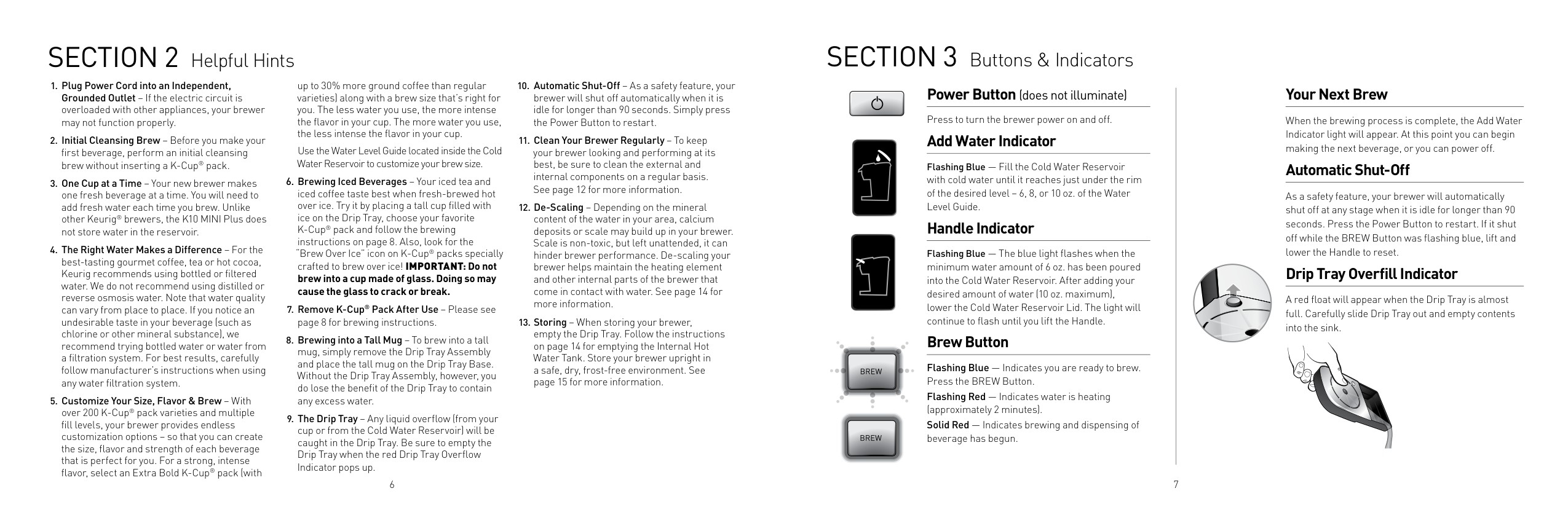
For replacement parts, please visit www.keurig.com
4 5
#### SeCtIon 2 Helpful Hints SeCtIon 3 Buttons & Indicators
up to 30% more ground coffee than regular varieties) along with a brew size that’s right for you. The less water you use, the more intense the flavor in your cup. The more water you use, the less intense the flavor in your cup.
######### Power Button (does not illuminate)
Press to turn the brewer power on and off.
######## Add Water Indicator
Use the Water Level Guide located inside the Cold Water Reservoir to customize your brew size.
Flashing Blue — Fill the Cold Water Reservoir with cold water until it reaches just under the rim of the desired level – 6, 8, or 10 oz. of the Water Level Guide.
######## Handle Indicator
Flashing Blue — The blue light flashes when the minimum water amount of 6 oz. has been poured into the Cold Water Reservoir. After adding your desired amount of water (10 oz. maximum), lower the Cold Water Reservoir Lid. The light will continue to flash until you lift the Handle.
######## Brew Button
Flashing Blue — Indicates you are ready to brew. Press the BREW Button. Flashing Red — Indicates water is heating (approximately 2 minutes). Solid Red — Indicates brewing and dispensing of beverage has begun.
6 7
######## Your Next Brew
When the brewing process is complete, the Add Water Indicator light will appear. At this point you can begin making the next beverage, or you can power off.
######## Automatic Shut-Off
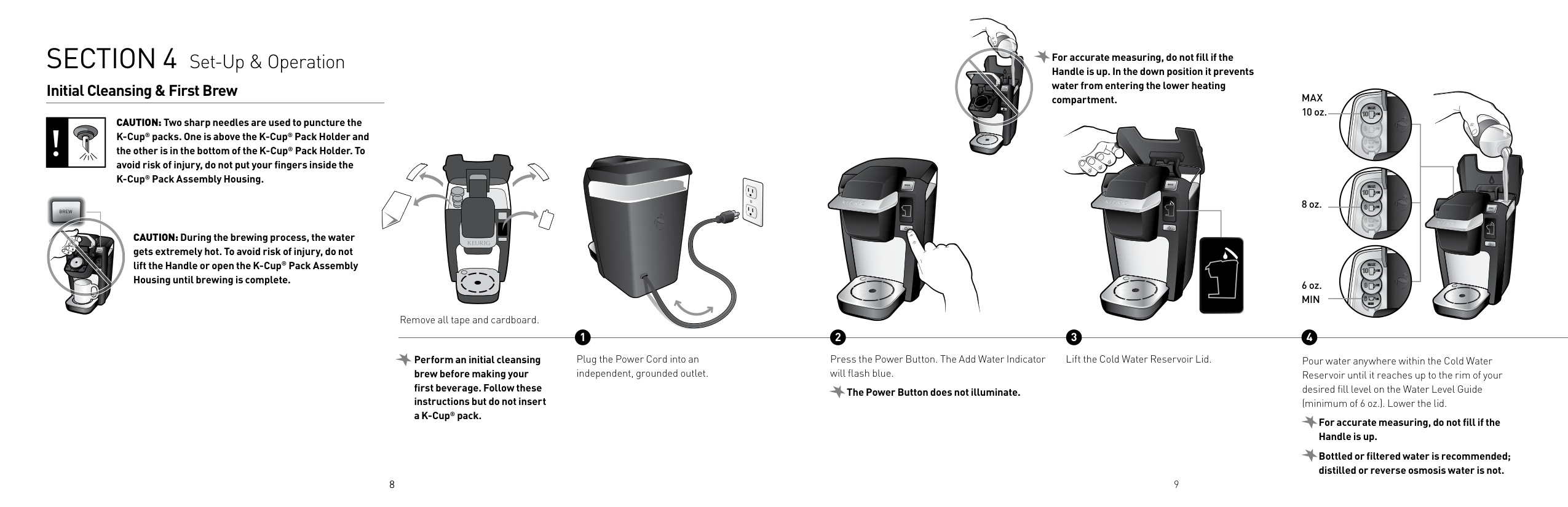
As a safety feature, your brewer will automatically shut off at any stage when it is idle for longer than 90 seconds. Press the Power Button to restart. If it shut off while the BREW Button was flashing blue, lift and lower the Handle to reset.
######## Drip Tray Overfill Indicator
A red float will appear when the Drip Tray is almost full. Carefully slide Drip Tray out and empty contents into the sink.
#### SeCtIon 4 Set-Up & Operation
############# For accurate measuring, do not fill if the Handle is up. In the down position it prevents water from entering the lower heating compartment.
######## Initial Cleansing & First Brew
MAX 10 oz.
CAUTION: Two sharp needles are used to puncture the K-Cup® packs. One is above the K-Cup® Pack Holder and the other is in the bottom of the K-Cup® Pack Holder. To avoid risk of injury, do not put your fingers inside the K-Cup® Pack Assembly Housing.
| | | |---|---|
| | | |---|---| | | |
8 oz.
BREW
CAUTION: During the brewing process, the water gets extremely hot. To avoid risk of injury, do not lift the Handle or open the K-Cup® Pack Assembly Housing until brewing is complete.
| | | |---|---| | | |
6 oz. Min
Remove all tape and cardboard.
############ 1 2
3 4
Perform an initial cleansing brew before making your first beverage. Follow these instructions but do not insert a K-Cup® pack.
Plug the Power Cord into an independent, grounded outlet.
8
Press the Power Button. The Add Water Indicator will flash blue.
The Power Button does not illuminate.
Lift the Cold Water Reservoir Lid.
9
Pour water anywhere within the Cold Water Reservoir until it reaches up to the rim of your desired fill level on the Water Level Guide (minimum of 6 oz.). Lower the lid.
For accurate measuring, do not fill if the Handle is up.
Bottled or filtered water is recommended; distilled or reverse osmosis water is not.
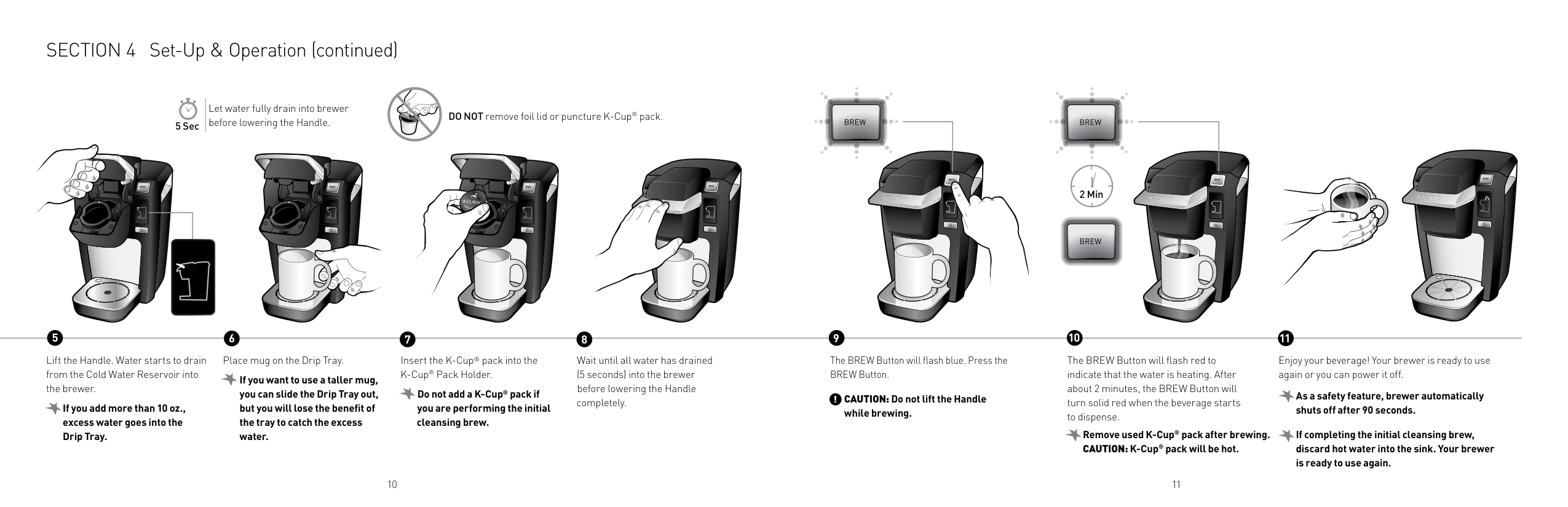
###### SECTION 4 Set-Up & Operation (continued)
Let water fully drain into brewer before lowering the Handle.
Do noT remove foil lid or puncture K-Cup® pack.
5 Sec
2 Min
5 6
############ 7 8 10 119
Lift the Handle. Water starts to drain from the Cold Water Reservoir into the brewer.
Place mug on the Drip Tray.
Insert the K-Cup® pack into the K-Cup® Pack Holder.
The BREW Button will flash blue. Press the BREW Button.
The BREW Button will flash red to indicate that the water is heating. After about 2 minutes, the BREW Button will turn solid red when the beverage starts to dispense.
Enjoy your beverage! Your brewer is ready to use again or you can power it off.
Wait until all water has drained (5 seconds) into the brewer before lowering the Handle completely.
If you want to use a taller mug, you can slide the Drip Tray out, but you will lose the benefit of the tray to catch the excess water.
Do not add a K-Cup® pack if you are performing the initial cleansing brew.
! As a safety feature, brewer automatically shuts off after 90 seconds. If completing the initial cleansing brew, discard hot water into the sink. Your brewer is ready to use again.
CAUTION: Do not lift the Handle while brewing.
If you add more than 10 oz., excess water goes into the Drip Tray.
Remove used K-Cup® pack after brewing. CAUTION: K-Cup® pack will be hot.
1110
#### SeCtIon 5 Cleaning & Maintenance
######## Cleaning External Parts
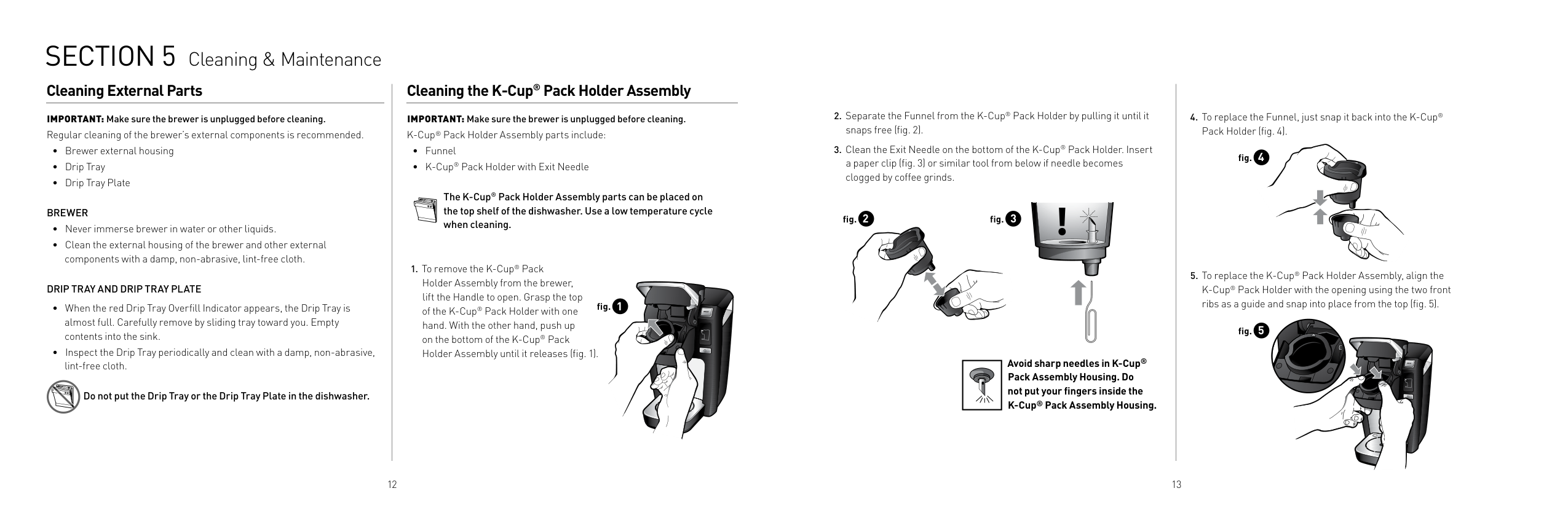
IMPORTANT: Make sure the brewer is unplugged before cleaning. Regular cleaning of the brewer’s external components is recommended.
BReWeR
DRiP TRAY AnD DRiP TRAY PLATe
Do not put the Drip Tray or the Drip Tray Plate in the dishwasher.
######## Cleaning the K-Cup® Pack Holder Assembly
IMPORTANT: Make sure the brewer is unplugged before cleaning. K-Cup® Pack Holder Assembly parts include:
The K-Cup® Pack Holder Assembly parts can be placed on the top shelf of the dishwasher. Use a low temperature cycle when cleaning.
fig. 1
fig. 2
fig. 3
############# Avoid sharp needles in K-Cup® Pack Assembly Housing. Do not put your fingers inside the K-Cup® Pack Assembly Housing.
| | |---|
12 13
###### SECTION 5 Cleaning & Maintenance (continued)
######## Cleaning the Cold Water Reservoir
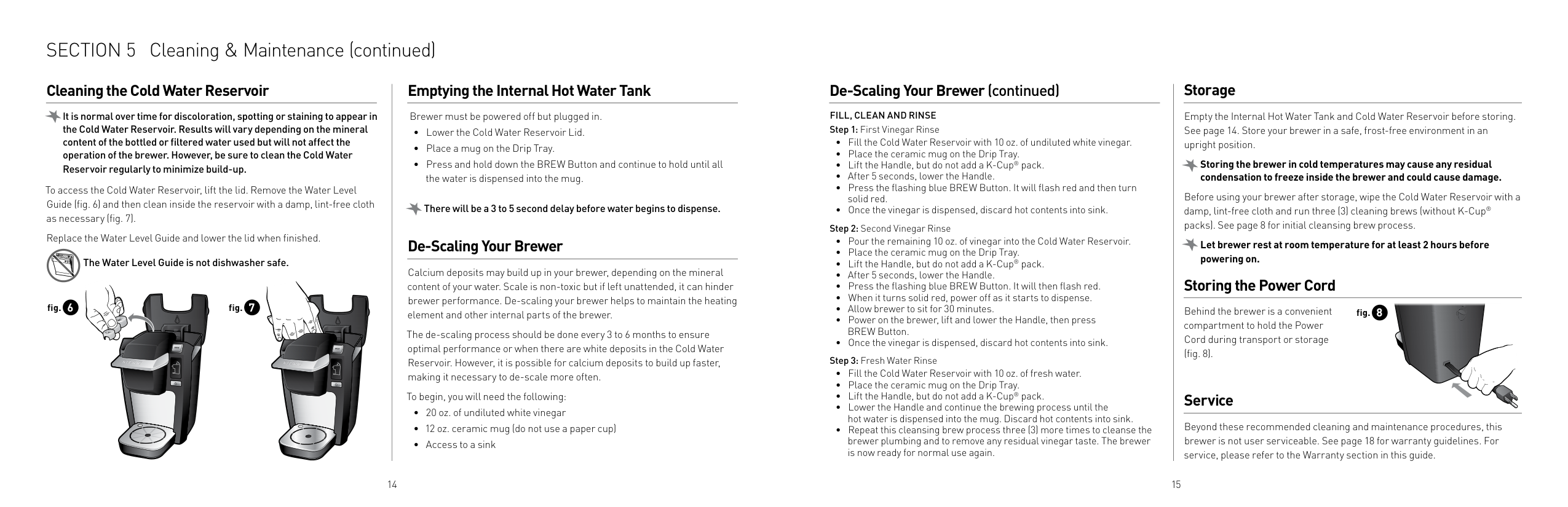
it is normal over time for discoloration, spotting or staining to appear in the Cold Water Reservoir. Results will vary depending on the mineral content of the bottled or filtered water used but will not affect the operation of the brewer. However, be sure to clean the Cold Water Reservoir regularly to minimize build-up.
To access the Cold Water Reservoir, lift the lid. Remove the Water Level Guide (fig. 6) and then clean inside the reservoir with a damp, lint-free cloth as necessary (fig. 7).
Replace the Water Level Guide and lower the lid when finished.
The Water Level Guide is not dishwasher safe.
fig. 6 fig. 7
######## Emptying the Internal Hot Water Tank
Brewer must be powered off but plugged in.
There will be a 3 to 5 second delay before water begins to dispense.
######## De-Scaling Your Brewer
Calcium deposits may build up in your brewer, depending on the mineral content of your water. Scale is non-toxic but if left unattended, it can hinder brewer performance. De-scaling your brewer helps to maintain the heating element and other internal parts of the brewer.
The de-scaling process should be done every 3 to 6 months to ensure optimal performance or when there are white deposits in the Cold Water Reservoir. However, it is possible for calcium deposits to build up faster, making it necessary to de-scale more often.
To begin, you will need the following:
######## De-Scaling Your Brewer (continued)
FiLL, CLeAn AnD RinSe
######## Storage
Empty the Internal Hot Water Tank and Cold Water Reservoir before storing. See page 14. Store your brewer in a safe, frost-free environment in an upright position.
Storing the brewer in cold temperatures may cause any residual condensation to freeze inside the brewer and could cause damage.
Before using your brewer after storage, wipe the Cold Water Reservoir with a damp, lint-free cloth and run three (3) cleaning brews (without K-Cup® packs). See page 8 for initial cleansing brew process.
Let brewer rest at room temperature for at least 2 hours before powering on.
######## Storing the Power Cord
Behind the brewer is a convenient compartment to hold the Power Cord during transport or storage (fig. 8).
fig. 8
######## Service
Beyond these recommended cleaning and maintenance procedures, this brewer is not user serviceable. See page 18 for warranty guidelines. For service, please refer to the Warranty section in this guide.
1514
SeCtIon 6 Troubleshooting
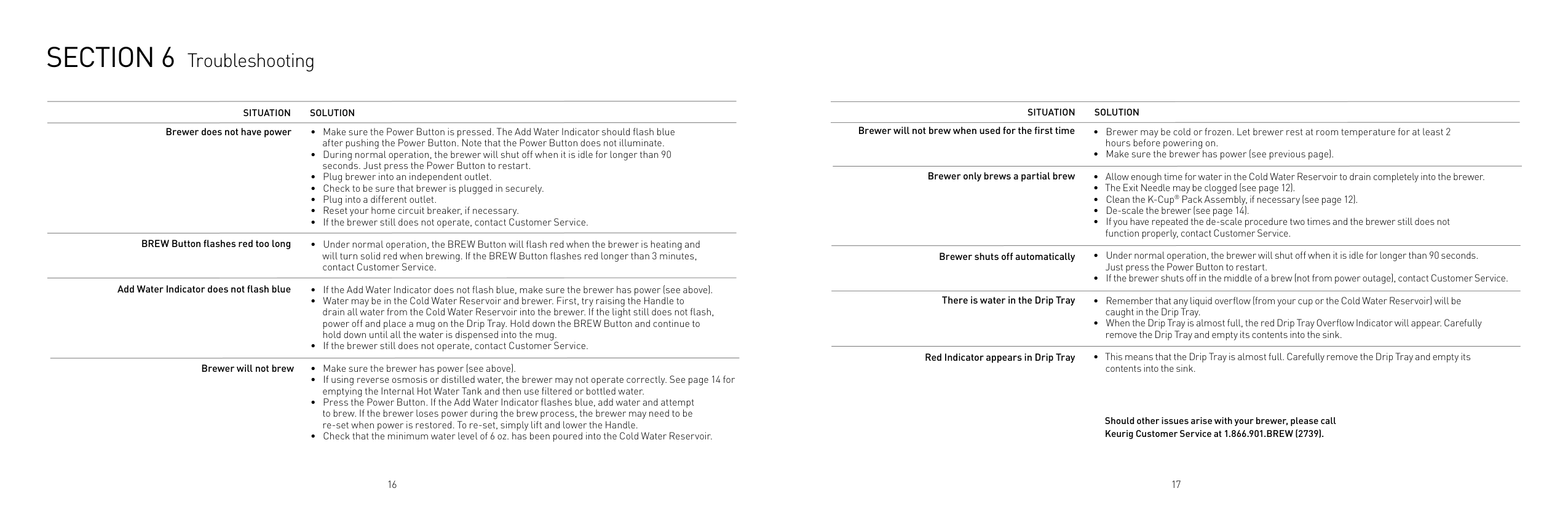
SiTUATion SoLUTion Brewer does not have power
SiTUATion SoLUTion
Brewer will not brew when used for the first time
Brewer only brews a partial brew
BReW Button flashes red too long
Brewer shuts off automatically
Add Water indicator does not flash blue
There is water in the Drip Tray
Red indicator appears in Drip Tray
Brewer will not brew
Should other issues arise with your brewer, please call Keurig Customer Service at 1.866.901.BReW (2739).
16 17
SeCtIon 7 Warranty
######## Scan. Click. Call!
Learn more and reach us quickly without leaving home.
######## Limited One Year Warranty
Nor does this warranty cover damages caused by non Keurig Brewed® K-Cup® brand packs or accessories, services performed by anyone other than Keurig or its authorized service providers, use of parts other than genuine Keurig® parts, or external causes such as abuse, misuse, inappropriate power supply or acts of God.
Keurig, Incorporated warrants that your brewer will be free of defects in materials or workmanship under normal home use for one year from the date of purchase. It is recommended that you fill out and return the warranty card enclosed with your brewer so that your purchase information will be stored in our system. Keurig will, at its option, repair or replace a defective brewer without charge upon its receipt of proof of the date of purchase. If a replacement brewer is necessary to service this warranty, the replacement brewer may be new or reconditioned. If a replacement brewer is sent, a new limited one year warranty will be applied to the replacement brewer.

other limitations
THIS WARRANTY IS EXCLUSIVE AND IS IN LIEU OF ANY OTHER EXPRESS WARRANTY, WHETHER WRITTEN OR ORAL. IN ADDITION, KEURIG HEREBY SPECIFICALLY DISCLAIMS ALL OTHER WARRANTIES WITH RESPECT TO YOUR K10 MINI PLUS BREWER, INCLUDING ANY IMPLIED WARRANTY OF MERCHANTABILITY OR FITNESS FOR ANY PARTICULAR PURPOSE. Some states or provinces do not allow disclaimers of such implied warranties or limitations on how long an implied warranty lasts, so the above limitation may not apply to you depending on the state or the province of purchase.
This warranty only applies to brewers operated in the United States and Canada. This warranty gives you specific legal rights, and you may also have other rights that vary from state to state and, in the case of Canada, from province to province.
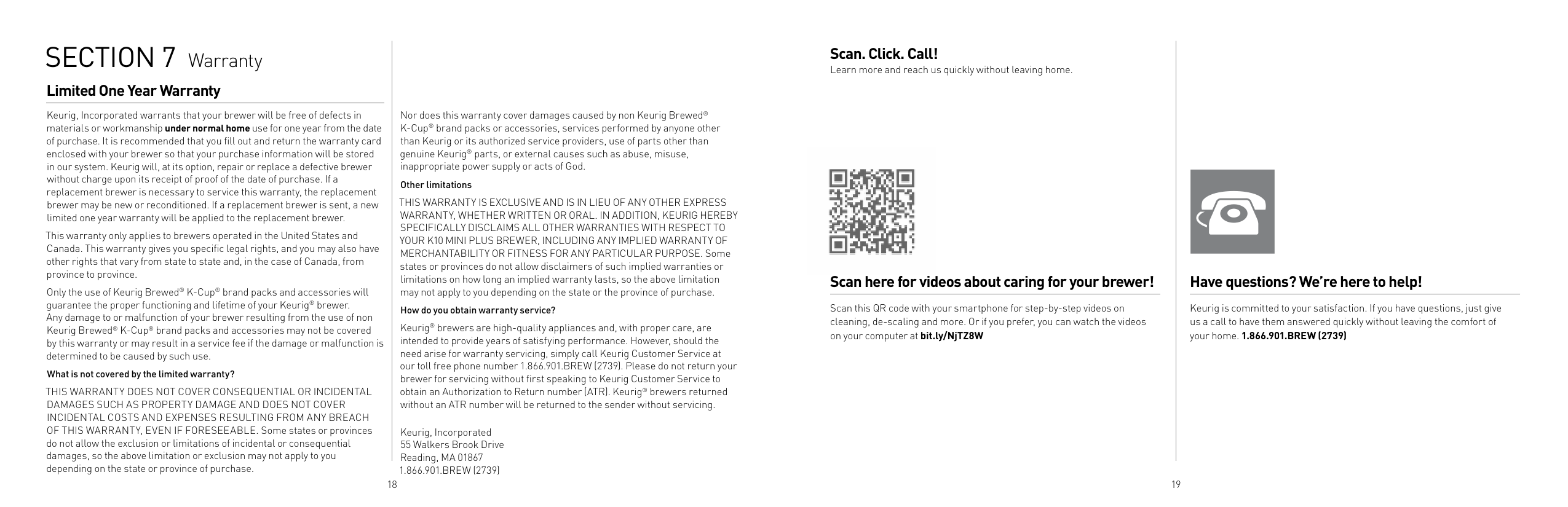
######## Scan here for videos about caring for your brewer!
Only the use of Keurig Brewed® K-Cup® brand packs and accessories will guarantee the proper functioning and lifetime of your Keurig® brewer. Any damage to or malfunction of your brewer resulting from the use of non Keurig Brewed® K-Cup® brand packs and accessories may not be covered by this warranty or may result in a service fee if the damage or malfunction is determined to be caused by such use.
Scan this QR code with your smartphone for step-by-step videos on cleaning, de-scaling and more. Or if you prefer, you can watch the videos on your computer at bit.ly/NjTZ8W
How do you obtain warranty service?
Keurig® brewers are high-quality appliances and, with proper care, are intended to provide years of satisfying performance. However, should the need arise for warranty servicing, simply call Keurig Customer Service at our toll free phone number 1.866.901.BREW (2739). Please do not return your brewer for servicing without first speaking to Keurig Customer Service to obtain an Authorization to Return number (ATR). Keurig® brewers returned without an ATR number will be returned to the sender without servicing.
What is not covered by the limited warranty?
THIS WARRANTY DOES NOT COVER CONSEQUENTIAL OR INCIDENTAL DAMAGES SUCH AS PROPERTY DAMAGE AND DOES NOT COVER INCIDENTAL COSTS AND EXPENSES RESULTING FROM ANY BREACH OF THIS WARRANTY, EVEN IF FORESEEABLE. Some states or provinces do not allow the exclusion or limitations of incidental or consequential damages, so the above limitation or exclusion may not apply to you depending on the state or province of purchase.
Keurig, Incorporated 55 Walkers Brook Drive Reading, MA 01867 1.866.901.BREW (2739)
18 19
######## Have questions? We’re here to help!
Keurig is committed to your satisfaction. If you have questions, just give us a call to have them answered quickly without leaving the comfort of your home. 1.866.901.BREW (2739)
P/N 60-202467-000 Rev A 08/12
To learn more about Keurig, visit www.keurig.com or call 1.866.901.BREW (2739)
Keurig, Incorporated 55 Walkers Brook Drive Reading, MA 01867
Keurig, Incorporated is a wholly-owned subsidiary of Green Mountain Coffee Roasters, Inc.
For Household Use Only Pat. www.GMCR.com/patents
© 2012 Keurig, Incorporated All rights reserved