
Ask AI
— answers from the official manualAnswers from the official manual.
Common questions
Common Questions
45 totalWhat should I do to store the unit properly when it won't be used for a long period?
Ensure the unit is completely drained of water and dry, and that the air filter has been cleaned. The unit should be unplugged and the batteries removed from the remote control before storage. (Page 12)
Why is my air cooler not cooling enough, and how can I fix it?
Check that all windows and doors are closed and remove or switch off any heat sources if possible. You should also move the unit closer to you, remove any obstacles between you and the unit, clean the air filter and refit it securely, and set a higher wind speed level. (Page 13)
How often should I clean the water tank, and why is it important?
The water tank should be cleaned properly every 3 days. Micro-organisms present in the water or environment can grow in the water reservoir and be blown into the air, causing very serious health risks if the water is not renewed and the tank is not cleaned regularly. Never leave water in the reservoir when the appliance is not in use. (Pages 3 & 15)
What should I do when the Evaporator indicator flashes and the unit beeps?
The flashing Evaporator indicator and beeping signal means there is a shortage of water in the water tank. You need to refill the water tank at the rear of the unit, keeping the water level above MIN and below MAX. Make sure the unit is unplugged before sliding out the water tank to refill it. (Page 13)
How do I replace the battery in the remote control?
The remote control requires a CR2032, 3V battery. Slide and hold the battery release tab in the direction of the arrow, pull out the battery holder and remove the old battery, replace it with a new one, and insert the battery holder back into the remote control.
How do I clean the grille and filter on the L48Acw20?
Remove the grille from the rear of the unit, then remove the honeycomb filter and the filter from the grille. Clean the filter in warm water with neutral detergent, and make sure both filters are thoroughly dry before reinstalling them onto the grille. Do not switch on the unit when the grille and filters are removed. (Page 12)
Show 39 more questions
What are the timer settings available on the L48Acw20?
What is the difference between Evaporator mode and Cooler mode?
What type of battery does the remote control use and how do I replace it?
How should I store the L48Acw20 when not in use for a long period?
How do I fill the water tank in my L48Acw20 Air Cooler?
What should I do if the Evaporator indicator flashes and the unit beeps?
How often should I clean the water tank?
How do I clean the grille and filter on the air cooler?
How do I clean the grille and filter?
What should I do if the unit is not cool enough?
What is the water tank capacity of the L48Acw20?
What fan modes are available on the L48Acw20?
What are the key specifications of the Logik L48Acw20 Air Cooler?
How do I store the unit for a long period?
How do I switch between Evaporator and Air Cooler mode?
What should I do if the unit does not start when I press the power button?
What should I do if the Evaporator indicator is flashing and the unit is beeping?
How do I fill the water tank on the L48Acw20?
How do I set the timer on the L48Acw20?
What should I do if the unit is knocked over during use?
What should I do if I'm not using the air cooler for a long time?
What should I do if my air cooler gets knocked over while it's running?
How much clearance space does the L48Acw20 need around it?
How often should I clean the filters on my air cooler?
What precautions should I take regarding the remote control batteries?
Is it safe to operate the air cooler with wet hands?
What should I do if the unit gets knocked over during use?
Can I place the air cooler in my bathroom or laundry room?
How often should I clean the water tank and renew the water?
How many people do I need to move the Logik L48Acw20 air cooler?
What's the correct way to turn the air cooler on and off?
What should I do if I notice the battery compartment won't close securely?
Can I use the air cooler in a bathroom or wet room?
Can I use cleaning chemicals on the L48Acw20 air cooler?
How many people do I need to safely move the Logik L48Acw20 air cooler?
How often should I clean the filters?
What type of cloth should I use to clean the L48Acw20?
Who should perform repairs or internal maintenance on the air cooler?
Can I use the mains socket switch to turn the air cooler on and off?
Full Manual
20 pages
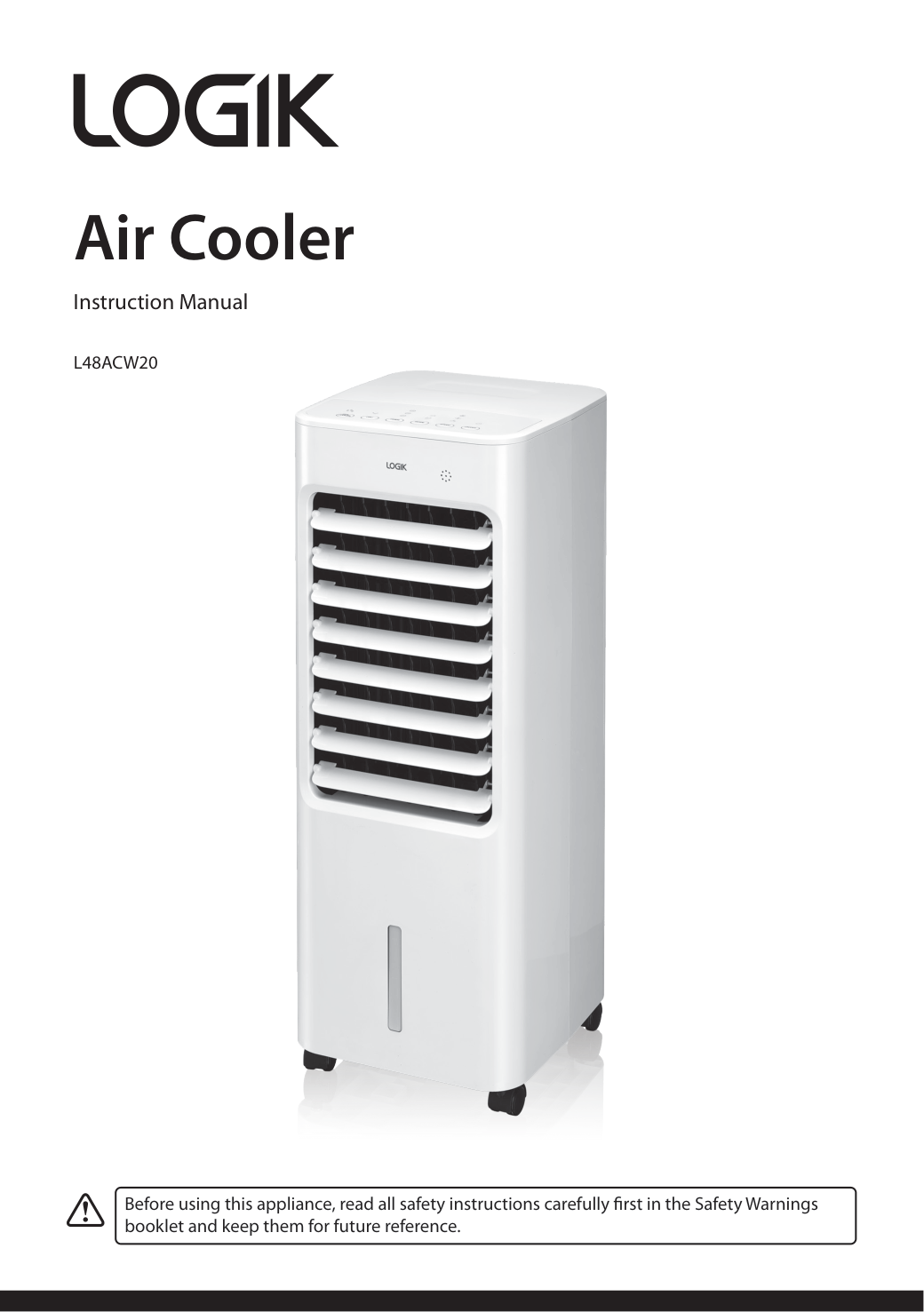
Air Cooler Instruction Manual
L48Acw20
Before using this appliance, read all safety instructions carefully first in the Safety Warnings booklet and keep them for future reference.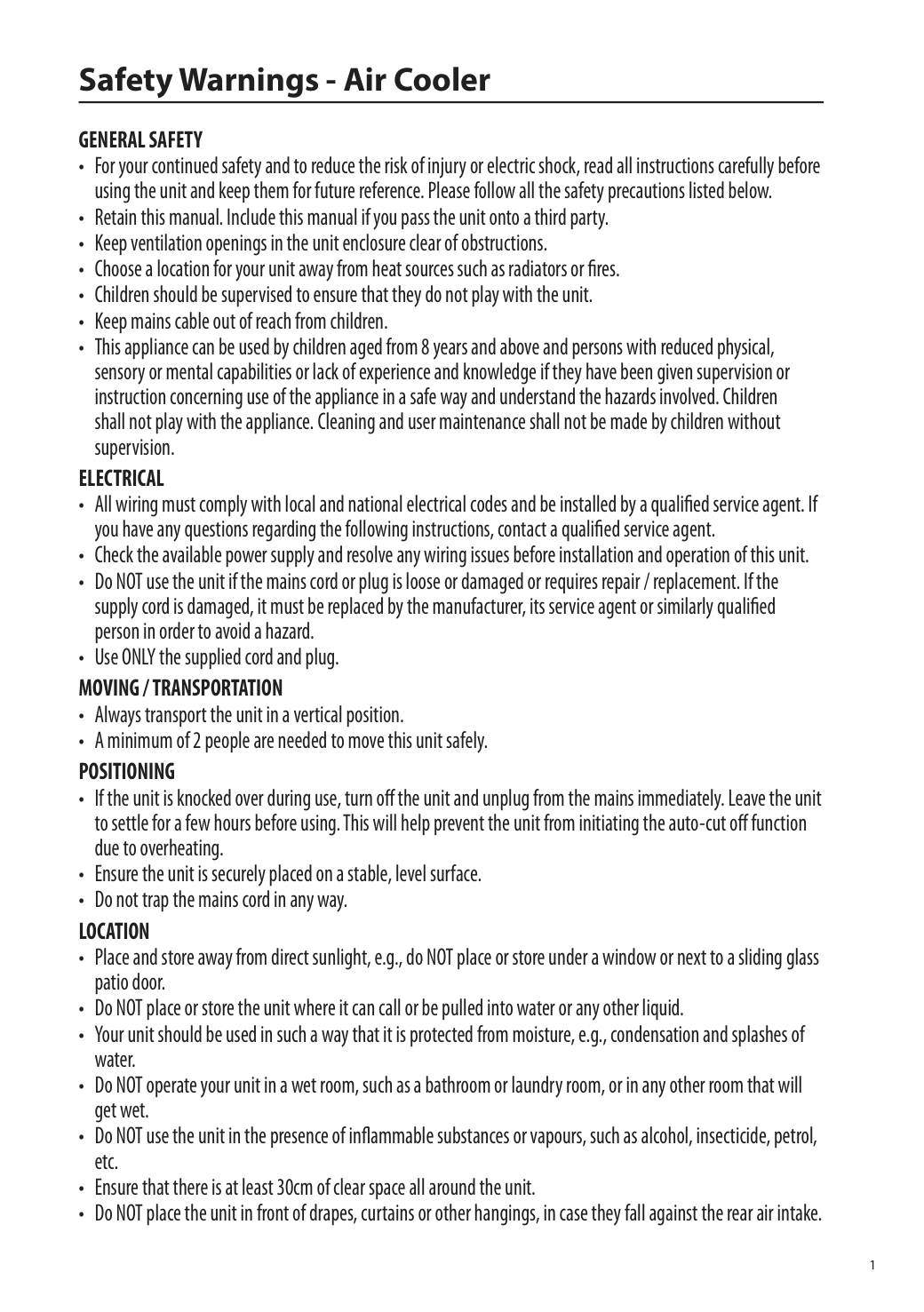
1 Safety Warnings - Air Cooler
General Safety
Electrical
Moving / Transportation
Positioning
Location
2
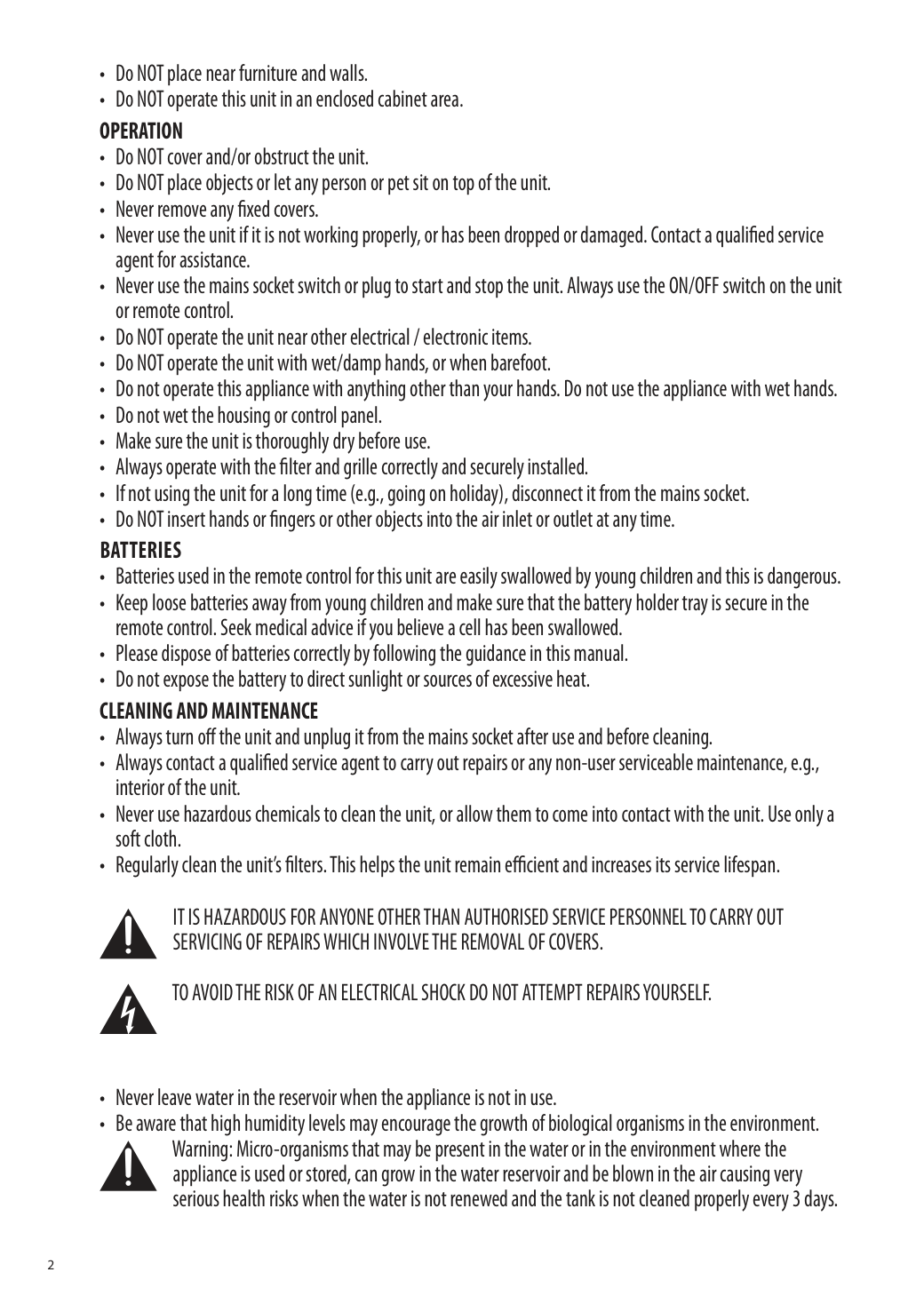
Operation
Batteries
Cleaning And Maintenance
It Is Hazardous For Anyone Other Than Authorised Service Personnel To Carry Out
Servicing Of Repairs Which Involve The Removal Of Covers.
To Avoid The Risk Of An Electrical Shock Do Not Attempt Repairs Yourself.
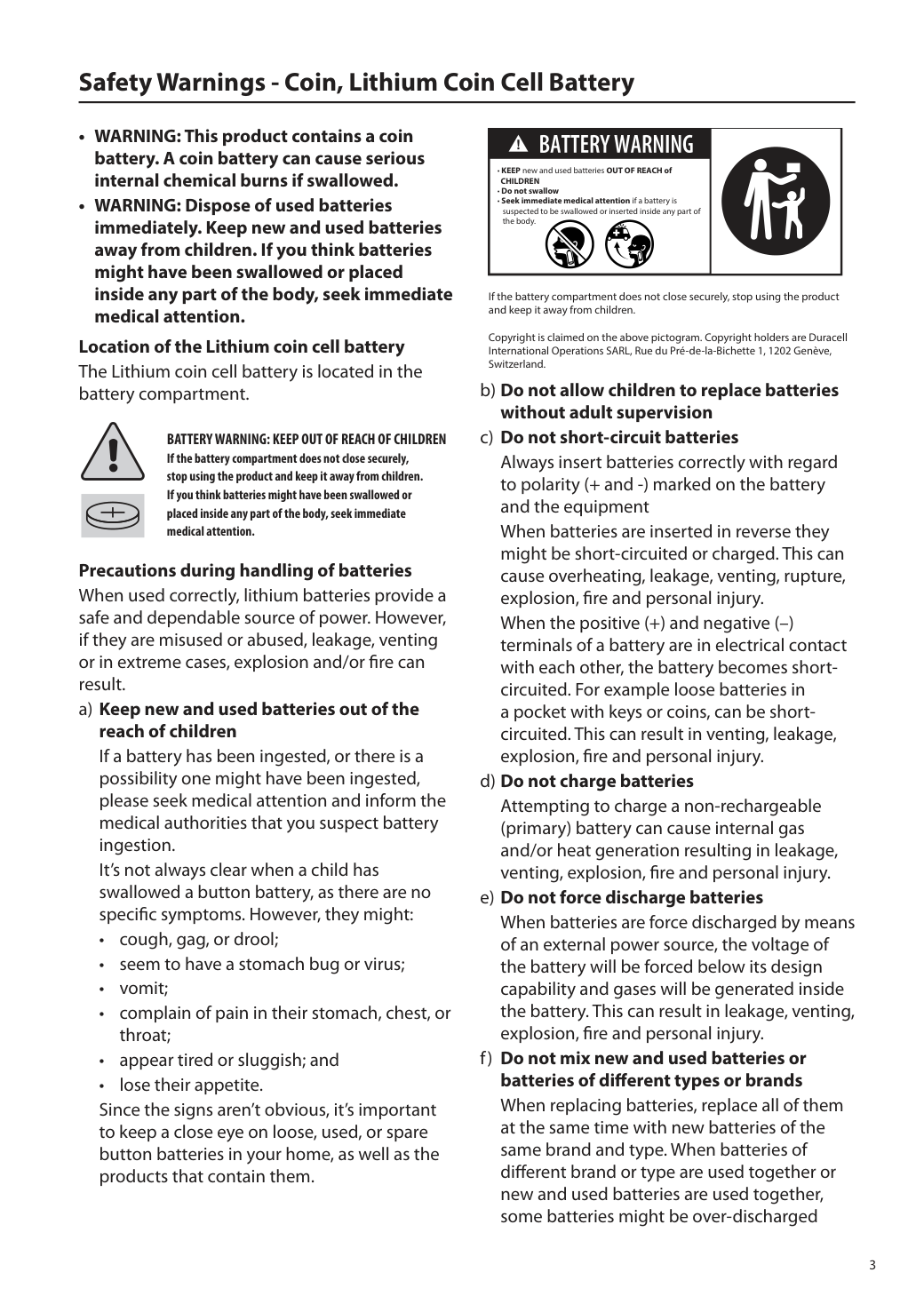
3 Safety Warnings - Coin, Lithium Coin Cell Battery
Battery Warning: Keep Out Of Reach Of Children
If the battery compartment does not close securely, stop using the product and keep it away from children. If you think batteries might have been swallowed or placed inside any part of the body, seek immediate medical attention. Precautions during handling of batteries When used correctly, lithium batteries provide a safe and dependable source of power. However, if they are misused or abused, leakage, venting or in extreme cases, explosion and/or fire can result. a) Keep new and used batteries out of the reach of children If a battery has been ingested, or there is a possibility one might have been ingested, please seek medical attention and inform the medical authorities that you suspect battery ingestion. It’s not always clear when a child has swallowed a button battery, as there are no specific symptoms. However, they might:Children
4 / force discharged due to a difference of voltage or capacity. This can result in leakage, venting, explosion or fire, and can cause personal injury. g) Exhausted batteries should be immediately removed from equipment and properly disposed of When discharged batteries are kept in the equipment for a long time, electrolyte leakage can occur causing damage to the equipment and/or personal injury. h) Do not heat batteries When a battery is exposed to heat, leakage, venting, explosion or fire can occur and cause personal injury. i) Do not weld or solder directly to batteries The heat from welding or soldering directly to a battery can cause leakage, venting, explosion or fire, and can cause personal injury. j) Do not dismantle batteries When a battery is dismantled or taken apart, contact with the components can be harmful and can cause personal injury or fire. k) Do not deform batteries Batteries should not be crushed, punctured, or otherwise mutilated. Such abuse can cause leakage, venting, explosion or fire, and can cause personal injury. l) Do not dispose of batteries in fire When batteries are disposed of in fire, the heat build-up can cause explosion and/or fire and personal injury. Do not incinerate batteries except for approved disposal in a controlled incinerator. m) A lithium battery with a damaged container should not be exposed to water Lithium metal in contact with water can produce hydrogen gas, fire, explosion and/or cause personal injury. n) Do not encapsulate and/or modify batteries Encapsulation or any other modification to a battery can result in blockage of the pressure relief mechanism(s) and subsequent explosion and personal injury. Advice from the battery manufacturer should be sought if it is considered necessary to make any modification. o) Store unused batteries in their original packaging away from metal objects. If already unpacked, do not mix or jumble batteries Unpacked batteries could get jumbled or get mixed with metal objects such as keys, coins, etc. This can cause battery short- circuiting which can result in leakage, venting, explosion or fire, and personal injury. One of the best ways to prevent this from happening is to store unused batteries in their original packaging. p) Remove batteries from equipment if it is not to be used for an extended period of time unless it is for emergency purposes It is advantageous to remove batteries immediately from equipment which has ceased to function satisfactorily, or when a long period of disuse is anticipated (e.g. camcorders, digital cameras, photoflash, etc.). Although most lithium batteries on the market today are highly leak resistant, a battery that has been partially or completely exhausted might be more prone to leak than one that is unused. q) If the battery compartment does not close securely, stop using the product and keep it away from children. Storage a) Store batteries in well ventilated, dry and cool conditions High temperature or high humidity can cause deterioration of the battery performance and/ or surface corrosion. b) Avoid storing or displaying batteries in direct sun or in places where they get exposed to rain When batteries get wet, their insulation resistance might be impaired and self- discharge and corrosion can occur. Heat can cause deterioration. c) When batteries are unpacked and mixed they can be short-circuited or damaged. Disposal a) Do not dismantle batteries Some ingredients of lithium batteries might be flammable or harmful. They can cause injuries, fire, rupture or explosion. b) Do not dispose of batteries in fire except under conditions of approved and controlled incineration Lithium burns violently. Lithium batteries can
5 explode in a fire. Combustion products from lithium batteries can be toxic and corrosive. c) Store collected batteries in a clean and dry environment out of direct sunlight and away from extreme heat Dirt and wetness might cause short-circuits and heat. Heat might cause leakage of flammable gas. This can result in fire, rupture or explosion. d) Store collected batteries in a well- ventilated area Used batteries might contain a residual charge. If they are short-circuited, abnormally charged or force discharged, leakage of flammable gas might be caused. This can result in fire, rupture or explosion. e) Do not mix collected batteries with other materials Used batteries might contain residual charge. If they are short-circuited, abnormally charged or force discharged, the generated heat can ignite flammable wastes such as oily rags, paper or wood and cause a fire. f) Protect battery terminals Protection of terminals should be considered by providing insulation, particularly for those batteries with a high voltage. Unprotected terminals might cause short-circuits, abnormal charging and forced discharge. This can result in leakage, fire, rupture or explosion. Instructions for use a) Always select the correct size and type of battery most suitable for the intended use. Information provided with the equipment to assist correct battery selection should be retained for reference. b) Replace all batteries of a set at the same time. c) Clean the battery contacts and also those of the equipment prior to battery installation. d) Ensure that the batteries are installed correctly with regard to polarity (+ and –). e) Remove exhausted batteries promptly.
Visit Partmaster.co.uk today for the easiest way to buy electrical spares and accessories. With over 1 million spares and accessories available we can deliver direct to your door the very next day. Visit www.partmaster.co.uk or call 0344 800 3456 (UK customers only). Calls charged at National Rate. The symbol on the product or its packaging indicates that this product must not be disposed of with your other household waste. Instead, it is your responsibility to dispose of your waste equipment by handing it over to a designated collection point for the recycling of waste electrical and electronic equipment. The separate collection and recycling of your waste equipment at the time of disposal will help conserve natural resources and ensure that it is recycled in a manner that protects human health and the environment. For more information about where you can drop off your waste for recycling, please contact your local authority, or where you purchased your product. Notes for battery disposal The batteries used with this product contain chemicals that are harmful to the environment. To preserve our environment, dispose of used batteries according to your local laws or regulations. Do not dispose of batteries with normal household waste. For more information, please contact the local authority or your retailer where you purchased the product. IB & Coin Battery Safety-Air Cooler-UK-251218V6 UK Representative and Responsible Person Currys Group Limited (No. 504877) 1 Portal Way, London, W3 6RS, UK https://www.currys.co.uk EU Representative and Responsible Person Currys Ireland Limited (No. 259460) 3rd Floor Office Suite, Omni Park SC, Santry, Dublin 9, Republic of Ireland https://www.currys.ie UK & EU Contact details: business.standards@currys.co.uk
Contents Safety Warnings............................................................................................Safety Warnings booklet Unpacking.............................................................................................................................................4 Product Overview.................................................................................................................................5 Main Unit..............................................................................................................................................................................5 Control Panel.......................................................................................................................................................................6 Remote Control..................................................................................................................................................................7 Moving the Unit....................................................................................................................................7 Battery Replacement for the Remote Control....................................................................................8 Filling the Water Tank...........................................................................................................................9 Draining water out from the water tank (if necessary).....................................................................................10 General Operation..............................................................................................................................11 Switching the Unit ON/OFF........................................................................................................................................11 Setting Evaporating / Cooling Mode.......................................................................................................................11 Adjusting the Louvre.....................................................................................................................................................11 Setting the Auto On/Off Time....................................................................................................................................11 Selecting Fan Mode.......................................................................................................................................................11 Selecting Speed..............................................................................................................................................................11 Cleaning and Maintenance................................................................................................................12 Cleaning the Exterior....................................................................................................................................................12 Cleaning the Grille and Filter......................................................................................................................................12 Storing the Unit...............................................................................................................................................................12 Hints and Tips.....................................................................................................................................13 Specifications......................................................................................................................................14
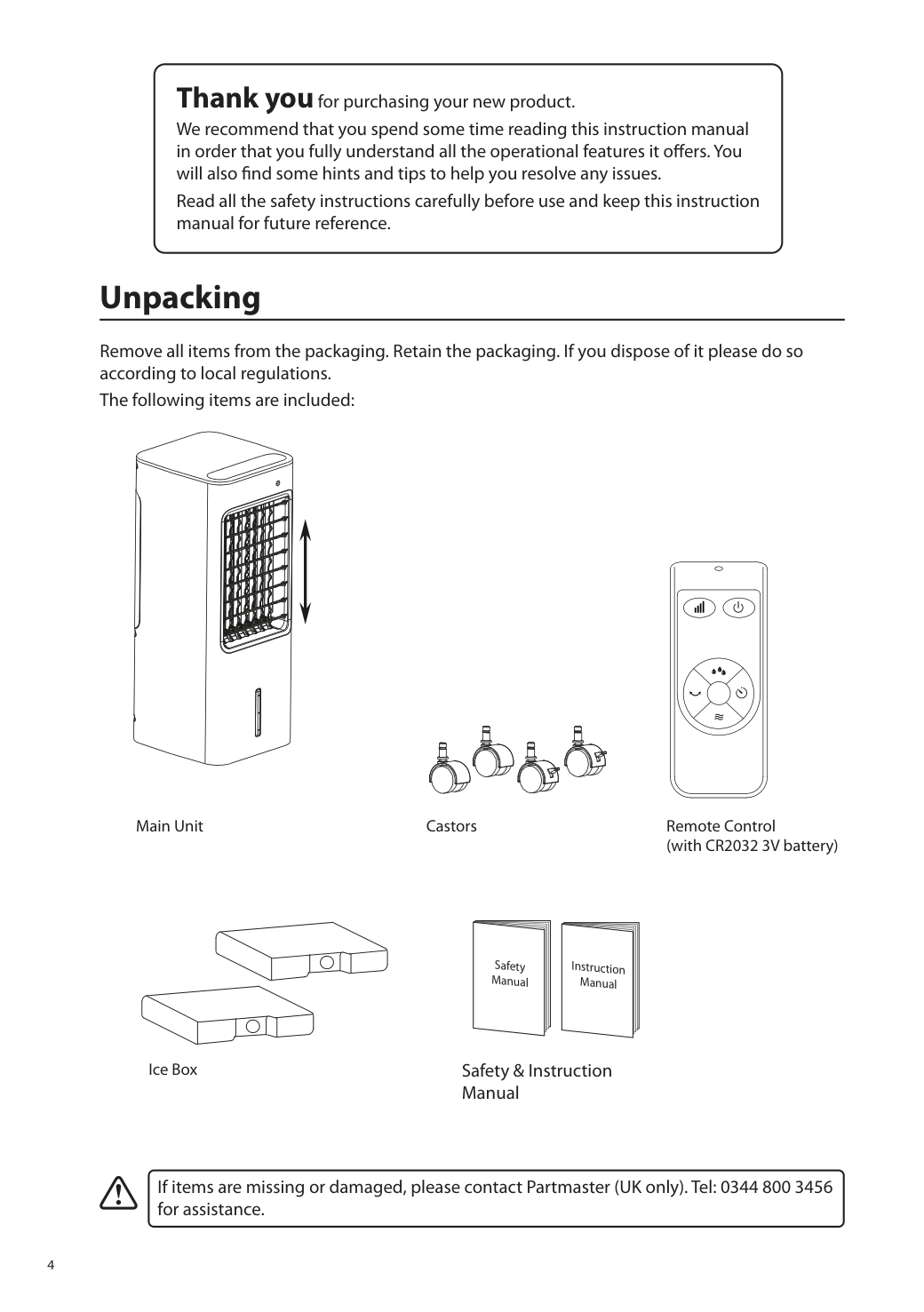
4 Thank you for purchasing your new product. We recommend that you spend some time reading this instruction manual in order that you fully understand all the operational features it offers. You will also find some hints and tips to help you resolve any issues. Read all the safety instructions carefully before use and keep this instruction manual for future reference. Unpacking Remove all items from the packaging. Retain the packaging. If you dispose of it please do so according to local regulations. The following items are included: If items are missing or damaged, please contact Partmaster (UK only). Tel: 0344 800 3456 for assistance. Main Unit Remote Control (with CR2032 3V battery) Castors Ice Box Safety & Instruction Manual Instruction Manual Safety Manual
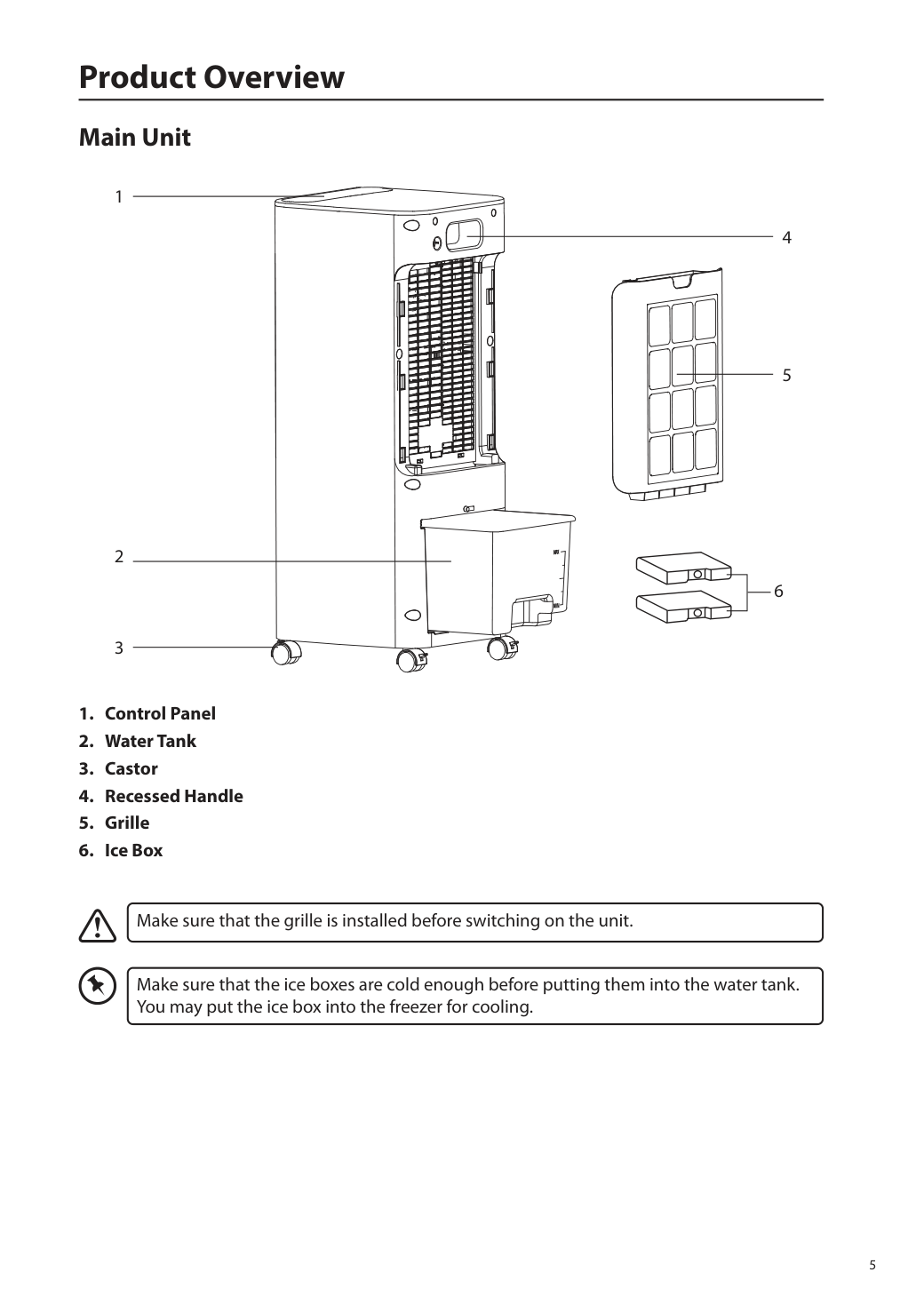
5 Product Overview Main Unit
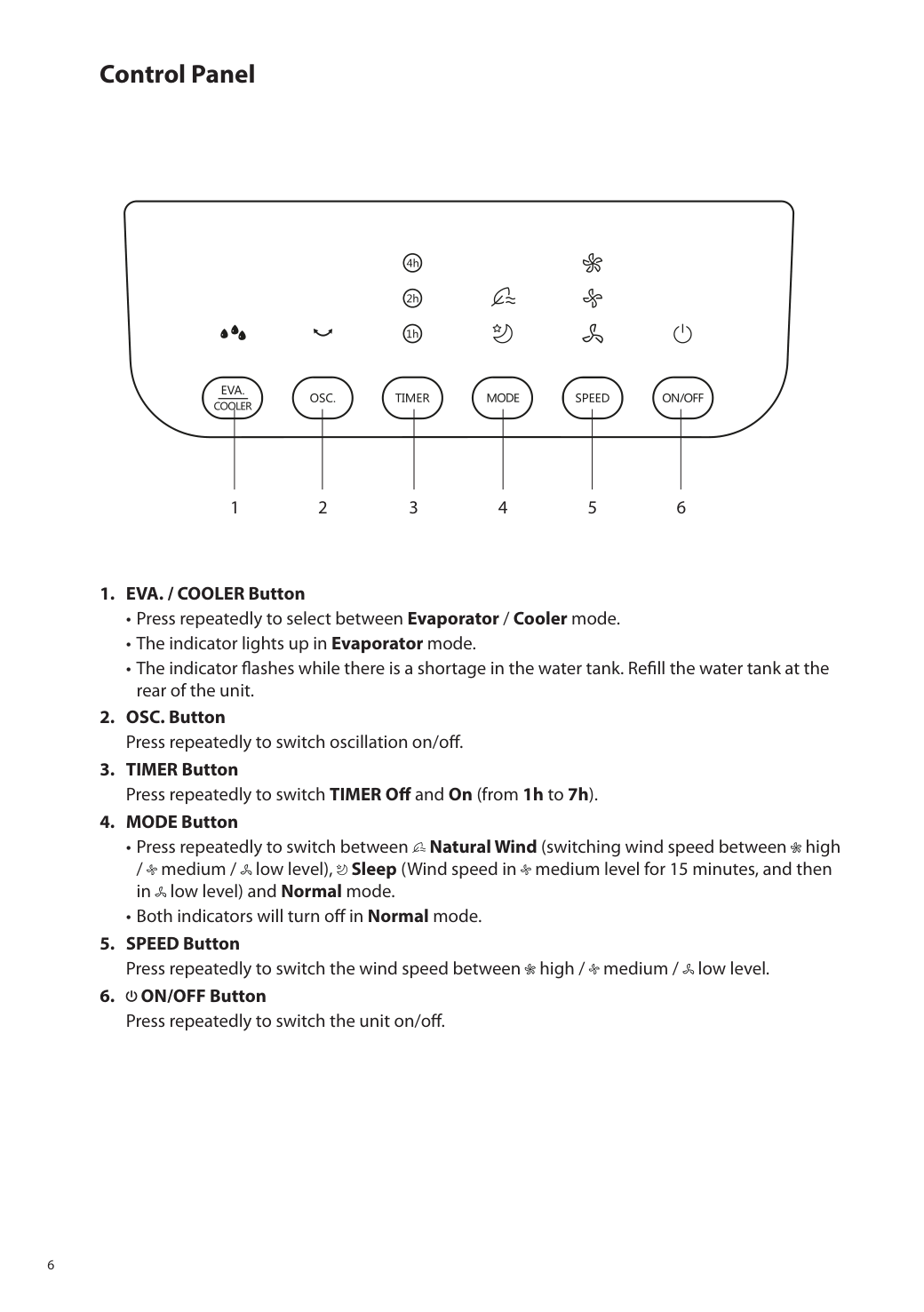
6 Control Panel
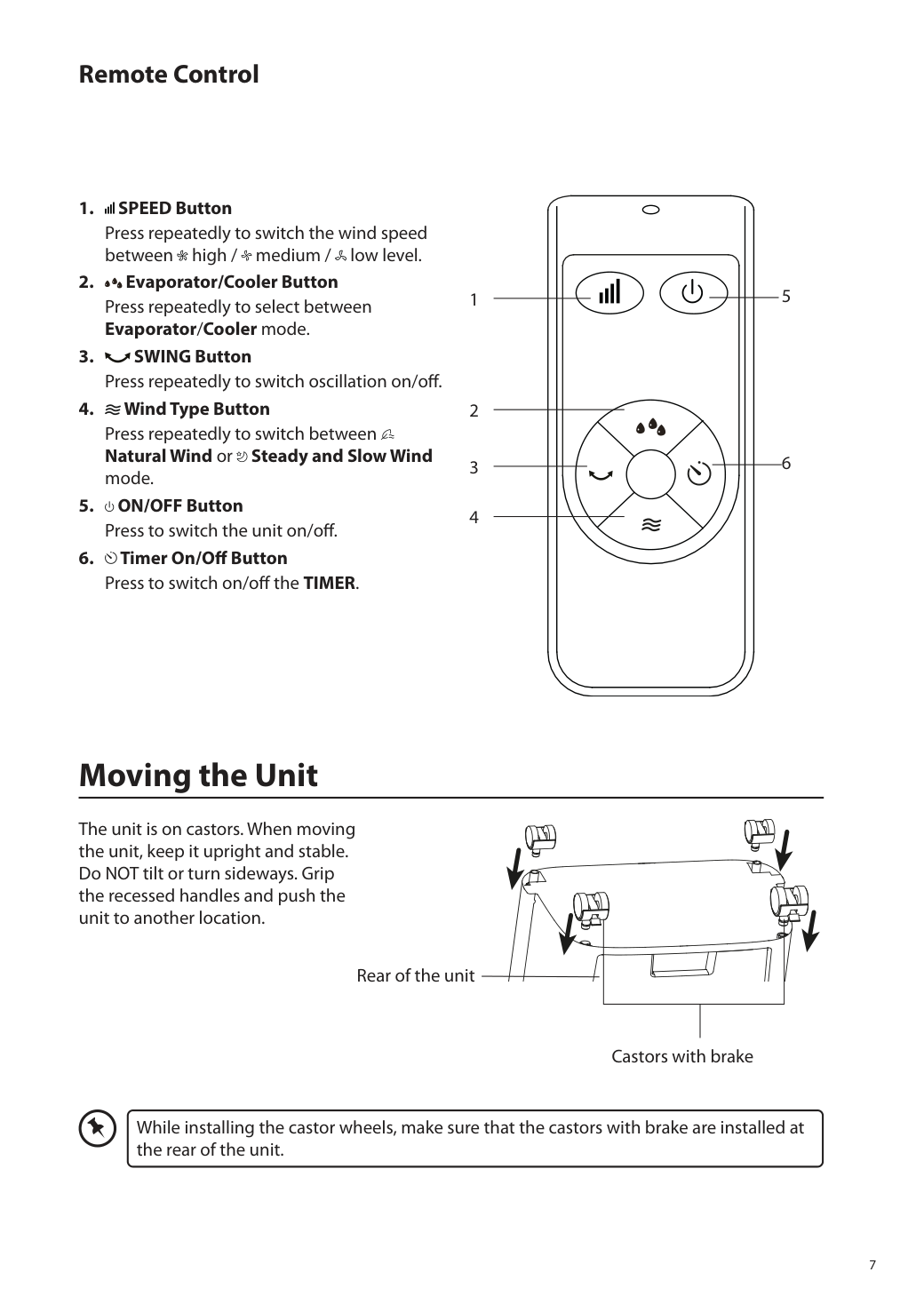
7 Remote Control 2 1 3 4 5 6
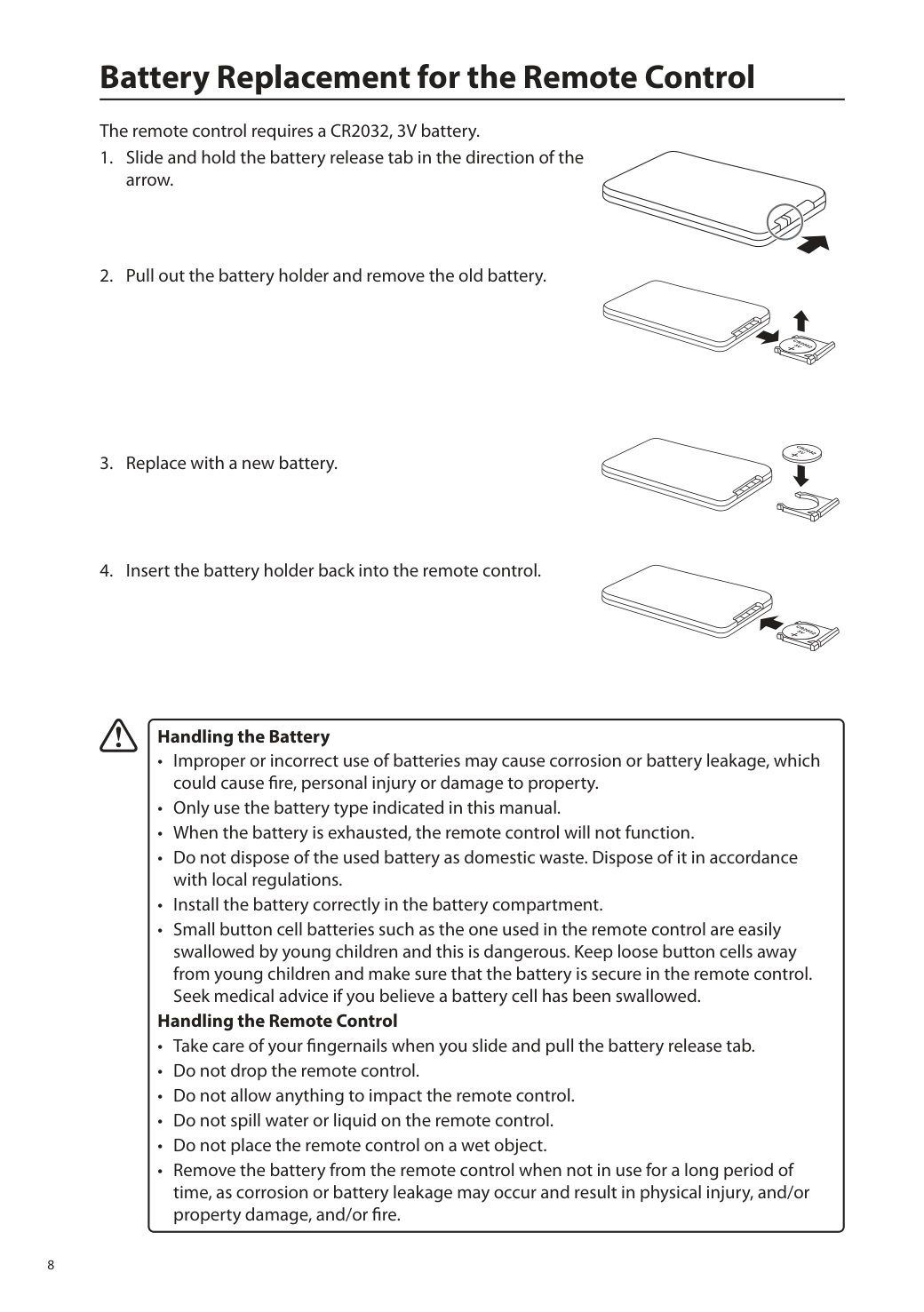
8 Battery Replacement for the Remote Control The remote control requires a CR2032, 3V battery.
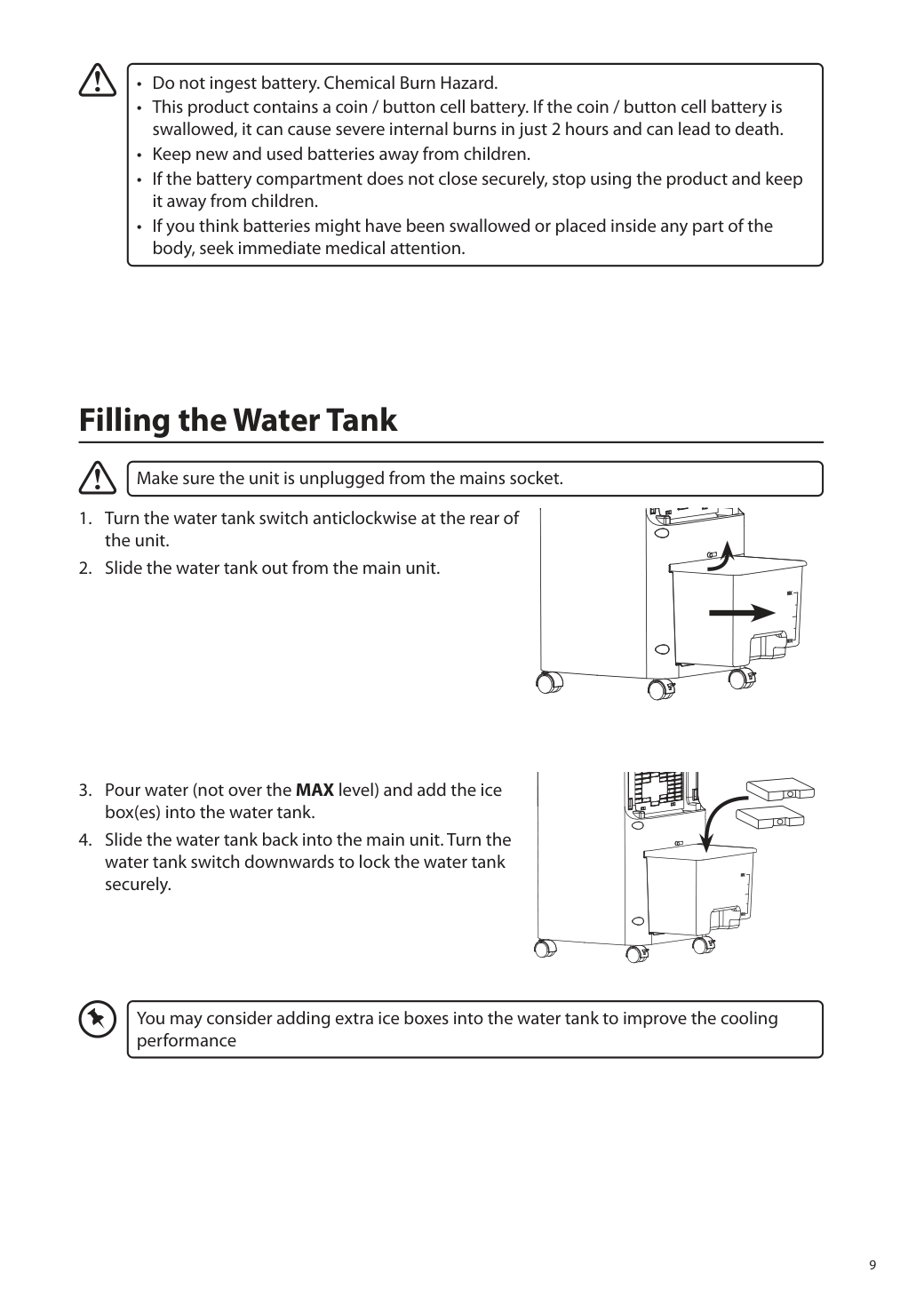
9 Filling the Water Tank Make sure the unit is unplugged from the mains socket.
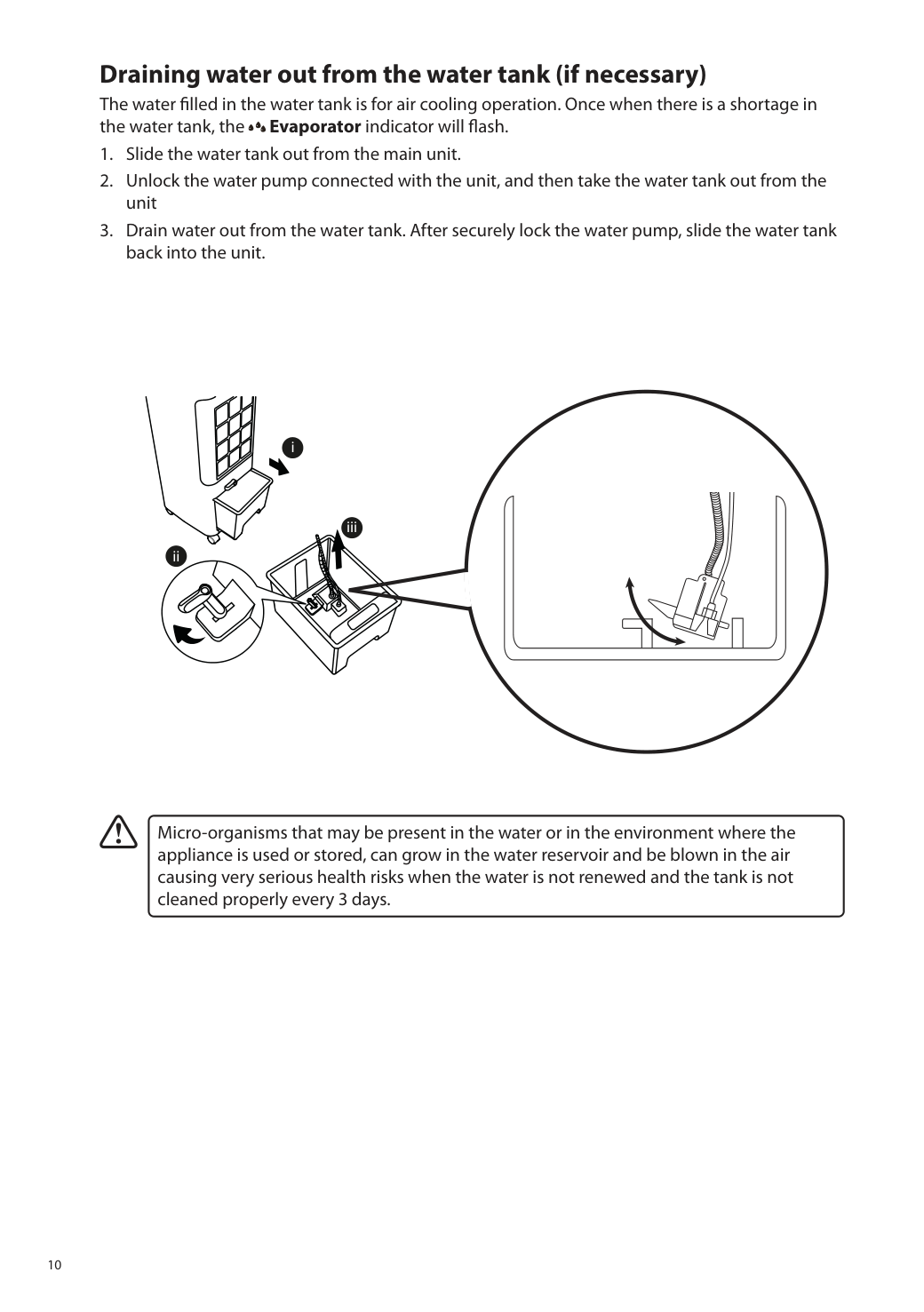
10 Draining water out from the water tank (if necessary) The water filled in the water tank is for air cooling operation. Once when there is a shortage in the water tank, the Evaporator indicator will flash.
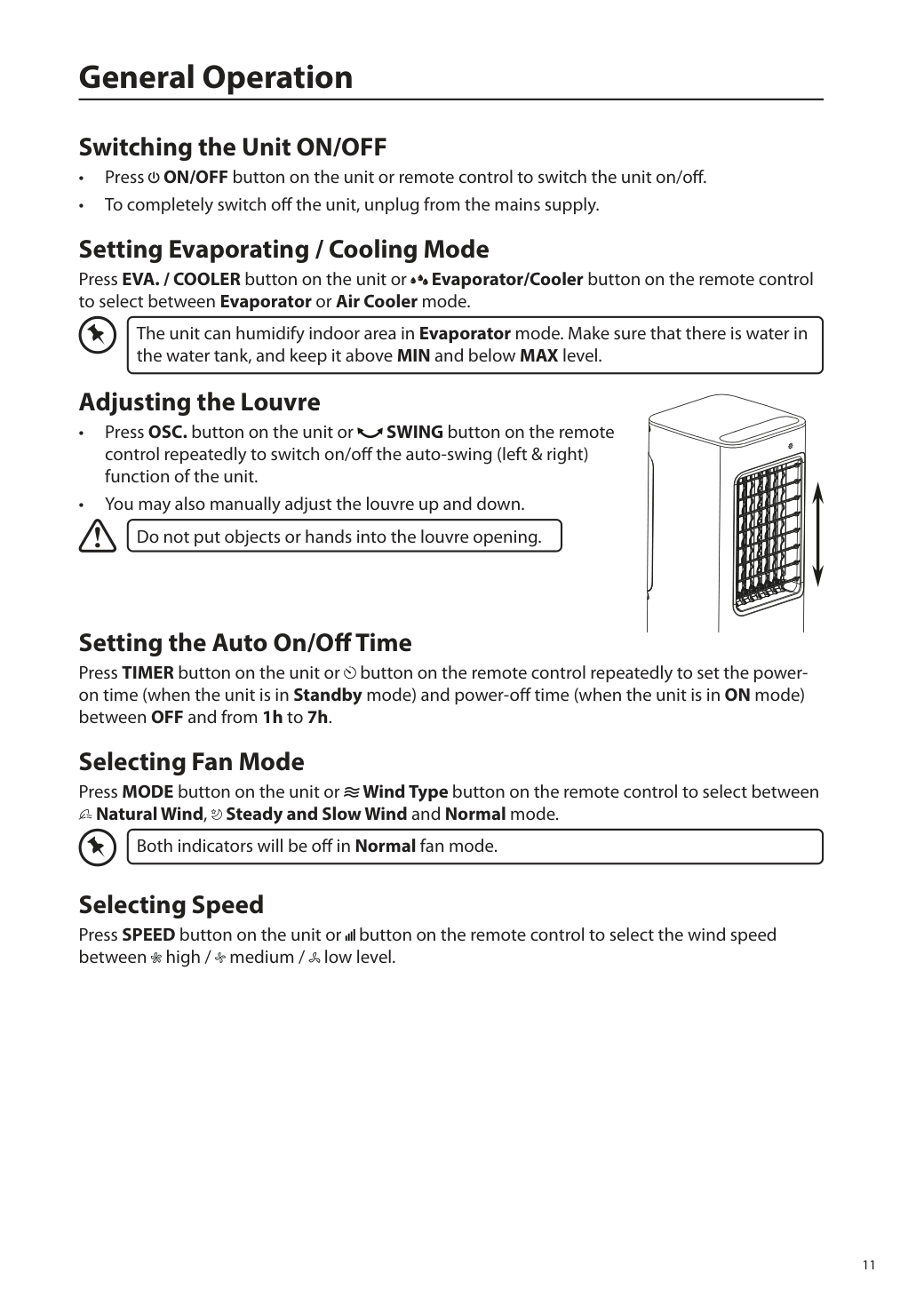
11 General Operation Switching the Unit ON/OFF • Press ON/OFF button on the unit or remote control to switch the unit on/off. • To completely switch off the unit, unplug from the mains supply. Setting Evaporating / Cooling Mode Press EVA. / COOLER button on the unit or Evaporator/Cooler button on the remote control to select between Evaporator or Air Cooler mode. The unit can humidify indoor area in Evaporator mode. Make sure that there is water in the water tank, and keep it above MIN and below MAX level. Adjusting the Louvre • Press OSC. button on the unit or SWING button on the remote control repeatedly to switch on/off the auto-swing (left & right) function of the unit. • You may also manually adjust the louvre up and down. Do not put objects or hands into the louvre opening. Setting the Auto On/Off Time Press TIMER button on the unit or button on the remote control repeatedly to set the power- on time (when the unit is in Standby mode) and power-off time (when the unit is in ON mode) between OFF and from 1h to 7h. Selecting Fan Mode Press MODE button on the unit or Wind Type button on the remote control to select between Natural Wind, Steady and Slow Wind and Normal mode. Both indicators will be off in Normal fan mode. Selecting Speed Press SPEED button on the unit or button on the remote control to select the wind speed between high / medium / low level.
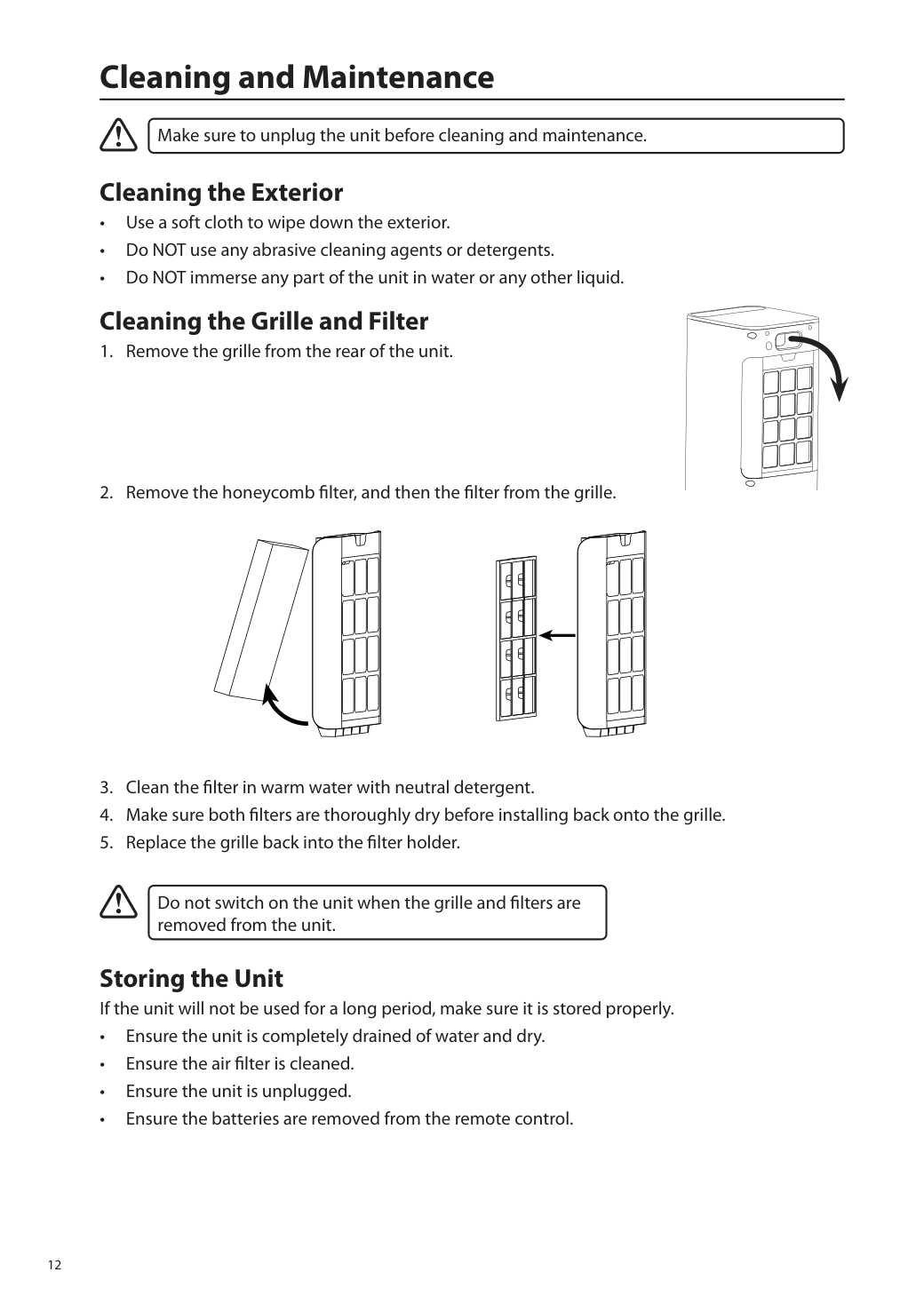
12 Cleaning and Maintenance Make sure to unplug the unit before cleaning and maintenance. Cleaning the Exterior • Use a soft cloth to wipe down the exterior. • Do NOT use any abrasive cleaning agents or detergents. • Do NOT immerse any part of the unit in water or any other liquid. Cleaning the Grille and Filter
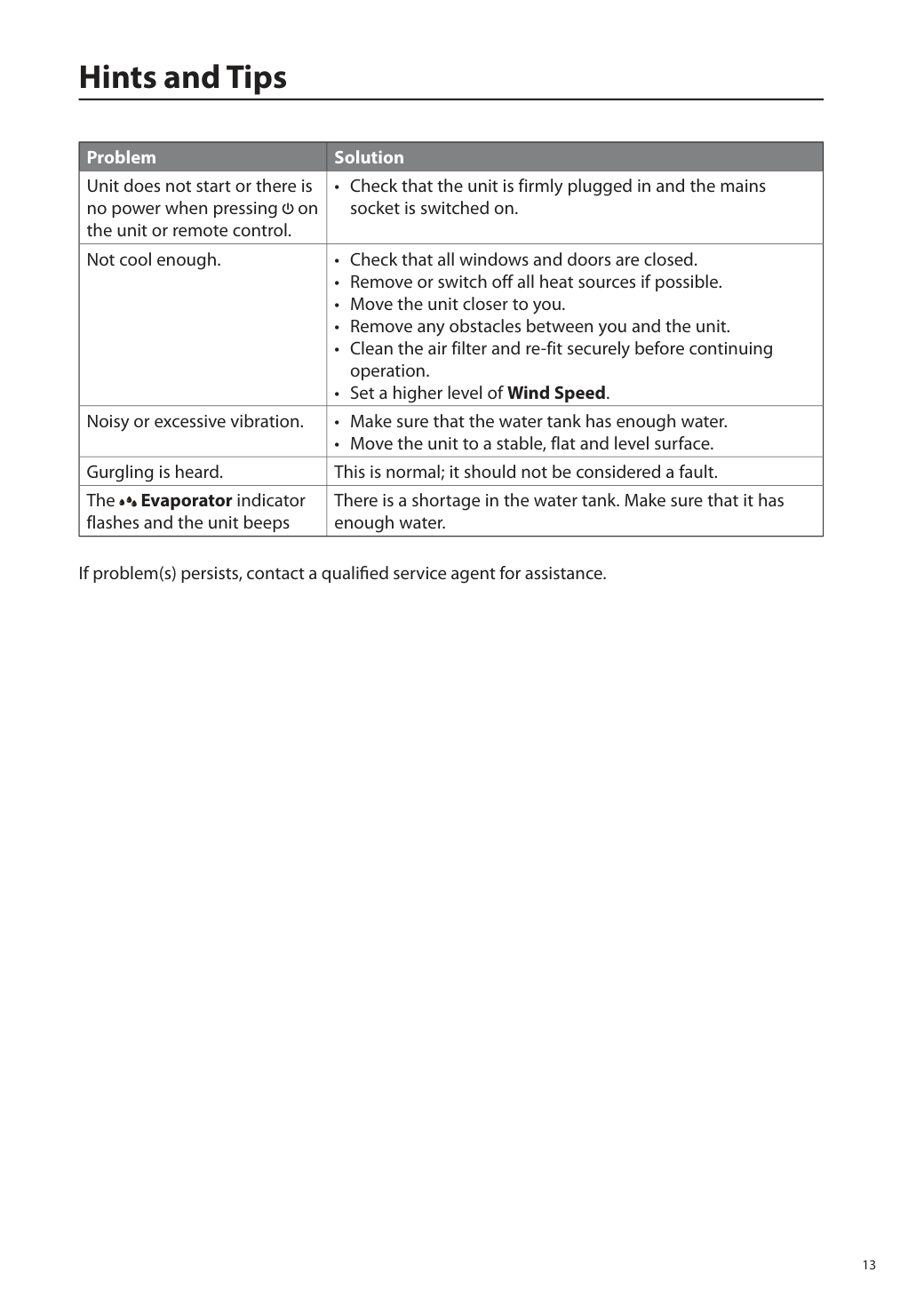
13 Hints and Tips Problem Solution Unit does not start or there is no power when pressing on the unit or remote control.
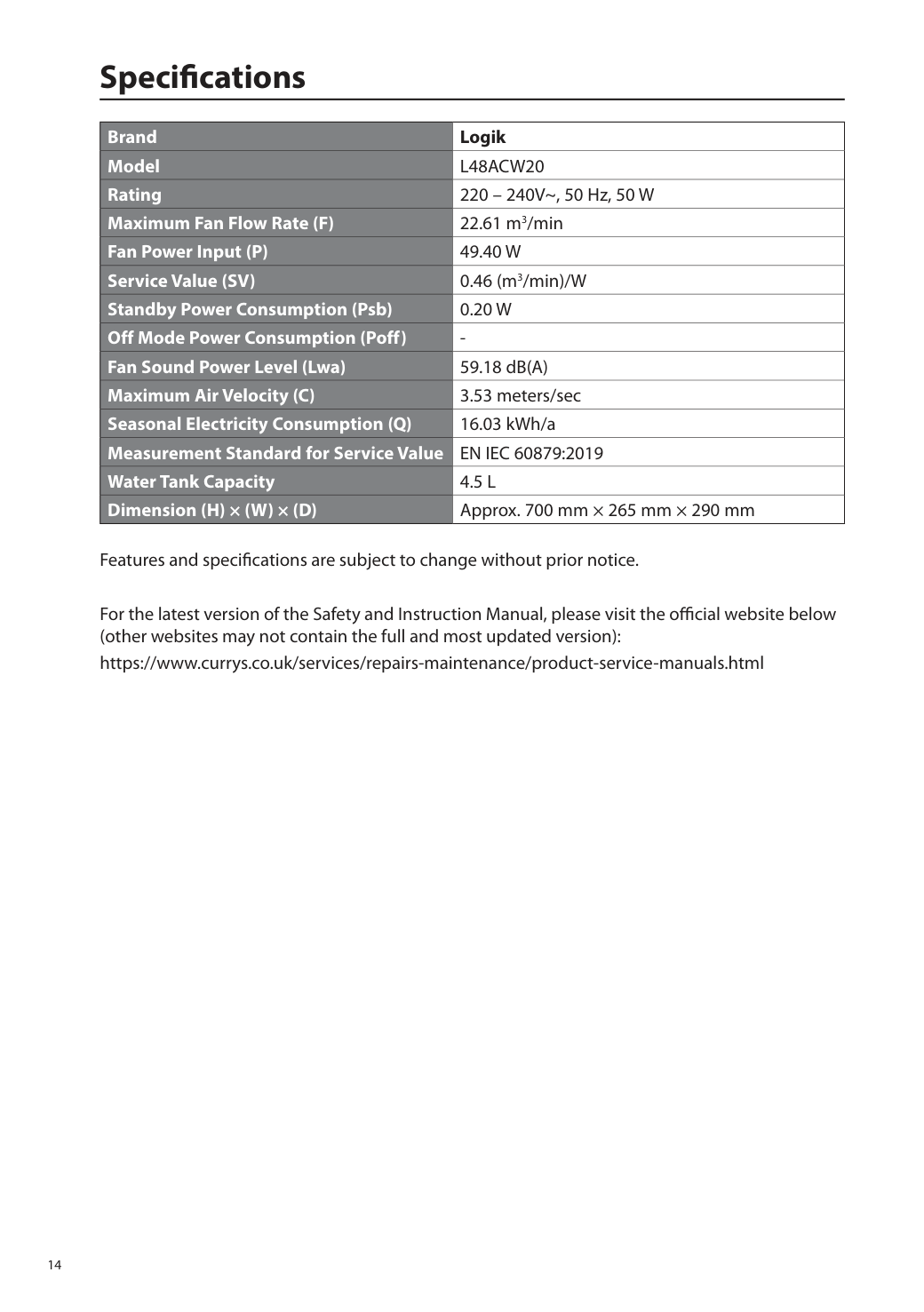
14 Specifications Brand Logik Model
L48Acw20
Rating 220 – 240V~, 50 Hz, 50 W Maximum Fan Flow Rate (F) 22.61 m3/min Fan Power Input (P)49.40 W
Service Value (SV) 0.46 (m3/min)/W Standby Power Consumption (Psb)0.20 W
Off Mode Power Consumption (Poff)En Iec 60879:2019
Water Tank Capacity4.5 L
Dimension (H) × (W) × (D) Approx. 700 mm × 265 mm × 290 mm Features and specifications are subject to change without prior notice. For the latest version of the Safety and Instruction Manual, please visit the official website below (other websites may not contain the full and most updated version): https://www.currys.co.uk/services/repairs-maintenance/product-service-manuals.html