
Ask AI
— answers from the official manualAnswers from the official manual.
Common questions
Common Questions
10 totalWhat should I do if the Deltaweld 302 overheats?
If the unit overheats, the thermostat(s) will open and stop the output while the cooling fan runs. Wait fifteen minutes for it to cool down before reducing amperage or duty cycle and resuming welding.
How do I safely connect weld cables on the Deltaweld 302?
Turn off power, remove the supplied nut from weld output terminal, slide weld cable terminal onto the terminal and secure with nut so that it is tight against copper bar. Ensure no foreign objects are between terminals and surfaces are clean to avoid excessive heat or damage.
What is the appropriate duty cycle for continuous welding on a Deltaweld 302?
The unit can operate at rated load output continuously without overheating if it does not exceed the specified duty cycle percentage, after which cooling time and reduced amperage are required to prevent damage.
How should I dispose of the Deltaweld 302 at the end of its life?
Do not discard with general waste; instead, reuse or recycle as Waste Electrical and Electronic Equipment (WEEE). Dispose through a designated collection facility. Contact your local recycling office or distributor for proper disposal instructions.
What are the safety requirements for grounding when using the Deltaweld 302?
Ensure power supply system is properly sized and protected to handle the unit's current. Verify input power cord ground wire is properly connected to a grounded receptacle or panel before use.
What are the recommendations for positioning and installing the Deltaweld 302?
Locate unit near correct input power supply. Ensure at least 18 inches clearance all around for ventilation. Avoid placing it in damp areas or locations with flammable materials where sparks may cause hazards.
Show 4 more questions
How do I move the Deltaweld 302 safely?
What precautionary measures should I take around electromagnetic fields with the Deltaweld 302?
What are the maintenance recommendations for ensuring proper operation of the Deltaweld 302?
How do I select the proper cable size for welding with the Deltaweld 302?
Full Manual
40 pages
|Visit our website at www.MillerWelds.com
| |---|


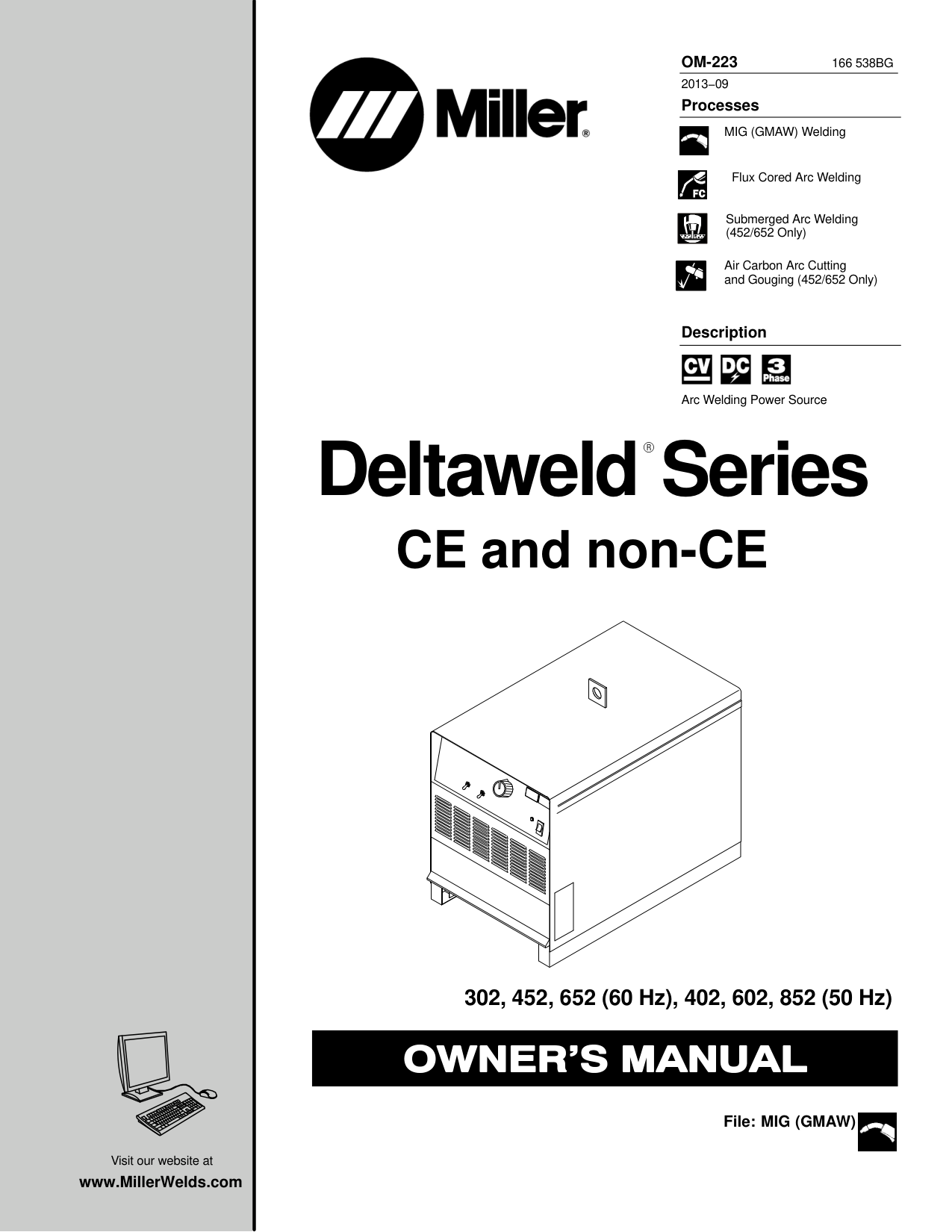
OM-223 166 538BG 2013−09 Processes
MIG (GMAW) Welding

Flux Cored Arc Welding
Submerged Arc Welding (452/652 Only)
Air Carbon Arc Cutting and Gouging (452/652 Only)
Description


Arc Welding Power Source
Deltaweld Series
CE and non-CE
######## 302, 452, 652 (60 Hz), 402, 602, 852 (50 Hz)
File: MIG (GMAW)

From Miller to You
Thank you and congratulations on choosing Miller. Now you can get the job done and get it done right. We know you don’t have time to do it any other way.
That’s why when Niels Miller first started building arc welders in 1929, he made sure his products offered long-lasting value and superior quality. Like you, his customers couldn’t afford anything less. Miller products had to be more than the best they could be. They had to be the best you could buy.
Today, the people that build and sell Miller products continue the tradition. They’re just as committed to providing equipment and service that meets the high standards of quality and value established in 1929. This Owner’s Manual is designed to help you get the most out of your Miller products. Please take time to read the Safety precautions. They will help you protect yourself against potential hazards on the worksite.
We’ve made installation and operation quick and easy. With Miller you can count on years of reliable service with proper maintenance. And if for some reason the unit needs repair, there’s a Troubleshooting section that will help you figure out what the problem is. The parts list will then help you to decide the exact part you may need to fix the problem. Warranty and service information for your particular model are also provided.
| | |---| | |
Miller is the first welding equipment manufacturer in the U.S.A. to be registered to the ISO 9001 Quality System Standard.

Miller Electric manufactures a full line of welders and welding related equipment. For information on other quality Miller products, contact your local Miller distributor to receive the latest full line catalog or individual specification sheets. To locate your nearest distributor or service agency call 1-800-4-A-Miller, or visit us at www.MillerWelds.com on the web.
Mil_Thank 2009−09
|
Working as hard as you do − every power source from Miller is backed by the most hassle-free warranty in the business.

| |---|
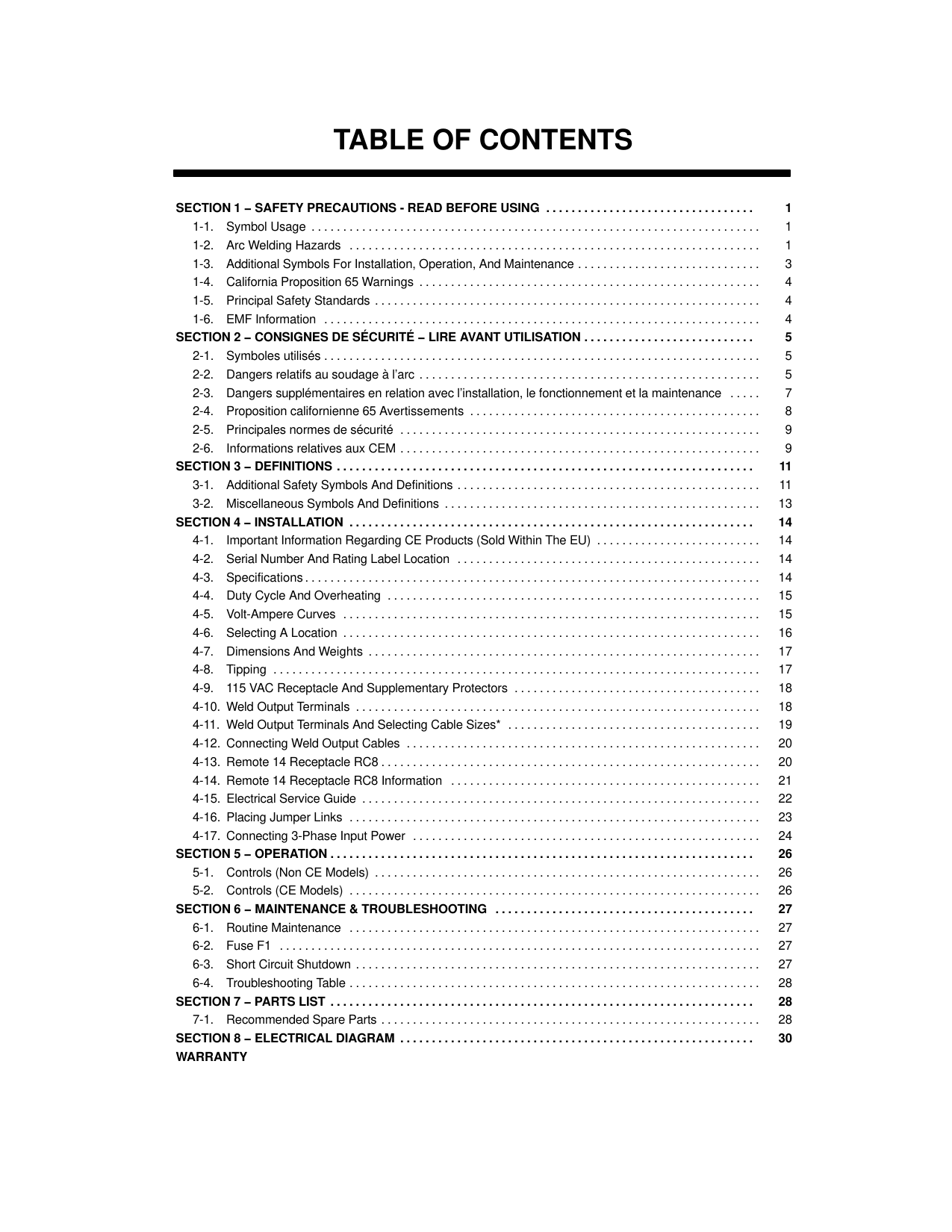
##### TABLE OF CONTENTS
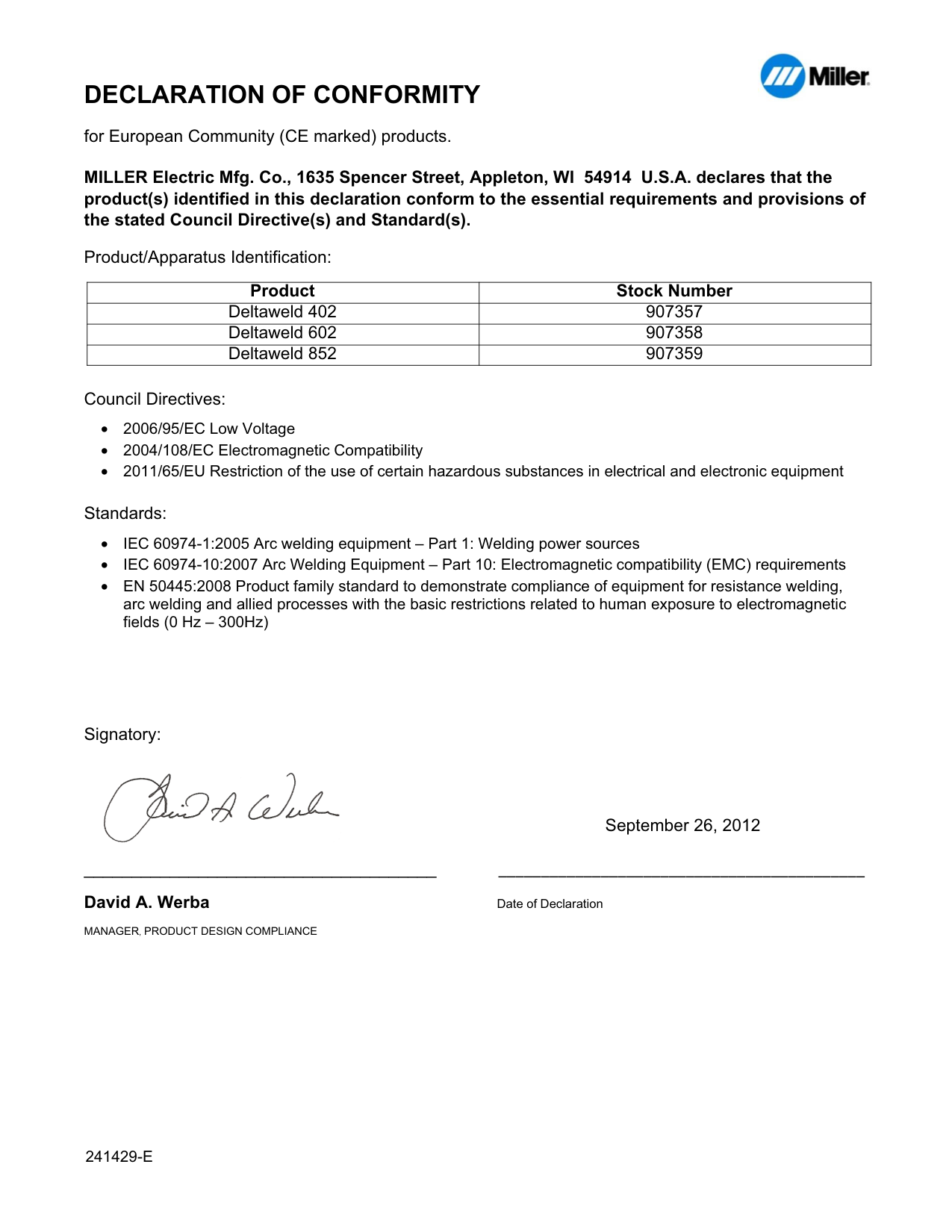
####### DECLARATION OF CONFORMITY
for European Community (CE marked) products.

MILLER Electric Mfg. Co., 1635 Spencer Street, Appleton, WI 54914 U.S.A. declares that the product(s) identified in this declaration conform to the essential requirements and provisions of the stated Council Directive(s) and Standard(s).
Product/Apparatus Identification:
|Product|Stock Number| |---|---| |Deltaweld 402|907357| |Deltaweld 602|907358| |Deltaweld 852|907359|
Council Directives:
Standards:
Signatory:

September 26, 2012
_____________________________________ David A. Werba Date of Declaration MANAGER, PRODUCT DESIGN COMPLIANCE
241429E
####### SECTION 1 − SAFETY PRECAUTIONS - READ BEFORE USING
som 2011−10
7
Protect yourself and others from injury — read, follow, and save these important safety precautions and operating instructions.
########## 1-1. Symbol Usage
DANGER! − Indicates a hazardous situation which, if not avoided, will result in death or serious injury. The possible hazards are shown in the adjoining symbols or explained in the text.
Indicates a hazardous situation which, if not avoided, could result in death or serious injury. The possible hazards are shown in the adjoining symbols or explained in the text.
NOTICE − Indicates statements not related to personal injury.
Indicates special instructions.
| | | | |---|---|---|
This group of symbols means Warning! Watch Out! ELECTRIC SHOCK, MOVING PARTS, and HOT PARTS hazards. Consult symbols and related instructions below for necessary actions to avoid the hazards.
########## 1-2. Arc Welding Hazards
The symbols shown below are used throughout this manual to call attention to and identify possible hazards. When you see the symbol, watch out, and follow the related instructions to avoid the hazard. The safety information given below is only a summary of the more complete safety information found in the Safety Standards listed in Section 1-5. Read and follow all Safety Standards.
Only qualified persons should install, operate, maintain, and repair this unit.
During operation, keep everybody, especially children, away.
| | |---| | |
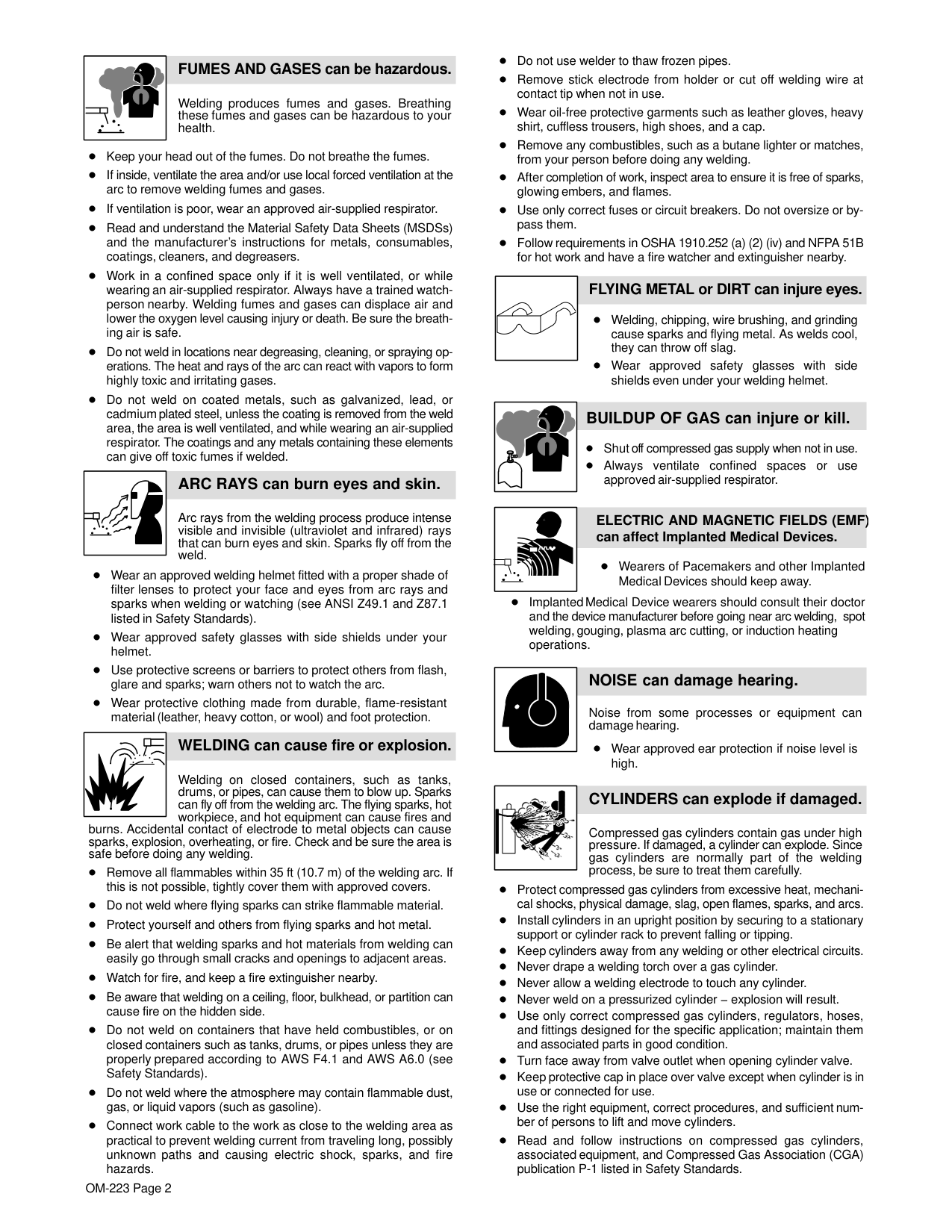
############ ELECTRIC SHOCK can kill.
Touching live electrical parts can cause fatal shocks or severe burns. The electrode and work circuit is electrically live whenever the output is on. The input power circuit and machine internal circuits are also live when power is on. In semiautomatic or automatic wire welding, the wire, wire reel, drive roll housing, and all metal parts touching the welding wire are electrically live. Incorrectly installed or improperly grounded equipment is a hazard.
Do not touch live electrical parts. Wear dry, hole-free insulating gloves and body protection.
Insulate yourself from work and ground using dry insulating mats or covers big enough to prevent any physical contact with the work or ground.
Do not use AC output in damp areas, if movement is confined, or if there is a danger of falling. Use AC output ONLY if required for the welding process. If AC output is required, use remote output control if present on unit.
Additional safety precautions are required when any of the following electrically hazardous conditions are present: in damp locations or while wearing wet clothing; on metal structures such as floors, gratings, or scaffolds; when in cramped positions such as sitting, kneeling, or lying; or when there is a high risk of unavoidable or accidental contact with the workpiece or ground. For these conditions, use the following equipment in order presented: 1) a semiautomatic DC constant voltage (wire) welder, 2) a DC manual (stick) welder, or 3) an AC welder with reduced open-circuit voltage. In most situations, use of a DC, constant voltage wire welder is recommended. And, do not work alone!
Disconnect input power or stop engine before installing or servicing this equipment. Lockout/tagout input power according to OSHA 29 CFR 1910.147 (see Safety Standards).
Properly install, ground, and operate this equipment according to its Owner’s Manual and national, state, and local codes.
Always verify the supply ground − check and be sure that input power cord ground wire is properly connected to ground terminal in disconnect box or that cord plug is connected to a properly grounded receptacle outlet.
When making input connections, attach proper grounding conductor first − double-check connections.
Keep cords dry, free of oil and grease, and protected from hot metal and sparks.
Frequently inspect input power cord for damage or bare wiring − replace cord immediately if damaged − bare wiring can kill.
Turn off all equipment when not in use. Do not use worn, damaged, undersized, or poorly spliced cables. Do not drape cables over your body. If earth grounding of the workpiece is required, ground it directly with a separate cable. Do not touch electrode if you are in contact with the work, ground, or another electrode from a different machine.
Do not touch electrode holders connected to two welding machines at the same time since double open-circuit voltage will be present.
Use only well-maintained equipment. Repair or replace damaged parts at once. Maintain unit according to manual.
Wear a safety harness if working above floor level. Keep all panels and covers securely in place. Clamp work cable with good metal-to-metal contact to workpiece or worktable as near the weld as practical. Insulate work clamp when not connected to workpiece to prevent contact with any metal object.
Do not connect more than one electrode or work cable to any single weld output terminal. Disconnect cable for process not in use.
############ SIGNIFICANT DC VOLTAGE exists in inverter welding power sources AFTER removal of input power.
Turn Off inverter, disconnect input power, and discharge input capacitors according to instructions in Maintenance Section before touching any parts.
| | |---|
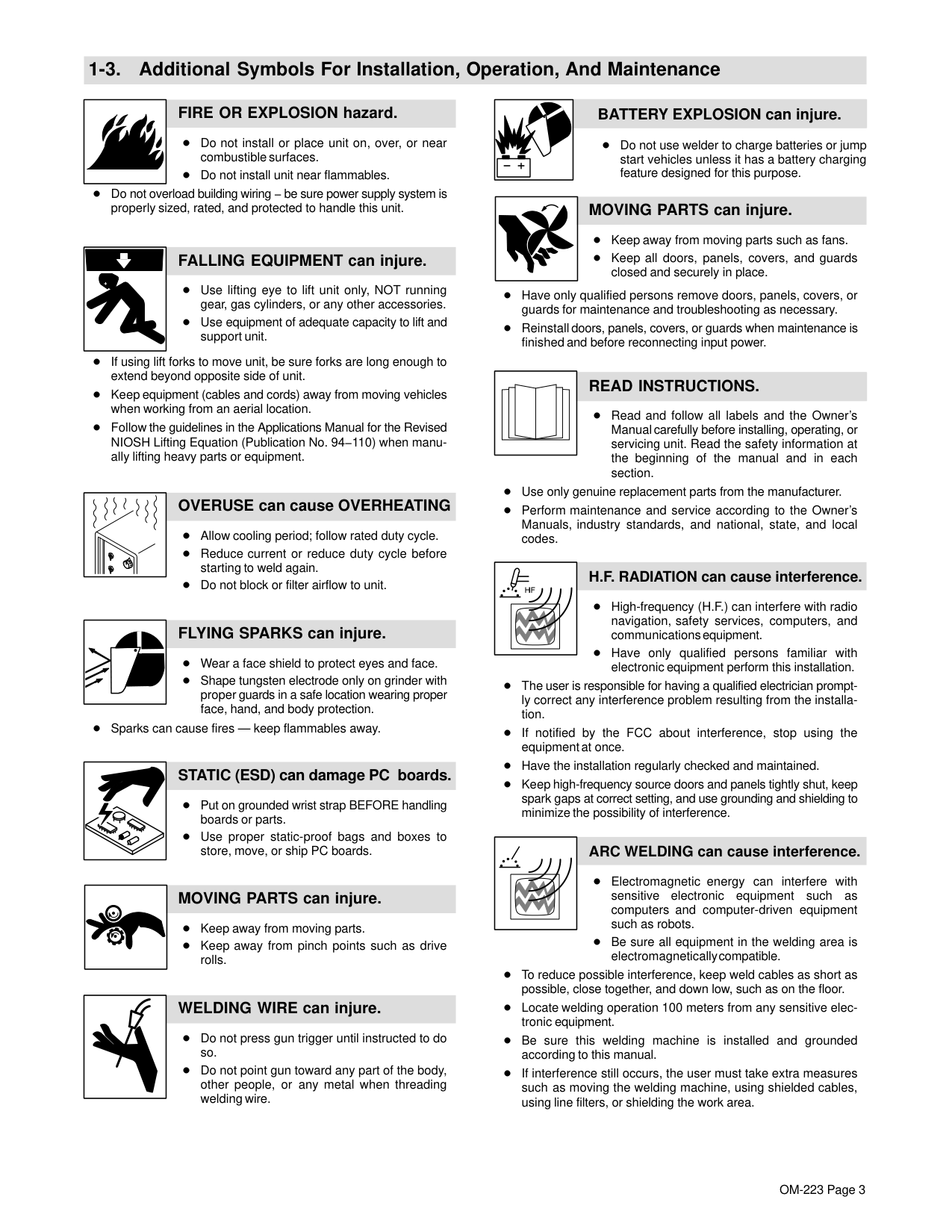
############ HOT PARTS can burn.
Do not touch hot parts bare handed. Allow cooling period before working on equipment.
To handle hot parts, use proper tools and/or wear heavy, insulated welding gloves and clothing to prevent burns.
| | |---|
############### FUMES AND GASES can be hazardous.
Welding produces fumes and gases. Breathing these fumes and gases can be hazardous to your health.
Keep your head out of the fumes. Do not breathe the fumes. If inside, ventilate the area and/or use local forced ventilation at the arc to remove welding fumes and gases. If ventilation is poor, wear an approved air-supplied respirator.
Read and understand the Material Safety Data Sheets (MSDSs) and the manufacturer’s instructions for metals, consumables, coatings, cleaners, and degreasers.
Work in a confined space only if it is well ventilated, or while wearing an air-supplied respirator. Always have a trained watchperson nearby. Welding fumes and gases can displace air and lower the oxygen level causing injury or death. Be sure the breathing air is safe.
Do not weld in locations near degreasing, cleaning, or spraying operations. The heat and rays of the arc can react with vapors to form highly toxic and irritating gases.
Do not weld on coated metals, such as galvanized, lead, or cadmium plated steel, unless the coating is removed from the weld area, the area is well ventilated, and while wearing an air-supplied respirator. The coatings and any metals containing these elements can give off toxic fumes if welded.
############ ARC RAYS can burn eyes and skin.
Arc rays from the welding process produce intense visible and invisible (ultraviolet and infrared) rays that can burn eyes and skin. Sparks fly off from the weld.
Wear an approved welding helmet fitted with a proper shade of filter lenses to protect your face and eyes from arc rays and sparks when welding or watching (see ANSI Z49.1 and Z87.1 listed in Safety Standards).
Wear approved safety glasses with side shields under your helmet.
Use protective screens or barriers to protect others from flash, glare and sparks; warn others not to watch the arc.
Wear protective clothing made from durable, flame-resistant material (leather, heavy cotton, or wool) and foot protection.
| | |---|
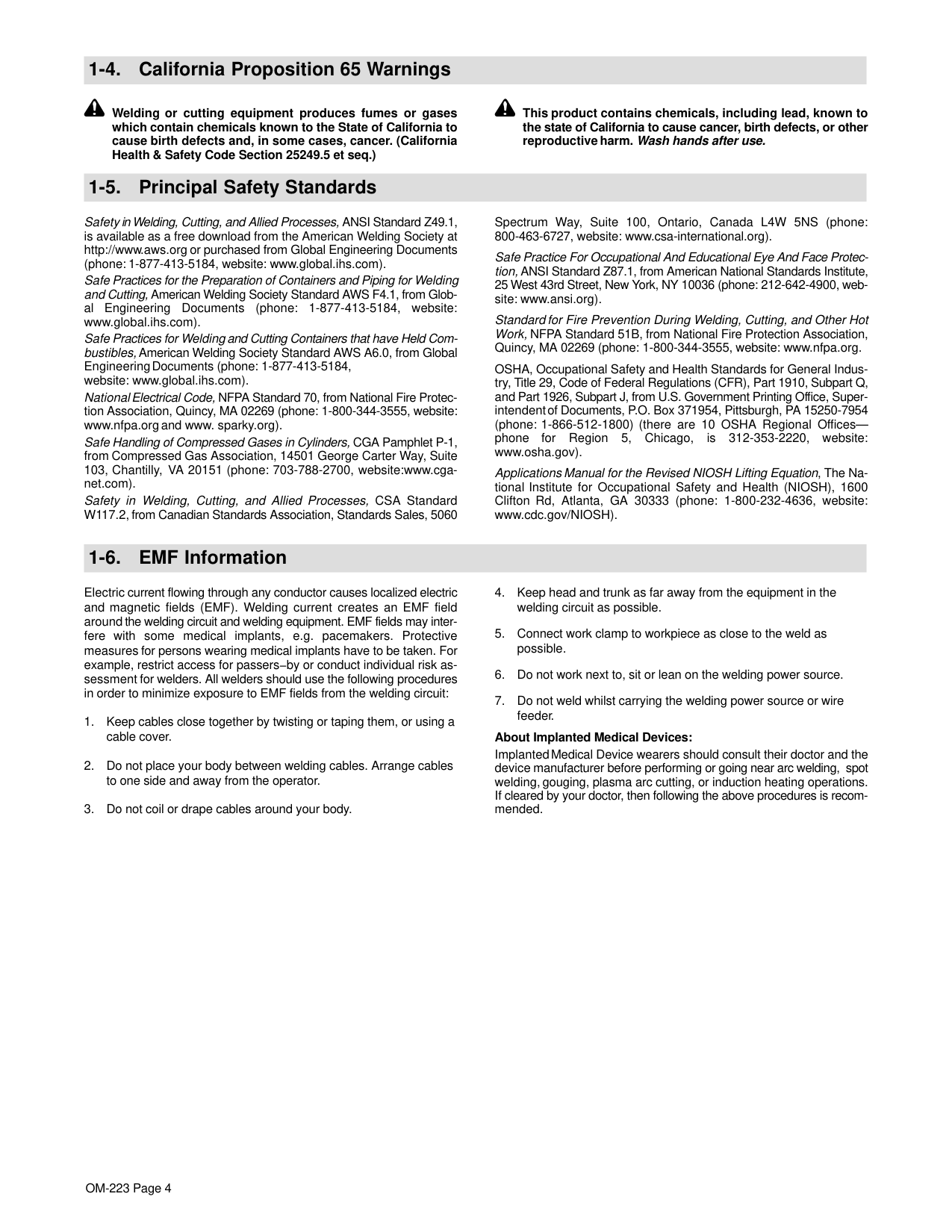
############## WELDING can cause fire or explosion.
Welding on closed containers, such as tanks, drums, or pipes, can cause them to blow up. Sparks can fly off from the welding arc. The flying sparks, hot workpiece, and hot equipment can cause fires and
burns. Accidental contact of electrode to metal objects can cause sparks, explosion, overheating, or fire. Check and be sure the area is safe before doing any welding.
Remove all flammables within 35 ft (10.7 m) of the welding arc. If this is not possible, tightly cover them with approved covers.
Do not weld where flying sparks can strike flammable material. Protect yourself and others from flying sparks and hot metal. Be alert that welding sparks and hot materials from welding can easily go through small cracks and openings to adjacent areas. Watch for fire, and keep a fire extinguisher nearby. Be aware that welding on a ceiling, floor, bulkhead, or partition can cause fire on the hidden side.
Do not weld on containers that have held combustibles, or on closed containers such as tanks, drums, or pipes unless they are properly prepared according to AWS F4.1 and AWS A6.0 (see Safety Standards).
Do not weld where the atmosphere may contain flammable dust, gas, or liquid vapors (such as gasoline).
Connect work cable to the work as close to the welding area as practical to prevent welding current from traveling long, possibly unknown paths and causing electric shock, sparks, and fire hazards.
Do not use welder to thaw frozen pipes. Remove stick electrode from holder or cut off welding wire at contact tip when not in use. Wear oil-free protective garments such as leather gloves, heavy shirt, cuffless trousers, high shoes, and a cap. Remove any combustibles, such as a butane lighter or matches, from your person before doing any welding. After completion of work, inspect area to ensure it is free of sparks, glowing embers, and flames. Use only correct fuses or circuit breakers. Do not oversize or bypass them. Follow requirements in OSHA 1910.252 (a) (2) (iv) and NFPA 51B for hot work and have a fire watcher and extinguisher nearby.
############### FLYING METAL or DIRT can injure eyes.
Welding, chipping, wire brushing, and grinding cause sparks and flying metal. As welds cool, they can throw off slag.
Wear approved safety glasses with side shields even under your welding helmet.
############ BUILDUP OF GAS can injure or kill.
Shut off compressed gas supply when not in use. Always ventilate confined spaces or use approved air-supplied respirator.
################### ELECTRIC AND MAGNETIC FIELDS (EMF) can affect Implanted Medical Devices.
Wearers of Pacemakers and other Implanted Medical Devices should keep away.
Implanted Medical Device wearers should consult their doctor and the device manufacturer before going near arc welding, spot welding, gouging, plasma arc cutting, or induction heating operations.
| | |---|
############ NOISE can damage hearing.
Noise from some processes or equipment can damage hearing.
Wear approved ear protection if noise level is high.
|| |---|
############ CYLINDERS can explode if damaged.
Compressed gas cylinders contain gas under high pressure. If damaged, a cylinder can explode. Since gas cylinders are normally part of the welding process, be sure to treat them carefully.
Protect compressed gas cylinders from excessive heat, mechanical shocks, physical damage, slag, open flames, sparks, and arcs. Install cylinders in an upright position by securing to a stationary support or cylinder rack to prevent falling or tipping. Keep cylinders away from any welding or other electrical circuits. Never drape a welding torch over a gas cylinder. Never allow a welding electrode to touch any cylinder. Never weld on a pressurized cylinder − explosion will result.
Use only correct compressed gas cylinders, regulators, hoses, and fittings designed for the specific application; maintain them and associated parts in good condition.
Turn face away from valve outlet when opening cylinder valve. Keep protective cap in place over valve except when cylinder is in use or connected for use. Use the right equipment, correct procedures, and sufficient number of persons to lift and move cylinders.
Read and follow instructions on compressed gas cylinders, associated equipment, and Compressed Gas Association (CGA) publication P-1 listed in Safety Standards.
########## 1-3. Additional Symbols For Installation, Operation, And Maintenance
############ FIRE OR EXPLOSION hazard.
Do not install or place unit on, over, or near combustible surfaces. Do not install unit near flammables.
Do not overload building wiring − be sure power supply system is properly sized, rated, and protected to handle this unit.
############ FALLING EQUIPMENT can injure.
Use lifting eye to lift unit only, NOT running gear, gas cylinders, or any other accessories. Use equipment of adequate capacity to lift and support unit.
If using lift forks to move unit, be sure forks are long enough to extend beyond opposite side of unit.
Keep equipment (cables and cords) away from moving vehicles when working from an aerial location.
Follow the guidelines in the Applications Manual for the Revised NIOSH Lifting Equation (Publication No. 94−110) when manually lifting heavy parts or equipment.
############ OVERUSE can cause OVERHEATING
Allow cooling period; follow rated duty cycle. Reduce current or reduce duty cycle before starting to weld again. Do not block or filter airflow to unit.
############ FLYING SPARKS can injure.
Wear a face shield to protect eyes and face.
Shape tungsten electrode only on grinder with proper guards in a safe location wearing proper face, hand, and body protection.
Sparks can cause fires — keep flammables away.
############## STATIC (ESD) can damage PC boards.
Put on grounded wrist strap BEFORE handling boards or parts. Use proper static-proof bags and boxes to store, move, or ship PC boards.
############ MOVING PARTS can injure.
Keep away from moving parts. Keep away from pinch points such as drive rolls.
############ WELDING WIRE can injure.
Do not press gun trigger until instructed to do so.
Do not point gun toward any part of the body, other people, or any metal when threading welding wire.
############## BATTERY EXPLOSION can injure.
Do not use welder to charge batteries or jump start vehicles unless it has a battery charging feature designed for this purpose.
############ MOVING PARTS can injure.
Keep away from moving parts such as fans. Keep all doors, panels, covers, and guards closed and securely in place.
Have only qualified persons remove doors, panels, covers, or guards for maintenance and troubleshooting as necessary. Reinstall doors, panels, covers, or guards when maintenance is finished and before reconnecting input power.
############ READ INSTRUCTIONS.
Read and follow all labels and the Owner’s Manual carefully before installing, operating, or servicing unit. Read the safety information at the beginning of the manual and in each section.
Use only genuine replacement parts from the manufacturer.
Perform maintenance and service according to the Owner’s Manuals, industry standards, and national, state, and local codes.
################ H.F. RADIATION can cause interference.
High-frequency (H.F.) can interfere with radio navigation, safety services, computers, and communications equipment.
Have only qualified persons familiar with electronic equipment perform this installation.
The user is responsible for having a qualified electrician promptly correct any interference problem resulting from the installation.
If notified by the FCC about interference, stop using the equipment at once. Have the installation regularly checked and maintained.
Keep high-frequency source doors and panels tightly shut, keep spark gaps at correct setting, and use grounding and shielding to minimize the possibility of interference.
| | |---|
################ ARC WELDING can cause interference.
Electromagnetic energy can interfere with sensitive electronic equipment such as computers and computer-driven equipment such as robots.
Be sure all equipment in the welding area is electromagnetically compatible.
To reduce possible interference, keep weld cables as short as possible, close together, and down low, such as on the floor.
Locate welding operation 100 meters from any sensitive electronic equipment. Be sure this welding machine is installed and grounded according to this manual.
If interference still occurs, the user must take extra measures such as moving the welding machine, using shielded cables, using line filters, or shielding the work area.
########## 1-4. California Proposition 65 Warnings
Welding or cutting equipment produces fumes or gases which contain chemicals known to the State of California to cause birth defects and, in some cases, cancer. (California Health & Safety Code Section 25249.5 et seq.)
This product contains chemicals, including lead, known to the state of California to cause cancer, birth defects, or other reproductive harm. Wash hands after use.
########## 1-5. Principal Safety Standards
Safety in Welding, Cutting, and Allied Processes, ANSI Standard Z49.1, is available as a free download from the American Welding Society at http://www.aws.org or purchased from Global Engineering Documents (phone: 1-877-413-5184, website: www.global.ihs.com).
Safe Practices for the Preparation of Containers and Piping for Welding and Cutting, American Welding Society Standard AWS F4.1, from Global Engineering Documents (phone: 1-877-413-5184, website: www.global.ihs.com).
Safe Practices for Welding and Cutting Containers that have Held Combustibles, American Welding Society Standard AWS A6.0, from Global Engineering Documents (phone: 1-877-413-5184, website: www.global.ihs.com).
National Electrical Code, NFPA Standard 70, from National Fire Protection Association, Quincy, MA 02269 (phone: 1-800-344-3555, website: www.nfpa.org and www. sparky.org).
Safe Handling of Compressed Gases in Cylinders, CGA Pamphlet P-1, from Compressed Gas Association, 14501 George Carter Way, Suite 103, Chantilly, VA 20151 (phone: 703-788-2700, website:www.cganet.com).
Safety in Welding, Cutting, and Allied Processes, CSA Standard W117.2, from Canadian Standards Association, Standards Sales, 5060
Spectrum Way, Suite 100, Ontario, Canada L4W 5NS (phone: 800-463-6727, website: www.csa-international.org).
Safe Practice For Occupational And Educational Eye And Face Protection, ANSI Standard Z87.1, from American National Standards Institute, 25 West 43rd Street, New York, NY 10036 (phone: 212-642-4900, website: www.ansi.org).
Standard for Fire Prevention During Welding, Cutting, and Other Hot Work, NFPA Standard 51B, from National Fire Protection Association, Quincy, MA 02269 (phone: 1-800-344-3555, website: www.nfpa.org.
OSHA, Occupational Safety and Health Standards for General Industry, Title 29, Code of Federal Regulations (CFR), Part 1910, Subpart Q, and Part 1926, Subpart J, from U.S. Government Printing Office, Superintendent of Documents, P.O. Box 371954, Pittsburgh, PA 15250-7954 (phone: 1-866-512-1800) (there are 10 OSHA Regional Officesphone for Region 5, Chicago, is 312-353-2220, website: www.osha.gov).
Applications Manual for the Revised NIOSH Lifting Equation, The National Institute for Occupational Safety and Health (NIOSH), 1600 Clifton Rd, Atlanta, GA 30333 (phone: 1-800-232-4636, website: www.cdc.gov/NIOSH).
########## 1-6. EMF Information
Electric current flowing through any conductor causes localized electric and magnetic fields (EMF). Welding current creates an EMF field around the welding circuit and welding equipment. EMF fields may interfere with some medical implants, e.g. pacemakers. Protective measures for persons wearing medical implants have to be taken. For example, restrict access for passers−by or conduct individual risk assessment for welders. All welders should use the following procedures in order to minimize exposure to EMF fields from the welding circuit:
#################### About Implanted Medical Devices:
Implanted Medical Device wearers should consult their doctor and the device manufacturer before performing or going near arc welding, spot welding, gouging, plasma arc cutting, or induction heating operations. If cleared by your doctor, then following the above procedures is recommended.
####### SECTION 2 − CONSIGNES DE SÉCURITÉ − LIRE AVANT UTILISATION
fre_som_2011−10
7
Pour écarter les risques de blessure pour vous−même et pour autrui — lire, appliquer et ranger en lieu sûr ces consignes relatives aux précautions de sécurité et au mode opératoire.
########## 2-1. Symboles utilisés
DANGER! − Indique une situation dangereuse qui si on l’évite pas peut donner la mort ou des blessures graves. Les dangers possibles sont montrés par les symboles joints ou sont expliqués dans le texte.
Indique une situation dangereuse qui si on l’évite pas peut donner la mort ou des blessures graves. Les dangers possibles sont montrés par les symboles joints ou sont expliqués dans le texte.
NOTE − Indique des déclarations pas en relation avec des blessures personnelles.
Indique des instructions spécifiques.
| | | | |---|---|---|
Ce groupe de symboles veut dire Avertissement! Attention! DANGER DE CHOC ELECTRIQUE, PIECES EN MOUVEMENT, et PIECES CHAUDES. Consulter les symboles et les instructions ci-dessous y afférant pour les actions nécessaires afin d’éviter le danger.
########## 2-2. Dangers relatifs au soudage à l’arc
Les symboles représentés ci-dessous sont utilisés dans ce manuel pour attirer l’attention et identifier les dangers possibles. En présence de l’un de ces symboles, prendre garde et suivre les instructions afférentes pour éviter tout risque. Les instructions en matière de sécurité indiquées ci-dessous ne constituent qu’un sommaire des instructions de sécurité plus complètes fournies dans les normes de sécurité énumérées dans la Section 2-5. Lire et observer toutes les normes de sécurité.
Seul un personnel qualifié est autorisé à installer, faire fonctionner, entretenir et réparer cet appareil.
Pendant le fonctionnement, maintenir à distance toutes les personnes, notamment les enfants de l’appareil.
| | |---| | |
############ UNE DÉCHARGE ÉLECTRIQUE peut entraîner la mort.
Le contact d’organes électriques sous tension peut provoquer des accidents mortels ou des brûlures graves. Le circuit de l’électrode et de la pièce est sous tension lorsque le courant est délivré à la sortie. Le circuit d’alimentation et les circuits internes de la machine sont également sous tension lorsque l’alimentation est sur Marche. Dans le mode de soudage avec du fil, le fil, le dérouleur, le bloc de commande du rouleau et toutes les parties métalliques en contact avec le fil sont sous tension électrique. Un équipement installé ou mis à la terre de manière incorrecte ou impropre constitue un danger.
Ne pas toucher aux pièces électriques sous tension. Porter des gants isolants et des vêtements de protection secs et sans trous.
S’isoler de la pièce à couper et du sol en utilisant des housses ou des tapis assez grands afin d’éviter tout contact physique avec la pièce à couper ou le sol.
Ne pas se servir de source électrique à courant électrique dans les zones humides, dans les endroits confinés ou là où on risque de tomber.
Se servir d’une source électrique à courant électrique UNIQUEMENT si le procédé de soudage le demande.
Si l’utilisation d’une source électrique à courant électrique s’avère nécessaire, se servir de la fonction de télécommande si l’appareil en est équipé.
D’autres consignes de sécurité sont nécessaires dans les conditions suivantes : risques électriques dans un environnement humide ou si l’on porte des vêtements mouillés ; sur des structures métalliques telles que sols, grilles ou échafaudages ; en position coincée comme assise, à genoux ou couchée ; ou s’il y a un risque élevé de contact inévitable ou accidentel avec la pièce à souder ou le sol. Dans ces conditions, utiliser les équipements suivants, dans l’ordre indiqué : 1) un poste à souder DC à tension constante

(à fil), 2) un poste à souder DC manuel (électrode) ou 3) un poste à souder AC à tension à vide réduite. Dans la plupart des situations, l’utilisation d’un poste à souder DC à fil à tension constante est recommandée. En outre, ne pas travailler seul !
Couper l’alimentation ou arrêter le moteur avant de procéder à l’installation, à la réparation ou à l’entretien de l’appareil. Déverrouiller l’alimentation selon la norme OSHA 29 CFR 1910.147 (voir normes de sécurité).
Installez, mettez à la terre et utilisez correctement cet équipement conformément à son Manuel d’Utilisation et aux réglementations nationales, gouvernementales et locales.
Toujours vérifier la terre du cordon d’alimentation. Vérifier et s’assurer que le fil de terre du cordon d’alimentation est bien raccordé à la borne de terre du sectionneur ou que la fiche du cordon est raccordée à une prise correctement mise à la terre.
En effectuant les raccordements d’entrée, fixer d’abord le conducteur de mise à la terre approprié et contre-vérifier les connexions.
Les câbles doivent être exempts d’humidité, d’huile et de graisse; protégez−les contre les étincelles et les pièces métalliques chaudes.
Vérifier fréquemment le cordon d’alimentation afin de s’assurer qu’il n’est pas altéré ou à nu, le remplacer immédiatement s’il l’est. Un fil à nu peut entraîner la mort.
L’équipement doit être hors tension lorsqu’il n’est pas utilisé. Ne pas utiliser des câbles usés, endommagés, de grosseur insuffisante ou mal épissés. Ne pas enrouler les câbles autour du corps. Si la pièce soudée doit être mise à la terre, le faire directement avec un câble distinct. Ne pas toucher l’électrode quand on est en contact avec la pièce, la terre ou une électrode provenant d’une autre machine.
Ne pas toucher des porte électrodes connectés à deux machines en même temps à cause de la présence d’une tension à vide doublée.
N’utiliser qu’un matériel en bon état. Réparer ou remplacer sur-lechamp les pièces endommagées. Entretenir l’appareil conformément à ce manuel.
Porter un harnais de sécurité si l’on doit travailler au-dessus du sol. S’assurer que tous les panneaux et couvercles sont correctement en place.
Fixer le câble de retour de façon à obtenir un bon contact métalmétal avec la pièce à souder ou la table de travail, le plus près possible de la soudure.
Isoler la pince de masse quand pas mis à la pièce pour éviter le contact avec tout objet métallique.
Ne pas raccorder plus d’une électrode ou plus d’un câble de masse à une même borne de sortie de soudage. Débrancher le câble pour le procédé non utilisé.
############ Il reste une TENSION DC NON NÉGLIGEABLE dans les sources de soudage onduleur UNE FOIS l’alimentation coupée.
Arrêter les convertisseurs, débrancher le courant électrique et décharger les condensateurs d’alimentation selon les instructions indiquées dans la partie Entretien avant de toucher les pièces.
############ LES PIÈCES CHAUDES peuvent provoquer des brûlures.
Ne pas toucher à mains nues les parties chaudes. Prévoir une période de refroidissement avant de travailler à l’équipement.
Ne pas toucher aux pièces chaudes, utiliser les outils recommandés et porter des gants de soudage et des vêtements épais pour éviter les brûlures.
| | |---|
############ LES FUMÉES ET LES GAZ peuvent être dangereux.
Le soudage génère des fumées et des gaz. Leur inhalation peut être dangereux pour votre santé.
Eloigner votre tête des fumées. Ne pas respirer les fumées.
À l’intérieur, ventiler la zone et/ou utiliser une ventilation forcée au niveau de l’arc pour l’évacuation des fumées et des gaz de soudage.
Si la ventilation est médiocre, porter un respirateur anti-vapeurs approuvé.
Lire et comprendre les spécifications de sécurité des matériaux (MSDS) et les instructions du fabricant concernant les métaux, les consommables, les revêtements, les nettoyants et les dégraisseurs.
Travailler dans un espace fermé seulement s’il est bien ventilé ou en portant un respirateur à alimentation d’air. Demander toujours à un surveillant dûment formé de se tenir à proximité. Des fumées et des gaz de soudage peuvent déplacer l’air et abaisser le niveau d’oxygène provoquant des blessures ou des accidents mortels. S’assurer que l’air de respiration ne présente aucun danger.
Ne pas souder dans des endroits situés à proximité d’opérations de dégraissage, de nettoyage ou de pulvérisation. La chaleur et les rayons de l’arc peuvent réagir en présence de vapeurs et former des gaz hautement toxiques et irritants.
Ne pas souder des métaux munis d’un revêtement, tels que l’acier galvanisé, plaqué en plomb ou au cadmium à moins que le revêtement n’ait été enlevé dans la zone de soudure, que l’endroit soit bien ventilé, et en portant un respirateur à alimentation d’air. Les revêtements et tous les métaux renfermant ces éléments peuvent dégager des fumées toxiques en cas de soudage.
############ LES RAYONS DE L’ARC peuvent provoquer des brûlures dans les yeux et sur la peau.
Le rayonnement de l’arc du procédé de soudage génère des rayons visibles et invisibles intenses
(ultraviolets et infrarouges) susceptibles de provoquer des brûlures dans les yeux et sur la peau. Des étincelles sont projetées pendant le soudage.
Porter un casque de soudage approuvé muni de verres filtrants approprié pour protéger visage et yeux pour protéger votre visage et vos yeux pendant le soudage ou pour regarder (voir ANSI Z49.1 et Z87.1 énuméré dans les normes de sécurité).
Porter des lunettes de sécurité avec écrans latéraux même sous votre casque.
Avoir recours à des écrans protecteurs ou à des rideaux pour protéger les autres contre les rayonnements les éblouissements et les étincelles ; prévenir toute personne sur les lieux de ne pas regarder l’arc.
Porter des vêtements confectionnés avec des matières résistantes et ignifuges (cuir, coton lourd ou laine) et des bottes de protection.
| | |---|
############ LE SOUDAGE peut provoquer un incendie ou une explosion.
Le soudage effectué sur des conteneurs fermés tels que des réservoirs, tambours ou des conduites peut provoquer leur éclatement. Des étincelles peuvent
être projetées de l’arc de soudure. La projection d’étincelles, des pièces chaudes et des équipements chauds peut provoquer des incendies et des brûlures. Le contact accidentel de l’électrode avec des objets métalliques peut provoquer des étincelles, une explosion, un surchauffement ou un incendie. Avant de commencer le soudage, vérifier et s’assurer que l’endroit ne présente pas de danger.
Déplacer toutes les substances inflammables à une distance de 10,7 m de l’arc de soudage. En cas d’impossibilité les recouvrir soigneusement avec des protections homologués.
Ne pas souder dans un endroit là où des étincelles peuvent tomber sur des substances inflammables.
Se protéger et d’autres personnes de la projection d’étincelles et de métal chaud.
Des étincelles et des matériaux chauds du soudage peuvent facilement passer dans d’autres zones en traversant de petites fissures et des ouvertures.
Surveiller tout déclenchement d’incendie et tenir un extincteur à proximité.
Le soudage effectué sur un plafond, plancher, paroi ou séparation peut déclencher un incendie de l’autre côté.
Ne pas effectuer le soudage sur des conteneurs fermés tels que des réservoirs, tambours, ou conduites, à moins qu’ils n’aient été préparés correctement conformément à AWS F4.1 et AWS A6.0 (voir les Normes de Sécurité).
Ne soudez pas si l’air ambiant est chargé de particules, gaz, ou vapeurs inflammables (vapeur d’essence, par exemple).
Brancher le câble de masse sur la pièce le plus près possible de la zone de soudage pour éviter le transport du courant sur une longue distance par des chemins inconnus éventuels en provoquant des risques d’électrocution, d’étincelles et d’incendie.
Ne pas utiliser le poste de soudage pour dégeler des conduites gelées.
En cas de non utilisation, enlever la baguette d’électrode du porteélectrode ou couper le fil à la pointe de contact.
Porter des vêtements de protection dépourvus d’huile tels que des gants en cuir, une chemise en matériau lourd, des pantalons sans revers, des chaussures hautes et un couvre chef.
Avant de souder, retirer toute substance combustible de vos poches telles qu’un allumeur au butane ou des allumettes.
Une fois le travail achevé, assurez−vous qu’il ne reste aucune trace d’étincelles incandescentes ni de flammes.
Utiliser exclusivement des fusibles ou coupe−circuits appropriés. Ne pas augmenter leur puissance; ne pas les ponter.
Une fois le travail achevé, assurez−vous qu’il ne reste aucune trace d’étincelles incandescentes ni de flammes.
Utiliser exclusivement des fusibles ou coupe−circuits appropriés. Ne pas augmenter leur puissance; ne pas les ponter.
Suivre les recommandations dans OSHA 1910.252(a)(2)(iv) et NFPA 51B pour les travaux à chaud et avoir de la surveillance et un extincteur à proximité.
| | |---|
############ DES PIECES DE METAL ou DES SALETES peuvent provoquer des blessures dans les yeux.
Le soudage, l’écaillement, le passage de la pièce à la brosse en fil de fer, et le meulage génèrent des étincelles et des particules métalliques volantes. Pendant la période de refroidissement des soudures, elles risquent de projeter du laitier.
Porter des lunettes de sécurité avec écrans latéraux ou un écran facial.
############ LES ACCUMULATIONS DE GAZ risquent de provoquer des blessures ou même la mort.
Fermer l’alimentation du gaz comprimé en cas de non utilisation.
Veiller toujours à bien aérer les espaces confinés ou se servir d’un respirateur d’adduction d’air homologué.
################### Les CHAMPS ÉLECTROMAGNÉTIQUES (CEM) peuvent affecter les implants médicaux.
Les porteurs de stimulateurs cardiaques et autres implants médicaux doivent rester à distance.
Les porteurs d’implants médicaux doivent consulter leur médecin et le fabricant du dispositif avant de s’approcher de la zone où se déroule du soudage à l’arc, du soudage par points, du gougeage, de la découpe plasma ou une opération de chauffage par induction.
| | |---|
############ LE BRUIT peut endommager l’ouïe.
Le bruit des processus et des équipements peut affecter l’ouïe.
Porter des protections approuvées pour les oreilles si le niveau sonore est trop élevé.
|| |---|
############ LES BOUTEILLES peuvent exploser si elles sont endommagées.
Les bouteilles de gaz comprimé contiennent du gaz sous haute pression. Si une bouteille est endommagée, elle peut exploser. Du fait que les bouteilles de gaz font normalement partie du procédé de soudage, les manipuler avec précaution.
Protéger les bouteilles de gaz comprimé d’une chaleur excessive, des chocs mécaniques, des dommages physiques, du laitier, des flammes ouvertes, des étincelles et des arcs.
Placer les bouteilles debout en les fixant dans un support stationnaire ou dans un porte-bouteilles pour les empêcher de tomber ou de se renverser.
Tenir les bouteilles éloignées des circuits de soudage ou autres circuits électriques.
Ne jamais placer une torche de soudage sur une bouteille à gaz. Une électrode de soudage ne doit jamais entrer en contact avec une bouteille. Ne jamais souder une bouteille pressurisée − risque d’explosion. Utiliser seulement des bouteilles de gaz comprimé, régulateurs, tuyaux et raccords convenables pour cette application spécifique; les maintenir ainsi que les éléments associés en bon état. Détourner votre visage du détendeur-régulateur lorsque vous ouvrez la soupape de la bouteille. Le couvercle du détendeur doit toujours être en place, sauf lorsque la bouteille est utilisée ou qu’elle est reliée pour usage ultérieur.
Utiliser les équipements corrects, les bonnes procédures et suffisamment de personnes pour soulever et déplacer les bouteilles.
Lire et suivre les instructions sur les bouteilles de gaz comprimé, l’équipement connexe et le dépliant P-1 de la CGA (Compressed Gas Association) mentionné dans les principales normes de sécurité.
########## 2-3. Dangers supplémentaires en relation avec l’installation, le fonctionnement et la maintenance
############ Risque D’INCENDIE OU D’EXPLOSION.
Ne pas placer l’appareil sur, au-dessus ou à proximité de surfaces inflammables. Ne pas installer l’appareil à proximité de produits inflammables.
Ne pas surcharger l’installation électrique − s’assurer que l’alimentation est correctement dimensionnée et protégée avant de mettre l’appareil en service.
############ LA CHUTE DE L’ÉQUIPEMENT peut provoquer des blessures.
Utiliser l’anneau de levage uniquement pour soulever l’appareil, NON PAS les chariots, les bouteilles de gaz ou tout autre accessoire.
Utiliser un équipement de levage de capacité suffisante pour lever l’appareil.
En utilisant des fourches de levage pour déplacer l’unité, s’assurer que les fourches sont suffisamment longues pour dépasser du côté opposé de l’appareil.
Tenir l’équipement (câbles et cordons) à distance des véhicules mobiles lors de toute opération en hauteur.
Suivre les consignes du Manuel des applications pour l’équation de levage NIOSH révisée (Publication Nº94–110) lors du levage manuelle de pièces ou équipements lourds.
############ L’EMPLOI EXCESSIF peut SURCHAUFFER L’ÉQUIPEMENT.
Prévoir une période de refroidissement ; respecter le cycle opératoire nominal. Réduire le courant ou le facteur de marche avant de poursuivre le soudage.
Ne pas obstruer les passages d’air du poste.
############ LES ÉTINCELLES PROJETÉES peuvent provoquer des blessures.
Porter un écran facial pour protéger le visage et les yeux.
Affûter l’électrode au tungstène uniquement à la meuleuse dotée de protecteurs. Cette manœuvre est à exécuter dans un endroit sûr lorsque l’on porte l’équipement homologué de protection du visage, des mains et du corps.
Les étincelles risquent de causer un incendie − éloigner toute substance inflammable.
| | |---|
############ LES CHARGES ÉLECTROSTATIQUES peuvent endommager les circuits imprimés.
Établir la connexion avec la barrette de terre avant de manipuler des cartes ou des pièces. Utiliser des pochettes et des boîtes antistatiques pour stocker, déplacer ou expédier des cartes de circuits imprimes.
############ Les PIÈCES MOBILES peuvent causer des blessures.
Ne pas s’approcher des organes mobiles. Ne pas s’approcher des points de coincement tels que des rouleaux de commande.
############ LES FILS DE SOUDAGE peuvent provoquer des blessures.
Ne pas appuyer sur la gâchette avant d’en avoir reçu l’instruction.
Ne pas diriger le pistolet vers soi, d’autres personnes ou toute pièce mécanique en engageant le fil de soudage.
############## L’EXPLOSION DE LA BATTERIE peut provoquer des blessures.
Ne pas utiliser l’appareil de soudage pour charger des batteries ou faire démarrer des véhicules à l’aide de câbles de démarrage, sauf si l’appareil dispose d’une fonctionnalité de charge de batterie destinée à cet usage.
############ Les PIÈCES MOBILES peuvent causer des blessures.
S’abstenir de toucher des organes mobiles tels que des ventilateurs.
Maintenir fermés et verrouillés les portes, panneaux, recouvrements et dispositifs de protection.
Lorsque cela est nécessaire pour des travaux d’entretien et de dépannage, faire retirer les portes, panneaux, recouvrements ou dispositifs de protection uniquement par du personnel qualifié.
Remettre les portes, panneaux, recouvrements ou dispositifs de protection quand l’entretien est terminé et avant de rebrancher l’alimentation électrique.
| | |---|
############ LIRE LES INSTRUCTIONS.
Lire et appliquer les instructions sur les étiquettes et le Mode d’emploi avant l’installation, l’utilisation ou l’entretien de l’appareil. Lire les informations de sécurité au début du manuel et dans chaque section.
N’utiliser que les pièces de rechange recommandées par le constructeur.
Effectuer l’entretien en respectant les manuels d’utilisation, les normes industrielles et les codes nationaux, d’état et locaux.
| | |---|
############ LE RAYONNEMENT HAUTE FRÉQUENCE (H.F.) risque de provoquer des interférences.
Le rayonnement haute fréquence (H.F.) peut provoquer des interférences avec les équipements de radio−navigation et de communication, les services de sécurité et les ordinateurs.
Demander seulement à des personnes qualifiées familiarisées avec des équipements électroniques de faire fonctionner l’installation.
L’utilisateur est tenu de faire corriger rapidement par un électricien qualifié les interférences résultant de l’installation.
Si le FCC signale des interférences, arrêter immédiatement l’appareil.
Effectuer régulièrement le contrôle et l’entretien de l’installation.
Maintenir soigneusement fermés les portes et les panneaux des sources de haute fréquence, maintenir les éclateurs à une distance correcte et utiliser une terre et un blindage pour réduire les interférences éventuelles.
############ LE SOUDAGE À L’ARC risque de provoquer des interférences.
L’énergie électromagnétique risque de provoquer des interférences pour l’équipement électronique sensible tel que les ordinateurs et l’équipement commandé par ordinateur tel que les robots.
Veiller à ce que tout l’équipement de la zone de soudage soit compatible électromagnétiquement.
Pour réduire la possibilité d’interférence, maintenir les câbles de soudage aussi courts que possible, les grouper, et les poser aussi bas que possible (ex. par terre).
Veiller à souder à une distance de 100 mètres de tout équipement électronique sensible. Veiller à ce que ce poste de soudage soit posé et mis à la terre conformément à ce mode d’emploi.
En cas d’interférences après avoir pris les mesures précédentes, il incombe à l’utilisateur de prendre des mesures supplémentaires telles que le déplacement du poste, l’utilisation de câbles blindés, l’utilisation de filtres de ligne ou la pose de protecteurs dans la zone de travail.
########## 2-4. Proposition californienne 65 Avertissements
Les équipements de soudage et de coupage produisent des fumées et des gaz qui contiennent des produits chimiques dont l’État de Californie reconnaît qu’ils provoquent des malformations congénitales et, dans certains cas, des cancers. (Code de santé et de sécurité de Californie, chapitre 25249.5 et suivants)
Ce produit contient des produits chimiques, notamment du plomb, dont l’État de Californie reconnaît qu’ils provoquent des cancers, des malformations congénitales ou d’autres problèmes de procréation. Se laver les mains après utilisation.
########## 2-5. Principales normes de sécurité
Spectrum Way, Suite 100, Ontario, Canada L4W 5NS (phone: 800-463-6727, website: www.csa-international.org).
Safety in Welding, Cutting, and Allied Processes, ANSI Standard Z49.1, is available as a free download from the American Welding Society at http://www.aws.org or purchased from Global Engineering Documents (phone: 1-877-413-5184, website: www.global.ihs.com).
Safe Practice For Occupational And Educational Eye And Face Protection, ANSI Standard Z87.1, from American National Standards Institute, 25 West 43rd Street, New York, NY 10036 (phone: 212-642-4900, website: www.ansi.org).
Safe Practices for the Preparation of Containers and Piping for Welding and Cutting, American Welding Society Standard AWS F4.1, from Global Engineering Documents (phone: 1-877-413-5184, website: www.global.ihs.com).
Standard for Fire Prevention During Welding, Cutting, and Other Hot Work, NFPA Standard 51B, from National Fire Protection Association, Quincy, MA 02269 (phone: 1-800-344-3555, website: www.nfpa.org.
Safe Practices for Welding and Cutting Containers that have Held Combustibles, American Welding Society Standard AWS A6.0, from Global Engineering Documents (phone: 1-877-413-5184, website: www.global.ihs.com).
OSHA, Occupational Safety and Health Standards for General Industry, Title 29, Code of Federal Regulations (CFR), Part 1910, Subpart Q, and Part 1926, Subpart J, from U.S. Government Printing Office, Superintendent of Documents, P.O. Box 371954, Pittsburgh, PA 15250-7954 (phone: 1-866-512-1800) (there are 10 OSHA Regional Officesphone for Region 5, Chicago, is 312-353-2220, website: www.osha.gov).
National Electrical Code, NFPA Standard 70, from National Fire Protection Association, Quincy, MA 02269 (phone: 1-800-344-3555, website: www.nfpa.org and www. sparky.org).
Safe Handling of Compressed Gases in Cylinders, CGA Pamphlet P-1, from Compressed Gas Association, 14501 George Carter Way, Suite 103, Chantilly, VA 20151 (phone: 703-788-2700, website:www.cganet.com).
Applications Manual for the Revised NIOSH Lifting Equation, The National Institute for Occupational Safety and Health (NIOSH), 1600 Clifton Rd, Atlanta, GA 30333 (phone: 1-800-232-4636, website: www.cdc.gov/NIOSH).
Safety in Welding, Cutting, and Allied Processes, CSA Standard W117.2, from Canadian Standards Association, Standards Sales, 5060
########## 2-6. Informations relatives aux CEM
Le courant électrique qui traverse tout conducteur génère des champs électromagnétiques (CEM) à certains endroits. Le courant de soudage crée un CEM autour du circuit et du matériel de soudage. Les CEM peuvent créer des interférences avec certains implants médicaux comme des stimulateurs cardiaques. Des mesures de protection pour les porteurs d’implants médicaux doivent être prises: Limiter par exemple tout accès aux passants ou procéder à une évaluation des risques individuels pour les soudeurs. Tous les soudeurs doivent appliquer les procédures suivantes pour minimiser l’exposition aux CEM provenant du circuit de soudage:
#################### En ce qui concerne les implants médicaux :
Les porteurs d’implants doivent d’abord consulter leur médecin avant de s’approcher des opérations de soudage à l’arc, de soudage par points, de gougeage, du coupage plasma ou de chauffage par induction. Si le médecin approuve, il est recommandé de suivre les procédures précédentes.
| | |---|
##### SECTION 3 − DEFINITIONS
########## 3-1. Additional Safety Symbols And Definitions
Some symbols are found only on CE products.
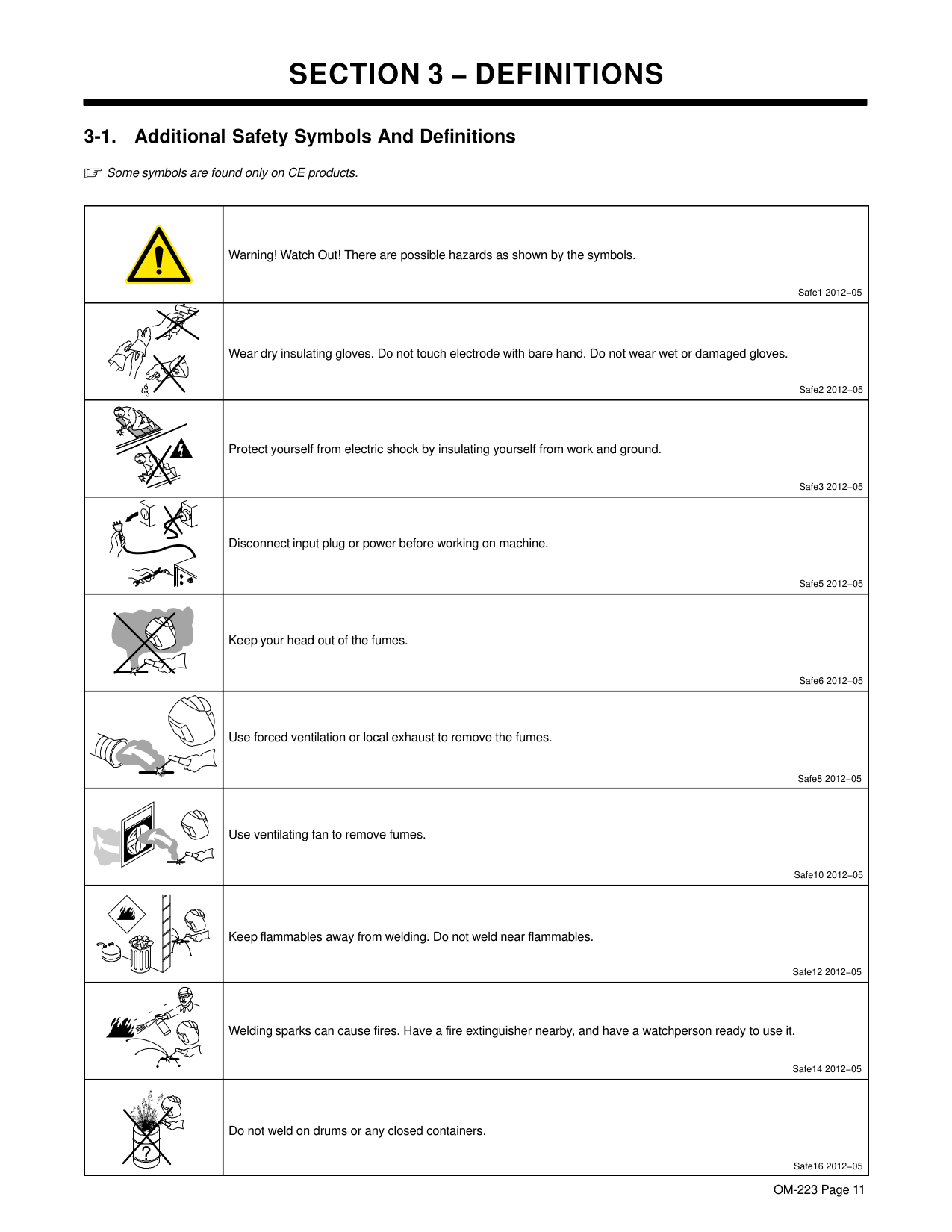
| |Warning! Watch Out! There are possible hazards as shown by the symbols.
Safe1 2012−05| |---|---| | |Wear dry insulating gloves. Do not touch electrode with bare hand. Do not wear wet or damaged gloves.
Safe2 2012−05| | |Protect yourself from electric shock by insulating yourself from work and ground.
Safe3 2012−05| | |Disconnect input plug or power before working on machine.
Safe5 2012−05| | |Keep your head out of the fumes.
Safe6 2012−05| | |Use forced ventilation or local exhaust to remove the fumes.
Safe8 2012−05| | |Use ventilating fan to remove fumes.
Safe10 2012−05| | |Keep flammables away from welding. Do not weld near flammables.
Safe12 2012−05| | |Welding sparks can cause fires. Have a fire extinguisher nearby, and have a watchperson ready to use it.
Safe14 2012−05| ||Do not weld on drums or any closed containers.
Safe16 2012−05|
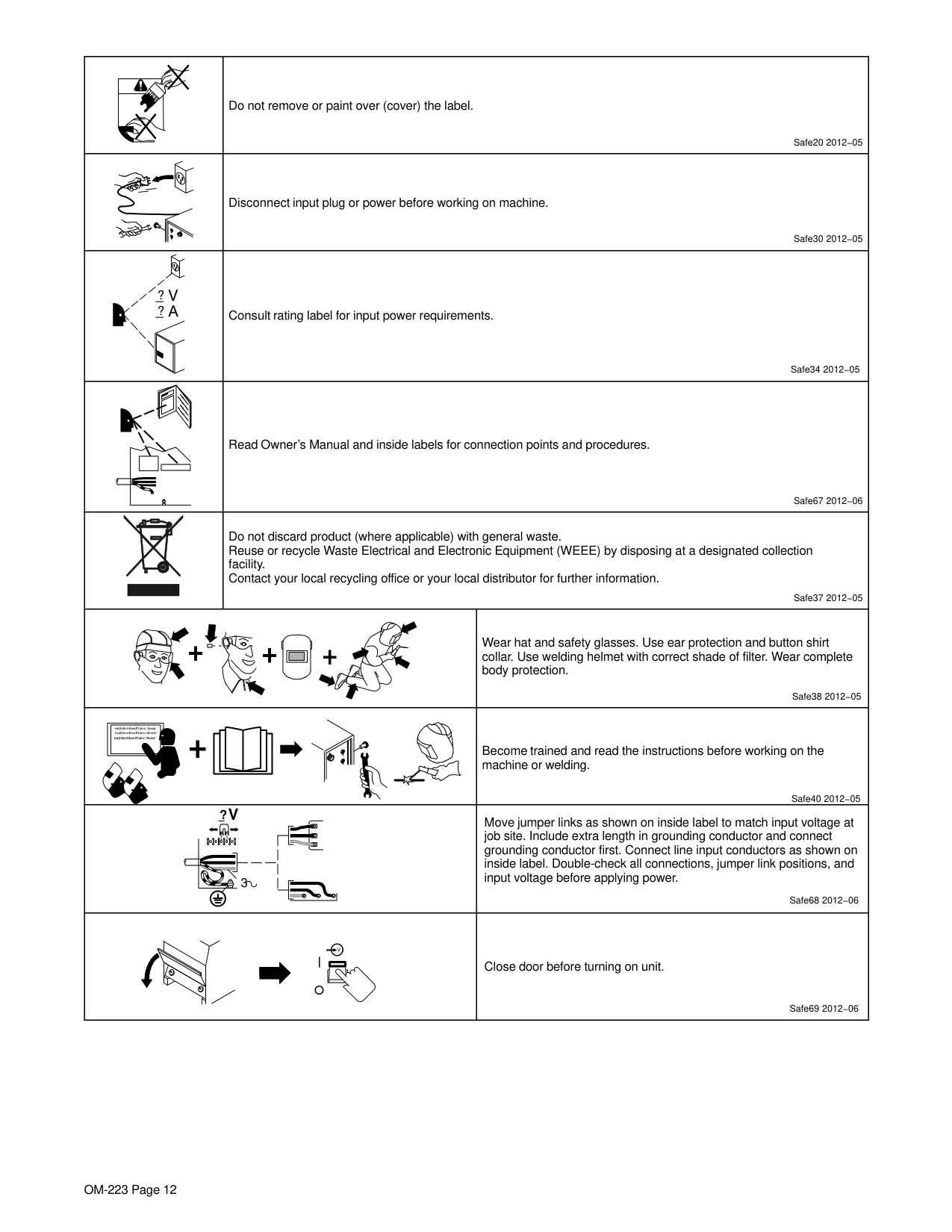
| |Do not remove or paint over (cover) the label.
Safe20 2012−05|Do not remove or paint over (cover) the label.
Safe20 2012−05| |---|---|---| | |Disconnect input plug or power before working on machine.
Safe30 2012−05|Disconnect input plug or power before working on machine.
Safe30 2012−05| |? V ? A
|Consult rating label for input power requirements.
Safe34 2012−05|Consult rating label for input power requirements.
Safe34 2012−05| | |Read Owner’s Manual and inside labels for connection points and procedures.
Safe67 2012−06|Read Owner’s Manual and inside labels for connection points and procedures.
Safe67 2012−06| | |Do not discard product (where applicable) with general waste. Reuse or recycle Waste Electrical and Electronic Equipment (WEEE) by disposing at a designated collection facility. Contact your local recycling office or your local distributor for further information.
Safe37 2012−05|Do not discard product (where applicable) with general waste. Reuse or recycle Waste Electrical and Electronic Equipment (WEEE) by disposing at a designated collection facility. Contact your local recycling office or your local distributor for further information.
Safe37 2012−05| | | |Wear hat and safety glasses. Use ear protection and button shirt collar. Use welding helmet with correct shade of filter. Wear complete body protection.
Safe38 2012−05| | | |Become trained and read the instructions before working on the machine or welding.
Safe40 2012−05| |?V
| | | |---|---| | | | | | |
3|?V
| | | |---|---| | | | | | |
3|Safe68 2012−06
Move jumper links as shown on inside label to match input voltage at job site. Include extra length in grounding conductor and connect grounding conductor first. Connect line input conductors as shown on inside label. Double-check all connections, jumper link positions, and input voltage before applying power.| | | |Safe69 2012−06
Close door before turning on unit.|
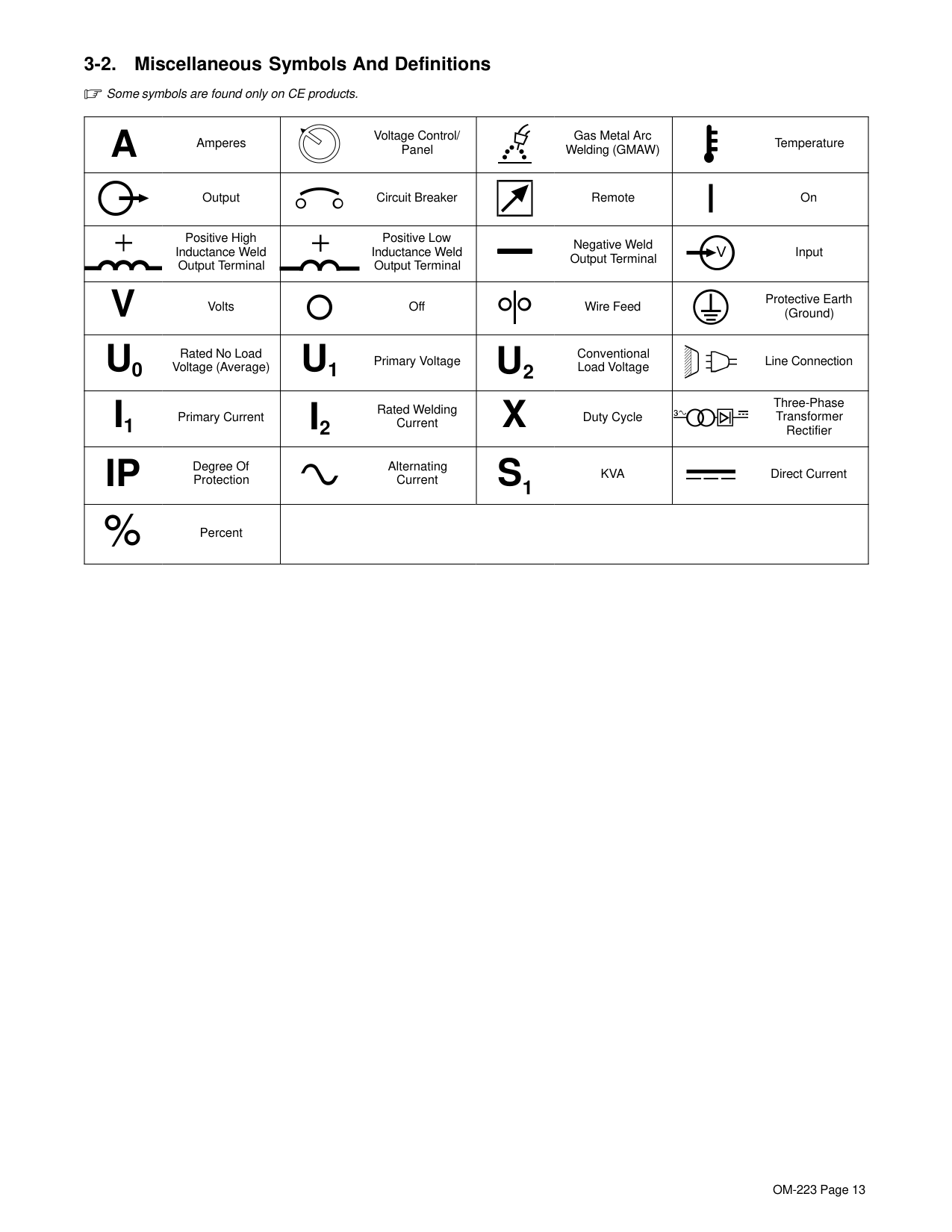
########## 3-2. Miscellaneous Symbols And Definitions
Some symbols are found only on CE products.
|A Amperes
|Voltage Control/ Panel
|Gas Metal Arc Welding (GMAW)|Temperature| |---|---|---|---|
|Output|Circuit Breaker
|Remote|On| |Positive High Inductance Weld
Output Terminal
|Positive Low Inductance Weld
Output Terminal
|Negative Weld Output Terminal|Input
| |V Volts
|Off|Wire Feed|Protective Earth (Ground)
| |U0 Rated No Load
Voltage (Average)
|U1 Primary Voltage
|U2
Conventional Load Voltage|Line Connection
| |I1 Primary Current
|I2
Rated Welding Current
|X Duty Cycle
|Three-Phase Transformer Rectifier
| |IP
Degree Of Protection|Alternating Current
|S1 KVA
|Direct Current| |Percent
| | | |
##### SECTION 4 − INSTALLATION
|! This equipment shall not be used by the general public as the EMF limits for the general public might be exceeded during welding. This equipment is built in accordance with EN 60974−1 and is intended to be used only in an occupational environment (where the general public access is prohibited or regulated in such a way as to be similar to occupational use) by an expert or an instructed person.
Wire feeders and ancillary equipment (such as torches, liquid cooling systems and arc striking and stabilizing devices) as part of the welding circuit may not be a major contributor to the EMF. See the Owner’s Manuals for all components of the welding circuit for additional EMF exposure information.
The EMF assessment on this equipment was conducted at 0.5 meter. At a distance of 1 meter the EMF exposure values were less than 20% of the permissible values.
ce-emf 1 2010-10| |---|
|! This Class A equipment is not intended for use in residential locations where the electrical power is provided by the public low voltage supply system. There may be potential difficulties in ensuring electromagnetic compatibility in those locations, due to conducted as well as radiated disturbances.
! This equipment does not comply with IEC 61000−3−12. If it is connected to a public low voltage system, it is the responsibility of the installer or user of the equipment to ensure, by consultation with the distribution network operator if necessary, that the equipment may be connected.
ce-emc 2 2010-10| |---|
The serial number and rating information for the power source is located on the front or the rear of the machine. Use the rating labels to determine input power requirements and/or rated output. For future reference, write serial number in space provided on back cover of this manual.
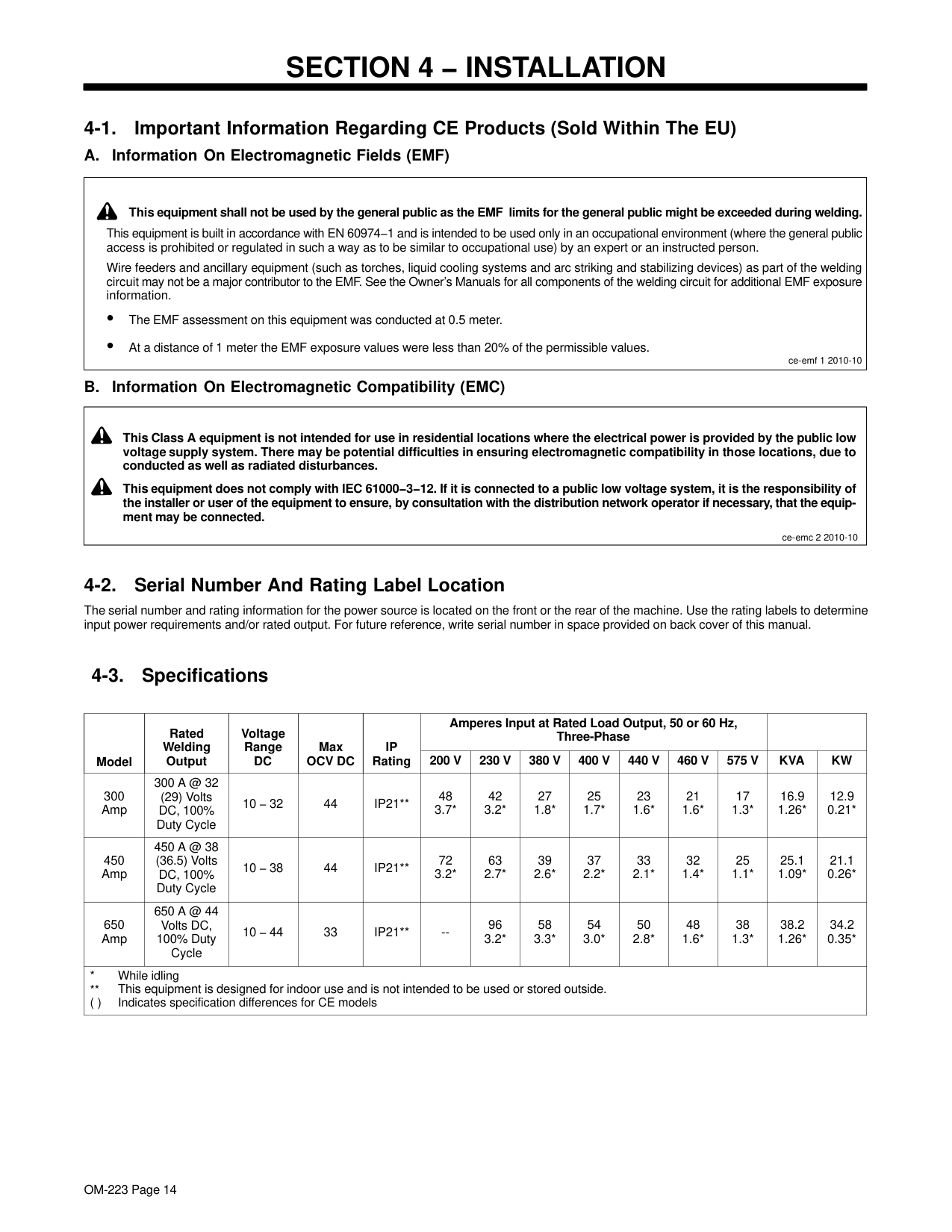
|Model|Rated Welding Output|Voltage Range DC|Max OCV DC|IP Rating|Amperes Input at Rated Load Output, 50 or 60 Hz, Three-Phase|Amperes Input at Rated Load Output, 50 or 60 Hz, Three-Phase|Amperes Input at Rated Load Output, 50 or 60 Hz, Three-Phase|Amperes Input at Rated Load Output, 50 or 60 Hz, Three-Phase|Amperes Input at Rated Load Output, 50 or 60 Hz, Three-Phase|Amperes Input at Rated Load Output, 50 or 60 Hz, Three-Phase|Amperes Input at Rated Load Output, 50 or 60 Hz, Three-Phase| | | |---|---|---|---|---|---|---|---|---|---|---|---|---|---| |Model|Rated Welding Output|Voltage Range DC|Max OCV DC|IP Rating|200 V|230 V|380 V|400 V|440 V|460 V|575 V|KVA|KW| |300 Amp|300 A @ 32 (29) Volts DC, 100% Duty Cycle|10 − 32|44|IP21**|48 3.7*|42 3.2*|27 1.8*|25 1.7*|23 1.6*|21 1.6*|17 1.3*|16.9 1.26*|12.9 0.21*| |450 Amp|450 A @ 38 (36.5) Volts DC, 100% Duty Cycle|10 − 38|44|IP21**|72 3.2*|63 2.7*|39 2.6*|37 2.2*|33 2.1*|32 1.4*|25 1.1*|25.1 1.09*|21.1 0.26*| |650 Amp|650 A @ 44 Volts DC, 100% Duty Cycle|10 − 44|33|IP21**|--|96 3.2*|58 3.3*|54 3.0*|50 2.8*|48 1.6*|38 1.3*|38.2 1.26*|34.2 0.35*| |* While idling
This equipment is designed for indoor use and is not intended to be used or stored outside. ( ) Indicates specification differences for CE models
|* While idling
This equipment is designed for indoor use and is not intended to be used or stored outside. ( ) Indicates specification differences for CE models
|* While idling
This equipment is designed for indoor use and is not intended to be used or stored outside. ( ) Indicates specification differences for CE models
|* While idling
This equipment is designed for indoor use and is not intended to be used or stored outside. ( ) Indicates specification differences for CE models
|* While idling
This equipment is designed for indoor use and is not intended to be used or stored outside. ( ) Indicates specification differences for CE models
|* While idling
This equipment is designed for indoor use and is not intended to be used or stored outside. ( ) Indicates specification differences for CE models
|* While idling
This equipment is designed for indoor use and is not intended to be used or stored outside. ( ) Indicates specification differences for CE models
|* While idling
This equipment is designed for indoor use and is not intended to be used or stored outside. ( ) Indicates specification differences for CE models
|* While idling
This equipment is designed for indoor use and is not intended to be used or stored outside. ( ) Indicates specification differences for CE models
|* While idling
This equipment is designed for indoor use and is not intended to be used or stored outside. ( ) Indicates specification differences for CE models
|* While idling
This equipment is designed for indoor use and is not intended to be used or stored outside. ( ) Indicates specification differences for CE models
|* While idling
This equipment is designed for indoor use and is not intended to be used or stored outside. ( ) Indicates specification differences for CE models
|* While idling
This equipment is designed for indoor use and is not intended to be used or stored outside. ( ) Indicates specification differences for CE models
|* While idling
This equipment is designed for indoor use and is not intended to be used or stored outside. ( ) Indicates specification differences for CE models
|
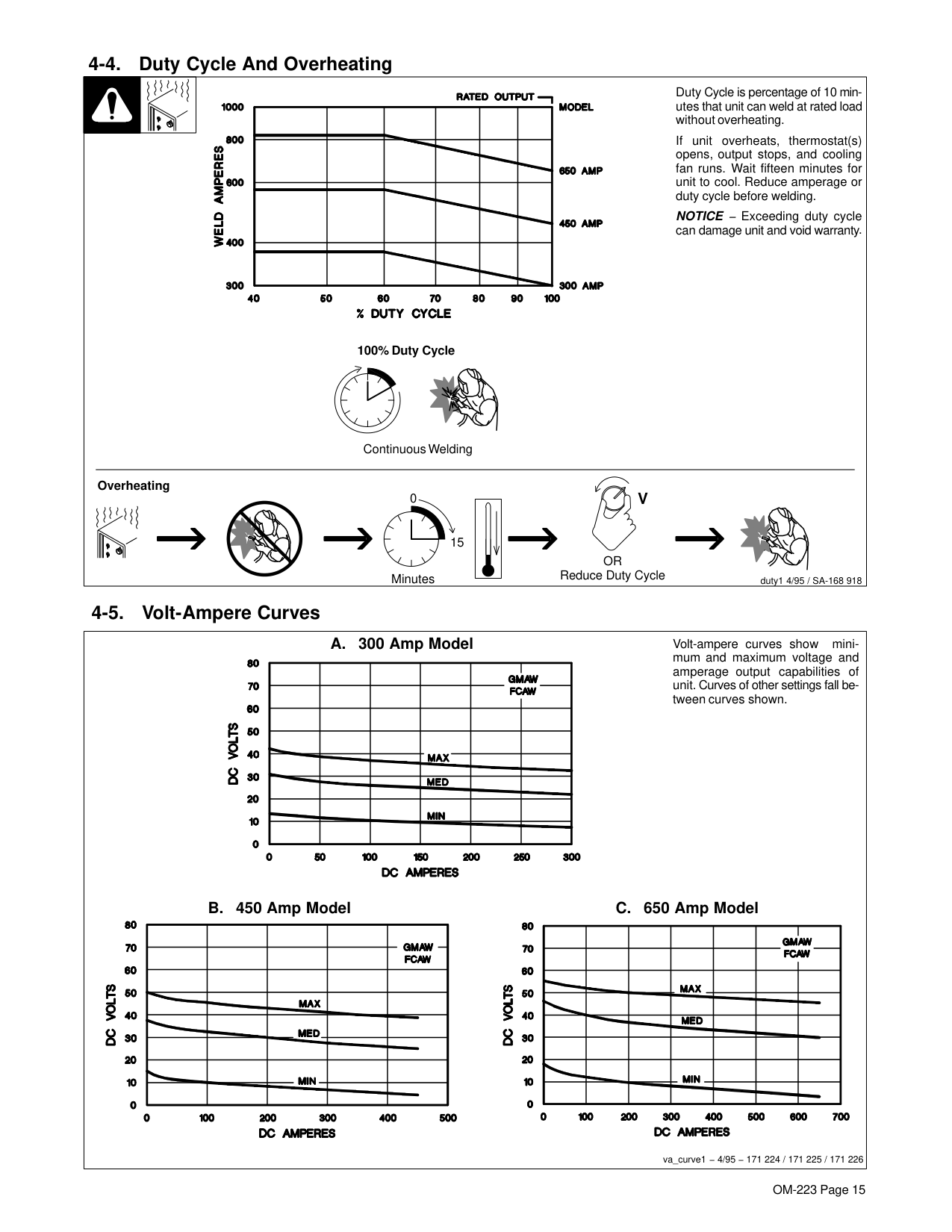
########## 4-4. Duty Cycle And Overheating
| | |Duty Cycle is percentage of 10 minutes that unit can weld at rated load without overheating.| |---|---|---| |Continuous Welding
If unit overheats, thermostat(s) opens, output stops, and cooling fan runs. Wait fifteen minutes for unit to cool. Reduce amperage or duty cycle before welding.
NOTICE − Exceeding duty cycle can damage unit and void warranty.
Overheating
0
15
V
OR Reduce Duty CycleMinutes duty1 4/95 / SA-168 918
100% Duty Cycle|Continuous Welding
If unit overheats, thermostat(s) opens, output stops, and cooling fan runs. Wait fifteen minutes for unit to cool. Reduce amperage or duty cycle before welding.
NOTICE − Exceeding duty cycle can damage unit and void warranty.
Overheating
0
15
V
OR Reduce Duty CycleMinutes duty1 4/95 / SA-168 918
100% Duty Cycle|Continuous Welding
If unit overheats, thermostat(s) opens, output stops, and cooling fan runs. Wait fifteen minutes for unit to cool. Reduce amperage or duty cycle before welding.
NOTICE − Exceeding duty cycle can damage unit and void warranty.
Overheating
0
15
V
OR Reduce Duty CycleMinutes duty1 4/95 / SA-168 918
100% Duty Cycle|
########## 4-5. Volt-Ampere Curves
|Volt-ampere curves show minimum and maximum voltage and amperage output capabilities of unit. Curves of other settings fall between curves shown.
B. 450 Amp Model C. 650 Amp Model
A. 300 Amp Model
va_curve1 − 4/95 − 171 224 / 171 225 / 171 226| |---|
########## 4-6. Selecting A Location
Movement
1
OR
Location And Airflow
18 in. (460 mm)
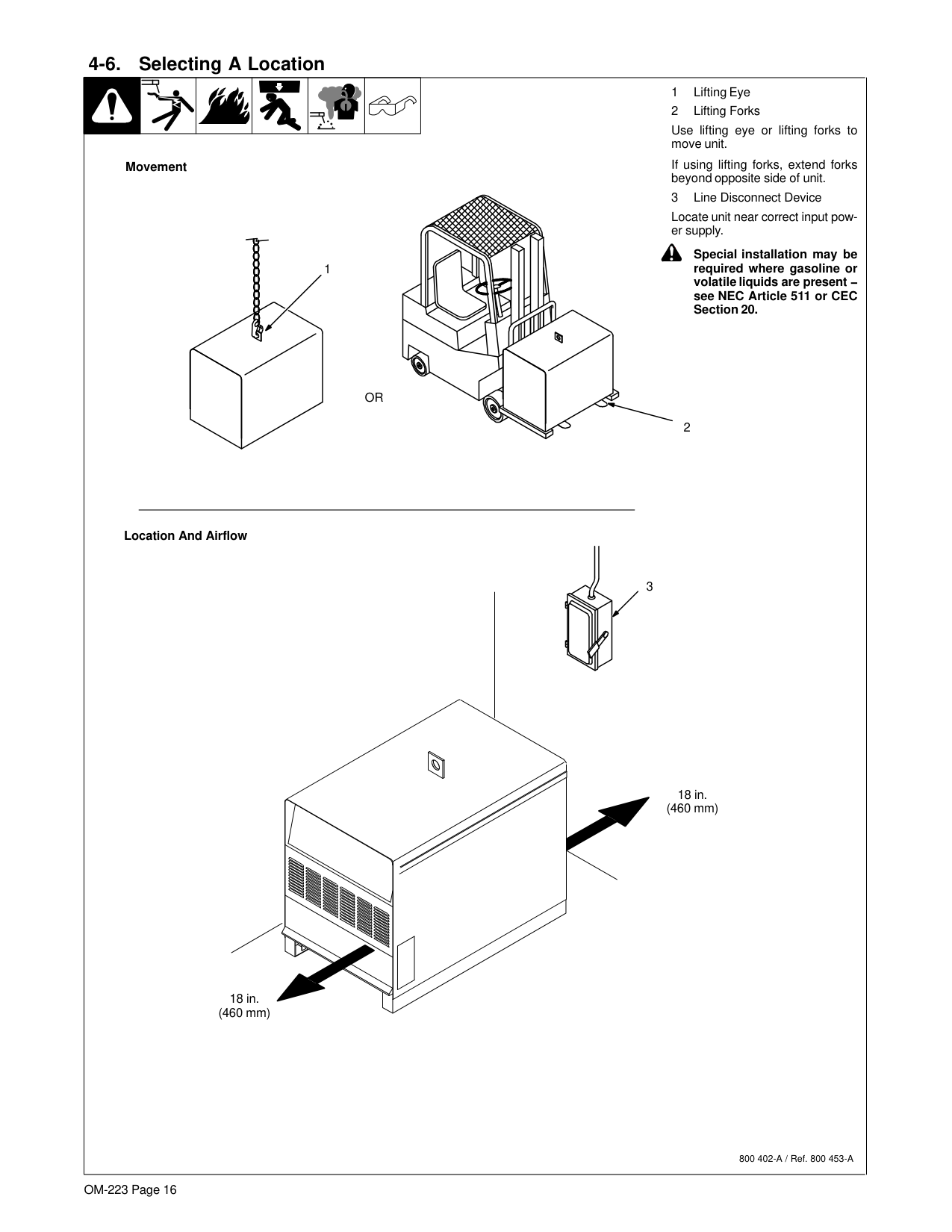
Use lifting eye or lifting forks to move unit.
If using lifting forks, extend forks beyond opposite side of unit.
Locate unit near correct input power supply.
! Special installation may be required where gasoline or volatile liquids are present − see NEC Article 511 or CEC Section 20.
2
3
18 in. (460 mm)
800 402-A / Ref. 800 453-A
########## 4-7. Dimensions And Weights
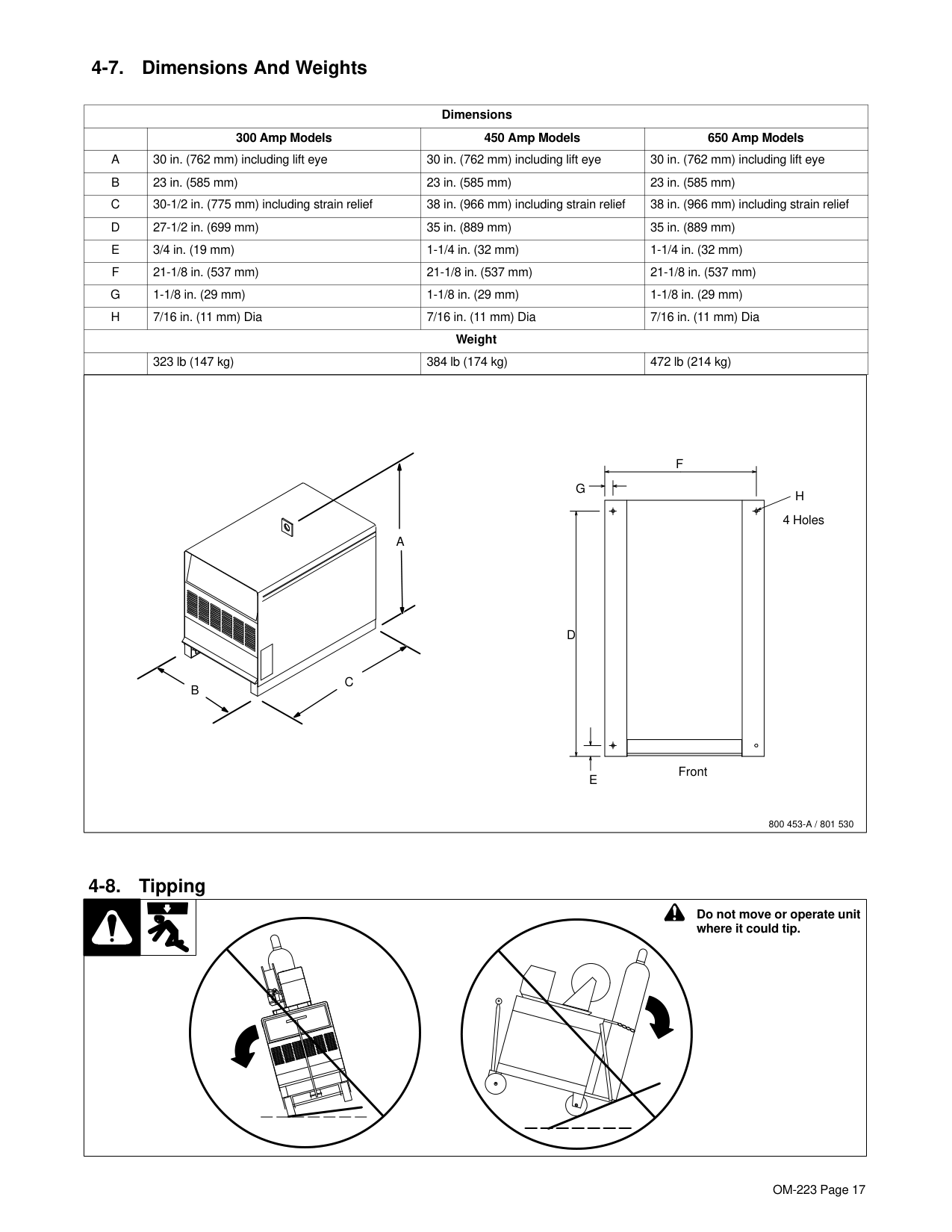
|Dimensions|Dimensions|Dimensions|Dimensions|Dimensions| |---|---|---|---|---| | |300 Amp Models|450 Amp Models|650 Amp Models|650 Amp Models| |A|30 in. (762 mm) including lift eye|30 in. (762 mm) including lift eye|30 in. (762 mm) including lift eye|30 in. (762 mm) including lift eye| |B|23 in. (585 mm)|23 in. (585 mm)|23 in. (585 mm)|23 in. (585 mm)| |C|30-1/2 in. (775 mm) including strain relief|38 in. (966 mm) including strain relief|38 in. (966 mm) including strain relief|38 in. (966 mm) including strain relief| |D|27-1/2 in. (699 mm)|35 in. (889 mm)|35 in. (889 mm)|35 in. (889 mm)| |E|3/4 in. (19 mm)|1-1/4 in. (32 mm)|1-1/4 in. (32 mm)|1-1/4 in. (32 mm)| |F|21-1/8 in. (537 mm)|21-1/8 in. (537 mm)|21-1/8 in. (537 mm)|21-1/8 in. (537 mm)| |G|1-1/8 in. (29 mm)|1-1/8 in. (29 mm)|1-1/8 in. (29 mm)|1-1/8 in. (29 mm)| |H|7/16 in. (11 mm) Dia|7/16 in. (11 mm) Dia|7/16 in. (11 mm) Dia|7/16 in. (11 mm) Dia| |Weight|Weight|Weight|Weight|Weight| | |323 lb (147 kg)|384 lb (174 kg)|472 lb (214 kg)|472 lb (214 kg)| |800 453-A / 801 530
|D| | | |---|---|---| | | | |
E
F G
H
4 Holes A
B
C
| | | | |---|---|---| | | | |
Front|800 453-A / 801 530
|D| | | |---|---|---| | | | |
E
F G
H
4 Holes A
B
C
| | | | |---|---|---| | | | |
Front|800 453-A / 801 530
|D| | | |---|---|---| | | | |
E
F G
H
4 Holes A
B
C
| | | | |---|---|---| | | | |
Front|800 453-A / 801 530
|D| | | |---|---|---| | | | |
E
F G
H
4 Holes A
B
C
| | | |
|---|---|---| | | | |
Front| |
########## 4-8. Tipping
! Do not move or operate unit
where it could tip.
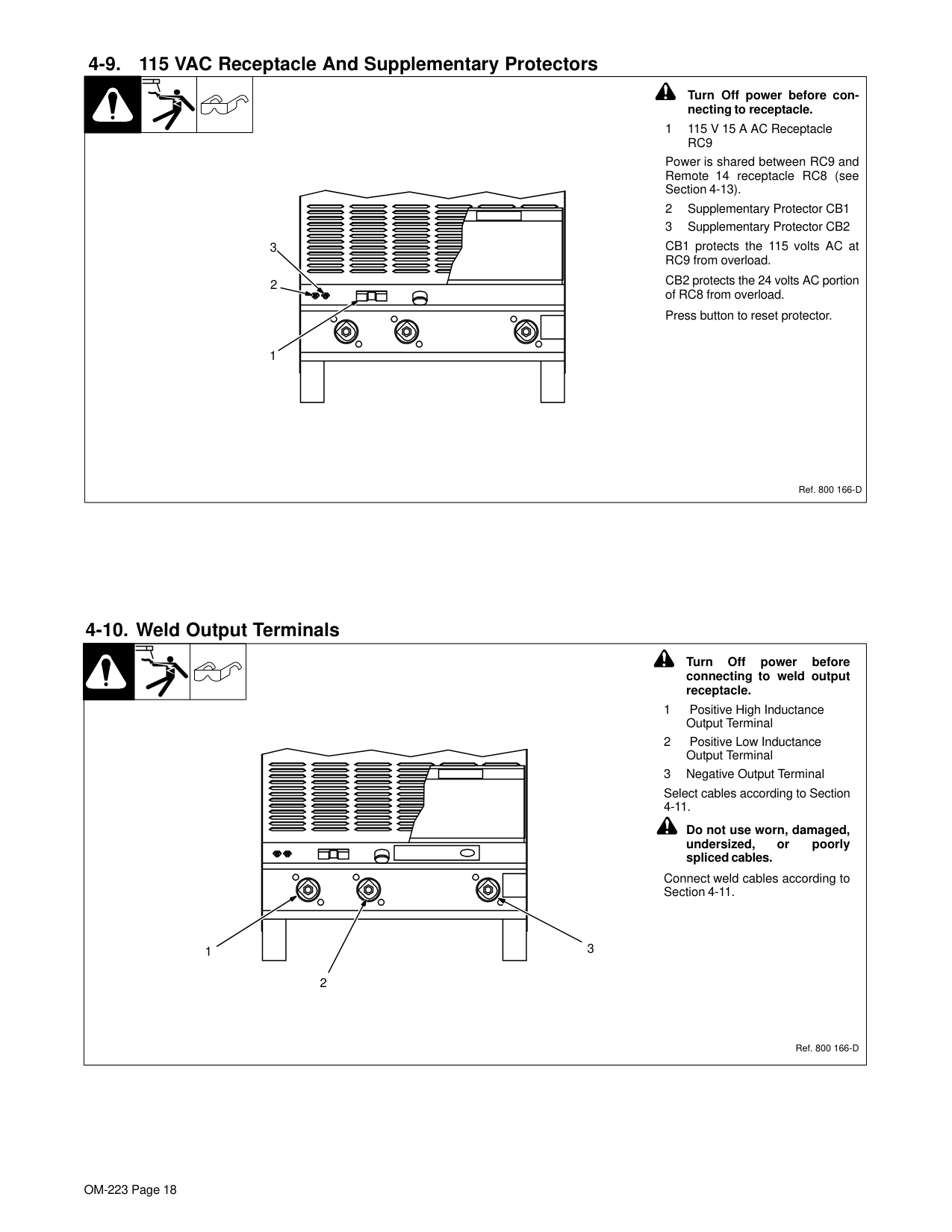
########## 4-9. 115 VAC Receptacle And Supplementary Protectors
3
| | | | |---|---|---|
! Turn Off power before con-
necting to receptacle.
Power is shared between RC9 and Remote 14 receptacle RC8 (see Section 4-13).
Ref. 800 166-D
########## 4-10. Weld Output Terminals
! Turn Off power before connecting to weld output receptacle.
Select cables according to Section 4-11.
! Do not use worn, damaged, undersized, or poorly spliced cables.
| | | | |---|---|---|
Connect weld cables according to Section 4-11.
1 3
2
Ref. 800 166-D
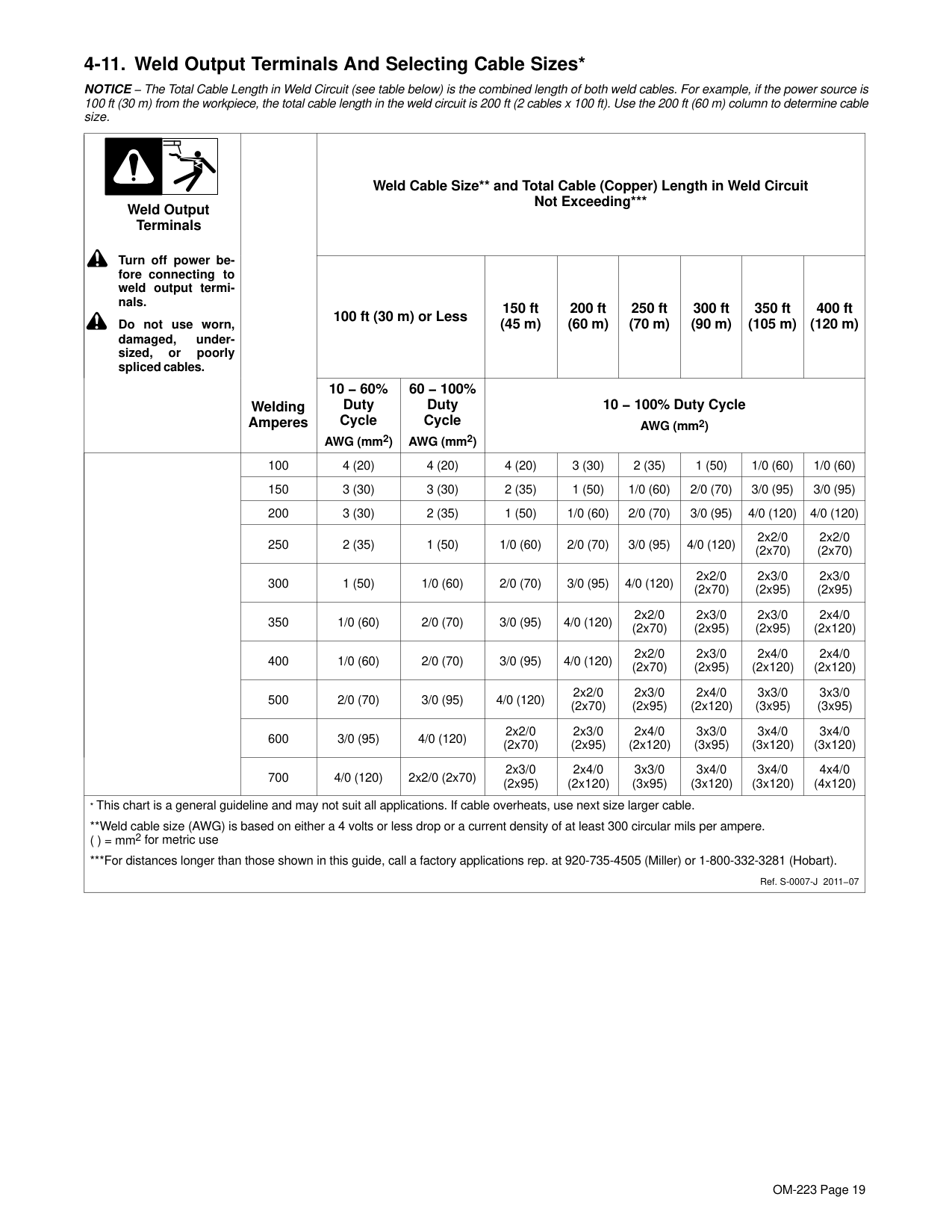
########## 4-11. Weld Output Terminals And Selecting Cable Sizes*
NOTICE − The Total Cable Length in Weld Circuit (see table below) is the combined length of both weld cables. For example, if the power source is 100 ft (30 m) from the workpiece, the total cable length in the weld circuit is 200 ft (2 cables x 100 ft). Use the 200 ft (60 m) column to determine cable size.
|! Turn off power before connecting to weld output terminals.
! Do not use worn, damaged, undersized, or poorly spliced cables.
Weld Output Terminals|Welding Amperes
|Weld Cable Size and Total Cable (Copper) Length in Weld Circuit Not Exceeding*|Weld Cable Size and Total Cable (Copper) Length in Weld Circuit Not Exceeding*|Weld Cable Size and Total Cable (Copper) Length in Weld Circuit Not Exceeding*|Weld Cable Size and Total Cable (Copper) Length in Weld Circuit Not Exceeding*|Weld Cable Size and Total Cable (Copper) Length in Weld Circuit Not Exceeding*|Weld Cable Size and Total Cable (Copper) Length in Weld Circuit Not Exceeding*|Weld Cable Size and Total Cable (Copper) Length in Weld Circuit Not Exceeding*|Weld Cable Size and Total Cable (Copper) Length in Weld Circuit Not Exceeding*| |---|---|---|---|---|---|---|---|---|---| |! Turn off power before connecting to weld output terminals.
! Do not use worn, damaged, undersized, or poorly spliced cables.
Weld Output Terminals|Welding Amperes
|100 ft (30 m) or Less|100 ft (30 m) or Less|150 ft (45 m)|200 ft (60 m)|250 ft (70 m)|300 ft (90 m)|350 ft (105 m)|400 ft (120 m)| |! Turn off power before connecting to weld output terminals.
! Do not use worn, damaged, undersized, or poorly spliced cables.
Weld Output Terminals|Welding Amperes
|10 − 60% Duty Cycle
AWG (mm2)|60 − 100% Duty Cycle
AWG (mm2)|10 − 100% Duty Cycle AWG (mm2)|10 − 100% Duty Cycle AWG (mm2)|10 − 100% Duty Cycle AWG (mm2)|10 − 100% Duty Cycle AWG (mm2)|10 − 100% Duty Cycle AWG (mm2)|10 − 100% Duty Cycle AWG (mm2)| | |100|4 (20)|4 (20)|4 (20)|3 (30)|2 (35)|1 (50)|1/0 (60)|1/0 (60)| | |150|3 (30)|3 (30)|2 (35)|1 (50)|1/0 (60)|2/0 (70)|3/0 (95)|3/0 (95)| | |200|3 (30)|2 (35)|1 (50)|1/0 (60)|2/0 (70)|3/0 (95)|4/0 (120)|4/0 (120)| | |250|2 (35)|1 (50)|1/0 (60)|2/0 (70)|3/0 (95)|4/0 (120)|2x2/0 (2x70)|2x2/0 (2x70)| | |300|1 (50)|1/0 (60)|2/0 (70)|3/0 (95)|4/0 (120)|2x2/0 (2x70)|2x3/0 (2x95)|2x3/0 (2x95)| | |350|1/0 (60)|2/0 (70)|3/0 (95)|4/0 (120)|2x2/0 (2x70)|2x3/0 (2x95)|2x3/0 (2x95)|2x4/0 (2x120)| | |400|1/0 (60)|2/0 (70)|3/0 (95)|4/0 (120)|2x2/0 (2x70)|2x3/0 (2x95)|2x4/0 (2x120)|2x4/0 (2x120)| | |500|2/0 (70)|3/0 (95)|4/0 (120)|2x2/0 (2x70)|2x3/0 (2x95)|2x4/0 (2x120)|3x3/0 (3x95)|3x3/0 (3x95)| | |600|3/0 (95)|4/0 (120)|2x2/0 (2x70)|2x3/0 (2x95)|2x4/0 (2x120)|3x3/0 (3x95)|3x4/0 (3x120)|3x4/0 (3x120)|
| |700|4/0 (120)|2x2/0 (2x70)|2x3/0 (2x95)|2x4/0 (2x120)|3x3/0 (3x95)|3x4/0 (3x120)|3x4/0 (3x120)|4x4/0 (4x120)| |* This chart is a general guideline and may not suit all applications. If cable overheats, use next size larger cable.
Weld cable size (AWG) is based on either a 4 volts or less drop or a current density of at least 300 circular mils per ampere. ( ) = mm2 for metric use
*For distances longer than those shown in this guide, call a factory applications rep. at 920-735-4505 (Miller) or 1-800-332-3281 (Hobart).
Ref. S-0007-J 2011−07|* This chart is a general guideline and may not suit all applications. If cable overheats, use next size larger cable.
Weld cable size (AWG) is based on either a 4 volts or less drop or a current density of at least 300 circular mils per ampere. ( ) = mm2 for metric use
*For distances longer than those shown in this guide, call a factory applications rep. at 920-735-4505 (Miller) or 1-800-332-3281 (Hobart).
Ref. S-0007-J 2011−07|* This chart is a general guideline and may not suit all applications. If cable overheats, use next size larger cable.
Weld cable size (AWG) is based on either a 4 volts or less drop or a current density of at least 300 circular mils per ampere. ( ) = mm2 for metric use
*For distances longer than those shown in this guide, call a factory applications rep. at 920-735-4505 (Miller) or 1-800-332-3281 (Hobart).
Ref. S-0007-J 2011−07|* This chart is a general guideline and may not suit all applications. If cable overheats, use next size larger cable.
Weld cable size (AWG) is based on either a 4 volts or less drop or a current density of at least 300 circular mils per ampere. ( ) = mm2 for metric use
*For distances longer than those shown in this guide, call a factory applications rep. at 920-735-4505 (Miller) or 1-800-332-3281 (Hobart).
Ref. S-0007-J 2011−07|* This chart is a general guideline and may not suit all applications. If cable overheats, use next size larger cable.
Weld cable size (AWG) is based on either a 4 volts or less drop or a current density of at least 300 circular mils per ampere. ( ) = mm2 for metric use
*For distances longer than those shown in this guide, call a factory applications rep. at 920-735-4505 (Miller) or 1-800-332-3281 (Hobart).
Ref. S-0007-J 2011−07|* This chart is a general guideline and may not suit all applications. If cable overheats, use next size larger cable.
Weld cable size (AWG) is based on either a 4 volts or less drop or a current density of at least 300 circular mils per ampere. ( ) = mm2 for metric use
*For distances longer than those shown in this guide, call a factory applications rep. at 920-735-4505 (Miller) or 1-800-332-3281 (Hobart).
Ref. S-0007-J 2011−07|* This chart is a general guideline and may not suit all applications. If cable overheats, use next size larger cable.
Weld cable size (AWG) is based on either a 4 volts or less drop or a current density of at least 300 circular mils per ampere. ( ) = mm2 for metric use
*For distances longer than those shown in this guide, call a factory applications rep. at 920-735-4505 (Miller) or 1-800-332-3281 (Hobart).
Ref. S-0007-J 2011−07|* This chart is a general guideline and may not suit all applications. If cable overheats, use next size larger cable.
Weld cable size (AWG) is based on either a 4 volts or less drop or a current density of at least 300 circular mils per ampere. ( ) = mm2 for metric use
*For distances longer than those shown in this guide, call a factory applications rep. at 920-735-4505 (Miller) or 1-800-332-3281 (Hobart).
Ref. S-0007-J 2011−07|* This chart is a general guideline and may not suit all applications. If cable overheats, use next size larger cable.
Weld cable size (AWG) is based on either a 4 volts or less drop or a current density of at least 300 circular mils per ampere. ( ) = mm2 for metric use
*For distances longer than those shown in this guide, call a factory applications rep. at 920-735-4505 (Miller) or 1-800-332-3281 (Hobart).
Ref. S-0007-J 2011−07|* This chart is a general guideline and may not suit all applications. If cable overheats, use next size larger cable.
Weld cable size (AWG) is based on either a 4 volts or less drop or a current density of at least 300 circular mils per ampere. ( ) = mm2 for metric use
*For distances longer than those shown in this guide, call a factory applications rep. at 920-735-4505 (Miller) or 1-800-332-3281 (Hobart).
Ref. S-0007-J 2011−07|
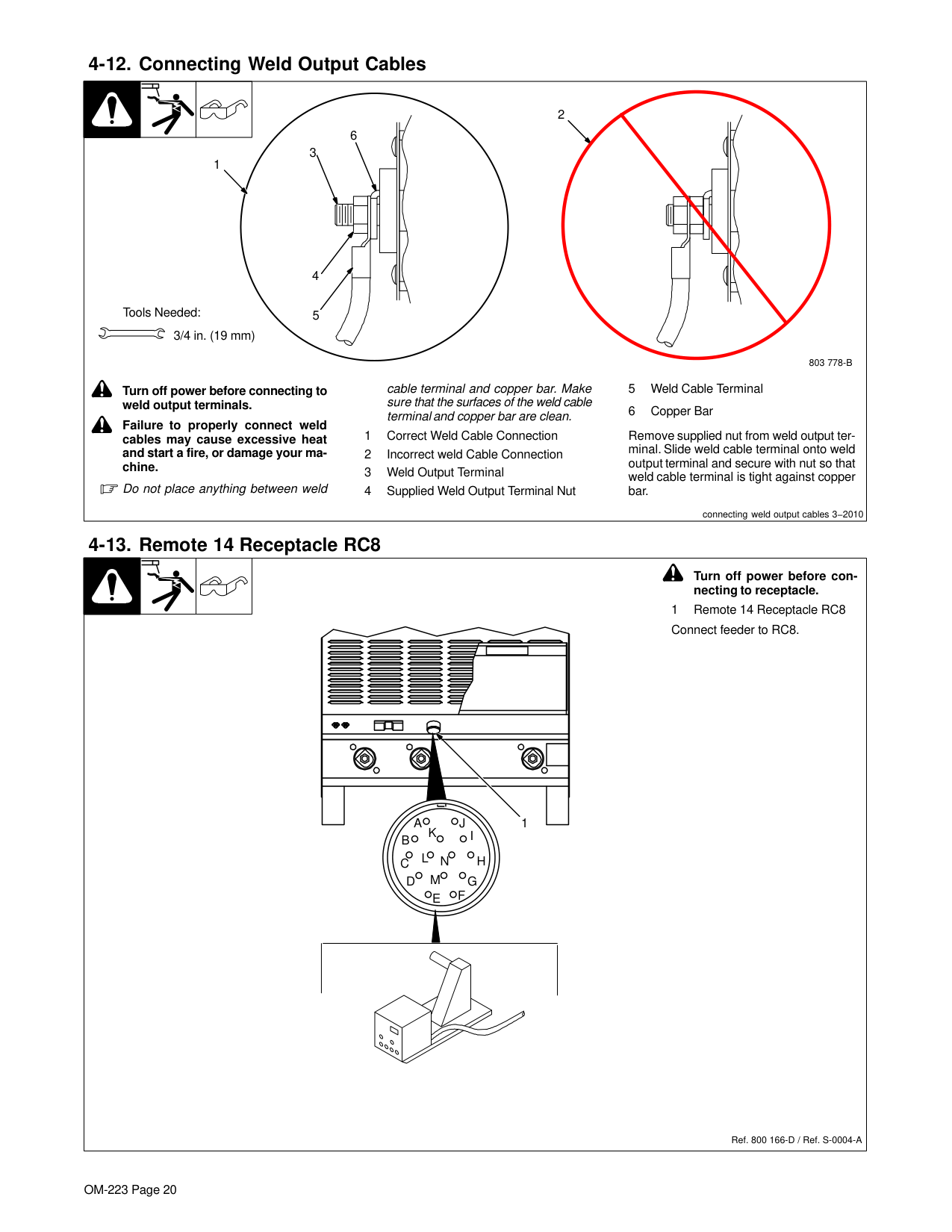
########## 4-12. Connecting Weld Output Cables
| | | |2 6| |---|---|---|---| |803 778-B
! Turn off power before connecting to
weld output terminals.
! Failure to properly connect weld cables may cause excessive heat and start a fire, or damage your machine.
Do not place anything between weld
cable terminal and copper bar. Make sure that the surfaces of the weld cable terminal and copper bar are clean.
1 Correct Weld Cable Connection
2 Incorrect weld Cable Connection
3 Weld Output Terminal
4 Supplied Weld Output Terminal Nut
5 Weld Cable Terminal
6 Copper Bar
Remove supplied nut from weld output terminal. Slide weld cable terminal onto weld output terminal and secure with nut so that weld cable terminal is tight against copper bar.
Tools Needed: 3/4 in. (19 mm)
4
3 1
5
connecting weld output cables 3−2010|803 778-B
! Turn off power before connecting to
weld output terminals.
! Failure to properly connect weld cables may cause excessive heat and start a fire, or damage your machine.
Do not place anything between weld
cable terminal and copper bar. Make sure that the surfaces of the weld cable terminal and copper bar are clean.
1 Correct Weld Cable Connection
2 Incorrect weld Cable Connection
3 Weld Output Terminal
4 Supplied Weld Output Terminal Nut
5 Weld Cable Terminal
6 Copper Bar
Remove supplied nut from weld output terminal. Slide weld cable terminal onto weld output terminal and secure with nut so that weld cable terminal is tight against copper bar.
Tools Needed: 3/4 in. (19 mm)
4
3 1
5
connecting weld output cables 3−2010|803 778-B
! Turn off power before connecting to
weld output terminals.
! Failure to properly connect weld cables may cause excessive heat and start a fire, or damage your machine.
Do not place anything between weld
cable terminal and copper bar. Make sure that the surfaces of the weld cable terminal and copper bar are clean.
1 Correct Weld Cable Connection
2 Incorrect weld Cable Connection
3 Weld Output Terminal
4 Supplied Weld Output Terminal Nut
5 Weld Cable Terminal
6 Copper Bar
Remove supplied nut from weld output terminal. Slide weld cable terminal onto weld output terminal and secure with nut so that weld cable terminal is tight against copper bar.
Tools Needed: 3/4 in. (19 mm)
4
3 1
5
connecting weld output cables 3−2010|803 778-B
! Turn off power before connecting to
weld output terminals.
! Failure to properly connect weld cables may cause excessive heat and start a fire, or damage your machine.
Do not place anything between weld
cable terminal and copper bar. Make sure that the surfaces of the weld cable terminal and copper bar are clean.
1 Correct Weld Cable Connection
2 Incorrect weld Cable Connection
3 Weld Output Terminal
4 Supplied Weld Output Terminal Nut
5 Weld Cable Terminal
6 Copper Bar
Remove supplied nut from weld output terminal. Slide weld cable terminal onto weld output terminal and secure with nut so that weld cable terminal is tight against copper bar.
Tools Needed: 3/4 in. (19 mm)
4
3 1
5
connecting weld output cables 3−2010|
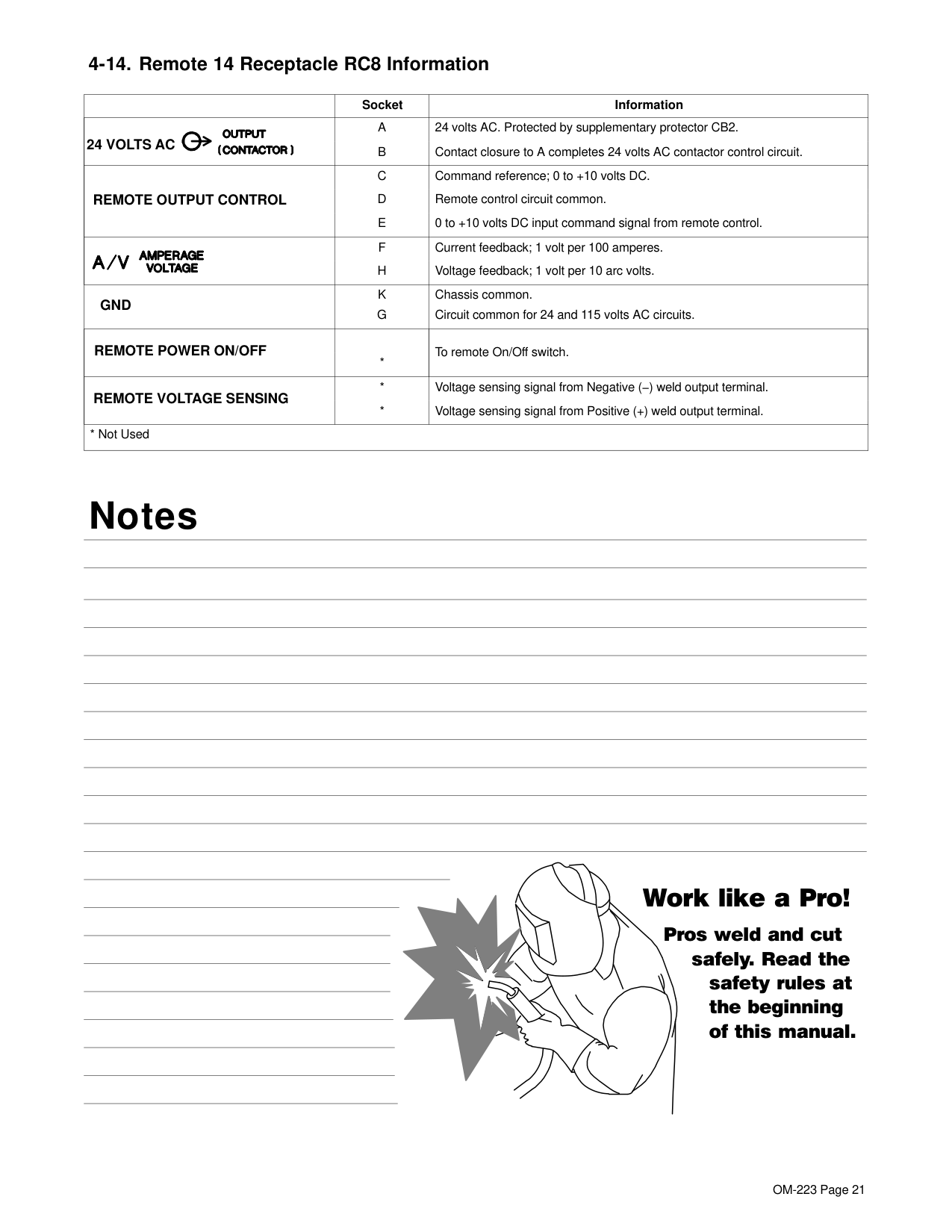
########## 4-13. Remote 14 Receptacle RC8
| | | |! Turn off power before con-
necting to receptacle. 1 Remote 14 Receptacle RC8| |---|---|---|---| |Ref. 800 166-D / Ref. S-0004-A
Connect feeder to RC8.
AJ
B
K I
C L NH
D M G E F
1|Ref. 800 166-D / Ref. S-0004-A
Connect feeder to RC8.
AJ
B
K I
C L NH
D M G E F
1|Ref. 800 166-D / Ref. S-0004-A
Connect feeder to RC8.
AJ
B
K I
C L NH
D M G E F
1|Ref. 800 166-D / Ref. S-0004-A
Connect feeder to RC8.
AJ
B
K I
C L NH
D M G E F
1|
| |Socket|Information| |---|---|---| |24 VOLTS AC|A
B
|24 volts AC. Protected by supplementary protector CB2. Contact closure to A completes 24 volts AC contactor control circuit.
| |REMOTE OUTPUT CONTROL
|C
D
E
|Command reference; 0 to +10 volts DC. Remote control circuit common. 0 to +10 volts DC input command signal from remote control.
| | |F H
|Current feedback; 1 volt per 100 amperes. Voltage feedback; 1 volt per 10 arc volts.
| |GND|K G|Chassis common. Circuit common for 24 and 115 volts AC circuits.| |REMOTE POWER ON/OFF|*|To remote On/Off switch.| |REMOTE VOLTAGE SENSING
|* *
|Voltage sensing signal from Negative (−) weld output terminal. Voltage sensing signal from Positive (+) weld output terminal.
| |* Not Used|* Not Used|* Not Used|
#### Notes
###### Work like a Pro!
Pros weld and cut
safely. Read the safety rules at the beginning of this manual.
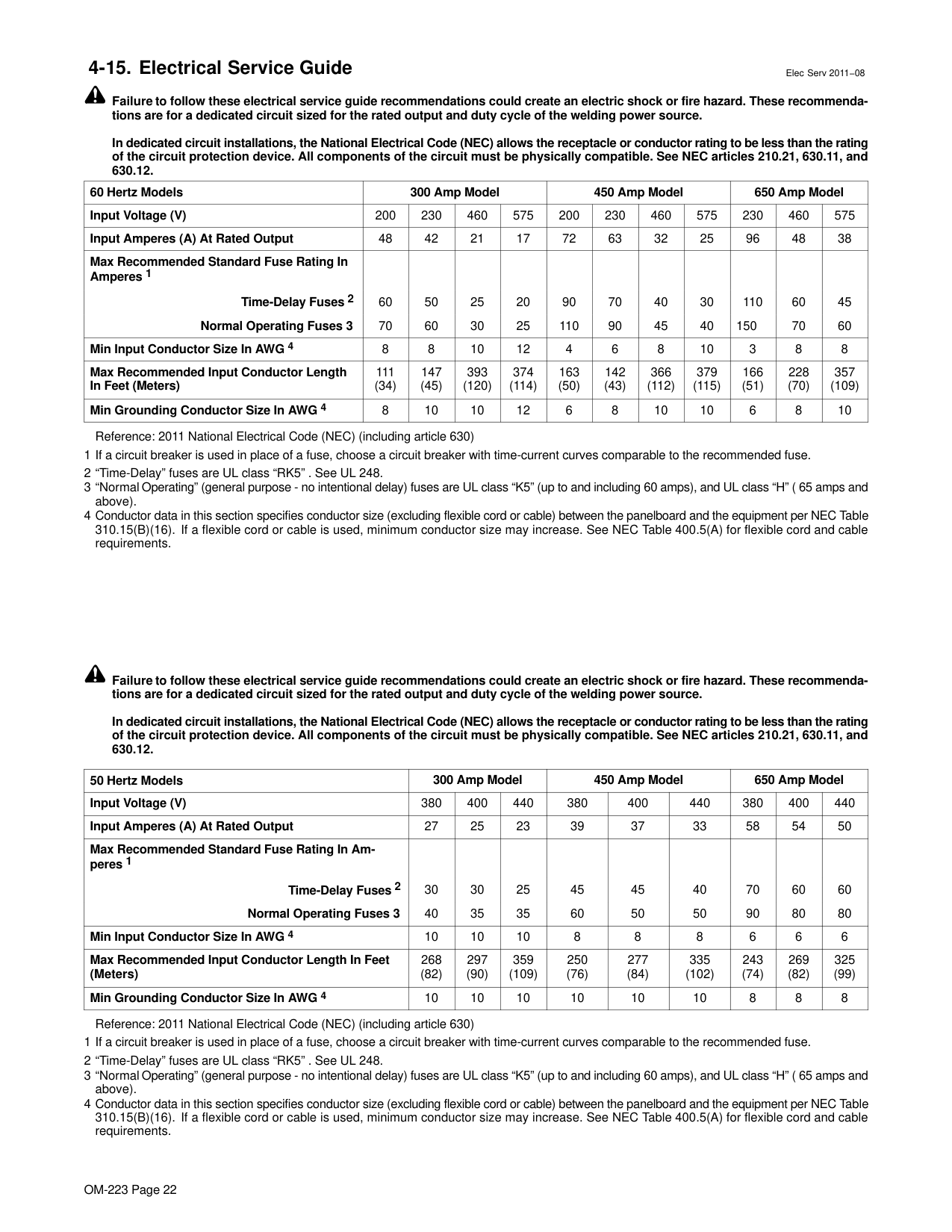
########## 4-15. Electrical Service Guide Elec Serv 2011−08
Failure to follow these electrical service guide recommendations could create an electric shock or fire hazard. These recommendations are for a dedicated circuit sized for the rated output and duty cycle of the welding power source.
In dedicated circuit installations, the National Electrical Code (NEC) allows the receptacle or conductor rating to be less than the rating of the circuit protection device. All components of the circuit must be physically compatible. See NEC articles 210.21, 630.11, and 630.12.
|60 Hertz Models|300 Amp Model|300 Amp Model|300 Amp Model|300 Amp Model|450 Amp Model|450 Amp Model|450 Amp Model|450 Amp Model|650 Amp Model|650 Amp Model|650 Amp Model| |---|---|---|---|---|---|---|---|---|---|---|---| |Input Voltage (V)|200|230|460|575|200|230|460|575|230|460|575| |Input Amperes (A) At Rated Output|48|42|21|17|72|63|32|25|96|48|38| |Max Recommended Standard Fuse Rating In Amperes 1
Time-Delay Fuses 2 Normal Operating Fuses 3|60 70
|50 60
|25 30|20 25
|90 110
|70 90|40 45
|30 40
|110 150
|60 70|45 60
| |Min Input Conductor Size In AWG 4|8|8|10|12|4|6|8|10|3|8|8| |Max Recommended Input Conductor Length In Feet (Meters)|111
(34)|147 (45)|393 (120)|374 (114)|163 (50)|142 (43)|366 (112)|379 (115)|166 (51)|228 (70)|357 (109)| |Min Grounding Conductor Size In AWG 4|8|10|10|12|6|8|10|10|6|8|10|
Reference: 2011 National Electrical Code (NEC) (including article 630)
Failure to follow these electrical service guide recommendations could create an electric shock or fire hazard. These recommendations are for a dedicated circuit sized for the rated output and duty cycle of the welding power source.
In dedicated circuit installations, the National Electrical Code (NEC) allows the receptacle or conductor rating to be less than the rating of the circuit protection device. All components of the circuit must be physically compatible. See NEC articles 210.21, 630.11, and 630.12.
|50 Hertz Models|300 Amp Model|300 Amp Model|300 Amp Model|450 Amp Model|450 Amp Model|450 Amp Model|650 Amp Model|650 Amp Model|650 Amp Model| |---|---|---|---|---|---|---|---|---|---| |Input Voltage (V)|380|400|440|380|400|440|380|400|440| |Input Amperes (A) At Rated Output|27|25|23|39|37|33|58|54|50| |Max Recommended Standard Fuse Rating In Amperes 1
Time-Delay Fuses 2 Normal Operating Fuses 3
|30 40|30 35
|25 35
|45 60|45 50
|40 50|70 90
|60 80|60 80
| |Min Input Conductor Size In AWG 4|10|10|10|8|8|8|6|6|6| |Max Recommended Input Conductor Length In Feet (Meters)|268 (82)|297 (90)|359 (109)|250 (76)|277 (84)|335 (102)|243 (74)|269 (82)|325 (99)| |Min Grounding Conductor Size In AWG 4|10|10|10|10|10|10|8|8|8|
Reference: 2011 National Electrical Code (NEC) (including article 630)
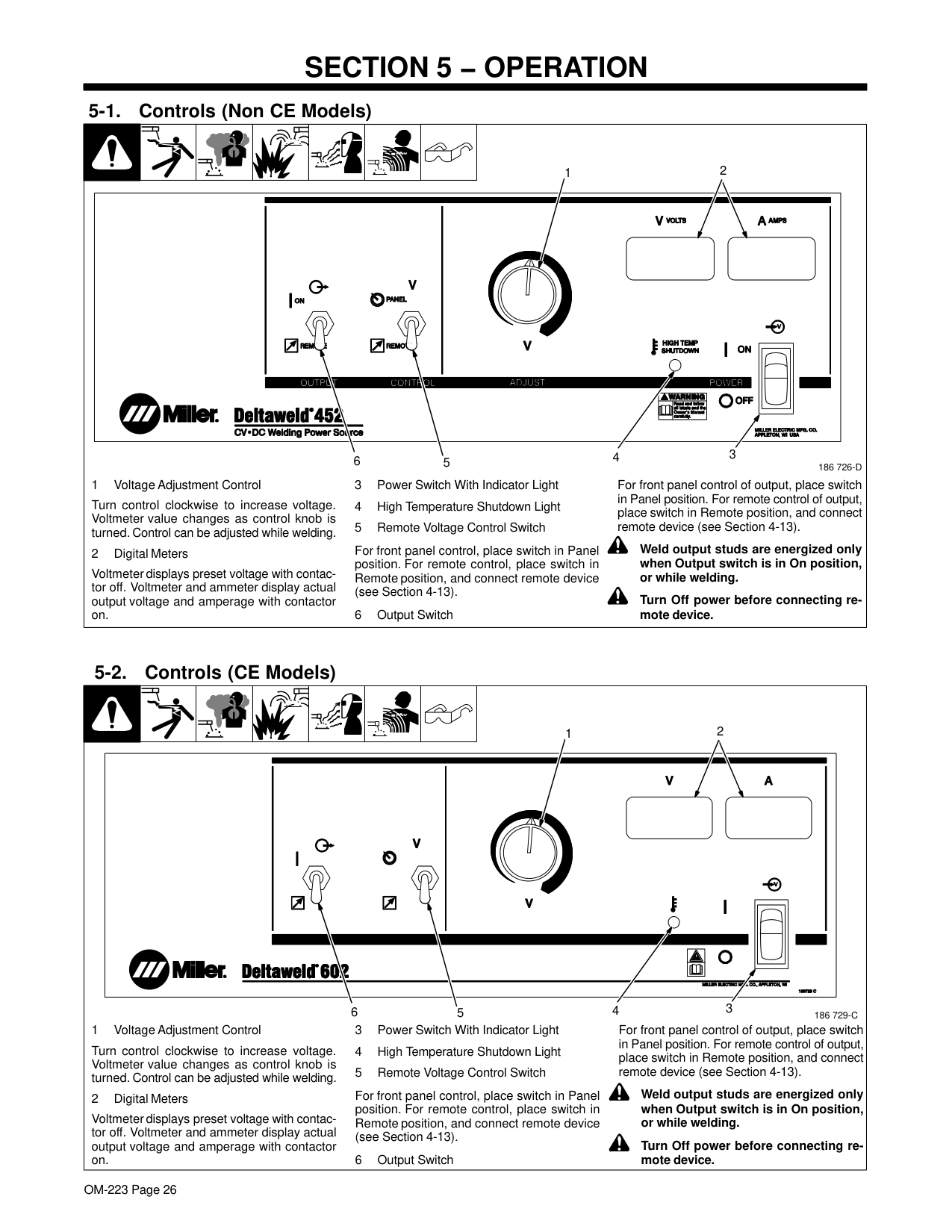
########## 4-16. Placing Jumper Links
| | | |! Disconnect and lockout/tagout input power before installing or moving jumper links.
| |---|---|---|---| |Ref. 800 103-A
Check input voltage available at site.
1 Jumper Link Label Check label − only one is on unit.
2 Jumper Links
Move jumper links to match input voltage.
Close access door, or go on to Section 4-17.
Tools Needed:
2
| | | |---|---| | | |
1
Do not overtighten jumper link nuts.
|230 VOLTS
Ref. S-174 973-B
575 VOLTS460 VOLTS| |---|
|380 VOLTS 400 VOLTS 440 VOLTS
| | |---|
Ref. S-174 975-B
220 VOLTS
(FACTORY OPTION)| |---|
|200 VOLTS
Ref. S-174 976-B
230 VOLTS
| | |---|
460 VOLTS| |---|
3/8 in. 3/8 in.|Ref. 800 103-A
Check input voltage available at site.
1 Jumper Link Label Check label − only one is on unit.
2 Jumper Links
Move jumper links to match input voltage.
Close access door, or go on to Section 4-17.
Tools Needed:
2
| | | |---|---| | | |
1
Do not overtighten jumper link nuts.
|230 VOLTS
Ref. S-174 973-B
575 VOLTS460 VOLTS| |---|
|380 VOLTS 400 VOLTS 440 VOLTS
| | |---|
Ref. S-174 975-B
220 VOLTS
(FACTORY OPTION)| |---|
|200 VOLTS
Ref. S-174 976-B
230 VOLTS
| | |---|
460 VOLTS| |---|
3/8 in. 3/8 in.|Ref. 800 103-A
Check input voltage available at site.
1 Jumper Link Label Check label − only one is on unit.
2 Jumper Links
Move jumper links to match input voltage.
Close access door, or go on to Section 4-17.
Tools Needed:
2
| | | |---|---| | | |
1
Do not overtighten jumper link nuts.
|230 VOLTS
Ref. S-174 973-B
575 VOLTS460 VOLTS| |---|
|380 VOLTS 400 VOLTS 440 VOLTS
| | |---|
Ref. S-174 975-B
220 VOLTS
(FACTORY OPTION)| |---|
|200 VOLTS
Ref. S-174 976-B
230 VOLTS
| |
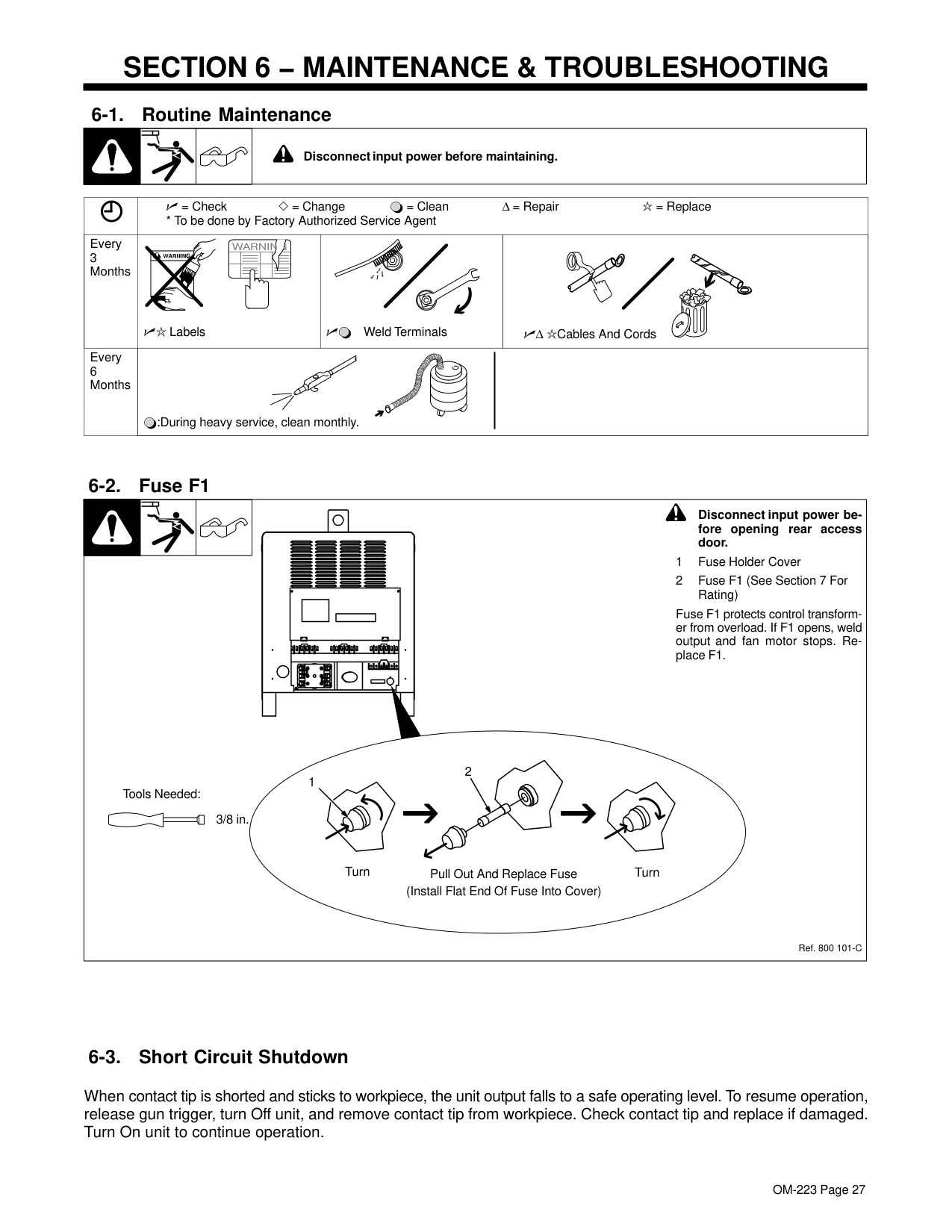
|---|
460 VOLTS| |---|
3/8 in. 3/8 in.|Ref. 800 103-A
Check input voltage available at site.
1 Jumper Link Label Check label − only one is on unit.
2 Jumper Links
Move jumper links to match input voltage.
Close access door, or go on to Section 4-17.
Tools Needed:
2
| | | |---|---| | | |
1
Do not overtighten jumper link nuts.
|230 VOLTS
Ref. S-174 973-B
575 VOLTS460 VOLTS| |---|
|380 VOLTS 400 VOLTS 440 VOLTS
| | |---|
Ref. S-174 975-B
220 VOLTS
(FACTORY OPTION)| |---|
|200 VOLTS
Ref. S-174 976-B
230 VOLTS
| | |---|
460 VOLTS| |---|
3/8 in. 3/8 in.|
########## 4-17. Connecting 3-Phase Input Power
3
9
= GND/PE Earth Ground
| | | |---|---| | | |
8
11
10
2
4
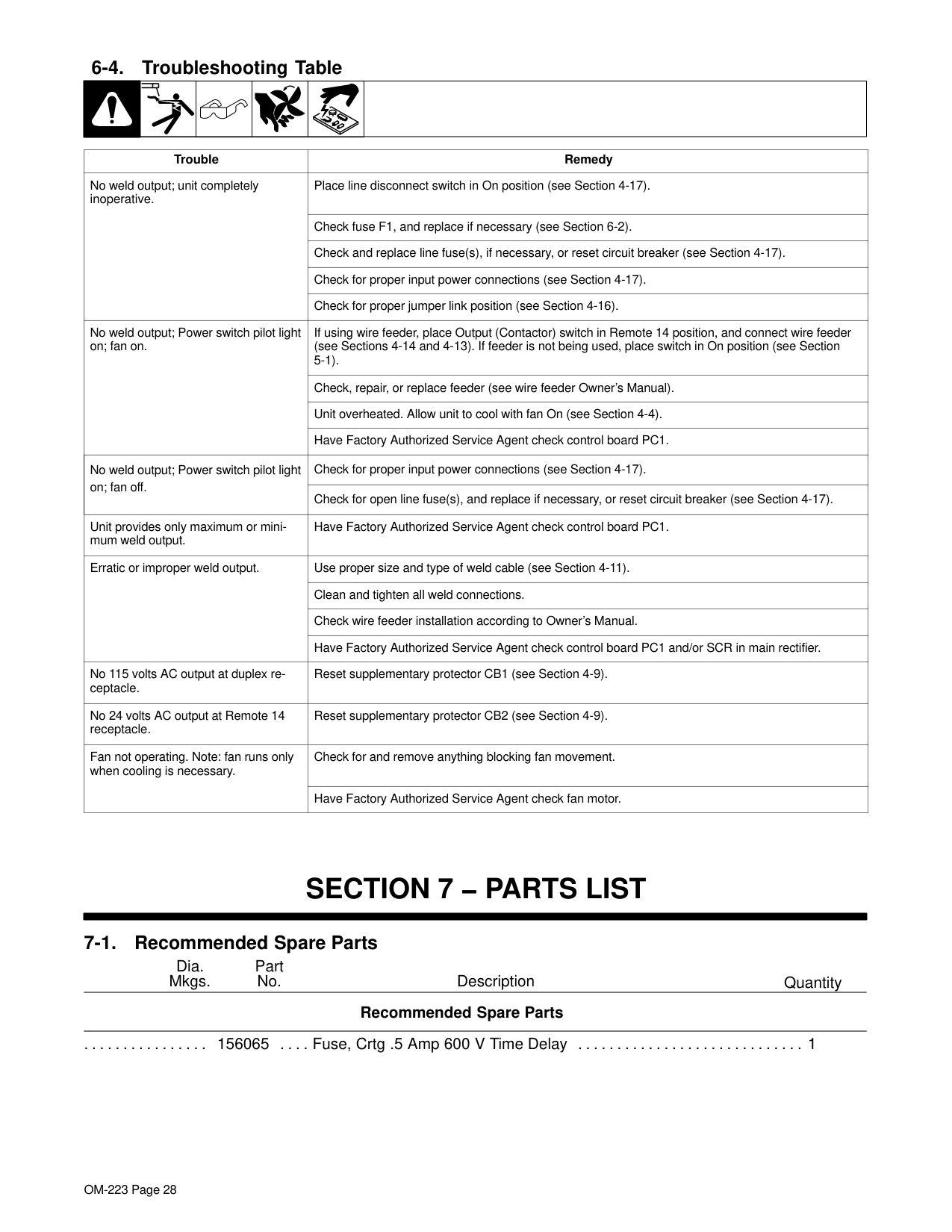
7
1
|IMPORTANT
| |---| |GND/
3
PE Earth Ground
Input Contactor
L1 L2 L3
6
3
7
4
=|
4
5
Tools Needed:
5/32 in.
3/8, 1/2 in. 3/8 in.
input3 2013−04 − Ref. 803 766-C / 800 103-C / Ref. 801 116-A
| | | | | |---|---|---|---| |! Installation must meet all National and Local Codes − have only qualified persons make this installation.
! Disconnect and lockout/tagout input power before connecting input conductors from unit. Follow established procedures regarding the installation and removal of lockout/tagout devices.
! Make input power connections to the
welding power source first.
! Always connect green or green/yellow conductor to supply grounding terminal first, and never to a line terminal.
See rating label on unit and check input voltage available at site.
1 Input Power Conductors (Customer Supplied Cord)
Select size and length of conductors using Section 4-15. Conductors must comply with national, state, and local electrical codes. If
applicable, use lugs of proper amperage capacity and correct hole size.
Welding Power Source Input Power Connections
2 Strain Relief (Customer Supplied)
Install strain relief of proper size for unit and conductors. Route conductors (cord) through strain relief. Tighten strain relief.
3 Welding Power Source Grounding Terminal
4 Green Or Green/Yellow Grounding Conductor
5 Reed Switch (Ground Current Sensor) (Optional)
Connect green or green/yellow grounding conductor to welding power source grounding terminal first. If unit is equipped with optional ground current sensor, route grounding conductor through reed switch two times and connect to grounding terminal.
6 Welding Power Source Line Terminals
7 Input Conductors L1, L2 And L3
Connect input conductors L1, L2 and L3 to welding power source line terminals.
Close and secure access door on welding power source.
Disconnect Device Input Power Connections
8 Disconnect Device (switch shown in OFF position)
9 Disconnect Device (Supply) Grounding Terminal
10 Disconnect Device Line Terminals
Connect green or green/yellow grounding conductor to disconnect device grounding terminal first.
Connect input conductors L1, L2, And L3 to disconnect device line terminals.
11 Over-Current Protection
Select type and size of over-current protection using Section 4-15 (fused disconnect switch shown).
Close and secure door on line disconnect device. Follow established lockout/tagout procedures to put unit in service.
input3 2013−04|! Installation must meet all National and Local Codes − have only qualified persons make this installation.
! Disconnect and lockout/tagout input power before connecting input conductors from unit. Follow established procedures regarding the installation and removal of lockout/tagout devices.
! Make input power connections to the
welding power source first.
! Always connect green or green/yellow conductor to supply grounding terminal first, and never to a line terminal.
See rating label on unit and check input voltage available at site.
1 Input Power Conductors (Customer Supplied Cord)
Select size and length of conductors using Section 4-15. Conductors must comply with national, state, and local electrical codes. If
applicable, use lugs of proper amperage capacity and correct hole size.
Welding Power Source Input Power Connections
2 Strain Relief (Customer Supplied)
Install strain relief of proper size for unit and conductors. Route conductors (cord) through strain relief. Tighten strain relief.
3 Welding Power Source Grounding Terminal
4 Green Or Green/Yellow Grounding Conductor
5 Reed Switch (Ground Current Sensor) (Optional)
Connect green or green/yellow grounding conductor to welding power source grounding terminal first. If unit is equipped with optional ground current sensor, route grounding conductor through reed switch two times and connect to grounding terminal.
6 Welding Power Source Line Terminals
7 Input Conductors L1, L2 And L3
Connect input conductors L1, L2 and L3 to welding power source line terminals.
Close and secure access door on welding power source.
Disconnect Device Input Power Connections
8 Disconnect Device (switch shown in OFF position)
9 Disconnect Device (Supply) Grounding Terminal
10 Disconnect Device Line Terminals
Connect green or green/yellow grounding conductor to disconnect device grounding terminal first.
Connect input conductors L1, L2, And L3 to disconnect device line terminals.
11 Over-Current Protection
Select type and size of over-current protection using Section 4-15 (fused disconnect switch shown).
Close and secure door on line disconnect device. Follow established lockout/tagout procedures to put unit in service.
input3 2013−04|! Installation must meet all National and Local Codes − have only qualified persons make this installation.
! Disconnect and lockout/tagout input power before connecting input conductors from unit. Follow established procedures regarding the installation and removal of lockout/tagout devices.
! Make input power connections to the
welding power source first.
! Always connect green or green/yellow conductor to supply grounding terminal first, and never to a line terminal.
See rating label on unit and check input voltage available at site.
1 Input Power Conductors (Customer Supplied Cord)
Select size and length of conductors using Section 4-15. Conductors must comply with national, state, and local electrical codes. If
applicable, use lugs of proper amperage capacity and correct hole size.
Welding Power Source Input Power Connections
2 Strain Relief (Customer Supplied)
Install strain relief of proper size for unit and conductors. Route conductors (cord) through strain relief. Tighten strain relief.
3 Welding Power Source Grounding Terminal
4 Green Or Green/Yellow Grounding Conductor
5 Reed Switch (Ground Current Sensor) (Optional)
Connect green or green/yellow grounding conductor to welding power source grounding terminal first. If unit is equipped with optional ground current sensor, route grounding conductor through reed switch two times and connect to grounding terminal.
6 Welding Power Source Line Terminals
7 Input Conductors L1, L2 And L3
Connect input conductors L1, L2 and L3 to welding power source line terminals.
Close and secure access door on welding power source.
Disconnect Device Input Power Connections
8 Disconnect Device (switch shown in OFF position)
9 Disconnect Device (Supply) Grounding Terminal
10 Disconnect Device Line Terminals
Connect green or green/yellow grounding conductor to disconnect device grounding terminal first.
Connect input conductors L1, L2, And L3 to disconnect device line terminals.
11 Over-Current Protection
Select type and size of over-current protection using Section 4-15 (fused disconnect switch shown).
Close and secure door on line disconnect device. Follow established lockout/tagout procedures to put unit in service.
input3 2013−04|! Installation must meet all National and Local Codes − have only qualified persons make this installation.
! Disconnect and lockout/tagout input power before connecting input conductors from unit. Follow established procedures regarding the installation and removal of lockout/tagout devices.
! Make input power connections to the
welding power source first.
! Always connect green or green/yellow conductor to supply grounding terminal first, and never to a line terminal.
See rating label on unit and check input voltage available at site.
1 Input Power Conductors (Customer Supplied Cord)
Select size and length of conductors using Section 4-15. Conductors must comply with national, state, and local electrical codes. If
applicable, use lugs of proper amperage capacity and correct hole size.
Welding Power Source Input Power Connections
2 Strain Relief (Customer Supplied)
Install strain relief of proper size for unit and conductors. Route conductors (cord) through strain relief. Tighten strain relief.
3 Welding Power Source Grounding Terminal
4 Green Or Green/Yellow Grounding Conductor
5 Reed Switch (Ground Current Sensor) (Optional)
Connect green or green/yellow grounding conductor to welding power source grounding terminal first. If unit is equipped with optional ground current sensor, route grounding conductor through reed switch two times and connect to grounding terminal.
6 Welding Power Source Line Terminals
7 Input Conductors L1, L2 And L3
Connect input conductors L1, L2 and L3 to welding power source line terminals.
Close and secure access door on welding power source.
Disconnect Device Input Power Connections
8 Disconnect Device (switch shown in OFF position)
9 Disconnect Device (Supply) Grounding Terminal
10 Disconnect Device Line Terminals
Connect green or green/yellow grounding conductor to disconnect device grounding terminal first.
Connect input conductors L1, L2, And L3 to disconnect device line terminals.
11 Over-Current Protection
Select type and size of over-current protection using Section 4-15 (fused disconnect switch shown).
Close and secure door on line disconnect device. Follow established lockout/tagout procedures to put unit in service.
input3 2013−04|
#### Notes
###### Work like a Pro!
Pros weld and cut
safely. Read the safety rules at the beginning of this manual.
##### SECTION 5 − OPERATION
########## 5-1. Controls (Non CE Models)
1

2
| | |---|
3
4
186 726-D56
For front panel control, place switch in Panel position. For remote control, place switch in Remote position, and connect remote device (see Section 4-13).
For front panel control of output, place switch in Panel position. For remote control of output, place switch in Remote position, and connect remote device (see Section 4-13).
Turn control clockwise to increase voltage. Voltmeter value changes as control knob is turned. Control can be adjusted while welding.
! Weld output studs are energized only when Output switch is in On position, or while welding.
Voltmeter displays preset voltage with contactor off. Voltmeter and ammeter display actual output voltage and amperage with contactor on.
! Turn Off power before connecting re-
mote device.
########## 5-2. Controls (CE Models)
1
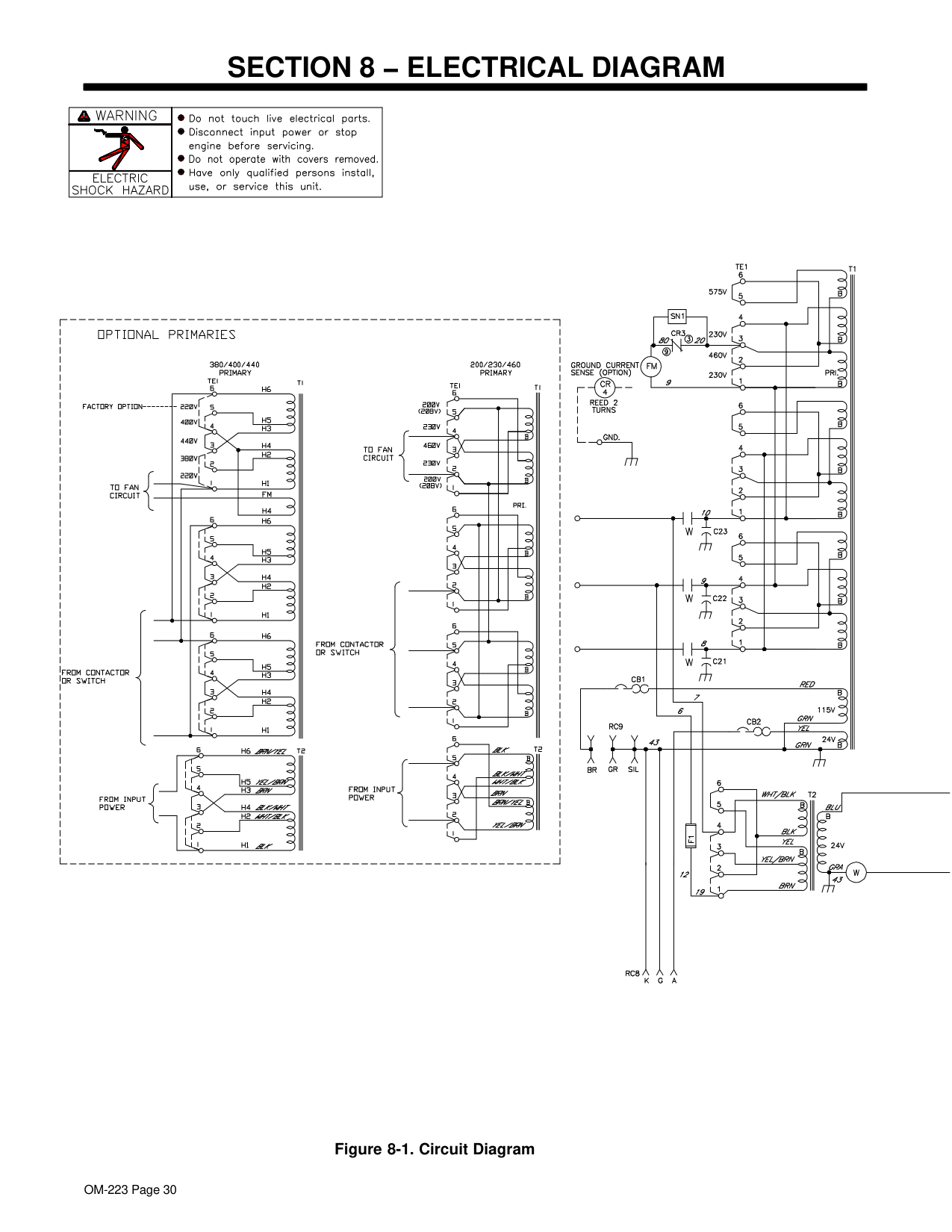
2
| | |---|
56 3
4
186 729-C
Turn control clockwise to increase voltage. Voltmeter value changes as control knob is turned. Control can be adjusted while welding.
For front panel control, place switch in Panel position. For remote control, place switch in Remote position, and connect remote device (see Section 4-13).
For front panel control of output, place switch in Panel position. For remote control of output, place switch in Remote position, and connect remote device (see Section 4-13).
! Weld output studs are energized only when Output switch is in On position, or while welding.
Voltmeter displays preset voltage with contactor off. Voltmeter and ammeter display actual output voltage and amperage with contactor on.
! Turn Off power before connecting re-
mote device.
##### SECTION 6 − MAINTENANCE & TROUBLESHOOTING
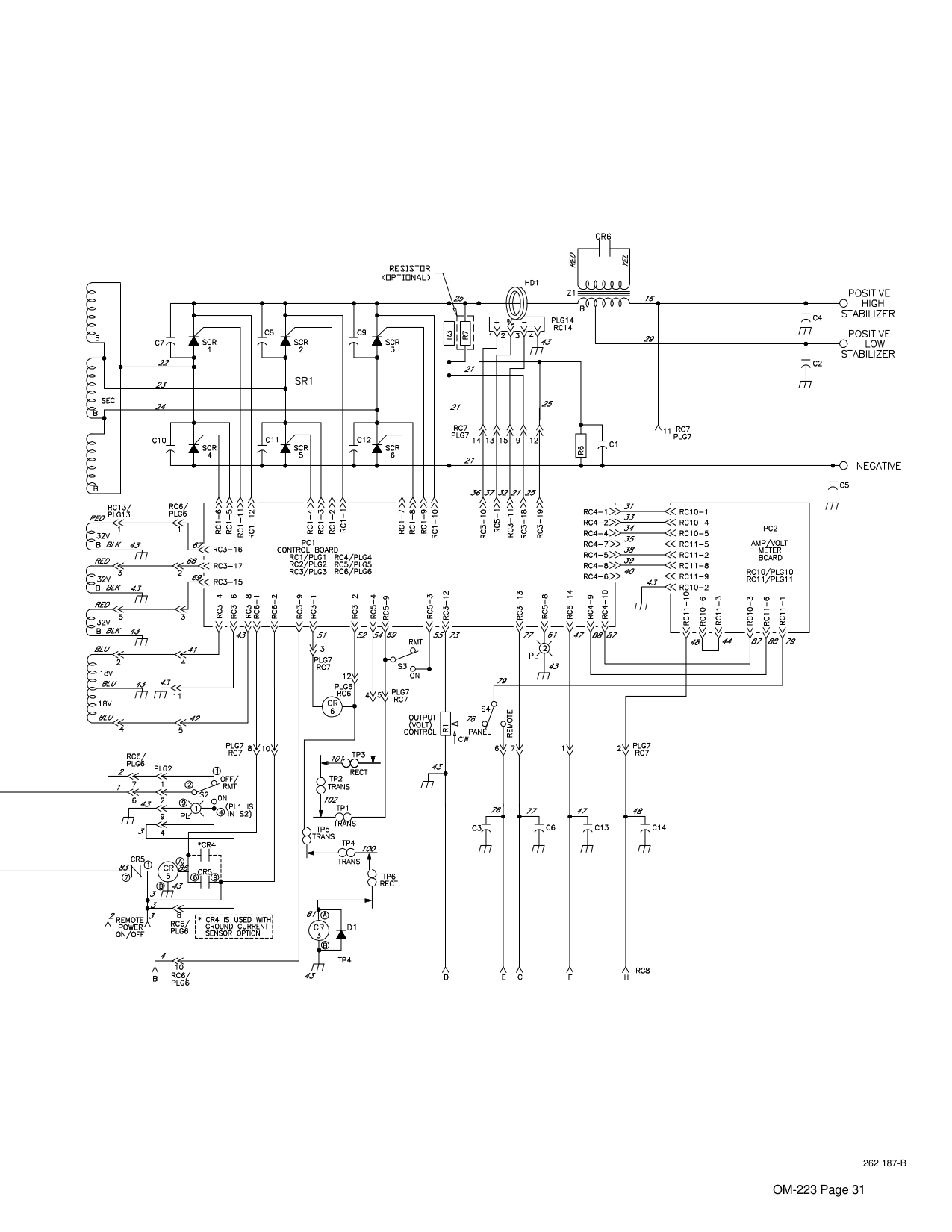
| | | |! Disconnect input power before maintaining.| |---|---|---|---|
| |= Check = Change = Clean Δ = Repair = Replace
* To be done by Factory Authorized Service Agent|= Check = Change = Clean Δ = Repair = Replace
* To be done by Factory Authorized Service Agent|= Check = Change = Clean Δ = Repair = Replace
* To be done by Factory Authorized Service Agent| |---|---|---|---| |Every 3 Months
|Labels|Weld Terminals|Δ Cables And Cords| |Every 6 Months|:During heavy service, clean monthly.|:During heavy service, clean monthly.|:During heavy service, clean monthly.|
! Disconnect input power before opening rear access door.
Fuse F1 protects control transformer from overload. If F1 opens, weld output and fan motor stops. Replace F1.
2 1
Tools Needed:
3/8 in.
Turn Pull Out And Replace Fuse (Install Flat End Of Fuse Into Cover)
Turn
Ref. 800 101-C
########## 6-3. Short Circuit Shutdown
When contact tip is shorted and sticks to workpiece, the unit output falls to a safe operating level. To resume operation, release gun trigger, turn Off unit, and remove contact tip from workpiece. Check contact tip and replace if damaged. Turn On unit to continue operation.

| | | | | | | |---|---|---|---|---|---|
|Trouble|Remedy| |---|---| |No weld output; unit completely inoperative.
|Place line disconnect switch in On position (see Section 4-17).| |No weld output; unit completely inoperative.
|Check fuse F1, and replace if necessary (see Section 6-2).| |No weld output; unit completely inoperative.
|Check and replace line fuse(s), if necessary, or reset circuit breaker (see Section 4-17).| |No weld output; unit completely inoperative.
|Check for proper input power connections (see Section 4-17).| |No weld output; unit completely inoperative.
|Check for proper jumper link position (see Section 4-16).| |No weld output; Power switch pilot light on; fan on.
|If using wire feeder, place Output (Contactor) switch in Remote 14 position, and connect wire feeder (see Sections 4-14 and 4-13). If feeder is not being used, place switch in On position (see Section 5-1).| |No weld output; Power switch pilot light on; fan on.
|Check, repair, or replace feeder (see wire feeder Owner’s Manual).| |No weld output; Power switch pilot light on; fan on.
|Unit overheated. Allow unit to cool with fan On (see Section 4-4).| |No weld output; Power switch pilot light on; fan on.
|Have Factory Authorized Service Agent check control board PC1.| |No weld output; Power switch pilot light on; fan off.|Check for proper input power connections (see Section 4-17).| |No weld output; Power switch pilot light on; fan off.|Check for open line fuse(s), and replace if necessary, or reset circuit breaker (see Section 4-17).| |Unit provides only maximum or minimum weld output.|Have Factory Authorized Service Agent check control board PC1.| |Erratic or improper weld output.
|Use proper size and type of weld cable (see Section 4-11).| |Erratic or improper weld output.
|Clean and tighten all weld connections.| |Erratic or improper weld output.
|Check wire feeder installation according to Owner’s Manual.| |Erratic or improper weld output.
|Have Factory Authorized Service Agent check control board PC1 and/or SCR in main rectifier.| |No 115 volts AC output at duplex receptacle.|Reset supplementary protector CB1 (see Section 4-9).| |No 24 volts AC output at Remote 14 receptacle.|Reset supplementary protector CB2 (see Section 4-9).| |Fan not operating. Note: fan runs only when cooling is necessary.
|Check for and remove anything blocking fan movement.| |Fan not operating. Note: fan runs only when cooling is necessary.
|Have Factory Authorized Service Agent check fan motor.|
##### SECTION 7 − PARTS LIST
########## 7-1. Recommended Spare Parts
Dia. Mkgs.
Part No.
Description
Quantity
Recommended Spare Parts

156065 Fuse, Crtg .5 Amp 600 V Time Delay 1................ .... .............................
#### Notes
###### Work like a Pro!
Pros weld and cut
safely. Read the safety rules at the beginning of this manual.
##### SECTION 8 − ELECTRICAL DIAGRAM
| | | |---|---| | | | | | |
| | | |---|---| | | |
| | | |---|---| | | |
| | | |---|---| | | |
Figure 8-1. Circuit Diagram
###################### 262 187-B
|Warranty Questions?
Call 1-800-4-A-MILLER for your local Miller distributor.


Your distributor also gives you ...
Service You always get the fast, reliable response you need. Most replacement parts can be in your hands in 24 hours.
Support Need fast answers to the tough welding questions? Contact your distributor. The expertise of the distributor and Miller is there to help you, every step of the way.| |---|
Effective January 1, 2013 (Equipment with a serial number preface of MD or newer)

This limited warranty supersedes all previous Miller warranties and is exclusive with no other guarantees or warranties expressed or implied.
LIMITED WARRANTY − Subject to the terms and conditions below, Miller Electric Mfg. Co., Appleton, Wisconsin, warrants to its original retail purchaser that new Miller equipment sold after the effective date of this limited warranty is free of defects in material and workmanship at the time it is shipped by Miller. THIS WARRANTY IS EXPRESSLY IN LIEU OF ALL OTHER WARRANTIES, EXPRESS OR IMPLIED, INCLUDING THE WARRANTIES OF MERCHANTABILITY AND FITNESS.
Within the warranty periods listed below, Miller will repair or replace any warranted parts or components that fail due to such defects in material or workmanship. Miller must be notified in writing within thirty (30) days of such defect or failure, at which time Miller will provide instructions on the warranty claim procedures to be followed.
Miller shall honor warranty claims on warranted equipment listed below in the event of such a failure within the warranty time periods. All warranty time periods start on the delivery date of the equipment to the original end-user purchaser, and not to exceed one year after the equipment is shipped to a North American distributor or eighteen months after the equipment is shipped to an International distributor.
Miller’s True Blue® Limited Warranty shall not apply to:
MILLER PRODUCTS ARE INTENDED FOR PURCHASE AND USE BY COMMERCIAL/INDUSTRIAL USERS AND PERSONS TRAINED AND EXPERIENCED IN THE USE AND MAINTENANCE OF WELDING EQUIPMENT.
In the event of a warranty claim covered by this warranty, the exclusive remedies shall be, at Miller’s option: (1) repair; or (2) replacement; or, where authorized in writing by Miller in appropriate cases, (3) the reasonable cost of repair or replacement at an authorized Miller service station; or (4) payment of or credit for the purchase price (less reasonable depreciation based upon actual use) upon return of the goods at customer’s risk and expense. Miller’s option of repair or replacement will be F.O.B., Factory at Appleton, Wisconsin, or F.O.B. at a Miller authorized service facility as determined by Miller. Therefore no compensation or reimbursement for transportation costs of any kind will be allowed. TO THE EXTENT PERMITTED BY LAW, THE REMEDIES PROVIDED HEREIN ARE THE SOLE AND EXCLUSIVE REMEDIES. IN NO EVENT SHALL MILLER BE LIABLE FOR DIRECT, INDIRECT, SPECIAL, INCIDENTAL OR CONSEQUENTIAL DAMAGES (INCLUDING LOSS OF PROFIT), WHETHER BASED ON CONTRACT, TORT OR ANY OTHER LEGAL THEORY.
ANY EXPRESS WARRANTY NOT PROVIDED HEREIN AND ANY IMPLIED WARRANTY, GUARANTY OR REPRESENTATION AS TO PERFORMANCE, AND ANY REMEDY FOR BREACH OF CONTRACT TORT OR ANY OTHER LEGAL THEORY WHICH, BUT FOR THIS PROVISION, MIGHT ARISE BY IMPLICATION, OPERATION OF LAW, CUSTOM OF TRADE OR COURSE OF DEALING, INCLUDING ANY IMPLIED WARRANTY OF MERCHANTABILITY OR FITNESS FOR PARTICULAR PURPOSE, WITH RESPECT TO ANY AND ALL EQUIPMENT FURNISHED BY MILLER IS EXCLUDED AND DISCLAIMED BY MILLER.
Some states in the U.S.A. do not allow limitations of how long an implied warranty lasts, or the exclusion of incidental, indirect, special or consequential damages, so the above limitation or exclusion may not apply to you. This warranty provides specific legal rights, and other rights may be available, but may vary from state to state.
In Canada, legislation in some provinces provides for certain additional warranties or remedies other than as stated herein, and to the extent that they may not be waived, the limitations and exclusions set out above may not apply. This Limited Warranty provides specific legal rights, and other rights may be available, but may vary from province to province.
miller_warr 2013-01
#### Owner’s Record
Please complete and retain with your personal records.
############# Model Name Serial/Style Number
Purchase Date (Date which equipment was delivered to original customer.)
Distributor
Address
City
State Zip
#### For Service
######### Contact a DISTRIBUTOR or SERVICE AGENCY near you.
Always provide Model Name and Serial/Style Number.
Contact your Distributor for:
Welding Supplies and Consumables Options and Accessories Personal Safety Equipment Service and Repair Replacement Parts Training (Schools, Videos, Books) Technical Manuals (Servicing Information and Parts) Circuit Diagrams Welding Process Handbooks
To locate a Distributor or Service Agency visit www.millerwelds.com or call 1-800-4-A-Miller
Contact the Delivering Carrier to:
File a claim for loss or damage during shipment.
For assistance in filing or settling claims, contact your distributor and/or equipment manufacturer’s Transportation Department.
ORIGINAL INSTRUCTIONS − PRINTED IN USA © 2013 Miller Electric Mfg. Co. 2013−01
|Miller Electric Mfg. Co. An Illinois Tool Works Company 1635 West Spencer Street Appleton, WI 54914 USA
International Headquarters−USA USA Phone: 920-735-4505 Auto-Attended USA & Canada FAX: 920-735-4134 International FAX: 920-735-4125
For International Locations Visit www.MillerWelds.com

| |---|