
Ask AI
— answers from the official manualAnswers from the official manual.
Common questions
Common Questions
30 totalWhat are the rated welding outputs for the Bobcat 225GP in each welding mode?
The CC/AC mode is rated at 225A, 25V at 100% duty cycle; the CC/DC mode is rated at 210A, 25V at 100% duty cycle; and the CV/DC mode is rated at 200A, 20V at 100% duty cycle. The weld output ranges are 50–225A for CC/AC, 50–210A for CC/DC, and 17–28V for CV/DC. (Page 1)
What should I do if there is no weld output from the machine?
First check control settings and weld connections, then check fuse F1 and replace it if open. Also make sure all equipment is disconnected from receptacles when starting the unit. If the problem persists, have a Factory Authorized Service Agent check the brushes, slip rings, and integrated rectifier SR2, and check plug PLG6 connection. (Page 18)
What does fuse F1 protect, and what happens if it blows?
Fuse F1 protects the generator excitation circuit. If F1 opens, there will be no or low weld and auxiliary power output. Replace any open fuses and reinstall the panel before operating the unit. (Page 17)
What should I do if the engine will not crank?
Check fuse F6 and replace it if open, then check battery voltage and tighten battery connections if necessary. Also check plug PLG4 and plug PLG8 connections. If the problem continues, have a Factory Authorized Service Agent check Engine Control switch S2. (Page 19)
How do I service the air cleaner on the Bobcat 225GP?
Wash the precleaner with a soap and water solution, allow it to air dry completely, then spread 1 tablespoon of SAE 30 oil evenly into the precleaner and squeeze out the excess oil. Replace the filter element if it is dirty or oily. Do not run the engine without the air cleaner or with a dirty element. (Page 14)
What is the duty cycle rating of the welding generator?
The unit is rated at 100% duty cycle at 225 amperes AC, 210 amperes CC/DC, and 200 amperes CV/DC, meaning it can weld continuously at those rated loads without overheating. Exceeding the duty cycle can damage the unit and void the warranty. (Page 9)
Show 24 more questions
How do I safely stop and start the engine, including using the choke?
What routine maintenance intervals should I follow for the welding generator?
What is the maximum auxiliary power output, and how does welding affect it?
How do I reset fuses that keep opening in my welding generator?
How do I check for fuel leaks after replacing the fuel filter and line?
How do I perform regular maintenance on my welding generator?
How do I troubleshoot low weld output?
How can I prevent damage due to exceeding duty cycle ratings during welding?
How do I install optional spark arrestors safely?
What safety precautions should I follow to prevent electric shock while welding?
How do I install the gas supply on my Miller Migmatic 175?
What is the duty cycle for my Miller Migmatic 175 at different amperage settings?
How do I replace the drive roll on my Miller Migmatic 175?
How do I adjust the wire pressure adjustment knob on my welding equipment?
What should I do if my Miller Migmatic 175 does not produce weld output?
What are the environmental specifications for my Miller Migmatic 175?
How do I change the drive roll and wire inlet guide on my welding equipment?
How do I install the wire feed assembly on my welding equipment?
How do I connect the input power for my Miller Migmatic 175?
How often should I perform routine maintenance on my welding equipment?
How do I replace the air cleaner on the engine?
What should I do if the battery discharges between uses?
How do I adjust the engine speed?
What should I do if the engine starts but stops when the Engine Control switch returns to Run position?
Full Manual
32 pages
|Visit our website at www.MillerWelds.com
| |---|


OM-259 158C 2015-06
Processes

MIG (GMAW) Welding Flux Cored (FCAW) Welding
Description


Arc Welding Power Source and Wire Feeder
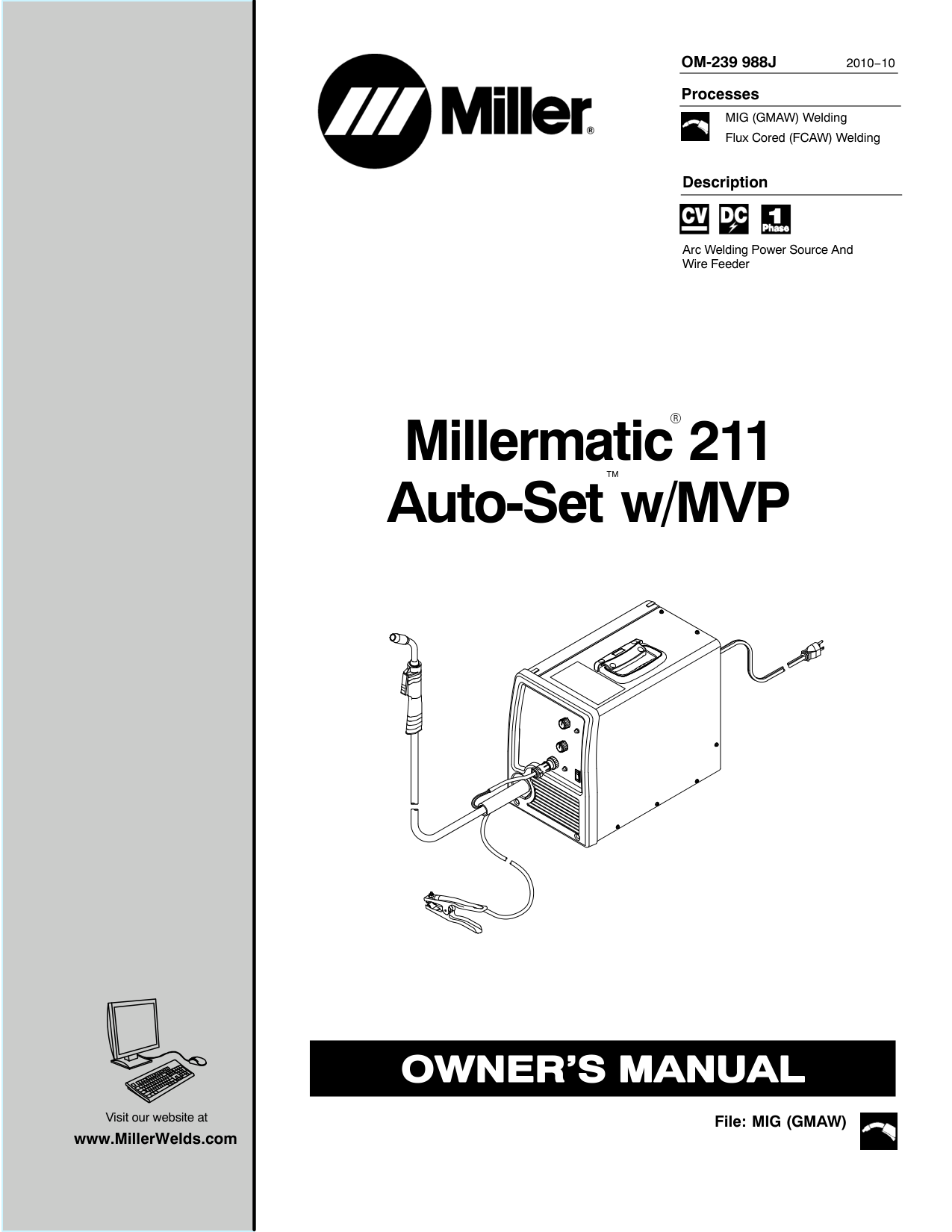
Migmatic 175
CE
OWNER’S MANUAL
From Miller to You
Thank you and congratulations on choosing Miller. Now you can get the job done and get it done right. We know you don’t have time to do it any other way.
That’s why when Niels Miller first started building arc welders in 1929, he made sure his products offered long-lasting value and superior quality. Like you, his customers couldn’t afford anything less. Miller products had to be more than the best they could be. They had to be the best you could buy.
Today, the people that build and sell Miller products continue the tradition. They’re just as committed to providing equipment and service that meets the high standards of quality and value established in 1929. This Owner’s Manual is designed to help you get the most out of your Miller products. Please take time to read the Safety precautions. They will help you protect yourself against potential hazards on the worksite. We’ve made installation and operation quick and easy. With Miller you can count on years of reliable service with proper maintenance. And if for some reason the unit needs repair, there’s a Troubleshooting section that will help you figure out what the problem is. The parts list will then help you to decide which exact part you may need to fix the problem. Warranty and service information for your particular model are also provided.

Miller Electric manufactures a full line of welders and welding related equipment. For information on other quality Miller products, contact your local Miller distributor to receive the latest full line catalog or individual catalog sheets.
|
Working as hard as you do − every power source from Miller is backed by the most hassle-free warranty in the business.

| |---|
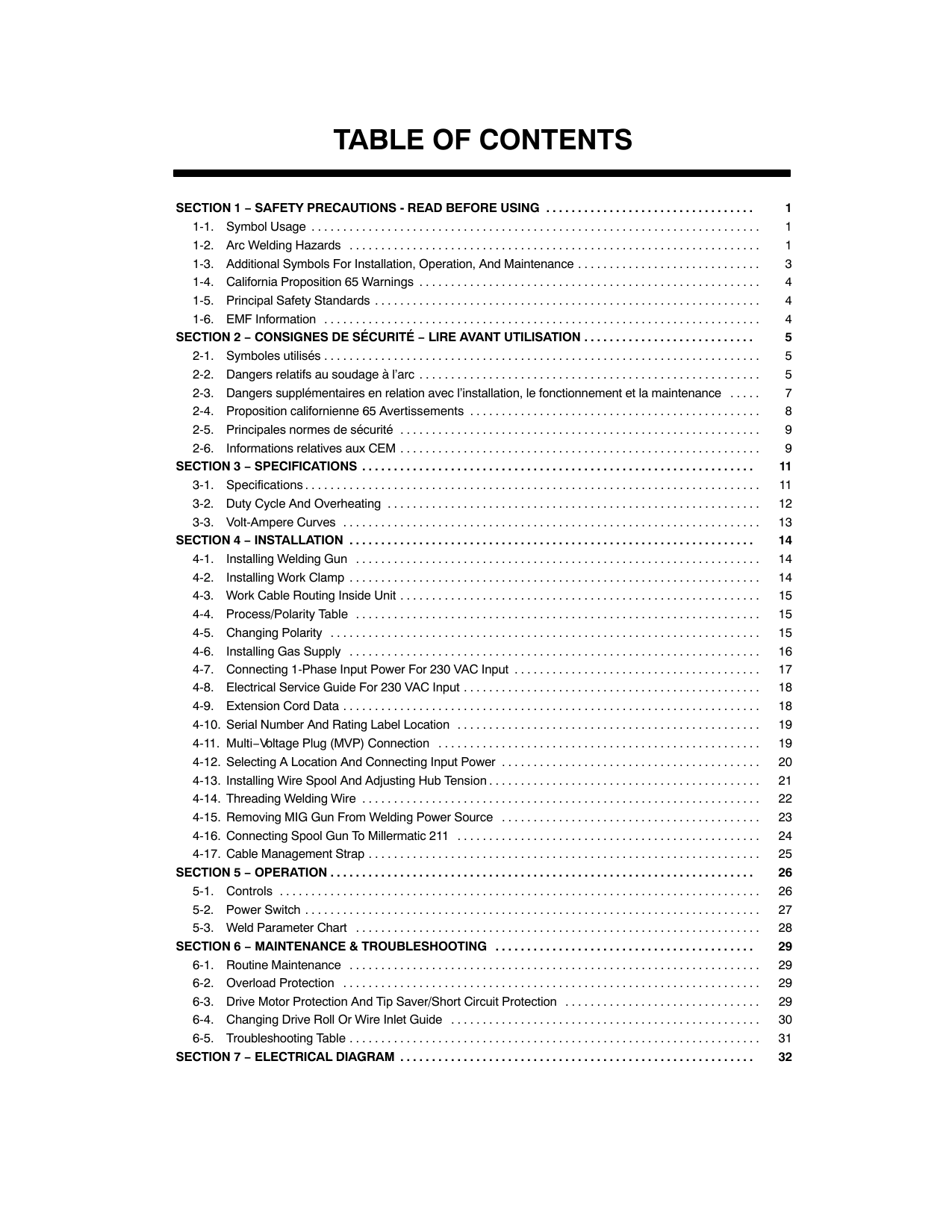
#### TABLE OF CONTENTS
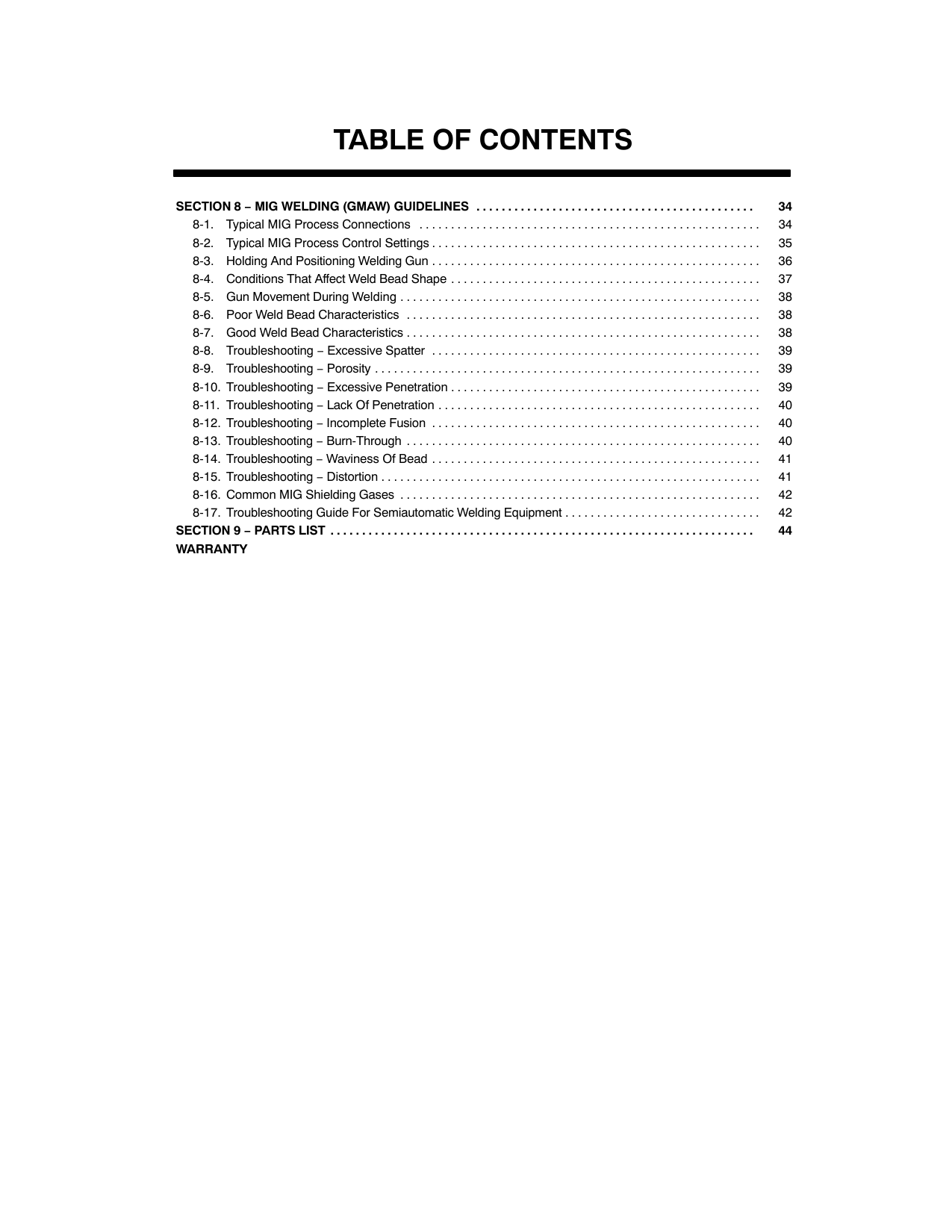
SECTION 6 − MAINTENANCE AND TROUBLESHOOTING 19......................................
##### DECLARATION OF CONFORMITY

for European Community (CE marked) products.
ITW Welding Italy S.r.l Via Privata Iseo 6/E, 20098 San Giuliano M.se, (MI) Italy declares that the product(s) identified in this declaration conform to the essential requirements and provisions of the stated Council Directive(s) and Standard(s).
Product/Apparatus Identification:
|Product|Stock Number| |---|---| |MIGMATIC 175, 230VAC|029015550|
Council Directives:
·2006/95/EC Low Voltage
·2004/108/EC Electromagnetic Compatibility
·2011/65/EU Restriction of the use of certain hazardous substances in electrical and electronic equipment Standards:
·IEC 60974-1:2012 Arc Welding Equipment – Part 1: Welding Power Sources
·IEC 60974-5:2007 Arc Welding Equipment – Part 5: Wire Feeders
·IEC 60974-10:2007 Arc Welding Equipment – Part 10: Electromagnetic Compatibility Requirements
EU Signatory:

June 30th, 2015 ___________________________________________________________________________________ Massimigliano Lavarini Date of Declaration
ITW WELDING ITALY PRODUCTION MANAGER
956 172 235
##### SECTION 1 − SAFETY PRECAUTIONS - READ BEFORE USING
som 2013−09
7
Protect yourself and others from injury — read, follow, and save these important safety precautions and operating instructions.
####### 1-1. Symbol Usage
DANGER! − Indicates a hazardous situation which, if not avoided, will result in death or serious injury. The possible hazards are shown in the adjoining symbols or explained in the text.
Indicates a hazardous situation which, if not avoided, could result in death or serious injury. The possible hazards are shown in the adjoining symbols or explained in the text.
NOTICE − Indicates statements not related to personal injury.
Indicates special instructions.
| | | | |---|---|---|
This group of symbols means Warning! Watch Out! ELECTRIC SHOCK, MOVING PARTS, and HOT PARTS hazards. Consult symbols and related instructions below for necessary actions to avoid the hazards.
####### 1-2. Arc Welding Hazards
The symbols shown below are used throughout this manual to call attention to and identify possible hazards. When you see the symbol, watch out, and follow the related instructions to avoid the hazard. The safety information given below is only a summary of the more complete safety information found in the Safety Standards listed in Section 1-5. Read and follow all Safety Standards.
Only qualified persons should install, operate, maintain, and repair this unit.
During operation, keep everybody, especially children, away.
| | |---|
| |
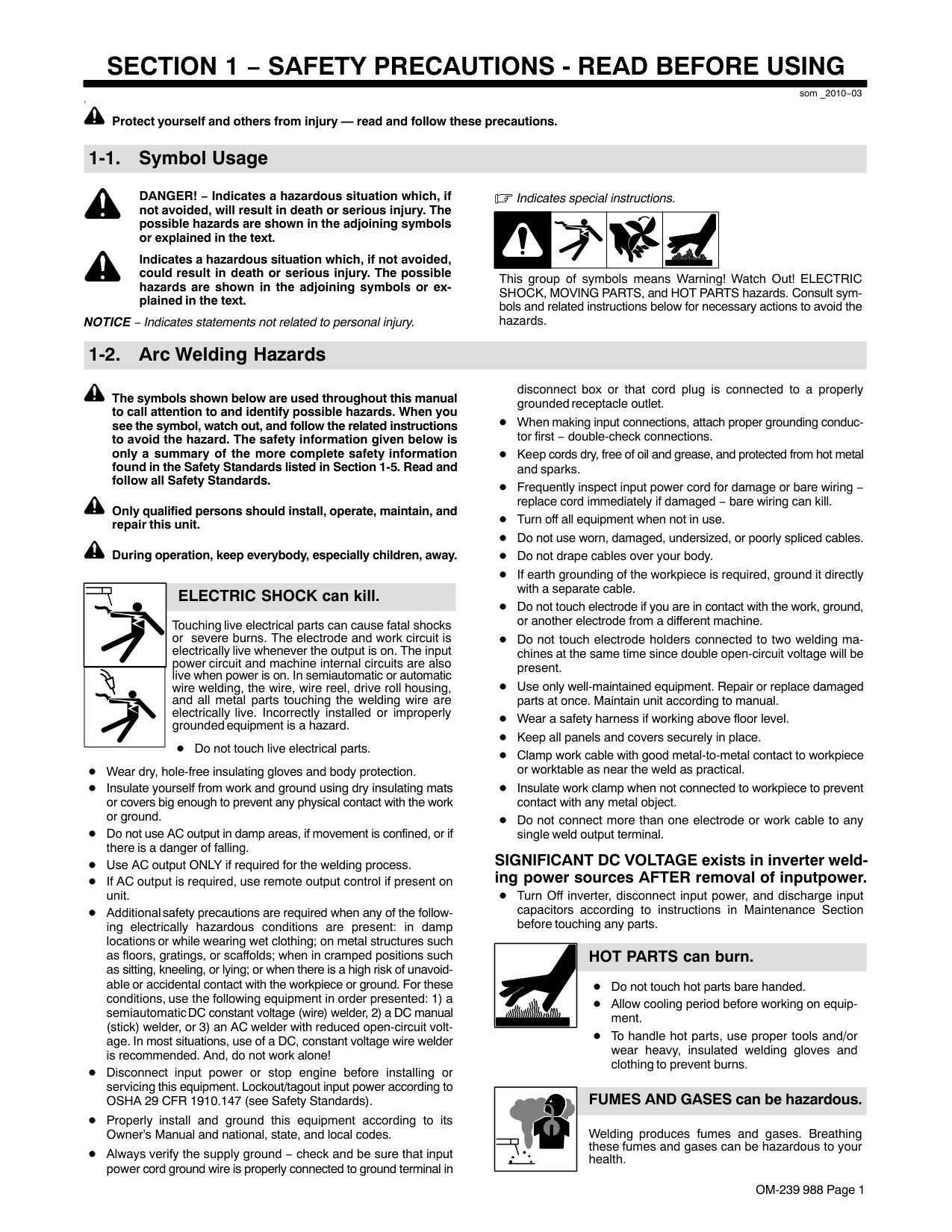
######## ELECTRIC SHOCK can kill.
Touching live electrical parts can cause fatal shocks or severe burns. The electrode and work circuit is electrically live whenever the output is on. The input power circuit and machine internal circuits are also live when power is on. In semiautomatic or automatic wire welding, the wire, wire reel, drive roll housing, and all metal parts touching the welding wire are electrically live. Incorrectly installed or improperly grounded equipment is a hazard.
Do not touch live electrical parts.
Wear dry, hole-free insulating gloves and body protection.
Insulate yourself from work and ground using dry insulating mats or covers big enough to prevent any physical contact with the work or ground.
Do not use AC output in damp areas, if movement is confined, or if there is a danger of falling. Use AC output ONLY if required for the welding process. If AC output is required, use remote output control if present on unit.
Additional safety precautions are required when any of the following electrically hazardous conditions are present: in damp locations or while wearing wet clothing; on metal structures such as floors, gratings, or scaffolds; when in cramped positions such as sitting, kneeling, or lying; or when there is a high risk of unavoidable or accidental contact with the workpiece or ground. For these conditions, use the following equipment in order presented: 1) a semiautomatic DC constant voltage (wire) welder, 2) a DC manual (stick) welder, or 3) an AC welder with reduced open-circuit voltage. In most situations, use of a DC, constant voltage wire welder is recommended. And, do not work alone!
Disconnect input power or stop engine before installing or servicing this equipment. Lockout/tagout input power according to OSHA 29 CFR 1910.147 (see Safety Standards).
Properly install, ground, and operate this equipment according to its Owner’s Manual and national, state, and local codes.
Always verify the supply ground − check and be sure that input power cord ground wire is properly connected to ground terminal in
disconnect box or that cord plug is connected to a properly grounded receptacle outlet. When making input connections, attach proper grounding conductor first − double-check connections. Keep cords dry, free of oil and grease, and protected from hot metal and sparks.
Frequently inspect input power cord and ground conductor for damage or bare wiring – replace immediately if damaged – bare wiring can kill.
Turn off all equipment when not in use. Do not use worn, damaged, undersized, or repaired cables. Do not drape cables over your body. If earth grounding of the workpiece is required, ground it directly with a separate cable. Do not touch electrode if you are in contact with the work, ground, or another electrode from a different machine.
Do not touch electrode holders connected to two welding machines at the same time since double open-circuit voltage will be present.
Use only well-maintained equipment. Repair or replace damaged parts at once. Maintain unit according to manual. Wear a safety harness if working above floor level. Keep all panels and covers securely in place. Clamp work cable with good metal-to-metal contact to workpiece or worktable as near the weld as practical. Insulate work clamp when not connected to workpiece to prevent contact with any metal object.
Do not connect more than one electrode or work cable to any single weld output terminal. Disconnect cable for process not in use.
Use GFCI protection when operating auxiliary equipment in damp or wet locations.
######## SIGNIFICANT DC VOLTAGE exists in inverter welding power sources AFTER removal of input power.
Turn Off inverter, disconnect input power, and discharge input capacitors according to instructions in Maintenance Section before touching any parts.
| | |---|
| |
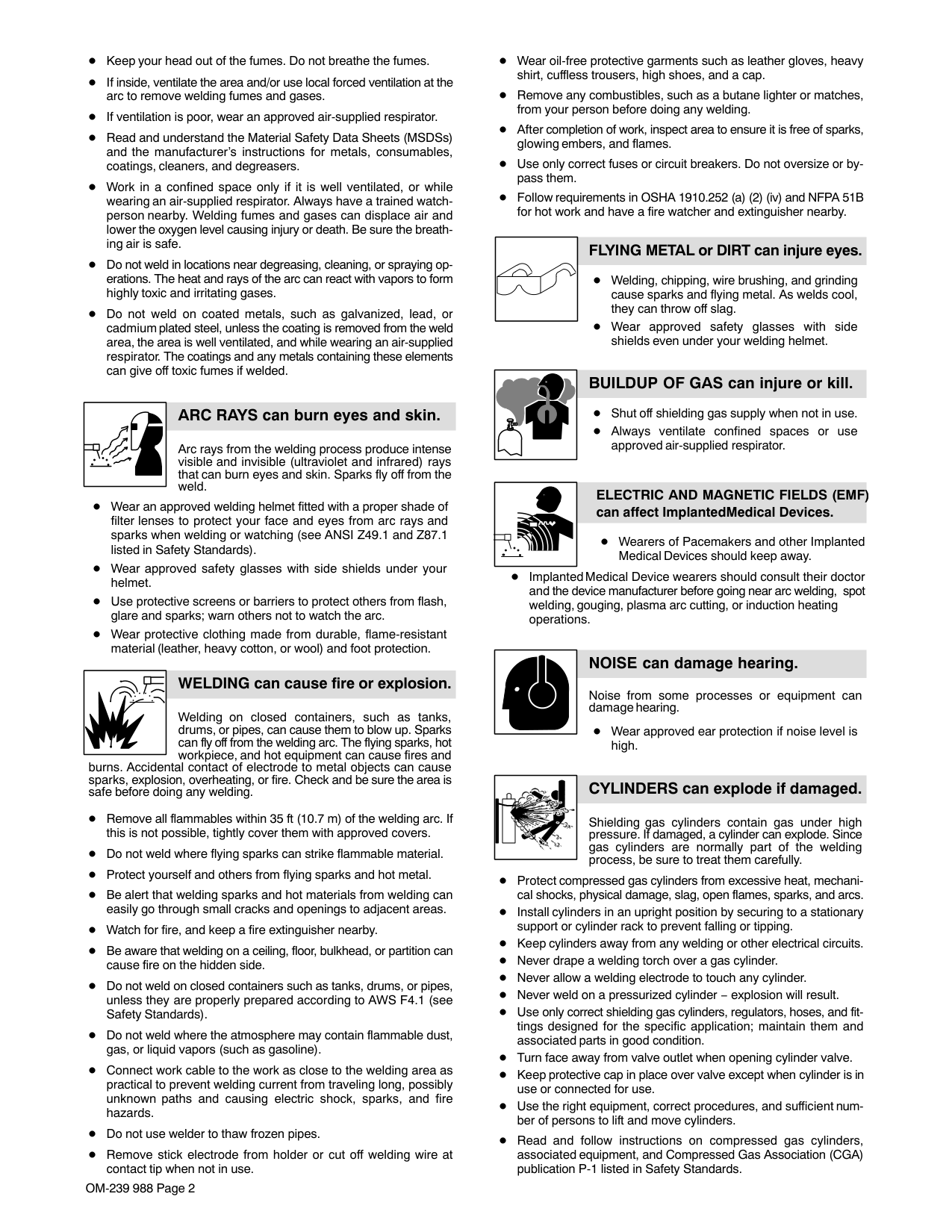
######## HOT PARTS can burn.
Do not touch hot parts bare handed. Allow cooling period before working on equipment.
To handle hot parts, use proper tools and/or wear heavy, insulated welding gloves and clothing to prevent burns.
| | |---|
########### FUMES AND GASES can be hazardous.
Welding produces fumes and gases. Breathing these fumes and gases can be hazardous to your health.
Keep your head out of the fumes. Do not breathe the fumes. If inside, ventilate the area and/or use local forced ventilation at the arc to remove welding fumes and gases. The recommended way to determine adequate ventilation is to sample for the composition and quantity of fumes and gases to which personnel are exposed. If ventilation is poor, wear an approved air-supplied respirator.
Read and understand the Safety Data Sheets (SDSs) and the manufacturer’s instructions for adhesives, coatings, cleaners, consumables, coolants, degreasers, fluxes, and metals.
Work in a confined space only if it is well ventilated, or while wearing an air-supplied respirator. Always have a trained watchperson nearby. Welding fumes and gases can displace air and lower the oxygen level causing injury or death. Be sure the breathing air is safe.
Do not weld in locations near degreasing, cleaning, or spraying operations. The heat and rays of the arc can react with vapors to form highly toxic and irritating gases.
Do not weld on coated metals, such as galvanized, lead, or cadmium plated steel, unless the coating is removed from the weld area, the area is well ventilated, and while wearing an air-supplied respirator. The coatings and any metals containing these elements can give off toxic fumes if welded.
| | |---|
######## ARC RAYS can burn eyes and skin.
Arc rays from the welding process produce intense visible and invisible (ultraviolet and infrared) rays that can burn eyes and skin. Sparks fly off from the weld.
Wear an approved welding helmet fitted with a proper shade of filter lenses to protect your face and eyes from arc rays and sparks when welding or watching (see ANSI Z49.1 and Z87.1 listed in Safety Standards).
Wear approved safety glasses with side shields under your helmet. Use protective screens or barriers to protect others from flash, glare and sparks; warn others not to watch the arc.
Wear body protection made from durable, flame−resistant material (leather, heavy cotton, wool). Body protection includes oil-free clothing such as leather gloves, heavy shirt, cuffless trousers, high shoes, and a cap.
| | |---|
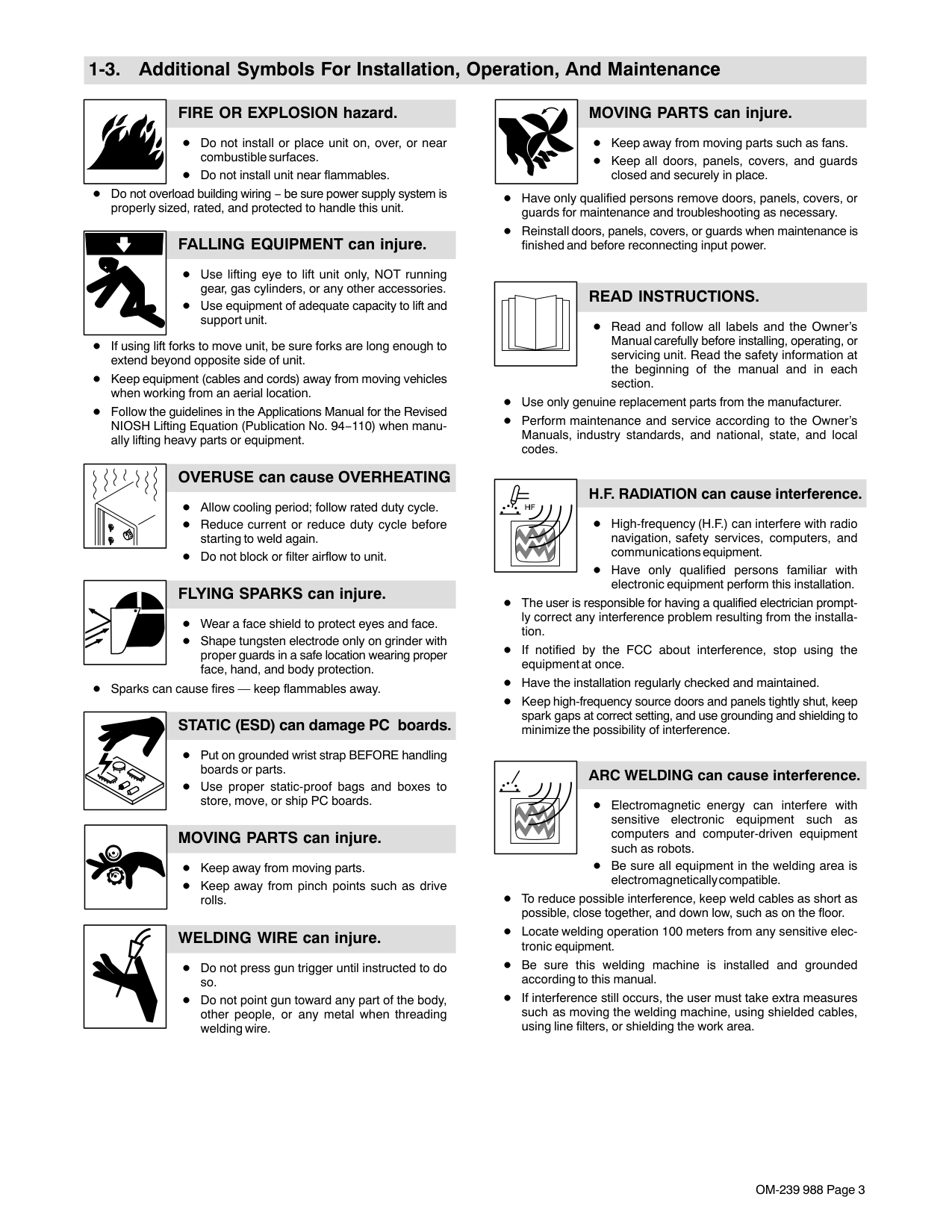
########## WELDING can cause fire or explosion.
Welding on closed containers, such as tanks, drums, or pipes, can cause them to blow up. Sparks can fly off from the welding arc. The flying sparks, hot workpiece, and hot equipment can cause fires and
burns. Accidental contact of electrode to metal objects can cause sparks, explosion, overheating, or fire. Check and be sure the area is safe before doing any welding.
Remove all flammables within 35 ft (10.7 m) of the welding arc. If this is not possible, tightly cover them with approved covers. Do not weld where flying sparks can strike flammable material. Protect yourself and others from flying sparks and hot metal. Be alert that welding sparks and hot materials from welding can easily go through small cracks and openings to adjacent areas. Watch for fire, and keep a fire extinguisher nearby. Be aware that welding on a ceiling, floor, bulkhead, or partition can cause fire on the hidden side.
Do not weld on containers that have held combustibles, or on closed containers such as tanks, drums, or pipes unless they are properly prepared according to AWS F4.1 and AWS A6.0 (see Safety Standards).
Do not weld where the atmosphere may contain flammable dust, gas, or liquid vapors (such as gasoline).
Connect work cable to the work as close to the welding area as practical to prevent welding current from traveling long, possibly unknown paths and causing electric shock, sparks, and fire hazards.
Do not use welder to thaw frozen pipes.
Remove stick electrode from holder or cut off welding wire at contact tip when not in use.
Wear body protection made from durable, flame−resistant material (leather, heavy cotton, wool). Body protection includes oil-free clothing such as leather gloves, heavy shirt, cuffless trousers, high shoes, and a cap.
Remove any combustibles, such as a butane lighter or matches, from your person before doing any welding. After completion of work, inspect area to ensure it is free of sparks, glowing embers, and flames. Use only correct fuses or circuit breakers. Do not oversize or bypass them. Follow requirements in OSHA 1910.252 (a) (2) (iv) and NFPA 51B for hot work and have a fire watcher and extinguisher nearby.
Read and understand the Safety Data Sheets (SDSs) and the manufacturer s instructions for adhesives, coatings, cleaners, consumables, coolants, degreasers, fluxes, and metals.
########### FLYING METAL or DIRT can injure eyes.
Welding, chipping, wire brushing, and grinding cause sparks and flying metal. As welds cool, they can throw off slag.
Wear approved safety glasses with side shields even under your welding helmet.
######## BUILDUP OF GAS can injure or kill.
Shut off compressed gas supply when not in use. Always ventilate confined spaces or use approved air-supplied respirator.
| | |---|
############# ELECTRIC AND MAGNETIC FIELDS (EMF) can affect Implanted Medical Devices.
Wearers of Pacemakers and other Implanted Medical Devices should keep away.
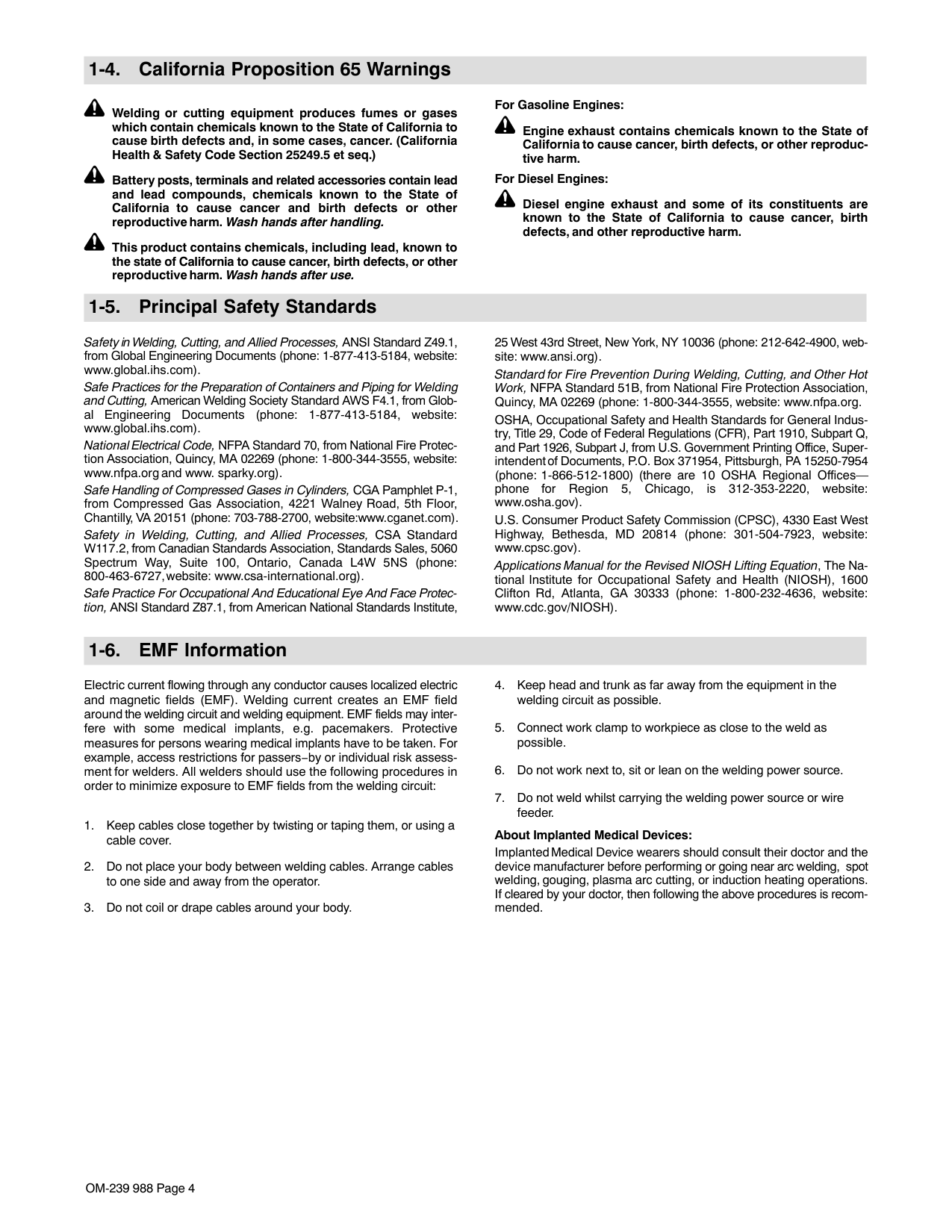
Implanted Medical Device wearers should consult their doctor and the device manufacturer before going near arc welding, spot welding, gouging, plasma arc cutting, or induction heating operations.
| | |---|
######## NOISE can damage hearing.
Noise from some processes or equipment can damage hearing.
Wear approved ear protection if noise level is high.
|| |---|
######## CYLINDERS can explode if damaged.
Compressed gas cylinders contain gas under high pressure. If damaged, a cylinder can explode. Since gas cylinders are normally part of the welding process, be sure to treat them carefully.
Protect compressed gas cylinders from excessive heat, mechanical shocks, physical damage, slag, open flames, sparks, and arcs. Install cylinders in an upright position by securing to a stationary support or cylinder rack to prevent falling or tipping. Keep cylinders away from any welding or other electrical circuits. Never drape a welding torch over a gas cylinder. Never allow a welding electrode to touch any cylinder. Never weld on a pressurized cylinder − explosion will result.
Use only correct compressed gas cylinders, regulators, hoses, and fittings designed for the specific application; maintain them and associated parts in good condition.
Turn face away from valve outlet when opening cylinder valve. Do not stand in front of or behind the regulator when opening the valve. Keep protective cap in place over valve except when cylinder is in use or connected for use. Use the right equipment, correct procedures, and sufficient number of persons to lift and move cylinders.
Read and follow instructions on compressed gas cylinders, associated equipment, and Compressed Gas Association (CGA) publication P-1 listed in Safety Standards.
####### 1-3. Additional Symbols For Installation, Operation, And Maintenance
######## FIRE OR EXPLOSION hazard.
Do not install or place unit on, over, or near combustible surfaces. Do not install unit near flammables.
Do not overload building wiring − be sure power supply system is properly sized, rated, and protected to handle this unit.
######## FALLING EQUIPMENT can injure.
Use lifting eye to lift unit only, NOT running gear, gas cylinders, or any other accessories. Use equipment of adequate capacity to lift and support unit.
If using lift forks to move unit, be sure forks are long enough to extend beyond opposite side of unit.
Keep equipment (cables and cords) away from moving vehicles when working from an aerial location.
Follow the guidelines in the Applications Manual for the Revised NIOSH Lifting Equation (Publication No. 94−110) when manually lifting heavy parts or equipment.
######## OVERUSE can cause OVERHEATING
Allow cooling period; follow rated duty cycle. Reduce current or reduce duty cycle before starting to weld again. Do not block or filter airflow to unit.
######## FLYING SPARKS can injure.
Wear a face shield to protect eyes and face.
Shape tungsten electrode only on grinder with proper guards in a safe location wearing proper face, hand, and body protection.
Sparks can cause fires — keep flammables away.
########## STATIC (ESD) can damage PC boards.
Put on grounded wrist strap BEFORE handling boards or parts. Use proper static-proof bags and boxes to store, move, or ship PC boards.
######## MOVING PARTS can injure.
Keep away from moving parts. Keep away from pinch points such as drive rolls.
######## WELDING WIRE can injure.
Do not press gun trigger until instructed to do so.
Do not point gun toward any part of the body, other people, or any metal when threading welding wire.
########## BATTERY EXPLOSION can injure.
Do not use welder to charge batteries or jump start vehicles unless it has a battery charging feature designed for this purpose.
######## MOVING PARTS can injure.
Keep away from moving parts such as fans. Keep all doors, panels, covers, and guards closed and securely in place.
Have only qualified persons remove doors, panels, covers, or guards for maintenance and troubleshooting as necessary. Reinstall doors, panels, covers, or guards when maintenance is finished and before reconnecting input power.
######## READ INSTRUCTIONS.
Read and follow all labels and the Owner’s Manual carefully before installing, operating, or servicing unit. Read the safety information at the beginning of the manual and in each section.
Use only genuine replacement parts from the manufacturer.
Perform maintenance and service according to the Owner’s Manuals, industry standards, and national, state, and local codes.
############ H.F. RADIATION can cause interference.
High-frequency (H.F.) can interfere with radio navigation, safety services, computers, and communications equipment.
Have only qualified persons familiar with electronic equipment perform this installation.
The user is responsible for having a qualified electrician promptly correct any interference problem resulting from the installation.
If notified by the FCC about interference, stop using the equipment at once. Have the installation regularly checked and maintained.
Keep high-frequency source doors and panels tightly shut, keep spark gaps at correct setting, and use grounding and shielding to minimize the possibility of interference.
| | |---|
############ ARC WELDING can cause interference.
Electromagnetic energy can interfere with sensitive electronic equipment such as computers and computer-driven equipment such as robots.
Be sure all equipment in the welding area is electromagnetically compatible.
To reduce possible interference, keep weld cables as short as possible, close together, and down low, such as on the floor.
Locate welding operation 100 meters from any sensitive electronic equipment. Be sure this welding machine is installed and grounded according to this manual.
If interference still occurs, the user must take extra measures such as moving the welding machine, using shielded cables, using line filters, or shielding the work area.
####### 1-4. California Proposition 65 Warnings
Welding or cutting equipment produces fumes or gases which contain chemicals known to the State of California to cause birth defects and, in some cases, cancer. (California Health & Safety Code Section 25249.5 et seq.)
This product contains chemicals, including lead, known to the state of California to cause cancer, birth defects, or other reproductive harm. Wash hands after use.
####### 1-5. Principal Safety Standards
Safety in Welding, Cutting, and Allied Processes, ANSI Standard Z49.1, is available as a free download from the American Welding Society at http://www.aws.org or purchased from Global Engineering Documents (phone: 1-877-413-5184, website: www.global.ihs.com).
Safe Practices for the Preparation of Containers and Piping for Welding and Cutting, American Welding Society Standard AWS F4.1, from Global Engineering Documents (phone: 1-877-413-5184, website: www.global.ihs.com).
Safe Practices for Welding and Cutting Containers that have Held Combustibles, American Welding Society Standard AWS A6.0, from Global Engineering Documents (phone: 1-877-413-5184, website: www.global.ihs.com).
National Electrical Code, NFPA Standard 70, from National Fire Protection Association, Quincy, MA 02269 (phone: 1-800-344-3555, website: www.nfpa.org and www. sparky.org).
Safe Handling of Compressed Gases in Cylinders, CGA Pamphlet P-1, from Compressed Gas Association, 14501 George Carter Way, Suite 103, Chantilly, VA 20151 (phone: 703-788-2700, website:www.cganet.com).
Safety in Welding, Cutting, and Allied Processes, CSA Standard W117.2, from Canadian Standards Association, Standards Sales, 5060
Spectrum Way, Suite 100, Ontario, Canada L4W 5NS (phone: 800-463-6727, website: www.csa-international.org).
Safe Practice For Occupational And Educational Eye And Face Protection, ANSI Standard Z87.1, from American National Standards Institute, 25 West 43rd Street, New York, NY 10036 (phone: 212-642-4900, website: www.ansi.org).
Standard for Fire Prevention During Welding, Cutting, and Other Hot Work, NFPA Standard 51B, from National Fire Protection Association, Quincy, MA 02269 (phone: 1-800-344-3555, website: www.nfpa.org.
OSHA, Occupational Safety and Health Standards for General Industry, Title 29, Code of Federal Regulations (CFR), Part 1910, Subpart Q, and Part 1926, Subpart J, from U.S. Government Printing Office, Superintendent of Documents, P.O. Box 371954, Pittsburgh, PA 15250-7954 (phone: 1-866-512-1800) (there are 10 OSHA Regional Officesphone for Region 5, Chicago, is 312-353-2220, website: www.osha.gov).
Applications Manual for the Revised NIOSH Lifting Equation, The National Institute for Occupational Safety and Health (NIOSH), 1600 Clifton Rd, Atlanta, GA 30333 (phone: 1-800-232-4636, website: www.cdc.gov/NIOSH).
####### 1-6. EMF Information
Electric current flowing through any conductor causes localized electric and magnetic fields (EMF). The current from arc welding (and allied processes including spot welding, gouging, plasma arc cutting, and induction heating operations) creates an EMF field around the welding circuit. EMF fields may interfere with some medical implants, e.g. pacemakers. Protective measures for persons wearing medical implants have to be taken. For example, restrict access for passers−by or conduct individual risk assessment for welders. All welders should use the following procedures in order to minimize exposure to EMF fields from the welding circuit:
############## About Implanted Medical Devices:
Implanted Medical Device wearers should consult their doctor and the device manufacturer before performing or going near arc welding, spot welding, gouging, plasma arc cutting, or induction heating operations. If cleared by your doctor, then following the above procedures is recommended.
#### SECTION 2 − DEFINITIONS
####### 2-1. Additional Safety Symbols And Definitions
Some symbols are found only on CE products.
| |Warning! Watch Out! There are possible hazards as shown by the symbols.
Safe1 2012−05| |---|---| | |Do not discard product (where applicable) with general waste. Reuse or recycle Waste Electrical and Electronic Equipment (WEEE) by disposing at a designated collection facility. Contact your local recycling office or your local distributor for further information.
Safe37 2012−05| | |Wear dry insulating gloves. Do not touch electrode with bare hand. Do not wear wet or damaged gloves.
Safe2 2012−05| | |Protect yourself from electric shock by insulating yourself from work and ground.
Safe3 2012−05| | |Disconnect input plug or power before working on machine.
Safe5 2012−05| | |Keep your head out of the fumes.
Safe6 2012−05| | |Use forced ventilation or local exhaust to remove the fumes.
Safe8 2012−05| | |Use ventilating fan to remove fumes.
Safe10 2012−05| | |Keep flammables away from welding. Do not weld near flammables.
Safe12 2012−05| | |Welding sparks can cause fires. Have a fire extinguisher nearby, and have a watchperson ready to use it.
Safe14 2012−05|
||Do not weld on drums or any closed containers.
Safe16 2012−05|Do not weld on drums or any closed containers.
Safe16 2012−05| |---|---|---| | |Do not remove or paint over (cover) the label.
Safe20 2012−05|Do not remove or paint over (cover) the label.
Safe20 2012−05| |<10°|Falling unit can cause injury. Do not move or operate unit where it could tip.
Safe53 2012−05|Falling unit can cause injury. Do not move or operate unit where it could tip.
Safe53 2012−05| | | |Wear hat and safety glasses. Use ear protection and button shirt collar. Use welding helmet with correct shade of filter. Wear complete body protection.
Safe38 2012−05| ||Kasjf;laksf;lkasdf'l;aksdf;lkasd;flksadflkasd;lk
|Kasjf;laksf;lkasdf'l;aksdf;lkasd;flksadflkasd;lk Kasjf;laksf;lkasdf'l;aksdf;lkasd;flksadflkasd;lk| |---| | |---|
||Kasjf;laksf;lkasdf'l;aksdf;lkasd;flksadflkasd;lk
|Kasjf;laksf;lkasdf'l;aksdf;lkasd;flksadflkasd;lk Kasjf;laksf;lkasdf'l;aksdf;lkasd;flksadflkasd;lk| |---| | |---|
|Become trained and read the instructions before working on the machine or welding.
Safe40 2012−05|
####### 2-2. Miscellaneous Symbols And Definitions
|A|Amperage| |---|---| |V|Volts| | |Alternating Current (AC)| | |Direct Current (DC)| | |Gas Supply| | |Caution| | |GMAW Gun With Switch| | |Remote| ||s|
|---| |Suitable For Welding In An Environment With Increased Risk Of Electric Shock| | |On|
| |Off| |---|---| | |Protective Earth (Ground)| | |Line Connection| | |Single Phase
Transformer Rectifier| | |Single Phase| | |Gas Metal Arc Welding (GMAW)| |U1|Primary Voltage| |1max|Rated Maximum Supply Current| |1eff|Maximum Effective Supply Current| |U2|Conventional Load Voltage|
|I2|Rated Welding Current| |---|---| |X|Duty Cycle| | |Percent| |U0|Rated No Load Voltage (OCV)| |IP|Degree Of Protection| | |Voltage Input| | |Wire Feed| |Hz|Hertz| | |Read Operator’s Manual| | |Gas Input|
| |Gas Output| |---|---| | |Gas Type|
| |Positive| |---|---|
| |Negative| |---|---| | |Input|
Notes
#### SECTION 3 − SPECIFICATIONS
####### 3-1. Serial Number And Rating Label Location
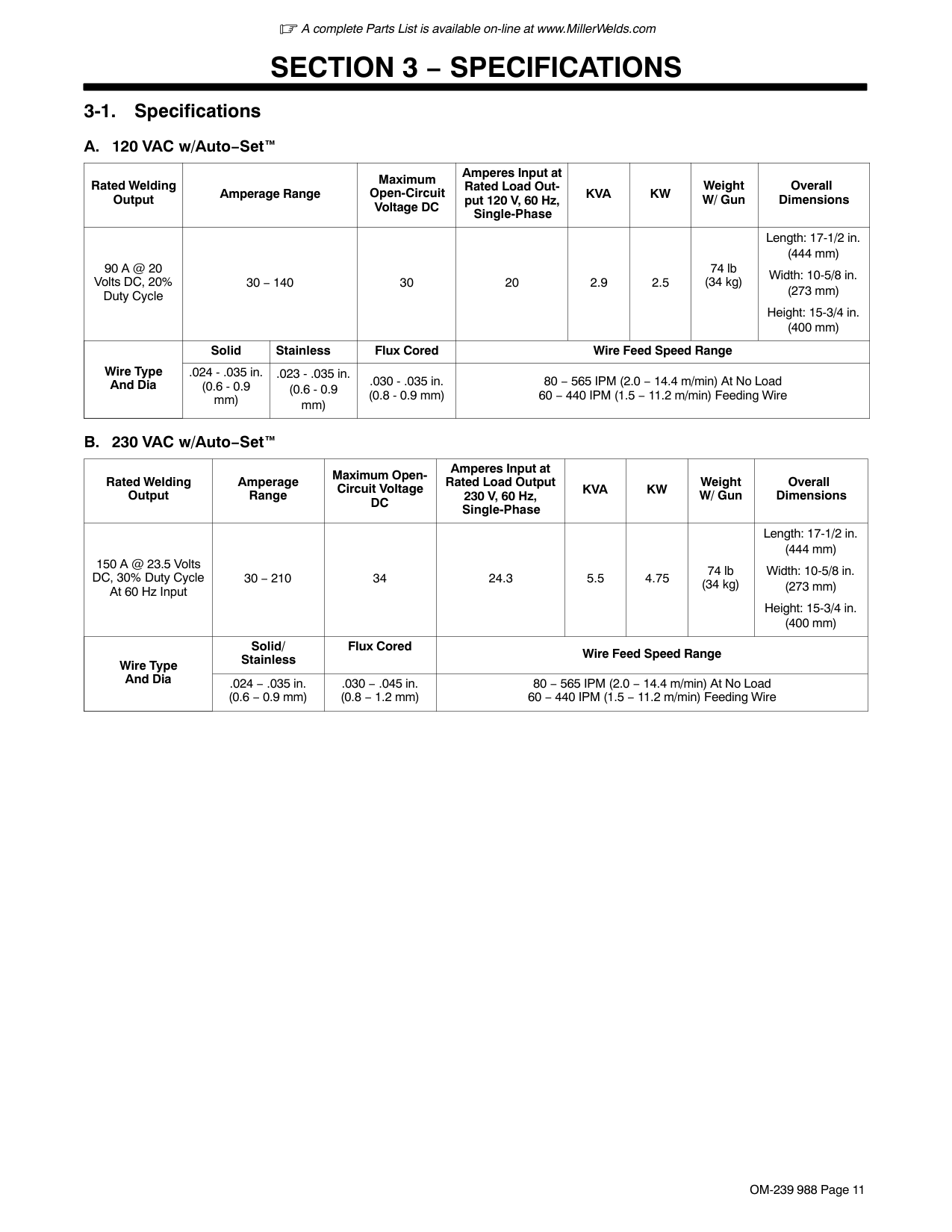
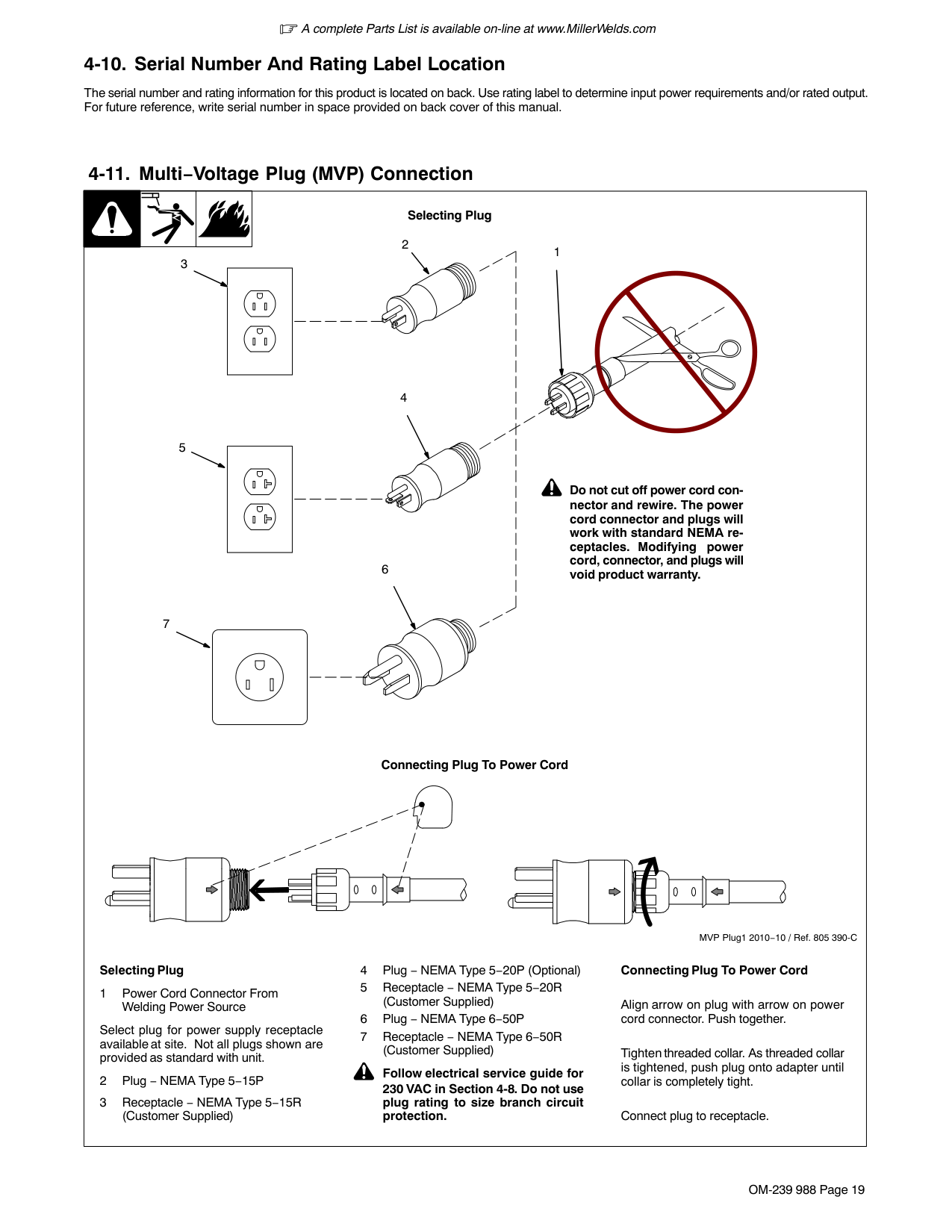
The serial number and rating information for this product is located on the back. Use rating label to determine input power requirements and/or rated output. For future reference, write serial number in space provided on back cover of this manual.
####### 3-2. Specifications
Do not use information in unit specifications table to determine electrical service requirements. See Sections 4-6 and 4-7 for information on connecting input power.
|Model|Input Power Single Phase AC 50/60 Hz Voltage|Rated Output|Rated Output|Rated Output|Max. Open Circuit Voltage|Amperage/ Voltage Range DC|Dimension|Weight| |---|---|---|---|---|---|---|---|---| |MigMatic 175|230 Volts MIG|100%|60%|30%|34 V|30−150 A 15.5−21.0 V|L=769 mm (30.3 in.) W=447 mm (17.6 in.) H=561 mm (22.1 in.)|Net: 43.3 Kg (95.5 lb) Ship: 45.4 Kg (100 lb)| |MigMatic 175|230 Volts MIG|60 A 17 V|100 A 19 V|150 A 21 V|34 V|30−150 A 15.5−21.0 V|L=769 mm (30.3 in.) W=447 mm (17.6 in.) H=561 mm (22.1 in.)|Net: 43.3 Kg (95.5 lb) Ship: 45.4 Kg (100 lb)| |Wire feed speed range 1,8 mpm to 18 mpm.|Wire feed speed range 1,8 mpm to 18 mpm.|Wire feed speed range 1,8 mpm to 18 mpm.|Wire feed speed range 1,8 mpm to 18 mpm.|Wire feed speed range 1,8 mpm to 18 mpm.|Wire feed speed range 1,8 mpm to 18 mpm.|Wire feed speed range 1,8 mpm to 18 mpm.|Wire feed speed range 1,8 mpm to 18 mpm.|Wire feed speed range 1,8 mpm to 18 mpm.|
####### 3-3. Environmental Specifications
|IP Rating|Operating Temperature Range|Storage Temperature Range| |---|---|---| |IP21S This equipment is designed for indoor use and is not intended to be used or stored outside.|−10 to 40 °C (14 to 104 F)|20 to 25 °C (68 to 77°F)
IP21S 2014−06|
|! This equipment shall not be used by the general public as the EMF limits for the general public might be exceeded during welding. This equipment is built in accordance with EN 60974−1 and is intended to be used only in an occupational environment (where the general public access is prohibited or regulated in such a way as to be similar to occupational use) by an expert or an instructed person.
Wire feeders and ancillary equipment (such as torches, liquid cooling systems and arc striking and stabilizing devices) as part of the welding circuit may not be a major contributor to the EMF. See the Owner’s Manuals for all components of the welding circuit for additional EMF exposure information.
The EMF assessment on this equipment was conducted at 0.5 meter. At a distance of 1 meter the EMF exposure values were less than 20% of the permissible values.
ce-emf 1 2010-10| |---|
|! This Class A equipment is not intended for use in residential locations where the electrical power is provided by the public low− voltage supply system. There can be potential difficulties in ensuring electromagnetic compatibility in those locations, due to conducted as well as radiated disturbances.
This equipment complies with IEC 61000-3-11 and IEC 61000-3-12.
ce-emc 4 2014-07| |---|
####### 3-4. Duty Cycle and Overheating
Rated Output
| | | | | | | | | | | | |---|---|---|---|---|---|---|---|---|---|---| | | | | | | | | | | | | | | | | | | | | | | | | | | | | | | | | | | | | | | | | | | | | | | | | | | | | | | | | | | | | | | | | | | | | | | | |
250
200
150
100
50
3525
30 40 50 60 70 80 90 100
% DUTY CYCLE
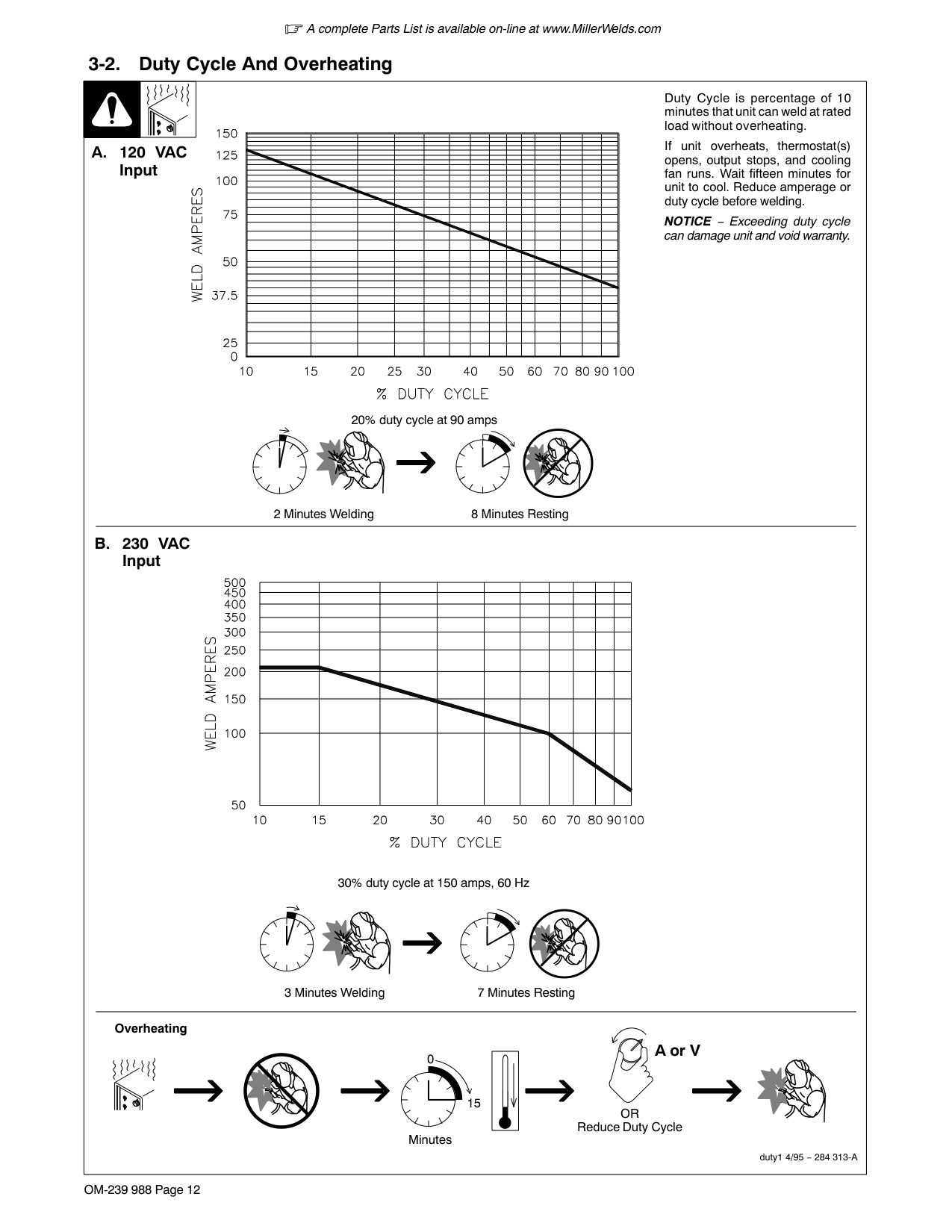
Duty Cycle is a percentage of 10 minutes that unit can weld at rated load without overheating.
If unit overheats, thermostat(s) opens, output stops, and cooling fan runs. Wait fifteen minutes for unit to cool. Reduce amperage or voltage, or duty cycle before welding.
NOTICE − Exceeding duty cycle can damage unit or gun and void warranty.
60% Duty Cycle at 100 Amperes
100% Duty Cycle at 60 Amperes
6 minutes welding 4 minutes resting
Continuous Welding
############## Overheating
A or V
0
15
OR reduce duty cycle Minutes
duty1 4/95 − SB-150 215
####### 3-5. Volt-Ampere Curves
|Model 175
50 100 150 200
40
30
20
10
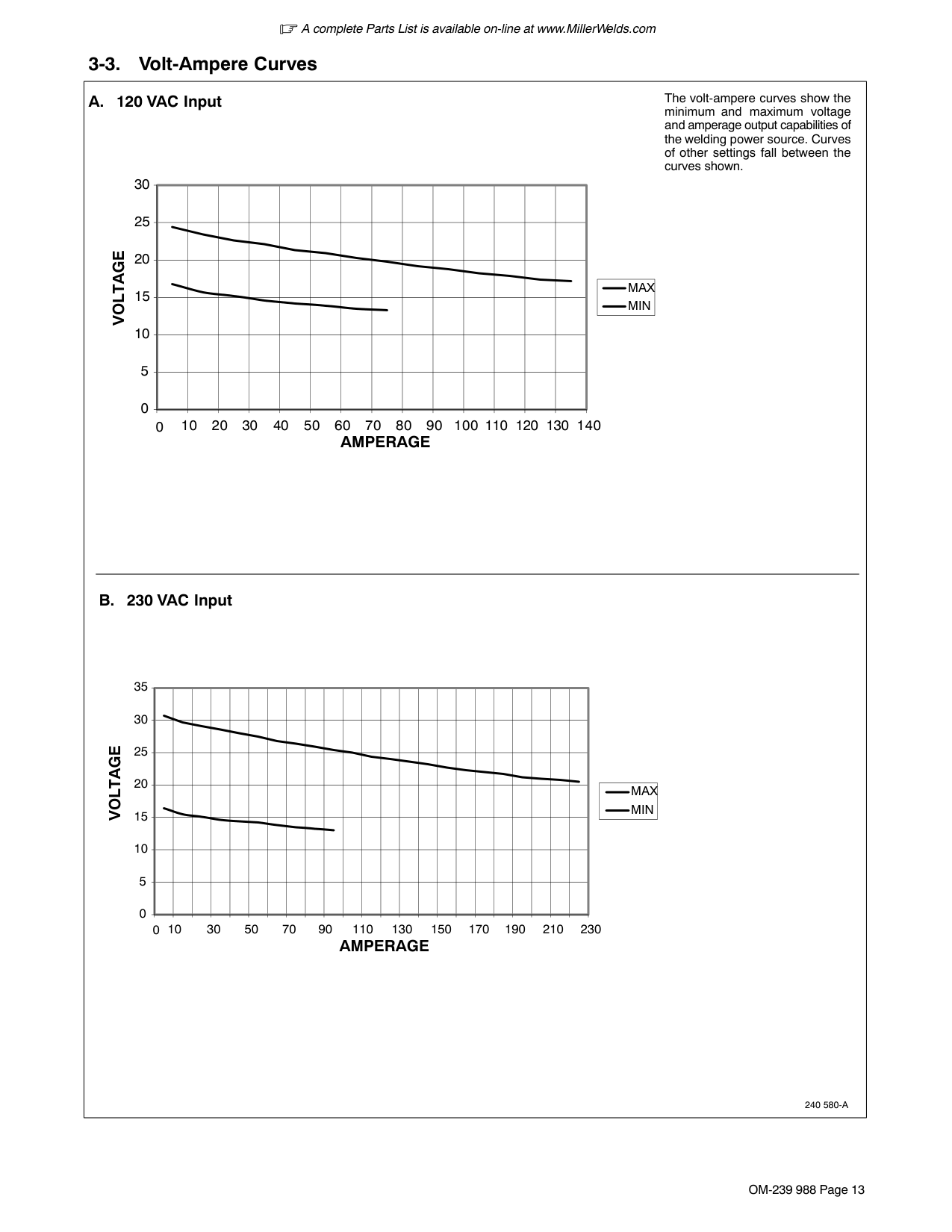
1 Normal Volt-Amperage Curves
The volt-ampere curves show the normal minimum and maximum voltage and amperage output capabilities of the welding power source. Curves of other settings fall between the curves shown.
2 Overload Volt-Ampere Curves
When unit is beyond capacity, circuitry senses the overload and shuts down unit output. Release trigger and lower weld voltage setting before trying to weld. This shut down circuitry protects internal circuits and parts from overload damage.| |---|
#### SECTION 4 − INSTALLATION
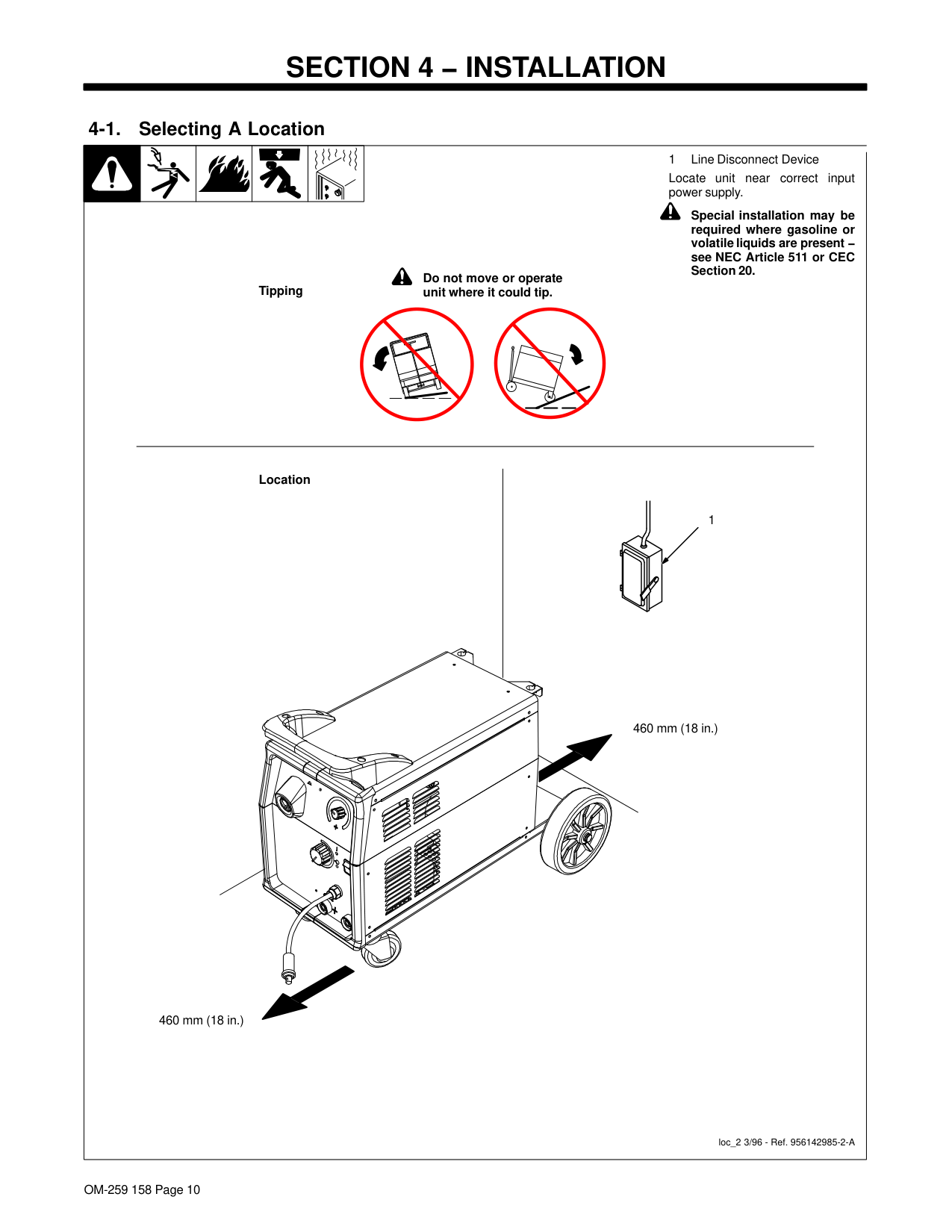
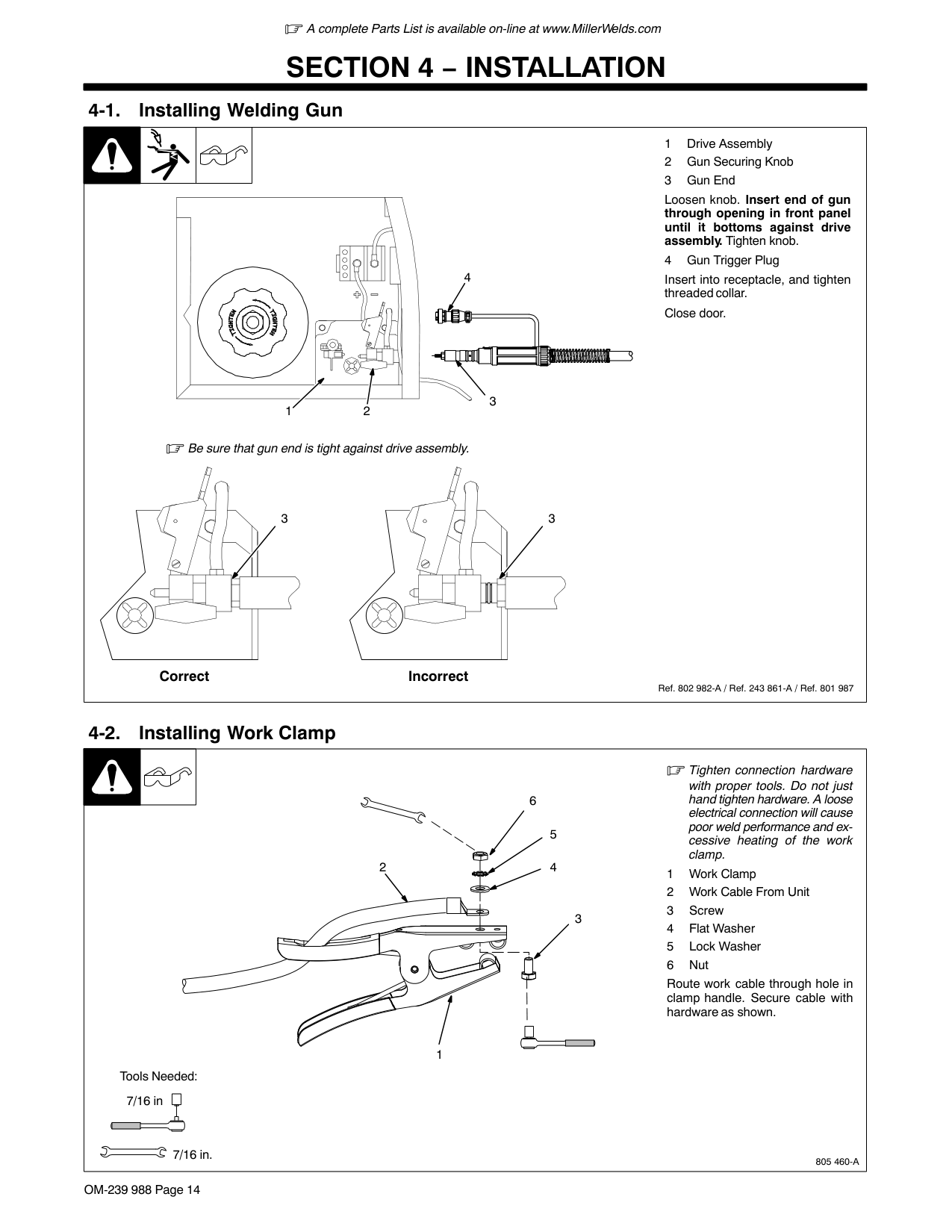
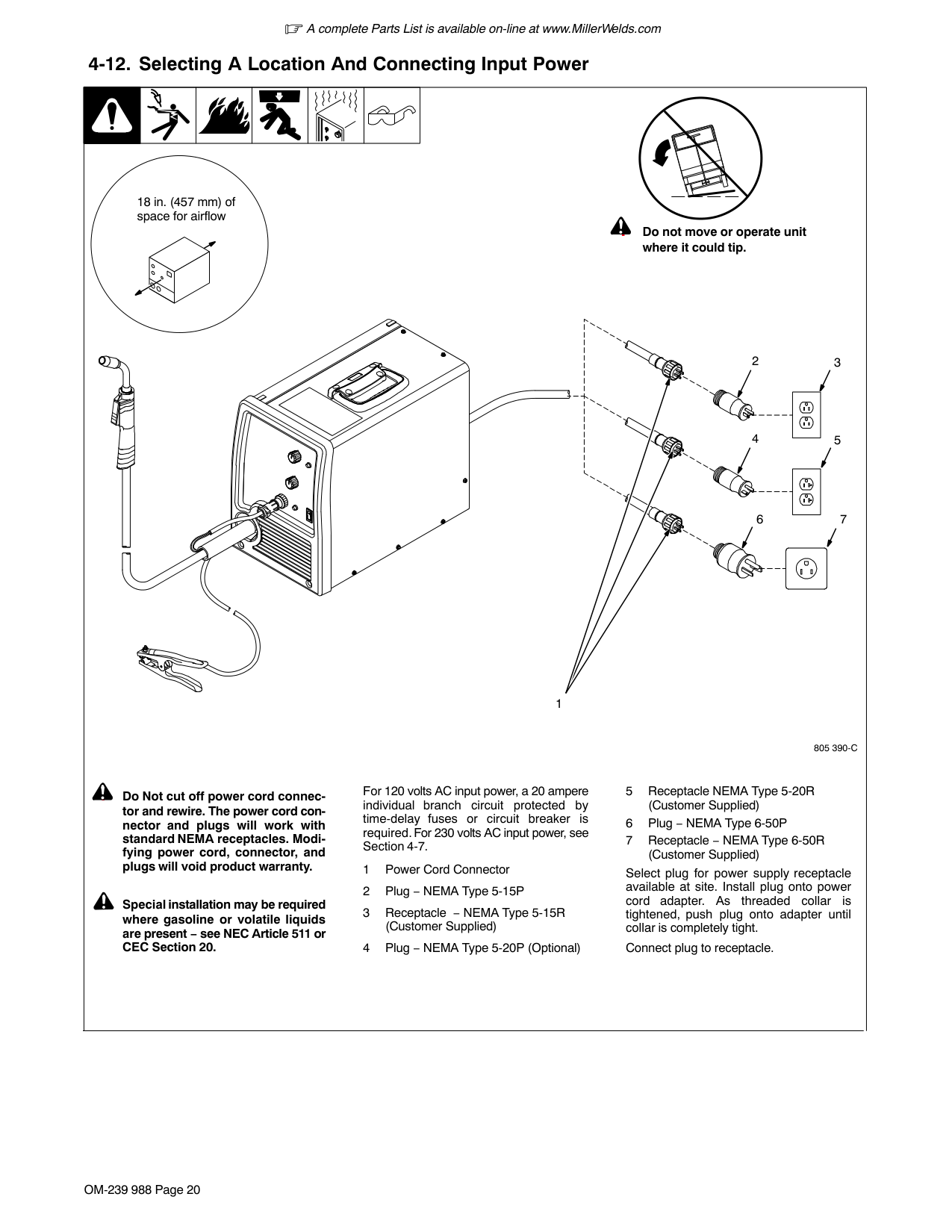
| | | | | |1 Line Disconnect Device Locate unit near correct input power supply.
| |---|---|---|---|---|---| |loc_2 3/96 - Ref. 956142985-2-A
! Special installation may be required where gasoline or volatile liquids are present − see NEC Article 511 or CEC Section 20.
Location
1
460 mm (18 in.)
Tipping
! Do not move or operate
unit where it could tip.
460 mm (18 in.)|loc_2 3/96 - Ref. 956142985-2-A
! Special installation may be required where gasoline or volatile liquids are present − see NEC Article 511 or CEC Section 20.
Location
1
460 mm (18 in.)
Tipping
! Do not move or operate
unit where it could tip.
460 mm (18 in.)|loc_2 3/96 - Ref. 956142985-2-A
! Special installation may be required where gasoline or volatile liquids are present − see NEC Article 511 or CEC Section 20.
Location
1
460 mm (18 in.)
Tipping
! Do not move or operate
unit where it could tip.
460 mm (18 in.)|loc_2 3/96 - Ref. 956142985-2-A
! Special installation may be required where gasoline or volatile liquids are present − see NEC Article 511 or CEC Section 20.
Location
1
460 mm (18 in.)
Tipping
! Do not move or operate
unit where it could tip.
460 mm (18 in.)|loc_2 3/96 - Ref. 956142985-2-A
! Special installation may be required where gasoline or volatile liquids are present − see NEC Article 511 or CEC Section 20.
Location
1
460 mm (18 in.)
Tipping
! Do not move or operate
unit where it could tip.
460 mm (18 in.)|loc_2 3/96 - Ref. 956142985-2-A
! Special installation may be required where gasoline or volatile liquids are present − see NEC Article 511 or CEC Section 20.
Location
1
460 mm (18 in.)
Tipping
! Do not move or operate
unit where it could tip.
460 mm (18 in.)|
####### 4-2. Installing Gas Supply

| | | | |---|---|---| | | | |
4
5 7
Argon Gas Or Mixed Gas
OR
8 9
CO2 Gas
Obtain gas cylinder and chain to running gear, wall, or other stationary support so cylinder cannot fall and break off valve.
Remove cap, stand to side of valve, and open valve slightly. Gas flow blows dust and dirt from valve. Close valve.
Connect supplied gas hose between regulator/flowmeter gas hose connection, and fitting on rear of welding power source.
Typical flow rate is between 15-20 liters per minute. Check wire manufacturer’s recommended flow rate.
Install adapter with O-ring between regulator/flowmeter and CO2 cylinder.
6
Rear Panel
Ref. 148 265-B / Ref. 149 827-B / Ref. 156 697-A / Ref. 956142985-2-A
|1 Wire Guide Securing Screw
2 Inlet Wire Guide
Loosen screw. Slide tip as close to drive rolls as possible without touching. Tighten screw.
3 Drive Roll
The drive roll consists of two different sized grooves. The stamped markings on the end surface of the drive roll refers to the grooves on the opposite side of the drive roll. The grooves closest to the motor shaft is the proper groove to thread.
4 Drive Roll Securing Screw Loosen screw and remove drive roll.
956142945-5-A2.5 mm (0.1 in.)
Tools Needed:
Tools Needed:
1
2
3
4
| |---|
| | | | |! Turn off and disconnect in-
put power
View is from top of drive rollsCorrect Incorrect| |---|---|---|---|---| |looking down with pressure assembly open.
1 Drive Roll Securing Nut
2 Drive Roll
3 Wire Guide
4 Welding Wire
5 Drive Gear
Insert screwdriver, and turn screw in or out until drive roll groove lines up with wire guide.
Close pressure roll assembly.
Ref. 800 412-A
43 2
1
5
Tools Needed:|looking down with pressure assembly open.
1 Drive Roll Securing Nut
2 Drive Roll
3 Wire Guide
4 Welding Wire
5 Drive Gear
Insert screwdriver, and turn screw in or out until drive roll groove lines up with wire guide.
Close pressure roll assembly.
Ref. 800 412-A
43 2
1
5
Tools Needed:|looking down with pressure assembly open.
1 Drive Roll Securing Nut
2 Drive Roll
3 Wire Guide
4 Welding Wire
5 Drive Gear
Insert screwdriver, and turn screw in or out until drive roll groove lines up with wire guide.
Close pressure roll assembly.
Ref. 800 412-A
43 2
1
5
Tools Needed:|looking down with pressure assembly open.
1 Drive Roll Securing Nut
2 Drive Roll
3 Wire Guide
4 Welding Wire
5 Drive Gear
Insert screwdriver, and turn screw in or out until drive roll groove lines up with wire guide.
Close pressure roll assembly.
Ref. 800 412-A
43 2
1
5
Tools Needed:|looking down with pressure assembly open.
1 Drive Roll Securing Nut
2 Drive Roll
3 Wire Guide
4 Welding Wire
5 Drive Gear
Insert screwdriver, and turn screw in or out until drive roll groove lines up with wire guide.
Close pressure roll assembly.
Ref. 800 412-A
43 2
1
5
Tools Needed:|
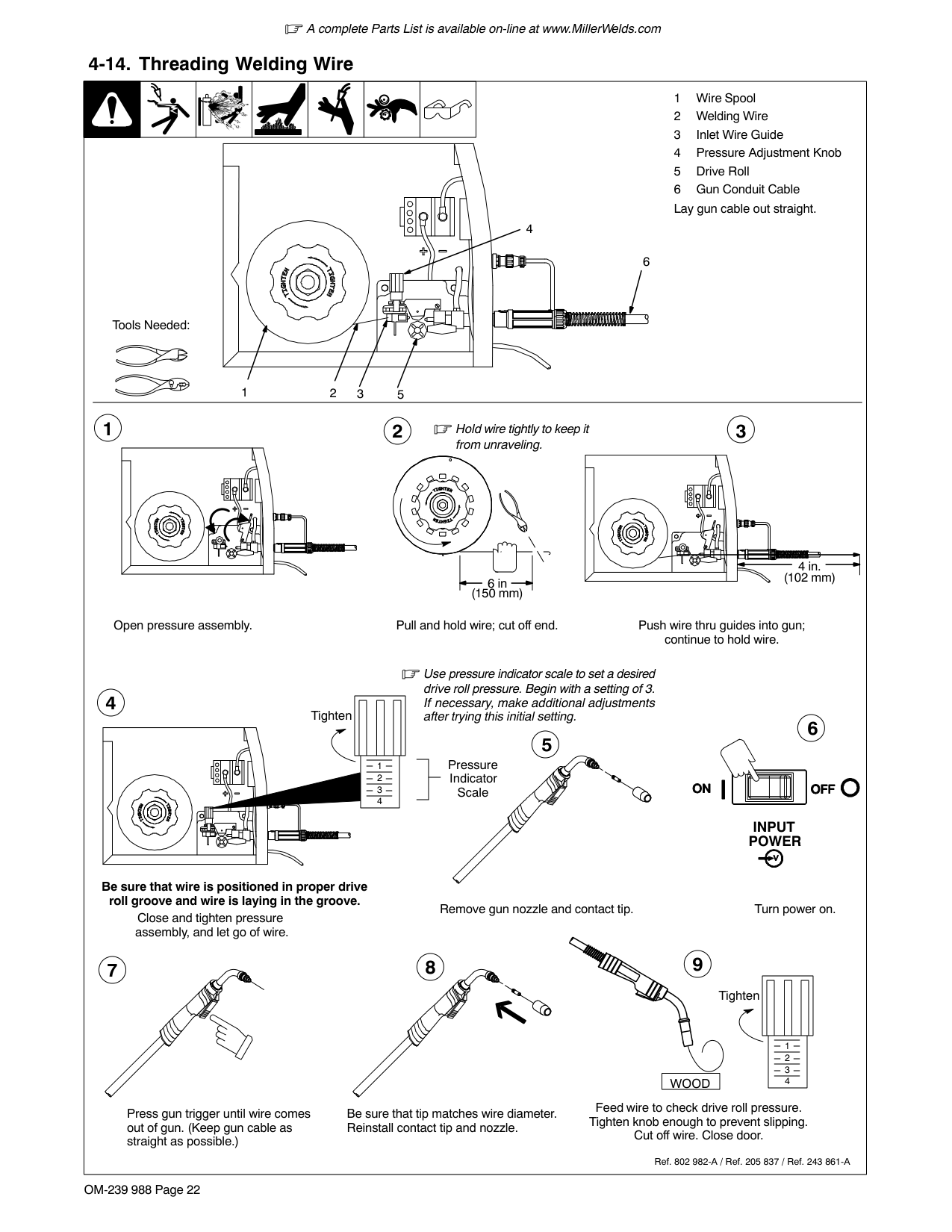
####### 4-5. Threading Welding Wire And Adjusting Pressure Roll Tension
| || | | | | |1 Wire Spool
2 Welding Wire
3 Inlet Wire Guide
| |---|---|---|---|---|---|---|---| |4 Pressure Adjustment Knob
5 Drive Roll
6 Outlet Wire Guide
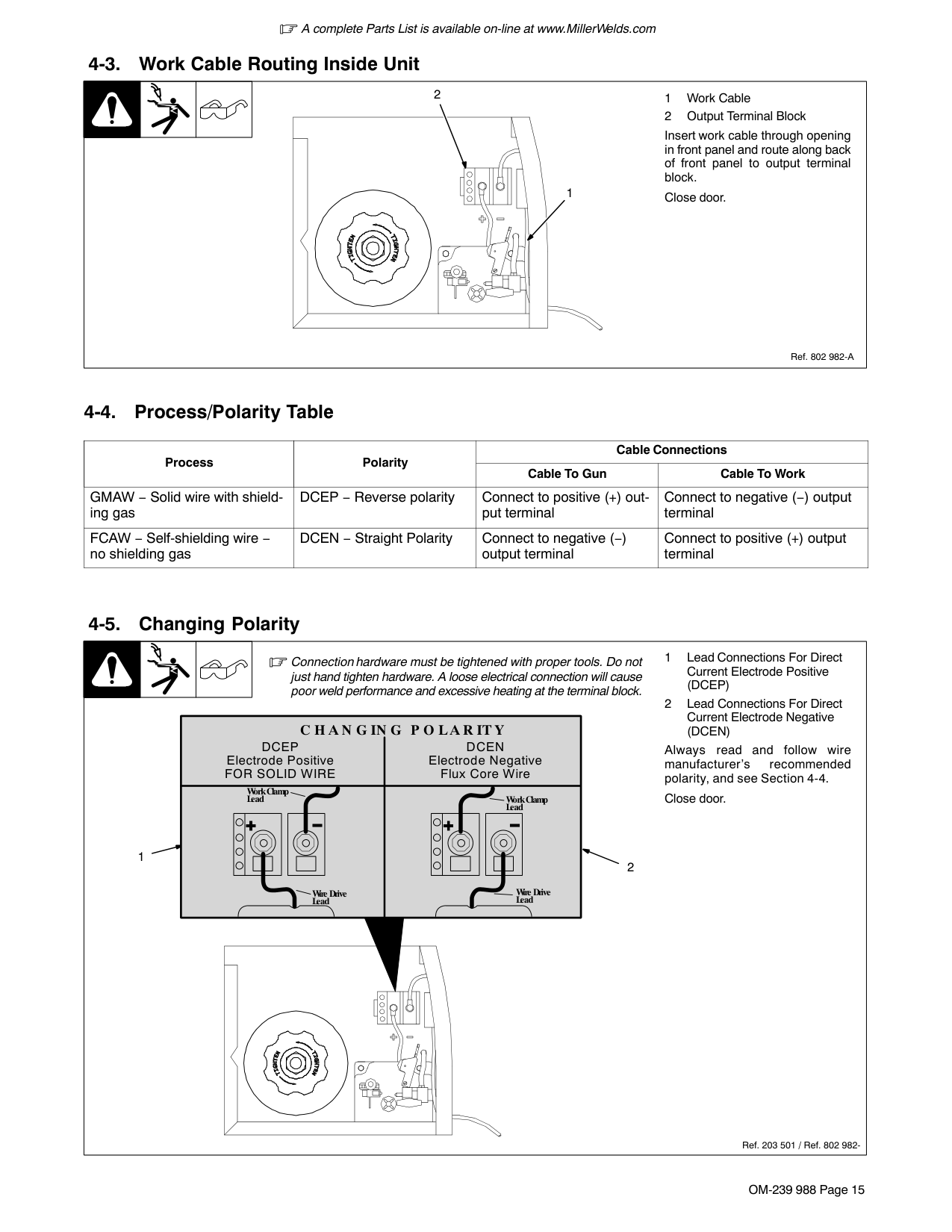
7 Gun Conduit Cable Lay gun cable out straight.
4
7
5
6
2
1
Tools Needed:
Hold wire tightly to keep it from unraveling.
Open pressure assembly. Pull and hold wire; cut off end. Push wire thru guides into gun; continue to hold wire.
Close and tighten pressure assembly, and let go of wire.
Remove gun nozzle and contact tip. Turn On.
Press gun trigger until wire comes out of gun. Reinstall contact tip and nozzle
Feed wire to check drive roll pressure. Tighten knob enough to prevent slipping.
Cut off wire. Close and latch door.
958142985_6-A
Tighten Use pressure indicator
scale to set a desired drive roll pressure.
| | | |---|---| | | |
Pressure Indicator Scale
Tighten
3
150 mm (6 in.)|4 Pressure Adjustment Knob
5 Drive Roll
6 Outlet Wire Guide
7 Gun Conduit Cable Lay gun cable out straight.
4
7
5
6
2
1
Tools Needed:
Hold wire tightly to keep it from unraveling.
Open pressure assembly. Pull and hold wire; cut off end. Push wire thru guides into gun; continue to hold wire.
Close and tighten pressure assembly, and let go of wire.
Remove gun nozzle and contact tip. Turn On.
Press gun trigger until wire comes out of gun. Reinstall contact tip and nozzle
Feed wire to check drive roll pressure. Tighten knob enough to prevent slipping.
Cut off wire. Close and latch door.
958142985_6-A
Tighten Use pressure indicator
scale to set a desired drive roll pressure.
| | | |---|---| | | |
Pressure Indicator Scale
Tighten
3
150 mm (6 in.)|4 Pressure Adjustment Knob
5 Drive Roll
6 Outlet Wire Guide
7 Gun Conduit Cable Lay gun cable out straight.
4
7
5
6
2
1
Tools Needed:
Hold wire tightly to keep it from unraveling.
Open pressure assembly. Pull and hold wire; cut off end. Push wire thru guides into gun; continue to hold wire.
Close and tighten pressure assembly, and let go of wire.
Remove gun nozzle and contact tip. Turn On.
Press gun trigger until wire comes out of gun. Reinstall contact tip and nozzle
Feed wire to check drive roll pressure. Tighten knob enough to prevent slipping.
Cut off wire. Close and latch door.
958142985_6-A
Tighten Use pressure indicator
scale to set a desired drive roll pressure.
| | | |---|---| | | |
Pressure Indicator Scale
Tighten
3
150 mm (6 in.)|4 Pressure Adjustment Knob
5 Drive Roll
6 Outlet Wire Guide
7 Gun Conduit Cable Lay gun cable out straight.
4
7
5
6
2
1
Tools Needed:
Hold wire tightly to keep it from unraveling.
Open pressure assembly. Pull and hold wire; cut off end. Push wire thru guides into gun; continue to hold wire.
Close and tighten pressure assembly, and let go of wire.
Remove gun nozzle and contact tip. Turn On.
Press gun trigger until wire comes out of gun. Reinstall contact tip and nozzle
Feed wire to check drive roll pressure. Tighten knob enough to prevent slipping.
Cut off wire. Close and latch door.
958142985_6-A
Tighten Use pressure indicator
scale to set a desired drive roll pressure.
| | | |---|---| | | |
Pressure Indicator Scale
Tighten
3
150 mm (6 in.)|4 Pressure Adjustment Knob
5 Drive Roll
6 Outlet Wire Guide
7 Gun Conduit Cable Lay gun cable out straight.
4
7
5
6
2
1
Tools Needed:
Hold wire tightly to keep it from unraveling.
Open pressure assembly. Pull and hold wire; cut off end. Push wire thru guides into gun; continue to hold wire.
Close and tighten pressure assembly, and let go of wire.
Remove gun nozzle and contact tip. Turn On.
Press gun trigger until wire comes out of gun. Reinstall contact tip and nozzle
Feed wire to check drive roll pressure. Tighten knob enough to prevent slipping.
Cut off wire. Close and latch door.
958142985_6-A
Tighten Use pressure indicator
scale to set a desired drive roll pressure.
| | | |---|---| | | |
Pressure Indicator Scale
Tighten
3
150 mm (6 in.)|4 Pressure Adjustment Knob
5 Drive Roll
6 Outlet Wire Guide
7 Gun Conduit Cable Lay gun cable out straight.
4
7
5
6
2
1
Tools Needed:
Hold wire tightly to keep it from unraveling.
Open pressure assembly. Pull and hold wire; cut off end. Push wire thru guides into gun; continue to hold wire.
Close and tighten pressure assembly, and let go of wire.
Remove gun nozzle and contact tip. Turn On.
Press gun trigger until wire comes out of gun. Reinstall contact tip and nozzle
Feed wire to check drive roll pressure. Tighten knob enough to prevent slipping.
Cut off wire. Close and latch door.
958142985_6-A
Tighten Use pressure indicator
scale to set a desired drive roll pressure.
| | | |---|---| | | |
Pressure Indicator Scale
Tighten
3
150 mm (6 in.)|4 Pressure Adjustment Knob
5 Drive Roll
6 Outlet Wire Guide
7 Gun Conduit Cable Lay gun cable out straight.
4
7
5
6
2
1
Tools Needed:
Hold wire tightly to keep it from unraveling.
Open pressure assembly. Pull and hold wire; cut off end. Push wire thru guides into gun; continue to hold wire.
Close and tighten pressure assembly, and let go of wire.
Remove gun nozzle and contact tip. Turn On.
Press gun trigger until wire comes out of gun. Reinstall contact tip and nozzle
Feed wire to check drive roll pressure. Tighten knob enough to prevent slipping.
Cut off wire. Close and latch door.
958142985_6-A
Tighten Use pressure indicator
scale to set a desired drive roll pressure.
| | |
|---|---| | | |
Pressure Indicator Scale
Tighten
3
150 mm (6 in.)|4 Pressure Adjustment Knob
5 Drive Roll
6 Outlet Wire Guide
7 Gun Conduit Cable Lay gun cable out straight.
4
7
5
6
2
1
Tools Needed:
Hold wire tightly to keep it from unraveling.
Open pressure assembly. Pull and hold wire; cut off end. Push wire thru guides into gun; continue to hold wire.
Close and tighten pressure assembly, and let go of wire.
Remove gun nozzle and contact tip. Turn On.
Press gun trigger until wire comes out of gun. Reinstall contact tip and nozzle
Feed wire to check drive roll pressure. Tighten knob enough to prevent slipping.
Cut off wire. Close and latch door.
958142985_6-A
Tighten Use pressure indicator
scale to set a desired drive roll pressure.
| | | |---|---| | | |
Pressure Indicator Scale
Tighten
3
150 mm (6 in.)|
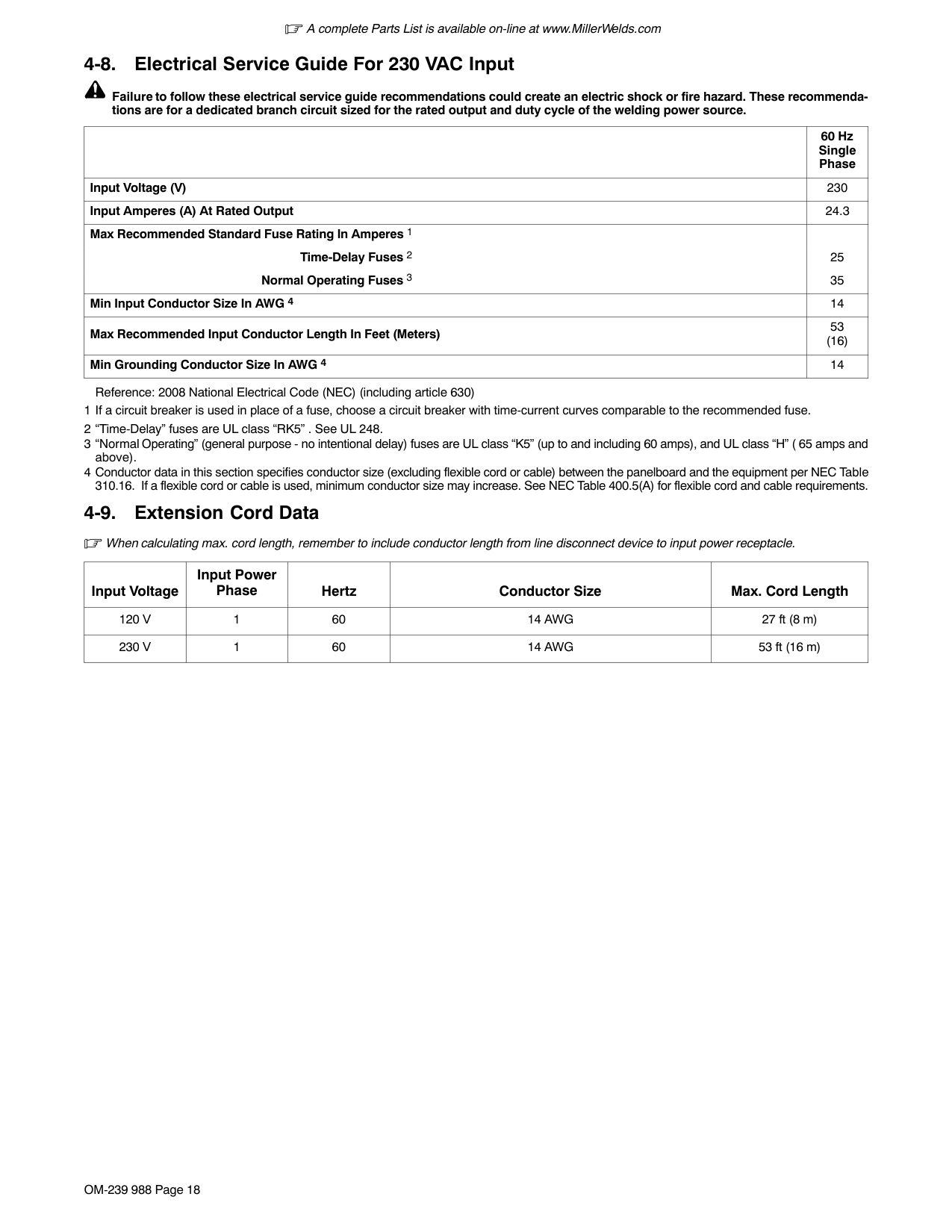
####### 4-6. Electrical Service Guide Elec Serv 2011−08
Failure to follow these electrical service guide recommendations could create an electric shock or fire hazard. These recommendations are for a dedicated circuit sized for the rated output and duty cycle of the welding power source.
In dedicated circuit installations, the National Electrical Code (NEC) allows the receptacle or conductor rating to be less than the rating of the circuit protection device. All components of the circuit must be physically compatible. See NEC articles 210.21, 630.11, and 630.12.
|MigMatic Model|MigMatic 175 50/60 Hz Single−Phase| |---|---| |Input Voltage (V)|230| |Input Amperes (A) At Rated Output|20| |Max Recommended Standard Fuse Rating In Amperes1 Time-Delay Fuses2 Normal Operating Fuses 3
|25 30
| |Min Input Conductor Size In AWG 4|4 (12)| |Max Recommended Input Conductor Length In Meters (Feet)|86 (26)| |Min Grounding Conductor Size In AWG 4|4 (12)|
Reference: 2014 National Electrical Code (NEC) (including article 630)
Notes
Notes
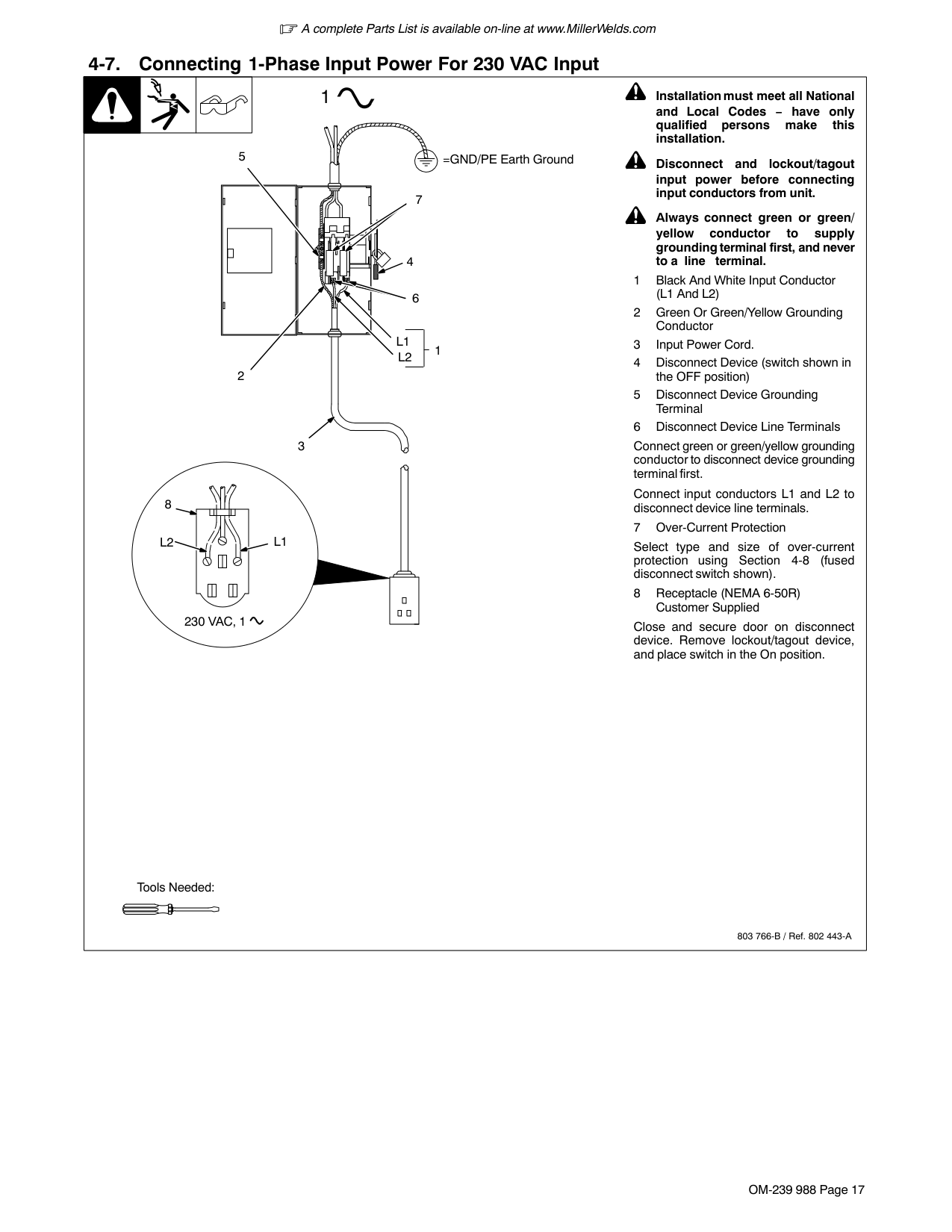
####### 4-7. Connecting 1-Phase Input Power For 230 VAC
| | | | | |---|---|---|---| |input4 2012−05 − Ref. 803 766-C / 956142985_2-A
2
1
L1 L2
1
=GND/PE Earth Ground
6
| | | |---|---| | | |
5
3
4
7
Tools Needed:|input4 2012−05 − Ref. 803 766-C / 956142985_2-A
2
1
L1 L2
1
=GND/PE Earth Ground
6
| | | |---|---| | | |
5
3
4
7
Tools Needed:|input4 2012−05 − Ref. 803 766-C / 956142985_2-A
2
1
L1 L2
1
=GND/PE Earth Ground
6
| | | |---|---| | | |
5
3
4
7
Tools Needed:|input4 2012−05 − Ref. 803 766-C / 956142985_2-A
2
1
L1 L2
1
=GND/PE Earth Ground
6
| | | |---|---| | | |
5
3
4
7
Tools Needed:|
| | | | | |---|---|---|---| |input4 2012−05
! Installation must meet all National and Local Codes − have only qualified persons make this installation.
! Disconnect and lockout/tagout input power before connecting input conductors from unit. Follow established procedures regarding the installation and removal of lockout/tagout devices.
! Always connect green or green/yellow conductor to supply grounding terminal first, and never to a line terminal.
See rating label on unit and check input voltage available at site.
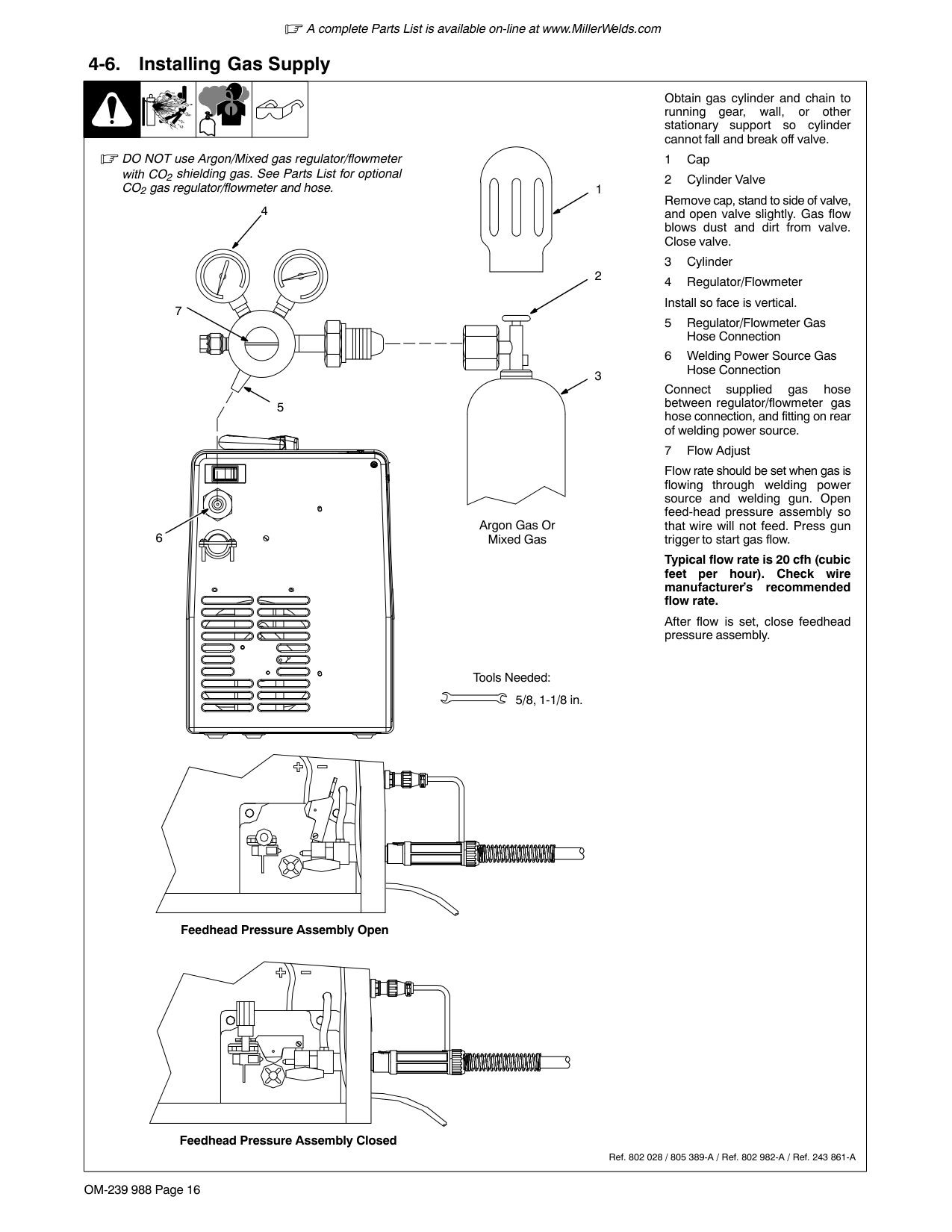
1 Input Power Cord
2 Disconnect Device (switch shown in the OFF position)
3 Disconnect Device Grounding Terminal
4 Disconnect Device Line Terminals
5 Black And White Input Conductor (L1 And L2)
6 Green Or Green/Yellow Grounding Conductor
Connect green or green/yellow grounding conductor to disconnect device grounding terminal first.
Connect input conductors L1 and L2 to disconnect device line terminals.
7 Over-Current Protection
Select type and size of over-current protection using Section 4-6 (fused disconnect switch shown).
Close and secure door on disconnect device. Follow established lockout/tagout procedures to put unit in service.|input4 2012−05
! Installation must meet all National and Local Codes − have only qualified persons make this installation.
! Disconnect and lockout/tagout input power before connecting input conductors from unit. Follow established procedures regarding the installation and removal of lockout/tagout devices.
! Always connect green or green/yellow conductor to supply grounding terminal first, and never to a line terminal.
See rating label on unit and check input voltage available at site.
1 Input Power Cord
2 Disconnect Device (switch shown in the OFF position)
3 Disconnect Device Grounding Terminal
4 Disconnect Device Line Terminals
5 Black And White Input Conductor (L1 And L2)
6 Green Or Green/Yellow Grounding Conductor
Connect green or green/yellow grounding conductor to disconnect device grounding terminal first.
Connect input conductors L1 and L2 to disconnect device line terminals.
7 Over-Current Protection
Select type and size of over-current protection using Section 4-6 (fused disconnect switch shown).
Close and secure door on disconnect device. Follow established lockout/tagout procedures to put unit in service.|input4 2012−05
! Installation must meet all National and Local Codes − have only qualified persons make this installation.
! Disconnect and lockout/tagout input power before connecting input conductors from unit. Follow established procedures regarding the installation and removal of lockout/tagout devices.
! Always connect green or green/yellow conductor to supply grounding terminal first, and never to a line terminal.
See rating label on unit and check input voltage available at site.
1 Input Power Cord
2 Disconnect Device (switch shown in the OFF position)
3 Disconnect Device Grounding Terminal
4 Disconnect Device Line Terminals
5 Black And White Input Conductor (L1 And L2)
6 Green Or Green/Yellow Grounding Conductor
Connect green or green/yellow grounding conductor to disconnect device grounding terminal first.
Connect input conductors L1 and L2 to disconnect device line terminals.
7 Over-Current Protection
Select type and size of over-current protection using Section 4-6 (fused disconnect switch shown).
Close and secure door on disconnect device. Follow established lockout/tagout procedures to put unit in service.|input4 2012−05
! Installation must meet all National and Local Codes − have only qualified persons make this installation.
! Disconnect and lockout/tagout input power before connecting input conductors from unit. Follow established procedures regarding the installation and removal of lockout/tagout devices.
! Always connect green or green/yellow conductor to supply grounding terminal first, and never to a line terminal.
See rating label on unit and check input voltage available at site.
1 Input Power Cord
2 Disconnect Device (switch shown in the OFF position)
3 Disconnect Device Grounding Terminal
4 Disconnect Device Line Terminals
5 Black And White Input Conductor (L1 And L2)
6 Green Or Green/Yellow Grounding Conductor
Connect green or green/yellow grounding conductor to disconnect device grounding terminal first.
Connect input conductors L1 and L2 to disconnect device line terminals.
7 Over-Current Protection
Select type and size of over-current protection using Section 4-6 (fused disconnect switch shown).
Close and secure door on disconnect device. Follow established lockout/tagout procedures to put unit in service.|
Notes
#### SECTION 5 − OPERATION
####### 5-1. Controls
1
2
11
3
4
| | | |---|---| | | |
| | |---| | |
| | | | |---|---|---| | | | | | | | |
78
10
9
Ref. 956142985_2-A
#### SECTION 6 − MAINTENANCE AND TROUBLESHOOTING
|! Disconnect power
before maintaining.
Maintain more often during severe conditions.|! Disconnect power
before maintaining.
Maintain more often during severe conditions.|! Disconnect power
before maintaining.
Maintain more often during severe conditions.|! Disconnect power
before maintaining.
Maintain more often during severe conditions.| |---|---|---|---| | |= Check = Change = Clean = Replace
* To be done by Factory Authorized Service Agent|= Check = Change = Clean = Replace
* To be done by Factory Authorized Service Agent|= Check = Change = Clean = Replace
* To be done by Factory Authorized Service Agent| |Every 3 Months|Replace unreadable labels.|Clean and tighten weld terminals.|Repair or replace cracked weld cables.| |Every 6 Months|OR Blow out or vacuum inside.
During heavy service clean monthly.|OR Blow out or vacuum inside.
During heavy service clean monthly.|OR Blow out or vacuum inside.
During heavy service clean monthly.|
####### 6-1. Unit Overload
If unit is beyond capacity (excessive wire feed, shorted output, etc.) wire feeds but is not energized. Release gun trigger to reset this condition.
####### 6-2. Troubleshooting
| | | | | | | | |---|---|---|---|---|---|---|
|Trouble|Remedy| |---|---| |No weld output; wire does not feed.
|Be sure line disconnect switch is On (see Section 4-7).| |No weld output; wire does not feed.
|Replace building line fuse or reset circuit breaker if open(see Section 4-7).| |No weld output; wire does not feed.
|Secure gun trigger connections.| |No weld output; wire does not feed.
|Check and replace Power switch if necessary| |No weld output; overload light on
|Thermostat TP1 open (overheating). Allow fan to run; the thermostat will close when the unit has cooled (see Section 3-4).| |No weld output; overload light on
|An overload condition occurred. Release gun trigger (see Section 6-1).| |Low weld output.|Connect unit to proper input voltage or check for low line voltage (see Section 4-7).| |No wire feed.
|Turn Wire Speed control to higher setting (see Section 5-1).| |No wire feed.
|Clear obstruction in gun contact tip or liner.| |No wire feed.
|Readjust drive roll pressure.| |No wire feed.
|Change to correct size drive rolls (see Section 4-3).| |No wire feed.
|Check gun trigger and leads. Repair or replace gun if necessary.| |No wire feed.
|Have Factory Authorized Service Agent check main control board.| |Poor weld bead, or welding wire is noodle welding.|Check polarity setting for type of welding wire being used.|
#### SECTION 7 − ELECTRICAL DIAGRAM
| | | | |---|---|---| | | | | | | | |
| | | | |---|---|---| | | | |
######## Figure 7-1. Circuit Diagram For MigMatic 175
Ref. 956142984_A
Notes
OM-188414 Page 21
#### SECTION 8 − PARTS LIST
13
12
11
10
18
16 17
15
14
19
28 29
2627
2223
20 21
3
1 2
7
6
4 5
44 45
40
41
42
47
43
46
38
48
51
53
52
2425
30 31
32
33
34
35
36
39
38
37
57
56
54 55
######## Figure 8-1. Main Assembly
58
51 19
Ref. 956142985-3-A
Item No.
Dia. Mkgs.
Part No.
Description
Quantity
Figure 8-1. Main Assembly
######### +When ordering a component originally displaying a precautionary label, the label should also be ordered.
######## Figure 8-1. Main Assembly (Continued)
######## +When ordering a component originally displaying a precautionary label, the label should also be ordered. To maintain the factory original performance of your equipment, use only Manufacturer’s Suggested Replacement Parts. Model and serial number required when ordering parts from your local distributor.
16
28
27
7
5 6
8
10
2
9
3
2
1
25
16
24
26
16
2223
21
20
15
14
26
13
35
12
11
19 18 17 16
36
######## Figure 8-2. Wire Drive Roll (2 Rolls)
4
37
Ref. 956142985_4-A
Item No.
Dia. Mkgs.
Part No.
Description
Quantity
Figure 8-2. Wire Drive Roll (2 Rolls)
To maintain the factory original performance of your equipment, use only Manufacturer’s Suggested Replacement Parts. Model and serial number required when ordering parts from your local distributor.
Table 7-1. Drive Roll And Wire Guide Kits (2 Roll Model)
|Base selection of drive rolls upon the following recommended usages:
1. V−Grooved rolls for hard wire.
2. U−Grooved rolls for soft and soft shelled cored wires.
3. U−Cogged rolls for extremely soft shelled wires (usually hard surfacing types).
4. V−Knurled rolls for hard shelled cored wires.
5. Drive roll types may be mixed to suit particular requirements (example: V−Knurled roll in combination with U−Grooved).
|Base selection of drive rolls upon the following recommended usages:
1. V−Grooved rolls for hard wire.
2. U−Grooved rolls for soft and soft shelled cored wires.
3. U−Cogged rolls for extremely soft shelled wires (usually hard surfacing types).
4. V−Knurled rolls for hard shelled cored wires.
5. Drive roll types may be mixed to suit particular requirements (example: V−Knurled roll in combination with U−Grooved).
|Base selection of drive rolls upon the following recommended usages:
1. V−Grooved rolls for hard wire.
2. U−Grooved rolls for soft and soft shelled cored wires.
3. U−Cogged rolls for extremely soft shelled wires (usually hard surfacing types).
4. V−Knurled rolls for hard shelled cored wires.
5. Drive roll types may be mixed to suit particular requirements (example: V−Knurled roll in combination with U−Grooved).
|Base selection of drive rolls upon the following recommended usages:
1. V−Grooved rolls for hard wire.
2. U−Grooved rolls for soft and soft shelled cored wires.
3. U−Cogged rolls for extremely soft shelled wires (usually hard surfacing types).
4. V−Knurled rolls for hard shelled cored wires.
5. Drive roll types may be mixed to suit particular requirements (example: V−Knurled roll in combination with U−Grooved).
|Base selection of drive rolls upon the following recommended usages:
1. V−Grooved rolls for hard wire.
2. U−Grooved rolls for soft and soft shelled cored wires.
3. U−Cogged rolls for extremely soft shelled wires (usually hard surfacing types).
4. V−Knurled rolls for hard shelled cored wires.
5. Drive roll types may be mixed to suit particular requirements (example: V−Knurled roll in combination with U−Grooved).
|Base selection of drive rolls upon the following recommended usages:
1. V−Grooved rolls for hard wire.
2. U−Grooved rolls for soft and soft shelled cored wires.
3. U−Cogged rolls for extremely soft shelled wires (usually hard surfacing types).
4. V−Knurled rolls for hard shelled cored wires.
5. Drive roll types may be mixed to suit particular requirements (example: V−Knurled roll in combination with U−Grooved).
| |---|---|---|---|---|---| |Wire Diameter|Wire Diameter|Wire Diameter|Drive Roll|Drive Roll|Wire Guide| |Metric|Fraction|Decimal|Part No.|Type|Inlet| |0.6 / 0.8 mm|(.023 / .030 in.)|(.023 / .030 in.)|156053046*|V|056100110| |0.6 / 0.8 mm|(.023 / .030 in.)|(.023 / .030 in.)|156053047|V−K|056100110| |0.8 / 1.0 mm|(.030 / .040 in.)|(.030 / .040 in.)|156053081|U|056100110| |* Included with power source.|* Included with power source.|* Included with power source.|* Included with power source.|* Included with power source.|* Included with power source.|
| | |---|
|
| |---|
Effective January 1, 2015 (Equipment with a serial number preface of MF or newer)
This limited warranty supersedes all previous Miller warranties and is exclusive with no other guarantees or warranties expressed or implied.
LIMITED WARRANTY − Subject to the terms and conditions below, ITW Welding Products Italy warrants to its original retail purchaser that new Miller equipment sold after the effective date of this limited warranty is free of defects in material and workmanship at the time it is shipped by Miller. THIS WARRANTY IS EXPRESSLY IN LIEU OF ALL OTHER WARRANTIES, EXPRESS OR IMPLIED, INCLUDING THE WARRANTIES OF MERCHANTABILITY AND FITNESS.
Within the warranty periods listed below, Miller will repair or replace any warranted parts or components that fail due to such defects in material or workmanship. Miller must be notified in writing within thirty (30) days of such defect or failure, at which time Miller will provide instructions on the warranty claim procedures to be followed. If notification is submitted as an online warranty claim, the claim must include a detailed description of the fault and the troubleshooting steps taken to identify failed components and the cause of their failure.
Miller shall honor warranty claims on warranted equipment listed below in the event of such a failure within the warranty time periods. All warranty time periods start on the date the equipment was delivered to the original retail purchaser or one year after the equipment is shipped to a European distributor or twelve months after the equipment is shipped to an International distributor.
Miller’s True Blue® Limited Warranty shall not apply to:
MILLER PRODUCTS ARE INTENDED FOR PURCHASE AND USE BY COMMERCIAL/INDUSTRIAL USERS AND PERSONS TRAINED AND EXPERIENCED IN THE USE AND MAINTENANCE OF WELDING EQUIPMENT.
In the event of a warranty claim covered by this warranty, the exclusive remedies shall be, at Miller’s option: (1) repair; or (2) replacement; or, where authorized in writing by Miller in appropriate cases, (3) the reasonable cost of repair or replacement at an authorized Miller service station; or (4) payment of or credit for the purchase price (less reasonable depreciation based upon actual use) upon return of the goods at customer’s risk and expense. Miller’s option of repair or replacement will be F.O.B., Factory at ITW Welding Products Group Europe or F.O.B. at a Miller authorized service facility as determined by Miller. Therefore no compensation or reimbursement for transportation costs of any kind will be allowed.
TO THE EXTENT PERMITTED BY LAW, THE REMEDIES PROVIDED HEREIN ARE THE SOLE AND EXCLUSIVE REMEDIES. IN NO EVENT SHALL MILLER BE LIABLE FOR DIRECT, INDIRECT, SPECIAL, INCIDENTAL OR CONSEQUENTIAL DAMAGES (INCLUDING LOSS OF PROFIT), WHETHER BASED ON CONTRACT, TORT OR ANY OTHER LEGAL THEORY.
ANY EXPRESS WARRANTY NOT PROVIDED HEREIN AND ANY IMPLIED WARRANTY, GUARANTY OR REPRESENTATION AS TO PERFORMANCE, AND ANY REMEDY FOR BREACH OF CONTRACT TORT OR ANY OTHER LEGAL THEORY WHICH, BUT FOR THIS PROVISION, MIGHT ARISE BY IMPLICATION, OPERATION OF LAW, CUSTOM OF TRADE OR COURSE OF DEALING, INCLUDING ANY IMPLIED WARRANTY OF MERCHANTABILITY OR FITNESS FOR PARTICULAR PURPOSE, WITH RESPECT TO ANY AND ALL EQUIPMENT FURNISHED BY MILLER IS EXCLUDED AND DISCLAIMED BY MILLER.
milan_warr 2015-01
Owner’s Record
Please complete and retain with your personal records.
Model Name Serial/Style Number
Purchase Date (Date which equipment was delivered to original customer.)
Distributor
Address
Country Zip/Postal Code
For Service
###### Contact a DISTRIBUTOR or SERVICE AGENCY near you.
Always provide Model Name and Serial/Style Number.
Contact your Distributor for:
Welding Supplies and Consumables Options and Accessories Service and Repair Replacement Parts Owner’s Manuals
Contact the Delivering Carrier to:
File a claim for loss or damage during shipment.
For assistance in filing or settling claims, contact your distributor and/or equipment manufacturer’s Transportation Department.
ORIGINAL INSTRUCTIONS − PRINTED IN USA © 2015 Miller Electric Mfg. Co. 2015−01
|ITW Welding Italy S.r.l. Via Privata Iseo, 6/E 20098 San Giuliano Milanese, Italy Phone: 39 (0) 2982901 Fax: 39 (0) 298290-203 email: miller@itw−welding.it

| |---|