
Ask AI
— answers from the official manualAnswers from the official manual.
Common questions
Common Questions
10 totalHow do I factory reset the Nokia TA1342 C10?
Press and hold the Power button for 10 seconds until the LED flashes red. This clears all settings and returns the device to factory defaults. You will need to re-pair all connected devices after the reset.
How do I charge my phone?
Plug the charger into a wall outlet, then connect the charger to your phone. When done, unplug the charger from the phone and then from the wall outlet.
How can I insert the SIM card?
Slide the SIM card holder in slot 1 to the left and open it up; place the nano-SIM card face down into the SIM slot. Close and slide the holder back to lock it.
What should I do if my device overheats during use?
The device may automatically slow down, close apps, switch off charging, or shut itself off to prevent excessive heat. If the problem persists, take it to an authorised service facility.
How can I ensure my phone is recycled properly?
Return your used electronics and batteries via dedicated recycling points for appropriate material recovery.
What should I do if the battery gets too hot?
Do not use a device with a very warm or cold battery temporarily, as extreme temperatures can reduce performance and lifetime of the battery;
Full Manual
28 pages

User Guide
Issue 2020-11-04 en-GB
1 About this user guide

Important: For important information on the safe use of your device and battery, read “For your safety” and “Product Safety” info in the printed user guide, or at www.nokia.com/support before you take the device into use. To find out how to get started with your new device, read the printed user guide.
Table of Contents
3 Get started
KEYS AND PARTS
#### Your phone

This user guide applies to the following models: TA-1276, TA-1296, TA-1279, TA-1289, TA1282, TA-1316, TA-1321.
Avoid touching the aerial while it is in use. Contact with the aerial affects communication quality and may reduce battery life because of the higher power levels required while operating the device.
Do not connect to products that create an output signal, as this may damage the device. Do not connect any voltage source to the audio connector. If you connect an external device or headset, other than those approved for use with this device, to the audio connector, pay special attention to volume levels. Parts of the device are magnetic. Metallic materials may be attracted to the device. Do not place credit cards or other magnetic storage media near the device, because information stored on them may be erased.
Some of the accessories mentioned in this user guide, such as chargers, headsets, or data cables, may be sold separately.

Note: You can set the phone to ask for a security code to protect your privacy and personal data. Select Menu > > Security > Keyguard > Security code . Note, however, that you need to remember the code, as HMD Global is not able to bypass it.
SET UP AND SWITCH ON YOUR PHONE
#### Nano-SIM

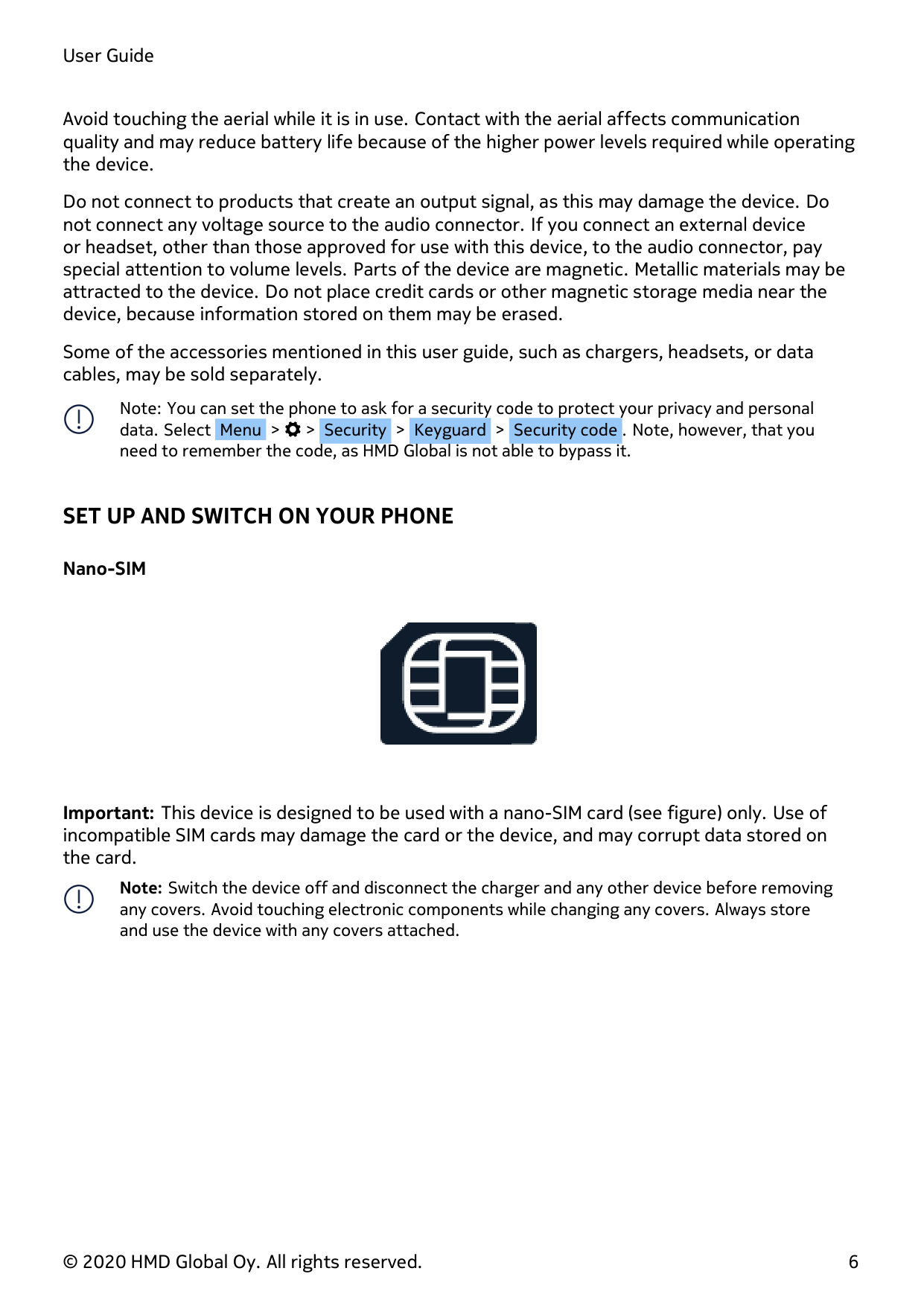
Important: This device is designed to be used with a nano-SIM card (see figure) only. Use of incompatible SIM cards may damage the card or the device, and may corrupt data stored on the card.

Note: Switch the device off and disconnect the charger and any other device before removing any covers. Avoid touching electronic components while changing any covers. Always store and use the device with any covers attached.
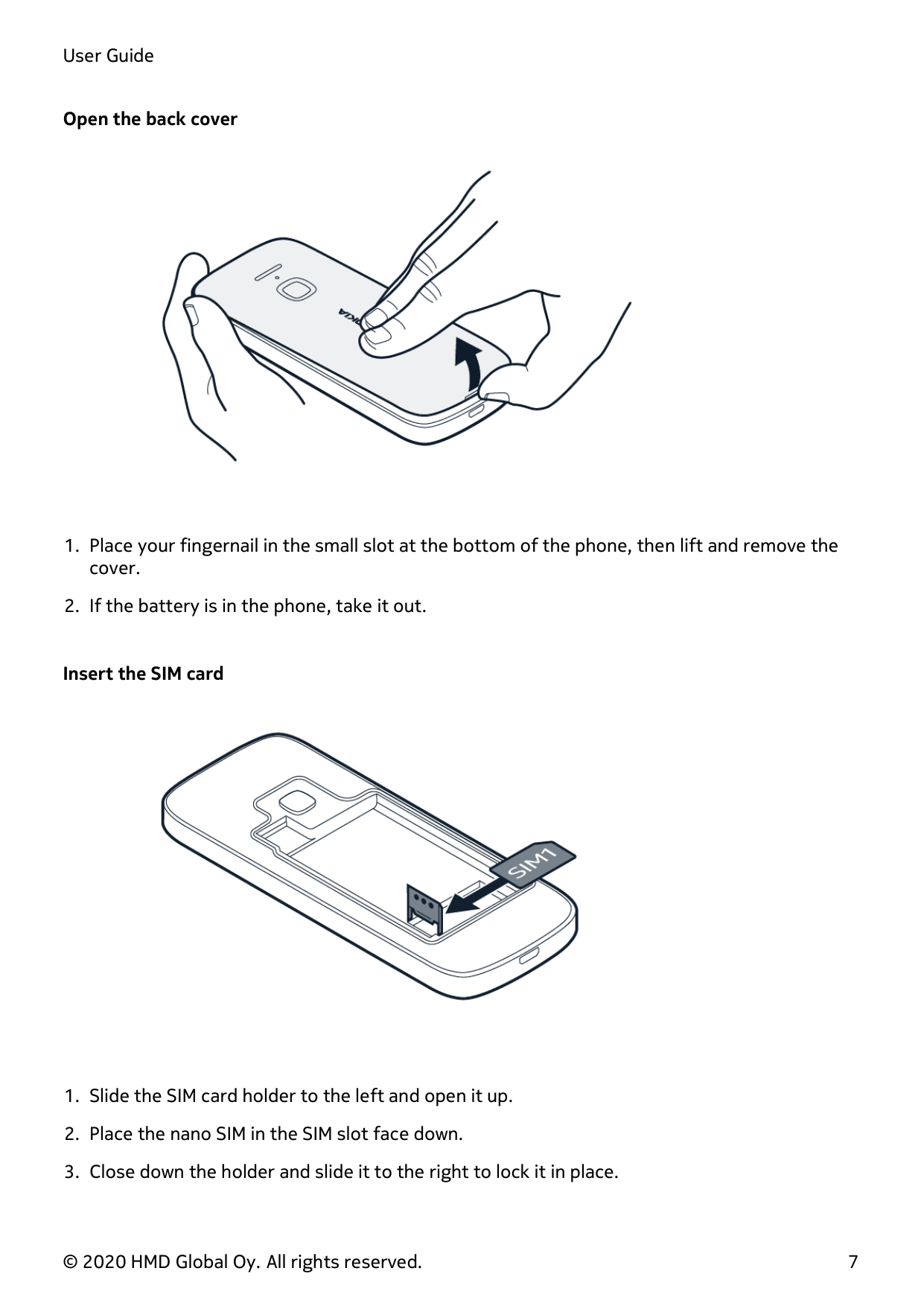
#### Open the back cover

#### Insert the SIM card

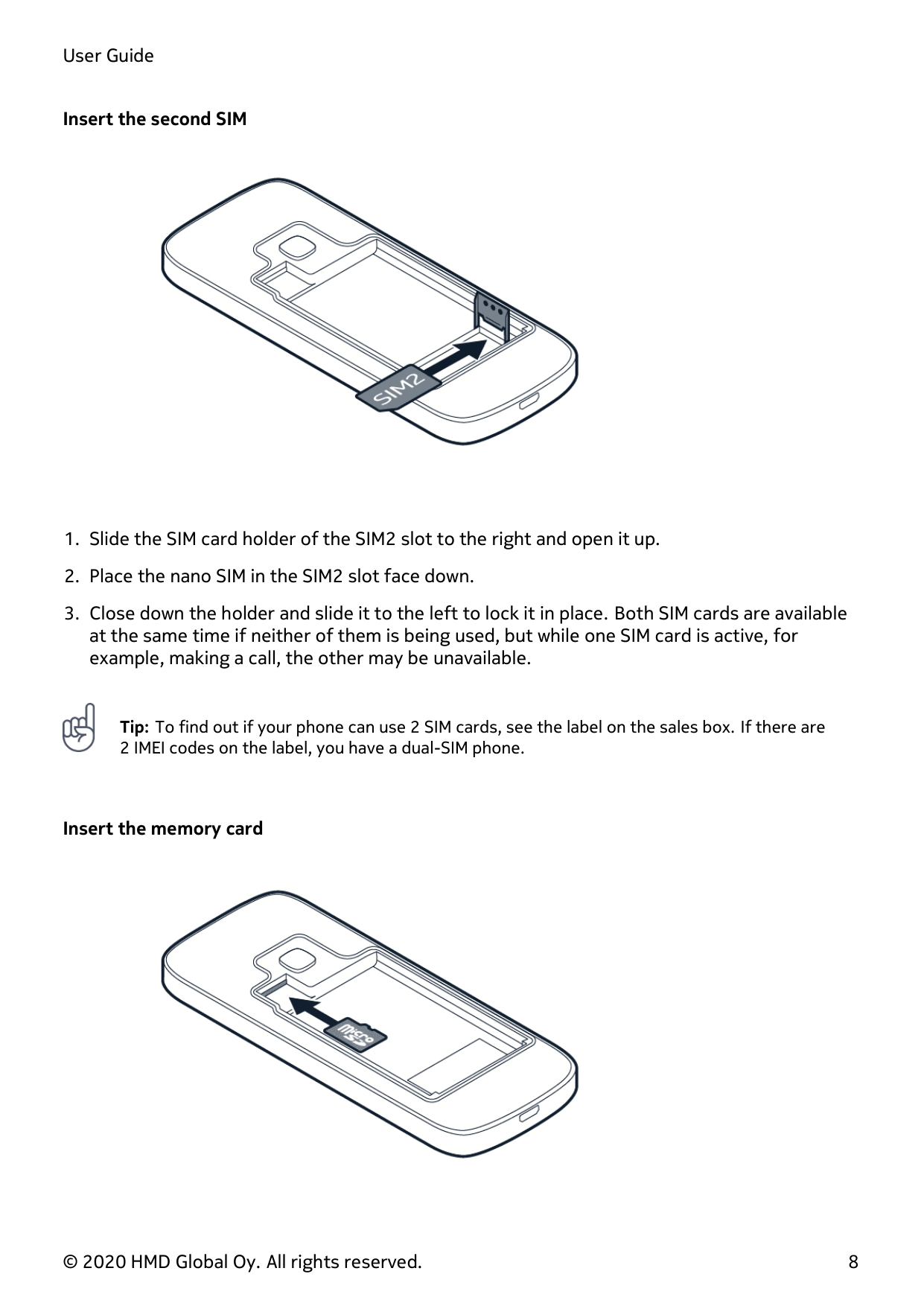
#### Insert the second SIM


Tip: To find out if your phone can use 2 SIM cards, see the label on the sales box. If there are 2 IMEI codes on the label, you have a dual-SIM phone.
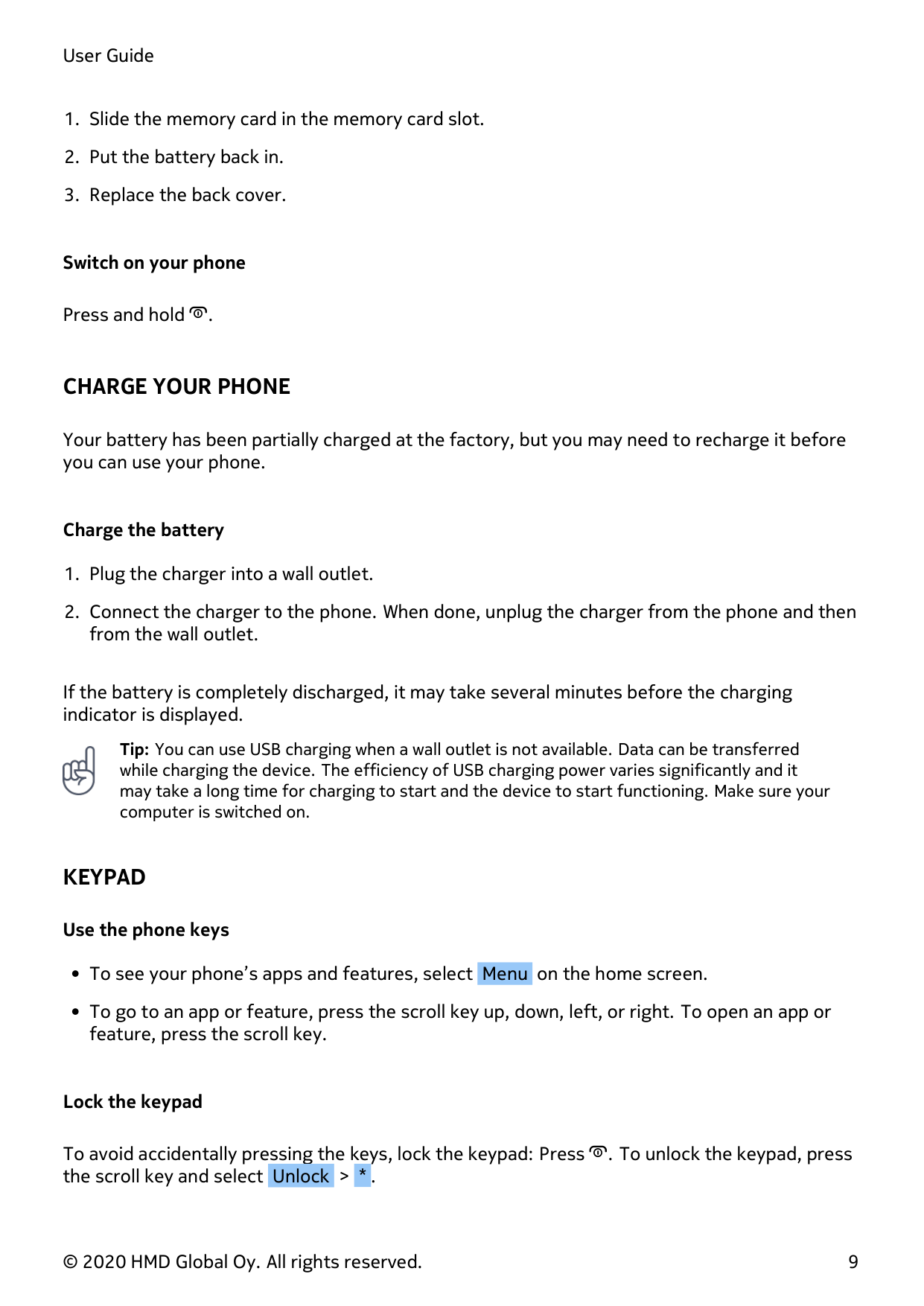
#### Insert the memory card

#### Switch on your phone
Press and hold .
CHARGE YOUR PHONE
Your battery has been partially charged at the factory, but you may need to recharge it before you can use your phone.
#### Charge the battery
If the battery is completely discharged, it may take several minutes before the charging indicator is displayed.

Tip: You can use USB charging when a wall outlet is not available. Data can be transferred while charging the device. The efficiency of USB charging power varies significantly and it may take a long time for charging to start and the device to start functioning. Make sure your computer is switched on.
KEYPAD
#### Use the phone keys
#### Lock the keypad
To avoid accidentally pressing the keys, lock the keypad: Press . To unlock the keypad, press the scroll key and select Unlock > * .
#### Type with the keypad
Press a key and then use the scroll key to select the letter you need. To enter a space press 0 . To type a special character or punctuation mark, select > Insert options > Insert symbol . To switch between character cases, press # repeatedly. To type in a number, press a number key and use the scroll key to select the number.
4 Calls, contacts, and messages
CALLS
#### Make a call
Learn how to make a call with your new phone.
#### Answer a call
Press .
CONTACTS
#### Add a contact
To add more contacts, select > Add new contact .
#### Save a contact from the call log
#### Call a contact
You can call a contact directly from the contact list. Select Menu > , scroll to the contact you want to call, then press the Call key.
SEND MESSAGES
#### Write and send messages
Contacts to add recipients from your contact list.
Insert smiley or Insert symbol .
5 Personalise your phone
CHANGE TONES
#### Set new tones
CHANGE THE LOOK OF YOUR HOME SCREEN
#### Choose a new wallpaper
You can change the background of your home screen.
GET THE MOST OUT OF THE TWO SIM CARDS
Your phone can have two SIM cards which can be used for different purposes.
#### Select which SIM card to use
Select Menu > > Connectivity > Dual SIM .

Tip: You can rename your SIM cards to make it easier to distinguish between them. Select Menu > > Connectivity > Dual SIM > SIM settings . Select a SIM card and then SIM name .
6 Camera
PHOTOS AND VIDEOS
You don’t need a separate camera when your phone has all you need for capturing memories.
#### Take a photo
To see the photo you just took, select > Gallery .
#### Camera options
Select Menu > > , then select the option you want, such as Effects or Timer .
#### Record a video
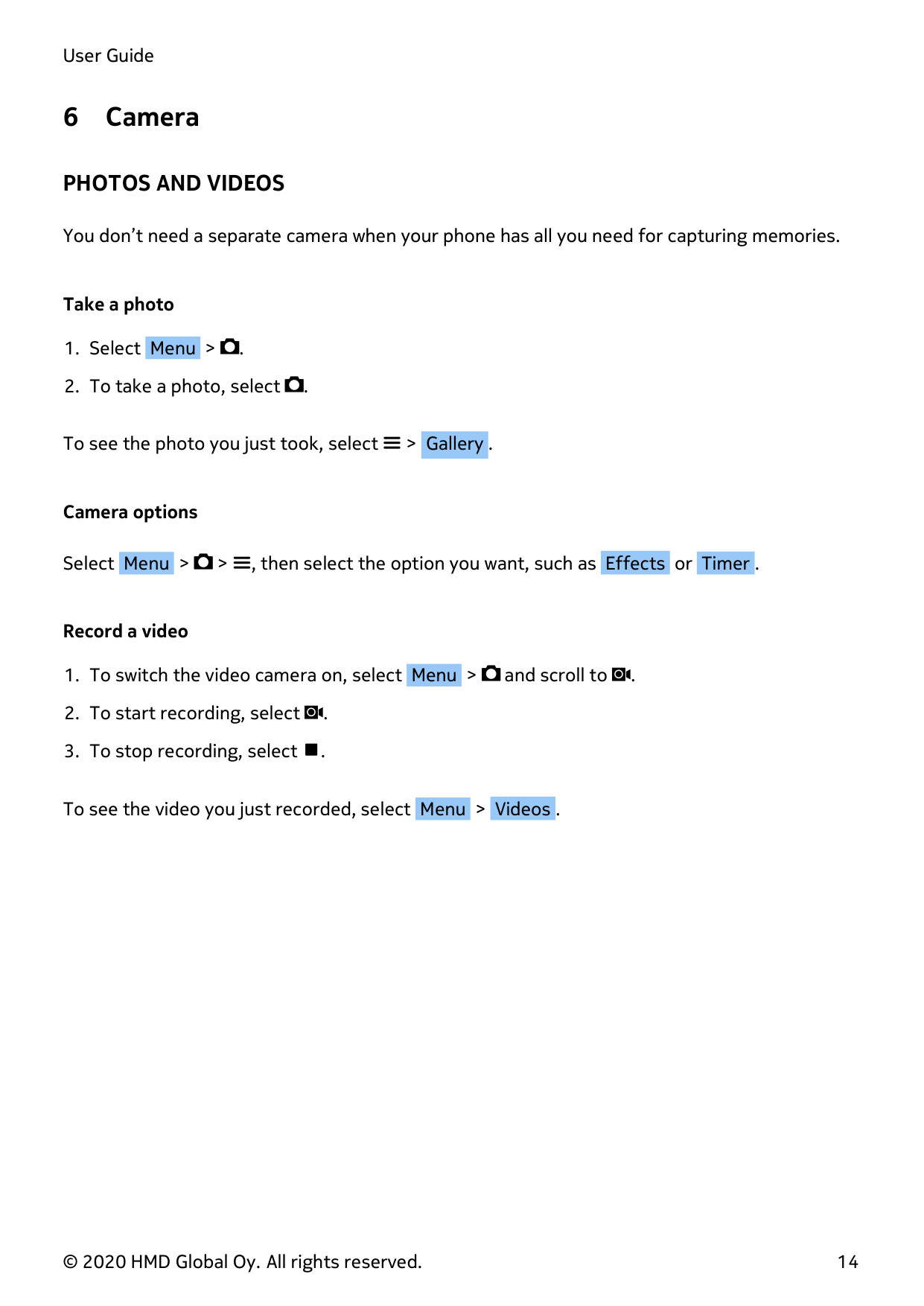
To see the video you just recorded, select Menu > Videos .
7 Internet and connections
BROWSE THE WEB
#### Connect to the Internet
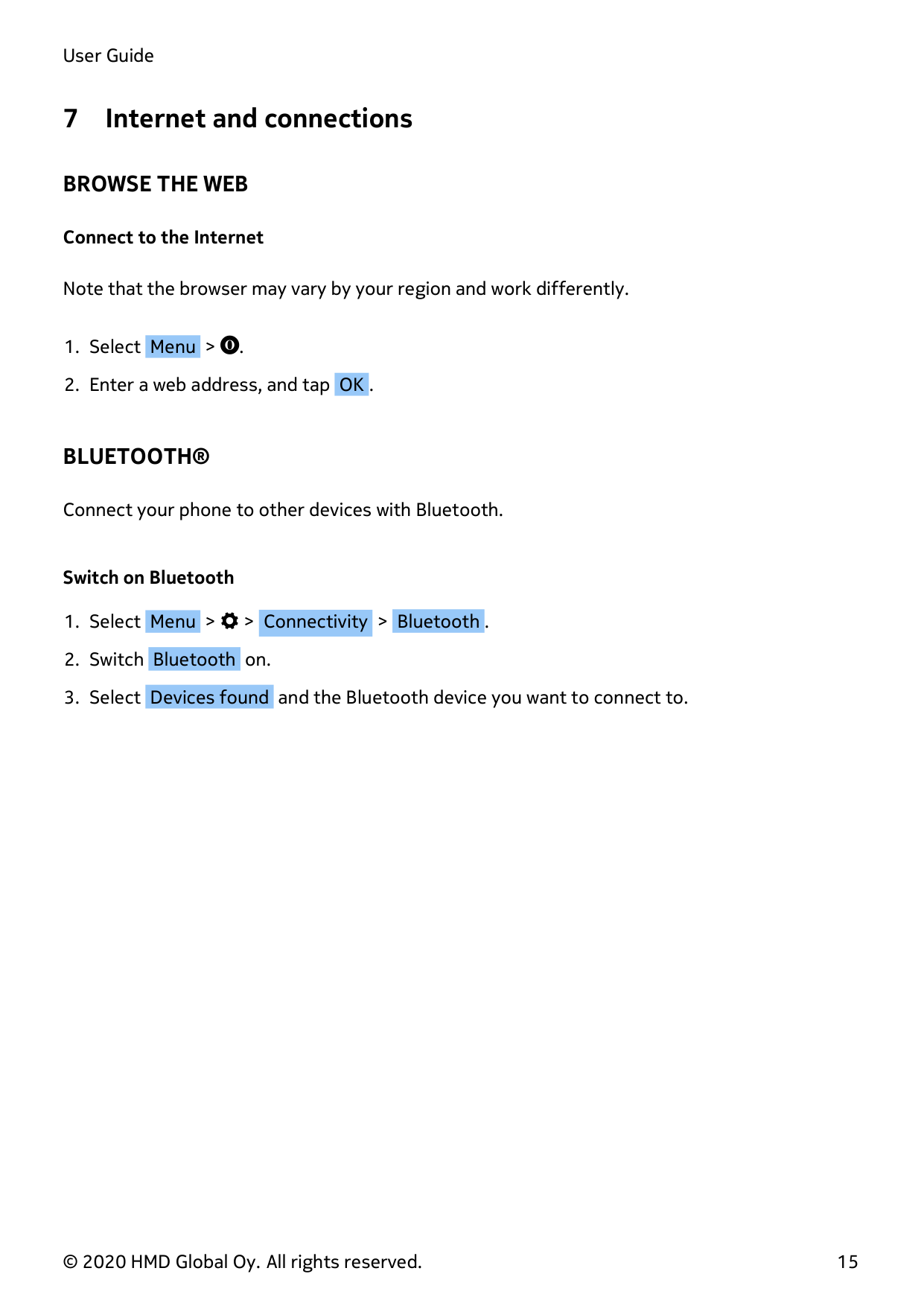
Note that the browser may vary by your region and work differently.
BLUETOOTH®
Connect your phone to other devices with Bluetooth.
#### Switch on Bluetooth
8 Music
MUSIC PLAYER
You can listen to your MP3 music files with the music player.
#### Listen to music
To play music, you need to store the music files on a memory card or on the phone memory.
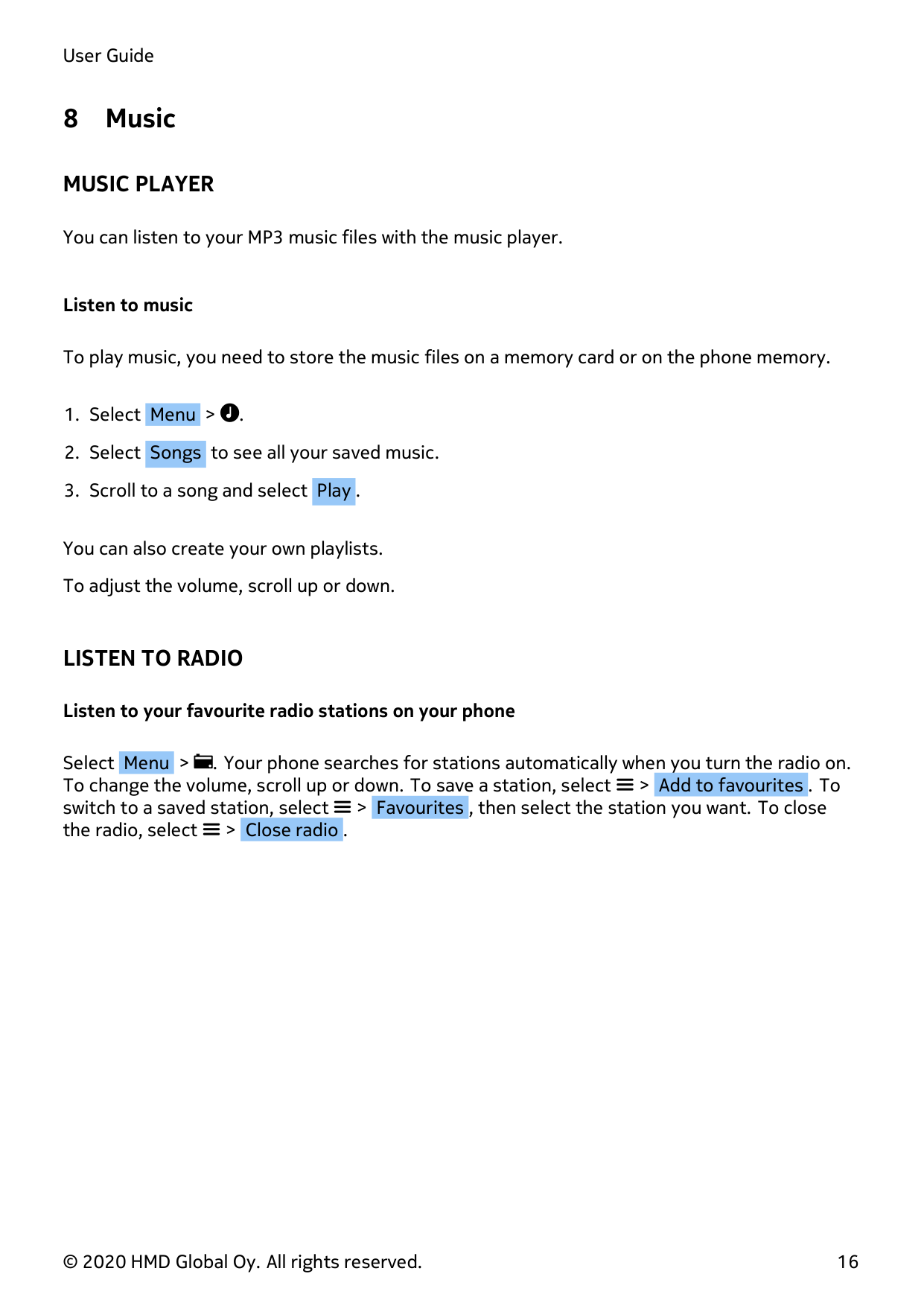
You can also create your own playlists. To adjust the volume, scroll up or down.
LISTEN TO RADIO
#### Listen to your favourite radio stations on your phone
Select Menu > . Your phone searches for stations automatically when you turn the radio on. To change the volume, scroll up or down. To save a station, select > Add to favourites . To switch to a saved station, select > Favourites , then select the station you want. To close the radio, select > Close radio .
9 Clock, calendar, and calculator
SET THE TIME AND DATE MANUALLY
#### Change the time and date
ALARM CLOCK
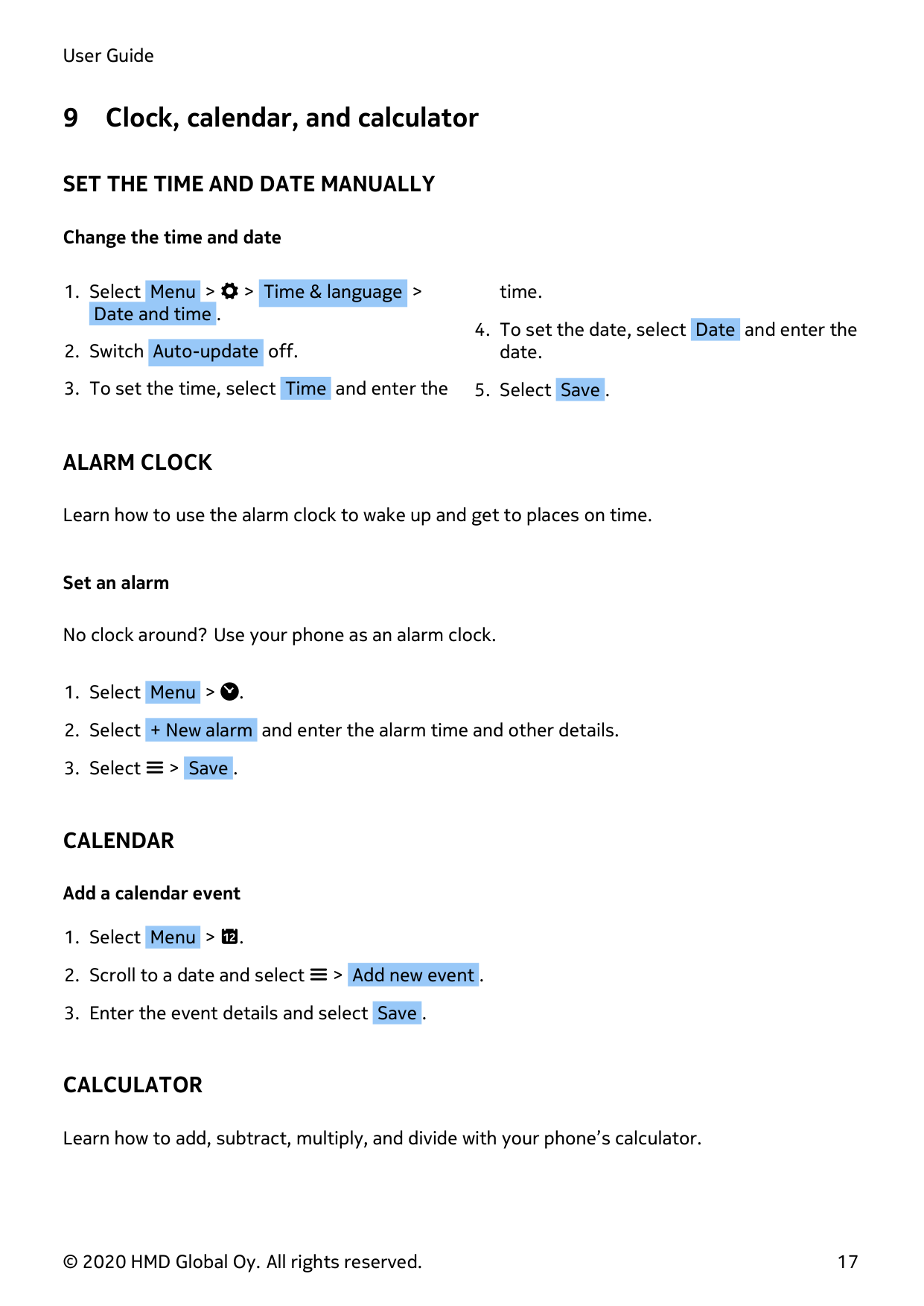
Learn how to use the alarm clock to wake up and get to places on time.
#### Set an alarm
No clock around? Use your phone as an alarm clock.
CALENDAR
#### Add a calendar event
CALCULATOR
Learn how to add, subtract, multiply, and divide with your phone’s calculator.
#### How to calculate
Select to empty the number fields.
10 Erase your phone’s data
REMOVE PRIVATE CONTENT FROM YOUR PHONE
If you buy a new phone, or want to dispose of or recycle your old phone for any other reason, here’s how you can remove your personal info and content. Note that it is your responsibility to remove all private content.
#### Remove content from your phone
When removing private content from your phone, pay attention to whether you are removing content from the phone memory or the SIM card.
To remove messages, select Menu > . Select > Delete conversations , select all the message threads, and then .
To remove contacts, select Menu > . Select > Delete contacts , select all the contacts, and then .
To remove your call info, select Menu > . Select > Delete all > OK . Check that all your personal content has been removed.
11 Product and safety information
FOR YOUR SAFETY
Read these simple guidelines. Not following them may be dangerous or against local laws and regulations. For further information, read the complete user guide.
#### SWITCH OFF IN RESTRICTED AREAS

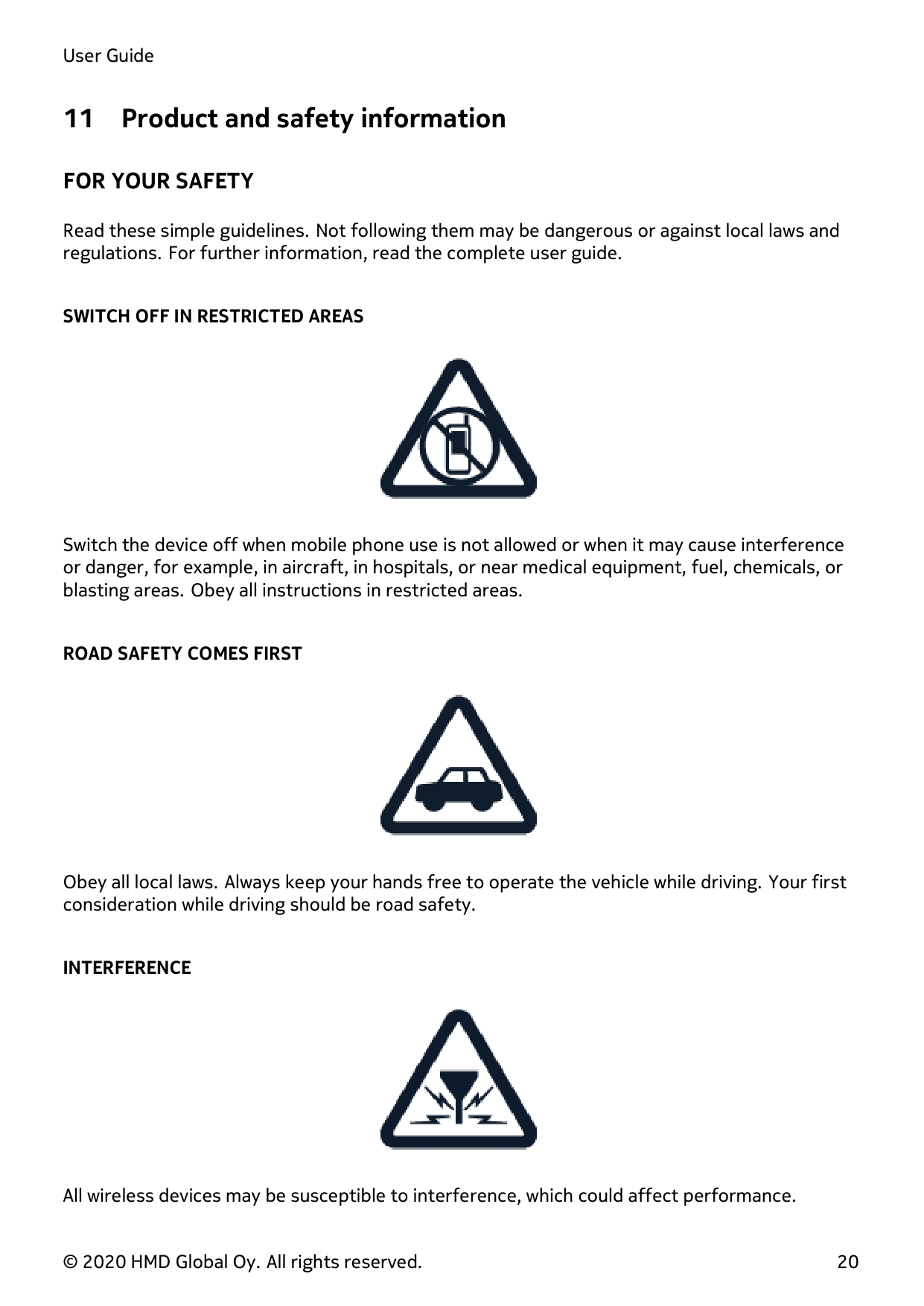
Switch the device off when mobile phone use is not allowed or when it may cause interference or danger, for example, in aircraft, in hospitals, or near medical equipment, fuel, chemicals, or blasting areas. Obey all instructions in restricted areas.
#### ROAD SAFETY COMES FIRST

Obey all local laws. Always keep your hands free to operate the vehicle while driving. Your first consideration while driving should be road safety.
#### INTERFERENCE

All wireless devices may be susceptible to interference, which could affect performance.
#### AUTHORISED SERVICE
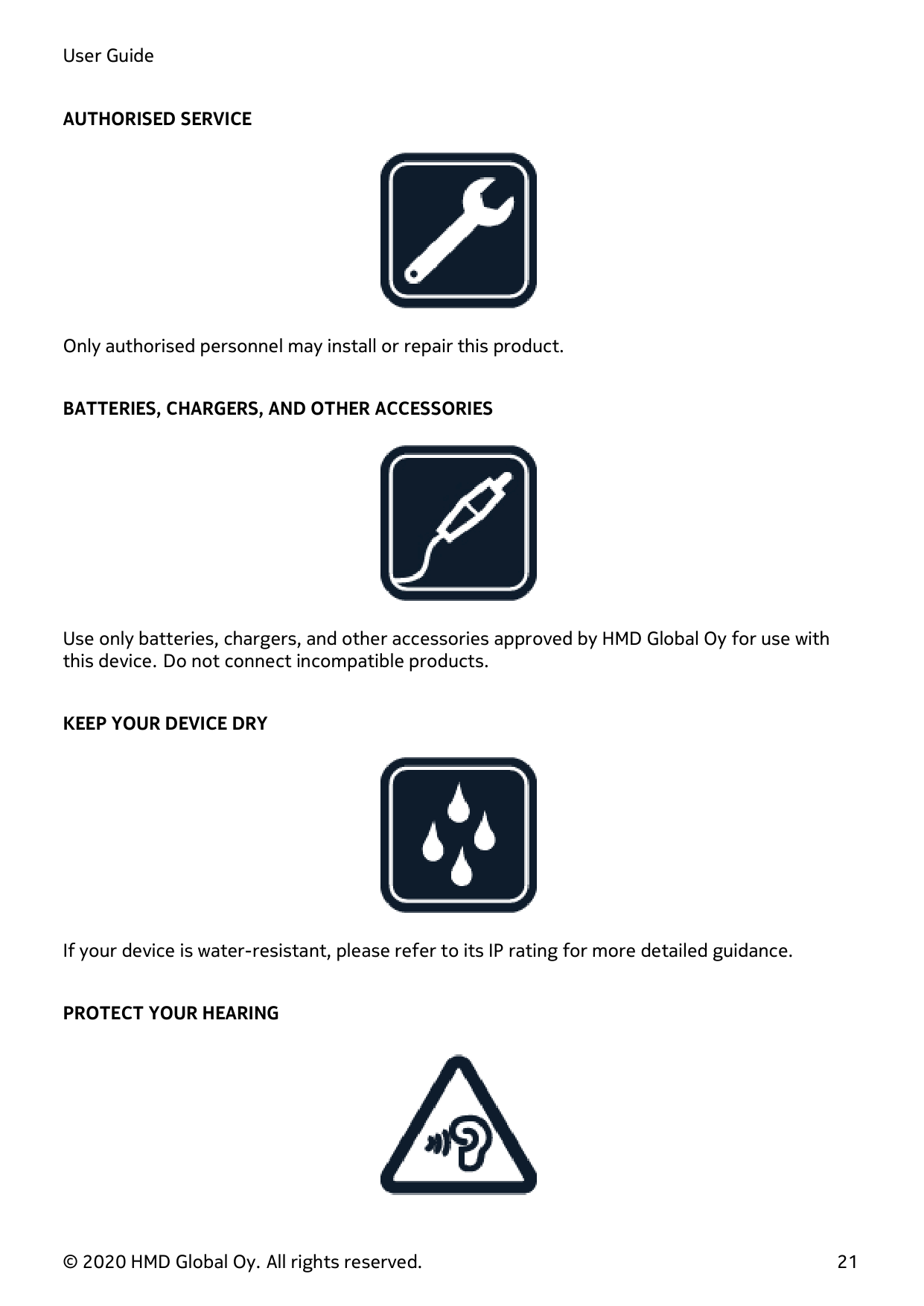

Only authorised personnel may install or repair this product.
#### BATTERIES, CHARGERS, AND OTHER ACCESSORIES

Use only batteries, chargers, and other accessories approved by HMD Global Oy for use with this device. Do not connect incompatible products.
#### KEEP YOUR DEVICE DRY

If your device is water-resistant, please refer to its IP rating for more detailed guidance.
#### PROTECT YOUR HEARING
To prevent possible hearing damage, do not listen at high volume levels for long periods. Exercise caution when holding your device near your ear while the loudspeaker is in use.
#### SAR

This device meets RF exposure guidelines when used either in the normal use position against the ear or when positioned at least 0.2 inches (5 mm) away from the body. The specific maximum SAR values can be found in the Certification Information (SAR) section of this user guide. For more information, go to www.sar-tick.com.
When a carry case, belt clip, or other form of device holder is used for body-worn operation, it should not contain metal and should provide at least the previously-stated separation distance from the body. Note that mobile devices may be transmitting even if you are not making a voice call.
EMERGENCY CALLS

Important: Connections cannot be guaranteed in all conditions. Never rely solely on any wireless phone for essential communications like medical emergencies.
Before making the call:
You may also need to do the following:
TAKE CARE OF YOUR DEVICE
Handle your device, battery, charger, and accessories with care. The following suggestions help you keep your device operational.
During extended operation, the device may feel warm. In most cases, this is normal. To avoid getting too warm, the device may automatically slow down, close apps, switch off charging, and if necessary, switch itself off. If the device is not working properly, take it to the nearest authorised service facility.
RECYCLE
Always return your used electronic products, batteries, and packaging materials to dedicated collection points. This way you help prevent uncontrolled waste disposal and promote the recycling of materials. Electrical and electronic products contain a lot of valuable materials, including metals (such as copper, aluminium, steel, and magnesium) and precious metals (such as gold, silver, and palladium). All of the materials in the device can be recovered as materials and energy.
CROSSED-OUT WHEELIE BIN SYMBOL
#### Crossed-out wheelie bin symbol

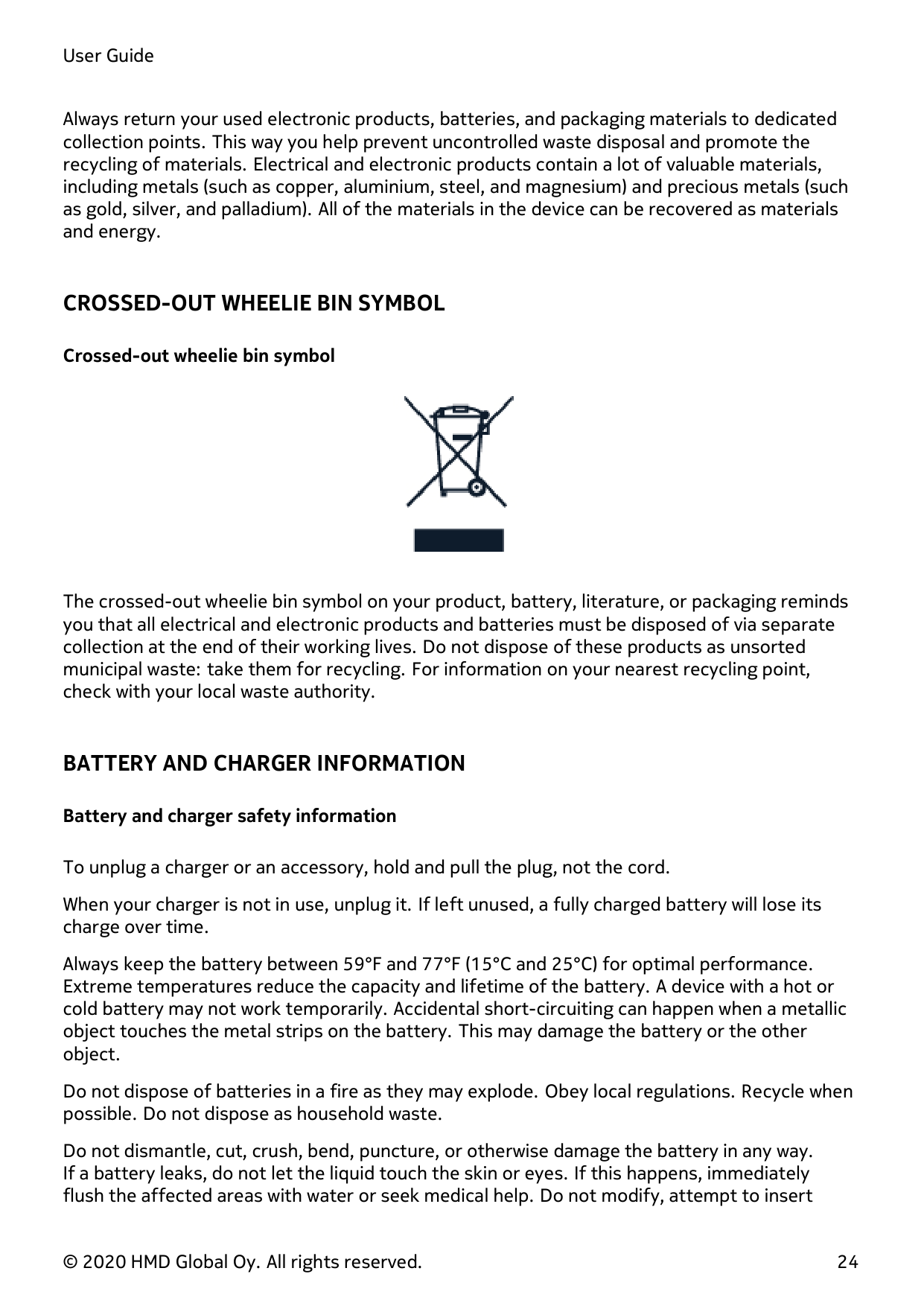
The crossed-out wheelie bin symbol on your product, battery, literature, or packaging reminds you that all electrical and electronic products and batteries must be disposed of via separate collection at the end of their working lives. Do not dispose of these products as unsorted municipal waste: take them for recycling. For information on your nearest recycling point, check with your local waste authority.
BATTERY AND CHARGER INFORMATION
#### Battery and charger safety information
To unplug a charger or an accessory, hold and pull the plug, not the cord. When your charger is not in use, unplug it. If left unused, a fully charged battery will lose its charge over time. Always keep the battery between 59°F and 77°F (15°C and 25°C) for optimal performance. Extreme temperatures reduce the capacity and lifetime of the battery. A device with a hot or cold battery may not work temporarily. Accidental short-circuiting can happen when a metallic object touches the metal strips on the battery. This may damage the battery or the other object. Do not dispose of batteries in a fire as they may explode. Obey local regulations. Recycle when possible. Do not dispose as household waste.
Do not dismantle, cut, crush, bend, puncture, or otherwise damage the battery in any way. If a battery leaks, do not let the liquid touch the skin or eyes. If this happens, immediately flush the affected areas with water or seek medical help. Do not modify, attempt to insert
foreign objects into the battery, or immerse or expose it to water or other liquids. Batteries may explode if damaged.
Use the battery and charger for their intended purposes only. Improper use or use of unapproved or incompatible batteries or chargers may present a risk of fire, explosion, or other hazard, and may invalidate any approval or warranty. If you believe the battery or charger is damaged, take it to a service centre or your phone dealer before continuing to use it. Never use a damaged battery or charger. Only use the charger indoors. Do not charge your device during a lightning storm.
SMALL CHILDREN
Your device and its accessories are not toys. They may contain small parts. Keep them out of the reach of small children.
MEDICAL DEVICES
Operation of radio transmitting equipment, including wireless phones, may interfere with inadequately shielded medical devices’ function. Consult a physician or the medical device’s manufacturer to determine if it is adequately shielded from external radio energy.
IMPLANTED MEDICAL DEVICES
To avoid potential interference, manufacturers of implanted medical devices recommend maintaining a minimum distance of 15.3 centimetres (6 inches) between a wireless device and the medical device. Persons who have such devices should:
If you have any questions about using your wireless device with an implanted medical device, consult your health care provider.
HEARING

Warning: When you use the headset, your ability to hear outside sounds may be affected. Do not use the headset where it can endanger your safety.
Some wireless devices may interfere with some hearing aids.
PROTECT YOUR DEVICE FROM HARMFUL CONTENT
Your device may be exposed to viruses and other harmful content. Be cautious when opening messages. They may contain malicious software or otherwise be harmful to your device.
VEHICLES
Radio signals may affect improperly installed or inadequately shielded electronic systems in vehicles. For more information, check with the manufacturer of your vehicle or its equipment. Only authorised personnel should install the device in a vehicle. Faulty installation may be dangerous and invalidate your warranty. Check regularly that all wireless device equipment in your vehicle is mounted and operating properly. Do not store or carry flammable or explosive materials in the same compartment as the device, its parts, or accessories. Do not place your device or accessories in the air bag deployment area.
POTENTIALLY EXPLOSIVE ENVIRONMENTS
Switch your device off in potentially explosive environments, such as near petrol or diesel pumps. Sparks may cause an explosion or fire resulting in injury or death. Note restrictions in areas with fuel, at chemical plants, or where blasting operations are in progress. Areas with a potentially explosive environment may not be clearly marked. These are usually areas where you are advised to switch your engine off, such as below deck on boats, chemical transfer or storage facilities, and where the air contains chemicals or particles. Check with the manufacturers of vehicles using liquefied petroleum gas (such as propane or butane) to see if this device can be safely used in their vicinity.
CERTIFICATION INFORMATION (SAR)
#### This mobile device meets guidelines for exposure to radio waves.
Your mobile device is a radio transmitter and receiver. It is designed not to exceed the limits for exposure to radio waves (radio frequency electromagnetic fields), recommended by international guidelines from the independent scientific organisation, ICNIRP. These guidelines incorporate substantial safety margins that are intended to assure the protection of all persons regardless of age and health. The exposure guidelines are based on the Specific Absorption Rate (SAR), which is an expression of the amount of radio frequency (RF) power deposited in the head or body when the device is transmitting. The ICNIRP SAR limit for mobile devices is 2.0 W/kg averaged over 10 grams of tissue.
SAR tests are carried out with the device in standard operating positions, transmitting at its highest certified power level, in all its frequency bands.
Please refer to www.nokia.com/phones/sar for the maximum SAR value of the device. This device meets RF exposure guidelines when used against the head or when positioned at least ⅝ inches (1.5 centimetres) away from the body. When a carry case, belt clip, or other
form of device holder is used for body-worn operation, it should not contain metal and should provide at least the above stated separation distance from the body.
To send data or messages, a good connection to the network is needed. Sending may be delayed until such a connection is available. Follow the separation distance instructions until the sending is finished.
During general use, the SAR values are usually well below the values stated above. This is because, for purposes of system efficiency and to minimise interference on the network, the operating power of your mobile is automatically decreased when full power is not needed for the call. The lower the power output, the lower the SAR value.
Device models may have different versions and more than one value. Component and design changes may occur over time and some changes could affect SAR values.
For more information, go to www.sar-tick.com. Note that mobile devices may be transmitting even if you are not making a voice call.
The World Health Organisation (WHO) has stated that current scientific information does not indicate the need for any special precautions when using mobile devices. If you are interested in reducing your exposure, they recommend you limit your usage or use a hands-free kit to keep the device away from your head and body. For more information and explanations and discussions on RF exposure, go to the WHO website at www.who.int/peh-emf/en.
ABOUT DIGITAL RIGHTS MANAGEMENT
When using this device, obey all laws and respect local customs, privacy, and legitimate rights of others, including copyrights. Copyright protection may prevent you from copying, modifying, or transferring photos, music, and other content.
COPYRIGHTS AND OTHER NOTICES
#### Copyright
The availability of products, features, apps, and services may vary by region. For more information, contact your dealer or your service provider. This device may contain commodities, technology, or software subject to export laws and regulations from the US and other countries. Diversion contrary to law is prohibited.
The contents of this document are provided ”as is”. Except as required by applicable law, no warranties of any kind, either express or implied, including, but not limited to, the implied warranties of merchantability and fitness for a particular purpose, are made in relation to the accuracy, reliability, or contents of this document. HMD Global reserves the right to revise this document or withdraw it at any time without prior notice.
To the maximum extent permitted by applicable law, under no circumstances shall HMD Global or any of its licensors be responsible for any loss of data or income or any special, incidental, consequential, or indirect damages howsoever caused.
Reproduction, transfer, or distribution of part or all of the contents in this document in any form without the prior written permission of HMD Global is prohibited. HMD Global operates a policy of continuous development. HMD Global reserves the right to make changes and improvements to any of the products described in this document without prior notice.
HMD Global does not make any representations, provide a warranty, or take any responsibility for the functionality, content, or end-user support of third-party apps provided with your device. By using an app, you acknowledge that the app is provided as is.
Downloading of maps, games, music, and videos and uploading of images and videos may involve transferring large amounts of data. Your service provider may charge for the data transmission. The availability of particular products, services, and features may vary by region. Please check with your local dealer for further details and availability of language options.
Certain features, functions, and product specifications may be network dependent and subject to additional terms, conditions, and charges.
All information about specifications, features, and products is subject to change without notice.
The HMD Global Privacy Policy, available at http://www.nokia.com/phones/privacy, applies to your use of the device.
HMD Global Oy is the exclusive licensee of the Nokia brand for phones & tablets. Nokia is a registered trademark of Nokia Corporation.
The Bluetooth word mark and logos are owned by the Bluetooth SIG, Inc. and any use of such marks by HMD Global is under licence.
This product includes open source software. For applicable copyright and other notices, permissions, and acknowledgements, select *#6774# on the home screen.