
Nutricia Scc3297 Flocare Infinity Pump Alarm
Ask AI
— answers from the official manualAnswers from the official manual.
Common questions
Common Questions
10 totalHow often should maintenance be conducted on this device?
The manufacturer recommends an inspection at an authorized service center once every two years and replace the feeding sets every 24 hours to maintain accuracy (Page 10-13).
How do I activate the 'Low Battery' alarm feature?
This function is automatically enabled; when remaining battery shows one hour left, it will blink and start beeping every two seconds reminding of low charge condition (Page 14).
How do I switch off the pump safely?
Press and hold the ON/OFF key for 2 seconds. This will cause a continuous alarm sound and the pump will shut down, retaining all feeding program data and administered volume since the last clearance (Page 11).
What happens when I press the 'START/STOP' key?
When pressed once, it temporarily pauses the pump in hold mode until pressing again for normal operation or for three minutes before a two-tone alarm sounds prompting you to start it ('PUSH STRT' displayed on screen). (Page 11)
How do I clear the volume delivered by the pump?
Press and hold the 'CLR' key until the screen shows '0 ml', setting total volume delivered to zero. This operation resets memorized data, putting the flow rate at default values for new programming sessions (Page 13).
How do you prime the pump set correctly?
Use the FILL SET function by pressing and holding this button to automatically fill a new or empty feeding tube while deactivating alarms to avoid accidental triggering. Release button once initiated until full (Page 12-13).
Full Manual
19 pages

PTIT-CHFR-BE-CH-LUESDE-AT-CH-LUBE-NL UK-IE







INSTRUCTIONS FOR USE
For enteral use onl Read this manual before using the pump


BE-NL • INHOUD Algemene productinformatie 5 Voorbereiding 5 Service en garantie 5 Gebruiksaanwizing 6 Alarmfuncties en veiligheidsvoorzieningen 10 Onderhoud 10 Problemen en oplossingen 11 Instelmodus 12 Technische specificaties 14
DE-AT-CH-LU • INHALT Allgemeine Informationen 15 Vorbereitung 16 Service und Gewährleistung 17 Bedienungsanweisung 17 Alarmfunktionen und Sicherheitstechnik 22 Instandhaltung 22 Fehlersuchtabelle 23 Sstemeinstellungen 24 Technische Daten 25 Bestellinformation 26
ES • ÍNDICE Introducción 27 Preparación 27 Servicio garantía 27 Instrucciones de funcionamiento 28 Funciones de alarma prestaciones de seguridad 32 Mantenimiento 32 Diagrama de solución de problemas 33 Modo de configuración 34 Especificaciones técnicas 36
FR-BE-CH-LU • CONTENT
Introduction 37 Précautions d’emploi 37 Service après-vente et garantie 37 Instructions d’utilisation 38 Alarmes et sécurités 42
Entretien 42 Résolutions des problèmes 43 Mode de paramétrage 44 Spécifications techniques 45
IT-CH • CONTENUTI
Introduzione 47 Preparazione 47 Servizio e garanzia 47 Istruzioni per l’uso 48 Allarmi e funzioni di sicurezza 52 Manutenzione 52 Risoluzione dei problemi 53 Funzione di parametrizzazione 54 Specifiche tecniche 55
PT • ÍNDICE Introdução 57 Preparação 57 Serviço e garantia 57 Instruções de funcionamento 58 Funções do alarme e características de segurança 62 Manutenção 62 Quadro para soluções e problemas 63 Modo de configuração - Set up 64 Especificações técnicas 65
UK-IE • CONTENT
Introduction 67 Preparation 67 Service and Warrant 67 Operating instructions 68 Alarm functions and safet features 72 Maintenance 72 Problem solver chart 73 Set up mode 74 Technical specifications 75
Appendix A: Guidance and manufacturer’s declaration Electromagnetic compatibilit 78

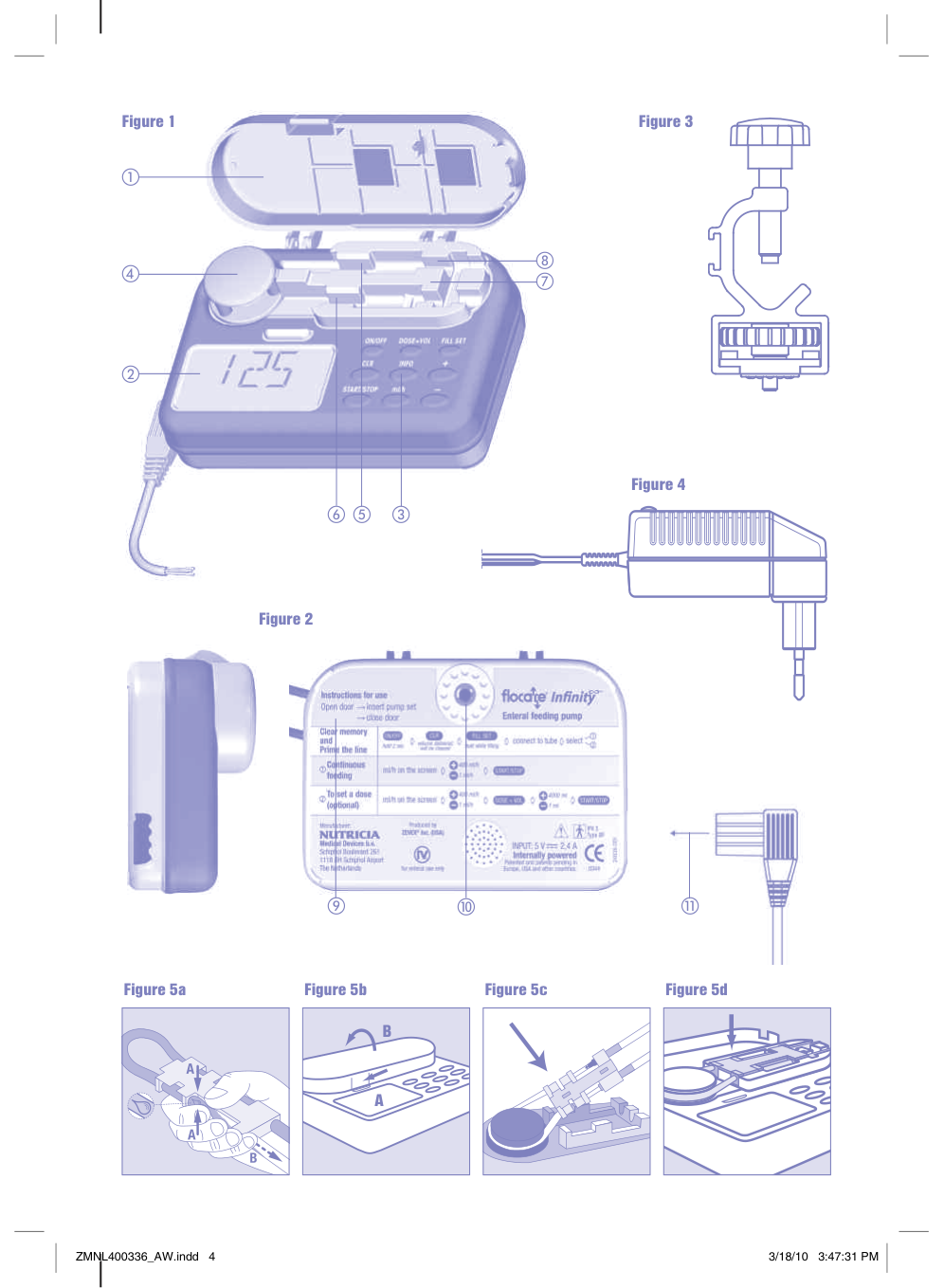
Figure 1
d
f c
e
Figure 3
| | |---| | |
Figure 4
Figure 2


i j
| | | |---|---| | | |

k
Figure 5a
Figure 5b
|A
B
| |---|
Figure 5c Figure 5d
ZMNL400336_AW.indd 4 3/18/10 3:47:31 PM
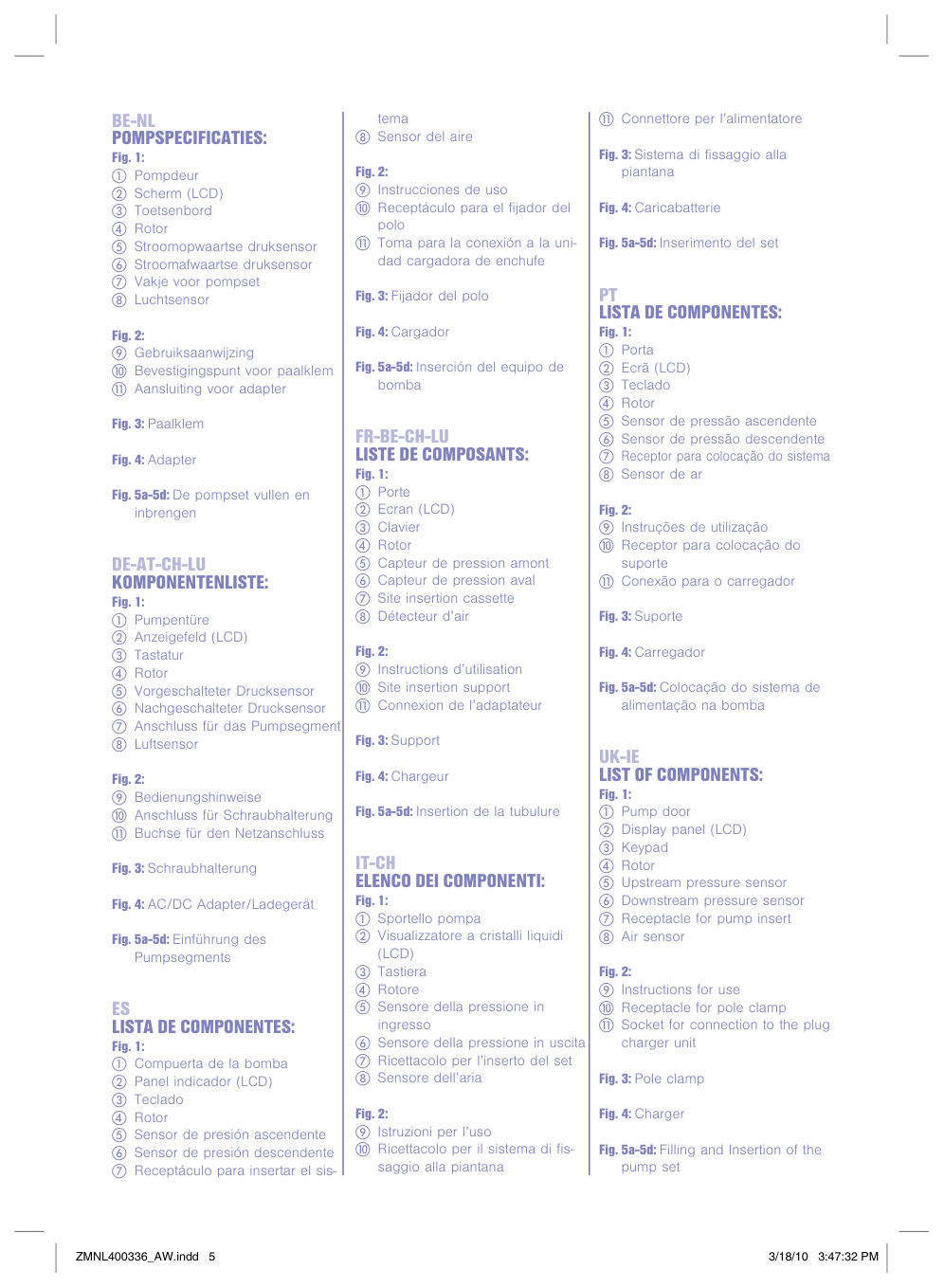
#### BE-NL POMPSPECIFICATIES:
Fig. 2:
Fig. 5a-5d: De pompset vullen en
inbrengen
#### DE-AT-CH-LU KOMPONENTENLISTE:
Fig. 2:
Fig. 5a-5d: Einführung des
Pumpsegments
i Instrucciones de uso j Receptáculo para el fiador del
polo
k Toma para la conexión a la uni-
dad cargadora de enchufe
Fig. 5a-5d: Inserción del equipo de
bomba
#### FR-BE-CH-LU LISTE DE COMPOSANTS:
Fig. 2:
#### IT-CH ELENCO DEI COMPONENTI:
Fig. 2:
#### ES LISTA DE COMPONENTES: Fig. 1:
k Connettore per l’alimentatore
#### PT LISTA DE COMPONENTES:
Fig. 2:
Fig. 5a-5d: Colocação do sistema de
alimentação na bomba
#### UK-IE LIST OF COMPONENTS:
Fig. 2:
Fig. 5a-5d: Filling and Insertion of the
pump set
ORDERING INFORMATION Flocare
#### pump Western Europe corporate code 35676 Flocare
#### Infinit
®
™
Infinit
Charger
®
™
Pole clamp Instructions for use
Optional accessories Please refer to our local Nutricia contact for availabilit of Flocare
accessories, as there are: feeding sets, carr bag, PDMS/data cable, nurse call, service suitcase and other.
Infinit
®
™
MANUFACTURER Nutricia Medical Devices b.v. Schiphol Boulevard 261 1118 BH Schiphol Airport The Netherlands
#### INTRODUCTION
PREPARATION
#### SERVICE AND WARRANTy
The manufacturer recommends an inspection of the pump at an authorised service centre ever 2 ears. Onl authorised personnel should perform service work on Infinit™ pumps. Please contact our local Sales Organisation / Nutricia Subsidiar for all service and repair of pumps (see address at the back of the booklet).
Limitations of warrant Solel for the benefit of the original buer/user, Nutricia Medical Devices B.V, warrants all new Flocare® Infinit™ pumps, of its manufacture to be free from defects in material and workmanship, excluding normal wear and tear, and will replace or repair, at its service facilit or other location designated b Nutricia Medical Devices B.V, an Flocare® Infinit™ pump returned to it within thirt-six (36) months of original purchase b the buer/user. Such repair or replacement shall be free of charge.
Nutricia Medical Devices B.V warrants to the original buer/user, all repaired or replaced pumps to be free from defects in material and workmanship and will replace or repair such products, at its service facilit or other location designated b Nutricia Medical Devices B.V. Such repair or replacement shall carr a warrant of ninet (90) das from the date of repair or replacement or the balance of the new pumps warrant as described above, whichever is greater.
THIS WARRANTy APPLIES ONLy TO FLOCARE® INFINITy™ PUMPS MANUFACTURED By NUTRICIA MEDICAL DEVICES B.V AND IS THE ONLy WARRANTy GIVEN WITH RESPECT TO THE PUMPS. NO WARRANTIES IMPLIED IN LAW, INCLUDING, BUT NOT LIMITED TO THE IMPLIED WARRANTIES OF MERCHANTABILITy AND FITNESS FOR PARTICULAR PURPOSE, SHALL APPLy. NUTRICIA MEDICAL DEVICES B.V WILL BE LIABLE, IN ANy EVENT, ONLy FOR THE PURCHASE PRICE OF THE DEFECTIVE PRODUCT, BUT NOT FOR ANy CONSEQUENTIAL DAMAGES.
This Warrant ma not be modified, amended or otherwise changed, except b a written document properl executed b a corporate officer of Nutricia Medical Devices B.V
THE WARRANTy IS VOID IF THE FLOCARE® INFINITy™ PUMP IS SUBjECT TO ABUSE, ACCIDENT, ALTERATION, MODIFICATION, TAMPERING, MISUSE OR THE UNAUTHORIZED REPAIR OR SERVICE IN ANy WAy WITHOUT PRIOR AUTHORIZATION FROM NUTRICIA MEDICAL DEVICES B.V. IN ANy EVENT, NUTRICIA MEDICAL DEVICES B.V.’S LIABILITy SHALL NEVER EXCEED THE ORIGINAL PURCHASE PRICE OF THE PUMP AND SHALL NOT EXTEND TO ANy CONSEQUENTIAL LOSS OR DAMAGE.
OPERATING INSTRUCTIONS INSERTION OF THE FLOCARE® INFINITy™ PUMP SET
®
Infinit
™
pump set. Remove the dust cap from the step connector.
®
Infinit
™
pump sets are equipped with an “automatic free-flow protection”, as a consequence the set has no roller clamp. Fill the pump set completel with feed b gentl pinching on the side of the cassette that is marked with a drop (point A on figure 5a) or fill the pump set with help of the pump (see paragraph: filling the pump set).
ON/OFF
#### SWITCHING “ON”
For proper pump operation, make sure the pump door is closed prior to switching the pump on. Press the “ON/OFF” ke for 2 seconds. The pump beeps and carries out a short self test, showing the pump serial number in 8 digits. Verif that all displa segments and smbols are active as shown in figure 6 (see next page). The pump displas the total volume delivered since the memor was cleared and switches in the hold mode read for programming.
#### SWITCHING “OFF”
ON/OFF
Press the “ON/OFF” ke and keep it pressed for 2 seconds. A continuous alarm will be heard and the pump switches off. The feeding program (installed parameters) and total volume administered since the last clearance will be retained in the pump’s memor. If the pump shuts down due to low batter voltage, the memor will be retained for 24 hours.
#### “HOLD” MODE
START/STOP
To temporaril pause the pump, or switch into “hold” mode whilst operating, press the “START/STOP” ke once. Three beeps are heard and the run smbol disappears. The programmed flow rate (ml/h), volume (DOSE=VOL) and the administered volume (ml) are retained.
The “hold” mode is used to temporaril stop the flow of feed:
#### FILLING THE PUMP SET
ON/OFF
d
FILL SET
The FILL SET function offered b the Infinit pump is used to fill a (new) feeding set with nutrition (or water as the case ma be). When the FILL SET function runs all alarms are deactivated helping avoid alarms being inadvertentl triggered (e.g. air alarm). The FILL SET function should onl be used to fill an empt (air-filled) feeding set. Use of the FILL SET function at an other time ma cause the pump to incorrectl calibrate. When the FILL SET function is initiated the pump will calibrate to the giving set.
When the pump is in the hold mode: Press and hold the “FILL SET” ke for 2 seconds to activate the “FILL SET” maneuver. Release the button as soon as the pump generates a beep and starts pumping at a flow rate of approx. 700ml/h. During this maneuver the message “FILL SET” appears in the displa. The pump will automaticall stop when the Flocare
Pack Infinit
®
pump set is completel filled with feed. However this “FILL SET” maneuver can at antime be stopped b pushing the “FILL SET” ke a second time. The pump will return to the hold mode when the “FILL SET” maneuver is complete or stopped.
™
#### DISPLAy
The pump has a liquid crstal displa (L.C.D.) with large alphanumeric characters, smaller smbols, words and a back light. The following information can be found in the displa:
• Flow rate (ml/h), volume (ml), is displaed through the large characters. Words below describe what the number relates to (rate, dose or volume). The pump also displas messages, for example “end of dose” will appear when the pump has finished delivering a single feed dose.
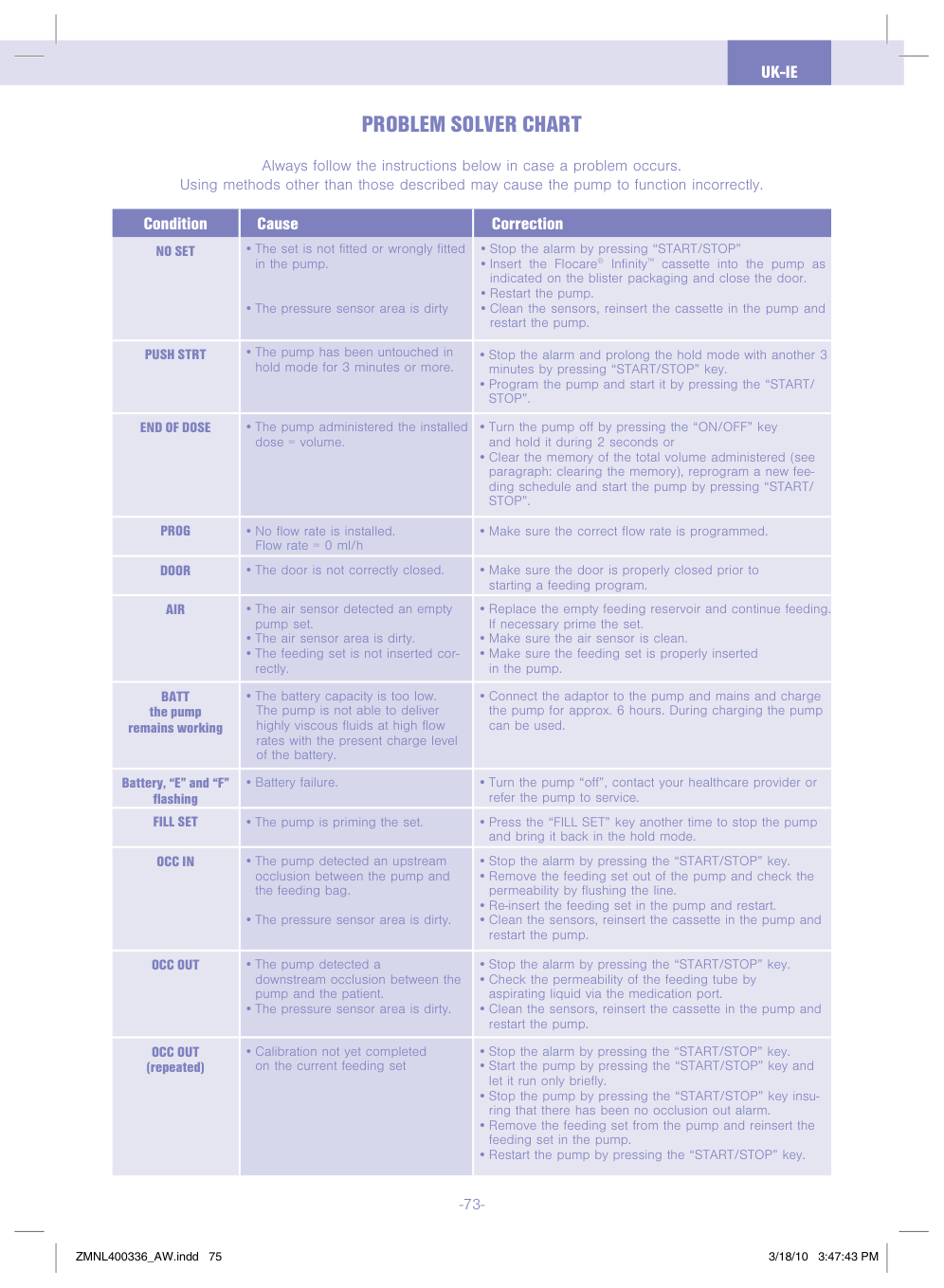
Figure 6
The back light of the displa turns off 10 seconds after the last ke is pressed. The back light will switch on for 10 seconds when the charger is connected to the mains.
#### PROGRAMMING THE PUMP
®
Infinit
™
pump can be used for continuous or dose feeding.
+ 1 ml/h-
ON/OFF d d dml/h400ml/h
START/STOP
#### TO SET A DOSE
+ 1 ml/h-
4000 ml+ 1 ml-
ON/OFF d d d d dml/h START/STOP400ml/h
DOSE=VOL
From the hold mode, with the last flow rate (ml/h) displaed in the LCD:
During functioning the following parameters can be found in the displa:
• B pressing the “INFO” ke the total volume since the memor was cleared will be visualized.
INFO
When the required volume or dose has been delivered, “END OF DOSE” will appear and the pump will beep (or mute, depending upon the pumps’ configuration (see paragraph: set up mode).
#### TO CHANGE THE FEEDING PROGRAM DURING FUNCTIONING
All parameters and values can be cleared one after the other in the following wa:
is stopped
INFO = 0 ml = Volume delivered is cleared In order to keep a clear overview of the dail amount of feed delivered, clear the total volume delivered as each dail feeding schedule is started, as follows:
BATTERy OPERATION
®
Infinit
™
pump is equipped with a Lithium-ion batter.
• To check the status of the batter, disconnect the charger from the pump and turn the pump on. The bars between E and F (E=Empt, F=Full) represent the “fuel gauge” of the batter. Each bar is approximatel 1/4 of a full batter charge. If 2 bars appear the batter is half full and remaining operating time is approximatel 12 hours at a flow rate of 125 ml/h.
START/STOP
d
CLR
recharge the batter or select a lower rate to complete the feed ccle.
#### CONNECTION TO AN EXTERNAL ALARM SySTEM
The power connector at the side of the pump offers the option of connecting the pump to an external alarm sstem or Patient Data Monitoring Sstem (PDMS).
®
Infinit
™
Nurse Call (corporate code 35752) enables connection to an external alarm sstem. This external alarm sstem ma be with open or closed contact. Follow the instructions for use of the Flocare
®
Infinit
™
Nurse Call to connect the pump.
PDMS Cable (corporate code 35776) enables connection to an external PDMS sstem. Follow the instructions for use of the Flocare
Infinit
®
™
Infinit
PDMS Cable to connect the pump.
®
™
ALARM FUNCTIONS AND SAFETy FEATURES In case an of the problems listed on the problem solver chart occur, the pump delivers an audible and visual alarm and stops working. The back light of the LCD automaticall switches on. Exception to this is the low batter alarm “BATT”, in this situation the pump continues working. Action in the event of an alarm: Check the tpe of alarm displaed b the large displa characters.
MAINTENANCE
Cleaning:
®
Infinit
™
pump ma be rinsed b holding under a stream of warm, clean water. Do not submerge the pump!
###### Safet notes:
®
Infinit
™
pump set ever 24 hours to maintain deliver accurac and prevent the growth of harmful bacteria. Dispose of Flocare
®

Infinit
™
disposable sets properl, as required b local law.
PROBLEM SOLVER CHART
Alwas follow the instructions below in case a problem occurs. Using methods other than those described ma cause the pump to function incorrectl.
|NO SET
Condition|•The set is not fitted or wrongl fitted in the pump.
•The pressure sensor area is dirt
Cause|•Stop the alarm b pressing “START/STOP”
•Insert the Flocare® Infinit™ cassette into the pump as indicated on the blister packaging and close the door.
•Restart the pump.
•Clean the sensors, reinsert the cassette in the pump and restart the pump.
Correction| |---|---|---| |PUSH STRT|•The pump has been untouched in hold mode for 3 minutes or more.|•Stop the alarm and prolong the hold mode with another 3 minutes b pressing “START/STOP” ke.
•Program the pump and start it b pressing the “START/ STOP”.
| |END OF DOSE|•The pump administered the installed dose volume.|•Turn the pump off b pressing the “ON/OFF” ke and hold it during 2 seconds or
•Clear the memor of the total volume administered (see paragraph: clearing the memor), reprogram a new feeding schedule and start the pump b pressing “START/ STOP”.
| |PROG|•No flow rate is installed. Flow rate 0 ml/h|•Make sure the correct flow rate is programmed.| |DOOR|•The door is not correctl closed.|•Make sure the door is properl closed prior to starting a feeding program.| |AIR|•The air sensor detected an empt pump set.
•The air sensor area is dirt.
•The feeding set is not inserted correctl.
|•Replace the empt feeding reservoir and continue feeding. If necessar prime the set.
•Make sure the air sensor is clean.
•Make sure the feeding set is properl inserted in the pump.
| |BATT the pump remains working|•The batter capacit is too low. The pump is not able to deliver highl viscous fluids at high flow rates with the present charge level of the batter.|•Connect the adaptor to the pump and mains and charge the pump for approx. 6 hours. During charging the pump can be used.| |Batter, “E” and “F” flashing|•Batter failure.|•Turn the pump “off”, contact our healthcare provider or refer the pump to service.| |FILL SET|•The pump is priming the set.|•Press the “FILL SET” ke another time to stop the pump and bring it back in the hold mode.| |OCC IN|•The pump detected an upstream occlusion between the pump and the feeding bag.
•The pressure sensor area is dirt.
|•Stop the alarm b pressing the “START/STOP” ke.
•Remove the feeding set out of the pump and check the permeabilit b flushing the line.
•Re-insert the feeding set in the pump and restart.
•Clean the sensors, reinsert the cassette in the pump and restart the pump.
| |OCC OUT|•The pump detected a downstream occlusion between the pump and the patient.
•The pressure sensor area is dirt.
|•Stop the alarm b pressing the “START/STOP” ke.
•Check the permeabilit of the feeding tube b aspirating liquid via the medication port.
•Clean the sensors, reinsert the cassette in the pump and restart the pump.
| |OCC OUT (repeated)|•Calibration not et completed on the current feeding set|•Stop the alarm b pressing the “START/STOP” ke.
•Start the pump b pressing the “START/STOP” ke and let it run onl briefl.
•Stop the pump b pressing the “START/STOP” ke insuring that there has been no occlusion out alarm.
•Remove the feeding set from the pump and reinsert the feeding set in the pump.
•Restart the pump b pressing the “START/STOP” ke.
|
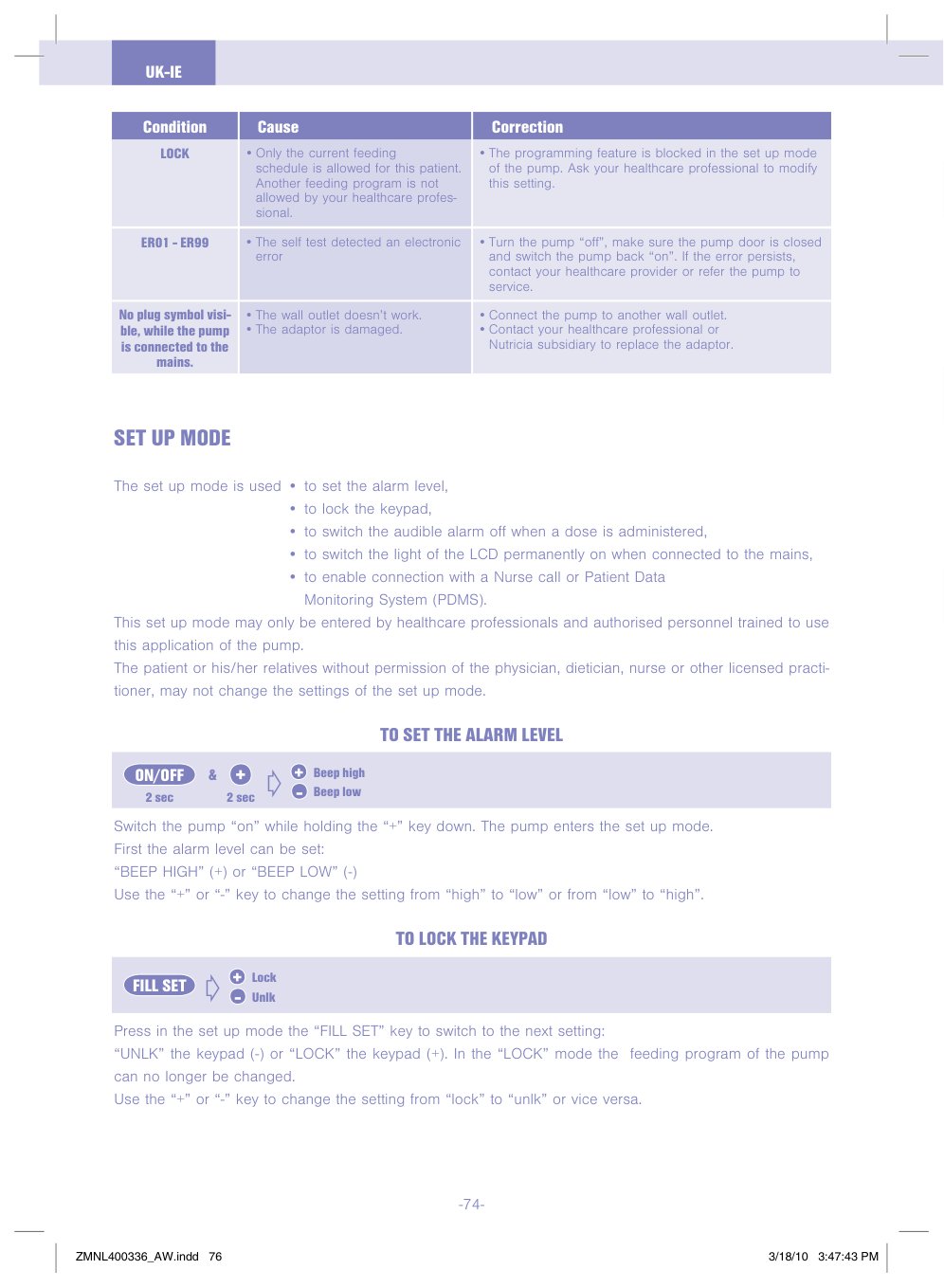
|Condition LOCK
|Cause
•Onl the current feeding schedule is allowed for this patient. Another feeding program is not allowed b our healthcare professional.|Correction
•The programming feature is blocked in the set up mode of the pump. Ask our healthcare professional to modif this setting.| |---|---|---| |ER01 - ER99|•The self test detected an electronic error|•Turn the pump “off”, make sure the pump door is closed and switch the pump back “on”. If the error persists, contact our healthcare provider or refer the pump to service.| |No plug smbol visible, while the pump is connected to the mains.|•The wall outlet doesn’t work.
•The adaptor is damaged.
|•Connect the pump to another wall outlet.
•Contact our healthcare professional or Nutricia subsidiar to replace the adaptor.
|
SET UP MODE
The set up mode is used • to set the alarm level,
This set up mode ma onl be entered b healthcare professionals and authorised personnel trained to use this application of the pump. The patient or his/her relatives without permission of the phsician, dietician, nurse or other licensed practitioner, ma not change the settings of the set up mode.
#### TO SET THE ALARM LEVEL
+ 2 sec 2 sec
Beep high+ Beep low-
ON/OFF & d
Switch the pump “on” while holding the “+” ke down. The pump enters the set up mode. First the alarm level can be set: “BEEP HIGH” (+) or “BEEP LOW” (-) Use the “+” or “-” ke to change the setting from “high” to “low” or from “low” to “high”.
#### TO LOCK THE KEyPAD
#### +
Lock Unlk-
FILL SET d
Press in the set up mode the “FILL SET” ke to switch to the next setting: “UNLK” the kepad (-) or “LOCK” the kepad (+). In the “LOCK” mode the feeding program of the pump can no longer be changed. Use the “+” or “-” ke to change the setting from “lock” to “unlk” or vice versa.
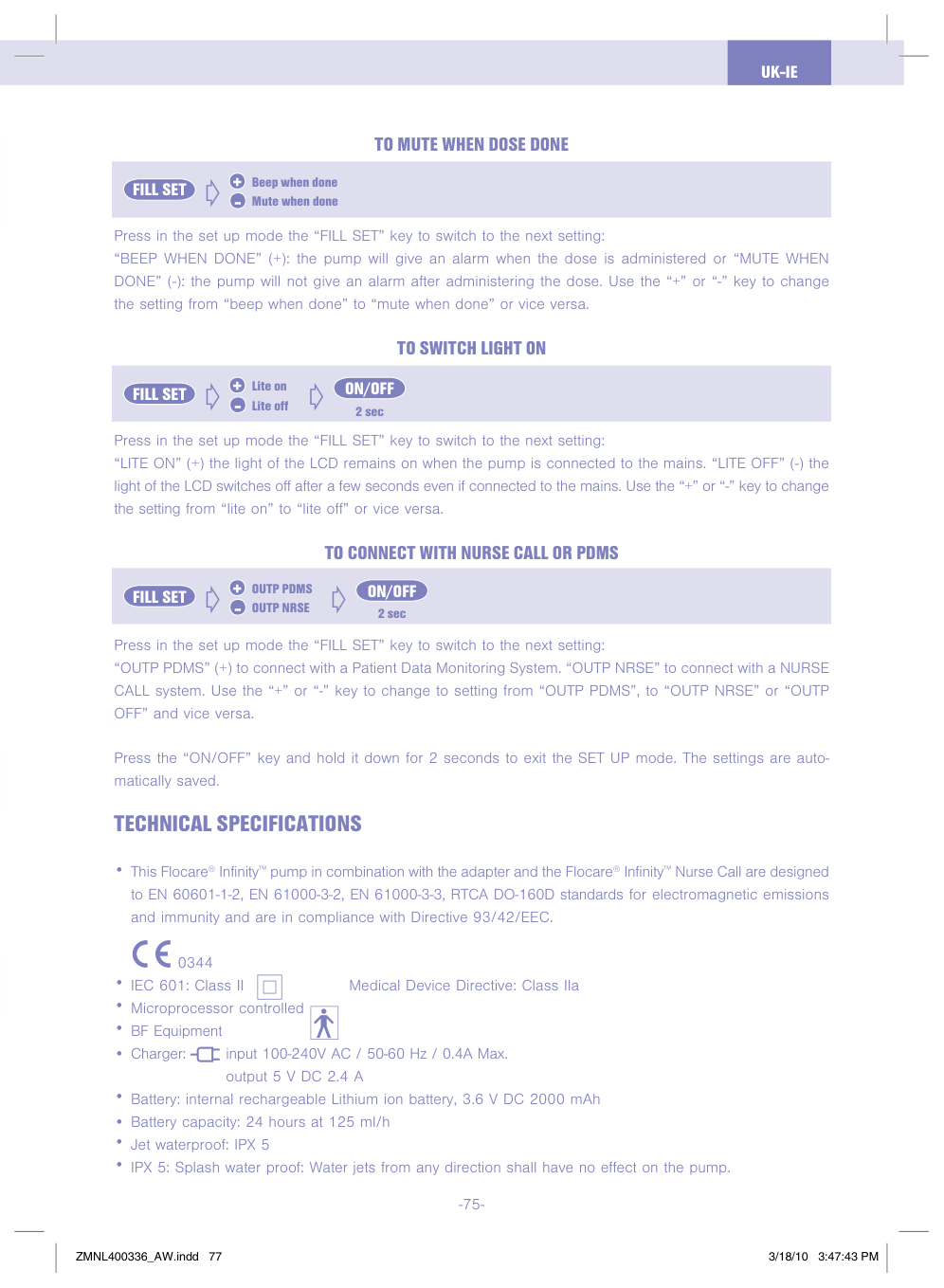
#### TO MUTE WHEN DOSE DONE
#### +
Beep when done Mute when done-
FILL SET d
Press in the set up mode the “FILL SET” ke to switch to the next setting: “BEEP WHEN DONE” (+): the pump will give an alarm when the dose is administered or “MUTE WHEN DONE” (-): the pump will not give an alarm after administering the dose. Use the “+” or “-” ke to change the setting from “beep when done” to “mute when done” or vice versa.
#### TO SWITCH LIGHT ON
#### + ON/OFF
Lite on Lite off-
FILL SET d d
2 sec
Press in the set up mode the “FILL SET” ke to switch to the next setting: “LITE ON” (+) the light of the LCD remains on when the pump is connected to the mains. “LITE OFF” (-) the light of the LCD switches off after a few seconds even if connected to the mains. Use the “+” or “-” ke to change the setting from “lite on” to “lite off” or vice versa.
#### TO CONNECT WITH NURSE CALL OR PDMS
#### + ON/OFF
OUTP PDMS OUTP NRSE-
FILL SET d d
2 sec
Press in the set up mode the “FILL SET” ke to switch to the next setting: “OUTP PDMS” (+) to connect with a Patient Data Monitoring Sstem. “OUTP NRSE” to connect with a NURSE CALL sstem. Use the “+” or “-” ke to change to setting from “OUTP PDMS”, to “OUTP NRSE” or “OUTP OFF” and vice versa.
Press the “ON/OFF” ke and hold it down for 2 seconds to exit the SET UP mode. The settings are automaticall saved.
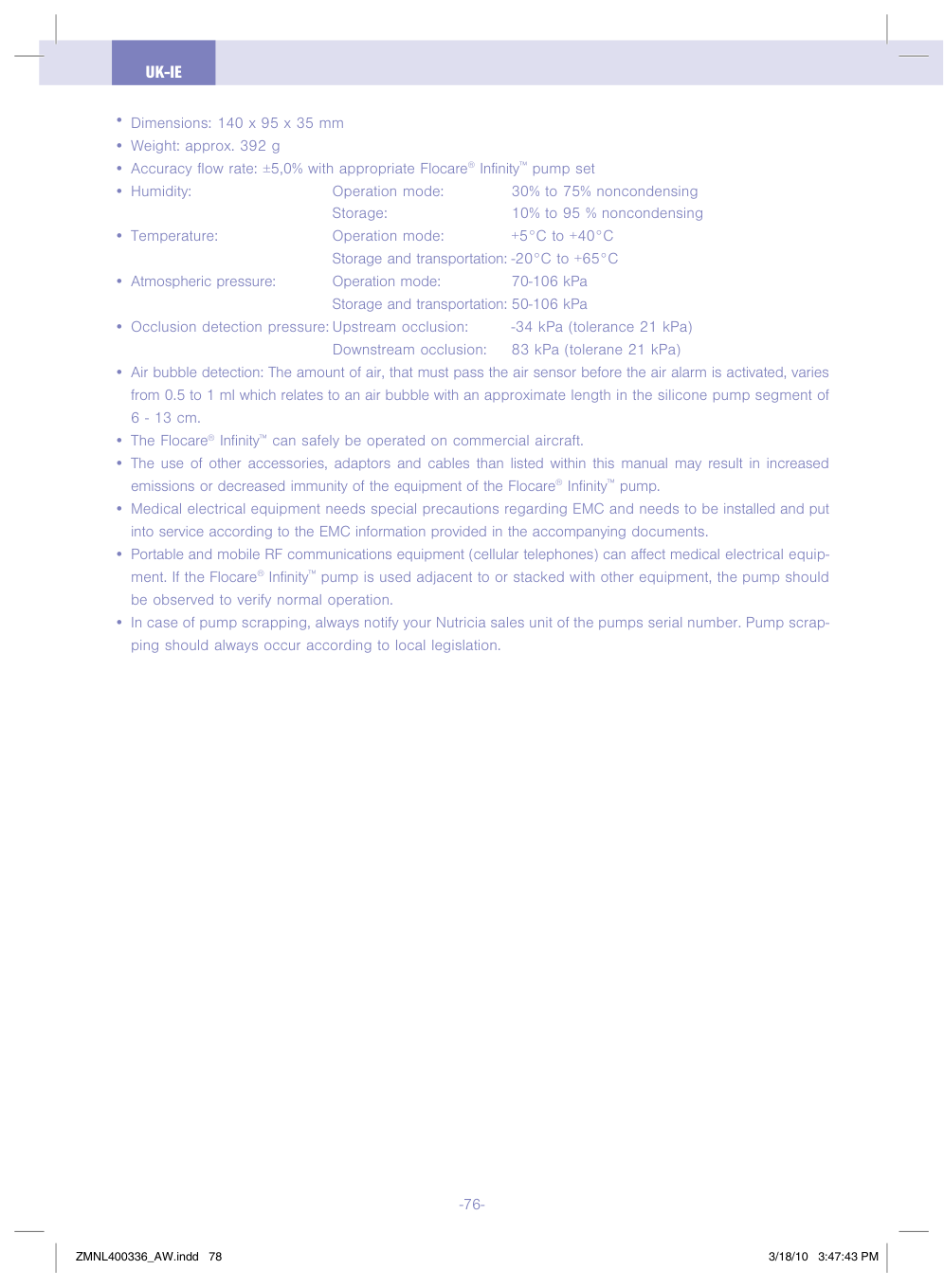
TECHNICAL SPECIFICATIONS
0344
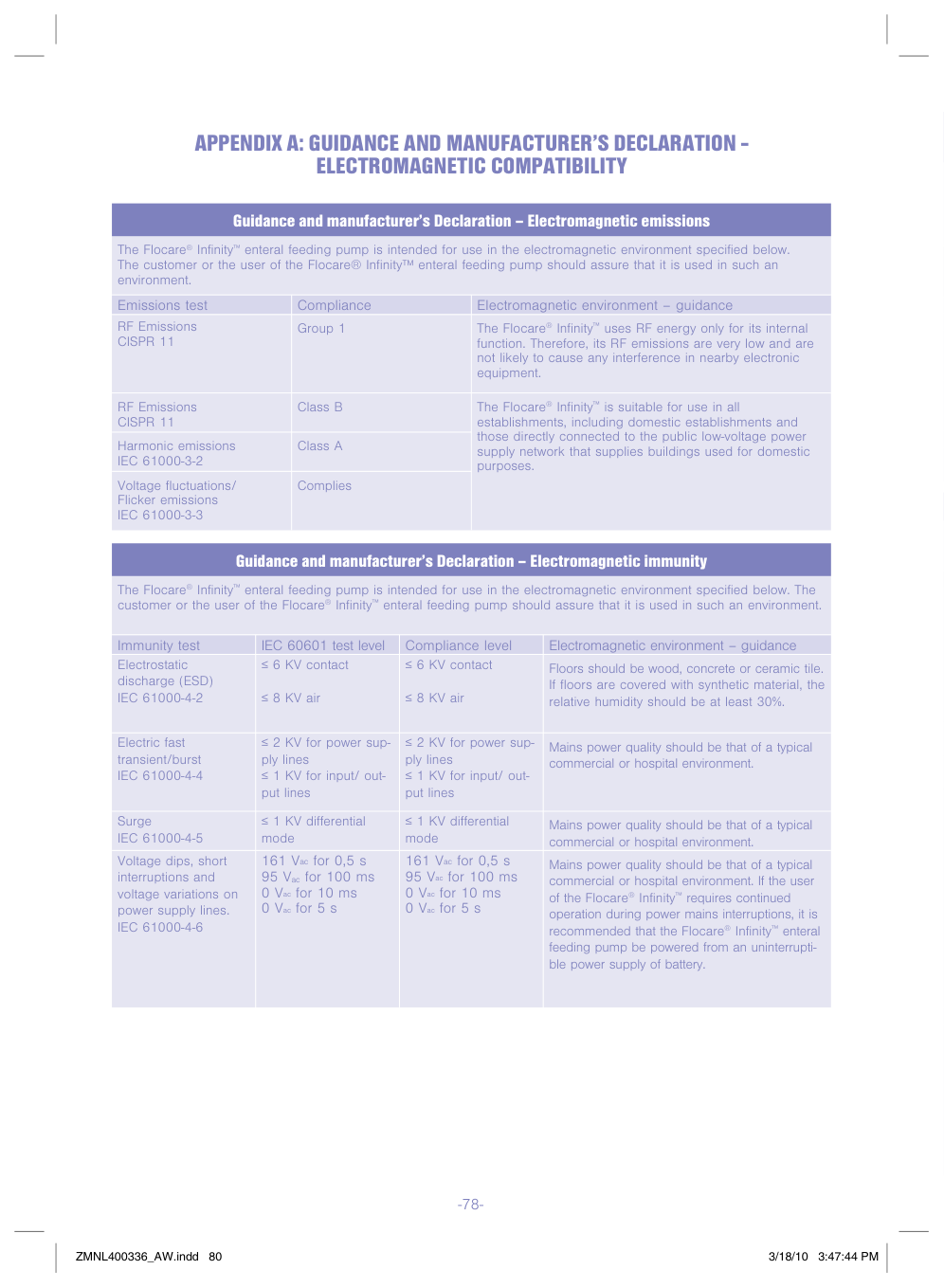
APPENDIX A: GUIDANCE AND MANUFACTURER’S DECLARATION ELECTROMAGNETIC COMPATIBILITy
Guidance and manufacturer’s Declaration – Electromagnetic emissions
The Flocare® Infinit™ enteral feeding pump is intended for use in the electromagnetic environment specified below. The customer or the user of the Flocare® Infinit™ enteral feeding pump should assure that it is used in such an environment.
|Emissions test|Compliance|Electromagnetic environment – guidance| |---|---|---| |RF Emissions CISPR 11|Group 1|The Flocare® Infinit™ uses RF energ onl for its internal function. Therefore, its RF emissions are ver low and are not likel to cause an interference in nearb electronic equipment.| |RF Emissions CISPR 11|Class B|The Flocare® Infinit™ is suitable for use in all establishments, including domestic establishments and those directl connected to the public low-voltage power suppl network that supplies buildings used for domestic purposes.| |Harmonic emissions IEC 61000-3-2|Class A|The Flocare® Infinit™ is suitable for use in all establishments, including domestic establishments and those directl connected to the public low-voltage power suppl network that supplies buildings used for domestic purposes.| |Voltage fluctuations/ Flicker emissions IEC 61000-3-3|Complies|The Flocare® Infinit™ is suitable for use in all establishments, including domestic establishments and those directl connected to the public low-voltage power suppl network that supplies buildings used for domestic purposes.|
Guidance and manufacturer’s Declaration – Electromagnetic immunit
The Flocare® Infinit™ enteral feeding pump is intended for use in the electromagnetic environment specified below. The customer or the user of the Flocare® Infinit™ enteral feeding pump should assure that it is used in such an environment.
|Immunit test|IEC 60601 test level|Compliance level|Electromagnetic environment – guidance| |---|---|---|---| |Electrostatic discharge (ESD) IEC 61000-4-2|≤ 6 KV contact ≤ 8 KV air|≤ 6 KV contact ≤ 8 KV air|Floors should be wood, concrete or ceramic tile. If floors are covered with snthetic material, the relative humidit should be at least 30%.|

|Electric fast transient/burst IEC 61000-4-4|≤ 2 KV for power suppl lines ≤ 1 KV for input/ output lines|≤ 2 KV for power suppl lines ≤ 1 KV for input/ output lines|Mains power qualit should be that of a tpical commercial or hospital environment.| |Surge IEC 61000-4-5|≤ 1 KV differential mode|≤ 1 KV differential mode|Mains power qualit should be that of a tpical commercial or hospital environment.| |Voltage dips, short interruptions and voltage variations on power suppl lines. IEC 61000-4-6|161 Vac for 0,5 s 95 Vac for 100 ms 0 Vac for 10 ms 0 Vac for 5 s|161 Vac for 0,5 s 95 Vac for 100 ms 0 Vac for 10 ms 0 Vac for 5 s|Mains power qualit should be that of a tpical commercial or hospital environment. If the user of the Flocare® Infinit™ requires continued operation during power mains interruptions, it is recommended that the Flocare® Infinit™ enteral feeding pump be powered from an uninterruptible power suppl of batter.|
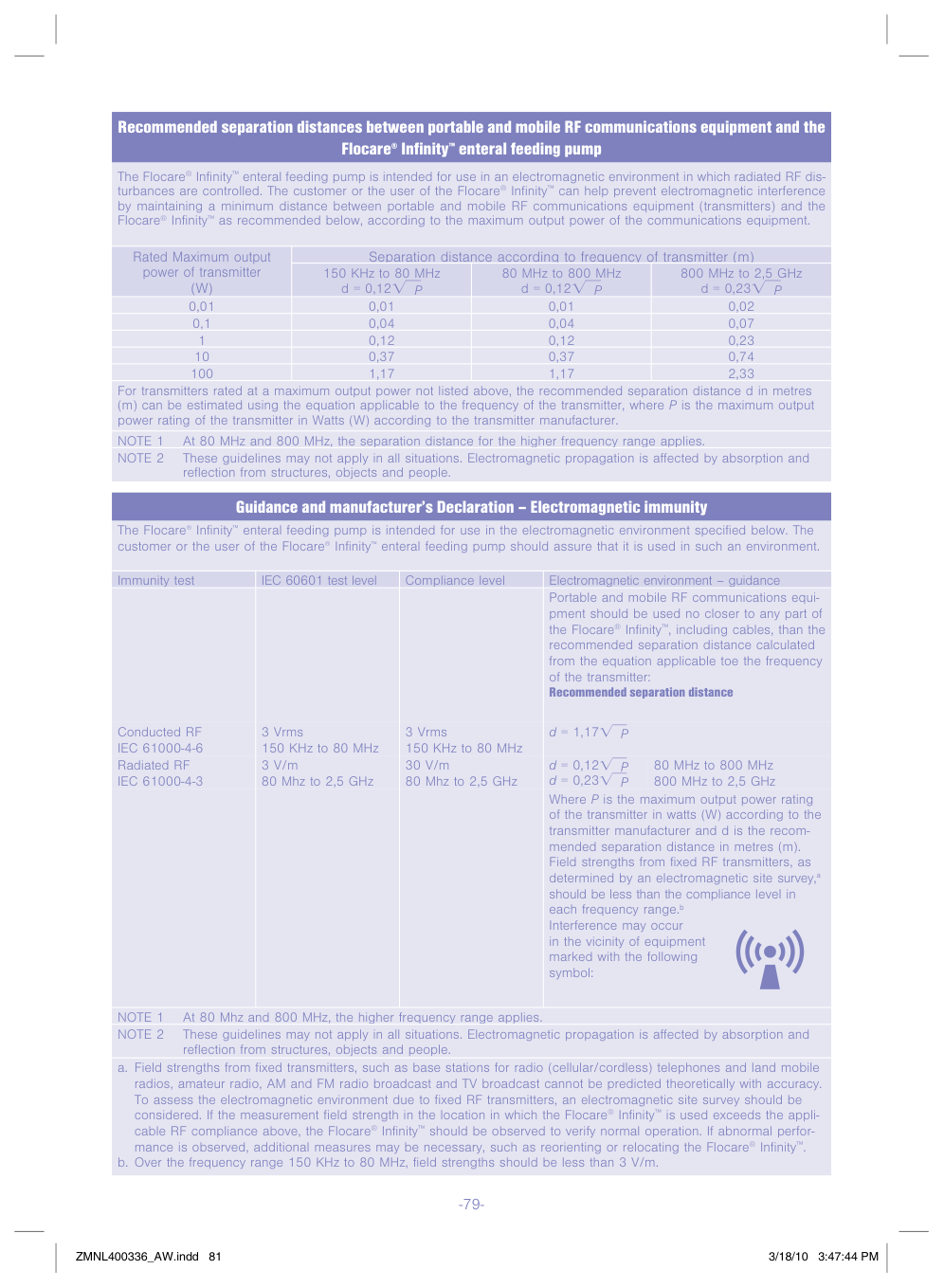
##### Recommended separation distances between portable and mobile RF communications euipment and the Flocare
##### Infinit
##### enteral feeding pump
®
™
The Flocare® Infinit™ enteral feeding pump is intended for use in an electromagnetic environment in which radiated RF disturbances are controlled. The customer or the user of the Flocare® Infinit™ can help prevent electromagnetic interference b maintaining a minimum distance between portable and mobile RF communications equipment (transmitters) and the Flocare® Infinit™ as recommended below, according to the maximum output power of the communications equipment.
|Rated Maximum output power of transmitter (W)|Separation distance according to frequenc of transmitter (m)|Separation distance according to frequenc of transmitter (m)|Separation distance according to frequenc of transmitter (m)| |---|---|---|---| |Rated Maximum output power of transmitter (W)|150 KHz to 80 MHz d 0,12CDP|80 MHz to 800 MHz d 0,12CDP|800 MHz to 2,5 GHz d 0,23CDP| |0,01|0,01|0,01|0,02| |0,1|0,04|0,04|0,07| |1|0,12|0,12|0,23| |10|0,37|0,37|0,74| |100|1,17|1,17|2,33|
For transmitters rated at a maximum output power not listed above, the recommended separation distance d in metres (m) can be estimated using the equation applicable to the frequenc of the transmitter, where P is the maximum output power rating of the transmitter in Watts (W) according to the transmitter manufacturer.
##### Guidance and manufacturer’s Declaration – Electromagnetic immunit
enteral feeding pump is intended for use in the electromagnetic environment specified below. The customer or the user of the Flocare
The Flocare
Infinit
®
™
Infinit
enteral feeding pump should assure that it is used in such an environment.
®
™
|Immunit test|IEC 60601 test level|Compliance level|Electromagnetic environment – guidance| |---|---|---|---| |Conducted RF IEC 61000-4-6 Radiated RF IEC 61000-4-3
|3 Vrms 150 KHz to 80 MHz 3 V/m 80 Mhz to 2,5 GHz
|3 Vrms 150 KHz to 80 MHz 30 V/m 80 Mhz to 2,5 GHz
|Portable and mobile RF communications equipment should be used no closer to an part of the Flocare® Infinit™, including cables, than the recommended separation distance calculated from the equation applicable toe the frequenc of the transmitter: Recommended separation distance
Where P is the maximum output power rating of the transmitter in watts (W) according to the transmitter manufacturer and d is the recommended separation distance in metres (m). Field strengths from fixed RF transmitters, as determined b an electromagnetic site surve,a should be less than the compliance level in each frequenc range.b Interference ma occur in the vicinit of equipment marked with the following smbol:
d = 1,17CDP d = 0,12CDP d = 0,23CDP
80 MHz to 800 MHz 800 MHz to 2,5 GHz|