
Ask AI
— answers from the official manualAnswers from the official manual.
Common questions
Common Questions
10 totalHow do I scan for FM radio stations?
Press and hold the Scan button to move through available FM frequencies. Press the Tune button to fine-tune any station you find interesting.
What should I do if my CD Boombox isn’t playing CDs?
Ensure that you have selected CD mode by pressing the Source button and then press Play/Pause to start playback. Also, check if there are any error codes displayed; refer to Page 3 for further troubleshooting.
How do I program tracks from a loaded CD?
While playing the CD, press Program then hold down Track Forward/Backward buttons to select track numbers. Press the same button again to confirm selection and start building your playlist up to 20 tracks before pressing Play/Pause to play.
How do I change FM radio station presets?
First tune to the desired frequency, then press and hold the Store button. Select a preset number using the Tune buttons and confirm by hitting the same Store button again for permanent storage.
How can I set up radio presets conveniently?
Tune to your preferred station with the Source button followed by pressing and holding the Store button. Confirm selection of a preset number (P01-P10) by selecting it first.
What do I need to consider when installing my CD Boombox?
Ensure there is no risk of moisture, heat sources like stoves or radiators nearby. Do not block ventilation openings and follow safety precautions listed on page 2.
Full Manual
3 pages
CD Boombox
Model: 100008719
PRODUCT GUIDE
We’d love to hear from you. Scan with you Walmart app and let us know what you think.
January 16, 2020_V1
Information and Safety Instructions
Need help? We’re here for you every day from 7 a.m. – 9 p.m. CST. Give us a call at 1-888-516-2630
##### Important Safety Instructions
FCC Warnings This device complies with Part 15 of the FCC Rules. Operation is subject to the following two conditions: (1) this device may not cause harmful interference, and (2) this device must accept any interference received, including interference that may cause undesired operation.
Warning: Changes or modifications to this unit not expressly approved by the party responsible for compliance could void the user’s authority to operate the equipment.
NOTE: This equipment has been tested and found to comply with the limits for a Class B digital device, pursuant to Part 15 of the FCC Rules. These limits are designed to provide reasonable protection against harmful interference in a residential installation. This equipment generates, uses, and can radiate radio frequency energy and, if not installed and used in accordance with the instructions, may cause harmful interference to radio communications. However,
there is no guarantee that interference will not occur in a particular installation. If this equipment does cause harmful interference to radio or television reception, which can be determined by turning the equipment off and on, the user is encouraged to try to correct the interference by one or more of the following measures:
##### Additional Warnings and Precautions
Overview
| | | |---|---| | | | | | |
| | | |---|---| | | |
| | | |---|---| | | |
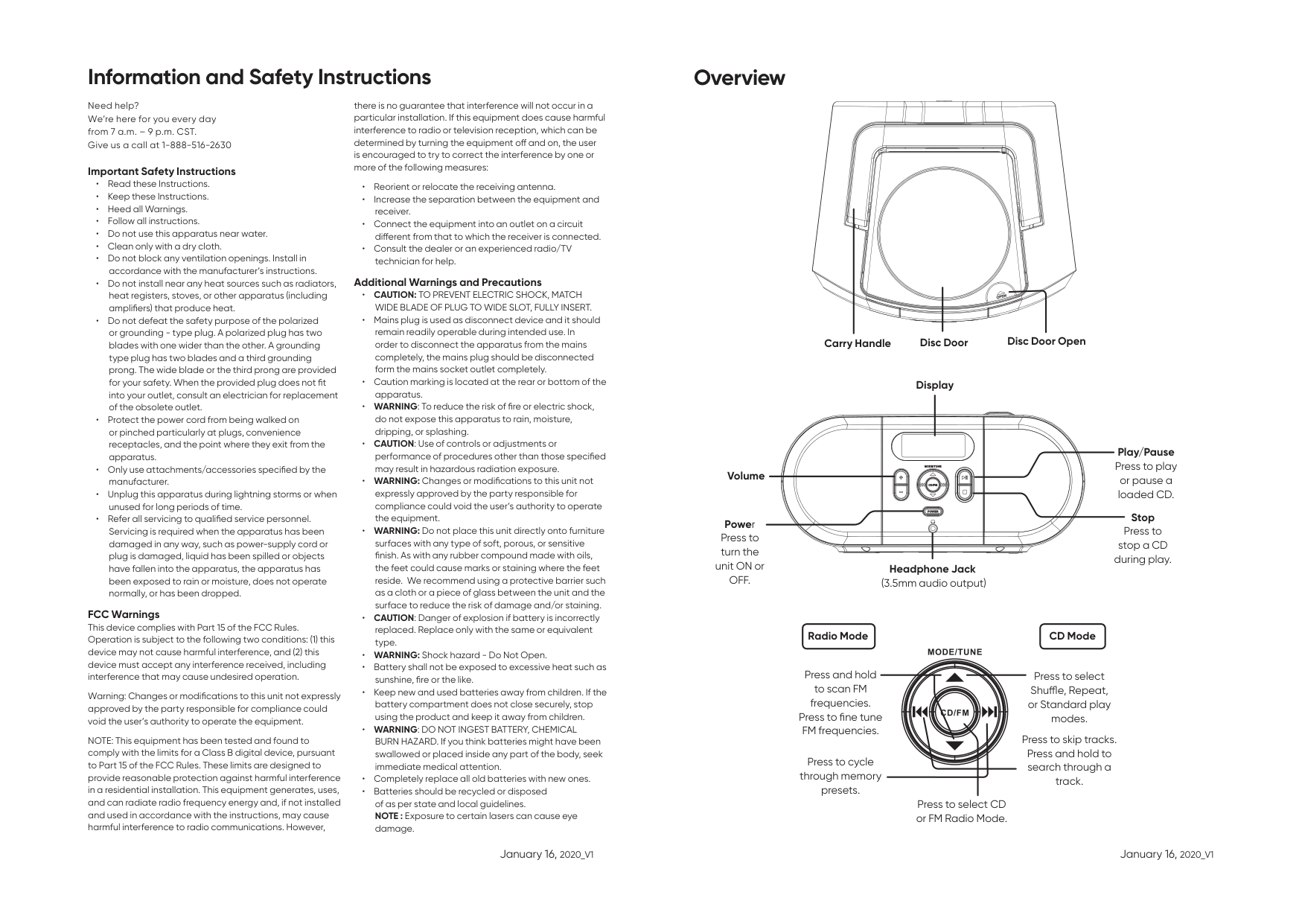
Carry Handle Disc Door Disc Door Open
Display
| | | |---|---| | | |
Play/Pause Press to play or pause a loaded CD.
Volume
| | | |---|---| | | |
| | | |---|---| | | |
| | | |---|---| | | |
| | | |---|---| | | |
| | | | |---|---|---| | | | |
| | | |---|---| | | |
Stop Press to stop a CD during play.
Power Press to turn the unit ON or OFF.
Headphone Jack (3.5mm audio output)
##### Radio Mode CD Mode
Press and hold to scan FM frequencies. Press to fine tune FM frequencies.
Press to select Shuffle, Repeat, or Standard play modes.
Press to skip tracks. Press and hold to search through a track.
Press to cycle through memory presets.
Press to select CD or FM Radio Mode.
January 16, 2020_V1 January 16, 2020_V1
Power and Batteries
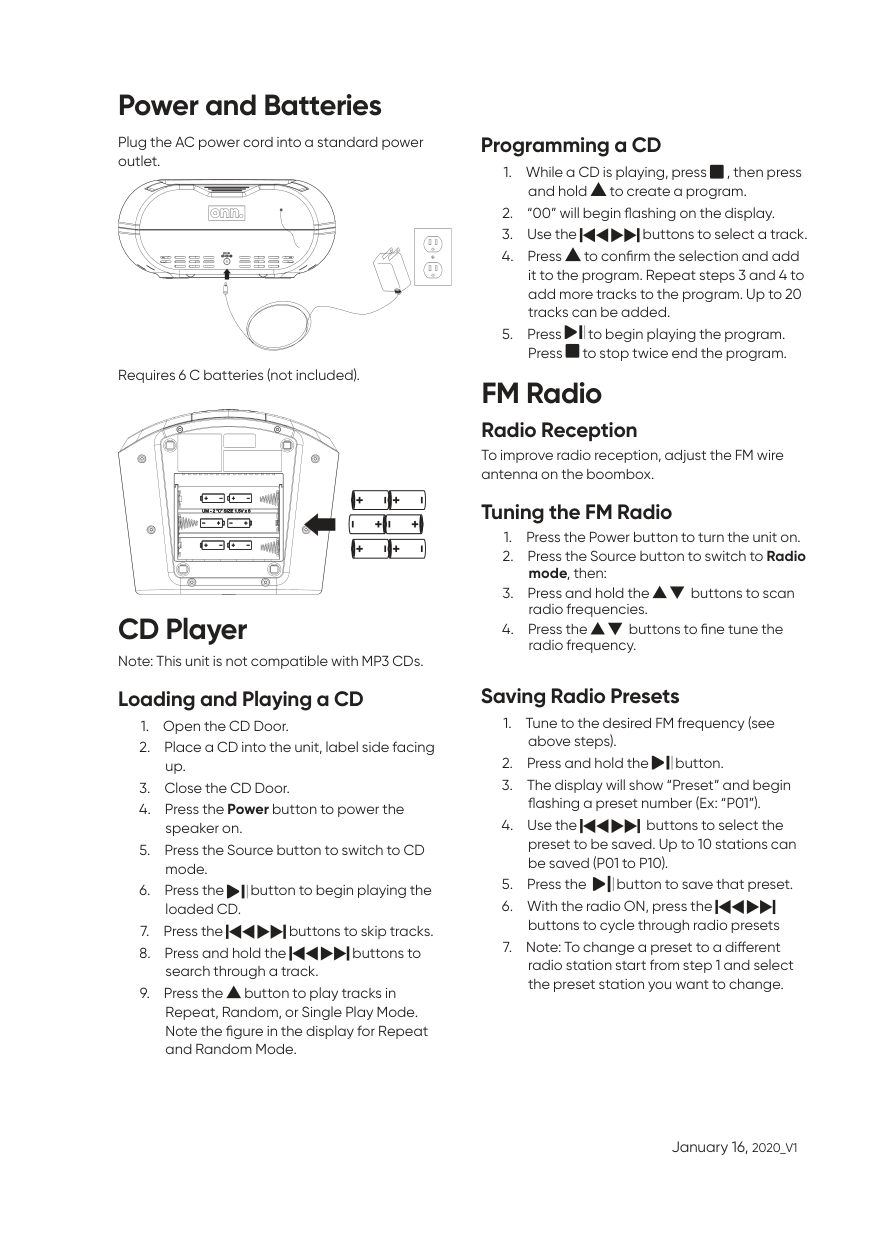
Plug the AC power cord into a standard power outlet.
| | | |---|---| | | |
| | | | | |---|---|---|---| | | | | |
| | | |---|---| | | |
| | | |---|---| | | |
| | | |---|---| | | |
| | | |---|---| | | |
| | | | |---|---|---| | | | |
| | | |---|---| | | | | | |
| | | |---|---| | | |
| | | |---|---| | | |
| | | |---|---| | | |
Requires 6 C batteries (not included).
| | | |---|---| | | |
| | | |---|---| | | |
| | | |---|---| | | |
| | | |---|---| | | |
| | | |---|---| | | |
CD Player
Note: This unit is not compatible with MP3 CDs. Loading and Playing a CD
#### Programming a CD
FM Radio
Radio Reception To improve radio reception, adjust the FM wire antenna on the boombox.
#### Tuning the FM Radio
#### Saving Radio Presets
January 16, 2020_V1