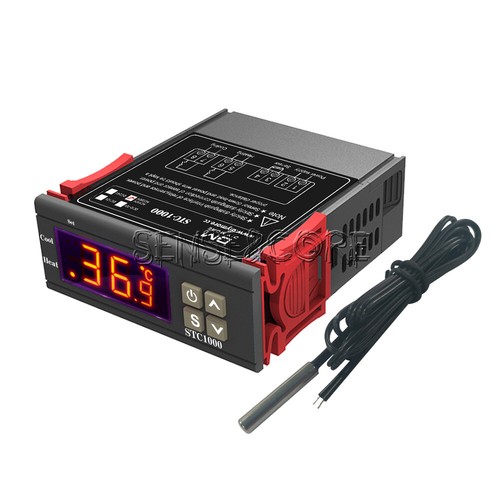
Purgear Stc 1000 Digital Thermostat
Ask AI
— answers from the official manualAnswers from the official manual.
Common questions
Common Questions
38 totalHow do I set the difference value (F2) for the thermostat?
Press and hold the key until you enter the parameter setting mode. Use or to switch between F1-F4 parameters and select F2, then press and hold S while adjusting with or to set the desired difference value.
What is the compressor delay time for this thermostat?
The default compressor delay time (F3) setting is 3 minutes. To change it, press and hold S until you enter the parameter setting mode, then adjust F3 accordingly.
How do I enter the menu to change thermostat settings?
Hold the SET key for 3 seconds to enter the menu list; the display will show the code F1. Once in the menu, you can press SET to view existing values and use the direction keys to change them.
What happens if I don't complete a setting change within a certain time?
If no operation is performed within 8 seconds after entering a menu, the new data will be discarded and the thermostat will return to its normal status. This prevents accidental changes from being saved.
Can I check the temperature setpoint without entering the full menu?
Yes, in normal status you can press the UP key to quickly check the temperature setpoint (F1) without entering the full menu. Similarly, press the DOWN key to check the hysteresis value (F2).
What does the STC-1000 do in terms of heating and cooling?
The PURGEAR STC-1000 is an All-Purpose Temperature Controller that automatically switches between heating and cooling modes. It features two relays, allowing for the connection of one refrigerator and one heater to manage both systems.
Show 32 more questions
How should I connect the wiring to the STC-1000?
How do I turn the thermostat off and on?
How do I save a temperature setting after changing it?
What is the temperature range that the STC-1000 can control?
What happens when an error occurs during setup?
How do I manually reset the thermostat if it displays an error?
What is the power supply range for this thermostat?
How do I change the operating mode between heat and cool?
What does it mean if the 'Set' light is on?
How do I check if the sensor is functioning correctly?
What should I do if my thermostat starts displaying 'Er'?
How do I restore the STC-1000 to factory settings?
How does the temperature range work on the STC-1000?
What are the four main functions available in the Function Menu?
What is the main purpose of the Purgear STC-1000 Digital Thermostat?
What happens if I don't save my settings within the time limit?
What is temperature hysteresis (F2) and why is it important?
Why does the manual state that live and neutral wires must be connected to each port?
How do I check the current temperature setpoint without entering the menu?
What are the four main function settings available in the STC-1000 menu?
How do I access the thermostat's menu settings?
What is the PURGEAR STC-1000 Digital Thermostat designed to do?
What does F1 represent in the function menu?
How do I set the target temperature range?
What happens if I don't save my settings within 8 seconds?
How do I check the current temperature setpoint while the thermostat is running normally?
Does the STC-1000 output AC electricity?
What is F2 in the function menu?
How do I turn the thermostat on and off?
How do I check the hysteresis value?
How do I set the target temperature range on my STC-1000?
How do I restore the thermostat to factory settings?