Samsung Rf28r7351sg manual
Unknown · 20 Q&As

Samsung Rf28r7351sg

Ask AI

— answers from the official manual

Answers from the official manual.

Common questions

Common Questions

20 total
1

How do I activate the Control Lock to prevent accidental setting changes?

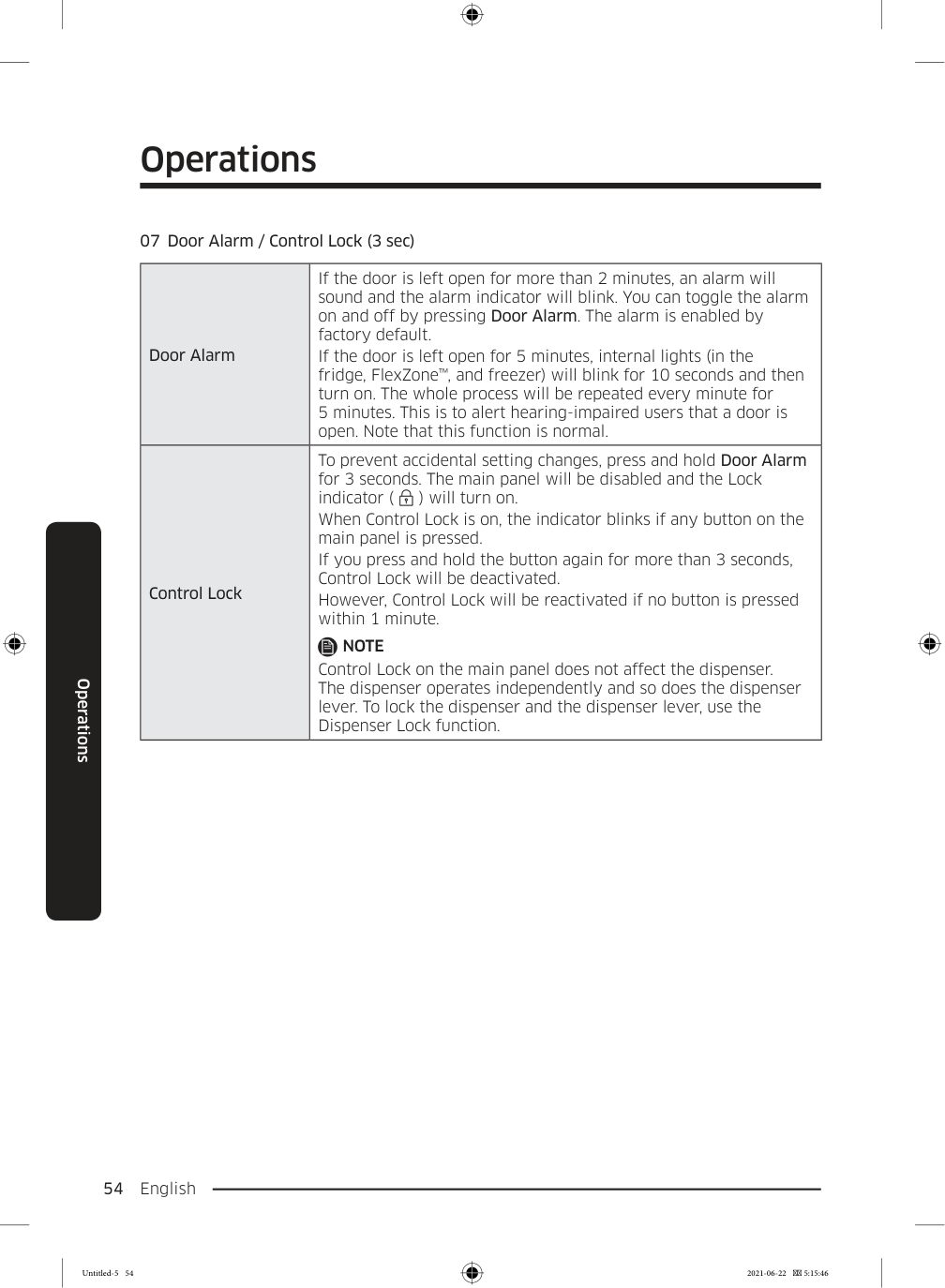
Press and hold the Door Alarm button for 3 seconds to activate Control Lock, which disables the main panel and turns on the Lock indicator. To deactivate, press and hold the button again for more than 3 seconds. Note that Control Lock will automatically reactivate if no button is pressed within 1 minute after deactivation. (Page 54)

2

How long should I wait before loading food into the refrigerator after installation?

Allow the appliance to stand for 2 to 3 hours before loading foods after installation and turning it on. After plugging in, set the temperature to the coldest setting and wait about an hour until the freezer is slightly chilled and the motor runs smoothly. Then wait until the refrigerator reaches the set temperature before use. (Page 13, 46)

3

What should I do if the door alarm keeps sounding?

The door alarm sounds if the door is left open for more than 2 minutes, and the alarm indicator will blink. You can toggle the alarm on and off by pressing the Door Alarm button. If the door is left open for 5 minutes, internal lights will also blink to alert hearing-impaired users, which is normal behavior. (Page 54)

4

What FlexZone™ modes are available and what temperatures do they maintain?

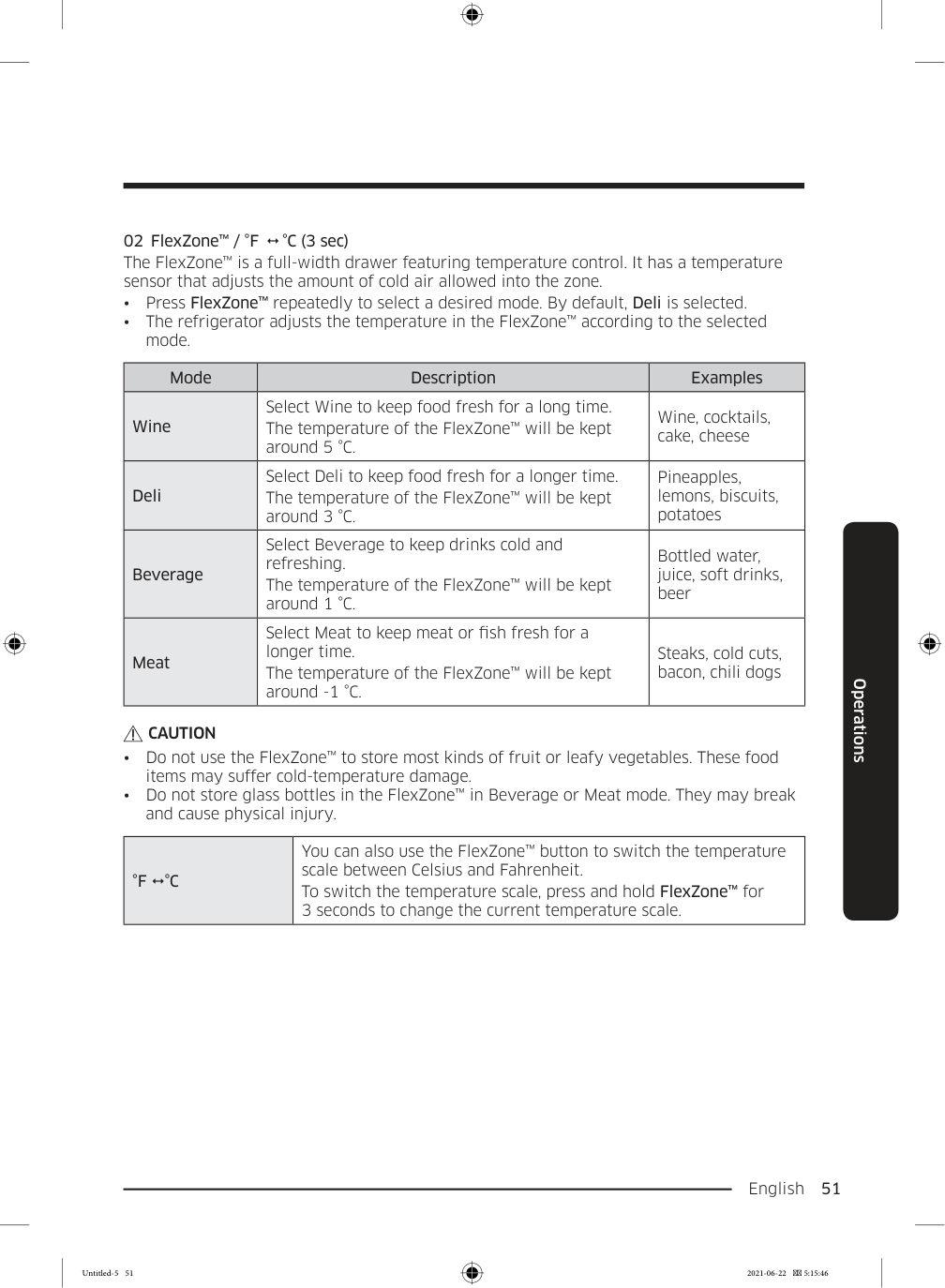
The FlexZone™ offers four modes: Wine (approximately 5 °C), Deli (approximately 3 °C), Beverage (approximately 1 °C), and Meat (approximately -1 °C). The default mode is Deli. Note that most fruits and leafy vegetables should not be stored in the FlexZone™ as they may suffer cold-temperature damage, and glass bottles should not be stored in Beverage or Meat mode. (Page 51)

5

What should I do if the Auto Water Fill indicator is blinking?

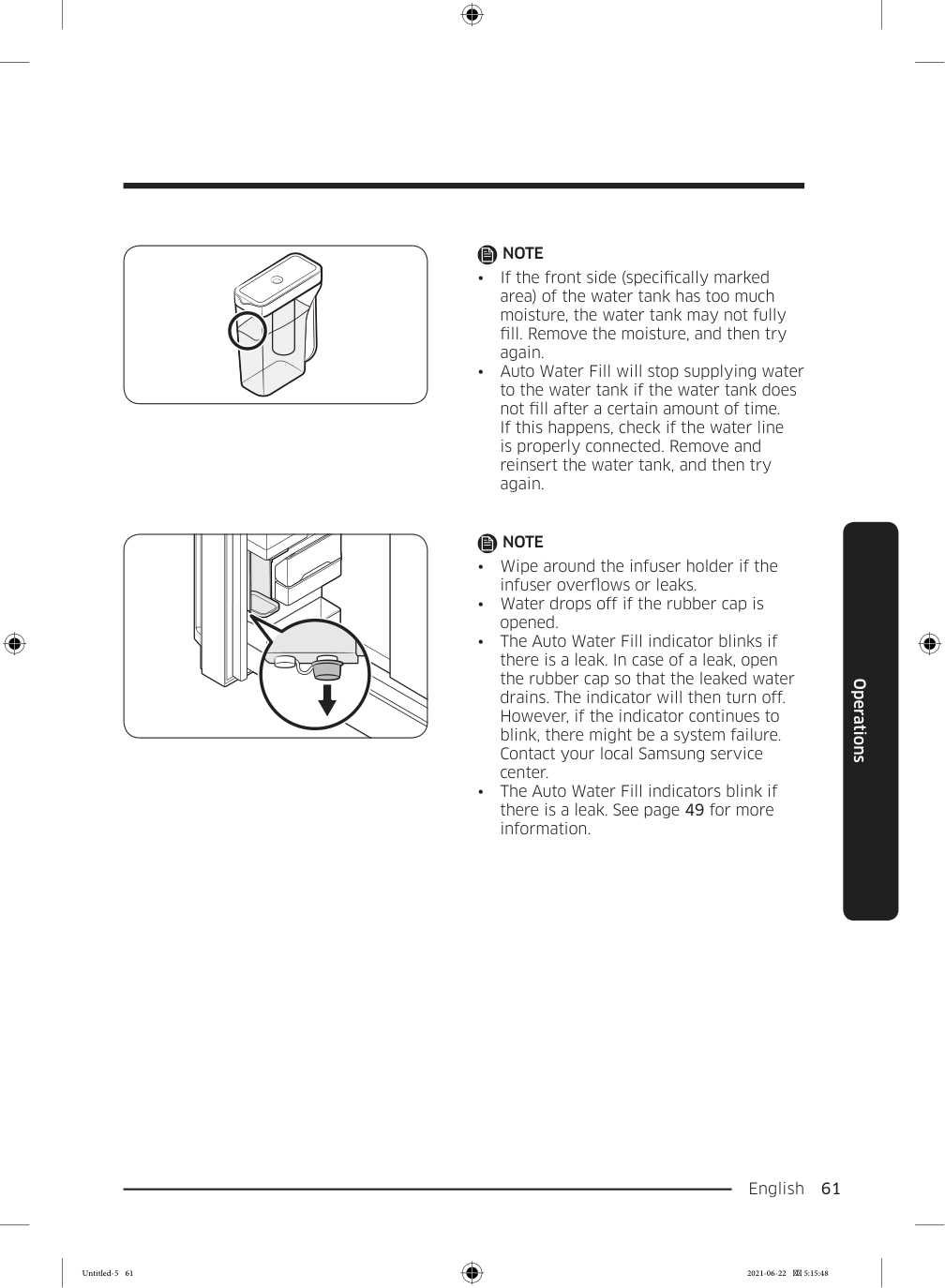
A blinking Auto Water Fill indicator signals a leak, which may be caused by an overflowing water tank or a water-line or water-level sensor failure. Open the rubber cap to drain the water, and the indicator should stop blinking and turn solid once draining is complete, then close the rubber cap. If the indicator continues to blink after draining, there may be a system failure and you should contact a local Samsung service center. (Page 50, 61)

6

How do I properly prepare the ice maker when first setting up the refrigerator?

Let the refrigerator operate for at least 24 hours first to ensure optimal performance. Then dispense the first 4 to 6 ice cubes into a glass, wait another 8 hours and dispense another 4 to 6 cubes, then wait 16 more hours before dispensing the first full glass of ice. After a power failure, empty the ice bucket so it can refill with fresh, loose ice cubes. (Page 63)

Show 14 more questions

Full Manual

176 pages
Page 1

Refrigerator User manual Free Standing Appliance Untitled-5 1 2021-06-22  5:15:39
Page 2

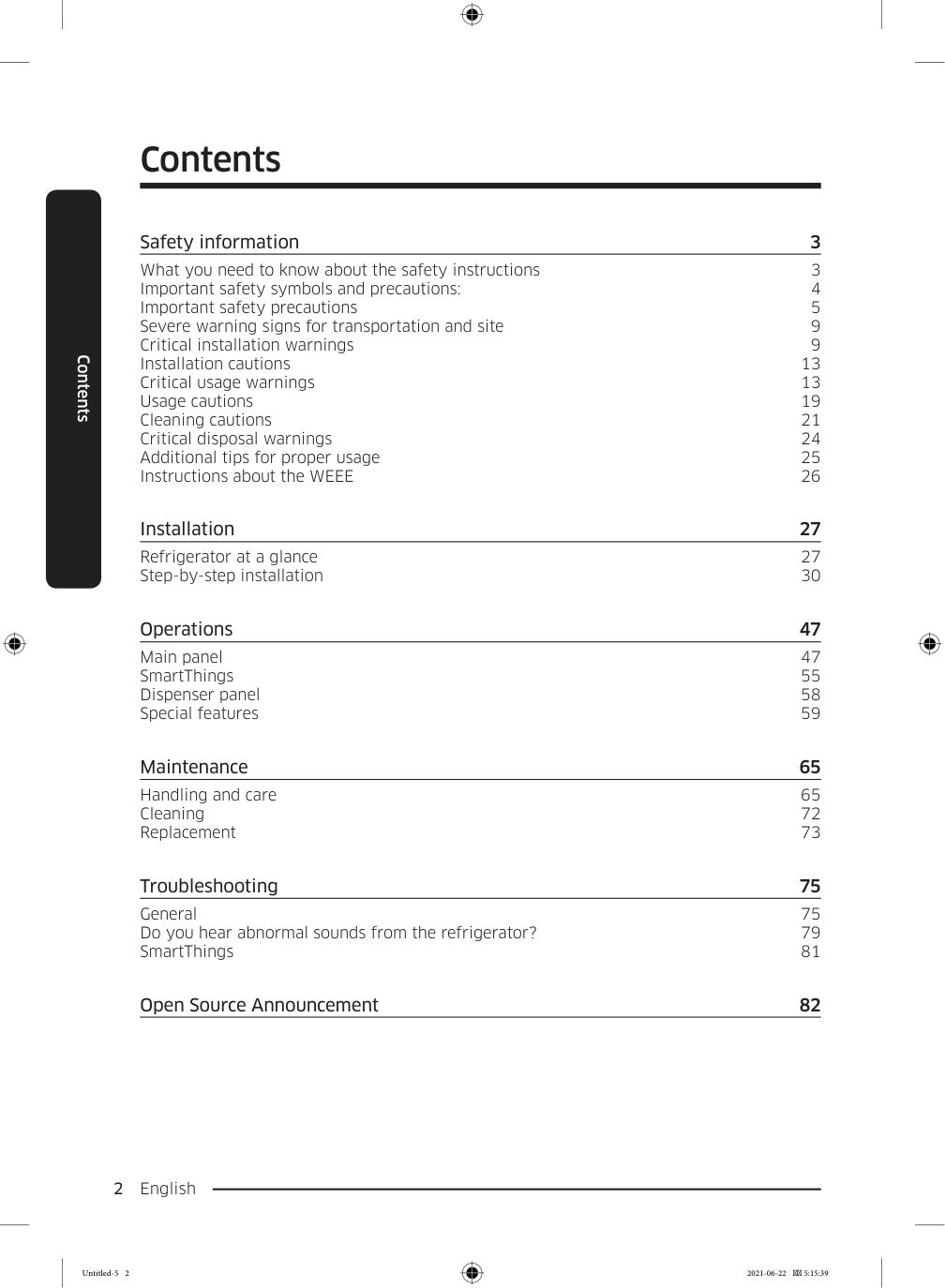
English 2 Contents Contents Safety information 3 What you need to know about the safety instructions 3 Important safety symbols and precautions: 4 Important safety precautions 5 Severe warning signs for transportation and site 9 Critical installation warnings 9 Installation cautions 13 Critical usage warnings 13 Usage cautions 19 Cleaning cautions 21 Critical disposal warnings 24 Additional tips for proper usage 25 Instructions about the WEEE 26 Installation 27 Refrigerator at a glance 27 Step-by-step installation 30 Operations 47 Main panel 47 SmartThings 55 Dispenser panel 58 Special features 59 Maintenance 65 Handling and care 65 Cleaning 72 Replacement 73 Troubleshooting 75 General 75 Do you hear abnormal sounds from the refrigerator? 79 SmartThings 81 Open Source Announcement 82 Untitled-5 2 2021-06-22  5:15:39
Page 3

English  3 Safety information Before using your new Samsung Refrigerator, please read this manual thoroughly to ensure that you know how to operate the features and functions that your new appliance offers safely and efficiently. What you need to know about the safety instructions
  • Warnings and Important Safety Instructions in this manual
  • do not cover all possible conditions and situations that may occur. It is your responsibility to use common sense, caution, and care when installing, maintaining, and operating your appliance.
  • Because these following operating instructions cover
  • various models, the characteristics of your refrigerator may differ slightly from those described in this manual and not all warning signs may be applicable. If you have any questions or concerns, contact your nearest service center or find help and information online at www.samsung.com.
  • R-600a or R-134a is used as a refrigerant. Check the
  • compressor label on the rear of the appliance or the rating label inside the fridge to see which refrigerant is used for your appliance. When this product contains flammable gas (Refrigerant R-600a), contact your local authority in regard to safe disposal of this product.
  • In order to avoid the creation of a flammable gas-air
  • mixture if a leak in the refrigerating circuit occurs, the size of the room in which the appliance may be sited depends on the amount of refrigerant used. Safety information Untitled-5 3 2021-06-22  5:15:39

    Page 4

    Safety information English 4 Safety information

  • Never start up an appliance showing any signs of damage.
  • If in doubt, consult your dealer. The room must be 1 m3 in size for every 8 g of R-600a refrigerant inside the appliance. The amount of refrigerant in your particular appliance is shown on the identification plate inside the appliance.
  • Refrigerant squirting out of the pipes could ignite or cause
  • an eye injury. When refrigerant leaks from the pipe, avoid any naked flames and move anything flammable away from the product and ventilate the room immediately.
  • Failing to do so may result in fire or explosion.
  • Important safety symbols and precautions: Please follow all safety instructions in this manual. This manual uses the following safety symbols.

    Warning

    Hazards or unsafe practices that may result in severe personal injury, property damage, and/or death.

    Caution

    Hazards or unsafe practices that may result in severe personal injury and/or property damage.

    Note

    Useful information that helps users understand or benefit from the refrigerator. Untitled-5 4 2021-06-22  5:15:39
    Page 5

    English  5 Safety information These warning signs are here to prevent injury to you and others. Please follow them carefully. After reading this section, keep it in a safe place for future reference. Important safety precautions Warning; Risk of fire / flammable materials

    Warning
  • When positioning the appliance, ensure the supply cord is
  • not trapped or damaged.
  • Do not locate multiple portable socket-outlets or portable
  • power supplies at the rear of the appliance.
  • Fill with potable water only.
  • Connect to potable water supply only.
  • Keep ventilation openings, in the appliance enclosure or in
  • the built-in structure, clear of obstruction.
  • Do not use mechanical devices or any other means
  • to accelerate the defrosting process, other than those recommended by the manufacturer.
  • Do not damage the refrigerant circuit.
  • Do not use electrical appliances inside the food storage
  • compartments of the appliance, unless they are of the type recommended by the manufacturer. Untitled-5 5 2021-06-22  5:15:39

    Page 6

    Safety information English 6 Safety information
  • This appliance is not intended for use by persons
  • (including children) with reduced physical, sensory, or mental capabilities, or those who lack experience and knowledge, unless they have been given supervision or instruction concerning the use of the appliance by a person responsible for their safety.
  • This appliance can be used by children aged from 8 years
  • and above and persons with reduced physical, sensory or mental capabilities or lack of experience and knowledge if they have been given supervision or instruction concerning use of the appliance in a safe way and understand the hazards involved. Children shall not play with the appliance. Cleaning and user maintenance shall not be made by children without supervision.
  • If the supply cord is damaged, it must be replaced by
  • the manufacturer, its service agent or similarly qualified persons in order to avoid a hazard.
  • The socket must be easily accessible so that the appliance
  • can be quickly disconnected from the supply in an emergency.
  • It must be outside the area of the rear of the appliance.
  • Do not store explosive substances such as aerosol cans
  • with a flammable propellant in this appliance.
  • If the product is equipped with LED lamps, do not
  • disassemble the Lamp Covers and LED lamps yourself.
  • Contact a Samsung service center.
  • Use only the LED Lamps provided by the manufacturer
  • or its service agents. Untitled-5 6 2021-06-22  5:15:39

    Page 7

    English  7 Safety information

  • New hose-sets supplied with the appliance are to be used
  • and old hose-sets should not be reused.
  • Have the refrigerator’s water supply connected only to a
  • potable water supply. To operate the ice maker properly, water pressure of 20 psi and 125 psi (138 and 862 kPa) is required.
  • For the most efficient use of energy, please keep the all
  • inner fittings such as baskets, drawers, shelves on the position supplied by manufacturer.
  • To get the best energy efficiency of this product, please
  • leave all shelves, drawers and baskets on their original position. How to minimize the energy consumption
  • Install the appliance in a cool, dry room with adequate
  • ventilation.
  • Ensure that it is not exposed to direct sunlight and never
  • put it near a direct source of heat (radiator, for example).
  • Not to block any vents or grilles is recommended for
  • energy efficiency.
  • Allow warm food to cool down before placing it in the
  • appliance.
  • Put frozen food in the refrigerator to thaw. You can
  • then use the low temperatures of the frozen products to cool food in the refrigerator.
  • Do not keep the door of the appliance open for too long
  • when putting food in or taking food out.
  • The shorter time for which the door is open, the less ice
  • will form in the freezer. Untitled-5 7 2021-06-22  5:15:39

    Page 8

    Safety information English 8 Safety information
  • Clean the rear of the refrigerator regularly. Dust
  • increases energy consumption.
  • Do not set temperature colder than necessary.
  • Ensure sufficient air exhaust at the refrigerator base
  • and at the back wall of the refrigerator. Do not cover air vent openings.
  • Allow clearance to the right, left, back and top when
  • installing. This will help reduce power consumption and keep your energy bills lower.
  • We recommend the value of clearance to be :
  • Right, left, and back side: more than 50 mm
  • Top side: more than 100 mm
  • This appliance is intended to be used in household and similar applications such as
  • staff kitchen areas in shops, offices and other working
  • environments;
  • farm houses and by clients in hotels, motels and other
  • residential type environments;
  • bed and breakfast type environments;
  • catering and similar non-retail applications.
  • Untitled-5 8 2021-06-22  5:15:39

    Page 9

    English  9 Safety information Severe warning signs for transportation and site

    Warning

  • When transporting and installing the appliance, care should
  • be taken to ensure that no parts of the refrigerating circuit are damaged.
  • Refrigerant leaking from the pipe work could ignite
  • or cause an eye injury. If a leak is detected, avoid any naked flames or potential sources of ignition and air the room in which the appliance is standing for several minutes.
  • This appliance contains a small amount of isobutane
  • refrigerant (R-600a), a natural gas with high environmental compatibility that is, however, also combustible. When transporting and installing the appliance, care should be taken to ensure that no parts of the refrigerating circuit are damaged.
  • When transporting and installing the refrigerator, do not
  • touch the water hose on the back side of the refrigerator.
  • This may damage the refrigerator and as a result the
  • water dispenser can not be used. Critical installation warnings

    Warning

  • Do not install the refrigerator in a damp location or place
  • where it may come in contact with water.
  • Deteriorated insulation on electrical parts may cause an
  • electric shock or fire. Untitled-5 9 2021-06-22  5:15:39

    Page 10

    Safety information English 10 Safety information
  • Do not place this refrigerator in direct sunlight or expose it
  • to the heat from stoves, room heaters, or other appliances.
  • Do not plug several appliances into the same multiple
  • power strip. The refrigerator should always be plugged into its own individual electrical outlet which has a voltage rating that matches the voltage listed on the refrigerator’s rating plate.
  • This provides the best performance and also prevents
  • overloading of house wiring circuits, which could cause a fire hazard from overheated wires.
  • If the wall socket is loose, do not insert the power plug.
  • There is a risk of electric shock of fire.
  • Do not use a power cord that has cracks or abrasion
  • damage along its length or at either end.
  • Do not bend the power cord excessively or place heavy
  • objects on it.
  • Do not pull or excessively bend the power cord.
  • Do not twist or tie the power cord.
  • Do not hook the power cord over a metal object, place a
  • heavy object on the power cord, insert the power cord between objects, or push the power cord into the space behind the appliance.
  • When moving the refrigerator, be careful not to roll over or
  • damage the power cord.
  • This may result in an electric shock or fire.
  • Never unplug your refrigerator by pulling on the power
  • cord. Always grip the plug firmly and pull straight out from the outlet.
  • Damage to the cord may cause a short-circuit, fire, and/
  • or electric shock. Untitled-5 10 2021-06-22  5:15:39

    Page 11

    English  11 Safety information

  • Do not use aerosols near the refrigerator.
  • Using aerosols near the refrigerator may cause an
  • explosion or fire.
  • Do not install this appliance near a heater or inflammable
  • material.
  • Do not install this appliance in a location where gas may
  • leak.
  • This may result in an electric shock or fire.
  • This refrigerator must be properly located and installed in
  • accordance with the instructions in this manual before you use it.
  • Connect the power plug in the proper position with the
  • cord hanging down.
  • If you connect the power plug upside down, the wire
  • can get cut off and cause a fire or electric shock.
  • Make sure that the power plug is not crushed or damaged
  • by the back of the refrigerator.
  • Keep the packing materials out of reach of children.
  • There is a risk of death from suffocation if a child puts
  • the packing materials on his or her head.
  • Do not install this appliance in a humid, oily or dusty
  • location, in a location exposed to direct sunlight and water (rain drops).
  • Deteriorated insulation of electrical parts may cause an
  • electric shock or fire.
  • If any dust or water is in the refrigerator, pull out power
  • plug and contact your Samsung Electronics service center.
  • Otherwise there is a risk of fire.
  • Untitled-5 11 2021-06-22  5:15:39

    Page 12

    Safety information English 12 Safety information
  • Do not stand on top of the appliance or place objects (such
  • as laundry, lighted candles, lighted cigarettes, dishes, chemicals, metal objects, etc.) on the appliance.
  • This may result in an electric shock, fire, problems with
  • the product, or injury.
  • You need to remove all the protective plastic film before
  • you initially plug the product in.
  • Children should be supervised to ensure that they do not
  • play with the snap rings used for door adjustment or the water tube clips.
  • There is risk of death by suffocation if a child swallows
  • a snap ring or water tube clip. Keep the snap rings and water tube clips out of children’s reach.
  • The refrigerator must be safely grounded.
  • Always make sure that you have grounded the
  • refrigerator before attempting to investigate or repair any part of the appliance. Power leakages can cause severe electric shock.
  • Never use gas pipes, telephone lines, or other potential
  • lightning attractors as an electrical ground.
  • You must ground the refrigerator to prevent any power
  • leakages or electric shocks caused by current leakage from the refrigerator.
  • This may result in an electric shock, fire, explosion, or
  • problems with the product.
  • Plug the power plug into the wall socket firmly. Do not use
  • a damaged power plug, damaged power cord, or loose wall socket.
  • This may result in an electric shock or fire.
  • Untitled-5 12 2021-06-22  5:15:39

    Page 13

    English  13 Safety information

  • The fuse on the refrigerator must be changed by a
  • qualified technician or service company.
  • Failing to do so may result in an electric shock or
  • personal injury. Installation cautions

    Caution

  • Allow sufficient space around the refrigerator and install it
  • on a flat surface.
  • If your refrigerator is not level, cooling efficiency and
  • durability can be declined.
  • Allow the appliance to stand for 2-3 hours before loading
  • foods after installation and turning on.
  • We strongly recommend you have a qualified technician or
  • service company install the refrigerator.
  • Failing to do so may result in an electric shock, fire,
  • explosion, problems with the product, or injury. Critical usage warnings

    Warning

  • Do not insert the power plug into a wall socket with wet
  • hands.
  • This may result in an electric shock.
  • Do not store articles on the top of the appliance.
  • When you open or close the door, the articles may fall
  • and cause personal injury and/or material damage. Untitled-5 13 2021-06-22  5:15:39

    Page 14

    Safety information English 14 Safety information
  • Do not insert hands, feet or metal objects (such as
  • chopsticks, etc.) into the bottom or the back of the refrigerator.
  • This may result in an electric shock or injury.
  • Any sharp edges may cause a personal injury.
  • Do not touch the inside walls of the freezer or products
  • stored in the freezer with wet hands.
  • This may cause frostbite.
  • Do not put a container filled with water on the refrigerator.
  • If spilled, there is a risk of fire or electric shock.
  • Do not keep volatile or flammable objects or substances
  • (benzene, thinner, propane gas, alcohol, ether, LP gas, and other such products) in the refrigerator.
  • This refrigerator is for storing food only.
  • This may result in fire or explosion.
  • Children should be supervised to ensure that they do not
  • play with the appliance.
  • Keep fingers out of “pinch point” areas. Clearances
  • between the doors and cabinet are necessarily small. Be careful when you open the doors if children are in the area.
  • Do not put your fingers or children's fingers between the
  • doors.
  • Keep fingers out of the left and right door gaps. Be
  • careful when you open the doors if your fingers are in between the doors.
  • Do not let children hang on the door or door bins. A
  • serious injury may occur.
  • Do not let children go inside the refrigerator. They could
  • become trapped. Untitled-5 14 2021-06-22  5:15:40

    Page 15

    English  15 Safety information

  • Do not insert your hands into the bottom area under the
  • appliance.
  • Any sharp edges may cause personal injury.
  • Do not store pharmaceutical products, scientific materials,
  • or temperature sensitive products in the refrigerator.
  • Products that require strict temperature controls must
  • not be stored in the refrigerator.
  • If you smell pharmaceutical or smoke, pull out power plug
  • immediately and contact your Samsung Electronics service center.
  • If any dust or water is in Refrigerator, pull out power plug
  • and contact your Samsung Electronics service center.
  • Otherwise there is a risk of fire.
  • Do not let children step on a drawer.
  • The drawer may break and cause them to slip.
  • Do not leave the doors of the refrigerator open while the
  • refrigerator is unattended and do not let children enter inside the refrigerator.
  • Do not allow babies or children go inside the drawer.
  • It can cause death from suffocation by entrapment or
  • personal injury.
  • Do not overfill the refrigerator with food.
  • When you open the door, an item may fall out and
  • cause personal injury or material damage.
  • Do not spray volatile material such as insecticide onto the
  • surface of the appliance.
  • As well as being harmful to humans, it may also result
  • in an electric shock, fire, or problems with the product. Untitled-5 15 2021-06-22  5:15:40

    Page 16

    Safety information English 16 Safety information
  • Never put fingers or other objects into the water dispenser
  • hole, ice chute and ice maker bucket.
  • It may cause a personal injury or material damage.
  • Do not use or place any substances sensitive to
  • temperature such as flammable sprays, flammable objects, dry ice, medicine, or chemicals near or inside of the refrigerator.
  • Do not use a hair dryer to dry the inside of the
  • refrigerator. Do not place a lighted candle in the refrigerator for removing bad odours.
  • This may result in an electric shock or fire.
  • Fill the water tank, ice tray and water cubes only with
  • potable water (mineral water or purified water).
  • Do not fill the tank with tea, juice or sports drink, this
  • may damage the refrigerator.
  • Do not stand on top of the appliance or place objects (such
  • as laundry, lighted candles, lighted cigarettes, dishes, chemicals, metal objects, etc.) on the appliance. This may result in an electric shock, fire, problems with the product, or injury. Do not put a container filled with water on the appliance.
  • If spilled, there is a risk of fire or electric shock.
  • Never stare directly at the UV LED lamp for long periods of
  • time.
  • This may result in eye strain due to the ultraviolet rays.
  • Do not put shelf in upside down. Shelf stopper could not
  • work.
  • It may cause a personal injury because of glass shelf
  • drop. Untitled-5 16 2021-06-22  5:15:40

    Page 17

    English  17 Safety information

  • Keep fingers out of “pinch point” areas. Clearances
  • between the doors and cabinet are necessarily small. Be careful when you open the doors if children are in the area.
  • If a gas leak is detected, avoid any naked flames or
  • potential sources of ignition, and air the room in which the appliance is standing for several minutes.
  • Do not touch the appliance or power cord.
  • Do not use a ventilating fan.
  • A spark may result in explosion or fire.
  • Bottles should be stored tightly together so that they do
  • not fall out.
  • This product is intended only for the storage of food in a
  • domestic environment.
  • Never put fingers or other objects into the water dispenser
  • hole, ice chute and ice maker bucket.
  • It may cause a personal injury or material damage.
  • Do not attempt to repair, disassemble, or modify the
  • refrigerator yourself.
  • Do not use any fuse (such as cooper, steel wire, etc.) other
  • than a standard fuse.
  • If your refrigerator needs to be repaired or reinstalled,
  • contact your nearest service center.
  • Failing to do so may result in an electric shock, fire,
  • problems with the product, or injury.
  • If the refrigerator emits a burning smell or smoke, unplug
  • the refrigerator immediately and contact your Samsung Electronics service center.
  • Failing to do so may result in an electric or fire hazards.
  • Untitled-5 17 2021-06-22  5:15:40

    Page 18

    Safety information English 18 Safety information
  • Pull the power plug out of the socket before changing the
  • interior lamps of the refrigerator.
  • Otherwise, there is a risk of electric shock.
  • If you experience difficulty changing a non-LED light,
  • contact a Samsung service center.
  • Plug the power plug into the wall socket firmly.
  • Do not use a damaged power plug, damaged power cord or
  • loose wall socket.
  • This may result in an electric shock or fire.
  • Untitled-5 18 2021-06-22  5:15:40

    Page 19

    English  19 Safety information Usage cautions

    Caution
  • Do not refreeze thawed food.
  • Frozen and thawed food will develop harmful bacteria
  • faster than fresh.
  • The second thaw will break down even more cells,
  • leaching out moisture and changing the integrity of the product.
  • Do not thaw meat at room temperature.
  • Safety will depend on whether the raw product was
  • handled properly.
  • Do not place glass bottles or carbonated beverages into
  • the freezer.
  • The container may freeze and break, and this may
  • result in injury.
  • Use only the ice maker provided with the refrigerator.
  • If you will be away from home for a long period of time
  • (on vacation, for example) and won’t be using the water or ice dispensers, close the water valve.
  • Otherwise, water leakage may occur.
  • If you won’t be using the refrigerator for a very long
  • period of time, (3 weeks or more) empty the refrigerator including the ice bucket, unplug it, close the water valve, wipe excess moisture from the inside walls, and leave the doors open to prevent odors and mold.
  • To get the best performance from the product:
  • Do not place food too close to the vents at the rear of
  • the refrigerator as this can obstruct free air circulation in the refrigerator compartment. Untitled-5 19 2021-06-22  5:15:40

    Page 20

    Safety information English 20 Safety information
  • Wrap food up properly or place it in airtight containers
  • before putting it into the refrigerator.
  • Please observe maximum storage times and expiration
  • dates of frozen goods.
  • There is no need to disconnect the refrigerator from
  • the power supply if you will be away for less than three weeks. However, if you will be away for more than three weeks, remove all the food and ice in the ice bucket, unplug the refrigerator, close the water valve, wipe excess moisture from the inside walls, and leave the doors open to prevent odors and mold.
  • Service Warranty and Modification.
  • Any changes or modifications performed by a 3rd
  • party on this finished appliance are not covered under Samsung warranty service, nor is Samsung responsible for safety issues that result from 3rd party modifications.
  • Do not block the air vents inside the refrigerator.
  • If the air vents are blocked, especially with a plastic
  • bag, the refrigerator can be over cooled. If a cooling period lasts too long, the water filter may break and cause water leakage.
  • Use only the ice-maker provided with the refrigerator.
  • Wipe excess moisture from the inside and leave the doors
  • open.
  • Otherwise, odor and mold may develop.
  • If the refrigerator is disconnected from the power supply,
  • you should wait for at least five minutes before plugging it back in. Untitled-5 20 2021-06-22  5:15:40

    Page 21

    English  21 Safety information

  • When the refrigerator got wet by water, pull out the power
  • plug and contact your Samsung Electronics service center.
  • Do not strike or apply excessive force to any glass surface.
  • Broken glass may result in a personal injury and/or
  • property damage.
  • Fill the water tank and ice cube trays with potable water
  • only (tap water, mineral water, or purified water).
  • Do not fill the tank with tea or a sports drink. This may
  • damage the refrigerator.
  • Be careful that your fingers are not caught in.
  • If the refrigerator is flooded, make sure to contact your
  • nearest service center.
  • There is a risk of electric shock or fire.
  • Do not keep vegetable oil in your refrigerator’s door bins.
  • The oil can solidify, making it foul-tasting and difficult to use. In addition, the open container can leak and the leaked oil can cause the door bin to crack. After opening an oil container, it is best to keep the container in a cool and shaded place such as a cupboard or pantry.
  • Examples of vegetable oil: olive oil, corn oil, grape-seed
  • oil, etc. Cleaning cautions

    Caution

  • Do not spray water directly on the inside or outside the
  • refrigerator.
  • There is a risk of fire or electric shock.
  • Untitled-5 21 2021-06-22  5:15:40

    Page 22

    Safety information English 22 Safety information
  • Do not use a hair dryer to dry the inside of the
  • refrigerator.
  • Do not place a lighted candle in the refrigerator to remove
  • bad odors.
  • This may result in an electric shock or fire.
  • Do not spray cleaning products directly on the display.
  • Printed letters on the display may come off.
  • If any foreign substance such as water has entered the
  • appliance, unplug the power plug and contact your nearest service center.
  • Failing to do so may result in an electric shock or fire.
  • Use a clean, dry cloth to remove any foreign matter or dust
  • from the power plug blades. Do not use a wet or damp cloth when cleaning the plug.
  • Otherwise, there is a risk of fire or electric shock.
  • Do not clean the appliance by spraying water directly onto
  • it.
  • Do not use benzene, thinner, or Clorox, Chloride for
  • cleaning.
  • They may damage the surface of the appliance and may
  • cause a fire.
  • Never put fingers or other objects into the dispenser hole.
  • It may cause a personal injury or material damage.
  • Before cleaning or performing maintenance, unplug the
  • appliance from the wall socket.
  • Failing to do so may result in an electric shock or fire.
  • Use a clean sponge or soft cloth and a mild detergent in
  • warm water to clean the refrigerator. Untitled-5 22 2021-06-22  5:15:40

    Page 23

    English  23 Safety information

  • Do not use abrasive or harsh cleansers such as window
  • sprays, scouring cleansers, flammable fluids, muriatic acid, cleaning waxes, concentrated detergents, bleaches, or cleansers containing petroleum products on exterior surfaces (doors and cabinet), plastic parts, door and interior liners, and gaskets.
  • These can scratch or damage the material.
  • Do not clean glass shelves or covers with warm water
  • when they are cold. Glass shelves and covers may break if exposed to sudden temperature changes or impacts such as bumping or dropping. Untitled-5 23 2021-06-22  5:15:40

    Page 24

    Safety information English 24 Safety information Critical disposal warnings

    Warning
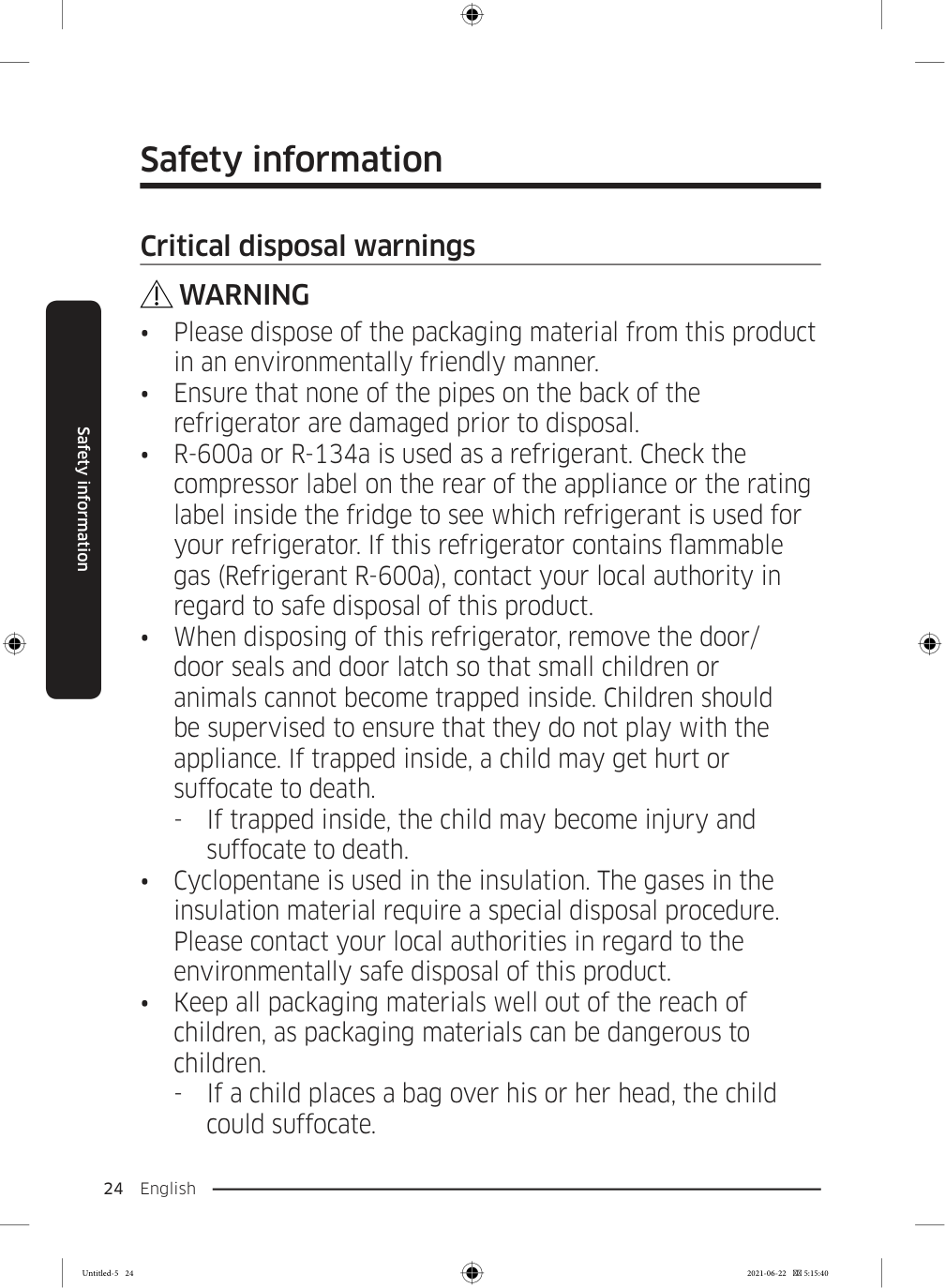
  • Please dispose of the packaging material from this product
  • in an environmentally friendly manner.
  • Ensure that none of the pipes on the back of the
  • refrigerator are damaged prior to disposal.
  • R-600a or R-134a is used as a refrigerant. Check the
  • compressor label on the rear of the appliance or the rating label inside the fridge to see which refrigerant is used for your refrigerator. If this refrigerator contains flammable gas (Refrigerant R-600a), contact your local authority in regard to safe disposal of this product.
  • When disposing of this refrigerator, remove the door/
  • door seals and door latch so that small children or animals cannot become trapped inside. Children should be supervised to ensure that they do not play with the appliance. If trapped inside, a child may get hurt or suffocate to death.
  • If trapped inside, the child may become injury and
  • suffocate to death.
  • Cyclopentane is used in the insulation. The gases in the
  • insulation material require a special disposal procedure. Please contact your local authorities in regard to the environmentally safe disposal of this product.
  • Keep all packaging materials well out of the reach of
  • children, as packaging materials can be dangerous to children.
  • If a child places a bag over his or her head, the child
  • could suffocate. Untitled-5 24 2021-06-22  5:15:40

    Page 25

    English  25 Safety information Additional tips for proper usage
  • In the event of a power failure, call the local office of your
  • electric company and ask how long the failure is going to last.
  • Most power failures that are corrected in an hour or two
  • will not affect your refrigerator temperatures. However, you should minimize the number of door openings while the power is off.
  • Should the power failure last more than 24 hours,
  • remove and discard all frozen food.
  • The refrigerator might not operate consistently (frozen
  • contents can thaw or temperatures can become too warm in the frozen food compartment) if sited for an extended period of time in a location where ambient air temperatures are constantly below the temperatures for which the appliance is designed.
  • In case of particular foods, keeping it under refrigeration
  • can have a bad effect on preservation due to its properties.
  • Your appliance is frost free, which means there is no need
  • to manually defrost your appliance. This will be carried out automatically.
  • Temperature rise during defrosting complies with ISO
  • requirements. If you want to prevent an undue rise in the temperature of frozen food while the appliance defrosts, wrap the frozen food in several layers of newspaper.
  • Do not re-freeze frozen foods that have thawed
  • completely. Untitled-5 25 2021-06-22  5:15:40

    Page 26

    Safety information English 26 Safety information
  • The temperature of two star section (sections) or
  • compartment (compartments) which have two star symbol ( ) is slightly higher than other freezer compartment (compartments). The two star section (sections) or compartment (compartments) is (are) based on the instruction and/or the condition as delivered. Instructions about the WEEE Correct Disposal of This Product (Waste Electrical & Electronic Equipment) (Applicable in countries with separate collection systems) This marking on the product, accessories or literature indicates that the product and its electronic accessories (e.g. charger, headset, USB cable) should not be disposed of with other household waste at the end of their working life. To prevent possible harm to the environment or human health from uncontrolled waste disposal, please separate these items from other types of waste and recycle them responsibly to promote the sustainable reuse of material resources. Household users should contact either the retailer where they purchased this product, or their local government office, for details of where and how they can take these items for environmentally safe recycling. Business users should contact their supplier and check the terms and conditions of the purchase contract. This product and its electronic accessories should not be mixed with other commercial wastes for disposal. Untitled-5 26 2021-06-22  5:15:40

    Page 27

    English  27 Installation Follow these instructions carefully to ensure a proper installation of this refrigerator and to prevent accidents before using it.

    Warning
  • Use the refrigerator only for its intended purpose as described in this manual.
  • Any servicing must be performed by a qualified technician.
  • Dispose of the product packaging material in compliance with the local regulations.
  • To prevent electric shock, unplug the power plug before servicing or replacing parts.
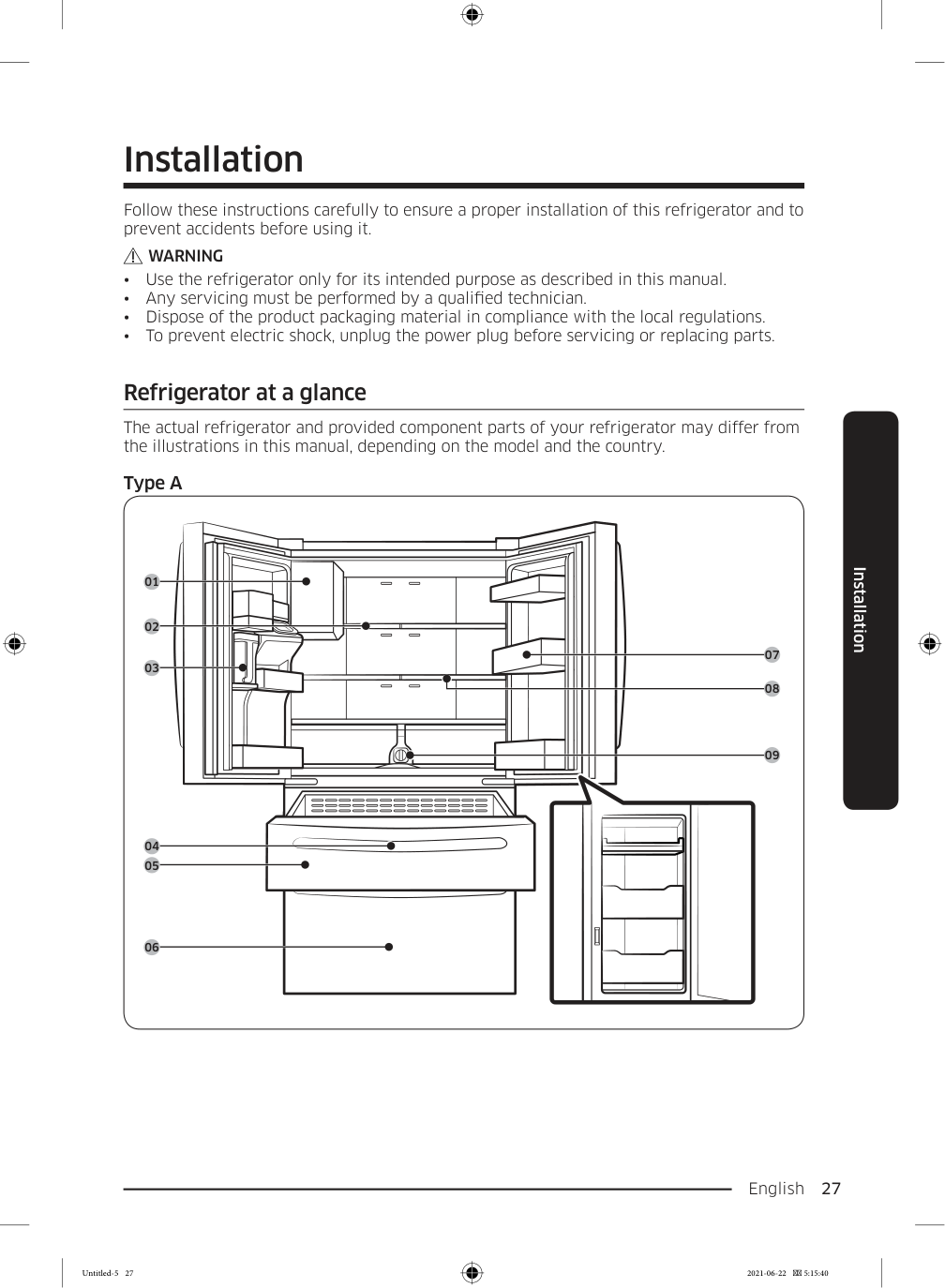
  • Refrigerator at a glance The actual refrigerator and provided component parts of your refrigerator may differ from the illustrations in this manual, depending on the model and the country. Type A 01 02 03 05 04 06 08 09 07 Installation Untitled-5 27 2021-06-22  5:15:40

    Page 28

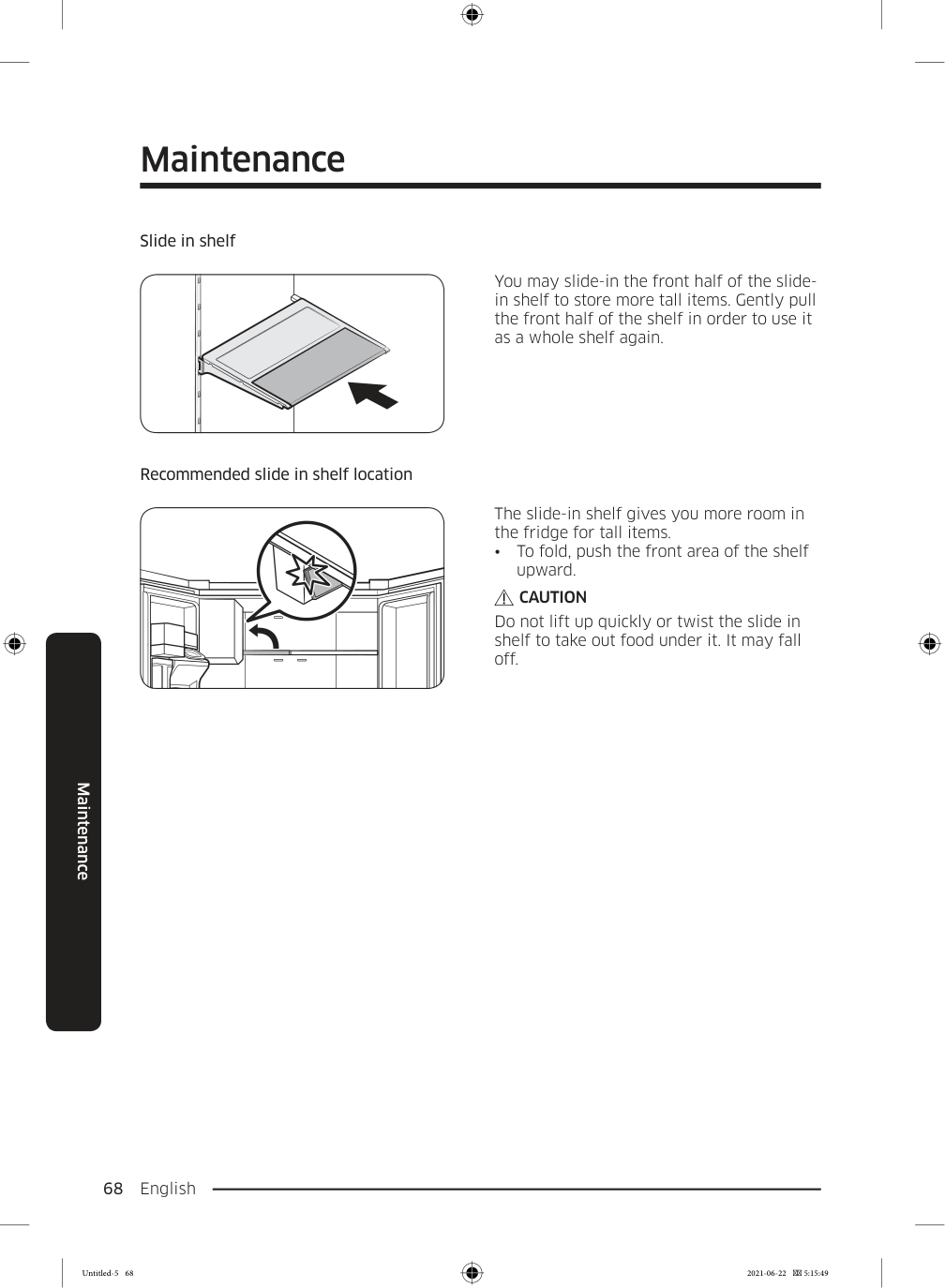
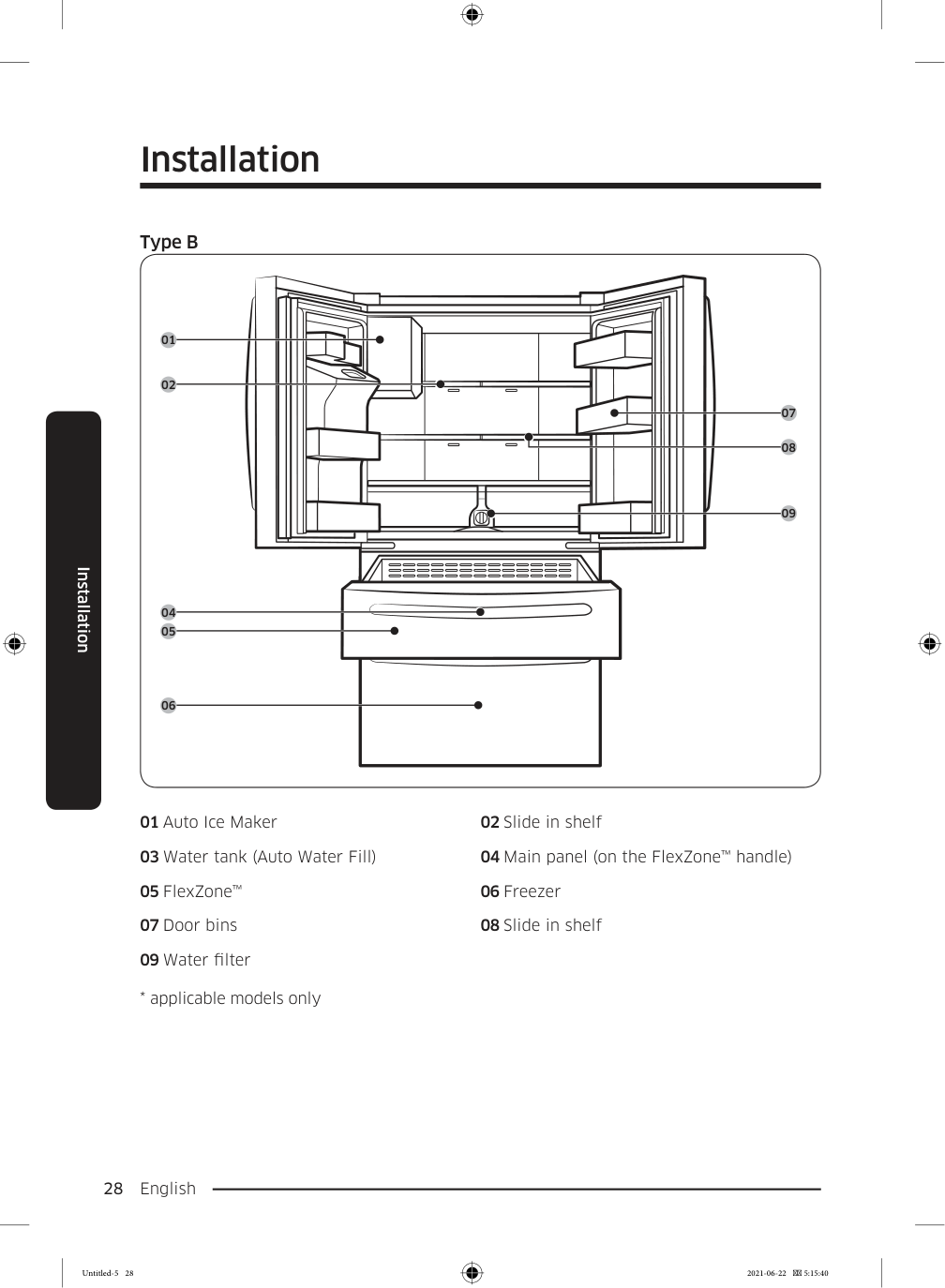
    Installation English 28 Installation Type B 01 02 05 04 06 08 09 07 01 Auto Ice Maker 02 Slide in shelf 03 Water tank (Auto Water Fill) 04 Main panel (on the FlexZone™ handle) 05 FlexZone™ 06 Freezer 07 Door bins 08 Slide in shelf 09 Water filter
  • applicable models only
  • Untitled-5 28 2021-06-22  5:15:40

    Page 29

    English  29 Installation

    Note

  • For energy efficiency, keep all shelves, drawers, and baskets in their original positions.
  • When closing the door, make sure the vertical hinged section is in the correct position
  • to avoid scratching the other door.
  • If the vertical hinged section is reversed, put it back into the correct position, and then
  • close the door.
  • Moisture may form at times on the vertical hinged section.
  • If you close a door forcefully, the other door may open.
  • When a door is opened, the interlock switch automatically disables the auger motor of
  • the ice maker for safety reasons.
  • If the internal or external LED lamp is out of order, contact a local Samsung service
  • center.
  • If the door is left open for too long, the top internal LED will blink. This is normal.
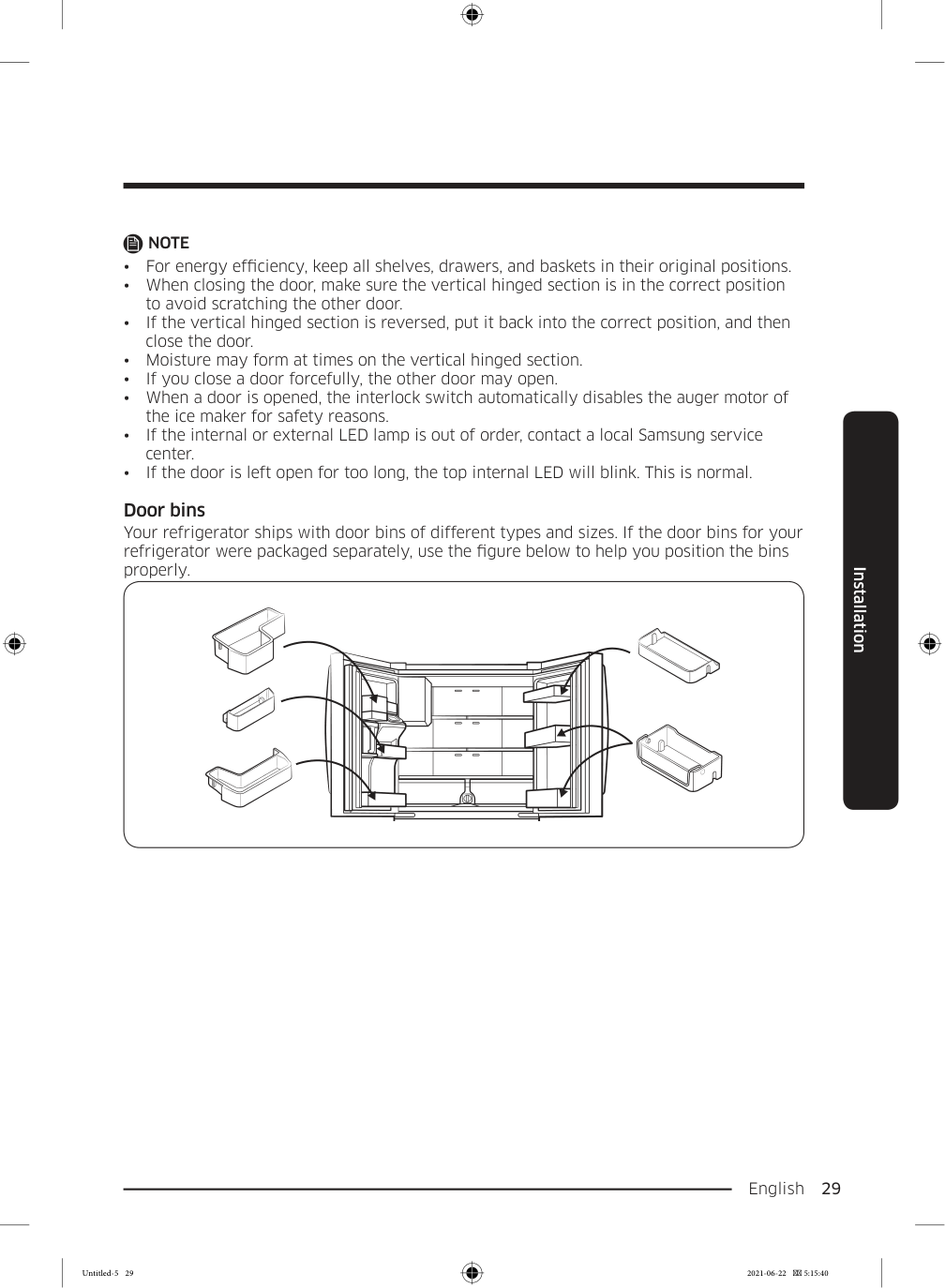
  • Door bins Your refrigerator ships with door bins of different types and sizes. If the door bins for your refrigerator were packaged separately, use the figure below to help you position the bins properly. Untitled-5 29 2021-06-22  5:15:40

    Page 30

    Installation English 30 Installation Step-by-step installation STEP  1  Select a site Select a site that:

  • Has a solid, level surface without carpeting or flooring that may obstruct ventilation
  • Is away from direct sunlight
  • Has adequate room for opening and closing the door
  • Is away from any heat sources
  • Provides room for maintenance and servicing
  • Has a temperature range between 10 °C and 43 °C
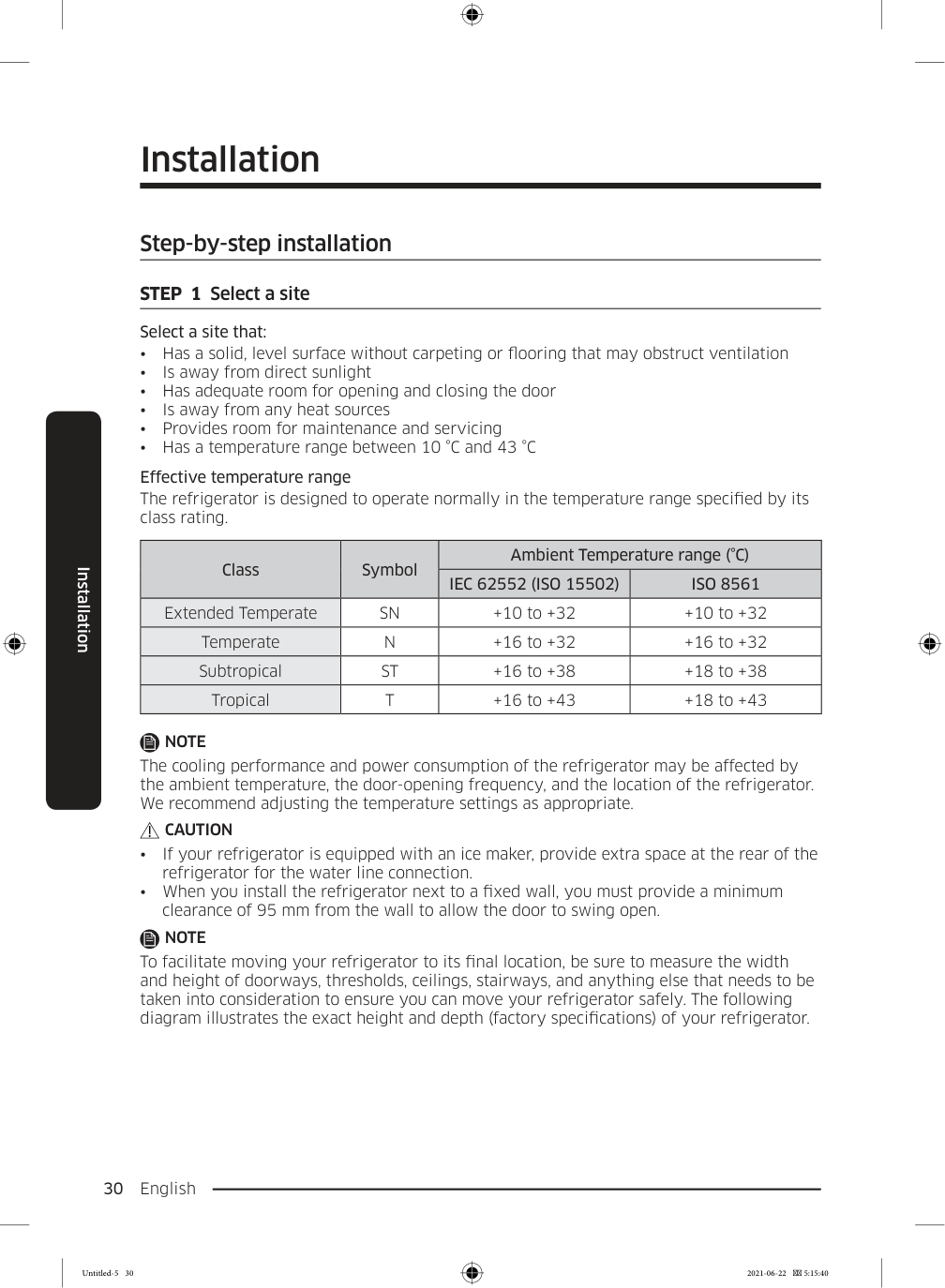
  • Effective temperature range The refrigerator is designed to operate normally in the temperature range specified by its class rating. Class Symbol Ambient Temperature range (°C)

    Iec 62552 (Iso 15502)

    Iso 8561

    Extended Temperate

    Sn

    +10 to +32 +10 to +32 Temperate

    N

    +16 to +32 +16 to +32 Subtropical

    St

    +16 to +38 +18 to +38 Tropical

    T

    +16 to +43 +18 to +43

    Note

    The cooling performance and power consumption of the refrigerator may be affected by the ambient temperature, the door-opening frequency, and the location of the refrigerator. We recommend adjusting the temperature settings as appropriate.

    Caution

  • If your refrigerator is equipped with an ice maker, provide extra space at the rear of the
  • refrigerator for the water line connection.
  • When you install the refrigerator next to a fixed wall, you must provide a minimum
  • clearance of 95 mm from the wall to allow the door to swing open.

    Note

    To facilitate moving your refrigerator to its final location, be sure to measure the width and height of doorways, thresholds, ceilings, stairways, and anything else that needs to be taken into consideration to ensure you can move your refrigerator safely. The following diagram illustrates the exact height and depth (factory specifications) of your refrigerator. Untitled-5 30 2021-06-22  5:15:40
    Page 31

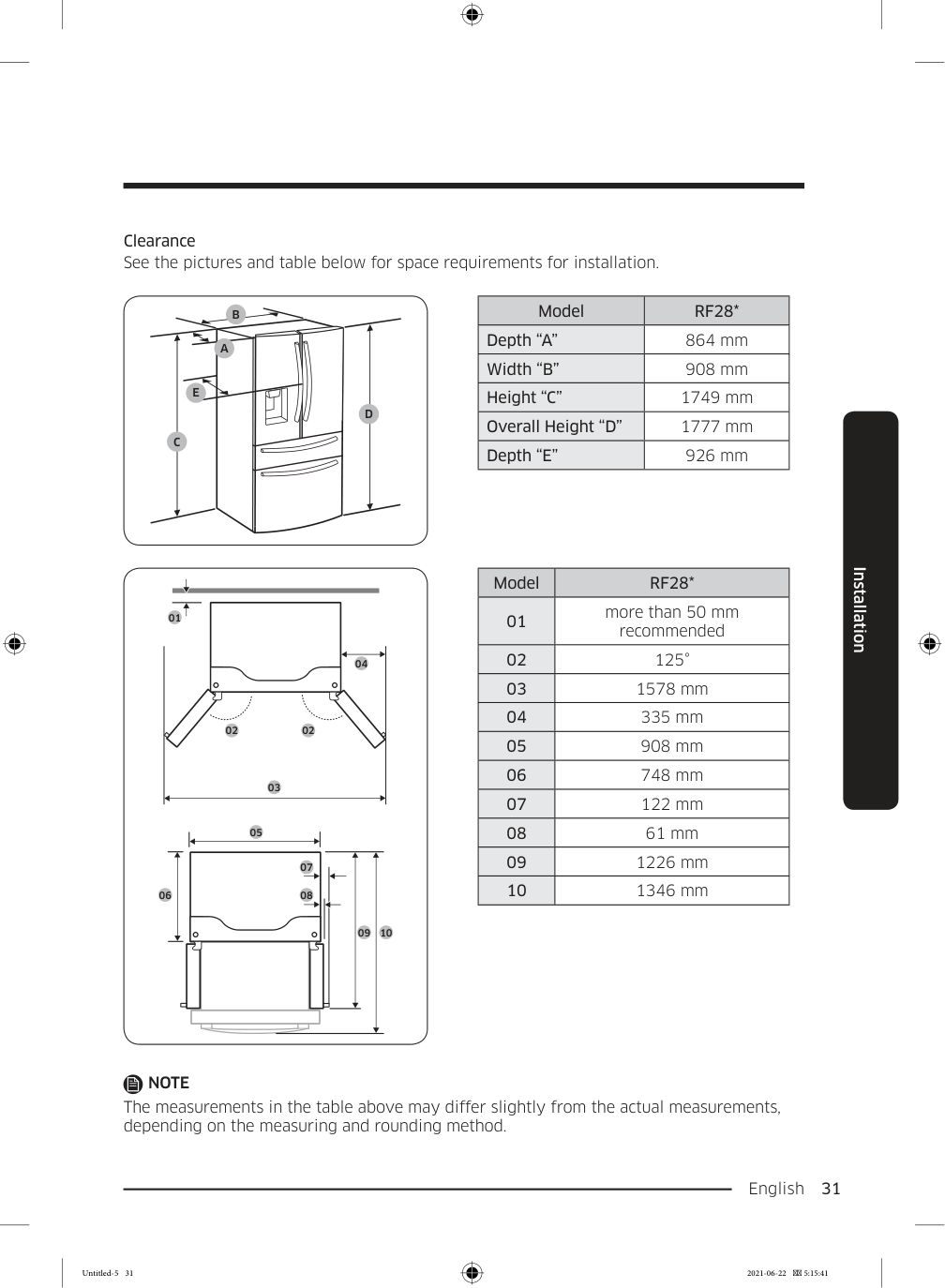
    English  31 Installation Clearance See the pictures and table below for space requirements for installation.

    C

    D

    E

    B

    A

    Model

    Rf28*

    Depth “A” 864 mm Width “B” 908 mm Height “C” 1749 mm Overall Height “D” 1777 mm Depth “E” 926 mm 01 02 02 04 03 05 06 09 10 07 08 Model

    Rf28*

    01 more than 50 mm recommended 02 125° 03 1578 mm 04 335 mm 05 908 mm 06 748 mm 07 122 mm 08 61 mm 09 1226 mm 10 1346 mm

    Note

    The measurements in the table above may differ slightly from the actual measurements, depending on the measuring and rounding method. Untitled-5 31 2021-06-22  5:15:41
    Page 32

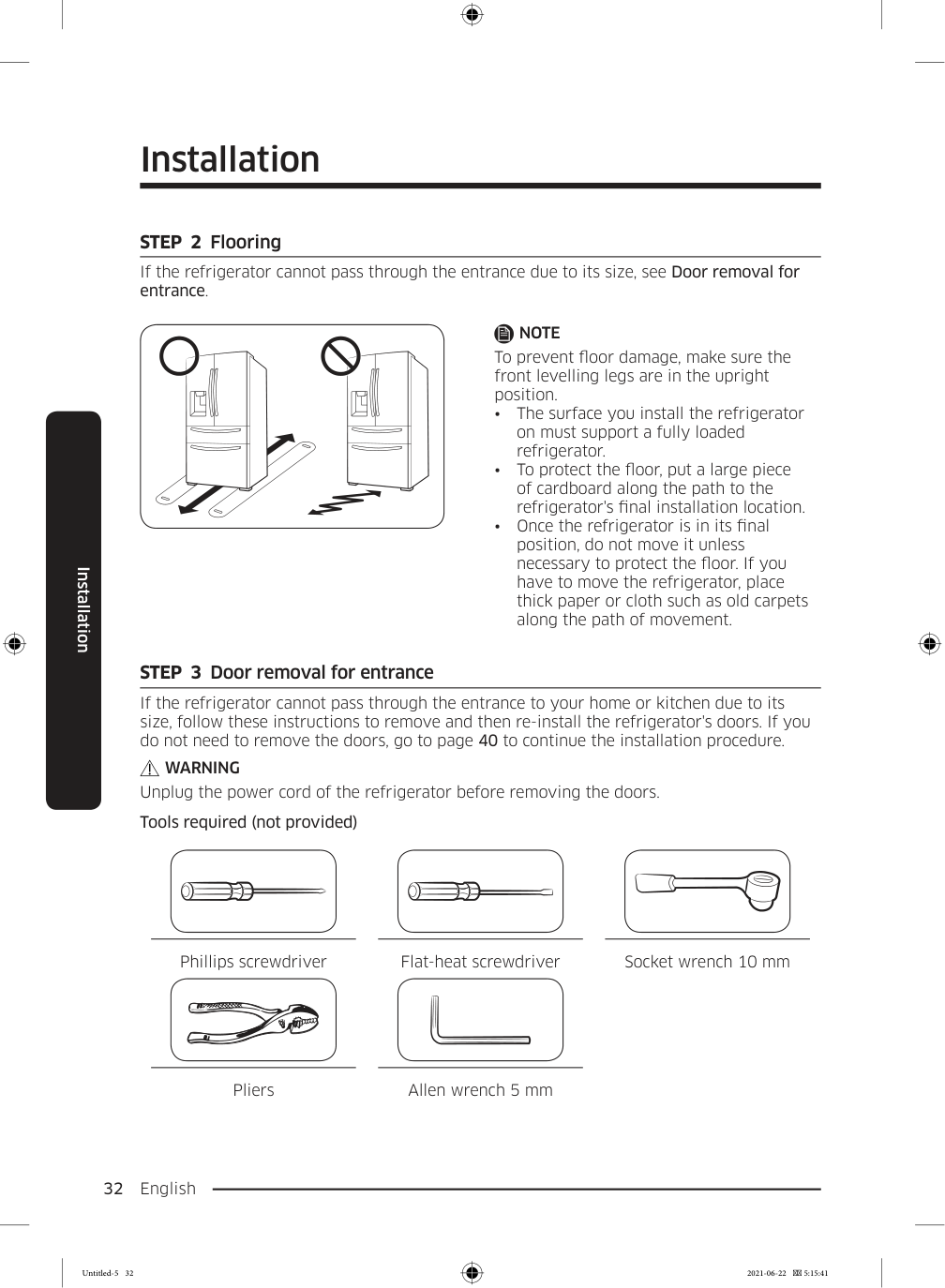
    Installation English 32 Installation STEP  2  Flooring If the refrigerator cannot pass through the entrance due to its size, see Door removal for entrance.

    Note

    To prevent floor damage, make sure the front levelling legs are in the upright position.
  • The surface you install the refrigerator
  • on must support a fully loaded refrigerator.
  • To protect the floor, put a large piece
  • of cardboard along the path to the refrigerator's final installation location.
  • Once the refrigerator is in its final
  • position, do not move it unless necessary to protect the floor. If you have to move the refrigerator, place thick paper or cloth such as old carpets along the path of movement. STEP  3  Door removal for entrance If the refrigerator cannot pass through the entrance to your home or kitchen due to its size, follow these instructions to remove and then re-install the refrigerator's doors. If you do not need to remove the doors, go to page 40 to continue the installation procedure.

    Warning

    Unplug the power cord of the refrigerator before removing the doors. Tools required (not provided) Phillips screwdriver Flat-heat screwdriver Socket wrench 10 mm Pliers Allen wrench 5 mm Untitled-5 32 2021-06-22  5:15:41
    Page 33

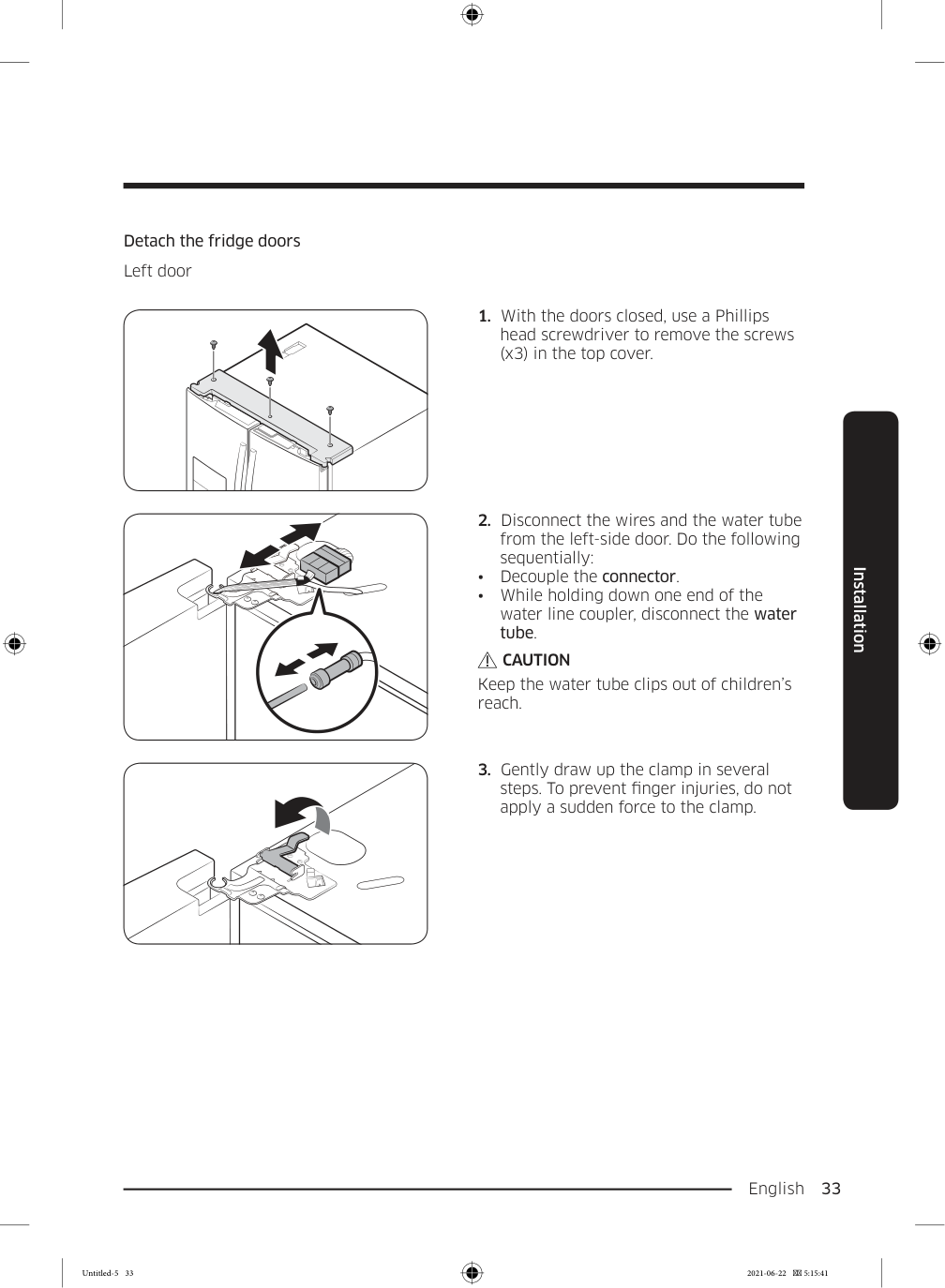
    English  33 Installation Detach the fridge doors Left door

  • With the doors closed, use a Phillips
  • head screwdriver to remove the screws (x3) in the top cover.
  • Disconnect the wires and the water tube
  • from the left-side door. Do the following sequentially:
  • Decouple the connector.
  • While holding down one end of the
  • water line coupler, disconnect the water tube.

    Caution

    Keep the water tube clips out of children’s reach.
  • Gently draw up the clamp in several
  • steps. To prevent finger injuries, do not apply a sudden force to the clamp. Untitled-5 33 2021-06-22  5:15:41

    Page 34

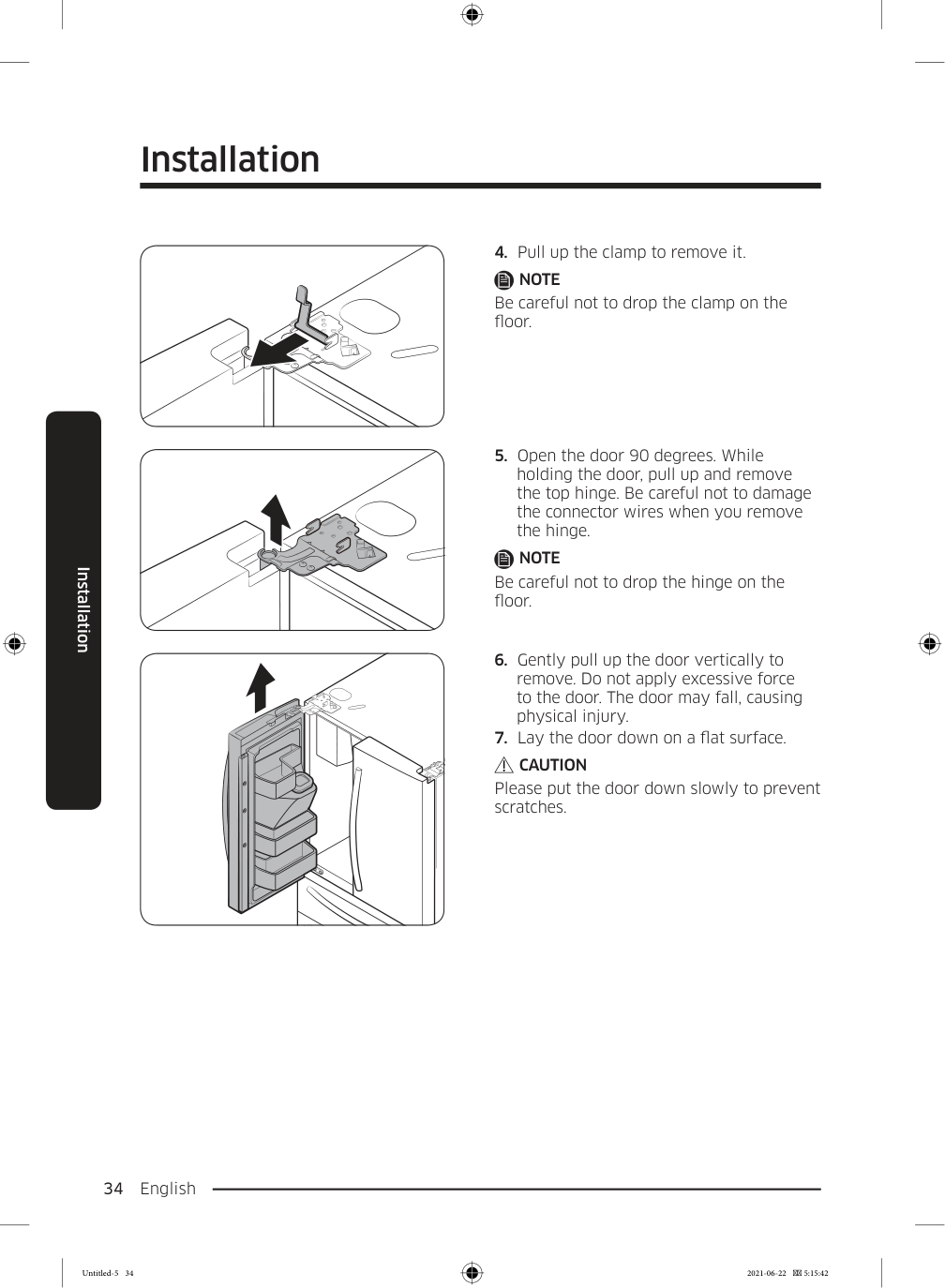
    Installation English 34 Installation

  • Pull up the clamp to remove it.
  • Note

    Be careful not to drop the clamp on the floor.
  • Open the door 90 degrees. While
  • holding the door, pull up and remove the top hinge. Be careful not to damage the connector wires when you remove the hinge.

    Note

    Be careful not to drop the hinge on the floor.
  • Gently pull up the door vertically to
  • remove. Do not apply excessive force to the door. The door may fall, causing physical injury.
  • Lay the door down on a flat surface.
  • Caution

    Please put the door down slowly to prevent scratches. Untitled-5 34 2021-06-22  5:15:42
    Page 35

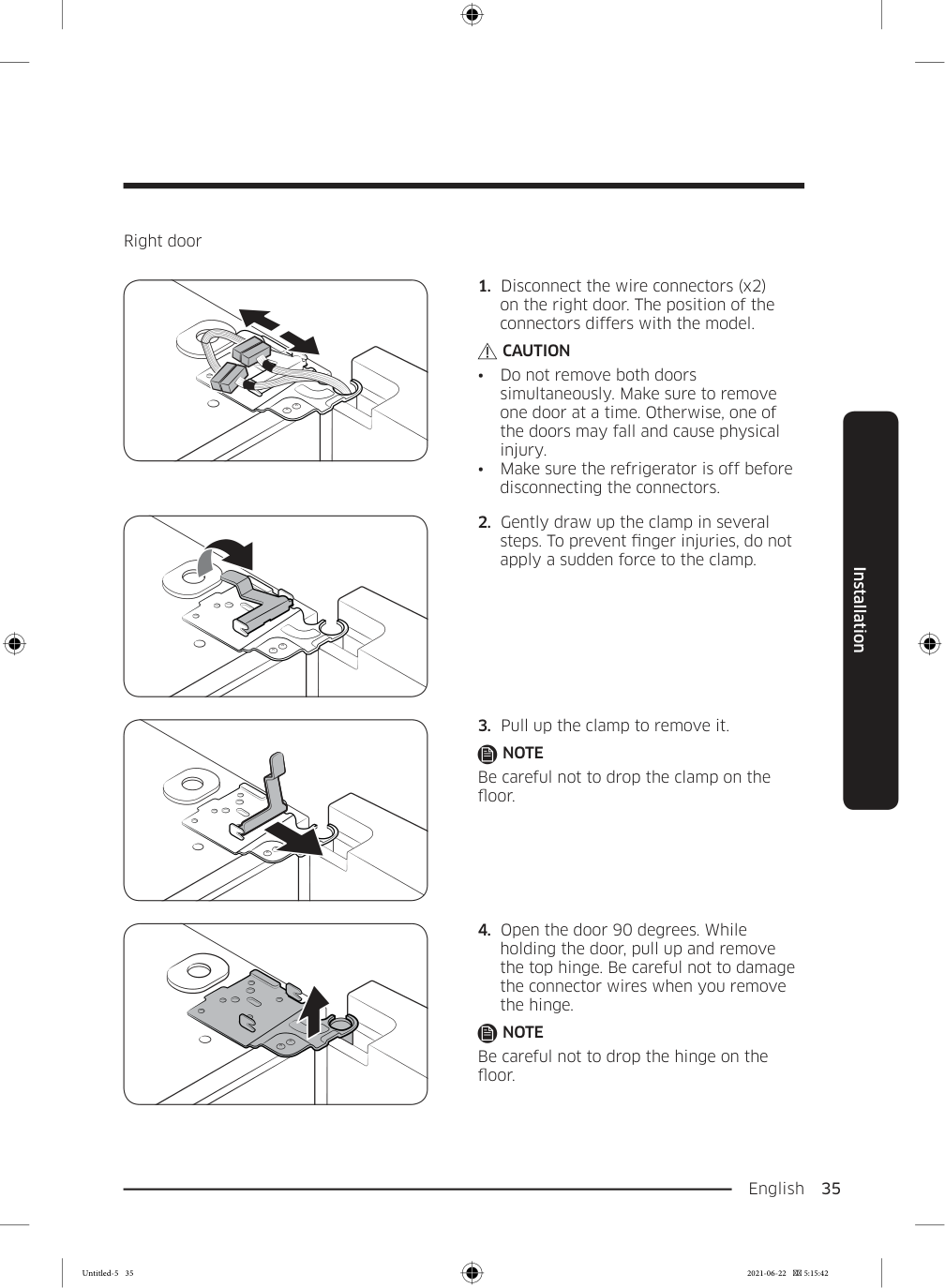
    English  35 Installation Right door

  • Disconnect the wire connectors (x2)
  • on the right door. The position of the connectors differs with the model.

    Caution

  • Do not remove both doors
  • simultaneously. Make sure to remove one door at a time. Otherwise, one of the doors may fall and cause physical injury.
  • Make sure the refrigerator is off before
  • disconnecting the connectors.
  • Gently draw up the clamp in several
  • steps. To prevent finger injuries, do not apply a sudden force to the clamp.
  • Pull up the clamp to remove it.
  • Note

    Be careful not to drop the clamp on the floor.
  • Open the door 90 degrees. While
  • holding the door, pull up and remove the top hinge. Be careful not to damage the connector wires when you remove the hinge.

    Note

    Be careful not to drop the hinge on the floor. Untitled-5 35 2021-06-22  5:15:42
    Page 36

    Installation English 36 Installation

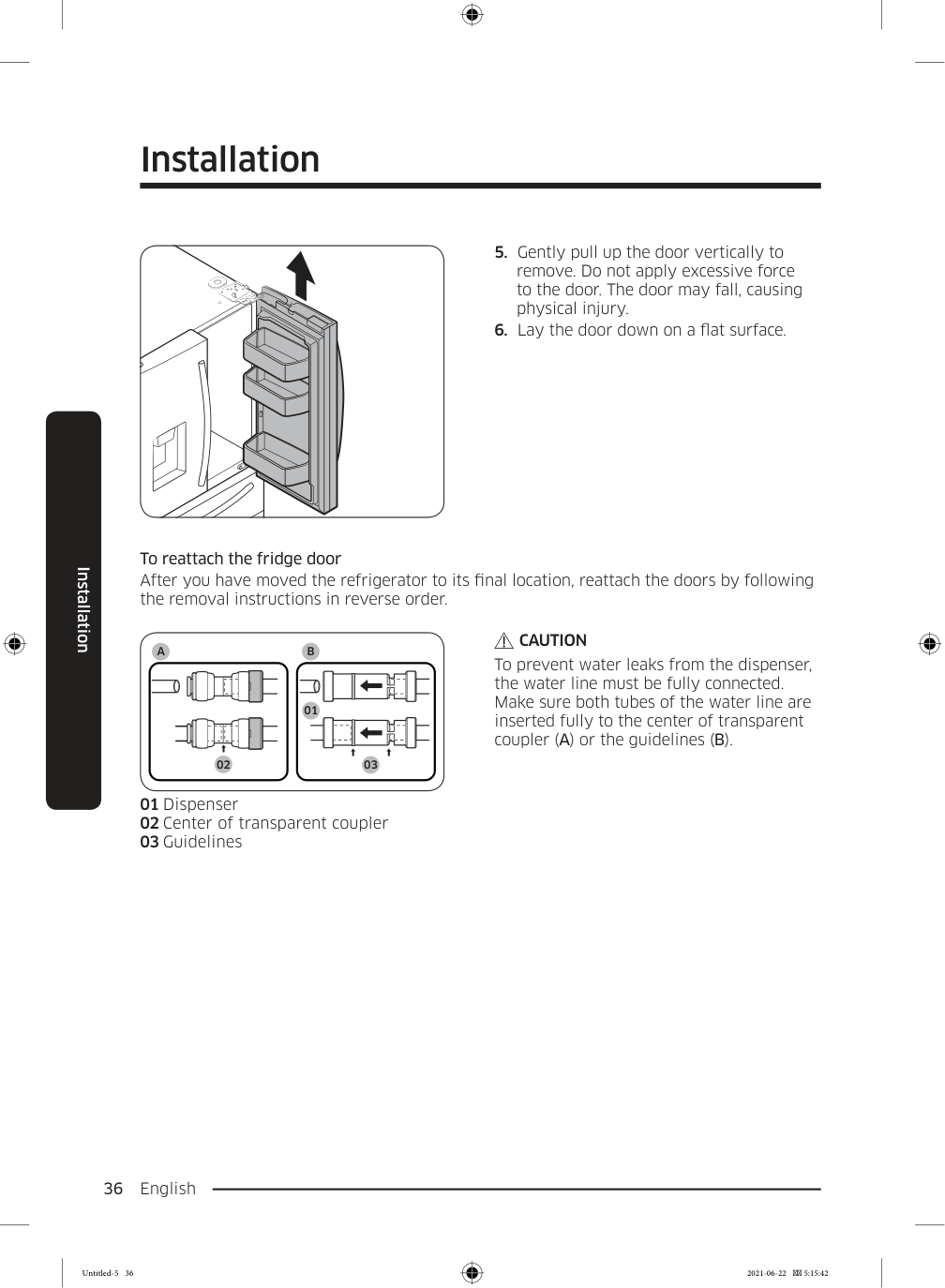
  • Gently pull up the door vertically to
  • remove. Do not apply excessive force to the door. The door may fall, causing physical injury.
  • Lay the door down on a flat surface.
  • To reattach the fridge door After you have moved the refrigerator to its final location, reattach the doors by following the removal instructions in reverse order.

    A

    01 02 03

    B

    01 Dispenser 02 Center of transparent coupler 03 Guidelines

    Caution

    To prevent water leaks from the dispenser, the water line must be fully connected. Make sure both tubes of the water line are inserted fully to the center of transparent coupler (A) or the guidelines (B). Untitled-5 36 2021-06-22  5:15:42
    Page 37

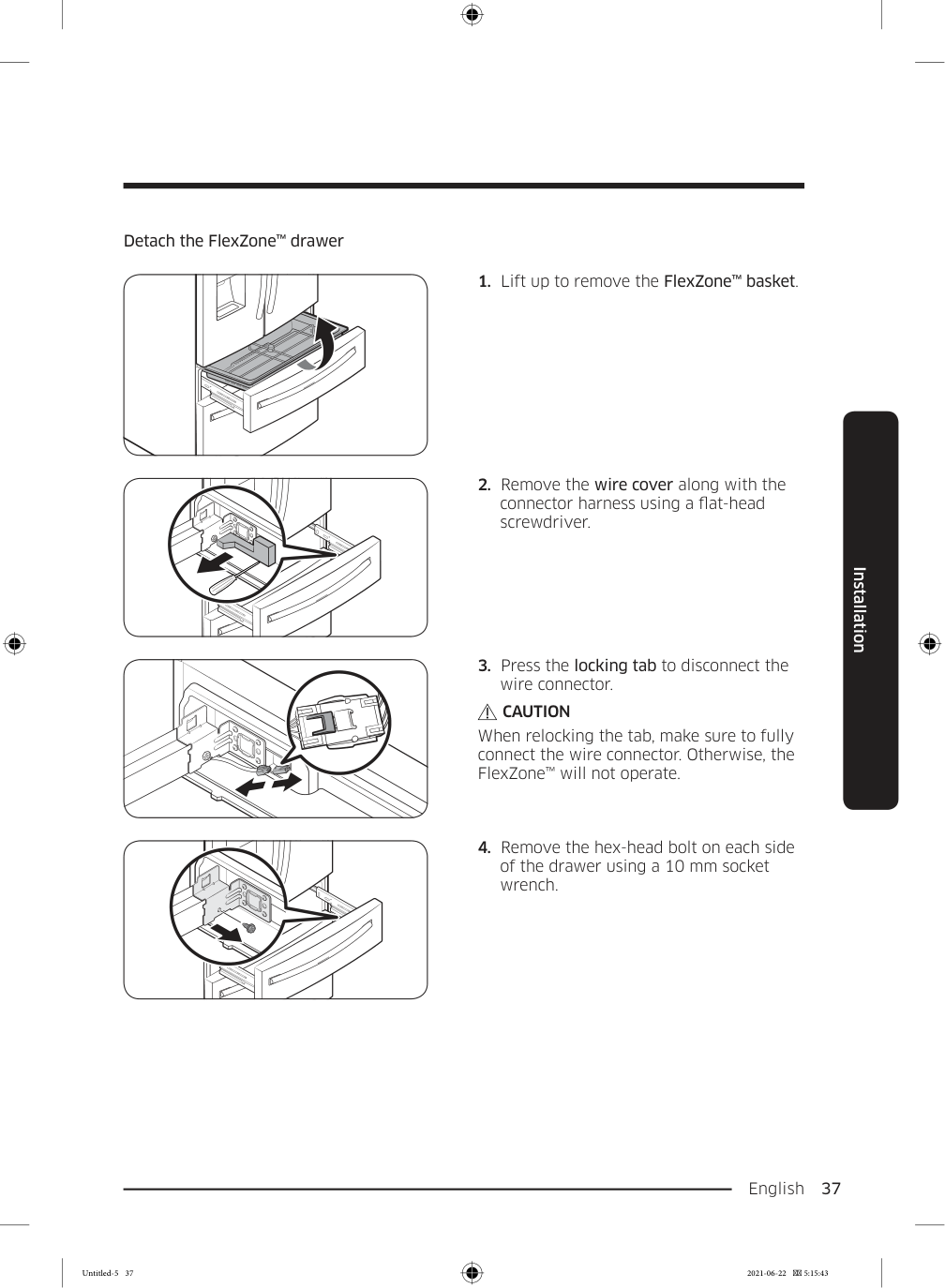
    English  37 Installation Detach the FlexZone™ drawer

  • Lift up to remove the FlexZone™ basket.
  • Remove the wire cover along with the
  • connector harness using a flat-head screwdriver.
  • Press the locking tab to disconnect the
  • wire connector.

    Caution

    When relocking the tab, make sure to fully connect the wire connector. Otherwise, the FlexZone™ will not operate.
  • Remove the hex-head bolt on each side
  • of the drawer using a 10 mm socket wrench. Untitled-5 37 2021-06-22  5:15:43

    Page 38

    Installation English 38 Installation

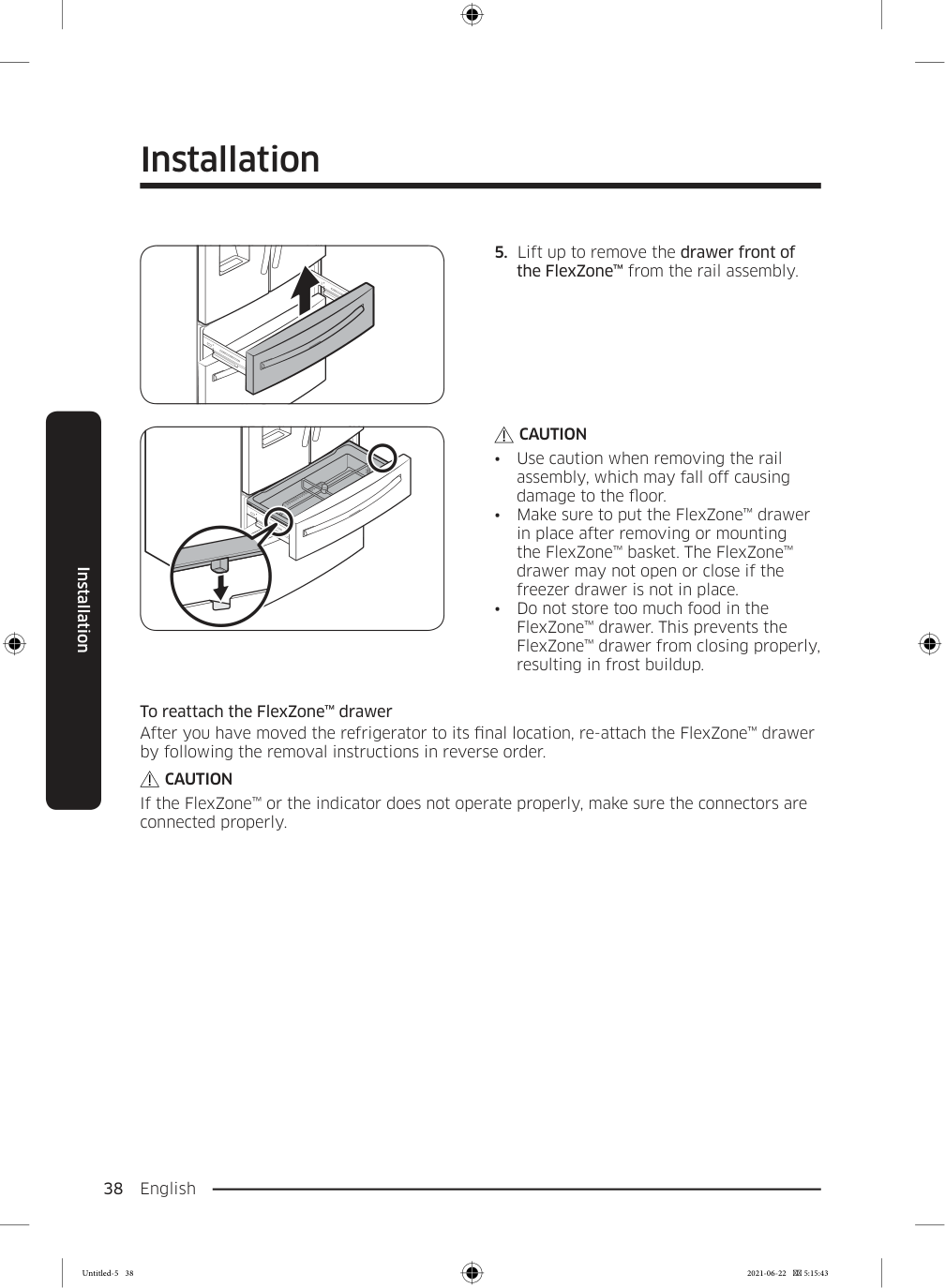
  • Lift up to remove the drawer front of
  • the FlexZone™ from the rail assembly.

    Caution

  • Use caution when removing the rail
  • assembly, which may fall off causing damage to the floor.
  • Make sure to put the FlexZone™ drawer
  • in place after removing or mounting the FlexZone™ basket. The FlexZone™ drawer may not open or close if the freezer drawer is not in place.
  • Do not store too much food in the
  • FlexZone™ drawer. This prevents the FlexZone™ drawer from closing properly, resulting in frost buildup. To reattach the FlexZone™ drawer After you have moved the refrigerator to its final location, re-attach the FlexZone™ drawer by following the removal instructions in reverse order.

    Caution

    If the FlexZone™ or the indicator does not operate properly, make sure the connectors are connected properly. Untitled-5 38 2021-06-22  5:15:43
    Page 39

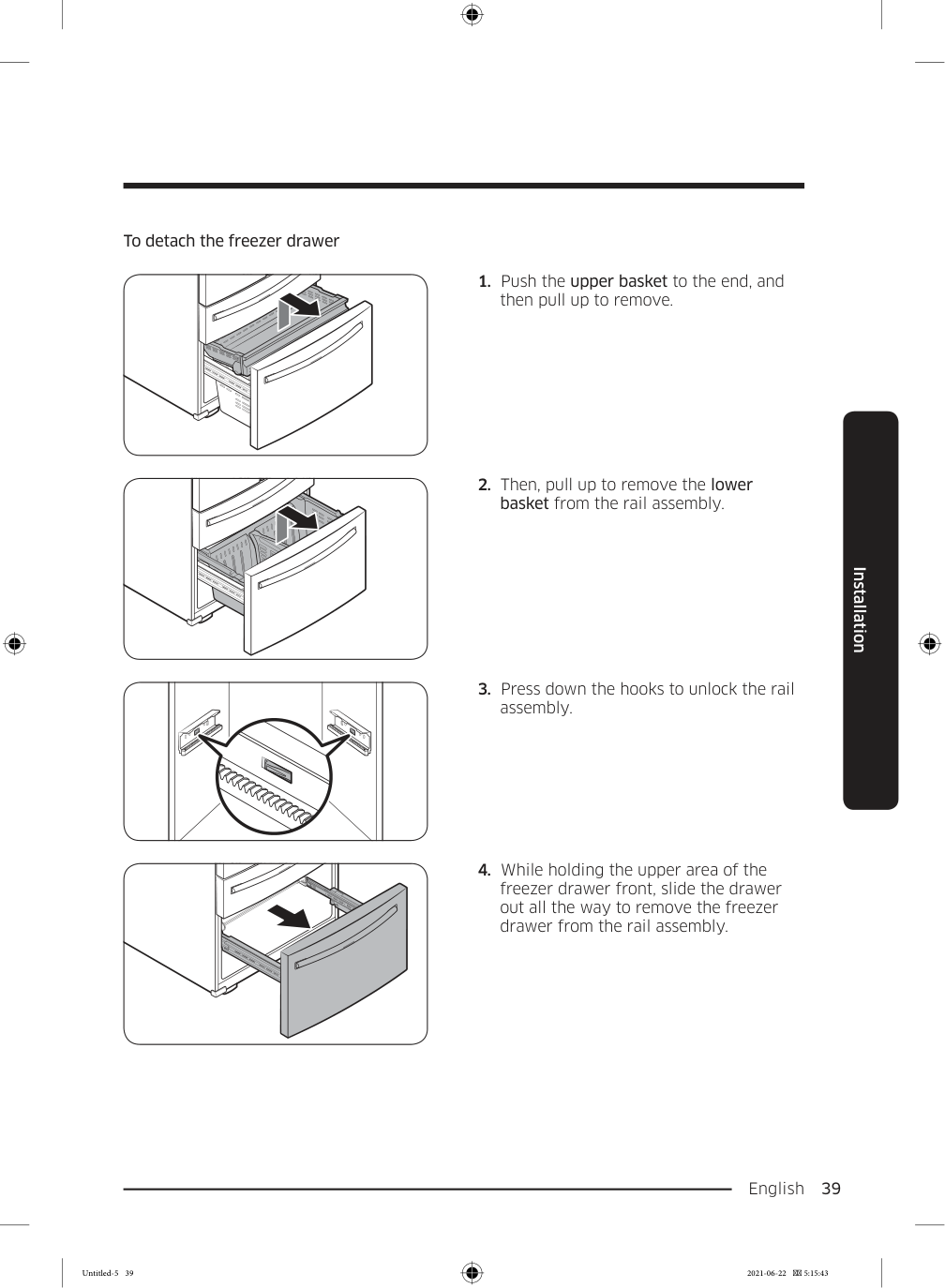
    English  39 Installation To detach the freezer drawer
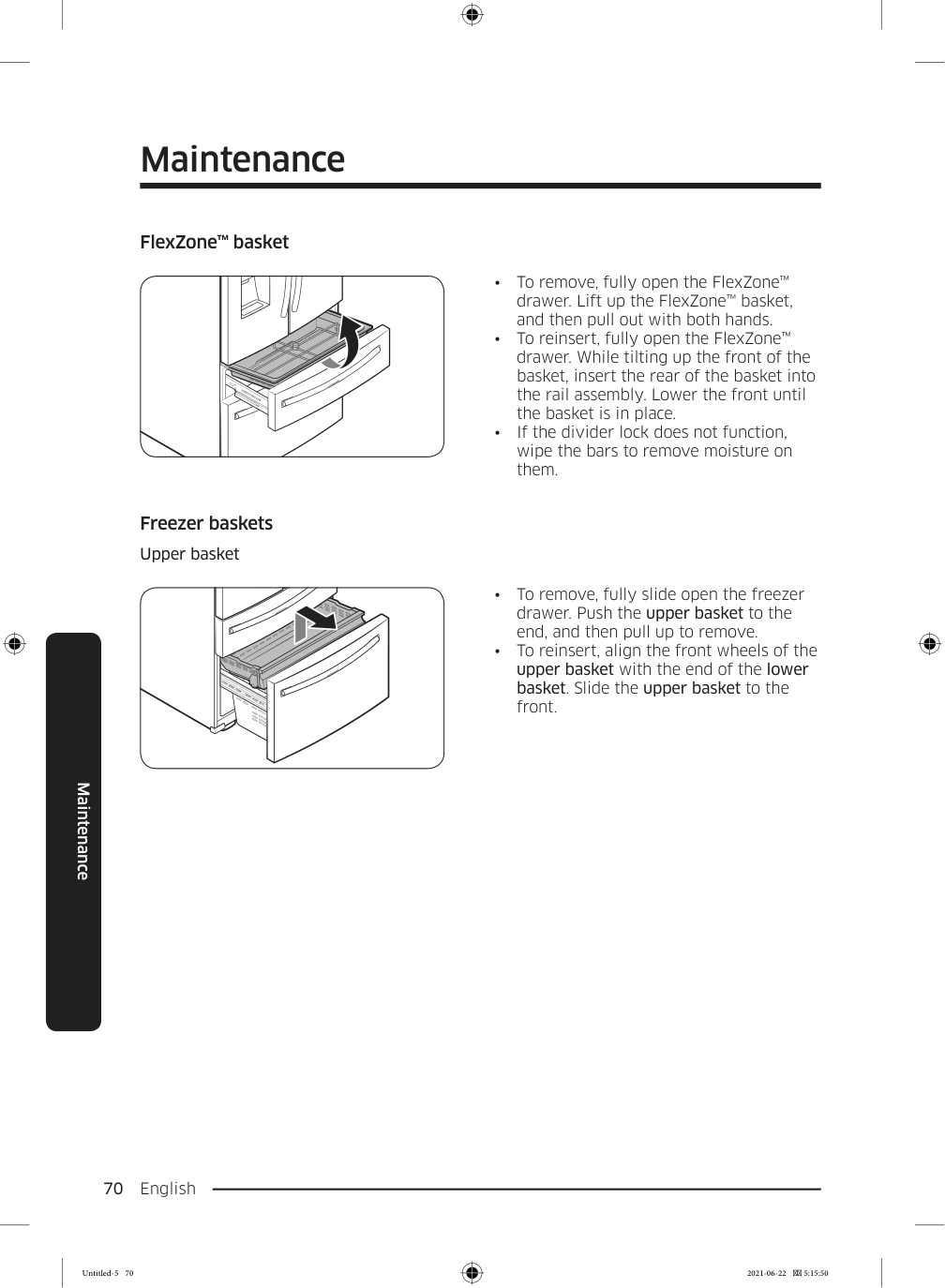
  • Push the upper basket to the end, and
  • then pull up to remove.
  • Then, pull up to remove the lower
  • basket from the rail assembly.
  • Press down the hooks to unlock the rail
  • assembly.
  • While holding the upper area of the
  • freezer drawer front, slide the drawer out all the way to remove the freezer drawer from the rail assembly. Untitled-5 39 2021-06-22  5:15:43

    Page 40

    Installation English 40 Installation

    Caution

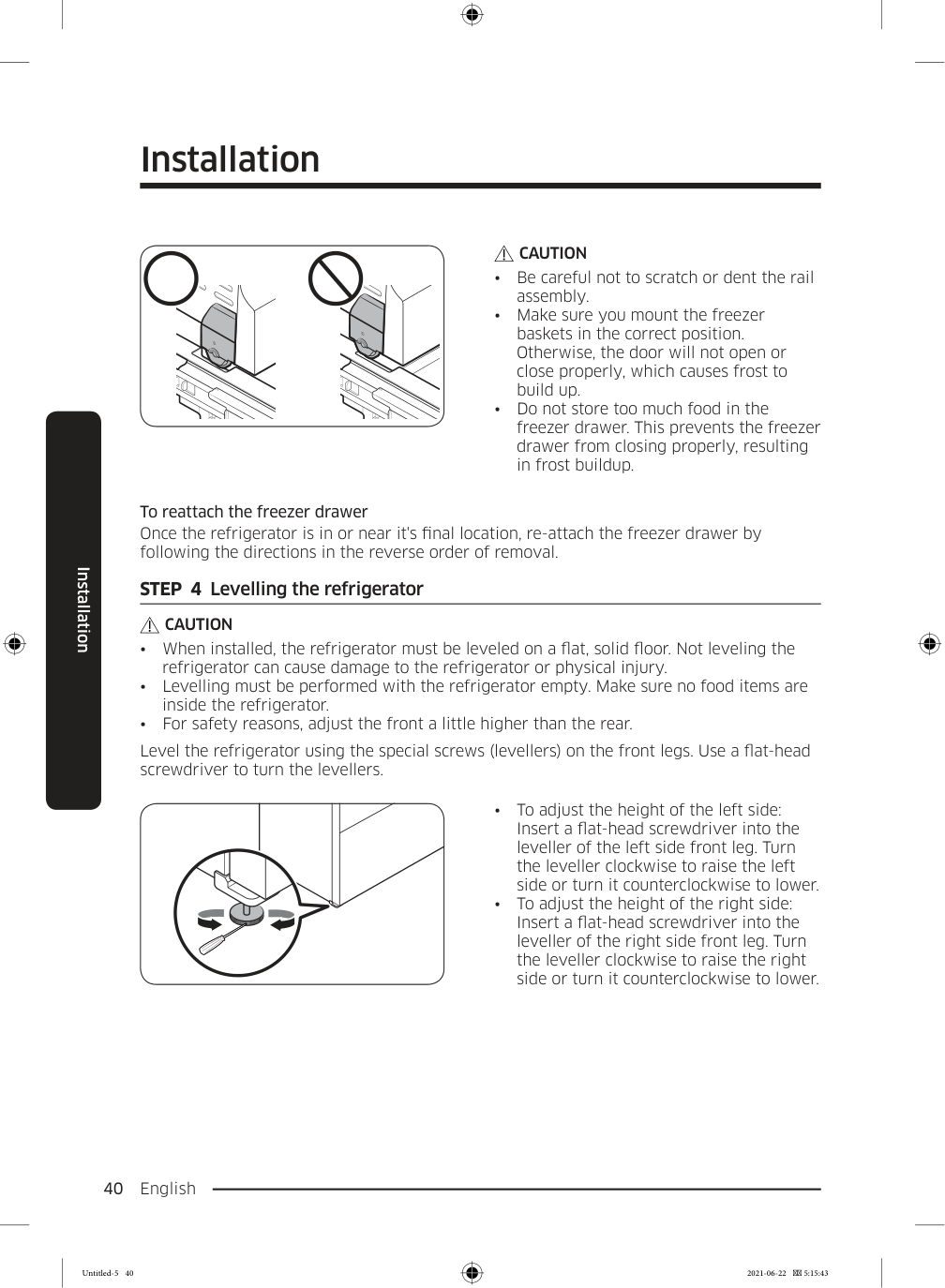
  • Be careful not to scratch or dent the rail
  • assembly.
  • Make sure you mount the freezer
  • baskets in the correct position. Otherwise, the door will not open or close properly, which causes frost to build up.
  • Do not store too much food in the
  • freezer drawer. This prevents the freezer drawer from closing properly, resulting in frost buildup. To reattach the freezer drawer Once the refrigerator is in or near it's final location, re-attach the freezer drawer by following the directions in the reverse order of removal. STEP  4  Levelling the refrigerator

    Caution

  • When installed, the refrigerator must be leveled on a flat, solid floor. Not leveling the
  • refrigerator can cause damage to the refrigerator or physical injury.
  • Levelling must be performed with the refrigerator empty. Make sure no food items are
  • inside the refrigerator.
  • For safety reasons, adjust the front a little higher than the rear.
  • Level the refrigerator using the special screws (levellers) on the front legs. Use a flat-head screwdriver to turn the levellers.
  • To adjust the height of the left side:
  • Insert a flat-head screwdriver into the leveller of the left side front leg. Turn the leveller clockwise to raise the left side or turn it counterclockwise to lower.
  • To adjust the height of the right side:
  • Insert a flat-head screwdriver into the leveller of the right side front leg. Turn the leveller clockwise to raise the right side or turn it counterclockwise to lower. Untitled-5 40 2021-06-22  5:15:43

    Page 41

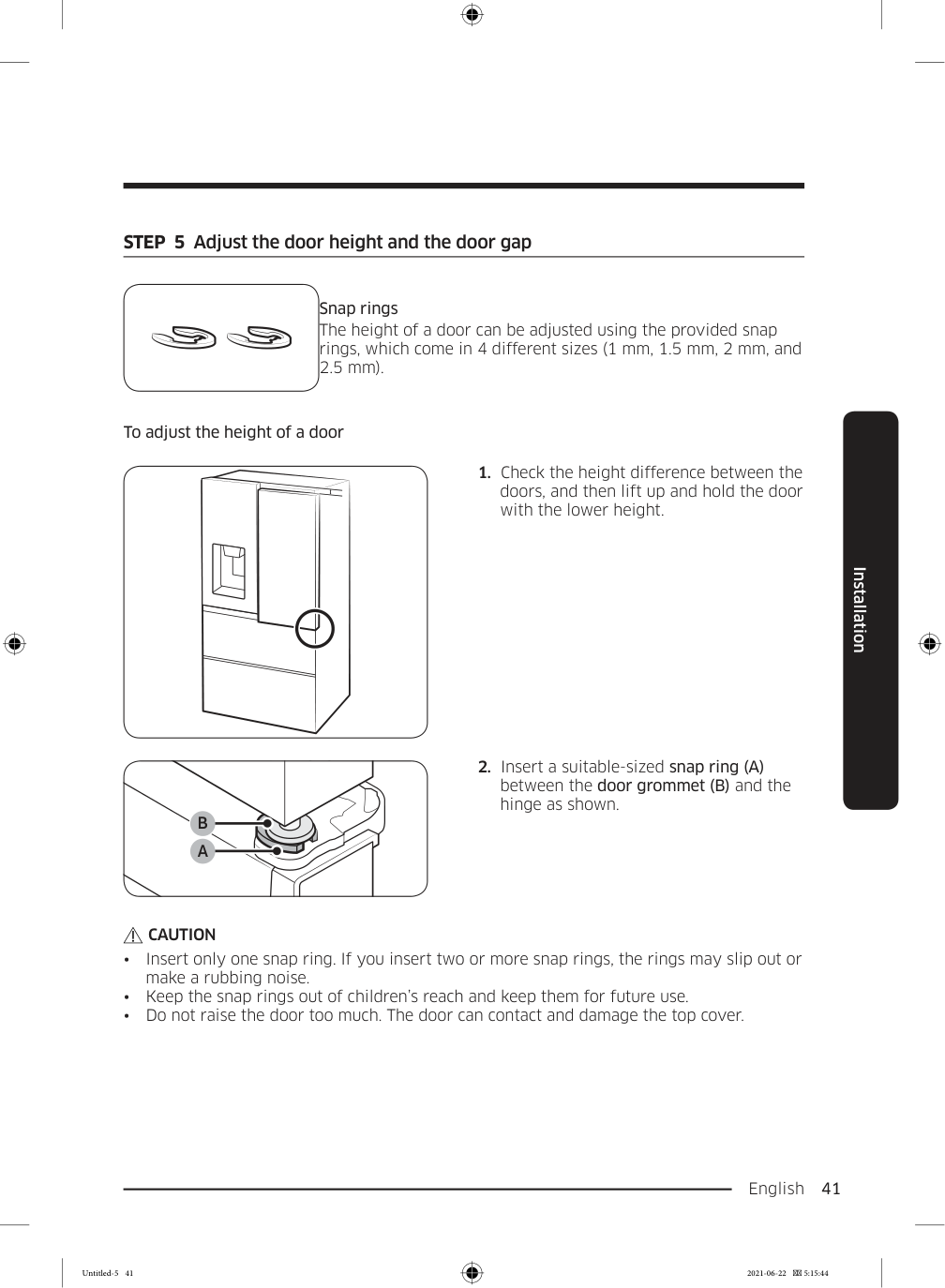
    English  41 Installation STEP  5  Adjust the door height and the door gap Snap rings The height of a door can be adjusted using the provided snap rings, which come in 4 different sizes (1 mm, 1.5 mm, 2 mm, and 2.5 mm). To adjust the height of a door

  • Check the height difference between the
  • doors, and then lift up and hold the door with the lower height.  9
  • Insert a suitable-sized snap ring (A)
  • between the door grommet (B) and the hinge as shown.

    Caution

  • Insert only one snap ring. If you insert two or more snap rings, the rings may slip out or
  • make a rubbing noise.
  • Keep the snap rings out of children’s reach and keep them for future use.
  • Do not raise the door too much. The door can contact and damage the top cover.
  • Untitled-5 41 2021-06-22  5:15:44

    Page 42

    Installation English 42 Installation STEP  6  Attach the handles

    Caution

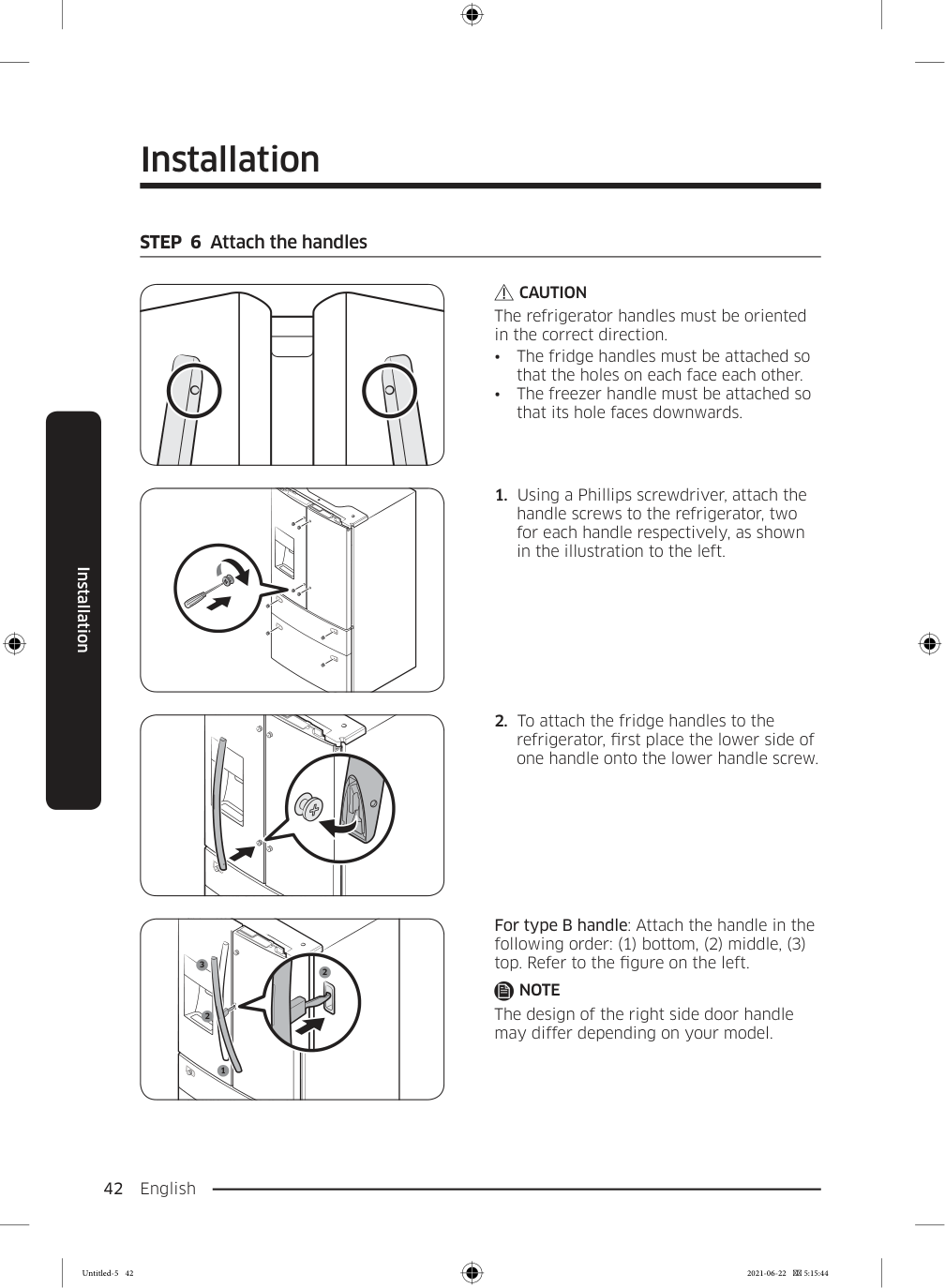
    The refrigerator handles must be oriented in the correct direction.
  • The fridge handles must be attached so
  • that the holes on each face each other.
  • The freezer handle must be attached so
  • that its hole faces downwards.
  • Using a Phillips screwdriver, attach the
  • handle screws to the refrigerator, two for each handle respectively, as shown in the illustration to the left.
  • To attach the fridge handles to the
  • refrigerator, first place the lower side of one handle onto the lower handle screw. 1 2 3 2 For type B handle: Attach the handle in the following order: (1) bottom, (2) middle, (3) top. Refer to the figure on the left.

    Note

    The design of the right side door handle may differ depending on your model. Untitled-5 42 2021-06-22  5:15:44
    Page 43

    English  43 Installation

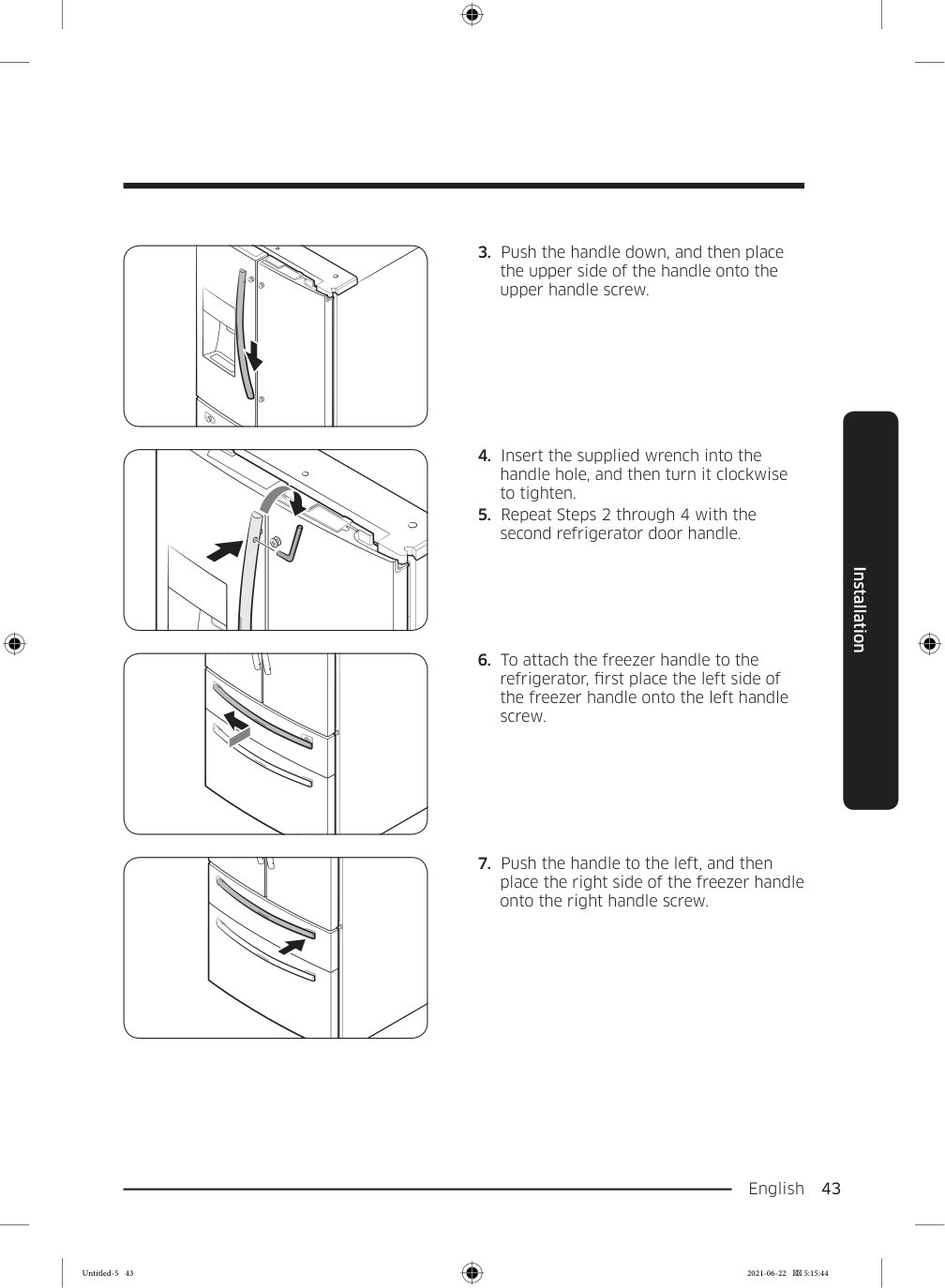
  • Push the handle down, and then place
  • the upper side of the handle onto the upper handle screw.
  • Insert the supplied wrench into the
  • handle hole, and then turn it clockwise to tighten.
  • Repeat Steps 2 through 4 with the
  • second refrigerator door handle.
  • To attach the freezer handle to the
  • refrigerator, first place the left side of the freezer handle onto the left handle screw.
  • Push the handle to the left, and then
  • place the right side of the freezer handle onto the right handle screw. Untitled-5 43 2021-06-22  5:15:44

    Page 44

    Installation English 44 Installation

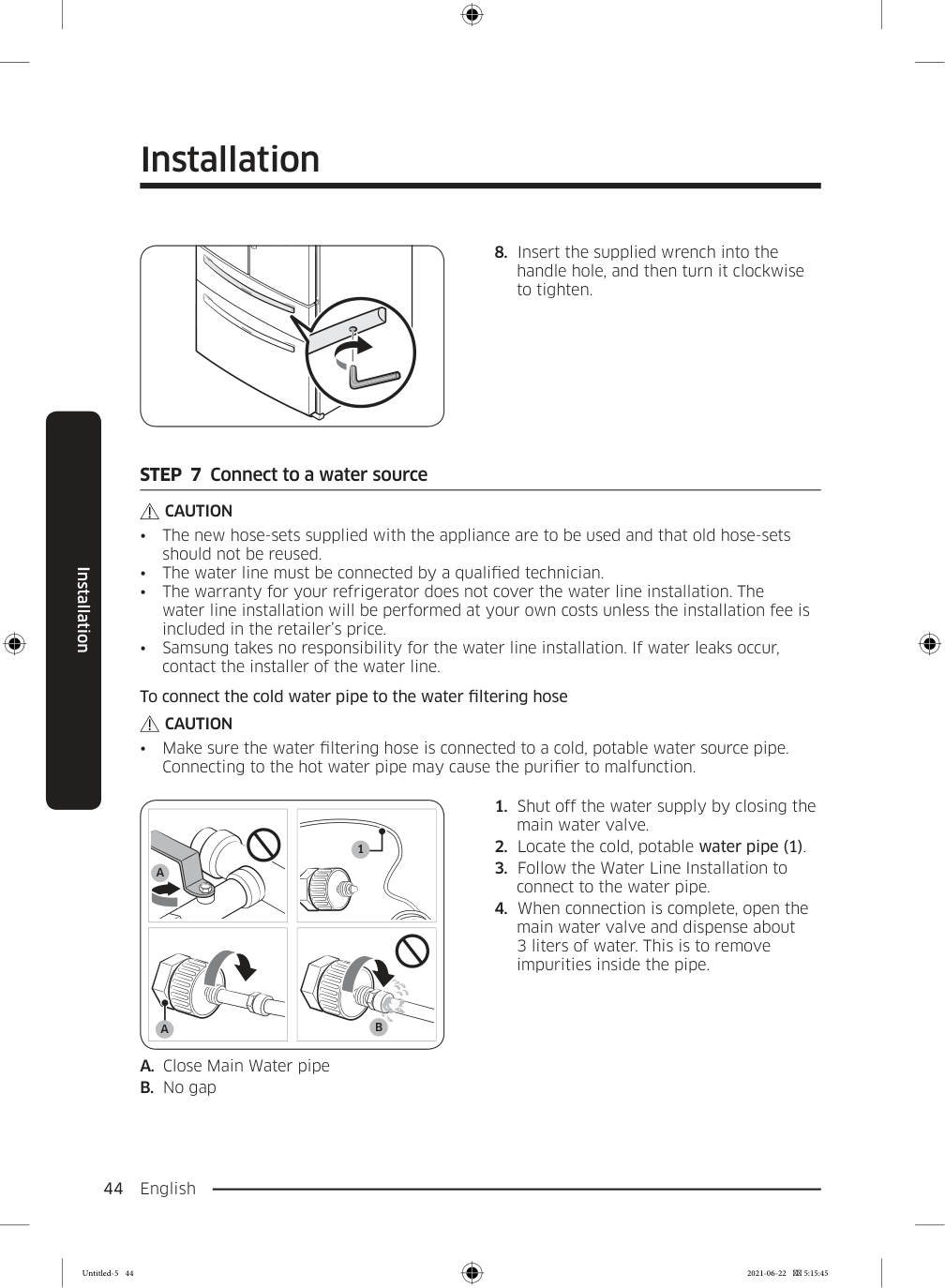
  • Insert the supplied wrench into the
  • handle hole, and then turn it clockwise to tighten. STEP  7  Connect to a water source

    Caution

  • The new hose-sets supplied with the appliance are to be used and that old hose-sets
  • should not be reused.
  • The water line must be connected by a qualified technician.
  • The warranty for your refrigerator does not cover the water line installation. The
  • water line installation will be performed at your own costs unless the installation fee is included in the retailer’s price.
  • Samsung takes no responsibility for the water line installation. If water leaks occur,
  • contact the installer of the water line. To connect the cold water pipe to the water filtering hose

    Caution

  • Make sure the water filtering hose is connected to a cold, potable water source pipe.
  • Connecting to the hot water pipe may cause the purifier to malfunction. 1

    A

    B

    A

    A. Close Main Water pipe B. No gap
  • Shut off the water supply by closing the
  • main water valve.
  • Locate the cold, potable water pipe (1).
  • Follow the Water Line Installation to
  • connect to the water pipe.
  • When connection is complete, open the
  • main water valve and dispense about 3 liters of water. This is to remove impurities inside the pipe. Untitled-5 44 2021-06-22  5:15:45

    Page 45

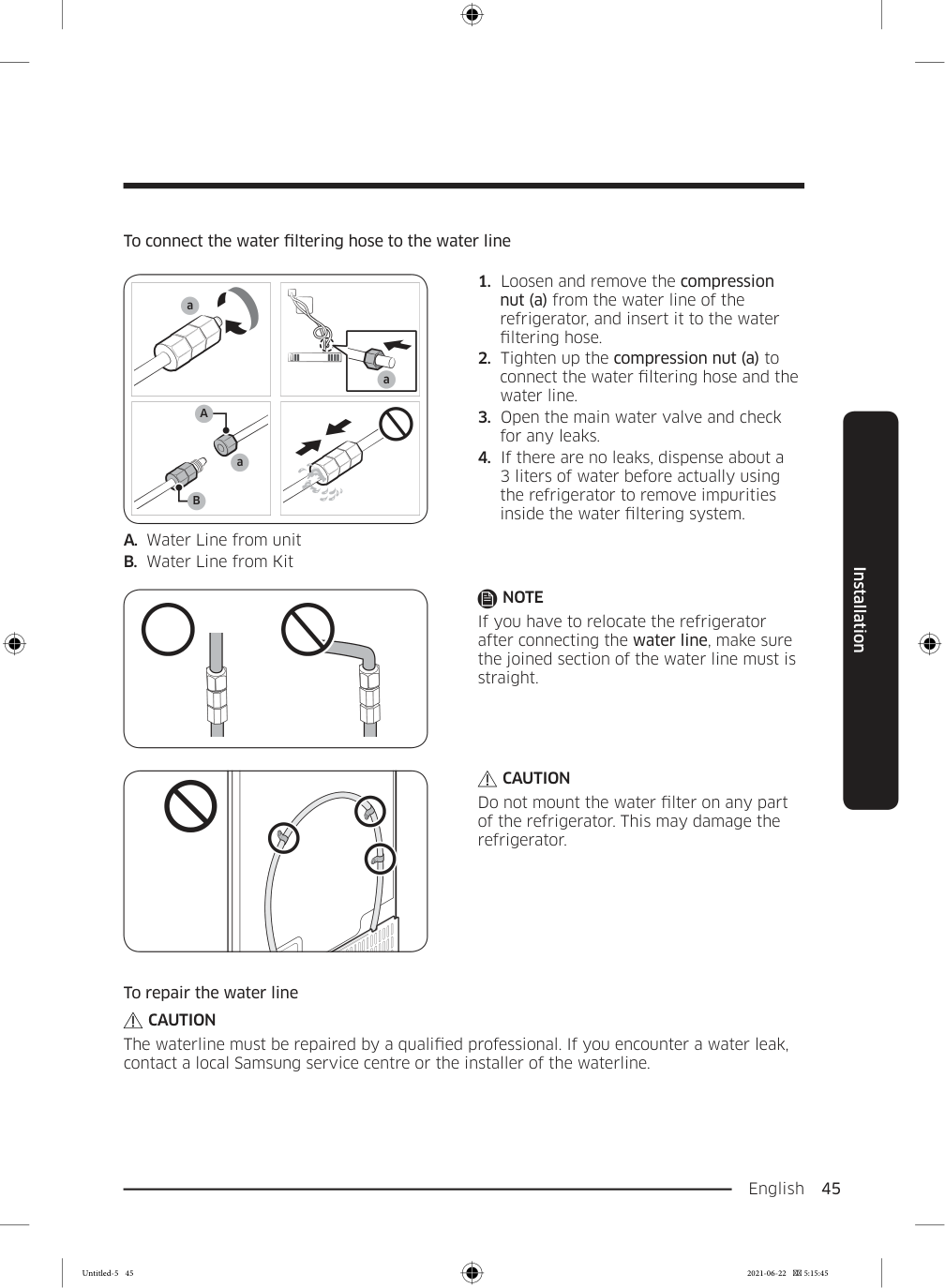
    English  45 Installation To connect the water filtering hose to the water line Remove cap a a

    A

    B

    a A. Water Line from unit B. Water Line from Kit
  • Loosen and remove the compression
  • nut (a) from the water line of the refrigerator, and insert it to the water filtering hose.
  • Tighten up the compression nut (a) to
  • connect the water filtering hose and the water line.
  • Open the main water valve and check
  • for any leaks.
  • If there are no leaks, dispense about a
  • 3 liters of water before actually using the refrigerator to remove impurities inside the water filtering system.

    Note

    If you have to relocate the refrigerator after connecting the water line, make sure the joined section of the water line must is straight.

    Caution

    Do not mount the water filter on any part of the refrigerator. This may damage the refrigerator. To repair the water line

    Caution

    The waterline must be repaired by a qualified professional. If you encounter a water leak, contact a local Samsung service centre or the installer of the waterline. Untitled-5 45 2021-06-22  5:15:45
    Page 46

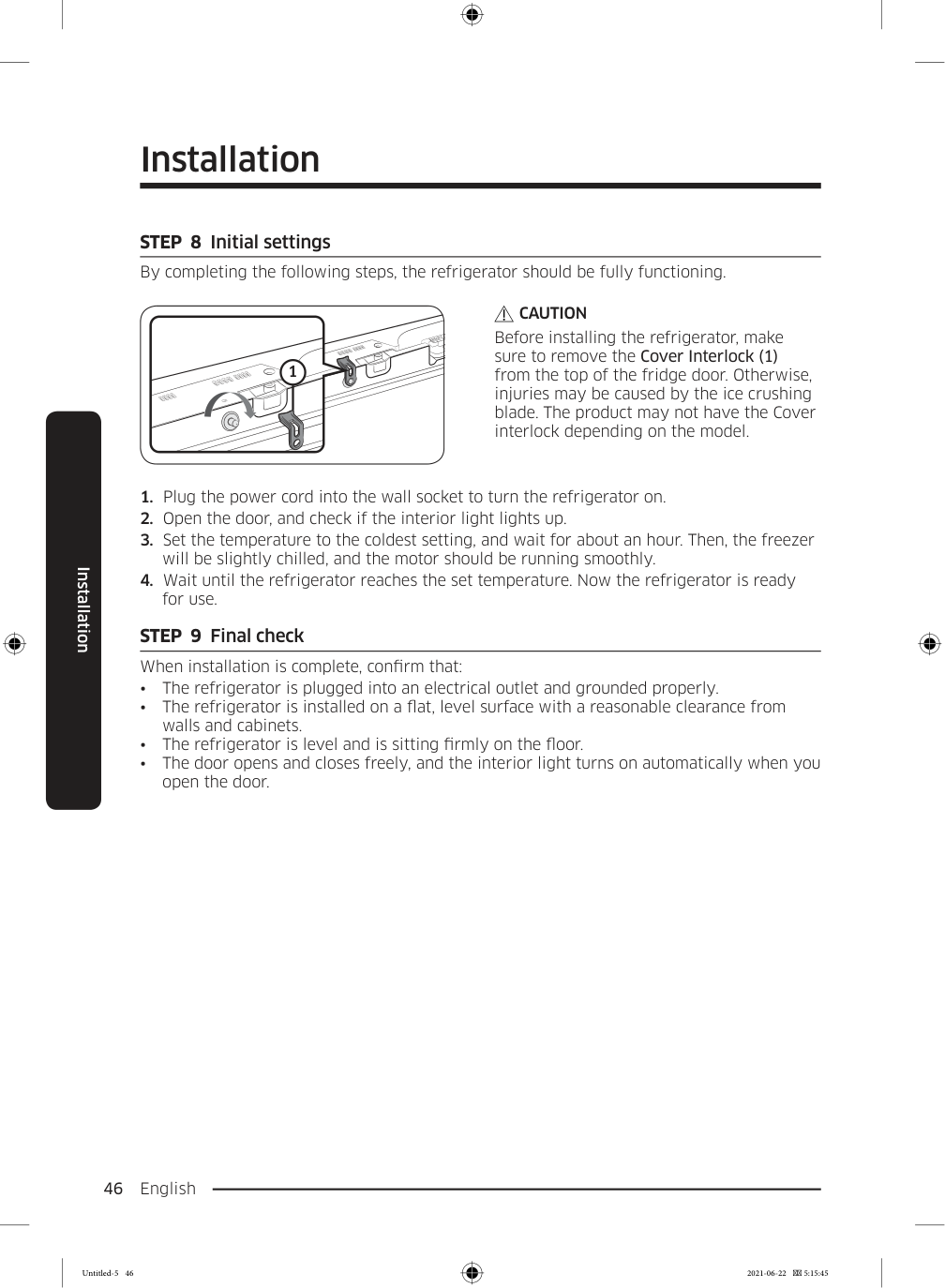
    Installation English 46 Installation STEP  8  Initial settings By completing the following steps, the refrigerator should be fully functioning. 1

    Caution

    Before installing the refrigerator, make sure to remove the Cover Interlock (1) from the top of the fridge door. Otherwise, injuries may be caused by the ice crushing blade. The product may not have the Cover interlock depending on the model.
  • Plug the power cord into the wall socket to turn the refrigerator on.
  • Open the door, and check if the interior light lights up.
  • Set the temperature to the coldest setting, and wait for about an hour. Then, the freezer
  • will be slightly chilled, and the motor should be running smoothly.
  • Wait until the refrigerator reaches the set temperature. Now the refrigerator is ready
  • for use. STEP  9  Final check When installation is complete, confirm that:
  • The refrigerator is plugged into an electrical outlet and grounded properly.
  • The refrigerator is installed on a flat, level surface with a reasonable clearance from
  • walls and cabinets.
  • The refrigerator is level and is sitting firmly on the floor.
  • The door opens and closes freely, and the interior light turns on automatically when you
  • open the door. Untitled-5 46 2021-06-22  5:15:45

    Page 47

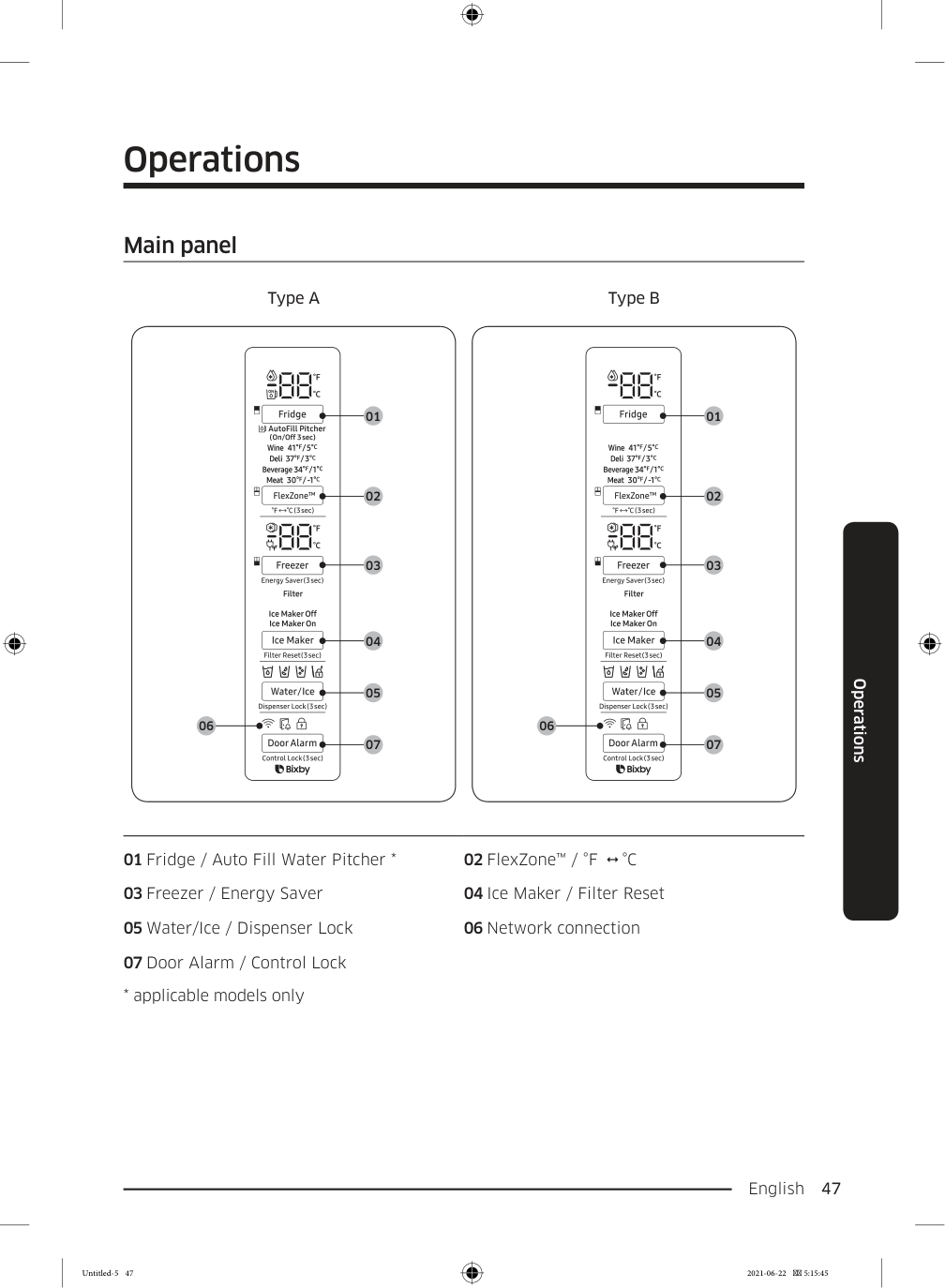
    English  47 Operations Main panel Type A Type B 01 02 03 04 05 07 06 01 02 03 04 05 07 06 01 Fridge / Auto Fill Water Pitcher * 02 FlexZone™ / °F    °C 03 Freezer / Energy Saver 04 Ice Maker / Filter Reset 05 Water/Ice / Dispenser Lock 06 Network connection 07 Door Alarm / Control Lock
  • applicable models only
  • Operations Untitled-5 47 2021-06-22  5:15:45

    Page 48

    Operations English 48 Operations

    Note
  • When you change the temperature on the panel, the panel displays the actual
  • temperature inside the refrigerator until the temperature matches the temperature you set. Then, the panel displays the new set temperature. Note that it will take time for the refrigerator to reach the new temperature. This is normal. During this time, you do not need to set the temperature again.
  • To ensure optimal performance, we recommend setting the temperature to -19 °C for
  • the freezer, and 3 °C for the fridge.
  • The temperature in the refrigerator may rise if you open the door frequently or put
  • a large amount of food into the refrigerator. If this happens, the temperature display blinks until the refrigerator returns to the specified temperature settings.
  • If a communication error occurs between the temperature display and the main
  • controller, this blinking continues for an extended time. Contact a local Samsung service center for technical assistance.
  • The display of the main panel turns on only if the door is opened and turns off if the
  • door is closed.
  • If you set Control Lock on the main panel, the main panel locks automatically 1 minute
  • after inactivity.
  • Bixby is a Samsung’s intelligence platform, and you can control the product with your
  • voice. To use the voice command feature, you must connect the product with the SmartThings app on your phone. For products that do not recognize voice directly from the product, you can use the Bixby on your smartphone to control some of the functions of your product after connecting to the app. Untitled-5 48 2021-06-22  5:15:46

    Page 49

    English  49 Operations 01  Fridge / Auto Fill Water Pitcher (3 sec) Fridge You can use the Fridge button to set the fridge temperature or to activate Power Cool.

  • Press Fridge repeatedly to select a desired temperature
  • between 1 °C and 7 °C.
  • The temperature indicator displays the currently set or
  • selected temperature.
  • To activate Power Cool, press Fridge repeatedly until the
  • Power Cool indicator ( ) lights up.
  • To deactivate Power Cool, simply press Fridge again while
  • the Power Cool function is on.
  • Power Cool speeds up the cooling process at maximum
  • power to lower the fridge temperature. The Power Cool process continues to run for several hours, and then turns off and the fridge returns to the previous temperature setting.
  • Use Power Cool to rapidly cool food that spoils quickly or
  • to rapidly cool the refrigerator after the door has been left open for some time.

    Note

    Using Power Cool increases power consumption. Make sure you turn it off manually if you no longer need it, and then select the desired refrigerator temperature. Untitled-5 49 2021-06-22  5:15:46
    Page 50

    Operations English 50 Operations Auto Fill Water Pitcher If the Lock indicator ( ) is off, press and hold Fridge for 3 seconds to turn Auto Fill Water Pitcher on. Then, open the left door of the fridge and insert the water tank. Close the door and the water tank starts to fill with water up to the preset level. If the Lock Indicator ( ) is on, indicating Control Lock is active, press and hold Door Alarm for 3 seconds to deactivate Control Lock. When the Lock indicator goes out, immediately press and hold Fridge for 3 seconds to turn Auto Fill Water Pitcher on. Then, open the left door of the fridge and insert the water tank. Close the door and the water tank starts to fill with water up to the preset level.

    Note

    When you turn off Control Lock, you must press and hold Fridge within one minute or the Control Lock function will automatically reactivate. You cannot turn the Auto Fill Water Pitcher function on if Control Lock is active. For more information on Control Lock, see page 54. To turn the function off, press and hold Fridge again for 3 seconds.

    Note

  • By default, Auto Fill Water Pitcher is disabled. Enable this
  • function after you have installed the water line.
  • If you open the door or push the dispenser lever, this function
  • is stopped temporarily.
  • The Auto Fill Water Pitcher indicators blink if there is a leak.
  • This may occur because the water tank overflows, or the water-line or water-level sensor fails. If this is the case, follow these steps. a. Open the rubber cap and drain water. b. When draining is complete, the indicators stop blinking and turn solid. c. Close the rubber cap.
  • If the indicators continue to blink, this might be a system
  • failure. Contact a local service center. Untitled-5 50 2021-06-22  5:15:46

    Page 51

    English  51 Operations 02  FlexZone™ / °F    °C (3 sec) The FlexZone™ is a full-width drawer featuring temperature control. It has a temperature sensor that adjusts the amount of cold air allowed into the zone.

  • Press FlexZone™ repeatedly to select a desired mode. By default, Deli is selected.
  • The refrigerator adjusts the temperature in the FlexZone™ according to the selected
  • mode. Mode Description Examples Wine Select Wine to keep food fresh for a long time. The temperature of the FlexZone™ will be kept around 5 °C. Wine, cocktails, cake, cheese Deli Select Deli to keep food fresh for a longer time. The temperature of the FlexZone™ will be kept around 3 °C. Pineapples, lemons, biscuits, potatoes Beverage Select Beverage to keep drinks cold and refreshing. The temperature of the FlexZone™ will be kept around 1 °C. Bottled water, juice, soft drinks, beer Meat Select Meat to keep meat or fish fresh for a longer time. The temperature of the FlexZone™ will be kept around -1 °C. Steaks, cold cuts, bacon, chili dogs

    Caution

  • Do not use the FlexZone™ to store most kinds of fruit or leafy vegetables. These food
  • items may suffer cold-temperature damage.
  • Do not store glass bottles in the FlexZone™ in Beverage or Meat mode. They may break
  • and cause physical injury.

    °F  °C

    You can also use the FlexZone™ button to switch the temperature scale between Celsius and Fahrenheit. To switch the temperature scale, press and hold FlexZone™ for 3 seconds to change the current temperature scale. Untitled-5 51 2021-06-22  5:15:46
    Page 52

    Operations English 52 Operations 03  Freezer / Energy Saver (3 sec) Freezer You can use the Freezer button to set the freezer temperature or to activate Power Freeze.

  • Press Freezer repeatedly to select a desired temperature
  • between -15 °C and -23 °C.
  • The temperature indicator displays the currently set or
  • selected temperature.
  • To activate Power Freeze, press Freezer repeatedly until the
  • Power Freeze indicator ( ) lights up.
  • To deactivate Power Freeze, simply press Freezer again
  • while the Power Freeze function is on.
  • Power Freeze speeds up the freezing process at maximum
  • power to lower the freezer temperature. The Power Freeze process continues to run for several hours, and then turns off and the freezer returns to the previous temperature setting.
  • To freeze large amounts of food, activate Power Freeze for
  • at least 20 hours before putting the food in the freezer.

    Note

    Using Power Freeze increases power consumption. Make sure you turn it off manually if you no longer need it, and then select the desired freezer temperature. Energy Saver Press Freezer for 3 seconds to set/clear the Energy Saver function.

    Note

    If condensation or water drops form on or around the doors, turn Energy Saver mode off. 04  Ice Maker / Filter Reset (3 sec) Ice Maker Press Ice Maker to turn the ice maker on or off. The ice maker has 2 indicators ( / ) to indicate its operating status.
  • When the ice maker operates, the corresponding indicator (
  • ) turns on.
  • When the ice maker is turned off, the corresponding
  • indicator ( ) turns on. In this case, ice making is disabled even if you press the Cubed or Crushed Ice buttons on the dispenser panel. To enable ice making, you must turn the ice maker on.

    Note

    If the ice maker is turned off, it will turn on if you press and hold the ice lever for more than 5 seconds. Untitled-5 52 2021-06-22  5:15:46
    Page 53

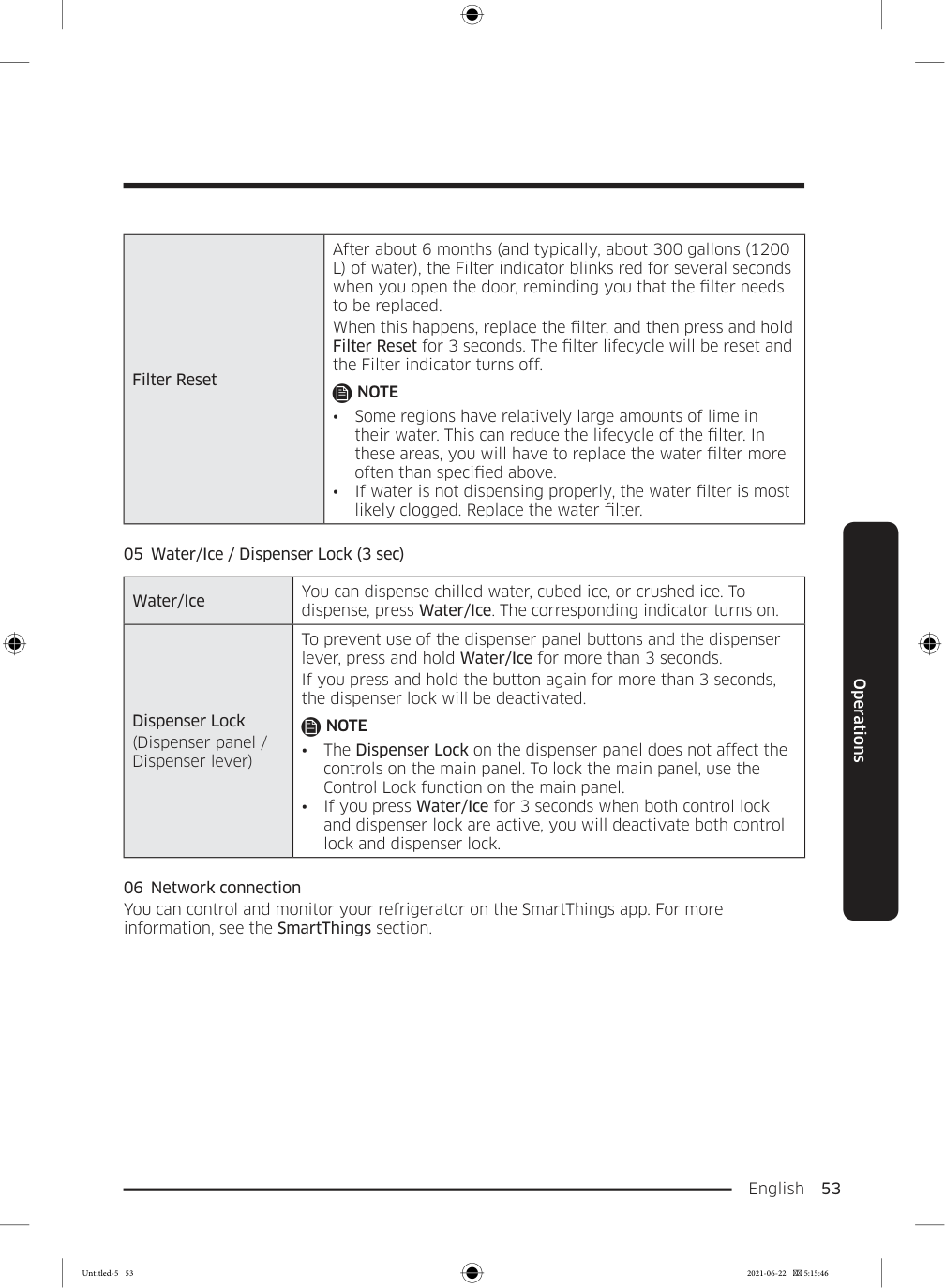
    English  53 Operations Filter Reset After about 6 months (and typically, about 300 gallons (1200 L) of water), the Filter indicator blinks red for several seconds when you open the door, reminding you that the filter needs to be replaced. When this happens, replace the filter, and then press and hold Filter Reset for 3 seconds. The filter lifecycle will be reset and the Filter indicator turns off.

    Note

  • Some regions have relatively large amounts of lime in
  • their water. This can reduce the lifecycle of the filter. In these areas, you will have to replace the water filter more often than specified above.
  • If water is not dispensing properly, the water filter is most
  • likely clogged. Replace the water filter. 05  Water/Ice / Dispenser Lock (3 sec) Water/Ice You can dispense chilled water, cubed ice, or crushed ice. To dispense, press Water/Ice. The corresponding indicator turns on. Dispenser Lock (Dispenser panel / Dispenser lever) To prevent use of the dispenser panel buttons and the dispenser lever, press and hold Water/Ice for more than 3 seconds. If you press and hold the button again for more than 3 seconds, the dispenser lock will be deactivated.

    Note

  • The Dispenser Lock on the dispenser panel does not affect the
  • controls on the main panel. To lock the main panel, use the Control Lock function on the main panel.
  • If you press Water/Ice for 3 seconds when both control lock
  • and dispenser lock are active, you will deactivate both control lock and dispenser lock. 06  Network connection You can control and monitor your refrigerator on the SmartThings app. For more information, see the SmartThings section. Untitled-5 53 2021-06-22  5:15:46

    Page 54

    Operations English 54 Operations 07  Door Alarm / Control Lock (3 sec) Door Alarm If the door is left open for more than 2 minutes, an alarm will sound and the alarm indicator will blink. You can toggle the alarm on and off by pressing Door Alarm. The alarm is enabled by factory default. If the door is left open for 5 minutes, internal lights (in the fridge, FlexZone™, and freezer) will blink for 10 seconds and then turn on. The whole process will be repeated every minute for 5 minutes. This is to alert hearing-impaired users that a door is open. Note that this function is normal. Control Lock To prevent accidental setting changes, press and hold Door Alarm for 3 seconds. The main panel will be disabled and the Lock indicator ( ) will turn on. When Control Lock is on, the indicator blinks if any button on the main panel is pressed. If you press and hold the button again for more than 3 seconds, Control Lock will be deactivated. However, Control Lock will be reactivated if no button is pressed within 1 minute.

    Note

    Control Lock on the main panel does not affect the dispenser. The dispenser operates independently and so does the dispenser lever. To lock the dispenser and the dispenser lever, use the Dispenser Lock function. Untitled-5 54 2021-06-22  5:15:46
    Page 55

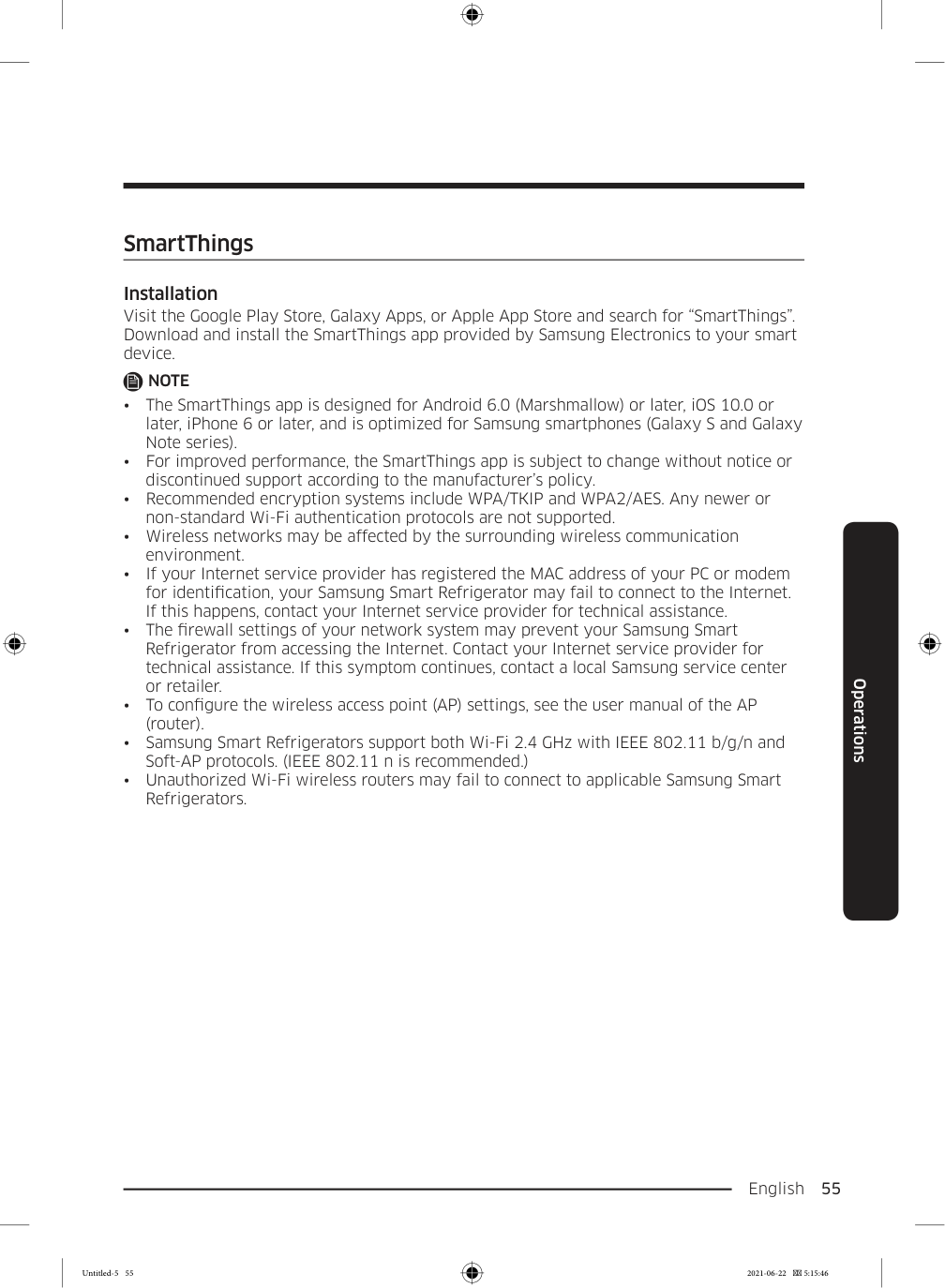
    English  55 Operations SmartThings Installation Visit the Google Play Store, Galaxy Apps, or Apple App Store and search for “SmartThings”. Download and install the SmartThings app provided by Samsung Electronics to your smart device.

    Note
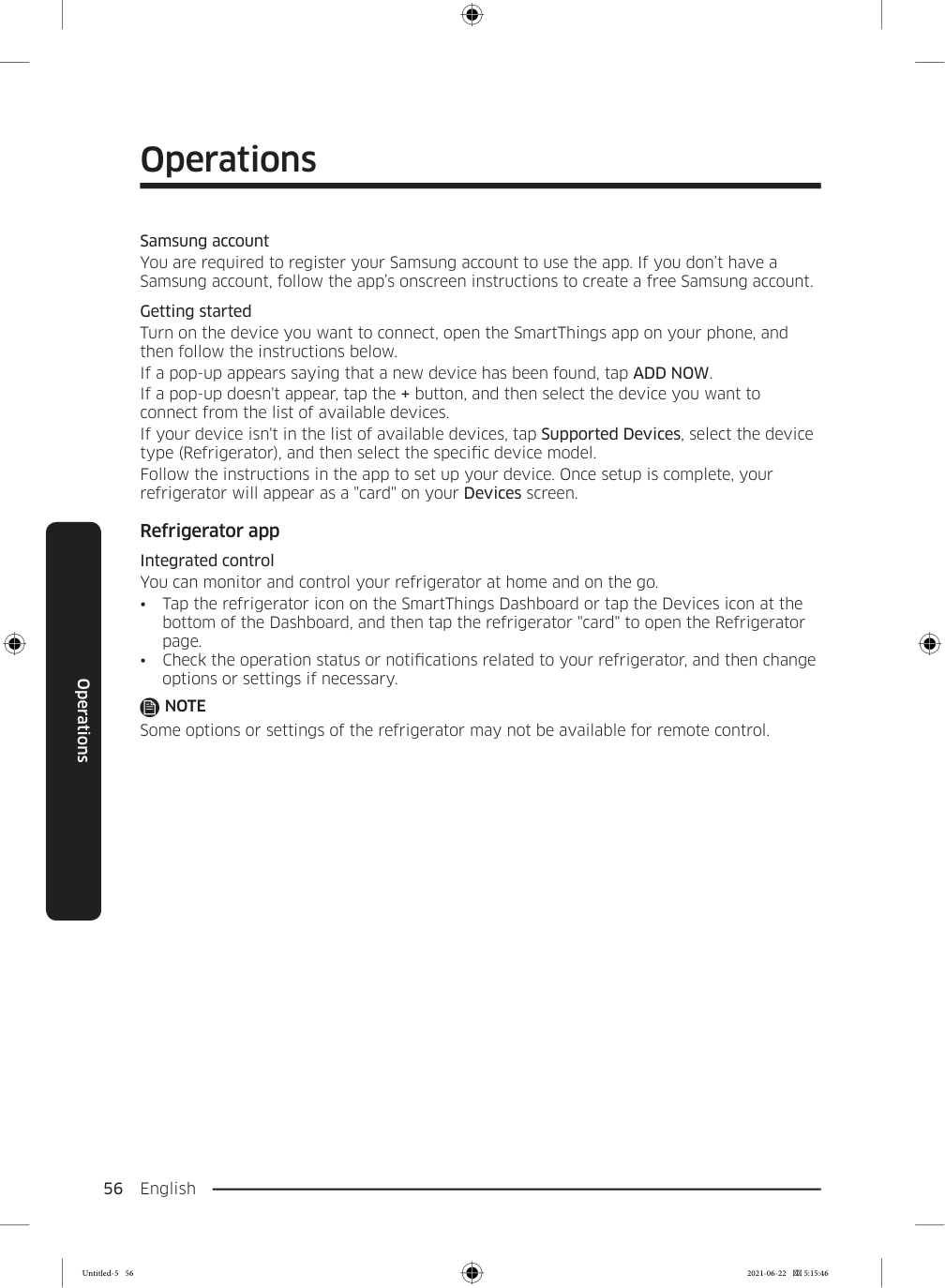
  • The SmartThings app is designed for Android 6.0 (Marshmallow) or later, iOS 10.0 or
  • later, iPhone 6 or later, and is optimized for Samsung smartphones (Galaxy S and Galaxy Note series).
  • For improved performance, the SmartThings app is subject to change without notice or
  • discontinued support according to the manufacturer’s policy.
  • Recommended encryption systems include WPA/TKIP and WPA2/AES. Any newer or
  • non-standard Wi-Fi authentication protocols are not supported.
  • Wireless networks may be affected by the surrounding wireless communication
  • environment.
  • If your Internet service provider has registered the MAC address of your PC or modem
  • for identification, your Samsung Smart Refrigerator may fail to connect to the Internet. If this happens, contact your Internet service provider for technical assistance.
  • The firewall settings of your network system may prevent your Samsung Smart
  • Refrigerator from accessing the Internet. Contact your Internet service provider for technical assistance. If this symptom continues, contact a local Samsung service center or retailer.
  • To configure the wireless access point (AP) settings, see the user manual of the AP
  • (router).
  • Samsung Smart Refrigerators support both Wi-Fi 2.4 GHz with IEEE 802.11 b/g/n and
  • Soft-AP protocols. (IEEE 802.11 n is recommended.)
  • Unauthorized Wi-Fi wireless routers may fail to connect to applicable Samsung Smart
  • Refrigerators. Untitled-5 55 2021-06-22  5:15:46

    Page 56

    Operations English 56 Operations Samsung account You are required to register your Samsung account to use the app. If you don’t have a Samsung account, follow the app’s onscreen instructions to create a free Samsung account. Getting started Turn on the device you want to connect, open the SmartThings app on your phone, and then follow the instructions below. If a pop-up appears saying that a new device has been found, tap ADD NOW. If a pop-up doesn't appear, tap the + button, and then select the device you want to connect from the list of available devices. If your device isn't in the list of available devices, tap Supported Devices, select the device type (Refrigerator), and then select the specific device model. Follow the instructions in the app to set up your device. Once setup is complete, your refrigerator will appear as a "card" on your Devices screen. Refrigerator app Integrated control You can monitor and control your refrigerator at home and on the go.

  • Tap the refrigerator icon on the SmartThings Dashboard or tap the Devices icon at the
  • bottom of the Dashboard, and then tap the refrigerator "card" to open the Refrigerator page.
  • Check the operation status or notifications related to your refrigerator, and then change
  • options or settings if necessary.

    Note

    Some options or settings of the refrigerator may not be available for remote control. Untitled-5 56 2021-06-22  5:15:46
    Page 57

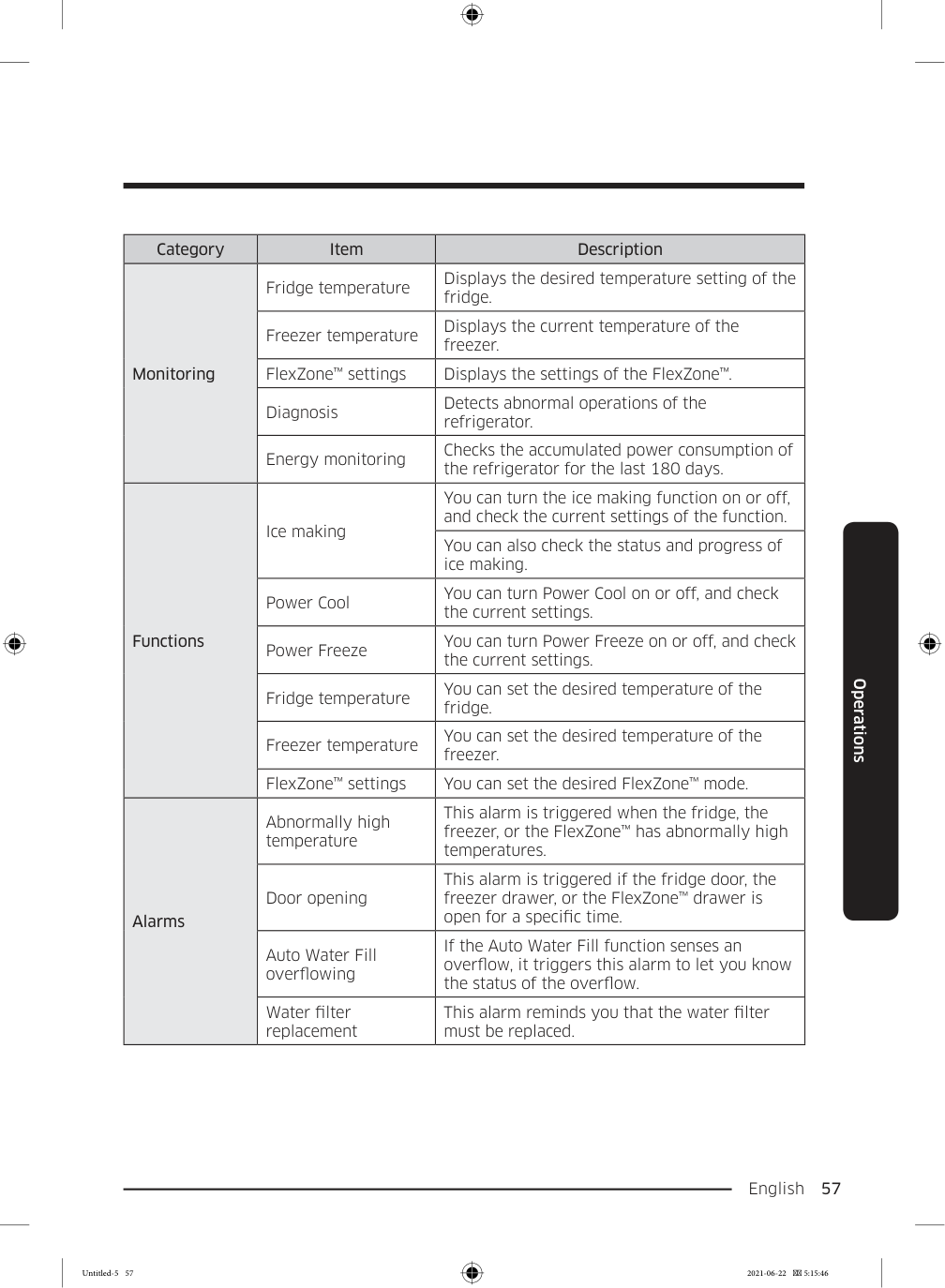
    English  57 Operations Category Item Description Monitoring Fridge temperature Displays the desired temperature setting of the fridge. Freezer temperature Displays the current temperature of the freezer. FlexZone™ settings Displays the settings of the FlexZone™. Diagnosis Detects abnormal operations of the refrigerator. Energy monitoring Checks the accumulated power consumption of the refrigerator for the last 180 days. Functions Ice making You can turn the ice making function on or off, and check the current settings of the function. You can also check the status and progress of ice making. Power Cool You can turn Power Cool on or off, and check the current settings. Power Freeze You can turn Power Freeze on or off, and check the current settings. Fridge temperature You can set the desired temperature of the fridge. Freezer temperature You can set the desired temperature of the freezer. FlexZone™ settings You can set the desired FlexZone™ mode. Alarms Abnormally high temperature This alarm is triggered when the fridge, the freezer, or the FlexZone™ has abnormally high temperatures. Door opening This alarm is triggered if the fridge door, the freezer drawer, or the FlexZone™ drawer is open for a specific time. Auto Water Fill overflowing If the Auto Water Fill function senses an overflow, it triggers this alarm to let you know the status of the overflow. Water filter replacement This alarm reminds you that the water filter must be replaced. Untitled-5 57 2021-06-22  5:15:46
    Page 58

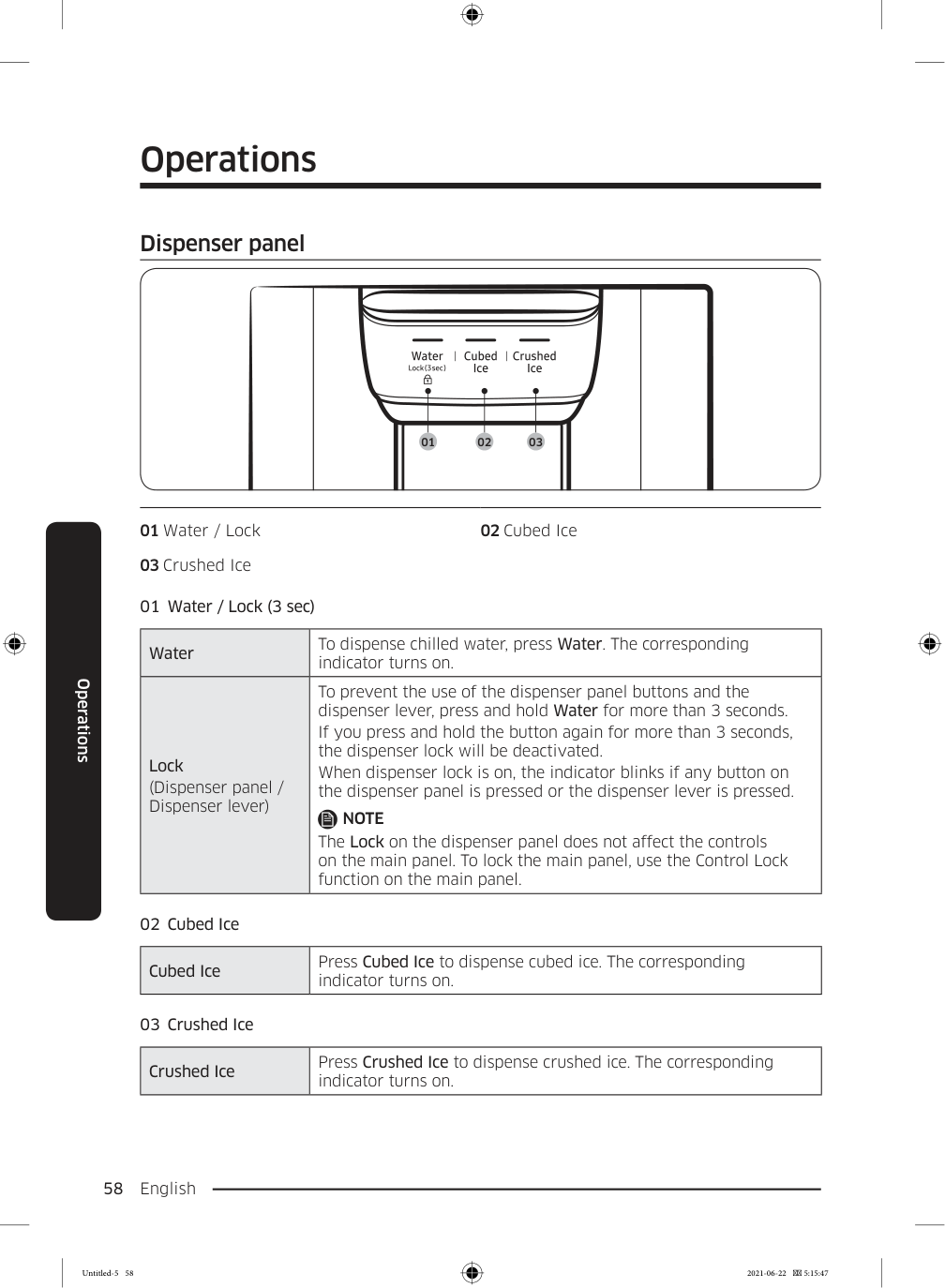
    Operations English 58 Operations Dispenser panel 01 02 03 01 Water / Lock 02 Cubed Ice 03 Crushed Ice 01  Water / Lock (3 sec) Water To dispense chilled water, press Water. The corresponding indicator turns on. Lock (Dispenser panel / Dispenser lever) To prevent the use of the dispenser panel buttons and the dispenser lever, press and hold Water for more than 3 seconds. If you press and hold the button again for more than 3 seconds, the dispenser lock will be deactivated. When dispenser lock is on, the indicator blinks if any button on the dispenser panel is pressed or the dispenser lever is pressed.

    Note

    The Lock on the dispenser panel does not affect the controls on the main panel. To lock the main panel, use the Control Lock function on the main panel. 02  Cubed Ice Cubed Ice Press Cubed Ice to dispense cubed ice. The corresponding indicator turns on. 03  Crushed Ice Crushed Ice Press Crushed Ice to dispense crushed ice. The corresponding indicator turns on. Untitled-5 58 2021-06-22  5:15:47
    Page 59

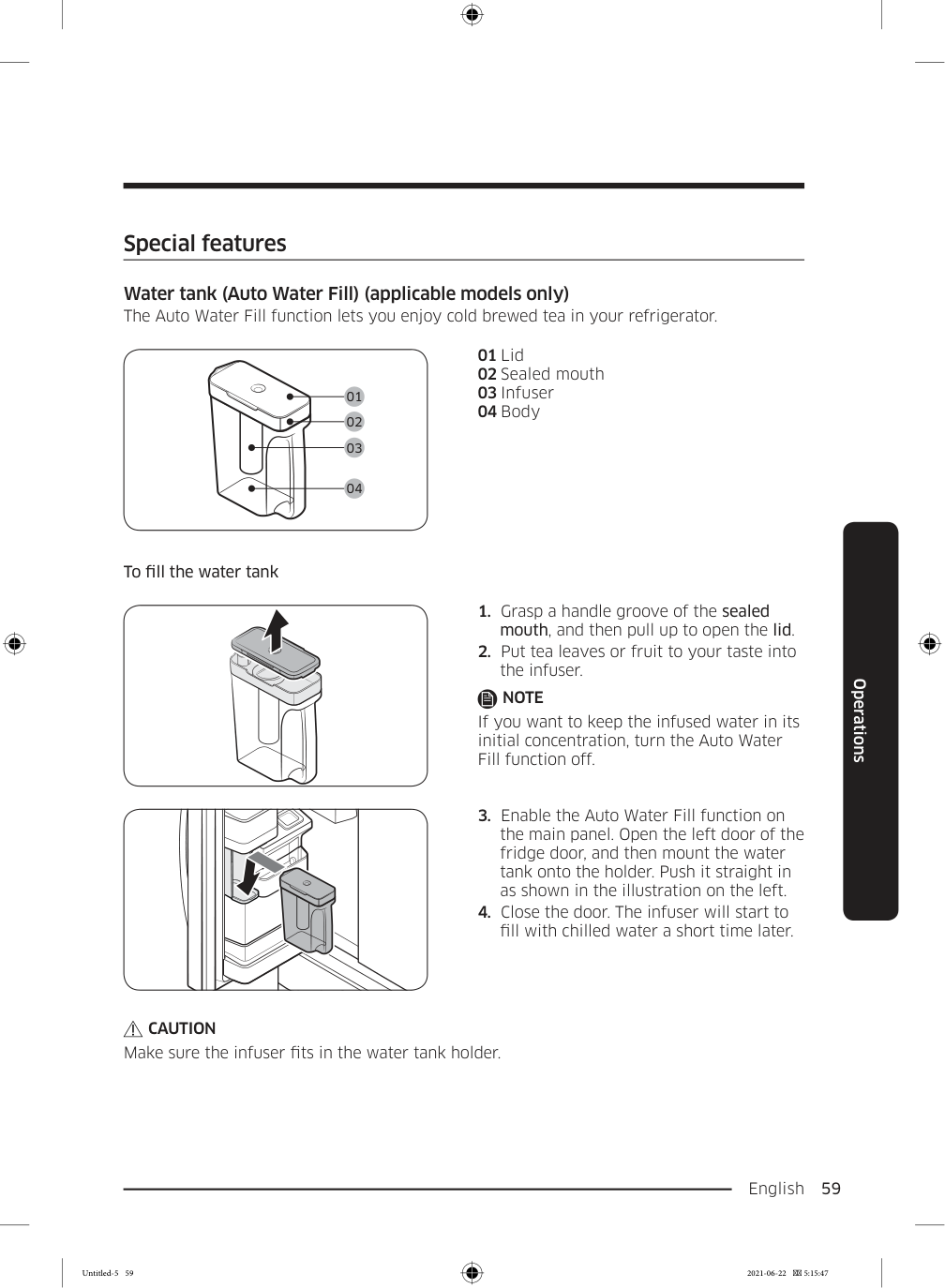
    English  59 Operations Special features Water tank (Auto Water Fill) (applicable models only) The Auto Water Fill function lets you enjoy cold brewed tea in your refrigerator. 01 02 03 04 01 Lid 02 Sealed mouth 03 Infuser 04 Body To fill the water tank

  • Grasp a handle groove of the sealed
  • mouth, and then pull up to open the lid.
  • Put tea leaves or fruit to your taste into
  • the infuser.

    Note

    If you want to keep the infused water in its initial concentration, turn the Auto Water Fill function off.
  • Enable the Auto Water Fill function on
  • the main panel. Open the left door of the fridge door, and then mount the water tank onto the holder. Push it straight in as shown in the illustration on the left.
  • Close the door. The infuser will start to
  • fill with chilled water a short time later.

    Caution

    Make sure the infuser fits in the water tank holder. Untitled-5 59 2021-06-22  5:15:47
    Page 60

    Operations English 60 Operations

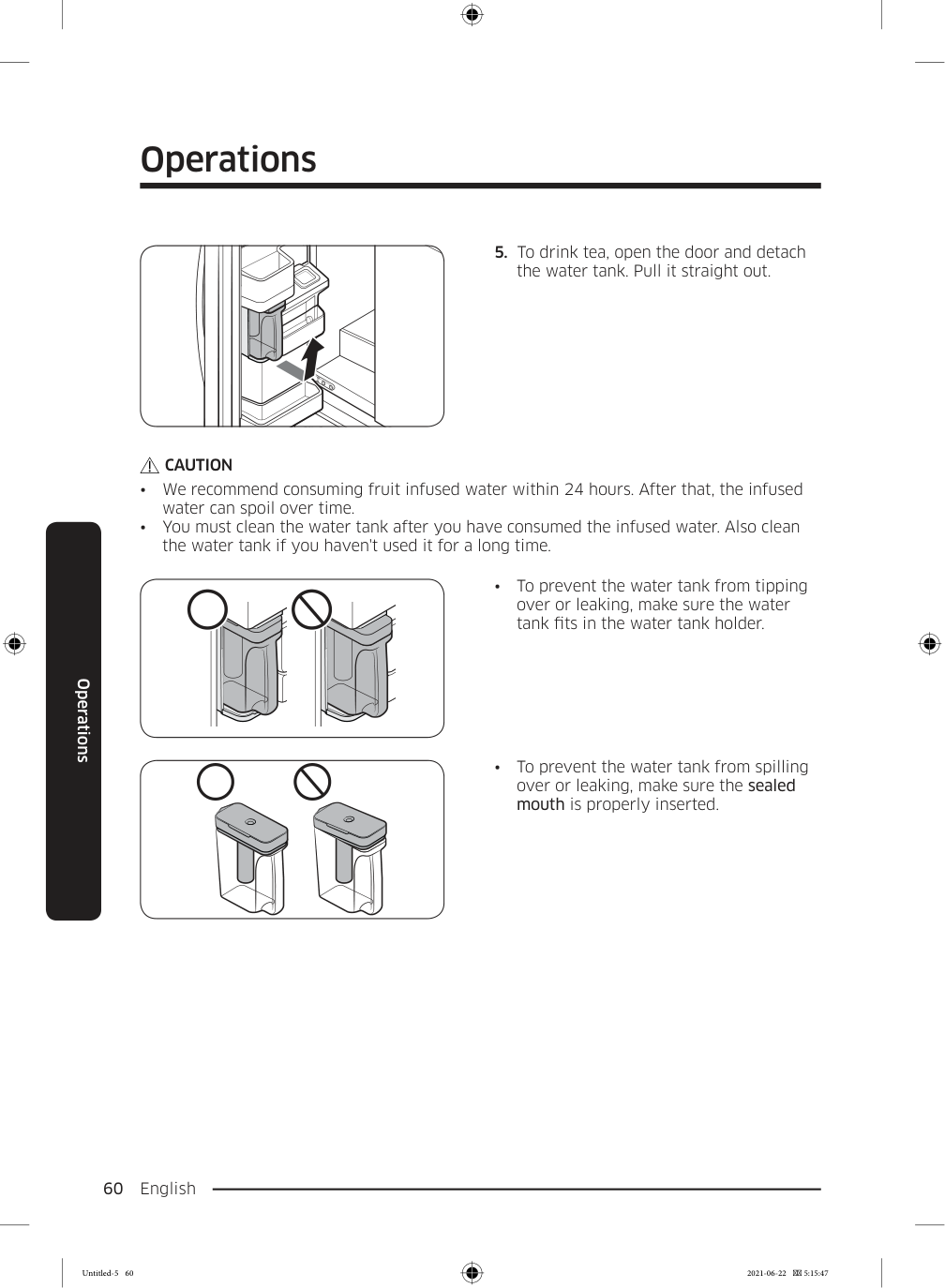
  • To drink tea, open the door and detach
  • the water tank. Pull it straight out.

    Caution

  • We recommend consuming fruit infused water within 24 hours. After that, the infused
  • water can spoil over time.
  • You must clean the water tank after you have consumed the infused water. Also clean
  • the water tank if you haven't used it for a long time.
  • To prevent the water tank from tipping
  • over or leaking, make sure the water tank fits in the water tank holder.
  • To prevent the water tank from spilling
  • over or leaking, make sure the sealed mouth is properly inserted. Untitled-5 60 2021-06-22  5:15:47

    Page 61

    English  61 Operations

    Note

  • If the front side (specifically marked
  • area) of the water tank has too much moisture, the water tank may not fully fill. Remove the moisture, and then try again.
  • Auto Water Fill will stop supplying water
  • to the water tank if the water tank does not fill after a certain amount of time. If this happens, check if the water line is properly connected. Remove and reinsert the water tank, and then try again.

    Note

  • Wipe around the infuser holder if the
  • infuser overflows or leaks.
  • Water drops off if the rubber cap is
  • opened.
  • The Auto Water Fill indicator blinks if
  • there is a leak. In case of a leak, open the rubber cap so that the leaked water drains. The indicator will then turn off. However, if the indicator continues to blink, there might be a system failure. Contact your local Samsung service center.
  • The Auto Water Fill indicators blink if
  • there is a leak. See page 49 for more information. Untitled-5 61 2021-06-22  5:15:48

    Page 62

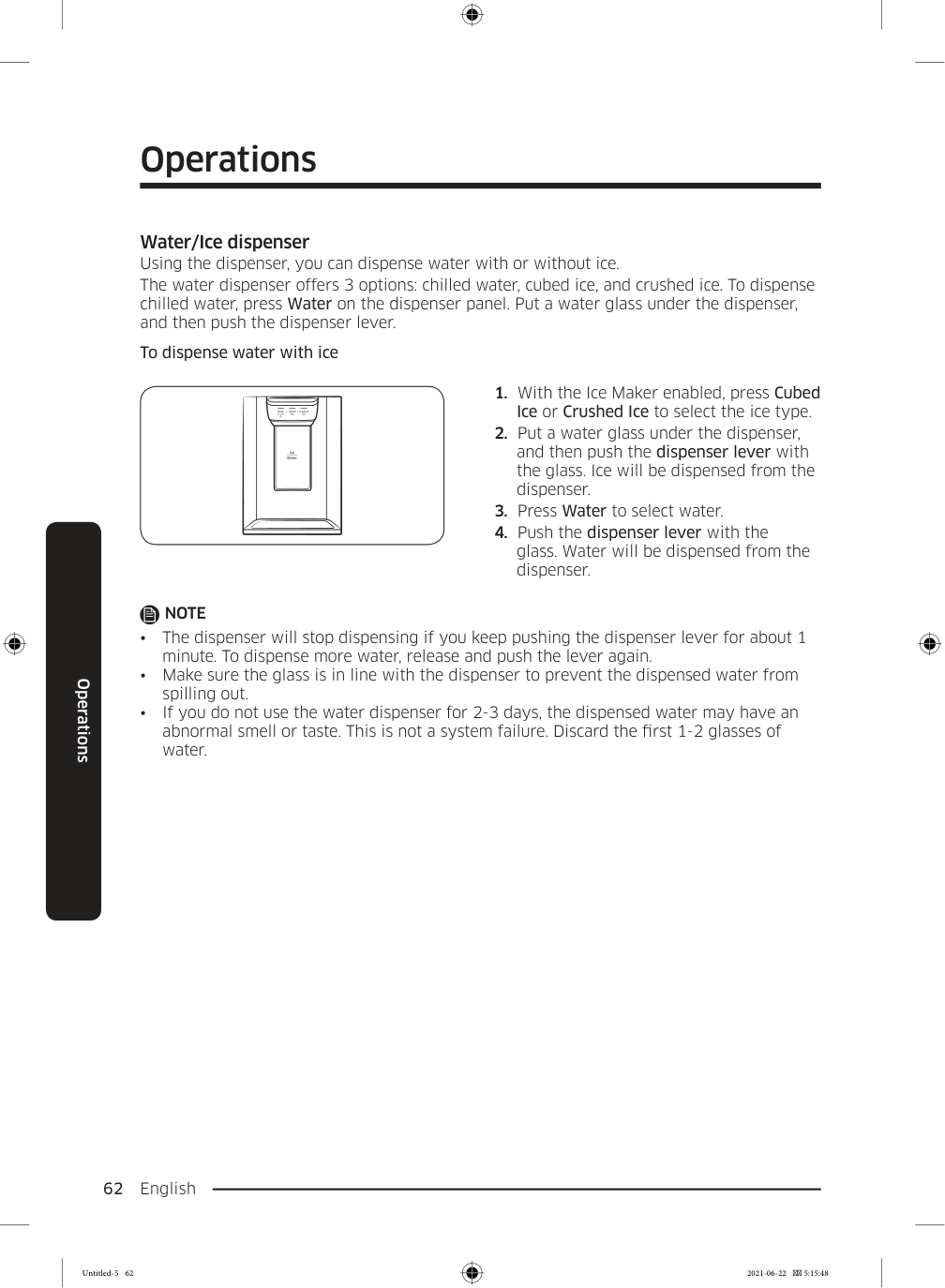
    Operations English 62 Operations Water/Ice dispenser Using the dispenser, you can dispense water with or without ice. The water dispenser offers 3 options: chilled water, cubed ice, and crushed ice. To dispense chilled water, press Water on the dispenser panel. Put a water glass under the dispenser, and then push the dispenser lever. To dispense water with ice

  • With the Ice Maker enabled, press Cubed
  • Ice or Crushed Ice to select the ice type.
  • Put a water glass under the dispenser,
  • and then push the dispenser lever with the glass. Ice will be dispensed from the dispenser.
  • Press Water to select water.
  • Push the dispenser lever with the
  • glass. Water will be dispensed from the dispenser.

    Note

  • The dispenser will stop dispensing if you keep pushing the dispenser lever for about 1
  • minute. To dispense more water, release and push the lever again.
  • Make sure the glass is in line with the dispenser to prevent the dispensed water from
  • spilling out.
  • If you do not use the water dispenser for 2-3 days, the dispensed water may have an
  • abnormal smell or taste. This is not a system failure. Discard the first 1-2 glasses of water. Untitled-5 62 2021-06-22  5:15:48

    Page 63

    English  63 Operations Ice maker The refrigerator has a built-in ice maker that automatically dispenses ice so that you can enjoy filtered water with cubed or crushed ice. Ice making After you have installed your refrigerator and plugged it in, follow these instructions to ensure proper ice making and to keep the ice bucket full of ice:

  • Let the refrigerator operate for at least 24 hours to ensure optimal performance.
  • Dispense the first 4 to 6 ice cubes into a glass.
  • Wait another 8 hours and dispense another 4 to 6 ice cubes.
  • Then, wait another 16 hours and dispense the first glass-full of ice.
  • Note

  • If you consume all the ice at once, you must wait 8 hours before dispensing the first 4
  • to 6 cubes. This ensures that the ice bucket is filled with ice properly.
  • Ice cubes generated rapidly may look white, which is normal.
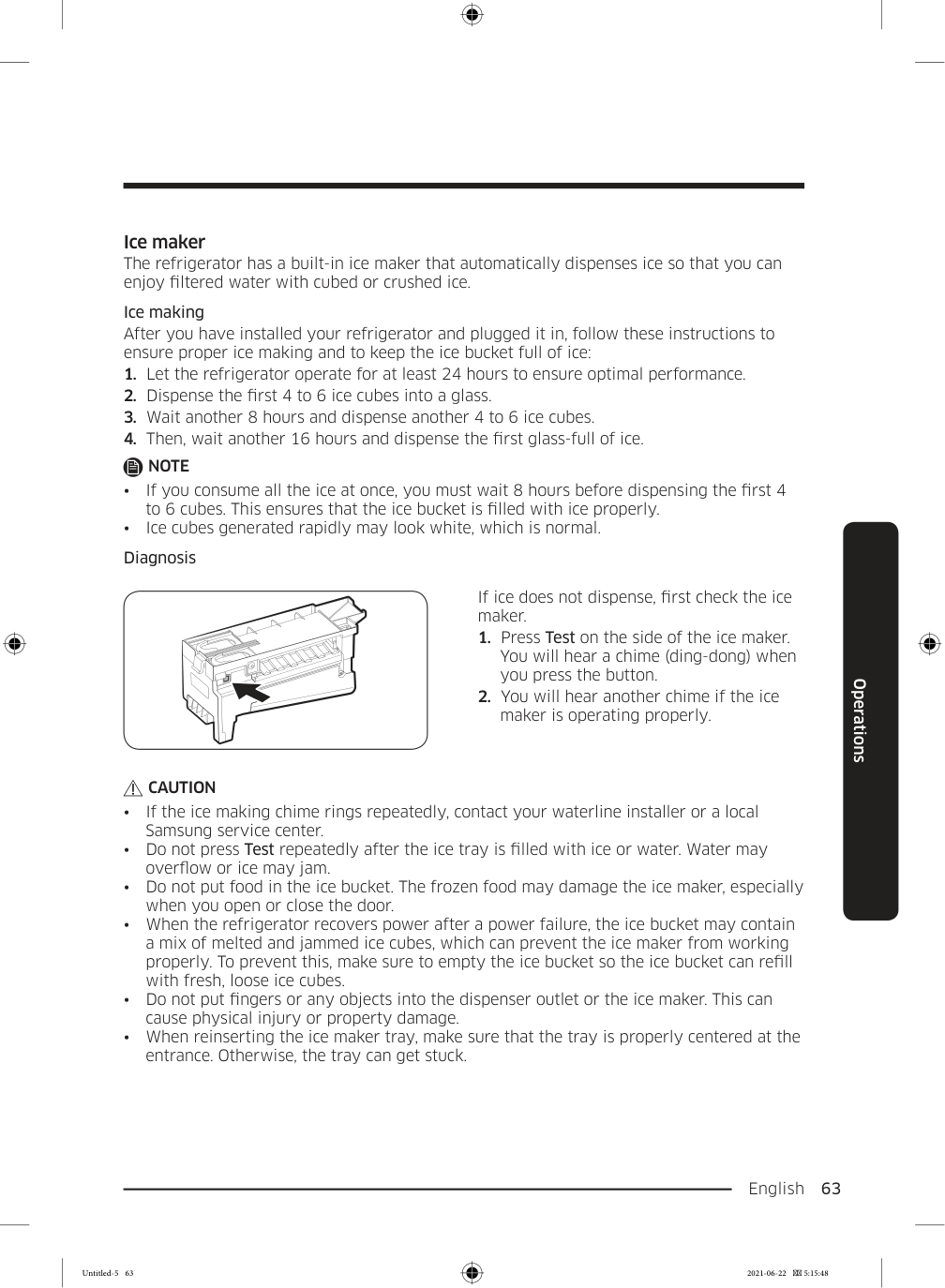
  • Diagnosis If ice does not dispense, first check the ice maker.
  • Press Test on the side of the ice maker.
  • You will hear a chime (ding-dong) when you press the button.
  • You will hear another chime if the ice
  • maker is operating properly.

    Caution

  • If the ice making chime rings repeatedly, contact your waterline installer or a local
  • Samsung service center.
  • Do not press Test repeatedly after the ice tray is filled with ice or water. Water may
  • overflow or ice may jam.
  • Do not put food in the ice bucket. The frozen food may damage the ice maker, especially
  • when you open or close the door.
  • When the refrigerator recovers power after a power failure, the ice bucket may contain
  • a mix of melted and jammed ice cubes, which can prevent the ice maker from working properly. To prevent this, make sure to empty the ice bucket so the ice bucket can refill with fresh, loose ice cubes.
  • Do not put fingers or any objects into the dispenser outlet or the ice maker. This can
  • cause physical injury or property damage.
  • When reinserting the ice maker tray, make sure that the tray is properly centered at the
  • entrance. Otherwise, the tray can get stuck. Untitled-5 63 2021-06-22  5:15:48

    Page 64

    Operations English 64 Operations If You Turn the Ice Maker Off If you press and hold Ice Maker for more than 3 seconds to turn the ice maker off, make sure to remove all ice cubes from the ice bucket. Remaining ice cubes may clump together, making it difficult to remove them. To remove the ice bucket, see the Ice bucket (applicable models only) section on page 65.

    Note

  • Removal of the ice bucket does not affect the thermal and mechanical performance of
  • the refrigerator. Water clouding Water supplied to the refrigerator flows through a core alkaline filter. During this filtering process, the water pressure of the water increases and the water becomes saturated with oxygen and nitrogen. This causes the water to look misty or cloudy temporarily when dispensed. This is normal and the water will look clear after a few seconds. FlexZone™ divider You can change the divider position. To do this, unlock the divider by turning the divider dial counter clockwise. Then, move the width and height bars as appropriate. When done, turn the dial clockwise to lock the divider.

    Note

    If the divider lock does not function, wipe the bars to remove moisture on them. Untitled-5 64 2021-06-22  5:15:48
    Page 65

    English  65 Maintenance Handling and care Ice bucket (applicable models only) If you do not dispense ice for an extended period, ice may form clumps inside the bucket. If this happens, remove and empty the ice bucket.

  • To remove the ice bucket, gently lift
  • it up, and then pull it out slowly while holding the bottom of the bucket with one hand and the side with the other hand.
  • Empty the bucket.
  • When done, put the bucket back into
  • position. If the bucket does not fit in, turn the helix screw 90 degrees, and then try again.

    A

    If the ice bucket is not firmly inserted, turn the Helix (A) 90 degrees, and then try again.

    Caution

  • Do not apply excessive force to the bucket cover. The cover may break.
  • Do not forcefully close the door. Water may spill over the ice maker.
  • To prevent injury, make sure to clean up any ice or water that has fallen on the floor.
  • To prevent accidents or injury, do not let children play with the water dispenser or the
  • ice maker.
  • Do not put your hand or an object into the ice chute. This may cause physical injury or
  • product damage.
  • Use only the provided ice bucket. Third-party ice buckets may cause a system failure.
  • Maintenance Untitled-5 65 2021-06-22  5:15:48

    Page 66

    Maintenance English 66 Maintenance

    Note

  • The water pressure required for ice making is between 20 psi and 125 psi (138 and 862
  • kPa).
  • Noise from the the ice maker as it produces ice during the ice making process is normal.
  • While the door is open, neither the ice maker nor the water dispenser operates.
  • Auto Water Fill (applicable models only)
  • Grasp a handle groove of the sealed
  • mouth, and then pull up to remove.
  • Grasp both sides of the sealed mouth,
  • and then lift to remove.
  • While slightly twisting the infuser, pull
  • it out of the sealed mouth.
  • Clean the infuser with neutral agents
  • and running water. Rinse and dry well.
  • Reassemble the Auto Water Fill in the
  • reverse order of disassembly.

    Caution

    The water pitcher and lid are not dishwasher and microwave safe and can melt or deform if exposed to heat (including hot water). Please hand wash in cool or warm water as needed. Untitled-5 66 2021-06-22  5:15:49
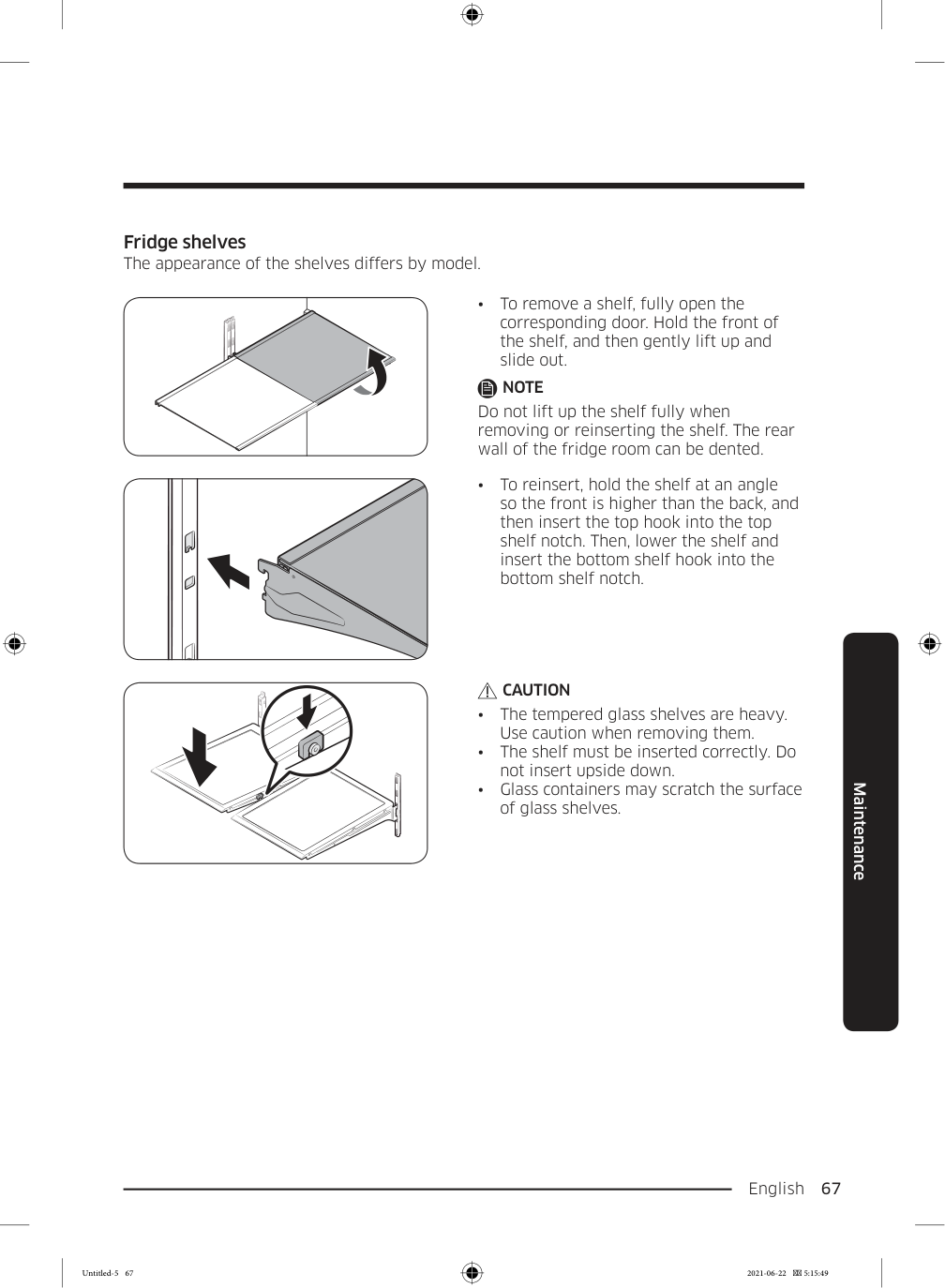
    Page 67

    English  67 Maintenance Fridge shelves The appearance of the shelves differs by model.

  • To remove a shelf, fully open the
  • corresponding door. Hold the front of the shelf, and then gently lift up and slide out.

    Note

    Do not lift up the shelf fully when removing or reinserting the shelf. The rear wall of the fridge room can be dented.
  • To reinsert, hold the shelf at an angle
  • so the front is higher than the back, and then insert the top hook into the top shelf notch. Then, lower the shelf and insert the bottom shelf hook into the bottom shelf notch.

    Caution

  • The tempered glass shelves are heavy.
  • Use caution when removing them.
  • The shelf must be inserted correctly. Do
  • not insert upside down.
  • Glass containers may scratch the surface
  • of glass shelves. Untitled-5 67 2021-06-22  5:15:49

    Page 68

    Maintenance English 68 Maintenance Slide in shelf You may slide-in the front half of the slide- in shelf to store more tall items. Gently pull the front half of the shelf in order to use it as a whole shelf again. Recommended slide in shelf location The slide-in shelf gives you more room in the fridge for tall items.

  • To fold, push the front area of the shelf
  • upward.

    Caution

    Do not lift up quickly or twist the slide in shelf to take out food under it. It may fall off. Untitled-5 68 2021-06-22  5:15:49
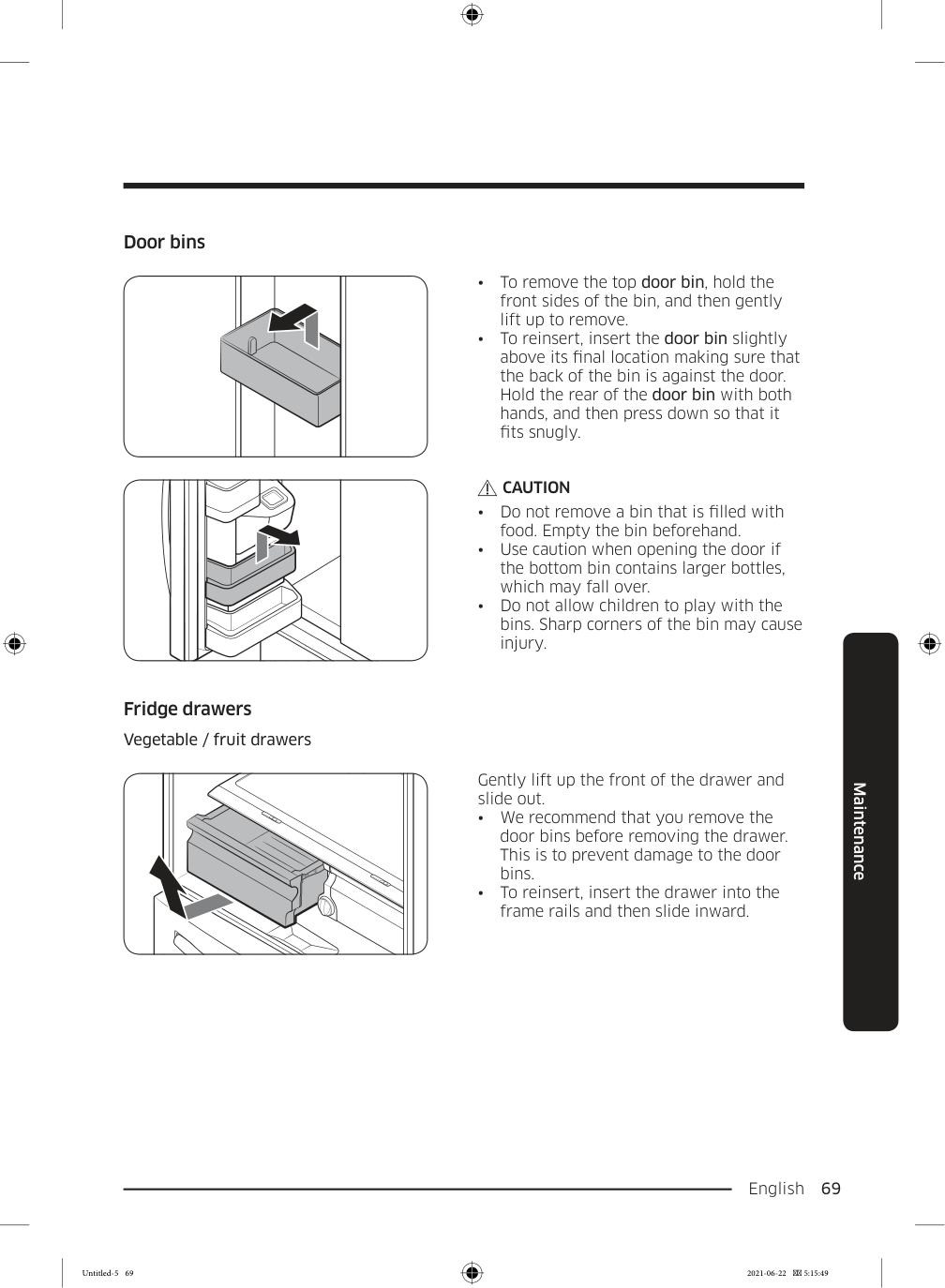
    Page 69

    English  69 Maintenance Door bins

  • To remove the top door bin, hold the
  • front sides of the bin, and then gently lift up to remove.
  • To reinsert, insert the door bin slightly
  • above its final location making sure that the back of the bin is against the door. Hold the rear of the door bin with both hands, and then press down so that it fits snugly.

    Caution

  • Do not remove a bin that is filled with
  • food. Empty the bin beforehand.
  • Use caution when opening the door if
  • the bottom bin contains larger bottles, which may fall over.
  • Do not allow children to play with the
  • bins. Sharp corners of the bin may cause injury. Fridge drawers Vegetable / fruit drawers Gently lift up the front of the drawer and slide out.
  • We recommend that you remove the
  • door bins before removing the drawer. This is to prevent damage to the door bins.
  • To reinsert, insert the drawer into the
  • frame rails and then slide inward. Untitled-5 69 2021-06-22  5:15:49

    Page 70

    Maintenance English 70 Maintenance FlexZone™ basket
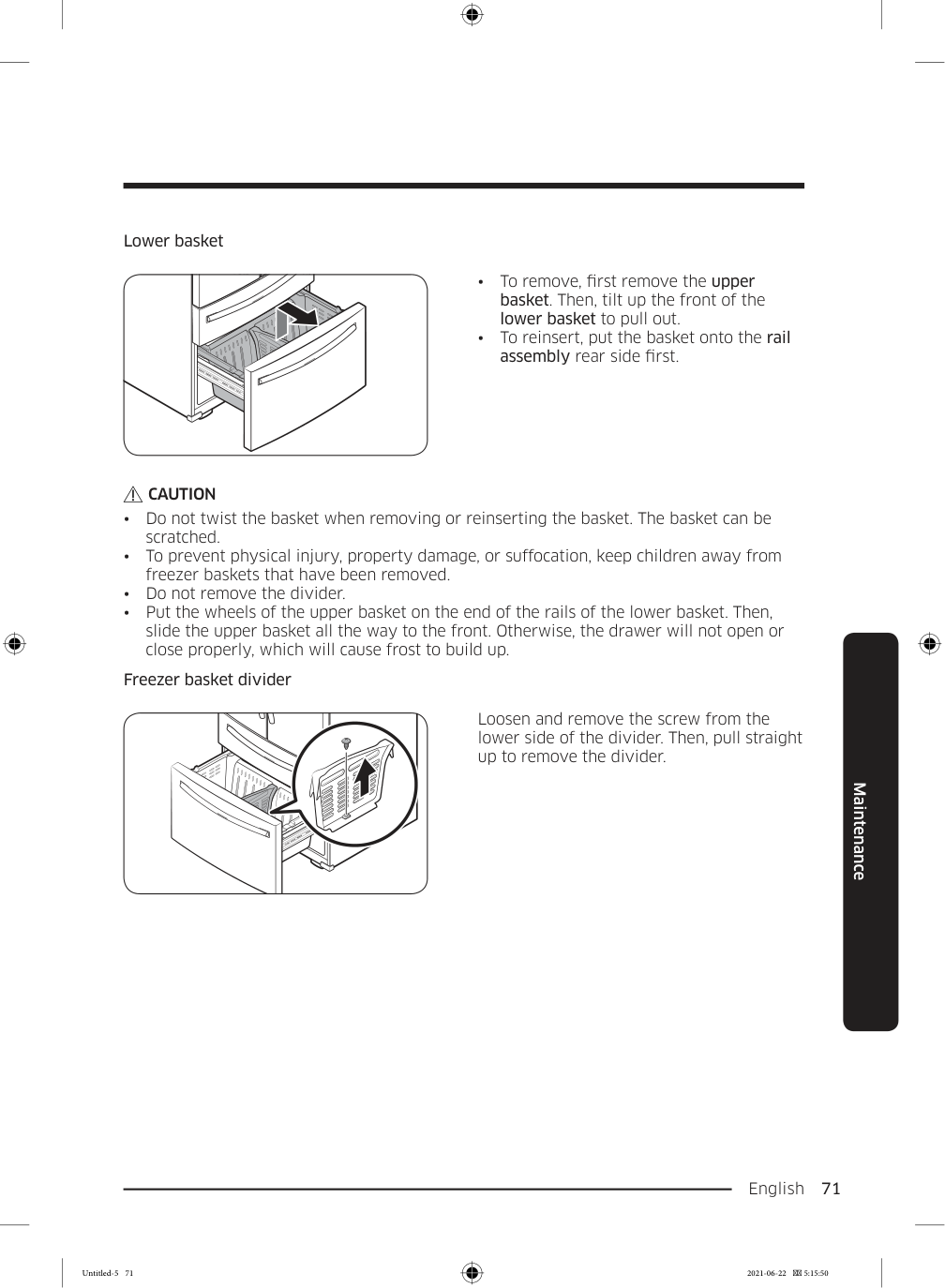
  • To remove, fully open the FlexZone™
  • drawer. Lift up the FlexZone™ basket, and then pull out with both hands.
  • To reinsert, fully open the FlexZone™
  • drawer. While tilting up the front of the basket, insert the rear of the basket into the rail assembly. Lower the front until the basket is in place.
  • If the divider lock does not function,
  • wipe the bars to remove moisture on them. Freezer baskets Upper basket
  • To remove, fully slide open the freezer
  • drawer. Push the upper basket to the end, and then pull up to remove.
  • To reinsert, align the front wheels of the
  • upper basket with the end of the lower basket. Slide the upper basket to the front. Untitled-5 70 2021-06-22  5:15:50

    Page 71

    English  71 Maintenance Lower basket

  • To remove, first remove the upper
  • basket. Then, tilt up the front of the lower basket to pull out.
  • To reinsert, put the basket onto the rail
  • assembly rear side first.

    Caution

  • Do not twist the basket when removing or reinserting the basket. The basket can be
  • scratched.
  • To prevent physical injury, property damage, or suffocation, keep children away from
  • freezer baskets that have been removed.
  • Do not remove the divider.
  • Put the wheels of the upper basket on the end of the rails of the lower basket. Then,
  • slide the upper basket all the way to the front. Otherwise, the drawer will not open or close properly, which will cause frost to build up. Freezer basket divider Loosen and remove the screw from the lower side of the divider. Then, pull straight up to remove the divider. Untitled-5 71 2021-06-22  5:15:50

    Page 72

    Maintenance English 72 Maintenance Cleaning Interior and exterior

    Warning

  • Do not use benzene, thinner, home/car detergent, or Clorox™ to clean the refrigerator.
  • They may damage the surface of the refrigerator and cause a fire.
  • Do not spray water onto the refrigerator. This may cause electric shock.
  • Regularly use a dry cloth to remove all foreign substances such as dust or water from the power plug terminals and contact points.
  • Unplug the power cord.
  • Use a moistened, soft, lint-free cloth or paper towel to clean the refrigerator’s interior
  • and exterior.
  • When done, use a dry cloth or paper towel to dry well.
  • Plug in the power cord.
  • Ice / Water dispenser

    Caution

    When crushed ice is selected, some residual ice chips may collect in the ice chute. To prevent this, remove the residual ice from the chute using a soft, clean cloth. Rubber seals If the rubber seals of a door become dirty, the door may not close properly and reducing refrigerator performance and efficiency. Use a mild detergent and damp cloth to clean the rubber seals. Then, dry well with a cloth. Rear panel To keep cords and exposed parts of the rear panel free of dirt, vacuum the panel once or twice a year.

    Caution

    Do not remove the rear panel cover. Electric shock may occur. Untitled-5 72 2021-06-22  5:15:50
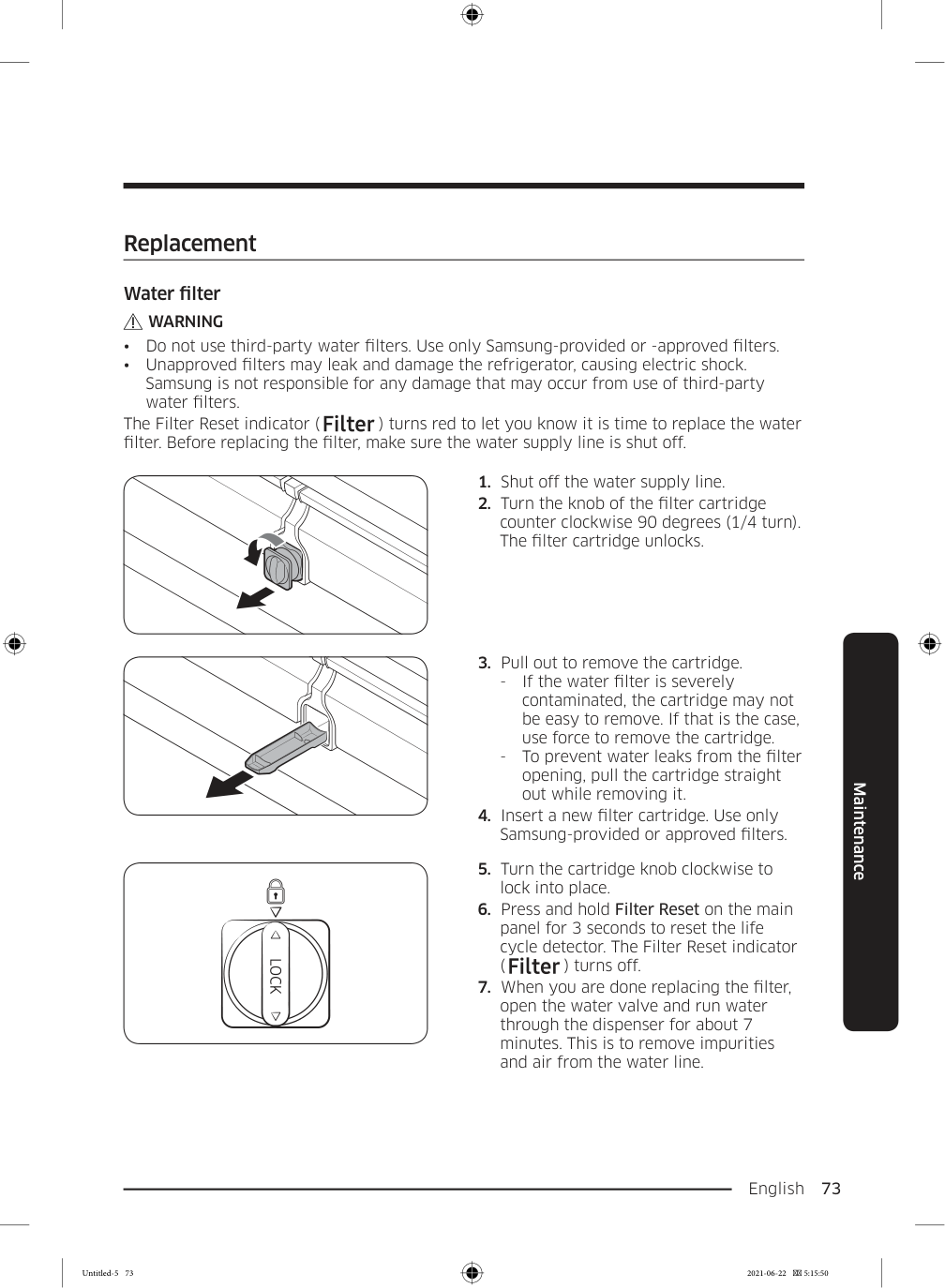
    Page 73

    English  73 Maintenance Replacement Water filter

    Warning
  • Do not use third-party water filters. Use only Samsung-provided or -approved filters.
  • Unapproved filters may leak and damage the refrigerator, causing electric shock.
  • Samsung is not responsible for any damage that may occur from use of third-party water filters. The Filter Reset indicator ( ) turns red to let you know it is time to replace the water filter. Before replacing the filter, make sure the water supply line is shut off.
  • Shut off the water supply line.
  • Turn the knob of the filter cartridge
  • counter clockwise 90 degrees (1/4 turn). The filter cartridge unlocks.
  • Pull out to remove the cartridge.
  • If the water filter is severely
  • contaminated, the cartridge may not be easy to remove. If that is the case, use force to remove the cartridge.
  • To prevent water leaks from the filter
  • opening, pull the cartridge straight out while removing it.
  • Insert a new filter cartridge. Use only
  • Samsung-provided or approved filters.
  • Turn the cartridge knob clockwise to
  • lock into place.
  • Press and hold Filter Reset on the main
  • panel for 3 seconds to reset the life cycle detector. The Filter Reset indicator ( ) turns off.
  • When you are done replacing the filter,
  • open the water valve and run water through the dispenser for about 7 minutes. This is to remove impurities and air from the water line. Untitled-5 73 2021-06-22  5:15:50

    Page 74

    Maintenance English 74 Maintenance

    Note

  • A newly installed filter may cause the water dispenser to spurt water briefly. This is
  • because air has entered the waterline.
  • The replacement process may cause the water dispenser to drip for a short period of
  • time. If it drips, simply wipe up any water on the floor with a dry towel. Reverse osmosis water filtration system The water pressure of the water supply system to a reverse osmosis water filtration system must be between 35 psi and 120 psi (241 kPa and 827 kPa). The water pressure of the reverse osmosis water filtration system to the refrigerator’s cold water line must be at least 40 psi (276 kPa). If the water pressure is below these specifications:
  • Check if the sediment filter in the reverse osmosis system is blocked. Replace the filter
  • if necessary.
  • Refill the water tank in the reverse osmosis system with water.
  • If your refrigerator has a water filter, it may further reduce the water pressure when
  • used in conjunction with a reverse osmosis system. Remove the water filter. For more information or servicing, contact a licensed plumbing professional. Ordering a new filter To purchase a new water filter, contact a local Samsung service center or visit www. samsungparts.com on the web. LED Lamps To replace the lamps of the refrigerator, contact a local Samsung service center.

    Warning

  • The lamps are not user-serviceable. Do not attempt to replace a lamp yourself. This can
  • cause electric shock. Untitled-5 74 2021-06-22  5:15:50

    Page 75

    English  75 Troubleshooting Before calling for service, review the checkpoints below. Any service calls regarding normal situations (No Defect Cases) will be charged to users. General Temperature Symptom Possible causes Solution Fridge/freezer does not operate. Fridge/freezer temperature is warm.
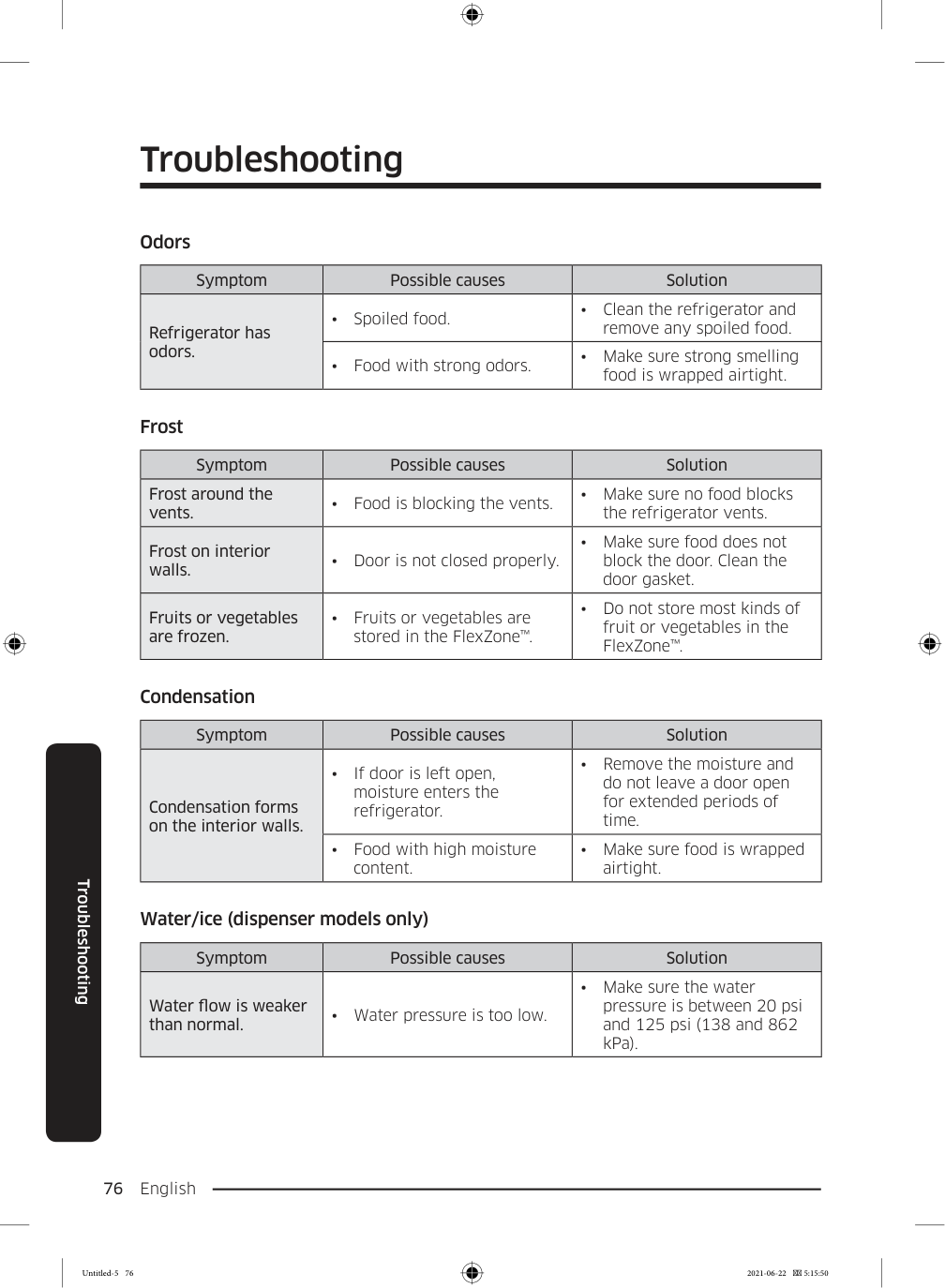
  • Power cord is not plugged
  • in properly.
  • Properly plug in the power
  • cord.
  • Temperature control is not
  • set correctly.
  • Set the temperature lower.
  • Refrigerator is located near
  • a heat source or direct sunlight.
  • Keep the refrigerator away
  • from direct sunlight or a heat source.
  • Not enough clearance
  • between refrigerator and nearby walls or cabinets.
  • Make sure there is a gap of
  • at least 5 cm between the refrigerator back and sides and any nearby walls or cabinets.
  • Energy Saver mode is
  • activated.
  • Deactivate Energy Saver
  • mode.
  • The refrigerator is
  • overloaded. Food is blocking the refrigerator vents.
  • Do not overload the
  • refrigerator. Do not allow food to block vents. Fridge/freezer is over-cooling.
  • Temperature control is not
  • set correctly.
  • Set the temperature higher.
  • Interior wall is hot.
  • Refrigerator has heat-proof
  • piping in the interior wall.
  • To prevent condensation
  • from forming, the refrigerator has heat-proof piping in the front corners. If the ambient temperature rises, this equipment may not work effectively. This is not a system failure. Troubleshooting Untitled-5 75 2021-06-22  5:15:50

    Page 76

    Troubleshooting English 76 Troubleshooting Odors Symptom Possible causes Solution Refrigerator has odors.
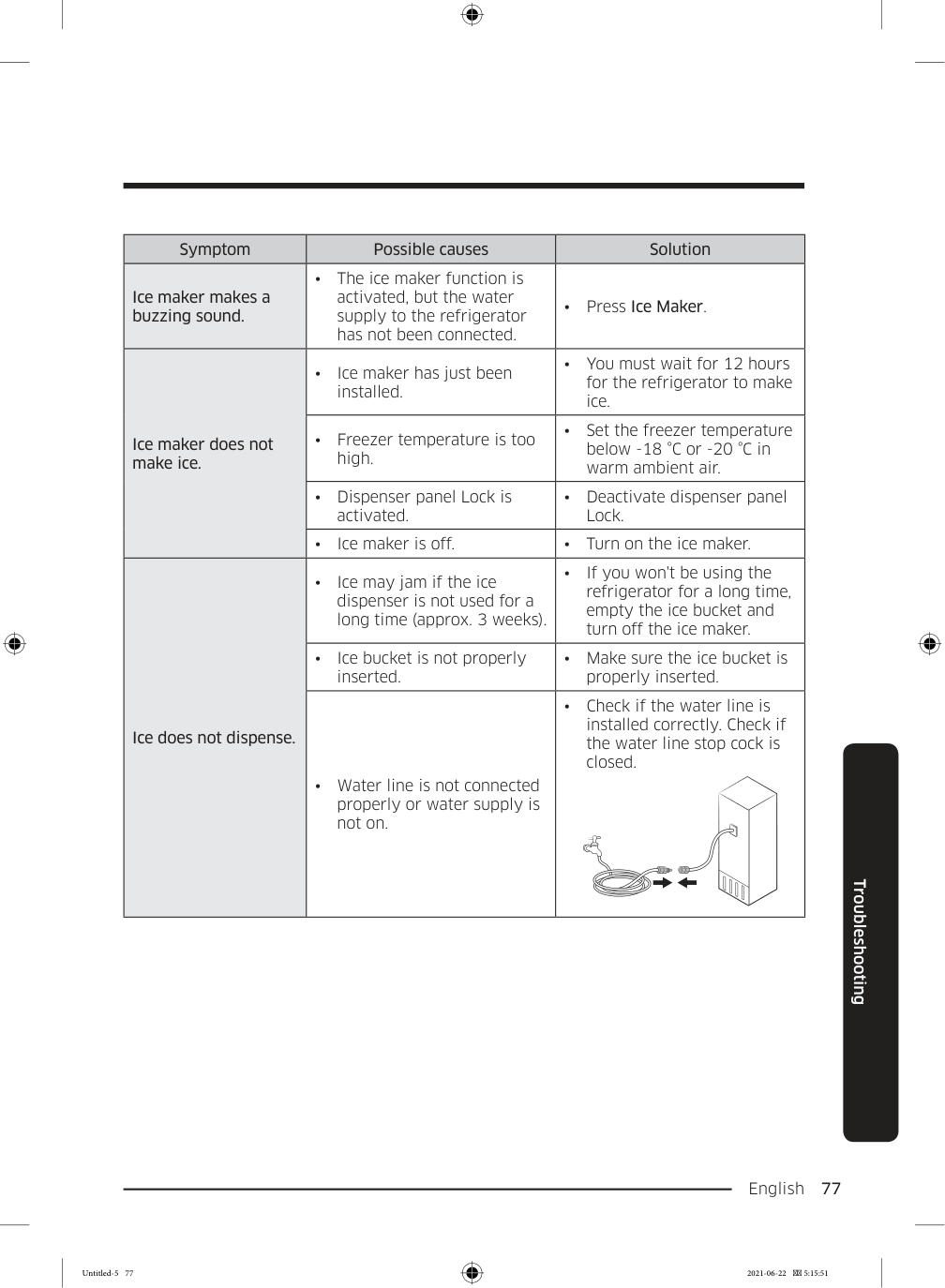
  • Spoiled food.
  • Clean the refrigerator and
  • remove any spoiled food.
  • Food with strong odors.
  • Make sure strong smelling
  • food is wrapped airtight. Frost Symptom Possible causes Solution Frost around the vents.
  • Food is blocking the vents.
  • Make sure no food blocks
  • the refrigerator vents. Frost on interior walls.
  • Door is not closed properly.
  • Make sure food does not
  • block the door. Clean the door gasket. Fruits or vegetables are frozen.
  • Fruits or vegetables are
  • stored in the FlexZone™.
  • Do not store most kinds of
  • fruit or vegetables in the FlexZone™. Condensation Symptom Possible causes Solution Condensation forms on the interior walls.
  • If door is left open,
  • moisture enters the refrigerator.
  • Remove the moisture and
  • do not leave a door open for extended periods of time.
  • Food with high moisture
  • content.
  • Make sure food is wrapped
  • airtight. Water/ice (dispenser models only) Symptom Possible causes Solution Water flow is weaker than normal.
  • Water pressure is too low.
  • Make sure the water
  • pressure is between 20 psi and 125 psi (138 and 862 kPa). Untitled-5 76 2021-06-22  5:15:50

    Page 77

    English  77 Troubleshooting Symptom Possible causes Solution Ice maker makes a buzzing sound.
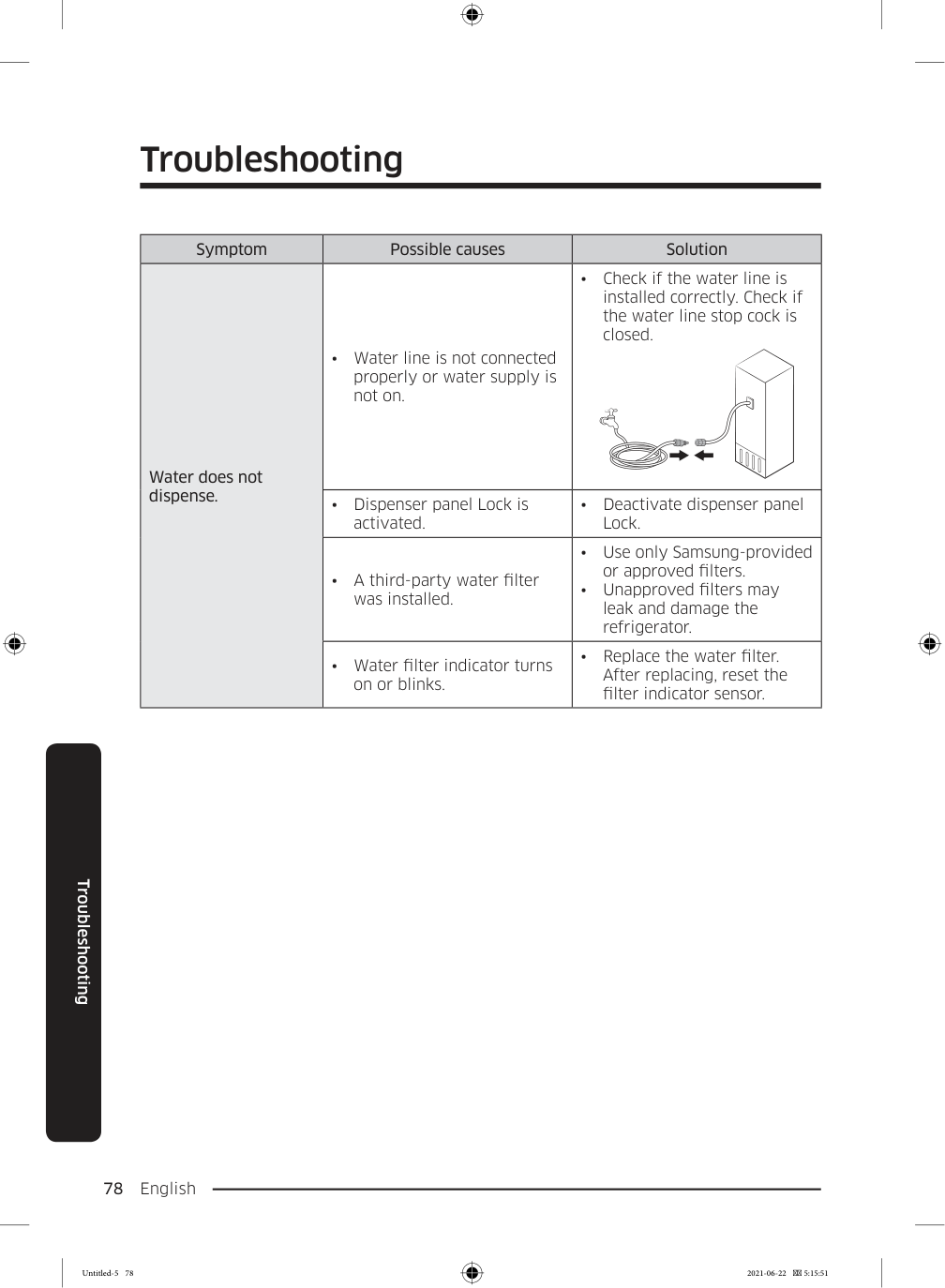
  • The ice maker function is
  • activated, but the water supply to the refrigerator has not been connected.
  • Press Ice Maker.
  • Ice maker does not make ice.
  • Ice maker has just been
  • installed.
  • You must wait for 12 hours
  • for the refrigerator to make ice.
  • Freezer temperature is too
  • high.
  • Set the freezer temperature
  • below -18 °C or -20 °C in warm ambient air.
  • Dispenser panel Lock is
  • activated.
  • Deactivate dispenser panel
  • Lock.
  • Ice maker is off.
  • Turn on the ice maker.
  • Ice does not dispense.
  • Ice may jam if the ice
  • dispenser is not used for a long time (approx. 3 weeks).
  • If you won't be using the
  • refrigerator for a long time, empty the ice bucket and turn off the ice maker.
  • Ice bucket is not properly
  • inserted.
  • Make sure the ice bucket is
  • properly inserted.
  • Water line is not connected
  • properly or water supply is not on.
  • Check if the water line is
  • installed correctly. Check if the water line stop cock is closed. Untitled-5 77 2021-06-22  5:15:51

    Page 78

    Troubleshooting English 78 Troubleshooting Symptom Possible causes Solution Water does not dispense.
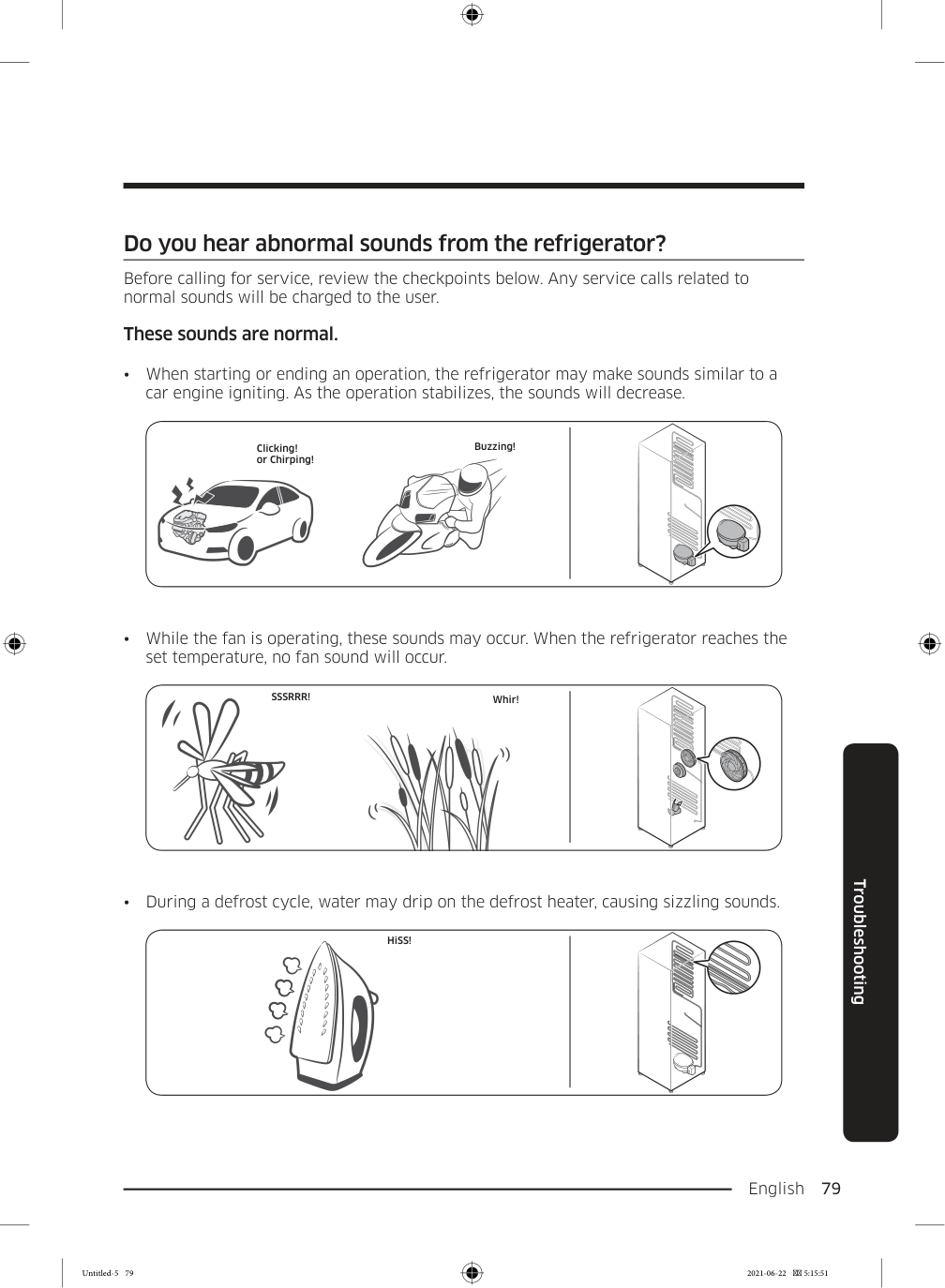
  • Water line is not connected
  • properly or water supply is not on.
  • Check if the water line is
  • installed correctly. Check if the water line stop cock is closed.
  • Dispenser panel Lock is
  • activated.
  • Deactivate dispenser panel
  • Lock.
  • A third-party water filter
  • was installed.
  • Use only Samsung-provided
  • or approved filters.
  • Unapproved filters may
  • leak and damage the refrigerator.
  • Water filter indicator turns
  • on or blinks.
  • Replace the water filter.
  • After replacing, reset the filter indicator sensor. Untitled-5 78 2021-06-22  5:15:51

    Page 79

    English  79 Troubleshooting Do you hear abnormal sounds from the refrigerator? Before calling for service, review the checkpoints below. Any service calls related to normal sounds will be charged to the user. These sounds are normal.

  • When starting or ending an operation, the refrigerator may make sounds similar to a
  • car engine igniting. As the operation stabilizes, the sounds will decrease. Clicking! or Chirping! Buzzing!
  • While the fan is operating, these sounds may occur. When the refrigerator reaches the
  • set temperature, no fan sound will occur.

    Sssrrr!

    Whir!
  • During a defrost cycle, water may drip on the defrost heater, causing sizzling sounds.
  • HiSS! Untitled-5 79 2021-06-22  5:15:51

    Page 80

    Troubleshooting English 80 Troubleshooting
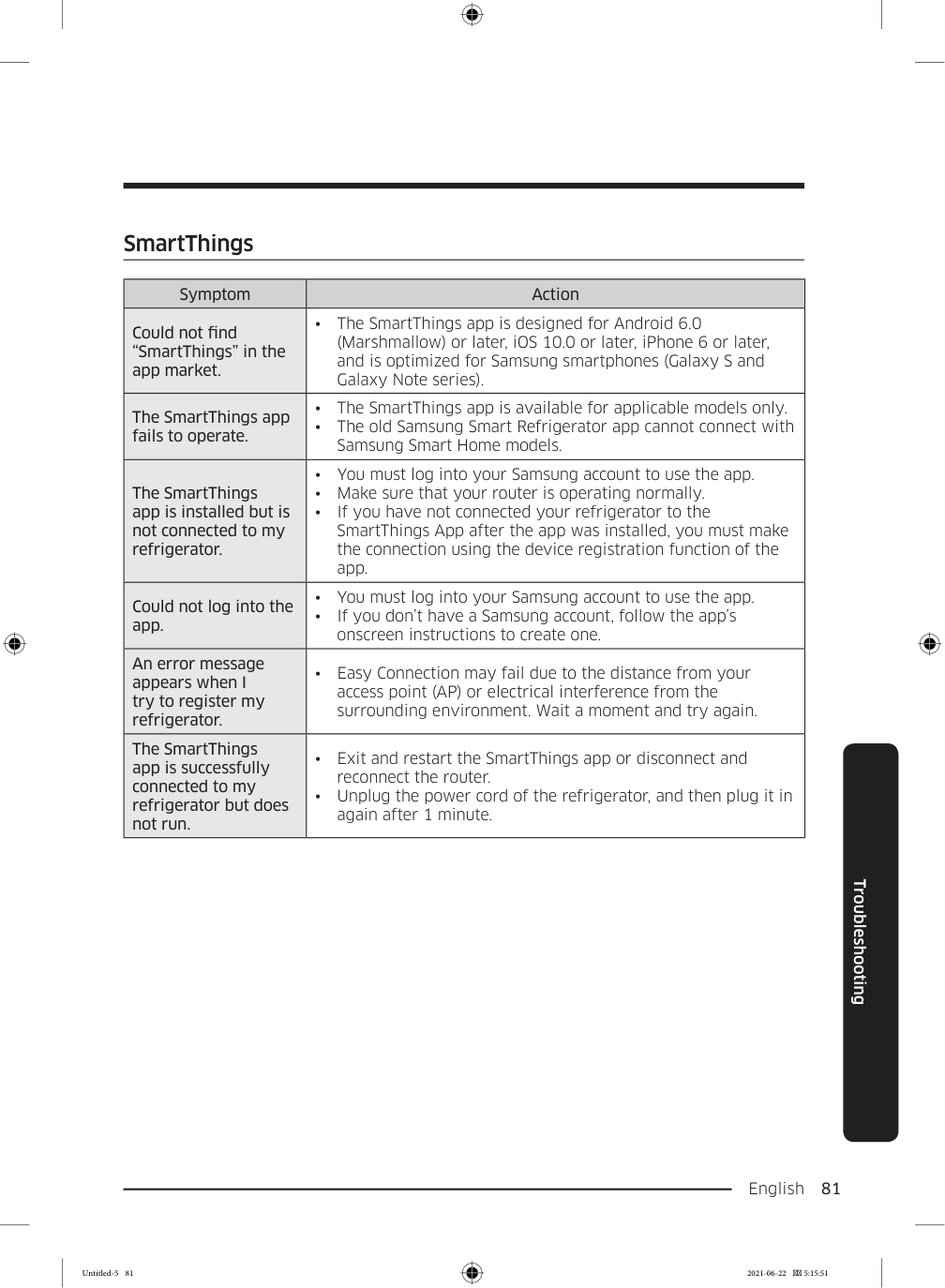
  • As the refrigerator cools or freezes, refrigerant gas moves through sealed pipes, causing
  • bubbling sounds. Bubbling!
  • As the refrigerator temperature increases or decreases, plastic parts contract and
  • expand, creating knocking noises. These noises occur during the defrosting cycle or when electronic parts are working. Cracking!
  • For ice maker models: When the water valve opens to fill the ice maker, buzzing sounds
  • may occur.
  • Due to pressure equalizing when opening and closing the refrigerator door, whooshing
  • sounds may occur. Untitled-5 80 2021-06-22  5:15:51

    Page 81

    English  81 Troubleshooting SmartThings Symptom Action Could not find “SmartThings” in the app market.
  • The SmartThings app is designed for Android 6.0
  • (Marshmallow) or later, iOS 10.0 or later, iPhone 6 or later, and is optimized for Samsung smartphones (Galaxy S and Galaxy Note series). The SmartThings app fails to operate.
  • The SmartThings app is available for applicable models only.
  • The old Samsung Smart Refrigerator app cannot connect with
  • Samsung Smart Home models. The SmartThings app is installed but is not connected to my refrigerator.
  • You must log into your Samsung account to use the app.
  • Make sure that your router is operating normally.
  • If you have not connected your refrigerator to the
  • SmartThings App after the app was installed, you must make the connection using the device registration function of the app. Could not log into the app.
  • You must log into your Samsung account to use the app.
  • If you don’t have a Samsung account, follow the app’s
  • onscreen instructions to create one. An error message appears when I try to register my refrigerator.
  • Easy Connection may fail due to the distance from your
  • access point (AP) or electrical interference from the surrounding environment. Wait a moment and try again. The SmartThings app is successfully connected to my refrigerator but does not run.
  • Exit and restart the SmartThings app or disconnect and
  • reconnect the router.
  • Unplug the power cord of the refrigerator, and then plug it in
  • again after 1 minute. Untitled-5 81 2021-06-22  5:15:51

    Page 82

    English 82 Open Source Announcement The software included in this product contains open source software. You may obtain the complete corresponding source code for a period of three years after the last shipment of this product by sending an email to mailto:oss.request@samsung.com. It is also possible to obtain the complete corresponding source code in a physical medium such as a CD-ROM; a minimal charge will be required. The following URL http://opensource.samsung.com/opensource/SMART_AT_051/seq/0 leads to the download page of the source code made available and open source license information as related to this product. This offer is valid to anyone in receipt of this information. Untitled-5 82 2021-06-22  5:15:51

    Page 83

    Memo Untitled-5 83 2021-06-22  5:15:51
    Page 84

    Contact SAMSUNG WORLD WIDE If you have any questions or comments relating to Samsung products, please contact the SAMSUNG Customer Care Center. Country Contact Center Web Site

    Costa Rica

    00-800-1-Samsung (726-7864)

    www.samsung.com/latin/support (Spanish) www.samsung.com/latin_en/support (English)

    Dominican

    Republic

    1-800-751-2676 www.samsung.com/latin/support (Spanish) www.samsung.com/latin_en/support (English)

    Ecuador

    1-800-Samsun (72-6786)

    www.samsung.com/latin/support (Spanish) www.samsung.com/latin_en/support (English)

    El Salvador

    8000-Samsung (726-7864)

    www.samsung.com/latin/support (Spanish) www.samsung.com/latin_en/support (English)

    Guatemala

    1-800-299-0033 www.samsung.com/latin/support (Spanish) www.samsung.com/latin_en/support (English)

    Honduras

    800-2791-9111 www.samsung.com/latin/support (Spanish) www.samsung.com/latin_en/support (English)

    Jamaica

    1-800-Samsung (726-7864)

    www.samsung.com/latin_en/support (English)

    Nicaragua

    001-800-5077267 www.samsung.com/latin/support (Spanish) www.samsung.com/latin_en/support (English)

    Panama

    800-0101 www.samsung.com/latin/support (Spanish) www.samsung.com/latin_en/support (English)

    Puerto Rico

    1-800-682-3180 www.samsung.com/latin/support (Spanish) www.samsung.com/latin_en/support (English)

    Trinidad &

    Tobago

    1-800-Samsung(726-7864)

    www.samsung.com/latin/support (Spanish) www.samsung.com/latin_en/support (English)

    Venezuela

    0-800-100-5303 www.samsung.com/latin/support (Spanish) www.samsung.com/latin_en/support (English)

    Da68-03833B-02

    Untitled-5 84 2021-06-22  5:15:51
    Page 85

    Refrigerador Manual del usuario Electrodoméstico independiente Untitled-6 1 2021-06-22  5:18:35
    Page 86

    Español 2 Contenido Contenido Información sobre seguridad 3 Qué debe saber sobre las instrucciones de seguridad 3 Símbolos y advertencias de seguridad importantes: 4 Precauciones importantes de seguridad 5 Señales de advertencia importantes para el transporte y el emplazamiento 10 Advertencias muy importantes para la instalación 11 Precauciones para la instalación 14 Advertencias muy importantes para el uso 15 Precauciones de uso 21 Precauciones para la limpieza 24 Advertencias muy importantes para la eliminación de residuos 27 Recomendaciones adicionales para el uso adecuado 28 Instrucciones acerca de WEEE 29 Instalación 30 Descripción breve del refrigerador 30 Instalación paso a paso 33 Funcionamiento 51 Panel principal 51 SmartThings 60 Panel del dispensador 63 Funciones especiales 64 Mantenimiento 70 Manipulación y cuidado 70 Limpieza 77 Reemplazo 78 Solución de problemas 80 General 80 ¿Se oyen ruidos anómalos procedentes del refrigerador? 85 SmartThings 87 Open Source Announcement 88 Untitled-6 2 2021-06-22  5:18:35
    Page 87

    Español 3 Información sobre seguridad Antes de utilizar su nuevo refrigerador Samsung, lea detenidamente este manual a fin de aprender a usar las funciones que ofrece de manera segura y eficiente. Qué debe saber sobre las instrucciones de seguridad
  • Las Instrucciones y Advertencias de Seguridad Importantes
  • en este manual no cubren todas las condiciones y situaciones posibles que podrían ocurrir. Es su responsabilidad utilizar el sentido común, la precaución y el cuidado para la instalación, el mantenimiento y la operación del electrodoméstico.
  • Debido a que las siguientes instrucciones operativas
  • abarcan diversos modelos, las características de su refrigerador pueden diferir levemente de aquellas descritas en este manual y no todas las señales de advertencia pueden ser aplicables. Si tiene una consulta o inquietud, deberá contactar al centro de servicios más cercano u obtener ayuda e información en línea en el sitio www.samsung.com.
  • Se utiliza R-600a o R-134a como refrigerante. Mire
  • la etiqueta del compresor en la parte posterior del electrodoméstico o la etiqueta de voltaje dentro del refrigerador para constatar qué refrigerante fue utilizado en su electrodoméstico. Si este producto contiene gas inflamable (refrigerante R-600a), comuníquese con las autoridades locales para desechar el producto en forma segura. Información sobre seguridad Untitled-6 3 2021-06-22  5:18:35

    Page 88

    Información sobre seguridad Español 4 Información sobre seguridad
  • Para evitar la creación de una mezcla de gas-aire
  • inflamable en caso de una pérdida en el circuito del refrigerante, el tamaño del lugar en el que se coloca el refrigerador depende de la cantidad de refrigerante utilizado.
  • Nunca debe poner en marcha un electrodoméstico que
  • presente signos de haber sido dañado. Si tiene alguna inquietud, consulte a su distribuidor. El lugar debe medir 1 m3 por cada 8 g de refrigerante R-600a en el electrodoméstico. La cantidad de refrigerante específica de su electrodoméstico consta en la placa de identificación que se encuentra en el interior.
  • Si el refrigerante sale por los tubos, este podría incendiarse
  • o dañar los ojos. Si hay pérdida de refrigerante del tubo, manténgalo alejado de las llamas, aparte cualquier material inflamable del producto y ventile la habitación inmediatamente.
  • No seguir esta recomendación puede causar riesgos de
  • incendio o explosión. Símbolos y advertencias de seguridad importantes: Sírvase seguir todas las instrucciones de seguridad del presente manual. En el presente manual se utilizan los siguientes símbolos de seguridad. Untitled-6 4 2021-06-22  5:18:35

    Page 89

    Español 5 Información sobre seguridad

    Advertencia

    Riesgos o prácticas inseguras que pueden causar graves lesiones personales, daños a la propiedad y/o incluso la muerte.

    Precaución

    Riesgos o prácticas inseguras que pueden causar lesiones personales leves y/o daños materiales.

    Nota

    Información útil que ayuda a los usuarios a comprender u obtener beneficios del refrigerador. Estas señales de advertencia se incluyen aquí para evitar que usted o terceros sufran lesiones. Sígalas atentamente. Después de leer esta sección, consérvela en un lugar seguro para referencia futura. Precauciones importantes de seguridad Advertencia: riesgo de incendio/materiales inflamables

    Advertencia

  • Cuando instale el electrodoméstico, asegúrese de que el
  • cable de alimentación no esté atrapado ni dañado. Untitled-6 5 2021-06-22  5:18:35

    Page 90

    Información sobre seguridad Español 6 Información sobre seguridad
  • No ubique varias regletas de tomacorrientes portátiles o
  • unidades de alimentación móviles en la parte trasera del electrodoméstico.
  • Llenar únicamente con agua potable.
  • Conéctelo solamente a un suministro de agua potable.
  • Mantenga las aberturas de ventilación del gabinete o
  • estructura incorporada del electrodoméstico libres de obstrucciones.
  • No utilice dispositivos mecánicos ni cualquier otro medio
  • para acelerar el proceso de descongelamiento que no sean aquellos recomendados por el fabricante.
  • No dañe el circuito del refrigerante.
  • No utilice electrodomésticos eléctricos dentro de los
  • compartimientos de almacenamiento de alimentos del electrodoméstico, a menos que sean del tipo recomendado por el fabricante.
  • Este electrodoméstico no debe ser utilizado por personas
  • (incluidos niños) con capacidades mentales, sensoriales o físicas reducidas o por personas que carezcan de experiencia y conocimientos, a menos que se encuentren bajo la supervisión o hayan recibido instrucciones de un responsable de su seguridad sobre el uso del refrigerador.
  • Este electrodoméstico puede ser utilizado por niños
  • mayores de 8 años y personas con las capacidades físicas, sensoriales o mentales reducidas o con falta de conocimiento y experiencia, bajo vigilancia o supervisión o con instrucciones adecuadas sobre el uso del seguro del electrodoméstico y comprendan los riesgos que implica. Untitled-6 6 2021-06-22  5:18:35

    Page 91

    Español 7 Información sobre seguridad No deje que los niños jueguen con el electrodoméstico. Los niños no deben efectuar tareas de limpieza ni de mantenimiento sin vigilancia.
  • Si el cable de alimentación está dañado, debe ser
  • reemplazado por el fabricante, su agente de servicios o personas igualmente calificadas para evitar riesgos.
  • Debe poder accederse al tomacorriente con facilidad
  • para que el electrodoméstico pueda desenchufarse de la alimentación en caso de emergencia.
  • Debe encontrarse fuera de la zona trasera del
  • electrodoméstico.
  • No almacene sustancias explosivas como latas de
  • aerosoles con gases propelentes inflamables en este electrodoméstico.
  • Si el producto cuenta con lámparas LED, no desensamble
  • las cubiertas de la lámpara y las lámparas LED usted mismo.
  • Comuníquese con un Centro de Servicio de Samsung.
  • Utilice solamente lámparas LED proporcionadas por el
  • fabricante o sus agentes de servicio técnico.
  • Se deben utilizar las mangueras nuevas provistas con el
  • electrodoméstico y no reutilizar las mangueras antiguas.
  • El refrigerador solo debe estar conectado al suministro
  • de agua potable. Para que la fábrica de hielo funcione correctamente, se necesita una presión de agua de 20 y 125 psi (138 y 862 kPa).
  • Para un uso más eficiente de la energía, conserve todos los
  • accesorios internos, como cestas, cajones, estantes, en la misma posición en la que los suministró el fabricante. Untitled-6 7 2021-06-22  5:18:35

    Page 92

    Información sobre seguridad Español 8 Información sobre seguridad
  • Para obtener la mejor eficiencia energética de este
  • producto, deje todos los estantes, cajones y cestas en su posición original. Cómo minimizar el consumo de energía
  • Instale el electrodoméstico en un ambiente fresco y seco
  • con la ventilación adecuada.
  • Asegúrese de que no esté expuesto a la luz solar directa y
  • nunca lo coloque cerca de una fuente de calor directa (por ejemplo, un radiador).
  • Se recomienda no bloquear las ventilaciones ni las
  • rejillas para una mayor eficiencia energética.
  • Deje enfriar los alimentos calientes antes de colocarlos
  • en el electrodoméstico.
  • Coloque los alimentos congelados en el refrigerador
  • para descongelarlos. Puede utilizar las temperaturas bajas de los productos congelados para enfriar los alimentos en el refrigerador.
  • No mantenga la puerta abierta durante mucho tiempo
  • cuando coloque o retire alimentos.
  • Cuanto menor sea el tiempo en que esté abierta la
  • puerta, menos hielo se formará en el congelador.
  • Limpie regularmente la parte posterior del refrigerador.
  • El polvo aumenta el consumo de energía.
  • No ajuste la temperatura a más frío del necesario.
  • Asegúrese de que haya suficiente salida de aire en la
  • base y en la pared posterior del refrigerador. No cubra las rejillas de ventilación. Untitled-6 8 2021-06-22  5:18:35

    Page 93

    Español 9 Información sobre seguridad
  • Cuando realice la instalación, deje un espacio libre a
  • la derecha, izquierda, atrás y arriba. Esto ayudará a reducir el consumo de energía y mantener bajo el gasto de las facturas de energía.
  • Los valores recomendados para el espacio libre son:
  • Lado derecho, izquierdo y parte trasera: más de 50 mm
  • Lado superior: más de 100 mm
  • Este electrodoméstico está diseñado para uso doméstico y en lugares como
  • zonas de cocina de tiendas, oficinas y otros entornos de
  • trabajo
  • granjas y zonas de uso de los clientes en hoteles,
  • moteles u otros entornos de tipo residencial
  • hospederías;
  • banqueterías y eventos en instalaciones no minorista
  • similares Untitled-6 9 2021-06-22  5:18:35

    Page 94

    Información sobre seguridad Español 10 Información sobre seguridad Señales de advertencia importantes para el transporte y el emplazamiento

    Advertencia
  • Al transportar e instalar el electrodoméstico deberá tener
  • cuidado de no dañar ninguna de las piezas del circuito del refrigerante.
  • La pérdida de refrigerante del tubo podría incendiarse
  • o dañar los ojos. Si se detecta una fuga, manténgalo alejado de las llamas o de posibles fuentes de inflamación y ventile durante varios minutos el ambiente en el que se encuentra la unidad.
  • El electrodoméstico contiene una pequeña cantidad
  • de refrigerante de isobutano (R-600a), un gas natural con alta compatibilidad ambiental que, no obstante, también es combustible. Al transportar e instalar el electrodoméstico deberá tener cuidado de no dañar ninguna de las piezas del circuito del refrigerante.
  • Al transportar e instalar el refrigerador, no toque la
  • manguera de agua de la parte posterior del refrigerador.
  • Esto podría dañar el refrigerador y, como resultado, el
  • dispensador de agua no se podría utilizar. Untitled-6 10 2021-06-22  5:18:36

    Page 95

    Español 11 Información sobre seguridad Advertencias muy importantes para la instalación

    Advertencia
  • No instale el refrigerador en un lugar húmedo o donde
  • pueda entrar en contacto con agua.
  • El aislamiento deficiente de las piezas eléctricas puede
  • provocar una descarga eléctrica o un incendio.
  • No exponga este refrigerador a la luz solar directa ni al
  • calor de estufas, calefactores u otros electrodomésticos.
  • No enchufe varios electrodomésticos en la misma toma
  • múltiple. El refrigerador debe conectarse siempre a un tomacorriente individual cuyo voltaje nominal coincida con el que se especifica en la placa de voltaje del refrigerador.
  • Así se obtiene el mejor desempeño y también se evita
  • que se sobrecarguen los circuitos del cableado de la casa, lo cual podría provocar un riesgo de incendio a causa del recalentamiento de los cables.
  • Si el tomacorriente está flojo, no conecte el enchufe.
  • Existe el riesgo de que se produzca una descarga
  • eléctrica o un incendio.
  • No utilice un cable de alimentación que esté dañado o
  • gastado en su extensión o en cualquiera de los extremos.
  • No doble excesivamente el cable de alimentación ni
  • coloque objetos pesados sobre él.
  • No tire del cable de alimentación ni lo doble
  • excesivamente.
  • No retuerza ni amarre el cable de alimentación.
  • Untitled-6 11 2021-06-22  5:18:36

    Page 96

    Información sobre seguridad Español 12 Información sobre seguridad
  • No coloque el cable de alimentación sobre un objeto
  • metálico; no coloque sobre él ningún objeto pesado; no lo coloque entre objetos ni lo empuje hacia el espacio que hay detrás del electrodoméstico.
  • Al mover el refrigerador, tenga cuidado de no enroscar ni
  • dañar el cable de alimentación.
  • Esto podría causar una descarga eléctrica o un incendio.
  • Nunca desenchufe el refrigerador jalando el cable de
  • alimentación. Siempre sostenga el enchufe con firmeza y jale para extraerlo del tomacorriente.
  • Los daños al cable pueden provocar un cortocircuito, un
  • incendio o una descarga eléctrica.
  • No utilice aerosoles cerca del refrigerador.
  • Utilizar aerosoles cerca del refrigerador puede causar
  • una explosión o un incendio.
  • No instale este electrodoméstico cerca de calefactores o
  • materiales inflamables.
  • No instale este electrodoméstico en un lugar donde pueda
  • haber fugas de gas.
  • Esto podría causar una descarga eléctrica o un incendio.
  • Antes de usarse, el refrigerador debe ubicarse e instalarse
  • de manera apropiada de acuerdo con las instrucciones de este manual.
  • Conecte el enchufe en la posición correcta con el cable
  • colgando hacia abajo.
  • Si conecta el enchufe al revés, el cable puede cortarse y
  • provocar un incendio o una descarga eléctrica.
  • Asegúrese de que el enchufe no esté aplastado ni haya
  • sido dañado por la parte posterior del refrigerador. Untitled-6 12 2021-06-22  5:18:36

    Page 97

    Español 13 Información sobre seguridad
  • Mantenga los materiales de empaque fuera del alcance de
  • los niños.
  • Existe el riesgo de muerte por asfixia si un niño se
  • coloca los materiales de empaque en la cabeza.
  • No instale este electrodoméstico en un lugar húmedo,
  • engrasado o sucio, ni en una ubicación expuesta a luz solar directa o al agua (lluvia).
  • El aislamiento deteriorado de las piezas eléctricas
  • puede provocar una descarga eléctrica o un incendio.
  • Si el refrigerador tiene polvo o agua, desenchúfelo y
  • comuníquese con el Centro de Servicio de Samsung Electronics.
  • Si no lo hace, existe el riesgo de que se produzca un
  • incendio.
  • No se pare sobre el electrodoméstico ni le coloque objetos
  • encima (tales como ropa, velas o cigarrillos encendidos, platos, productos químicos, objetos metálicos, etc.).
  • Esto podría causar una descarga eléctrica, un incendio,
  • problemas con el producto o lesiones.
  • Es necesario quitar toda la película plástica protectora
  • antes de enchufar el producto por primera vez.
  • Se deberá vigilar a los niños para asegurarse de que no
  • jueguen con los anillos elásticos utilizados para el ajuste de la puerta o con las grapas del tubo de agua.
  • Existe riesgo de muerte por asfixia si un niño se
  • traga un anillo elástico o una grapa del tubo de agua. Mantenga los anillos elásticos y las grapas del tubo de agua fuera del alcance de los niños. Untitled-6 13 2021-06-22  5:18:36

    Page 98

    Información sobre seguridad Español 14 Información sobre seguridad

  • El refrigerador debe estar conectado a tierra de manera
  • segura.
  • Siempre asegúrese de haber conectado el refrigerador
  • a tierra antes de intentar examinar o reparar alguna pieza. Las fugas de energía pueden provocar una descarga eléctrica grave.
  • Nunca utilice como conexión a tierra tubos de gas, líneas
  • telefónicas ni otras posibles fuentes de atracción de rayos.
  • El refrigerador debe estar conectado a tierra para
  • evitar cualquier fuga de energía o descarga eléctrica provocada por fugas de corriente del refrigerador.
  • Esto podría causar descargas eléctricas, incendios,
  • explosiones o problemas con el producto.
  • Conecte bien el enchufe al tomacorriente. No utilice
  • enchufes o cables de alimentación dañados ni enchufes de pared flojos.
  • Esto podría causar una descarga eléctrica o un incendio.
  • El fusible del refrigerador debe ser reemplazado por un
  • técnico calificado o una compañía de servicios.
  • No seguir esta recomendación, podría causar una
  • descarga eléctrica o lesiones. Precauciones para la instalación

    Precaución

  • Deje espacio suficiente alrededor del refrigerador e
  • instálelo sobre una superficie plana.
  • Si el refrigerador no está nivelado, la eficiencia de
  • enfriamiento y la durabilidad pueden reducirse. Untitled-6 14 2021-06-22  5:18:36

    Page 99

    Español 15 Información sobre seguridad

  • Antes de cargar alimentos, el electrodoméstico debe
  • permanecer en posición vertical durante 2-3 horas después de la instalación y su encendido.
  • Recomendamos que el refrigerador sea instalado por un
  • técnico calificado o una compañía de servicios.
  • No seguir esta recomendación puede causar descargas
  • eléctricas, incendios, explosiones, problemas con el producto o lesiones. Advertencias muy importantes para el uso

    Advertencia

  • No conecte el enchufe en un tomacorriente con las manos
  • mojadas.
  • Esto podría causar una descarga eléctrica.
  • No coloque objetos en la parte superior de la unidad.
  • Cada vez que abra o cierre la puerta, estos podrían
  • caerse y provocar lesiones personales o daños materiales.
  • No coloque las manos, los pies ni objetos metálicos
  • (como palillos, etc.) en la parte inferior o posterior del refrigerador.
  • Esto podría causar una descarga eléctrica o lesiones
  • personales.
  • Algunos bordes filosos podrían provocar lesiones
  • personales.
  • No toque las paredes internas del congelador ni los
  • productos almacenados en este con las manos mojadas.
  • Esto puede provocar quemaduras por frío.
  • Untitled-6 15 2021-06-22  5:18:36

    Page 100

    Información sobre seguridad Español 16 Información sobre seguridad
  • No coloque un recipiente con agua sobre el refrigerador.
  • Si se derrama, existe el riesgo de que se produzca un
  • incendio o una descarga eléctrica.
  • No almacene sustancias u objetos volátiles o inflamables
  • (benceno, solvente, gas propano, alcohol, éter, gas LP ni cualquier otro producto de este tipo) en el refrigerador.
  • Este refrigerador se debe utilizar solo para almacenar
  • alimentos.
  • Esto podría causar un incendio o una explosión.
  • Se deberá vigilar a los niños para asegurarse de que no
  • jueguen con el electrodoméstico.
  • Aleje los dedos de los puntos de agarre. Los espacios
  • entre las puertas y el gabinete son inevitablemente pequeños. Abra las puertas con cuidado si hay niños cerca.
  • No ponga los dedos entre las puertas, ni deje que los niños
  • lo hagan.
  • Mantenga los dedos lejos de las holguras de las puertas
  • izquierda y derecha. Si tiene los dedos entre las puertas, tenga cuidado al abrirlas.
  • No permita que los niños se cuelguen de la puerta ni de los
  • compartimientos de la puerta. Pueden producirse lesiones graves.
  • No permita que los niños ingresen al refrigerador. Podrían
  • quedar atrapados.
  • No coloque las manos debajo del electrodoméstico.
  • Es posible que algunas puntas filosas le provoquen
  • lesiones. Untitled-6 16 2021-06-22  5:18:36

    Page 101

    Español 17 Información sobre seguridad
  • No almacene en el refrigerador productos farmacéuticos,
  • materiales científicos ni productos sensibles a la temperatura.
  • No se deben almacenar productos que requieran
  • controles estrictos de temperatura.
  • En caso de sentir olor a fármacos o a humo, desconecte
  • el enchufe de inmediato y comuníquese con el Centro de Servicio de Samsung Electronics.
  • Si el refrigerador tiene polvo o agua, desenchúfelo y
  • comuníquese con el Centro de Servicio de Samsung Electronics.
  • Si no lo hace, existe el riesgo de que se produzca un
  • incendio.
  • No permita que los niños se paren sobre un cajón.
  • El cajón se puede romper y los niños pueden caerse.
  • No deje las puertas del refrigerador abiertas si este no está
  • siendo vigilado ni permita que los niños ingresen en él.
  • No permita que los bebés ni los niños ingresen en el cajón.
  • Esto puede provocar muerte por asfixia debido al
  • encierro o lesiones personales.
  • No sobrecargue el refrigerador con comida.
  • Cuando abra la puerta, algún elemento podría caerse y
  • provocar lesiones personales o daños materiales.
  • No pulverice material volátil, tal como un insecticida, sobre
  • la superficie del electrodoméstico.
  • Además de ser perjudicial para los seres humanos,
  • puede causar una descarga eléctrica, un incendio o problemas con el producto. Untitled-6 17 2021-06-22  5:18:36

    Page 102

    Información sobre seguridad Español 18 Información sobre seguridad
  • Nunca coloque los dedos u otros objetos en el hueco del
  • dispensador de agua, en el recipiente de hielo o en la cubeta de la fábrica de hielo.
  • Esto puede provocar lesiones personales o daños
  • materiales.
  • No utilice ni coloque ninguna sustancia sensible a la
  • temperatura, tales como pulverizadores inflamables, objetos inflamables, hielo seco, medicamentos o productos químicos, cerca o dentro del refrigerador.
  • No utilice un secador de cabello para secar el interior
  • del refrigerador. No coloque velas encendidas en el refrigerador para quitar los malos olores.
  • Esto podría causar una descarga eléctrica o un incendio.
  • Llene el tanque de agua, la charola para el hielo y los
  • cubos de agua solamente con agua potable (agua mineral o agua purificada).
  • No llene el tanque con té, jugos ni bebidas isotónicas ya
  • que podrían dañar el refrigerador.
  • No se pare sobre el electrodoméstico ni le coloque objetos
  • encima (tales como ropa, velas o cigarrillos encendidos, platos, productos químicos, objetos metálicos, etc.). Esto podría causar una descarga eléctrica, un incendio, problemas con el producto o lesiones. No coloque un recipiente con agua sobre el electrodoméstico.
  • Si se derrama, existe el riesgo de que se produzca un
  • incendio o una descarga eléctrica.
  • No mire fijamente la lámpara LED UV durante mucho
  • tiempo.
  • Los rayos ultravioletas podrían dañarle la visión.
  • Untitled-6 18 2021-06-22  5:18:36

    Page 103

    Español 19 Información sobre seguridad
  • No coloque el estante al revés. El tope del estante no
  • funcionaría.
  • Si se cae el estante de vidrio puede causar lesiones
  • personales.
  • Aleje los dedos de los puntos de agarre. Los espacios entre
  • las puertas y el gabinete son inevitablemente pequeños. Abra las puertas con cuidado si hay niños cerca.
  • Si se detecta una fuga de gas, evite las llamas o posibles
  • fuentes de ignición y ventile durante varios minutos la habitación en la que se encuentra el electrodoméstico.
  • No toque el electrodoméstico ni el cable de
  • alimentación.
  • No utilice un ventilador.
  • Una chispa puede provocar una explosión o un incendio.
  • Las botellas se deben almacenar una junto a otra de
  • manera tal que no se caigan.
  • Este producto se debe utilizar solo para almacenar
  • alimentos en un entorno doméstico.
  • Nunca coloque los dedos u otros objetos en el hueco del
  • dispensador de agua, en el recipiente de hielo o en la cubeta de la fábrica de hielo.
  • Esto puede provocar lesiones personales o daños
  • materiales.
  • No intente reparar, desensamblar ni modificar el
  • refrigerador por su cuenta.
  • No utilice ningún fusible (tales como los de alambres de
  • acero, de cobre, etc.) que no sea un fusible estándar. Untitled-6 19 2021-06-22  5:18:36

    Page 104

    Información sobre seguridad Español 20 Información sobre seguridad
  • Si es necesario reparar o volver a instalar el refrigerador,
  • comuníquese con su Centro de Servicio más cercano.
  • No seguir esta recomendación puede causar una
  • descarga eléctrica, un incendio, problemas con el producto o lesiones.
  • En caso de sentir olor a quemado o a humo en el
  • refrigerador, desenchúfelo de inmediato y comuníquese con el Centro de Servicio de Samsung Electronics.
  • No seguir esta recomendación podría causar una
  • descarga eléctrica o un incendio.
  • Desenchufe el refrigerador antes de cambiar las lámparas
  • internas.
  • Si no lo hace, existe el riesgo de que se produzca una
  • descarga eléctrica.
  • Si le resulta difícil cambiar una luz que no sea de LED,
  • comuníquese con un Centro de Servicio de Samsung.
  • Conecte bien el enchufe al tomacorriente.
  • No utilice enchufes ni cables de alimentación dañados ni
  • un tomacorriente flojo.
  • Esto podría causar una descarga eléctrica o un incendio.
  • Untitled-6 20 2021-06-22  5:18:36

    Page 105

    Español 21 Información sobre seguridad Precauciones de uso

    Precaución
  • No vuelva a congelar alimentos descongelados.
  • Los alimentos congelados y luego descongelados
  • desarrollan bacterias nocivas más rápidamente que los alimentos frescos.
  • La segunda descongelación descompone aún más la
  • estructura de las células, con la consiguiente pérdida de humedad y la modificación de la integridad del producto.
  • No descongele la carne a temperatura ambiente.
  • La seguridad dependerá de si el producto crudo se trató
  • de una manera adecuada.
  • No coloque botellas de vidrio ni bebidas carbonatadas en
  • el congelador.
  • El recipiente puede congelarse y romperse, y esto
  • puede ocasionar lesiones.
  • Utilice solamente la fábrica de hielo del refrigerador.
  • Si no estará en su casa por un período de tiempo
  • prolongado (por ejemplo, de vacaciones) y no usará los dispensadores de agua o hielo, cierre la válvula de agua.
  • De lo contrario, pueden producirse fugas de agua.
  • Si no utilizará el refrigerador por un período de tiempo
  • prolongado (3 semanas o más), debe vaciarlo (la cubeta de hielo incluida), desenchufarlo, cerrar la válvula de agua, retirar el exceso de humedad de las paredes internas y dejar las puertas abiertas para que no aparezcan olores y moho. Untitled-6 21 2021-06-22  5:18:36

    Page 106

    Información sobre seguridad Español 22 Información sobre seguridad
  • Para obtener el mejor desempeño del producto:
  • No coloque alimentos muy cerca de las rejillas de
  • ventilación en la parte posterior del refrigerador, ya que pueden obstruir la libre circulación del aire en el compartimiento del refrigerador.
  • Envuelva los alimentos adecuadamente o colóquelos
  • en recipientes herméticos antes de almacenarlos en el refrigerador.
  • Cumpla con los tiempos máximos de almacenamiento y
  • las fechas de vencimiento de los alimentos congelados.
  • No es necesario desenchufar el refrigerador si se
  • ausentará menos de tres semanas. Sin embargo, si se ausentará durante más de tres semanas, debe retirar todos los alimentos y el hielo de la cubeta, desenchufar el refrigerador, cerrar la válvula de agua, retirar el exceso de humedad de las paredes internas y dejar las puertas abiertas para que no aparezcan olores y moho.
  • Garantía de servicio y modificación.
  • El servicio de garantía de Samsung no cubre los
  • cambios o las modificaciones realizadas por un tercero a este electrodoméstico; Samsung tampoco es responsable de los problemas relacionados con la seguridad que puedan surgir a causa de modificaciones hechas por terceros. Untitled-6 22 2021-06-22  5:18:36

    Page 107

    Español 23 Información sobre seguridad
  • No obstruya las rejillas de ventilación dentro del
  • refrigerador.
  • Si las rejillas de ventilación están tapadas, en
  • particular con una bolsa de plástico, el refrigerador se puede sobrecongelar. Si el período de enfriamiento es demasiado prolongado, el filtro de agua puede romperse y provocar fugas de agua.
  • Utilice solamente la fábrica de hielo provista con el
  • refrigerador.
  • Retire el exceso de humedad del interior del refrigerador y
  • deje las puertas abiertas.
  • De lo contrario, pueden aparecer olores y moho.
  • Si se desconecta el refrigerador del suministro de
  • energía, espere al menos cinco minutos antes de volver a enchufarlo.
  • Si el refrigerador se moja, desenchúfelo y comuníquese con
  • el Centro de Servicio de Samsung Electronics.
  • No golpee ni aplique una fuerza excesiva sobre ninguna
  • superficie de vidrio.
  • Un vidrio roto puede causar lesiones personales o
  • daños materiales.
  • Llene el tanque de agua y la charola para el hielo
  • solamente con agua potable (agua de la llave, agua mineral o agua purificada).
  • No llene el tanque con té ni bebidas isotónicas. Esto
  • podría dañar el refrigerador.
  • Tenga cuidado de que sus dedos no queden atrapados.
  • Untitled-6 23 2021-06-22  5:18:36

    Page 108

    Información sobre seguridad Español 24 Información sobre seguridad

  • Si el refrigerador está lleno de agua, comuníquese con el
  • Centro de Servicio más cercano.
  • Existe el riesgo de que se produzca una descarga
  • eléctrica o un incendio.
  • No guarde aceite vegetal en los compartimientos de la
  • puerta del refrigerador. El aceite puede solidificarse, y modificar su sabor y la facilidad de uso. Asimismo, el envase abierto puede gotear y el aceite vertido puede causar grietas en el compartimiento de la puerta. Una vez abierto un envase de aceite, es mejor almacenarlo en un lugar fresco y a la sombra, como un armario o alacena.
  • Ejemplos de aceite vegetal: aceite de oliva, de maíz, de
  • semilla de uva, etc. Precauciones para la limpieza

    Precaución

  • No pulverice con agua directamente dentro o fuera del
  • refrigerador.
  • Existe el riesgo de que se produzca un incendio o una
  • descarga eléctrica.
  • No utilice un secador de cabello para secar el interior del
  • refrigerador.
  • No coloque velas encendidas en el refrigerador para
  • eliminar los malos olores.
  • Esto podría causar una descarga eléctrica o un incendio.
  • No rocíe productos de limpieza directamente sobre el visor.
  • Las letras impresas en el visor pueden borrarse.
  • Untitled-6 24 2021-06-22  5:18:36

    Page 109

    Español 25 Información sobre seguridad
  • Si cualquier sustancia extraña, tal como agua, ingresa en el
  • refrigerador, desenchúfelo y comuníquese con su Centro de Servicio más cercano.
  • No seguir esta recomendación podría causar una
  • descarga eléctrica o un incendio.
  • Use un paño seco y limpio para retirar cualquier sustancia
  • extraña o polvo de las clavijas del enchufe. No utilice un paño mojado ni húmedo para limpiar el enchufe.
  • De lo contrario, existe el riesgo de que se produzca un
  • incendio o una descarga eléctrica.
  • No limpie el refrigerador rociando agua directamente
  • sobre él.
  • No utilice benceno, solvente, Clorox ni cloruro para
  • limpiarlo.
  • Pueden dañar la superficie del refrigerador y provocar
  • un incendio.
  • Nunca coloque los dedos ni otros objetos en el hueco del
  • dispensador.
  • Esto puede provocar lesiones personales o daños
  • materiales.
  • Antes de limpiar o realizar el mantenimiento, desenchufe el
  • refrigerador del enchufe de pared.
  • No seguir esta recomendación podría causar una
  • descarga eléctrica o un incendio.
  • Utilice una esponja limpia o un paño suave y un detergente
  • neutro disuelto en agua templada para limpiar el refrigerador. Untitled-6 25 2021-06-22  5:18:36

    Page 110

    Información sobre seguridad Español 26 Información sobre seguridad
  • No utilice limpiadores abrasivos ni muy fuertes,
  • como limpiacristales, limpiadores corrosivos, líquidos inflamables, ácido clorhídrico, ceras limpiadoras, detergentes concentrados, blanqueadores o limpiadores que contengan petróleo en las superficies externas (puertas y paneles), piezas de plástico, revestimientos de puertas e interiores y juntas.
  • Pueden rayar o dañar el material.
  • No limpie con agua caliente los estantes o las cubiertas de
  • vidrio cuando estén fríos. Los estantes y las cubiertas de vidrio pueden romperse si se exponen a cambios bruscos de temperatura o a impactos como golpes o caídas. Untitled-6 26 2021-06-22  5:18:36

    Page 111

    Español 27 Información sobre seguridad Advertencias muy importantes para la eliminación de residuos

    Advertencia
  • Deseche el material de empaque de este producto de
  • forma tal que no resulte nocivo para el medio ambiente.
  • Asegúrese de que ninguno de los tubos que se encuentran
  • en la parte trasera del refrigerador estén dañados antes de desecharlos.
  • Se utiliza R-600a o R-134a como refrigerante. Mire
  • la etiqueta del compresor en la parte posterior del electrodoméstico o la etiqueta de voltaje dentro del refrigerador para constatar qué refrigerante fue utilizado en su electrodoméstico. Si este refrigerador contiene gas inflamable (Refrigerante R-600a), comuníquese con las autoridades locales para desechar este producto en forma segura.
  • Cuando deseche este refrigerador, retire los burletes y
  • los pestillos de las puertas de manera tal que los niños pequeños o los animales no puedan quedar atrapados en el interior. Se deberá vigilar a los niños para asegurarse de que no jueguen con el electrodoméstico. Si queda atrapado dentro, un niño puede lesionarse o asfixiarse hasta morir.
  • Si queda atrapado dentro, el niño puede resultar herido
  • y asfixiarse hasta morir.
  • Se utiliza ciclopentano como aislante. Los gases del
  • material de aislamiento requieren un procedimiento especial para desecharlos. Comuníquese con las autoridades locales para desechar este producto de manera que no resulte nocivo para el medio ambiente. Untitled-6 27 2021-06-22  5:18:36

    Page 112

    Información sobre seguridad Español 28 Información sobre seguridad
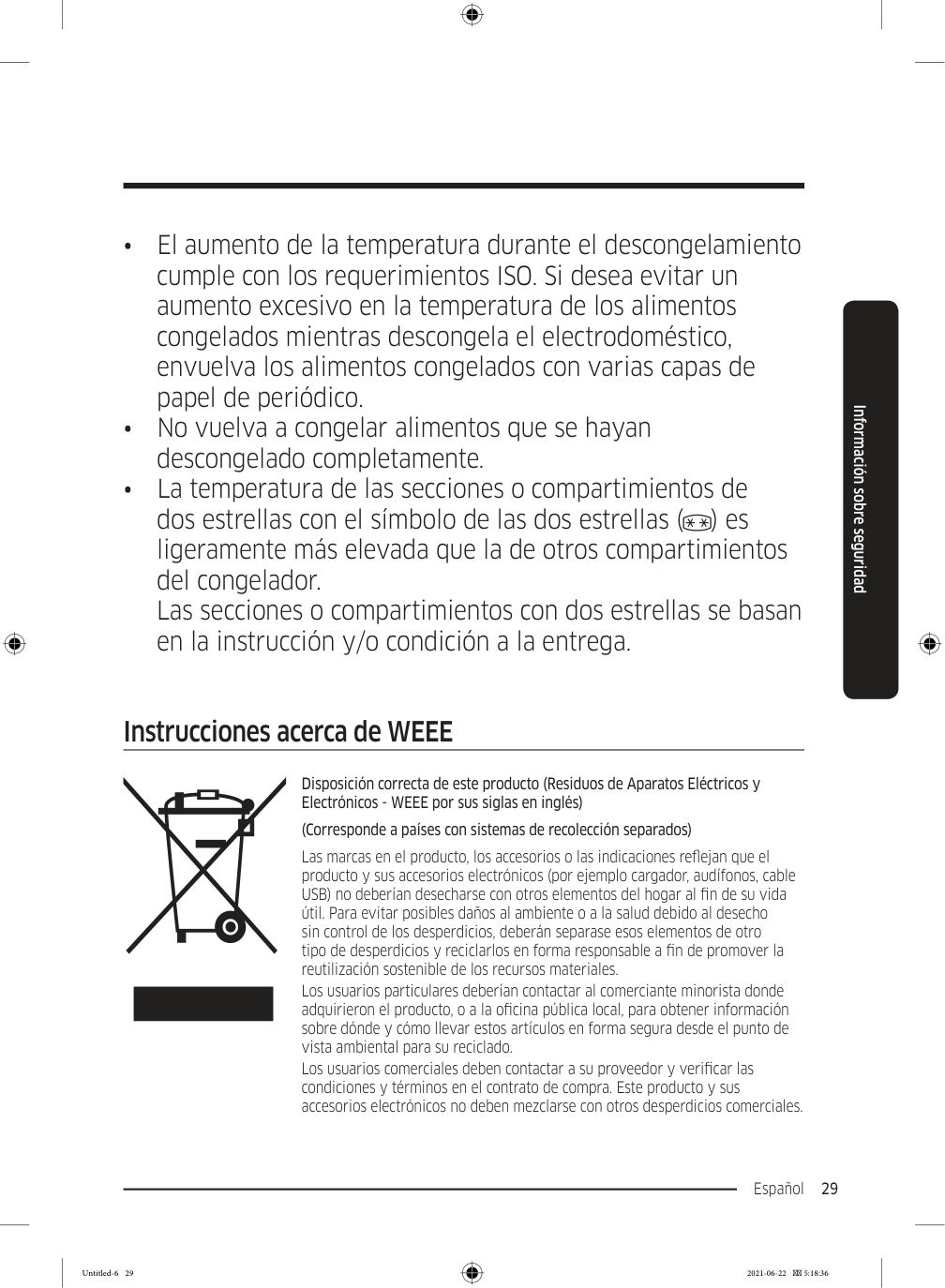
  • Mantenga los materiales de empaque fuera del alcance de
  • los niños, ya que pueden ser peligrosos para ellos.
  • Si un niño se coloca una bolsa en la cabeza, puede
  • asfixiarse. Recomendaciones adicionales para el uso adecuado
  • En caso de un corte de energía, comuníquese con la oficina
  • local de su compañía de electricidad y pregunte cuánto tiempo durará el corte.
  • La mayoría de los cortes de energía que se solucionan
  • dentro del lapso de una o dos horas no afectan las temperaturas del refrigerador. Sin embargo, deberá abrir la puerta la menor cantidad de veces posible.
  • Si el corte de energía dura más de 24 horas, deberá
  • retirar y desechar toda la comida congelada.
  • El refrigerador puede no funcionar de manera uniforme
  • (el contenido puede descongelarse o la temperatura en el compartimiento de comidas congeladas puede elevarse) si se lo coloca durante un tiempo prolongado en un sitio donde la temperatura del ambiente esté constantemente por debajo de las temperaturas para las que está diseñado el electrodoméstico.
  • Algunos alimentos especiales, debido a sus características,
  • pueden conservarse mal durante la refrigeración.
  • El refrigerador es “no frost”, lo que significa que no es
  • necesario descongelarlo manualmente. Esto se hará de forma automática. Untitled-6 28 2021-06-22  5:18:36

    Page 113

    Español 29 Información sobre seguridad
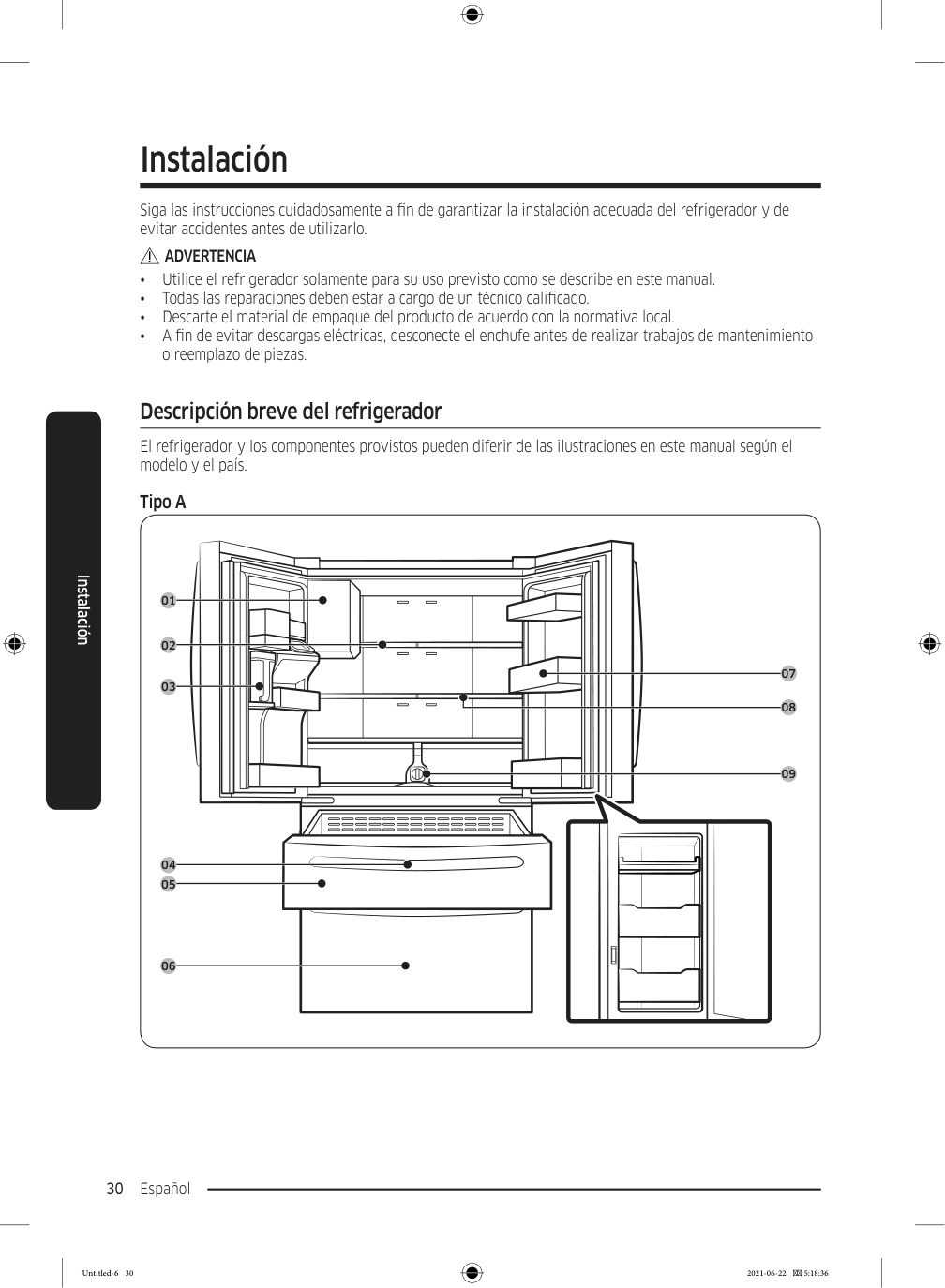
  • El aumento de la temperatura durante el descongelamiento
  • cumple con los requerimientos ISO. Si desea evitar un aumento excesivo en la temperatura de los alimentos congelados mientras descongela el electrodoméstico, envuelva los alimentos congelados con varias capas de papel de periódico.
  • No vuelva a congelar alimentos que se hayan
  • descongelado completamente.
  • La temperatura de las secciones o compartimientos de
  • dos estrellas con el símbolo de las dos estrellas ( ) es ligeramente más elevada que la de otros compartimientos del congelador. Las secciones o compartimientos con dos estrellas se basan en la instrucción y/o condición a la entrega. Instrucciones acerca de WEEE Disposición correcta de este producto (Residuos de Aparatos Eléctricos y Electrónicos - WEEE por sus siglas en inglés) (Corresponde a países con sistemas de recolección separados) Las marcas en el producto, los accesorios o las indicaciones reflejan que el producto y sus accesorios electrónicos (por ejemplo cargador, audífonos, cable USB) no deberían desecharse con otros elementos del hogar al fin de su vida útil. Para evitar posibles daños al ambiente o a la salud debido al desecho sin control de los desperdicios, deberán separase esos elementos de otro tipo de desperdicios y reciclarlos en forma responsable a fin de promover la reutilización sostenible de los recursos materiales. Los usuarios particulares deberían contactar al comerciante minorista donde adquirieron el producto, o a la oficina pública local, para obtener información sobre dónde y cómo llevar estos artículos en forma segura desde el punto de vista ambiental para su reciclado. Los usuarios comerciales deben contactar a su proveedor y verificar las condiciones y términos en el contrato de compra. Este producto y sus accesorios electrónicos no deben mezclarse con otros desperdicios comerciales. Untitled-6 29 2021-06-22  5:18:36

    Page 114

    Español 30 Instalación Siga las instrucciones cuidadosamente a fin de garantizar la instalación adecuada del refrigerador y de evitar accidentes antes de utilizarlo.

    Advertencia

    • Utilice el refrigerador solamente para su uso previsto como se describe en este manual. • Todas las reparaciones deben estar a cargo de un técnico calificado. • Descarte el material de empaque del producto de acuerdo con la normativa local. • A fin de evitar descargas eléctricas, desconecte el enchufe antes de realizar trabajos de mantenimiento o reemplazo de piezas. Descripción breve del refrigerador El refrigerador y los componentes provistos pueden diferir de las ilustraciones en este manual según el modelo y el país. Tipo A 01 02 03 05 04 06 08 09 07 Instalación Untitled-6 30 2021-06-22  5:18:36
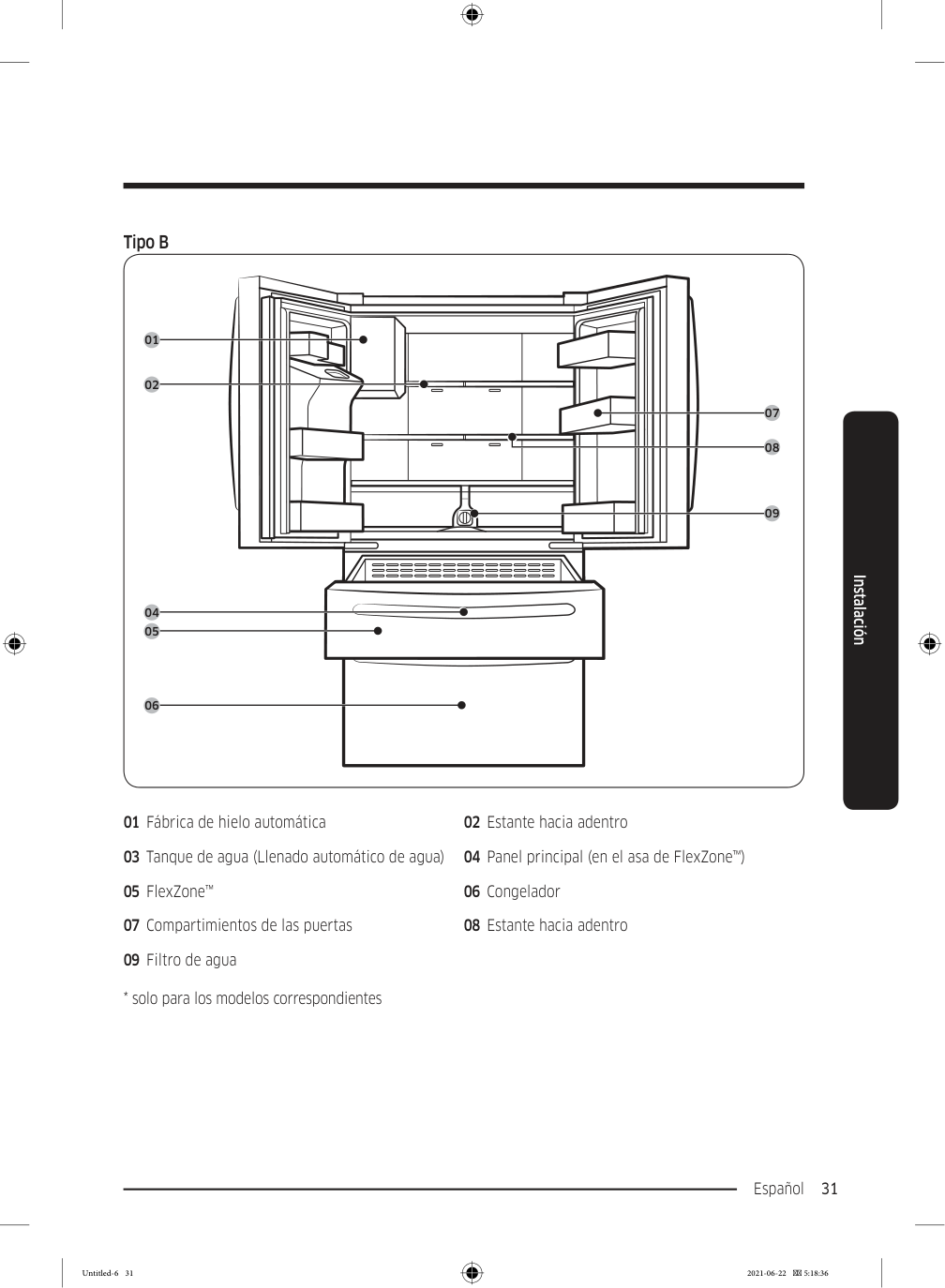
    Page 115

    Español 31 Instalación Tipo B 01 02 05 04 06 08 09 07 01 Fábrica de hielo automática 02 Estante hacia adentro 03 Tanque de agua (Llenado automático de agua) 04 Panel principal (en el asa de FlexZone™) 05 FlexZone™ 06 Congelador 07 Compartimientos de las puertas 08 Estante hacia adentro 09 Filtro de agua
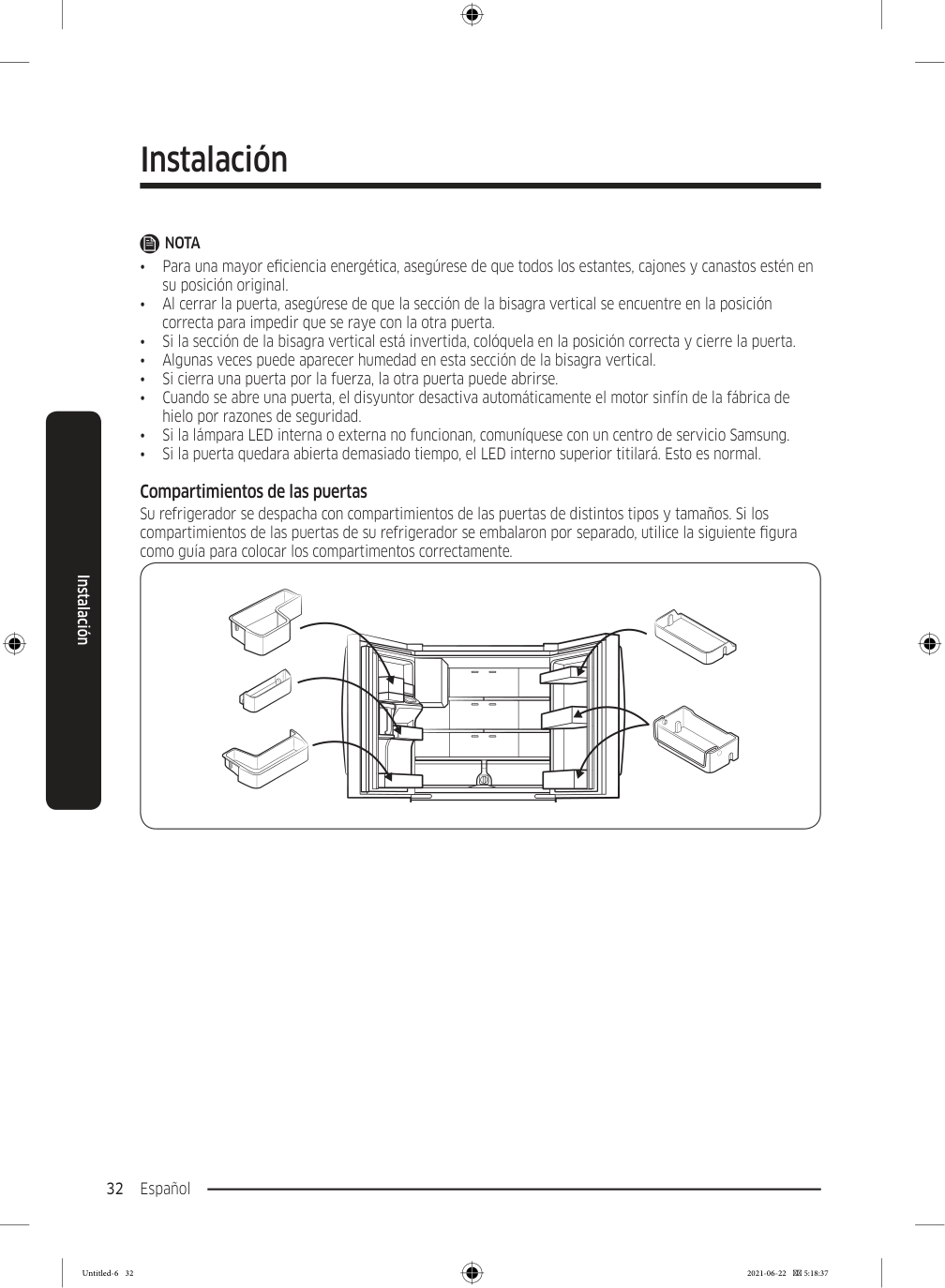
  • solo para los modelos correspondientes
  • Untitled-6 31 2021-06-22  5:18:36

    Page 116

    Instalación Español 32 Instalación

    Nota

    • Para una mayor eficiencia energética, asegúrese de que todos los estantes, cajones y canastos estén en su posición original. • Al cerrar la puerta, asegúrese de que la sección de la bisagra vertical se encuentre en la posición correcta para impedir que se raye con la otra puerta. • Si la sección de la bisagra vertical está invertida, colóquela en la posición correcta y cierre la puerta. • Algunas veces puede aparecer humedad en esta sección de la bisagra vertical. • Si cierra una puerta por la fuerza, la otra puerta puede abrirse. • Cuando se abre una puerta, el disyuntor desactiva automáticamente el motor sinfín de la fábrica de hielo por razones de seguridad. • Si la lámpara LED interna o externa no funcionan, comuníquese con un centro de servicio Samsung. • Si la puerta quedara abierta demasiado tiempo, el LED interno superior titilará. Esto es normal. Compartimientos de las puertas Su refrigerador se despacha con compartimientos de las puertas de distintos tipos y tamaños. Si los compartimientos de las puertas de su refrigerador se embalaron por separado, utilice la siguiente figura como guía para colocar los compartimentos correctamente. Untitled-6 32 2021-06-22  5:18:37
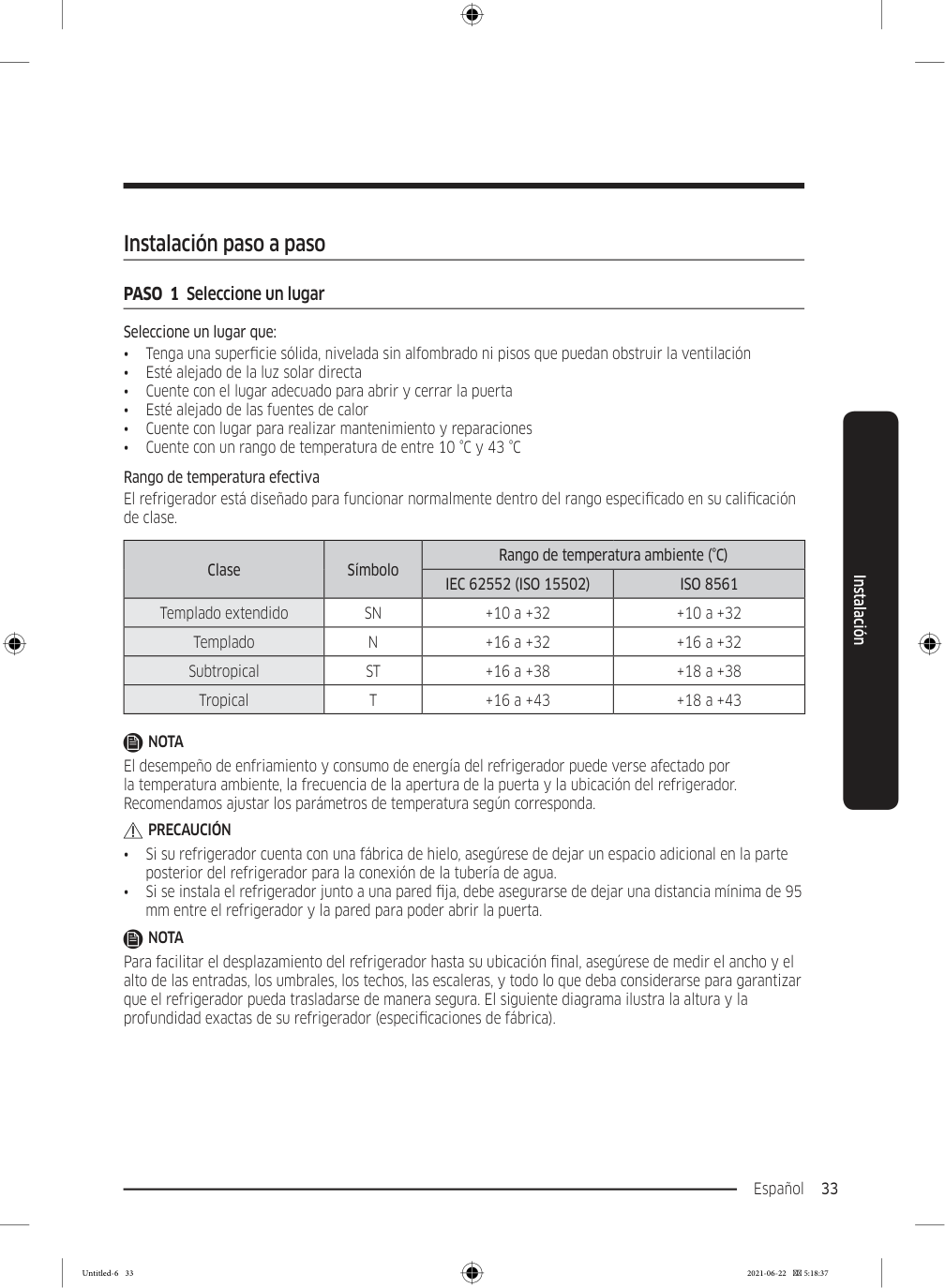
    Page 117

    Español 33 Instalación Instalación paso a paso PASO  1  Seleccione un lugar Seleccione un lugar que: • Tenga una superficie sólida, nivelada sin alfombrado ni pisos que puedan obstruir la ventilación • Esté alejado de la luz solar directa • Cuente con el lugar adecuado para abrir y cerrar la puerta • Esté alejado de las fuentes de calor • Cuente con lugar para realizar mantenimiento y reparaciones • Cuente con un rango de temperatura de entre 10 °C y 43 °C Rango de temperatura efectiva El refrigerador está diseñado para funcionar normalmente dentro del rango especificado en su calificación de clase. Clase Símbolo Rango de temperatura ambiente (°C)

    Iec 62552 (Iso 15502)

    Iso 8561

    Templado extendido

    Sn

    +10 a +32 +10 a +32 Templado

    N

    +16 a +32 +16 a +32 Subtropical

    St

    +16 a +38 +18 a +38 Tropical

    T

    +16 a +43 +18 a +43

    Nota

    El desempeño de enfriamiento y consumo de energía del refrigerador puede verse afectado por la temperatura ambiente, la frecuencia de la apertura de la puerta y la ubicación del refrigerador. Recomendamos ajustar los parámetros de temperatura según corresponda.

    Precaución

    • Si su refrigerador cuenta con una fábrica de hielo, asegúrese de dejar un espacio adicional en la parte posterior del refrigerador para la conexión de la tubería de agua. • Si se instala el refrigerador junto a una pared fija, debe asegurarse de dejar una distancia mínima de 95 mm entre el refrigerador y la pared para poder abrir la puerta.

    Nota

    Para facilitar el desplazamiento del refrigerador hasta su ubicación final, asegúrese de medir el ancho y el alto de las entradas, los umbrales, los techos, las escaleras, y todo lo que deba considerarse para garantizar que el refrigerador pueda trasladarse de manera segura. El siguiente diagrama ilustra la altura y la profundidad exactas de su refrigerador (especificaciones de fábrica). Untitled-6 33 2021-06-22  5:18:37
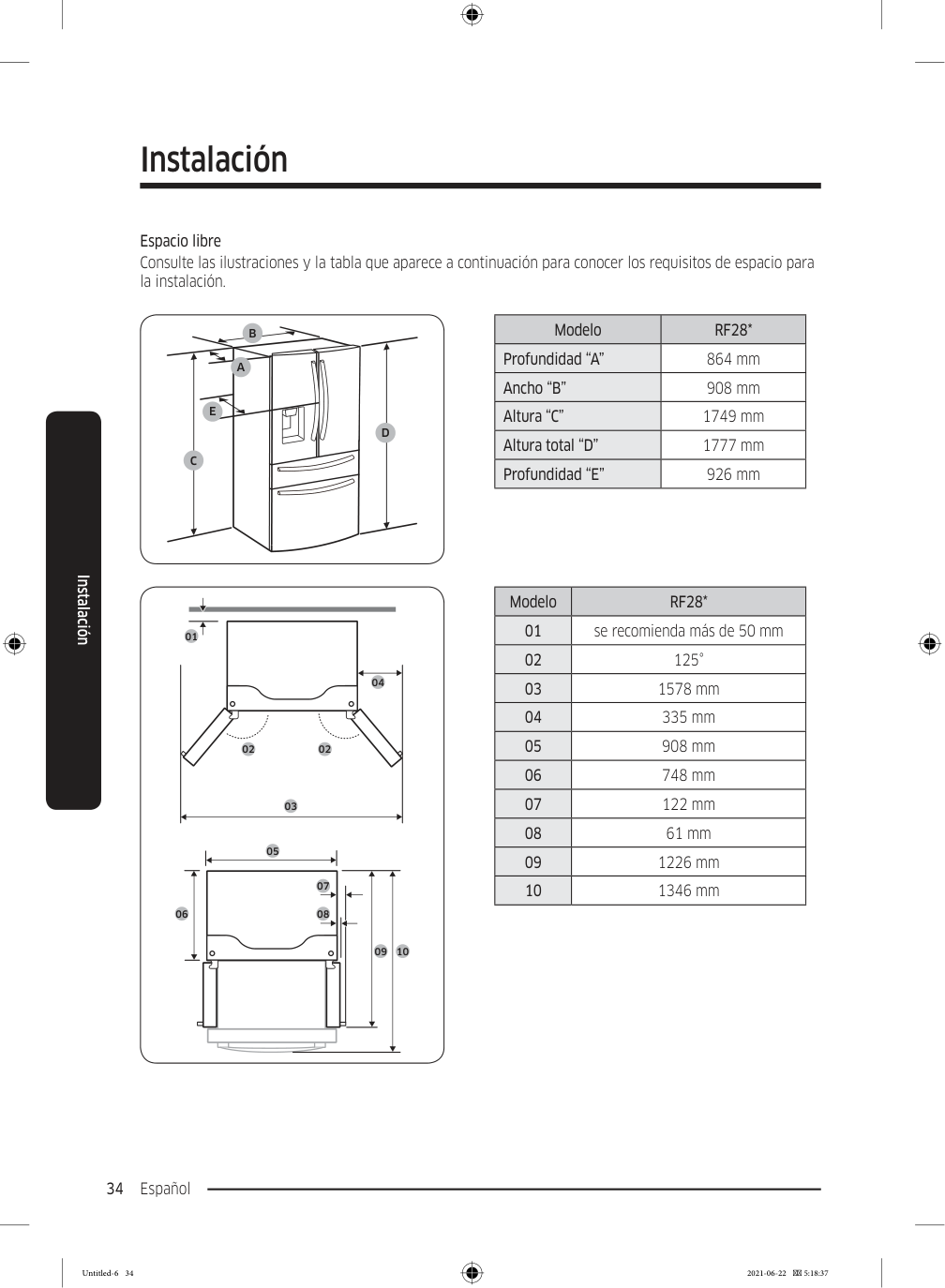
    Page 118

    Instalación Español 34 Instalación Espacio libre Consulte las ilustraciones y la tabla que aparece a continuación para conocer los requisitos de espacio para la instalación.

    C

    D

    E

    B

    A

    Modelo

    Rf28*

    Profundidad “A” 864 mm Ancho “B” 908 mm Altura “C” 1749 mm Altura total “D” 1777 mm Profundidad “E” 926 mm 01 02 02 04 03 05 06 09 10 07 08 Modelo

    Rf28*

    01 se recomienda más de 50 mm 02 125° 03 1578 mm 04 335 mm 05 908 mm 06 748 mm 07 122 mm 08 61 mm 09 1226 mm 10 1346 mm Untitled-6 34 2021-06-22  5:18:37
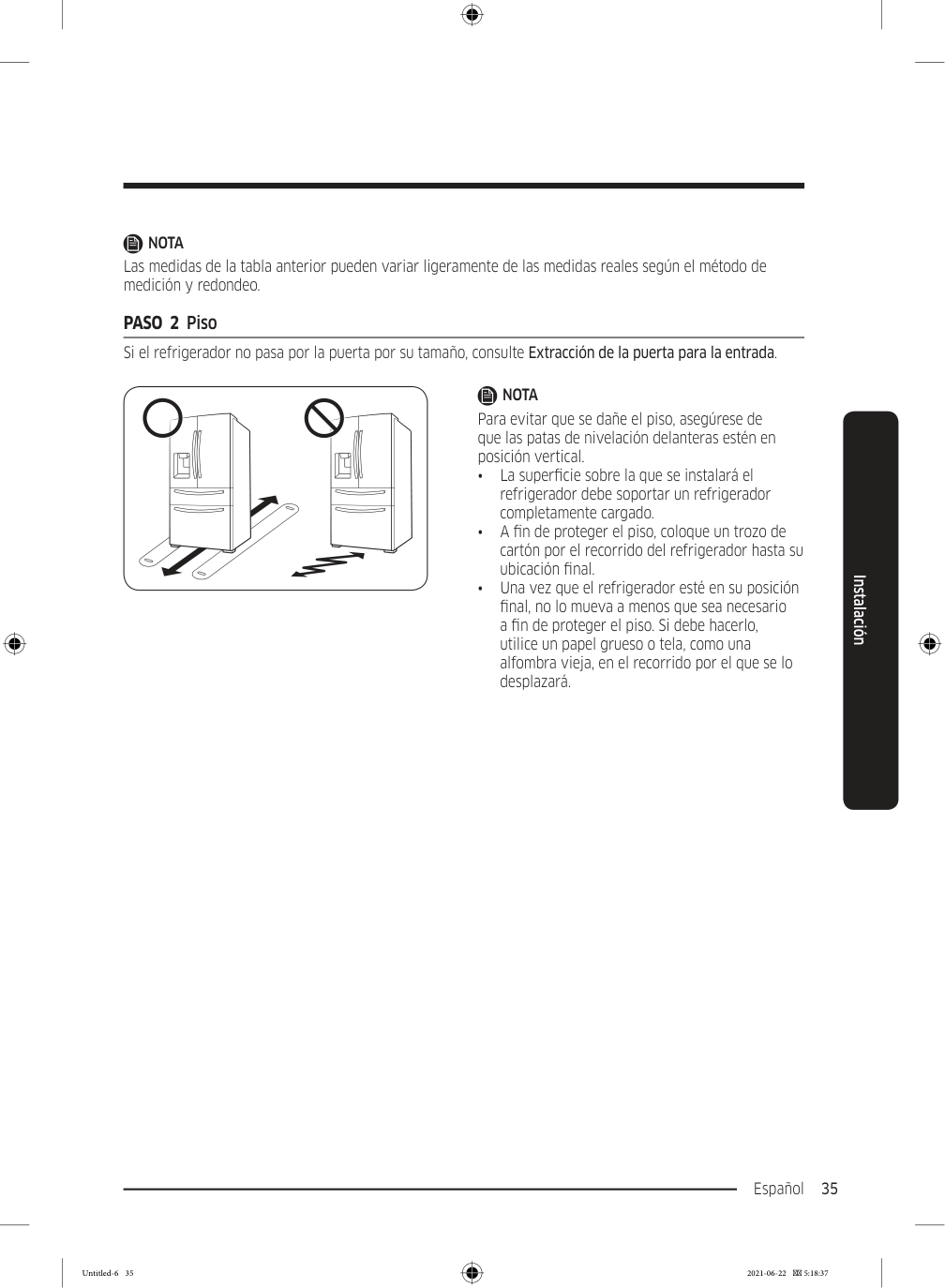
    Page 119

    Español 35 Instalación

    Nota

    Las medidas de la tabla anterior pueden variar ligeramente de las medidas reales según el método de medición y redondeo. PASO  2  Piso Si el refrigerador no pasa por la puerta por su tamaño, consulte Extracción de la puerta para la entrada.

    Nota

    Para evitar que se dañe el piso, asegúrese de que las patas de nivelación delanteras estén en posición vertical. • La superficie sobre la que se instalará el refrigerador debe soportar un refrigerador completamente cargado. • A fin de proteger el piso, coloque un trozo de cartón por el recorrido del refrigerador hasta su ubicación final. • Una vez que el refrigerador esté en su posición final, no lo mueva a menos que sea necesario a fin de proteger el piso. Si debe hacerlo, utilice un papel grueso o tela, como una alfombra vieja, en el recorrido por el que se lo desplazará. Untitled-6 35 2021-06-22  5:18:37
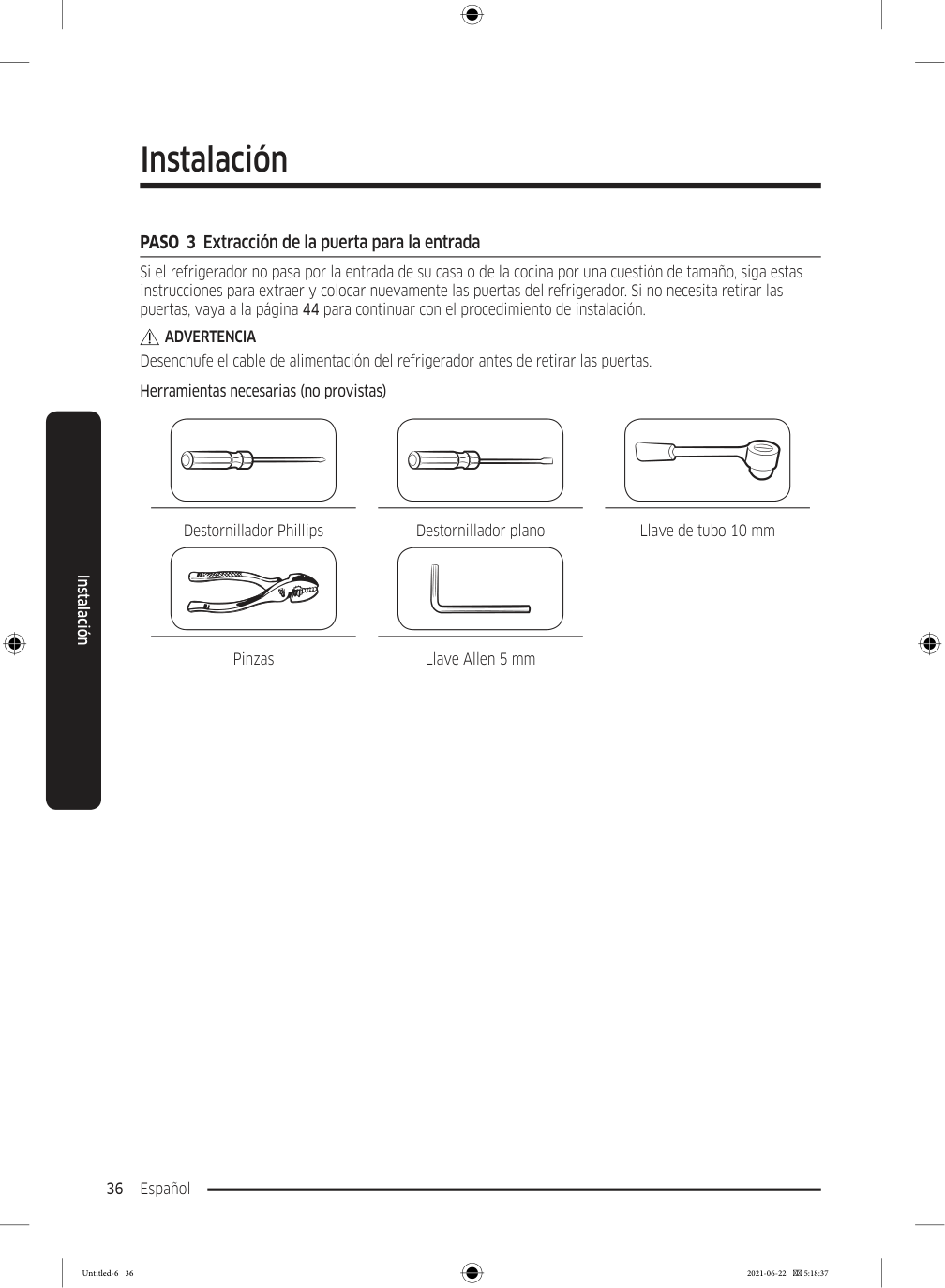
    Page 120

    Instalación Español 36 Instalación PASO  3  Extracción de la puerta para la entrada Si el refrigerador no pasa por la entrada de su casa o de la cocina por una cuestión de tamaño, siga estas instrucciones para extraer y colocar nuevamente las puertas del refrigerador. Si no necesita retirar las puertas, vaya a la página 44 para continuar con el procedimiento de instalación.

    Advertencia

    Desenchufe el cable de alimentación del refrigerador antes de retirar las puertas. Herramientas necesarias (no provistas) Destornillador Phillips Destornillador plano Llave de tubo 10 mm Pinzas Llave Allen 5 mm Untitled-6 36 2021-06-22  5:18:37
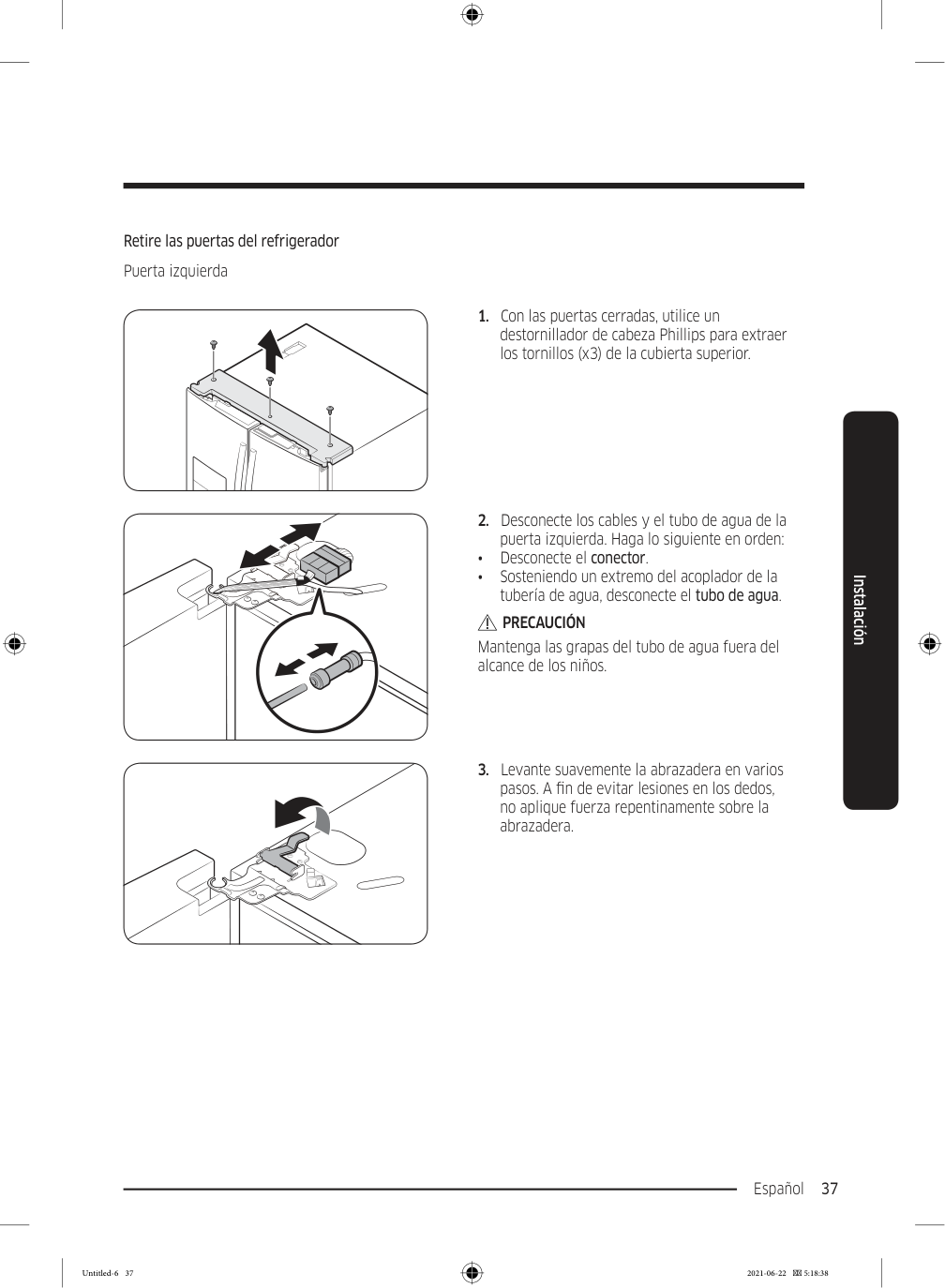
    Page 121

    Español 37 Instalación Retire las puertas del refrigerador Puerta izquierda

  • Con las puertas cerradas, utilice un
  • destornillador de cabeza Phillips para extraer los tornillos (x3) de la cubierta superior.
  • Desconecte los cables y el tubo de agua de la
  • puerta izquierda. Haga lo siguiente en orden: • Desconecte el conector. • Sosteniendo un extremo del acoplador de la tubería de agua, desconecte el tubo de agua.

    Precaución

    Mantenga las grapas del tubo de agua fuera del alcance de los niños.
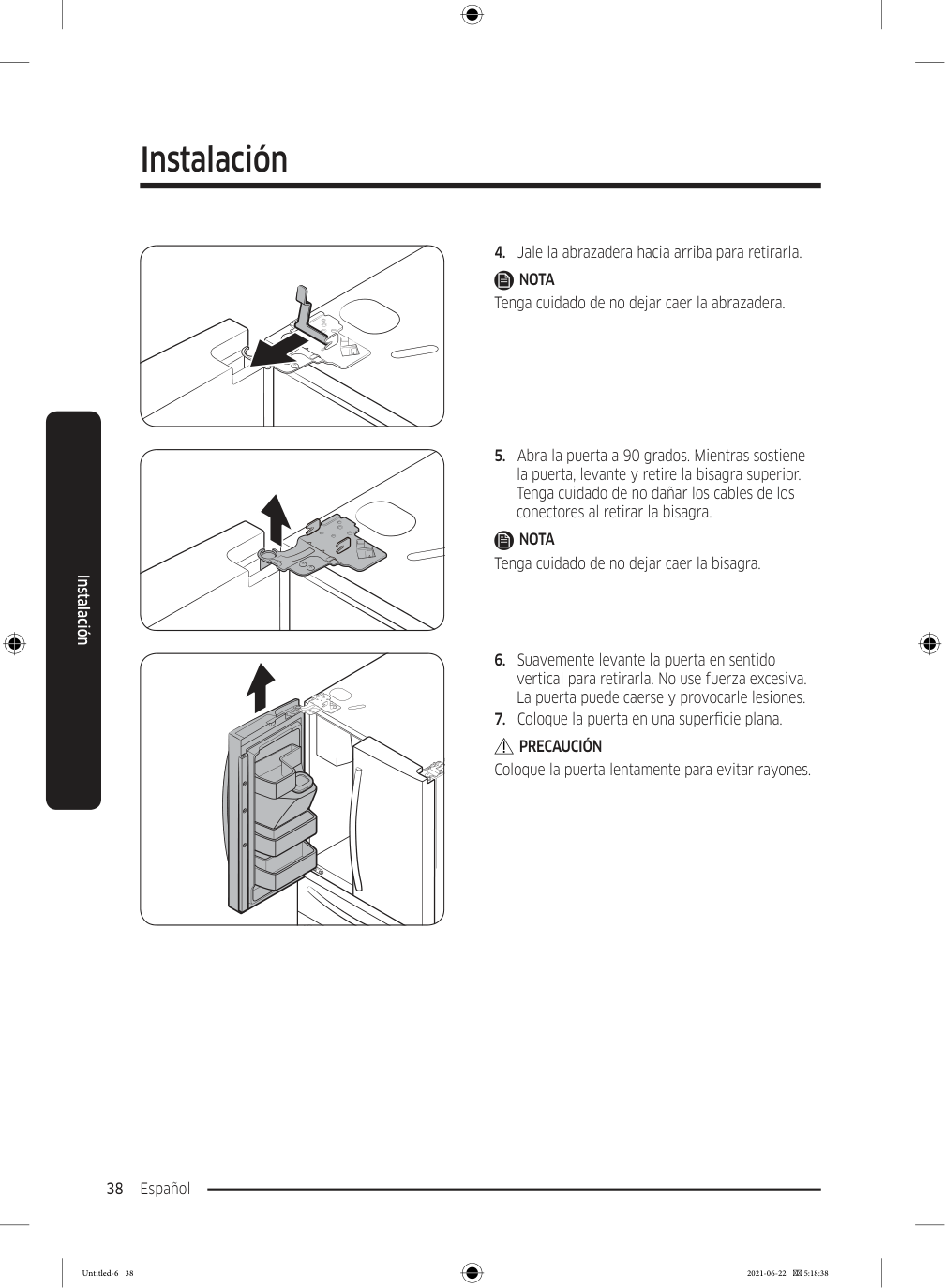
  • Levante suavemente la abrazadera en varios
  • pasos. A fin de evitar lesiones en los dedos, no aplique fuerza repentinamente sobre la abrazadera. Untitled-6 37 2021-06-22  5:18:38

    Page 122

    Instalación Español 38 Instalación

  • Jale la abrazadera hacia arriba para retirarla.
  • Nota

    Tenga cuidado de no dejar caer la abrazadera.
  • Abra la puerta a 90 grados. Mientras sostiene
  • la puerta, levante y retire la bisagra superior. Tenga cuidado de no dañar los cables de los conectores al retirar la bisagra.

    Nota

    Tenga cuidado de no dejar caer la bisagra.
  • Suavemente levante la puerta en sentido
  • vertical para retirarla. No use fuerza excesiva. La puerta puede caerse y provocarle lesiones.
  • Coloque la puerta en una superficie plana.
  • Precaución

    Coloque la puerta lentamente para evitar rayones. Untitled-6 38 2021-06-22  5:18:38
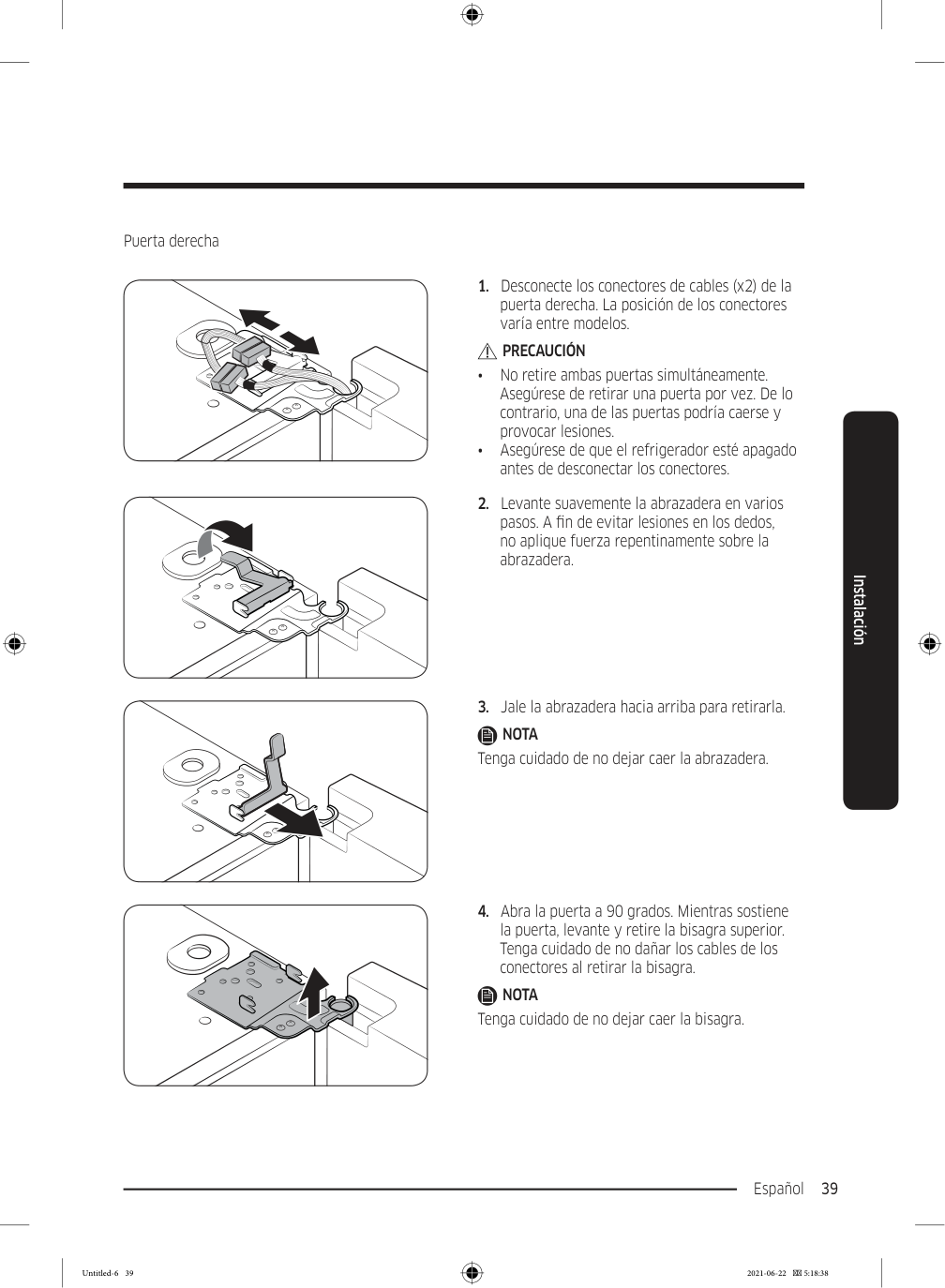
    Page 123

    Español 39 Instalación Puerta derecha

  • Desconecte los conectores de cables (x2) de la
  • puerta derecha. La posición de los conectores varía entre modelos.

    Precaución

    • No retire ambas puertas simultáneamente. Asegúrese de retirar una puerta por vez. De lo contrario, una de las puertas podría caerse y provocar lesiones. • Asegúrese de que el refrigerador esté apagado antes de desconectar los conectores.
  • Levante suavemente la abrazadera en varios
  • pasos. A fin de evitar lesiones en los dedos, no aplique fuerza repentinamente sobre la abrazadera.
  • Jale la abrazadera hacia arriba para retirarla.
  • Nota

    Tenga cuidado de no dejar caer la abrazadera.
  • Abra la puerta a 90 grados. Mientras sostiene
  • la puerta, levante y retire la bisagra superior. Tenga cuidado de no dañar los cables de los conectores al retirar la bisagra.

    Nota

    Tenga cuidado de no dejar caer la bisagra. Untitled-6 39 2021-06-22  5:18:38
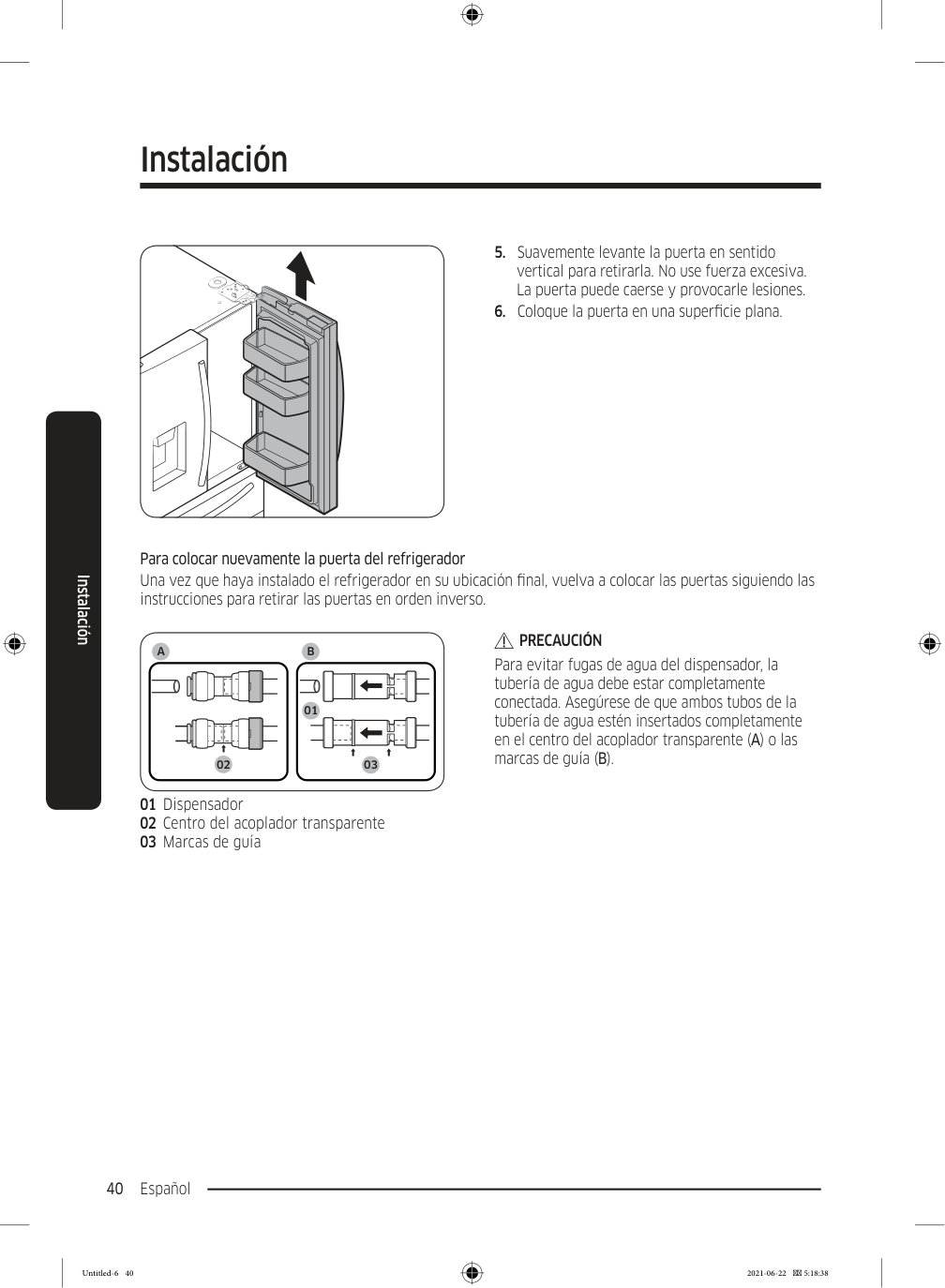
    Page 124

    Instalación Español 40 Instalación

  • Suavemente levante la puerta en sentido
  • vertical para retirarla. No use fuerza excesiva. La puerta puede caerse y provocarle lesiones.
  • Coloque la puerta en una superficie plana.
  • Para colocar nuevamente la puerta del refrigerador Una vez que haya instalado el refrigerador en su ubicación final, vuelva a colocar las puertas siguiendo las instrucciones para retirar las puertas en orden inverso.

    A

    01 02 03

    B

    01 Dispensador 02 Centro del acoplador transparente 03 Marcas de guía

    Precaución

    Para evitar fugas de agua del dispensador, la tubería de agua debe estar completamente conectada. Asegúrese de que ambos tubos de la tubería de agua estén insertados completamente en el centro del acoplador transparente (A) o las marcas de guía (B). Untitled-6 40 2021-06-22  5:18:38
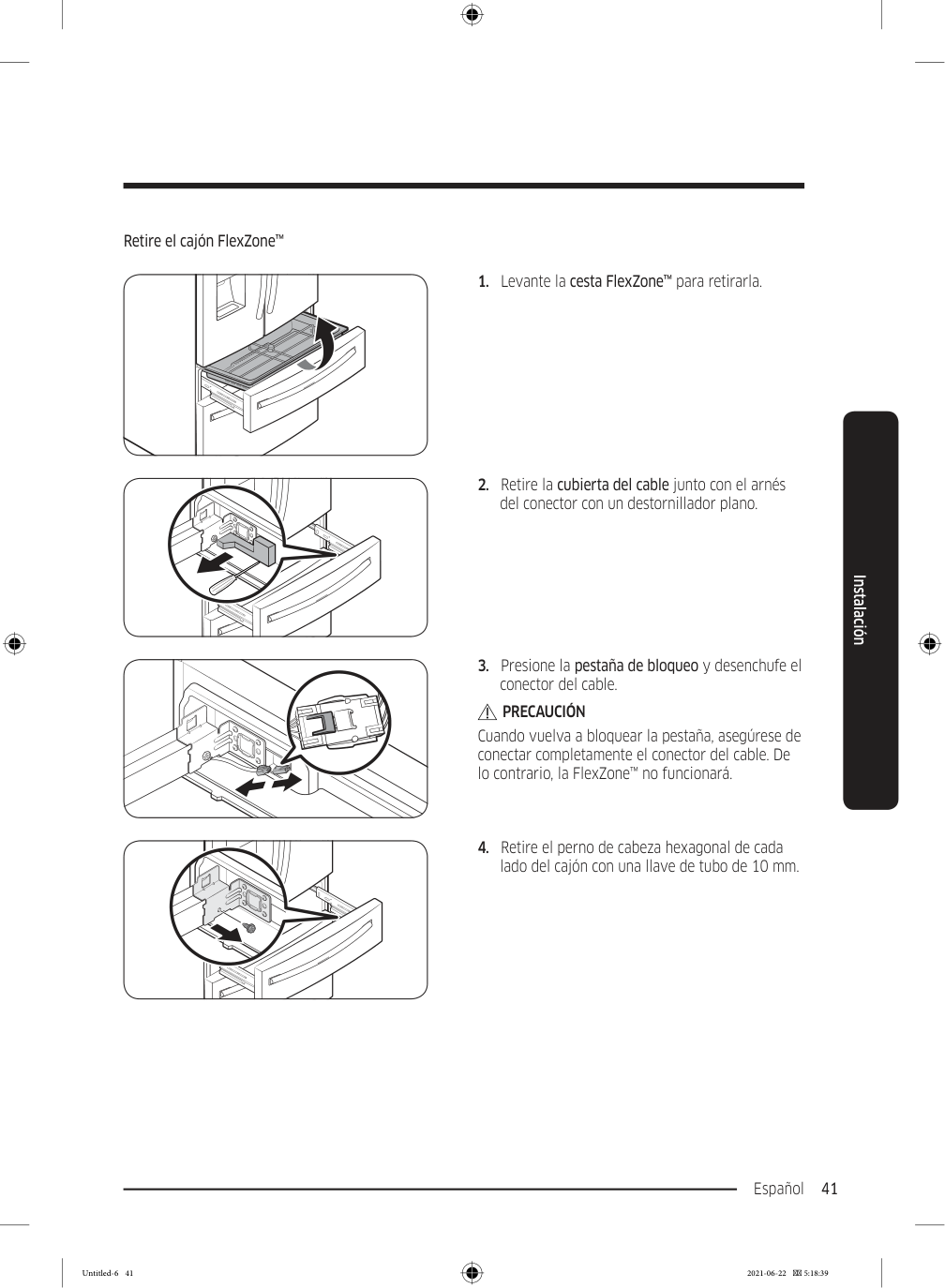
    Page 125

    Español 41 Instalación Retire el cajón FlexZone™

  • Levante la cesta FlexZone™ para retirarla.
  • Retire la cubierta del cable junto con el arnés
  • del conector con un destornillador plano.
  • Presione la pestaña de bloqueo y desenchufe el
  • conector del cable.

    Precaución

    Cuando vuelva a bloquear la pestaña, asegúrese de conectar completamente el conector del cable. De lo contrario, la FlexZone™ no funcionará.
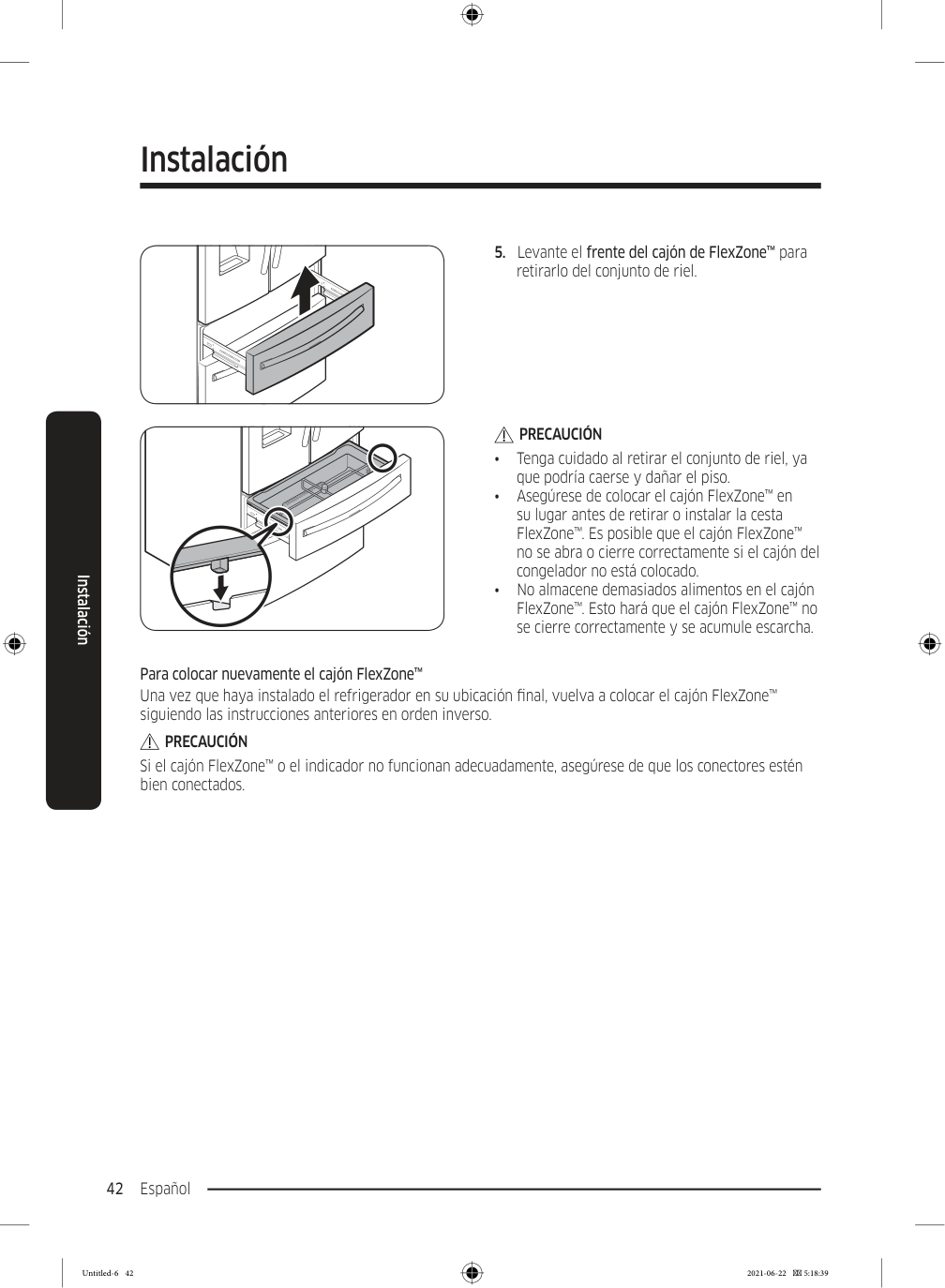
  • Retire el perno de cabeza hexagonal de cada
  • lado del cajón con una llave de tubo de 10 mm. Untitled-6 41 2021-06-22  5:18:39

    Page 126

    Instalación Español 42 Instalación

  • Levante el frente del cajón de FlexZone™ para
  • retirarlo del conjunto de riel.

    Precaución

    • Tenga cuidado al retirar el conjunto de riel, ya que podría caerse y dañar el piso. • Asegúrese de colocar el cajón FlexZone™ en su lugar antes de retirar o instalar la cesta FlexZone™. Es posible que el cajón FlexZone™ no se abra o cierre correctamente si el cajón del congelador no está colocado. • No almacene demasiados alimentos en el cajón FlexZone™. Esto hará que el cajón FlexZone™ no se cierre correctamente y se acumule escarcha. Para colocar nuevamente el cajón FlexZone™ Una vez que haya instalado el refrigerador en su ubicación final, vuelva a colocar el cajón FlexZone™ siguiendo las instrucciones anteriores en orden inverso.

    Precaución

    Si el cajón FlexZone™ o el indicador no funcionan adecuadamente, asegúrese de que los conectores estén bien conectados. Untitled-6 42 2021-06-22  5:18:39
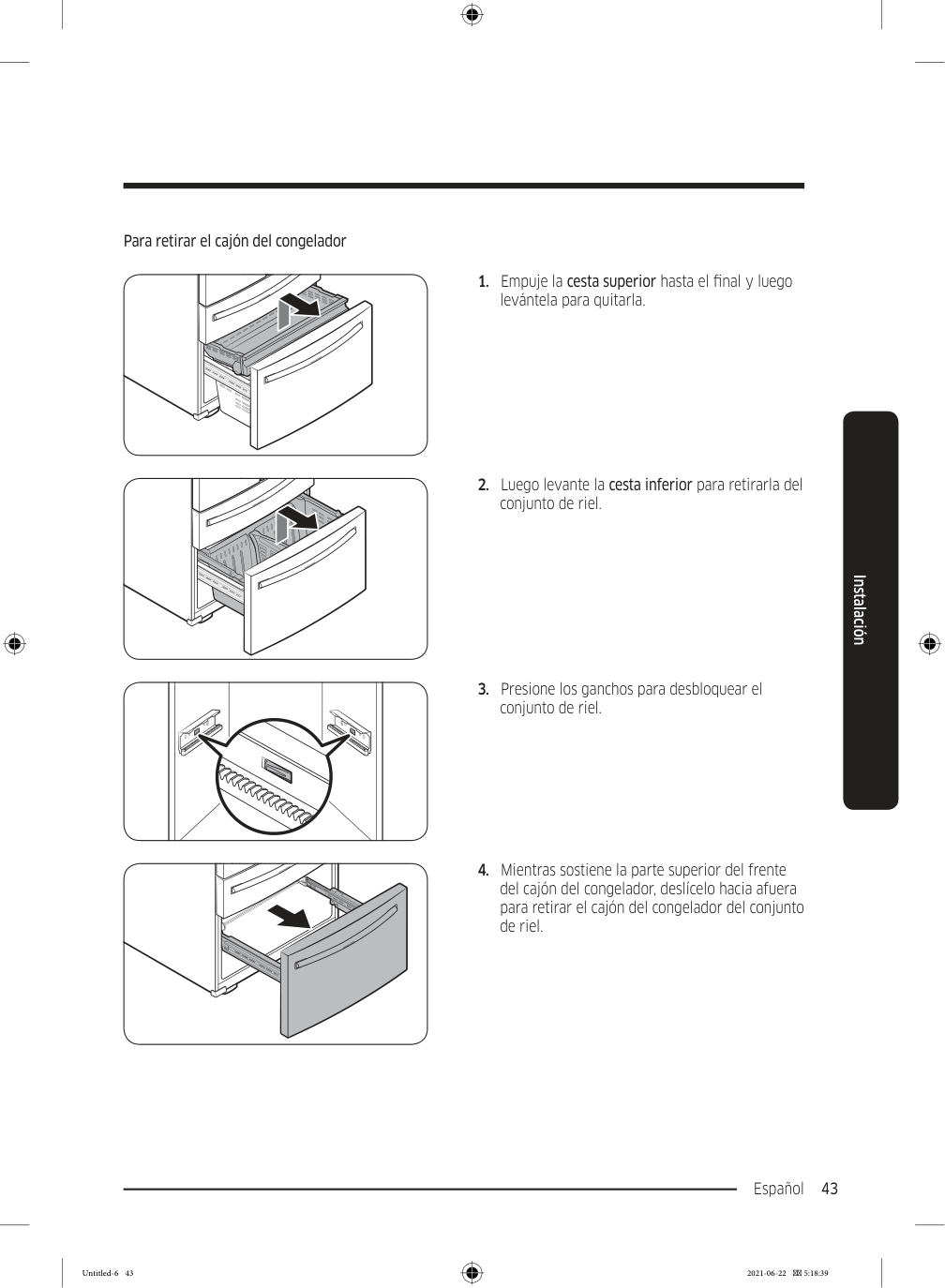
    Page 127

    Español 43 Instalación Para retirar el cajón del congelador
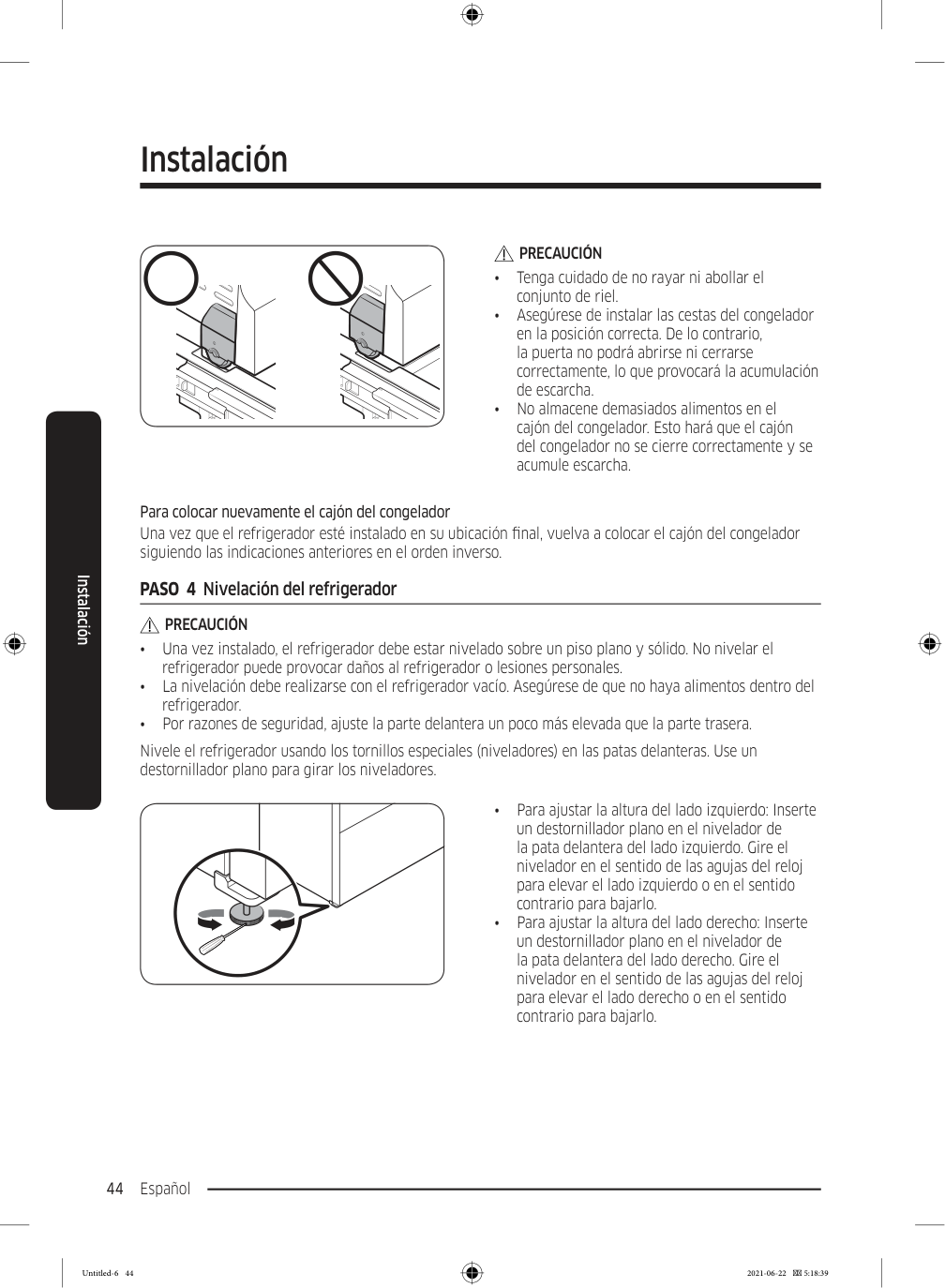
  • Empuje la cesta superior hasta el final y luego
  • levántela para quitarla.
  • Luego levante la cesta inferior para retirarla del
  • conjunto de riel.
  • Presione los ganchos para desbloquear el
  • conjunto de riel.
  • Mientras sostiene la parte superior del frente
  • del cajón del congelador, deslícelo hacia afuera para retirar el cajón del congelador del conjunto de riel. Untitled-6 43 2021-06-22  5:18:39

    Page 128

    Instalación Español 44 Instalación

    Precaución

    • Tenga cuidado de no rayar ni abollar el conjunto de riel. • Asegúrese de instalar las cestas del congelador en la posición correcta. De lo contrario, la puerta no podrá abrirse ni cerrarse correctamente, lo que provocará la acumulación de escarcha. • No almacene demasiados alimentos en el cajón del congelador. Esto hará que el cajón del congelador no se cierre correctamente y se acumule escarcha. Para colocar nuevamente el cajón del congelador Una vez que el refrigerador esté instalado en su ubicación final, vuelva a colocar el cajón del congelador siguiendo las indicaciones anteriores en el orden inverso. PASO  4  Nivelación del refrigerador

    Precaución

    • Una vez instalado, el refrigerador debe estar nivelado sobre un piso plano y sólido. No nivelar el refrigerador puede provocar daños al refrigerador o lesiones personales. • La nivelación debe realizarse con el refrigerador vacío. Asegúrese de que no haya alimentos dentro del refrigerador. • Por razones de seguridad, ajuste la parte delantera un poco más elevada que la parte trasera. Nivele el refrigerador usando los tornillos especiales (niveladores) en las patas delanteras. Use un destornillador plano para girar los niveladores. • Para ajustar la altura del lado izquierdo: Inserte un destornillador plano en el nivelador de la pata delantera del lado izquierdo. Gire el nivelador en el sentido de las agujas del reloj para elevar el lado izquierdo o en el sentido contrario para bajarlo. • Para ajustar la altura del lado derecho: Inserte un destornillador plano en el nivelador de la pata delantera del lado derecho. Gire el nivelador en el sentido de las agujas del reloj para elevar el lado derecho o en el sentido contrario para bajarlo. Untitled-6 44 2021-06-22  5:18:39
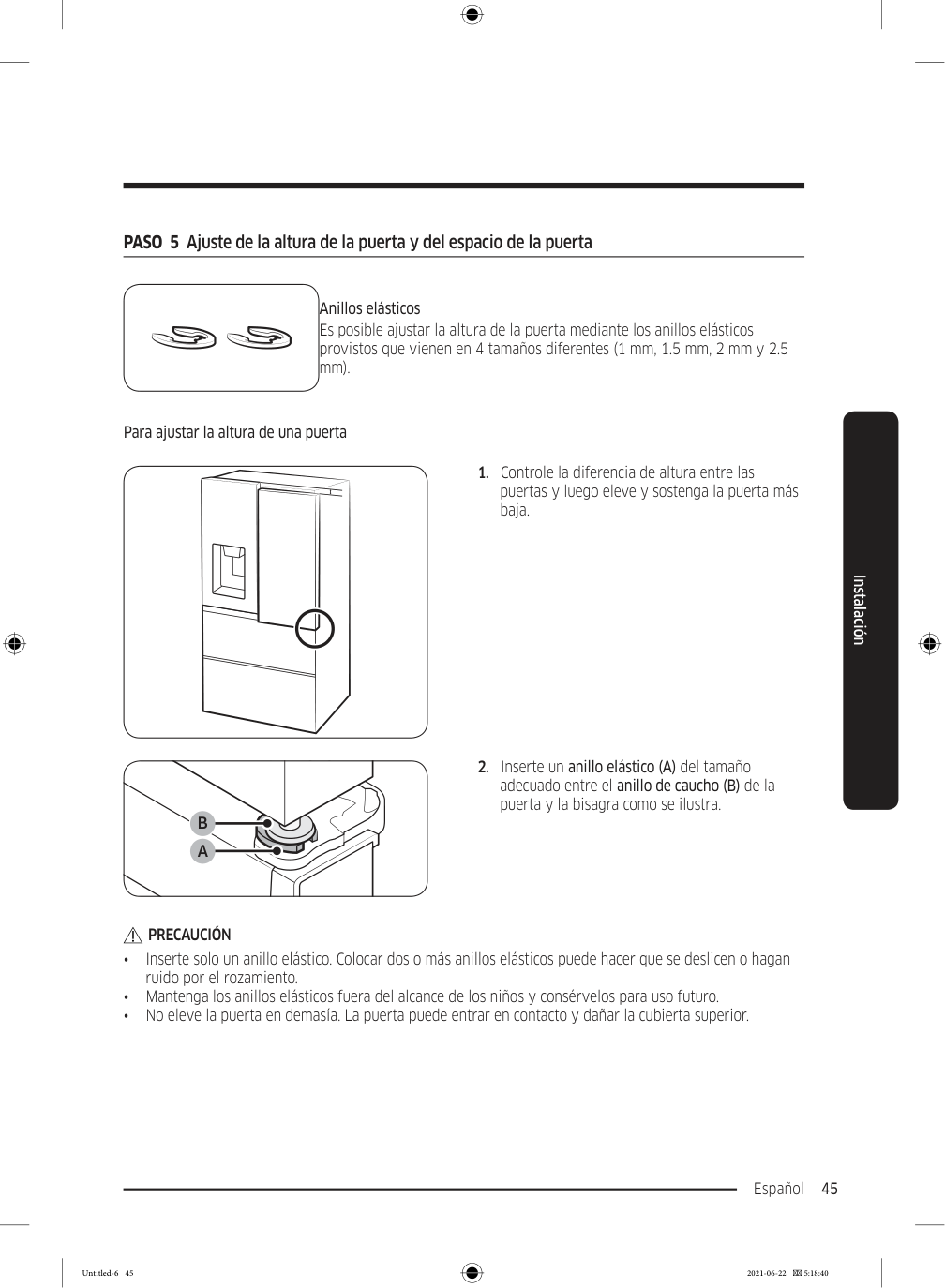
    Page 129

    Español 45 Instalación PASO  5  Ajuste de la altura de la puerta y del espacio de la puerta Anillos elásticos Es posible ajustar la altura de la puerta mediante los anillos elásticos provistos que vienen en 4 tamaños diferentes (1 mm, 1.5 mm, 2 mm y 2.5 mm). Para ajustar la altura de una puerta

  • Controle la diferencia de altura entre las
  • puertas y luego eleve y sostenga la puerta más baja.  9
  • Inserte un anillo elástico (A) del tamaño
  • adecuado entre el anillo de caucho (B) de la puerta y la bisagra como se ilustra.

    Precaución

    • Inserte solo un anillo elástico. Colocar dos o más anillos elásticos puede hacer que se deslicen o hagan ruido por el rozamiento. • Mantenga los anillos elásticos fuera del alcance de los niños y consérvelos para uso futuro. • No eleve la puerta en demasía. La puerta puede entrar en contacto y dañar la cubierta superior. Untitled-6 45 2021-06-22  5:18:40
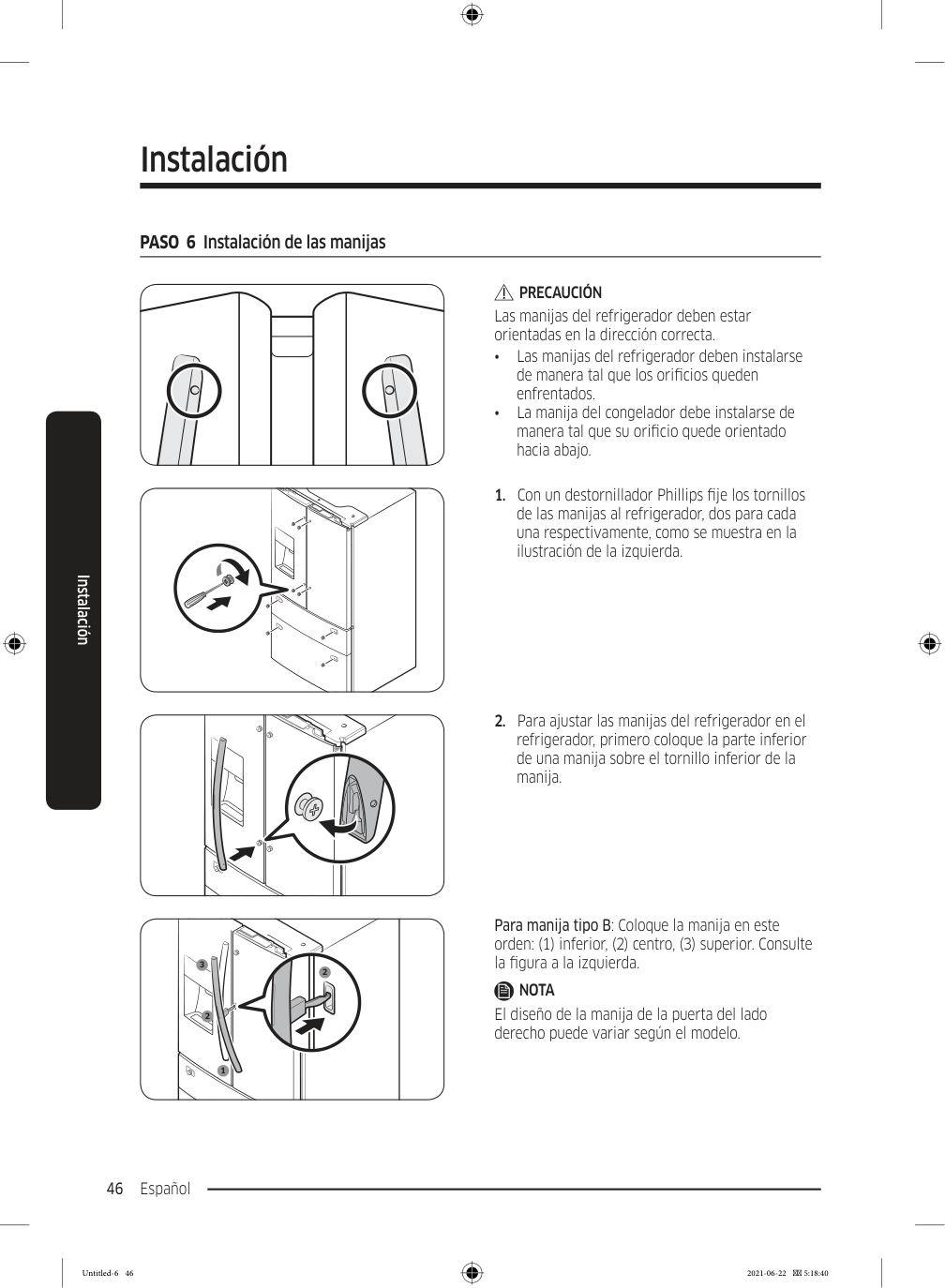
    Page 130

    Instalación Español 46 Instalación PASO  6  Instalación de las manijas

    Precaución

    Las manijas del refrigerador deben estar orientadas en la dirección correcta. • Las manijas del refrigerador deben instalarse de manera tal que los orificios queden enfrentados. • La manija del congelador debe instalarse de manera tal que su orificio quede orientado hacia abajo.
  • Con un destornillador Phillips fije los tornillos
  • de las manijas al refrigerador, dos para cada una respectivamente, como se muestra en la ilustración de la izquierda.
  • Para ajustar las manijas del refrigerador en el
  • refrigerador, primero coloque la parte inferior de una manija sobre el tornillo inferior de la manija. 1 2 3 2 Para manija tipo B: Coloque la manija en este orden: (1) inferior, (2) centro, (3) superior. Consulte la figura a la izquierda.

    Nota

    El diseño de la manija de la puerta del lado derecho puede variar según el modelo. Untitled-6 46 2021-06-22  5:18:40
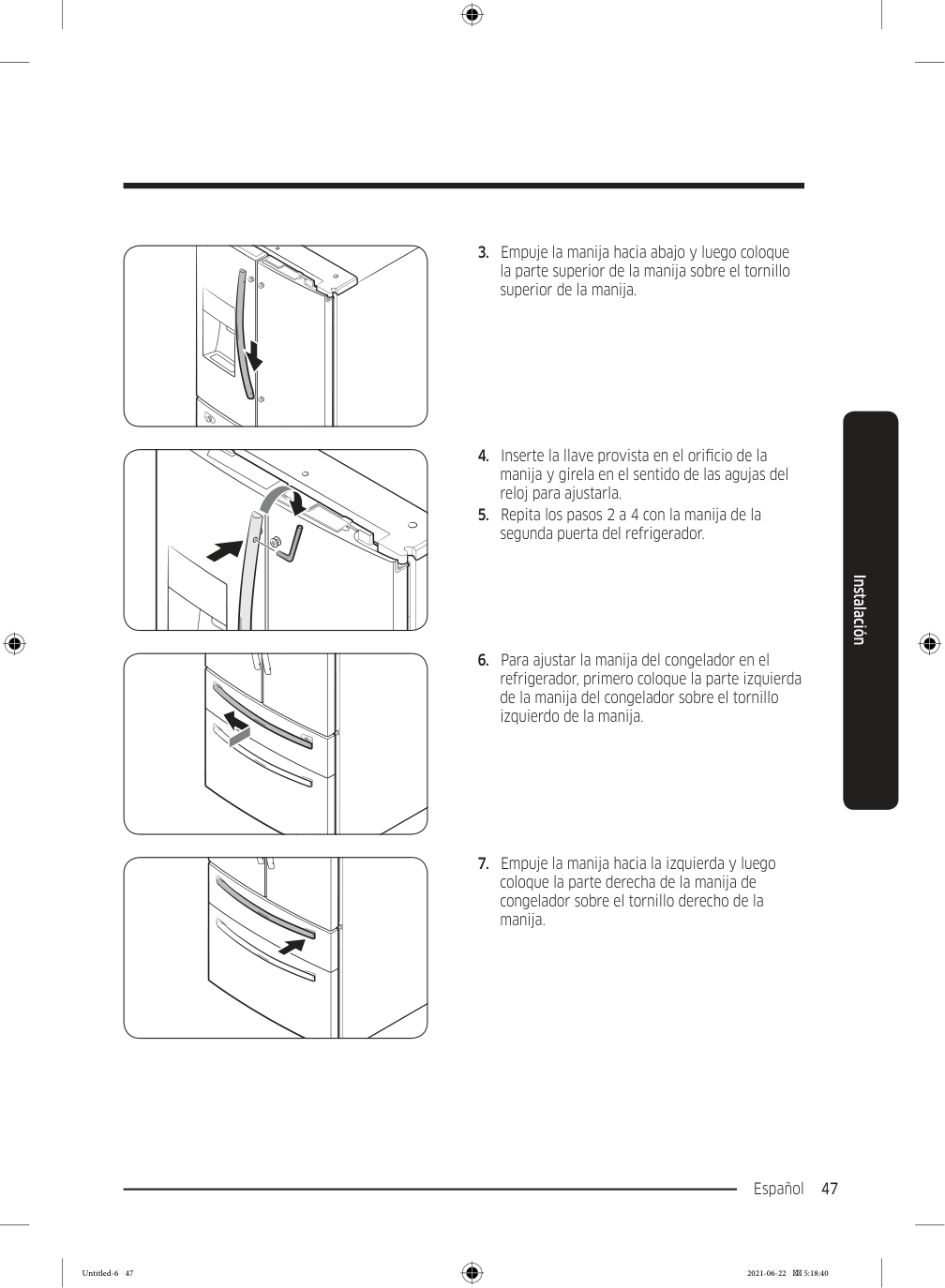
    Page 131

    Español 47 Instalación

  • Empuje la manija hacia abajo y luego coloque
  • la parte superior de la manija sobre el tornillo superior de la manija.
  • Inserte la llave provista en el orificio de la
  • manija y gírela en el sentido de las agujas del reloj para ajustarla.
  • Repita los pasos 2 a 4 con la manija de la
  • segunda puerta del refrigerador.
  • Para ajustar la manija del congelador en el
  • refrigerador, primero coloque la parte izquierda de la manija del congelador sobre el tornillo izquierdo de la manija.
  • Empuje la manija hacia la izquierda y luego
  • coloque la parte derecha de la manija de congelador sobre el tornillo derecho de la manija. Untitled-6 47 2021-06-22  5:18:40

    Page 132

    Instalación Español 48 Instalación

  • Inserte la llave provista en el orificio de la
  • manija y gírela en el sentido de las agujas del reloj para ajustarla. PASO  7  Conexión a una fuente de agua

    Precaución

    • Se deben utilizar las mangueras nuevas provistas con el electrodoméstico y no reutilizar las mangueras antiguas. • La instalación de la tubería de agua solo debe estar a cargo de un técnico calificado. • La garantía del refrigerador no cubre la instalación de la tubería de agua. La instalación de la tubería de agua deberá realizarse a su cargo a menos que la tarifa de instalación esté incluida en el precio minorista. • Samsung no se hace responsable de la instalación de la tubería de agua. En caso de pérdida de agua, comuníquese con el instalador de la tubería de agua. Para conectar la tubería de agua fría a la manguera de filtrado de agua

    Precaución

    • Asegúrese de que la manguera de filtrado de agua esté conectada a una tubería de agua fría y potable. Si se conecta a una tubería de agua caliente, el purificador podría funcionar mal. 1

    A

    B

    A

    A. Cierre de la tubería de agua principal B. Sin espacio
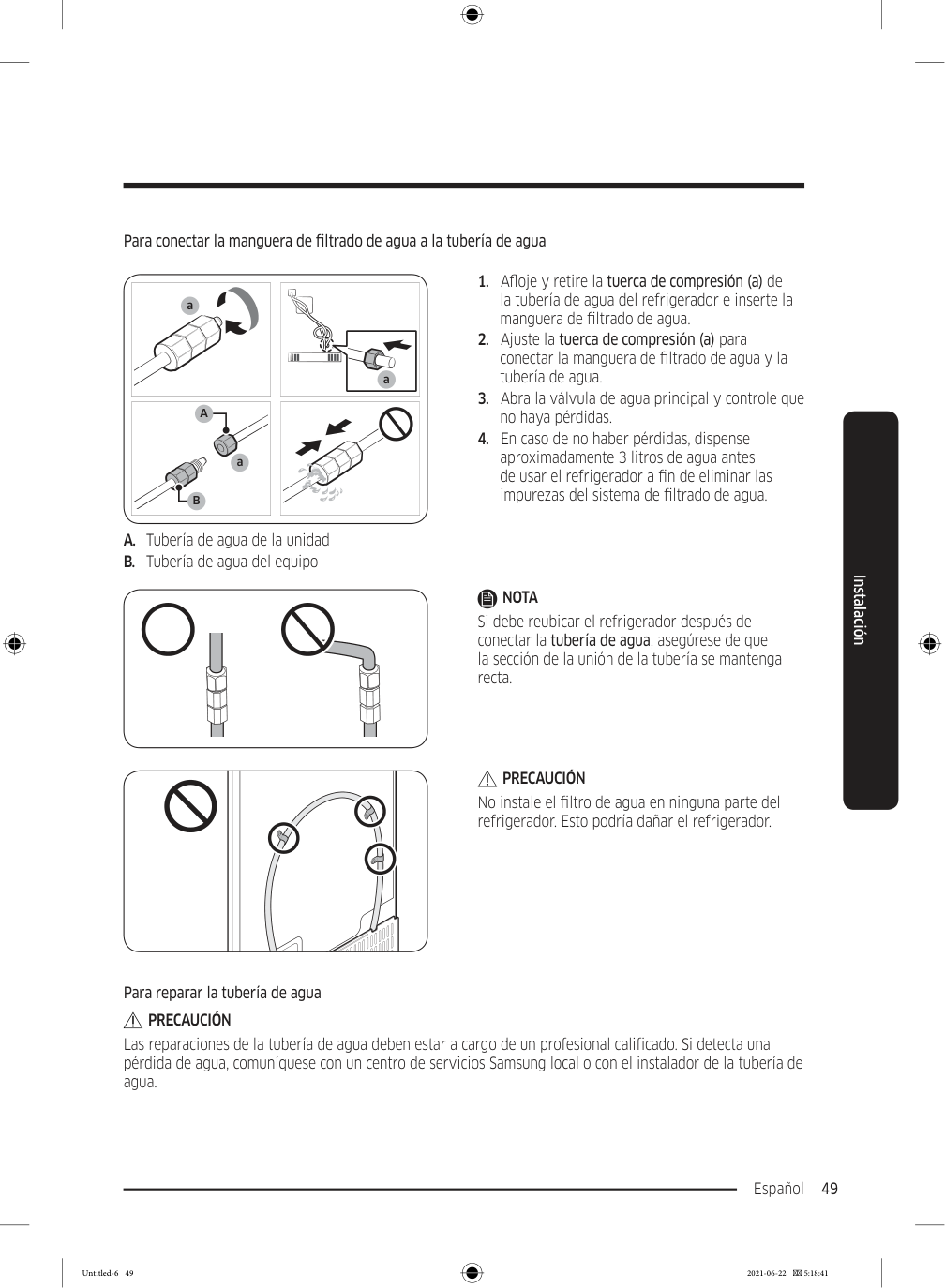
  • Cierre el suministro de agua con la válvula
  • principal.
  • Ubique la tubería de agua (1) fría y potable.
  • Siga las instrucciones de instalación de la
  • tubería de agua para realizar la instalación.
  • Una vez finalizada la conexión, abra la válvula
  • principal de agua y dispense aproximadamente 3 litros de agua. Este procedimiento es para eliminar las impurezas de la tubería. Untitled-6 48 2021-06-22  5:18:41

    Page 133

    Español 49 Instalación Para conectar la manguera de filtrado de agua a la tubería de agua Remove cap a a

    A

    B

    a A. Tubería de agua de la unidad B. Tubería de agua del equipo
  • Afloje y retire la tuerca de compresión (a) de
  • la tubería de agua del refrigerador e inserte la manguera de filtrado de agua.
  • Ajuste la tuerca de compresión (a) para
  • conectar la manguera de filtrado de agua y la tubería de agua.
  • Abra la válvula de agua principal y controle que
  • no haya pérdidas.
  • En caso de no haber pérdidas, dispense
  • aproximadamente 3 litros de agua antes de usar el refrigerador a fin de eliminar las impurezas del sistema de filtrado de agua.

    Nota

    Si debe reubicar el refrigerador después de conectar la tubería de agua, asegúrese de que la sección de la unión de la tubería se mantenga recta.

    Precaución

    No instale el filtro de agua en ninguna parte del refrigerador. Esto podría dañar el refrigerador. Para reparar la tubería de agua

    Precaución

    Las reparaciones de la tubería de agua deben estar a cargo de un profesional calificado. Si detecta una pérdida de agua, comuníquese con un centro de servicios Samsung local o con el instalador de la tubería de agua. Untitled-6 49 2021-06-22  5:18:41
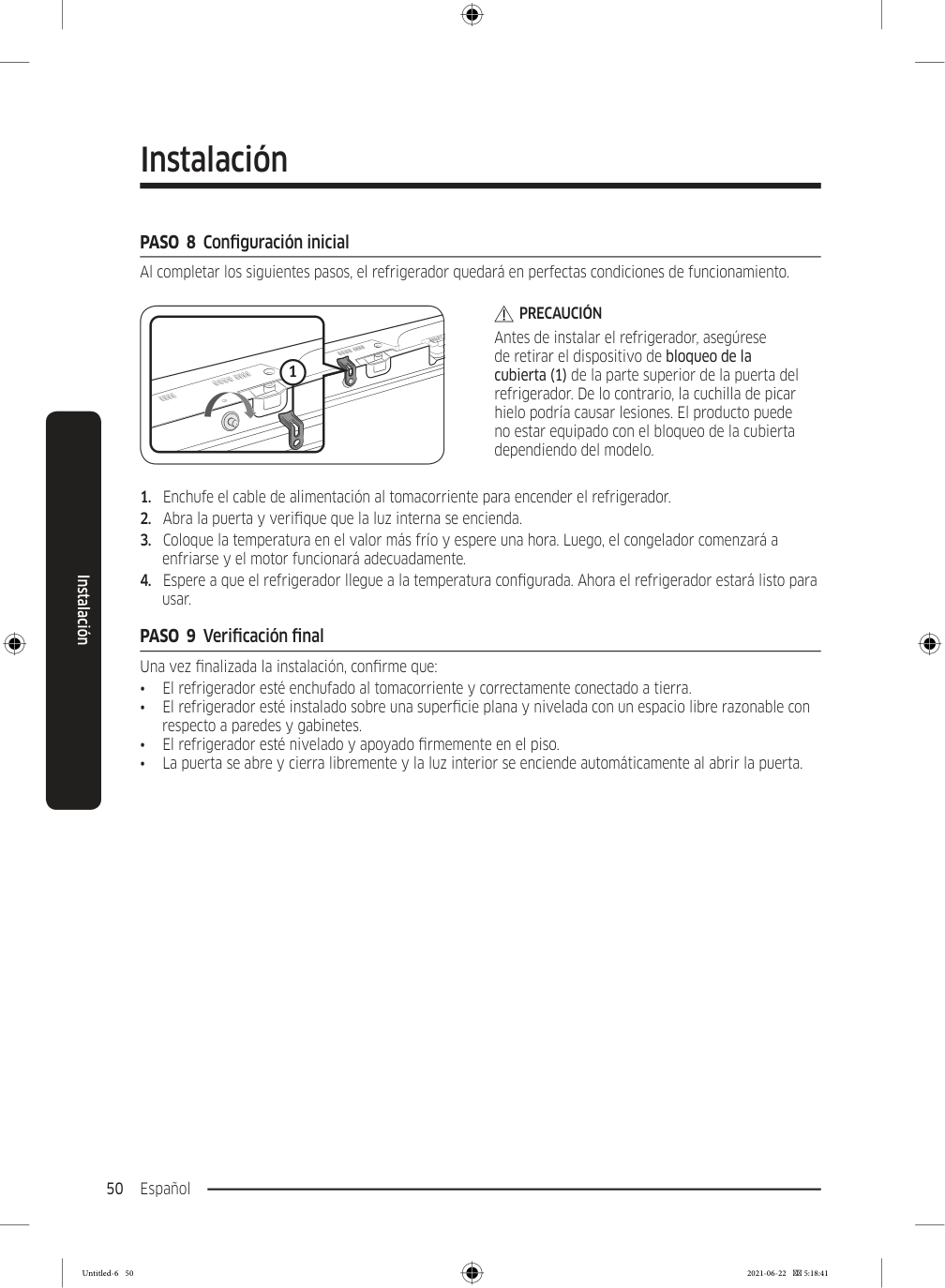
    Page 134

    Instalación Español 50 Instalación PASO  8  Configuración inicial Al completar los siguientes pasos, el refrigerador quedará en perfectas condiciones de funcionamiento. 1

    Precaución

    Antes de instalar el refrigerador, asegúrese de retirar el dispositivo de bloqueo de la cubierta (1) de la parte superior de la puerta del refrigerador. De lo contrario, la cuchilla de picar hielo podría causar lesiones. El producto puede no estar equipado con el bloqueo de la cubierta dependiendo del modelo.
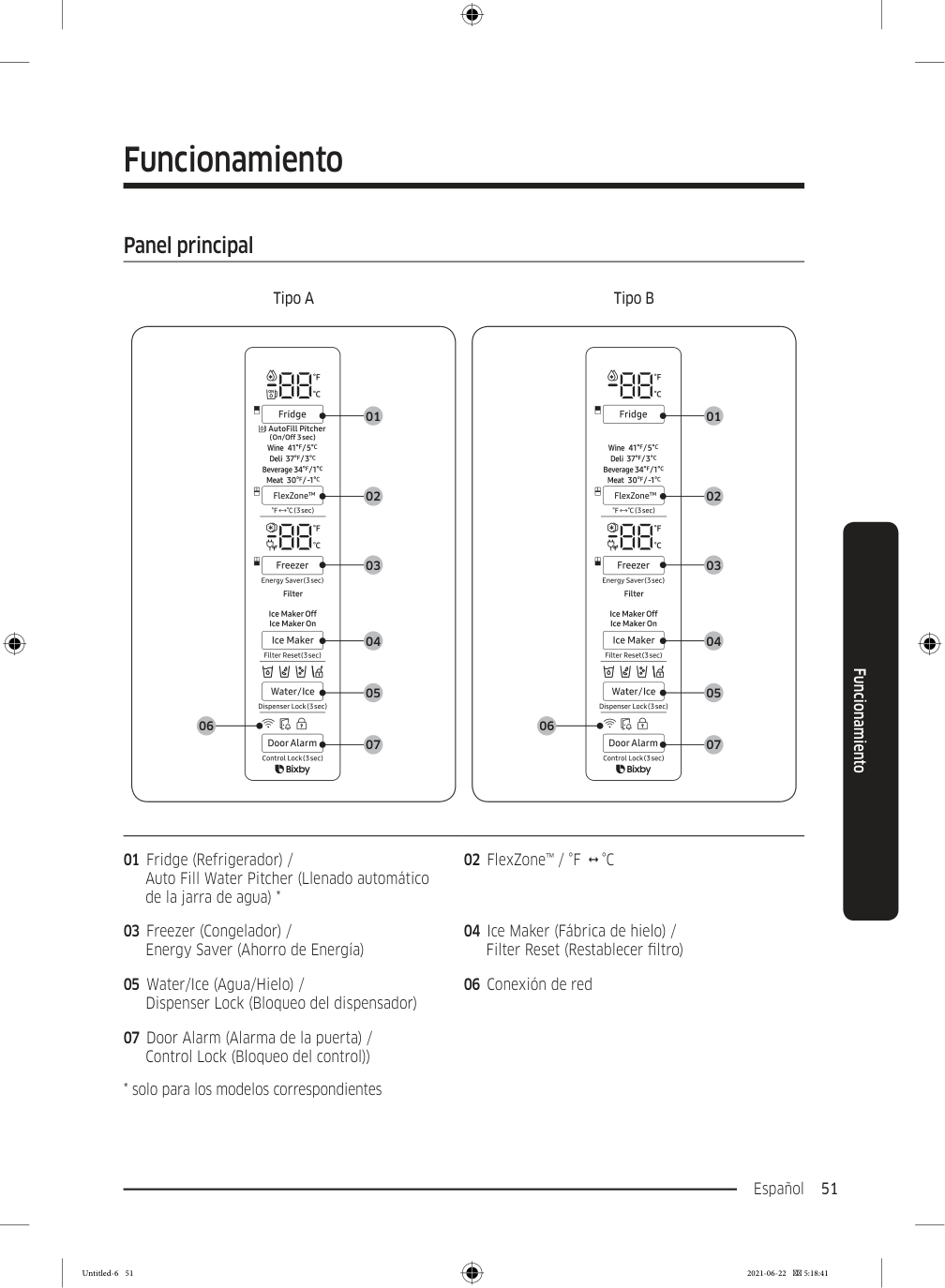
  • Enchufe el cable de alimentación al tomacorriente para encender el refrigerador.
  • Abra la puerta y verifique que la luz interna se encienda.
  • Coloque la temperatura en el valor más frío y espere una hora. Luego, el congelador comenzará a
  • enfriarse y el motor funcionará adecuadamente.
  • Espere a que el refrigerador llegue a la temperatura configurada. Ahora el refrigerador estará listo para
  • usar. PASO  9  Verificación final Una vez finalizada la instalación, confirme que: • El refrigerador esté enchufado al tomacorriente y correctamente conectado a tierra. • El refrigerador esté instalado sobre una superficie plana y nivelada con un espacio libre razonable con respecto a paredes y gabinetes. • El refrigerador esté nivelado y apoyado firmemente en el piso. • La puerta se abre y cierra libremente y la luz interior se enciende automáticamente al abrir la puerta. Untitled-6 50 2021-06-22  5:18:41

    Page 135

    Español 51 Funcionamiento Panel principal Tipo A Tipo B 01 02 03 04 05 07 06 01 02 03 04 05 07 06 01 Fridge (Refrigerador) / Auto Fill Water Pitcher (Llenado automático de la jarra de agua) * 02 FlexZone™ / °F    °C 03 Freezer (Congelador) / Energy Saver (Ahorro de Energía) 04 Ice Maker (Fábrica de hielo) / Filter Reset (Restablecer filtro) 05 Water/Ice (Agua/Hielo) / Dispenser Lock (Bloqueo del dispensador) 06 Conexión de red 07 Door Alarm (Alarma de la puerta) / Control Lock (Bloqueo del control))
  • solo para los modelos correspondientes
  • Funcionamiento Untitled-6 51 2021-06-22  5:18:41

    Page 136

    Funcionamiento Español 52 Funcionamiento

    Nota

    • Cuando cambia la temperatura del panel, este muestra la temperatura actual dentro del refrigerador hasta que se alcanza la temperatura que ha configurado. Luego el panel muestra la nueva temperatura configurada. Tenga en cuenta que el refrigerador necesita un tiempo para alcanzar la nueva temperatura. Esto es normal. Durante este tiempo, no es necesario restablecer la temperatura. • A fin de garantizar un desempeño óptimo, recomendamos configurar la temperatura en -19 °C para el congelador y 3 °C para el refrigerador. • La temperatura del refrigerador puede aumentar si abre la puerta con frecuencia o si se coloca una gran cantidad de alimentos dentro de este. Si esto ocurriera, el visor de temperatura parpadeará hasta que el refrigerador regrese al ajuste de temperatura especificado. • Si se produce un error de comunicación entre el visor de temperatura y el regulador principal, es posible que el parpadeo continúe durante un período prolongado. Comuníquese con un centro de servicios Samsung local para recibir asistencia técnica. • El visor del panel principal solo se enciende si la puerta está abierta, y se apaga cuando la puerta se cierra. • Si activa el Bloqueo del control en el panel principal, este se bloquea automáticamente después de 1 minuto de inactividad. • Bixby es una plataforma de inteligencia de Samsung que le permite controlar el producto con su voz. Para usar la función de comando de voz, debe conectar el producto con la aplicación SmartThings en su teléfono. Con los productos que no reconocen la voz directamente desde el producto, puede usar Bixby en su teléfono inteligente para controlar algunas de las funciones del producto luego de conectar la aplicación. Untitled-6 52 2021-06-22  5:18:41
    Page 137

    Español 53 Funcionamiento 01  Refrigerador / Llenado automático de la jarra de agua (3 segundos) Fridge (Refrigerador) Puede usar el botón Fridge (Refrigerador) para configurar la temperatura del refrigerador o activar Refrigeración rápida. • Presione Fridge (Refrigerador) varias veces para seleccionar una temperatura deseada entre 1 °C y 7 °C.

  • El indicador de temperatura le muestra la temperatura configurada o
  • seleccionada actualmente. • Para activar Refrigeración rápida, presiones Fridge (Refrigerador) repetidamente hasta que se encienda el indicador Refrigeración rápida ( ).
  • Para desactivar Refrigeración rápida, simplemente presione Fridge
  • (Refrigerador) nuevamente con la función Refrigeración rápida activada.
  • Refrigeración rápida acelera el proceso de enfriamiento a máxima
  • potencia para bajar la temperatura del refrigerador. El proceso de Refrigeración rápidadura varias horas y, luego, el refrigerador vuelve a la temperatura configurada anteriormente.
  • Utilice Refrigeración rápida para enfriar rápidamente alimentos
  • que se echan a perder rápidamente o para enfriar rápidamente el refrigerador después de haber permanecido abierto por un tiempo.

    Nota

    Utilizar Refrigeración rápida aumenta el consumo energético. Asegúrese de desactivar dicha función en forma manual si ya no la necesita y luego seleccione la temperatura deseada del refrigerador. Untitled-6 53 2021-06-22  5:18:41
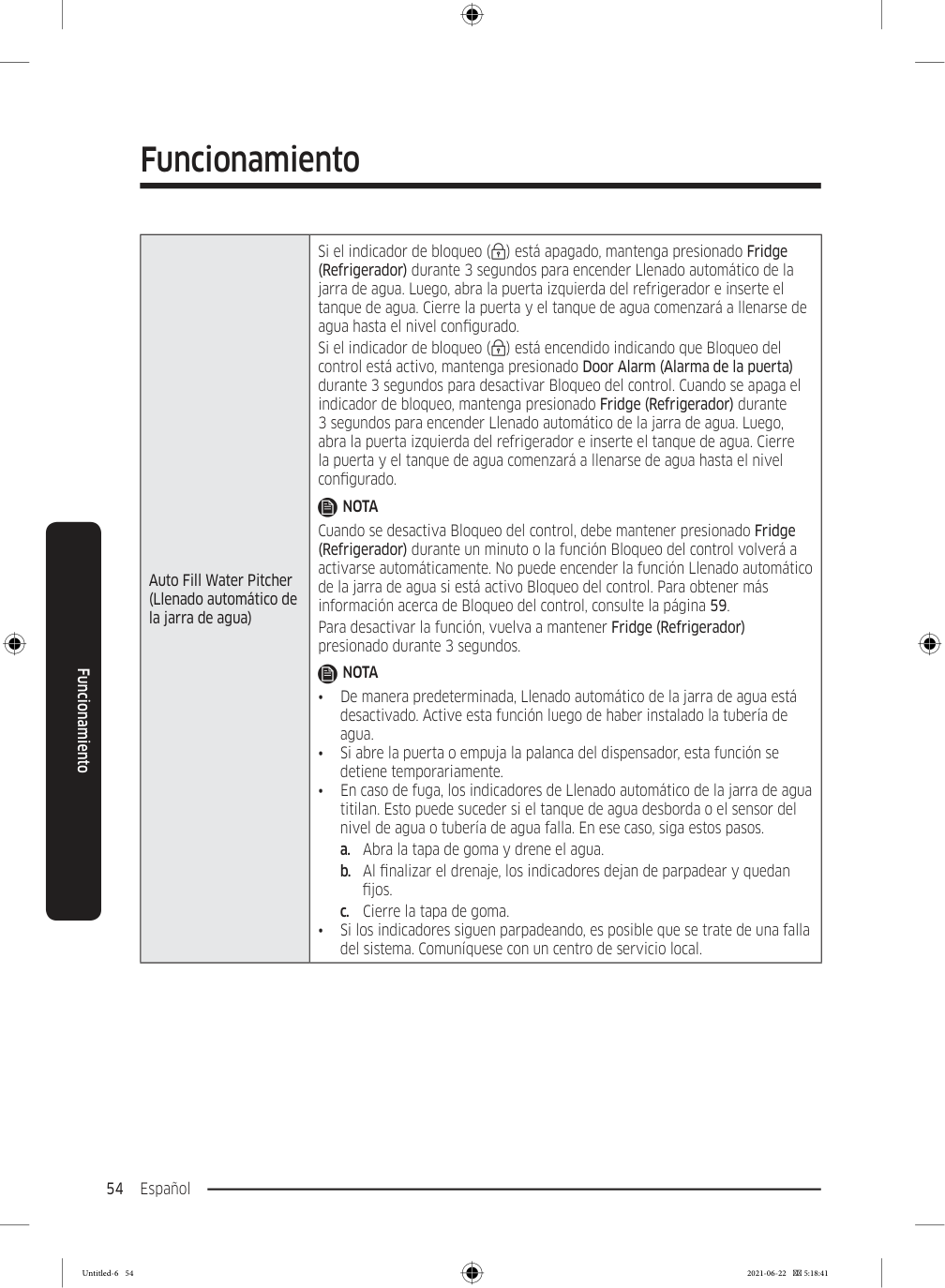
    Page 138

    Funcionamiento Español 54 Funcionamiento Auto Fill Water Pitcher (Llenado automático de la jarra de agua) Si el indicador de bloqueo ( ) está apagado, mantenga presionado Fridge (Refrigerador) durante 3 segundos para encender Llenado automático de la jarra de agua. Luego, abra la puerta izquierda del refrigerador e inserte el tanque de agua. Cierre la puerta y el tanque de agua comenzará a llenarse de agua hasta el nivel configurado. Si el indicador de bloqueo ( ) está encendido indicando que Bloqueo del control está activo, mantenga presionado Door Alarm (Alarma de la puerta) durante 3 segundos para desactivar Bloqueo del control. Cuando se apaga el indicador de bloqueo, mantenga presionado Fridge (Refrigerador) durante 3 segundos para encender Llenado automático de la jarra de agua. Luego, abra la puerta izquierda del refrigerador e inserte el tanque de agua. Cierre la puerta y el tanque de agua comenzará a llenarse de agua hasta el nivel configurado.

    Nota

    Cuando se desactiva Bloqueo del control, debe mantener presionado Fridge (Refrigerador) durante un minuto o la función Bloqueo del control volverá a activarse automáticamente. No puede encender la función Llenado automático de la jarra de agua si está activo Bloqueo del control. Para obtener más información acerca de Bloqueo del control, consulte la página 59. Para desactivar la función, vuelva a mantener Fridge (Refrigerador) presionado durante 3 segundos.

    Nota

    • De manera predeterminada, Llenado automático de la jarra de agua está desactivado. Active esta función luego de haber instalado la tubería de agua. • Si abre la puerta o empuja la palanca del dispensador, esta función se detiene temporariamente. • En caso de fuga, los indicadores de Llenado automático de la jarra de agua titilan. Esto puede suceder si el tanque de agua desborda o el sensor del nivel de agua o tubería de agua falla. En ese caso, siga estos pasos. a. Abra la tapa de goma y drene el agua. b. Al finalizar el drenaje, los indicadores dejan de parpadear y quedan fijos. c. Cierre la tapa de goma. • Si los indicadores siguen parpadeando, es posible que se trate de una falla del sistema. Comuníquese con un centro de servicio local. Untitled-6 54 2021-06-22  5:18:41
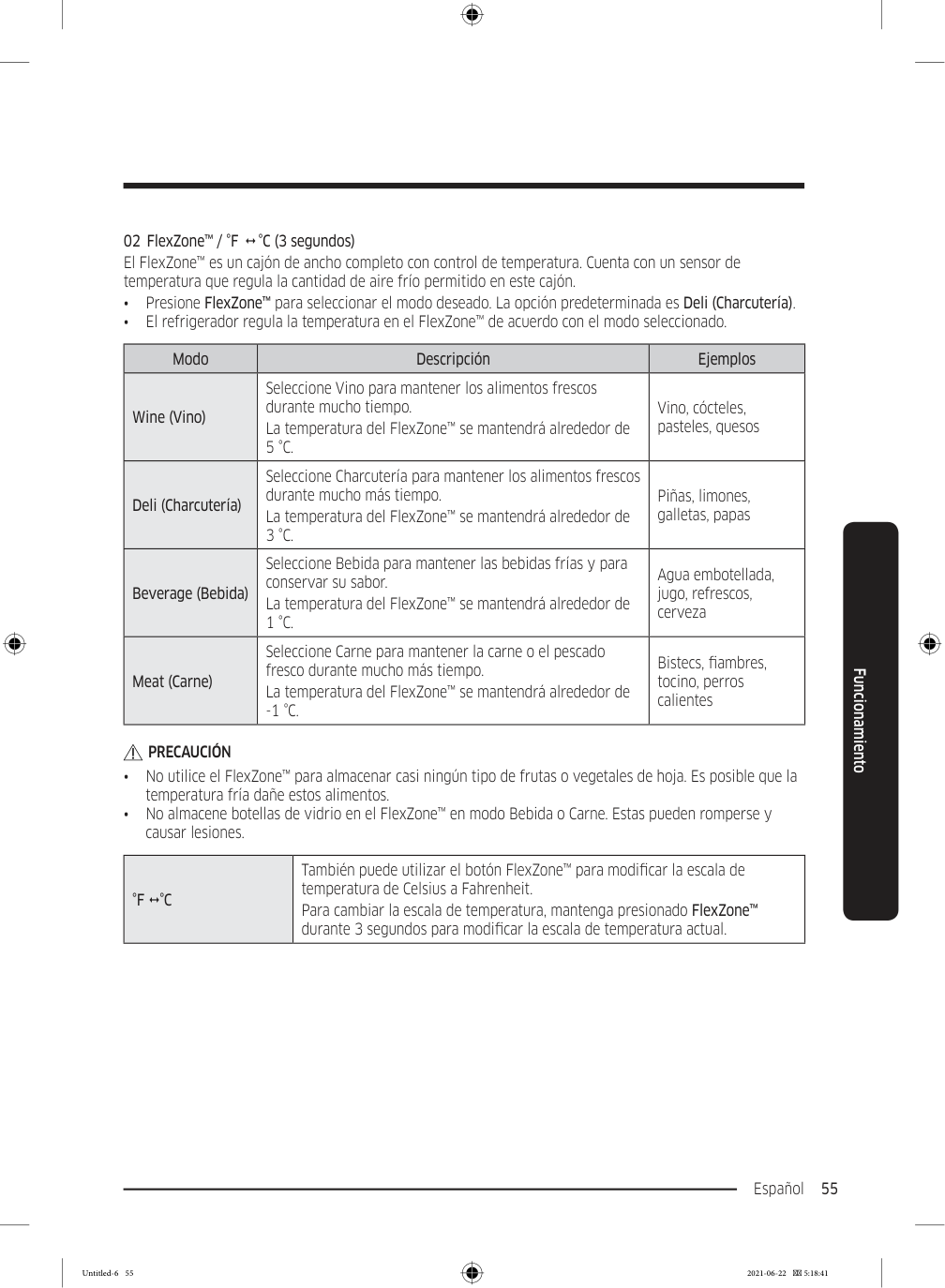
    Page 139

    Español 55 Funcionamiento 02  FlexZone™ / °F    °C (3 segundos) El FlexZone™ es un cajón de ancho completo con control de temperatura. Cuenta con un sensor de temperatura que regula la cantidad de aire frío permitido en este cajón. • Presione FlexZone™ para seleccionar el modo deseado. La opción predeterminada es Deli (Charcutería). • El refrigerador regula la temperatura en el FlexZone™ de acuerdo con el modo seleccionado. Modo Descripción Ejemplos Wine (Vino) Seleccione Vino para mantener los alimentos frescos durante mucho tiempo. La temperatura del FlexZone™ se mantendrá alrededor de

    5 °C.

    Vino, cócteles, pasteles, quesos Deli (Charcutería) Seleccione Charcutería para mantener los alimentos frescos durante mucho más tiempo. La temperatura del FlexZone™ se mantendrá alrededor de

    3 °C.

    Piñas, limones, galletas, papas Beverage (Bebida) Seleccione Bebida para mantener las bebidas frías y para conservar su sabor. La temperatura del FlexZone™ se mantendrá alrededor de

    1 °C.

    Agua embotellada, jugo, refrescos, cerveza Meat (Carne) Seleccione Carne para mantener la carne o el pescado fresco durante mucho más tiempo. La temperatura del FlexZone™ se mantendrá alrededor de

    -1 °C.

    Bistecs, fiambres, tocino, perros calientes

    Precaución

    • No utilice el FlexZone™ para almacenar casi ningún tipo de frutas o vegetales de hoja. Es posible que la temperatura fría dañe estos alimentos. • No almacene botellas de vidrio en el FlexZone™ en modo Bebida o Carne. Estas pueden romperse y causar lesiones.

    °F  °C

    También puede utilizar el botón FlexZone™ para modificar la escala de temperatura de Celsius a Fahrenheit. Para cambiar la escala de temperatura, mantenga presionado FlexZone™ durante 3 segundos para modificar la escala de temperatura actual. Untitled-6 55 2021-06-22  5:18:41
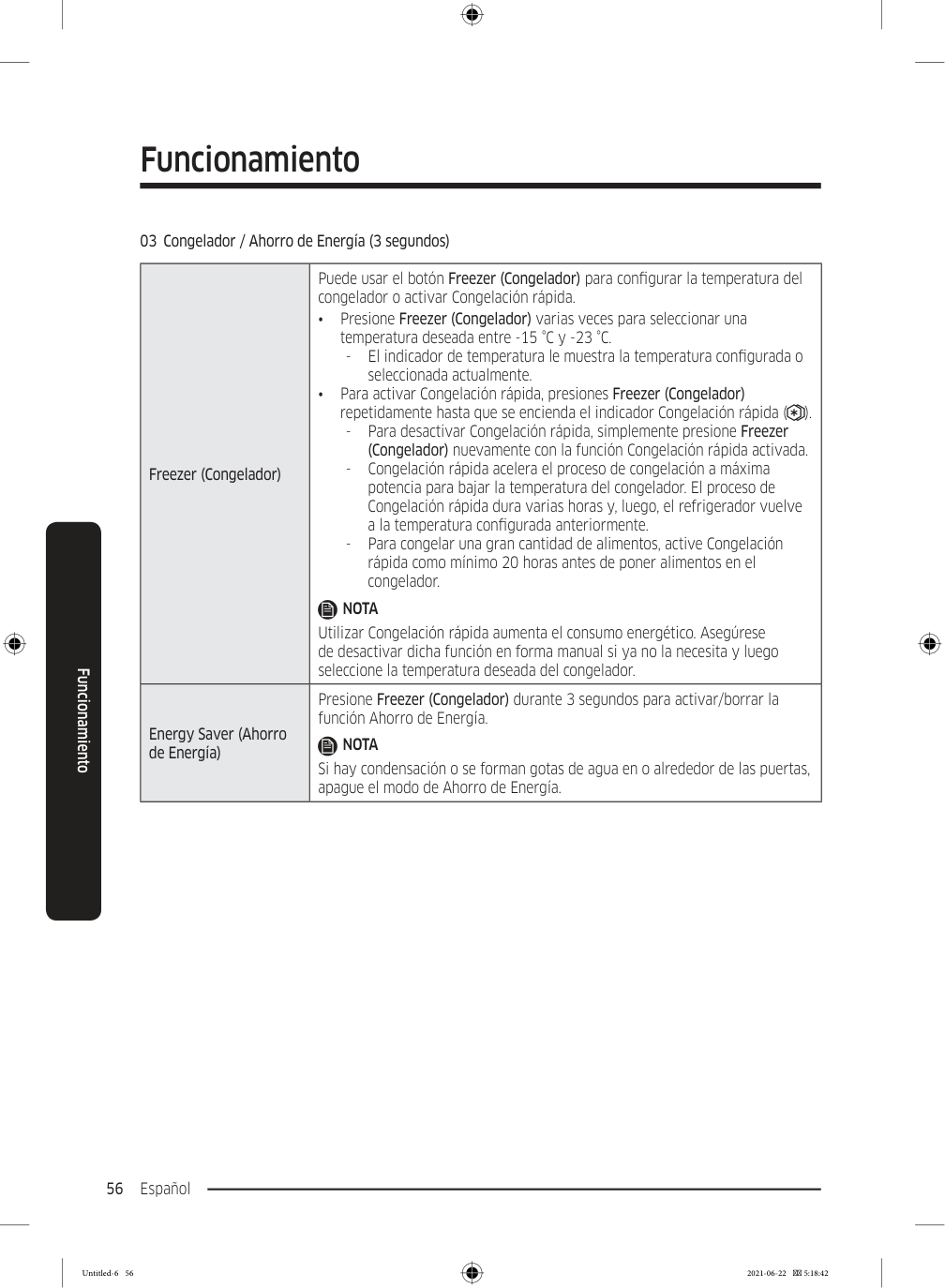
    Page 140

    Funcionamiento Español 56 Funcionamiento 03  Congelador / Ahorro de Energía (3 segundos) Freezer (Congelador) Puede usar el botón Freezer (Congelador) para configurar la temperatura del congelador o activar Congelación rápida. • Presione Freezer (Congelador) varias veces para seleccionar una temperatura deseada entre -15 °C y -23 °C.

  • El indicador de temperatura le muestra la temperatura configurada o
  • seleccionada actualmente. • Para activar Congelación rápida, presiones Freezer (Congelador) repetidamente hasta que se encienda el indicador Congelación rápida ( ).
  • Para desactivar Congelación rápida, simplemente presione Freezer
  • (Congelador) nuevamente con la función Congelación rápida activada.
  • Congelación rápida acelera el proceso de congelación a máxima
  • potencia para bajar la temperatura del congelador. El proceso de Congelación rápida dura varias horas y, luego, el refrigerador vuelve a la temperatura configurada anteriormente.
  • Para congelar una gran cantidad de alimentos, active Congelación
  • rápida como mínimo 20 horas antes de poner alimentos en el congelador.

    Nota

    Utilizar Congelación rápida aumenta el consumo energético. Asegúrese de desactivar dicha función en forma manual si ya no la necesita y luego seleccione la temperatura deseada del congelador. Energy Saver (Ahorro de Energía) Presione Freezer (Congelador) durante 3 segundos para activar/borrar la función Ahorro de Energía.

    Nota

    Si hay condensación o se forman gotas de agua en o alrededor de las puertas, apague el modo de Ahorro de Energía. Untitled-6 56 2021-06-22  5:18:42
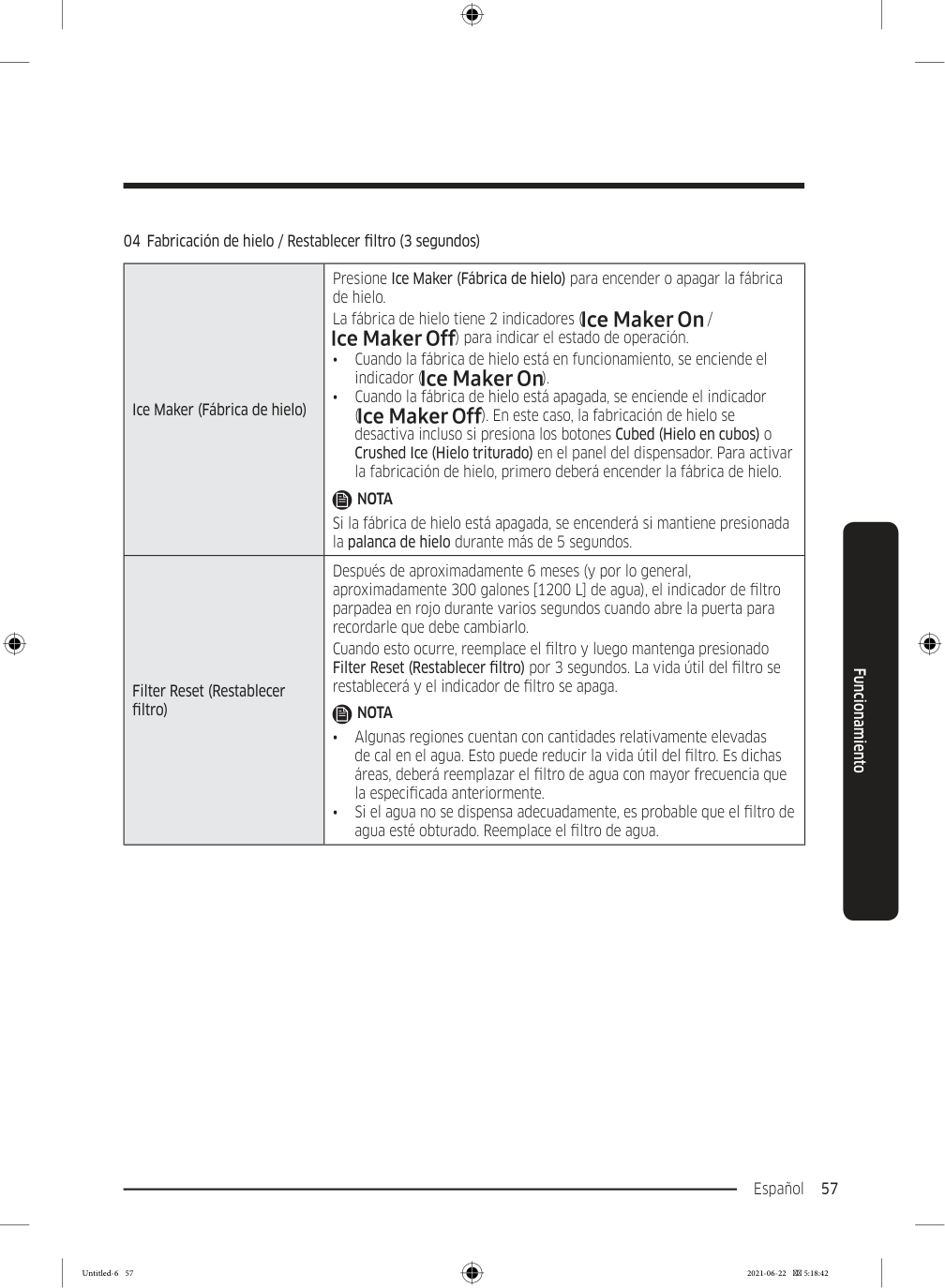
    Page 141

    Español 57 Funcionamiento 04  Fabricación de hielo / Restablecer filtro (3 segundos) Ice Maker (Fábrica de hielo) Presione Ice Maker (Fábrica de hielo) para encender o apagar la fábrica de hielo. La fábrica de hielo tiene 2 indicadores ( / ) para indicar el estado de operación. • Cuando la fábrica de hielo está en funcionamiento, se enciende el indicador ( ). • Cuando la fábrica de hielo está apagada, se enciende el indicador ( ). En este caso, la fabricación de hielo se desactiva incluso si presiona los botones Cubed (Hielo en cubos) o Crushed Ice (Hielo triturado) en el panel del dispensador. Para activar la fabricación de hielo, primero deberá encender la fábrica de hielo.

    Nota

    Si la fábrica de hielo está apagada, se encenderá si mantiene presionada la palanca de hielo durante más de 5 segundos. Filter Reset (Restablecer filtro) Después de aproximadamente 6 meses (y por lo general, aproximadamente 300 galones [1200 L] de agua), el indicador de filtro parpadea en rojo durante varios segundos cuando abre la puerta para recordarle que debe cambiarlo. Cuando esto ocurre, reemplace el filtro y luego mantenga presionado Filter Reset (Restablecer filtro) por 3 segundos. La vida útil del filtro se restablecerá y el indicador de filtro se apaga.

    Nota

    • Algunas regiones cuentan con cantidades relativamente elevadas de cal en el agua. Esto puede reducir la vida útil del filtro. Es dichas áreas, deberá reemplazar el filtro de agua con mayor frecuencia que la especificada anteriormente. • Si el agua no se dispensa adecuadamente, es probable que el filtro de agua esté obturado. Reemplace el filtro de agua. Untitled-6 57 2021-06-22  5:18:42
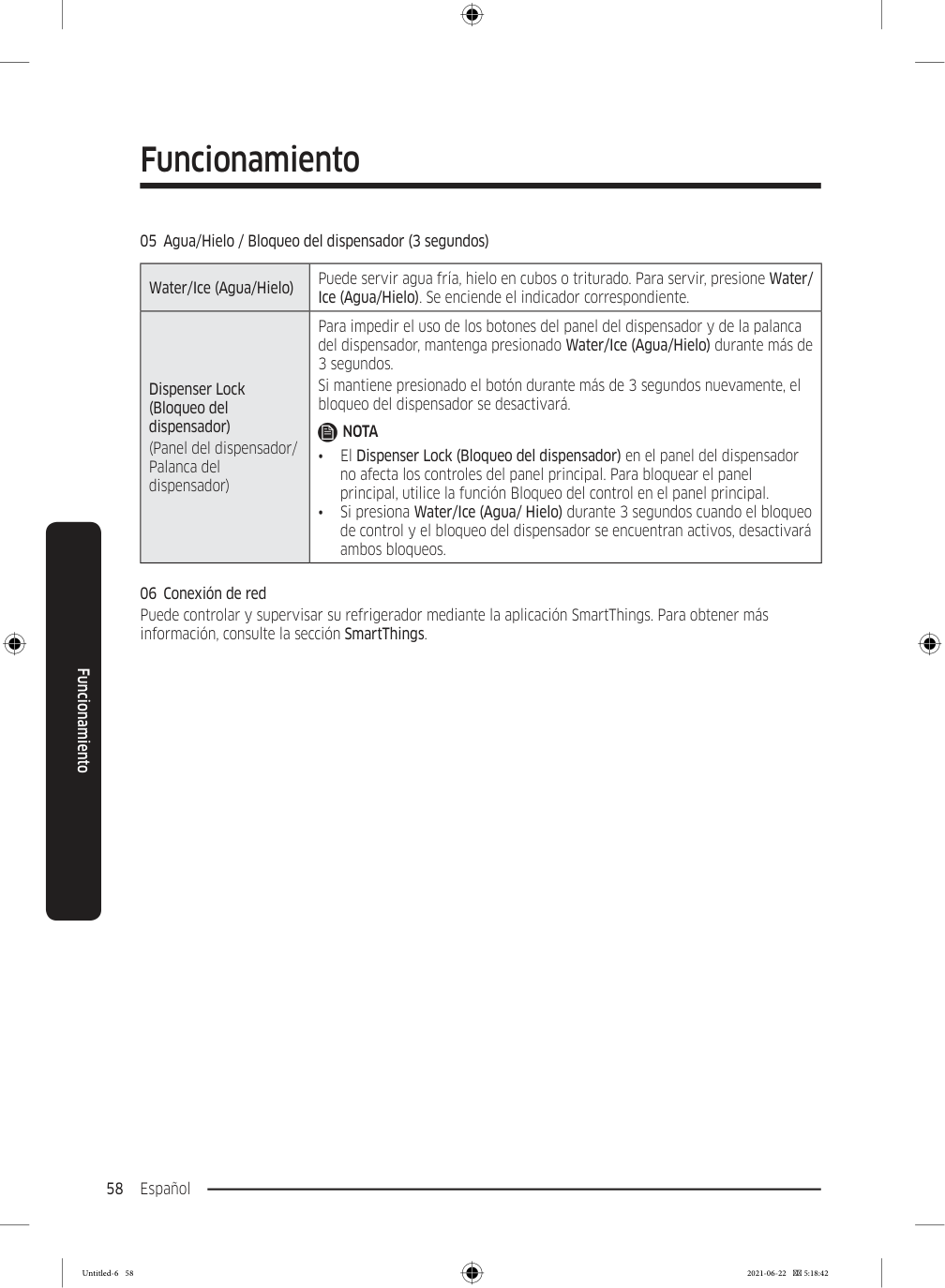
    Page 142

    Funcionamiento Español 58 Funcionamiento 05  Agua/Hielo / Bloqueo del dispensador (3 segundos) Water/Ice (Agua/Hielo) Puede servir agua fría, hielo en cubos o triturado. Para servir, presione Water/ Ice (Agua/Hielo). Se enciende el indicador correspondiente. Dispenser Lock (Bloqueo del dispensador) (Panel del dispensador/ Palanca del dispensador) Para impedir el uso de los botones del panel del dispensador y de la palanca del dispensador, mantenga presionado Water/Ice (Agua/Hielo) durante más de 3 segundos. Si mantiene presionado el botón durante más de 3 segundos nuevamente, el bloqueo del dispensador se desactivará.

    Nota

    • El Dispenser Lock (Bloqueo del dispensador) en el panel del dispensador no afecta los controles del panel principal. Para bloquear el panel principal, utilice la función Bloqueo del control en el panel principal. • Si presiona Water/Ice (Agua/ Hielo) durante 3 segundos cuando el bloqueo de control y el bloqueo del dispensador se encuentran activos, desactivará ambos bloqueos. 06  Conexión de red Puede controlar y supervisar su refrigerador mediante la aplicación SmartThings. Para obtener más información, consulte la sección SmartThings. Untitled-6 58 2021-06-22  5:18:42
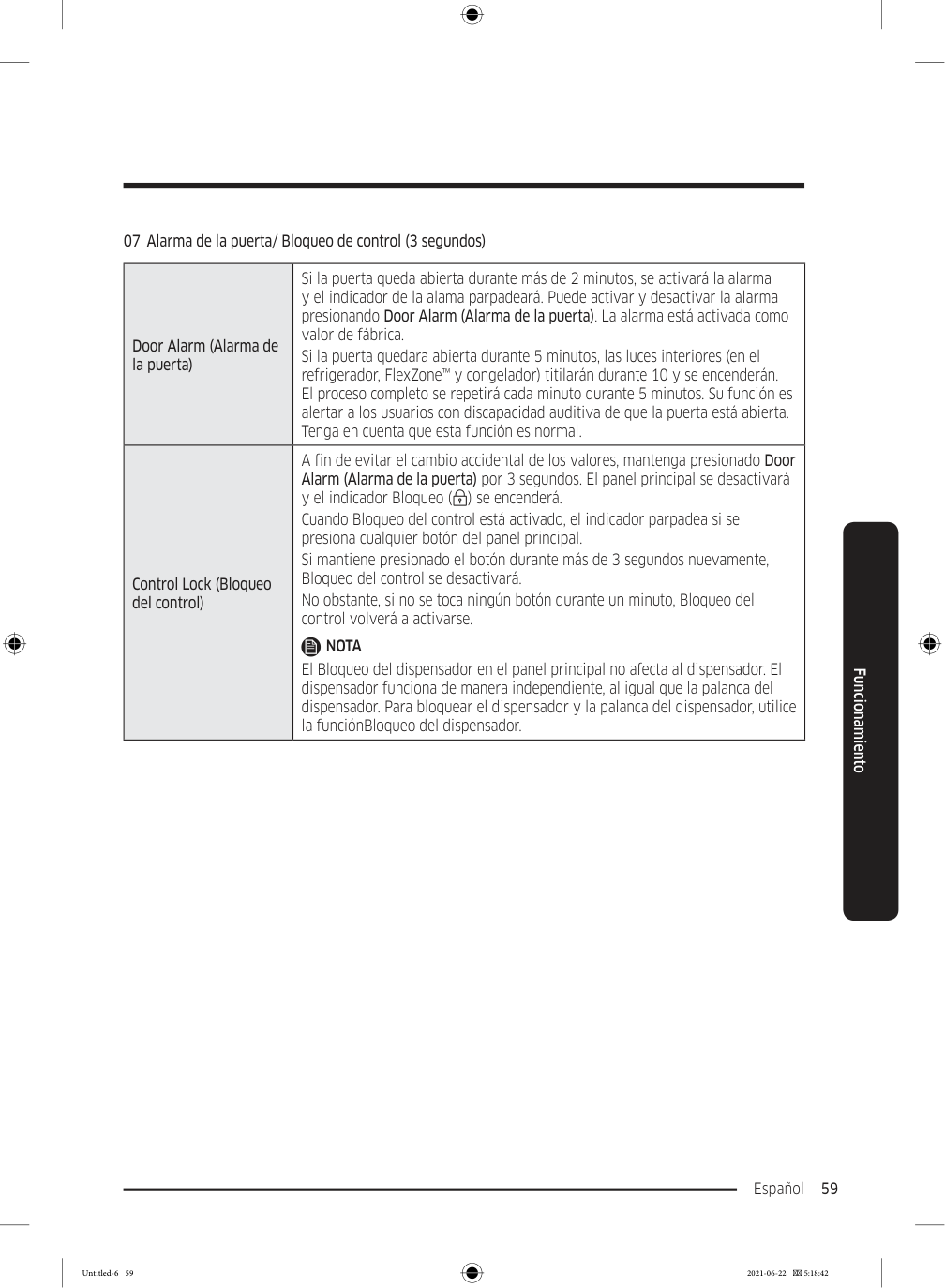
    Page 143

    Español 59 Funcionamiento 07  Alarma de la puerta/ Bloqueo de control (3 segundos) Door Alarm (Alarma de la puerta) Si la puerta queda abierta durante más de 2 minutos, se activará la alarma y el indicador de la alama parpadeará. Puede activar y desactivar la alarma presionando Door Alarm (Alarma de la puerta). La alarma está activada como valor de fábrica. Si la puerta quedara abierta durante 5 minutos, las luces interiores (en el refrigerador, FlexZone™ y congelador) titilarán durante 10 y se encenderán. El proceso completo se repetirá cada minuto durante 5 minutos. Su función es alertar a los usuarios con discapacidad auditiva de que la puerta está abierta. Tenga en cuenta que esta función es normal. Control Lock (Bloqueo del control) A fin de evitar el cambio accidental de los valores, mantenga presionado Door Alarm (Alarma de la puerta) por 3 segundos. El panel principal se desactivará y el indicador Bloqueo ( ) se encenderá. Cuando Bloqueo del control está activado, el indicador parpadea si se presiona cualquier botón del panel principal. Si mantiene presionado el botón durante más de 3 segundos nuevamente, Bloqueo del control se desactivará. No obstante, si no se toca ningún botón durante un minuto, Bloqueo del control volverá a activarse.

    Nota

    El Bloqueo del dispensador en el panel principal no afecta al dispensador. El dispensador funciona de manera independiente, al igual que la palanca del dispensador. Para bloquear el dispensador y la palanca del dispensador, utilice la funciónBloqueo del dispensador. Untitled-6 59 2021-06-22  5:18:42
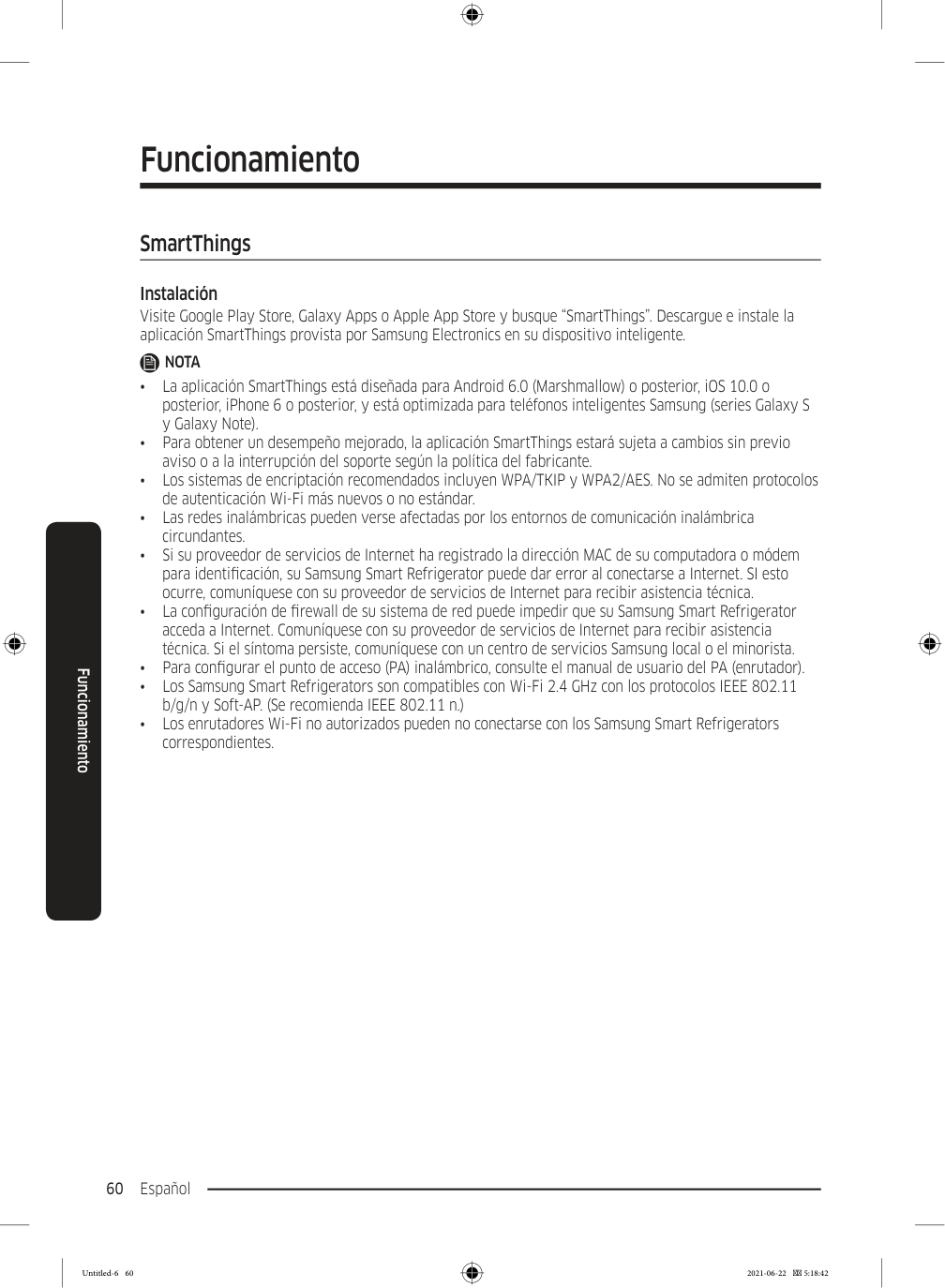
    Page 144

    Funcionamiento Español 60 Funcionamiento SmartThings Instalación Visite Google Play Store, Galaxy Apps o Apple App Store y busque “SmartThings”. Descargue e instale la aplicación SmartThings provista por Samsung Electronics en su dispositivo inteligente.

    Nota

    • La aplicación SmartThings está diseñada para Android 6.0 (Marshmallow) o posterior, iOS 10.0 o posterior, iPhone 6 o posterior, y está optimizada para teléfonos inteligentes Samsung (series Galaxy S y Galaxy Note). • Para obtener un desempeño mejorado, la aplicación SmartThings estará sujeta a cambios sin previo aviso o a la interrupción del soporte según la política del fabricante. • Los sistemas de encriptación recomendados incluyen WPA/TKIP y WPA2/AES. No se admiten protocolos de autenticación Wi-Fi más nuevos o no estándar. • Las redes inalámbricas pueden verse afectadas por los entornos de comunicación inalámbrica circundantes. • Si su proveedor de servicios de Internet ha registrado la dirección MAC de su computadora o módem para identificación, su Samsung Smart Refrigerator puede dar error al conectarse a Internet. SI esto ocurre, comuníquese con su proveedor de servicios de Internet para recibir asistencia técnica. • La configuración de firewall de su sistema de red puede impedir que su Samsung Smart Refrigerator acceda a Internet. Comuníquese con su proveedor de servicios de Internet para recibir asistencia técnica. Si el síntoma persiste, comuníquese con un centro de servicios Samsung local o el minorista. • Para configurar el punto de acceso (PA) inalámbrico, consulte el manual de usuario del PA (enrutador). • Los Samsung Smart Refrigerators son compatibles con Wi-Fi 2.4 GHz con los protocolos IEEE 802.11 b/g/n y Soft-AP. (Se recomienda IEEE 802.11 n.) • Los enrutadores Wi-Fi no autorizados pueden no conectarse con los Samsung Smart Refrigerators correspondientes. Untitled-6 60 2021-06-22  5:18:42
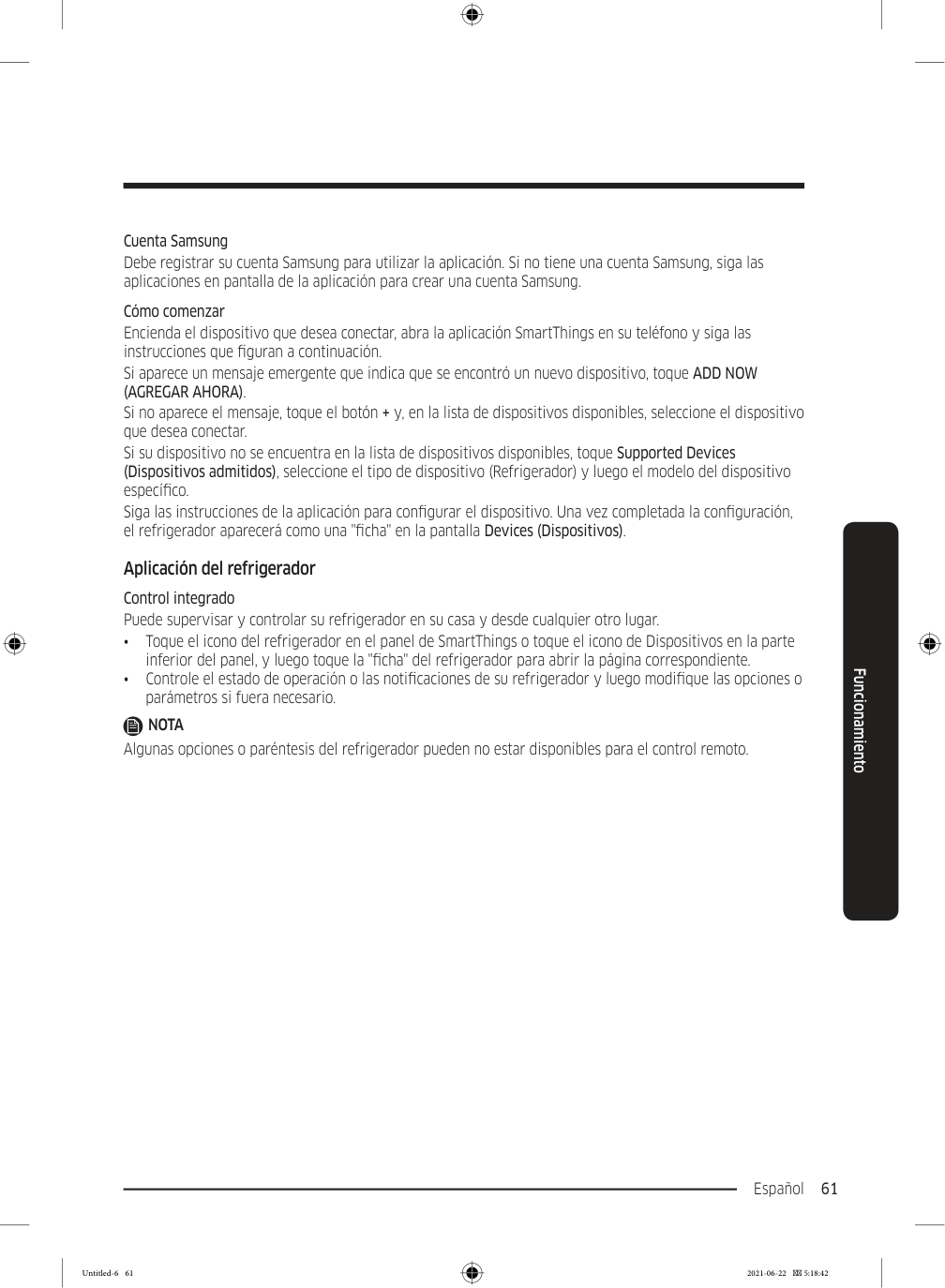
    Page 145

    Español 61 Funcionamiento Cuenta Samsung Debe registrar su cuenta Samsung para utilizar la aplicación. Si no tiene una cuenta Samsung, siga las aplicaciones en pantalla de la aplicación para crear una cuenta Samsung. Cómo comenzar Encienda el dispositivo que desea conectar, abra la aplicación SmartThings en su teléfono y siga las instrucciones que figuran a continuación. Si aparece un mensaje emergente que indica que se encontró un nuevo dispositivo, toque ADD NOW

    (Agregar Ahora).

    Si no aparece el mensaje, toque el botón + y, en la lista de dispositivos disponibles, seleccione el dispositivo que desea conectar. Si su dispositivo no se encuentra en la lista de dispositivos disponibles, toque Supported Devices (Dispositivos admitidos), seleccione el tipo de dispositivo (Refrigerador) y luego el modelo del dispositivo específico. Siga las instrucciones de la aplicación para configurar el dispositivo. Una vez completada la configuración, el refrigerador aparecerá como una "ficha" en la pantalla Devices (Dispositivos). Aplicación del refrigerador Control integrado Puede supervisar y controlar su refrigerador en su casa y desde cualquier otro lugar. • Toque el icono del refrigerador en el panel de SmartThings o toque el icono de Dispositivos en la parte inferior del panel, y luego toque la "ficha" del refrigerador para abrir la página correspondiente. • Controle el estado de operación o las notificaciones de su refrigerador y luego modifique las opciones o parámetros si fuera necesario.

    Nota

    Algunas opciones o paréntesis del refrigerador pueden no estar disponibles para el control remoto. Untitled-6 61 2021-06-22  5:18:42
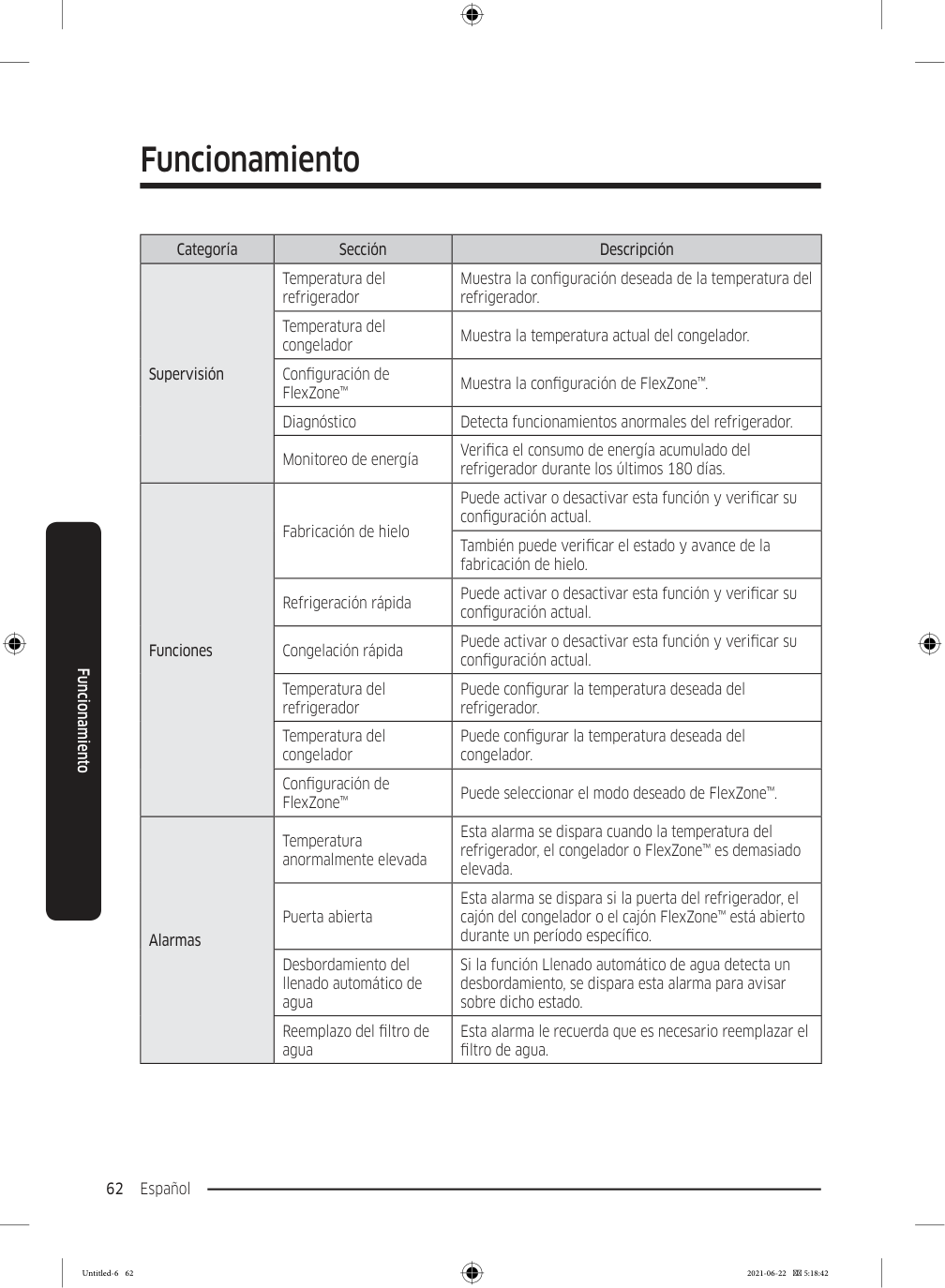
    Page 146

    Funcionamiento Español 62 Funcionamiento Categoría Sección Descripción Supervisión Temperatura del refrigerador Muestra la configuración deseada de la temperatura del refrigerador. Temperatura del congelador Muestra la temperatura actual del congelador. Configuración de FlexZone™ Muestra la configuración de FlexZone™. Diagnóstico Detecta funcionamientos anormales del refrigerador. Monitoreo de energía Verifica el consumo de energía acumulado del refrigerador durante los últimos 180 días. Funciones Fabricación de hielo Puede activar o desactivar esta función y verificar su configuración actual. También puede verificar el estado y avance de la fabricación de hielo. Refrigeración rápida Puede activar o desactivar esta función y verificar su configuración actual. Congelación rápida Puede activar o desactivar esta función y verificar su configuración actual. Temperatura del refrigerador Puede configurar la temperatura deseada del refrigerador. Temperatura del congelador Puede configurar la temperatura deseada del congelador. Configuración de FlexZone™ Puede seleccionar el modo deseado de FlexZone™. Alarmas Temperatura anormalmente elevada Esta alarma se dispara cuando la temperatura del refrigerador, el congelador o FlexZone™ es demasiado elevada. Puerta abierta Esta alarma se dispara si la puerta del refrigerador, el cajón del congelador o el cajón FlexZone™ está abierto durante un período específico. Desbordamiento del llenado automático de agua Si la función Llenado automático de agua detecta un desbordamiento, se dispara esta alarma para avisar sobre dicho estado. Reemplazo del filtro de agua Esta alarma le recuerda que es necesario reemplazar el filtro de agua. Untitled-6 62 2021-06-22  5:18:42
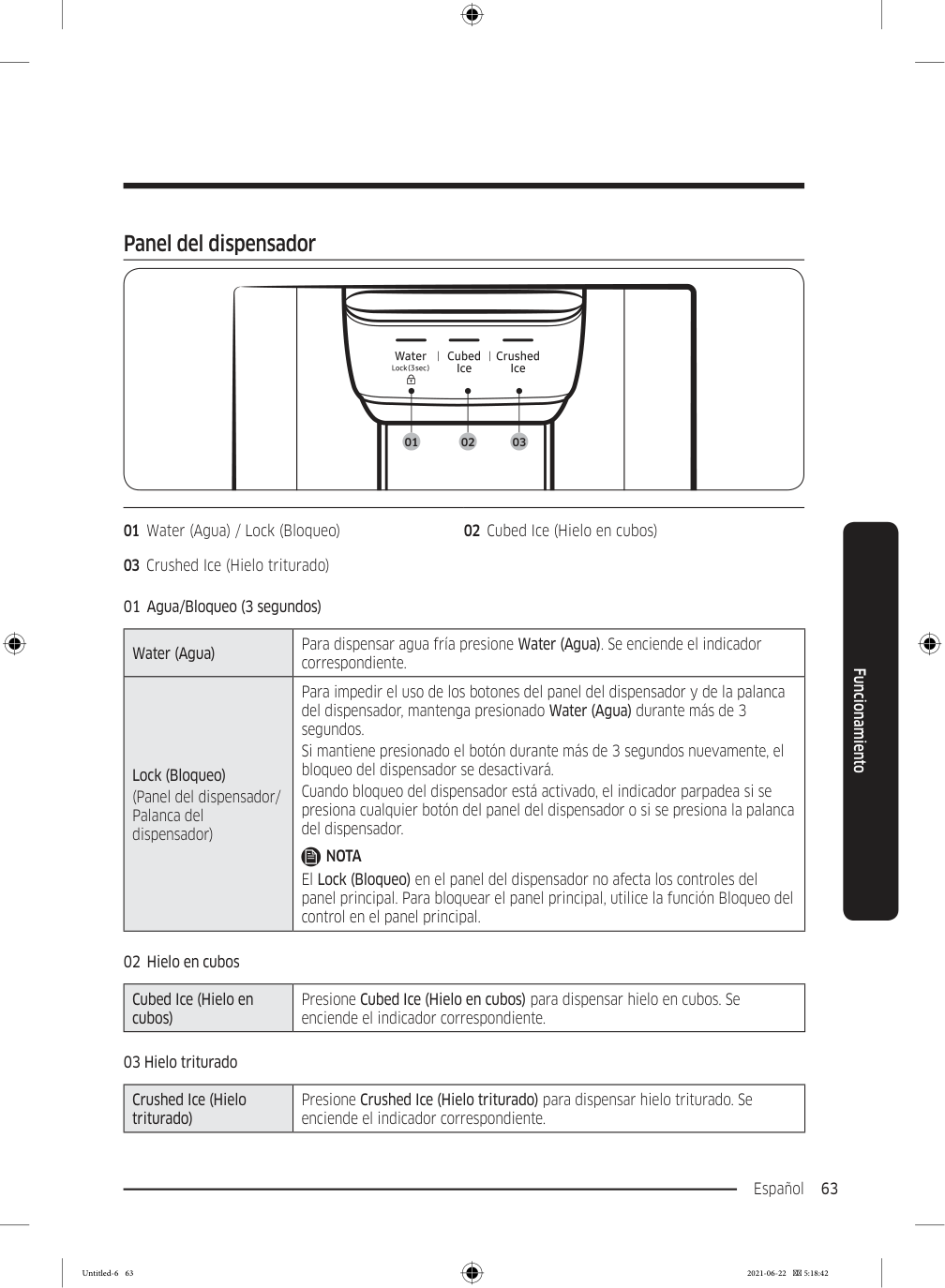
    Page 147

    Español 63 Funcionamiento Panel del dispensador 01 02 03 01 Water (Agua) / Lock (Bloqueo) 02 Cubed Ice (Hielo en cubos) 03 Crushed Ice (Hielo triturado) 01  Agua/Bloqueo (3 segundos) Water (Agua) Para dispensar agua fría presione Water (Agua). Se enciende el indicador correspondiente. Lock (Bloqueo) (Panel del dispensador/ Palanca del dispensador) Para impedir el uso de los botones del panel del dispensador y de la palanca del dispensador, mantenga presionado Water (Agua) durante más de 3 segundos. Si mantiene presionado el botón durante más de 3 segundos nuevamente, el bloqueo del dispensador se desactivará. Cuando bloqueo del dispensador está activado, el indicador parpadea si se presiona cualquier botón del panel del dispensador o si se presiona la palanca del dispensador.

    Nota

    El Lock (Bloqueo) en el panel del dispensador no afecta los controles del panel principal. Para bloquear el panel principal, utilice la función Bloqueo del control en el panel principal. 02  Hielo en cubos Cubed Ice (Hielo en cubos) Presione Cubed Ice (Hielo en cubos) para dispensar hielo en cubos. Se enciende el indicador correspondiente. 03 Hielo triturado Crushed Ice (Hielo triturado) Presione Crushed Ice (Hielo triturado) para dispensar hielo triturado. Se enciende el indicador correspondiente. Untitled-6 63 2021-06-22  5:18:42
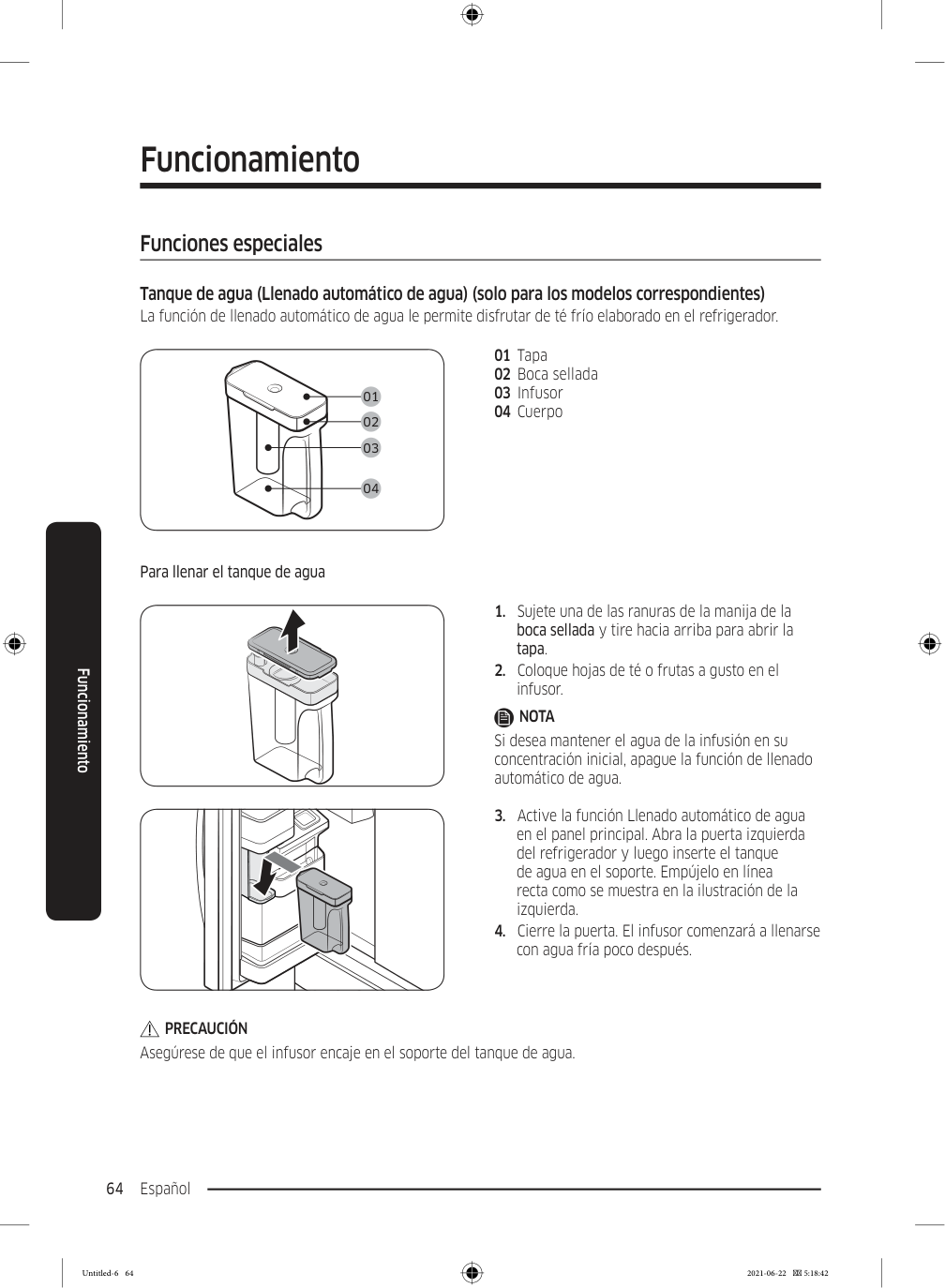
    Page 148

    Funcionamiento Español 64 Funcionamiento Funciones especiales Tanque de agua (Llenado automático de agua) (solo para los modelos correspondientes) La función de llenado automático de agua le permite disfrutar de té frío elaborado en el refrigerador. 01 02 03 04 01 Tapa 02 Boca sellada 03 Infusor 04 Cuerpo Para llenar el tanque de agua

  • Sujete una de las ranuras de la manija de la
  • boca sellada y tire hacia arriba para abrir la tapa.
  • Coloque hojas de té o frutas a gusto en el
  • infusor.

    Nota

    Si desea mantener el agua de la infusión en su concentración inicial, apague la función de llenado automático de agua.
  • Active la función Llenado automático de agua
  • en el panel principal. Abra la puerta izquierda del refrigerador y luego inserte el tanque de agua en el soporte. Empújelo en línea recta como se muestra en la ilustración de la izquierda.
  • Cierre la puerta. El infusor comenzará a llenarse
  • con agua fría poco después.

    Precaución

    Asegúrese de que el infusor encaje en el soporte del tanque de agua. Untitled-6 64 2021-06-22  5:18:42
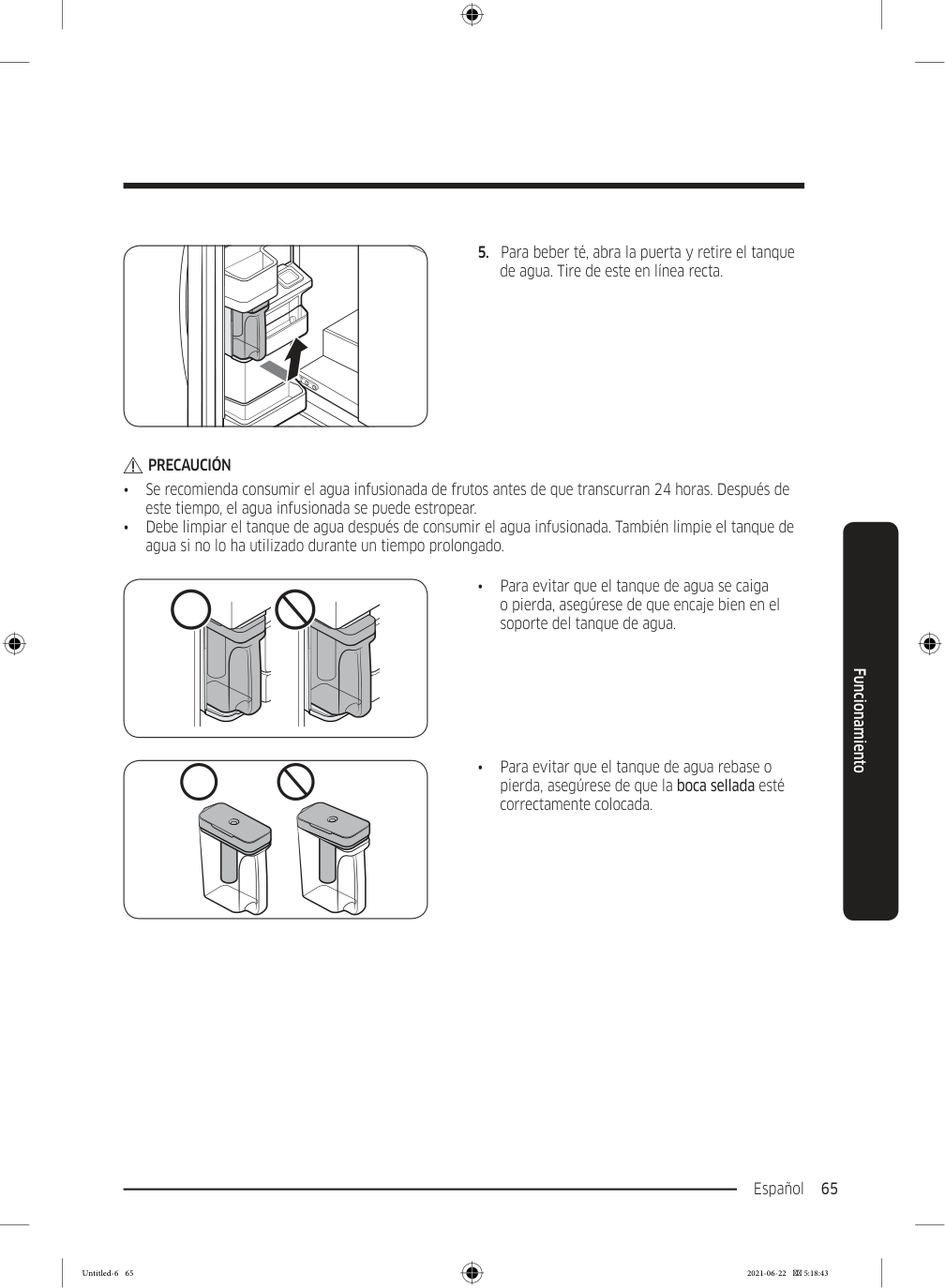
    Page 149

    Español 65 Funcionamiento

  • Para beber té, abra la puerta y retire el tanque
  • de agua. Tire de este en línea recta.

    Precaución

    • Se recomienda consumir el agua infusionada de frutos antes de que transcurran 24 horas. Después de este tiempo, el agua infusionada se puede estropear. • Debe limpiar el tanque de agua después de consumir el agua infusionada. También limpie el tanque de agua si no lo ha utilizado durante un tiempo prolongado. • Para evitar que el tanque de agua se caiga o pierda, asegúrese de que encaje bien en el soporte del tanque de agua. • Para evitar que el tanque de agua rebase o pierda, asegúrese de que la boca sellada esté correctamente colocada. Untitled-6 65 2021-06-22  5:18:43
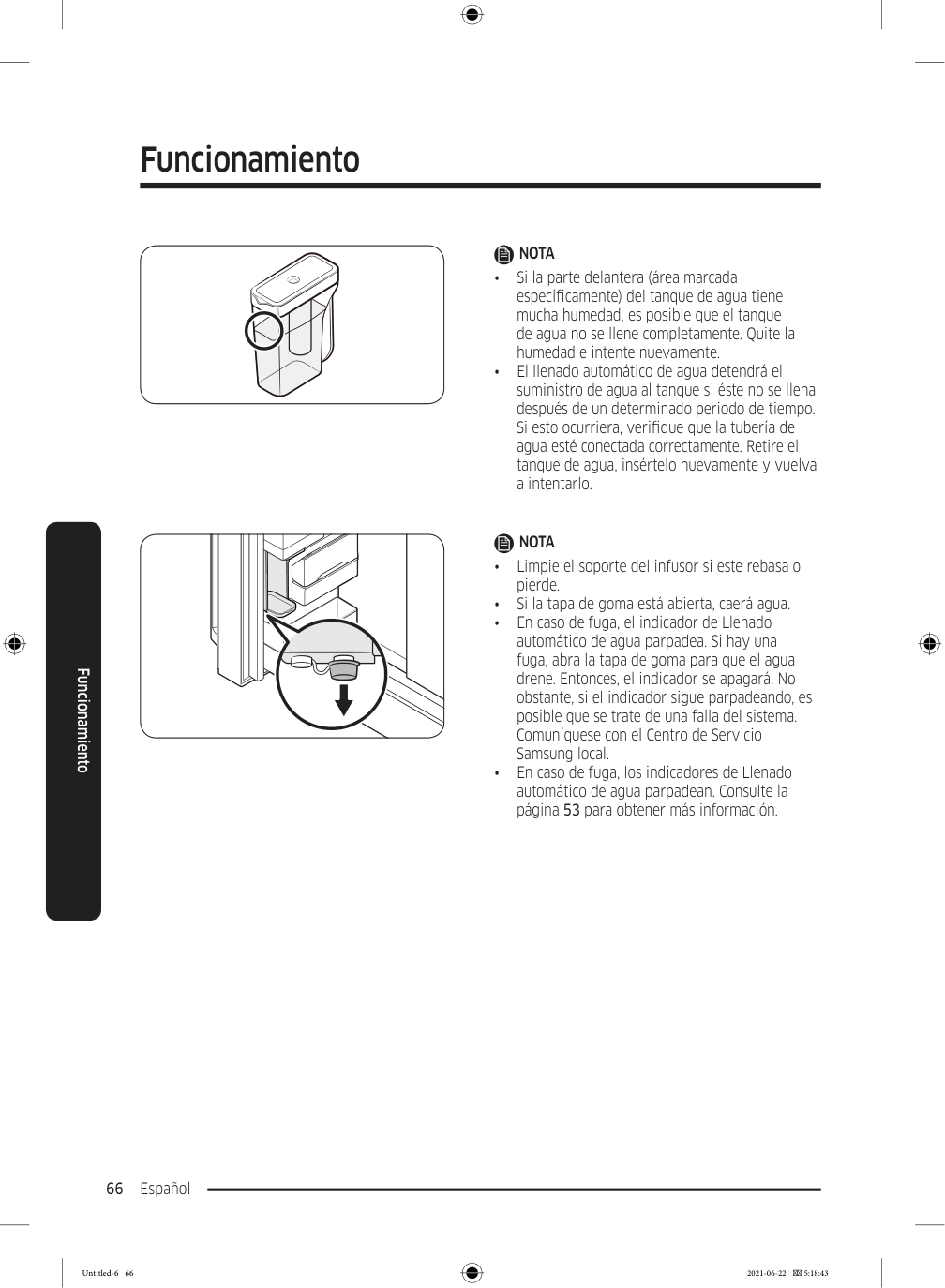
    Page 150

    Funcionamiento Español 66 Funcionamiento

    Nota

    • Si la parte delantera (área marcada específicamente) del tanque de agua tiene mucha humedad, es posible que el tanque de agua no se llene completamente. Quite la humedad e intente nuevamente. • El llenado automático de agua detendrá el suministro de agua al tanque si éste no se llena después de un determinado periodo de tiempo. Si esto ocurriera, verifique que la tubería de agua esté conectada correctamente. Retire el tanque de agua, insértelo nuevamente y vuelva a intentarlo.

    Nota

    • Limpie el soporte del infusor si este rebasa o pierde. • Si la tapa de goma está abierta, caerá agua. • En caso de fuga, el indicador de Llenado automático de agua parpadea. Si hay una fuga, abra la tapa de goma para que el agua drene. Entonces, el indicador se apagará. No obstante, si el indicador sigue parpadeando, es posible que se trate de una falla del sistema. Comuníquese con el Centro de Servicio Samsung local. • En caso de fuga, los indicadores de Llenado automático de agua parpadean. Consulte la página 53 para obtener más información. Untitled-6 66 2021-06-22  5:18:43
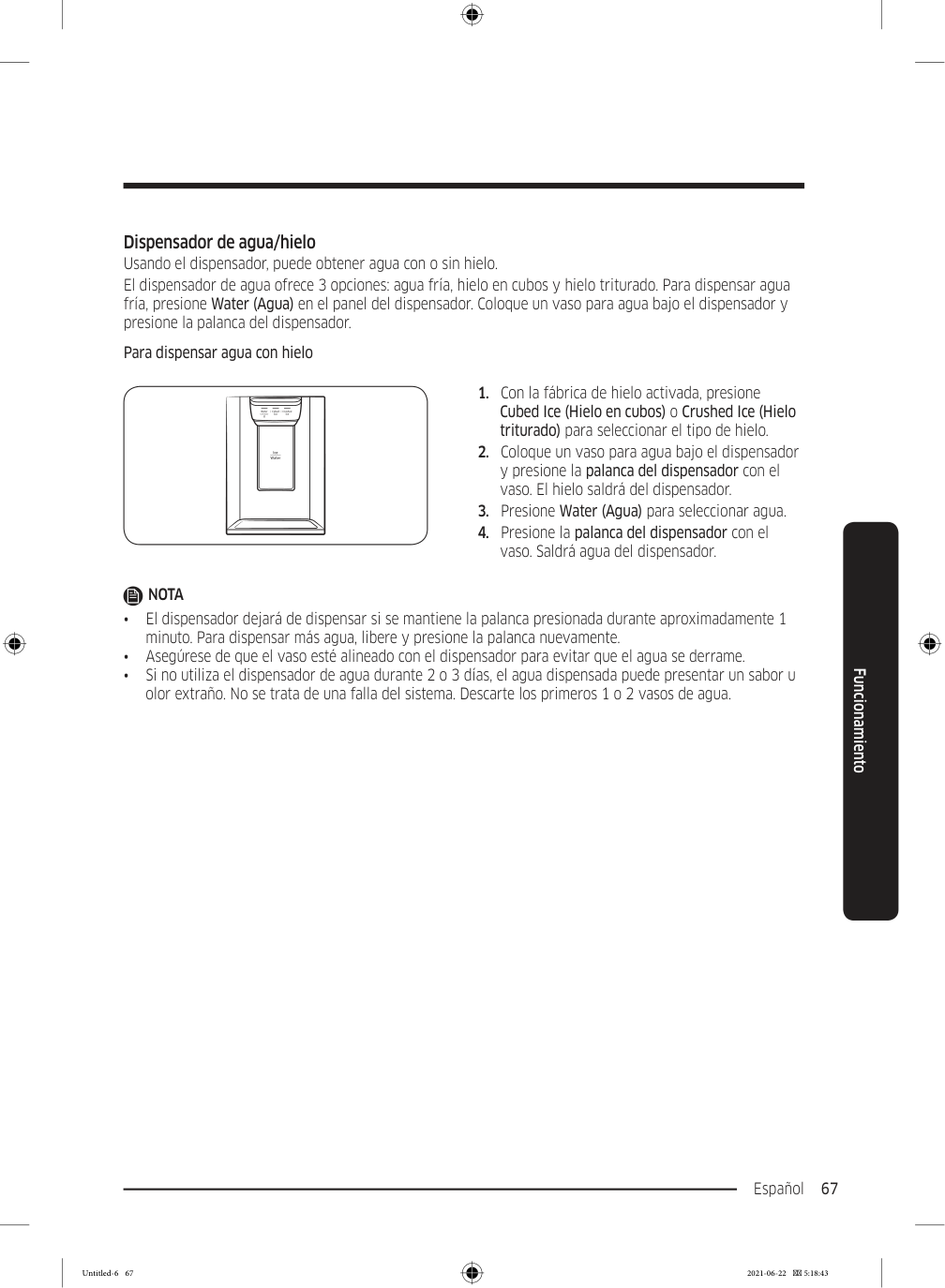
    Page 151

    Español 67 Funcionamiento Dispensador de agua/hielo Usando el dispensador, puede obtener agua con o sin hielo. El dispensador de agua ofrece 3 opciones: agua fría, hielo en cubos y hielo triturado. Para dispensar agua fría, presione Water (Agua) en el panel del dispensador. Coloque un vaso para agua bajo el dispensador y presione la palanca del dispensador. Para dispensar agua con hielo

  • Con la fábrica de hielo activada, presione
  • Cubed Ice (Hielo en cubos) o Crushed Ice (Hielo triturado) para seleccionar el tipo de hielo.
  • Coloque un vaso para agua bajo el dispensador
  • y presione la palanca del dispensador con el vaso. El hielo saldrá del dispensador.
  • Presione Water (Agua) para seleccionar agua.
  • Presione la palanca del dispensador con el
  • vaso. Saldrá agua del dispensador.

    Nota

    • El dispensador dejará de dispensar si se mantiene la palanca presionada durante aproximadamente 1 minuto. Para dispensar más agua, libere y presione la palanca nuevamente. • Asegúrese de que el vaso esté alineado con el dispensador para evitar que el agua se derrame. • Si no utiliza el dispensador de agua durante 2 o 3 días, el agua dispensada puede presentar un sabor u olor extraño. No se trata de una falla del sistema. Descarte los primeros 1 o 2 vasos de agua. Untitled-6 67 2021-06-22  5:18:43
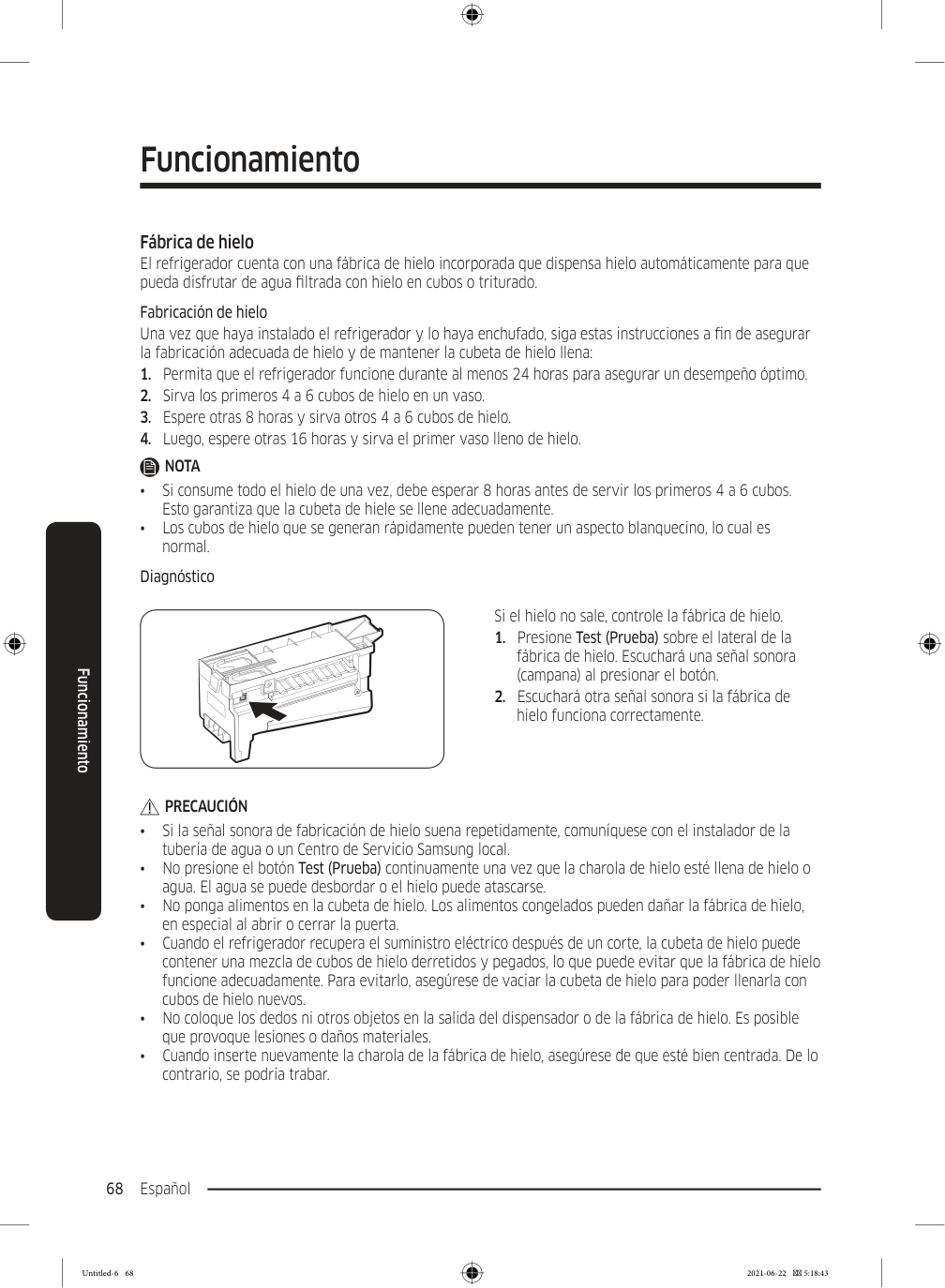
    Page 152

    Funcionamiento Español 68 Funcionamiento Fábrica de hielo El refrigerador cuenta con una fábrica de hielo incorporada que dispensa hielo automáticamente para que pueda disfrutar de agua filtrada con hielo en cubos o triturado. Fabricación de hielo Una vez que haya instalado el refrigerador y lo haya enchufado, siga estas instrucciones a fin de asegurar la fabricación adecuada de hielo y de mantener la cubeta de hielo llena:

  • Permita que el refrigerador funcione durante al menos 24 horas para asegurar un desempeño óptimo.
  • Sirva los primeros 4 a 6 cubos de hielo en un vaso.
  • Espere otras 8 horas y sirva otros 4 a 6 cubos de hielo.
  • Luego, espere otras 16 horas y sirva el primer vaso lleno de hielo.
  • Nota

    • Si consume todo el hielo de una vez, debe esperar 8 horas antes de servir los primeros 4 a 6 cubos. Esto garantiza que la cubeta de hiele se llene adecuadamente. • Los cubos de hielo que se generan rápidamente pueden tener un aspecto blanquecino, lo cual es normal. Diagnóstico Si el hielo no sale, controle la fábrica de hielo.
  • Presione Test (Prueba) sobre el lateral de la
  • fábrica de hielo. Escuchará una señal sonora (campana) al presionar el botón.
  • Escuchará otra señal sonora si la fábrica de
  • hielo funciona correctamente.

    Precaución

    • Si la señal sonora de fabricación de hielo suena repetidamente, comuníquese con el instalador de la tubería de agua o un Centro de Servicio Samsung local. • No presione el botón Test (Prueba) continuamente una vez que la charola de hielo esté llena de hielo o agua. El agua se puede desbordar o el hielo puede atascarse. • No ponga alimentos en la cubeta de hielo. Los alimentos congelados pueden dañar la fábrica de hielo, en especial al abrir o cerrar la puerta. • Cuando el refrigerador recupera el suministro eléctrico después de un corte, la cubeta de hielo puede contener una mezcla de cubos de hielo derretidos y pegados, lo que puede evitar que la fábrica de hielo funcione adecuadamente. Para evitarlo, asegúrese de vaciar la cubeta de hielo para poder llenarla con cubos de hielo nuevos. • No coloque los dedos ni otros objetos en la salida del dispensador o de la fábrica de hielo. Es posible que provoque lesiones o daños materiales. • Cuando inserte nuevamente la charola de la fábrica de hielo, asegúrese de que esté bien centrada. De lo contrario, se podría trabar. Untitled-6 68 2021-06-22  5:18:43
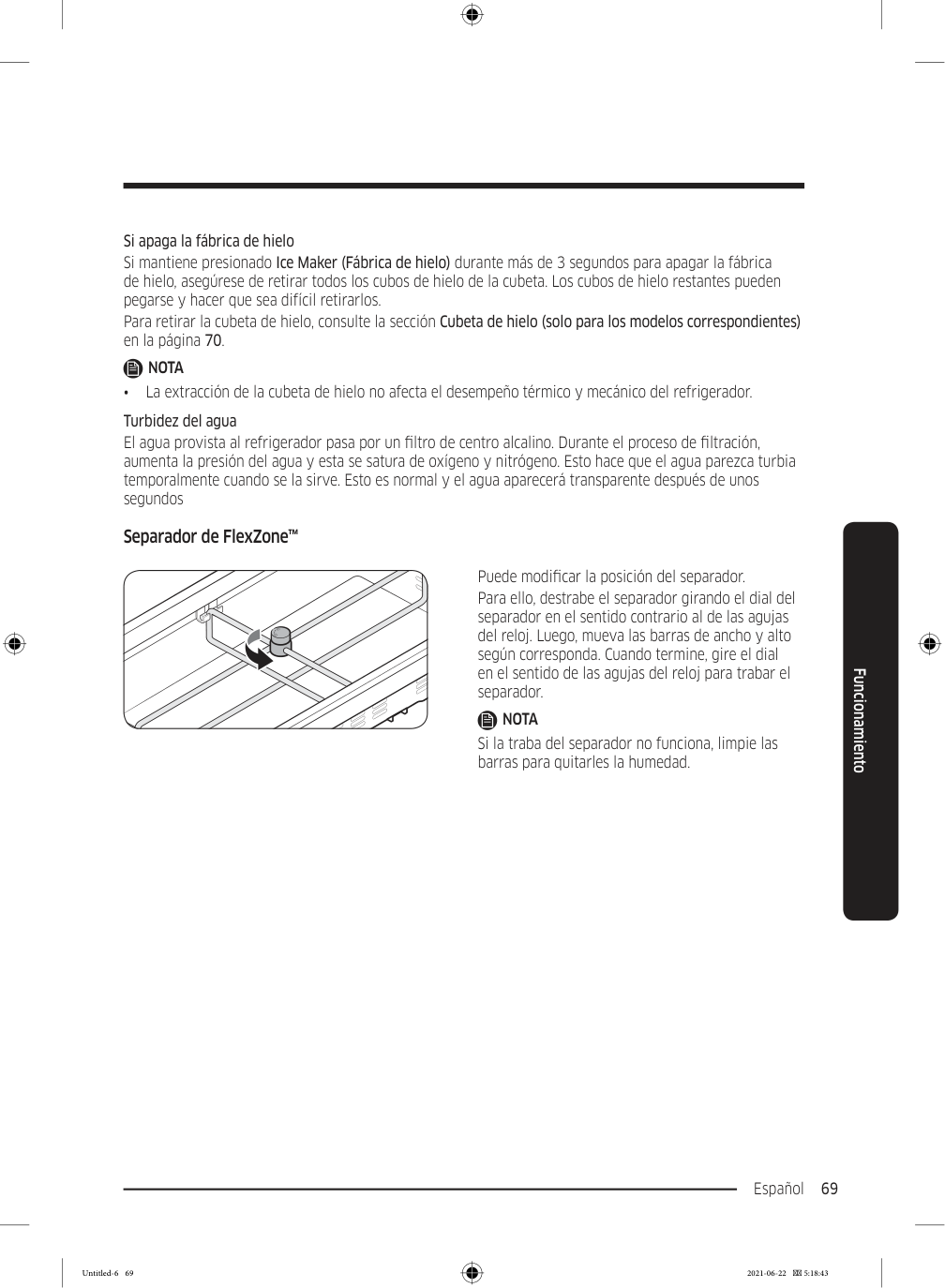
    Page 153

    Español 69 Funcionamiento Si apaga la fábrica de hielo Si mantiene presionado Ice Maker (Fábrica de hielo) durante más de 3 segundos para apagar la fábrica de hielo, asegúrese de retirar todos los cubos de hielo de la cubeta. Los cubos de hielo restantes pueden pegarse y hacer que sea difícil retirarlos. Para retirar la cubeta de hielo, consulte la sección Cubeta de hielo (solo para los modelos correspondientes) en la página 70.

    Nota

    • La extracción de la cubeta de hielo no afecta el desempeño térmico y mecánico del refrigerador. Turbidez del agua El agua provista al refrigerador pasa por un filtro de centro alcalino. Durante el proceso de filtración, aumenta la presión del agua y esta se satura de oxígeno y nitrógeno. Esto hace que el agua parezca turbia temporalmente cuando se la sirve. Esto es normal y el agua aparecerá transparente después de unos segundos Separador de FlexZone™ Puede modificar la posición del separador. Para ello, destrabe el separador girando el dial del separador en el sentido contrario al de las agujas del reloj. Luego, mueva las barras de ancho y alto según corresponda. Cuando termine, gire el dial en el sentido de las agujas del reloj para trabar el separador.

    Nota

    Si la traba del separador no funciona, limpie las barras para quitarles la humedad. Untitled-6 69 2021-06-22  5:18:43
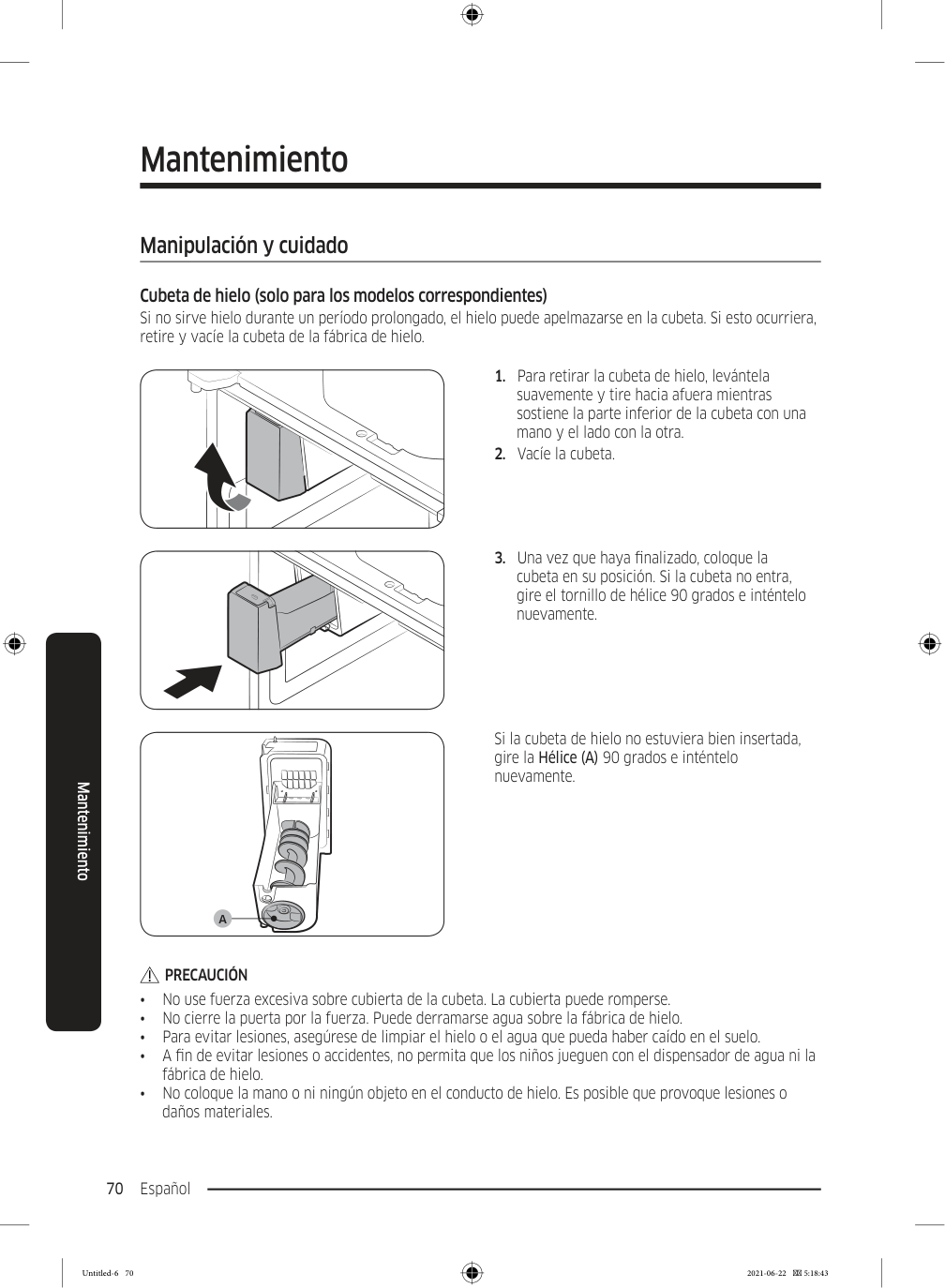
    Page 154

    Español 70 Mantenimiento Manipulación y cuidado Cubeta de hielo (solo para los modelos correspondientes) Si no sirve hielo durante un período prolongado, el hielo puede apelmazarse en la cubeta. Si esto ocurriera, retire y vacíe la cubeta de la fábrica de hielo.

  • Para retirar la cubeta de hielo, levántela
  • suavemente y tire hacia afuera mientras sostiene la parte inferior de la cubeta con una mano y el lado con la otra.
  • Vacíe la cubeta.
  • Una vez que haya finalizado, coloque la
  • cubeta en su posición. Si la cubeta no entra, gire el tornillo de hélice 90 grados e inténtelo nuevamente.

    A

    Si la cubeta de hielo no estuviera bien insertada, gire la Hélice (A) 90 grados e inténtelo nuevamente.

    Precaución

    • No use fuerza excesiva sobre cubierta de la cubeta. La cubierta puede romperse. • No cierre la puerta por la fuerza. Puede derramarse agua sobre la fábrica de hielo. • Para evitar lesiones, asegúrese de limpiar el hielo o el agua que pueda haber caído en el suelo. • A fin de evitar lesiones o accidentes, no permita que los niños jueguen con el dispensador de agua ni la fábrica de hielo. • No coloque la mano o ni ningún objeto en el conducto de hielo. Es posible que provoque lesiones o daños materiales. Mantenimiento Untitled-6 70 2021-06-22  5:18:43
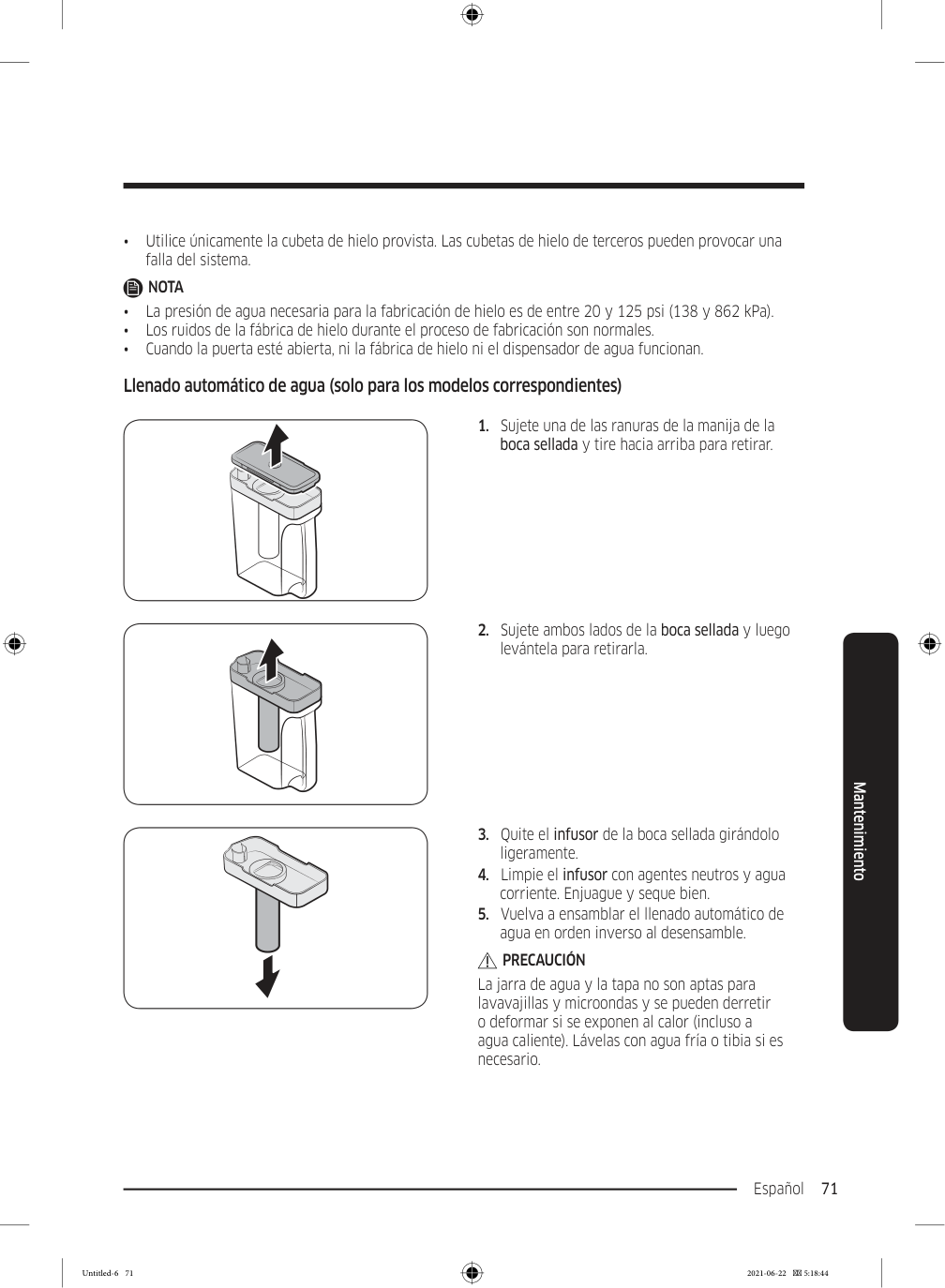
    Page 155

    Español 71 Mantenimiento • Utilice únicamente la cubeta de hielo provista. Las cubetas de hielo de terceros pueden provocar una falla del sistema.

    Nota

    • La presión de agua necesaria para la fabricación de hielo es de entre 20 y 125 psi (138 y 862 kPa). • Los ruidos de la fábrica de hielo durante el proceso de fabricación son normales. • Cuando la puerta esté abierta, ni la fábrica de hielo ni el dispensador de agua funcionan. Llenado automático de agua (solo para los modelos correspondientes)
  • Sujete una de las ranuras de la manija de la
  • boca sellada y tire hacia arriba para retirar.
  • Sujete ambos lados de la boca sellada y luego
  • levántela para retirarla.
  • Quite el infusor de la boca sellada girándolo
  • ligeramente.
  • Limpie el infusor con agentes neutros y agua
  • corriente. Enjuague y seque bien.
  • Vuelva a ensamblar el llenado automático de
  • agua en orden inverso al desensamble.

    Precaución

    La jarra de agua y la tapa no son aptas para lavavajillas y microondas y se pueden derretir o deformar si se exponen al calor (incluso a agua caliente). Lávelas con agua fría o tibia si es necesario. Untitled-6 71 2021-06-22  5:18:44
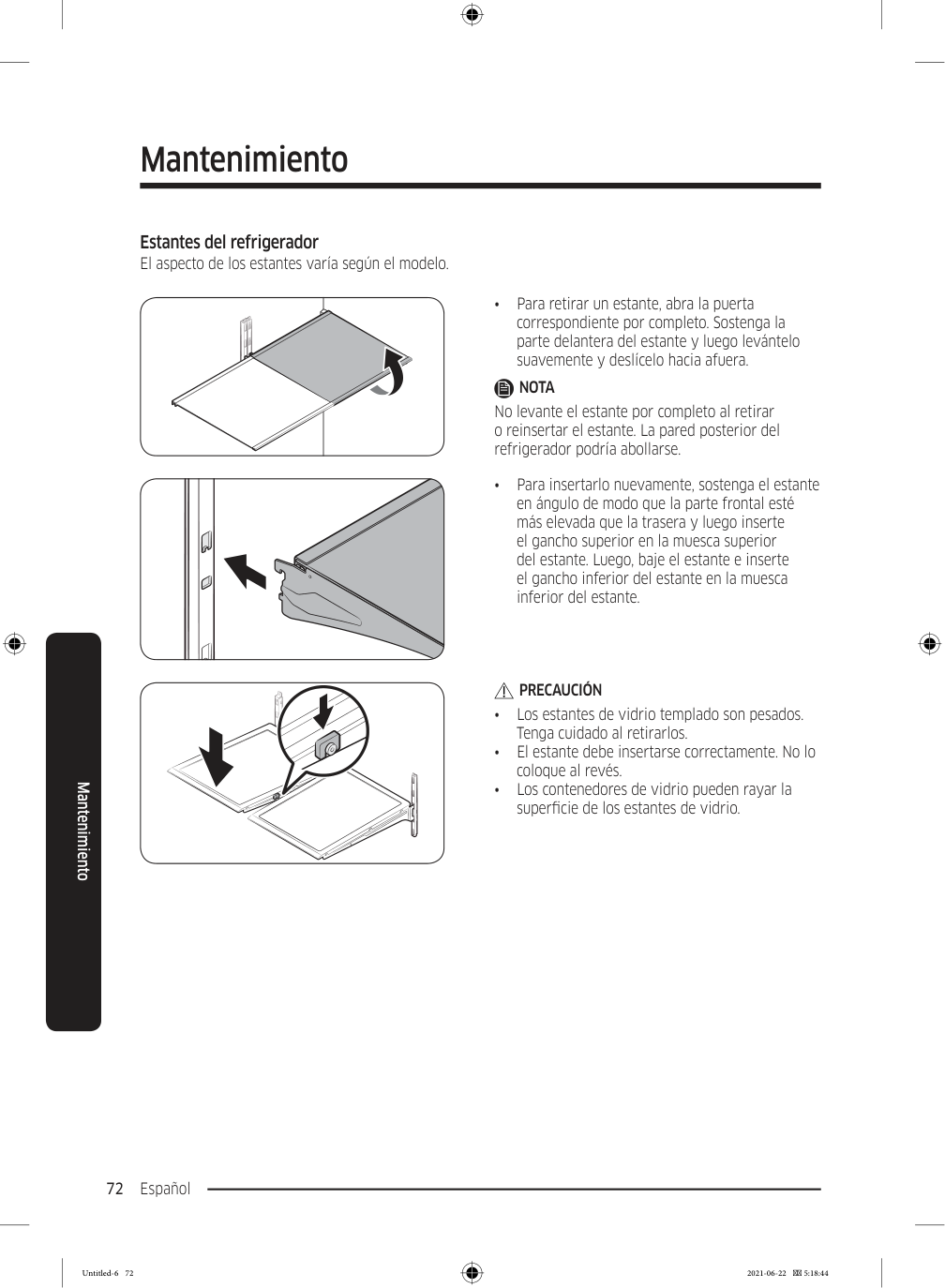
    Page 156

    Mantenimiento Español 72 Mantenimiento Estantes del refrigerador El aspecto de los estantes varía según el modelo. • Para retirar un estante, abra la puerta correspondiente por completo. Sostenga la parte delantera del estante y luego levántelo suavemente y deslícelo hacia afuera.

    Nota

    No levante el estante por completo al retirar o reinsertar el estante. La pared posterior del refrigerador podría abollarse. • Para insertarlo nuevamente, sostenga el estante en ángulo de modo que la parte frontal esté más elevada que la trasera y luego inserte el gancho superior en la muesca superior del estante. Luego, baje el estante e inserte el gancho inferior del estante en la muesca inferior del estante.

    Precaución

    • Los estantes de vidrio templado son pesados. Tenga cuidado al retirarlos. • El estante debe insertarse correctamente. No lo coloque al revés. • Los contenedores de vidrio pueden rayar la superficie de los estantes de vidrio. Untitled-6 72 2021-06-22  5:18:44
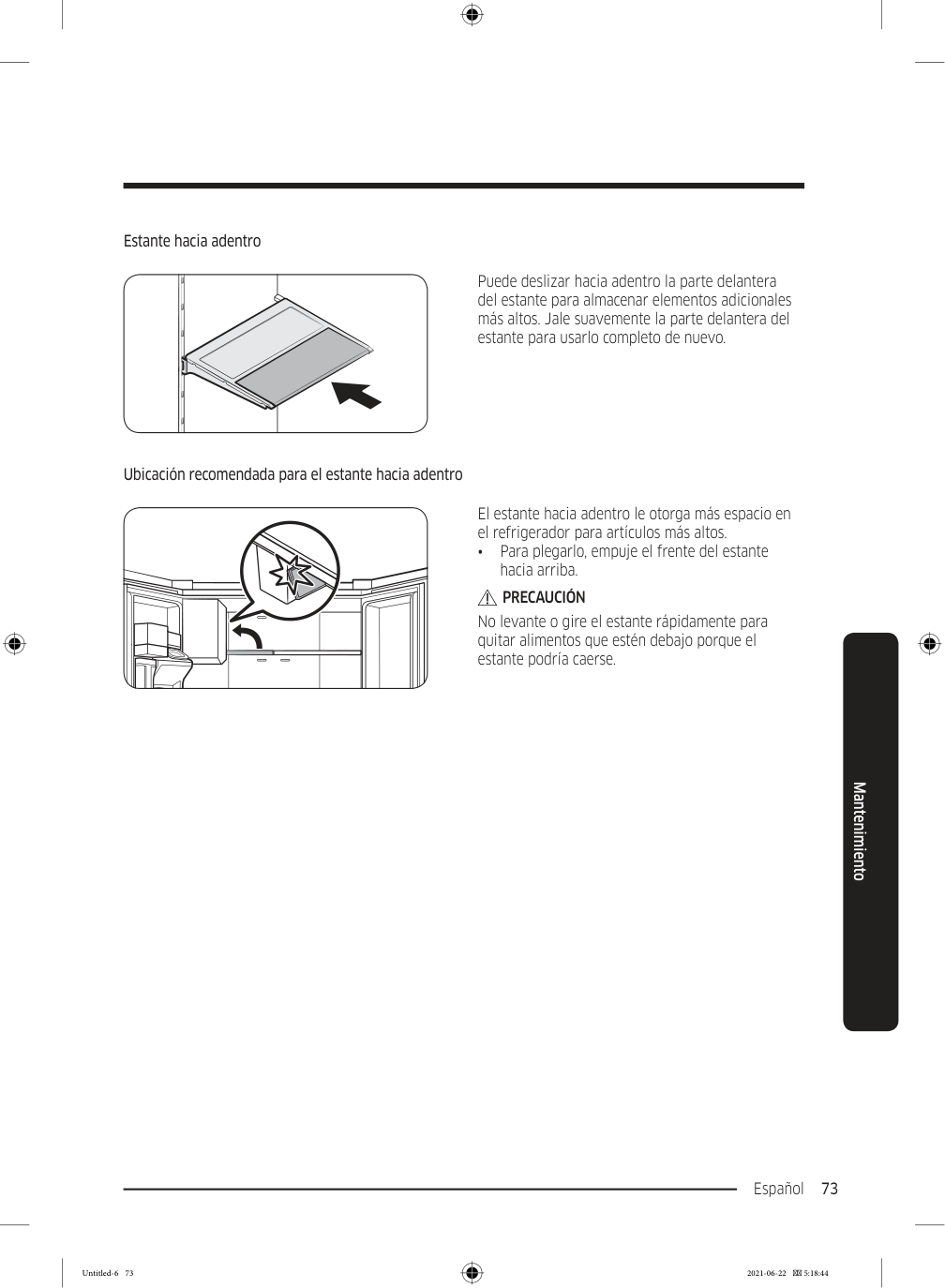
    Page 157

    Español 73 Mantenimiento Estante hacia adentro Puede deslizar hacia adentro la parte delantera del estante para almacenar elementos adicionales más altos. Jale suavemente la parte delantera del estante para usarlo completo de nuevo. Ubicación recomendada para el estante hacia adentro El estante hacia adentro le otorga más espacio en el refrigerador para artículos más altos. • Para plegarlo, empuje el frente del estante hacia arriba.

    Precaución

    No levante o gire el estante rápidamente para quitar alimentos que estén debajo porque el estante podría caerse. Untitled-6 73 2021-06-22  5:18:44
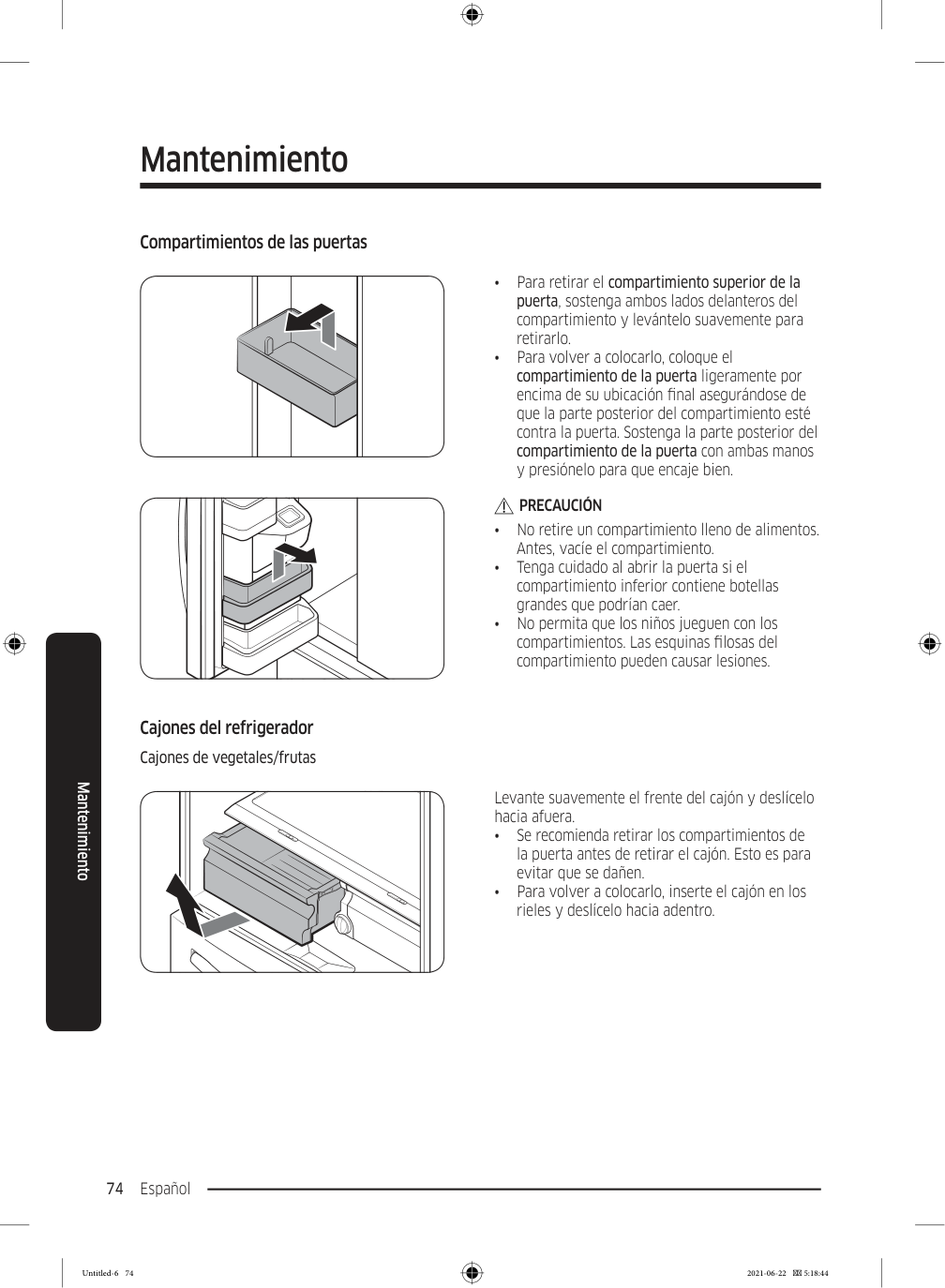
    Page 158

    Mantenimiento Español 74 Mantenimiento Compartimientos de las puertas • Para retirar el compartimiento superior de la puerta, sostenga ambos lados delanteros del compartimiento y levántelo suavemente para retirarlo. • Para volver a colocarlo, coloque el compartimiento de la puerta ligeramente por encima de su ubicación final asegurándose de que la parte posterior del compartimiento esté contra la puerta. Sostenga la parte posterior del compartimiento de la puerta con ambas manos y presiónelo para que encaje bien.

    Precaución

    • No retire un compartimiento lleno de alimentos. Antes, vacíe el compartimiento. • Tenga cuidado al abrir la puerta si el compartimiento inferior contiene botellas grandes que podrían caer. • No permita que los niños jueguen con los compartimientos. Las esquinas filosas del compartimiento pueden causar lesiones. Cajones del refrigerador Cajones de vegetales/frutas Levante suavemente el frente del cajón y deslícelo hacia afuera. • Se recomienda retirar los compartimientos de la puerta antes de retirar el cajón. Esto es para evitar que se dañen. • Para volver a colocarlo, inserte el cajón en los rieles y deslícelo hacia adentro. Untitled-6 74 2021-06-22  5:18:44
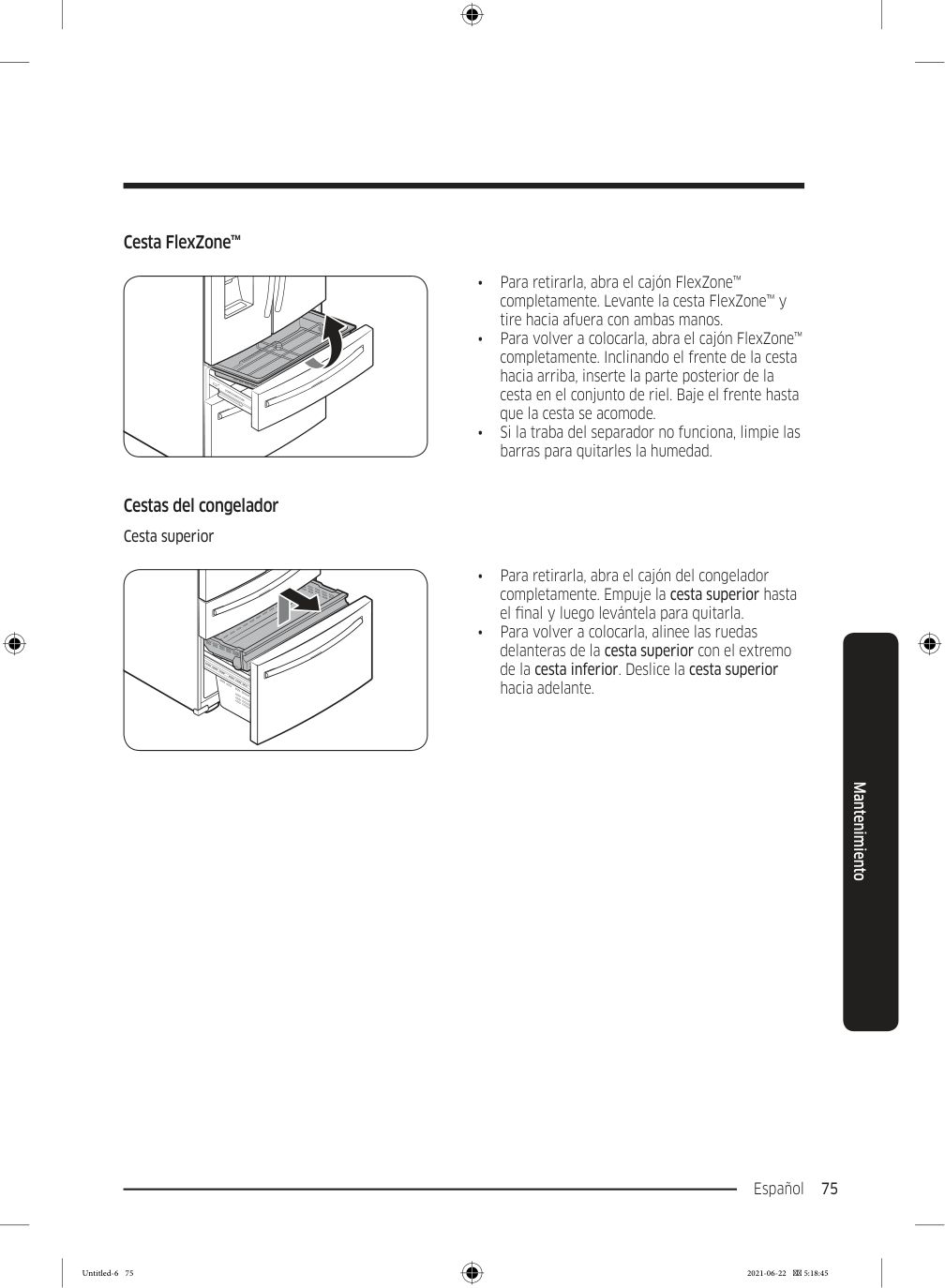
    Page 159

    Español 75 Mantenimiento Cesta FlexZone™ • Para retirarla, abra el cajón FlexZone™ completamente. Levante la cesta FlexZone™ y tire hacia afuera con ambas manos. • Para volver a colocarla, abra el cajón FlexZone™ completamente. Inclinando el frente de la cesta hacia arriba, inserte la parte posterior de la cesta en el conjunto de riel. Baje el frente hasta que la cesta se acomode. • Si la traba del separador no funciona, limpie las barras para quitarles la humedad. Cestas del congelador Cesta superior • Para retirarla, abra el cajón del congelador completamente. Empuje la cesta superior hasta el final y luego levántela para quitarla. • Para volver a colocarla, alinee las ruedas delanteras de la cesta superior con el extremo de la cesta inferior. Deslice la cesta superior hacia adelante. Untitled-6 75 2021-06-22  5:18:45
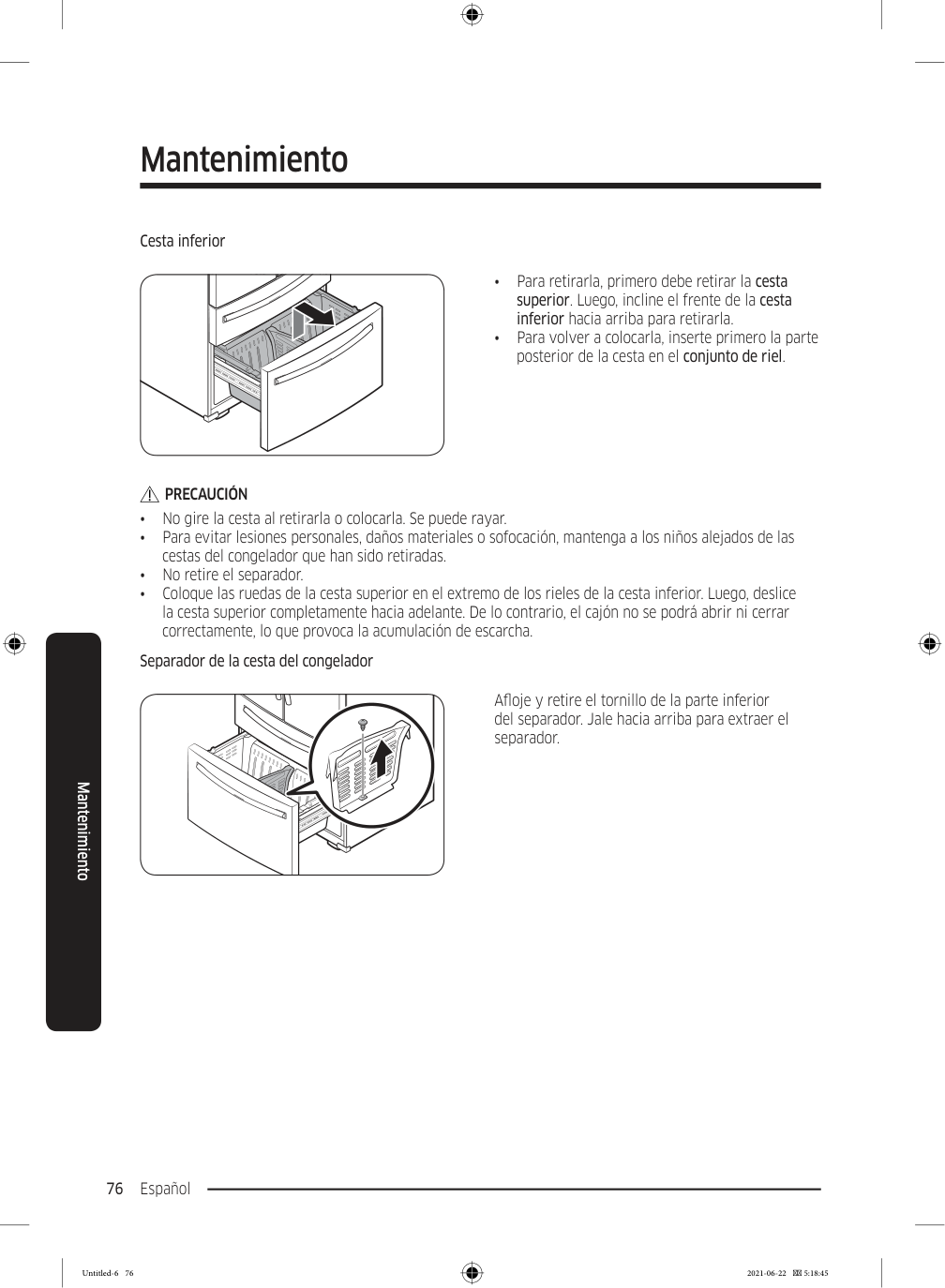
    Page 160

    Mantenimiento Español 76 Mantenimiento Cesta inferior • Para retirarla, primero debe retirar la cesta superior. Luego, incline el frente de la cesta inferior hacia arriba para retirarla. • Para volver a colocarla, inserte primero la parte posterior de la cesta en el conjunto de riel.

    Precaución

    • No gire la cesta al retirarla o colocarla. Se puede rayar. • Para evitar lesiones personales, daños materiales o sofocación, mantenga a los niños alejados de las cestas del congelador que han sido retiradas. • No retire el separador. • Coloque las ruedas de la cesta superior en el extremo de los rieles de la cesta inferior. Luego, deslice la cesta superior completamente hacia adelante. De lo contrario, el cajón no se podrá abrir ni cerrar correctamente, lo que provoca la acumulación de escarcha. Separador de la cesta del congelador Afloje y retire el tornillo de la parte inferior del separador. Jale hacia arriba para extraer el separador. Untitled-6 76 2021-06-22  5:18:45
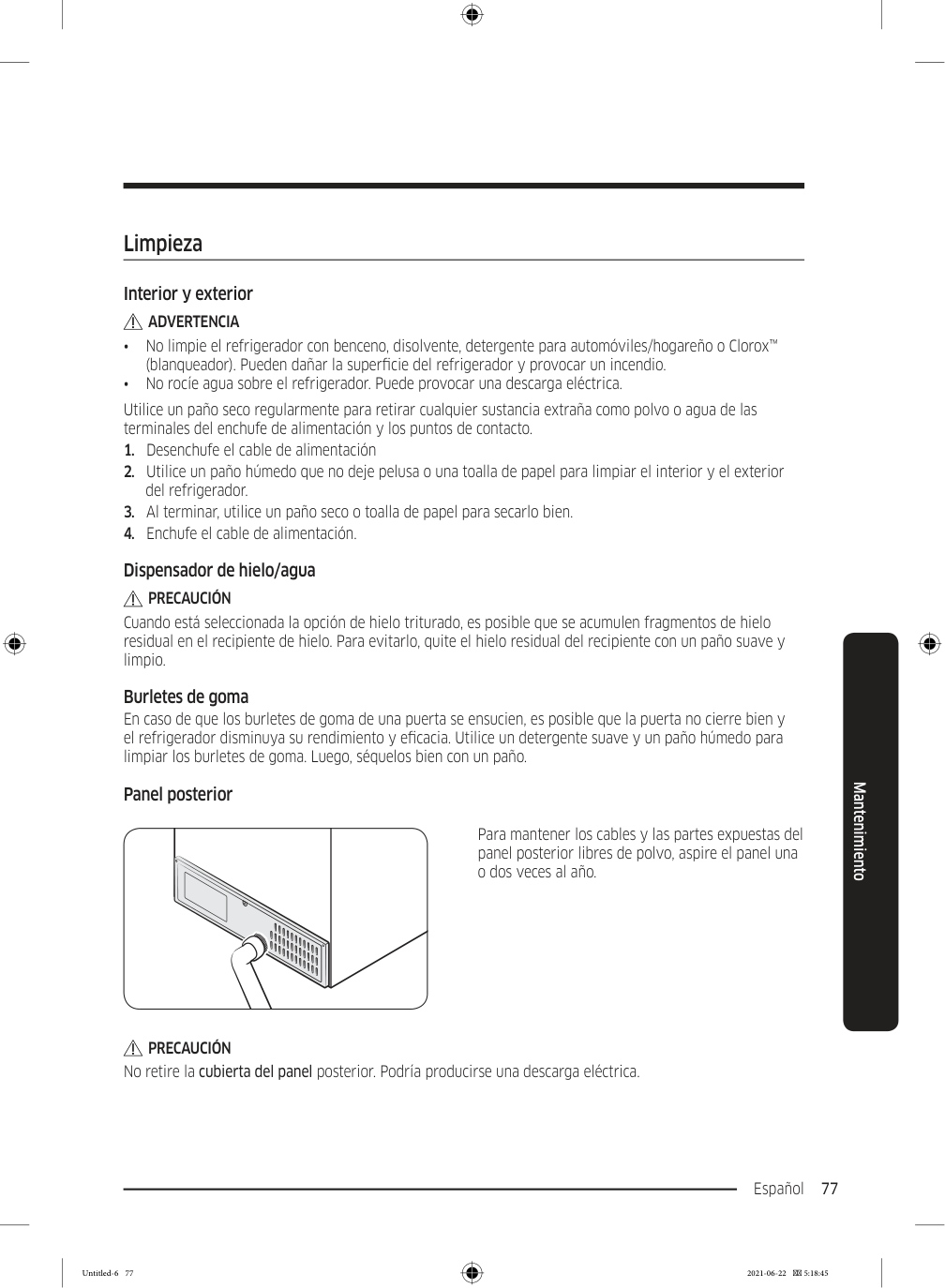
    Page 161

    Español 77 Mantenimiento Limpieza Interior y exterior

    Advertencia

    • No limpie el refrigerador con benceno, disolvente, detergente para automóviles/hogareño o Clorox™ (blanqueador). Pueden dañar la superficie del refrigerador y provocar un incendio. • No rocíe agua sobre el refrigerador. Puede provocar una descarga eléctrica. Utilice un paño seco regularmente para retirar cualquier sustancia extraña como polvo o agua de las terminales del enchufe de alimentación y los puntos de contacto.
  • Desenchufe el cable de alimentación
  • Utilice un paño húmedo que no deje pelusa o una toalla de papel para limpiar el interior y el exterior
  • del refrigerador.
  • Al terminar, utilice un paño seco o toalla de papel para secarlo bien.
  • Enchufe el cable de alimentación.
  • Dispensador de hielo/agua

    Precaución

    Cuando está seleccionada la opción de hielo triturado, es posible que se acumulen fragmentos de hielo residual en el recipiente de hielo. Para evitarlo, quite el hielo residual del recipiente con un paño suave y limpio. Burletes de goma En caso de que los burletes de goma de una puerta se ensucien, es posible que la puerta no cierre bien y el refrigerador disminuya su rendimiento y eficacia. Utilice un detergente suave y un paño húmedo para limpiar los burletes de goma. Luego, séquelos bien con un paño. Panel posterior Para mantener los cables y las partes expuestas del panel posterior libres de polvo, aspire el panel una o dos veces al año.

    Precaución

    No retire la cubierta del panel posterior. Podría producirse una descarga eléctrica. Untitled-6 77 2021-06-22  5:18:45
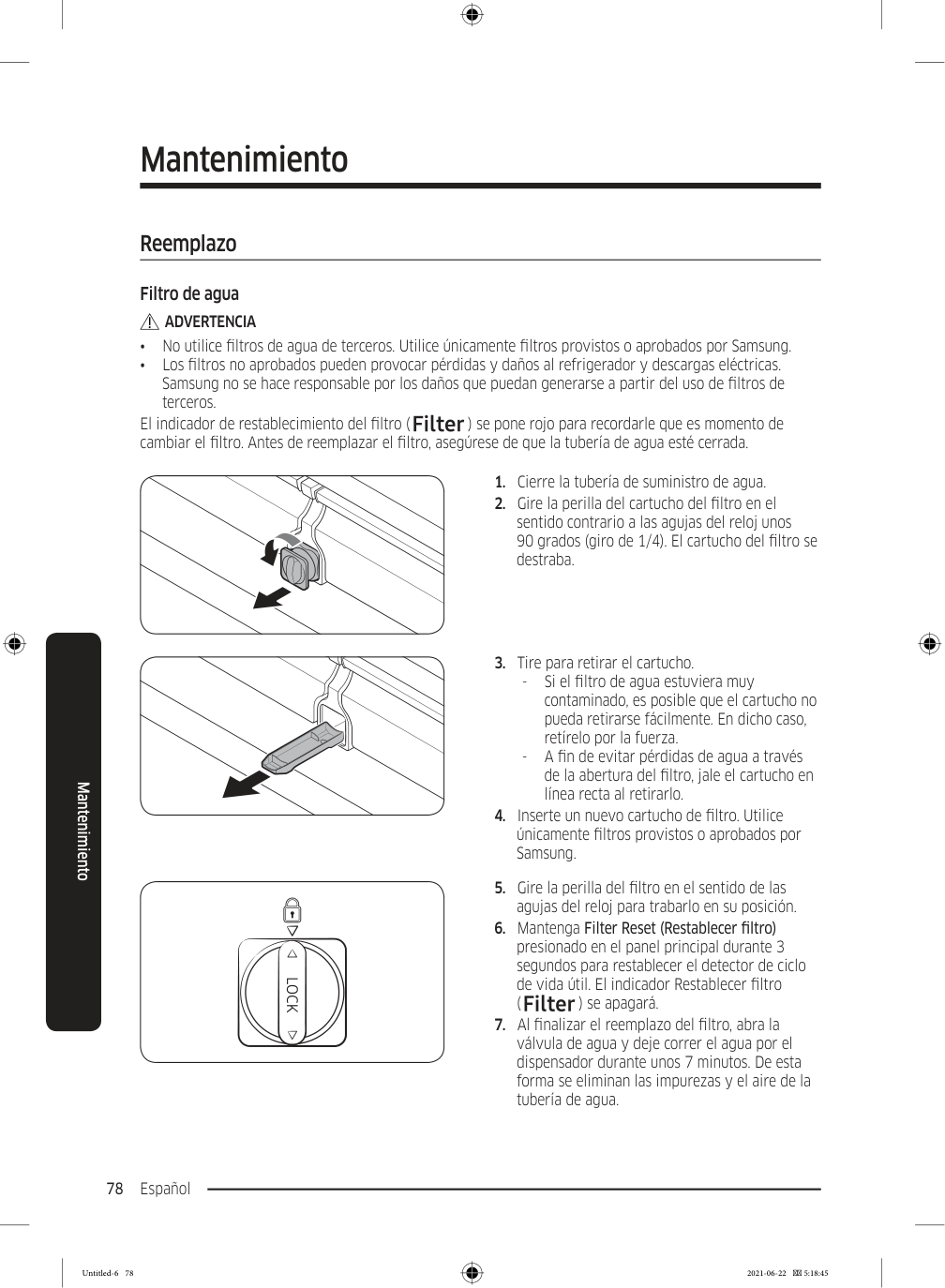
    Page 162

    Mantenimiento Español 78 Mantenimiento Reemplazo Filtro de agua

    Advertencia

    • No utilice filtros de agua de terceros. Utilice únicamente filtros provistos o aprobados por Samsung. • Los filtros no aprobados pueden provocar pérdidas y daños al refrigerador y descargas eléctricas. Samsung no se hace responsable por los daños que puedan generarse a partir del uso de filtros de terceros. El indicador de restablecimiento del filtro ( ) se pone rojo para recordarle que es momento de cambiar el filtro. Antes de reemplazar el filtro, asegúrese de que la tubería de agua esté cerrada.
  • Cierre la tubería de suministro de agua.
  • Gire la perilla del cartucho del filtro en el
  • sentido contrario a las agujas del reloj unos 90 grados (giro de 1/4). El cartucho del filtro se destraba.
  • Tire para retirar el cartucho.
  • Si el filtro de agua estuviera muy
  • contaminado, es posible que el cartucho no pueda retirarse fácilmente. En dicho caso, retírelo por la fuerza.
  • A fin de evitar pérdidas de agua a través
  • de la abertura del filtro, jale el cartucho en línea recta al retirarlo.
  • Inserte un nuevo cartucho de filtro. Utilice
  • únicamente filtros provistos o aprobados por Samsung.
  • Gire la perilla del filtro en el sentido de las
  • agujas del reloj para trabarlo en su posición.
  • Mantenga Filter Reset (Restablecer filtro)
  • presionado en el panel principal durante 3 segundos para restablecer el detector de ciclo de vida útil. El indicador Restablecer filtro ( ) se apagará.
  • Al finalizar el reemplazo del filtro, abra la
  • válvula de agua y deje correr el agua por el dispensador durante unos 7 minutos. De esta forma se eliminan las impurezas y el aire de la tubería de agua. Untitled-6 78 2021-06-22  5:18:45

    Page 163

    Español 79 Mantenimiento

    Nota

    • Los filtros nuevos pueden hacer que brote agua del dispensador brevemente. Esto se debe al ingreso de aire en la tubería de agua. • El proceso de reemplazo puede hacer que el dispensador de agua gotee por un período breve. Si gotea, simplemente limpie el agua del piso con una toalla seca. Sistema de filtración por ósmosis inversa La presión de agua del sistema de suministro hacia un sistema de filtrado por ósmosis inversa debe ser de entre 35 y 120 psi (241 y 827 kPa). La presión de agua del sistema de filtración de agua por ósmosis inversa a la tubería de agua fría del refrigerador debe ser de al menos 40 psi (276 kPa). Si la presión de agua estuviera por debajo de estas especificaciones: • Verifique si el filtro de sedimentos en el sistema de ósmosis inversa está bloqueado. Reemplace el filtro si fuera necesario. • Llene nuevamente de agua el tanque de agua el sistema de ósmosis inversa. • Si el refrigerador cuenta con un filtro de agua, es posible que la presión de agua disminuya aún más al usarlo con un sistema de ósmosis inversa. Retire el filtro de agua. Para obtener más información sobre el mantenimiento, comuníquese con un plomero profesional. Pedir un filtro nuevo. Para comprar un nuevo filtro de agua, comuníquese con un centro de servicios Samsung local o visite www. samsungparts.com en Internet. Lámparas de LED Para reemplazar las lámparas del refrigerador, comuníquese con un centro de servicios Samsung local.

    Advertencia

    • El usuario no debe reemplazar las lámparas. No intente reemplazar la lámpara usted mismo. Puede provocar una descarga eléctrica. Untitled-6 79 2021-06-22  5:18:45
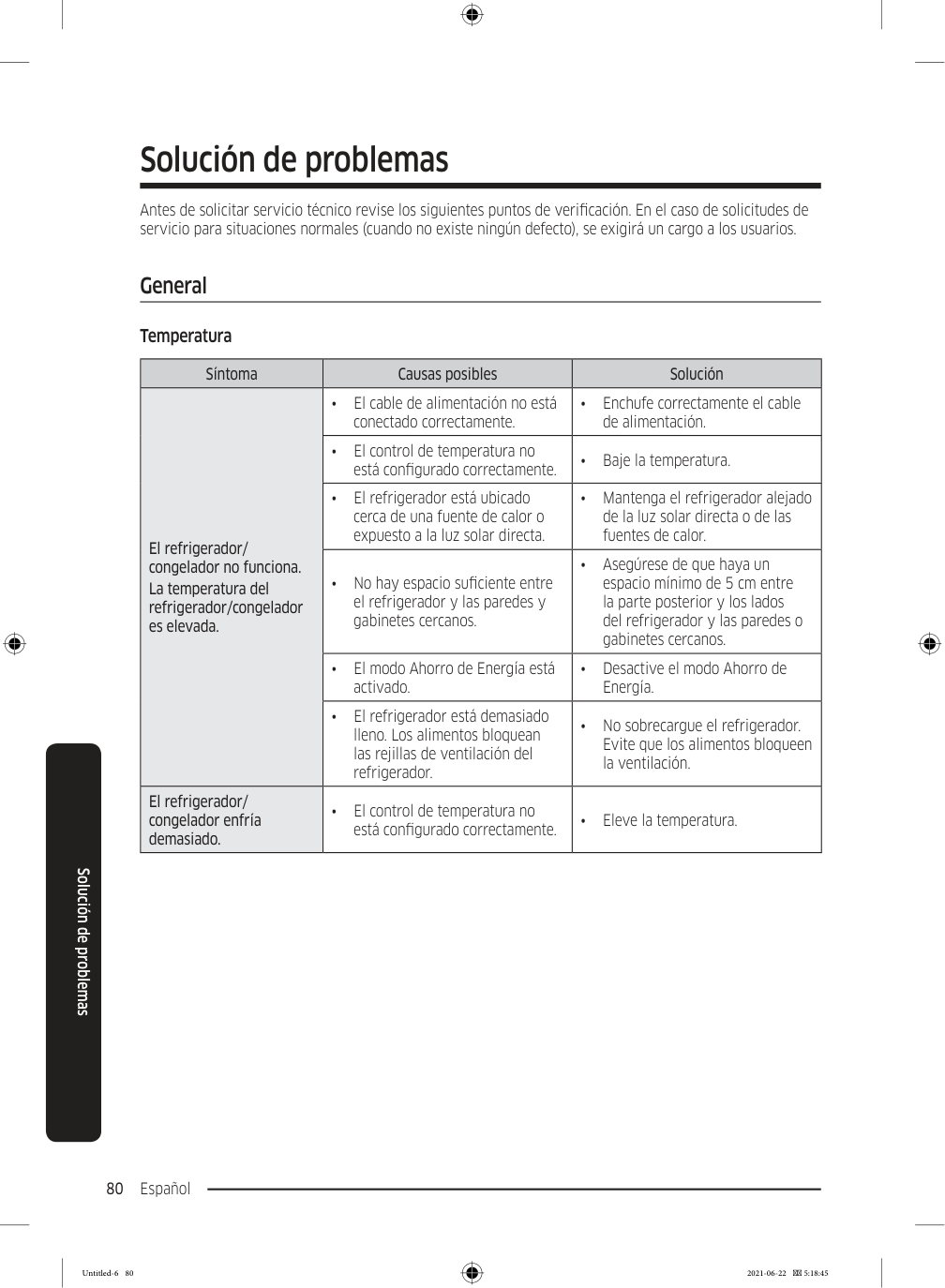
    Page 164

    Español 80 Solución de problemas Antes de solicitar servicio técnico revise los siguientes puntos de verificación. En el caso de solicitudes de servicio para situaciones normales (cuando no existe ningún defecto), se exigirá un cargo a los usuarios. General Temperatura Síntoma Causas posibles Solución El refrigerador/ congelador no funciona. La temperatura del refrigerador/congelador es elevada. • El cable de alimentación no está conectado correctamente. • Enchufe correctamente el cable de alimentación. • El control de temperatura no está configurado correctamente. • Baje la temperatura. • El refrigerador está ubicado cerca de una fuente de calor o expuesto a la luz solar directa. • Mantenga el refrigerador alejado de la luz solar directa o de las fuentes de calor. • No hay espacio suficiente entre el refrigerador y las paredes y gabinetes cercanos. • Asegúrese de que haya un espacio mínimo de 5 cm entre la parte posterior y los lados del refrigerador y las paredes o gabinetes cercanos. • El modo Ahorro de Energía está activado. • Desactive el modo Ahorro de Energía. • El refrigerador está demasiado lleno. Los alimentos bloquean las rejillas de ventilación del refrigerador. • No sobrecargue el refrigerador. Evite que los alimentos bloqueen la ventilación. El refrigerador/ congelador enfría demasiado. • El control de temperatura no está configurado correctamente. • Eleve la temperatura. Solución de problemas Untitled-6 80 2021-06-22  5:18:45
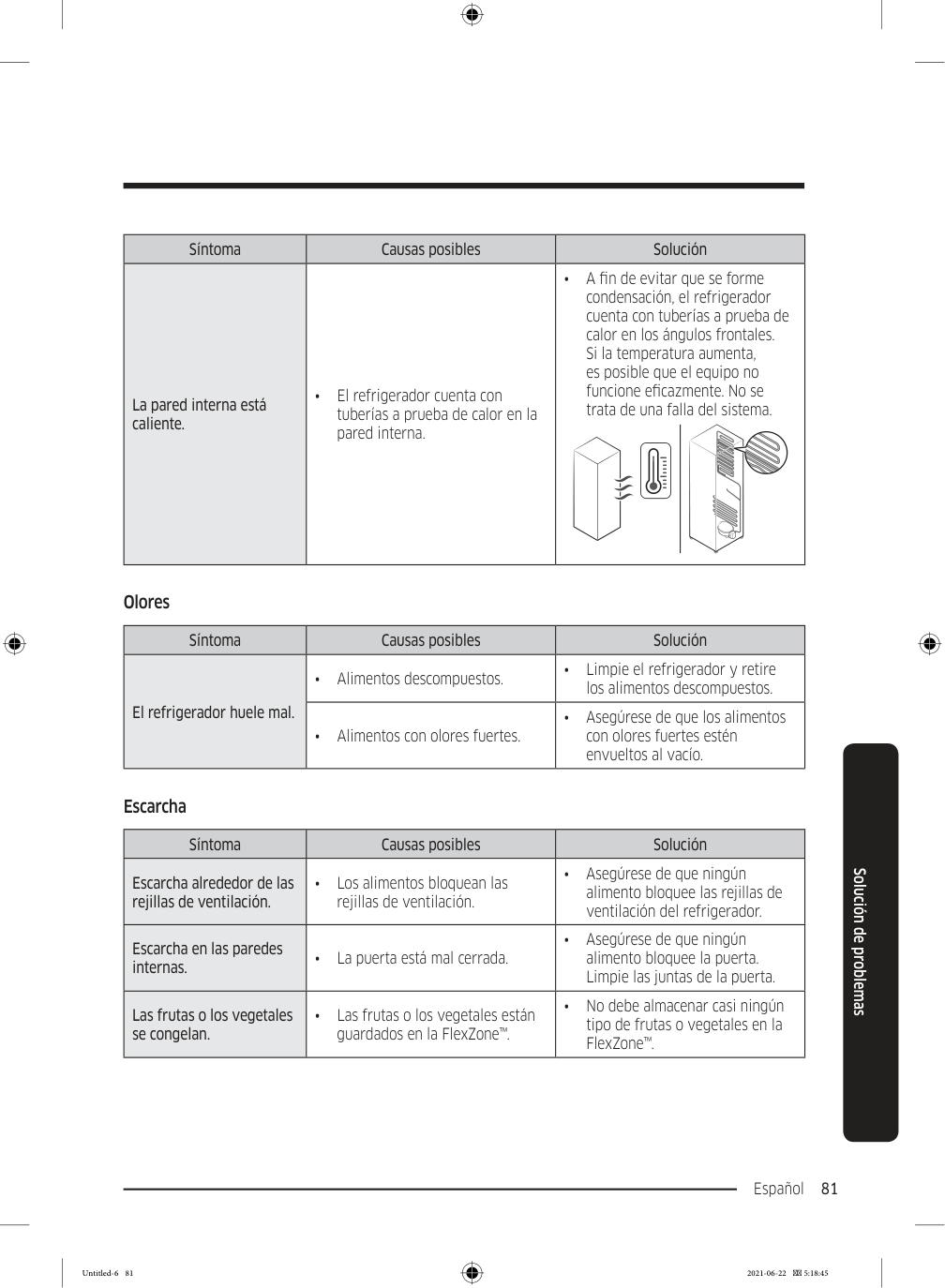
    Page 165

    Español 81 Solución de problemas Síntoma Causas posibles Solución La pared interna está caliente. • El refrigerador cuenta con tuberías a prueba de calor en la pared interna. • A fin de evitar que se forme condensación, el refrigerador cuenta con tuberías a prueba de calor en los ángulos frontales. Si la temperatura aumenta, es posible que el equipo no funcione eficazmente. No se trata de una falla del sistema. Olores Síntoma Causas posibles Solución El refrigerador huele mal. • Alimentos descompuestos. • Limpie el refrigerador y retire los alimentos descompuestos. • Alimentos con olores fuertes. • Asegúrese de que los alimentos con olores fuertes estén envueltos al vacío. Escarcha Síntoma Causas posibles Solución Escarcha alrededor de las rejillas de ventilación. • Los alimentos bloquean las rejillas de ventilación. • Asegúrese de que ningún alimento bloquee las rejillas de ventilación del refrigerador. Escarcha en las paredes internas. • La puerta está mal cerrada. • Asegúrese de que ningún alimento bloquee la puerta. Limpie las juntas de la puerta. Las frutas o los vegetales se congelan. • Las frutas o los vegetales están guardados en la FlexZone™. • No debe almacenar casi ningún tipo de frutas o vegetales en la FlexZone™. Untitled-6 81 2021-06-22  5:18:45
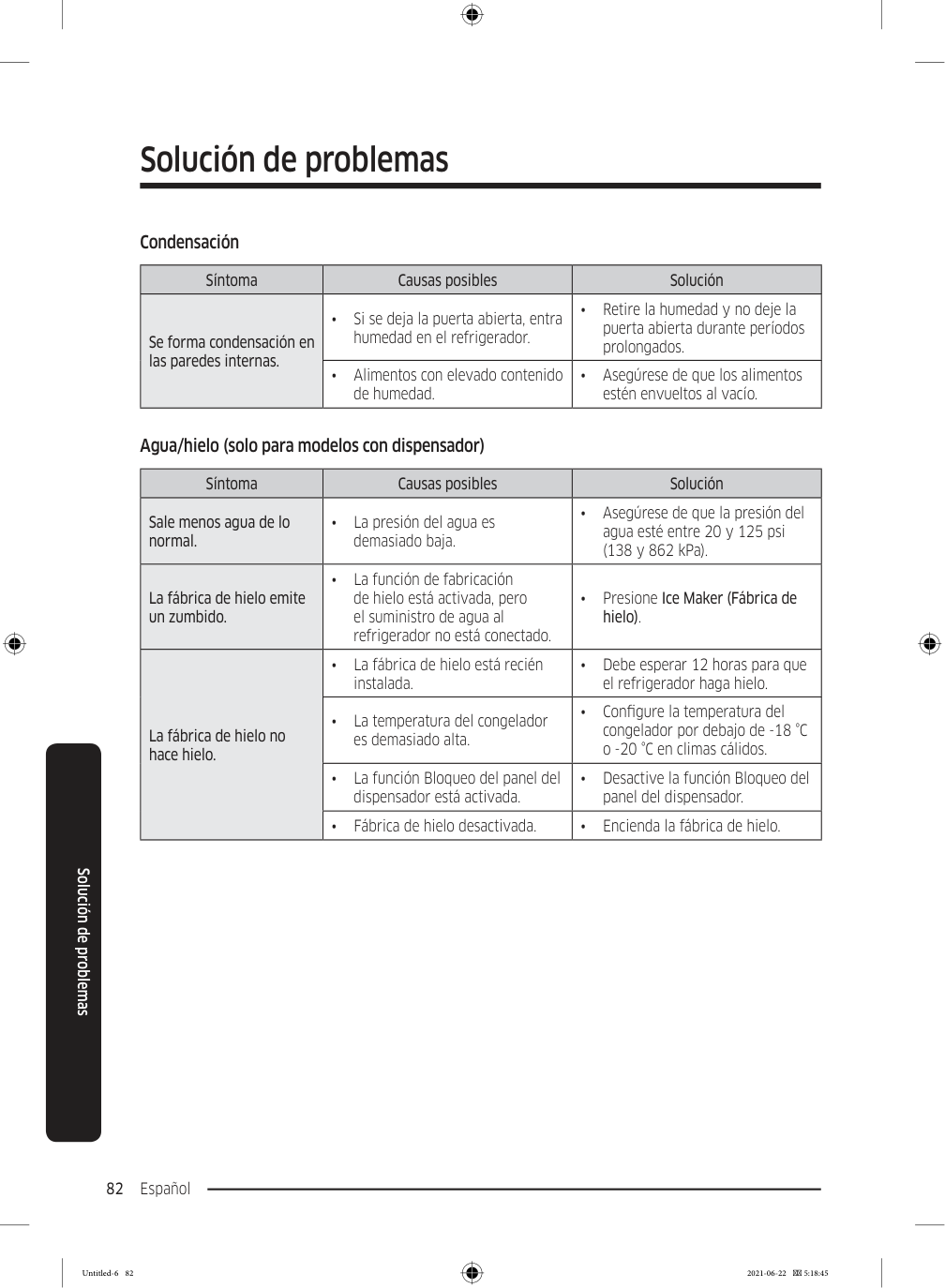
    Page 166

    Solución de problemas Español 82 Solución de problemas Condensación Síntoma Causas posibles Solución Se forma condensación en las paredes internas. • Si se deja la puerta abierta, entra humedad en el refrigerador. • Retire la humedad y no deje la puerta abierta durante períodos prolongados. • Alimentos con elevado contenido de humedad. • Asegúrese de que los alimentos estén envueltos al vacío. Agua/hielo (solo para modelos con dispensador) Síntoma Causas posibles Solución Sale menos agua de lo normal. • La presión del agua es demasiado baja. • Asegúrese de que la presión del agua esté entre 20 y 125 psi (138 y 862 kPa). La fábrica de hielo emite un zumbido. • La función de fabricación de hielo está activada, pero el suministro de agua al refrigerador no está conectado. • Presione Ice Maker (Fábrica de hielo). La fábrica de hielo no hace hielo. • La fábrica de hielo está recién instalada. • Debe esperar 12 horas para que el refrigerador haga hielo. • La temperatura del congelador es demasiado alta. • Configure la temperatura del congelador por debajo de -18 °C o -20 °C en climas cálidos. • La función Bloqueo del panel del dispensador está activada. • Desactive la función Bloqueo del panel del dispensador. • Fábrica de hielo desactivada. • Encienda la fábrica de hielo. Untitled-6 82 2021-06-22  5:18:45
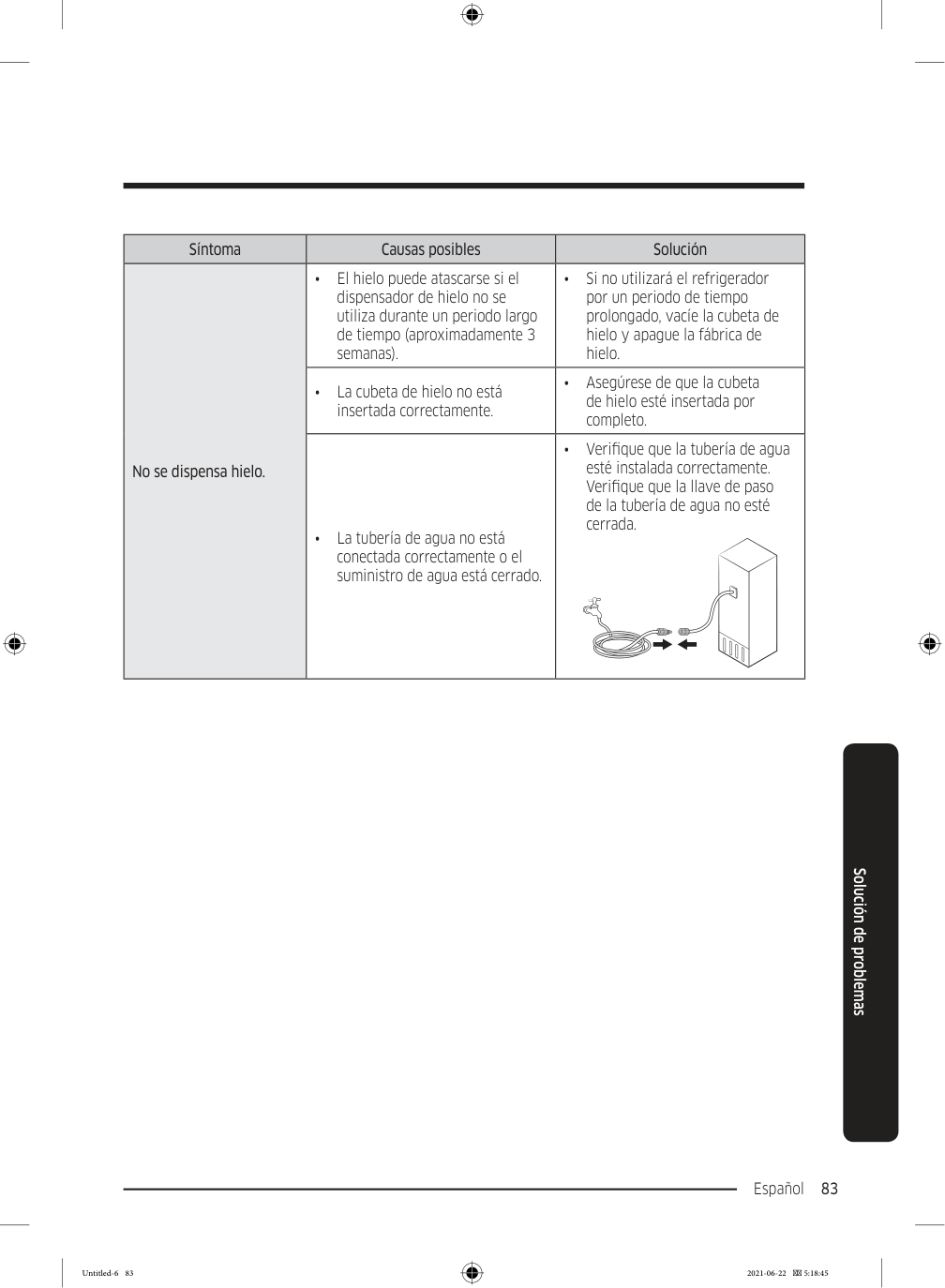
    Page 167

    Español 83 Solución de problemas Síntoma Causas posibles Solución No se dispensa hielo. • El hielo puede atascarse si el dispensador de hielo no se utiliza durante un periodo largo de tiempo (aproximadamente 3 semanas). • Si no utilizará el refrigerador por un periodo de tiempo prolongado, vacíe la cubeta de hielo y apague la fábrica de hielo. • La cubeta de hielo no está insertada correctamente. • Asegúrese de que la cubeta de hielo esté insertada por completo. • La tubería de agua no está conectada correctamente o el suministro de agua está cerrado. • Verifique que la tubería de agua esté instalada correctamente. Verifique que la llave de paso de la tubería de agua no esté cerrada. Untitled-6 83 2021-06-22  5:18:45
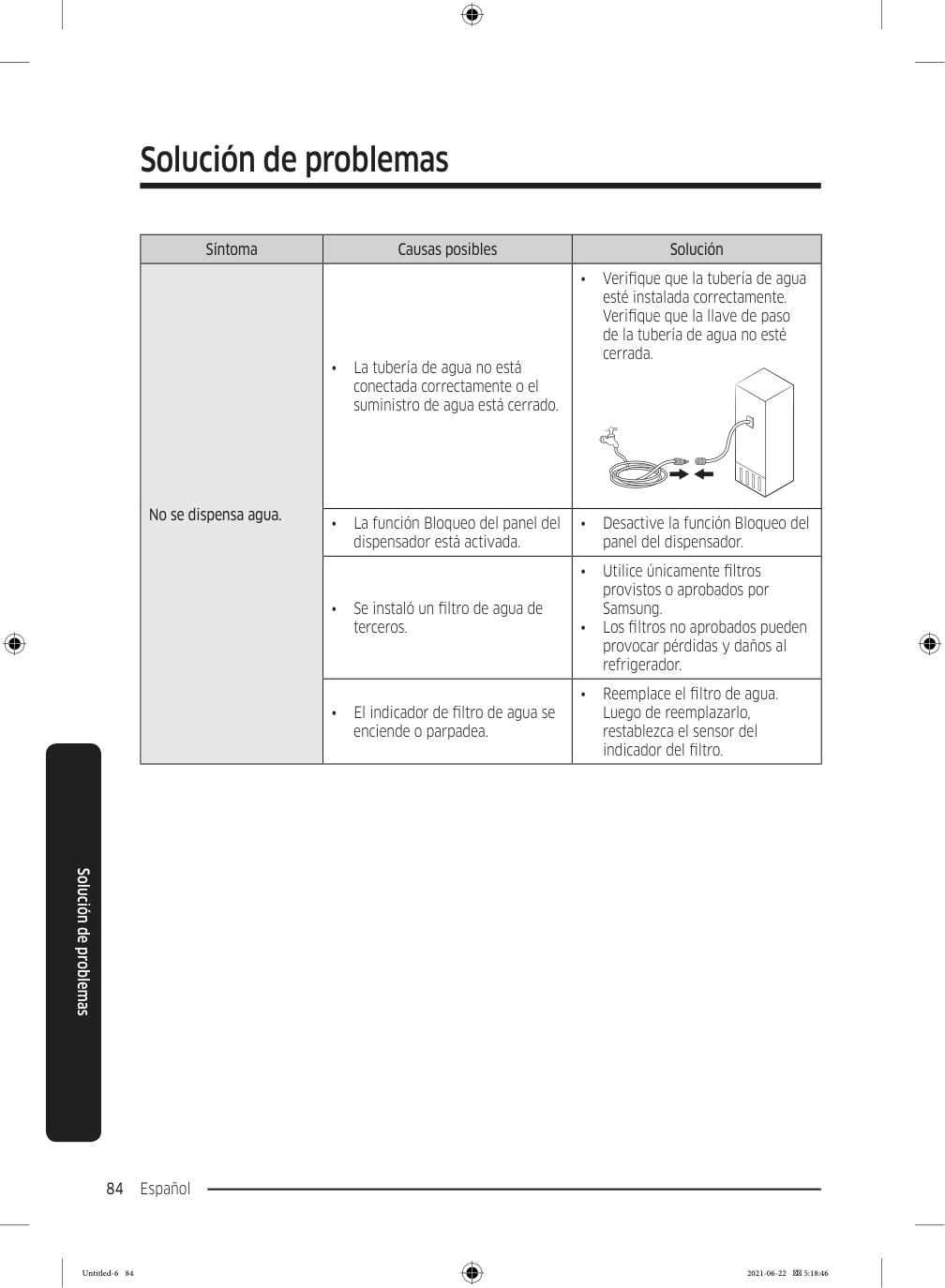
    Page 168

    Solución de problemas Español 84 Solución de problemas Síntoma Causas posibles Solución No se dispensa agua. • La tubería de agua no está conectada correctamente o el suministro de agua está cerrado. • Verifique que la tubería de agua esté instalada correctamente. Verifique que la llave de paso de la tubería de agua no esté cerrada. • La función Bloqueo del panel del dispensador está activada. • Desactive la función Bloqueo del panel del dispensador. • Se instaló un filtro de agua de terceros. • Utilice únicamente filtros provistos o aprobados por Samsung. • Los filtros no aprobados pueden provocar pérdidas y daños al refrigerador. • El indicador de filtro de agua se enciende o parpadea. • Reemplace el filtro de agua. Luego de reemplazarlo, restablezca el sensor del indicador del filtro. Untitled-6 84 2021-06-22  5:18:46
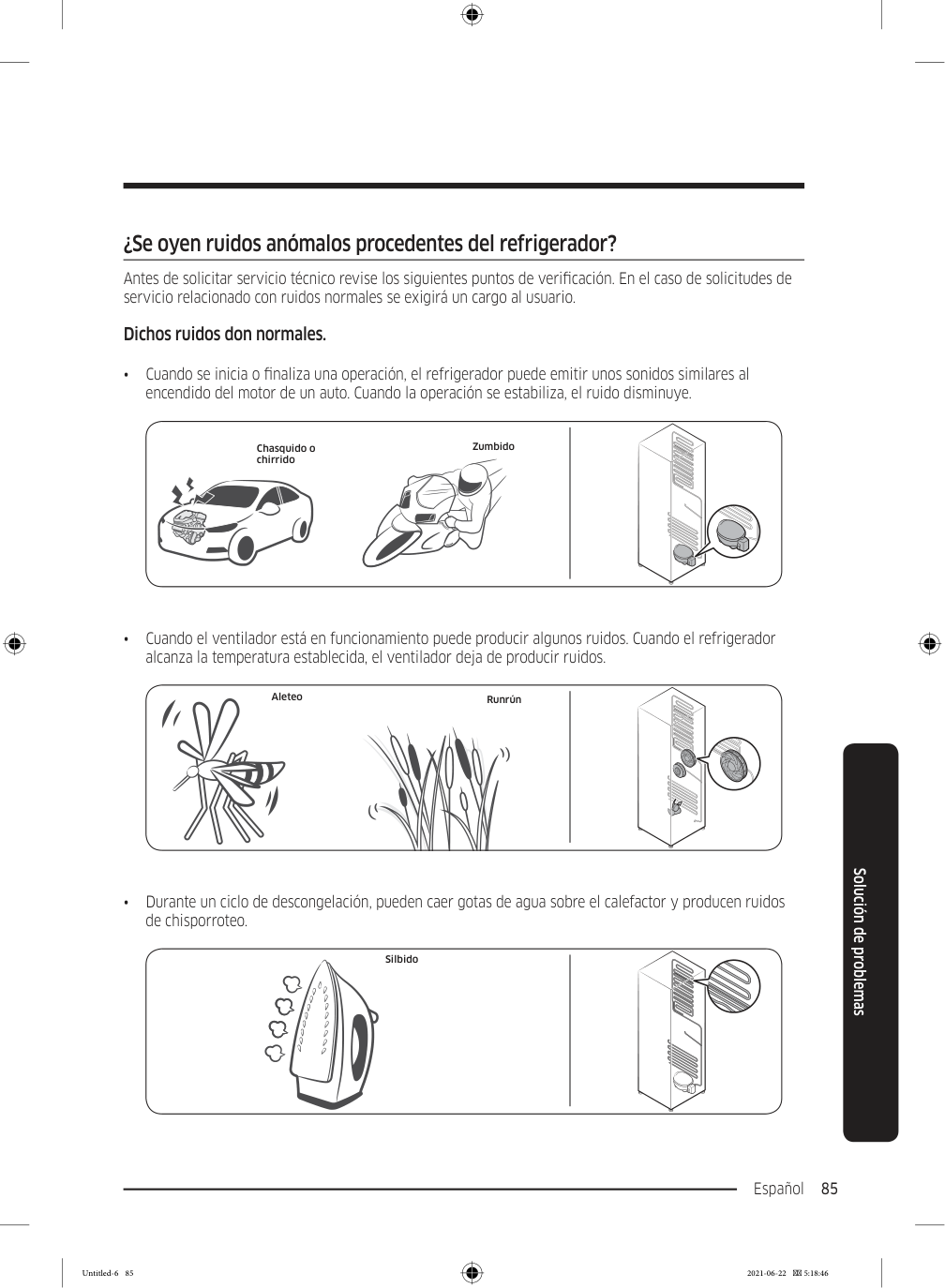
    Page 169

    Español 85 Solución de problemas ¿Se oyen ruidos anómalos procedentes del refrigerador? Antes de solicitar servicio técnico revise los siguientes puntos de verificación. En el caso de solicitudes de servicio relacionado con ruidos normales se exigirá un cargo al usuario. Dichos ruidos don normales. • Cuando se inicia o finaliza una operación, el refrigerador puede emitir unos sonidos similares al encendido del motor de un auto. Cuando la operación se estabiliza, el ruido disminuye. Chasquido o chirrido Zumbido • Cuando el ventilador está en funcionamiento puede producir algunos ruidos. Cuando el refrigerador alcanza la temperatura establecida, el ventilador deja de producir ruidos. Aleteo Runrún • Durante un ciclo de descongelación, pueden caer gotas de agua sobre el calefactor y producen ruidos de chisporroteo. Silbido Untitled-6 85 2021-06-22  5:18:46
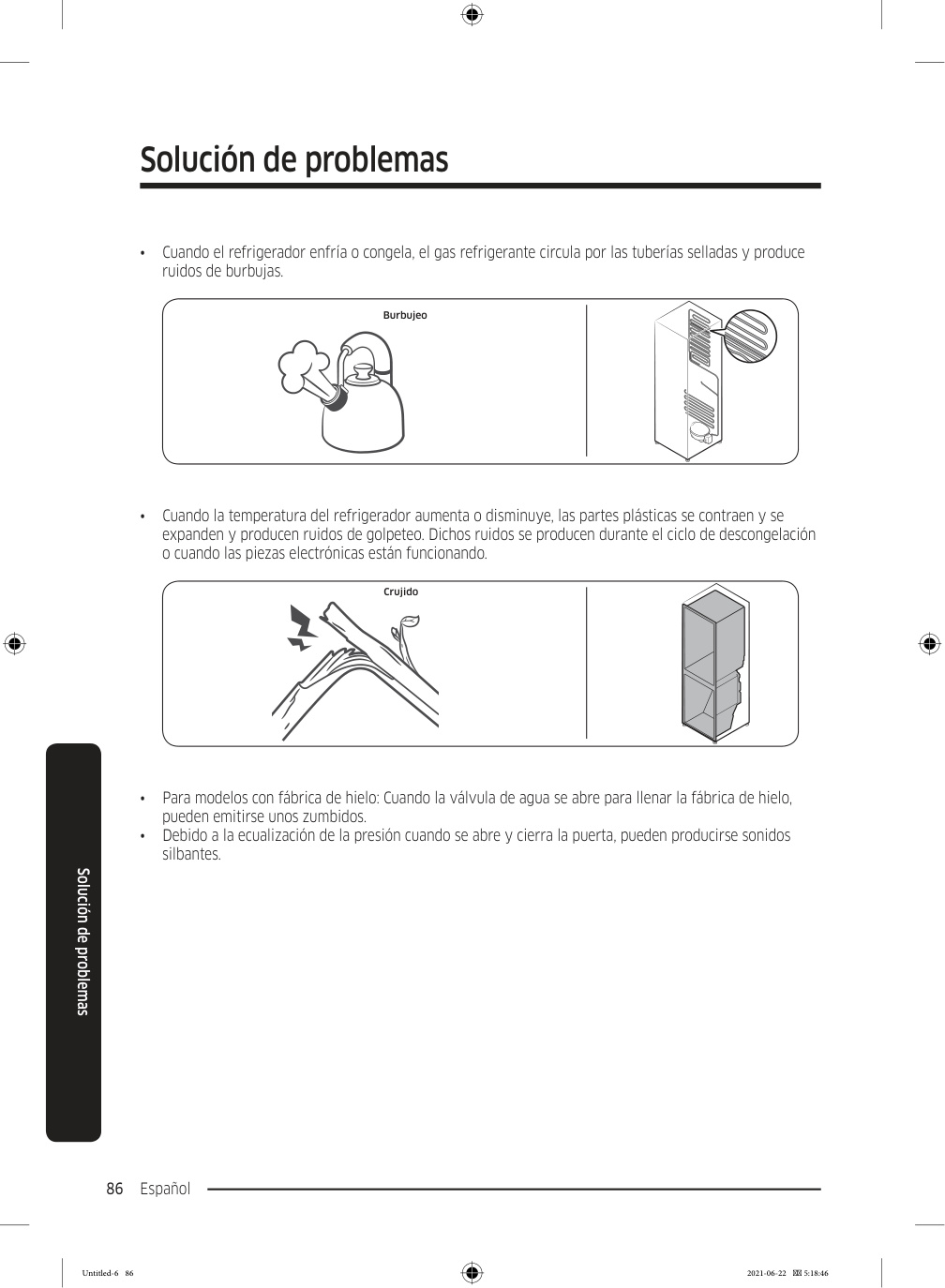
    Page 170

    Solución de problemas Español 86 Solución de problemas • Cuando el refrigerador enfría o congela, el gas refrigerante circula por las tuberías selladas y produce ruidos de burbujas. Burbujeo • Cuando la temperatura del refrigerador aumenta o disminuye, las partes plásticas se contraen y se expanden y producen ruidos de golpeteo. Dichos ruidos se producen durante el ciclo de descongelación o cuando las piezas electrónicas están funcionando. Crujido • Para modelos con fábrica de hielo: Cuando la válvula de agua se abre para llenar la fábrica de hielo, pueden emitirse unos zumbidos. • Debido a la ecualización de la presión cuando se abre y cierra la puerta, pueden producirse sonidos silbantes. Untitled-6 86 2021-06-22  5:18:46
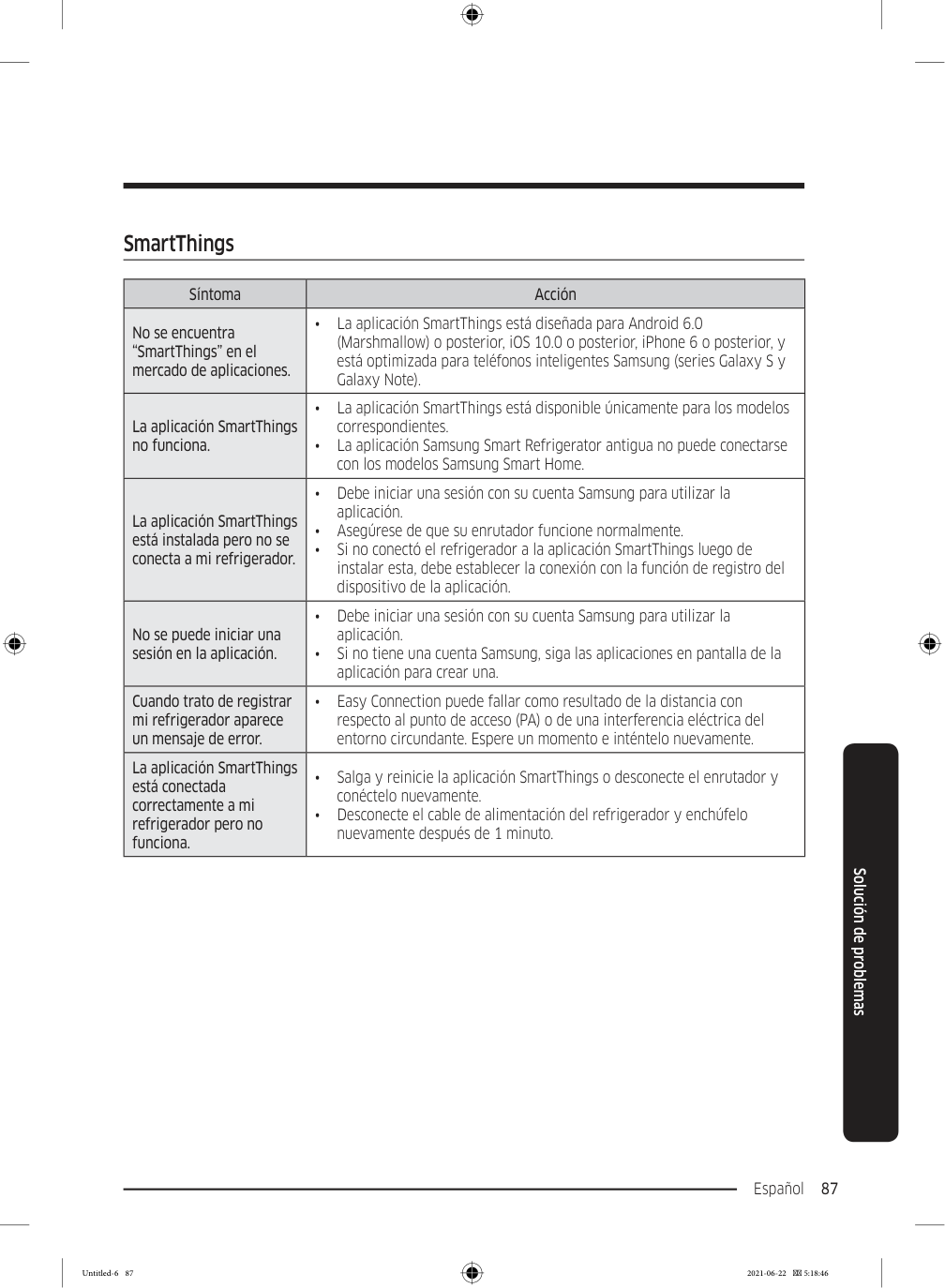
    Page 171

    Español 87 Solución de problemas SmartThings Síntoma Acción No se encuentra “SmartThings” en el mercado de aplicaciones. • La aplicación SmartThings está diseñada para Android 6.0 (Marshmallow) o posterior, iOS 10.0 o posterior, iPhone 6 o posterior, y está optimizada para teléfonos inteligentes Samsung (series Galaxy S y Galaxy Note). La aplicación SmartThings no funciona. • La aplicación SmartThings está disponible únicamente para los modelos correspondientes. • La aplicación Samsung Smart Refrigerator antigua no puede conectarse con los modelos Samsung Smart Home. La aplicación SmartThings está instalada pero no se conecta a mi refrigerador. • Debe iniciar una sesión con su cuenta Samsung para utilizar la aplicación. • Asegúrese de que su enrutador funcione normalmente. • Si no conectó el refrigerador a la aplicación SmartThings luego de instalar esta, debe establecer la conexión con la función de registro del dispositivo de la aplicación. No se puede iniciar una sesión en la aplicación. • Debe iniciar una sesión con su cuenta Samsung para utilizar la aplicación. • Si no tiene una cuenta Samsung, siga las aplicaciones en pantalla de la aplicación para crear una. Cuando trato de registrar mi refrigerador aparece un mensaje de error. • Easy Connection puede fallar como resultado de la distancia con respecto al punto de acceso (PA) o de una interferencia eléctrica del entorno circundante. Espere un momento e inténtelo nuevamente. La aplicación SmartThings está conectada correctamente a mi refrigerador pero no funciona. • Salga y reinicie la aplicación SmartThings o desconecte el enrutador y conéctelo nuevamente. • Desconecte el cable de alimentación del refrigerador y enchúfelo nuevamente después de 1 minuto. Untitled-6 87 2021-06-22  5:18:46
    Page 172

    Español 88 Open Source Announcement The software included in this product contains open source software. You may obtain the complete corresponding source code for a period of three years after the last shipment of this product by sending an email to mailto:oss.request@samsung.com. It is also possible to obtain the complete corresponding source code in a physical medium such as a CD- ROM; a minimal charge will be required. The following URL http://opensource.samsung.com/opensource/SMART_AT_051/seq/0 leads to the download page of the source code made available and open source license information as related to this product. This offer is valid to anyone in receipt of this information. Untitled-6 88 2021-06-22  5:18:46

    Page 173

    Notas Untitled-6 89 2021-06-22  5:18:46

    Page 174

    Notas Untitled-6 90 2021-06-22  5:18:46

    Page 175

    Notas Untitled-6 91 2021-06-22  5:18:46
    Page 176

    Contacte a SAMSUNG WORLD WIDE Si tiene preguntas o comentarios relacionados con los productos Samsung, póngase en contacto con el Servicio de Atención al Cliente de SAMSUNG. País Centro de contacto Sitio web

    Costa Rica

    00-800-1-Samsung (726-7864)

    www.samsung.com/latin/support (Spanish) www.samsung.com/latin_en/support (English)

    Dominican Republic

    1-800-751-2676 www.samsung.com/latin/support (Spanish) www.samsung.com/latin_en/support (English)

    Ecuador

    1-800-Samsun (72-6786)

    www.samsung.com/latin/support (Spanish) www.samsung.com/latin_en/support (English)

    El Salvador

    8000-Samsung (726-7864)

    www.samsung.com/latin/support (Spanish) www.samsung.com/latin_en/support (English)

    Guatemala

    1-800-299-0033 www.samsung.com/latin/support (Spanish) www.samsung.com/latin_en/support (English)

    Honduras

    800-2791-9111 www.samsung.com/latin/support (Spanish) www.samsung.com/latin_en/support (English)

    Jamaica

    1-800-Samsung (726-7864)

    www.samsung.com/latin_en/support (English)

    Nicaragua

    001-800-5077267 www.samsung.com/latin/support (Spanish) www.samsung.com/latin_en/support (English)

    Panama

    800-0101 www.samsung.com/latin/support (Spanish) www.samsung.com/latin_en/support (English)

    Puerto Rico

    1-800-682-3180 www.samsung.com/latin/support (Spanish) www.samsung.com/latin_en/support (English)

    Trinidad & Tobago

    1-800-Samsung(726-7864)

    www.samsung.com/latin/support (Spanish) www.samsung.com/latin_en/support (English)

    Venezuela

    0-800-100-5303 www.samsung.com/latin/support (Spanish) www.samsung.com/latin_en/support (English)

    Da68-03833B-02

    Untitled-6 92 2021-06-22  5:18:46

    More from Samsung

    Similar Unknown