
Ttec Airbeat Play True Wireless Bluetooth Headset
Ask AI
— answers from the official manualAnswers from the official manual.
Common questions
Common Questions
9 totalHow do I factory reset the Ttec Airbeat Play True Wireless Bluetooth Headset?
Press and hold the button on the charging box until the lights on the earbuds turn red. Wait for the lights to blink three times on the charger, then close it. When the charging unit's lights turn on, take out the earbuds and they will be reset. You'll need to pair them with your device again using Bluetooth settings.
What is the process for resetting my Ttec Airbeat Play?
To reset, remove the earbuds from the charging case and press and hold the button on the charging unit until the earbud lights turn red. Wait for three blinks of lights on the charger, then close it. When the two lights on the charger are lit again, open the box to complete resetting. Re-pair with your device via Bluetooth afterwards.
How do I charge my Ttec Airbeat Play earbuds?
Place the earbuds in the charging case. The lights on the earbud indicate charging status: blue flashing indicates charging, red steady light signifies fully charged and not charging.
What are the steps to set up my Ttec Airbeat Play headphones for the first time?
Take out your earbuds from the charger. Press and hold the button on the box till lights on earbuds turn red followed by blinking three times. After closing the box, wait for its light indication to start pairing process. Choose 'AirBeat Play' in phone’s Bluetooth menu to connect your device.
How do I connect my Ttec Airbeat Play earbuds without using the charging case?
Open Bluetooth on your device and press each earbud button for three seconds to turn them on. Once turned on, they will automatically pair with your phone.
What do I do if my Ttec Airbeat Play doesn’t connect with my smartphone?
Ensure Bluetooth is enabled and the device lists 'AirBeat Play'. Repeat the pairing process: place earbuds in charger to power off, then take out; press charger button until lights turn red and blink three times. Open app after closing the box for automatic reconnect.
Full Manual
2 pages
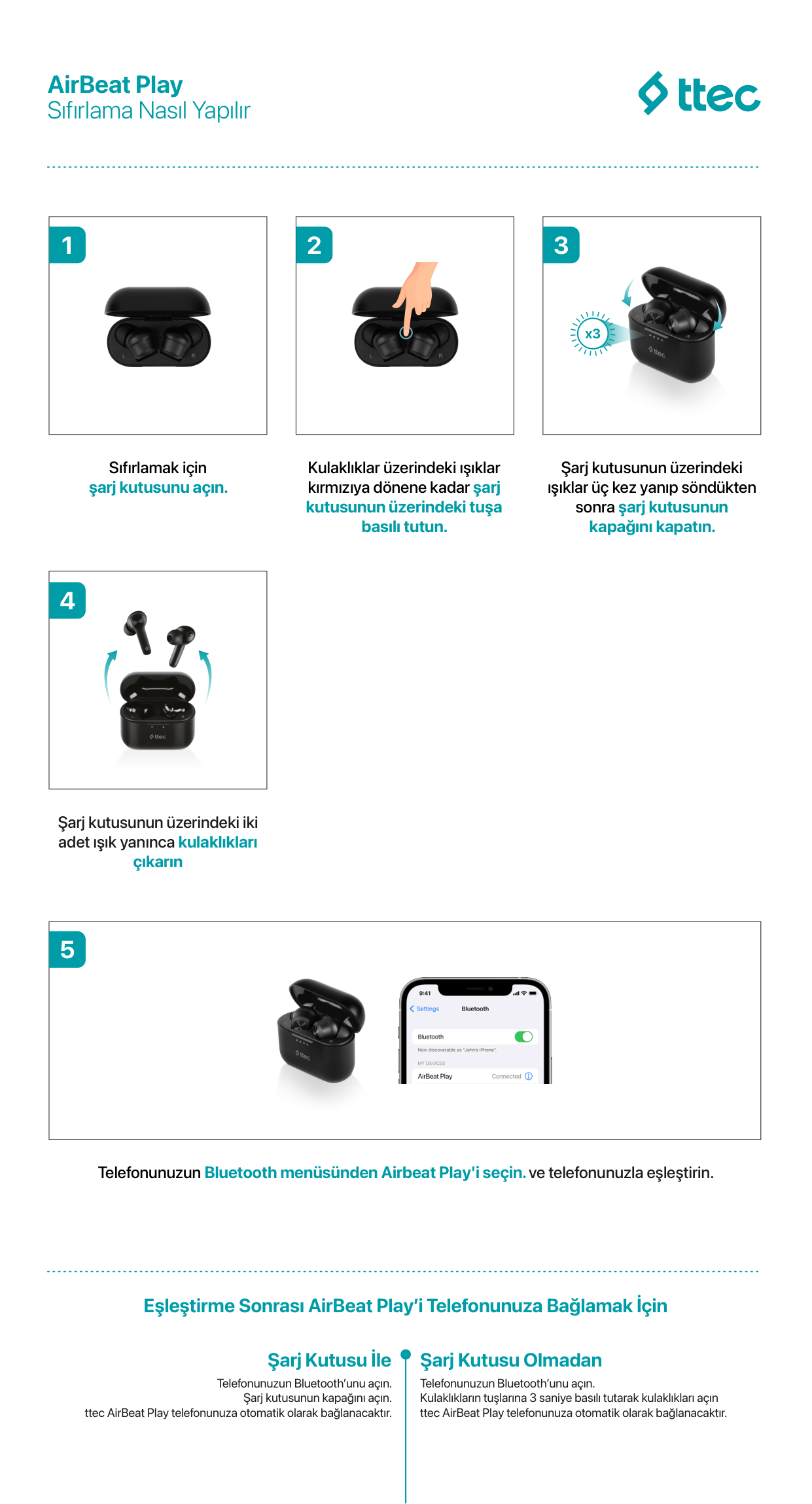
Sıfırlama Nasıl Yapılır
|
1| |---|
Sıfırlamak için şarj kutusunu açın.
|


2| |---|
Kulaklıklar üzerindeki ışıklar kırmızıya dönene kadar şarj kutusunun üzerindeki tuşa basılı tutun.
|
x3
3| |---|
Şarj kutusunun üzerindeki ışıklar üç kez yanıp söndükten sonra şarj kutusunun kapağını kapatın.
|
4| |---|
Şarj kutusunun üzerindeki iki adet ışık yanınca kulaklıkları çıkarın
|
AirBeat Play

5| |---|
Telefonunuzun Bluetooth menüsünden Airbeat Play'i seçin.ve telefonunuzla eşleştirin.
Eşleştirme Sonrası AirBeat Playʼi Telefonunuza Bağlamak İçin
Şarj Kutusu İle
Telefonunuzun Bluetoothʼunu açın.
Şarj kutusunun kapağını açın. ttec AirBeat Play telefonunuza otomatik olarak bağlanacaktır.
Şarj Kutusu Olmadan
Telefonunuzun Bluetoothʼunu açın. Kulaklıkların tuşlarına 3 saniye basılı tutarak kulaklıkları açın ttec AirBeat Play telefonunuza otomatik olarak bağlanacaktır.
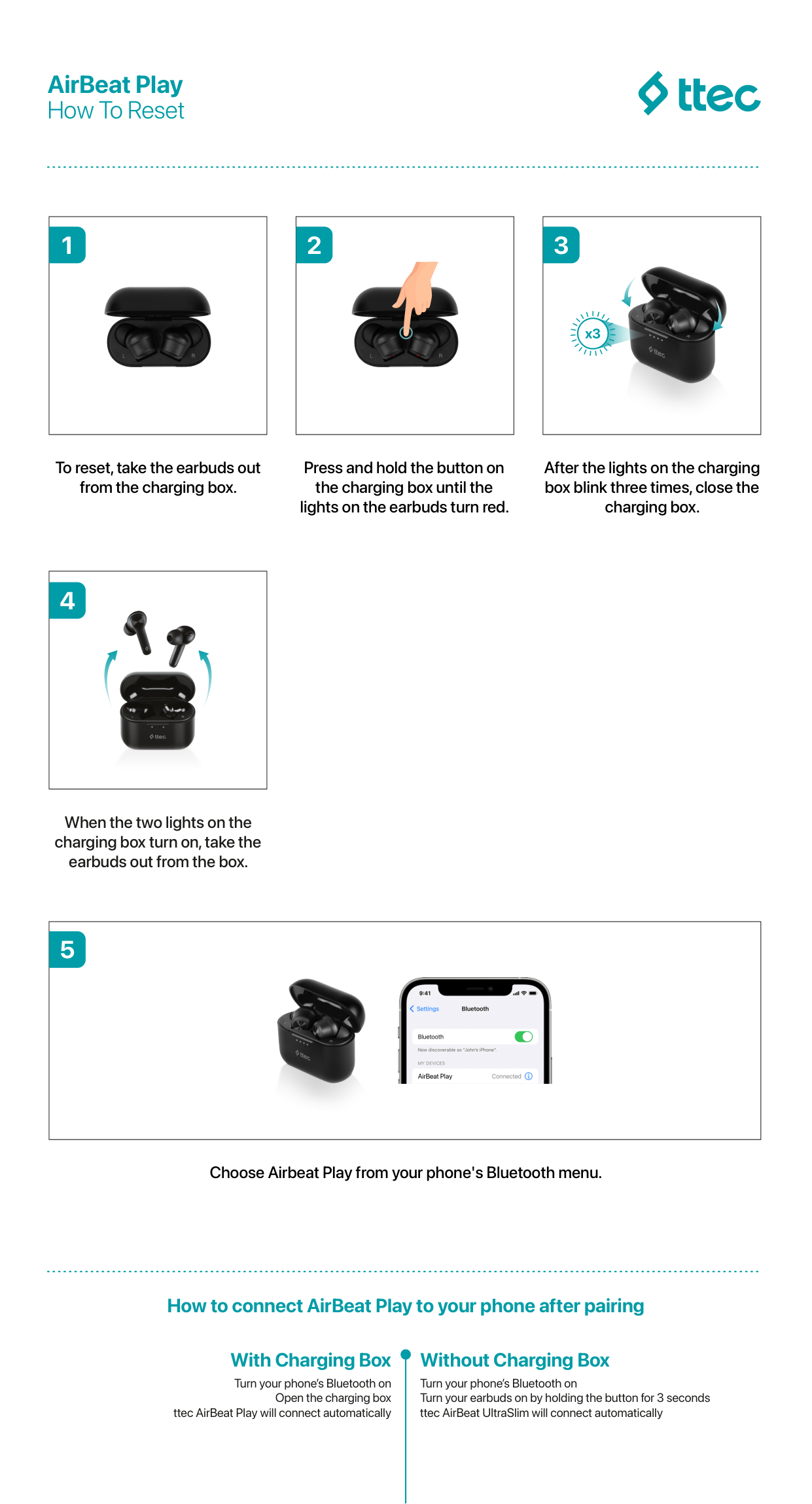
How To Reset
|
1| |---|
To reset, take the earbuds out from the charging box.
|


2| |---|
Press and hold the button on the charging box until the lights on the earbuds turn red.
|
x3
3| |---|
After the lights on the charging box blink three times, close the charging box.
|
4| |---|
When the two lights on the charging box turn on, take the earbuds out from the box.
|
AirBeat Play

5| |---|
Choose Airbeat Play from your phone's Bluetooth menu.
How to connect AirBeat Play to your phone after pairing
With Charging Box
Turn your phoneʼs Bluetooth on
Open the charging box ttec AirBeat Play will connect automatically
Without Charging Box
Turn your phoneʼs Bluetooth on Turn your earbuds on by holding the button for 3 seconds ttec AirBeat UltraSlim will connect automatically