
Walton Myb A1c AC Remote Control
Ask AI
— answers from the official manualAnswers from the official manual.
Common questions
Common Questions
10 totalHow do I activate Health Mode on my AC using the remote?
Press the Health Mode button once to turn it ON or OFF. If your model supports Voice Command feature by pressing the relevant button twice, you can also use voice command for this purpose under specific conditions. (Page 1)
What happens when I press and hold the SWING button with another function?
Pressing and holding the Left-Right Swing button along with Temp Up/Down concurrently for three seconds will convert the temperature display to Fahrenheit units. (Page 4)
How can I reset my AC’s swing functions?
To activate/deactivate the UP-DOWN Swing function, press it once; and for LEFT-RIGHT Swing press it accordingly as depicted in your model's specific remote controller guide. (Page 3)
How can I adjust the temperature on my AC using the remote?
Press the Temp Up button to increase and the Temp Down button to decrease the temperature you have set for your indoor unit. Ensure that these buttons are used when AC is powered ON. (Page 3)
What does the DISPLAY button do?
Pressing this button turns on or off the display screen of either your Indoor Display Unit or on the Remote controller, allowing you to control its visibility according to your preference. (Page 1)
How can I set a specific time for my AC to turn on/off?
Press and hold the On Time button to set an on-time when the AC is currently off, or press Off Time to set an off-time when it’s turned on. This lets you schedule your air conditioning according to your needs. (Page 2)
Full Manual
4 pages
|

MODE TIMER
FAN
HEALTH TURBO
LOCK AUH
SWING
SLEEP DISPLAY
ECO
SWING
Functions of Remote Controller
Model: MYB-A1C
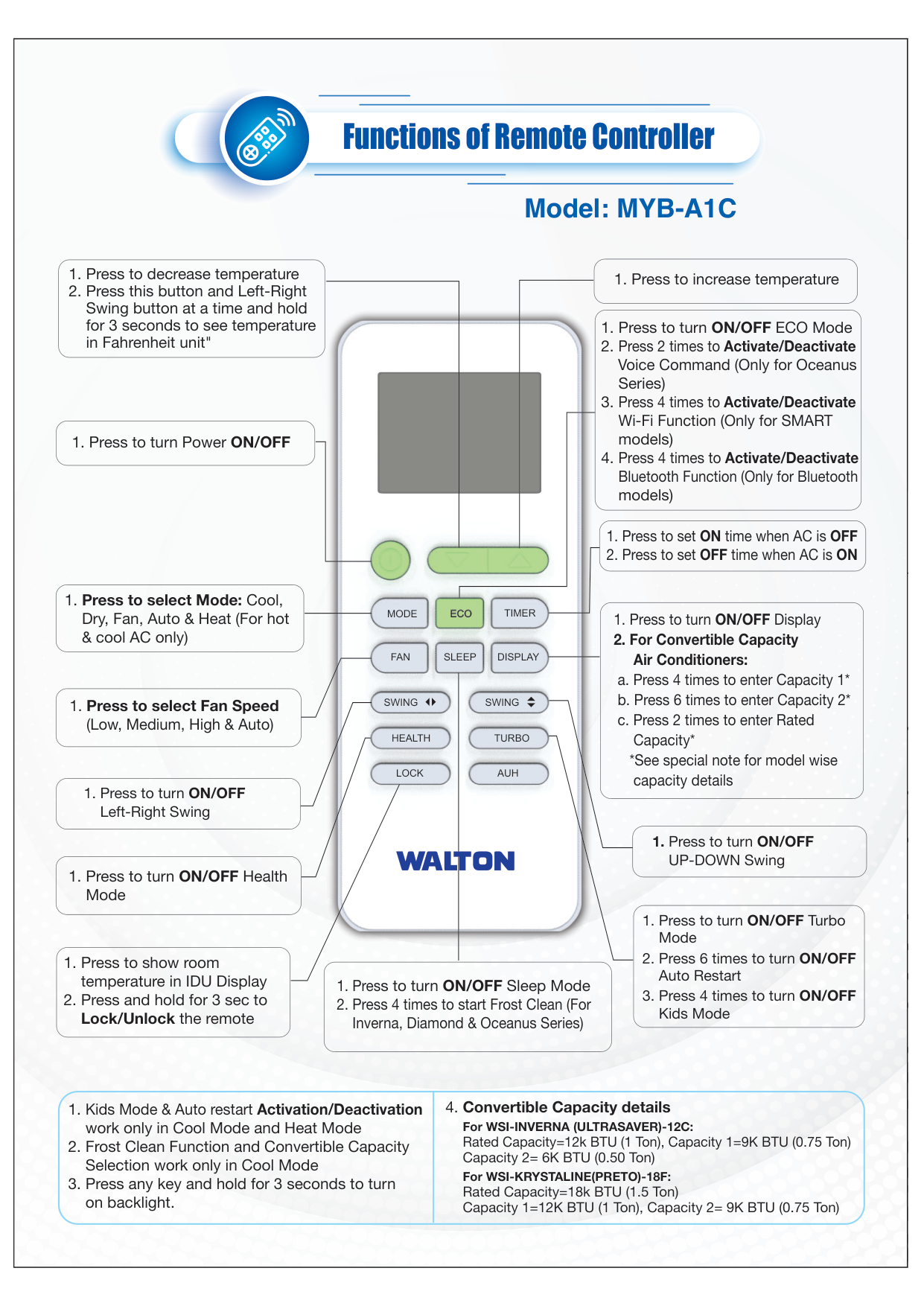
1. Press to turn Power ON/OFF
1. Press to increase temperature
1. Press to select Fan Speed (Low, Medium, High & Auto)
1. Press to turn ON/OFF Health Mode
1. Press to turn ON/OFF Left-Right Swing
1. Press to turn ON/OFF
UP-DOWN Swing
1. Press to turn ON/OFF Display
2. For Convertible Capacity Air Conditioners:
a. Press 4 times to enter Capacity 1*
b. Press 6 times to enter Capacity 2*
c. Press 2 times to enter Rated Capacity*
*See special note for model wise capacity details
1. Press to turn ON/OFF ECO Mode
2. Press 2 times to Activate/Deactivate Voice Command (Only for Oceanus Series)
3. Press 4 times to Activate/Deactivate Wi-Fi Function (Only for SMART models)
4. Press 4 times to Activate/Deactivate Bluetooth Function (Only for Bluetooth models)
1. Press to turn ON/OFF Turbo Mode
2. Press 6 times to turn ON/OFF Auto Restart
3. Press 4 times to turn ON/OFF Kids Mode
1. Press to set ON time when AC is OFF
2. Press to set OFF time when AC is ON
1. Press to decrease temperature
2. Press this button and Left-Right Swing button at a time and hold for 3 seconds to see temperature in Fahrenheit unit"
1. Press to show room temperature in IDU Display
2. Press and hold for 3 sec to Lock/Unlock the remote
1. Press to turn ON/OFF Sleep Mode
2. Press 4 times to start Frost Clean (For Inverna, Diamond & Oceanus Series)
1. Press to select Mode: Cool, Dry, Fan, Auto & Heat (For hot & cool AC only)
1. Kids Mode & Auto restart Activation/Deactivation work only in Cool Mode and Heat Mode
2. Frost Clean Function and Convertible Capacity Selection work only in Cool Mode
3. Press any key and hold for 3 seconds to turn on backlight.
4. Convertible Capacity details For WSI-INVERNA (ULTRASAVER)-12C: Rated Capacity=12k BTU (1 Ton), Capacity 1=9K BTU (0.75 Ton) Capacity 2= 6K BTU (0.50 Ton) For WSI-KRYSTALINE(PRETO)-18F: Rated Capacity=18k BTU (1.5 Ton) Capacity 1=12K BTU (1 Ton), Capacity 2= 9K BTU (0.75 Ton)| |---|


|

Functions of Remote Controller
Model: WK14-R01
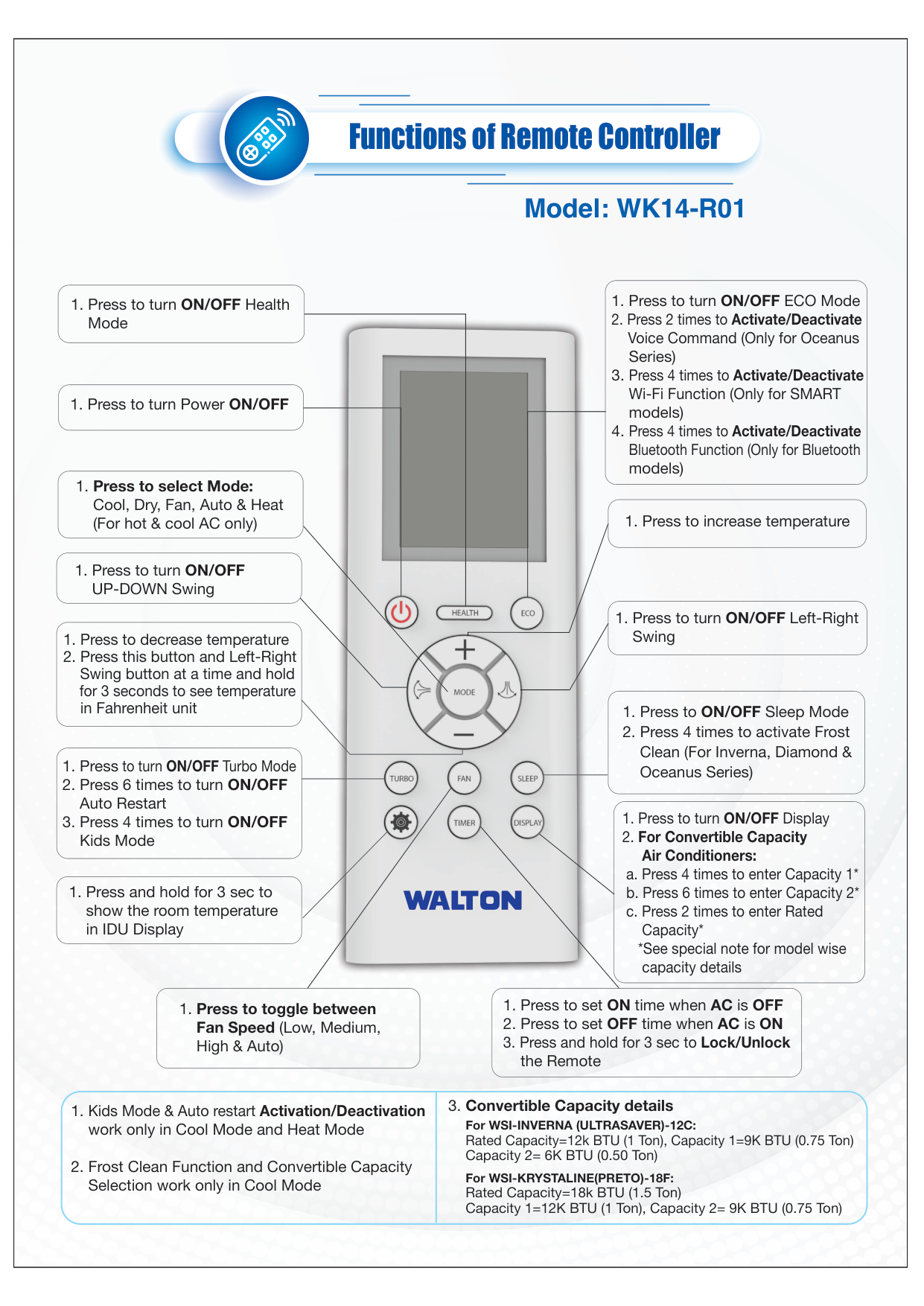
1. Press to turn Power ON/OFF
1. Press to turn ON/OFF UP-DOWN Swing
1. Press and hold for 3 sec to show the room temperature in IDU Display
1. Press to increase temperature
1. Press to select Mode: Cool, Dry, Fan, Auto & Heat (For hot & cool AC only)
1. Press to turn ON/OFF Left-Right Swing
1. Press to turn ON/OFF Turbo Mode
2. Press 6 times to turn ON/OFF Auto Restart
3. Press 4 times to turn ON/OFF Kids Mode
1. Press to decrease temperature
2. Press this button and Left-Right Swing button at a time and hold for 3 seconds to see temperature in Fahrenheit unit
1. Press to turn ON/OFF Display
2. For Convertible Capacity Air Conditioners:
a. Press 4 times to enter Capacity 1*
b. Press 6 times to enter Capacity 2*
c. Press 2 times to enter Rated Capacity*
*See special note for model wise capacity details
1. Press to ON/OFF Sleep Mode
2. Press 4 times to activate Frost Clean (For Inverna, Diamond & Oceanus Series)
1. Press to toggle between Fan Speed (Low, Medium, High & Auto)
1. Press to set ON time when AC is OFF
2. Press to set OFF time when AC is ON
3. Press and hold for 3 sec to Lock/Unlock the Remote
1. Press to turn ON/OFF Health Mode
1. Press to turn ON/OFF ECO Mode
2. Press 2 times to Activate/Deactivate Voice Command (Only for Oceanus Series)
3. Press 4 times to Activate/Deactivate Wi-Fi Function (Only for SMART models)
4. Press 4 times to Activate/Deactivate Bluetooth Function (Only for Bluetooth models)
1. Kids Mode & Auto restart Activation/Deactivation work only in Cool Mode and Heat Mode
2. Frost Clean Function and Convertible Capacity Selection work only in Cool Mode
3. Convertible Capacity details For WSI-INVERNA (ULTRASAVER)-12C: Rated Capacity=12k BTU (1 Ton), Capacity 1=9K BTU (0.75 Ton) Capacity 2= 6K BTU (0.50 Ton)
For WSI-KRYSTALINE(PRETO)-18F: Rated Capacity=18k BTU (1.5 Ton) Capacity 1=12K BTU (1 Ton), Capacity 2= 9K BTU (0.75 Ton)| |---|

|

ECOTURBO
MODE
TIMER FAN SLEEP
Functions of Remote Controller
Model: WM2-S-C
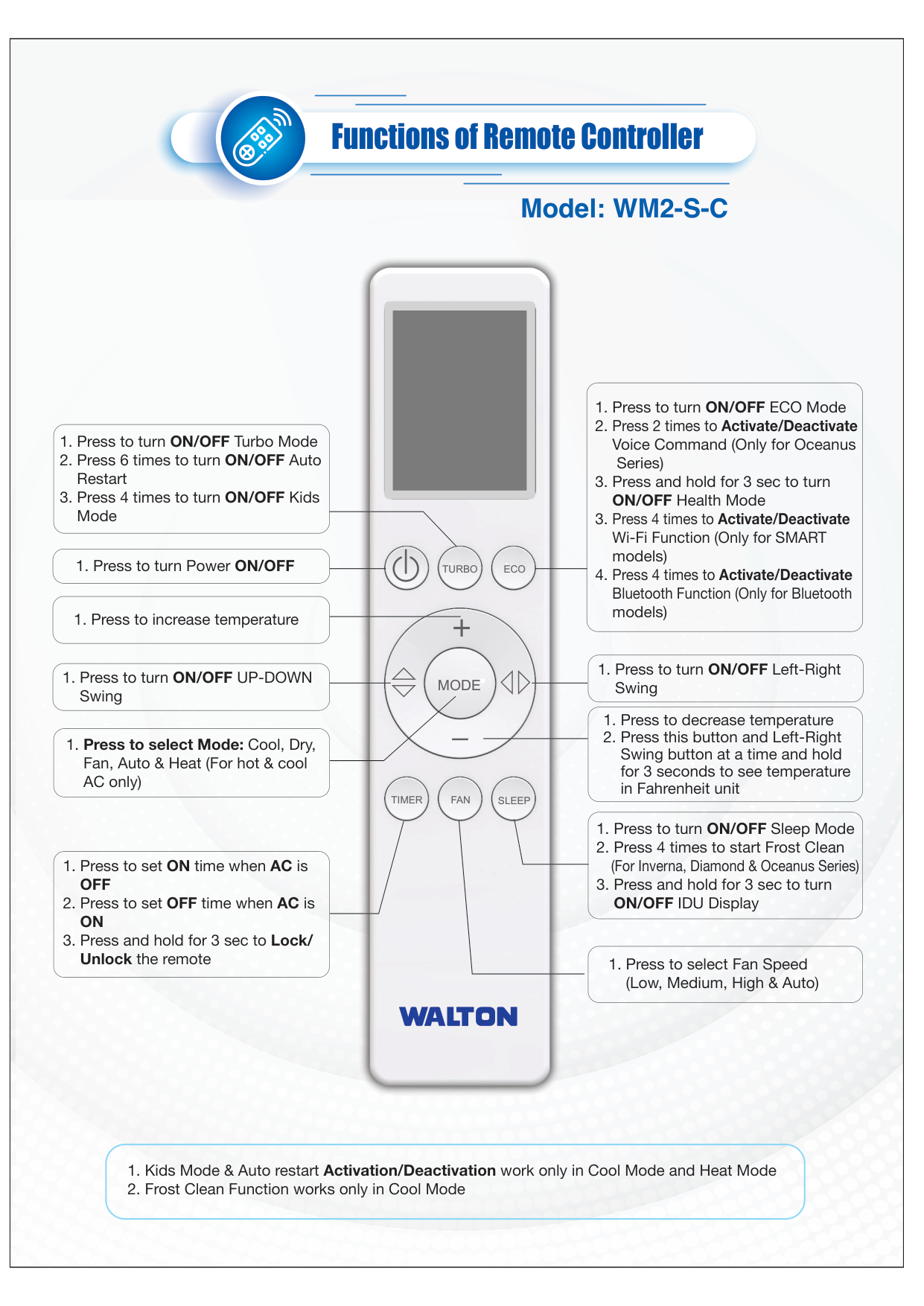
1. Press to turn ON/OFF Turbo Mode
2. Press 6 times to turn ON/OFF Auto Restart
3. Press 4 times to turn ON/OFF Kids Mode
1. Press to select Mode: Cool, Dry, Fan, Auto & Heat (For hot & cool AC only)
1. Press to set ON time when AC is OFF
2. Press to set OFF time when AC is ON
3. Press and hold for 3 sec to Lock/ Unlock the remote
1. Press to turn ON/OFF ECO Mode
2. Press 2 times to Activate/Deactivate Voice Command (Only for Oceanus
Series)
3. Press and hold for 3 sec to turn ON/OFF Health Mode
3. Press 4 times to Activate/Deactivate Wi-Fi Function (Only for SMART models)
4. Press 4 times to Activate/Deactivate Bluetooth Function (Only for Bluetooth models)
1. Press to turn Power ON/OFF
1. Press to turn ON/OFF UP-DOWN Swing
1. Press to turn ON/OFF Left-Right Swing
1. Press to decrease temperature
2. Press this button and Left-Right Swing button at a time and hold for 3 seconds to see temperature in Fahrenheit unit
1. Press to turn ON/OFF Sleep Mode
2. Press 4 times to start Frost Clean (For Inverna, Diamond & Oceanus Series)
3. Press and hold for 3 sec to turn ON/OFF IDU Display
1. Press to select Fan Speed (Low, Medium, High & Auto)
1. Press to increase temperature
1. Kids Mode & Auto restart Activation/Deactivation work only in Cool Mode and Heat Mode
2. Frost Clean Function works only in Cool Mode
| |---|

|Functions of Remote Controller
Model: WI20-P01

M
zzz
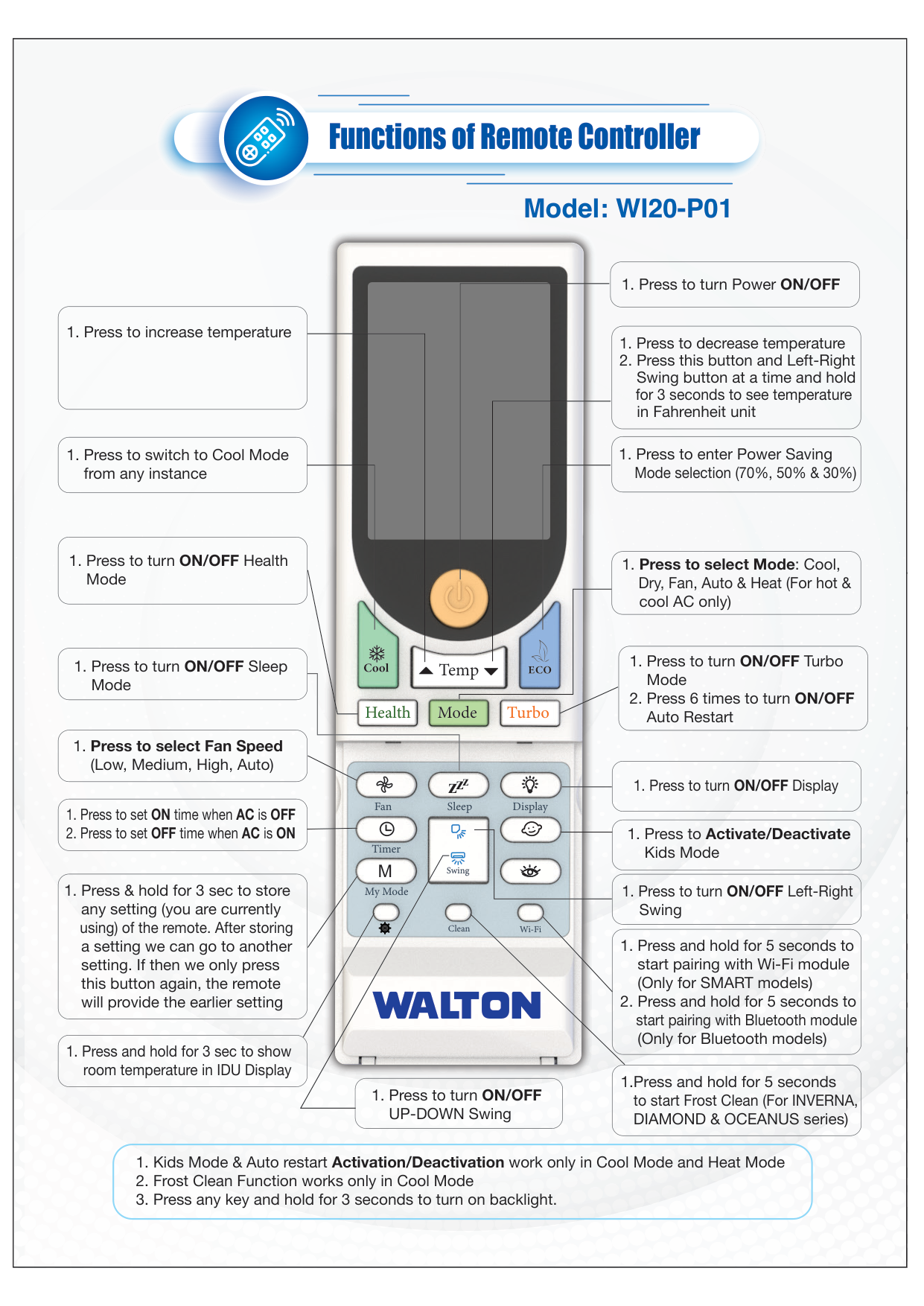
1. Press to switch to Cool Mode from any instance
1. Press to turn ON/OFF Health Mode
1. Press to Activate/Deactivate Kids Mode
1. Press to turn ON/OFF UP-DOWN Swing
1. Press to turn ON/OFF Left-Right Swing
1. Press and hold for 5 seconds to start pairing with Wi-Fi module (Only for SMART models)
2. Press and hold for 5 seconds to start pairing with Bluetooth module (Only for Bluetooth models)
1.Press and hold for 5 seconds to start Frost Clean (For INVERNA, DIAMOND & OCEANUS series)
1. Press to select Fan Speed (Low, Medium, High, Auto)
1. Press & hold for 3 sec to store any setting (you are currently using) of the remote. After storing a setting we can go to another setting. If then we only press this button again, the remote will provide the earlier setting
1. Press to turn ON/OFF Sleep Mode
1. Press and hold for 3 sec to show room temperature in IDU Display
1. Press to set ON time when AC is OFF
2. Press to set OFF time when AC is ON
1. Press to turn ON/OFF Display
1. Press to turn ON/OFF Turbo Mode
2. Press 6 times to turn ON/OFF Auto Restart
1. Press to decrease temperature
2. Press this button and Left-Right Swing button at a time and hold for 3 seconds to see temperature in Fahrenheit unit
1. Press to enter Power Saving Mode selection (70%, 50% & 30%)
1. Press to increase temperature
1. Press to select Mode: Cool, Dry, Fan, Auto & Heat (For hot & cool AC only)
1. Press to turn Power ON/OFF
1. Kids Mode & Auto restart Activation/Deactivation work only in Cool Mode and Heat Mode
2. Frost Clean Function works only in Cool Mode
3. Press any key and hold for 3 seconds to turn on backlight.
|
|---|


