Baseus Pb4669z Bowie H1 Pro
Wireless Earbuds · 10 Q&As

Baseus Pb4669z Bowie H1 Pro

Ask AI

— answers from the official manual

Answers from the official manual.

Common questions

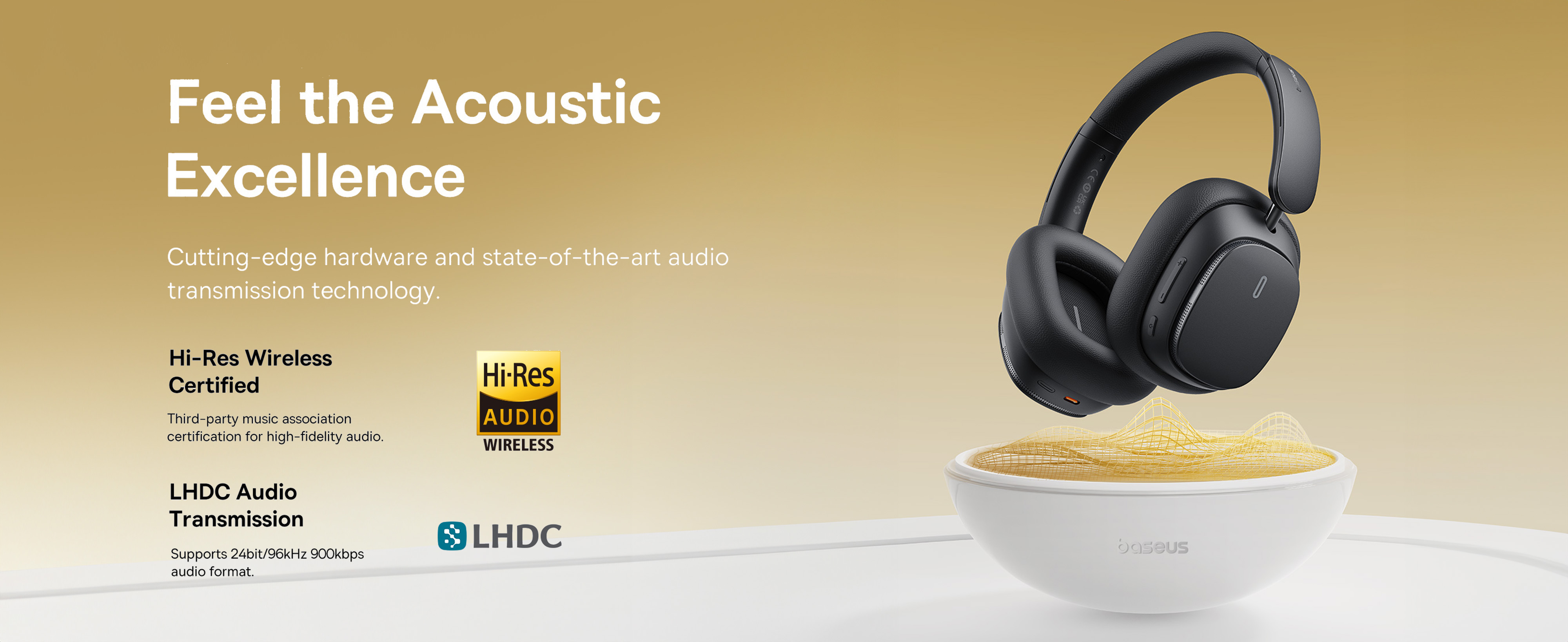
The Baseus Bowie H1 Pro (model PB4669z) is a pair of over-ear noise-cancelling Bluetooth headphones in the budget tier. They cover the basics you'd want from this class — active noise cancellation, transparent mode, a multifunction button that does too many things at once, and a battery that gets you through a workday.

If you're here, you probably want the answer to one of three things: how to pair them, how to switch modes, or what the lights mean. So let's start there.

Pairing them, the short version

First time, brand new: press and hold the multifunction button for 2 seconds. The red and white lights flash quickly, and the headphones go into pairing mode. On your phone or laptop, find "Baseus Bowie H1 Pro" in the Bluetooth list and tap it. Light goes off when connected. From here on, the headphones auto-reconnect to that device when you turn them on.

Switching to a new device (e.g., laptop after they were paired to your phone): long-press the ANC button for 2 seconds. Same red-and-white flash, headphones drop the existing pairing and re-enter pairing mode. Find them on the new device.

If they don't show up, two things to try: turn Bluetooth off and back on on your phone, or hold the multifunction button for 4 seconds to power them off, then 2 seconds to power back on and re-enter pairing.

Source: pages 2-3 of the manual

Power and battery

Turn on: 2-second press of the multifunction button.

Turn off: 4-second press of the multifunction button. The LED blinking stops when they're fully off.

Charging: USB-C cable. The light glows solid red while charging and switches to white when fully charged. A full charge takes about an hour. The cells inside are 400mAh per side (1.48Wh).

The published battery life depends on what mode you're using. ANC drains faster than normal mode, which drains faster than no-music passive use. For real-world expectations: a workday of mixed listening (music + calls + some idle wear time) is comfortable. Two long flights without recharging is asking too much.

Source: pages 2 and 5 of the manual

The three listening modes (ANC button)

Single-click the ANC button to cycle through three modes:

  1. Noise reduction — active noise cancellation. Best on planes, in cafés, anywhere with constant ambient noise.
  2. Normal — no processing either way. Just the audio, with the natural seal of the over-ear cups providing passive isolation.
  3. Transparent mode — the microphones pipe outside sound into the cups, so you can hear conversations or announcements without removing the headphones.

In typical use you'll alternate between ANC and Transparent depending on the situation. Normal mode (no processing either way) is useful when your environment is already quiet and you don't want any ANC artifacts on the audio.

Source: page 3 of the manual

Indicator lights — quick reference

  • Solid red while plugged in — charging
  • Solid white while plugged in — fully charged
  • Red and white flashing rapidly — pairing mode (waiting for a Bluetooth device to find them)
  • Off, no music — connected and idle, working as intended

Care

The Bowie H1 Pro is rated for use between 0°C and 45°C (32°F to 113°F). Don't leave them in a hot car in summer, don't expose them to direct strong sunlight for long, and don't store them somewhere that gets above 50°C — the lithium cells degrade faster outside their operating range, even when off.

For the charging port: the contacts inside the USB-C jack collect lint and dust, which is the most common cause of "they won't charge anymore." Use a lint-free cotton cloth (eyeglass cleaning cloth works) or a wooden toothpick to gently clear the port if charging gets unreliable. Don't use anything metal.

Source: page 5 of the manual

Specs at a glance

  • Battery: 400mAh per side, 1.48Wh
  • Charge time: ~1 hour for a full charge
  • Charging input: USB-C
  • Modes: ANC / Normal / Transparent
  • Operating temperature: 0°C to 45°C
  • Bluetooth: Standard (verify version on the box; varies by production batch)

When something goes wrong

The most common issues, in order of frequency:

  • Won't charge → clean the USB-C contacts. Dirt and debris on the charging contacts is the most common cause of charging failures on consumer headphones, per iFixit and headphone manufacturer support pages. A lint-free cloth or a wooden toothpick clears it; don't use anything metal.
  • Won't connect to phone → forget the device on your phone (in Bluetooth settings), then re-pair from scratch with the long-press procedure above.
  • One side is quieter → the L/R balance has shifted somehow. On iPhone, Settings → Accessibility → Audio/Visual → Balance. On Android, Settings → Accessibility → Audio adjustment. Reset to center.
  • Microphone sounds bad on calls — the H1 Pro mic is okay for calls but not great. Wind noise and echo are the typical issues. Turn on the device's own noise suppression if available.

If a hardware issue persists, Baseus warranty covers most defects in the first year. The warranty process is usually fastest through the original seller (Amazon, AliExpress, or wherever you bought them) rather than going direct.

Alternatives

If the Bowie H1 Pro isn't the right fit, in the same price range:

  • Better ANC: Anker Soundcore Life Q35 or similar
  • Better mic for calls: Jabra Evolve 2 Headset (more expensive, but designed for calls)
  • True wireless instead of over-ear: many options under $80

(No internal links yet — AskManual's audio catalog is currently limited.)
Full Manual

6 pages
Page 1

|H1 Pro product specification copy| |---| |Baseus noise-cancelling headphones Bowie H1 Pro|

Page 2

|1. Product connection steps Step 1 Turn it on For the first time, press and hold the multi-function button for 2 seconds to turn on the device. At this time, the red and white lights flash quickly and enter the Bluetooth pairing.
2. Bluetooth connection Turn on the Bluetooth function of the mobile phone, enter the search pairing state, and select the device model: Baseus Bowie H1 Pro When the connection is successful, the light goes off. After subsequent use, the ear device will be connected back to the device used for the last time, and the white light will be displayed when the device is connected back flicker

Note: To connect the new Bluetooth device, long press the ANC key for 2 seconds, then the red and white lights will flash quickly, and the headset will enter the pairing state

3. Download the APP and bind the headset
4 Turn it off Press and hold the multifunction button for 4 seconds to turn off the headset.


2. Product function operation (wireframes, indicating corresponding buttons) Music mode: Play/Pause: Click the multifunction button Previous: Long press - button for 1.5 seconds Next: Long press + for 1.5 seconds Volume minus: Click Volume plus: Click the + key Activate the phone's voice assistant: three-click multi-function button Pairing mode: Long press ANC button for 2 seconds Noise reduction mode switch: Click ANC button Note: The mode switching sequence is: Noise reduction on -> Normal mode -> Transparent mode Panorama mode switch: Double click ANC button Note: The mode switching sequence is: Normal mode -> Music mode -> Cinema mode

Phone mode: Answer/Hang Up: Click the multi-function button Reject: Press and hold the multifunction button for 1.5 seconds

Charging power indicator: When the headset is in the process of charging, the power indicator is long red; When the battery is fully charged, the battery indicator lights up white.

![image 1](User-manual-6748255_images/imageFile1.png)| |---|

|Restore factory Settings: When the headset is on, turn off the Bluetooth of the mobile phone, and hold down the + and - keys for 4 seconds. The red light blinks three times, indicating success.

Intelligent double connection operation steps:

1. Firstly, turn on the Bluetooth of mobile phone A and search for "Baseus Bowie H1 Pro". After completing the connection and pairing, click to turn off the Bluetooth;
2. Then turn on the Bluetooth of B mobile phone and search for "Baseus Bowie H1 Pro" to complete the connection and pairing;
3. Finally, turn on the Bluetooth of A mobile phone again, and the headset will automatically connect to A mobile phone, completing the function of A/B mobile phone connecting to the headset at the same time. Note: If the headset has the pairing record of mobile phone A and mobile phone B, the headset will automatically connect to mobile phone A and mobile phone B at the same time the next time it is turned on.


APP usage and security:

1. Panoramic sound mode can be selected in the APP.
2. EQ mode selection and custom adjustment can be performed in the APP.
3. Noise reduction mode can be selected in the APP.
4. Switch the low latency mode in the APP.


Note: Enter Settings - Open application - Application startup management - Manually open the "Beisi" APP: Allow self-startup, allow associated startup, allow background activities.

3, electronic information products hazardous substances declaration:

|Part name|Harmful substance or element|Harmful substance or element|Harmful substance or element|Harmful substance or element|Harmful substance or element|Harmful substance or element|

Page 3

|---|---|---|---|---|---|---| |Part name|(pb)|(Hg)|(Cd)|(Cr Vl)|(PBB)|(PBDE)| |PCB|X|O|O|O|O|O| |plastic|O|O|O|O|O|O| |Bat|O|O|O|O|O|O|

Page 4

|attachments|O|O|O|O|O|O| |cable|X|O|O|O|O|O|

This form is prepared in accordance with SJ/T 11364.

 O: indicates that the content of the hazardous substance in all homogeneous materials of the part is below the limit requirements specified in GB/T 26572 standard.X: The content of the hazardous substance in at least one homogeneous material of the part exceeds the limit requirements specified in the GB/T 26572 standard.

 The product complies with the EU RoHS 2.0 Directive (2011/65/EU)| |---|

Page 5

| Tips: The 5-year icon refers to the "environmental effective use period", not the product quality assurance period. Electronic products contain lead, mercury, cadmium and other harmful substances, once used beyond the expiration date, harmful substances may cause pollution to the environment due to leakage or mutation, or cause serious damage to the human body and personal property. "Environmental protection period" means that all electronic products will be required to use within this effective period, and we will no longer be responsible for product quality if safety risks occur after the safe use period.

 4. Product safety information

 Please read all instructions and warnings before using this product, non-standard use will cause damage to the product or personal safety.

 contains batteries. Do not expose this product to strong sunlight or overheating environment such as a heater. Do not store this product in high temperature, strong light and strong magnetic field environment.

 Do not place the product in a harsh environment such as near a fire source. Do not knock, throw, trample, squeeze or put into the fire. Do not use the product if it appears swollen.

 Ambient temperature of the product: 0~45℃.

 Do not use the product in violation of the instructions, which may cause damage to the product or endanger the safety of human life and property.

 Non-professional personnel are strictly forbidden to disassemble this product, otherwise it may cause fire or even damage the product completely.

 Do not use the load that exceeds the output current of this product (electrical appliances), it will automatically stop working.

 Periodically clean the charging contact of the earphone with a clean cotton cloth to avoid failure to charge or start the earphone due to long-term uncleaning.

 Do not place this product in water (or washing machine). In case of water, please allow it to dry naturally before use.

V. Product parameters: Name: Bex Headset noise cancelling headphones Model: Baseus Bowie H1 Pro Material: ABS+PC+ metal Bluetooth version: V5.3 Communication distance: 10 meters Listening time: 70 hours (70% volume, noise reduction) 40 hours (70% volume, noise reduction on) Battery capacity (L/R) : 400mAh/1.48Wh Headset Rated input: DC5V ⎓ 1A Headset rated current consumption: 15 mA Charging time: about 1 hour Frequency response range: 20Hz-40kHz Charging interface: Type-C| |---|

Page 6

|Suitable for: Playback devices with Bluetooth function

* The above data comes from Baseus laboratory values, but the data may be different or incorrect due to changes in the objective environment

6. Packing list headset *1pcs Charging cable *1pcs Manual *1pcs Warranty card *1pcs

Related ICONS, product implementation stand ards, product safety warnings and additional supplier information

Manufacturer: Shenzhen BSI Technology Co., LTD Address: 5th Floor, Building B, Beisi Intelligent Park, No. 2008, Xuegang Road, Gangtou Community, Bantian Street, Longgang District, Shenzhen Implementation standard: GB4943.1-2011 Hotline: 4000-712-711 Website: www.baseus.com CMIIT ID: XXXXXXXXX It is hereby affirmed that the product model of Shenzhen Shishang Chuang Exhibition Technology Co., Ltd. is Baseus Bowie H1 Pro in accordance with the provisions of EU Directives 2014/53/EU and 2011/65/EU. The full text of the EU Declaration of Conformity is available at www.baseus.com This equipment complies with the provisions of EU Directive 2012/19/EU and EU Directive 2006/66/EU, this equipment must not be disposed of with ordinary waste and must be recycled. This symbol indicates that this product shall not be disposed of as domestic waste, but must be handed over to the corresponding waste recycling station for electronic and electrical equipment recycling.

Any changes or modifications not expressly approved by the party responsible for compliance could void the user’s authority to operate the equipment. This device complies with Part 15 of the FCC Rules. Operation is subject to the following two conditions:

(1) this device may not cause harmful interference, and
(2) this device must accept any interference received, including interference that may cause undesired operation. Note: This equipment has been tested and found to comply with the limits for a Class B digital device, pursuant to Part 15 of the FCC Rules. These limits are designed to provide reasonable protection against harmful interference in a residential installation. This equipment generates, uses, and can radiate radio frequency energy, and if not installed and used in accordance with the instructions, may cause harmful interference to radio communications. However, there is no guarantee that interference will not occur in a


![image 2](User-manual-6748255_images/imageFile2.png)

![image 3](User-manual-6748255_images/imageFile3.png)| |---|

|particular installation. If this equipment does cause harmful interference to radio or television reception, which can be determined by turning the equipment off and on, the user is encouraged to try to correct the interference by one or more of the following measures:

– Reorient or relocate the receiving antenna.
– Increase the separation between the equipment and receiver.
– Connect the equipment into an outlet on a circuit different from that to which the receiver is connected.
– Consult the dealer or an experienced radio/TV technician for help.
| |---|

More from Baseus