
Ask AI
— answers from the official manualAnswers from the official manual.
Common questions
Common Questions
20 totalHow do I safely increase the volume on my headphones?
Before connecting your headphones to a music player, ensure the volume is turned down low. After placing them in or over your ears, gradually turn up the volume until you reach a comfortable listening level.
How can I answer an incoming call?
Press and release the center button once to answer the incoming call. Press again to end the call if needed.
What happens if my device doesn't detect my Beats Studio3 headphones in Bluetooth?
Ensure your headphones are powered on and in pairing mode; press the power button until 'BT' appears. Retry connecting through your device's Bluetooth settings.
How do I skip to the next or previous track using the remote mic?
To skip forward, press and release the center button twice quickly; for skipping back, press and release three times rapidly. Functionality can vary by device.
How do I control volume while listening to music or a call?
Press the top button to increase the volume and the bottom button to decrease it, according to your device’s settings for functionality.
What is the recommended safe listening period at full volume?
Loud noises above 85 dB can cause hearing damage. Listening to sounds between 90 and 100 dB for more than a few minutes without protection could lead to permanent hearing loss.
Show 14 more questions
How do I use the remote mic's voice command function?
What are some safety tips when using these headphones?
How do I pair my Beats Studio3 headphones with a device?
What actions can I perform using the remote mic?
What is the safe listening level for headphones?
How do I play or pause music with the remote mic?
How do I skip to the next track using the remote mic?
How do I scan forward or backward through a song?
How do I answer or end a call with the Beats headphones?
How do I decline an incoming call?
How do I control the volume with the remote mic?
How do I activate voice command on the headphones?
Is it safe to wear headphones while driving?
What should I do before connecting the headphones to adjust volume safely?
Full Manual
7 pages
☰ Home » BEATS » Beats Studio 1 Headphones User Guide Contents [ hide ] 1 Beats Studio 1 Headphones User Guide 2 Important Safety Information 2.1 Use Responsibly 3 Using the Remote Mic 4 Connect, Listen and Enjoy 5 References 6 Related Posts Beats Studio 1 Headphones User Guide Manuals+
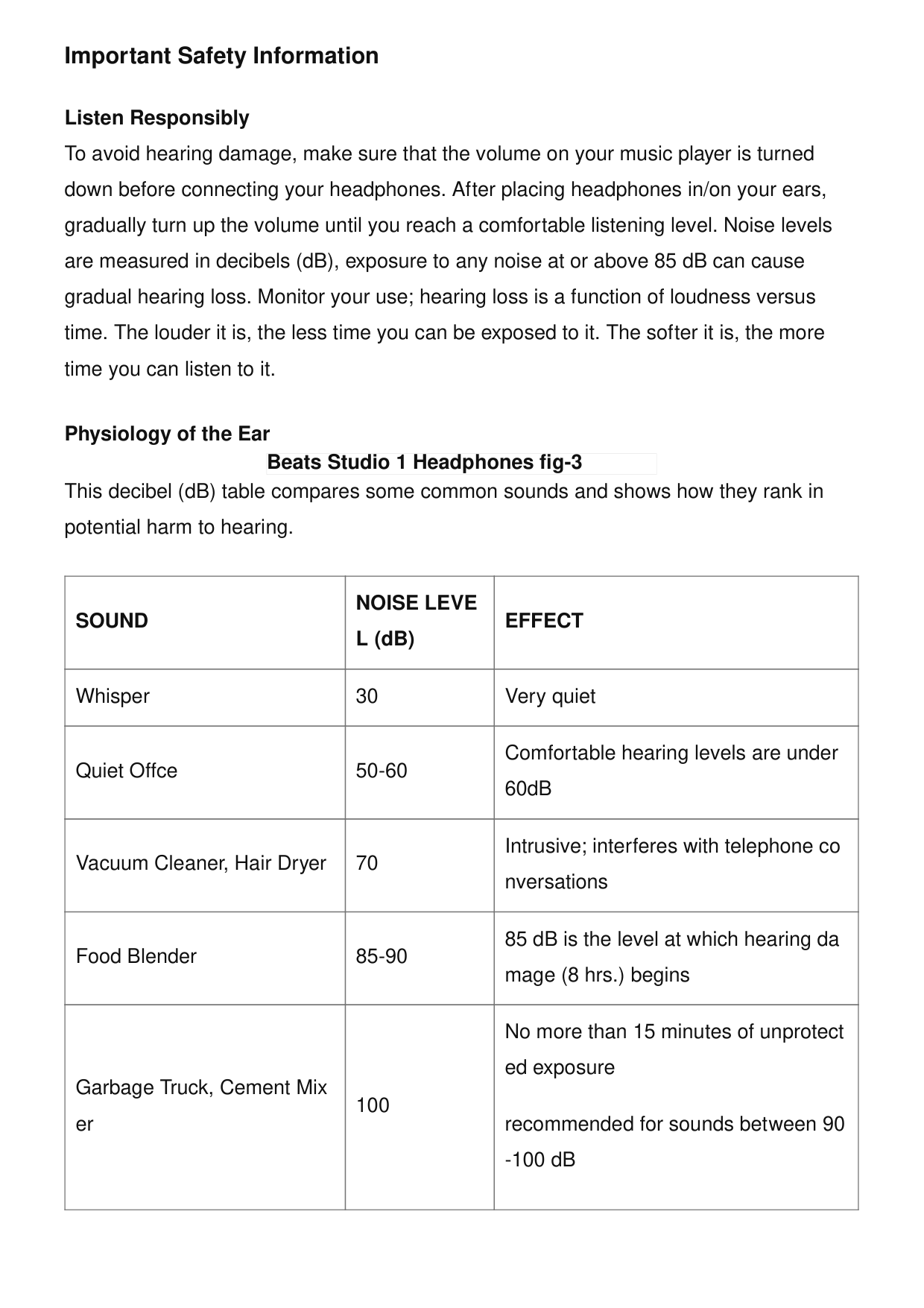
Important Safety Information Listen Responsibly To avoid hearing damage, make sure that the volume on your music player is turned down before connecting your headphones. After placing headphones in/on your ears, gradually turn up the volume until you reach a comfortable listening level. Noise levels are measured in decibels (dB), exposure to any noise at or above 85 dB can cause gradual hearing loss. Monitor your use; hearing loss is a function of loudness versus time. The louder it is, the less time you can be exposed to it. The softer it is, the more time you can listen to it. Physiology of the Ear This decibel (dB) table compares some common sounds and shows how they rank in potential harm to hearing.
Sound
Noise Leve
L (dB)Effect
Whisper 30 Very quiet Quiet Offce 50-60 Comfortable hearing levels are under 60dB Vacuum Cleaner, Hair Dryer 70 Intrusive; interferes with telephone co nversations Food Blender 85-90 85 dB is the level at which hearing da mage (8 hrs.) begins Garbage Truck, Cement Mix er 100 No more than 15 minutes of unprotect ed exposure recommended for sounds between 90 -100 dB Beats Studio 1 Headphones fig-3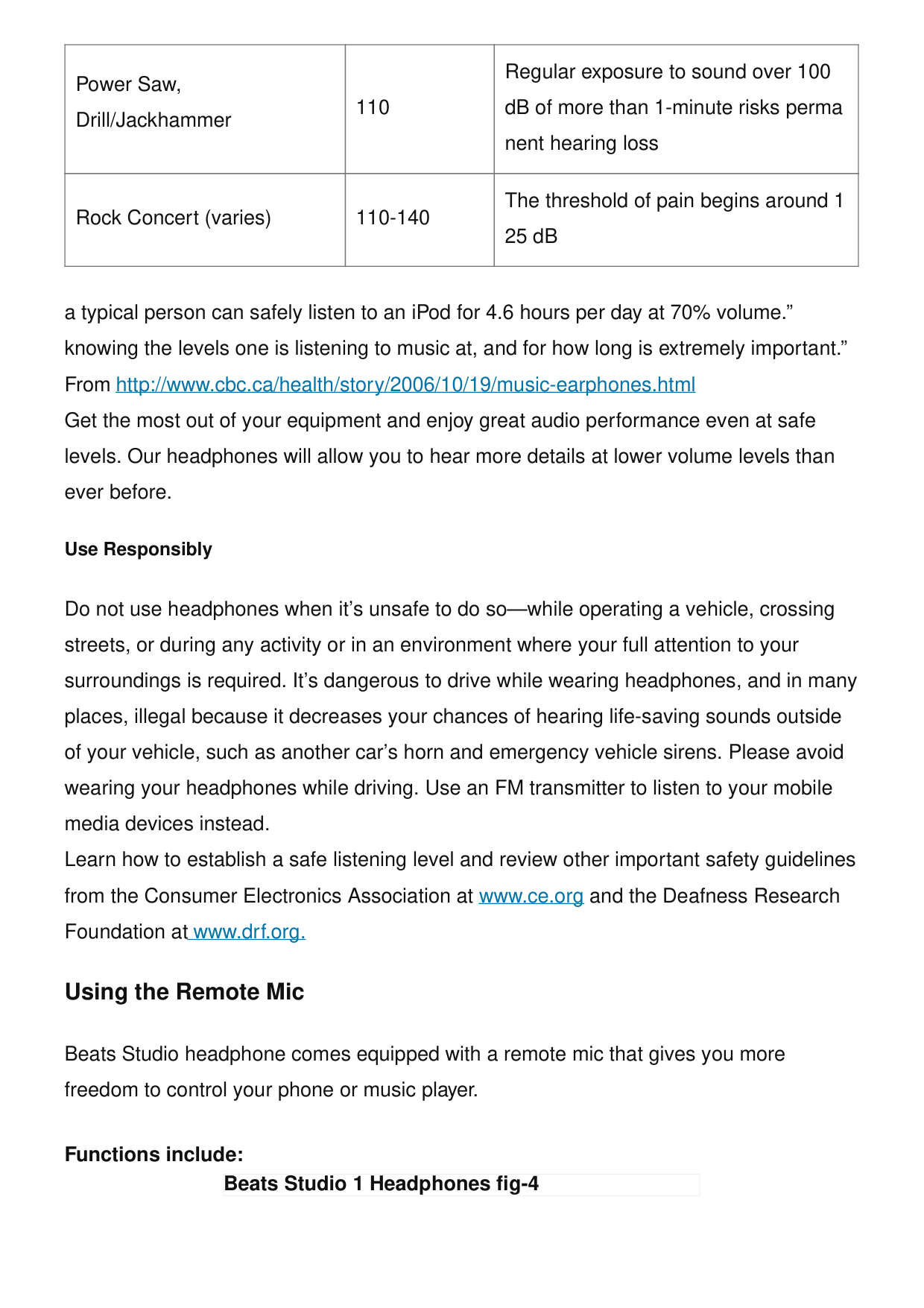
Power Saw, Drill/Jackhammer 110 Regular exposure to sound over 100 dB of more than 1-minute risks perma nent hearing loss Rock Concert (varies) 110-140 The threshold of pain begins around 1 25 dB a typical person can safely listen to an iPod for 4.6 hours per day at 70% volume.” knowing the levels one is listening to music at, and for how long is extremely important.” From http://www.cbc.ca/health/story/2006/10/19/music-earphones.html Get the most out of your equipment and enjoy great audio performance even at safe levels. Our headphones will allow you to hear more details at lower volume levels than ever before. Use Responsibly Do not use headphones when it’s unsafe to do so—while operating a vehicle, crossing streets, or during any activity or in an environment where your full attention to your surroundings is required. It’s dangerous to drive while wearing headphones, and in many places, illegal because it decreases your chances of hearing life-saving sounds outside of your vehicle, such as another car’s horn and emergency vehicle sirens. Please avoid wearing your headphones while driving. Use an FM transmitter to listen to your mobile media devices instead. Learn how to establish a safe listening level and review other important safety guidelines from the Consumer Electronics Association at www.ce.org and the Deafness Research Foundation at www.drf.org. Using the Remote Mic Beats Studio headphone comes equipped with a remote mic that gives you more freedom to control your phone or music player. Functions include: Beats Studio 1 Headphones fig-4
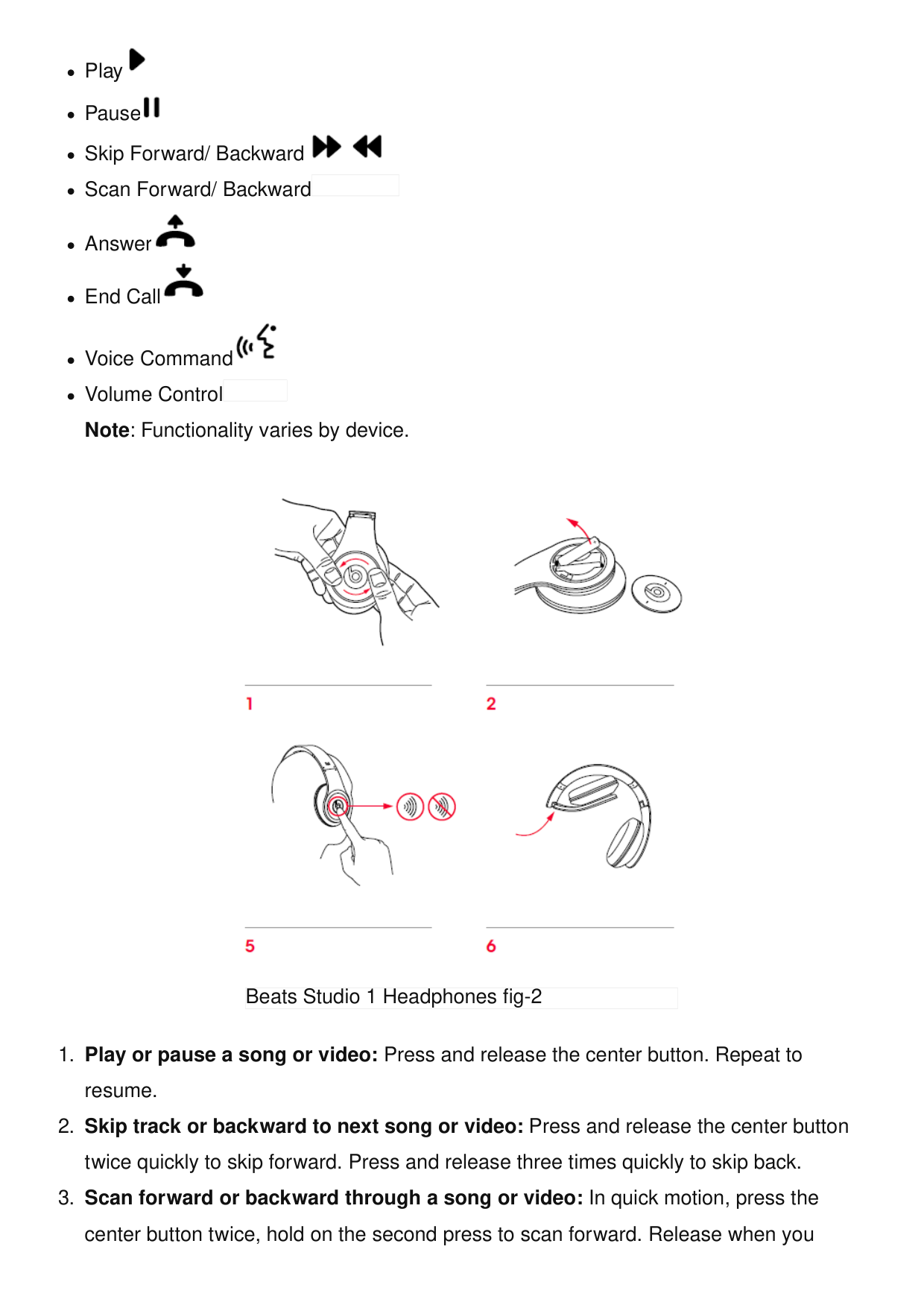
Play Pause Skip Forward/ Backward Scan Forward/ Backward Answer End Call Voice Command Volume Control Note: Functionality varies by device.
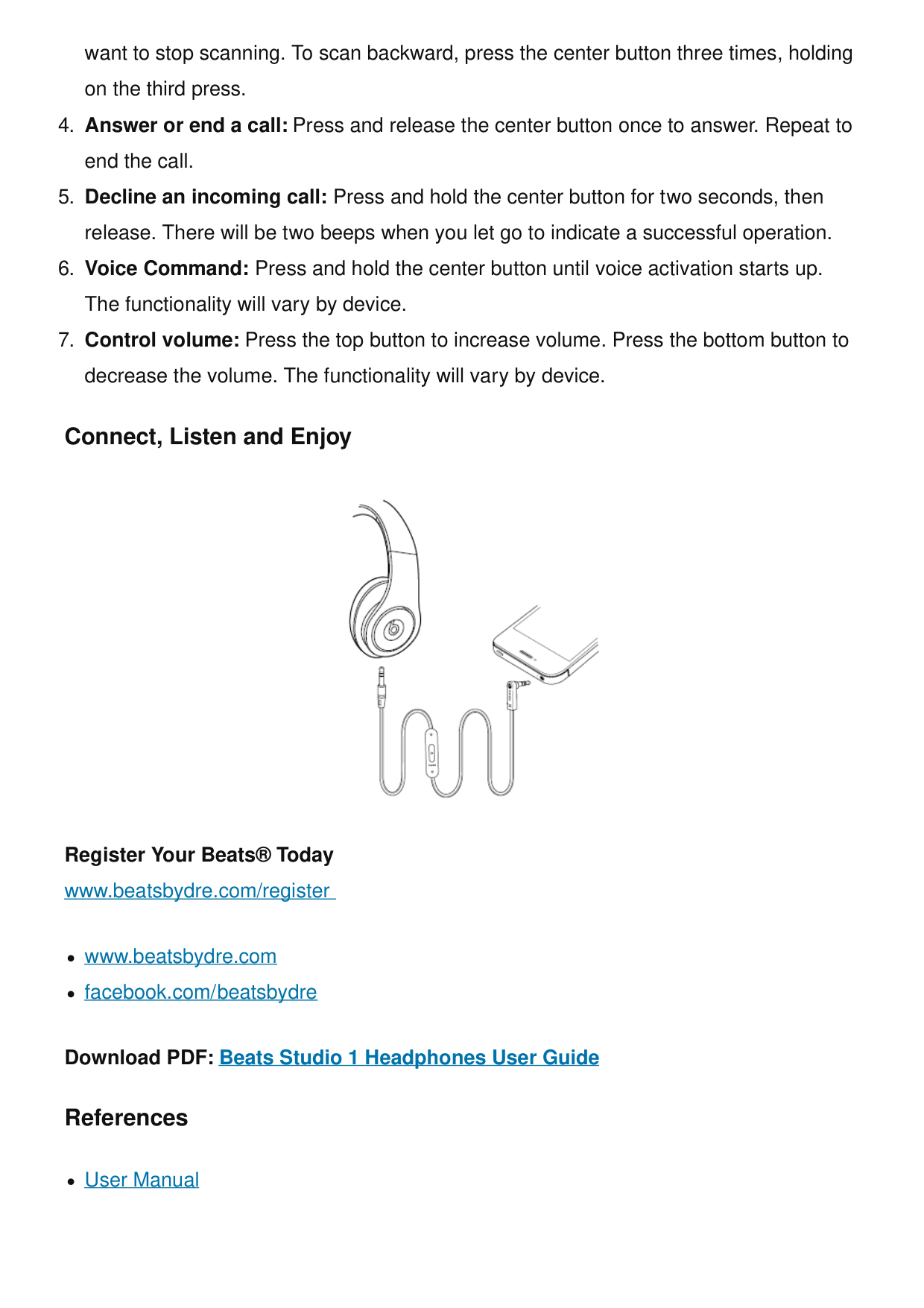
want to stop scanning. To scan backward, press the center button three times, holding on the third press.
Behringer Studio Headphones User Guide Behringer Studio Headphones Features Ultra-wide frequency response High-definition bass and super- transparent highs Ultra-wide dynamic range High- efficiency cobalt capsule… Ranorex STUDIO FUNDAMENTALS USER GUIDE Ranorex STUDIO FUNDAMENTALS USER GUIDE HUAWEI FreeBuds Studio User Guide FreeBuds Studio Quick Start Guide Download and install the app https://smarthome.hicloud.com/d/?p=ZA06 Download the HUAWEI AI Life app to… Wireless Headphones User Manual Wireless Headphones User Manual - Optimized PDF Wireless Headphones User Manual - Original PDF Related Posts
Beats
1, Beats, guide, headphones, Studio, User Leave a comment Your email address will not be published. Required fields are marked * Comment *
Search: e.g. whirlpool wrf535swhz
Search This website is an independent publication and is neither affiliated with nor endorsed by any of the trademark owners. The "Bluetooth®" word mark and logos are registered trademarks owned by Bluetooth SIG, Inc. The "Wi-Fi®" word mark and logos are registered trademarks owned by the Wi-Fi Alliance. Any use of these marks on this website does not imply any affiliation with or endorsement. Name Email Website Save my name, email, and website in this browser for the next time I comment. Post Comment