
Earfun Air Pro 3 True Wireless Earbuds
Ask AI
— answers from the official manualAnswers from the official manual.
Common questions
Common Questions
8 totalHow do I factory reset the EarFun Air Pro 3 earbuds?
Place both earbuds into the charging case, then keep it open and press and hold the reset button for at least 8 seconds until both earbuds flash in purple to confirm a successful reset. (Page 11)
How do I pair my new EarFun Air Pro 3 with a device?
Open the charging case, and the earbuds will automatically power on and enter pairing mode. Then activate Bluetooth on your device and select 'EarFun Air Pro 3' from the list of devices (enter '0000' if prompted for a password). (Page 6)
How do I connect to two devices simultaneously?
Press and hold the reset button in the charging case for 3 seconds with both earbuds inside until they flash blue rapidly, then pair them to a second device by searching on it while keeping the case open. Afterward, manually reconnect the earbuds to the first device. (Page 8)
What should I do if my EarFun Air Pro 3 is not connecting to any devices?
Try resetting it by placing both earbuds in the charging case and pressing the reset button inside for at least 8 seconds until they flash purple, then delete previous connections on your device before repairing. (Page 11)
What is the battery level indication for EarFun Air Pro 3?
The charging case LED indicates battery levels with three white LEDs for over 60%, two LEDs for between 20-60%, one LED less than 20%, and a flashing LED at under 5%. A single LED also signifies low power. (Page 3)
How long does it take to fully charge the EarFun Air Pro 3?
The charging case takes approximately two hours when charged via USB-C cable and about three and a half hours with wireless charger, while individual earbuds can be completely recharged within an hour. (Page 4)
Full Manual
14 pages
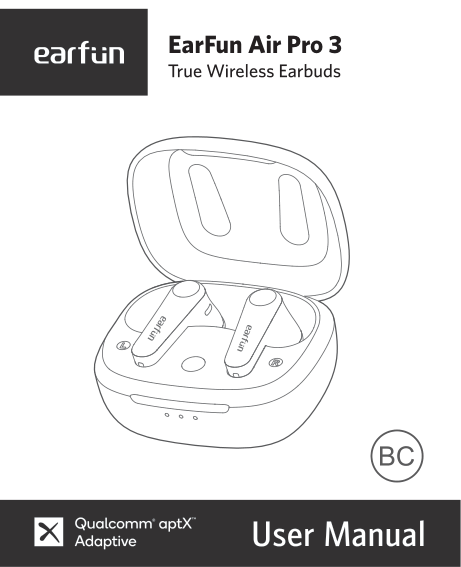
EarFun Air Pro 3
01 10 17 26 35
EN
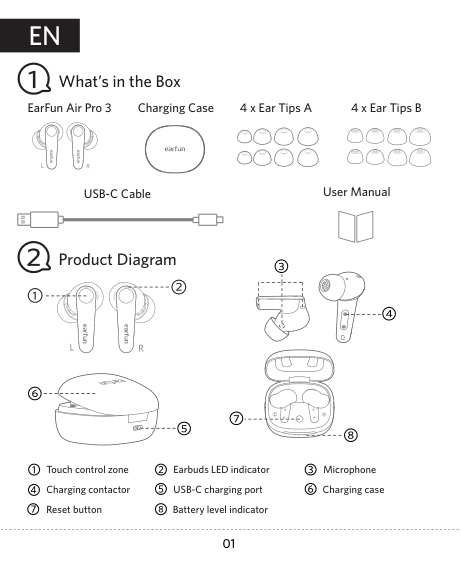
What’s in the Box
EarFun Air Pro 3 Charging Case
4 x Ear Tips A 4 x Ear Tips B
User ManualUSB-C Cable
Product Diagram
Touch control zone Charging contactor Reset button Battery level indicator
Earbuds LED indicator Microphone USB-C charging port Charging case
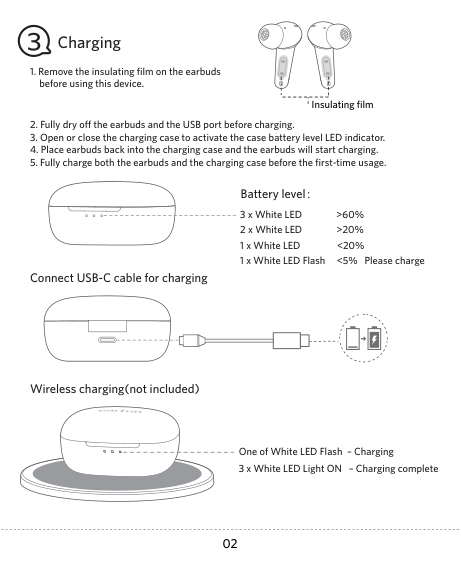
#### Charging

Insulating film
Connect USB-C cable for charging
###### Battery level:
3 x White LED >60% 2 x White LED >20% 1 x White LED <20% 1 x White LED Flash <5% Please charge
| | | |---|---|
Wireless charging(not included)
One of White LED Flash – Charging 3 x White LED Light ON – Charging complete
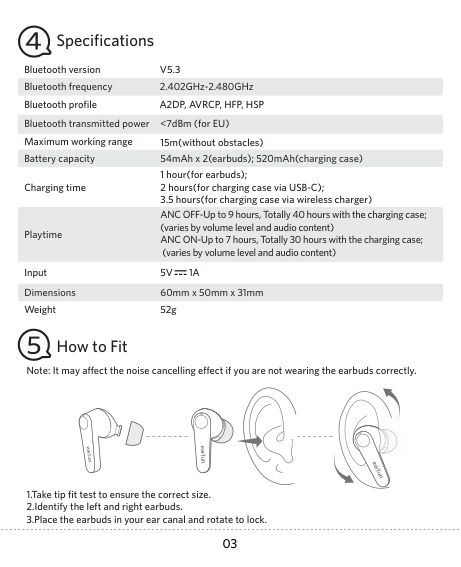
Specifications
Bluetooth version
V5.3
2.402GHz-2.480GHzBluetooth frequency Bluetooth profile A2DP, AVRCP, HFP, HSP
Bluetooth transmitted power Maximum working range Battery capacity
<7dBm (for EU) 15m(without obstacles)
54mAh x 2(earbuds); 520mAh(charging case)
Charging time
ANC OFF-Up to 9 hours, Totally 40 hours with the charging case; (varies by volume level and audio content) ANC ON-Up to 7 hours, Totally 30 hours with the charging case; (varies by volume level and audio content)
Playtime
Input Dimensions Weight
5V 1A
60mm x 50mm x 31mm 52g
How to Fit
Note: It may affect the noise cancelling effect if you are not wearing the earbuds correctly.
#### Pairing Your Earbuds
Notes:
Option A

EarFun Air Pro 3 EarFun Air Pro 3

Option B
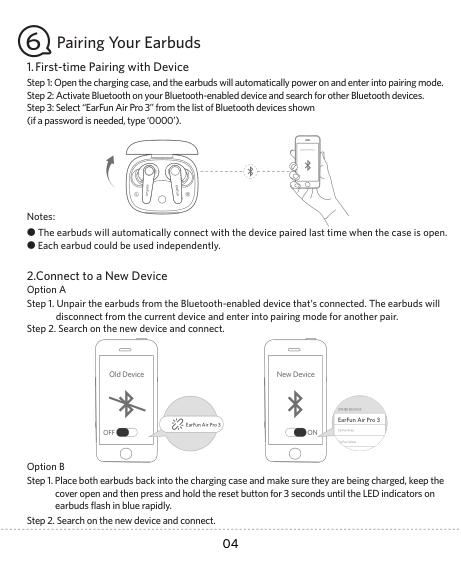
EarFun Air Pro 3
3s
###### 3. Pairing and Connecting two Bluetooth devices simultaneously
####### 1 2
|Device A| |---|
Device A
Device B

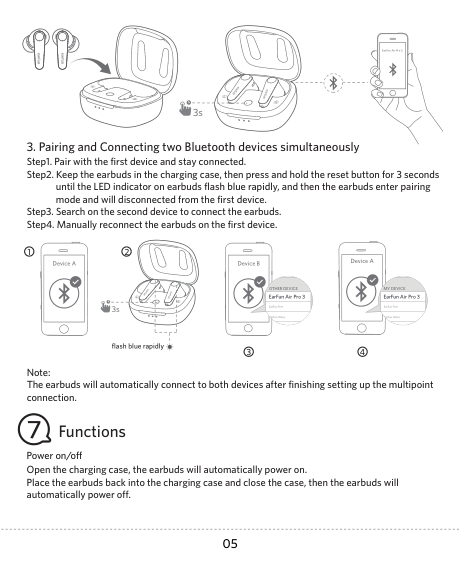

OTHER DEVICE EarFun Air Pro 3
MY DEVICE EarFun Air Pro 3


3s
3flash blue rapidly 4
Note: The earbuds will automatically connect to both devices after finishing setting up the multipoint connection.
#### Functions
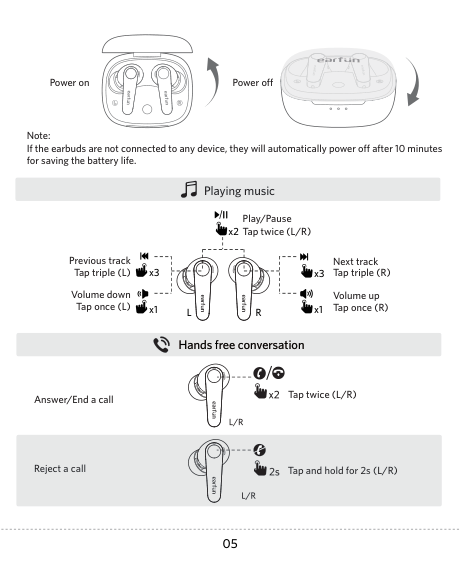
Power on/off Open the charging case, the earbuds will automatically power on. Place the earbuds back into the charging case and close the case, then the earbuds will automatically power off.
Power on Power off
Note: If the earbuds are not connected to any device, they will automatically power off after 10 minutes for saving the battery life.
###### Playing music
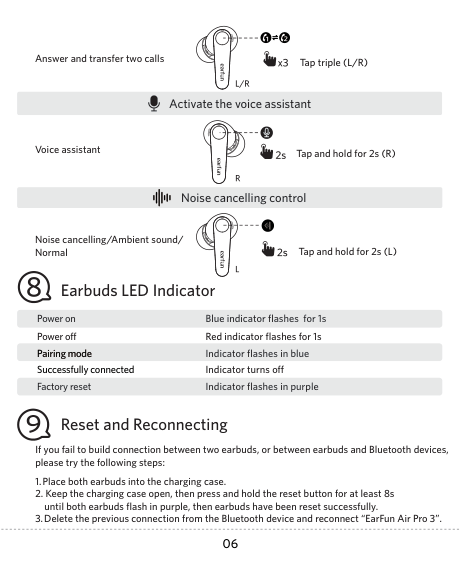
Play/Pause Tap twice (L/R)x2
| | | |---|---| | | |
Previous track Tap triple (L)
Next track Tap triple (R)
| | | |---|---| | | |
| | | |---|---| | | |
x3
x3
Volume down Tap once (L)
Volume up Tap once (R)
x1
x1
L R
###### Hands free conversation
Answer/End a call
Tap twice (L/R)
Reject a call
Tap and hold for 2s (L/R)
Answer and transfer two calls Tap triple (L/R)
Activate the voice assistant
Tap and hold for 2s (R)Voice assistant
###### Noise cancelling control
Noise cancelling/Ambient sound/ Normal
Tap and hold for 2s (L)
Earbuds LED Indicator
Power on Blue indicator flashes for 1s Power off Red indicator flashes for 1s
Pairing mode Indicator flashes in blue Successfully connected Indicator turns off
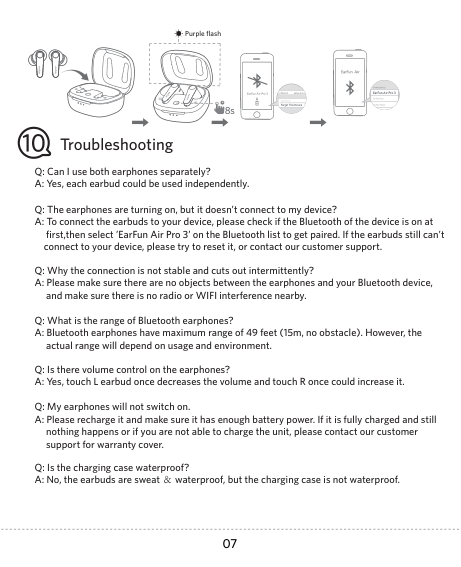
Factory reset Indicator flashes in purple
Reset and Reconnecting
If you fail to build connection between two earbuds, or between earbuds and Bluetooth devices, please try the following steps:

Purple flash
|EarFun Air Pro 3| |---|

EarFun Air Pro 3EarFun Air Pro 3

Troubleshooting
Q: Can I use both earphones separately? A: Yes, each earbud could be used independently.
Q: The earphones are turning on, but it doesn’t connect to my device? A: To connect the earbuds to your device, please check if the Bluetooth of the device is on at
first,then select ’EarFun Air Pro 3’ on the Bluetooth list to get paired. If the earbuds still can’t connect to your device, please try to reset it, or contact our customer support.
Q: Why the connection is not stable and cuts out intermittently? A: Please make sure there are no objects between the earphones and your Bluetooth device,
and make sure there is no radio or WIFI interference nearby.
Q: What is the range of Bluetooth earphones? A: Bluetooth earphones have maximum range of 49 feet (15m, no obstacle). However, the
actual range will depend on usage and environment.
Q: Is there volume control on the earphones? A: Yes, touch L earbud once decreases the volume and touch R once could increase it.
Q: My earphones will not switch on. A: Please recharge it and make sure it has enough battery power. If it is fully charged and still
nothing happens or if you are not able to charge the unit, please contact our customer support for warranty cover.
Q: Is the charging case waterproof? A: No, the earbuds are sweat & waterproof, but the charging case is not waterproof.
Q: Will the earbuds shut off automatically? A: The earbuds will remain on as long as they are connected to a device. If no audio is in use,
they will enter power-saving mode and wake up once audio is played. If the earbuds are not connected with any devices, they will automatically shut off in 10 minutes.
Customer Service
###### For FAQS and more information: Please Email to: service@myearfun.com www.myearfun.com
#### FCC Statement
Changes or modifications not expressly approved by the party responsible for compliance could void the user's authority to operate the equipment. This equipment has been tested and found to comply with the limits for a Class B digital device, pursuant to Part 15 of the FCC Rules. These limits are designed to provide reasonable protection against harmful interference in a residential installation. This equipment generates uses and can radiate radio frequency energy and, if not installed and used in accordance with the instructions, may cause harmful interference to radio communications. However, there is no guarantee that interference will not occur in a particular installation. If this equipment does cause harmful interference to radio or television reception, which can be determined by turning the equipment off and on, the user is encouraged to try to correct the interference by one or more of the following measures:
-- Reorient or relocate the receiving antenna.
-- Increase the separation between the equipment and receiver.
-- Connect the equipment into an outlet on a circuit different from that to which the receiver is connected.
-- Consult the dealer or an experienced radio/TV technician for help. This device complies with part 15 of the FCC rules. Operation is subject to the following two conditions:
#### RF Exposure Compliance
This equipment complies with FCC radiation exposure limits set forth for an uncontrolled environment. This transmitter must not be co-located or operating in conjunction with any other antenna or transmitter.
#### CAUTION
Risk of explosion if the battery is replaced by an incorrect type Disposal of a battery into fire or a hot even, or mechanically crushing or cutting of a battery, that can result in an explosion; Leaving a battery in an extremely high temperature surrounding environment that can result in an explosion or the leakage of flammable liquid or gas; A battery subjected to extremely low air pressure that may result in an explosion or the leakage of flammable liquid or gas.

To prevent possible hearing damage, do not listen at high volume levels for long periods.
#### BLUETOOTH
The Bluetooth word mark and logos are registered trademarks owned by Bluetooth SIG, Inc. and any use of such marks by Earfun Technology (HK) Limited is under license.
Qualcomm aptX is a product of Qualcomm Technologies, Inc. and/or its subsidiaries. Qualcomm is a trademark of Qualcomm Incorporated, registered in the United States and other countries. aptX is a trademark of Qualcomm Technologies International, Ltd., registered in the United States and other countries.
Other trademarks and trade names are those of their respective owners.
#### EU Declaration of Conformity
Earfun Technology (HK) Limited hereby declares that this equipment is in compliance with the essential requirements and other relevant provisions of Directive 2014/53/EU and RoHS 2011/ 65/EU Directive. The declaration of conformity may be consulted in the support section of our Web site, accessible from www.myearfun.com
#### UK Declaration of Conformity
Hereby, [Earfun Technology (HK) Limited] declares that the radio equipment type [TW500] is in compliance with UK Radio Equipment Regulations (SI 2017/1206). The full text of the declaration of conformity is available at the following internet address: www.myearfun.com
NCC聲明:
取得審驗證明之低功率射頻器材,非經核准,公司、商號或使用者均不得擅自變更頻率、 加大功率或變更原設計之特性及功能。低功率射頻器材之使用不得影響飛航安全及干擾 合法通信;經發現有干擾現象時,應立即停用,並改善至無干擾時方得繼續使用。前述 合法通信,指依電信管理法規定作業之無線電通信。低功率射頻器材須忍受合法通信或 工業、科學及醫療用電波輻射性電機設備之干擾。
###### MODEL: TW500
###### FCC ID: 2AVIT-TW500
xxx-xxxxxx