
Ask AI
— answers from the official manualAnswers from the official manual.
Common questions
Common Questions
9 totalHow do I test the CO alarm?
To test the CO alarm, press and release the Test/Reset button; you will hear four quick beeps – followed by five seconds of silence – followed by another set of four quick beeps. Notice the red Alarm LED flashing when the unit is activated in this mode.
When should I change my CO alarm batteries?
Replace your batteries twice a year, at the same time you change your clocks for daylight saving time. Install or replace two approved replacement Alkaline batteries: Energizer E91, Duracell MN1500 or MX1500, Gold Peak 15A, and Golden Power GLR6A.
What is the ‘End of Life Hush’ feature?
The End of Life Hush feature allows you to press the test/reset button on the alarm to disable chirps for up to three days. The two quick beeps will repeat every three days and can be reset a total of thirty days. After this period, the signal cannot be hushed.
How do I activate the Tamper-Resist feature?
To activate the tamper resist feature: Move the tamper resist activate slide to the “ON” position. Once enabled, there is a two-minute delay before the feature activates fully.
What should I do if my alarm chirps every few seconds and has a red flashing LED?
If your unit chirps one time each thirty seconds with a red LED flash, it signifies an error condition. Replace the CO alarm immediately as the unit will not respond properly.
How do I perform proper maintenance on my CO alarm sensor?
Maintenance tips include testing the alarm weekly by pressing the Test/Reset button, vacuuming the cover to remove accumulated dust every month and ensuring children never touch or unplug the unit.
Full Manual
17 pages
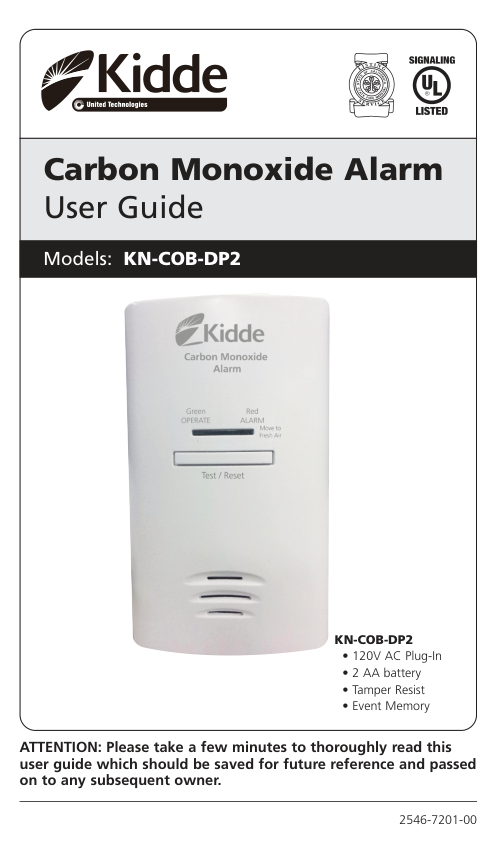
Carbon Monoxide Alarm User Guide Models: KN-COB-DP2

####### KN-COB-DP2
ATTENTION: Please take a few minutes to thoroughly read this user guide which should be saved for future reference and passed on to any subsequent owner.
2546-7201-00
What to do When the Alarm Sounds!
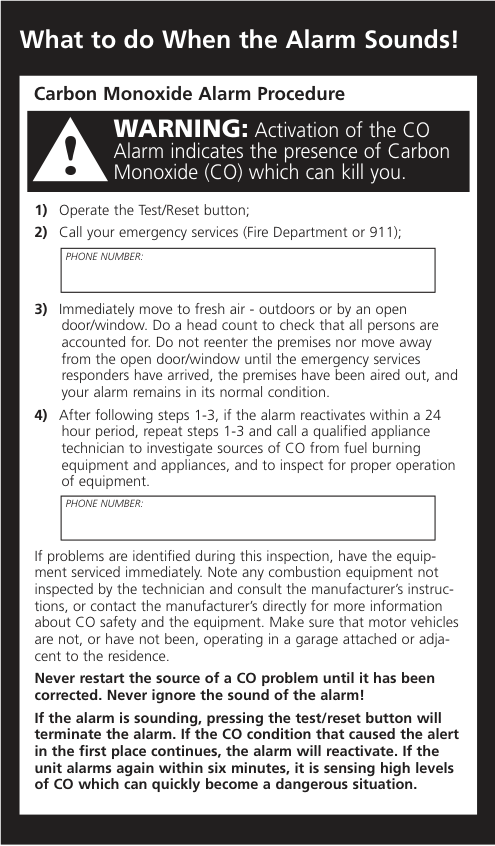
Carbon Monoxide Alarm Procedure
WARNING: Activation of the CO Alarm indicates the presence of Carbon Monoxide (CO) which can kill you.
|PHONE NUMBER:| |---|
|PHONE NUMBER:| |---|
If problems are identified during this inspection, have the equipment serviced immediately. Note any combustion equipment not inspected by the technician and consult the manufacturer’s instructions, or contact the manufacturer’s directly for more information about CO safety and the equipment. Make sure that motor vehicles are not, or have not been, operating in a garage attached or adjacent to the residence.
Never restart the source of a CO problem until it has been corrected. Never ignore the sound of the alarm!
If the alarm is sounding, pressing the test/reset button will terminate the alarm. If the CO condition that caused the alert in the first place continues, the alarm will reactivate. If the unit alarms again within six minutes, it is sensing high levels of CO which can quickly become a dangerous situation.
Welcome
Note: Many times throughout this User Guide, we will refer to Carbon Monoxide as “CO”.
This Kidde carbon monoxide (CO) alarm is an important part of your family’s home safety plan. This alarm has been designed and tested to detect CO buildup in a residential environment. Your alarm is for use specifically in the home. As an owner of a CO alarm, there are some basic facts you should know about for your protection.
Many people think that CO alarms operate like smoke alarms. Like smoke alarms, CO alarms monitor the air in your home and sound a loud alarm to warn you of trouble. The way you respond to a CO alarm is quite different than a smoke alarm. That’s because a house fire and a CO problem are two distinctly different situations. If your smoke alarm were to alarm, you would quickly be able to judge the level of danger you were in with your senses. You can see and smell the smoke, feel the heat, see, and possibly hear the fire burning. You can also readily see if your smoke alarm is alarming in a non-emergency situation. Because your sense of sight, smell, hearing and touch give you information, you can almost instantly judge what action to take if you hear your smoke alarm.
CO is an invisible, odorless, tasteless and non-irritating gas – completely undetectable to your senses. That’s why it is important to your safety that you have a CO alarm.
Important Warning Statements
IMPORTANT: This carbon monoxide alarm is designed to detect carbon monoxide from ANY source of combustion. It is NOT designed to detect smoke, fire, or any other gas.
WARNING: Carbon monoxide alarms are not smoke alarms. This carbon monoxide alarm is not a substitute for installing and maintaining an appropriate number of smoke alarms in your home.
!
This carbon monoxide alarm will not sense smoke, fire, or any poisonous gas other than carbon monoxide even though carbon monoxide can be generated by fire. For this reason you must install smoke alarms to provide early warning of fire and to protect you and your family from fire and its related hazards.
!
CAUTION: This alarm will only indicate the presence of carbon monoxide at the sensor. Carbon monoxide may be present in other areas.
Important Warning Statements
WARNING: This product is intended for use in ordinary indoor locations of family living units. It is not designed to measure compliance with Occupational Safety and Health Administration (OSHA), commercial or industrial standards. It is not suitable for installation in hazardous locations as defined in the National Electric Code.
!
The installation of this device should not be used as a substitute for proper installation, use and maintenance of fuel burning appliances, including appropriate ventilation and exhaust systems. It does not prevent CO from occurring, nor can it solve an existing CO problem.
WARNING: This device is designed to protect individuals from acute effects of carbon monoxide exposure. It may not fully safeguard individuals with specific medical conditions. If in doubt, consult a medical practitioner.
!
Individuals with medical problems may consider using warning devices which provide audible and visual signals for carbon monoxide concentrations under 30 PPM.
This carbon monoxide alarm requires a continuous supply of electrical power – it will not work without power. Models without battery backup will not operate during power failure.
This alarm has not been independently investigated for carbon monoxide detection below 70 PPM.
Contents of This User Guide
##### General Carbon Monoxide Information
Carbon monoxide is a colorless, odorless and tasteless poison gas that can be fatal when inhaled. CO inhibits the blood’s capacity to carry oxygen.
Periodically review this user guide and discuss your CO alarm emergency procedure with all the members of your family. Never ignore a CO alarm. A true alarm is an indication of potentially dangerous levels of CO. CO alarms are designed to alert you to the presence of CO before an emergency – before most people would experience symptoms of CO poisoning, giving you time to resolve the problem calmly.
Determine if anyone in the household is experiencing symptoms of CO poisoning. Many cases of reported CO poisoning indicate that while victims are aware they are not well, they become so disoriented they are unable to save themselves by either exiting the building or calling for assistance. Also, young children and household pets may be the first affected. You should take extra precautions to protect high-risk persons from CO exposure because they may experience ill effects from CO at levels that would not ordinarily affect a healthy adult.
##### Symptoms of CO Poisoning
The following common symptoms are related to CO poisoning and should be discussed with ALL members of the household.
Mild Exposure: Slight headache, nausea, vomiting, fatigue (often described as “flu-like” symptoms).
Medium Exposure: Severe throbbing headache, drowsiness, confusion, fast heart rate.
Extreme Exposure: Unconsciousness, convulsions, cardio-respiratory failure, death. If you experience even mild symptoms of CO poisoning, consult your doctor immediately!
##### Possible Sources of Carbon Monoxide
Inside your home, appliances used for heating and cooking are the most likely sources of CO. Vehicles running in attached garages can also produce dangerous levels of CO.
CO can be produced when burning any fossil fuel, such as gasoline, propane, natural gas, oil and wood. It can be produced by any fuelburning appliance that is malfunctioning, improperly installed, or not ventilated correctly, such as:
To be safe, know the possible sources of CO in your home. Keep fuelburning appliances and their chimneys and vents in good working condition. Learn the early symptoms of exposure, and if you suspect CO poisoning, move outside to fresh air and get emergency help. Your first line of defense is an annual inspection and regular maintenance of your appliances. Contact a licensed contractor or call your local utility company for assistance.
Information About Carbon Monoxide Alarms – What They Can and Cannot Do:
CO alarms provide early warning of the presence of CO, usually before a healthy adult would experience symptoms. This early warning is possible, however, only if your CO alarm is located, installed and maintained as described in this guide.

Because carbon monoxide is a cumulative poison, long-term exposures to low levels may cause symptoms, as well as short-term exposures to high levels. This Kidde unit has a time-weighted alarm – the higher the level of CO present, the sooner the alarm will be triggered.
This CO alarm can only warn you of the presence of CO. It does not prevent CO from occurring, nor can it solve an existing CO problem. If your unit has alarmed and you’ve provided ventilation by leaving your windows and doors open, the CO buildup may have dissipated by the time help responds. Although your problem may appear to be temporarily solved, it’s crucial that the source of the CO is determined and that the appropriate repairs are made.
This CO alarm is designed to act as a monitor; it is not designed for use
CO alarms have limitations. Like any other electronic device, CO alarms are not fool-proof. CO alarms have a limited operational life. You must test your CO alarm weekly, because it could fail to operate at any time.
If your CO alarm fails to test properly, or if its self-diagnostic test reveals a malfunction, immediately have the unit replaced. This alarm will not monitor CO levels while in an error condition.
CO alarms can only sense CO that reaches the unit’s sensor. It’s possible that CO may be present in other areas without reaching the alarm. The rate and ability that which CO reaches the alarm may be affected by:
For these reasons, we recommend you provide complete coverage by placing a CO alarm on every level of the home. Please carefully read all information on properly installing this CO alarm.
CO alarms should not be used to detect the presence of natural gas (methane), propane, butane, or other combustible fuels.
2. Product Features and Specifications
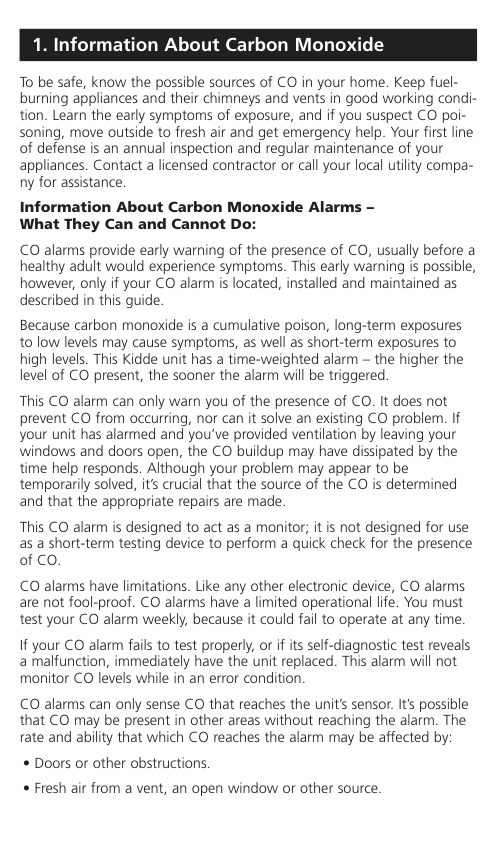
Tamper-Resist Activate Slide
###### Model KN-COB-DP-2
Rotating AC Plug
Tamper-Resist Activation Switch (see Normal Operating Characteristics)
CarbonMonoxide
Alarm
GreenOPERATE
Re ARM
overeshAi
est
Rese
2 AA Batteries Door
##### Low Battery Warning
If the battery is missing or battery power is low, the unit will chirp every 60 seconds to indicate the batteries must be replaced.
THE BATTERIES MUST BE REPLACED IMMEDIATELY! Low Battery HUSH
##### CONTROL
®
When the batteries need to be replaced, the unit will produce a low battery warning. The Low Battery HUSH
feature allows you to press the button on the alarm and disable the “chirp” for a random period of up to 12 hours. This gives you a chance to replace the battery at a more convenient time by disconnecting the alarm from power. During this Low Battery HUSH® period, your alarm is monitoring for CO.
®
##### Tamper-Resist Feature
The tamper resist is an optional feature and DOES NOT need to be activated for the CO alarm to function properly. The Tamper Resist feature is a constant 85dB alert to indicate the unit has been unplugged or has come loose from the outlet. THIS FEATURE IS INITIALLY DISABLED FROM THE FACTORY AND MUST BE ACTIVATED IF FEATURE IS DESIRED. To activate the tamper resist feature: Move the tamper resist activate slide to the “ON” position. Once enabled, there is a two minute delay when power is supplied to give you time to plug in the unit after activating the batteries. This feature is automatically disabled once the battery voltage has reached a level to cause a low battery warning chirp. Pressing the Test/Reset button will defeat the 85dB tamper alarm for two minutes to allow time for the batteries to be changed without the alarm sounding. To deactivate the tamper resist feature, press in the tamper resist activation switch and move the activate slide to the “OFF” position.
##### End of Life Notification
IMPORTANT: Ten (10) years after unit is first powered, this alarm will chirp two times every 30 seconds to indicate it is time to replace the alarm.
End of Life “Hush”: This model has an End of Life Hush feature which allows you to press the test/reset button on the alarm and disable the “chirps” for a period of 3 days. This gives you a chance to replace the alarm at a more convenient time while still providing protection. The two chirps will repeat again every 3 days and can be reset a total of 30 days. After 30 days, the End of Life signal cannot be “Hushed.” The alarm must be replaced.
During this End of Life HUSH period, your alarm is monitoring for CO.
To help identify the date to replace the alarm, a label has been affixed to the side of the alarm. Write the “replace by” date (ten years from power up) in a permanent marker on this label.
Temperature: Operating Range: 40°F (4.4°C) to 100°F (37.8°C)
Humidity: Operating range: 10-95% non-condensing
Audible Alarm: 85+ dB at 10’ @ 3.4±0.5 KHz pulsing alarm
Sensor: Electrochemical
Power: 120 volts AC, 60 Hz, 90 mA max, 2AA battery back-up
Alarm Response Times: 70 PPM = 60-240 min., 150 PPM = 10-50 min., 400 PPM = 4-15 min.
3. Installation Locations
##### Recommended Installation Locations
CO alarms should be mounted in or near bedrooms and living areas. It is recommended that you install a Kidde CO alarm on each level of your home.
When choosing your installation locations, make sure you can hear the alarm from all sleeping areas. If you install only one CO alarm in your home, install it near bedrooms, not in the basement or furnace room.
Recommended Locations
Locations To Avoid IMPORTANT: Improper location can affect the sensitive electronic components in this alarm. To avoid causing damage to the unit, to provide optimum performance, and to prevent unnecessary nuisance alarms:
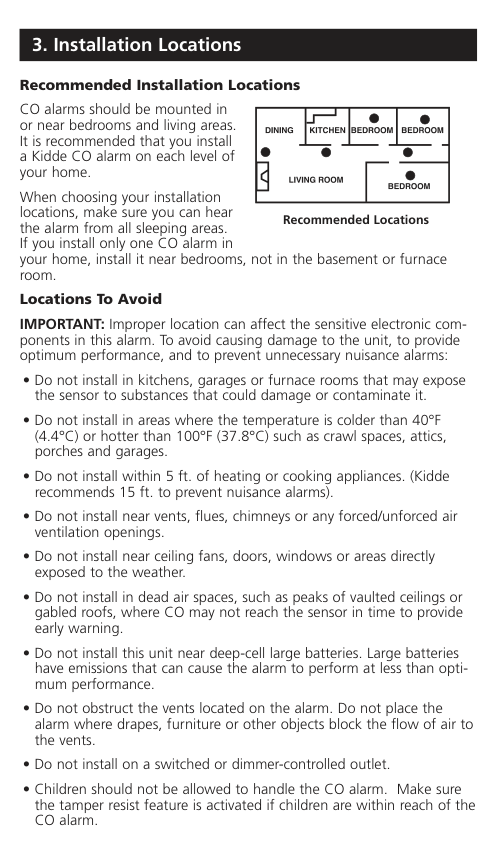
How to Install Your Alarm Direct Plug Alarm To install:
90º ROTATING DIRECT PLUG
Tamper-Resist Activate Slide
Tamper-Resist Activation Switch
Two labels have been provided that have important information on what to do in case of an alarm. Add the phone number of your emergency service provider in the space provided. Place one label next to the alarm after it is mounted, and one label near a fresh air source such as a door or window.
##### Carbon Monoxide Alarm Indicator
When the alarm senses a dangerous level of CO, the unit will emit a loud alarm pattern. The alarm pattern is 4 quick beeps followed by 5 seconds of silence. This cycle repeats as long as a dangerous CO conditions exist. The red Alarm LED will flash the same pattern.
WARNING: This model will stay in alarm on battery operation as long as dangerous CO condition exists
!
6.Operating Characteristics
When you first power up the alarm: The alarm will sound briefly, then the green Operate LED will light. This indicates that the CO alarm is receiving power and that the alarm circuit is functioning.
Within a few minutes, your carbon monoxide alarm will start monitoring for CO and will continue to do so as long as it receives power or the end of life function is activated.
6.Operating Characteristics
When the CO alarm loses AC power: If you have two good AA batteries installed, the alarm will automatically switch to the battery backup mode and the green LED will flash approximately every 60 seconds. The unit will continue to operate normally and detect CO .
When AC power is restored, the alarm will automatically switch back to normal operating mode and the green LED will come on continuously.
When the CO alarm is unplugged: If the tamper resist feature is "ON" and the unit is unplugged it will produce a constant tone until a battery is removed, tamper resist disabled or the unit is plugged back into the wall. If tamper resist feature in "OFF" and unit is unplugged, it will operate as if on battery backup only. Plug unit back into AC as soon as possible.
Observe the CO alarm regularly to make sure the green Operate LED is on, indicating normal operation.
If the green Operate LED is not on, unplug the CO alarm, then plug it in again. This will clear the alarm for restart. If the green Operate LED does not light, your CO alarm may be malfunctioning.
Event Memory: If the unit has detected a CO concentration of 100ppm or greater, the Green LED will flash every 10 seconds. Pushing the test button will clear the Event Memory and initiate the test sequence.
When the CO alarm detects an error condition: If the unit detects an internal error or malfunction, it will produce one beep every 30 seconds with a red LED flash. If error condition continues, replace the CO alarm immediately. Unit will not respond to CO in this condition.
The following table describes the audible alarm patterns and the recommended actions to take.
Operating and Alarm Characteristics Function LED Display Alarm Sound Unit Status Recommendation
Normal Operation
Green LED constantly on
None Normal AC
None
operation (sensing no CO) and with a good battery
Normal Operation
Green LED flashes every 60 seconds
None Normal DC operation on battery backup
Verify AC power is restored as soon as possible to conserve battery.Replace batteries.
Carbon monoxide alarm
Red LED flashes with beeps.
Alarm condition. Dangerous concentrations of CO detected
Refer to “What to do When the Alarm Sounds” (inside front cover)
Low battery
Red LED flashes every 60 seconds
One quick beep every 60 seconds
AC powered and low or missing batteries
Install or replace two AA batteries.
##### Operating and Alarm Characteristics Function LED Display Alarm Sound Unit Status Recommendation
Replace batteries. If “Err” continues, unit has malfunctioned. Replace immediately. Unit will not respond CO
Error/ service alarm
Red LED flashes every 30 seconds
One quick beep every 30 seconds
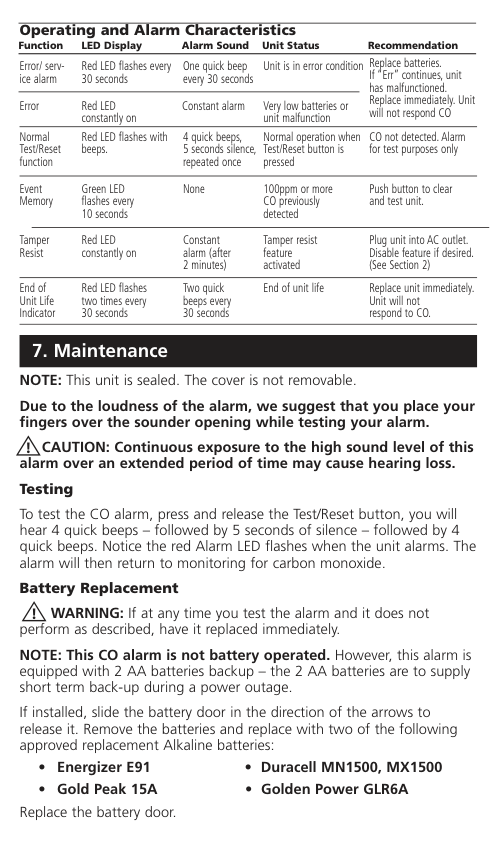
Unit is in error condition
Error Red LED constantly on
Constant alarm Very low batteries or unit malfunction
Normal Test/Reset function
Red LED flashes with beeps.
Normal operation when Test/Reset button is pressed
CO not detected.Alarm for test purposes only
Event Memory
Green LED flashes every 10 seconds
None 100ppm or more CO previously detected
Push button to clear and test unit.
Tamper Resist
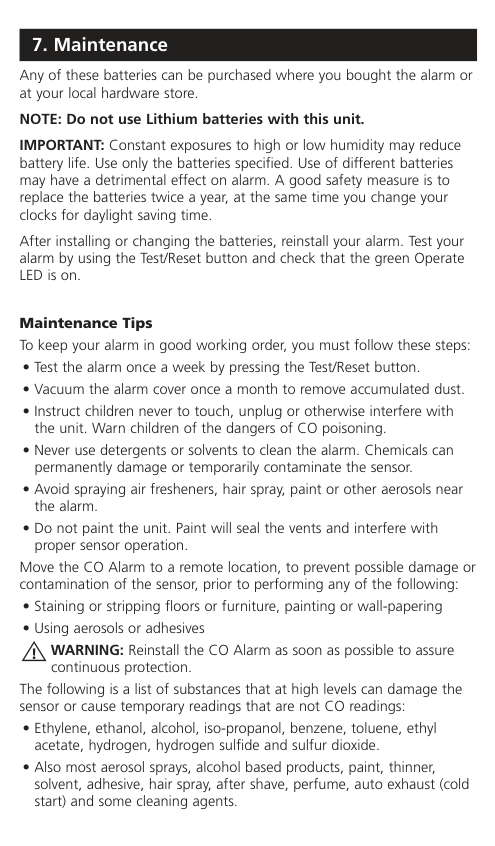
Red LED constantly on
Constant alarm (after 2 minutes)
Tamper resist feature activated
Plug unit into AC outlet. Disable feature if desired. (See Section 2)
End of Unit Life Indicator
Red LED flashes two times every 30 seconds
Two quick beeps every 30 seconds
End of unit life Replace unit immediately. Unit will not respond to CO.
7. Maintenance
NOTE: This unit is sealed. The cover is not removable. Due to the loudness of the alarm, we suggest that you place your fingers over the sounder opening while testing your alarm.
CAUTION: Continuous exposure to the high sound level of this alarm over an extended period of time may cause hearing loss. Testing
!
To test the CO alarm, press and release the Test/Reset button, you will hear 4 quick beeps – followed by 5 seconds of silence – followed by 4 quick beeps. Notice the red Alarm LED flashes when the unit alarms. The alarm will then return to monitoring for carbon monoxide.
##### Battery Replacement
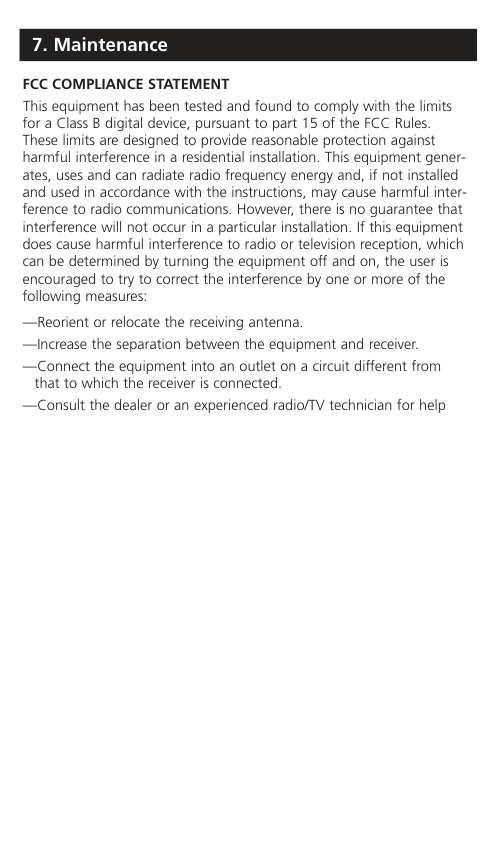
WARNING: If at any time you test the alarm and it does not perform as described, have it replaced immediately.
!
NOTE: This CO alarm is not battery operated. However, this alarm is equipped with 2 AA batteries backup – the 2 AA batteries are to supply short term back-up during a power outage.
If installed, slide the battery door in the direction of the arrows to release it. Remove the batteries and replace with two of the following approved replacement Alkaline batteries:
Replace the battery door.
Any of these batteries can be purchased where you bought the alarm or
IMPORTANT: Constant exposures to high or low humidity may reduce battery life. Use only the batteries specified. Use of different batteries may have a detrimental effect on alarm. A good safety measure is to replace the batteries twice a year, at the same time you change your clocks for daylight saving time.
After installing or changing the batteries, reinstall your alarm. Test your alarm by using the Test/Reset button and check that the green Operate LED is on.
Maintenance Tips To keep your alarm in good working order, you must follow these steps:

Move the CO Alarm to a remote location, to prevent possible damage or contamination of the sensor, prior to performing any of the following:
WARNING: Reinstall the CO Alarm as soon as possible to assure continuous protection.
#### !
The following is a list of substances that at high levels can damage the sensor or cause temporary readings that are not CO readings:
FCC COMPLIANCE STATEMENT This equipment has been tested and found to comply with the limits for a Class B digital device, pursuant to part 15 of the FCC Rules. These limits are designed to provide reasonable protection against harmful interference in a residential installation. This equipment generates, uses and can radiate radio frequency energy and, if not installed and used in accordance with the instructions, may cause harmful interference to radio communications. However, there is no guarantee that interference will not occur in a particular installation. If this equipment does cause harmful interference to radio or television reception, which can be determined by turning the equipment off and on, the user is encouraged to try to correct the interference by one or more of the following measures:
—Reorient or relocate the receiving antenna.
—Increase the separation between the equipment and receiver.
—Connect the equipment into an outlet on a circuit different from that to which the receiver is connected.
—Consult the dealer or an experienced radio/TV technician for help
|TEN YEAR LIMITED WARRANTY
Warranty Coverage: The manufacturer warrants to the original consumer purchaser, that this product (except batteries) will be free of defects in material and workmanship for a period of ten (10) years from date of purchase. The manufacturer’s liability hereunder is limited to replacement of the product, repair of the product or replacement of the product with repaired product at the discretion of the manufacturer. This warranty is void if the product has been damaged by accident, unreasonable use, neglect, tampering or other causes not arising from defects in material or workmanship. This warranty extends to the original consumer purchaser of the product only.
Warranty Disclaimers: Any implied warranties arising out of this sale, including but not limited to the implied warranties of description, merchantability and fitness for a particular purpose, are limited in duration to the above warranty period. In no event shall the Manufacturer be liable for loss of use of this product or for any indirect, special, incidental or consequential damages, or costs, or expenses incurred by the consumer or any other user of this product, whether due to a breach of contract, negligence, strict liability in tort or otherwise. The Manufacturer shall have no liability for any personal injury, property damage or any special, incidental, contingent or consequential damage of any kind resulting from gas leakage, fire or explosion. Some states do not allow limitations on how long an implied warranty lasts, so the above limitation may not apply to you. Some states do not allow the exclusion or limitation of consequential or incidental damages, so the above limitations or exclusions may not apply to you.
Legal Remedies: This warranty gives you specific legal rights and you may also have other rights that vary from state to state.
Warranty Performance: During the above warranty period, your product will be replaced with a comparable product if the defective product is returned in a postage paid package to the following address: Kidde, Customer Service Department, 1016 Corporate Park Drive, Mebane, NC 27302 USA, together with proof of purchase date. Please include a note describing the problem when you return the unit. The replacement product will be in warranty for the remainder of the original warranty period or for six months, whichever is longer. Other than the cost of postage, no charge will be made for replacement of the defective product. In many cases the quickest way to exchange your alarm is to return it to the original place of purchase. If you have questions, call Kidde customer service department.
IMPORTANT: Do not remove unit back cover. Back cover removal will void warranty.
Your Kidde Carbon Monoxide Alarm is not a substitute for property, disability, life or other insurance of any kind. Appropriate insurance coverage is your responsibility. Consult your insurance agent.
Also, Kidde makes no warranty, express or implied, written or oral, including that of merchantability or fitness for any particular purpose, with respect to the batteries.
The above warranty may not be altered except in writing signed by both parties hereto.| |---|
QUESTIONS OR FOR MORE INFORMATION Call our Product Support Line at 1-800-880-6788 or contact us at our website at www.kidde.com
Kidde, 1016 Corporate Park Drive, Mebane, NC 27302