
Ask AI
— answers from the official manualAnswers from the official manual.
Common questions
Common Questions
20 totalWhat type of heating/cooling system is the TH3210D designed for?
The TH3210D is designed exclusively for 2 Heat/1 Cool heat pump systems. It is not compatible with conventional gas, oil, or electric heating systems — those applications require the TH3110D model instead. (Page 1)
How do I enter the installer setup mode to configure the thermostat?
Press and hold both the up (s) and down (t) buttons simultaneously until the display changes. From there, press the t button to change settings, press s to advance to the next function, and press and hold both buttons together to exit and save all settings. (Page 6)
What does it mean when 'Cool On' or 'Heat On' is flashing on the display?
A flashing 'Cool On' or 'Heat On' message indicates the compressor protection feature is active and the compressor is waiting before restarting. This delay is controlled by Setup Function 15 and is designed to prevent equipment damage from rapid compressor cycling. (Page 8)
How do I change the temperature display from Fahrenheit to Celsius?
Enter the installer setup mode and navigate to Setup Function 14. Set it to '0' for Fahrenheit (factory default) or '1' for Celsius. (Page 6)
What wire gauge should I use when wiring the thermostat?
Use 18- to 22-gauge thermostat wire for all connections. Shielded cable is not required. (Page 4)
What are the temperature range specifications for heating and cooling on the TH3210D?
The heating temperature range is 40°F to 90°F (4.5°C to 32°C), and the cooling range is 50°F to 99°F (10°C to 37°C). The thermostat is rated for an operating ambient temperature of 32°F to 120°F (0°C to 48.9°C) and an operating relative humidity of 5% to 90% non-condensing. (Page 8)
Show 14 more questions
How do I run a system test after installation to verify everything is working?
Is it safe to install this thermostat myself, or does it require a professional?
What safety precaution must I take before starting the wiring installation?
What should I do with my old thermostat if it contains mercury?
How do I configure the system type on my Honeywell Pro TH3210D?
How do I perform an emergency heat test?
What is the recommended cycle rate for compressors in my TH3210D?
How do I change the temperature display unit?
Where can I find safety warnings in the manual?
How do I adjust compressor protection settings?
How do I factory reset the Honeywell Pro TH3210D?
What are the power options available for the TH3210D?
How do I test the heating system on my Honeywell Pro TH3210D?
What is the correct wiring sequence for a 2H/1C system?
Full Manual
16 pages
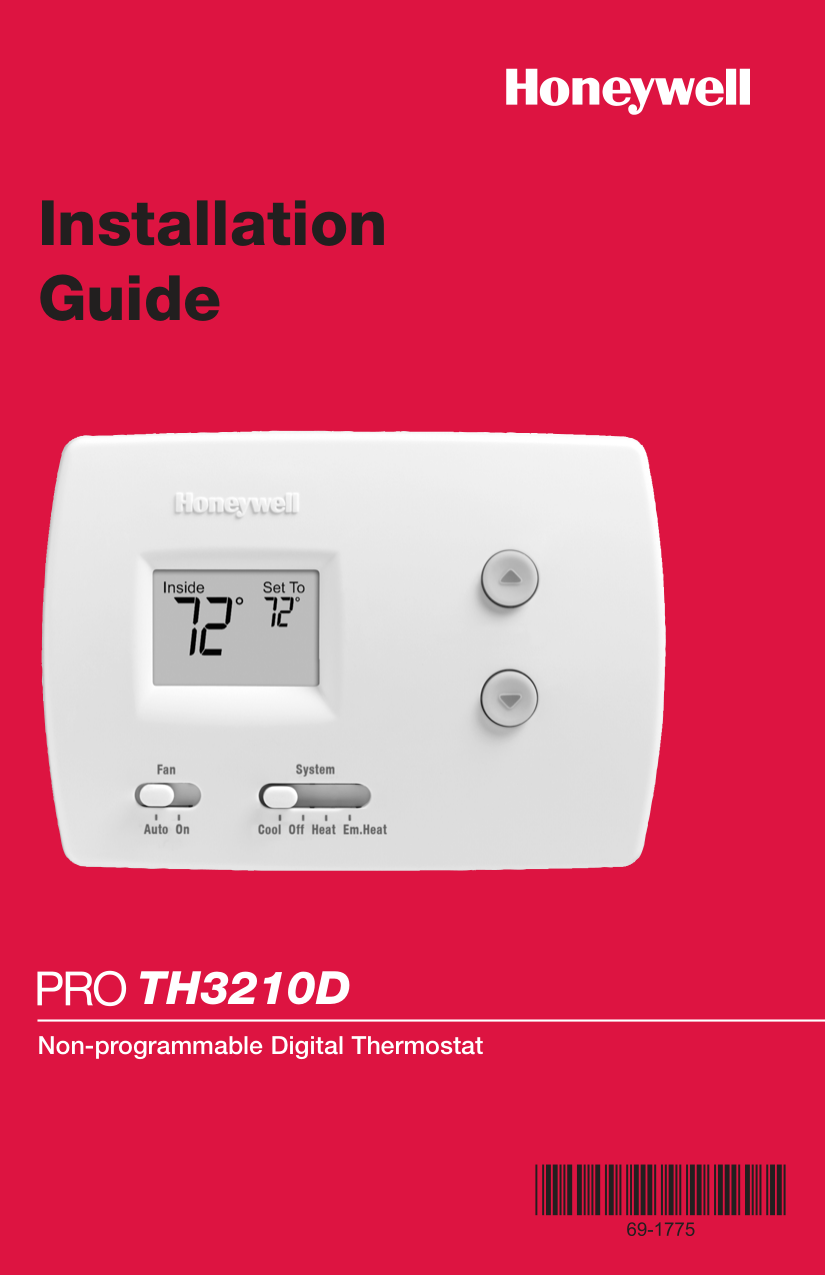
Installation Guide

TH3210D
Non-programmable Digital Thermostat
Product Application
This thermostat provides electronic control of 24 VAC heat pump systems with auxiliary heat (2 heat/1 cool).
Power Type
Must be installed by a trained, experienced technician
CAUTION: ELECTRICAL HAZARD Can cause electrical shock or equipment damage. Disconnect power before beginning installation.
MERCURY NOTICE If this product is replacing a control that contains mercury in a sealed tube, do not place the old control in the trash. Contact your local waste management authority for instructions regarding recycling and proper disposal.
® U.S. Registered Trademark. Patents pending. Copyright © 2005 Honeywell International Inc. All rights reserved.
Table of contents
Installation
Pre-installation checklist ................2 Wallplate installation ......................3 Wiring..............................................4 Wiring diagrams ..............................5
Installer Setup
Battery installation ..........................6 Thermostat mounting ....................6 Installer setup..................................7 Installer system test ........................7
Appendices
Quick reference to controls............9 Quick reference to display..............9 Compressor protection ..................9 In case of difficulty ......................10 Accessories....................................11 Specifications ................................11
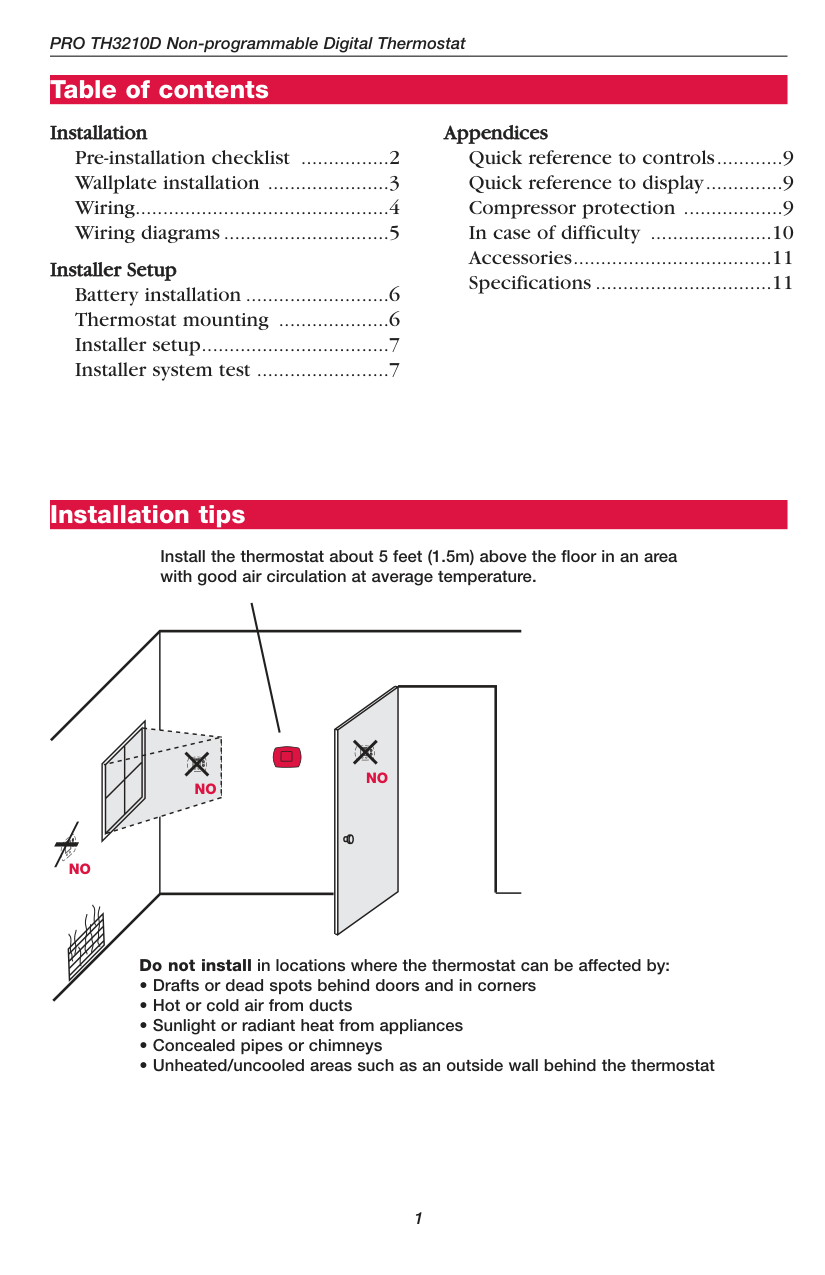
Installation tips
Install the thermostat about 5 feet (1.5m) above the floor in an area with good air circulation at average temperature.
NO
NO
NO
Do not install in locations where the thermostat can be affected by:
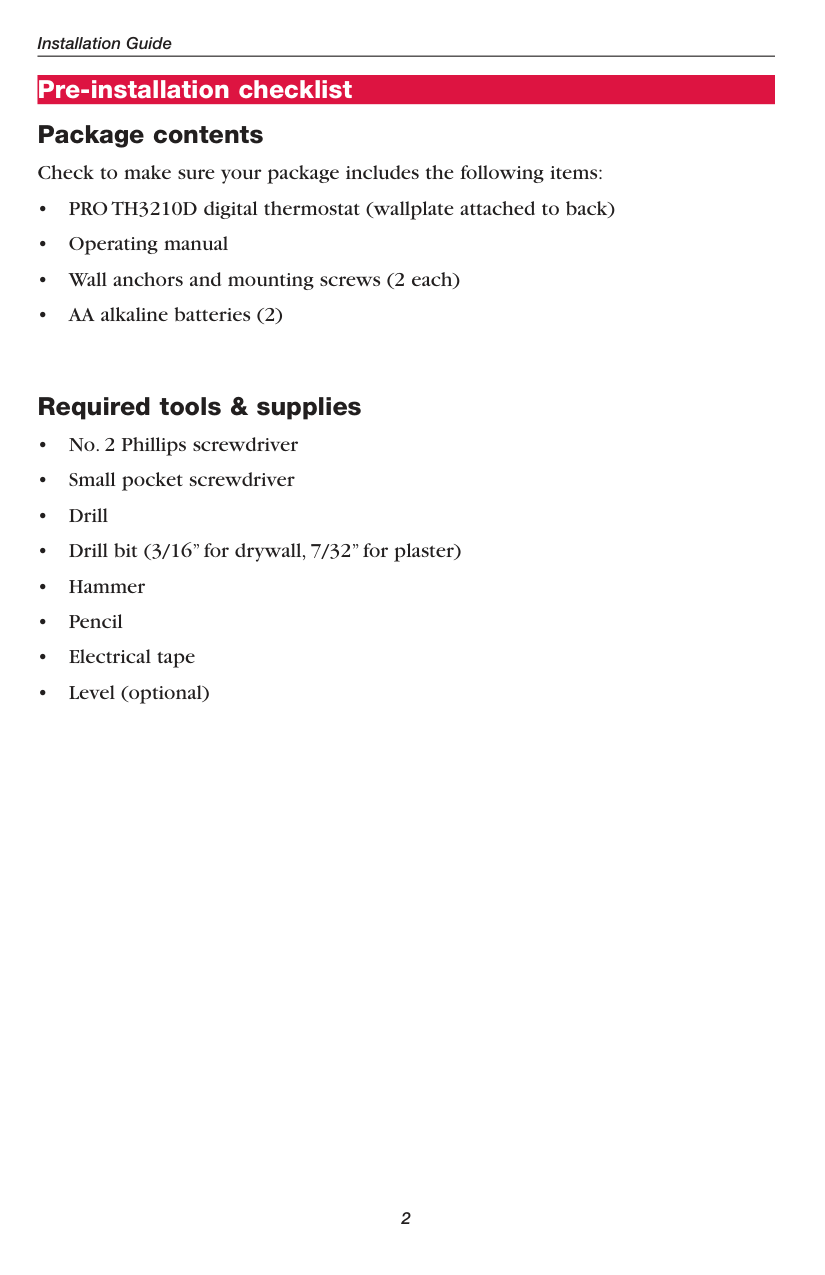
Pre-installation checklist Package contents Check to make sure your package includes the following items:
Required tools & supplies
Wallplate installation
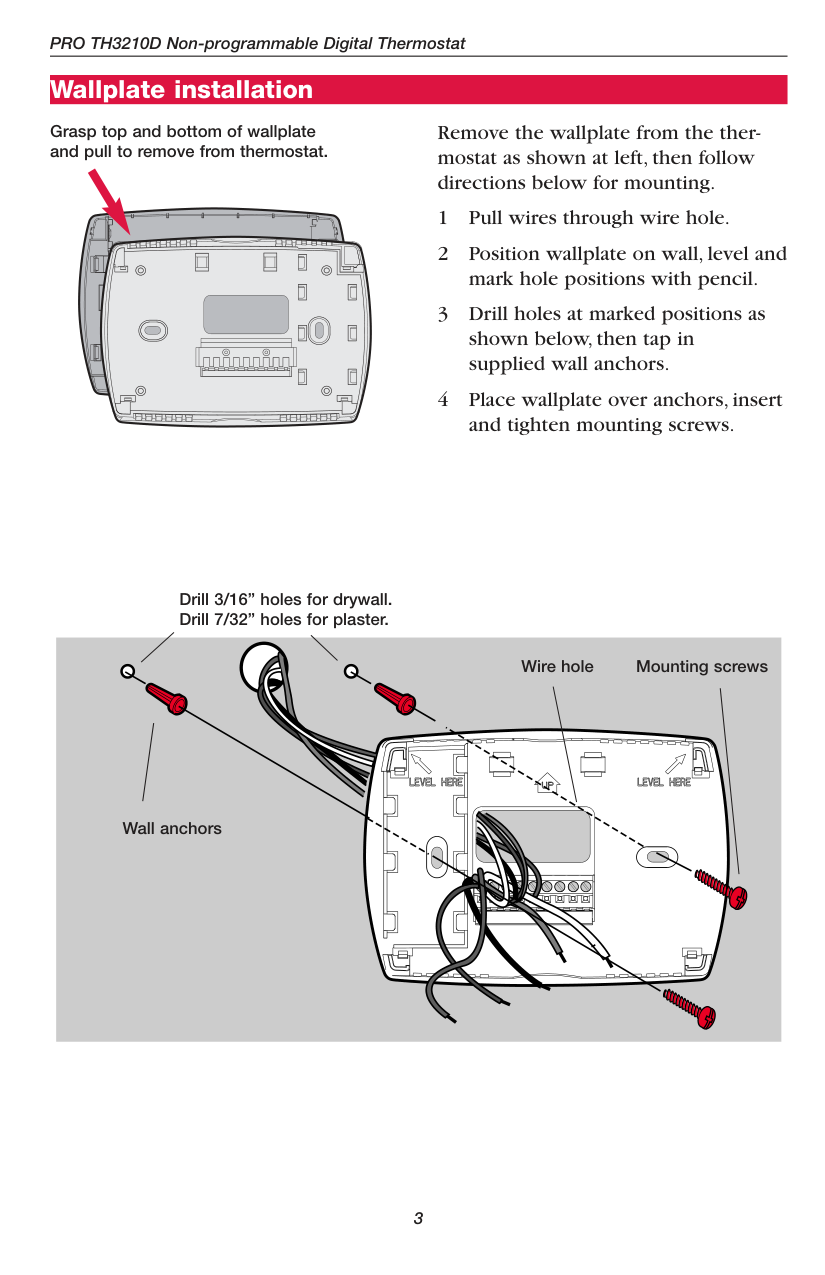
Grasp top and bottom of wallplate and pull to remove from thermostat.
| | | |
|---|---|---| | | | |
| | | |---|---| | | | | | |
| | |---| | | | |
| | | | |---|---|---|
| | | | |---|---|---|
| | | | | | |---|---|---|---|---| | | | | | |
| | | |
|---|---|---| | | | |
Remove the wallplate from the thermostat as shown at left, then follow directions below for mounting.
Drill 3/16” holes for drywall. Drill 7/32” holes for plaster.
Wall anchors
Mounting screwsWire hole
| | |---| | | | |
Wiring
CAUTION: ELECTRICAL HAZARD. Can cause electrical shock or equipment damage. Disconnect power before wiring.
Keep wires in this shaded area
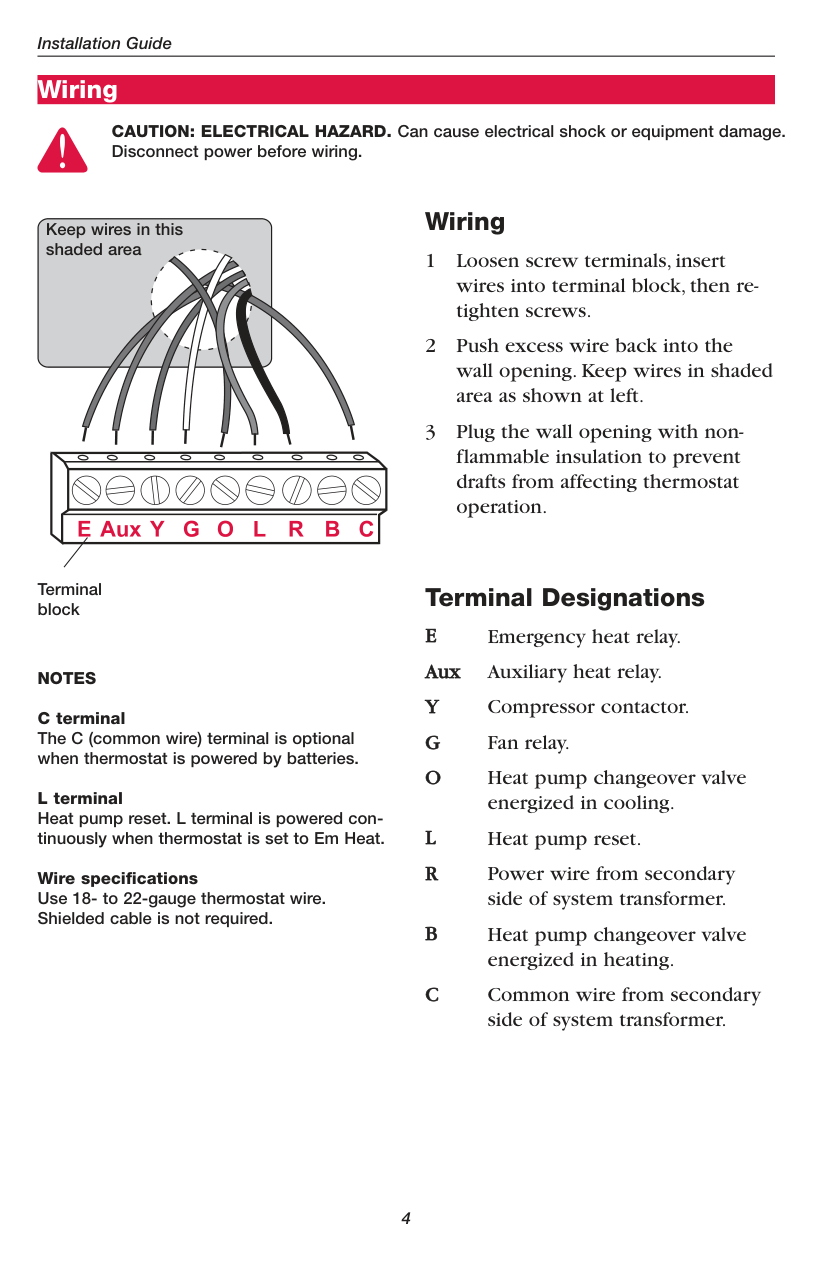
Terminal block
NOTES C terminal The C (common wire) terminal is optional when thermostat is powered by batteries. L terminal
Heat pump reset. L terminal is powered continuously when thermostat is set to Em Heat.
Wire specifications Use 18- to 22-gauge thermostat wire. Shielded cable is not required.
Wiring
Terminal Designations E Emergency heat relay. Aux Auxiliary heat relay. Y Compressor contactor. G Fan relay. O Heat pump changeover valve
energized in cooling. L Heat pump reset. R Power wire from secondary
side of system transformer.
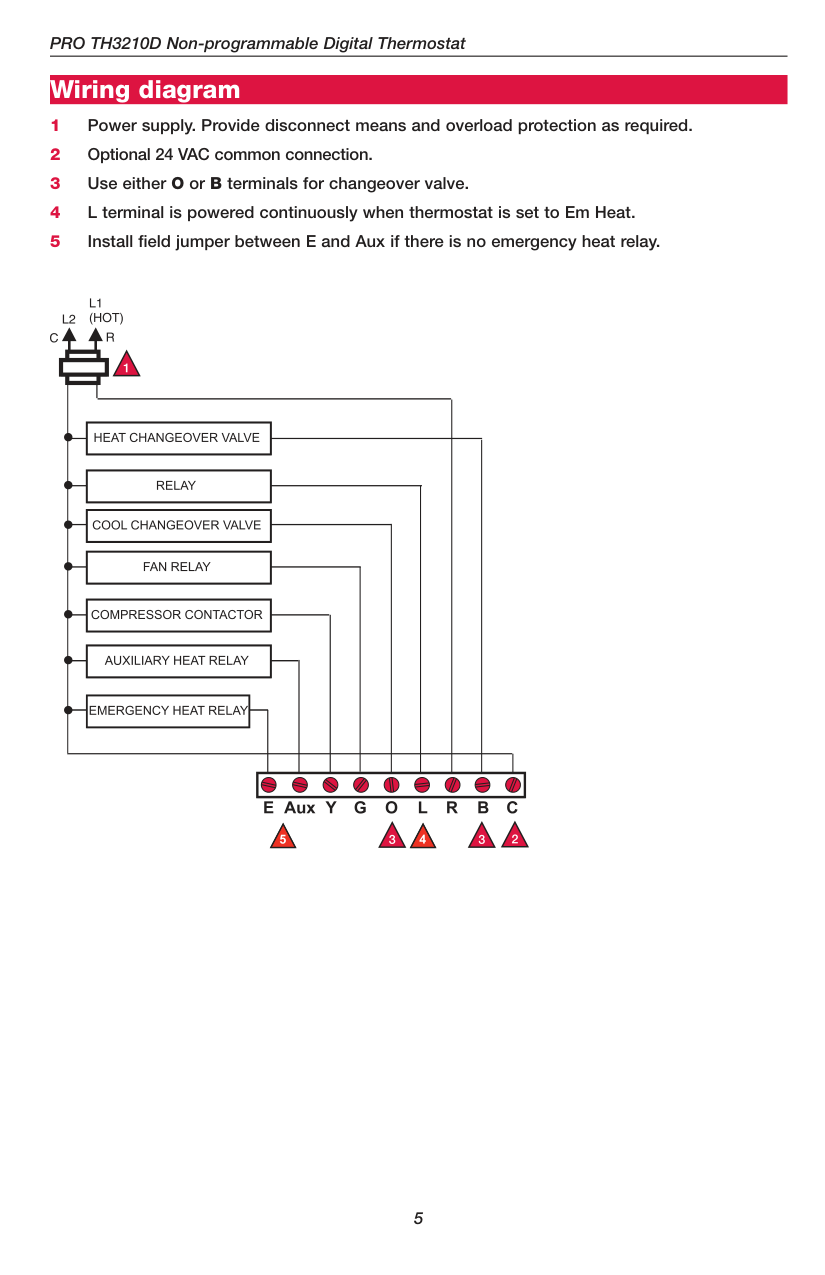
Wiring diagram
Power options & mounting
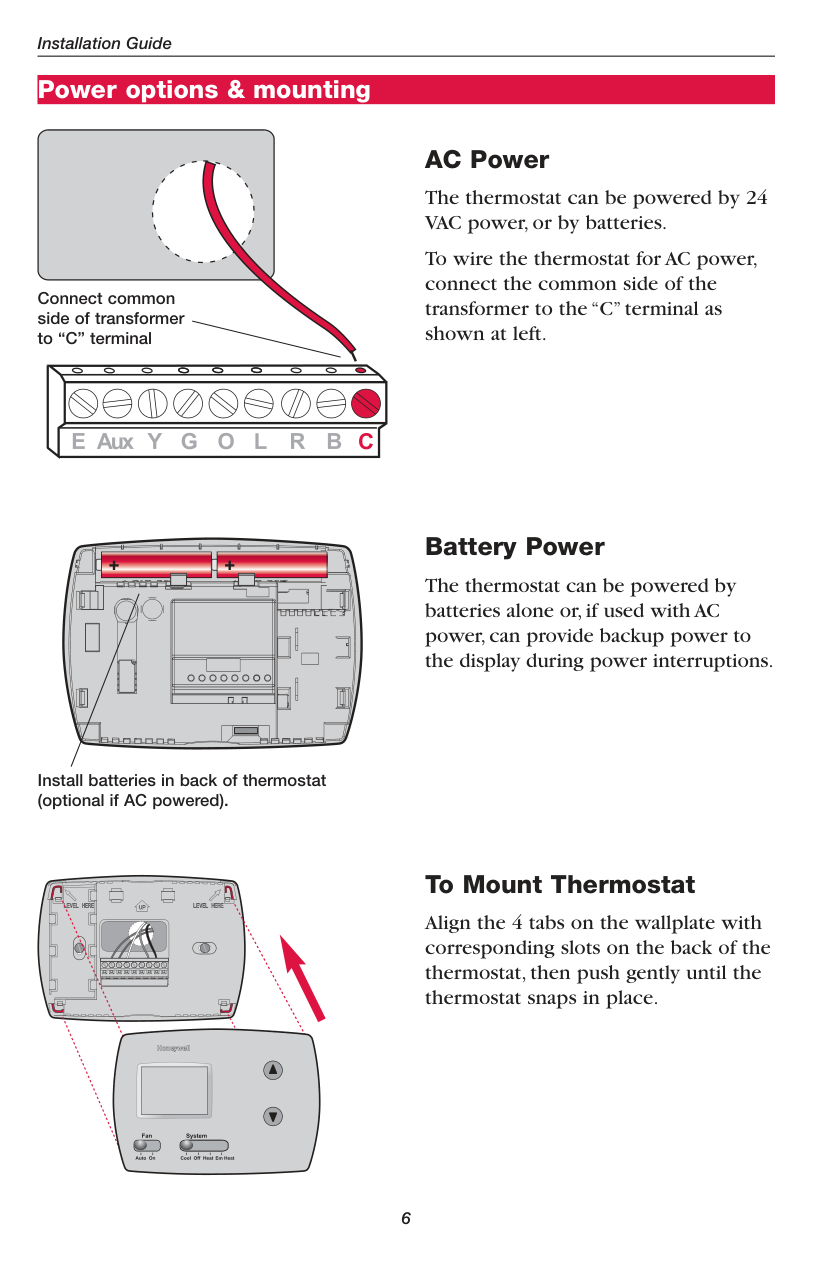
Connect common side of transformer to “C” terminal
| | | | |---|---|---| | | | |
| | |---| | | | |
| | |---| | | | |
| | | | |---|---|---|
| | | |
|---|---|---|
Install batteries in back of thermostat (optional if AC powered).
AC Power
The thermostat can be powered by 24 VAC power, or by batteries.
To wire the thermostat for AC power, connect the common side of the transformer to the “C”terminal as shown at left.
Battery Power
The thermostat can be powered by batteries alone or,if used with AC power,can provide backup power to the display during power interruptions.
To Mount Thermostat
Align the 4 tabs on the wallplate with corresponding slots on the back of the thermostat, then push gently until the thermostat snaps in place.
Installer setup
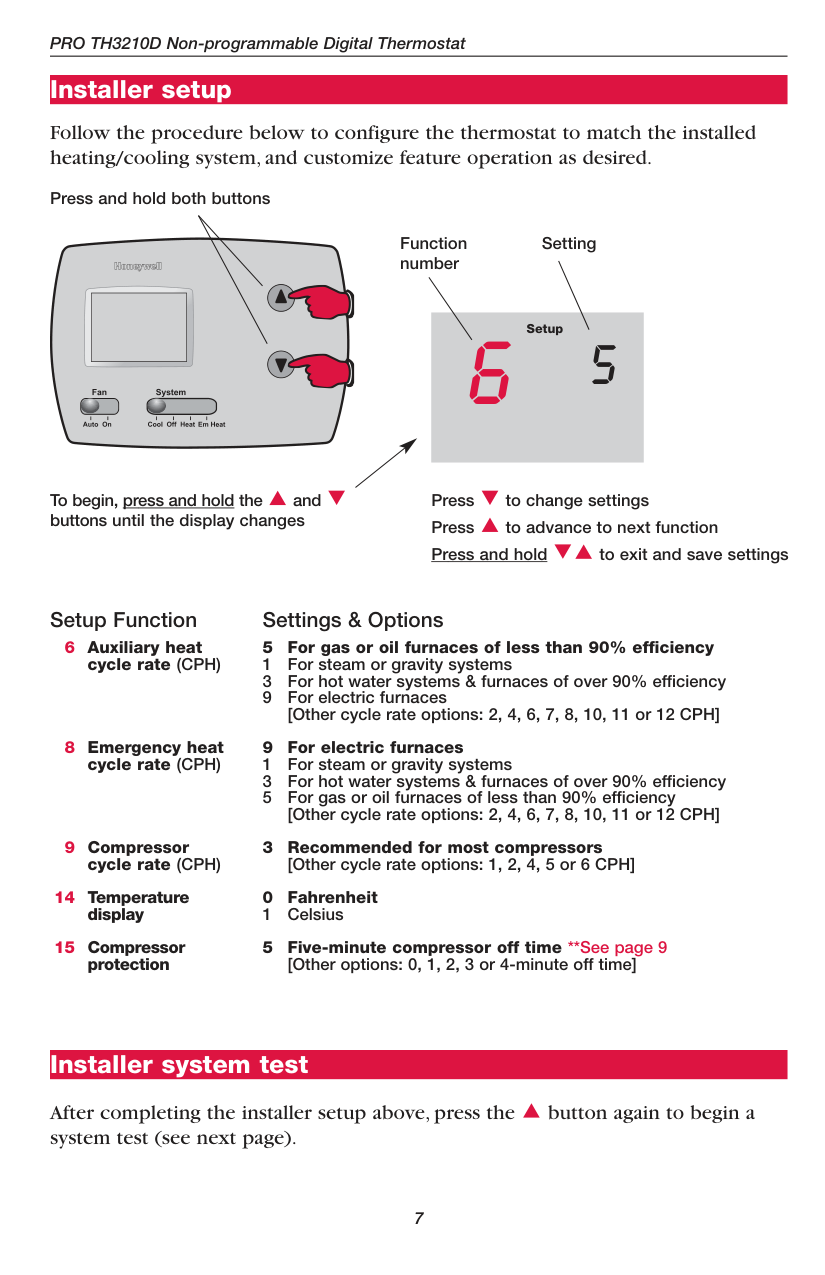
Follow the procedure below to configure the thermostat to match the installed heating/cooling system, and customize feature operation as desired.
Press and hold both buttons
Function number
Setting
Setup
6 5
To begin, press and hold the and buttons until the display changes
Press to change settings Press to advance to next function Press and hold to exit and save settings
Setup Function Settings & Options
6
Auxiliary heat cycle rate (CPH)
5 For gas or oil furnaces of less than 90% efficiency 1 For steam or gravity systems 3 For hot water systems & furnaces of over 90% efficiency 9 For electric furnaces
[Other cycle rate options: 2, 4, 6, 7, 8, 10, 11 or 12 CPH]
Emergency heat cycle rate (CPH)
Compressor cycle rate (CPH)
Temperature display
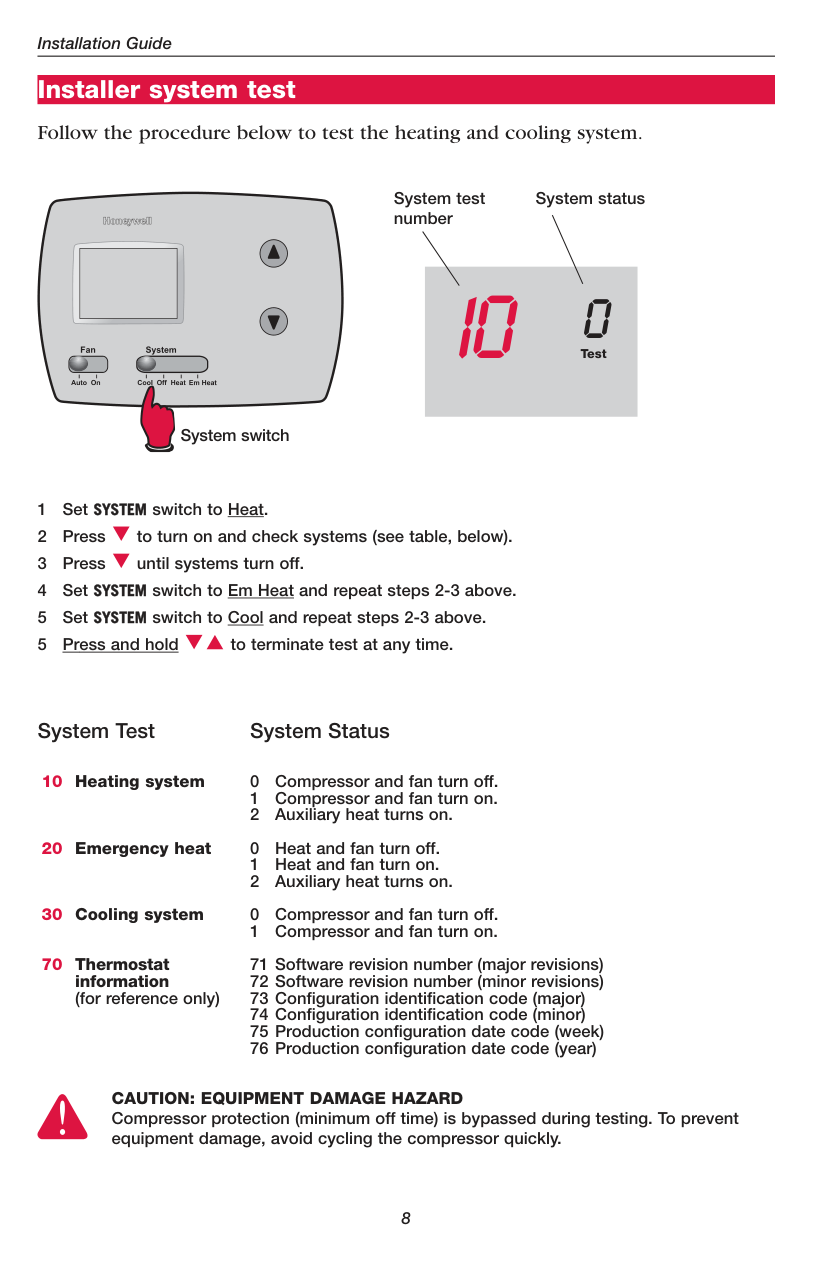
Compressor protection
9 For electric furnaces 1 For steam or gravity systems 3 For hot water systems & furnaces of over 90% efficiency 5 For gas or oil furnaces of less than 90% efficiency
[Other cycle rate options: 2, 4, 6, 7, 8, 10, 11 or 12 CPH] 3 Recommended for most compressors
[Other cycle rate options: 1, 2, 4, 5 or 6 CPH]
5 Five-minute compressor off time **See page 9 [Other options: 0, 1, 2, 3 or 4-minute off time]
Installer system test
After completing the installer setup above, press the button again to begin a system test (see next page).
Installer system test
Follow the procedure below to test the heating and cooling system.
System switch
System test number
System status
10 0Test
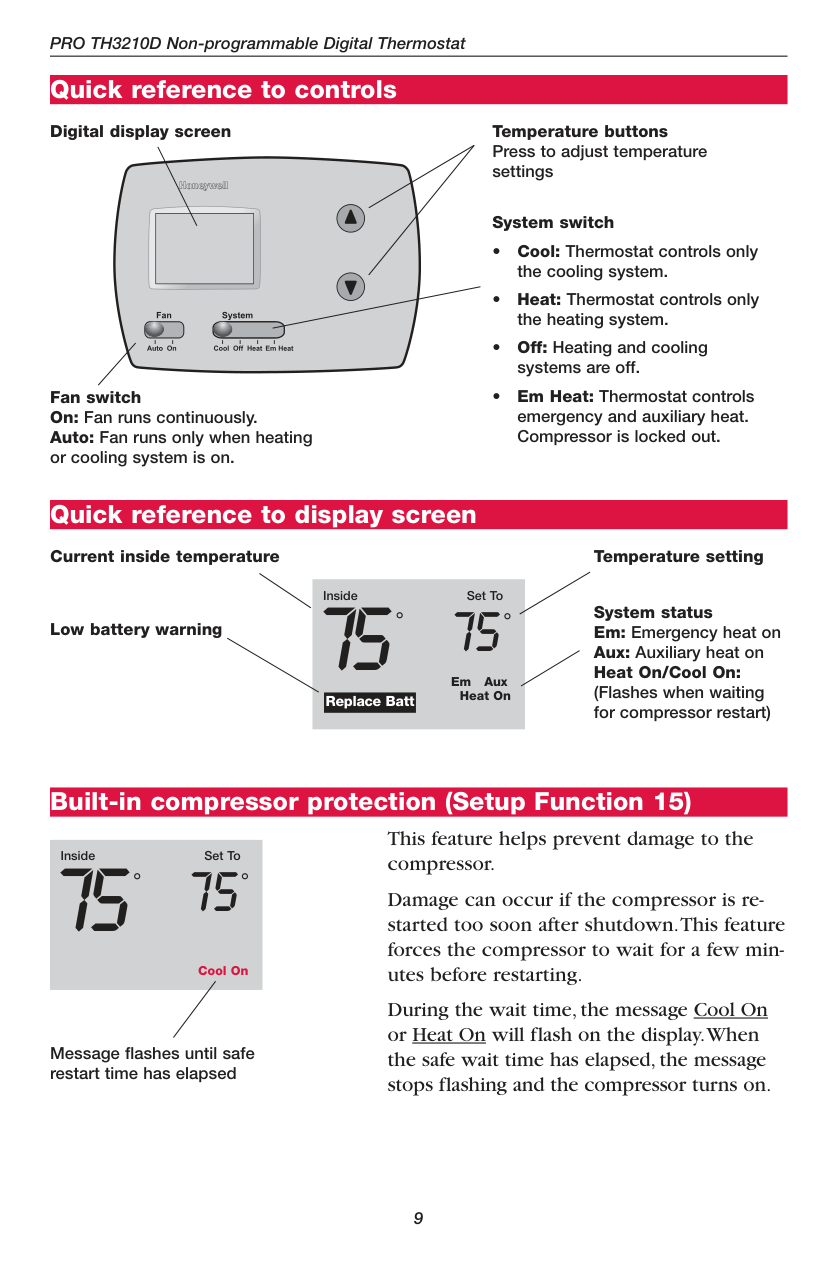
System Test System Status
10
Heating system
20
Emergency heat
30
Cooling system
70
Thermostat information (for reference only)
CAUTION: EQUIPMENT DAMAGE HAZARD Compressor protection (minimum off time) is bypassed during testing. To prevent equipment damage, avoid cycling the compressor quickly.
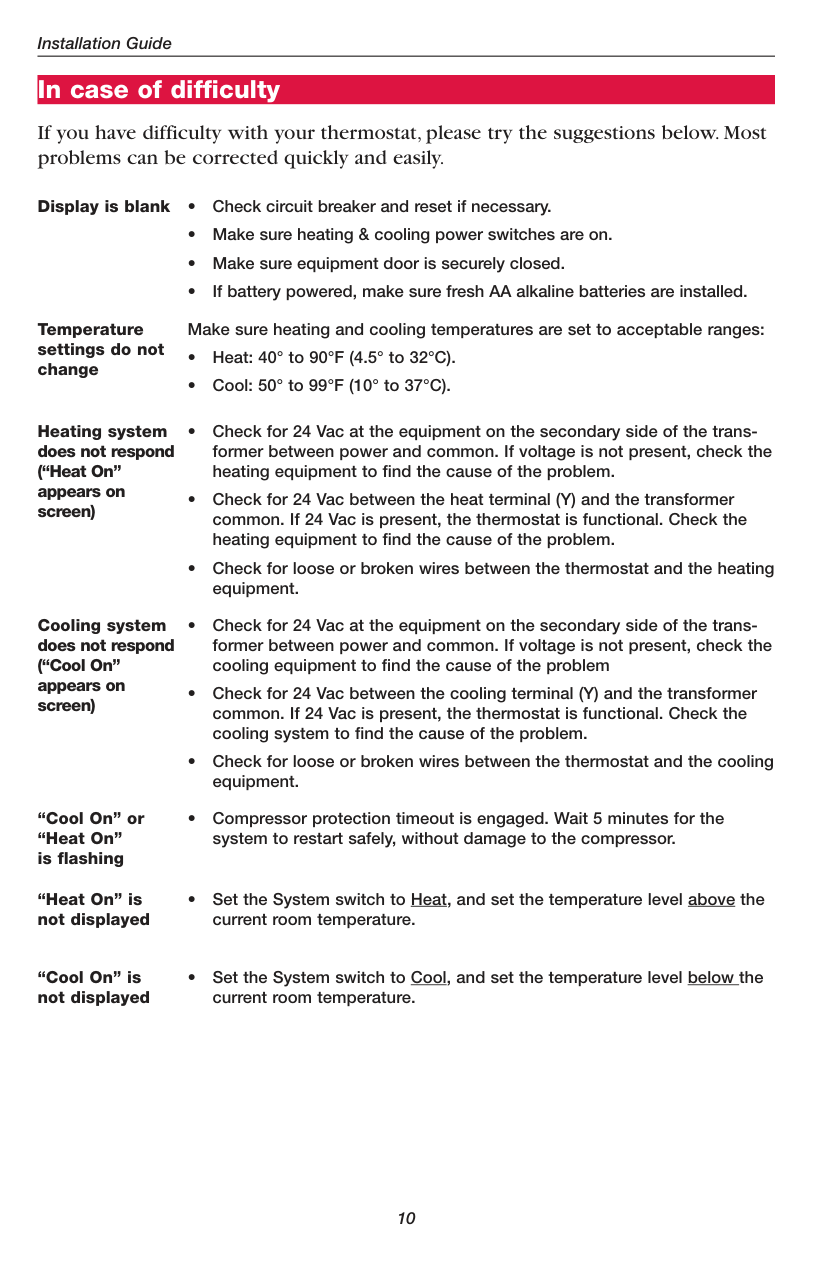
Quick reference to controls
Digital display screen Temperature buttons Press to adjust temperature settings
System switch
Fan switch On: Fan runs continuously. Auto: Fan runs only when heating or cooling system is on.
Quick reference to display screen
Current inside temperature
Low battery warning
Inside Set To
##### ° °
75 75
Em Aux Heat On
Replace Batt
Temperature setting
System status Em: Emergency heat on Aux: Auxiliary heat on Heat On/Cool On: (Flashes when waiting for compressor restart)
Built-in compressor protection (Setup Function 15)
Inside Set To

° °
75 75
Cool On
Message flashes until safe restart time has elapsed
This feature helps prevent damage to the compressor.
Damage can occur if the compressor is restarted too soon after shutdown.This feature forces the compressor to wait for a few minutes before restarting.
During the wait time,the message Cool On or Heat On will flash on the display.When the safe wait time has elapsed,the message stops flashing and the compressor turns on.
In case of difficulty
If you have difficulty with your thermostat, please try the suggestions below. Most problems can be corrected quickly and easily.
Display is blank • Check circuit breaker and reset if necessary.
Temperature settings do not change
Make sure heating and cooling temperatures are set to acceptable ranges:

Heating system does not respond (“Heat On” appears on screen)
Cooling system does not respond (“Cool On” appears on screen)
“Cool On” or “Heat On” is flashing
• Compressor protection timeout is engaged. Wait 5 minutes for the system to restart safely, without damage to the compressor.
“Heat On” is not displayed
• Set the System switch to Heat, and set the temperature level above the current room temperature.
“Cool On” is not displayed
• Set the System switch to Cool, and set the temperature level below the current room temperature.
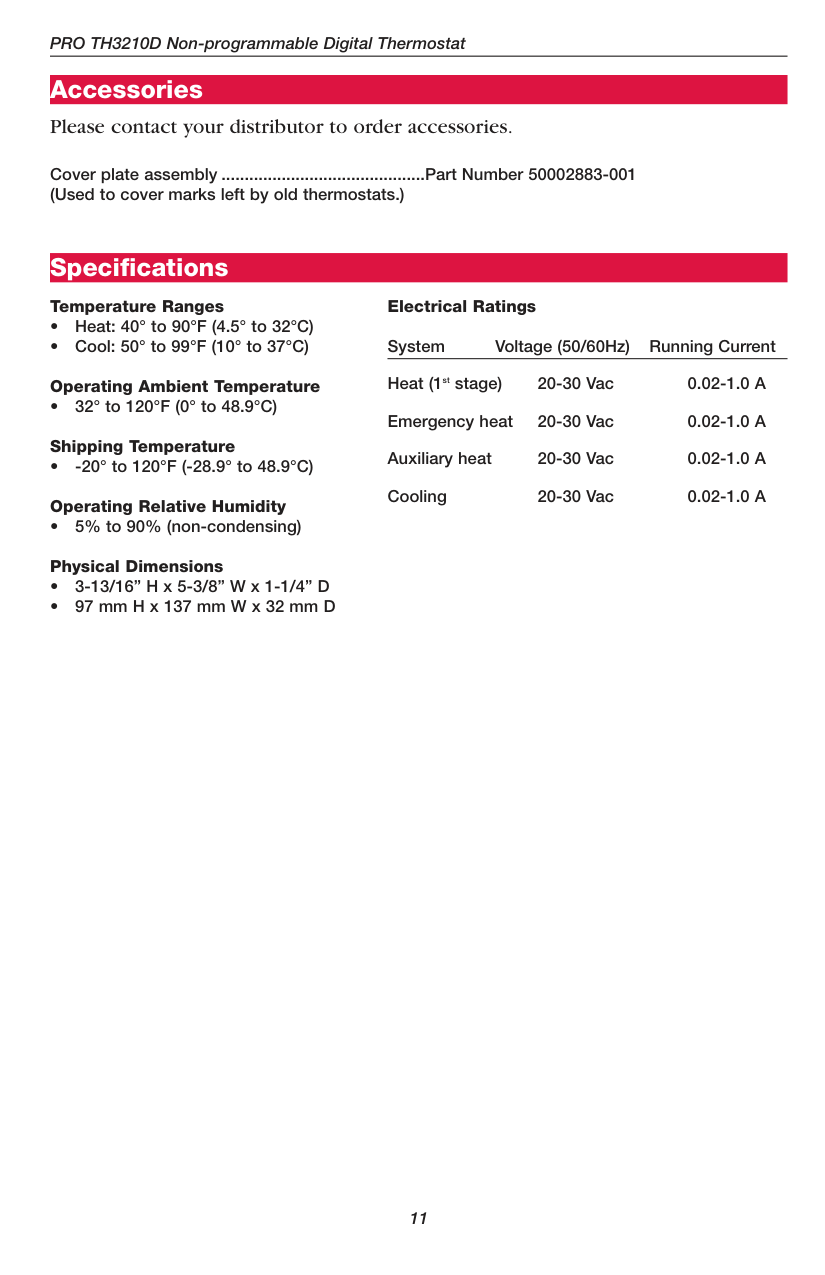
Accessories Please contact your distributor to order accessories.

Cover plate assembly ............................................Part Number 50002883-001 (Used to cover marks left by old thermostats.)
Specifications
####### Temperature Ranges
Electrical Ratings System Voltage (50/60Hz) Running Current Heat (1
stage) 20-30 Vac 0.02-1.0 A Emergency heat 20-30 Vac 0.02-1.0 A Auxiliary heat 20-30 Vac 0.02-1.0 A Cooling 20-30 Vac 0.02-1.0 A
st
#### Automation and Control Solutions
Honeywell International Inc. 1985 Douglas Drive North Golden Valley, MN 55422 http://yourhome.honeywell.com
###### Honeywell Limited-Honeywell Limitée 35 Dynamic Drive Scarborough, Ontario M1V 4Z9
Printed in U.S.A. on recycled paper containing at least 10% post-consumer paper fibers.
® U.S. Registered Trademark. © 2005 Honeywell International Inc. Patents pending. All rights reserved. 69-1775 • 06-2005