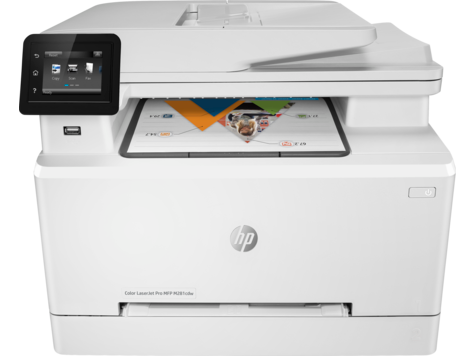
HP Color Laserjet Pro M280 M281 Multifunction Printer
Ask AI
— answers from the official manualAnswers from the official manual.
Common questions
Common Questions
27 totalWhat are the available model numbers for the Color LaserJet Pro MFP M278-M281 series?
The available models are the M280nw (T6B80A), M281fdn (T6B81A), M281fdw (T6B82A), and M281cdw (T6B83A). Each model has a unique product number for identification and ordering purposes. (Page 6)
How fast does the M280/M281 print and copy?
The printer produces 21 pages per minute (ppm) on A4 paper and 22 ppm on letter-size paper. The copy speed is the same: 21 ppm on A4 and 22 ppm on letter-size paper. (Page 6)
What is the scan speed for the M280/M281 series?
The scanner supports 22 ppm in color and 26 ppm in monochrome. The printer also includes a 50-page document feeder for scanning multi-page documents. (Page 6)
What are the scan-to destination options available on the M281?
The M281 supports Scan to E-mail, Scan to USB, and Scan to Network Folder. These options allow users to send scanned documents directly without needing to use a connected computer. (Page 6)
What is the capacity of Tray 2 on the M280/M281 series?
Tray 2 has a 250-sheet capacity. The printer also includes a single-sheet priority feed slot (Tray 1) for feeding individual sheets or special media. (Page 6)
Does the M280nw support automatic duplex (two-sided) printing?
The M280nw does not support automatic duplex printing. Automatic duplex printing is only available on duplex models within the M281 series. (Page 6)
Show 21 more questions
What connectivity options are available on the M281 series?
What paper sizes can be fed through Tray 1 (single-sheet priority feed slot)?
Can I print on envelopes using Tray 2?
What paper types are supported for automatic duplex printing?
How do I set the network settings for my printer?
What is the maximum paper size my printer supports?
Which paper types does my printer support for printing high-quality documents?
How can I print a document wirelessly without connecting to my computer?
What are the print speeds on A4 and letter-size paper?
How do I reset my printer settings?
Is automatic duplex printing supported in my printer?
What paper sizes can I use in Tray 2?
What types of envelopes are compatible with my printer?
How many sheets can Tray 2 hold in the HP Color Laserjet Pro M280/M281?
Which envelope sizes are supported by the printer?
What types of paper can be used in Tray 1?
Can the printer automatically print double-sided?
What happens if an error code E13 appears on the display?
How do I connect the printer via USB?
Does this model support faxing or scanning to email?
What are the networking options available for this printer?
Full Manual
12 pages

Color LaserJet Pro MFP M278-M281
Technical Specification Guide
Copyright and License
© Copyright 2017 HP Development Company, L.P.
Reproduction, adaptation, or translation without prior written permission is prohibited, except as allowed under the copyright laws.
The information contained herein is subject to change without notice.
The only warranties for HP products and services are set forth in the express warranty statements accompanying such products and services. Nothing herein should be construed as constituting an additional warranty. HP shall not be liable for technical or editorial errors or omissions contained herein.
Edition 2, 2/2020
Trademark Credits
Adobe®, Adobe Photoshop®, Acrobat®, and PostScript® are trademarks of Adobe Systems Incorporated.
Apple and the Apple logo are trademarks of Apple Inc., registered in the U.S. and other countries.
OS X is a trademark of Apple Inc., registered in the U.S. and other countries.
AirPrint is a trademark of Apple Inc., registered in the U.S. and other countries.
iPad is a trademark of Apple Inc., registered in the U.S. and other countries.
iPod is a trademark of Apple Inc., registered in the U.S. and other countries.
iPhone is a trademark of Apple Inc., registered in the U.S. and other countries.
Microsoft®, Windows®, Windows® XP, and Windows Vista® are U.S. registered trademarks of Microsoft Corporation.
UNIX® is a registered trademark of The Open Group.
Table of contents
Web only content .......................................................................................................................................................................................... 1 Technical specifications ........................................................................................................................................................... 2 Supported paper sizes and types .......................................................................................................................................... 3
Introduction .......................................................................................................................................................... 3 Supported paper sizes ........................................................................................................................................ 3 Supported paper types ....................................................................................................................................... 4
##### Index ................................................................................................................................................................................................................ 7
ENWW iii
###### iv ENWW
Web only content

ENWW 1
Technical specifications
Model name Product number
M280nw T6B80A
Paper handling Single-sheet priority feed slot (Tray 1) Tray 2 (250-sheet capacity) Automatic duplex printing Not supported
Connectivity 10/100/1000 Ethernet LAN connection with IPv4 and IPv6 Hi-Speed USB 2.0 Walk Up USB port Print server for wireless network connectivity
Wi-Fi Direct for printing from mobile devices
Control-panel display and input

Color touchscreen control panel
Print Prints 21 pages per minute (ppm) on A4 and 22 ppm on letter-size paper
Walk Up USB printing (no computer required)
Fax Not supported Copy and Scan Copies 21 pages per minute
(ppm) on A4 and 22 ppm on letter-size paper
Scans 22 ppm color and 26 ppm monochrome
50-page document feeder Scan to E-mail, Scan to USB, and Scan to Network Folder options
M281fdn T6B81A
Not supported
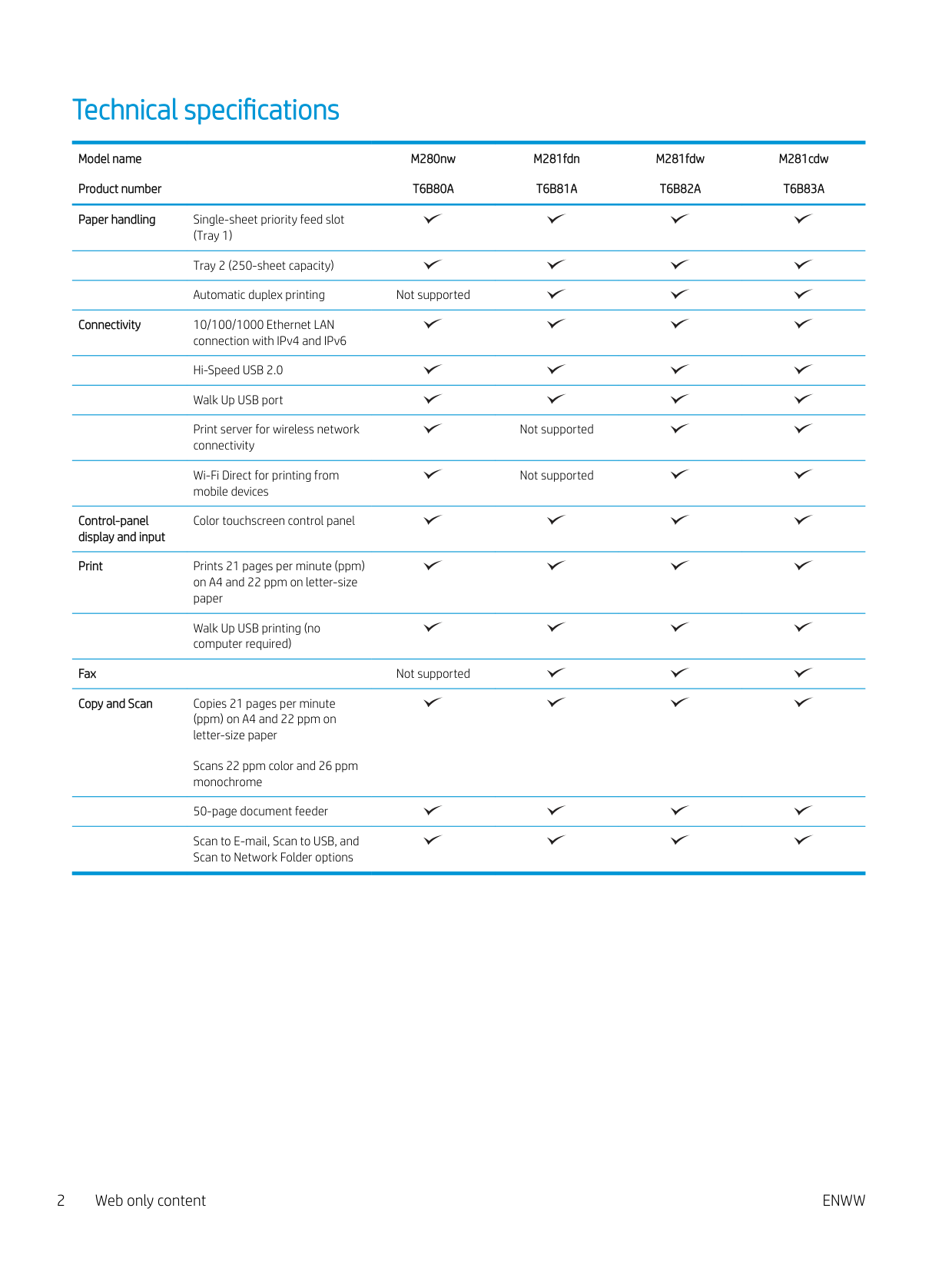
Not supported
M281fdw T6B82A
M281cdw T6B83A
Supported paper sizes and types
#### Introduction
The following information provides the sizes and types of paper supported for each tray and for the automatic duplexer.
#### Supported paper sizes
| | |---|
NOTE: To obtain the best results, select the correct paper size and type in the print driver before printing.
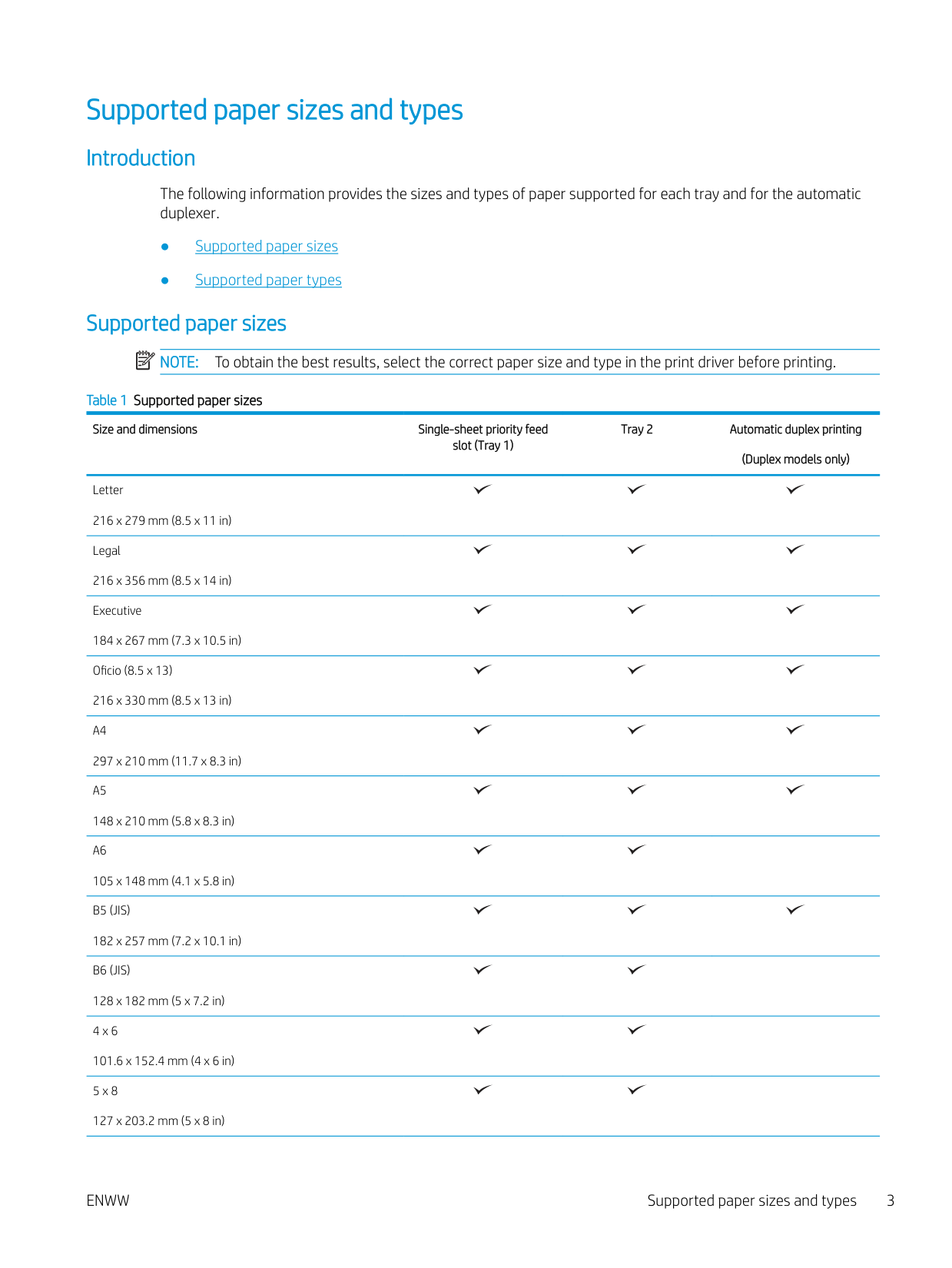
Table 1 Supported paper sizes
Size and dimensions Single-sheet priority feed slot (Tray 1)
Letter 216 x 279 mm (8.5 x 11 in) Legal 216 x 356 mm (8.5 x 14 in) Executive 184 x 267 mm (7.3 x 10.5 in) Oficio (8.5 x 13) 216 x 330 mm (8.5 x 13 in)
Tray 2 Automatic duplex printing (Duplex models only)
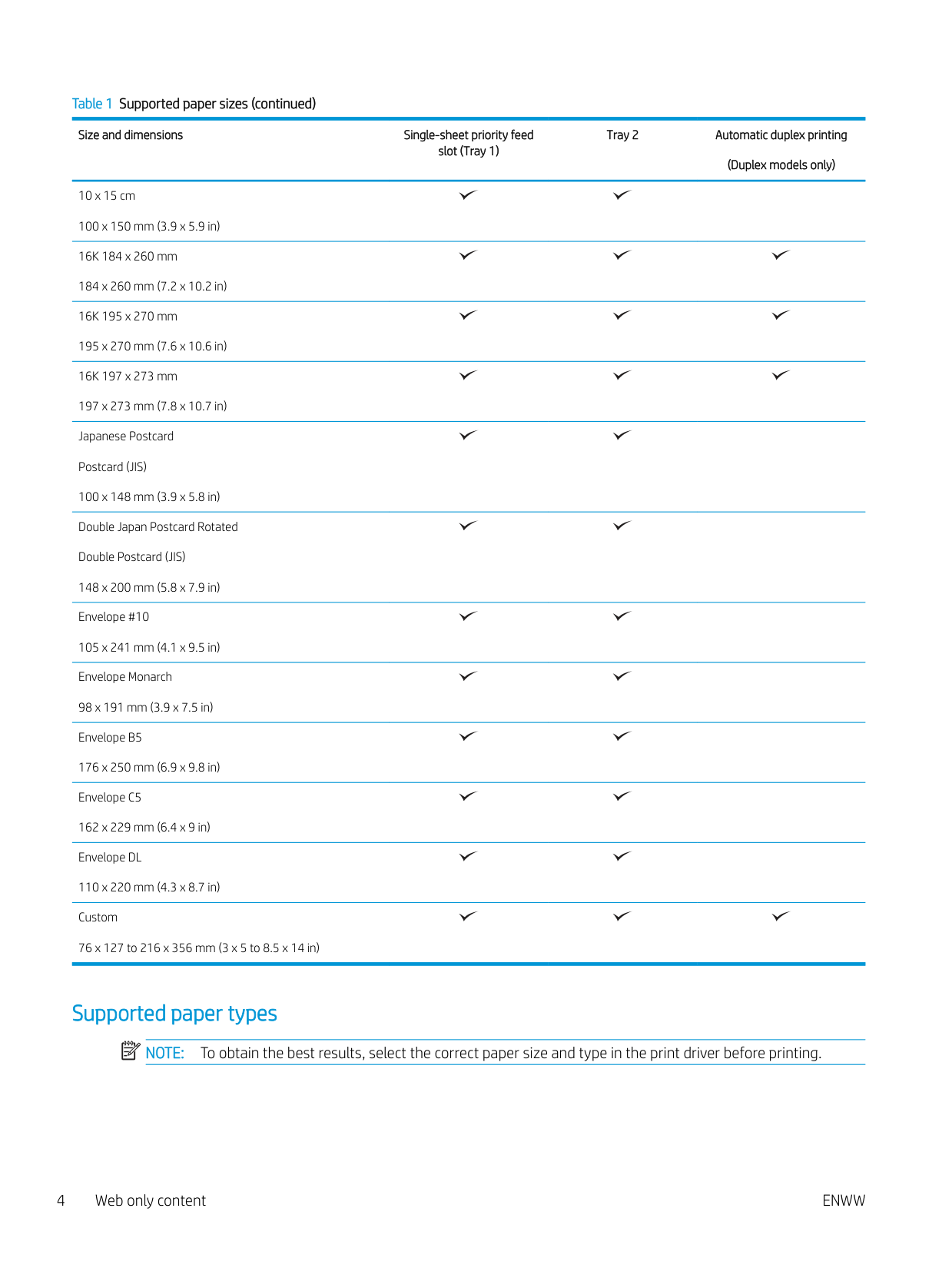
Size and dimensions Single-sheet priority feed slot (Tray 1)
10 x 15 cm 100 x 150 mm (3.9 x 5.9 in) 16K 184 x 260 mm 184 x 260 mm (7.2 x 10.2 in) 16K 195 x 270 mm 195 x 270 mm (7.6 x 10.6 in) 16K 197 x 273 mm 197 x 273 mm (7.8 x 10.7 in) Japanese Postcard Postcard (JIS) 100 x 148 mm (3.9 x 5.8 in) Double Japan Postcard Rotated Double Postcard (JIS) 148 x 200 mm (5.8 x 7.9 in) Envelope #10 105 x 241 mm (4.1 x 9.5 in) Envelope Monarch 98 x 191 mm (3.9 x 7.5 in)
Tray 2 Automatic duplex printing (Duplex models only)
#### Supported paper types
| |
|---|
NOTE: To obtain the best results, select the correct paper size and type in the print driver before printing.
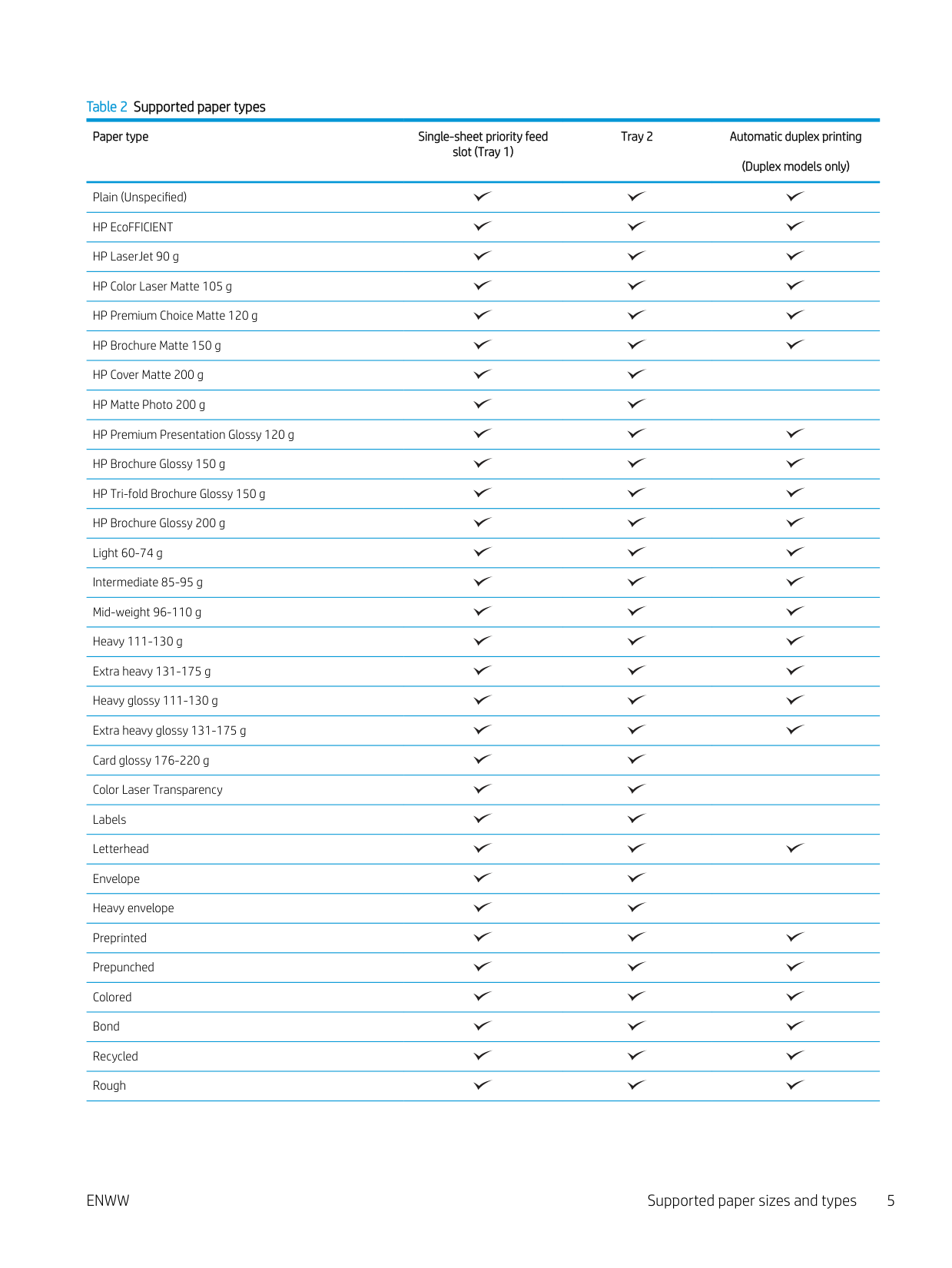
Table 2 Supported paper types
Paper type Single-sheet priority feed slot (Tray 1)
Plain (Unspecified) HP EcoFFICIENT HP LaserJet 90 g HP Color Laser Matte 105 g HP Premium Choice Matte 120 g HP Brochure Matte 150 g HP Cover Matte 200 g HP Matte Photo 200 g HP Premium Presentation Glossy 120 g HP Brochure Glossy 150 g HP Tri-fold Brochure Glossy 150 g HP Brochure Glossy 200 g Light 60-74 g Intermediate 85-95 g Mid-weight 96-110 g Heavy 111-130 g Extra heavy 131-175 g Heavy glossy 111-130 g Extra heavy glossy 131-175 g Card glossy 176-220 g Color Laser Transparency Labels Letterhead Envelope Heavy envelope Preprinted Prepunched Colored Bond Recycled Rough
Tray 2 Automatic duplex printing (Duplex models only)
Paper type Single-sheet priority feed slot (Tray 1)
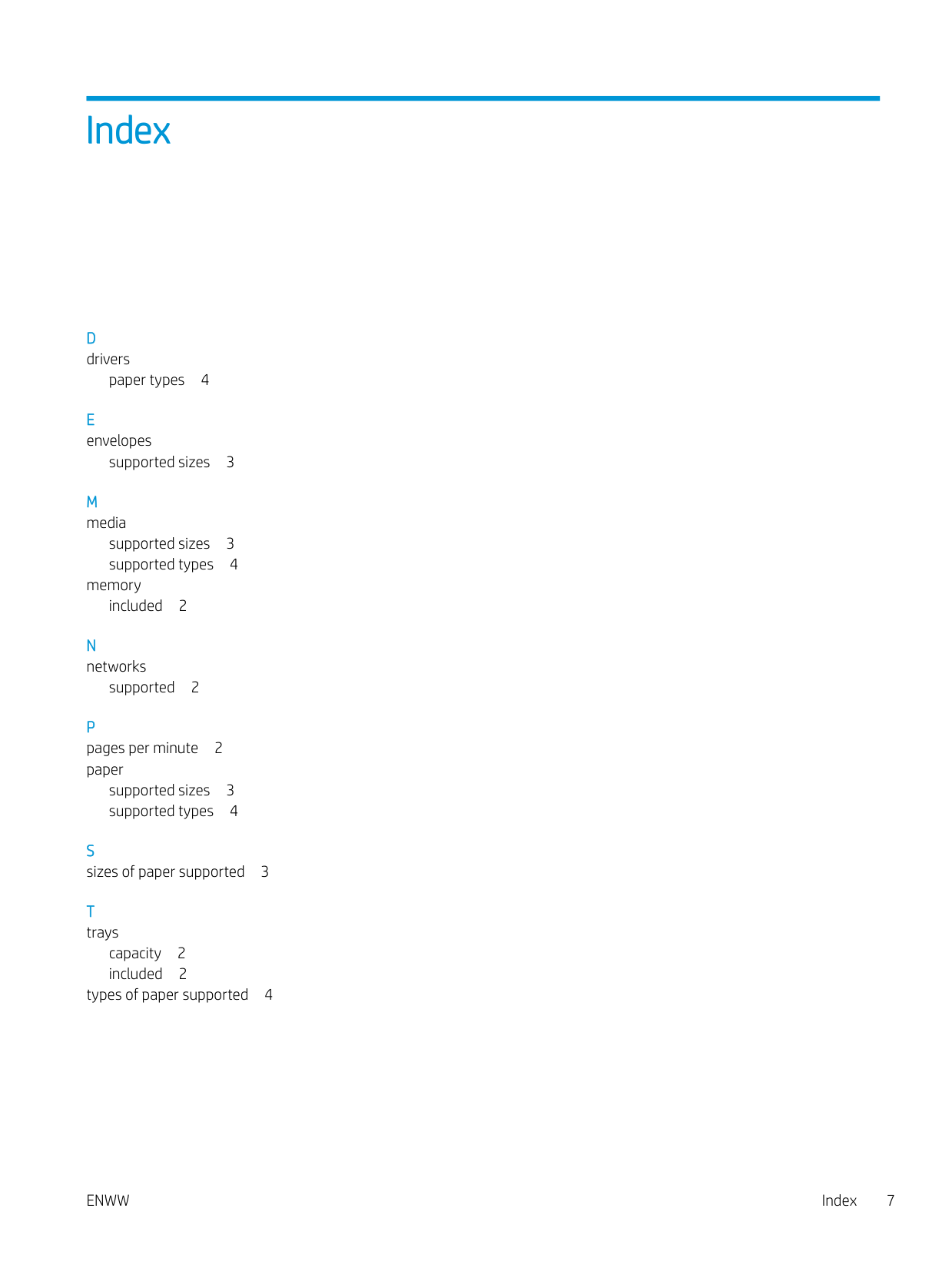
Heavy rough Opaque film
Tray 2 Automatic duplex printing (Duplex models only)
Index
paper types 4
supported sizes 3

supported sizes 3 supported types 4
memory included 2
supported 2
P pages per minute 2 paper
supported sizes 3 supported types 4
capacity 2 included 2
types of paper supported 4
ENWW Index 7
###### 8 Index ENWW