
Ask AI
— answers from the official manualAnswers from the official manual.
Common questions
Common Questions
18 totalWhat are the print speeds for the HP DeskJet 3755?
The HP DeskJet 3755 prints at up to 8 ppm in black and up to 5.5 ppm in color at ISO speeds. In draft mode, it can reach up to 19 ppm black and up to 15 ppm color. The first page out is as fast as 15 seconds for black and 18 seconds for color. (Page 2)
Which ink cartridges are compatible with the HP DeskJet 3755?
The printer uses HP 65 Black Ink Cartridge (~120 pages) and HP 65 Tri-color Ink Cartridge (~100 pages). High-yield options are also available: the HP 65 XL Black Ink Cartridge (~300 pages) and the HP 65 XL Tri-color Ink Cartridge (~300 pages), which print 2.5x as many pages as standard cartridges. (Page 2)
Does the HP DeskJet 3755 support wireless printing?
Yes, the HP DeskJet 3755 has built-in Wi-Fi 802.11b/g/n and supports HP ePrint, Apple AirPrint, and Wireless Direct Printing. Note that wireless operations are compatible with 2.4 GHz routers only and wireless direct may require a driver or app to be installed on your mobile device or PC. (Page 2)
Can I print directly from my smartphone or tablet without a network?
Yes, you can connect your smartphone or tablet directly to the printer and print without a network using Wi-Fi Direct. Your mobile device needs to be connected directly to the Wi-Fi Direct signal of the printer prior to printing, and depending on your device, an app or driver may also be required. (Page 1)
What is the paper input and output capacity of the HP DeskJet 3755?
The printer has an input tray capacity of up to 60 sheets of standard paper, up to 5 envelopes, up to 20 cards, and up to 10 sheets of labels. The output tray holds up to 25 sheets of standard paper, up to 5 envelopes, up to 20 cards, and up to 10 sheets of labels. (Page 2)
What operating systems are compatible with the HP DeskJet 3755?
The printer is compatible with Windows 10, 8.1, 8, 7, Vista, and XP SP3 (32-bit), as well as OS X v10.8 Mountain Lion, OS X v10.9 Mavericks, and OS X v10.10 Yosemite. Mac users also need OS X v10.11 El Capitan or OS v10.15 Catalina support according to the minimum system requirements section. (Page 2)
Show 12 more questions
What are the operating temperature and humidity requirements for the HP DeskJet 3755?
Will third-party or modified ink cartridges work in the HP DeskJet 3755?
What is the maximum scan resolution on the HP DeskJet 3755?
What warranty and support is included with the HP DeskJet 3755?
How do I install ink cartridges in my HP DeskJet 3755 printer?
What does my HP DeskJet 3755 do if I use non-HP ink cartridges?
How do I connect my HP DeskJet 3755 printer to Wi-Fi?
What software does my HP DeskJet 3755 use?
How do I set up and use Instant Ink with my HP DeskJet 3755?
How often should I clean my HP DeskJet 3755 printer's print head?
How do I check the ink status and refill if needed on my HP DeskJet 3755?
How do I recycle used HP Original Ink Cartridges?
Full Manual
2 pages
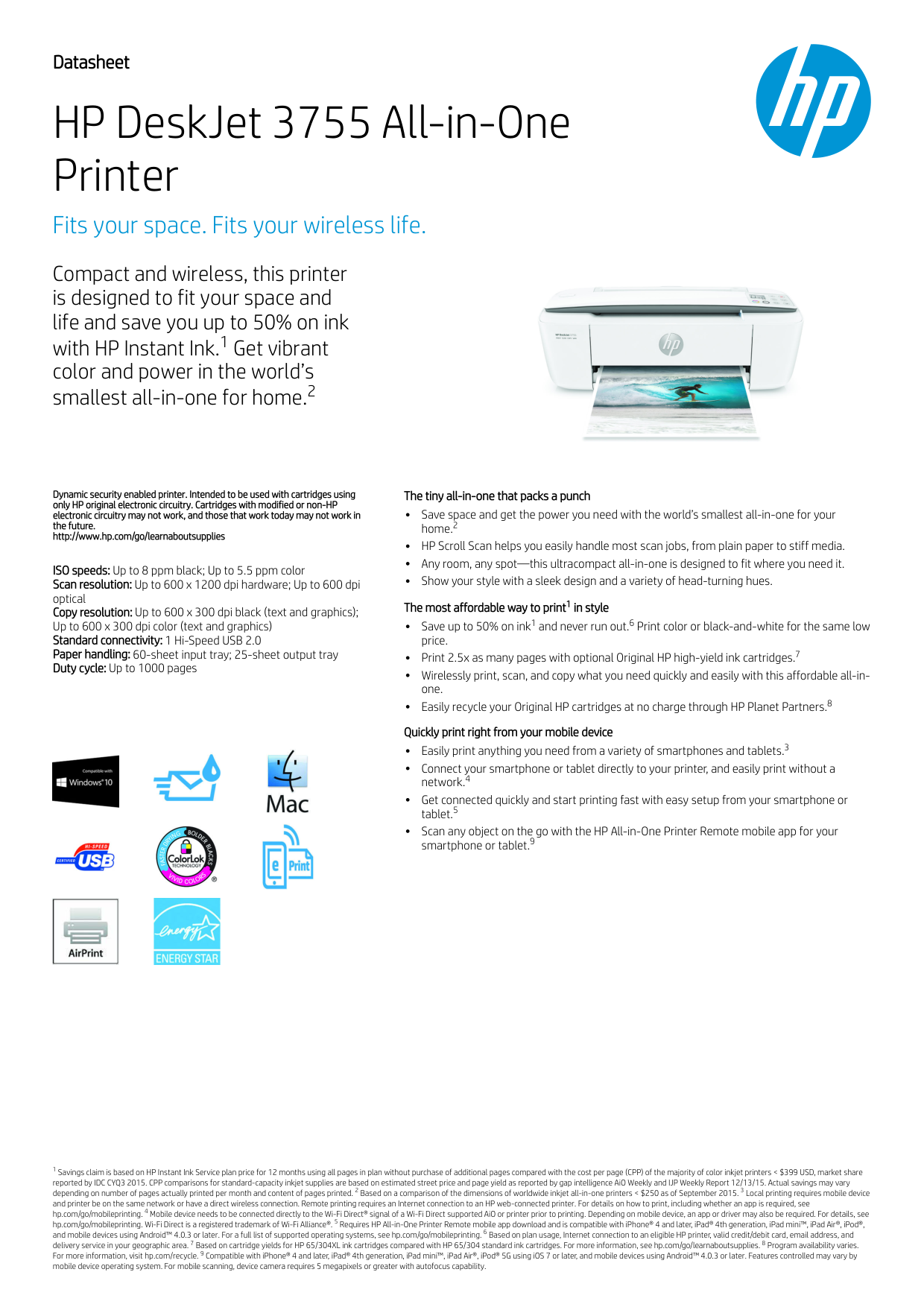
Dynamic security enabled printer. Intended to be used with cartridges using only HP original electronic circuitry. Cartridges with modified or non-HP electronic circuitry may not work, and those that work today may not work in the future. http://www.hp.com/go/learnaboutsupplies ISO speeds: Up to 8 ppm black; Up to 5.5 ppm color Scan resolution: Up to 600 x 1200 dpi hardware; Up to 600 dpi optical Copy resolution: Up to 600 x 300 dpi black (text and graphics); Up to 600 x 300 dpi color (text and graphics) Standard connectivity: 1 Hi-Speed USB 2.0 Paper handling: 60-sheet input tray; 25-sheet output tray Duty cycle: Up to 1000 pages The tiny all-in-one that packs a punch Save space and get the power you need with the world’s smallest all-in-one for your home. HP Scroll Scan helps you easily handle most scan jobs, from plain paper to stiff media. Any room, any spot—this ultracompact all-in-one is designed to fit where you need it. Show your style with a sleek design and a variety of head-turning hues. The most affordable way to print in style Save up to 50% on ink and never run out. Print color or black-and-white for the same low price. Print 2.5x as many pages with optional Original HP high-yield ink cartridges. Wirelessly print, scan, and copy what you need quickly and easily with this affordable all-in- one. Easily recycle your Original HP cartridges at no charge through HP Planet Partners. Quickly print right from your mobile device Easily print anything you need from a variety of smartphones and tablets. Connect your smartphone or tablet directly to your printer, and easily print without a network. Get connected quickly and start printing fast with easy setup from your smartphone or tablet. Scan any object on the go with the HP All-in-One Printer Remote mobile app for your smartphone or tablet. Savings claim is based on HP Instant Ink Service plan price for 12 months using all pages in plan without purchase of additional pages compared with the cost per page (CPP) of the majority of color inkjet printers < $399 USD, market share reported by IDC CYQ3 2015. CPP comparisons for standard-capacity inkjet supplies are based on estimated street price and page yield as reported by gap intelligence AiO Weekly and IJP Weekly Report 12/13/15. Actual savings may vary depending on number of pages actually printed per month and content of pages printed. Based on a comparison of the dimensions of worldwide inkjet all-in-one printers < $250 as of September 2015. Local printing requires mobile device and printer be on the same network or have a direct wireless connection. Remote printing requires an Internet connection to an HP web-connected printer. For details on how to print, including whether an app is required, see hp.com/go/mobileprinting. Mobile device needs to be connected directly to the Wi-Fi Direct® signal of a Wi-Fi Direct supported AiO or printer prior to printing. Depending on mobile device, an app or driver may also be required. For details, see hp.com/go/mobileprinting. Wi-Fi Direct is a registered trademark of Wi-Fi Alliance®. Requires HP All-in-One Printer Remote mobile app download and is compatible with iPhone® 4 and later, iPad® 4th generation, iPad mini™, iPad Air®, iPod®, and mobile devices using Android™ 4.0.3 or later. For a full list of supported operating systems, see hp.com/go/mobileprinting. Based on plan usage, Internet connection to an eligible HP printer, valid credit/debit card, email address, and delivery service in your geographic area. Based on cartridge yields for HP 65/304XL ink cartridges compared with HP 65/304 standard ink cartridges. For more information, see hp.com/go/learnaboutsupplies. Program availability varies. For more information, visit hp.com/recycle. Compatible with iPhone® 4 and later, iPad® 4th generation, iPad mini™, iPad Air®, iPod® 5G using iOS 7 or later, and mobile devices using Android™ 4.0.3 or later. Features controlled may vary by mobile device operating system. For mobile scanning, device camera requires 5 megapixels or greater with autofocus capability. Datasheet HP DeskJet 3755 All-in-One Printer Fits your space. Fits your wireless life. Compact and wireless, this printer is designed to fit your space and life and save you up to 50% on ink with HP Instant Ink.1 Get vibrant color and power in the world’s smallest all-in-one for home.2 2 1 1 6 7 8 3 4 5 9 1 2 3 4 5 6 7 8 9
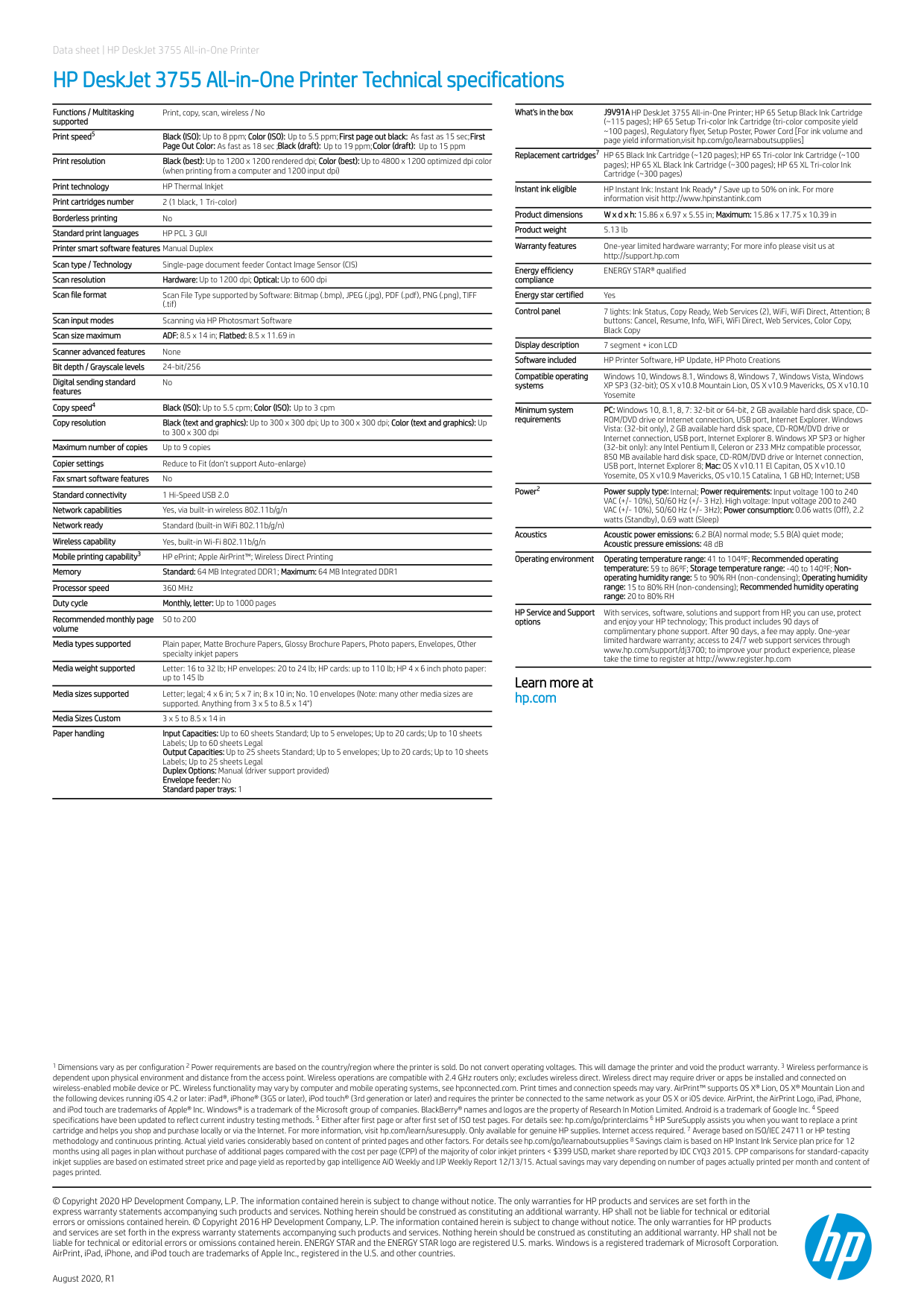
Data sheet | HP DeskJet 3755 All-in-One Printer HP DeskJet 3755 All-in-One Printer Technical specifications Functions / Multitasking supported Print, copy, scan, wireless / No Print speed Black (ISO): Up to 8 ppm; Color (ISO): Up to 5.5 ppm; First page out black: As fast as 15 sec; First Page Out Color: As fast as 18 sec ;Black (draft): Up to 19 ppm; Color (draft): Up to 15 ppm Print resolution Black (best): Up to 1200 x 1200 rendered dpi; Color (best): Up to 4800 x 1200 optimized dpi color (when printing from a computer and 1200 input dpi) Print technology HP Thermal Inkjet Print cartridges number 2 (1 black, 1 Tri-color) Borderless printing No Standard print languages