Ask AI
— answers from the official manualAnswers from the official manual.
Common questions
Common Questions
18 totalWhat should I do if the Printhead lights, Error light, and Resume light are all blinking?
This indicates a carriage jam. Open the front door and then the printhead access door, ensure the printhead latch is properly closed and the carriage is not obstructed, remove any jammed paper or objects blocking the carriage, close both doors, and then press the Resume button to continue or the Cancel button to stop. (Page 2)
What does it mean when the Power button light is on and one or both Printhead lights along with all other control panel lights are blinking?
This indicates a printhead issue. Ensure both printheads are properly installed, and if needed, remove the indicated printhead(s) and check that there is no plug or plastic tape on them before reinserting them securely. Also verify that you are using the correct HP printheads for your printer. (Page 2)
What does it mean when only the Warning light is on (not blinking)?
This indicates that ink system maintenance is required. Check the ink tanks and add more ink if needed, and open the printhead access door completely then close it to remove ink buildup — but do not open the printhead latch. (Page 2)
Can I open the printhead latch at any time to inspect the printheads?
No — you should not open the printhead latch unless you are installing new printheads or moving the printer outside your home or office. For more information, refer to the 'How to move and repack' flyer. (Page 2)
Will repairs be covered under warranty if I use non-HP ink in my Ink Tank 110?
No, repairs or service required as a result of filling the ink tanks improperly and/or using non-HP ink will not be covered under warranty. Additionally, the warranty does not cover printer or printhead failure due to damage from use of non-HP ink or an expired printhead. (Pages 3, 4)
What is the warranty period for the HP Ink Tank 110 printer and its printheads?
The printer and printheads are each covered by a limited warranty of 1 year or 30,000 pages, whichever comes first. Ink bottles are covered until the HP ink is depleted or the 'end of warranty' date printed on the bottle is reached, whichever occurs first. (Page 4)
Show 12 more questions
How can I extend the HP Limited Warranty on my Ink Tank 110?
What power cord or adapter should I use with the HP Ink Tank 110?
Where can I find troubleshooting help and user guides for the HP Ink Tank 110?
How do I clear a paper jam indicated by the control panel?
What should I do if both printhead lights and other control panel lights are blinking?
Why is the power button light constantly on with blinking lights?
How do I prevent ink system maintenance alerts from appearing?
Is it safe to open the printhead latches?
What is covered under the limited one-year warranty for HP Ink Tank 110?
What should I do if the warning light is blinking?
What are the legal rights I have in addition to the HP limited warranty?
What does it mean when the Warning light and Resume light are both blinking?
Full Manual
12 pages
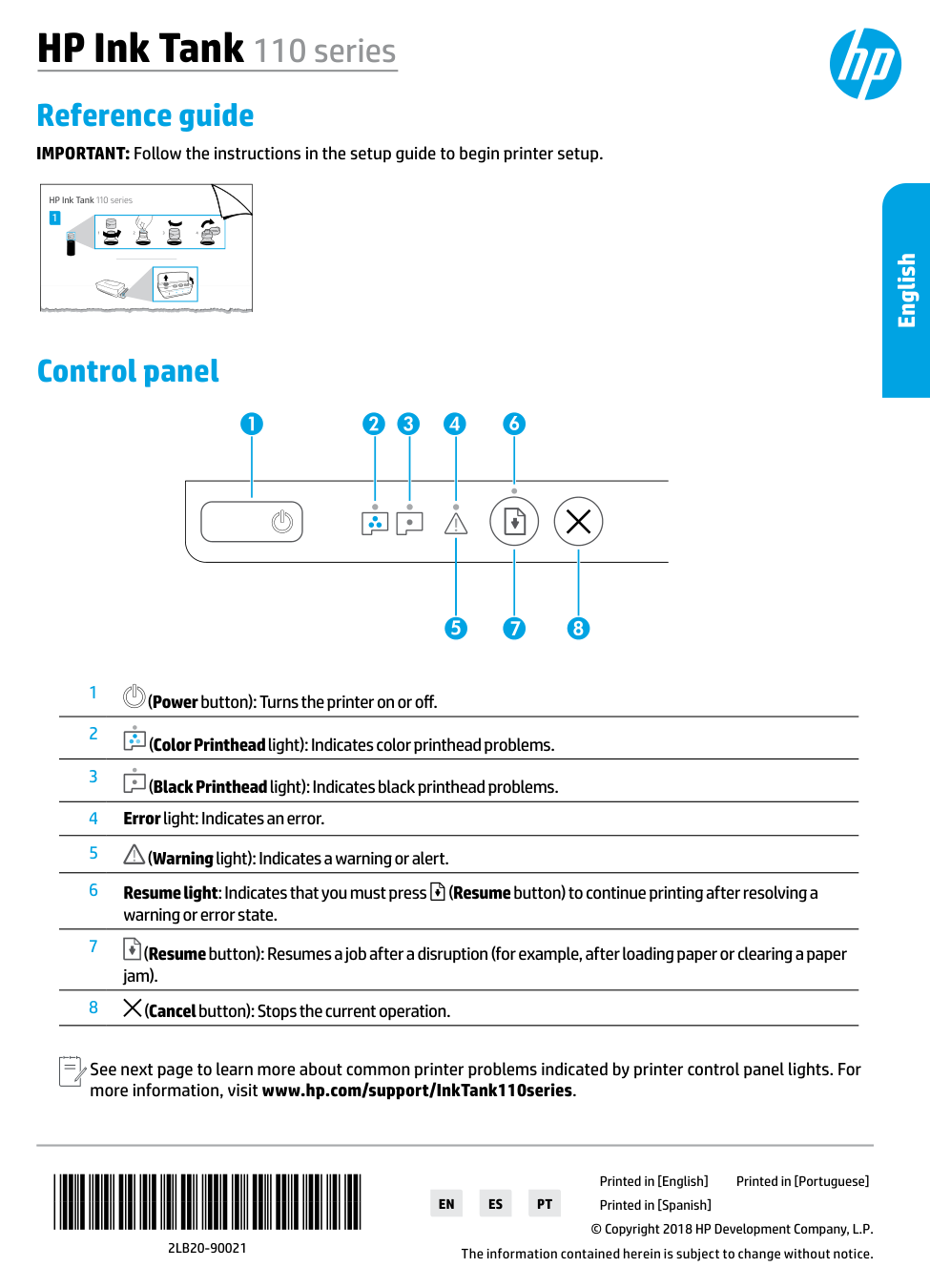
Printed in [English] Printed in [Portuguese] 1 HP Ink Tank 110 series 2 1 3 4 HP Ink Tank 110 series Reference guide IMPORTANT: Follow the instructions in the setup guide to begin printer setup.
*2Lb20-90021*
*2Lb20-90021*
2Lb20-90021
© Copyright 2018 HP Development Company, L.P. Printed in [Spanish]En
Es
Pt
The information contained herein is subject to change without notice. Control panel 1 (Power button): Turns the printer on or off. 2 (Color Printhead light): Indicates color printhead problems. 3 (Black Printhead light): Indicates black printhead problems. 4 Error light: Indicates an error. 5 (Warning light): Indicates a warning or alert. 6 Resume light: Indicates that you must press (Resume button) to continue printing after resolving a warning or error state. 7 (Resume button): Resumes a job after a disruption (for example, after loading paper or clearing a paper jam). 8 (Cancel button): Stops the current operation. See next page to learn more about common printer problems indicated by printer control panel lights. For more information, visit www.hp.com/support/InkTank110series. English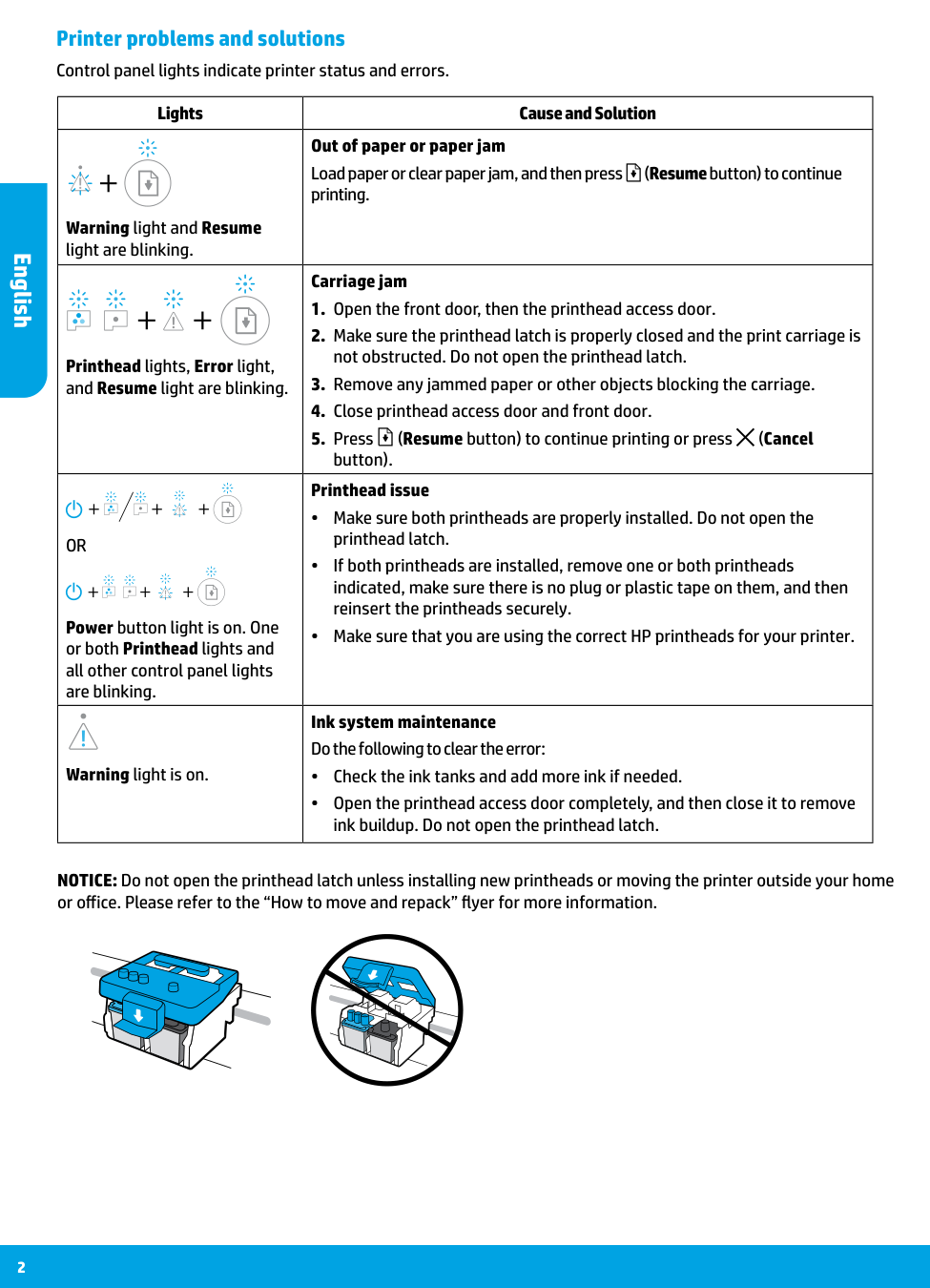
2 Lights Cause and Solution Warning light and Resume light are blinking. Out of paper or paper jam Load paper or clear paper jam, and then press (Resume button) to continue printing. Printhead lights, Error light, and Resume light are blinking. Carriage jam
Or
Power button light is on. One or both Printhead lights and all other control panel lights are blinking. Printhead issue •• Make sure both printheads are properly installed. Do not open the printhead latch. •• If both printheads are installed, remove one or both printheads indicated, make sure there is no plug or plastic tape on them, and then reinsert the printheads securely. •• Make sure that you are using the correct HP printheads for your printer. Warning light is on. Ink system maintenance Do the following to clear the error: •• Check the ink tanks and add more ink if needed. •• Open the printhead access door completely, and then close it to remove ink buildup. Do not open the printhead latch. Printer problems and solutions Control panel lights indicate printer status and errors. NOTICE: Do not open the printhead latch unless installing new printheads or moving the printer outside your home or office. Please refer to the “How to move and repack” flyer for more information. English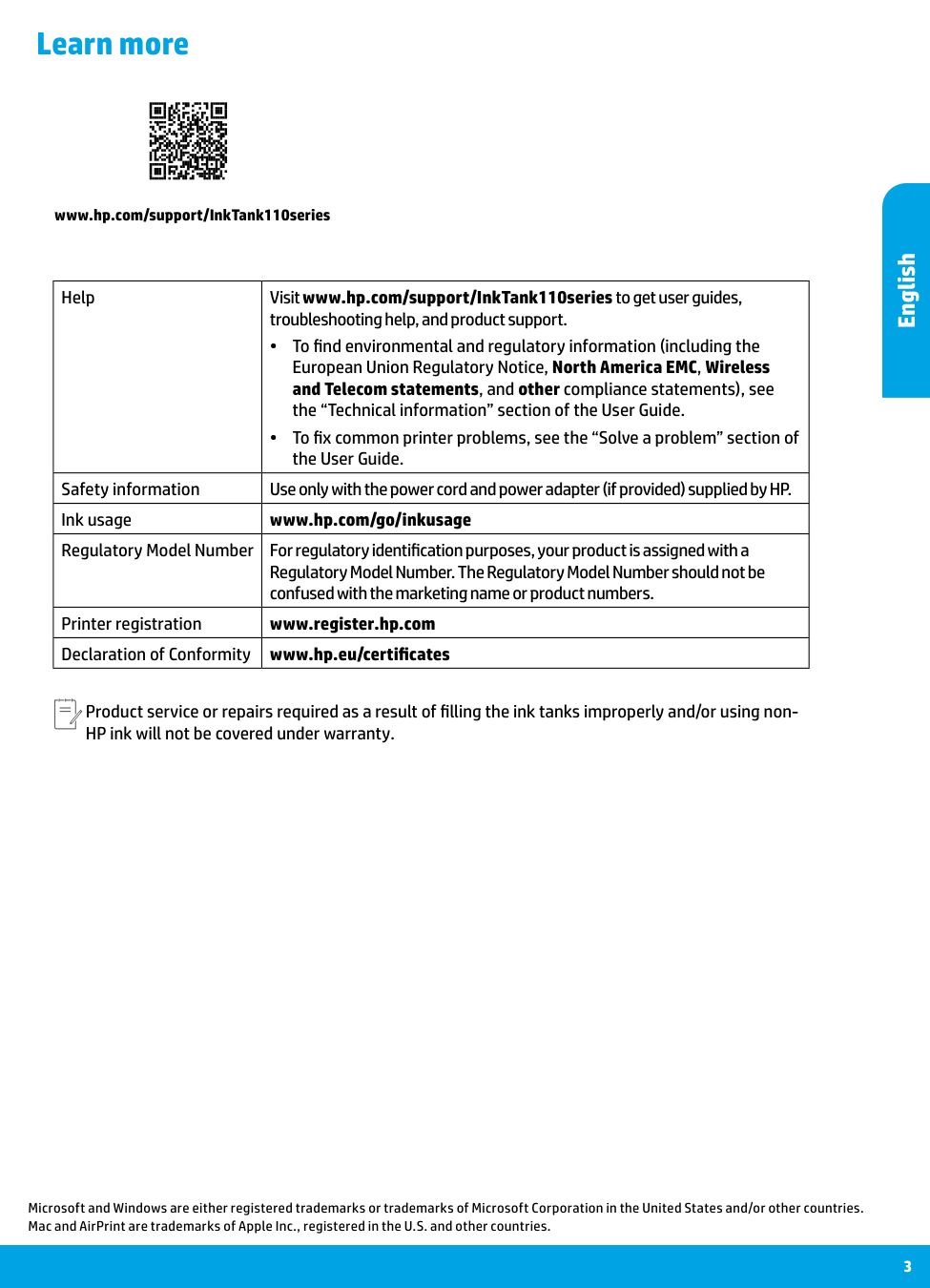
3 Learn more Microsoft and Windows are either registered trademarks or trademarks of Microsoft Corporation in the United States and/or other countries. Mac and AirPrint are trademarks of Apple Inc., registered in the U.S. and other countries. Help Visit www.hp.com/support/InkTank110series to get user guides, troubleshooting help, and product support. •• To find environmental and regulatory information (including the European Union Regulatory Notice, North America EMC, Wireless and Telecom statements, and other compliance statements), see the “Technical information” section of the User Guide. •• To fix common printer problems, see the “Solve a problem” section of the User Guide. Safety information Use only with the power cord and power adapter (if provided) supplied by HP. Ink usage www.hp.com/go/inkusage Regulatory Model Number For regulatory identification purposes, your product is assigned with a Regulatory Model Number. The Regulatory Model Number should not be confused with the marketing name or product numbers. Printer registration www.register.hp.com Declaration of Conformity www.hp.eu/certificates www.hp.com/support/InkTank110series Product service or repairs required as a result of filling the ink tanks improperly and/or using non- HP ink will not be covered under warranty. English
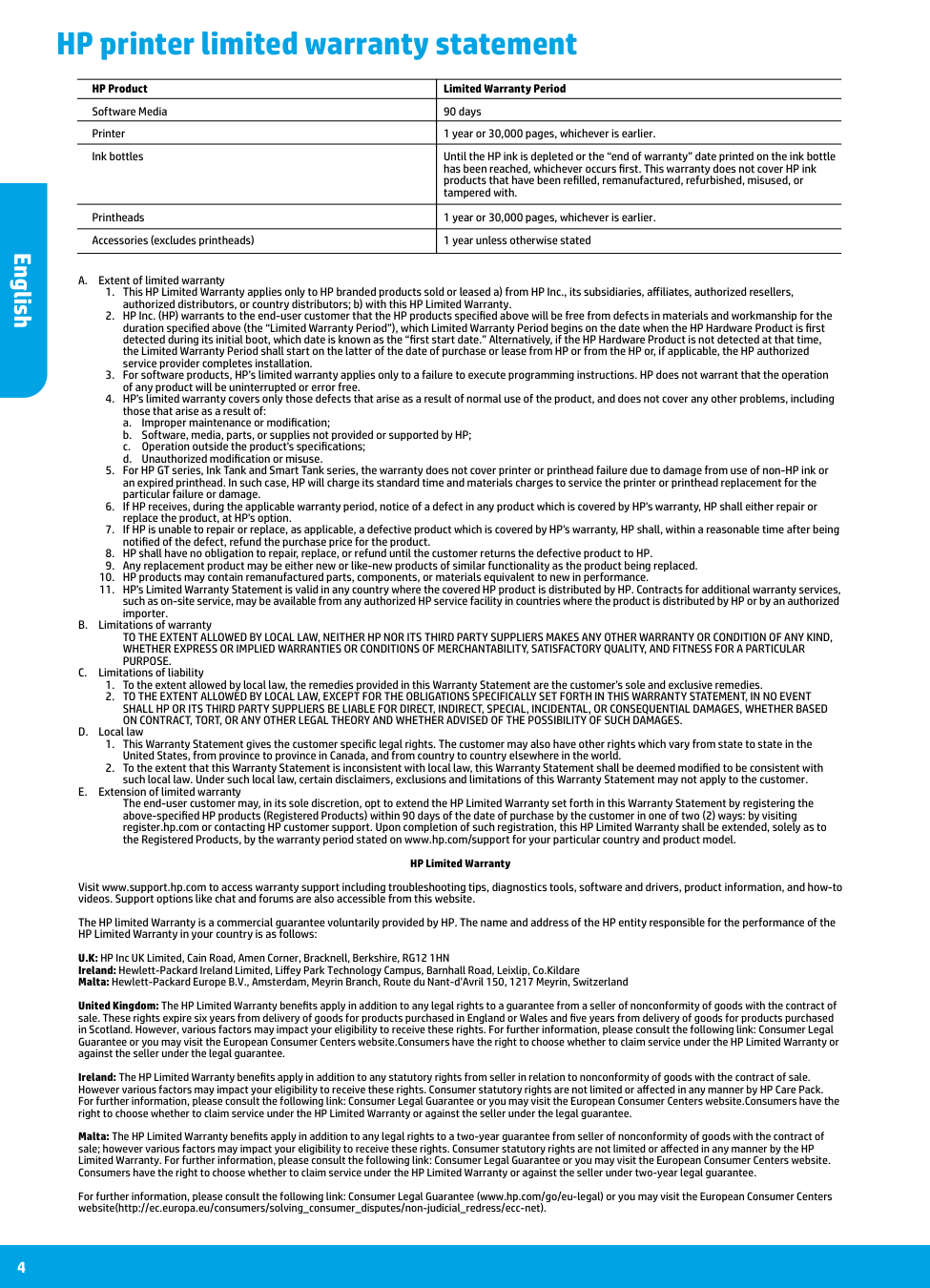
A. Extent of limited warranty
a. Improper maintenance or modification;
b. Software, media, parts, or supplies not provided or supported by HP;
c. Operation outside the product's specifications;
d. Unauthorized modification or misuse.
Purpose.
C. Limitations of liabilityThe end-user customer may, in its sole discretion, opt to extend the HP Limited Warranty set forth in this Warranty Statement by registering the above-specified HP products (Registered Products) within 90 days of the date of purchase by the customer in one of two (2) ways: by visiting register.hp.com or contacting HP customer support. Upon completion of such registration, this HP Limited Warranty shall be extended, solely as to the Registered Products, by the warranty period stated on www.hp.com/support for your particular country and product model. HP Limited Warranty Visit www.support.hp.com to access warranty support including troubleshooting tips, diagnostics tools, software and drivers, product information, and how-to videos. Support options like chat and forums are also accessible from this website. The HP limited Warranty is a commercial guarantee voluntarily provided by HP. The name and address of the HP entity responsible for the performance of the HP Limited Warranty in your country is as follows: U.K: HP Inc UK Limited, Cain Road, Amen Corner, Bracknell, Berkshire, RG12 1HN Ireland: Hewlett-Packard Ireland Limited, Liffey Park Technology Campus, Barnhall Road, Leixlip, Co.Kildare Malta: Hewlett-Packard Europe B.V., Amsterdam, Meyrin Branch, Route du Nant-d’Avril 150, 1217 Meyrin, Switzerland United Kingdom: The HP Limited Warranty benefits apply in addition to any legal rights to a guarantee from a seller of nonconformity of goods with the contract of sale. These rights expire six years from delivery of goods for products purchased in England or Wales and five years from delivery of goods for products purchased in Scotland. However, various factors may impact your eligibility to receive these rights. For further information, please consult the following link: Consumer Legal Guarantee or you may visit the European Consumer Centers website.Consumers have the right to choose whether to claim service under the HP Limited Warranty or against the seller under the legal guarantee. Ireland: The HP Limited Warranty benefits apply in addition to any statutory rights from seller in relation to nonconformity of goods with the contract of sale. However various factors may impact your eligibility to receive these rights. Consumer statutory rights are not limited or affected in any manner by HP Care Pack. For further information, please consult the following link: Consumer Legal Guarantee or you may visit the European Consumer Centers website.Consumers have the right to choose whether to claim service under the HP Limited Warranty or against the seller under the legal guarantee. Malta: The HP Limited Warranty benefits apply in addition to any legal rights to a two-year guarantee from seller of nonconformity of goods with the contract of sale; however various factors may impact your eligibility to receive these rights. Consumer statutory rights are not limited or affected in any manner by the HP Limited Warranty. For further information, please consult the following link: Consumer Legal Guarantee or you may visit the European Consumer Centers website. Consumers have the right to choose whether to claim service under the HP Limited Warranty or against the seller under two-year legal guarantee. For further information, please consult the following link: Consumer Legal Guarantee (www.hp.com/go/eu-legal) or you may visit the European Consumer Centers website(http://ec.europa.eu/consumers/solving_consumer_disputes/non-judicial_redress/ecc-net). HP Product Limited Warranty Period Software Media 90 days Printer 1 year or 30,000 pages, whichever is earlier. Ink bottles Until the HP ink is depleted or the “end of warranty” date printed on the ink bottle
has been reached, whichever occurs first. This warranty does not cover HP ink
products that have been refilled, remanufactured, refurbished, misused, or
tampered with. Printheads 1 year or 30,000 pages, whichever is earlier. Accessories (excludes printheads) 1 year unless otherwise stated 4 HP printer limited warranty statement English
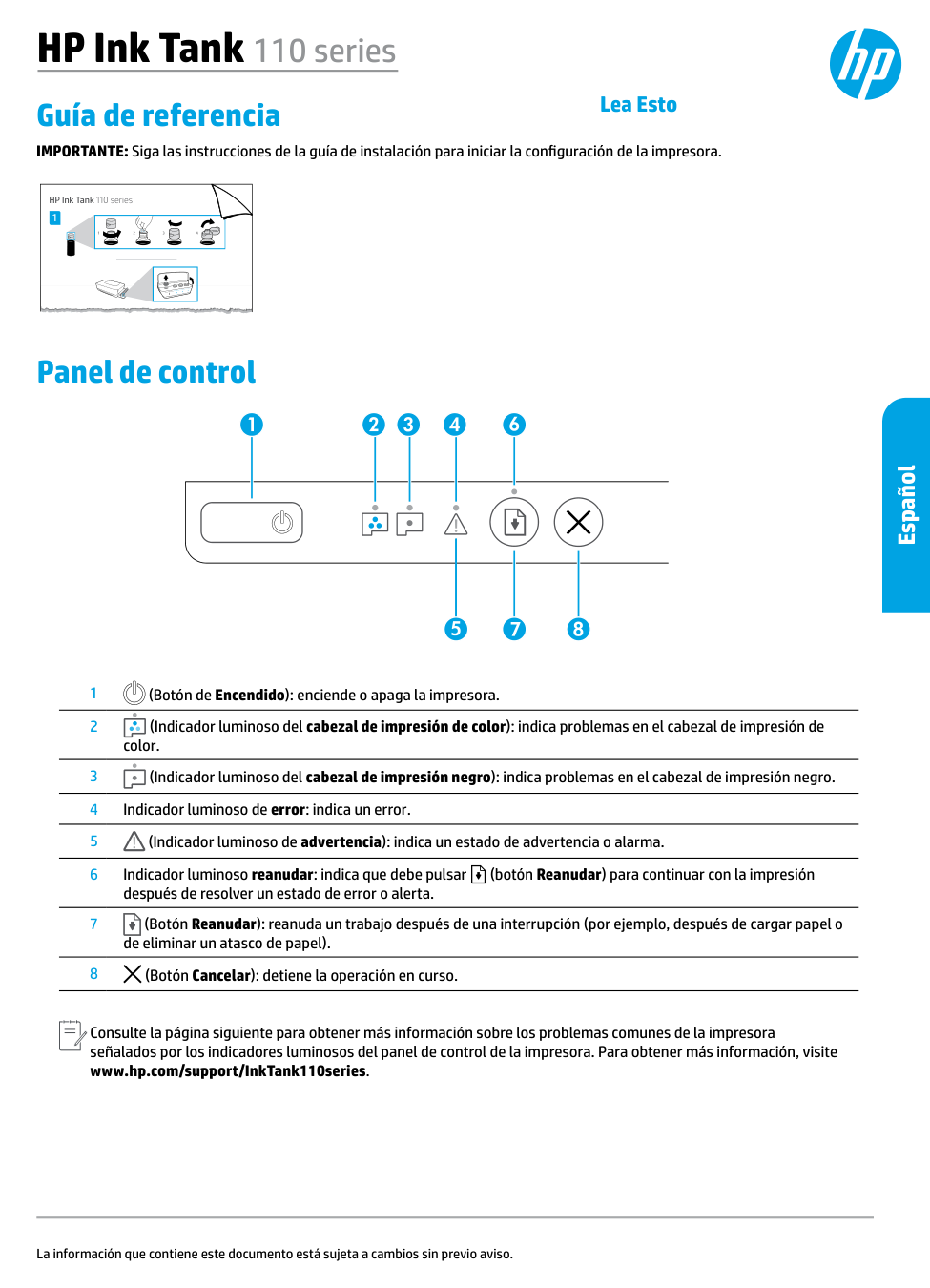
1 HP Ink Tank 110 series 2 1 3 4 Guía de referencia IMPORTANTE: Siga las instrucciones de la guía de instalación para iniciar la configuración de la impresora. La información que contiene este documento está sujeta a cambios sin previo aviso. Panel de control 1 (Botón de Encendido): enciende o apaga la impresora. 2 (Indicador luminoso del cabezal de impresión de color): indica problemas en el cabezal de impresión de color. 3 (Indicador luminoso del cabezal de impresión negro): indica problemas en el cabezal de impresión negro. 4 Indicador luminoso de error: indica un error. 5 (Indicador luminoso de advertencia): indica un estado de advertencia o alarma. 6 Indicador luminoso reanudar: indica que debe pulsar (botón Reanudar) para continuar con la impresión después de resolver un estado de error o alerta. 7 (Botón Reanudar): reanuda un trabajo después de una interrupción (por ejemplo, después de cargar papel o de eliminar un atasco de papel). 8 (Botón Cancelar): detiene la operación en curso. Consulte la página siguiente para obtener más información sobre los problemas comunes de la impresora señalados por los indicadores luminosos del panel de control de la impresora. Para obtener más información, visite www.hp.com/support/InkTank110series. HP Ink Tank 110 series Español Lea Esto
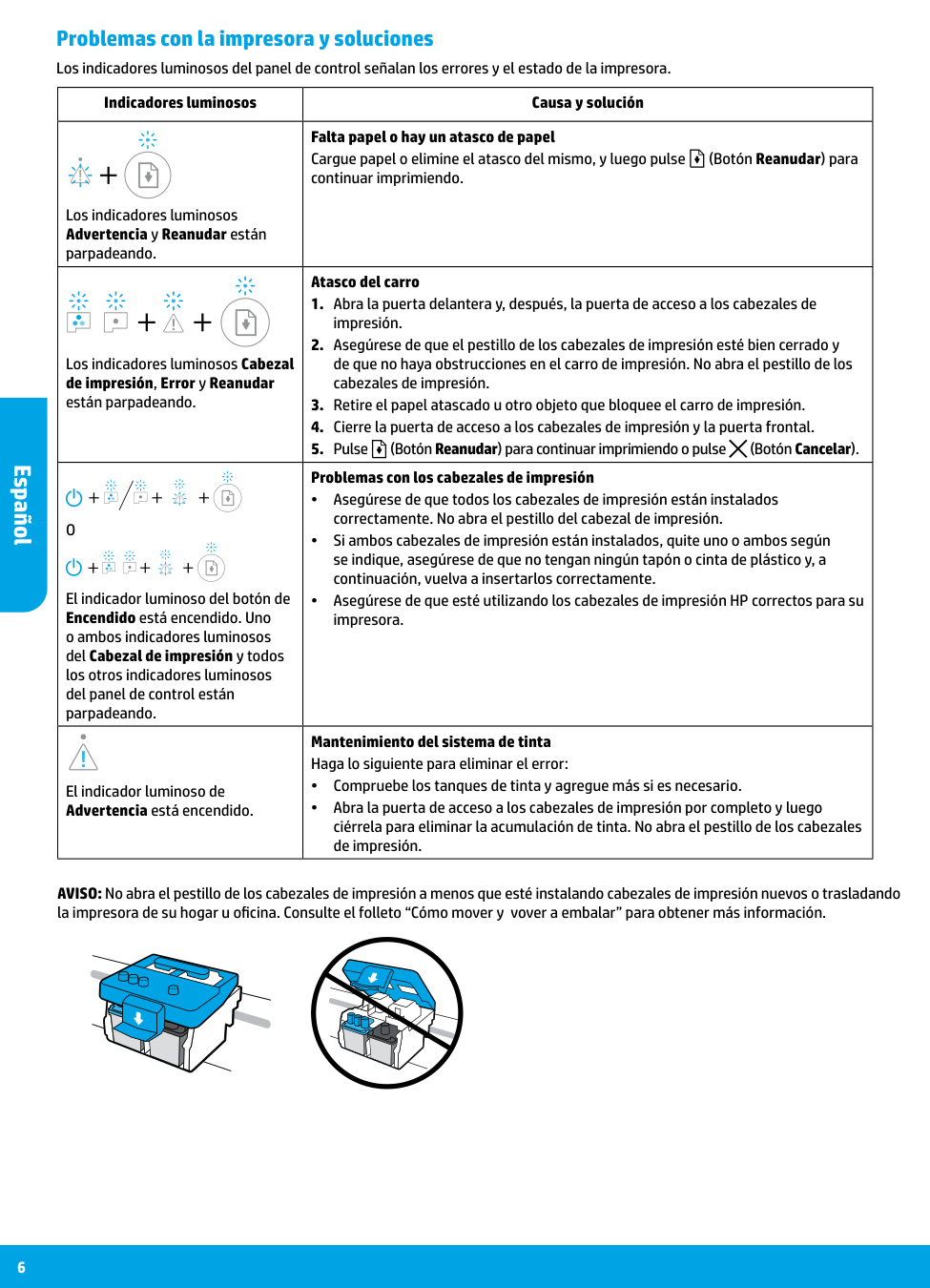
6 Indicadores luminosos Causa y solución Los indicadores luminosos Advertencia y Reanudar están parpadeando. Falta papel o hay un atasco de papel Cargue papel o elimine el atasco del mismo, y luego pulse (Botón Reanudar) para continuar imprimiendo. Los indicadores luminosos Cabezal de impresión, Error y Reanudar están parpadeando. Atasco del carro
O
El indicador luminoso del botón de Encendido está encendido. Uno o ambos indicadores luminosos del Cabezal de impresión y todos los otros indicadores luminosos del panel de control están parpadeando. Problemas con los cabezales de impresión •• Asegúrese de que todos los cabezales de impresión están instalados correctamente. No abra el pestillo del cabezal de impresión. •• Si ambos cabezales de impresión están instalados, quite uno o ambos según se indique, asegúrese de que no tengan ningún tapón o cinta de plástico y, a continuación, vuelva a insertarlos correctamente. •• Asegúrese de que esté utilizando los cabezales de impresión HP correctos para su impresora. El indicador luminoso de Advertencia está encendido. Mantenimiento del sistema de tinta Haga lo siguiente para eliminar el error: •• Compruebe los tanques de tinta y agregue más si es necesario. •• Abra la puerta de acceso a los cabezales de impresión por completo y luego ciérrela para eliminar la acumulación de tinta. No abra el pestillo de los cabezales de impresión. Problemas con la impresora y soluciones Los indicadores luminosos del panel de control señalan los errores y el estado de la impresora. AVISO: No abra el pestillo de los cabezales de impresión a menos que esté instalando cabezales de impresión nuevos o trasladando la impresora de su hogar u oficina. Consulte el folleto “Cómo mover y vover a embalar” para obtener más información. Español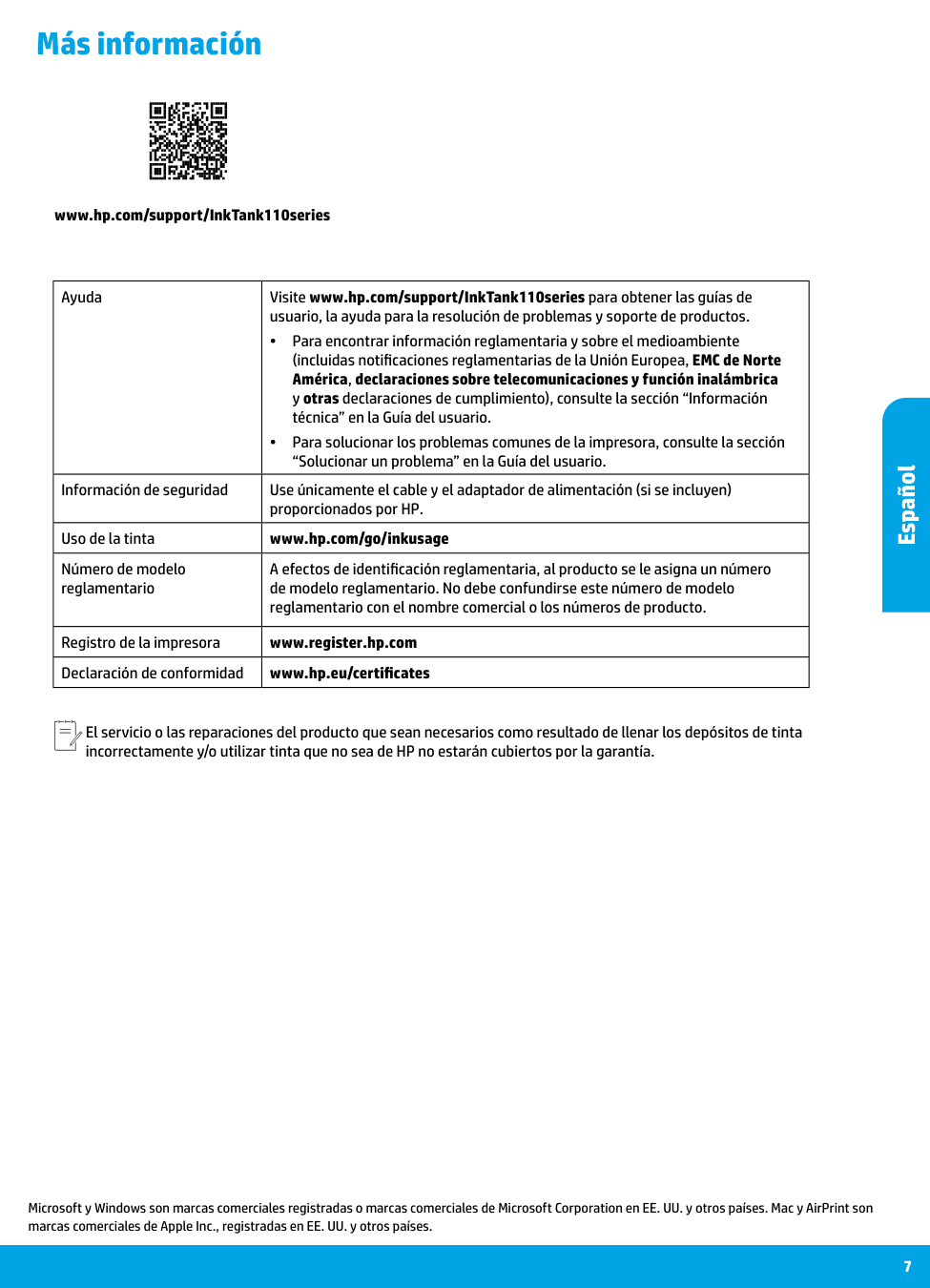
7 Más información Microsoft y Windows son marcas comerciales registradas o marcas comerciales de Microsoft Corporation en EE. UU. y otros países. Mac y AirPrint son marcas comerciales de Apple Inc., registradas en EE. UU. y otros países. Ayuda Visite www.hp.com/support/InkTank110series para obtener las guías de usuario, la ayuda para la resolución de problemas y soporte de productos. •• Para encontrar información reglamentaria y sobre el medioambiente (incluidas notificaciones reglamentarias de la Unión Europea, EMC de Norte América, declaraciones sobre telecomunicaciones y función inalámbrica y otras declaraciones de cumplimiento), consulte la sección “Información técnica” en la Guía del usuario. •• Para solucionar los problemas comunes de la impresora, consulte la sección “Solucionar un problema” en la Guía del usuario. Información de seguridad Use únicamente el cable y el adaptador de alimentación (si se incluyen) proporcionados por HP. Uso de la tinta www.hp.com/go/inkusage Número de modelo reglamentario A efectos de identificación reglamentaria, al producto se le asigna un número de modelo reglamentario. No debe confundirse este número de modelo reglamentario con el nombre comercial o los números de producto. Registro de la impresora www.register.hp.com Declaración de conformidad www.hp.eu/certificates www.hp.com/support/InkTank110series El servicio o las reparaciones del producto que sean necesarios como resultado de llenar los depósitos de tinta incorrectamente y/o utilizar tinta que no sea de HP no estarán cubiertos por la garantía. Español
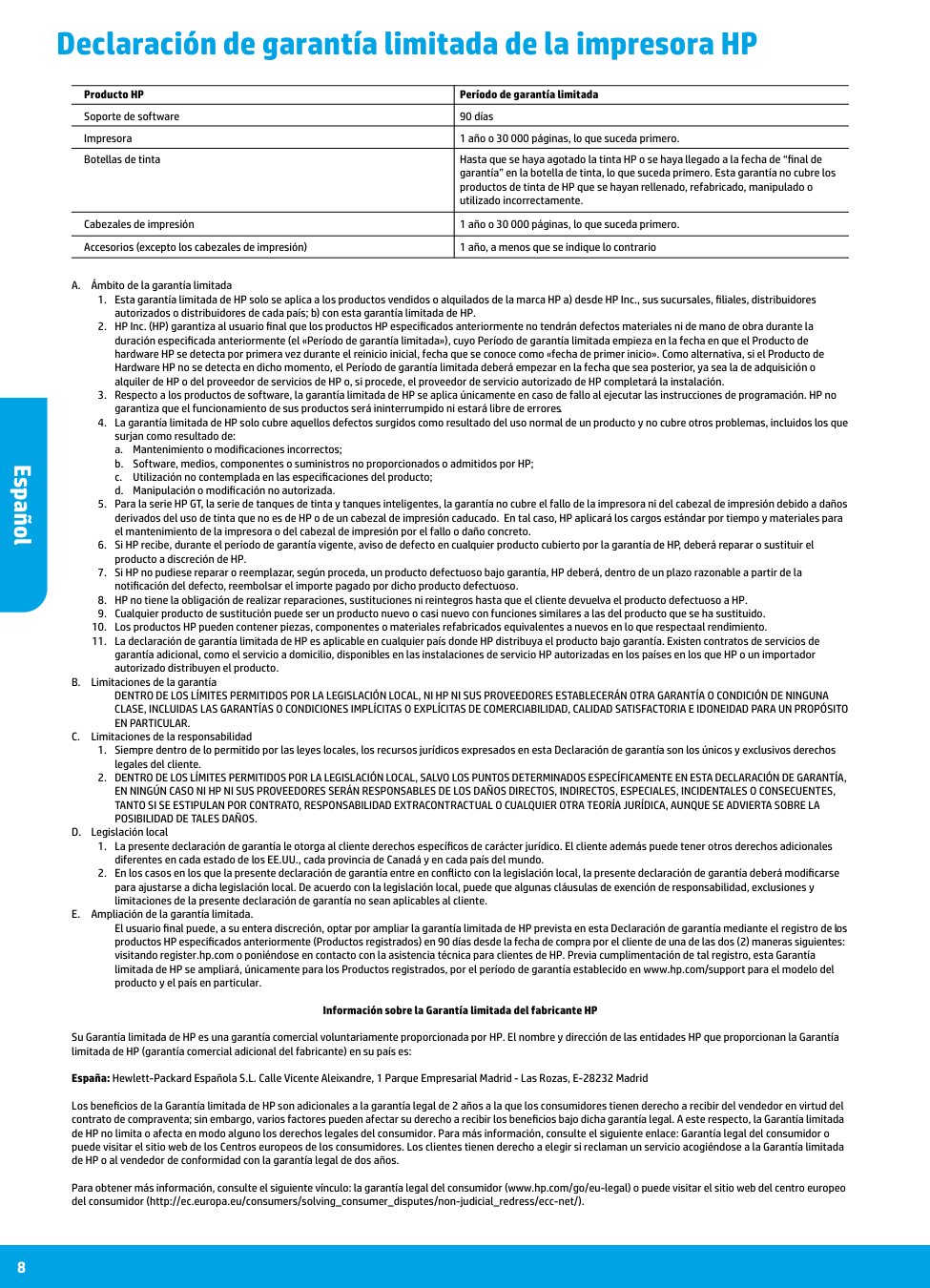
A. Ámbito de la garantía limitada
a. Mantenimiento o modificaciones incorrectos;
b. Software, medios, componentes o suministros no proporcionados o admitidos por HP;
c. Utilización no contemplada en las especificaciones del producto;
d. Manipulación o modificación no autorizada.
En Particular.
C. Limitaciones de la responsabilidadPosibilidad De Tales Daños.
D. Legislación localEl usuario final puede, a su entera discreción, optar por ampliar la garantía limitada de HP prevista en esta Declaración de garantía mediante el registro de los productos HP especificados anteriormente (Productos registrados) en 90 días desde la fecha de compra por el cliente de una de las dos (2) maneras siguientes: visitando register.hp.com o poniéndose en contacto con la asistencia técnica para clientes de HP. Previa cumplimentación de tal registro, esta Garantía limitada de HP se ampliará, únicamente para los Productos registrados, por el período de garantía establecido en www.hp.com/support para el modelo del producto y el país en particular. Información sobre la Garantía limitada del fabricante HP Su Garantía limitada de HP es una garantía comercial voluntariamente proporcionada por HP. El nombre y dirección de las entidades HP que proporcionan la Garantía limitada de HP (garantía comercial adicional del fabricante) en su país es: España: Hewlett-Packard Española S.L. Calle Vicente Aleixandre, 1 Parque Empresarial Madrid - Las Rozas, E-28232 Madrid Los beneficios de la Garantía limitada de HP son adicionales a la garantía legal de 2 años a la que los consumidores tienen derecho a recibir del vendedor en virtud del contrato de compraventa; sin embargo, varios factores pueden afectar su derecho a recibir los beneficios bajo dicha garantía legal. A este respecto, la Garantía limitada de HP no limita o afecta en modo alguno los derechos legales del consumidor. Para más información, consulte el siguiente enlace: Garantía legal del consumidor o puede visitar el sitio web de los Centros europeos de los consumidores. Los clientes tienen derecho a elegir si reclaman un servicio acogiéndose a la Garantía limitada de HP o al vendedor de conformidad con la garantía legal de dos años. Para obtener más información, consulte el siguiente vínculo: la garantía legal del consumidor (www.hp.com/go/eu-legal) o puede visitar el sitio web del centro europeo del consumidor (http://ec.europa.eu/consumers/solving_consumer_disputes/non-judicial_redress/ecc-net/). Producto HP Período de garantía limitada Soporte de software 90 días Impresora 1 año o 30 000 páginas, lo que suceda primero. Botellas de tinta Hasta que se haya agotado la tinta HP o se haya llegado a la fecha de “final de
garantía” en la botella de tinta, lo que suceda primero. Esta garantía no cubre los
productos de tinta de HP que se hayan rellenado, refabricado, manipulado o
utilizado incorrectamente. Cabezales de impresión 1 año o 30 000 páginas, lo que suceda primero. Accesorios (excepto los cabezales de impresión) 1 año, a menos que se indique lo contrario 8 Declaración de garantía limitada de la impresora HP Español
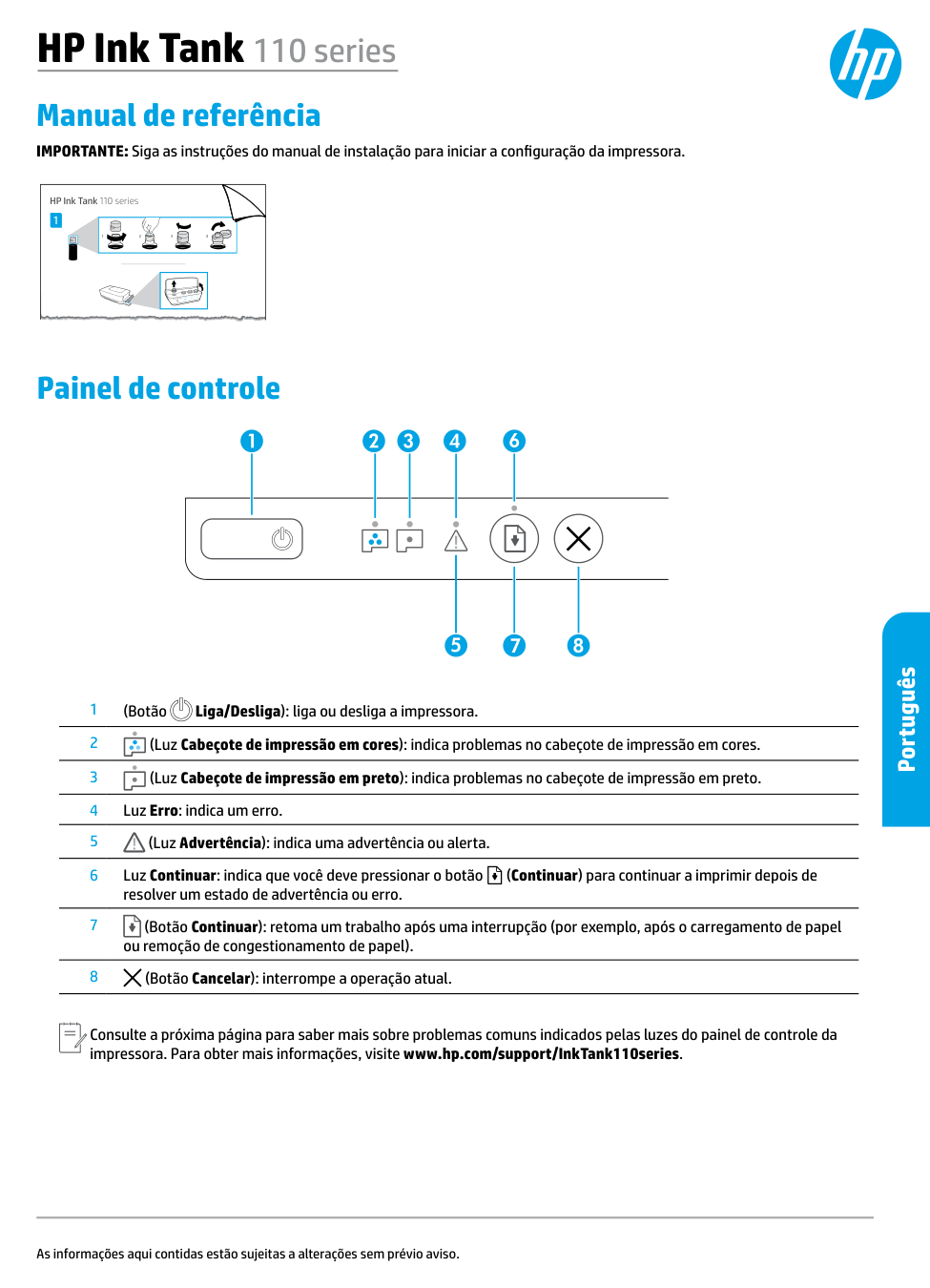
1 HP Ink Tank 110 series 2 1 3 4 Manual de referência IMPORTANTE: Siga as instruções do manual de instalação para iniciar a configuração da impressora. As informações aqui contidas estão sujeitas a alterações sem prévio aviso. Painel de controle 1 (Botão Liga/Desliga): liga ou desliga a impressora. 2 (Luz Cabeçote de impressão em cores): indica problemas no cabeçote de impressão em cores. 3 (Luz Cabeçote de impressão em preto): indica problemas no cabeçote de impressão em preto. 4 Luz Erro: indica um erro. 5 (Luz Advertência): indica uma advertência ou alerta. 6 Luz Continuar: indica que você deve pressionar o botão (Continuar) para continuar a imprimir depois de resolver um estado de advertência ou erro. 7 (Botão Continuar): retoma um trabalho após uma interrupção (por exemplo, após o carregamento de papel ou remoção de congestionamento de papel). 8 (Botão Cancelar): interrompe a operação atual. Consulte a próxima página para saber mais sobre problemas comuns indicados pelas luzes do painel de controle da impressora. Para obter mais informações, visite www.hp.com/support/InkTank110series. HP Ink Tank 110 series Português
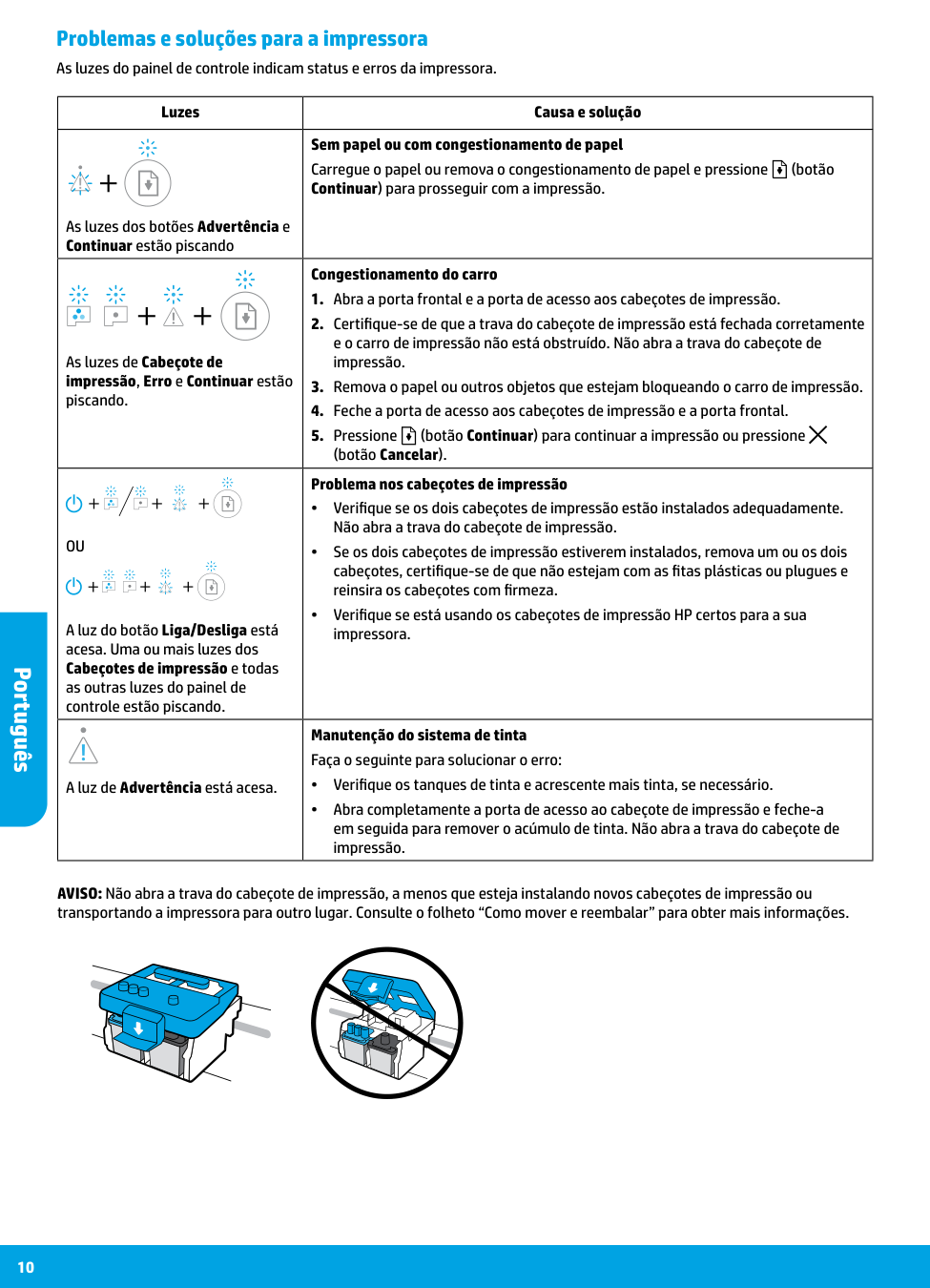
10 Luzes Causa e solução As luzes dos botões Advertência e Continuar estão piscando Sem papel ou com congestionamento de papel Carregue o papel ou remova o congestionamento de papel e pressione (botão Continuar) para prosseguir com a impressão. As luzes de Cabeçote de impressão, Erro e Continuar estão piscando. Congestionamento do carro
(botão Cancelar).
Ou
A luz do botão Liga/Desliga está acesa. Uma ou mais luzes dos Cabeçotes de impressão e todas as outras luzes do painel de controle estão piscando. Problema nos cabeçotes de impressão •• Verifique se os dois cabeçotes de impressão estão instalados adequadamente. Não abra a trava do cabeçote de impressão. •• Se os dois cabeçotes de impressão estiverem instalados, remova um ou os dois cabeçotes, certifique-se de que não estejam com as fitas plásticas ou plugues e reinsira os cabeçotes com firmeza. •• Verifique se está usando os cabeçotes de impressão HP certos para a sua impressora. A luz de Advertência está acesa. Manutenção do sistema de tinta Faça o seguinte para solucionar o erro: •• Verifique os tanques de tinta e acrescente mais tinta, se necessário. •• Abra completamente a porta de acesso ao cabeçote de impressão e feche-a em seguida para remover o acúmulo de tinta. Não abra a trava do cabeçote de impressão. Problemas e soluções para a impressora As luzes do painel de controle indicam status e erros da impressora. AVISO: Não abra a trava do cabeçote de impressão, a menos que esteja instalando novos cabeçotes de impressão ou transportando a impressora para outro lugar. Consulte o folheto “Como mover e reembalar” para obter mais informações. Português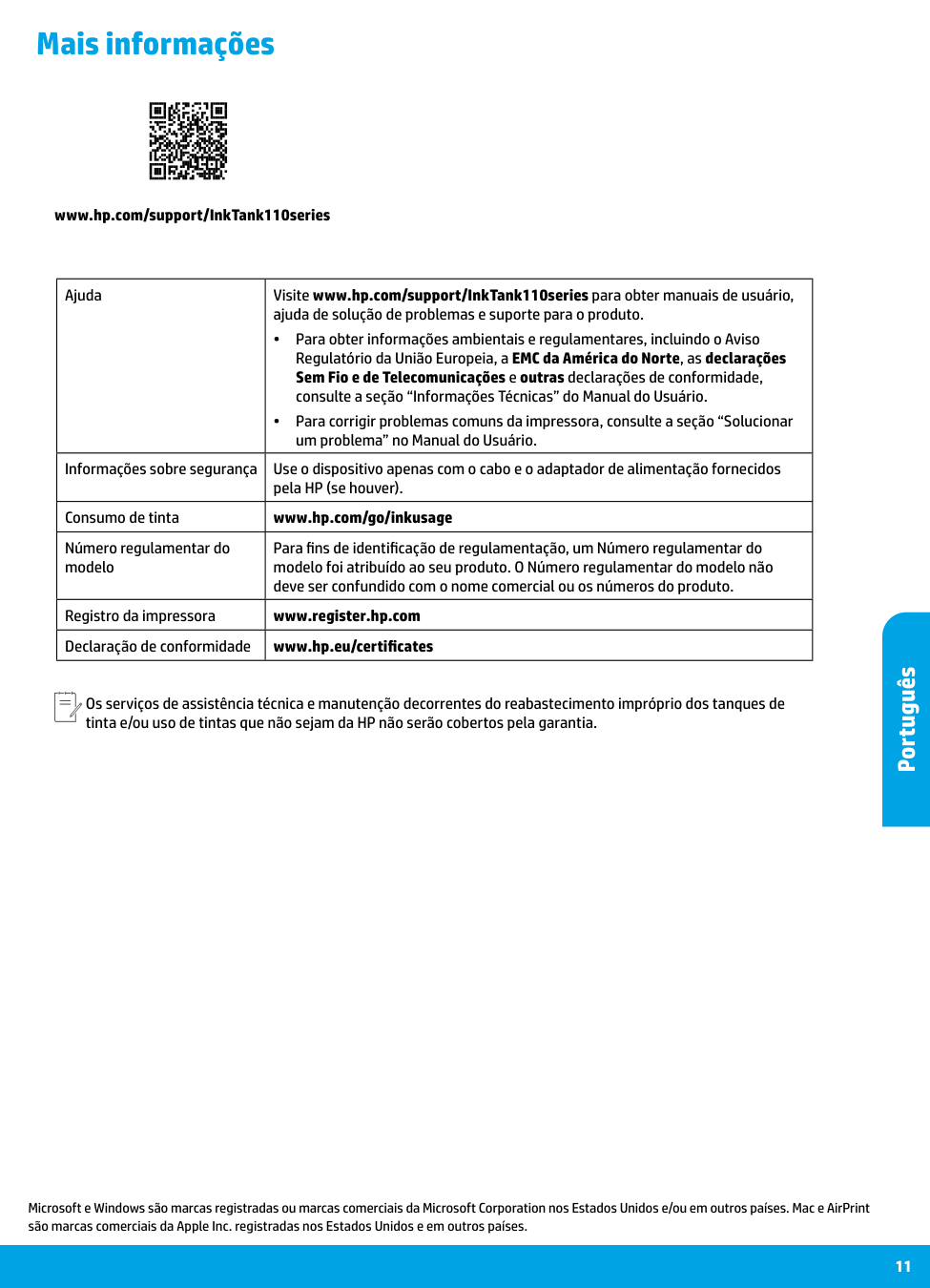
11 Mais informações Microsoft e Windows são marcas registradas ou marcas comerciais da Microsoft Corporation nos Estados Unidos e/ou em outros países. Mac e AirPrint são marcas comerciais da Apple Inc. registradas nos Estados Unidos e em outros países. Ajuda Visite www.hp.com/support/InkTank110series para obter manuais de usuário, ajuda de solução de problemas e suporte para o produto. •• Para obter informações ambientais e regulamentares, incluindo o Aviso Regulatório da União Europeia, a EMC da América do Norte, as declarações Sem Fio e de Telecomunicações e outras declarações de conformidade, consulte a seção “Informações Técnicas” do Manual do Usuário. •• Para corrigir problemas comuns da impressora, consulte a seção “Solucionar um problema” no Manual do Usuário. Informações sobre segurança Use o dispositivo apenas com o cabo e o adaptador de alimentação fornecidos pela HP (se houver). Consumo de tinta www.hp.com/go/inkusage Número regulamentar do modelo Para fins de identificação de regulamentação, um Número regulamentar do modelo foi atribuído ao seu produto. O Número regulamentar do modelo não deve ser confundido com o nome comercial ou os números do produto. Registro da impressora www.register.hp.com Declaração de conformidade www.hp.eu/certificates www.hp.com/support/InkTank110series Os serviços de assistência técnica e manutenção decorrentes do reabastecimento impróprio dos tanques de tinta e/ou uso de tintas que não sejam da HP não serão cobertos pela garantia. Português

12 Português