Ask AI
— answers from the official manualAnswers from the official manual.
Common questions
Common Questions
19 totalWhat do the control panel lights mean when the printer is ready?
When the printer is ready, the Ready/Power light will be on in a steady state. The control panel light patterns section of the reference guide distinguishes between Ready, Processing, and Initializing or canceling states. Understanding these patterns helps quickly identify the printer's current status. (Page 1)
What does it mean when the Toner light is on?
The Toner light indicates either that a cartridge is not installed, the wrong cartridge is installed, or the cartridge is very low. The light pattern differs between these two conditions, so you should check the control panel light patterns diagram to identify which issue applies. Refer to the control panel light patterns section for the specific pattern details. (Page 1)
What should I do if the printer shows a paper jam or out-of-paper light pattern?
The Attention light will indicate a paper jam or out-of-paper condition through a specific light pattern shown in the control panel light patterns section. You should check the paper tray and clear any jammed paper before resuming printing. The Resume/Cancel button may be used to resume printing once the issue is resolved. (Page 1)
What is the recommended operating temperature for the HP Laser 1000?
The recommended temperature range for the HP Laser 1000 is 17.5°C to 25°C (63.5°F to 77°F). Operating the printer outside this range may affect performance. This information is listed under the printer operating environment guidelines. (Page 1)
What humidity level is recommended for the HP Laser 1000 printer?
The recommended humidity range for the HP Laser 1000 is 30% to 70%. Keeping the printer within this humidity range helps ensure proper operation. This guideline is found in the printer operating environment section of the reference guide. (Page 1)
How do I clear a message when the printer lights show 'Processing...'
Allow the current process to complete; the message will disappear once the operation is finished. If issues persist, refer to troubleshooting steps in the user guide.
Show 13 more questions
What should I do if the Power button light does not turn on?
How do I initialize or cancel operations?
What causes a blinking green Power button light?
How do I prevent overheating issues with my HP Laser 1000?
Where should I avoid placing the HP Laser 1000 printer?
How do I know if the printer is initializing or canceling a job?
Does the HP Laser 1000 support wireless connectivity?
Where can I find additional support for the HP Laser 1000 printer?
What should I do if the toner light is blinking red?
How do I reset a paper jam?
What environmental conditions are recommended for my HP Laser 1000?
What does a red Attention light indicate?
How do I set up wireless connectivity?
Full Manual
1 pages
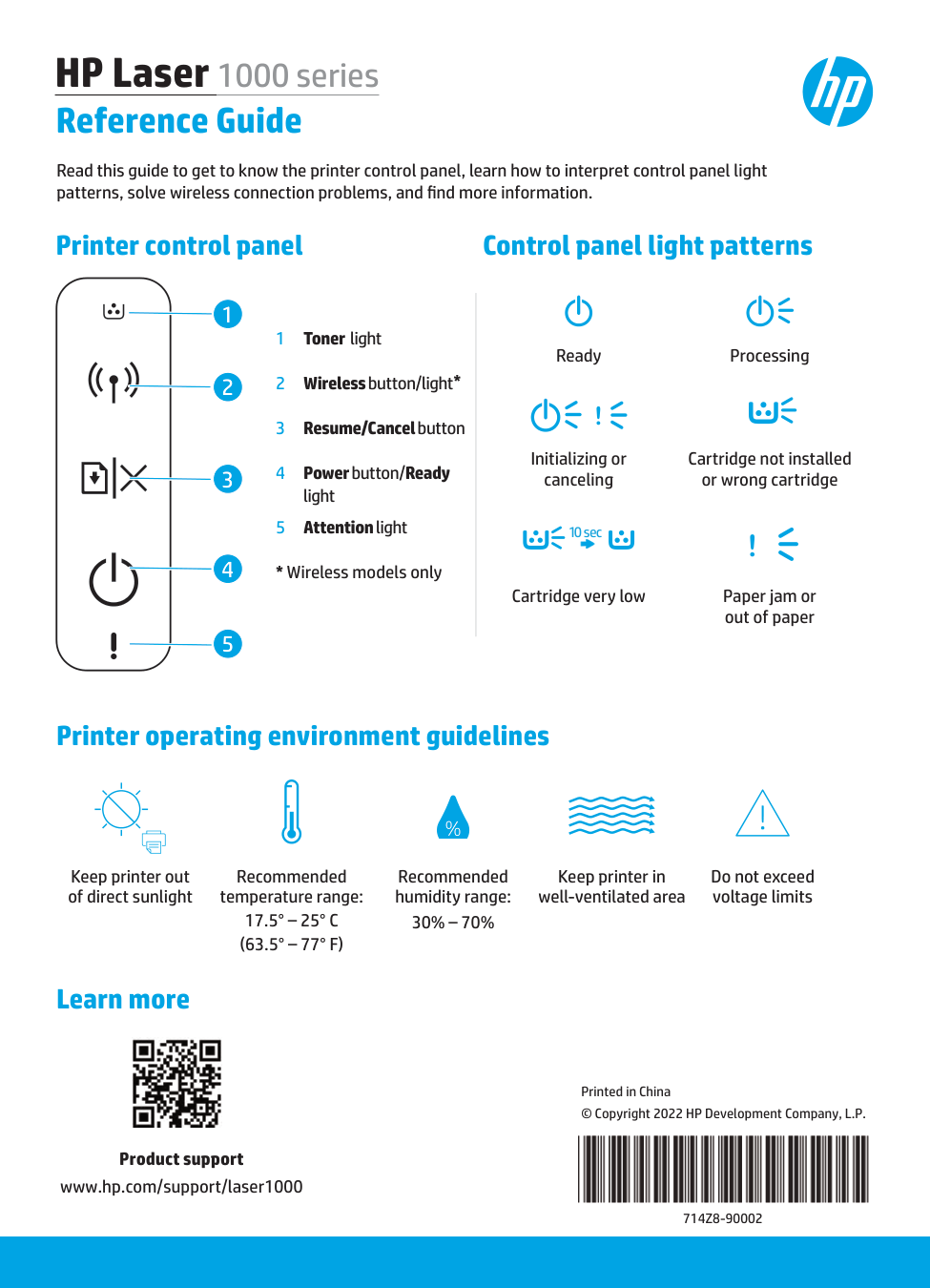
Printer control panel HP Laser 1000 series Reference Guide Read this guide to get to know the printer control panel, learn how to interpret control panel light patterns, solve wireless connection problems, and find more information. 1 Toner light 2 Wireless button/light* 3 Resume/Cancel button 4 Power button/Ready light 5 Attention light