Ask AI
— answers from the official manualAnswers from the official manual.
Common questions
Common Questions
16 totalWhat is the recommended operating temperature range for the HP Laser MFP 1000?
The recommended temperature range for the HP Laser MFP 1000 is 17.5°C to 25°C (63.5°F to 77°F). The printer should also be kept out of direct sunlight and in a well-ventilated area for optimal performance. (Page 2)
What is the recommended humidity range for operating the HP Laser MFP 1000?
The recommended humidity range for the HP Laser MFP 1000 is 30% to 70%. Keeping the printer within this humidity range helps ensure proper operation and print quality. (Page 2)
What does a blinking green light on the control panel mean?
A blinking green light indicates the printer is initializing or processing. This is a normal status indication and does not signal an error condition. (Page 2)
What does a blinking orange light on the control panel mean?
A blinking orange light indicates a paper jam or that the printer is out of paper. You should check the paper tray and clear any jams to resolve this condition. (Page 2)
Where can I find product support for the HP Laser MFP 1000?
Product support for the HP Laser MFP 1000 can be found at www.hp.com/support/laser1000mfp. This resource can assist with setup, troubleshooting, and additional guidance. (Page 2)
What does a solid light on the control panel indicate?
A solid light on the control panel indicates the printer is in a Ready state. This means the printer is prepared to receive and process print jobs. (Page 2)
Show 10 more questions
What should I do if the printer displays 'Paper jam'?
How do I pair my printer wirelessly with devices?
What are the recommended operating temperature and humidity levels for this printer?
How do I clear all settings and reset my printer?
How do I access the menu on the control panel of my HP Laser MFP 1000?
What should I check if my printer is not connecting wirelessly?
Can you provide guidelines for placing this printer in an optimal location?
What is the ID Copy button used for on the HP Laser MFP 1000?
Does the HP Laser MFP 1000 support fax functionality?
What buttons are available for navigating menus on the HP Laser MFP 1000 control panel?
Full Manual
2 pages
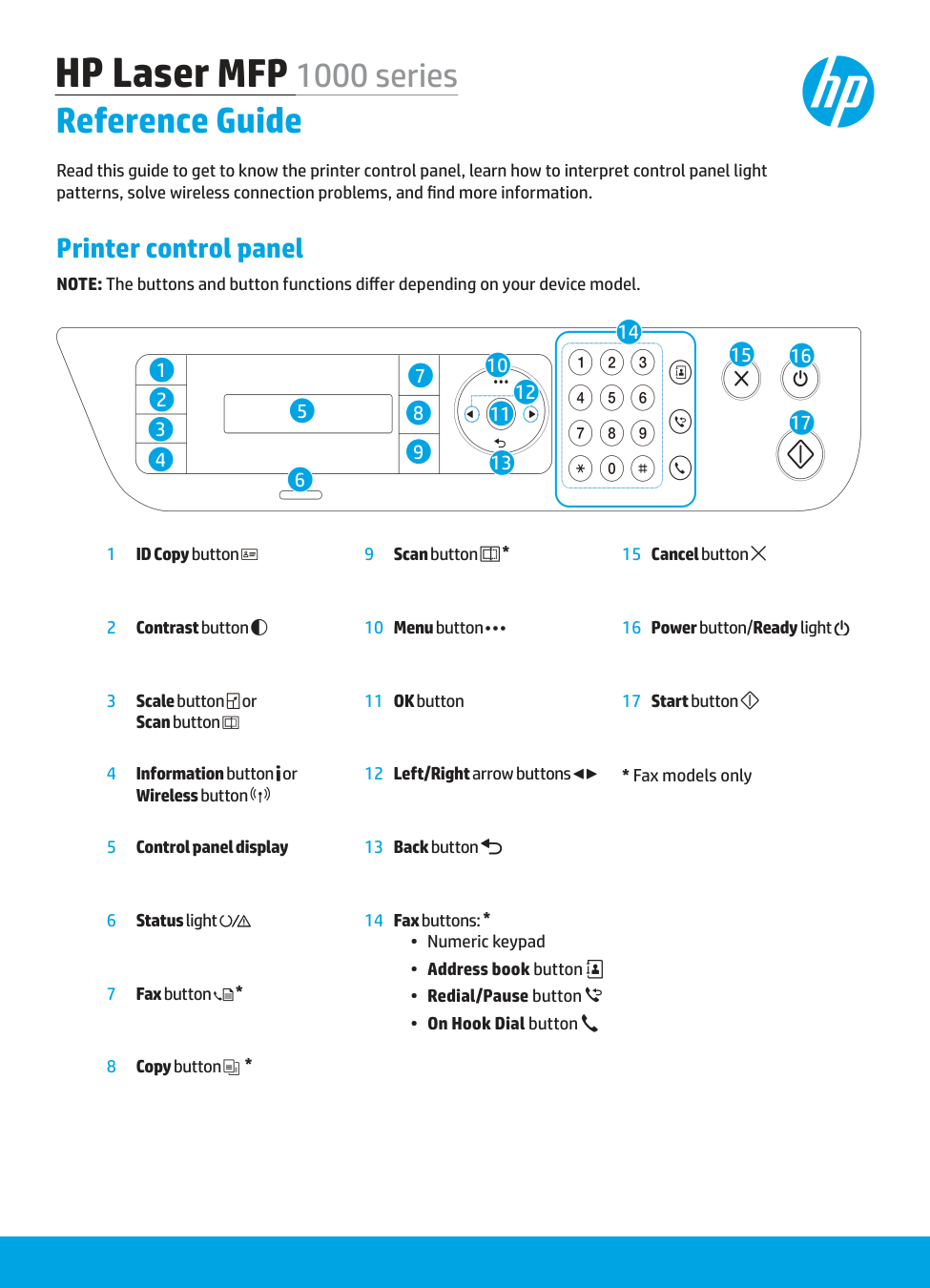
NOTE: The buttons and button functions differ depending on your device model. HP Laser MFP 1000 series Reference Guide Read this guide to get to know the printer control panel, learn how to interpret control panel light patterns, solve wireless connection problems, and find more information. Printer control panel 1 ID Copy button 2 Contrast button 3 Scale button or Scan button 4 Information button or Wireless button 5 Control panel display 6 Status light 7 Fax button
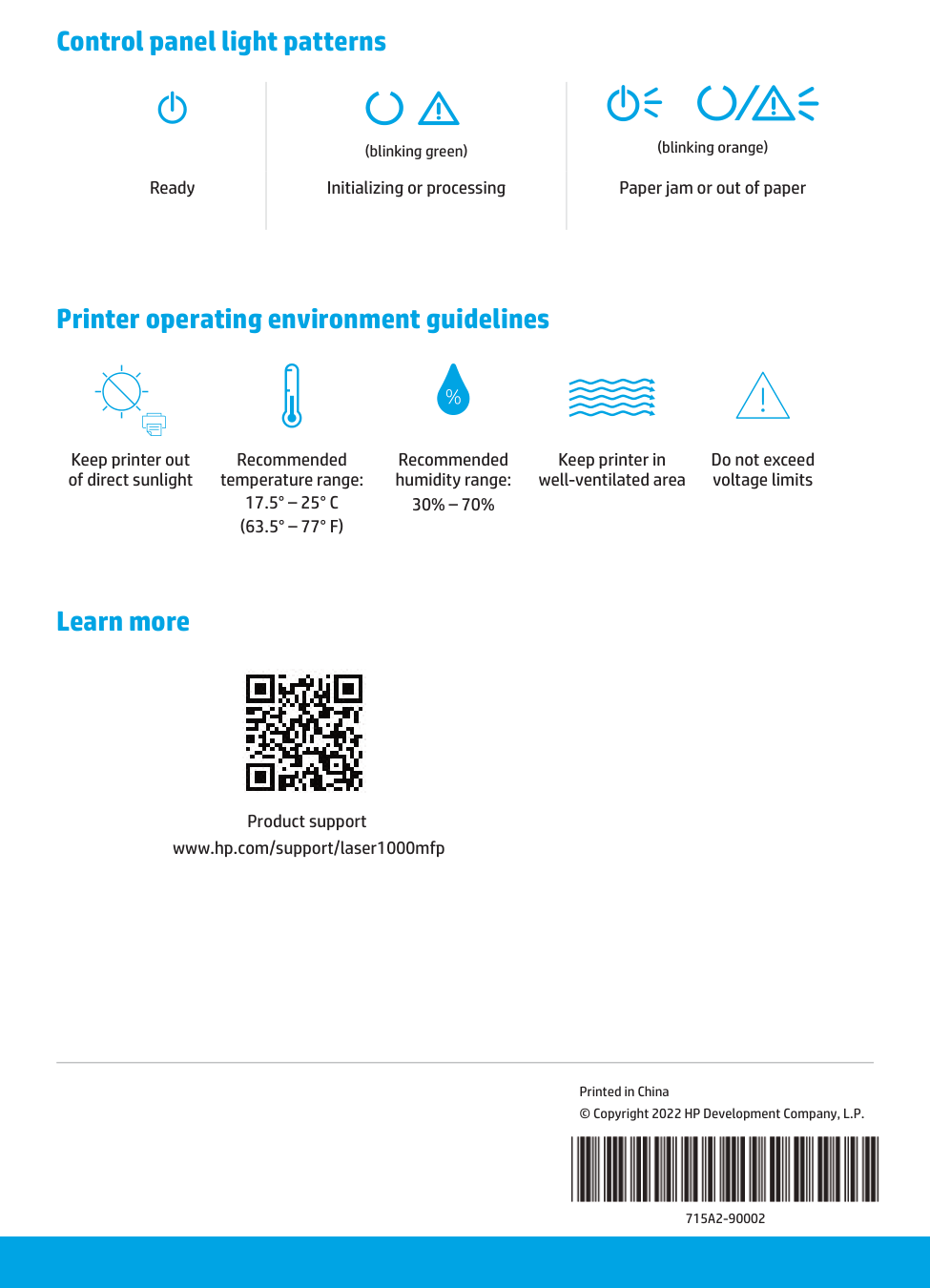
Learn more Printer operating environment guidelines Keep printer out of direct sunlight Recommended temperature range: