
Ask AI
— answers from the official manualAnswers from the official manual.
Common questions
Common Questions
3 totalWhat are the safety warnings I should be aware of when using this printer?
The equipment has been tested to comply with Class B digital device limits and must be used in accordance with instructions to prevent harmful interference with radio communications. Modifying or altering this equipment without written approval from HP could void your authority to operate it. (Page 2)
How do I set up the toner cartridge?
Open the front cover of the printer and lift up on the black or color lever, then remove any old toner cartridges. Insert the new toner cartridge firmly into the slot until it clicks both in place. Ensure no plastic film remains inside because this could cause a paper jam or poor print quality. (Page 2)
What should I do if my printer prints with stripes across every page?
If your printed pages display horizontal stripes, try cleaning the toner cartridge or replacing it as worn-out cartridges can cause streaking. Also, check that there is no paper jamming in the rollers near the cartridge as this may be causing interruption of toner flow. (Page 2)
Full Manual
2 pages
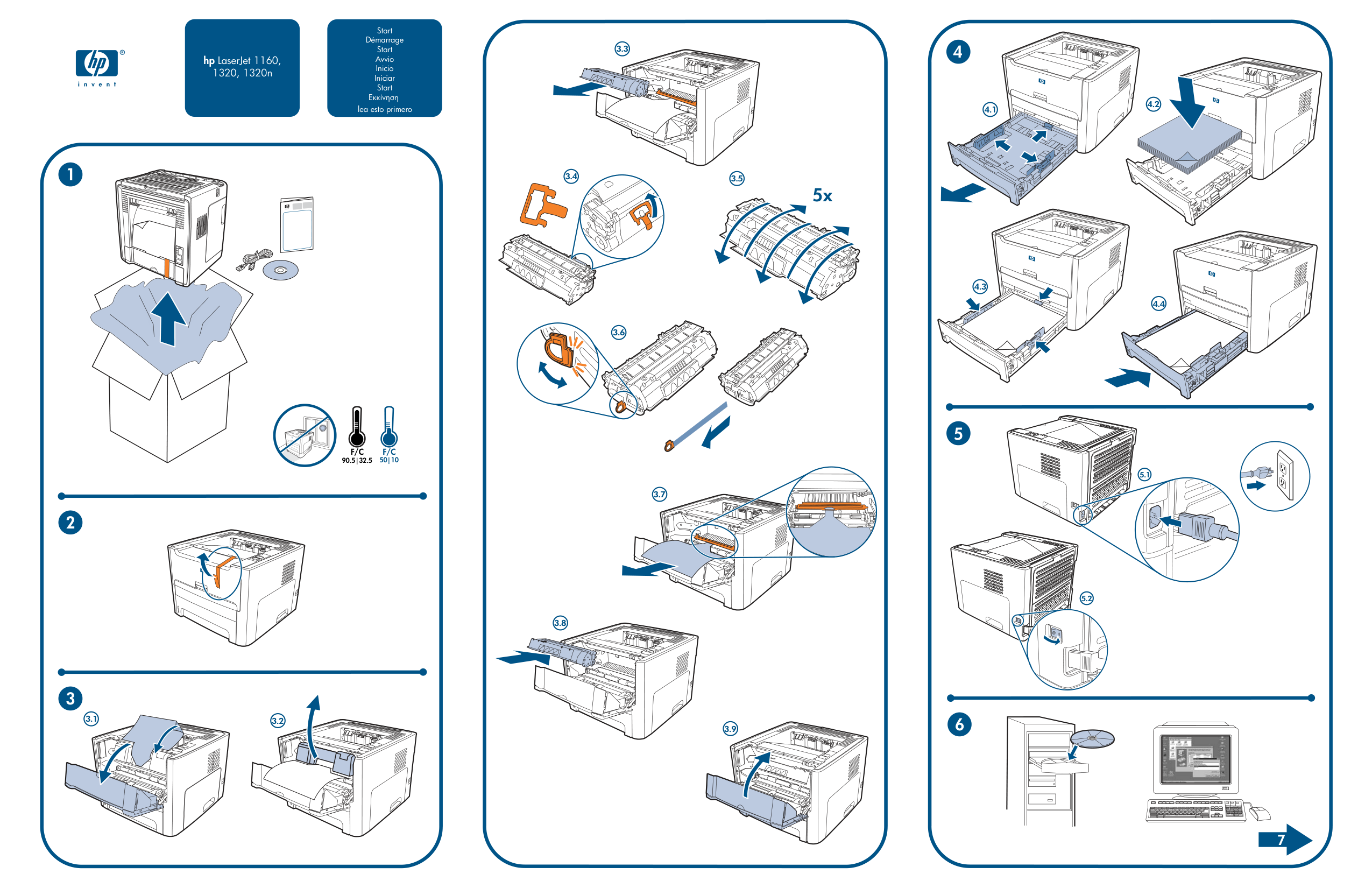
Start Démarrage Start Avvio Inicio Iniciar Start
hp LaserJet 1160, 1320, 1320n
lea esto primero
F/C 50|10
F/C 90.5|32.5
3.1 3.2
3.3
3.4
3.5
5x
3.6
3.7
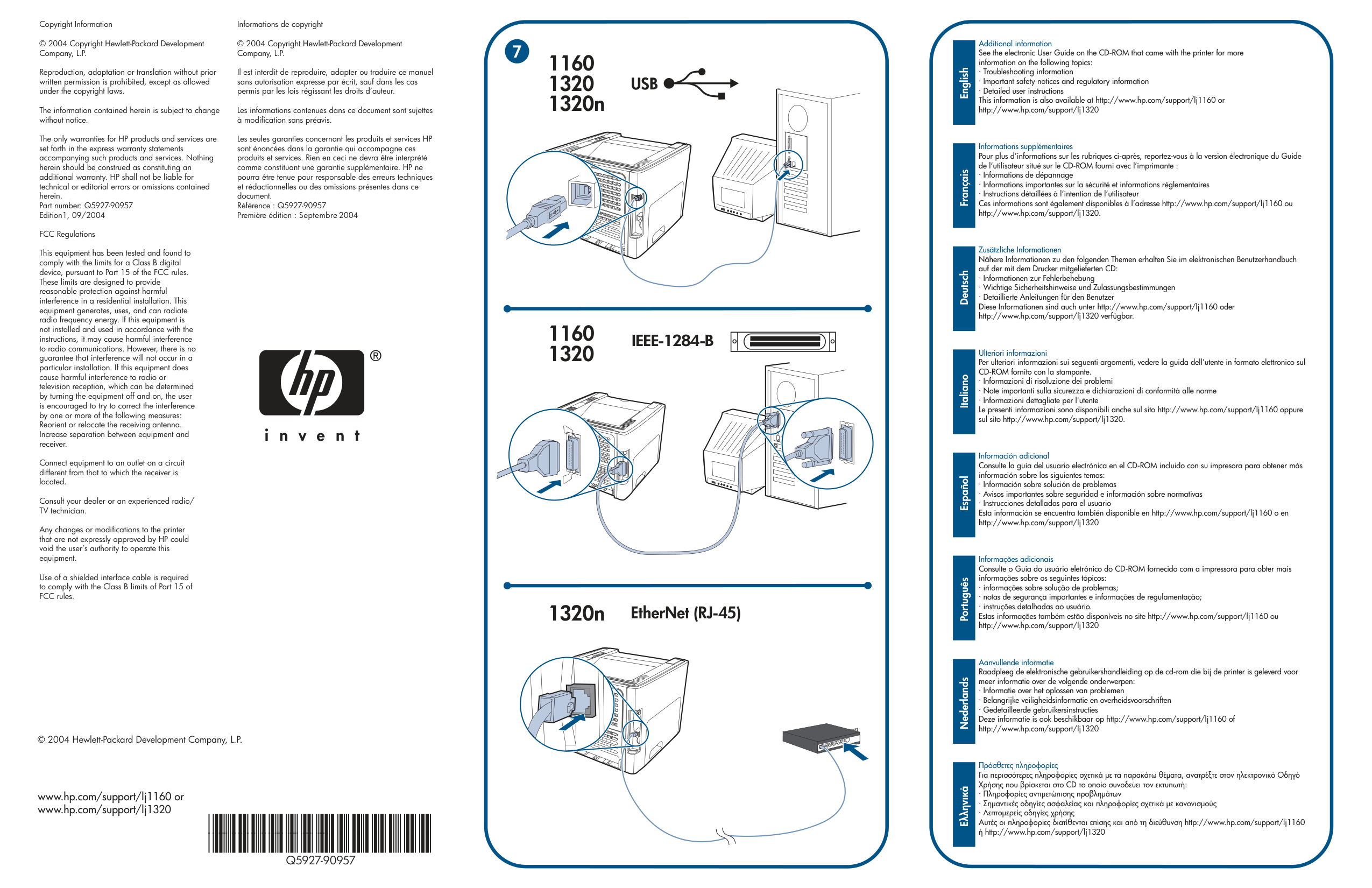
3.8
3.9
Copyright Information © 2004 Copyright Hewlett-Packard Development Company, L.P. Reproduction, adaptation or translation without prior written permission is prohibited, except as allowed under the copyright laws. The information contained herein is subject to change without notice. The only warranties for HP products and services are set forth in the express warranty statements accompanying such products and services. Nothing herein should be construed as constituting an additional warranty. HP shall not be liable for technical or editorial errors or omissions contained herein. Part number: Q5927-90957 Edition1, 09/2004 FCC Regulations This equipment has been tested and found to comply with the limits for a Class B digital device, pursuant to Part 15 of the FCC rules. These limits are designed to provide reasonable protection against harmful interference in a residential installation. This equipment generates, uses, and can radiate radio frequency energy. If this equipment is not installed and used in accordance with the instructions, it may cause harmful interference to radio communications. However, there is no guarantee that interference will not occur in a particular installation. If this equipment does cause harmful interference to radio or television reception, which can be determined by turning the equipment off and on, the user is encouraged to try to correct the interference by one or more of the following measures: Reorient or relocate the receiving antenna. Increase separation between equipment and receiver. Connect equipment to an outlet on a circuit different from that to which the receiver is located. Consult your dealer or an experienced radio/ TV technician. Any changes or modifications to the printer that are not expressly approved by HP could void the user’s authority to operate this equipment. Use of a shielded interface cable is required to comply with the Class B limits of Part 15 of FCC rules.
Informations de copyright © 2004 Copyright Hewlett-Packard Development Company, L.P. Il est interdit de reproduire, adapter ou traduire ce manuel sans autorisation expresse par écrit, sauf dans les cas permis par les lois régissant les droits d’auteur. Les informations contenues dans ce document sont sujettes à modification sans préavis. Les seules garanties concernant les produits et services HP sont énoncées dans la garantie qui accompagne ces produits et services. Rien en ceci ne devra être interprété comme constituant une garantie supplémentaire. HP ne pourra être tenue pour responsable des erreurs techniques et rédactionnelles ou des omissions présentes dans ce document. Référence : Q5927-90957 Première édition : Septembre2004
© 2004 Hewlett-Packard Development Company, L.P.
www.hp.com/support/lj1160 or www.hp.com/support/lj1320
Q5927-90957
7
1160 1320 1320n
1160 1320
IEEE-1284-B
| | | |---|---|