
Ask AI
— answers from the official manualAnswers from the official manual.
Common questions
Common Questions
9 totalWhat can I use the front USB port for on my printer?
The front USB host accepts print jobs, scan uploads, photos, and is also used for uploading firmware updates to the device. (Page 2)
How can I clear the volatile memory of my HP LaserJet Pro M102w?
To clear the volatile memory, power off the printer. This action erases all data stored in temporary storage during processing and application running on the OS. (Page 1)
What non-volatile memory is included in my HP LaserJet Pro M102w?
The printer contains 16KB EEPROM for storing customer settings data and a Nor-Flash with up to 16MB capacity that stores firmware, file system, and additional customer setting data. (Page 1)
How do I perform an NVRAM initialization on my printer?
To clear the non-volatile memory to default factory settings, follow the procedures outlined in the service manual. This process resets most system parameters. (Page 2)
Does my HP LaserJet Pro M102w come with built-in mass storage?
No mass storage devices such as hard drives or tape backups are included in the printer's design and specifications. (Page 2)
How do I use the rear USB port of the HP LaserJet Pro M102w?
When configured properly, the rear USB host can accept stored user jobs and encrypted files, which users have the capability to store and delete. (Page 2)
Full Manual
2 pages
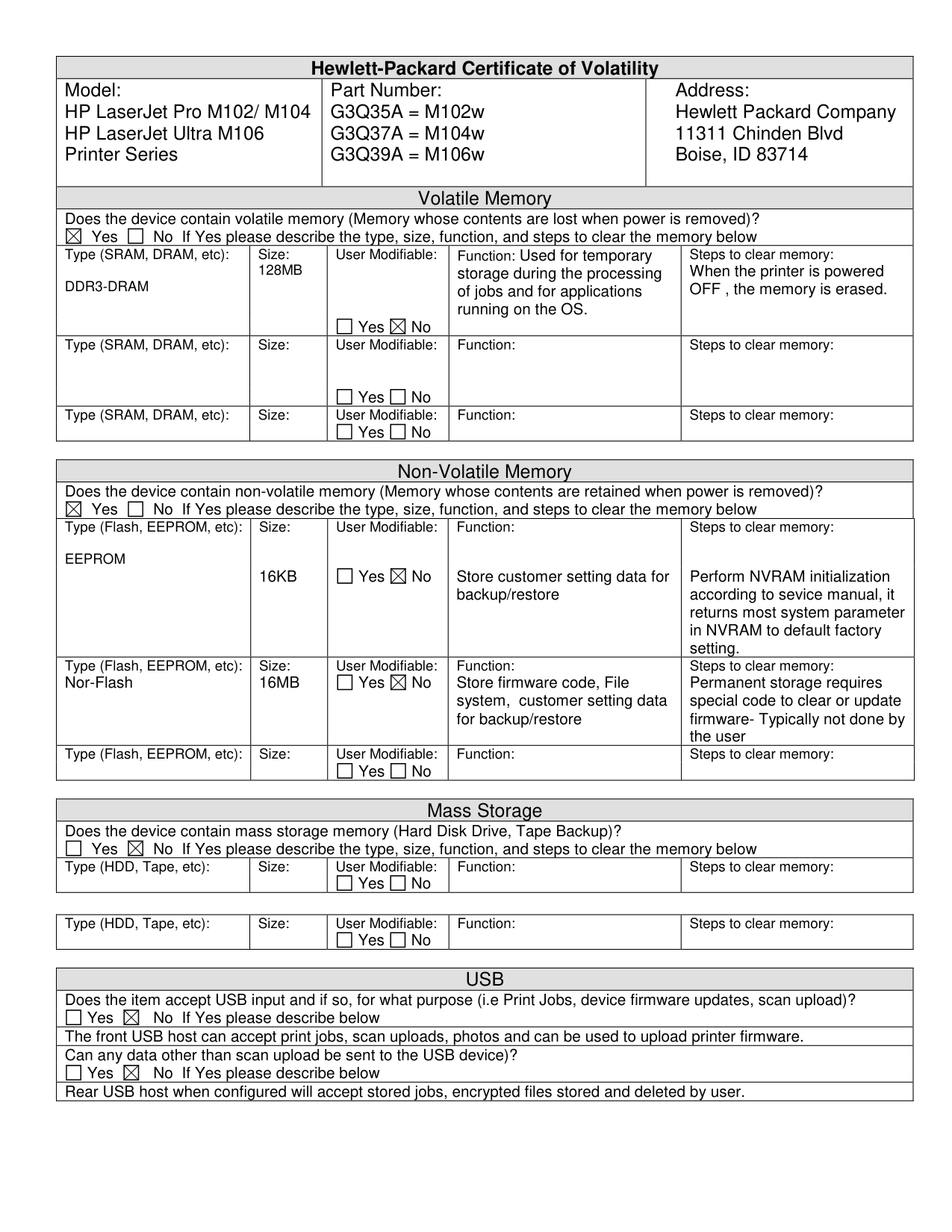
|Hewlett-Packard Certificate of Volatility|Hewlett-Packard Certificate of Volatility|Hewlett-Packard Certificate of Volatility|Hewlett-Packard Certificate of Volatility|Hewlett-Packard Certificate of Volatility|Hewlett-Packard Certificate of Volatility|Hewlett-Packard Certificate of Volatility| |---|---|---|---|---|---|---| |Model: HP LaserJet Pro M102/ M104 HP LaserJet Ultra M106 Printer Series|Model: HP LaserJet Pro M102/ M104 HP LaserJet Ultra M106 Printer Series|Part Number: G3Q35A = M102w G3Q37A = M104w G3Q39A = M106w
|Part Number: G3Q35A = M102w G3Q37A = M104w G3Q39A = M106w
|Part Number: G3Q35A = M102w G3Q37A = M104w G3Q39A = M106w
|Address: Hewlett Packard Company 11311 Chinden Blvd Boise, ID 83714|Address: Hewlett Packard Company 11311 Chinden Blvd Boise, ID 83714| |Volatile Memory|Volatile Memory|Volatile Memory|Volatile Memory|Volatile Memory|Volatile Memory|Volatile Memory| |Does the device contain volatile memory (Memory whose contents are lost when power is removed)? Yes
| | |---|
| | |---|
No If Yes please describe the type, size, function, and steps to clear the memory below
|Does the device contain volatile memory (Memory whose contents are lost when power is removed)? Yes
| | |---|
| | |---|
No If Yes please describe the type, size, function, and steps to clear the memory below
|Does the device contain volatile memory (Memory whose contents are lost when power is removed)? Yes
| | |---|
| | |---|
No If Yes please describe the type, size, function, and steps to clear the memory below
|Does the device contain volatile memory (Memory whose contents are lost when power is removed)? Yes
| | |---|
| | |---|
No If Yes please describe the type, size, function, and steps to clear the memory below
|Does the device contain volatile memory (Memory whose contents are lost when power is removed)? Yes
| | |---|
| | |---|
No If Yes please describe the type, size, function, and steps to clear the memory below
|Does the device contain volatile memory (Memory whose contents are lost when power is removed)? Yes
| | |---|
| | |---|
No If Yes please describe the type, size, function, and steps to clear the memory below
|Does the device contain volatile memory (Memory whose contents are lost when power is removed)? Yes
| | |---|
| | |---|
No If Yes please describe the type, size, function, and steps to clear the memory below
| |Type (SRAM, DRAM, etc): DDR3-DRAM|Size: 128MB
|Size: 128MB
|User Modifiable:
| | |---|
Yes
| | |---|
No|Function: Used for temporary storage during the processing of jobs and for applications running on the OS.|Function: Used for temporary storage during the processing of jobs and for applications running on the OS.|Steps to clear memory: When the printer is powered OFF , the memory is erased.| |Type (SRAM, DRAM, etc):|Size:
|Size:
|User Modifiable:
| | |---|
Yes
| | |---|
No|Function:|Function:|Steps to clear memory:| |Type (SRAM, DRAM, etc):|Size:|Size:|User Modifiable:
| | |---|
Yes
| | |---|
No
|Function:|Function:|Steps to clear memory:|
|Non-Volatile Memory|Non-Volatile Memory|Non-Volatile Memory|Non-Volatile Memory|Non-Volatile Memory| |---|---|---|---|---| |Does the device contain non-volatile memory (Memory whose contents are retained when power is removed)? Yes
| | |---|
| | |---|
No If Yes please describe the type, size, function, and steps to clear the memory below
|Does the device contain non-volatile memory (Memory whose contents are retained when power is removed)? Yes
| | |---|
| | |---|
No If Yes please describe the type, size, function, and steps to clear the memory below
|Does the device contain non-volatile memory (Memory whose contents are retained when power is removed)? Yes
| | |---|
| | |---|
No If Yes please describe the type, size, function, and steps to clear the memory below
|Does the device contain non-volatile memory (Memory whose contents are retained when power is removed)? Yes
| | |---|
| | |---|
No If Yes please describe the type, size, function, and steps to clear the memory below
|Does the device contain non-volatile memory (Memory whose contents are retained when power is removed)? Yes
| | |---|
| | |---|
No If Yes please describe the type, size, function, and steps to clear the memory below
| |Type (Flash, EEPROM, etc): EEPROM|Size:
16KB
|User Modifiable:
| | |---|
Yes
| | |---|
No|Function:
Store customer setting data for backup/restore|Steps to clear memory:
Perform NVRAM initialization according to sevice manual, it returns most system parameter in NVRAM to default factory setting.| |Type (Flash, EEPROM, etc): Nor-Flash|Size: 16MB|User Modifiable:
| | |---|
Yes
| | |---|
No
|Function: Store firmware code, File system, customer setting data for backup/restore|Steps to clear memory: Permanent storage requires special code to clear or update firmware- Typically not done by the user| |Type (Flash, EEPROM, etc):|Size:|User Modifiable:
| | |---|
Yes
| | |---|
No
|Function:|Steps to clear memory:|
|Mass Storage|Mass Storage|Mass Storage|Mass Storage|Mass Storage| |---|---|---|---|---| |Does the device contain mass storage memory (Hard Disk Drive, Tape Backup)? Yes
| | |---|
| | |---|
No If Yes please describe the type, size, function, and steps to clear the memory below
|Does the device contain mass storage memory (Hard Disk Drive, Tape Backup)? Yes
| | |---|
| | |---|
No If Yes please describe the type, size, function, and steps to clear the memory below
|Does the device contain mass storage memory (Hard Disk Drive, Tape Backup)? Yes
| | |---|
| | |---|
No If Yes please describe the type, size, function, and steps to clear the memory below
|Does the device contain mass storage memory (Hard Disk Drive, Tape Backup)? Yes
| | |---|
| | |---|
No If Yes please describe the type, size, function, and steps to clear the memory below
|Does the device contain mass storage memory (Hard Disk Drive, Tape Backup)? Yes
| | |---|
| | |---|
No If Yes please describe the type, size, function, and steps to clear the memory below
| |Type (HDD, Tape, etc):|Size:|User Modifiable:
| | |---|
Yes
| | |---|
No
|Function:|Steps to clear memory:|
|Type (HDD, Tape, etc):|Size:|User Modifiable:
| | |---|
Yes
| | |---|
No
|Function:|Steps to clear memory:| |---|---|---|---|---|
|USB| |---| |Does the item accept USB input and if so, for what purpose (i.e Print Jobs, device firmware updates, scan upload)? Yes
| | |---|
| | |---|
No If Yes please describe below
| |The front USB host can accept print jobs, scan uploads, photos and can be used to upload printer firmware.| |Can any data other than scan upload be sent to the USB device)? Yes
| | |---|
| | |---|
No If Yes please describe below
| |Rear USB host when configured will accept stored jobs, encrypted files stored and deleted by user.|
|RF/RFID|RF/RFID| |---|---| |Does the item use RF or RFID for receive or transmit of any data including remote diagnostics. (e.g. Cellular phone, Bluetooth)
| | |---|
Yes
| | |---|
No If Yes please describe below|Does the item use RF or RFID for receive or transmit of any data including remote diagnostics. (e.g. Cellular phone, Bluetooth)
| | |---|
Yes
| | |---|
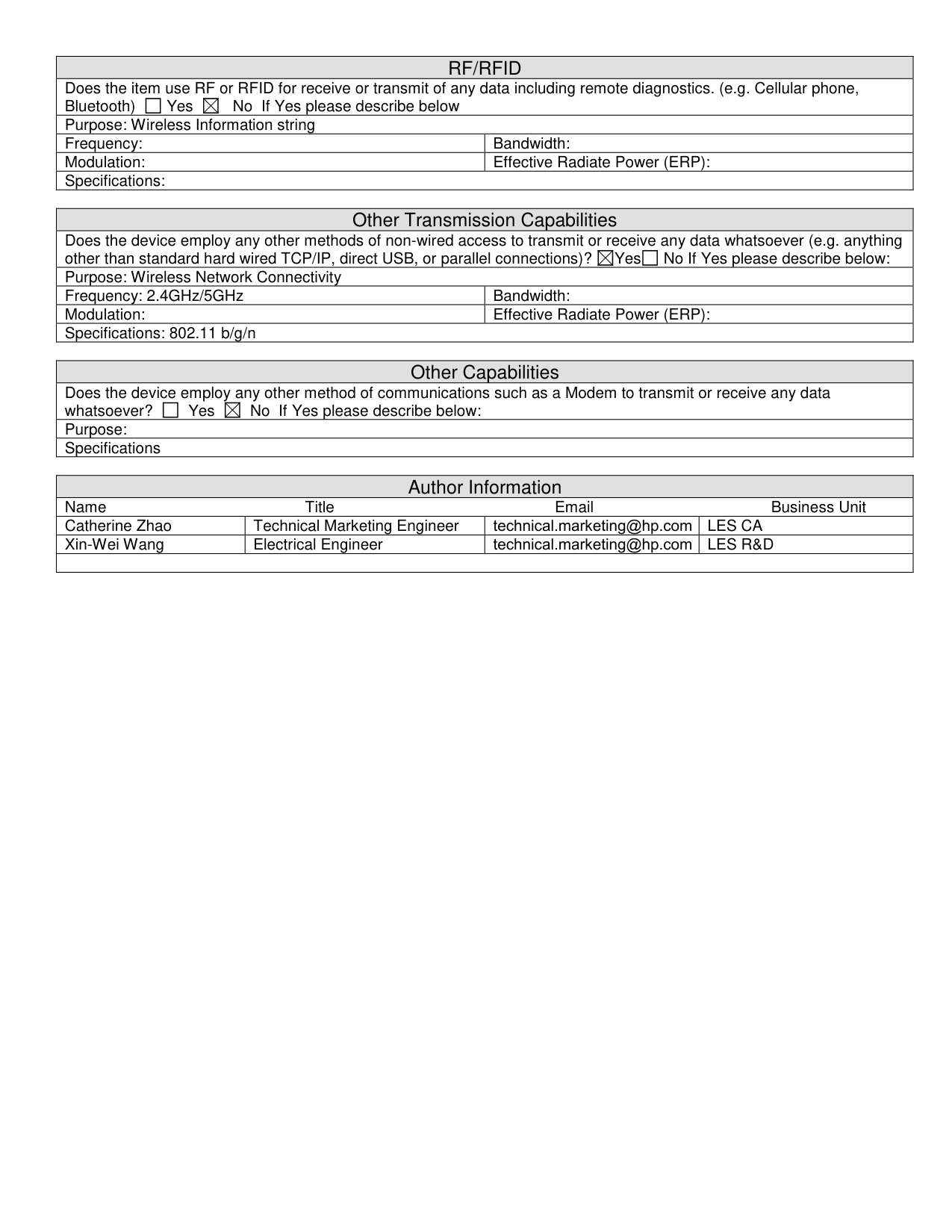
No If Yes please describe below| |Purpose: Wireless Information string|Purpose: Wireless Information string| |Frequency:|Bandwidth:| |Modulation:|Effective Radiate Power (ERP):| |Specifications:|Specifications:|
|Other Transmission Capabilities|Other Transmission Capabilities| |---|---| |Does the device employ any other methods of non-wired access to transmit or receive any data whatsoever (e.g. anything other than standard hard wired TCP/IP, direct USB, or parallel connections)?
| | |---|
Yes
| | |---|
No If Yes please describe below:|Does the device employ any other methods of non-wired access to transmit or receive any data whatsoever (e.g. anything other than standard hard wired TCP/IP, direct USB, or parallel connections)?
| | |---|
Yes
| | |---|
No If Yes please describe below:| |Purpose: Wireless Network Connectivity|Purpose: Wireless Network Connectivity| |Frequency: 2.4GHz/5GHz|Bandwidth:| |Modulation:|Effective Radiate Power (ERP):| |Specifications: 802.11 b/g/n|Specifications: 802.11 b/g/n|
|Other Capabilities| |---| |Does the device employ any other method of communications such as a Modem to transmit or receive any data whatsoever?
| | |---|
Yes
| | |---|
No If Yes please describe below:| |Purpose:| |Specifications|
|Author Information|Author Information|Author Information|Author Information| |---|---|---|---| |Name Title Email Business Unit|Name Title Email Business Unit|Name Title Email Business Unit|Name Title Email Business Unit| |Catherine Zhao|Technical Marketing Engineer|technical.marketing@hp.com|LES CA| |Xin-Wei Wang|Electrical Engineer|technical.marketing@hp.com|LES R&D| | | | | |