Ask AI
— answers from the official manualAnswers from the official manual.
Common questions
Common Questions
55 totalWhere can I find technical support and drivers for my printer?
You can find support, software, and drivers at www.hp.com/support/ljM14. You can also go to 123.hp.com/laserjet for downloads and the HP Smart app, or visit www.hp.com/go/LaserJetMobilePrinting for mobile printing information.
Can I print from my phone or tablet using the HP LaserJet Pro M14-M17?
Yes, you can print from a phone or tablet by connecting the device to the same wireless network as the printer. The HP Smart app can be used to manage printing from mobile devices. More mobile printing information is available at www.hp.com/go/LaserJetMobilePrinting.
Where can I find full support documentation for the HP LaserJet Pro M14-M17?
Full support documentation is available at www.hp.com/support/ljM14. You can also find software and drivers for your specific printer model and operating system at this website.
How do I register my HP LaserJet Pro M14-M17 printer?
You can register your printer by going to www.register.hp.com. Registration is recommended to receive product updates and support information.
What is the correct order of steps to set up the HP LaserJet Pro M14-M17 hardware?
You should first follow Steps 1 through 3 on the printer hardware setup poster, and then continue with Step 4, which involves downloading and installing the software. The getting started guide picks up from Step 4 onward.
How do I connect the HP LaserJet Pro M14-M17 to a grounded power outlet safely?
Connect the power cord between the printer and a grounded AC outlet, then turn on the printer. You must verify that the power source matches the voltage rating shown on the printer label, which is either 100-127 Vac or 220-240 Vac at 50/60 Hz. Only use the power cord supplied with the printer to avoid damage.
Show 49 more questions
When should I connect the USB cable during software installation?
How do I set up mobile printing on the HP LaserJet Pro M14-M17?
What are the voltage requirements for the HP LaserJet Pro M14-M17 printer?
How do I download and install the printer software on Windows or Mac?
Does the HP LaserJet Pro M14-M17 support AirPrint and Wi-Fi Direct?
How do I print from a phone or tablet using the HP LaserJet Pro M14-M17?
What is the correct way to power on the HP LaserJet Pro M14-M17 printer?
What steps should I follow to complete the initial hardware setup of the HP LaserJet Pro M14-M17?
What types of paper media can I use with the HP LaserJet Pro M14-M17?
How do I get the best print quality on the HP LaserJet Pro M14-M17?
What type of control panel does the HP LaserJet Pro M14-M17 have?
Can I print envelopes on the HP LaserJet Pro M14-M17?
Does the HP LaserJet Pro M17w support Wi-Fi Direct printing from mobile devices?
Can I use a third-party power cord with the HP LaserJet Pro M14-M17?
How do I install the software for the HP LaserJet Pro M14-M17 on Windows or Mac?
Where can I find additional support resources for the HP LaserJet Pro M14-M17?
What is the correct way to connect the HP LaserJet Pro M14-M17 printer to power?
What type of power cord should I use with my printer?
How do I download and install the printer software on my Windows or Mac computer?
Can I install the printer software from a CD?
When should I connect the USB cable during setup?
How can I print from my mobile device using this printer?
Does this printer support AirPrint and Wi-Fi Direct?
What are the first steps to set up my new HP LaserJet Pro M14-M17 printer?
What voltage specifications does the HP LaserJet Pro M14-M17 require?
What voltage does the HP LaserJet Pro M14-M17 printer require?
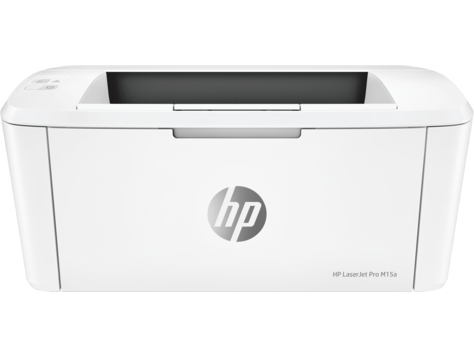
What are the product numbers for the HP LaserJet Pro M14-M17 series models?
How fast does the HP LaserJet Pro M17 print?
Does the HP LaserJet Pro M15a or M16a support wireless network printing?
What type of connectivity does the HP LaserJet Pro M14-M17 series support?
What paper sizes are supported by the HP LaserJet Pro M14-M17?
How do I download and install the printer software?
Does the HP LaserJet Pro M14-M17 support mobile printing?
Is there a difference in setup between Windows and Mac computers?
What voltage does the HP LaserJet Pro M14-M17 printer require?
What should I do before connecting the USB cable during setup?
Where can I find more information about mobile printing?
What are the first steps to set up my HP LaserJet Pro M14-M17?
What are the steps to set up my HP LaserJet Pro M14-M17 printer?
How do I connect the power cable safely?
Where can I find more information about my printer's software?
What power cable should I use with my HP LaserJet Pro M14-M17 printer?
How do I connect the power cable to my printer?
What do I need to do to print from my phone or tablet?
Where can I find support for my HP LaserJet Pro M14-M17?
What power voltage does the HP LaserJet Pro M14-M17 require?
How do I install the HP Smart app for mobile printing?
Can I use any power cable with my printer?
What should I do if I'm in an area with both 110V and 220V power?
Full Manual
9 pages
LaserJet Pro M14-M17 Hướng Dẫn Thông Số Kỹ Thuật

Bản quyền và Giấy phép © Copyright 2018 HP Development Company, L.P. Nghiêm cấm việc sao chép lại, phóng tác hoặc dịch mà không có sự chấp thuận trước bằng văn bản, ngoại trừ trường hợp được luật bản quyền cho phép. Thông tin có trong tài liệu này có thể được thay đổi mà không cần phải thông báo. Các bảo hành duy nhất dành cho các sản phẩm và dịch vụ HP đều được lập ra ở trên trong các bản tuyên bố bảo hành rõ ràng đi cùng với những sản phẩm và dịch vụ như thế. Không có gì trong tài liệu này được hiểu như là sự tạo thành một bảo hành phụ. HP sẽ không chịu trách nhiệm pháp lý đối với các lỗi hoặc sai sót kỹ thuật hoặc biên tập ở trong tài liệu này. Edition 3, 7/2019

Mục lục Nội dung chỉ dành cho web ................................................................................................................................................................... 1 Thông số kỹ thuật ................................................................................................................................................................. 2 Các khổ giấy và loại giấy được hỗ trợ ........................................................................................................................... 3 Giới thiệu ............................................................................................................................................................. 3 Khổ giấy được hỗ trợ ....................................................................................................................................... 3 Loại giấy được hỗ trợ ...................................................................................................................................... 3 Bảng chú dẫn .............................................................................................................................................................................................. 5
Viww
iii
Nội dung chỉ dành cho web
Viww
1
Thông số kỹ thuật Tên kiểu Số sản phẩm
M15a
W2G50A
M15wW2G51A
M16aW2G52A
M17aY5S43A
M17wY5S47A
Khả năng kết nối USB 2.0 Tốc độ CaoMáy chủ in để kết nối mạng không dây Không được hỗ trợ Không được hỗ trợ Không được hỗ trợ
Wi-Fi Direct khi in từ các thiết bị di động Không được hỗ trợ Không được hỗ trợ Không được hỗ trợ Màn hình và đầu vào của bảng điều khiển Bảng điều khiển LED In In 18 trang mỗi phút (ppm) trên giấy A4 và 19 ppm trên giấy Letter Không được hỗ trợ Không được hỗ trợ Không được hỗ trợ In In 20 trang mỗi phút (ppm) trên giấy A4 và 21 ppm trên giấy Letter Không được hỗ trợ Không được hỗ trợ 2 Nội dung chỉ dành cho web
Viww

Các khổ giấy và loại giấy được hỗ trợ Giới thiệu Thông tin sau đây cung cấp các khổ giấy và loại giấy được hỗ trợ. ● Khổ giấy được hỗ trợ ● Loại giấy được hỗ trợ Khổ giấy được hỗ trợ
Ghi Chú:
Để có kết quả in tốt nhất, hãy chọn đúng khổ giấy và loại giấy trong trình điều khiển in trước khi in. Bảng 1 Khổ giấy được hỗ trợ Chiều và kích thước Khay tiếp giấy Letter 216 x 279 mmA4
297 x 210 mmA5
148 x 210 mm Phong bì #10 105 x 241 mm Phong bì C5 162 x 229 mm Phong bì DL 110 x 220 mm Custom 76 x 127 đến 216 x 356 mm Loại giấy được hỗ trợGhi Chú:
Để có kết quả in tốt nhất, hãy chọn đúng khổ giấy và loại giấy trong trình điều khiển in trước khi in.Viww
Các khổ giấy và loại giấy được hỗ trợ 3 216 x 297mm
Bảng 2 Loại giấy được hỗ trợ Loại giấy Khay tiếp giấy Thường 75-89 g Nhẹ 65-74 g Nặng 90-120 g Nhãn Phong bì Liên kết 4 Nội dung chỉ dành cho web
Viww

Bảng chú dẫn
B
bộ nhớ đi kèm 2C
các loại giấy được hỗ trợ 3Gi
giấy khổ được hỗ trợ 3 loại được hỗ trợ 3Kh
khay đi kèm 2 khả năng chứa giấy 2 khổ giấy được hỗ trợ 3M
mạng được hỗ trợ 2Ph
phong bì khổ được hỗ trợ 3 phương tiện khổ được hỗ trợ 3 loại được hỗ trợ 3Tr
trang mỗi phút 2 trình điều khiển loại giấy 3Viww
Bảng chú dẫn 5
6 Bảng chú dẫn