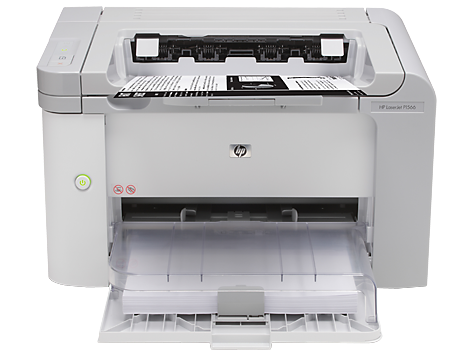
Ask AI
— answers from the official manualAnswers from the official manual.
Common questions
Common Questions
16 totalHow fast can the HP LaserJet Pro P1560 print?
The HP LaserJet Pro P1560 prints at up to 22 ppm for A4 black documents. The first page out is as fast as 7 seconds from Auto-Off mode using Instant-on Technology. Exact speed varies depending on system configuration, software application, driver, and document complexity. (Page 2)
How do I install the HP LaserJet Pro P1560 without a CD?
The printer supports HP Smart Install, which allows you to install the printer without a CD. Note that HP Smart Install works with Windows only. (Page 1)
What media types are supported by the HP LaserJet Pro P1560?
The printer supports paper (laser, plain, photo, rough, vellum), envelopes, labels, cardstock, transparencies, and postcards. Media weight ranges from 60 to 163 g/m². Supported sizes include A4, A5, B5, postcards, and envelopes (C5, DL, B5). (Page 2)
What operating systems are compatible with the HP LaserJet Pro P1560?
The printer is compatible with Windows 7 (32-bit/64-bit), Windows Vista (32-bit/64-bit), Windows XP (32-bit/64-bit), Server 2008, Server 2003, Mac OS X v10.4, v10.5, and v10.6, as well as Linux. For Linux, the current print driver is available at http://www.hplip.net. (Page 2)
Does the HP LaserJet Pro P1560 support duplex (two-sided) printing?
The HP LaserJet Pro P1560 supports duplex printing manually, with driver support provided. There is no automatic duplex printing unit built into this printer. (Page 2)
What is the recommended operating environment for the HP LaserJet Pro P1560?
The recommended operating temperature is 17.5 to 25°C, and the recommended operating humidity is 30 to 70% RH. The printer can operate within a broader range of 15 to 32.5°C and 10 to 80% RH. Storage temperature ranges from -20 to 40°C with storage humidity of 10 to 90% RH. (Page 2)
Show 10 more questions
How can I install the printer software without a CD?
What is the recommended monthly page volume for the HP LaserJet Pro P1560?
What types of media can the HP LaserJet Pro P1560 handle?
What is the paper tray capacity of the HP LaserJet Pro P1560?
What are the power requirements and energy consumption of the HP LaserJet Pro P1560?
What is the print resolution of the HP LaserJet Pro P1560?
What control panel indicators and buttons are on the HP LaserJet Pro P1560?
What is the power consumption of my HP LaserJet Pro P1560 during operation?
How do I connect my HP LaserJet Pro P1560 to a wireless network?
What operating systems does the HP LaserJet Pro P1560 support?
Full Manual
2 pages
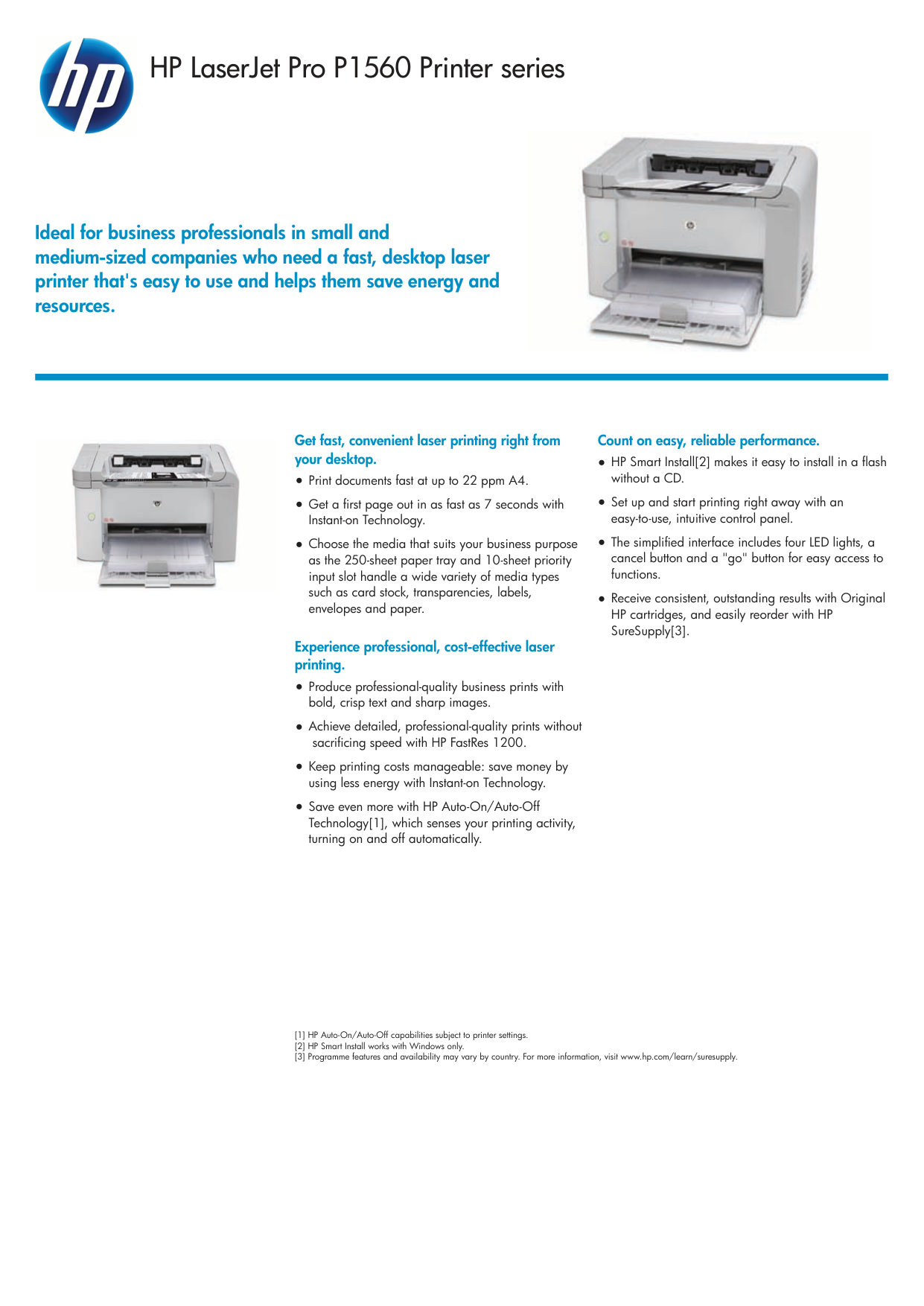
HP LaserJet Pro P1560 Printer series Ideal for business professionals in small and medium-sized companies who need a fast, desktop laser printer that's easy to use and helps them save energy and resources. [1] HP Auto-On/Auto-Off capabilities subject to printer settings. [2] HP Smart Install works with Windows only. [3] Programme features and availability may vary by country. For more information, visit www.hp.com/learn/suresupply. Get fast, convenient laser printing right from your desktop. ●Print documents fast at up to 22 ppm A4. ●Get a first page out in as fast as 7 seconds with Instant-on Technology. ●Choose the media that suits your business purpose as the 250-sheet paper tray and 10-sheet priority input slot handle a wide variety of media types such as card stock, transparencies, labels, envelopes and paper. Experience professional, cost-effective laser printing. ●Produce professional-quality business prints with bold, crisp text and sharp images. ●Achieve detailed, professional-quality prints without sacrificing speed with HP FastRes 1200. ●Keep printing costs manageable: save money by using less energy with Instant-on Technology. ●Save even more with HP Auto-On/Auto-Off Technology[1], which senses your printing activity, turning on and off automatically. Count on easy, reliable performance. ●HP Smart Install[2] makes it easy to install in a flash without a CD. ●Set up and start printing right away with an easy-to-use, intuitive control panel. ●The simplified interface includes four LED lights, a cancel button and a "go" button for easy access to functions. ●Receive consistent, outstanding results with Original HP cartridges, and easily reorder with HP SureSupply[3].
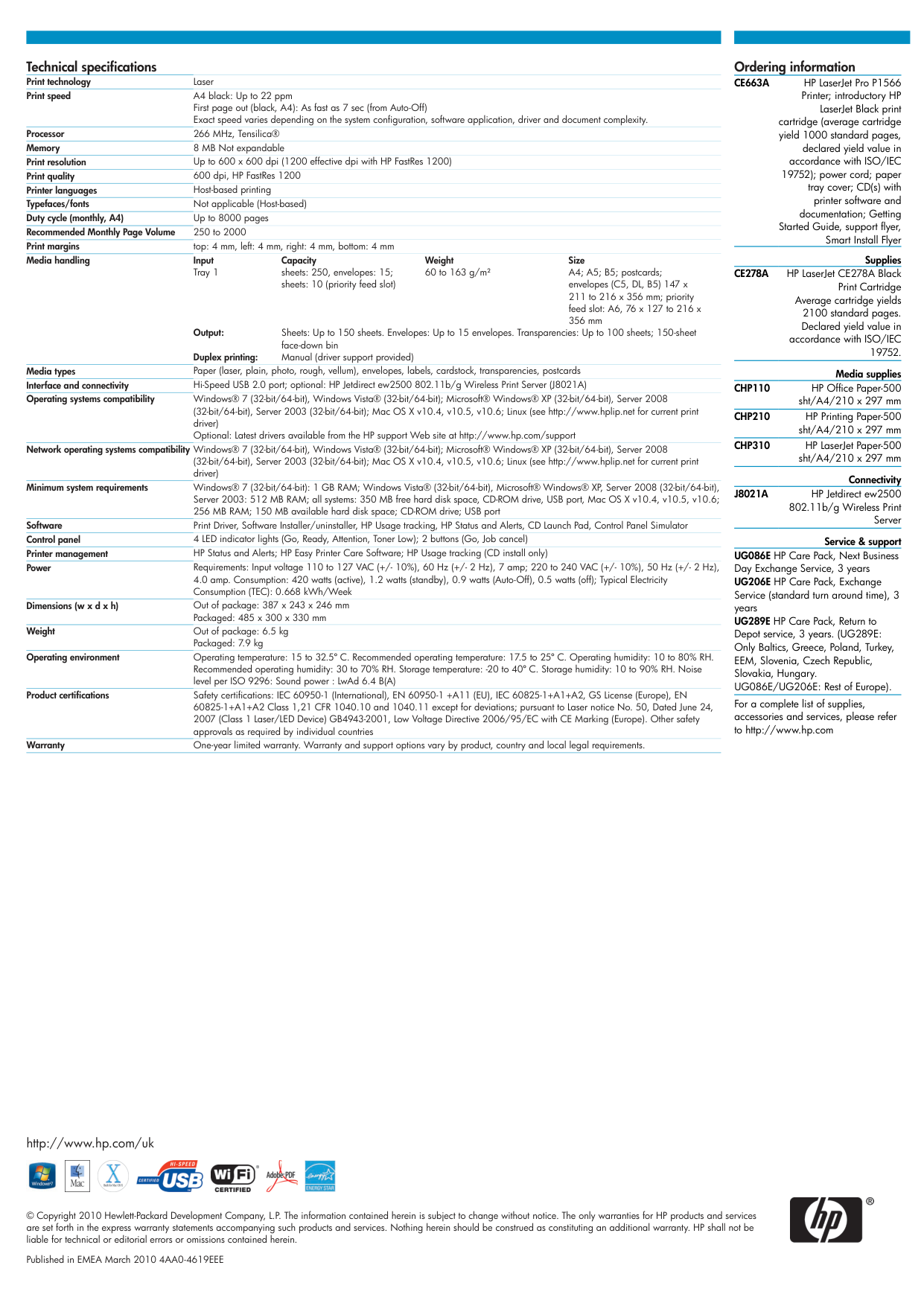
Ordering information Technical specifications Print technology Laser Print speed A4 black: Up to 22 ppm First page out (black, A4): As fast as 7 sec (from Auto-Off) Exact speed varies depending on the system configuration, software application, driver and document complexity. Processor 266 MHz, Tensilica® Memory 8 MB Not expandable Print resolution Up to 600 x 600 dpi (1200 effective dpi with HP FastRes 1200) Print quality 600 dpi, HP FastRes 1200 Printer languages Host-based printing Typefaces/fonts Not applicable (Host-based) Duty cycle (monthly, A4) Up to 8000 pages Recommended Monthly Page Volume 250 to 2000 Print margins top: 4 mm, left: 4 mm, right: 4 mm, bottom: 4 mm Media handling Input Capacity Weight Size Tray 1 sheets: 250, envelopes: 15; sheets: 10 (priority feed slot) 60 to 163 g/m² A4; A5; B5; postcards; envelopes (C5, DL, B5) 147 x 211 to 216 x 356 mm; priority feed slot: A6, 76 x 127 to 216 x 356 mm Output: Sheets: Up to 150 sheets. Envelopes: Up to 15 envelopes. Transparencies: Up to 100 sheets; 150-sheet face-down bin Duplex printing: Manual (driver support provided) Media types Paper (laser, plain, photo, rough, vellum), envelopes, labels, cardstock, transparencies, postcards Interface and connectivity Hi-Speed USB 2.0 port; optional: HP Jetdirect ew2500 802.11b/g Wireless Print Server (J8021A) Operating systems compatibility Windows® 7 (32-bit/64-bit), Windows Vista® (32-bit/64-bit); Microsoft® Windows® XP (32-bit/64-bit), Server 2008 (32-bit/64-bit), Server 2003 (32-bit/64-bit); Mac OS X v10.4, v10.5, v10.6; Linux (see http://www.hplip.net for current print driver) Optional: Latest drivers available from the HP support Web site at http://www.hp.com/support Network operating systems compatibility Windows® 7 (32-bit/64-bit), Windows Vista® (32-bit/64-bit); Microsoft® Windows® XP (32-bit/64-bit), Server 2008 (32-bit/64-bit), Server 2003 (32-bit/64-bit); Mac OS X v10.4, v10.5, v10.6; Linux (see http://www.hplip.net for current print driver) Minimum system requirements Windows® 7 (32-bit/64-bit): 1 GB RAM; Windows Vista® (32-bit/64-bit), Microsoft® Windows® XP, Server 2008 (32-bit/64-bit), Server 2003: 512 MB RAM; all systems: 350 MB free hard disk space, CD-ROM drive, USB port, Mac OS X v10.4, v10.5, v10.6; 256 MB RAM; 150 MB available hard disk space; CD-ROM drive; USB port Software Print Driver, Software Installer/uninstaller, HP Usage tracking, HP Status and Alerts, CD Launch Pad, Control Panel Simulator Control panel 4 LED indicator lights (Go, Ready, Attention, Toner Low); 2 buttons (Go, Job cancel) Printer management HP Status and Alerts; HP Easy Printer Care Software; HP Usage tracking (CD install only) Power Requirements: Input voltage 110 to 127 VAC (+/- 10%), 60 Hz (+/- 2 Hz), 7 amp; 220 to 240 VAC (+/- 10%), 50 Hz (+/- 2 Hz), 4.0 amp. Consumption: 420 watts (active), 1.2 watts (standby), 0.9 watts (Auto-Off), 0.5 watts (off); Typical Electricity Consumption (TEC): 0.668 kWh/Week Dimensions (w x d x h) Out of package: 387 x 243 x 246 mm Packaged: 485 x 300 x 330 mm Weight Out of package: 6.5 kg Packaged: 7.9 kg Operating environment Operating temperature: 15 to 32.5º C. Recommended operating temperature: 17.5 to 25º C. Operating humidity: 10 to 80% RH. Recommended operating humidity: 30 to 70% RH. Storage temperature: -20 to 40º C. Storage humidity: 10 to 90% RH. Noise level per ISO 9296: Sound power : LwAd 6.4 B(A) Product certifications Safety certifications: IEC 60950-1 (International), EN 60950-1 +A11 (EU), IEC 60825-1+A1+A2, GS License (Europe), EN 60825-1+A1+A2 Class 1,21 CFR 1040.10 and 1040.11 except for deviations; pursuant to Laser notice No. 50, Dated June 24, 2007 (Class 1 Laser/LED Device) GB4943-2001, Low Voltage Directive 2006/95/EC with CE Marking (Europe). Other safety approvals as required by individual countries Warranty One-year limited warranty. Warranty and support options vary by product, country and local legal requirements.