
Ask AI
— answers from the official manualAnswers from the official manual.
Common questions
Common Questions
20 totalWhat are the print speeds for the HP OfficeJet 8010e?
The HP OfficeJet 8010e prints black (A4, ISO) at up to 18 ppm and colour (A4, ISO) at up to 10 ppm. Draft mode speeds are faster, reaching up to 28 ppm for black and up to 24 ppm for colour on A4 paper.
What ink cartridges come in the box with the HP OfficeJet 8010e?
The printer (model 228G2D) includes HP 915 Black, Cyan, Magenta, and Yellow Original Ink Cartridges in the box. For ink volume and page yield information, HP directs users to hp.com/go/learnaboutsupplies.
What replacement ink cartridges are compatible with the HP OfficeJet 8010e?
The printer is compatible with HP 915 standard cartridges (approximately 300 pages for black, 315 pages for cyan, magenta, and yellow) and HP 915XL High Yield cartridges (approximately 825 pages each for all colours). Standard cartridge part numbers are 3YM15AA (Cyan), 3YM16AA (Magenta), 3YM17AA (Yellow), and 3YM18AA (Black).
Can the HP OfficeJet 8010e use third-party or refilled ink cartridges?
The printer uses dynamic security measures to block cartridges using a non-HP chip, and periodic firmware updates will maintain the effectiveness of these measures. A reused HP chip does enable the use of reused, remanufactured, and refilled cartridges. More information is available at http://www.hp.com/learn/ds.
What wireless connectivity does the HP OfficeJet 8010e support?
The printer features built-in Wi-Fi 802.11a/b/g/n wireless connectivity. It supports mobile printing via Chrome OS, the HP Smart app, Apple AirPrint, Wi-Fi Direct Printing, and Mopria. Note that wireless operations are compatible with 2.4 GHz and 5.0 GHz operations only.
What is the maximum paper input capacity of the HP OfficeJet 8010e?
The standard paper tray holds up to 225 sheets, while the Auto Document Feeder (ADF) holds up to 35 sheets. The printer can also hold up to 10 envelopes or up to 60 card sheets in the input tray.
Show 14 more questions
What are the operating environment requirements for the HP OfficeJet 8010e?
How do I set up the HP OfficeJet 8010e for the first time?
What supplies come with the HP OfficeJet 8010e?
How can I fix the error code E07 on my HP OfficeJet 8010e?
How do I perform automatic two-sided printing on my HP OfficeJet 8010e?
What should I do if my HP OfficeJet 8010e stops working during Wi-Fi setup?
Can I print borderless photos on my HP OfficeJet 8010e?
How do I maintain the HP OfficeJet 8010e to ensure optimal performance?
What operating systems are compatible with the HP OfficeJet 8010e?
What is the recommended monthly print volume for the HP OfficeJet 8010e?
What scan file formats does the HP OfficeJet 8010e support?
What steps do I take if my HP OfficeJet 8010e is not scanning properly?
Can I use Instant Ink with my HP OfficeJet 8010e?
How do I enroll in the HP+ program for my HP OfficeJet 8010e?
Full Manual
3 pages
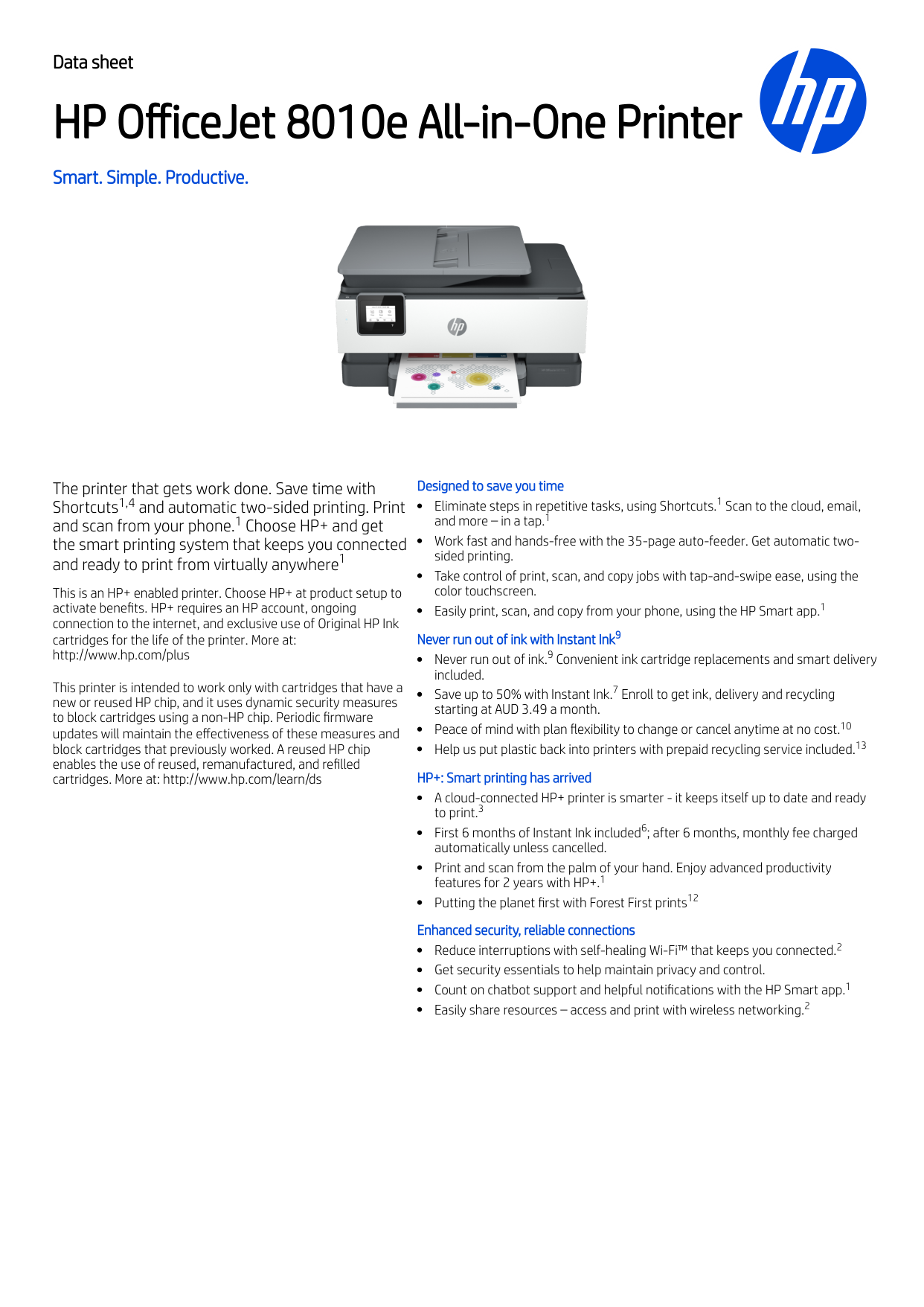
Data sheet HP OfficeJet 8010e All-in-One Printer Smart. Simple. Productive. The printer that gets work done. Save time with Shortcuts and automatic two-sided printing. Print and scan from your phone. Choose HP+ and get the smart printing system that keeps you connected and ready to print from virtually anywhere This is an HP+ enabled printer. Choose HP+ at product setup to activate benefits. HP+ requires an HP account, ongoing connection to the internet, and exclusive use of Original HP Ink cartridges for the life of the printer. More at: http://www.hp.com/plus This printer is intended to work only with cartridges that have a new or reused HP chip, and it uses dynamic security measures to block cartridges using a non-HP chip. Periodic firmware updates will maintain the effectiveness of these measures and block cartridges that previously worked. A reused HP chip enables the use of reused, remanufactured, and refilled cartridges. More at: http://www.hp.com/learn/ds Designed to save you time Eliminate steps in repetitive tasks, using Shortcuts. Scan to the cloud, email, and more – in a tap. Work fast and hands-free with the 35-page auto-feeder. Get automatic two- sided printing. Take control of print, scan, and copy jobs with tap-and-swipe ease, using the color touchscreen. Easily print, scan, and copy from your phone, using the HP Smart app. Never run out of ink with Instant Ink Never run out of ink. Convenient ink cartridge replacements and smart delivery included. Save up to 50% with Instant Ink. Enroll to get ink, delivery and recycling starting at AUD 3.49 a month. Peace of mind with plan flexibility to change or cancel anytime at no cost. Help us put plastic back into printers with prepaid recycling service included. HP+: Smart printing has arrived A cloud-connected HP+ printer is smarter - it keeps itself up to date and ready to print. First 6 months of Instant Ink included ; after 6 months, monthly fee charged automatically unless cancelled. Print and scan from the palm of your hand. Enjoy advanced productivity features for 2 years with HP+. Putting the planet first with Forest First prints Enhanced security, reliable connections Reduce interruptions with self-healing Wi-Fi™ that keeps you connected. Get security essentials to help maintain privacy and control. Count on chatbot support and helpful notifications with the HP Smart app. Easily share resources – access and print with wireless networking. 1,4 1 1 1 1 1 9 9 7 10 13 3 6 1 12 2 1 2
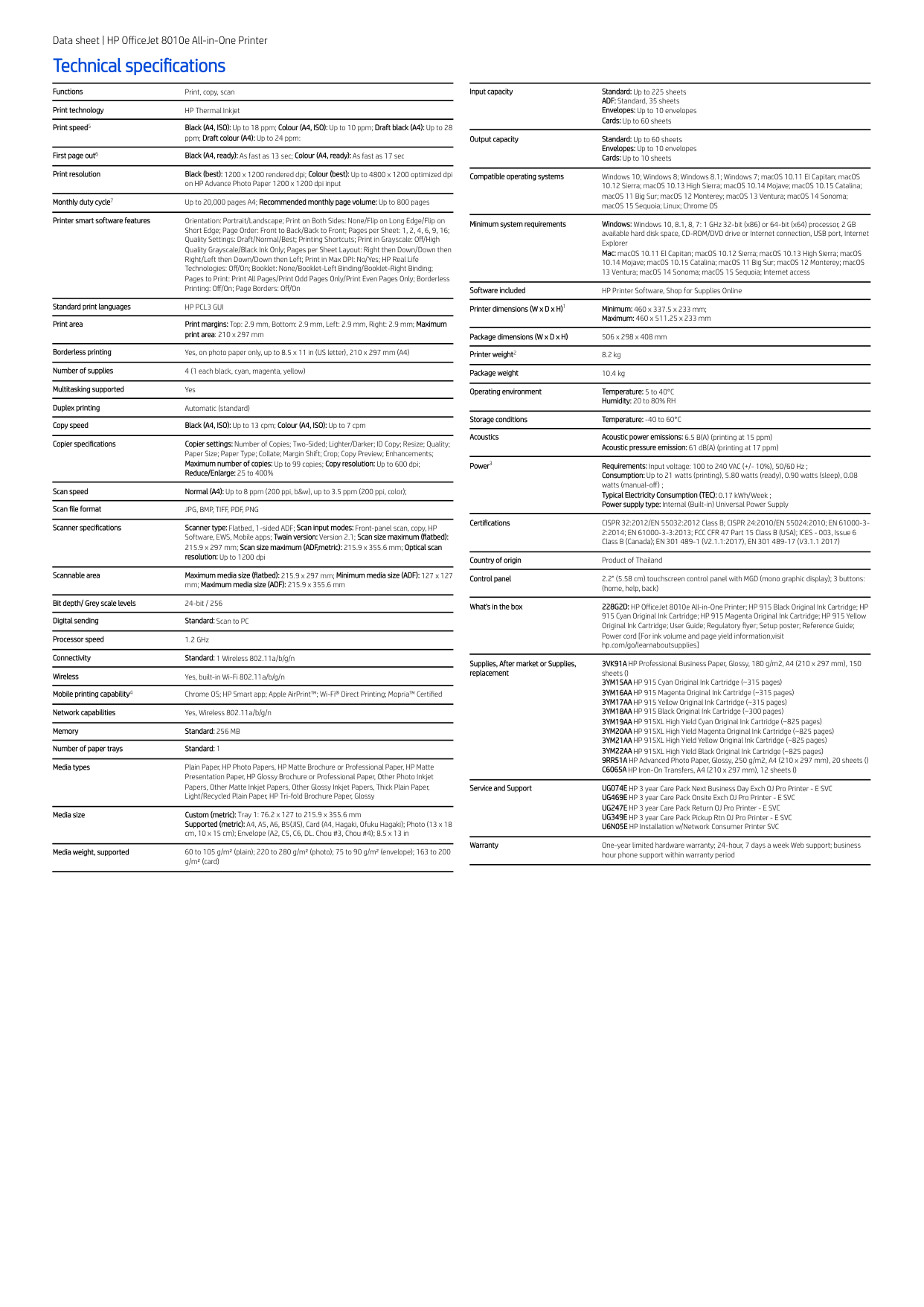
Data sheet | HP OfficeJet 8010e All-in-One Printer Technical specifications Functions Print, copy, scan Print technology HP Thermal Inkjet Print speed Black (A4, ISO): Up to 18 ppm; Colour (A4, ISO): Up to 10 ppm; Draft black (A4): Up to 28 ppm; Draft colour (A4): Up to 24 ppm: First page out Black (A4, ready): As fast as 13 sec; Colour (A4, ready): As fast as 17 sec Print resolution Black (best): 1200 x 1200 rendered dpi; Colour (best): Up to 4800 x 1200 optimized dpi on HP Advance Photo Paper 1200 x 1200 dpi input Monthly duty cycle Up to 20,000 pages A4; Recommended monthly page volume: Up to 800 pages Printer smart software features Orientation: Portrait/Landscape; Print on Both Sides: None/Flip on Long Edge/Flip on Short Edge; Page Order: Front to Back/Back to Front; Pages per Sheet: 1, 2, 4, 6, 9, 16; Quality Settings: Draft/Normal/Best; Printing Shortcuts; Print in Grayscale: Off/High Quality Grayscale/Black Ink Only; Pages per Sheet Layout: Right then Down/Down then Right/Left then Down/Down then Left; Print in Max DPI: No/Yes; HP Real Life Technologies: Off/On; Booklet: None/Booklet-Left Binding/Booklet-Right Binding; Pages to Print: Print All Pages/Print Odd Pages Only/Print Even Pages Only; Borderless Printing: Off/On; Page Borders: Off/On Standard print languages
Hp Pcl3 Gui
Print area Print margins: Top: 2.9 mm, Bottom: 2.9 mm, Left: 2.9 mm, Right: 2.9 mm; Maximum print area: 210 x 297 mm Borderless printing Yes, on photo paper only, up to 8.5 x 11 in (US letter), 210 x 297 mm (A4) Number of supplies 4 (1 each black, cyan, magenta, yellow) Multitasking supported Yes Duplex printing Automatic (standard) Copy speed Black (A4, ISO): Up to 13 cpm; Colour (A4, ISO): Up to 7 cpm Copier specifications Copier settings: Number of Copies; Two-Sided; Lighter/Darker; ID Copy; Resize; Quality; Paper Size; Paper Type; Collate; Margin Shift; Crop; Copy Preview; Enhancements; Maximum number of copies: Up to 99 copies; Copy resolution: Up to 600 dpi; Reduce/Enlarge: 25 to 400% Scan speed Normal (A4): Up to 8 ppm (200 ppi, b&w), up to 3.5 ppm (200 ppi, color); Scan file formatJpg, Bmp, Tiff, Pdf, Png
Scanner specifications Scanner type: Flatbed, 1-sided ADF; Scan input modes: Front-panel scan, copy, HP Software, EWS, Mobile apps; Twain version: Version 2.1; Scan size maximum (flatbed): 215.9 x 297 mm; Scan size maximum (ADF,metric): 215.9 x 355.6 mm; Optical scan resolution: Up to 1200 dpi Scannable area Maximum media size (flatbed): 215.9 x 297 mm; Minimum media size (ADF): 127 x 127 mm; Maximum media size (ADF): 215.9 x 355.6 mm Bit depth/ Grey scale levels 24-bit / 256 Digital sending Standard: Scan to PC Processor speed 1.2 GHz Connectivity Standard: 1 Wireless 802.11a/b/g/n Wireless Yes, built-in Wi-Fi 802.11a/b/g/n Mobile printing capability Chrome OS; HP Smart app; Apple AirPrint™; Wi-Fi® Direct Printing; Mopria™ Certified Network capabilities Yes, Wireless 802.11a/b/g/n Memory Standard: 256 MB Number of paper trays Standard: 1 Media types Plain Paper, HP Photo Papers, HP Matte Brochure or Professional Paper, HP Matte Presentation Paper, HP Glossy Brochure or Professional Paper, Other Photo Inkjet Papers, Other Matte Inkjet Papers, Other Glossy Inkjet Papers, Thick Plain Paper, Light/Recycled Plain Paper, HP Tri-fold Brochure Paper, Glossy Media size Custom (metric): Tray 1: 76.2 x 127 to 215.9 x 355.6 mm Supported (metric): A4, A5, A6, B5(JIS), Card (A4, Hagaki, Ofuku Hagaki); Photo (13 x 18 cm, 10 x 15 cm); Envelope (A2, C5, C6, DL. Chou #3, Chou #4); 8.5 x 13 in Media weight, supported 60 to 105 g/m² (plain); 220 to 280 g/m² (photo); 75 to 90 g/m² (envelope); 163 to 200 g/m² (card) Input capacity Standard: Up to 225 sheets ADF: Standard, 35 sheets Envelopes: Up to 10 envelopes Cards: Up to 60 sheets Output capacity Standard: Up to 60 sheets Envelopes: Up to 10 envelopes Cards: Up to 10 sheets Compatible operating systems Windows 10; Windows 8; Windows 8.1; Windows 7; macOS 10.11 El Capitan; macOS 10.12 Sierra; macOS 10.13 High Sierra; macOS 10.14 Mojave; macOS 10.15 Catalina; macOS 11 Big Sur; macOS 12 Monterey; macOS 13 Ventura; macOS 14 Sonoma; macOS 15 Sequoia; Linux; Chrome OS Minimum system requirements Windows: Windows 10, 8.1, 8, 7: 1 GHz 32-bit (x86) or 64-bit (x64) processor, 2 GB available hard disk space, CD-ROM/DVD drive or Internet connection, USB port, Internet Explorer Mac: macOS 10.11 El Capitan; macOS 10.12 Sierra; macOS 10.13 High Sierra; macOS 10.14 Mojave; macOS 10.15 Catalina; macOS 11 Big Sur; macOS 12 Monterey; macOS 13 Ventura; macOS 14 Sonoma; macOS 15 Sequoia; Internet access Software included HP Printer Software, Shop for Supplies Online Printer dimensions (W x D x H) Minimum: 460 x 337.5 x 233 mm; Maximum: 460 x 511.25 x 233 mm Package dimensions (W x D x H) 506 x 298 x 408 mm Printer weight 8.2 kg Package weight 10.4 kg Operating environment Temperature: 5 to 40°C Humidity: 20 to 80% RH Storage conditions Temperature: -40 to 60°C Acoustics Acoustic power emissions: 6.5 B(A) (printing at 15 ppm) Acoustic pressure emission: 61 dB(A) (printing at 17 ppm) Power Requirements: Input voltage: 100 to 240 VAC (+/- 10%), 50/60 Hz ; Consumption: Up to 21 watts (printing), 5.80 watts (ready), 0.90 watts (sleep), 0.08 watts (manual-off) ; Typical Electricity Consumption (TEC): 0.17 kWh/Week ; Power supply type: Internal (Built-in) Universal Power Supply Certifications CISPR 32:2012/EN 55032:2012 Class B; CISPR 24:2010/EN 55024:2010; EN 61000-3- 2:2014; EN 61000-3-3:2013; FCC CFR 47 Part 15 Class B (USA); ICES - 003, Issue 6 Class B (Canada); EN 301 489-1 (V2.1.1:2017), EN 301 489-17 (V3.1.1 2017) Country of origin Product of Thailand Control panel 2.2" (5.58 cm) touchscreen control panel with MGD (mono graphic display); 3 buttons: (home, help, back) What's in the box 228G2D: HP OfficeJet 8010e All-in-One Printer; HP 915 Black Original Ink Cartridge; HP 915 Cyan Original Ink Cartridge; HP 915 Magenta Original Ink Cartridge; HP 915 Yellow Original Ink Cartridge; User Guide; Regulatory flyer; Setup poster; Reference Guide; Power cord [For ink volume and page yield information,visit hp.com/go/learnaboutsupplies] Supplies, After market or Supplies, replacement 3VK91A HP Professional Business Paper, Glossy, 180 g/m2, A4 (210 x 297 mm), 150 sheets () 3YM15AA HP 915 Cyan Original Ink Cartridge (~315 pages) 3YM16AA HP 915 Magenta Original Ink Cartridge (~315 pages) 3YM17AA HP 915 Yellow Original Ink Cartridge (~315 pages) 3YM18AA HP 915 Black Original Ink Cartridge (~300 pages) 3YM19AA HP 915XL High Yield Cyan Original Ink Cartridge (~825 pages) 3YM20AA HP 915XL High Yield Magenta Original Ink Cartridge (~825 pages) 3YM21AA HP 915XL High Yield Yellow Original Ink Cartridge (~825 pages) 3YM22AA HP 915XL High Yield Black Original Ink Cartridge (~825 pages) 9RR51A HP Advanced Photo Paper, Glossy, 250 g/m2, A4 (210 x 297 mm), 20 sheets () C6065A HP Iron-On Transfers, A4 (210 x 297 mm), 12 sheets () Service and Support UG074E HP 3 year Care Pack Next Business Day Exch OJ Pro Printer - E SVC UG469E HP 3 year Care Pack Onsite Exch OJ Pro Printer - E SVC UG247E HP 3 year Care Pack Return OJ Pro Printer - E SVC UG349E HP 3 year Care Pack Pickup Rtn OJ Pro Printer - E SVC U6N05E HP Installation w/Network Consumer Printer SVC Warranty One-year limited hardware warranty; 24-hour, 7 days a week Web support; business hour phone support within warranty period 5 6 7 4 1 2 3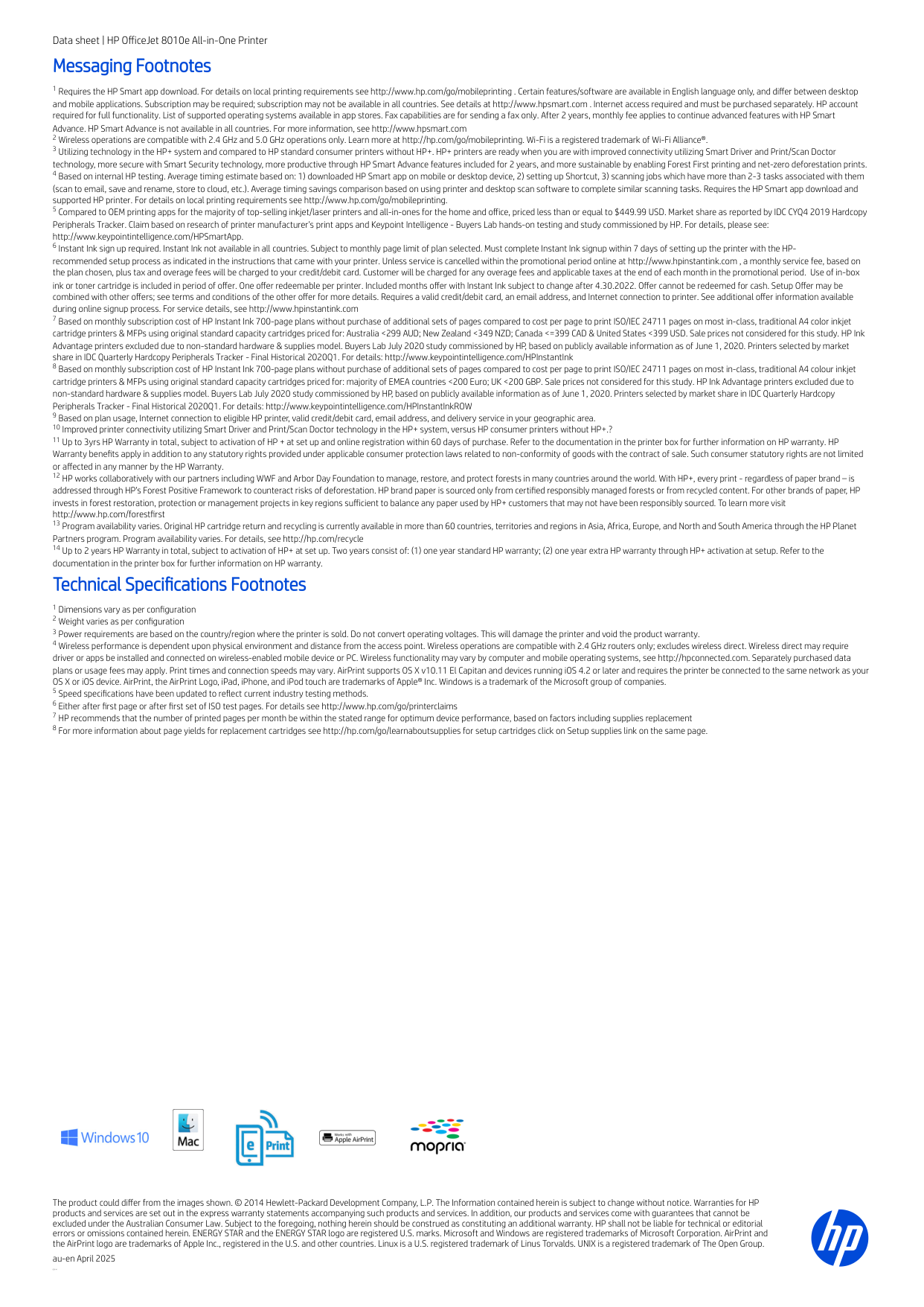
Data sheet | HP OfficeJet 8010e All-in-One Printer Messaging Footnotes Requires the HP Smart app download. For details on local printing requirements see http://www.hp.com/go/mobileprinting . Certain features/software are available in English language only, and differ between desktop and mobile applications. Subscription may be required; subscription may not be available in all countries. See details at http://www.hpsmart.com . Internet access required and must be purchased separately. HP account required for full functionality. List of supported operating systems available in app stores. Fax capabilities are for sending a fax only. After 2 years, monthly fee applies to continue advanced features with HP Smart Advance. HP Smart Advance is not available in all countries. For more information, see http://www.hpsmart.com Wireless operations are compatible with 2.4 GHz and 5.0 GHz operations only. Learn more at http://hp.com/go/mobileprinting. Wi-Fi is a registered trademark of Wi-Fi Alliance®. Utilizing technology in the HP+ system and compared to HP standard consumer printers without HP+. HP+ printers are ready when you are with improved connectivity utilizing Smart Driver and Print/Scan Doctor technology, more secure with Smart Security technology, more productive through HP Smart Advance features included for 2 years, and more sustainable by enabling Forest First printing and net-zero deforestation prints. Based on internal HP testing. Average timing estimate based on: 1) downloaded HP Smart app on mobile or desktop device, 2) setting up Shortcut, 3) scanning jobs which have more than 2-3 tasks associated with them (scan to email, save and rename, store to cloud, etc.). Average timing savings comparison based on using printer and desktop scan software to complete similar scanning tasks. Requires the HP Smart app download and supported HP printer. For details on local printing requirements see http://www.hp.com/go/mobileprinting. Compared to OEM printing apps for the majority of top-selling inkjet/laser printers and all-in-ones for the home and office, priced less than or equal to $449.99 USD. Market share as reported by IDC CYQ4 2019 Hardcopy Peripherals Tracker. Claim based on research of printer manufacturer’s print apps and Keypoint Intelligence - Buyers Lab hands-on testing and study commissioned by HP. For details, please see: http://www.keypointintelligence.com/HPSmartApp. Instant Ink sign up required. Instant Ink not available in all countries. Subject to monthly page limit of plan selected. Must complete Instant Ink signup within 7 days of setting up the printer with the HP- recommended setup process as indicated in the instructions that came with your printer. Unless service is cancelled within the promotional period online at http://www.hpinstantink.com , a monthly service fee, based on the plan chosen, plus tax and overage fees will be charged to your credit/debit card. Customer will be charged for any overage fees and applicable taxes at the end of each month in the promotional period. Use of in-box ink or toner cartridge is included in period of offer. One offer redeemable per printer. Included months offer with Instant Ink subject to change after 4.30.2022. Offer cannot be redeemed for cash. Setup Offer may be combined with other offers; see terms and conditions of the other offer for more details. Requires a valid credit/debit card, an email address, and Internet connection to printer. See additional offer information available during online signup process. For service details, see http://www.hpinstantink.com Based on monthly subscription cost of HP Instant Ink 700-page plans without purchase of additional sets of pages compared to cost per page to print ISO/IEC 24711 pages on most in-class, traditional A4 color inkjet cartridge printers & MFPs using original standard capacity cartridges priced for: Australia <299 AUD; New Zealand <349 NZD; Canada <=399 CAD & United States <399 USD. Sale prices not considered for this study. HP Ink Advantage printers excluded due to non-standard hardware & supplies model. Buyers Lab July 2020 study commissioned by HP, based on publicly available information as of June 1, 2020. Printers selected by market share in IDC Quarterly Hardcopy Peripherals Tracker - Final Historical 2020Q1. For details: http://www.keypointintelligence.com/HPInstantInk Based on monthly subscription cost of HP Instant Ink 700-page plans without purchase of additional sets of pages compared to cost per page to print ISO/IEC 24711 pages on most in-class, traditional A4 colour inkjet cartridge printers & MFPs using original standard capacity cartridges priced for: majority of EMEA countries <200 Euro; UK <200 GBP. Sale prices not considered for this study. HP Ink Advantage printers excluded due to non-standard hardware & supplies model. Buyers Lab July 2020 study commissioned by HP, based on publicly available information as of June 1, 2020. Printers selected by market share in IDC Quarterly Hardcopy Peripherals Tracker - Final Historical 2020Q1. For details: http://www.keypointintelligence.com/HPInstantInkROW Based on plan usage, Internet connection to eligible HP printer, valid credit/debit card, email address, and delivery service in your geographic area. Improved printer connectivity utilizing Smart Driver and Print/Scan Doctor technology in the HP+ system, versus HP consumer printers without HP+.? Up to 3yrs HP Warranty in total, subject to activation of HP + at set up and online registration within 60 days of purchase. Refer to the documentation in the printer box for further information on HP warranty. HP Warranty benefits apply in addition to any statutory rights provided under applicable consumer protection laws related to non-conformity of goods with the contract of sale. Such consumer statutory rights are not limited or affected in any manner by the HP Warranty. HP works collaboratively with our partners including WWF and Arbor Day Foundation to manage, restore, and protect forests in many countries around the world. With HP+, every print - regardless of paper brand – is addressed through HP’s Forest Positive Framework to counteract risks of deforestation. HP brand paper is sourced only from certified responsibly managed forests or from recycled content. For other brands of paper, HP invests in forest restoration, protection or management projects in key regions sufficient to balance any paper used by HP+ customers that may not have been responsibly sourced. To learn more visit http://www.hp.com/forestfirst Program availability varies. Original HP cartridge return and recycling is currently available in more than 60 countries, territories and regions in Asia, Africa, Europe, and North and South America through the HP Planet Partners program. Program availability varies. For details, see http://hp.com/recycle Up to 2 years HP Warranty in total, subject to activation of HP+ at set up. Two years consist of: (1) one year standard HP warranty; (2) one year extra HP warranty through HP+ activation at setup. Refer to the documentation in the printer box for further information on HP warranty. Technical Specifications Footnotes Dimensions vary as per configuration Weight varies as per configuration Power requirements are based on the country/region where the printer is sold. Do not convert operating voltages. This will damage the printer and void the product warranty. Wireless performance is dependent upon physical environment and distance from the access point. Wireless operations are compatible with 2.4 GHz routers only; excludes wireless direct. Wireless direct may require driver or apps be installed and connected on wireless-enabled mobile device or PC. Wireless functionality may vary by computer and mobile operating systems, see http://hpconnected.com. Separately purchased data plans or usage fees may apply. Print times and connection speeds may vary. AirPrint supports OS X v10.11 El Capitan and devices running iOS 4.2 or later and requires the printer be connected to the same network as your OS X or iOS device. AirPrint, the AirPrint Logo, iPad, iPhone, and iPod touch are trademarks of Apple® Inc. Windows is a trademark of the Microsoft group of companies. Speed specifications have been updated to reflect current industry testing methods. Either after first page or after first set of ISO test pages. For details see http://www.hp.com/go/printerclaims HP recommends that the number of printed pages per month be within the stated range for optimum device performance, based on factors including supplies replacement For more information about page yields for replacement cartridges see http://hp.com/go/learnaboutsupplies for setup cartridges click on Setup supplies link on the same page. The product could differ from the images shown. © 2014 Hewlett-Packard Development Company, L.P. The Information contained herein is subject to change without notice. Warranties for HP products and services are set out in the express warranty statements accompanying such products and services. In addition, our products and services come with guarantees that cannot be excluded under the Australian Consumer Law. Subject to the foregoing, nothing herein should be construed as constituting an additional warranty. HP shall not be liable for technical or editorial errors or omissions contained herein. ENERGY STAR and the ENERGY STAR logo are registered U.S. marks. Microsoft and Windows are registered trademarks of Microsoft Corporation. AirPrint and the AirPrint logo are trademarks of Apple Inc., registered in the U.S. and other countries. Linux is a U.S. registered trademark of Linus Torvalds. UNIX is a registered trademark of The Open Group. au-en April 2025