
HP Officejet Pro 8600 E All IN One Printer Series N911
Ask AI
— answers from the official manualAnswers from the official manual.
Common questions
Common Questions
9 totalWhy does the ink level seem to decrease during initialization?
The ink is used during the initialization process, which prepares the printer and cartridges for printing. In addition, this helps keep the printheads clear and ensures proper ink flow (Page 23).
What accessories can I install to improve functionality?
You may install an automatic two-sided printing accessory (duplexer) to print on both sides of the paper automatically and optional tray 2 for additional paper capacity (Page 23).
How do I ensure my printer is securely connected?
Plug in the power cord and turn on your HP Officejet Pro 8600 to start connecting it to a power source. Follow instructions displayed on the control panel during setup (Page 23).
What language settings can I apply?
Upon setting up your HP Officejet Pro 8600, configure the language and location preferences from the instructions presented on the printer control panel (Page 23).
What are the setup steps for installing ink cartridges?
Follow the instructions on the printer control panel to install ink cartridges and load paper during initialization of the printer. This process might consume some ink, which is normal as it prepares the printer and cartridges for printing (Page 23).
How do I register my HP Officejet Pro 8600 printer?
Go to http://www.register.hp.com to register your printer. This registration ensures quicker service and more efficient support (Page 23).
Full Manual
4 pages


OFFICEJET PRO 8600


Start


www.hp.com/go/customercare
21
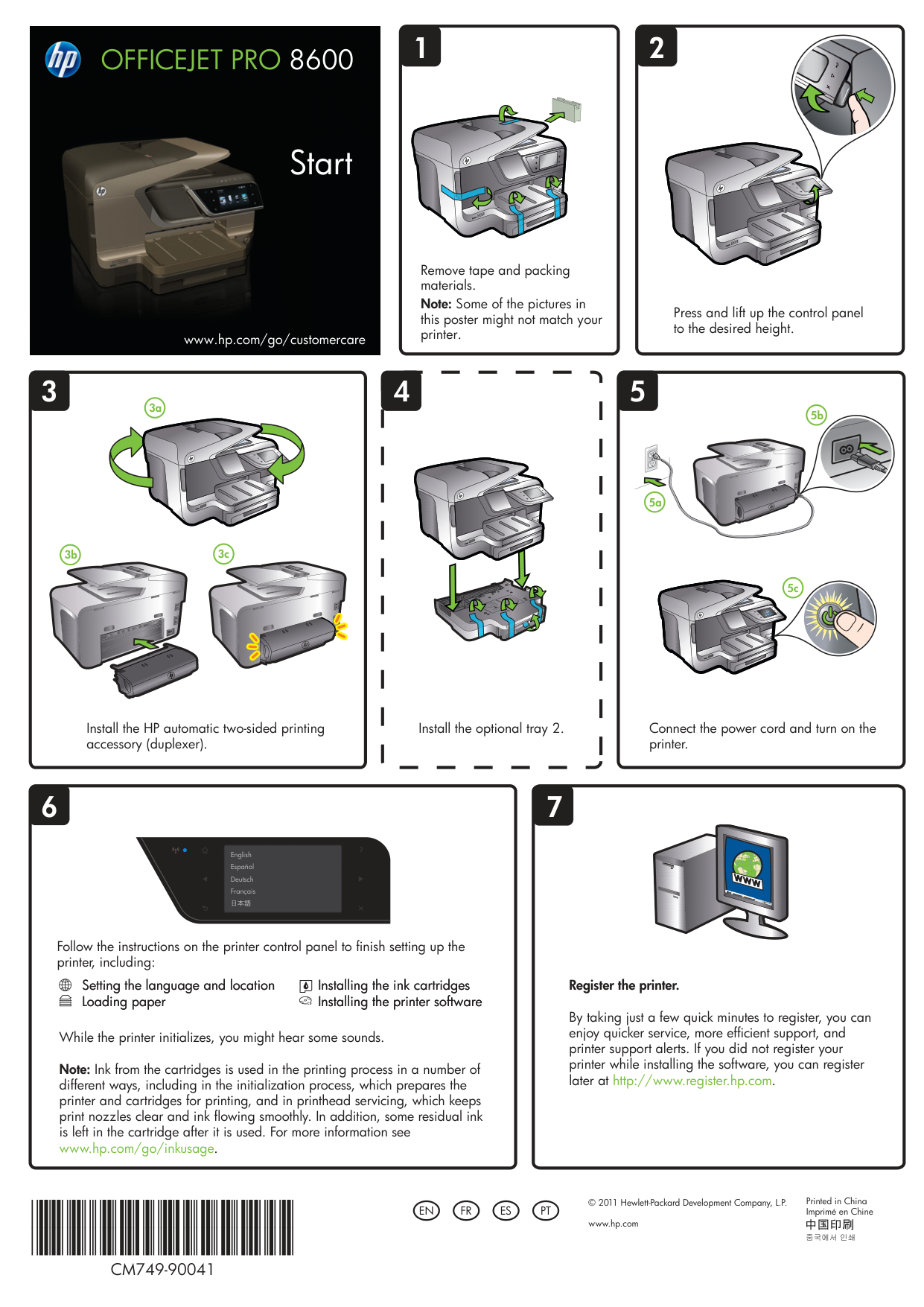
Remove tape and packing materials. Note: Some of the pictures in this poster might not match your printer.
Press and lift up the control panel to the desired height.
534
3a
3b 3c
5a

5b
5c
Install the HP automatic two-sided printing accessory (duplexer).
Install the optional tray 2.
Connect the power cord and turn on the printer.
76
English Español Deutsch Français 日本語
Follow the instructions on the printer control panel to finish setting up the printer, including:
Setting the language and location Loading paper
Installing the ink cartridges Installing the printer software
While the printer initializes, you might hear some sounds. Note: Ink from the cartridges is used in the printing process in a number of different ways, including in the initialization process, which prepares the printer and cartridges for printing, and in printhead servicing, which keeps print nozzles clear and ink flowing smoothly. In addition, some residual ink is left in the cartridge after it is used. For more information see www.hp.com/go/inkusage.
Register the printer.
By taking just a few quick minutes to register, you can enjoy quicker service, more efficient support, and printer support alerts. If you did not register your printer while installing the software, you can register later at http://www.register.hp.com.
CM749-90041
Printed in China
© 2011 Hewlett-Packard Development Company, L.P. www.hp.com
Imprimé en ChineENFRESPT


OFFICEJET PRO 8600


Démarrage
www.hp.com/go/customercare
1
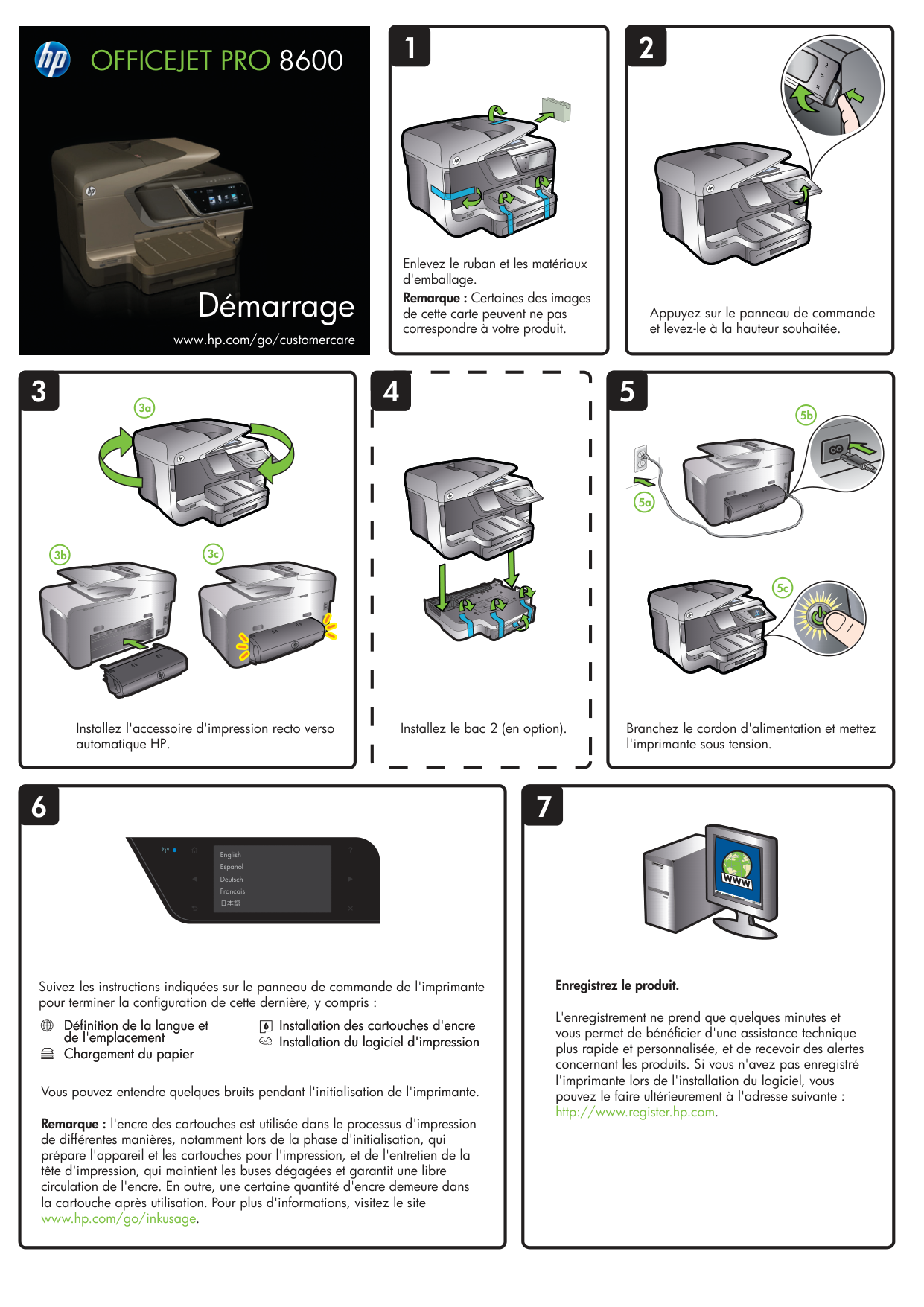
Enlevez le ruban et les matériaux d'emballage. Remarque : Certaines des images
de cette carte peuvent ne pas correspondre à votre produit.
3 4
3a
3b 3c
Installez l'accessoire d'impression recto verso automatique HP.
Installez le bac 2 (en option).
76
English Español Deutsch Français 日本語
2
Appuyez sur le panneau de commande et levez-le à la hauteur souhaitée.
5
5a

5b
5c
Branchez le cordon d'alimentation et mettez l'imprimante sous tension.
Suivez les instructions indiquées sur le panneau de commande de l'imprimante pour terminer la configuration de cette dernière, y compris :
Définition de la langue et de l'emplacement
Installation des cartouches d'encre Installation du logiciel d'impression
Chargement du papier
Vous pouvez entendre quelques bruits pendant l'initialisation de l'imprimante. Remarque : l'encre des cartouches est utilisée dans le processus d'impression de différentes manières, notamment lors de la phase d'initialisation, qui prépare l'appareil et les cartouches pour l'impression, et de l'entretien de la tête d'impression, qui maintient les buses dégagées et garantit une libre circulation de l'encre. En outre, une certaine quantité d'encre demeure dans la cartouche après utilisation. Pour plus d'informations, visitez le site
Enregistrez le produit.
L'enregistrement ne prend que quelques minutes et vous permet de bénéficier d'une assistance technique plus rapide et personnalisée, et de recevoir des alertes concernant les produits. Si vous n'avez pas enregistré l'imprimante lors de l'installation du logiciel, vous pouvez le faire ultérieurement à l'adresse suivante : http://www.register.hp.com.


OFFICEJET PRO 8600


Inicio
Lea esto primero


www.hp.com/go/customercare
21
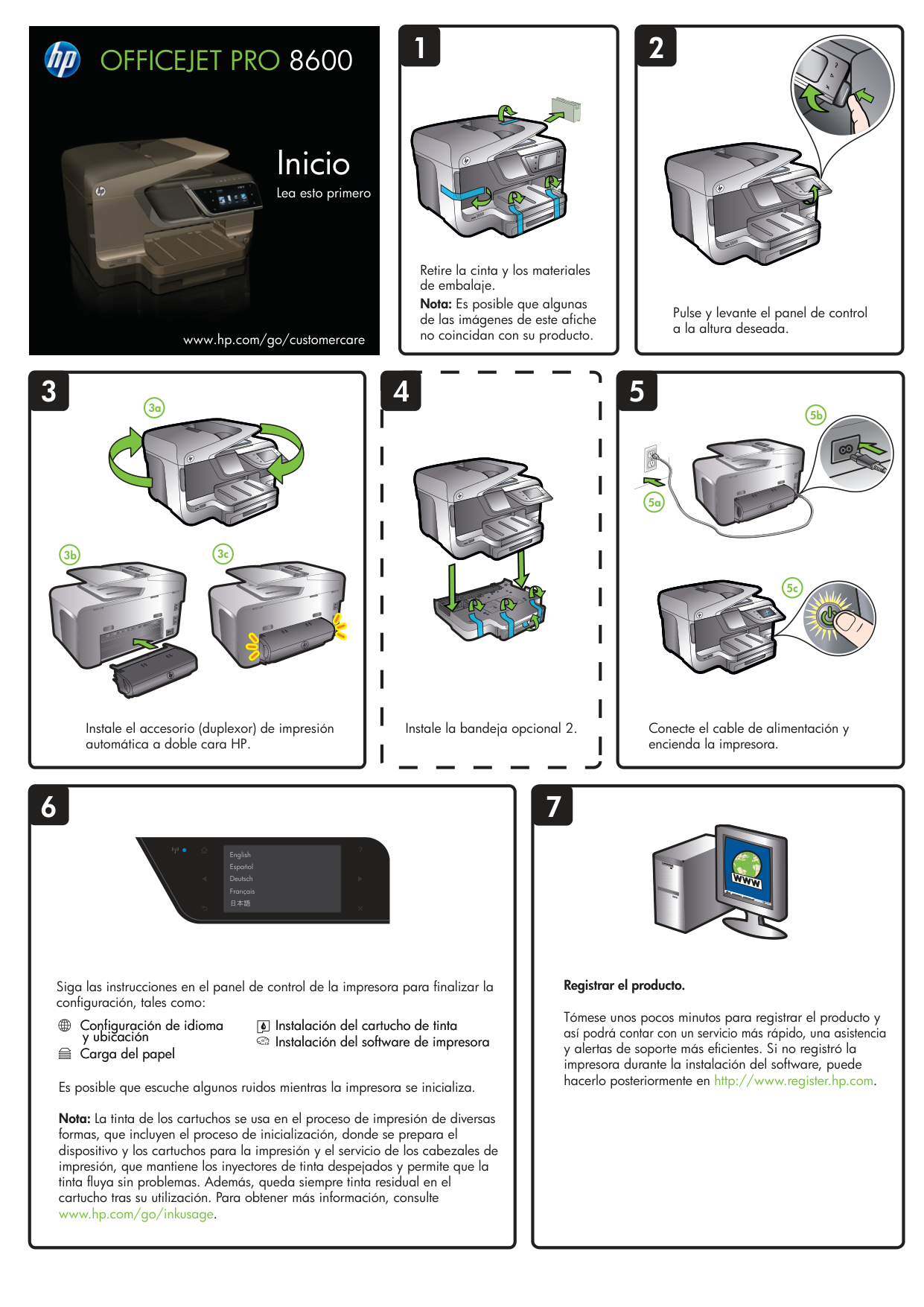
Retire la cinta y los materiales de embalaje. Nota: Es posible que algunas de las imágenes de este afiche no coincidan con su producto.
Pulse y levante el panel de control a la altura deseada.
534
3a
3b 3c
5a

5b
5c
Instale el accesorio (duplexor) de impresión automática a doble cara HP.
Instale la bandeja opcional 2.
76
English Español Deutsch Français 日本語
Conecte el cable de alimentación y encienda la impresora.
Siga las instrucciones en el panel de control de la impresora para finalizar la configuración, tales como:
Configuración de idioma y ubicación
Instalación del cartucho de tinta Instalación del software de impresora
Carga del papel
Es posible que escuche algunos ruidos mientras la impresora se inicializa. Nota: La tinta de los cartuchos se usa en el proceso de impresión de diversas formas, que incluyen el proceso de inicialización, donde se prepara el dispositivo y los cartuchos para la impresión y el servicio de los cabezales de impresión, que mantiene los inyectores de tinta despejados y permite que la tinta fluya sin problemas. Además, queda siempre tinta residual en el cartucho tras su utilización. Para obtener más información, consulte
Registrar el producto.
Tómese unos pocos minutos para registrar el producto y así podrá contar con un servicio más rápido, una asistencia y alertas de soporte más eficientes. Si no registró la impresora durante la instalación del software, puede hacerlo posteriormente en http://www.register.hp.com.


OFFICEJET PRO 8600


Iniciar


www.hp.com/go/customercare
21
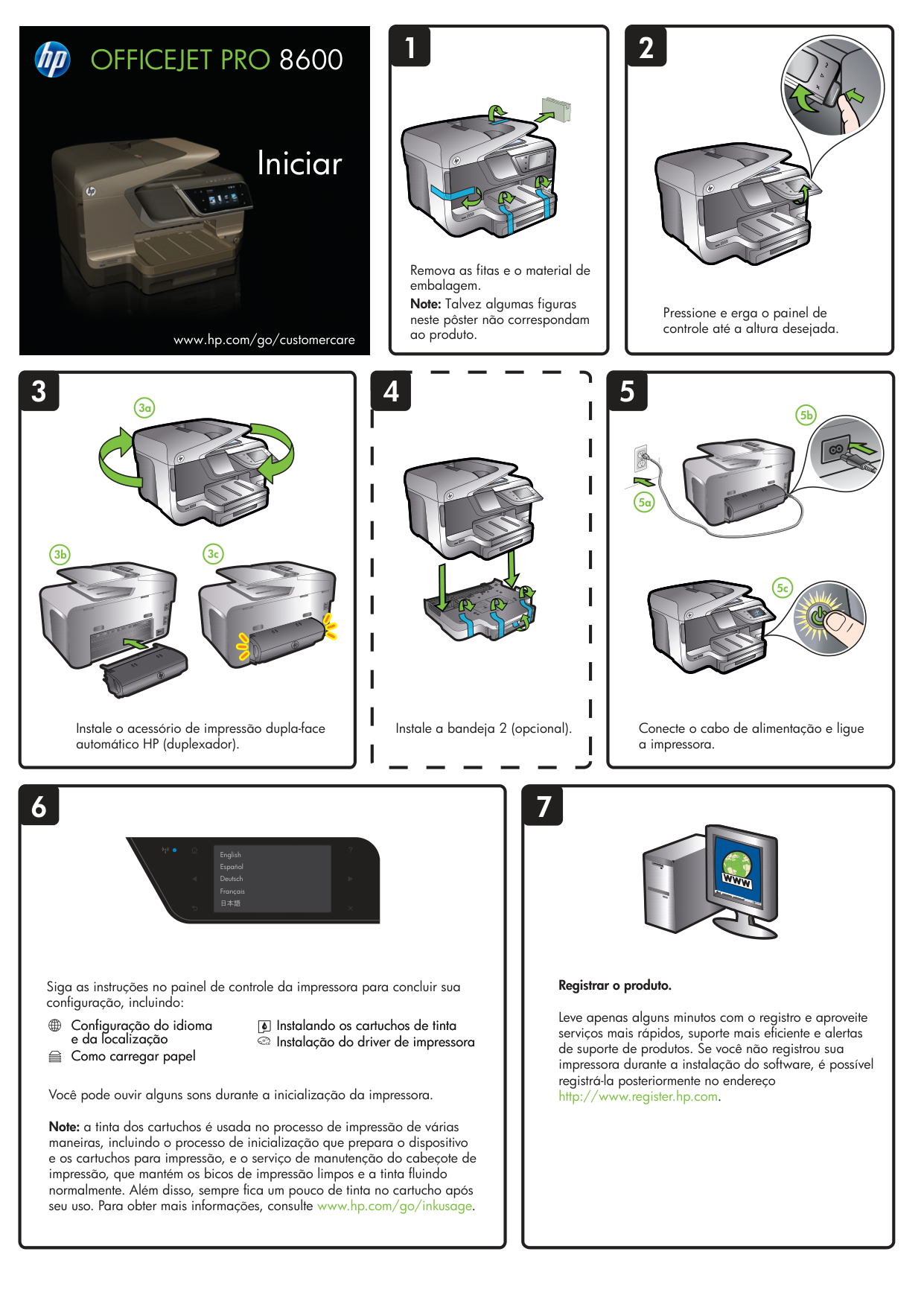
Remova as fitas e o material de embalagem. Note: Talvez algumas figuras neste pôster não correspondam ao produto.
Pressione e erga o painel de controle até a altura desejada.
534
3a
3b 3c
5a

5b
5c
Instale o acessório de impressão dupla-face automático HP (duplexador).
Instale a bandeja 2 (opcional).
76
English Español Deutsch Français 日本語
Conecte o cabo de alimentação e ligue a impressora.
Siga as instruções no painel de controle da impressora para concluir sua configuração, incluindo:
Configuração do idioma e da localização Como carregar papel
Instalando os cartuchos de tinta Instalação do driver de impressora
Você pode ouvir alguns sons durante a inicialização da impressora. Note: a tinta dos cartuchos é usada no processo de impressão de várias maneiras, incluindo o processo de inicialização que prepara o dispositivo e os cartuchos para impressão, e o serviço de manutenção do cabeçote de impressão, que mantém os bicos de impressão limpos e a tinta fluindo normalmente. Além disso, sempre fica um pouco de tinta no cartucho após seu uso. Para obter mais informações, consulte www.hp.com/go/inkusage.
Registrar o produto.
Leve apenas alguns minutos com o registro e aproveite serviços mais rápidos, suporte mais eficiente e alertas de suporte de produtos. Se você não registrou sua impressora durante a instalação do software, é possível registrá-la posteriormente no endereço http://www.register.hp.com.