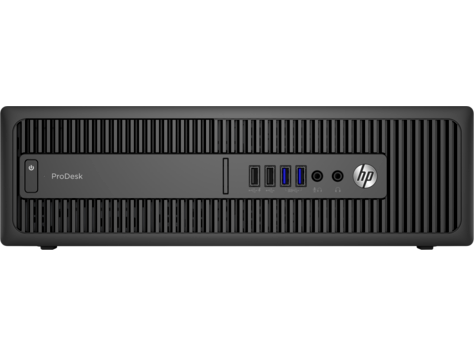
Ask AI
— answers from the official manualAnswers from the official manual.
Common questions
Common Questions
19 totalHow do I delete a Power-On or Setup password on the HP ProDesk 600 G1?
To delete a password, enter Computer Setup by pressing Esc during boot and then pressing F10. When the key icon appears, type your current password followed by a slash (/) or alternate delimiter character, for example: currentpassword/, then press Enter. This removes the password from the system. (Page 3)
How do I clear the CMOS on the HP ProDesk 600 G1?
Turn off the computer and disconnect the power cord from the power outlet, then remove the access panel. On the system board, press and hold the CMOS button for 5 seconds. Replace the chassis access panel, reconnect the power cord, and turn on the computer to allow it to start. (Page 3)
What should I do if I see the error message '1720-SMART Hard Drive Detects Imminent Failure'?
This error means your hard drive is about to fail. First, enter Computer Setup and run the Drive Protection System test under Storage > DPS Self-Test to confirm the error, and apply a hard drive firmware patch if applicable. You should immediately back up all contents and then replace the hard drive. (Page 2)
What is the maximum RAM supported by the HP ProDesk 600 G1 SFF, and what type of memory does it use?
The HP ProDesk 600 G1 SFF supports a maximum of 32 GB of RAM. The memory type is Non-ECC DDR3 PC3-12800 (1600 MHz), and available module sizes include 2 GB, 4 GB, and 8 GB. (Page 1)
What are the front and rear I/O ports available on the HP ProDesk 600 G1 SFF?
The front of the PC includes 2 USB 3.0 ports, 2 USB 2.0 ports, a headphone jack, and a microphone jack. The rear provides 2 USB 3.0 ports, 4 USB 2.0 ports, 2 DisplayPort outputs, VGA, a serial port, PS/2 mouse and keyboard connectors, an RJ-45 network connector, and 3.5mm audio in/out jacks. (Page 1)
What should I do if I see a '164-Memory Size Error' or '201-Memory Error' POST message?
These errors indicate an incorrect memory configuration. Run Setup by pressing F10 and check that the DIMMs are properly seated, are the correct type, and are HP-compatible. If the issue persists, remove DIMMs one at a time and reboot to isolate the faulty module, and replace the system board if necessary. (Page 2)
Show 13 more questions
What expansion slots are available on the HP ProDesk 600 G1 SFF?
How do I secure my ProDesk with a password?
Can I disable USB ports for security reasons?
How do I configure the storage devices on my ProDesk?
Does my PC support Secure Boot?
How do I fix POST error messages like '103-System Board Failure'?
How do I set BIOS Power-On options?
What diagnostics are available for hard drives and what do their statuses mean?
How do I access the Computer Setup (BIOS) utility on the HP ProDesk 600 G1?
How do I set or change a Power-On or Setup password on the HP ProDesk 600 G1?
How do I reset my system to factory defaults?
What is the maximum memory capacity for this PC?
How do I clear the CMOS?
Full Manual
4 pages
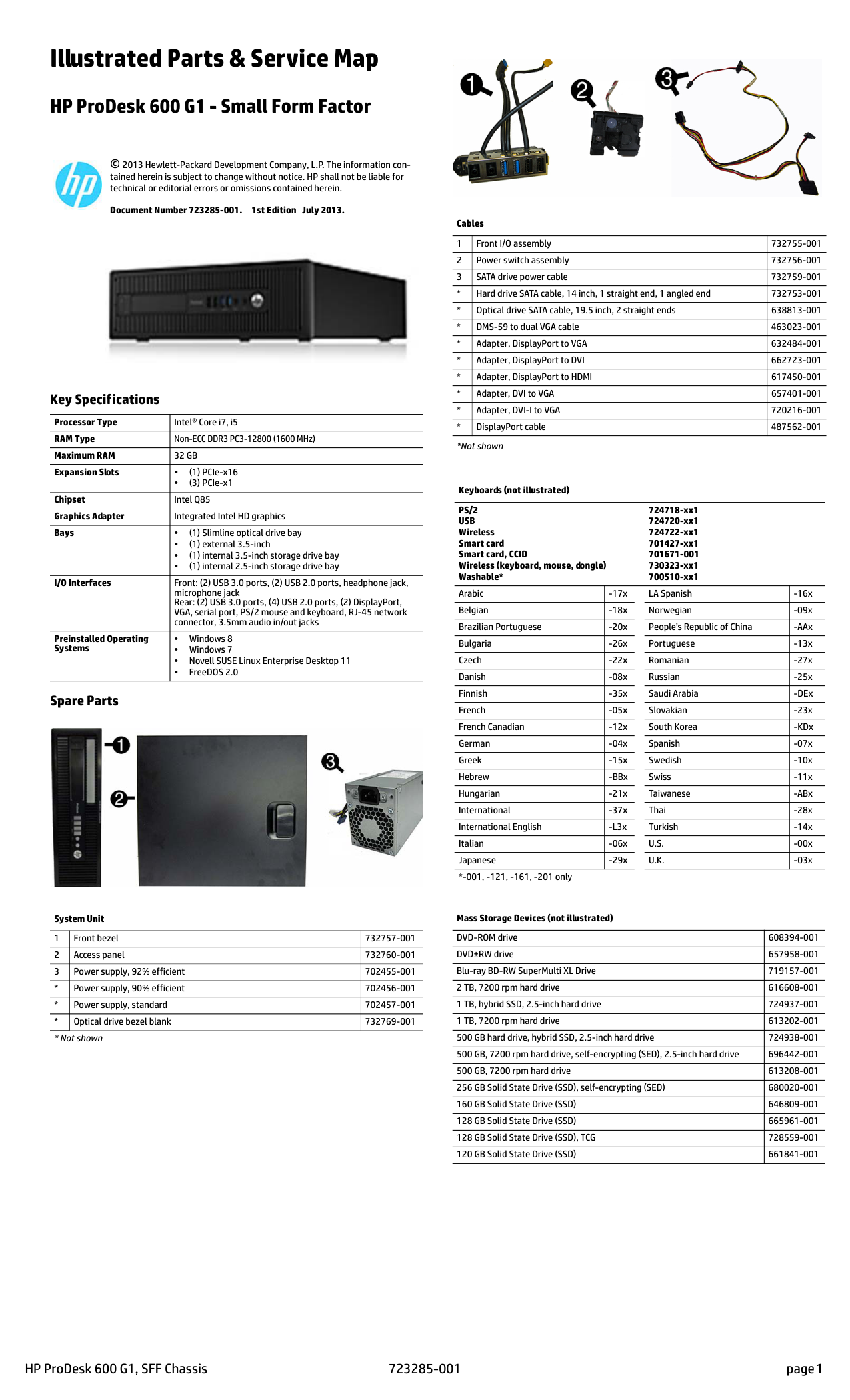
HP ProDesk 600 G1, SFF Chassis 723285-001 page 1 Illustrated Parts & Service Map HP ProDesk 600 G1 - Small Form Factor © 2013 Hewlett-Packard Development Company, L.P. The information con- tained herein is subject to change without notice. HP shall not be liable for technical or editorial errors or omissions contained herein. Document Number 723285-001. 1st Edition July 2013. Key Specifications Spare Parts Processor Type Intel® Core i7, i5 RAM Type Non-ECC DDR3 PC3-12800 (1600 MHz) Maximum RAM
32 Gb
Expansion Slots • (1) PCIe-x16 • (3) PCIe-x1 Chipset Intel Q85 Graphics Adapter Integrated Intel HD graphics Bays • (1) Slimline optical drive bay • (1) external 3.5-inch • (1) internal 3.5-inch storage drive bay • (1) internal 2.5-inch storage drive bay I/O Interfaces Front: (2) USB 3.0 ports, (2) USB 2.0 ports, headphone jack, microphone jack Rear: (2) USB 3.0 ports, (4) USB 2.0 ports, (2) DisplayPort, VGA, serial port, PS/2 mouse and keyboard, RJ-45 network connector, 3.5mm audio in/out jacks Preinstalled Operating Systems • Windows 8 • Windows 7 • Novell SUSE Linux Enterprise Desktop 11 • FreeDOS 2.0 System Unit 1 Front bezel 732757-001 2 Access panel 732760-001 3 Power supply, 92% efficient 702455-001Ps/2
Usb
Wireless Smart card Smart card, CCID Wireless (keyboard, mouse, dongle) Washable* 724718-xx1 724720-xx1 724722-xx1 701427-xx1 701671-001 730323-xx1 700510-xx1 Arabic -17x LA Spanish -16x Belgian -18x Norwegian -09x Brazilian Portuguese -20x People’s Republic of China -AAx Bulgaria -26x Portuguese -13x Czech -22x Romanian -27x Danish -08x Russian -25x Finnish -35x Saudi Arabia -DEx French -05x Slovakian -23x French Canadian -12x South Korea -KDx German -04x Spanish -07x Greek -15x Swedish -10x Hebrew -BBx Swiss -11x Hungarian -21x Taiwanese -ABx International -37x Thai -28x International English -L3x Turkish -14x Italian -06xU.S.
-00x Japanese -29xU.K.
-03x *-001, -121, -161, -201 only Mass Storage Devices (not illustrated) DVD-ROM drive 608394-001 DVD±RW drive 657958-001 Blu-ray BD-RW SuperMulti XL Drive 719157-001 2 TB, 7200 rpm hard drive 616608-001 1 TB, hybrid SSD, 2.5-inch hard drive 724937-001 1 TB, 7200 rpm hard drive 613202-001 500 GB hard drive, hybrid SSD, 2.5-inch hard drive 724938-001 500 GB, 7200 rpm hard drive, self-encrypting (SED), 2.5-inch hard drive 696442-001 500 GB, 7200 rpm hard drive 613208-001 256 GB Solid State Drive (SSD), self-encrypting (SED) 680020-001 160 GB Solid State Drive (SSD) 646809-001 128 GB Solid State Drive (SSD) 665961-001 128 GB Solid State Drive (SSD), TCG 728559-001 120 GB Solid State Drive (SSD) 661841-001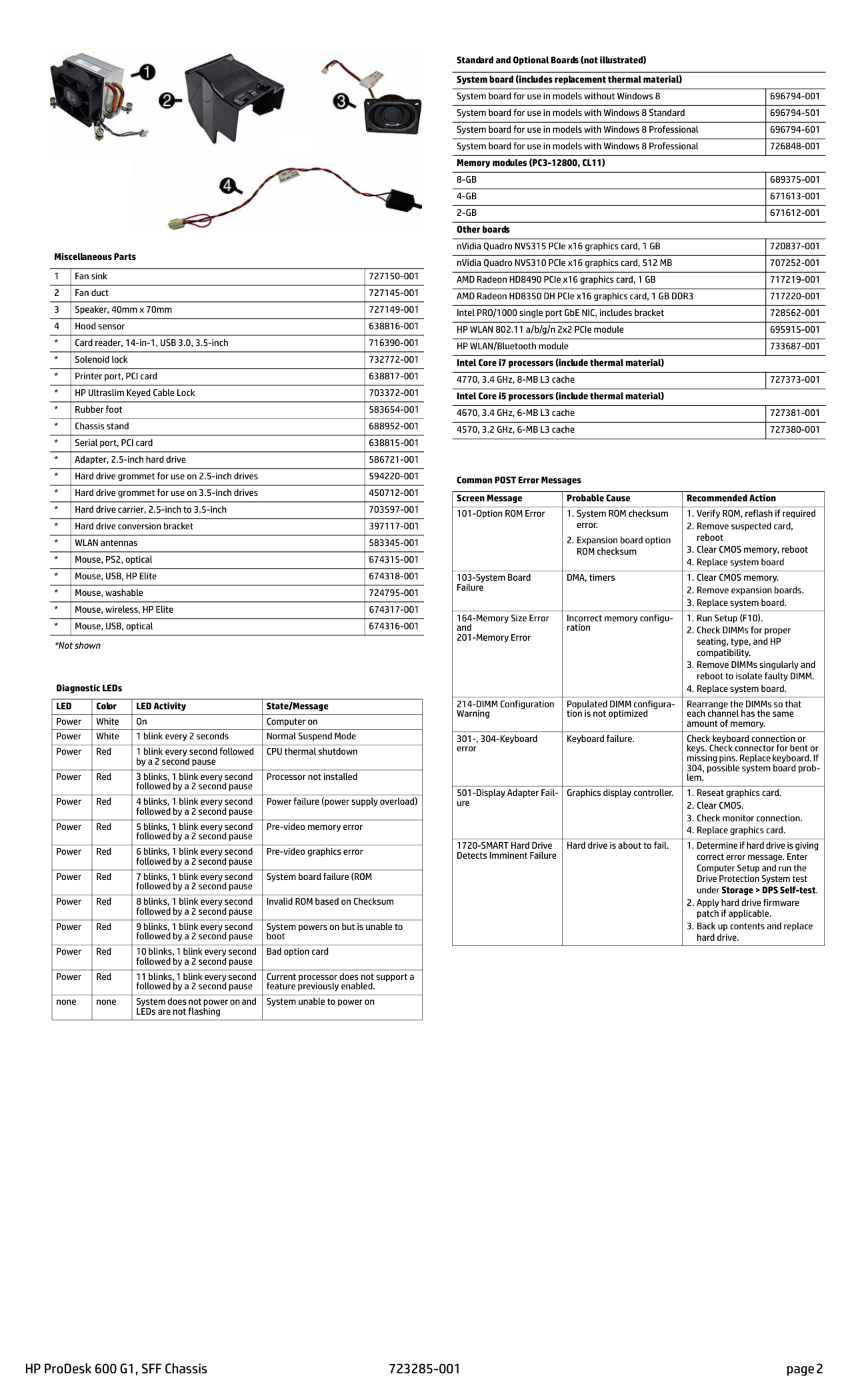
HP ProDesk 600 G1, SFF Chassis 723285-001 page 2 Miscellaneous Parts 1 Fan sink 727150-001 2 Fan duct 727145-001 3 Speaker, 40mm x 70mm 727149-001 4 Hood sensor 638816-001
Led
Color LED Activity State/Message Power White On Computer on Power White 1 blink every 2 seconds Normal Suspend Mode Power Red 1 blink every second followed by a 2 second pause CPU thermal shutdown Power Red 3 blinks, 1 blink every second followed by a 2 second pause Processor not installed Power Red 4 blinks, 1 blink every second followed by a 2 second pause Power failure (power supply overload) Power Red 5 blinks, 1 blink every second followed by a 2 second pause Pre-video memory error Power Red 6 blinks, 1 blink every second followed by a 2 second pause Pre-video graphics error Power Red 7 blinks, 1 blink every second followed by a 2 second pause System board failure (ROM Power Red 8 blinks, 1 blink every second followed by a 2 second pause Invalid ROM based on Checksum Power Red 9 blinks, 1 blink every second followed by a 2 second pause System powers on but is unable to boot Power Red 10 blinks, 1 blink every second followed by a 2 second pause Bad option card Power Red 11 blinks, 1 blink every second followed by a 2 second pause Current processor does not support a feature previously enabled. none none System does not power on and LEDs are not flashing System unable to power on Standard and Optional Boards (not illustrated) System board (includes replacement thermal material) System board for use in models without Windows 8 696794-001 System board for use in models with Windows 8 Standard 696794-501 System board for use in models with Windows 8 Professional 696794-601 System board for use in models with Windows 8 Professional 726848-001 Memory modules (PC3-12800, CL11)8-Gb
689375-0014-Gb
671613-0012-Gb
671612-001 Other boards nVidia Quadro NVS315 PCIe x16 graphics card, 1 GB 720837-001 nVidia Quadro NVS310 PCIe x16 graphics card, 512 MB 707252-001 AMD Radeon HD8490 PCIe x16 graphics card, 1 GB 717219-001 AMD Radeon HD8350 DH PCIe x16 graphics card, 1 GB DDR3 717220-001 Intel PRO/1000 single port GbE NIC, includes bracket 728562-001 HP WLAN 802.11 a/b/g/n 2x2 PCIe module 695915-001 HP WLAN/Bluetooth module 733687-001 Intel Core i7 processors (include thermal material) 4770, 3.4 GHz, 8-MB L3 cache 727373-001 Intel Core i5 processors (include thermal material) 4670, 3.4 GHz, 6-MB L3 cache 727381-001 4570, 3.2 GHz, 6-MB L3 cache 727380-001 Common POST Error Messages Screen Message Probable Cause Recommended Action 101-Option ROM Error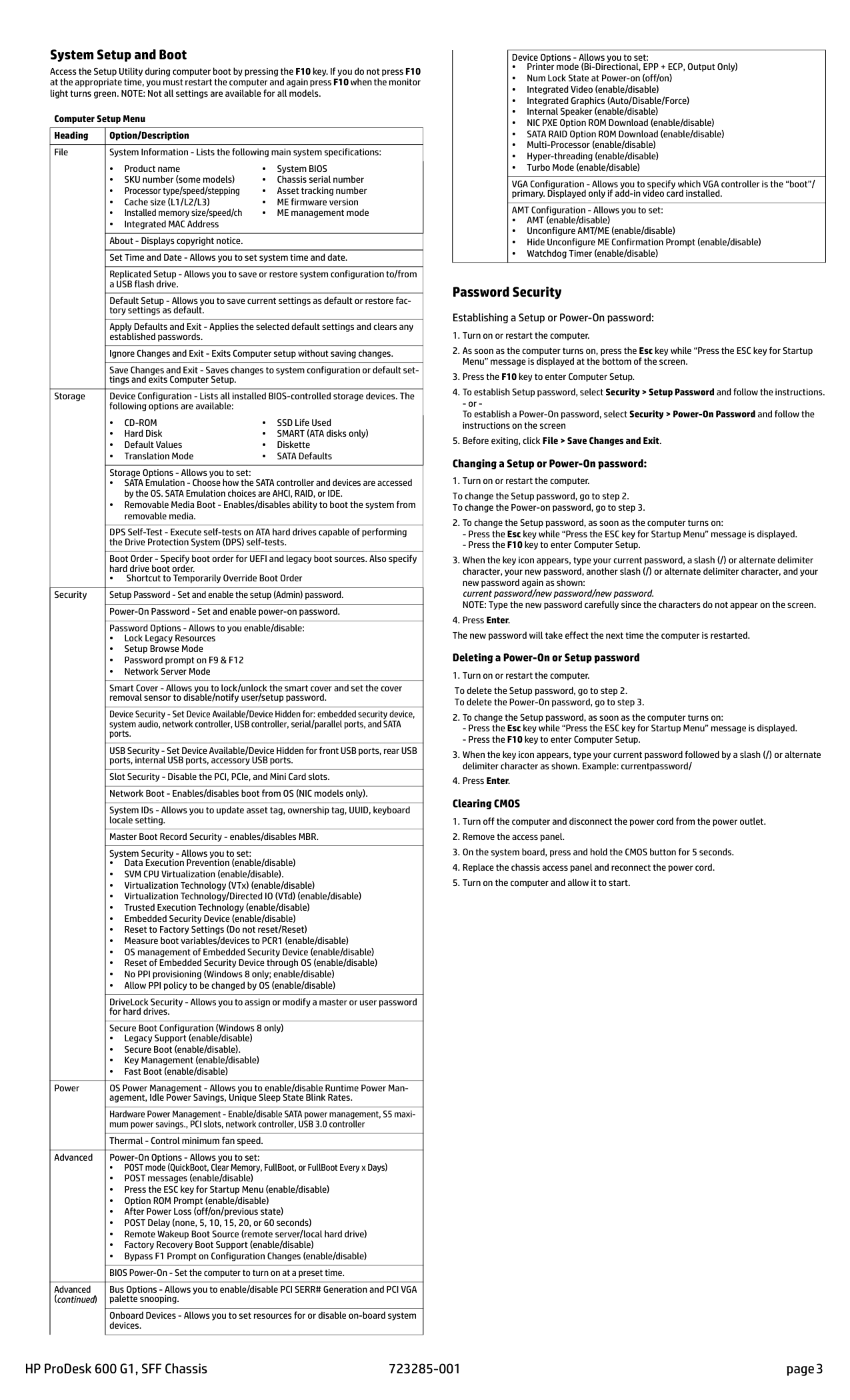
HP ProDesk 600 G1, SFF Chassis 723285-001 page 3 System Setup and Boot Access the Setup Utility during computer boot by pressing the F10 key. If you do not press F10 at the appropriate time, you must restart the computer and again press F10 when the monitor light turns green. NOTE: Not all settings are available for all models. Password Security Establishing a Setup or Power-On password:
Cd-Rom
• Hard Disk • Default Values • Translation Mode • SSD Life Used • SMART (ATA disks only) • Diskette • SATA Defaults Storage Options - Allows you to set: • SATA Emulation - Choose how the SATA controller and devices are accessed by the OS. SATA Emulation choices are AHCI, RAID, or IDE. • Removable Media Boot - Enables/disables ability to boot the system from removable media. DPS Self-Test - Execute self-tests on ATA hard drives capable of performing the Drive Protection System (DPS) self-tests. Boot Order - Specify boot order for UEFI and legacy boot sources. Also specify hard drive boot order. • Shortcut to Temporarily Override Boot Order Security Setup Password - Set and enable the setup (Admin) password. Power-On Password - Set and enable power-on password. Password Options - Allows to you enable/disable: • Lock Legacy Resources • Setup Browse Mode • Password prompt on F9 & F12 • Network Server Mode Smart Cover - Allows you to lock/unlock the smart cover and set the cover removal sensor to disable/notify user/setup password. Device Security - Set Device Available/Device Hidden for: embedded security device, system audio, network controller, USB controller, serial/parallel ports, and SATA ports. USB Security - Set Device Available/Device Hidden for front USB ports, rear USB ports, internal USB ports, accessory USB ports. Slot Security - Disable the PCI, PCIe, and Mini Card slots. Network Boot - Enables/disables boot from OS (NIC models only). System IDs - Allows you to update asset tag, ownership tag, UUID, keyboard locale setting. Master Boot Record Security - enables/disables MBR. System Security - Allows you to set: • Data Execution Prevention (enable/disable) • SVM CPU Virtualization (enable/disable). • Virtualization Technology (VTx) (enable/disable) • Virtualization Technology/Directed IO (VTd) (enable/disable) • Trusted Execution Technology (enable/disable) • Embedded Security Device (enable/disable) • Reset to Factory Settings (Do not reset/Reset) • Measure boot variables/devices to PCR1 (enable/disable) • OS management of Embedded Security Device (enable/disable) • Reset of Embedded Security Device through OS (enable/disable) • No PPI provisioning (Windows 8 only; enable/disable) • Allow PPI policy to be changed by OS (enable/disable) DriveLock Security - Allows you to assign or modify a master or user password for hard drives. Secure Boot Configuration (Windows 8 only) • Legacy Support (enable/disable) • Secure Boot (enable/disable). • Key Management (enable/disable) • Fast Boot (enable/disable) Power OS Power Management - Allows you to enable/disable Runtime Power Man- agement, Idle Power Savings, Unique Sleep State Blink Rates. Hardware Power Management - Enable/disable SATA power management, S5 maxi- mum power savings., PCI slots, network controller, USB 3.0 controller Thermal - Control minimum fan speed. Advanced Power-On Options - Allows you to set: • POST mode (QuickBoot, Clear Memory, FullBoot, or FullBoot Every x Days) • POST messages (enable/disable) • Press the ESC key for Startup Menu (enable/disable) • Option ROM Prompt (enable/disable) • After Power Loss (off/on/previous state) • POST Delay (none, 5, 10, 15, 20, or 60 seconds) • Remote Wakeup Boot Source (remote server/local hard drive) • Factory Recovery Boot Support (enable/disable) • Bypass F1 Prompt on Configuration Changes (enable/disable) BIOS Power-On - Set the computer to turn on at a preset time. Advanced (continued) Bus Options - Allows you to enable/disable PCI SERR# Generation and PCI VGA palette snooping. Onboard Devices - Allows you to set resources for or disable on-board system devices. Device Options - Allows you to set: • Printer mode (Bi-Directional, EPP + ECP, Output Only) • Num Lock State at Power-on (off/on) • Integrated Video (enable/disable) • Integrated Graphics (Auto/Disable/Force) • Internal Speaker (enable/disable) • NIC PXE Option ROM Download (enable/disable) • SATA RAID Option ROM Download (enable/disable) • Multi-Processor (enable/disable) • Hyper-threading (enable/disable) • Turbo Mode (enable/disable) VGA Configuration - Allows you to specify which VGA controller is the “boot”/ primary. Displayed only if add-in video card installed. AMT Configuration - Allows you to set: • AMT (enable/disable) • Unconfigure AMT/ME (enable/disable) • Hide Unconfigure ME Confirmation Prompt (enable/disable) • Watchdog Timer (enable/disable)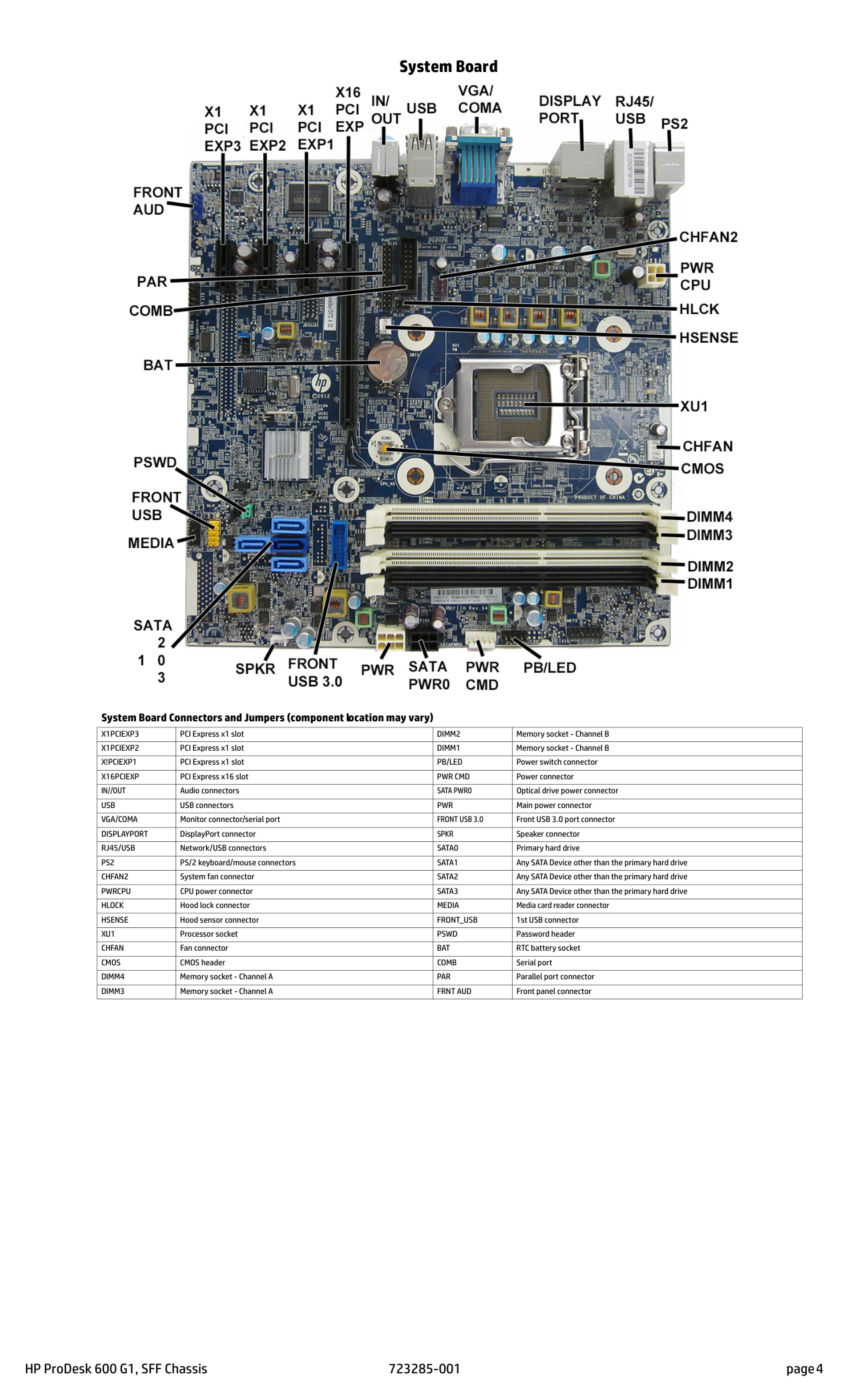
HP ProDesk 600 G1, SFF Chassis 723285-001 page 4 System Board System Board Connectors and Jumpers (component location may vary)