Ask AI
— answers from the official manualAnswers from the official manual.
Common questions
Common Questions
10 totalHow much non-volatile memory is there on the HMD main MCU?
The HMD main MCU contains 6K Bytes of ROM for storing system code and data, along with additional 192K Bytes of ROM that are not accessible to customers. Data in this section updates/clears using HP's f/w patch package tool (Page 1).
Where is the firmware for audio codec stored?
Audio codec configuration firmware is stored on a 2Mbit Flash ROM and programmed at the factory. The utility required to modify this memory is available from HP's website, but inappropriate methods can harm device functionality (Page 3).
How do I reset the non-volatile memory on the HMD?
Resetting non-volatile memory on the HMD can typically only be done by clearing data through HP's software package tool, which may clear or update ROM data. Follow official instructions and use appropriate tools to avoid rendering the HMD nonfunctional (Page 2).
Does the USB hub controller retain its configuration when power is removed?
Yes, the USB hub controller retains data in EEPROM memory even after power removal. Any modifications should be done carefully with vendor tools as improper changes can cause functionality issues (Page 2).
Can I update the firmware for the Blue tooth controller on my Reverb G2?
The BT controller firmware is programmed at the factory and not intended for user updates. Modifying it requires special tools from chip vendors, and incorrect usage can impair functionality (Page 4).
Is there customer data stored in the non-volatile memory of the controllers?
No customer data is stored within the non-volatile memory on any of the controllers, and resetting this memory involves using tools from chip vendors. Improper handling may render components non-functional (Page 5).
Full Manual
5 pages
Statement of memory volatility HP Reverb G2 VR System
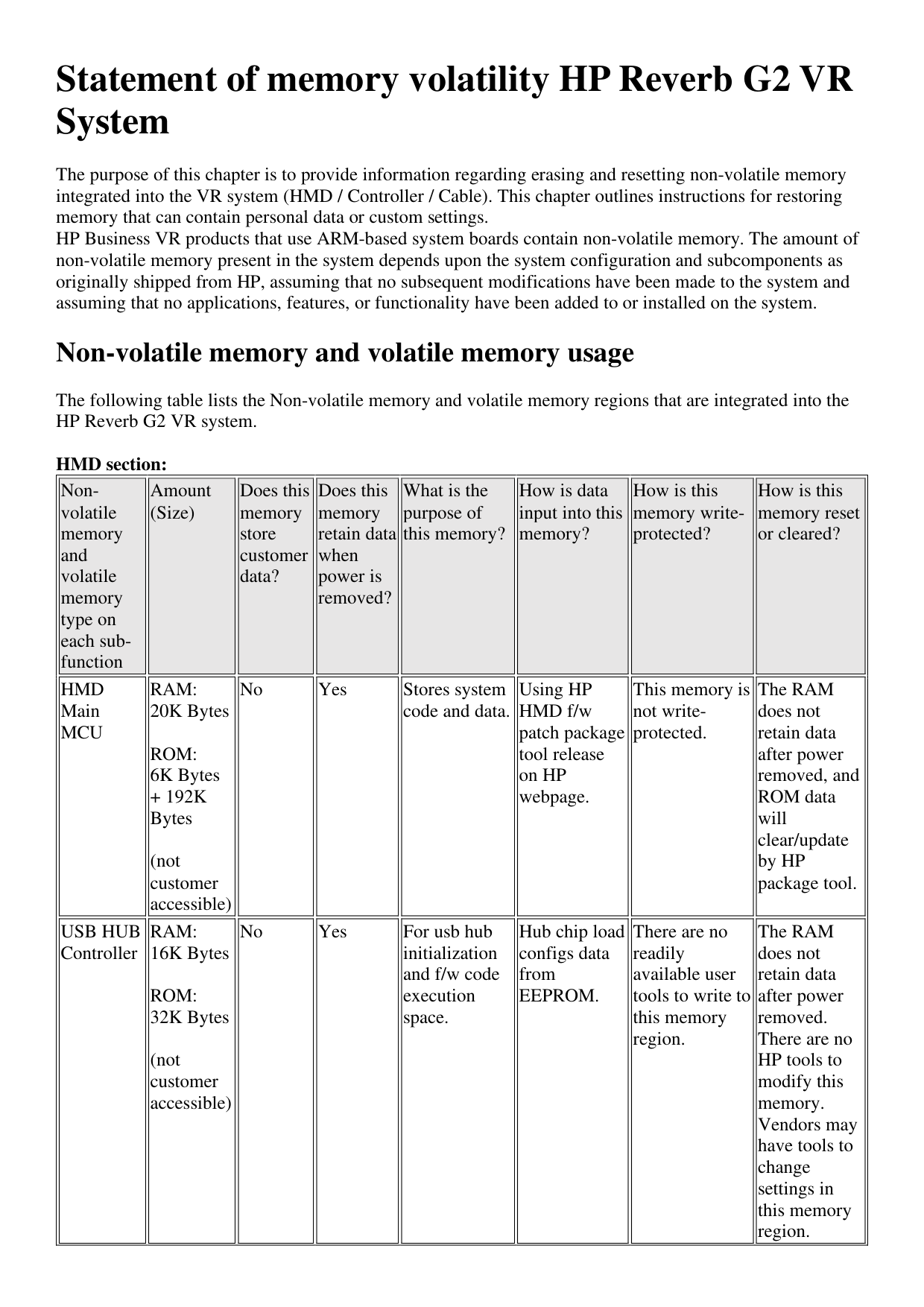
The purpose of this chapter is to provide information regarding erasing and resetting non-volatile memory integrated into the VR system (HMD / Controller / Cable). This chapter outlines instructions for restoring memory that can contain personal data or custom settings. HP Business VR products that use ARM-based system boards contain non-volatile memory. The amount of non-volatile memory present in the system depends upon the system configuration and subcomponents as originally shipped from HP, assuming that no subsequent modifications have been made to the system and assuming that no applications, features, or functionality have been added to or installed on the system.
Non-volatile memory and volatile memory usage
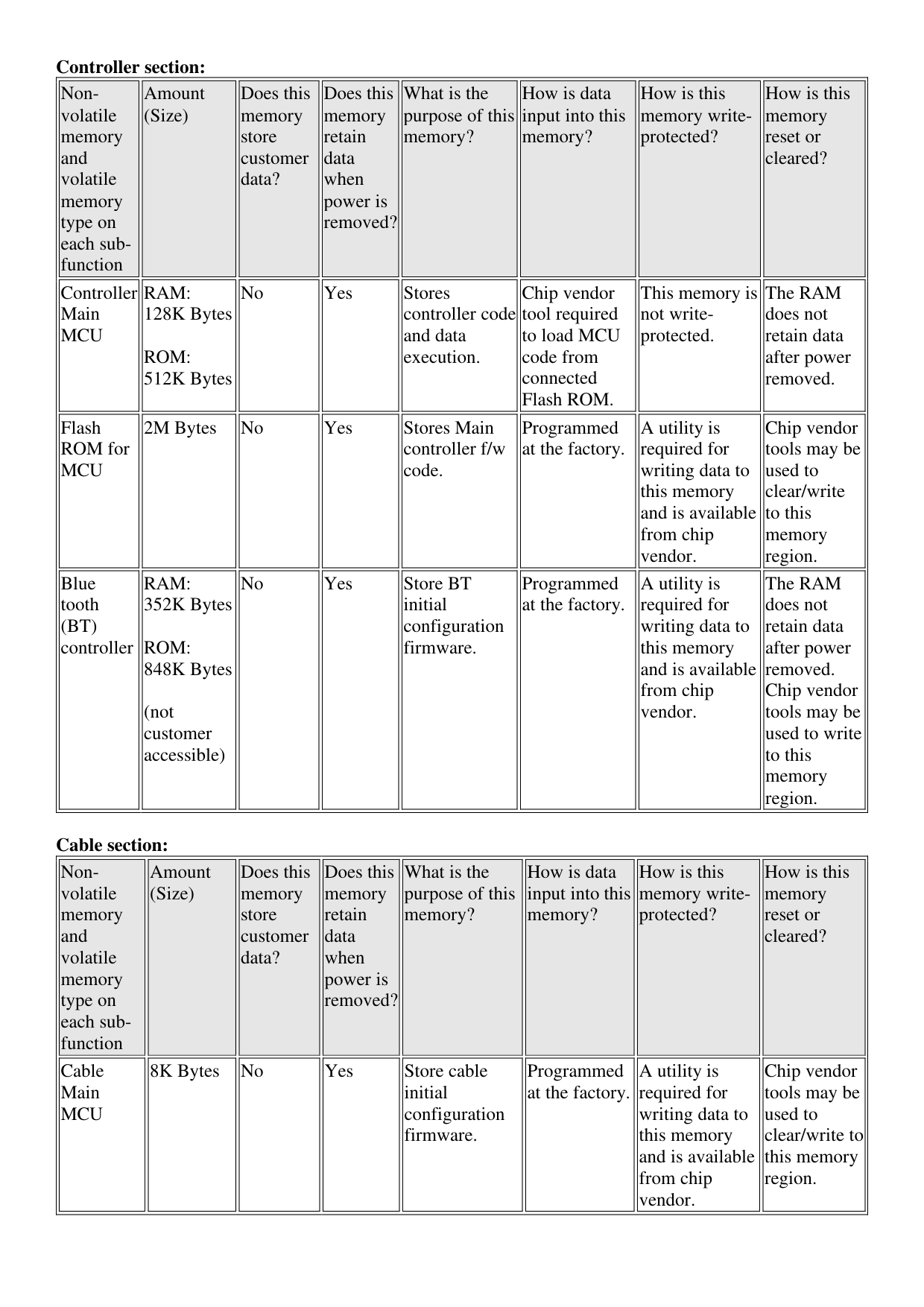
The following table lists the Non-volatile memory and volatile memory regions that are integrated into the HP Reverb G2 VR system.
HMD section:
||Nonvolatile memory and volatile memory type on each subfunction
| |---|
|Amount (Size)
| |---|
|Does this memory store customer data?
| |---|
|Does this memory retain data when power is removed?
| |---|
|What is the purpose of this memory?
| |---|
|How is data input into this memory?
| |---|
|How is this memory writeprotected?
| |---|
|How is this memory reset or cleared?
| |---|
|HMD Main MCU| |---|
|RAM: 20K Bytes
ROM: 6K Bytes
+ 192K Bytes
(not customer accessible)| |---|
|No| |---|
|Yes| |---|
|Stores system code and data.| |---|
|Using HP HMD f/w patch package tool release on HP webpage.| |---|
|This memory is not writeprotected.| |---|
|The RAM does not retain data after power removed, and ROM data will clear/update by HP package tool.| |---|
|USB HUB Controller| |---|
|RAM: 16K Bytes
ROM: 32K Bytes
(not customer accessible)| |---|
|No| |---|
|Yes| |---|
|For usb hub initialization and f/w code execution space.| |---|
|Hub chip load configs data from EEPROM.| |---|
|There are no readily available user tools to write to this memory region.| |---|
|The RAM does not retain data after power removed. There are no HP tools to modify this memory. Vendors may have tools to change settings in this memory region.| |---| | |---|
||Nonvolatile memory and volatile memory type on each subfunction
| |---|
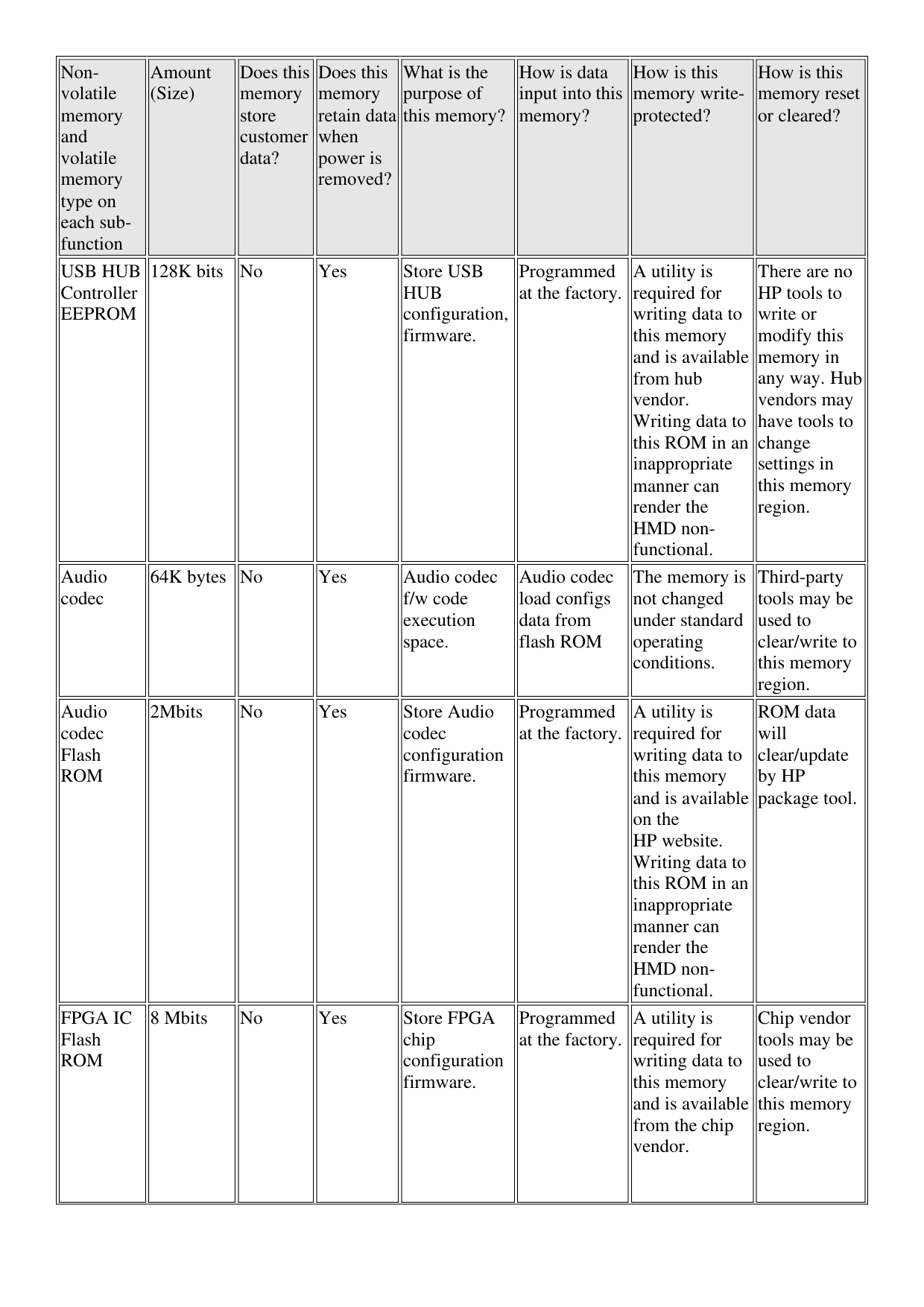
|Amount (Size)
| |---|
|Does this memory store customer data?
| |---|
|Does this memory retain data when power is removed?
| |---|
|What is the purpose of this memory?
| |---|
|How is data input into this memory?
| |---|
|How is this memory writeprotected?
| |---|
|How is this memory reset or cleared?
| |---|
|USB HUB Controller EEPROM| |---|
|128K bits| |---|
|No| |---|
|Yes| |---|
|Store USB HUB configuration, firmware.| |---|
|Programmed at the factory.| |---|
|A utility is required for writing data to this memory and is available from hub vendor. Writing data to this ROM in an inappropriate manner can render the HMD nonfunctional.| |---|
|There are no HP tools to write or modify this memory in any way. Hub vendors may have tools to change settings in this memory region.| |---|
|Audio codec| |---|
|64K bytes| |---|
|No| |---|
|Yes| |---|
|Audio codec f/w code execution space.| |---|
|Audio codec load configs data from flash ROM| |---|
|The memory is not changed under standard operating conditions.| |---|
|Third-party tools may be used to clear/write to this memory region.| |---|
|Audio codec Flash ROM| |---|
|2Mbits| |---|
|No| |---|
|Yes| |---|
|Store Audio codec configuration firmware.| |---|
|Programmed at the factory.| |---|
|A utility is required for writing data to this memory and is available on the HP website. Writing data to this ROM in an inappropriate manner can render the HMD nonfunctional.| |---|
|ROM data will clear/update by HP package tool.| |---|
|FPGA IC Flash ROM| |---|
|8 Mbits| |---|
|No| |---|
|Yes| |---|
|Store FPGA chip configuration firmware.| |---|
|Programmed at the factory.| |---|
|A utility is required for writing data to this memory and is available from the chip vendor.| |---|
|Chip vendor tools may be used to clear/write to this memory region.| |---| | |---|
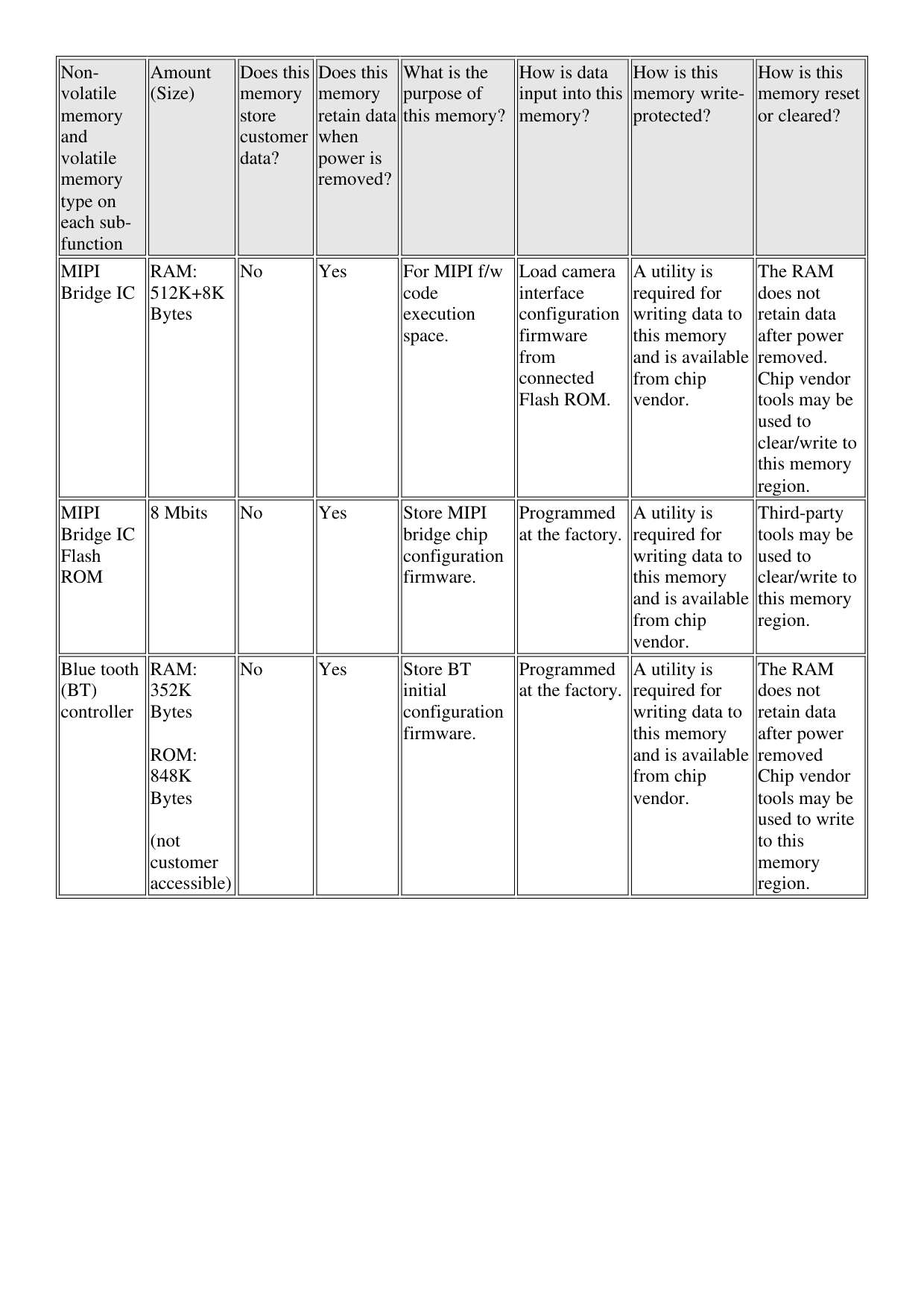
||Nonvolatile memory and volatile memory type on each subfunction
| |---|
|Amount (Size)
| |---|
|Does this memory store customer data?
| |---|
|Does this memory retain data when power is removed?
| |---|
|What is the purpose of this memory?
| |---|
|How is data input into this memory?
| |---|
|How is this memory writeprotected?
| |---|
|How is this memory reset or cleared?
| |---|
|MIPI Bridge IC| |---|
|RAM: 512K+8K Bytes| |---|
|No| |---|
|Yes| |---|
|For MIPI f/w code execution space.| |---|
|Load camera interface configuration firmware from connected Flash ROM.| |---|
|A utility is required for writing data to this memory and is available from chip vendor.| |---|
|The RAM does not retain data after power removed. Chip vendor tools may be used to clear/write to this memory region.| |---|
|MIPI Bridge IC Flash ROM| |---|
|8 Mbits| |---|
|No| |---|
|Yes| |---|
|Store MIPI bridge chip configuration firmware.| |---|
|Programmed at the factory.| |---|
|A utility is required for writing data to this memory and is available from chip vendor.| |---|
|Third-party tools may be used to clear/write to this memory region.| |---|
|Blue tooth (BT) controller| |---|
|RAM: 352K Bytes
ROM: 848K Bytes
(not customer accessible)| |---|
|No| |---|
|Yes| |---|
|Store BT initial configuration firmware.| |---|
|Programmed at the factory.| |---|
|A utility is required for writing data to this memory and is available from chip vendor.| |---|
|The RAM does not retain data after power removed Chip vendor tools may be used to write to this memory region.| |---| | |---|
Controller section:
||Nonvolatile memory and volatile memory type on each subfunction
| |---|
|Amount (Size)
| |---|
|Does this memory store customer data?
| |---|
|Does this memory retain data when power is removed?
| |---|
|What is the purpose of this memory?
| |---|
|How is data input into this memory?
| |---|
|How is this memory writeprotected?
| |---|
|How is this memory reset or cleared?
| |---|
|Controller Main MCU| |---|
|RAM: 128K Bytes
ROM: 512K Bytes| |---|
|No| |---|
|Yes| |---|
|Stores controller code and data execution.| |---|
|Chip vendor tool required to load MCU code from connected Flash ROM.| |---|
|This memory is not writeprotected.| |---|
|The RAM does not retain data after power removed.| |---|
|Flash ROM for MCU| |---|
|2M Bytes| |---|
|No| |---|
|Yes| |---|

|Stores Main controller f/w code.| |---|
|Programmed at the factory.| |---|
|A utility is required for writing data to this memory and is available from chip vendor.| |---|
|Chip vendor tools may be used to clear/write to this memory region.| |---|
|Blue tooth (BT) controller| |---|
|RAM: 352K Bytes
ROM: 848K Bytes
(not customer accessible)| |---|
|No| |---|
|Yes| |---|
|Store BT initial configuration firmware.| |---|
|Programmed at the factory.| |---|
|A utility is required for writing data to this memory and is available from chip vendor.| |---|
|The RAM does not retain data after power removed. Chip vendor tools may be used to write to this memory region.| |---| | |---|
Cable section:
||Nonvolatile memory and volatile memory type on each subfunction
| |---|
|Amount (Size)
| |---|
|Does this memory store customer data?
| |---|
|Does this memory retain data when power is removed?
| |---|
|What is the purpose of this memory?
| |---|
|How is data input into this memory?
| |---|
|How is this memory writeprotected?
| |---|
|How is this memory reset or cleared?
| |---|
|Cable Main MCU| |---|
|8K Bytes| |---|
|No| |---|
|Yes| |---|
|Store cable initial configuration firmware.| |---|
|Programmed at the factory.| |---|
|A utility is required for writing data to this memory and is available from chip vendor.| |---|
|Chip vendor tools may be used to clear/write to this memory region.| |---| | |---|
Recommended steps for clearing user data and custom settings No user data is stored in memory of this product. There is no tool available for clearing custom settings beyond manipulation of individual component memory using vendor and HP-supplied tools. Questions and answers Not available now.