HP Smart Tank 530 Wireless All-in-One manual
Unknown · 20 Q&As

HP Smart Tank 530 Wireless All-in-One

Ask AI

— answers from the official manual

Answers from the official manual.

Common questions

Common Questions

20 total
1

What is the warranty coverage for the HP Smart Tank 530?

The HP Smart Tank 530 includes a one-year or 30,000 pages limited hardware warranty, whichever comes first from the date of purchase. It also includes one year of 24/7 world-class technical support through http://www.hp.com/support. User replaceable parts have separate warranty periods. (Page 2)

2

What are the recommended operating temperature and humidity ranges for the HP Smart Tank 530?

The recommended operating temperature for the HP Smart Tank 530 is 15 to 30°C, with an operating range of 5 to 40°C. The recommended operating humidity range is 20 to 80% RH (non-condensing), with an operating range of 15 to 80% RH. Storage temperatures range from -40 to 60°C. (Page 2)

3

What scan file formats does the HP Smart Tank 530 support?

The HP Smart Tank 530 supports scanning to JPG, BMP, TIFF, PDF, RTF, TXT, and PNG file formats. The scanner uses a Contact Image Sensor (CIS) with a hardware resolution of up to 1200 x 1200 dpi. Scan input modes include Front Panel Scan, Copy, HP Software, and EWS. (Page 2)

4

How do I set up the HP Smart Tank 530 Wireless All-in-One?

Begin setup by connecting your device to a power source, installing ink bottles in their respective slots until you hear a click, and then turning on the printer. Follow the installation instructions provided for connecting via Wi-Fi or USB, install the software on your computer, and calibrate using the setup wizard (Page 23).

5

What is error code E54 and how do I resolve it?

Error code E54 indicates an issue with the paper tray. Clear the jammed paper, ensure no foreign objects are present in the tray, and reinsert paper properly. Then press the 'OK' button to retry (Page 31).

6

How often should I clean the inkjet head of my HP Smart Tank?

Clean the inkjet head based on the number of prints and if print quality deteriorates. Use automatic cleaning through the printer's maintenance menu or perform a manual cleaning using cleaning solution (Page 45).

Show 14 more questions

Full Manual

2 pages
Page 1

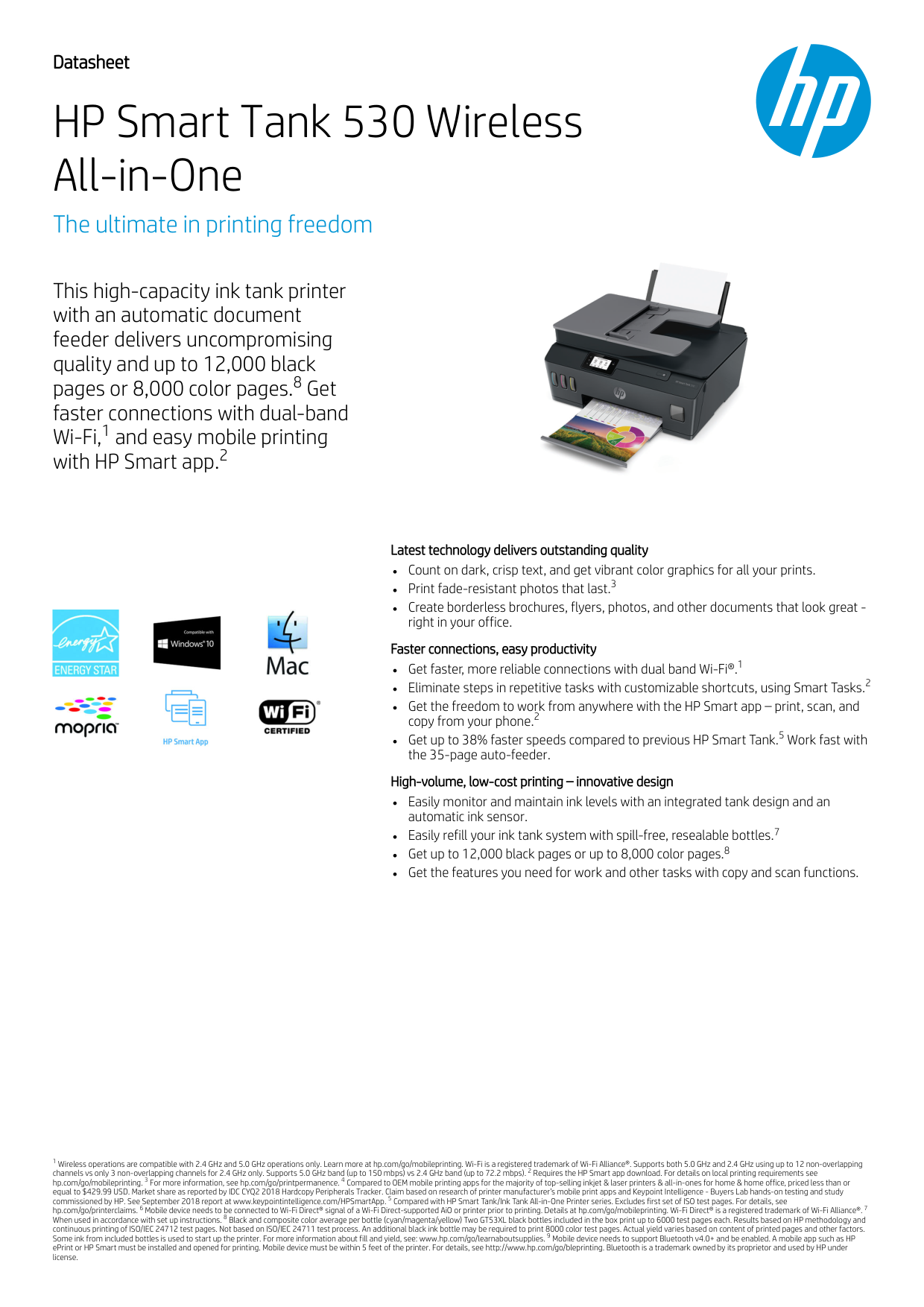
Datasheet HP Smart Tank 530 Wireless All-in-One The ultimate in printing freedom This high-capacity ink tank printer with an automatic document feeder delivers uncompromising quality and up to 12,000 black pages or 8,000 color pages. Get faster connections with dual-band Wi-Fi, and easy mobile printing with HP Smart app. Latest technology delivers outstanding quality Count on dark, crisp text, and get vibrant color graphics for all your prints. Print fade-resistant photos that last. Create borderless brochures, flyers, photos, and other documents that look great - right in your office. Faster connections, easy productivity Get faster, more reliable connections with dual band Wi-Fi®. Eliminate steps in repetitive tasks with customizable shortcuts, using Smart Tasks. Get the freedom to work from anywhere with the HP Smart app – print, scan, and copy from your phone. Get up to 38% faster speeds compared to previous HP Smart Tank. Work fast with the 35-page auto-feeder. High-volume, low-cost printing – innovative design Easily monitor and maintain ink levels with an integrated tank design and an automatic ink sensor. Easily refill your ink tank system with spill-free, resealable bottles. Get up to 12,000 black pages or up to 8,000 color pages. Get the features you need for work and other tasks with copy and scan functions. Wireless operations are compatible with 2.4 GHz and 5.0 GHz operations only. Learn more at hp.com/go/mobileprinting. Wi-Fi is a registered trademark of Wi-Fi Alliance®. Supports both 5.0 GHz and 2.4 GHz using up to 12 non-overlapping channels vs only 3 non-overlapping channels for 2.4 GHz only. Supports 5.0 GHz band (up to 150 mbps) vs 2.4 GHz band (up to 72.2 mbps). Requires the HP Smart app download. For details on local printing requirements see hp.com/go/mobileprinting. For more information, see hp.com/go/printpermanence. Compared to OEM mobile printing apps for the majority of top-selling inkjet & laser printers & all-in-ones for home & home office, priced less than or equal to $429.99 USD. Market share as reported by IDC CYQ2 2018 Hardcopy Peripherals Tracker. Claim based on research of printer manufacturer’s mobile print apps and Keypoint Intelligence - Buyers Lab hands-on testing and study commissioned by HP. See September 2018 report at www.keypointintelligence.com/HPSmartApp. Compared with HP Smart Tank/Ink Tank All-in-One Printer series. Excludes first set of ISO test pages. For details, see hp.com/go/printerclaims. Mobile device needs to be connected to Wi-Fi Direct® signal of a Wi-Fi Direct-supported AiO or printer prior to printing. Details at hp.com/go/mobileprinting. Wi-Fi Direct® is a registered trademark of Wi-Fi Alliance®. When used in accordance with set up instructions. Black and composite color average per bottle (cyan/magenta/yellow) Two GT53XL black bottles included in the box print up to 6000 test pages each. Results based on HP methodology and continuous printing of ISO/IEC 24712 test pages. Not based on ISO/IEC 24711 test process. An additional black ink bottle may be required to print 8000 color test pages. Actual yield varies based on content of printed pages and other factors. Some ink from included bottles is used to start up the printer. For more information about fill and yield, see: www.hp.com/go/learnaboutsupplies. Mobile device needs to support Bluetooth v4.0+ and be enabled. A mobile app such as HP ePrint or HP Smart must be installed and opened for printing. Mobile device must be within 5 feet of the printer. For details, see http://www.hp.com/go/bleprinting. Bluetooth is a trademark owned by its proprietor and used by HP under license. 8 1 2 3 1 2 2 5 7 8 1 2 3 4 5 6 7 8 9
Page 2

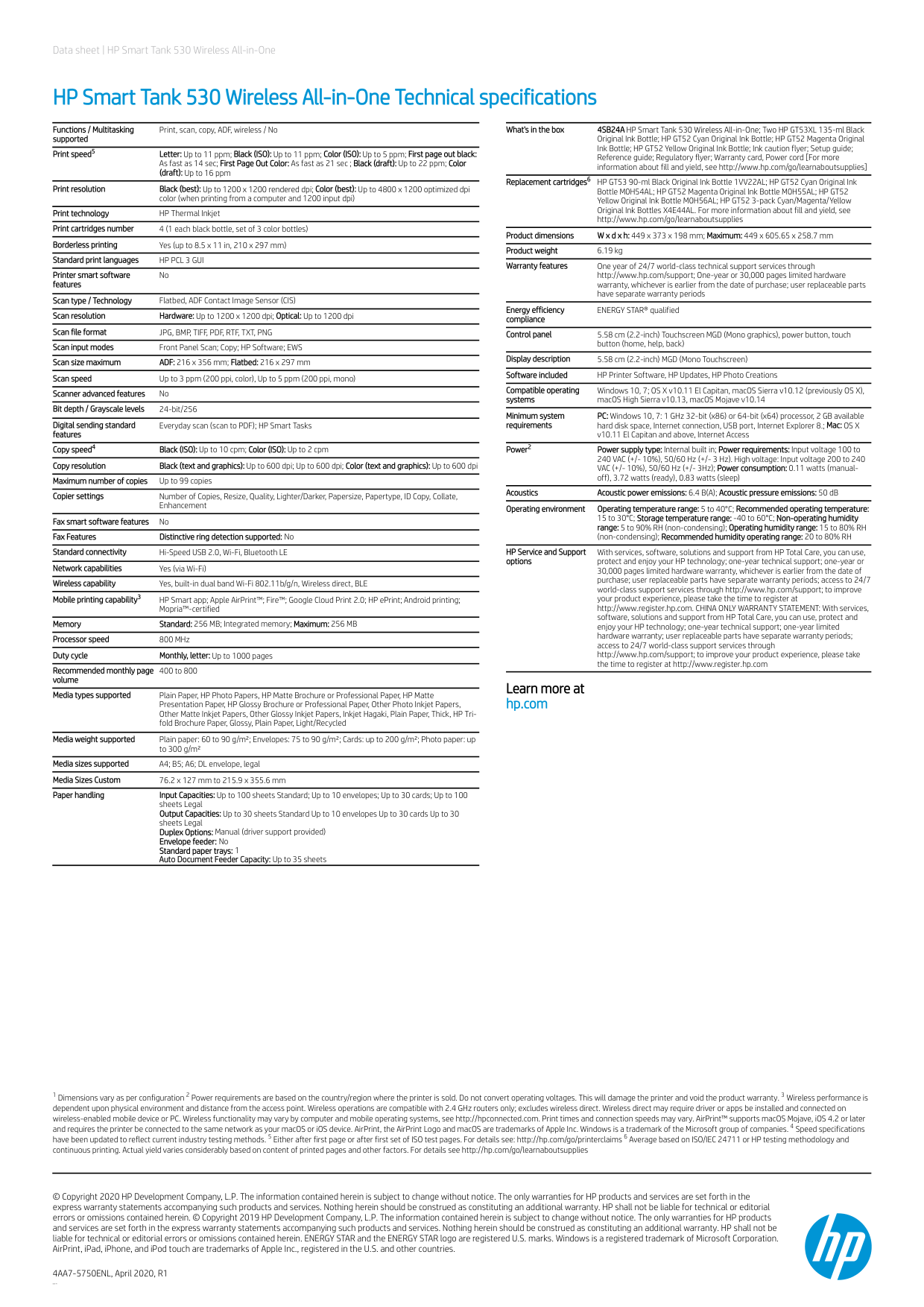
Data sheet | HP Smart Tank 530 Wireless All-in-One HP Smart Tank 530 Wireless All-in-One Technical specifications Functions / Multitasking supported Print, scan, copy, ADF, wireless / No Print speed Letter: Up to 11 ppm; Black (ISO): Up to 11 ppm; Color (ISO): Up to 5 ppm; First page out black: As fast as 14 sec; First Page Out Color: As fast as 21 sec ; Black (draft): Up to 22 ppm; Color (draft): Up to 16 ppm Print resolution Black (best): Up to 1200 x 1200 rendered dpi; Color (best): Up to 4800 x 1200 optimized dpi color (when printing from a computer and 1200 input dpi) Print technology HP Thermal Inkjet Print cartridges number 4 (1 each black bottle, set of 3 color bottles) Borderless printing Yes (up to 8.5 x 11 in, 210 x 297 mm) Standard print languages

Hp Pcl 3 Gui

Printer smart software features No Scan type / Technology Flatbed, ADF Contact Image Sensor (CIS) Scan resolution Hardware: Up to 1200 x 1200 dpi; Optical: Up to 1200 dpi Scan file format

Jpg, Bmp, Tiff, Pdf, Rtf, Txt, Png

Scan input modes Front Panel Scan; Copy; HP Software; EWS Scan size maximum ADF: 216 x 356 mm; Flatbed: 216 x 297 mm Scan speed Up to 3 ppm (200 ppi, color), Up to 5 ppm (200 ppi, mono) Scanner advanced features No Bit depth / Grayscale levels 24-bit/256 Digital sending standard features Everyday scan (scan to PDF); HP Smart Tasks Copy speed Black (ISO): Up to 10 cpm; Color (ISO): Up to 2 cpm Copy resolution Black (text and graphics): Up to 600 dpi; Up to 600 dpi; Color (text and graphics): Up to 600 dpi Maximum number of copies Up to 99 copies Copier settings Number of Copies, Resize, Quality, Lighter/Darker, Papersize, Papertype, ID Copy, Collate, Enhancement Fax smart software features No Fax Features Distinctive ring detection supported: No Standard connectivity Hi-Speed USB 2.0, Wi-Fi, Bluetooth LE Network capabilities Yes (via Wi-Fi) Wireless capability Yes, built-in dual band Wi-Fi 802.11b/g/n, Wireless direct, BLE Mobile printing capability HP Smart app; Apple AirPrint™; Fire™; Google Cloud Print 2.0; HP ePrint; Android printing; Mopria™-certified Memory Standard: 256 MB; Integrated memory; Maximum: 256 MB Processor speed 800 MHz Duty cycle Monthly, letter: Up to 1000 pages Recommended monthly page volume 400 to 800 Media types supported Plain Paper, HP Photo Papers, HP Matte Brochure or Professional Paper, HP Matte Presentation Paper, HP Glossy Brochure or Professional Paper, Other Photo Inkjet Papers, Other Matte Inkjet Papers, Other Glossy Inkjet Papers, Inkjet Hagaki, Plain Paper, Thick, HP Tri- fold Brochure Paper, Glossy, Plain Paper, Light/Recycled Media weight supported Plain paper: 60 to 90 g/m²; Envelopes: 75 to 90 g/m²; Cards: up to 200 g/m²; Photo paper: up to 300 g/m² Media sizes supported A4; B5; A6; DL envelope, legal Media Sizes Custom 76.2 x 127 mm to 215.9 x 355.6 mm Paper handling Input Capacities: Up to 100 sheets Standard; Up to 10 envelopes; Up to 30 cards; Up to 100 sheets Legal Output Capacities: Up to 30 sheets Standard Up to 10 envelopes Up to 30 cards Up to 30 sheets Legal Duplex Options: Manual (driver support provided) Envelope feeder: No Standard paper trays: 1 Auto Document Feeder Capacity: Up to 35 sheets What's in the box 4SB24A HP Smart Tank 530 Wireless All-in-One; Two HP GT53XL 135-ml Black Original Ink Bottle; HP GT52 Cyan Original Ink Bottle; HP GT52 Magenta Original Ink Bottle; HP GT52 Yellow Original Ink Bottle; Ink caution flyer; Setup guide; Reference guide; Regulatory flyer; Warranty card, Power cord [For more information about fill and yield, see http://www.hp.com/go/learnaboutsupplies] Replacement cartridges HP GT53 90-ml Black Original Ink Bottle 1VV22AL; HP GT52 Cyan Original Ink Bottle M0H54AL; HP GT52 Magenta Original Ink Bottle M0H55AL; HP GT52 Yellow Original Ink Bottle M0H56AL; HP GT52 3-pack Cyan/Magenta/Yellow Original Ink Bottles X4E44AL. For more information about fill and yield, see http://www.hp.com/go/learnaboutsupplies Product dimensions W x d x h: 449 x 373 x 198 mm; Maximum: 449 x 605.65 x 258.7 mm Product weight 6.19 kg Warranty features One year of 24/7 world-class technical support services through http://www.hp.com/support; One-year or 30,000 pages limited hardware warranty, whichever is earlier from the date of purchase; user replaceable parts have separate warranty periods Energy efficiency compliance ENERGY STAR® qualified Control panel 5.58 cm (2.2-inch) Touchscreen MGD (Mono graphics), power button, touch button (home, help, back) Display description 5.58 cm (2.2-inch) MGD (Mono Touchscreen) Software included HP Printer Software, HP Updates, HP Photo Creations Compatible operating systems Windows 10, 7; OS X v10.11 El Capitan, macOS Sierra v10.12 (previously OS X), macOS High Sierra v10.13, macOS Mojave v10.14 Minimum system requirements PC: Windows 10, 7: 1 GHz 32-bit (x86) or 64-bit (x64) processor, 2 GB available hard disk space, Internet connection, USB port, Internet Explorer 8.; Mac: OS X v10.11 El Capitan and above, Internet Access Power Power supply type: Internal built in; Power requirements: Input voltage 100 to 240 VAC (+/- 10%), 50/60 Hz (+/- 3 Hz). High voltage: Input voltage 200 to 240 VAC (+/- 10%), 50/60 Hz (+/- 3Hz); Power consumption: 0.11 watts (manual- off), 3.72 watts (ready), 0.83 watts (sleep) Acoustics Acoustic power emissions: 6.4 B(A); Acoustic pressure emissions: 50 dB Operating environment Operating temperature range: 5 to 40°C; Recommended operating temperature: 15 to 30°C; Storage temperature range: -40 to 60°C; Non-operating humidity range: 5 to 90% RH (non-condensing); Operating humidity range: 15 to 80% RH (non-condensing); Recommended humidity operating range: 20 to 80% RH HP Service and Support options With services, software, solutions and support from HP Total Care, you can use, protect and enjoy your HP technology; one-year technical support; one-year or 30,000 pages limited hardware warranty, whichever is earlier from the date of purchase; user replaceable parts have separate warranty periods; access to 24/7 world-class support services through http://www.hp.com/support; to improve your product experience, please take the time to register at http://www.register.hp.com. CHINA ONLY WARRANTY STATEMENT: With services, software, solutions and support from HP Total Care, you can use, protect and enjoy your HP technology; one-year technical support; one-year limited hardware warranty; user replaceable parts have separate warranty periods; access to 24/7 world-class support services through http://www.hp.com/support; to improve your product experience, please take the time to register at http://www.register.hp.com Learn more at hp.com Dimensions vary as per configuration Power requirements are based on the country/region where the printer is sold. Do not convert operating voltages. This will damage the printer and void the product warranty. Wireless performance is dependent upon physical environment and distance from the access point. Wireless operations are compatible with 2.4 GHz routers only; excludes wireless direct. Wireless direct may require driver or apps be installed and connected on wireless-enabled mobile device or PC. Wireless functionality may vary by computer and mobile operating systems, see http://hpconnected.com. Print times and connection speeds may vary. AirPrint™ supports macOS Mojave, iOS 4.2 or later and requires the printer be connected to the same network as your macOS or iOS device. AirPrint, the AirPrint Logo and macOS are trademarks of Apple Inc. Windows is a trademark of the Microsoft group of companies. Speed specifications have been updated to reflect current industry testing methods. Either after first page or after first set of ISO test pages. For details see: http://hp.com/go/printerclaims Average based on ISO/IEC 24711 or HP testing methodology and continuous printing. Actual yield varies considerably based on content of printed pages and other factors. For details see http://hp.com/go/learnaboutsupplies © Copyright 2020 HP Development Company, L.P. The information contained herein is subject to change without notice. The only warranties for HP products and services are set forth in the express warranty statements accompanying such products and services. Nothing herein should be construed as constituting an additional warranty. HP shall not be liable for technical or editorial errors or omissions contained herein. © Copyright 2019 HP Development Company, L.P. The information contained herein is subject to change without notice. The only warranties for HP products and services are set forth in the express warranty statements accompanying such products and services. Nothing herein should be construed as constituting an additional warranty. HP shall not be liable for technical or editorial errors or omissions contained herein. ENERGY STAR and the ENERGY STAR logo are registered U.S. marks. Windows is a registered trademark of Microsoft Corporation. AirPrint, iPad, iPhone, and iPod touch are trademarks of Apple Inc., registered in the U.S. and other countries. 4AA7-5750ENL, April 2020, R1

Doc-M

5 4 3 6 2 1 2 3 4 5 6

More from HP

Similar Unknown