Ask AI
— answers from the official manualAnswers from the official manual.
Common questions
Common Questions
10 totalWhat is the battery life of the HP Spectre 15 x360, and is it user-replaceable?
The battery provides approximately 11 hours of operation, as measured by MobileMark 2014. The battery in this product is not a user-removable type — do not attempt to remove or replace it yourself. For battery replacement, please contact HP Japan support. (Page 2)
What safety precautions should I follow regarding the battery?
Do not charge the battery pack using any method other than the specified one, and never throw the battery into fire or subject it to physical shock. Do not disassemble or modify the battery pack, and avoid short-circuiting the terminals, water exposure, or leaving it in high-temperature environments. The battery is a consumable item and its lifespan is not covered under the standard product warranty. (Page 2)
How do I create recovery media for the HP Spectre 15 x360, and what media types are supported?
After completing the initial computer setup, you must create recovery media using HP Recovery Manager, which requires an external optical drive or USB drive. Recovery media is not included in the box, and the system can be restored from either the hard drive or the created recovery media. Note that dual-layer DVD-RW, dual-layer DVD+RW, CD-RW, DVD+RW, DVD-RW, and DVD-RAM are not supported for recovery media creation. (Page 2)
What display does the HP Spectre 15 x360 have?
The laptop features a 15.6-inch wide UHD (4K) BrightView IPS touch display with a resolution of 3840×2160, up to 16.77 million colors, 340 nits brightness, and 282 ppi. The LCD display can rotate approximately 360 degrees. Color appearance may vary depending on viewing angle and brightness. (Page 1)
What ports and interfaces are available on the HP Spectre 15 x360?
The HP Spectre 15 x360 includes one HDMI 2.0 output port, one USB 3.1 Gen1 port (with off-state USB charging), two USB Type-C 3.1 Gen2 ports (Thunderbolt 3 compatible, with off-state USB charging), and one headphone output/microphone input combo port. An SD card slot is also included, supporting SD, SDHC, and SDXC memory cards. (Page 1)
What security features does the HP Spectre 15 x360 support?
The laptop supports Power-on Password, Administrator Password, and TPM 2.0 for hardware-level security. It also includes Windows Hello with both facial recognition and fingerprint authentication sensors. These features allow for secure login without a traditional password. (Page 1)
Show 4 more questions
What are the operating and storage temperature conditions for the HP Spectre 15 x360?
What is the standard warranty and support period for the HP Spectre 15 x360?
Can I upgrade or replace the memory (RAM) in the HP Spectre 15 x360?
What are the processor and RAM specifications of the HP Spectre 15 x360 (15-ch000 series)?
Full Manual
2 pages
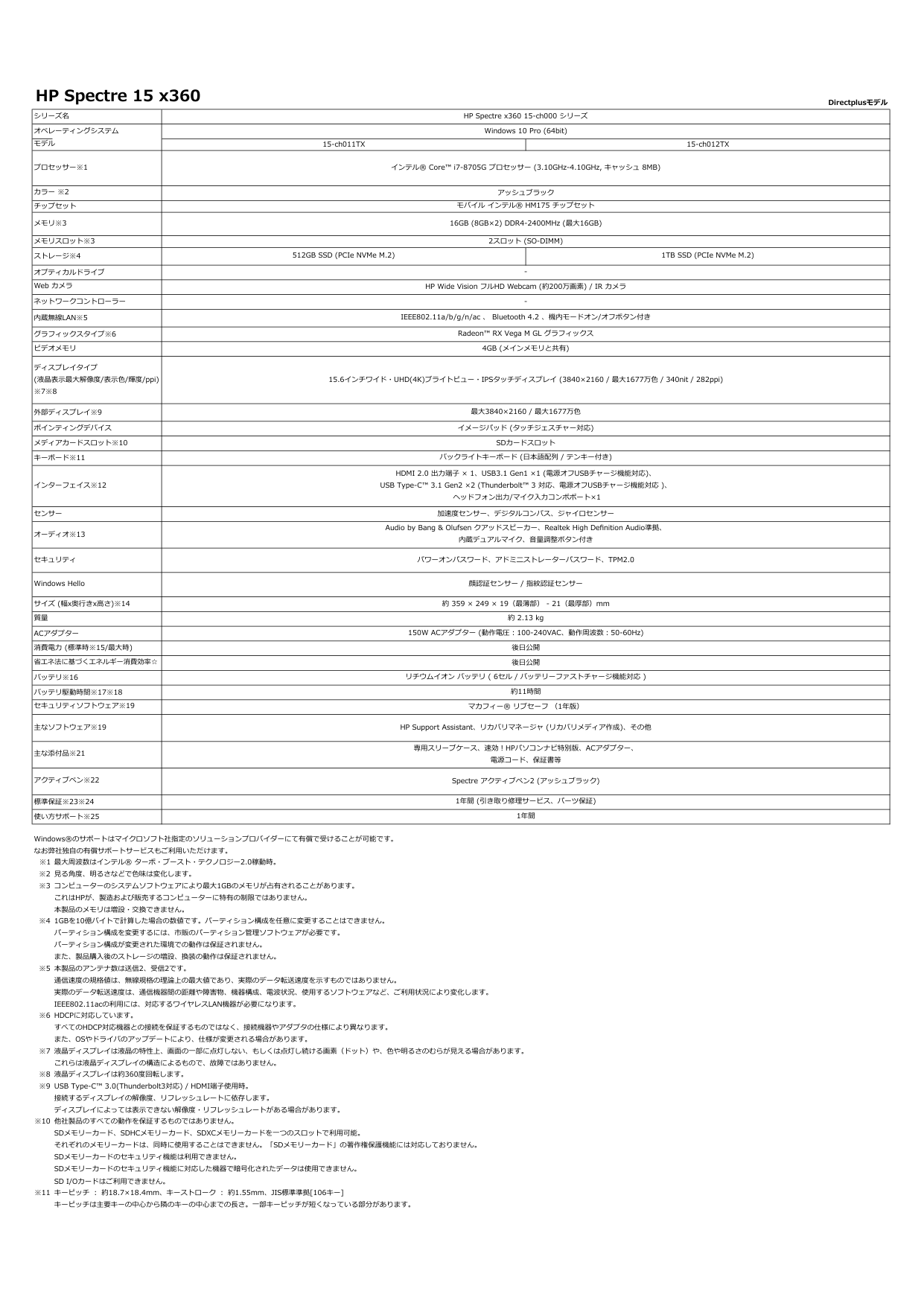
HP Spectre 15 x360 Directplusモデル シリーズ名 オペレーティングシステム プロセッサー※1 チップセット メモリ※3 メモリスロット※3 ストレージ※4 オプティカルドライブ ネットワークコントローラー
内蔵無線Lan※5
グラフィックスタイプ※6 ビデオメモリ 外部ディスプレイ※9 ポインティングデバイス メディアカードスロット※10 キーボード※11 インターフェイス※12 センサー オーディオ※13 セキュリティ サイズ (幅x奥行きx高さ)※14Acアダプター
バッテリ※16 バッテリ駆動時間※17※18 主なソフトウェア※19 標準保証※23※24 使い方サポート※25 ※1 ※2 ※3 ※4 ※5 ※6 ※7 ※8 ※9 ※10 ※11 Web カメラ HDMI 2.0 出力端子 × 1、USB3.1 Gen1 ×1 (電源オフUSBチャージ機能対応)、 USB Type-C™ 3.1 Gen2 ×2 (Thunderbolt™ 3 対応、電源オフUSBチャージ機能対応 )、 ヘッドフォン出力/マイク入力コンボポート×1 消費電力 (標準時※15/最大時) 省エネ法に基づくエネルギー消費効率☆ セキュリティソフトウェア※19 マカフィー® リブセーフ (1年版) HP Wide Vision フルHD Webcam (約200万画素) / IR カメラ Windows Hello 顔認証センサー / 指紋認証センサー ディスプレイタイプ (液晶表示最大解像度/表示色/輝度/ppi) ※7※8 質量 イメージパッド (タッチジェスチャー対応)Sdカードスロット
バックライトキーボード (日本語配列 / テンキー付き) 加速度センサー、デジタルコンパス、ジャイロセンサー Audio by Bang & Olufsen クアッドスピーカー、Realtek High Definition Audio準拠、 内蔵デュアルマイク、音量調整ボタン付きコンピューターのシステムソフトウェアにより最大1Gbのメモリが占有されることがあります。
これはHpが、製造および販売するコンピューターに特有の制限ではありません。
本製品のメモリは増設・交換できません。 リチウムイオン バッテリ ( 6セル / バッテリーファストチャージ機能対応 ) Windows®のサポートはマイクロソフト社指定のソリューションプロバイダーにて有償で受けることが可能です。 なお弊社独自の有償サポートサービスもご利用いただけます。専用スリーブケース、速効!Hpパソコンナビ特別版、Acアダプター、
電源コード、保証書等 液晶ディスプレイは約360度回転します。 見る角度、明るさなどで色味は変化します。 主な添付品※21 アクティブペン※22 1年間 1年間 (引き取り修理サービス、パーツ保証) キーピッチ : 約18.7×18.4mm、キーストローク : 約1.55mm、JIS標準準拠[106キー] キーピッチは主要キーの中心から隣のキーの中心までの⾧さ。一部キーピッチが短くなっている部分があります。 最大周波数はインテル® ターボ・ブースト・テクノロジー2.0稼動時。1Gbを10億バイトで計算した場合の数値です。パーティション構成を任意に変更することはできません。
パーティション構成を変更するには、市販のパーティション管理ソフトウェアが必要です。 パーティション構成が変更された環境での動作は保証されません。 また、製品購入後のストレージの増設、換装の動作は保証されません。 USB Type-C™ 3.0(Thunderbolt3対応) / HDMI端子使用時。 接続するディスプレイの解像度、リフレッシュレートに依存します。 ディスプレイによっては表示できない解像度・リフレッシュレートがある場合があります。 本製品のアンテナ数は送信2、受信2です。 通信速度の規格値は、無線規格の理論上の最大値であり、実際のデータ転送速度を示すものではありません。 実際のデータ転送速度は、通信機器間の距離や障害物、機器構成、電波状況、使用するソフトウェアなど、ご利用状況により変化します。 IEEE802.11acの利用には、対応するワイヤレスLAN機器が必要になります。 他社製品のすべての動作を保証するものではありません。Sdメモリーカード、Sdhcメモリーカード、Sdxcメモリーカードを一つのスロットで利用可能。
それぞれのメモリーカードは、同時に使用することはできません。「Sdメモリーカード」の著作権保護機能には対応しておりません。
Sdメモリーカードのセキュリティ機能は利用できません。
Sdメモリーカードのセキュリティ機能に対応した機器で暗号化されたデータは使用できません。
Sd I/Oカードはご利用できません。
Hdcpに対応しています。
すべてのHdcp対応機器との接続を保証するものではなく、接続機器やアダプタの仕様により異なります。
また、Osやドライバのアップデートにより、仕様が変更される場合があります。
液晶ディスプレイは液晶の特性上、画面の一部に点灯しない、もしくは点灯し続ける画素(ドット)や、色や明るさのむらが見える場合があります。 これらは液晶ディスプレイの構造によるもので、故障ではありません。 HP Spectre x360 15-ch000 シリーズモバイル インテル® Hm175 チップセット
モデル 15-ch011TX 15-ch012TX Windows 10 Pro (64bit) インテル® Core™ i7-8705G プロセッサー (3.10GHz-4.10GHz, キャッシュ 8MB) カラー ※2パワーオンパスワード、アドミニストレーターパスワード、Tpm2.0
約 359 × 249 × 19(最薄部) - 21(最厚部)mm2スロット (So-Dimm)
4Gb (メインメモリと共有)
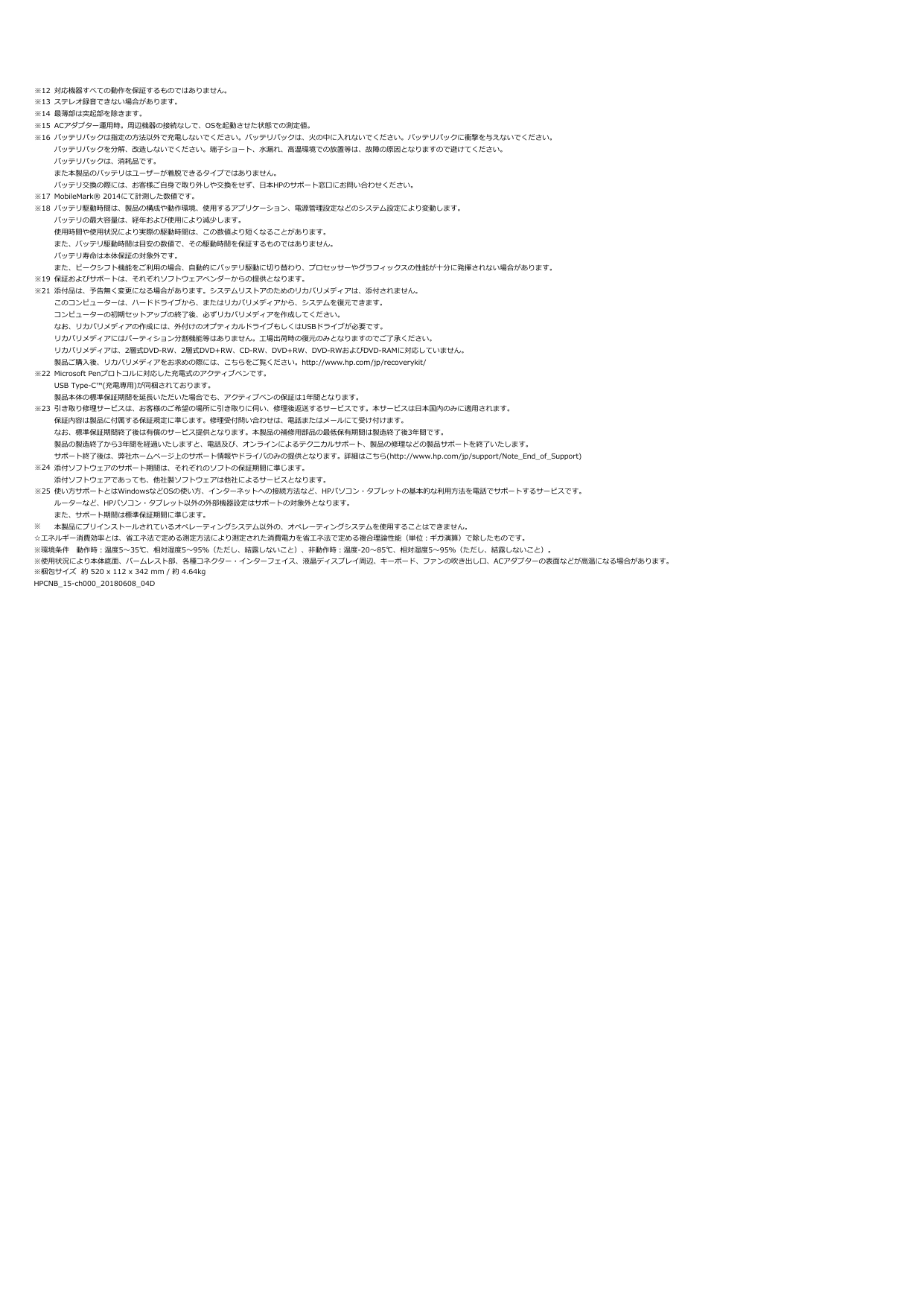
※12 ※13 ※14 ※15 ※16 ※17 ※18 ※19 ※21 ※22 ※23 ※24 ※25 ※ ※梱包サイズ 約 520 x 112 x 342 mm / 約 4.64kg HPCNB_15-ch000_20180608_04D ステレオ録音できない場合があります。 対応機器すべての動作を保証するものではありません。 引き取り修理サービスは、お客様のご希望の場所に引き取りに伺い、修理後返送するサービスです。本サービスは日本国内のみに適用されます。 保証内容は製品に付属する保証規定に準じます。修理受付問い合わせは、電話またはメールにて受け付けます。 なお、標準保証期間終了後は有償のサービス提供となります。本製品の補修用部品の最低保有期間は製造終了後3年間です。 製品の製造終了から3年間を経過いたしますと、電話及び、オンラインによるテクニカルサポート、製品の修理などの製品サポートを終了いたします。 サポート終了後は、弊社ホームページ上のサポート情報やドライバのみの提供となります。詳細はこちら(http://www.hp.com/jp/support/Note_End_of_Support) 最薄部は突起部を除きます。