Ask AI
— answers from the official manualAnswers from the official manual.
Common questions
Common Questions
20 totalWhat does it mean when the edge lighting is blinking or solid amber?
An amber light (on or blinking) indicates an error on the HP Tango. This could mean the printer has lost its connection, or that the ink or paper is not installed correctly. Check your ink cartridges and paper loading to resolve the issue. (Page 1)
What does the rotating blue edge lighting mean on the HP Tango?
Rotating blue edge lighting means the printer is in Wi-Fi setup mode. You can use the HP Smart app to connect the printer to your Wi-Fi network when you see this light. (Page 1)
How do I put the HP Tango into Wi-Fi setup mode?
Press and hold the Wi-Fi button on the back of the printer for 5 seconds to enter setup mode. You will know the printer is in setup mode when you see rotating blue edge lighting. Once in setup mode, you can use the HP Smart app to connect the printer. (Page 1)
What does steady light blue edge lighting indicate on the HP Tango?
A steady light blue edge light means the printer is connected to a Wi-Fi network and is ready to print. No action is required when you see this light. (Page 1)
What does pulsing green edge lighting mean on the HP Tango?
Pulsing green edge lighting indicates that the printer is either turning on or off, or is in the process of updating. Wait for the update or power cycle to complete before using the printer. (Page 1)
How do I turn Wi-Fi on or off on the HP Tango?
Press the Wi-Fi button on the back of the printer once to turn Wi-Fi on or off. If the HP Smart app cannot find the printer, press and hold the Wi-Fi button for 5 seconds to enter setup mode. (Page 1)
Show 14 more questions
How do I cancel a print job on the HP Tango?
How do I access the ink cartridges on the HP Tango?
What does the paper input light on the HP Tango indicate?
How do I print information about the printer's connectivity and web services?
What does it mean when the light on the HP Tango is steady amber?
How do I check connectivity information on my HP Tango?
What should I do if the app cannot find my HP Tango during setup?
How do I load paper into my HP Tango?
What does it mean when my HP Tango has steady blue lighting?
How do I set up the Wi-Fi connection on my HP Tango?
How do I cancel a current operation or print job on my HP Tango?
How do I factory reset the HP Tango?
What will happen if I press and hold the Power button for 5 seconds on my HP Tango?
Can I access ink supplies on my HP Tango without opening it?
Full Manual
4 pages
Tango / Tango X
En
Ar
Fr
Pt
*3Dp65-90015*
*3Dp65-90015*
3Dp65-90015
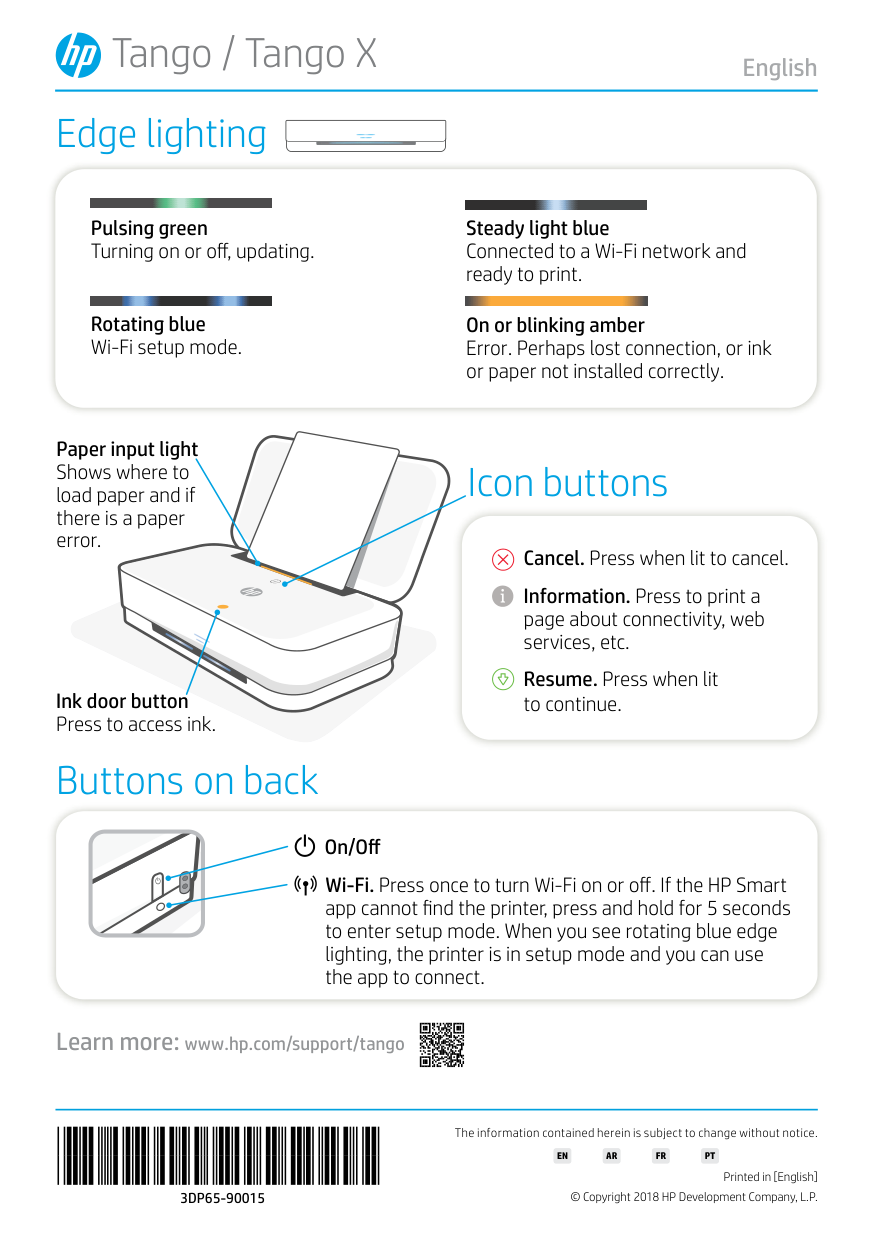
© Copyright 2018 HP Development Company, L.P. Printed in [English] The information contained herein is subject to change without notice. Learn more: www.hp.com/support/tango Edge lighting Buttons on back Pulsing green Turning on or off, updating. Rotating blue Wi-Fi setup mode. Steady light blue Connected to a Wi-Fi network and ready to print. On or blinking amber Error. Perhaps lost connection, or ink or paper not installed correctly. On/Off English Wi-Fi. Press once to turn Wi-Fi on or off. If the HP Smart app cannot find the printer, press and hold for 5 seconds to enter setup mode. When you see rotating blue edge lighting, the printer is in setup mode and you can use the app to connect. Icon buttons Cancel. Press when lit to cancel. Information. Press to print a page about connectivity, web services, etc. Resume. Press when lit to continue. Ink door button Press to access ink. Paper input light Shows where to load paper and if there is a paper error.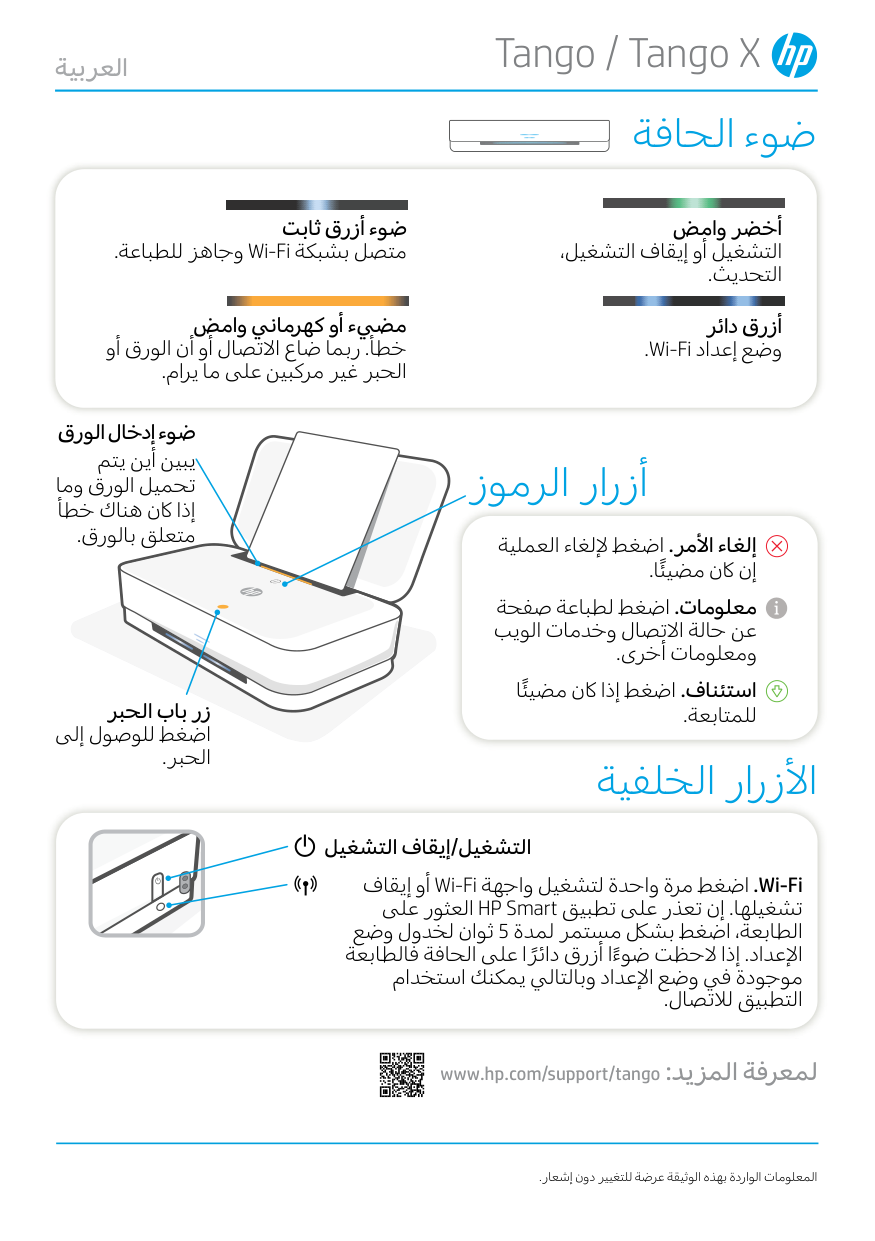
Tango / Tango X .المعلومات الواردة بهذه الوثيقة عرضة للتغيير دون إشعار www.hp.com/support/tango :لمعرفة المزيد ضوء الحافة األزرار الخلفية أخضر وامض التشغيل أو إيقاف التشغيل، التحديث. أزرق دائر .Wi-Fi وضع إعداد ضوء أزرق ثابت وجاهز للطباعة.Wi-Fi متصل بشبكة مضيء أو كهرماني وامض خطأ. ربما ضاع االتصال أو أن الورق أو الحبر غير مركبين على ما يرام. التشغيل/إيقاف التشغيل العربية أو إيقافWi-Fi . اضغط مرة واحدة لتشغيل واجهةWi-Fi العثور علىHP Smart تشغيلها. إن تعذر على تطبيق ثوان لخدول وضع 5 الطابعة، اضغط بشلك مستمر لمدة اإلعداد. إذا الحظت ضوءً ا أزرق دائرً ا على الحافة فالطابعة موجودة في وضع اإلعداد وبالتالي يمكنك استخدام التطبيق لالتصال. أزرار الرموز إلغاء األمر. اضغط إللغاء العملية إن اكن مضيئً ا. معلومات. اضغط لطباعة صفحة عن حالة االتصال وخدمات الويب ومعلومات أخرى. استئناف. اضغط إذا اكن مضيئً ا للمتابعة. زر باب الحبر اضغط للوصول إلى الحبر. ضوء إدخال الورق يبين أين يتم تحميل الورق وما إذا اكن هناك خطأ متعلق بالورق.
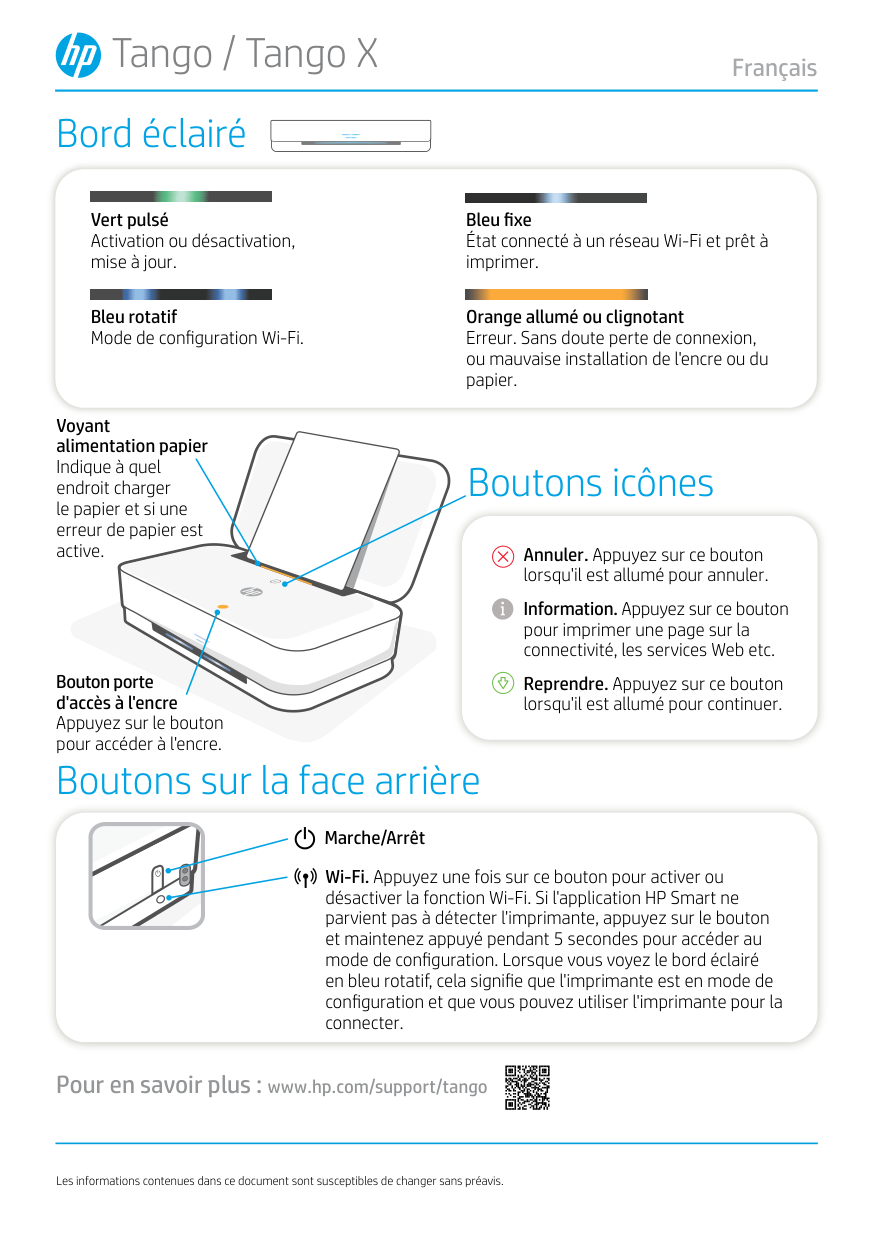
Tango / Tango X Les informations contenues dans ce document sont susceptibles de changer sans préavis. Pour en savoir plus : www.hp.com/support/tango Bord éclairé Boutons sur la face arrière Vert pulsé Activation ou désactivation, mise à jour. Bleu rotatif Mode de configuration Wi-Fi. Bleu fixe État connecté à un réseau Wi-Fi et prêt à imprimer. Orange allumé ou clignotant Erreur. Sans doute perte de connexion, ou mauvaise installation de l'encre ou du papier. Marche/Arrêt Français Wi-Fi. Appuyez une fois sur ce bouton pour activer ou désactiver la fonction Wi-Fi. Si l'application HP Smart ne parvient pas à détecter l'imprimante, appuyez sur le bouton et maintenez appuyé pendant 5 secondes pour accéder au mode de configuration. Lorsque vous voyez le bord éclairé en bleu rotatif, cela signifie que l'imprimante est en mode de configuration et que vous pouvez utiliser l'imprimante pour la connecter. Boutons icônes Annuler. Appuyez sur ce bouton lorsqu'il est allumé pour annuler. Information. Appuyez sur ce bouton pour imprimer une page sur la connectivité, les services Web etc. Reprendre. Appuyez sur ce bouton lorsqu'il est allumé pour continuer. Bouton porte d'accès à l'encre Appuyez sur le bouton pour accéder à l'encre. Voyant alimentation papier Indique à quel endroit charger le papier et si une erreur de papier est active.
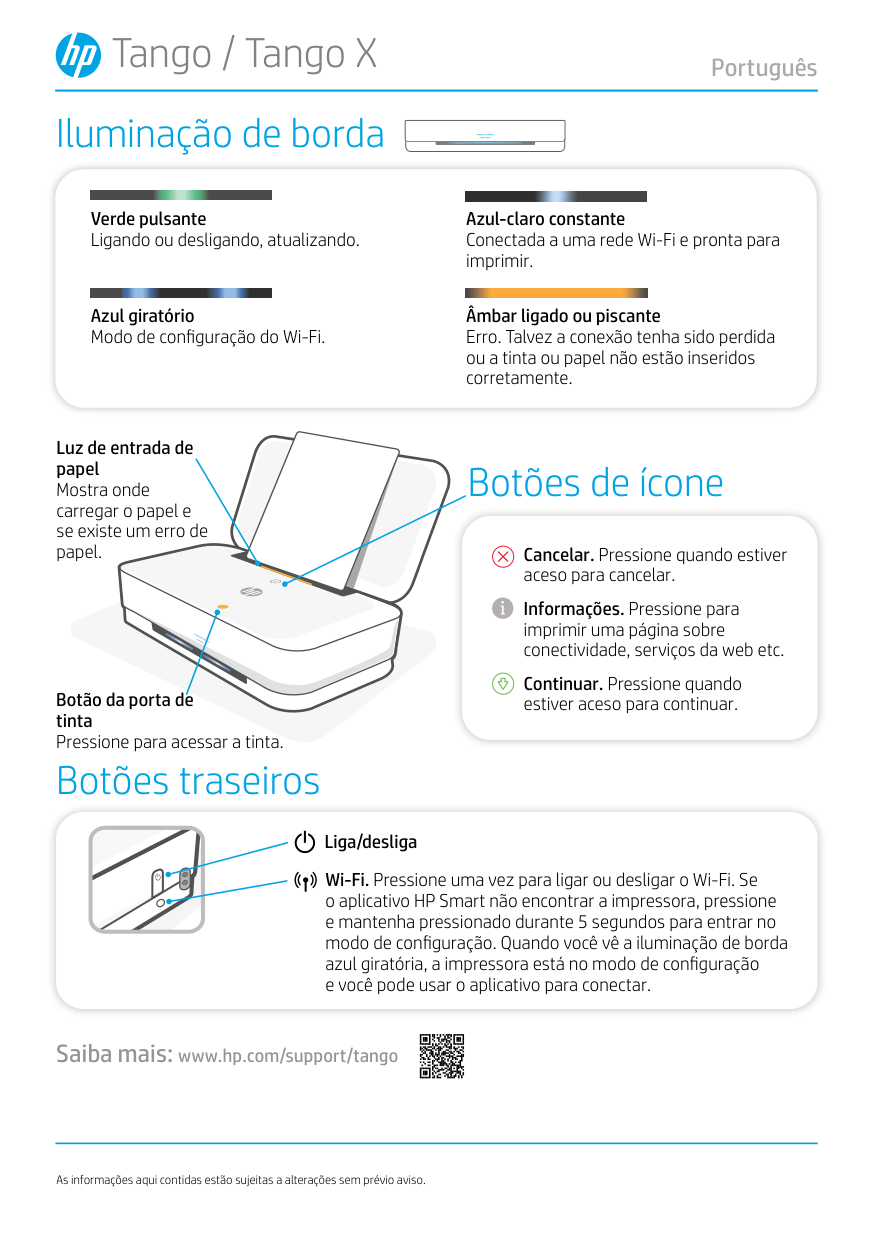
Tango / Tango X As informações aqui contidas estão sujeitas a alterações sem prévio aviso. Saiba mais: www.hp.com/support/tango Iluminação de borda Botões traseiros Verde pulsante Ligando ou desligando, atualizando. Azul giratório Modo de configuração do Wi-Fi. Azul-claro constante Conectada a uma rede Wi-Fi e pronta para imprimir. Âmbar ligado ou piscante Erro. Talvez a conexão tenha sido perdida ou a tinta ou papel não estão inseridos corretamente. Liga/desliga Português Wi-Fi. Pressione uma vez para ligar ou desligar o Wi-Fi. Se o aplicativo HP Smart não encontrar a impressora, pressione e mantenha pressionado durante 5 segundos para entrar no modo de configuração. Quando você vê a iluminação de borda azul giratória, a impressora está no modo de configuração e você pode usar o aplicativo para conectar. Botões de ícone Cancelar. Pressione quando estiver aceso para cancelar. Informações. Pressione para imprimir uma página sobre conectividade, serviços da web etc. Continuar. Pressione quando estiver aceso para continuar. Botão da porta de tinta Pressione para acessar a tinta. Luz de entrada de papel Mostra onde carregar o papel e se existe um erro de papel.