
Ask AI
— answers from the official manualAnswers from the official manual.
Common questions
Common Questions
20 totalWhat are the default HTTP and HTTPS ports used by HP Web Jetadmin?
The default HTTP port is 8000 and the default HTTPS port is 8443. Users can access the HP Web Jetadmin URL by browsing to either http://servername:8000 or https://servername:8443 using Internet Explorer.
How do I add a certificate to enable HTTPS communication in HP Web Jetadmin?
Certificates are added after HP Web Jetadmin is installed by navigating to Tools > Options > Application Management. Note that HP Web Jetadmin does not self-generate certificates — a certificate must be signed by a Certificate Authority (CA) after a certificate signing request is made in HP Web Jetadmin, and certificates can only be added via a client running locally on the HP Web Jetadmin server.
What happens to encrypted data in the database if I change the HP Web Jetadmin service account?
If you change the account for the HP Web Jetadmin service, HP Web Jetadmin can no longer decrypt the sensitive data that was stored in the SQL Server database before the account change. This is an important warning to consider before making any service account modifications.
What encryption method is used when exporting or importing configuration templates in HP Web Jetadmin?
HP Web Jetadmin uses AES encryption with a key size of 256 bits for exporting and importing configuration templates. This ensures that configuration data is securely protected during the export/import process.
What authentication protocols does HP Web Jetadmin support for SNMPv3?
For SNMPv3, HP Web Jetadmin supports AES-128 and DES for the Privacy Protocol, and MD5 and SHA-1 for the Authentication Protocol. HP Web Jetadmin can also use SNMPv1/SNMPv2, though these are unencrypted.
What port does HP Web Jetadmin use for Web Services communication with HP FutureSmart devices?
HP Web Jetadmin uses port 7627 for Web Services communication, which is a SOAP-based protocol used especially with HP FutureSmart devices. This communication is conducted over HTTPS to ensure all data is encrypted during transmission, even if no password is set on the device.
Show 14 more questions
Does HP Web Jetadmin require administrator rights to install the client application?
What port does HP Web Jetadmin use for communication with a remote SQL Server database?
How does HP Web Jetadmin protect against rogue or tampered software assemblies?
Is HTTP communication between HP Web Jetadmin and devices considered secure, and what is recommended?
How does the client installer software of HP Web Jetadmin work on a user's computer?
What steps are involved in setting up a secure connection with HP Web Jetadmin using HTTPS?
How does HP Web Jetadmin handle event routing between clients to ensure they have the latest information?
How are SNMP communications secured when HP Web Jetadmin communicates with devices?
What security measures are in place to prevent unauthorized access when using HTTP traffic with HP Web Jetadmin?
What encryption method does HP Web Jetadmin use for exporting and importing configuration templates?
How does HP Web Jetadmin protect product assemblies from rogue replacements?
What is the default port number used when connecting to an HP Web Jetadmin server via HTTP?
What protocol does HP Web Jetadmin use for communication with HP FutureSmart devices?
What happens to encrypted sensitive data stored in SQL Server when the HP Web Jetadmin service account changes?
Full Manual
8 pages
1 Technical white paper Data Security for HP Web Jetadmin
Table of contents Overview 3 Client download and client communication initiated over HTTP 3 Client download and client communication initiated over HTTPS 4 Communication between the HP Web Jetadmin client and server 5 Data in transit between the HP Web Jetadmin Server and a remote SQL server database 5 Data in transit between the HP Web Jetadmin server and the local SQL server database 5 Data at rest in the SQL server database (stored data) 6 Data in transit between the HP Web Jetadmin server and the device 6 Export/import configuration templates from HP Web Jetadmin 7 SNMPv1/SNMPv2 or SNMPv3 7 Web Services 7
Pjl
7Xdmp
7Dsmp
7Ledm
7 Product integrity protection 8
3 Overview HP Web Jetadmin uses different techniques to make sure that the sensitive data it handles cannot be compromised. This white paper explains how HP Web Jetadmin treats data. Client download and client communication initiated over HTTP HP Web Jetadmin uses the Microsoft® ClickOnce Smart Client technology. This technology runs a Microsoft .NET Framework application by automatically downloading and launching the application through a web browser. The Smart Client application runs as a local .NET Framework application on the host and communicates with the HP Web Jetadmin service via .NET Remoting. After the Smart Client application launches, the web browser is no longer required. Although HP Web Jetadmin also uses the web browser to deliver online Help and proactive Product Update notifications, the HP Web Jetadmin client application runs locally on the computer. The default HTTP port is 8000. The default HTTPS port is 8443. The client installer software comprises the client desktop Internet Explorer (IE) browser and client software or files that are distributed via an HTTP or HTTPS channel on the HP Web Jetadmin server application. The user experience is very simple and consists of the following steps:
4
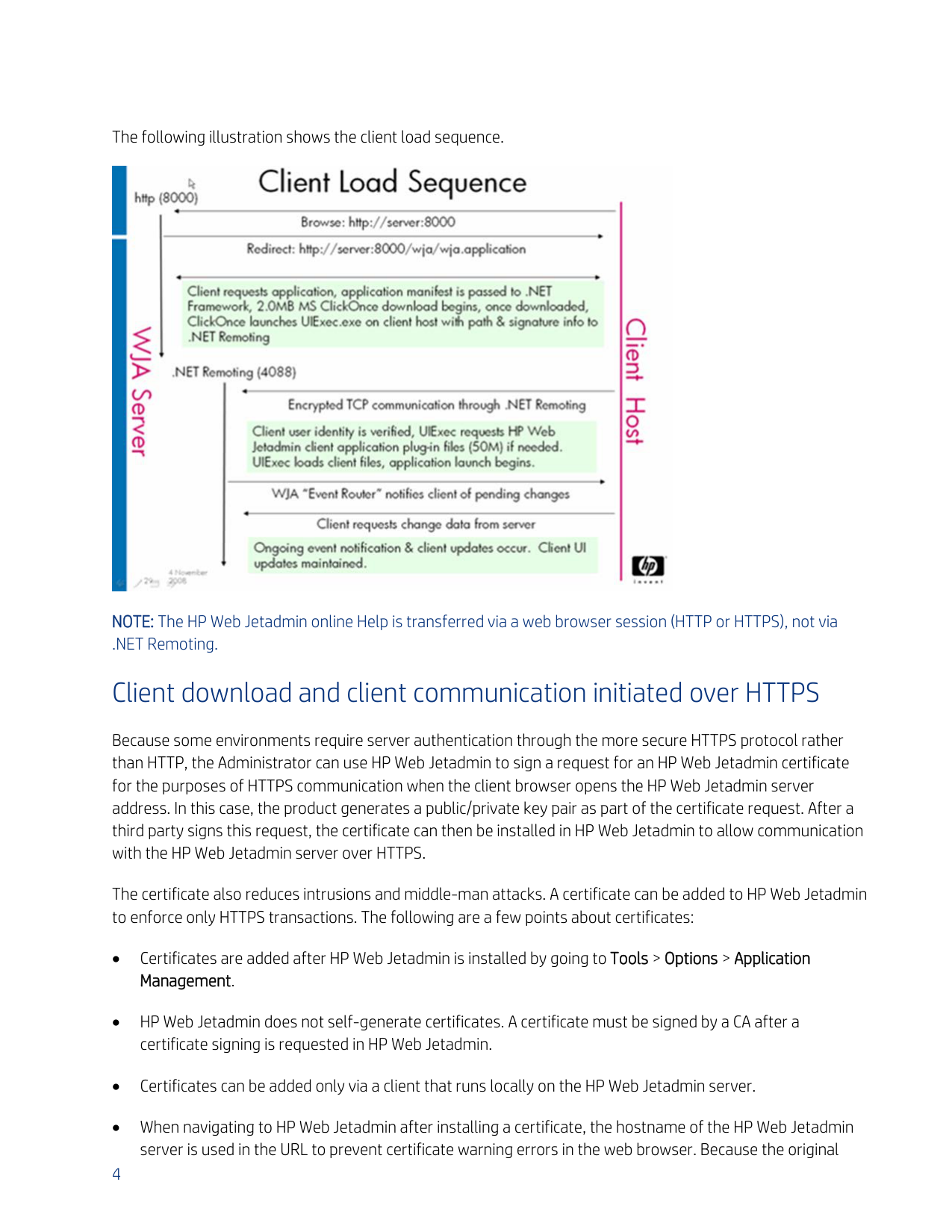
The following illustration shows the client load sequence.
NOTE: The HP Web Jetadmin online Help is transferred via a web browser session (HTTP or HTTPS), not via .NET Remoting. Client download and client communication initiated over HTTPS Because some environments require server authentication through the more secure HTTPS protocol rather than HTTP, the Administrator can use HP Web Jetadmin to sign a request for an HP Web Jetadmin certificate for the purposes of HTTPS communication when the client browser opens the HP Web Jetadmin server address. In this case, the product generates a public/private key pair as part of the certificate request. After a third party signs this request, the certificate can then be installed in HP Web Jetadmin to allow communication with the HP Web Jetadmin server over HTTPS. The certificate also reduces intrusions and middle-man attacks. A certificate can be added to HP Web Jetadmin to enforce only HTTPS transactions. The following are a few points about certificates: • Certificates are added after HP Web Jetadmin is installed by going to Tools > Options > Application Management. • HP Web Jetadmin does not self-generate certificates. A certificate must be signed by a CA after a certificate signing is requested in HP Web Jetadmin. • Certificates can be added only via a client that runs locally on the HP Web Jetadmin server. • When navigating to HP Web Jetadmin after installing a certificate, the hostname of the HP Web Jetadmin server is used in the URL to prevent certificate warning errors in the web browser. Because the original
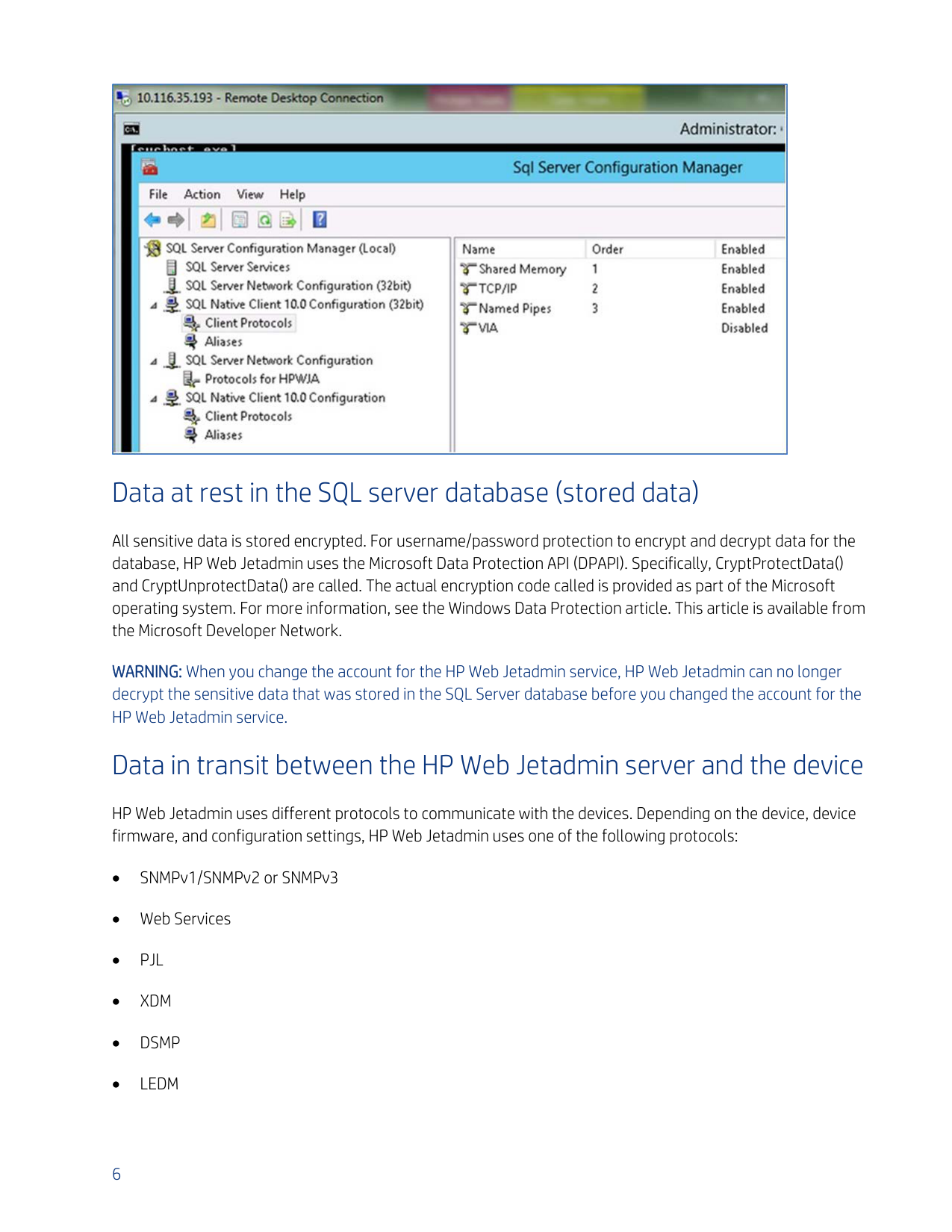
5 certificate signing request contains the hostname, the final installed certificate also contains the hostname inside the certificate. Communication between the HP Web Jetadmin client and server This section describes the event routing interactions that facilitate display accuracy. Event routing is a term used to describe the mechanism that updates the HP Web Jetadmin client whenever the server has new information to share. For instance, Joe runs a different client than Raul. Joe just added four device groups and ran a discovery that captured 1,000 new devices. Raul can detect this new information through the client display because the HP Web Jetadmin server notifies his client that updated information is available. When the client receives this notification, the client uses the .NET Remoting channel to retrieve the updated information. The update notification, however, comes via a different channel known as Client Event Routing. Client Event Routing uses a static port (4089). This port is configured in the Global.config.xml file. This file is located in the following directory: C:\Windows\ServiceProfiles\NetworkService\AppData\Local\HP Inc\HPWebJetadmin\WjaService\config Data in transit between the HP Web Jetadmin Server and a remote SQL server database By default, HP Web Jetadmin uses port 1433 for communication to the remote Microsoft SQL Server database via .NET Remoting. NOTE: The port number can be configured. For more information, see the Using Microsoft SQL Server with HP Web Jetadmin white paper. This white paper is available on the HP Web Jetadmin support page. HP Web Jetadmin encrypts all the sensitive data that it sends. For username/password protection to encrypt and decrypt data for the database, HP Web Jetadmin uses the Microsoft Data Protection API (DPAPI). Specifically, CryptProtectData() and CryptUnprotectData() are called. The actual encryption code called is provided as part of the Microsoft operating system. Data in transit between the HP Web Jetadmin server and the local SQL server database Data transmission between the HP Web Jetadmin server and the local SQL Server database is the same as data transmission between the HP Web Jetadmin server and a remote SQL Server database. However, because the SQL Server database is local, the communication to the database might be changed to use only Shared Memory as shown in the following example.
6
Data at rest in the SQL server database (stored data) All sensitive data is stored encrypted. For username/password protection to encrypt and decrypt data for the database, HP Web Jetadmin uses the Microsoft Data Protection API (DPAPI). Specifically, CryptProtectData() and CryptUnprotectData() are called. The actual encryption code called is provided as part of the Microsoft operating system. For more information, see the Windows Data Protection article. This article is available from the Microsoft Developer Network. WARNING: When you change the account for the HP Web Jetadmin service, HP Web Jetadmin can no longer decrypt the sensitive data that was stored in the SQL Server database before you changed the account for the HP Web Jetadmin service. Data in transit between the HP Web Jetadmin server and the device HP Web Jetadmin uses different protocols to communicate with the devices. Depending on the device, device firmware, and configuration settings, HP Web Jetadmin uses one of the following protocols: • SNMPv1/SNMPv2 or SNMPv3 • Web Services •
Pjl
•Xdm
•Dsmp
•Ledm
7 Export/import configuration templates from HP Web Jetadmin HP Web Jetadmin uses AES encryption with a key size of 256 for exporting and importing configuration templates. SNMPv1/SNMPv2 or SNMPv3 HP Web Jetadmin can use SNMPv1/SNMPv2, which is unencrypted, or SNMPv3. For encrypting over SNMPv3, HP Web Jetadmin supports AES-128 and DES for the Privacy Protocol and supports MD5 and SHA-1 for the Authentication Protocol. Web Services HP Web Jetadmin uses Web Services, which is a SOAP-based protocol, especially with HP FutureSmart devices. This communication uses port 7627. HP Web Jetadmin communicates over HTTPS to ensure that all the data is encrypted during the transmission. HP Web Jetadmin is dependent on .NET Remoting for this communication. To encrypt and decrypt the data, .NET Remoting uses a symmetric key that is generated during the handshake operation between HP Web Jetadmin and the device. Even if no password is set on an HP FutureSmart device, HP Web Jetadmin uses Web Services over HTTPS.
Pjl
HP Web Jetadmin can use PJL for some disk operation, such as macro and font installation, and for firmware upgrades. This communication goes over port 9100. NOTE: HP Web Jetadmin uses the Web Services protocol for firmware upgrades on HP FutureSmart devices.Xdmp
XDMP is an HP-proprietary protocol. HP Web Jetadmin uses XDM during the IPsec configuration.Dsmp
DSMP is a proprietary protocol that HP Web Jetadmin uses for some configuration options in the Digital Sending category for legacy HP Enterprise printers. DSMP is sent over HTTP.Ledm
For the configuration of some non-HP FutureSmart devices, HP Web Jetadmin uses Low-end Data Model (LEDM). LEDM is based on the Representational State Transfer (REST) style architecture, which is a design that describes a simple interface for transmitting XML data over HTTP or HTTPS without an additional messaging layer. This configuration is done over HTTP or HTTPS depending on the device configuration and device firmware. Because HTTP traffic is unencrypted and unsecure, HP recommends enforcing HTTPS communication on the device.
8 NOTE: Setting the administrator password on the devices that allow HTTP traffic prevents unauthorized access. However, the communication continues over HTTP unless HTTPS redirection is enforced on the device. Product integrity protection HP Web Jetadmin uses the Windows .NET Strong Naming capability. This feature allows the signing of assemblies that are part of the product. This prevents someone from replacing product assemblies with rogue assemblies that can impersonate existing assemblies and harm the customer’s interests.

hp.com/go/getconnected Current HP driver, support, and security alerts delivered directly to your desktop © Copyright 2020 HP Inc. The information contained herein is subject to change without notice. The only warranties for HP products and services are set forth in the express warranty statements accompanying such products and services. Nothing herein should be construed as constituting an additional warranty. HP shall not be liable for technical or editorial errors or omissions contained herein. c04894262, Rev. 5, September 2020