
Indesit Washing Machine Manual 19
Ask AI
— answers from the official manualAnswers from the official manual.
Common questions
Common Questions
10 totalWhat should I do if my washing machine has a high spin speed issue?
If the washing machine vibrates during the spin cycle, it might need to be balanced properly. Ensure there is no excessive unbalanced load; mixing small and large garments can improve balance (Page 15).
How do I clean the water inlet hose?
Check the inlet hose at least once a year. If there are any cracks, replace it immediately since high water pressure during cycles could lead to splits (Page 6).
Why is my door not opening after finishing a wash cycle?
The machine has a safety feature that locks the door until shortly after the program finishes. Wait for about three minutes and the DOOR LOCKED indicator light should turn off, allowing you to open the door (Page 9).
Can I clean the detergent drawer?
Yes, remove the detergent dispenser drawer by pressing lever (1) and pulling it outwards (2), wash it under running water to keep it hygienic. Clean frequently to maintain effectiveness (Page 6).
How do I start a wash cycle with the machine turned off?
Press and hold the Push & Wash button for two seconds; this initiates an automatic uncustomisable programme suitable for cotton or synthetic fabrics without needing to turn on the appliance (Page 10).
What should I do if my machine is noisy during spin cycles?
Normal motor, pump and drum noise occurs during spin. High noise could indicate an out-of-balance load or incorrect installation; try redistributing the wash load to resolve issues (Page 15).
Full Manual
16 pages
Instructions for use
WASHING MACHINE
GB
English,1
BWSC 61252
Contents Installation, 2-3-4-5 Unpacking and levelling Connecting the electricity and water supplies The first wash cycle Technical data Care and maintenance, 6 Cutting off the water or electricity supply Cleaning the washing machine Cleaning the detergent dispenser drawer Caring for the door and drum of your appliance Cleaning the pump Checking the water inlet hose Precautions and tips, 7 General safety Load balancing system Disposal
Description of the washing machine and starting a wash cycle, 8-9 Control panel Indicator lights Starting a wash cycle
Wash cycles, 10 Push & Wash Table of wash cycles
Personalisation, 11 Setting the temperature Setting the spin speed Functions
Detergents and laundry, 12 Detergent dispenser drawer Preparing the laundry Garments requiring special care
Troubleshooting, 13-14 Product Guarantee and Repair Information, 15
GB
Installation
GB
! This instruction manual should be kept in a safe place for future reference. If the washing machine is sold, transferred or moved, make sure that the instruction manual remains with the machine so that the new owner is able to familiarise himself/herself with its operation and features. ! Read these instructions carefully: they contain vital information relating to the safe installation and operation of the appliance.
Unpacking and levelling Unpacking
| | |---|
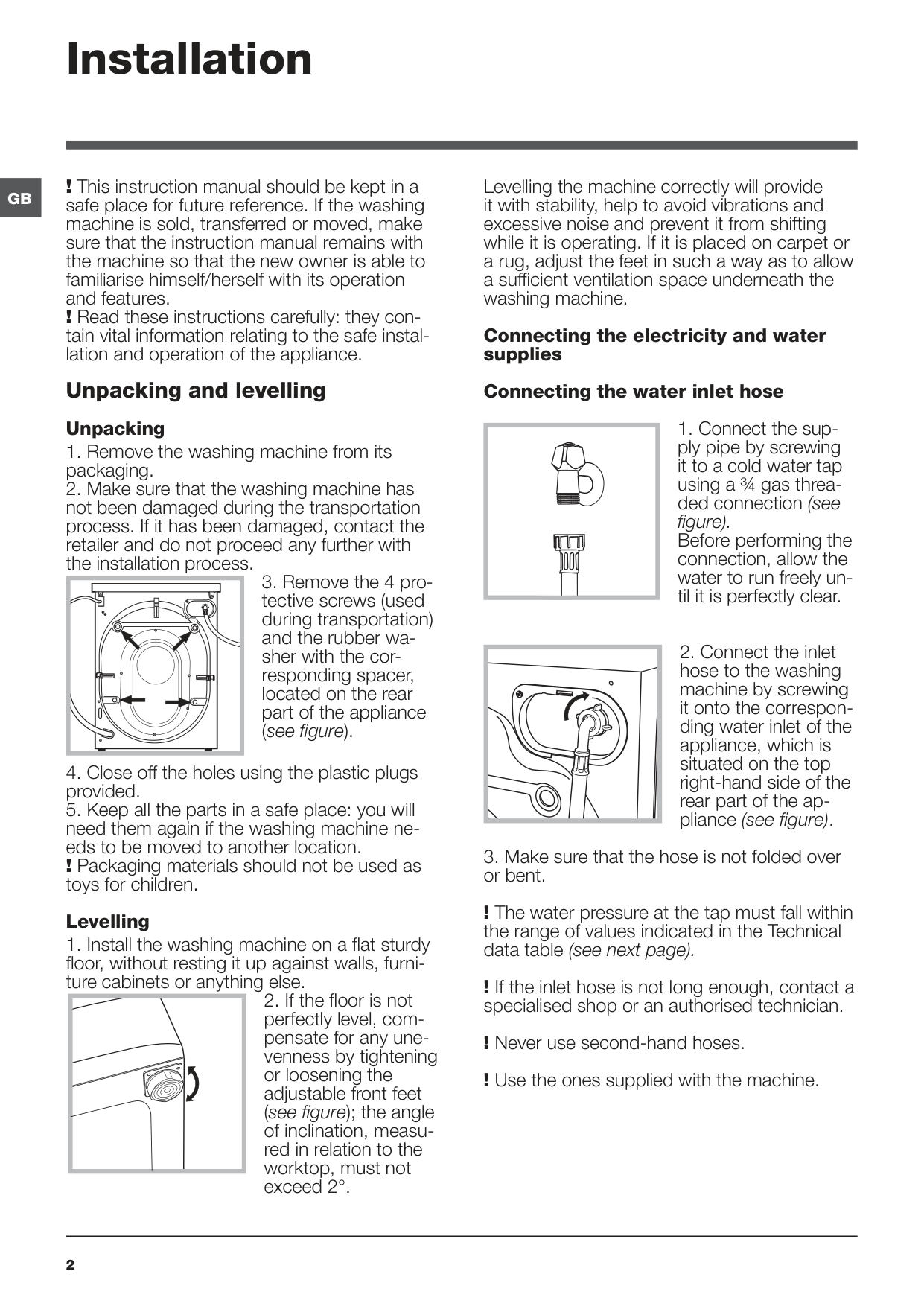
Levelling
Levelling the machine correctly will provide it with stability, help to avoid vibrations and excessive noise and prevent it from shifting while it is operating. If it is placed on carpet or a rug, adjust the feet in such a way as to allow a sufficient ventilation space underneath the washing machine.
Connecting the electricity and water supplies
Connecting the water inlet hose
| | |---|
| | |---|
! The water pressure at the tap must fall within the range of values indicated in the Technical data table (see next page).
! If the inlet hose is not long enough, contact a specialised shop or an authorised technician.
! Never use second-hand hoses. ! Use the ones supplied with the machine.
Connecting the drain hose
|65 - 100 cm| |---|
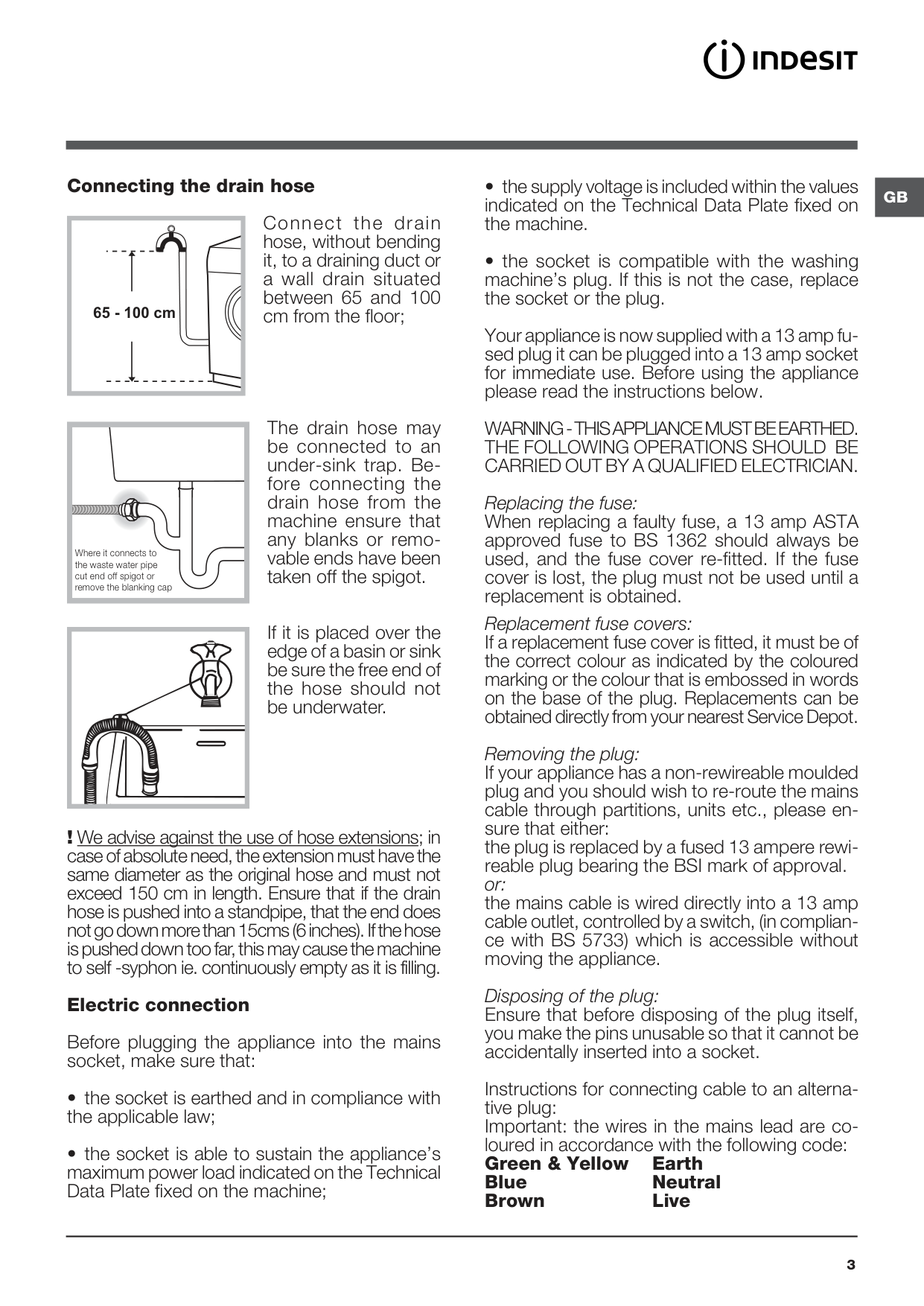
Connect the drain hose, without bending it, to a draining duct or a wall drain situated between 65 and 100 cm from the floor;
Where it connects to the waste water pipe cut end off spigot or remove the blanking cap
The drain hose may be connected to an under-sink trap. Before connecting the drain hose from the machine ensure that any blanks or removable ends have been taken off the spigot.
If it is placed over the edge of a basin or sink be sure the free end of the hose should not be underwater.
! We advise against the use of hose extensions; in case of absolute need, the extension must have the same diameter as the original hose and must not exceed 150 cm in length. Ensure that if the drain hose is pushed into a standpipe, that the end does not go down more than 15cms (6 inches). If the hose is pushed down too far, this may cause the machine to self -syphon ie. continuously empty as it is filling.
Electric connection
Before plugging the appliance into the mains socket, make sure that:
Your appliance is now supplied with a 13 amp fused plug it can be plugged into a 13 amp socket for immediate use. Before using the appliance please read the instructions below.
WARNING - THIS APPLIANCE MUST BE EARTHED. THE FOLLOWING OPERATIONS SHOULD BE CARRIED OUT BY A QUALIFIED ELECTRICIAN.
Replacing the fuse:
When replacing a faulty fuse, a 13 amp ASTA approved fuse to BS 1362 should always be used, and the fuse cover re-fitted. If the fuse cover is lost, the plug must not be used until a replacement is obtained.
Replacement fuse covers:
If a replacement fuse cover is fitted, it must be of the correct colour as indicated by the coloured marking or the colour that is embossed in words on the base of the plug. Replacements can be obtained directly from your nearest Service Depot.
Removing the plug: If your appliance has a non-rewireable moulded plug and you should wish to re-route the mains cable through partitions, units etc., please ensure that either: the plug is replaced by a fused 13 ampere rewireable plug bearing the BSI mark of approval. or: the mains cable is wired directly into a 13 amp cable outlet, controlled by a switch, (in compliance with BS 5733) which is accessible without moving the appliance. Disposing of the plug:
Ensure that before disposing of the plug itself, you make the pins unusable so that it cannot be accidentally inserted into a socket.
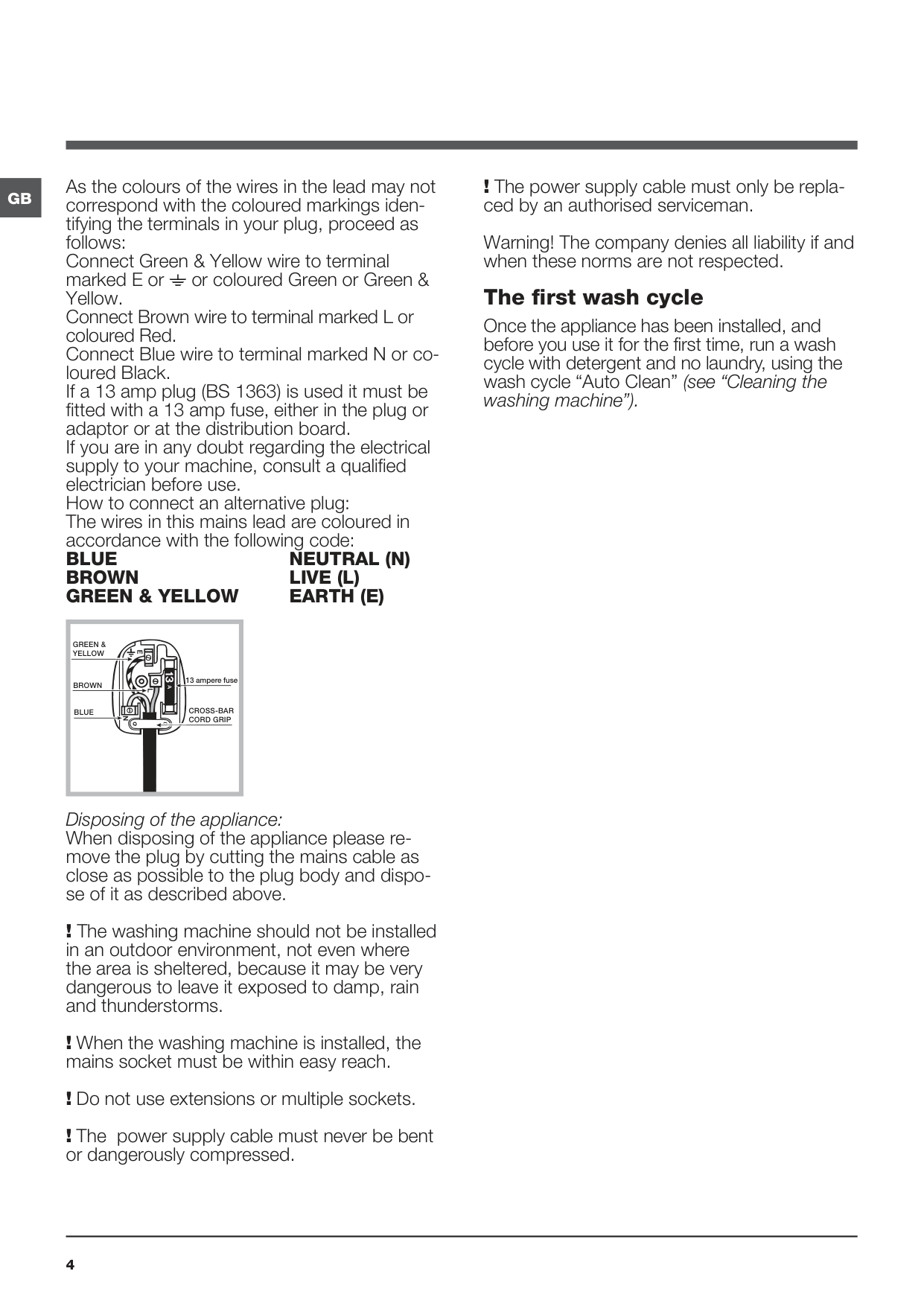
Instructions for connecting cable to an alternative plug: Important: the wires in the mains lead are coloured in accordance with the following code: Green & Yellow Earth Blue Neutral Brown Live
GB
GB As the colours of the wires in the lead may not correspond with the coloured markings identifying the terminals in your plug, proceed as follows: Connect Green & Yellow wire to terminal marked E or or coloured Green or Green & Yellow. Connect Brown wire to terminal marked L or coloured Red. Connect Blue wire to terminal marked N or coloured Black. If a 13 amp plug (BS 1363) is used it must be fitted with a 13 amp fuse, either in the plug or adaptor or at the distribution board. If you are in any doubt regarding the electrical supply to your machine, consult a qualified electrician before use. How to connect an alternative plug: The wires in this mains lead are coloured in accordance with the following code: BLUE NEUTRAL (N) BROWN LIVE (L) GREEN & YELLOW EARTH (E)
|GREEN & YELLOW
BROWN
BLUE
13 ampere fuse
CROSS-BAR CORD GRIP| |---|
Disposing of the appliance: When disposing of the appliance please remove the plug by cutting the mains cable as close as possible to the plug body and dispose of it as described above.
! The washing machine should not be installed in an outdoor environment, not even where the area is sheltered, because it may be very dangerous to leave it exposed to damp, rain and thunderstorms.
! When the washing machine is installed, the mains socket must be within easy reach.
! Do not use extensions or multiple sockets. ! The power supply cable must never be bent or dangerously compressed.
! The power supply cable must only be replaced by an authorised serviceman. Warning! The company denies all liability if and when these norms are not respected. The first wash cycle
Once the appliance has been installed, and before you use it for the first time, run a wash cycle with detergent and no laundry, using the wash cycle “Auto Clean” (see “Cleaning the washing machine”).
|Technical data| |---| |Model BWSC 61252| |Dimensions
width 59.5 cm height 85 cm depth 42.5 cm| |Capacity from 1 to 6 kg| |Electrical connections
please refer to the technical data plate fixed to the machine| |Water connections
maximum pressure 1 MPa (10 bar) minimum pressure 0.05 MPa (0.5 bar) drum capacity 40 litres| |Spin speed up to 1200 rotations per minute| |Test wash cycles in accordance with regulations 1061/2010 and 1015/2010.
Programme 9: Eco Cotton 60°. Programme 9: Eco Cotton 40°.| |This appliance conforms to the following EC Directives:
- EMC 2014/30/EU (Electromagnetic Compatibility)
- LVD 2014/35/EU (Low Voltage)
- 2012/19/EU (WEEE)
|
##### GB
Care and maintenance
GB
Cutting off the water and electricity supplies
|A
B
| |---|
Cleaning the detergent dispenser drawer
To remove the drawer, press lever (1) and pull the drawer outwards (2) (see figure).
|2
1
| |---|
Wash it under running water; this procedure should be repeated frequently.
Cleaning the pump The washing machine is fitted with a selfcleaning pump which does not require any maintenance. Sometimes, small items (such as coins or buttons) may fall into the protective pre-chamber at the base of the pump. ! Make sure the wash cycle has finished and unplug the appliance.
To access the pre-chamber:
|1
2 3
| |---|
Checking the water inlet hose
Check the inlet hose at least once a year. If there are any cracks, it should be replaced immediately: during the wash cycles, water pressure is very strong and a cracked hose could easily split open.
! Never use second-hand hoses.
Caring for the door and drum of your appliance
• Always leave the porthole door ajar in order to prevent unpleasant odours from forming.
Precautions and tips
! This washing machine was designed and constructed in accordance with international safety regulations. The following information is provided for safety reasons and must therefore be read carefully.
General safety
Load balancing system
Before every spin cycle, to avoid excessive vibrations and to distribute the load in a uniform manner, the drum rotates continuously at a speed which is slightly greater than the washing rotation speed. If, after several attempts, the load is not balanced correctly, the machine spins at a reduced spin speed. If the load is excessively unbalanced, the washing machine performs the distribution process instead of spinning. To encourage improved load distribution and balance, we recommend small and large garments are mixed in the load.
Disposal
GB
Description of the washing machine and starting a wash cycle
##### GB
Control panel
######## DELAY TIMER button
WASH CYCLE PROGRESS indicator lights
FUNCTION buttons with indicator lights
| | | | | |---|---|---|---| | | | | |
DOOR LOCKED indicator light
START/PAUSE button with indicator light
ON/OFF button
| | | |---|---| | | |
CHILD LOCK button with indicator light
WASH CYCLE knob
Detergent dispenser drawer
SPIN SPEED knob and indicator light
TEMPERATURE knob and indicator light
PUSH & WASH button
Detergent dispenser drawer: used to dispense detergents and washing additives (see “Detergents and laundry”).
ON/OFF button: switches the washing machine on and off.
PUSH & WASH button: (see “Wash cycles”).
WASH CYCLE knob: programmes the wash cycles. During the wash cycle, the knob does not move.
FUNCTION buttons with indicator light: used to select the available functions. The indicator light corresponding to the selected function will remain lit.
CHILD LOCK button with indicator light: to activate the control panel lock, press and hold the button for approximately 2 seconds. When the indicator light is illuminated, the control panel is locked (apart from the ON/ OFF button). This means it is possible to prevent wash cycles from being modified accidentally, especially where there are children in the home. To deactivate the control panel lock, press and hold the button for approximately 2 seconds.
TEMPERATURE knob and indicator light: sets the temperature or the cold wash cycle (see “Personalisation”).
SPIN SPEED knob and indicator light: sets the spin speed or exclude the spin cycle completely (see “Personalisation”).
DELAY TIMER button: delays the start of the wash cycle by up to 9 hours. Press the button repeatedly until the indicator light corresponding to the desired delay time turns on. When the button is pressed for the fourth time, the option will be deactivated.
WASH CYCLE PROGRESS indicator lights: used to monitor the progress of the wash cycle. The illuminated indicator light shows which phase is in progress.
DOOR LOCKED indicator light: indicates whether the door may be opened or not (see next page).
START/PAUSE button with indicator light: starts or temporarily interrupts the wash cycles. N.B. To pause the wash cycle in progress, press this button; the corresponding indicator light will flash orange, while the indicator light for the current wash cycle phase will remain lit in a fixed manner. If the DOOR LOCKED indicator light is switched off, the door may be opened (wait approximately 3 minutes). To start the wash cycle from the point at which it was interrupted, press this button again.
Standby mode This washing machine, in compliance with new energy saving regulations, is fitted with an automatic standby system which is enabled after about 30 minutes if no activity is detected. Press the ON-OFF button briefly and wait for the machine to start up again.
Indicator lights
The indicator lights provide important information. This is what they can tell you:
Delayed start If the DELAY TIMER function has been activated (see “Personalisation”), after the wash cycle has been started the indicator light corresponding to the selected delay period will begin to flash:
As time passes, the remaining delay will be displayed and the corresponding indicator light will flash:
The set programme will start once the selected time delay has expired.
Wash cycle phase indicator lights Once the desired wash cycle has been selected and has begun, the indicator lights switch on one by one to indicate which phase of the cycle is currently in progress.
Wash Rinse Spin Drain End of wash cycle
Function buttons and corresponding indicator lights When a function is selected, the corresponding indicator light will illuminate. If the selected function is not compatible with the programmed wash cycle, the corresponding indicator light will flash and the function will not be activated. If the selected option is not compatible with another previously selected option, the indicator light will flash accompanied by a buzzer (3 beeps), and only the latter option will be activated; the indicator light corresponding to the activated option will turn on
Door locked indicator light When the indicator light is on, the porthole door is locked to prevent it from being opened; make sure the indicator light is off before opening the door (wait approximately 3 minutes). To open the door during a running wash cycle, press the START/PAUSE button; the door may be opened once the DOOR LOCKED indicator light turns off.
Starting a wash cycle Rapid programming
######## Traditional programming
GB
Wash cycles
GB
Push & Wash This function allows for starting a wash cycle even when the machine is switched off without having to press the ON/OFF button in advance, or after switching on the machine, without having activated any button and/or selector (otherwise, the Push & Wash function will be deactivated). To start the Push & Wash cycle press and hold the relative button for 2 seconds. The lit indicator light indicates that the cycle has started. This wash cycle is ideal for cotton or synthetic fabrics, as it washes at a temperature of 30° and a maximum spin speed of 1000 rpm. Maximum load 3 kg. (Cycle duration 45’). How does it work?
|Wash cycles|Description of the wash cycle|Max. temp. (°C)|Max. speed (rpm)|Detergents|Detergents|Max. load (kg)|Residual
dampness %|Energy
consumption kWh|Total water lt|Cycle duration| |---|---|---|---|---|---|---|---|---|---|---| |Wash cycles|Description of the wash cycle|Max. temp. (°C)|Max. speed (rpm)|Wash|Fabric
softener|Max. load (kg)|Residual
dampness %|Energy
consumption kWh|Total water lt|Cycle duration| |Everyday 30° ECO|Everyday 30° ECO|Everyday 30° ECO|Everyday 30° ECO|Everyday 30° ECO|Everyday 30° ECO|Everyday 30° ECO|Everyday 30° ECO|Everyday 30° ECO|Everyday 30° ECO|Everyday 30° ECO| |1|Daily cotton|30°|1200|||3|-|-|-|100’| |2|Daily synthetics|30°|1000|||3|-|-|-|90’| |3|Coloureds|30°|1000|||3|-|-|-|95’|
|4|Delicates|30°|0|||0.5|-|-|-|80’| |5|Rapid 30min: to refresh lightly soiled garments quickly (not suitable for wool, silk and clothes which require washing by hand).|30°|800|||3|71|0.20|30|30’| |Traditionals|Traditionals|Traditionals|Traditionals|Traditionals|Traditionals|Traditionals|Traditionals|Traditionals|Traditionals|Traditionals| |6|Cotton (3): lightly soiled whites and delicate colours.|40° (Max.60°)|1200|||6|53|0.97|63|230’| |7|Synthetics (4): lightly soiled resistant colours.|40° (Max.60°)|1000|||3|44|0.61|45|115’| |8|Mixed|40°|1200|||6|-|-|-|125’| |9|Eco cotton 60°C (1): heavily soiled whites and resistant colours.|60°|1200|||6|53|0.89|50|200’| |9|Eco cotton 40°C (2): lightly soiled whites and delicate colours.|40°|1200|||6|53|0.97|63|230’| |10|White cotton: extremely soiled whites.|90°|1200|||6|-|-|-|190’| |Specials|Specials|Specials|Specials|Specials|Specials|Specials|Specials|Specials|Specials|Specials| |11|Sport|30°|600|||2.5|-|-|-|50’| |12|Duvet: for down-stuffed garments.|30°|1000|||1|-|-|-|100’| |13|Wool: for wool, cashmere, etc.|40°|800|||1|-|-|-|65’| |14|Anti odour|40°|1000|||2.5|-|-|-|135’| | |Rinse + Spin|-|1200|-||6|-|-|-|50’| | |Spin + Drain|-|1200|-|-|6|-|-|-|10’| | |Drain only *| | |-|-|6|-|-|-|3’|
###### * If you select programme and exclude the spin cycle, the machine will drain only.
The length of cycle shown on the display or in this booklet is an estimation only and is calculated assuming standard working conditions. The actual duration can vary according to factors such as water temperature and pressure, the amount of detergent used, the amount and type of load inserted, load balancing and any wash options selected.
Personalisation
Setting the temperature Turning the TEMPERATURE knob to set the wash temperature (see Table of wash cycles). The temperature may be lowered, or even set to a cold wash . N.B.: If the set value is compatible with the selected cycle, the knob indicator will be lit (fixed light). If it isn’t, it will flash and 3 beeps will be heard. The washing machine will automatically prevent you from selecting a temperature which is higher than the maximum value set for each wash cycle.
Setting the spin speed Turning the SPIN SPEED knobn to set the spin speed for the selected wash cycle. N.B.: If the set value is compatible with the selected cycle, the knob indicator will be lit (fixed light). If it isn’t, it will flash and 3 beeps will be heard. The maximum spin speeds available for each wash cycle are as follows: Wash cycles Maximum spin speed
Cottons 1200 rpm Synthetics 1000 rpm Wool 800 rpm
The spin speed may be lowered, or the spin cycle can be excluded altogether by selecting the symbol . The washing machine will automatically prevent you from selecting a spin speed which is higher than the maximum speed set for each wash cycle.
Functions The various wash functions available with this washing machine will help to achieve the desired results, every time. To activate the functions:
|- If the selected function is not compatible with the programmed wash cycle, the corresponding indicator light will flash and the function will not be activated.
- If the selected option is not compatible with another previously selected option, the indicator light will flash accompanied by a buzzer (3 beeps), and only the latter option will be activated; the indicator light corresponding to the activated option will turn on
| |---|
Extra Rinse By selecting this option, the efficiency of the rinse is increased and optimal detergent removal is guaranteed. It is particularly useful for sensitive skin.
Easy iron By selecting this function, the wash and spin cycles will be modified in order to reduce the formation of creases. At the end of the cycle the washing machine will perform slow rotations of the drum, while the EASY IRON and START/PAUSE indicator lights will flash and the led will remain lit in a fixed manner. To end the cycle, press the START/PAUSE button or the EASY IRON button.
GB
Detergents and laundry
GB
Detergent dispenser drawer
Successful washing results also depend on the correct dose of detergent: adding too much detergent will not necessarily result in a more efficient wash, and may in fact cause build up on the inside of your appliance and contribute to environmental pollution.
! Do not use hand washing detergents because these create too much foam. ! Use powder detergent for white cotton garments, for prewashing, and for washing at temperatures over 60°C.
! Follow the instructions given on the detergent packaging. Open the detergent dispenser drawer and pour in the detergent or washing additive, as follows.
| | |---|
######## detergent (powder or liquid)
If liquid detergent is used, it is recommended that the removable plastic partition A (supplied) be used for proper dosage. If powder detergent is used, place the partition into slot B.
Compartment 3: Additives (fabric softeners, etc.) The fabric softener must not exceed the “max” level indicated on the central pin.
Preparing the laundry
How much does your laundry weigh? 1 sheet 400-500 g 1 pillow case 150-200 g 1 tablecloth 400-500 g 1 bathrobe 900-1.200 g 1 towel 150-250 g
Garments requiring special care
Daily cotton: a 30°C cycle for cotton garments. It allows for reducing consumption of energy for heating the water, while guaranteeing excellent results. Suitable for lightly soiled garments.
Daily synthetics: a 30°C cycle for synthetic garments. It allows for reducing consumption of energy for heating the water, while guaranteeing excellent results. Suitable for lightly soiled garments.
Coloureds: a 30°C cycle that helps to preserve the colours; suitable for coloured cotton and synthetic garments. It allows for reducing consumption of energy for heating the water, while guaranteeing excellent results. Suitable for lightly soiled garments.
Delicates: use programme 4 to wash very delicate garments. It is advisable to turn the garments inside out before washing them. For best results, use liquid detergent on delicate garments. For washing Silk items and Curtains, select the relevant cycle 4 and activate the option ; the machine will end the cycle with the laundry soaked and the indicator light will flash. To drain the water so that the laundry can be removed, press the START/PAUSE button or the option .
Mixed: a 40°C cycle for washing cotton and synthetic garments together. Suitable for lightly soiled underwear.
Sport (programme 11) is designed for washing lightly soiled sports clothing (tracksuits, shorts, etc.); for best results, we recommend not exceeding the maximum load indicated in the “Programme table”. We recommend using liquid detergent, and adding the amount suitable for a half-load.
Duvet: to wash single duvets (the weight of which should not exceed 1 kg), cushions or clothes padded with goose down such as puffa jackets, use the special wash cycle number 12. We recommend that duvets are placed in the drum with their edges folded inwards (see figure) and that no more than ¾ of the total volume of the drum is used. To achieve the best results, we recommend that a liquid detergent is used and placed inside the detergent dispenser drawer.
| | |---|
Wool - Woolmark Apparel Care - Blue:
the wool wash cycle of this machine has been approved by The Woolmark Company for the washing of wool garments labelled as “hand wash” provided that the products are washed according to the instructions on the garment label and those issued by the manufacturer of this washing machine. (M1128)


In UK, Eire, Hong Kong and India the Woolmark trade mark is a Certification trade mark.
Anti odour: use programme 14 (Synthetics) for washing garments with bad odours (e.g. smoke, sweat, fried food). The programme is designed to remove bad odours while preserving the fabric fibres.
Troubleshooting
Your washing machine could fail to work. Before contacting the Technical Assistance Centre (see “Assistance”), make sure that the problem cannot be solved easily using the following list.
Problem:
Possible causes / Solutions:
The machine does not switch on.
The wash cycle does not start.
The machine does not fill with water or the indicator light for the first wash cycle stage flashes rapidly.
The machine continuously fills with water and continually drains away or Water left in the drum or Stuck on wash.
The machine does not drain or spin
The machine does spin.
The machine does not heat or poor wash results.
The machine does not drain or spin
The programme takes too long.
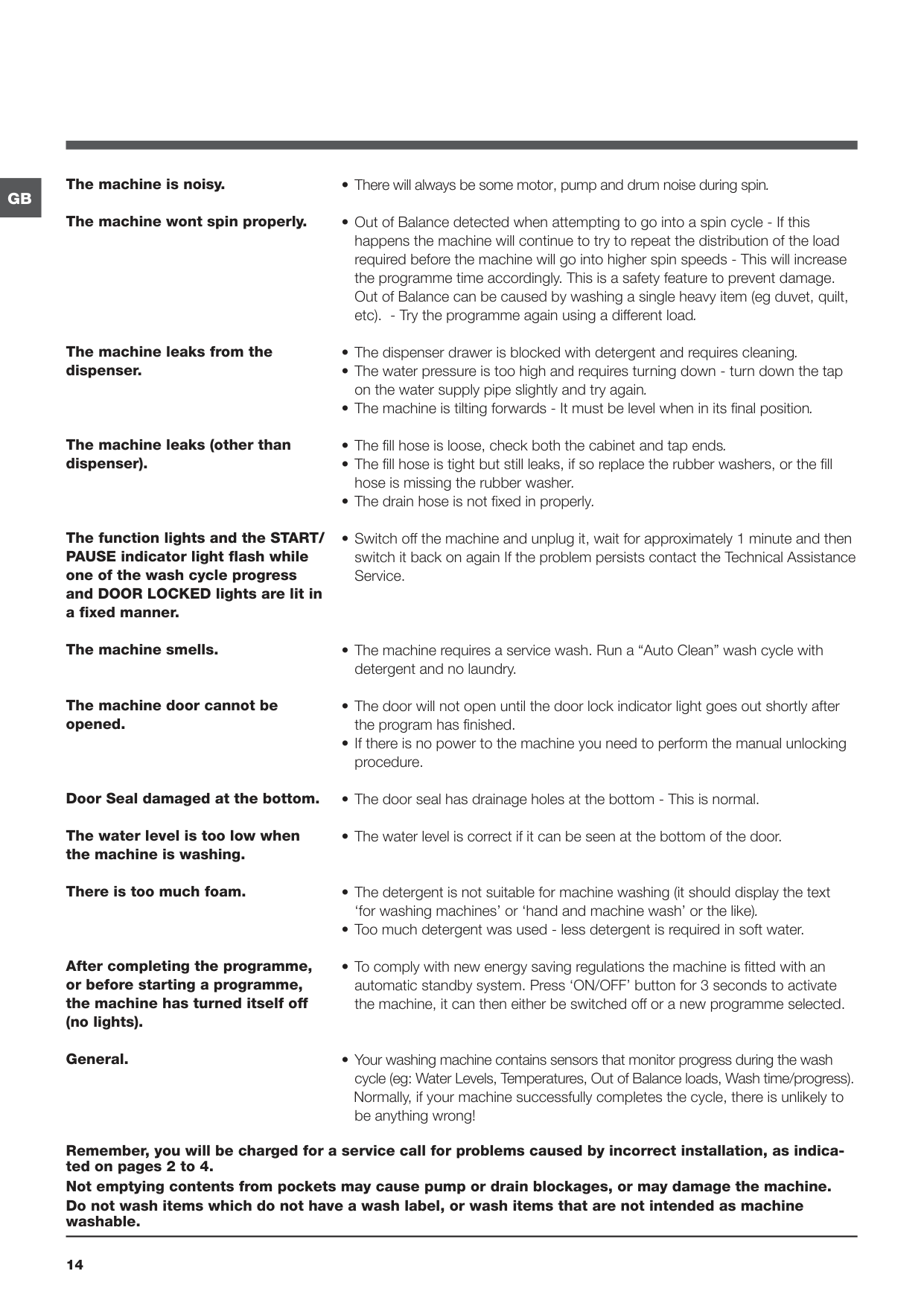
The machine vibrates a lot during the spin cycle.
GB
GB
The machine is noisy.
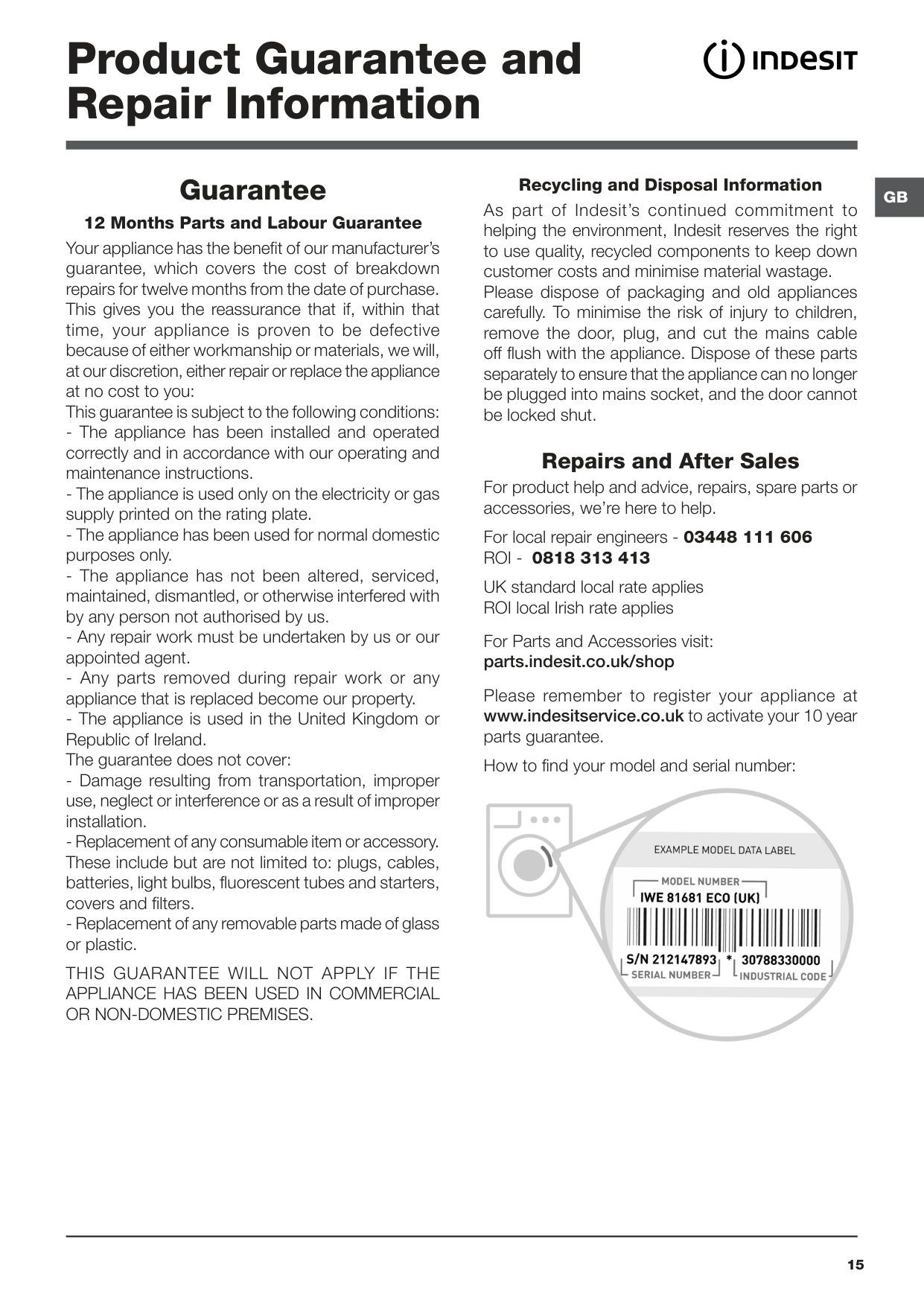
The machine wont spin properly.
The machine leaks from the dispenser.
The machine leaks (other than dispenser).
The function lights and the START/ PAUSE indicator light flash while one of the wash cycle progress and DOOR LOCKED lights are lit in a fixed manner.
The machine smells.
The machine door cannot be opened.
Door Seal damaged at the bottom.
The water level is too low when the machine is washing.
There is too much foam.
After completing the programme, or before starting a programme, the machine has turned itself off (no lights).
General.

Remember, you will be charged for a service call for problems caused by incorrect installation, as indicated on pages 2 to 4. Not emptying contents from pockets may cause pump or drain blockages, or may damage the machine. Do not wash items which do not have a wash label, or wash items that are not intended as machine washable.
Product Guarantee and Repair Information
Guarantee 12 Months Parts and Labour Guarantee Your appliance has the benefit of our manufacturer’s guarantee, which covers the cost of breakdown repairs for twelve months from the date of purchase. This gives you the reassurance that if, within that time, your appliance is proven to be defective because of either workmanship or materials, we will, at our discretion, either repair or replace the appliance at no cost to you: This guarantee is subject to the following conditions:
THIS GUARANTEE WILL NOT APPLY IF THE APPLIANCE HAS BEEN USED IN COMMERCIAL OR NON-DOMESTIC PREMISES.
Recycling and Disposal Information As part of Indesit’s continued commitment to helping the environment, Indesit reserves the right to use quality, recycled components to keep down customer costs and minimise material wastage. Please dispose of packaging and old appliances carefully. To minimise the risk of injury to children, remove the door, plug, and cut the mains cable off flush with the appliance. Dispose of these parts separately to ensure that the appliance can no longer be plugged into mains socket, and the door cannot be locked shut.
GB
Repairs and After Sales For product help and advice, repairs, spare parts or accessories, we’re here to help.
For local repair engineers - 03448 111 606 ROI - 0818 313 413
UK standard local rate applies ROI local Irish rate applies
For Parts and Accessories visit: parts.indesit.co.uk/shop
Please remember to register your appliance at www.indesitservice.co.uk to activate your 10 year parts guarantee.
How to find your model and serial number:

#### 195156064.00
03/2017
GB
Whirlpool EMEA S.p.a. Via Carlo Pisacane n. 1 20016 Pero (MI) Italy www.indesit.co.uk