HomeConnect Lock Configuration Guide HomeConnect Lock Configuration Guide HomeConnect Lock Configuration Guide Home Connect 44571 / 04 English
Ensure you have followed all the steps in the SmartCode Quick Installation Guide.
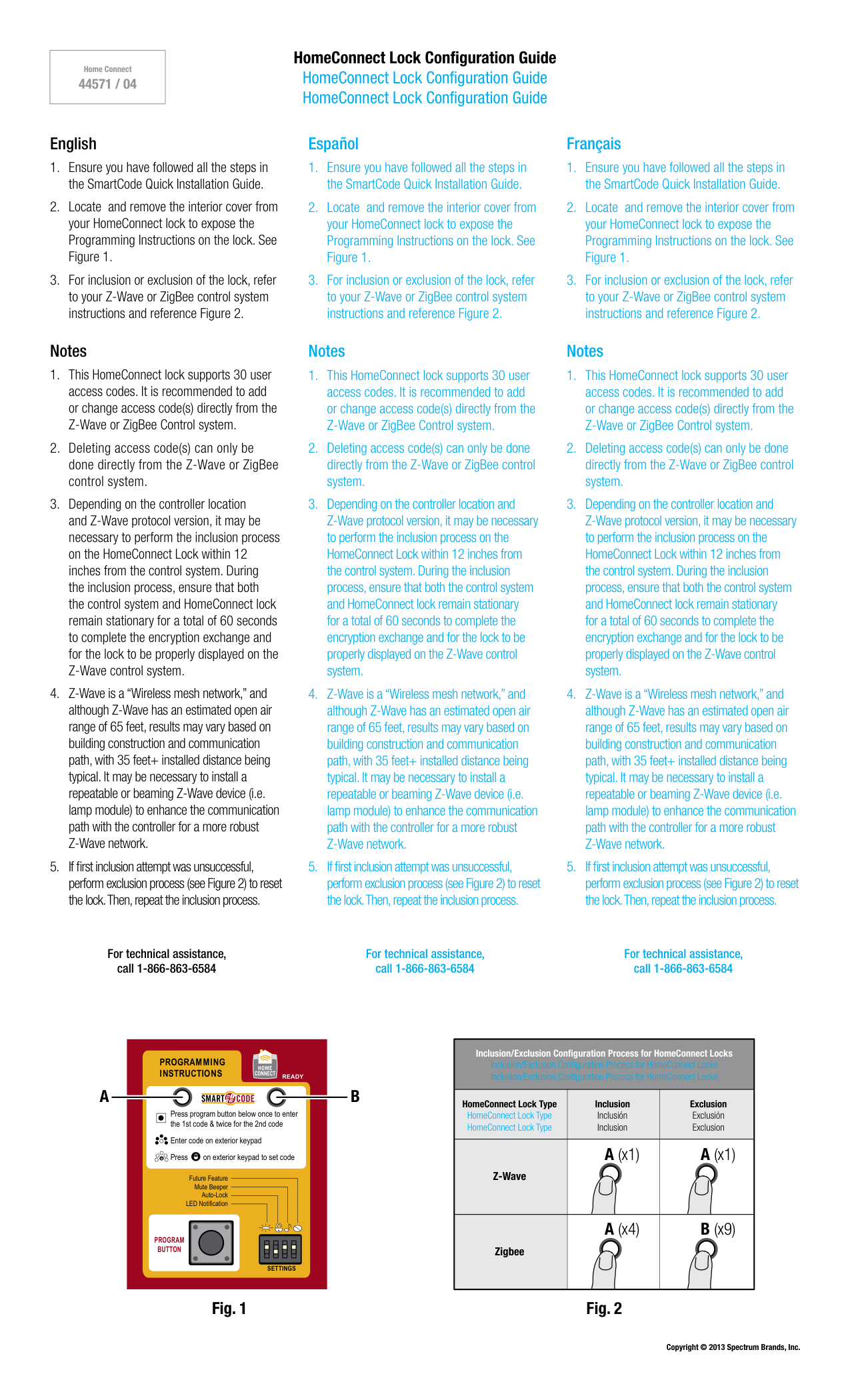
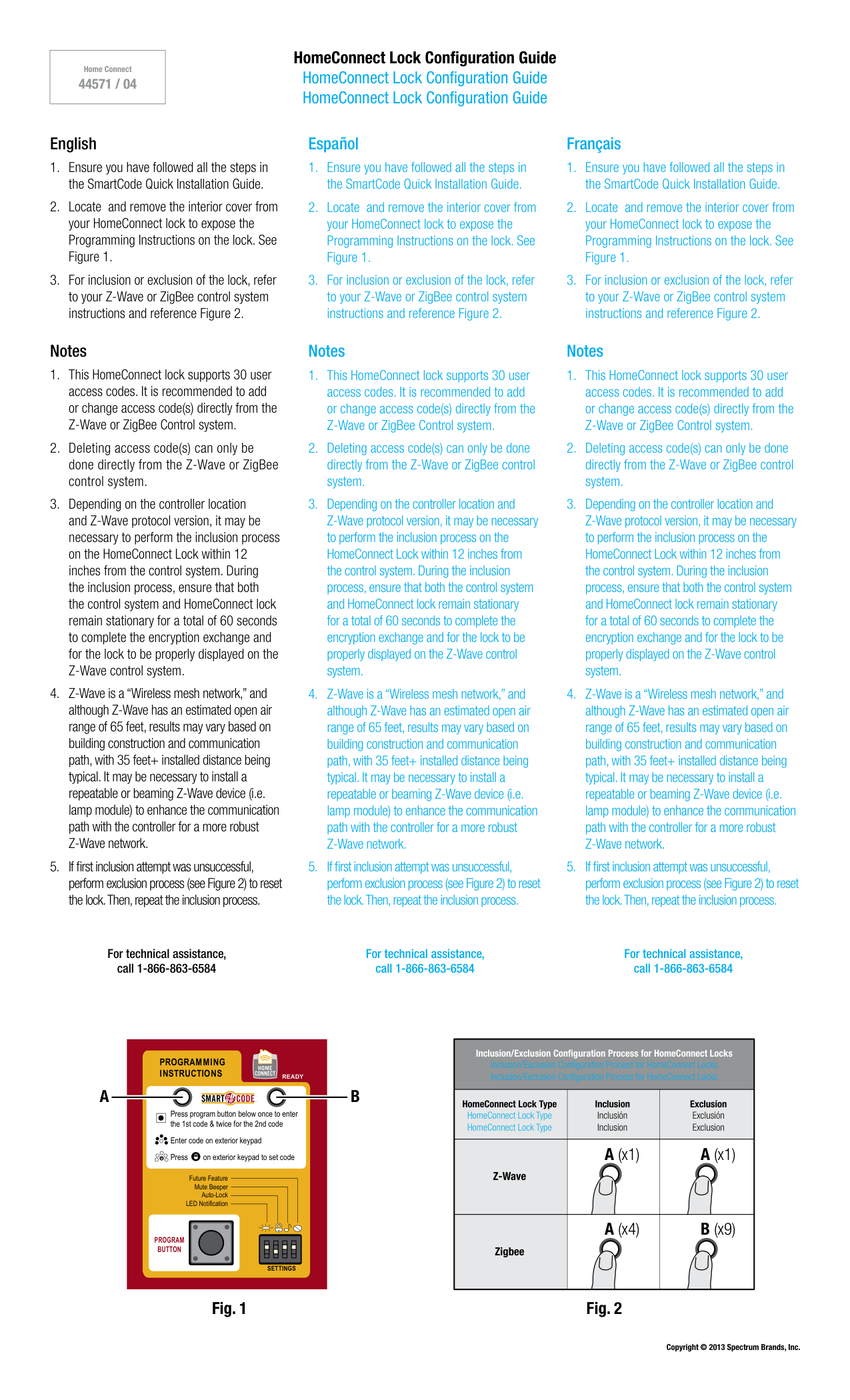
Locate and remove the interior cover from your HomeConnect lock to expose the Programming Instructions on the lock. See Figure 1.
For inclusion or exclusion of the lock, refer to your Z-Wave or ZigBee control system instructions and reference Figure 2. Notes
This HomeConnect lock supports 30 user access codes. It is recommended to add or change access code(s) directly from the Z-Wave or ZigBee Control system.
Deleting access code(s) can only be done directly from the Z-Wave or ZigBee control system.
Depending on the controller location and Z-Wave protocol version, it may be necessary to perform the inclusion process on the HomeConnect Lock within 12 inches from the control system. During the inclusion process, ensure that both the control system and HomeConnect lock remain stationary for a total of 60 seconds to complete the encryption exchange and for the lock to be properly displayed on the Z-Wave control system.
Z-Wave is a “Wireless mesh network,” and although Z-Wave has an estimated open air range of 65 feet, results may vary based on building construction and communication path, with 35 feet+ installed distance being typical. It may be necessary to install a repeatable or beaming Z-Wave device (i.e. lamp module) to enhance the communication path with the controller for a more robust Z-Wave network.
If first inclusion attempt was unsuccessful, perform exclusion process (see Figure 2) to reset the lock. Then, repeat the inclusion process. Español
Ensure you have followed all the steps in the SmartCode Quick Installation Guide.
Locate and remove the interior cover from your HomeConnect lock to expose the Programming Instructions on the lock. See Figure 1.
For inclusion or exclusion of the lock, refer to your Z-Wave or ZigBee control system instructions and reference Figure 2. Notes
This HomeConnect lock supports 30 user access codes. It is recommended to add or change access code(s) directly from the Z-Wave or ZigBee Control system.
Deleting access code(s) can only be done directly from the Z-Wave or ZigBee control system.
Depending on the controller location and Z-Wave protocol version, it may be necessary to perform the inclusion process on the HomeConnect Lock within 12 inches from the control system. During the inclusion process, ensure that both the control system and HomeConnect lock remain stationary for a total of 60 seconds to complete the encryption exchange and for the lock to be properly displayed on the Z-Wave control system.
Z-Wave is a “Wireless mesh network,” and although Z-Wave has an estimated open air range of 65 feet, results may vary based on building construction and communication path, with 35 feet+ installed distance being typical. It may be necessary to install a repeatable or beaming Z-Wave device (i.e. lamp module) to enhance the communication path with the controller for a more robust Z-Wave network.
If first inclusion attempt was unsuccessful, perform exclusion process (see Figure 2) to reset the lock. Then, repeat the inclusion process. Français
Ensure you have followed all the steps in the SmartCode Quick Installation Guide.
Locate and remove the interior cover from your HomeConnect lock to expose the Programming Instructions on the lock. See Figure 1.
For inclusion or exclusion of the lock, refer to your Z-Wave or ZigBee control system instructions and reference Figure 2. Notes
This HomeConnect lock supports 30 user access codes. It is recommended to add or change access code(s) directly from the Z-Wave or ZigBee Control system.
Deleting access code(s) can only be done directly from the Z-Wave or ZigBee control system.
Depending on the controller location and Z-Wave protocol version, it may be necessary to perform the inclusion process on the HomeConnect Lock within 12 inches from the control system. During the inclusion process, ensure that both the control system and HomeConnect lock remain stationary for a total of 60 seconds to complete the encryption exchange and for the lock to be properly displayed on the Z-Wave control system.
Z-Wave is a “Wireless mesh network,” and although Z-Wave has an estimated open air range of 65 feet, results may vary based on building construction and communication path, with 35 feet+ installed distance being typical. It may be necessary to install a repeatable or beaming Z-Wave device (i.e. lamp module) to enhance the communication path with the controller for a more robust Z-Wave network.
If first inclusion attempt was unsuccessful, perform exclusion process (see Figure 2) to reset the lock. Then, repeat the inclusion process. Copyright © 2013 Spectrum Brands, Inc. For technical assistance, call 1-866-863-6584 For technical assistance, call 1-866-863-6584 For technical assistance, call 1-866-863-6584
Program
Button
Settings
Press program button below once to enter the 1st code & twice for the 2nd code Enter code on exterior keypad Press on exterior keypad to set code
Programming
Instructions
Ready
Future Feature Mute Beeper Auto-Lock LED Notification
A
B
A (x1) A (x1) A (x4) B (x9) Inclusion Inclusión Inclusion HomeConnect Lock Type HomeConnect Lock Type HomeConnect Lock Type Z-Wave Zigbee Exclusion Exclusión Exclusion Inclusion/Exclusion Configuration Process for HomeConnect Locks Inclusion/Exclusion Configuration Process for HomeConnect Locks Inclusion/Exclusion Configuration Process for HomeConnect Locks Fig. 1 Fig. 2