
Ask AI
— answers from the official manualAnswers from the official manual.
Common questions
Common Questions
32 totalHow do I set up my Schlage Be489WB?
To set up your lock, open the door and enter one of the provided default user codes. Your lock will proceed through a setup routine; once the bolt stops moving, setup is complete.
What should I do if the bolt doesn't extend or retract during testing?
If the bolt fails to move in tests, visit alle.co/encode for troubleshooting steps and additional assistance. Follow the on-screen prompts and check your installation.
How do I know if the lock is fully installed?
Ensure that the slot in the bolt aligns with the back of the inside assembly's slot, and make sure the thumbturn is vertical (up and down). Double-check by extending and retracting the bolt smoothly using both the touchscreen code and the internal mechanism. If it functions properly, installation is complete.
How do I install batteries?
Remove the battery cover; slide out the battery holder and insert three AA batteries, aligning them with the door edge upon reinstallation. Ensure the holder is in place within the lock.
Why doesn’t my ‘X’ button work when I enter an incorrect code?
The 'X' icon flashes whenever a wrong user code is entered, indicating that the entry was unsuccessful.
How do I unlock my door using a user code?
Unlock your door by entering one of the programmed codes on the touchscreen assembly after pressing the Home button.
Show 26 more questions
How do I securely mount the strike plate and reinforcement screw(s)?
How do I know when my Schlage Be489WB’s batteries are low?
What should I do if I see a low battery indicator?
What does a flashing 'X' on the screen mean?
How do I add a new user code to my lock?
What does an amber LED indicate?
How do I unlock my door using the Be489Wb?
What type of batteries does the Be489Wb use?
How do I lock my door with the Be489Wb?
How do I delete an existing user code from the lock?
How do I reset my BE489WB to factory settings?
How do I troubleshoot WiFi connectivity issues?
What does a flashing "X" on the lock mean?
How do I install the Schlage BE489WB deadbolt on my door?
How do I unlock my door using the touchscreen?
What security features does the BE489WB have?
How do I install the Schlage BE489WB deadbolt?
What type of batteries does the BE489WB use and how do I replace them?
What should I do if my lock shows a low battery indicator?
What should I do if the touchscreen is unresponsive?
How do I reset my Schlage BE489WB to factory settings?
My lock is having WiFi connectivity issues. What should I do?
What type of batteries does the BE489WB use and how often do I need to replace them?
What does the flashing "X" icon mean on my lock?
Can I control my Schlage BE489WB from my smartphone?
How do I unlock my door with the BE489WB?
Full Manual
16 pages

########### Quick Start Guide
| | | |---|---| | | | | | |
Parts
| | | |---|---| | | | | | |
Backup Key
Backplate

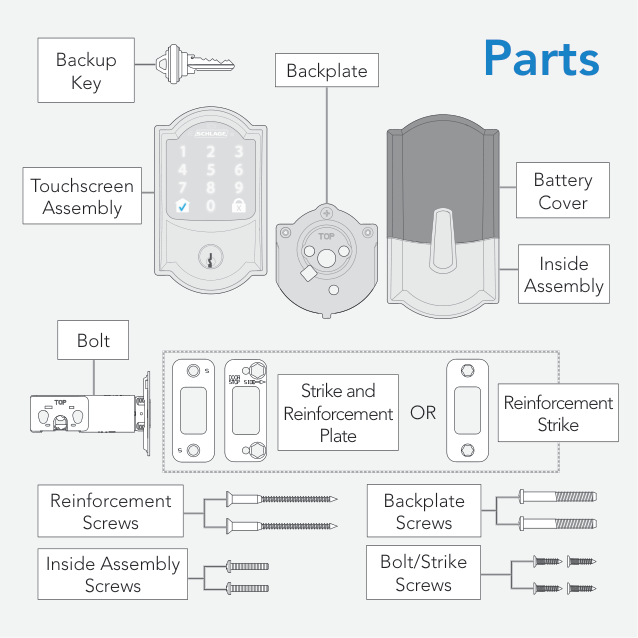
Battery Cover
Touchscreen Assembly

| | | |---|---| | | |
Inside Assembly
| | | | |---|---|---| | | | | | | | |
Bolt
|Strike and Reinforcement Plate|Strike and Reinforcement Plate|Strike and Reinforcement Plate| |---|---|---| | | | |
Reinforcement Strike
OR
Backplate Screws
Reinforcement Screws
| | | |---|---| | | | | | |
| | | |---|---| | | | | | |
| | |---|
| | | |
Bolt/Strike Screws
Inside Assembly Screws

##### alle.co/encode
Visit alle.co/encode for an improved installation experience. Access online interactive instructions, warranty, and reference information.
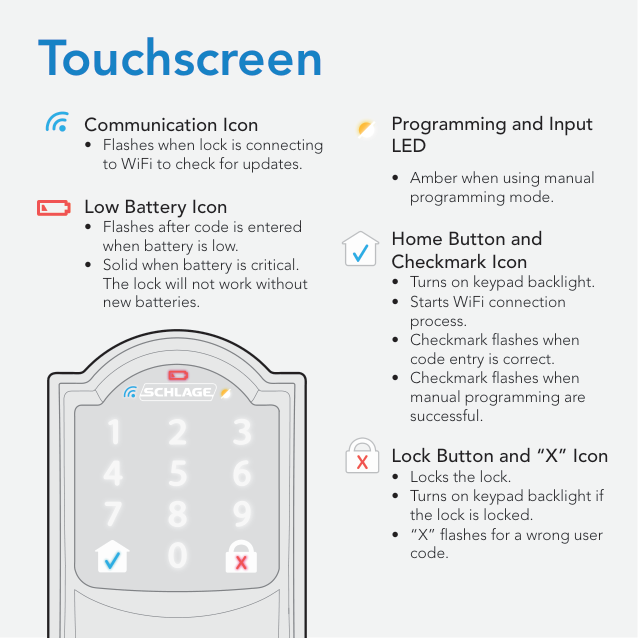
Touchscreen


############# Programming and Input LED
############# Communication Icon


• Flashes when lock is connecting to WiFi to check for updates. Low Battery Icon
• Amber when using manual
programming mode.


############# Home Button and Checkmark Icon




############# Lock Button and “X” Icon


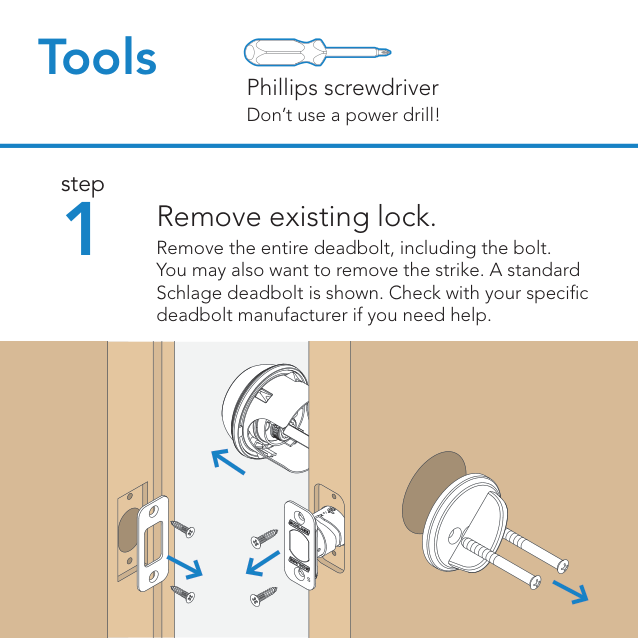
Tools
45
3
Phillips screwdriver
Don’t use a power drill!
step
1
Remove existing lock. Remove the entire deadbolt, including the bolt. You may also want to remove the strike. A standard Schlage deadbolt is shown. Check with your specific deadbolt manufacturer if you need help.
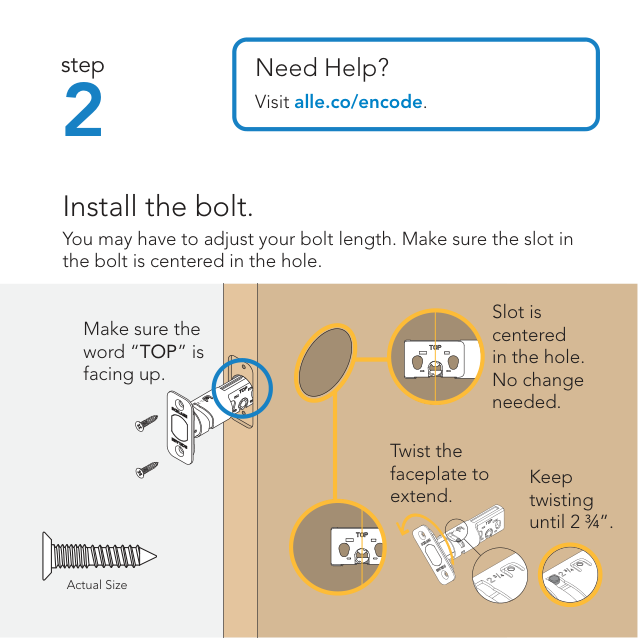
2
Need Help? Visit alle.co/encode.
Install the bolt. You may have to adjust your bolt length. Make sure the slot in the bolt is centered in the hole.
Slot is centered in the hole. No change needed.
Make sure the word “TOP” is facing up.
Twist the faceplate to extend.
Keep twisting until 2 ¾”.
Actual Size
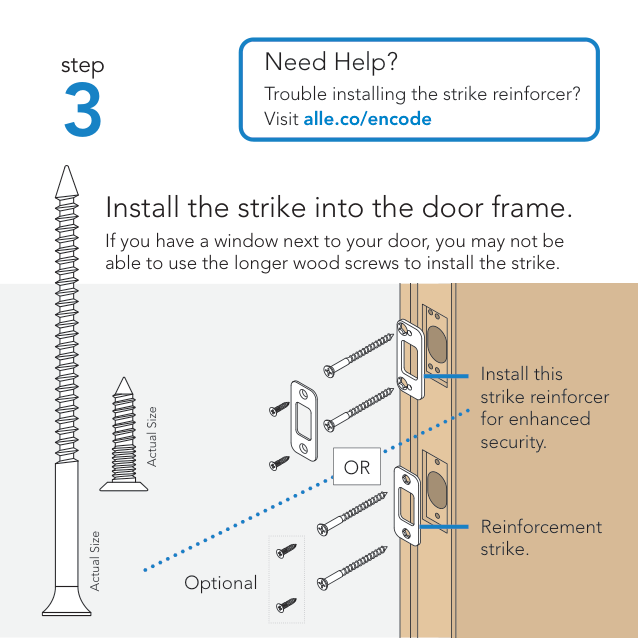
3
Actual Size
Actual Size
|Need Help?
Trouble installing Visit alle.co/enco|he s
e|rike reinforcer?| |---|---|---| |rike into th
w next to your do ger wood screws t
|OR| |---| |do
r, yo inst|r frame.
Install this strike reinforcer for enhanced security.
Reinforcement strike.
may not be ll the strike.| |rike into th
w next to your do ger wood screws t
|OR| |---| | |r frame.
Install this strike reinforcer for enhanced security.
Reinforcement strike.
may not be ll the strike.| |rike into th
w next to your do ger wood screws t
|OR| |---| | |r frame.
Install this strike reinforcer for enhanced security.
Reinforcement strike.
may not be ll the strike.|
Optional
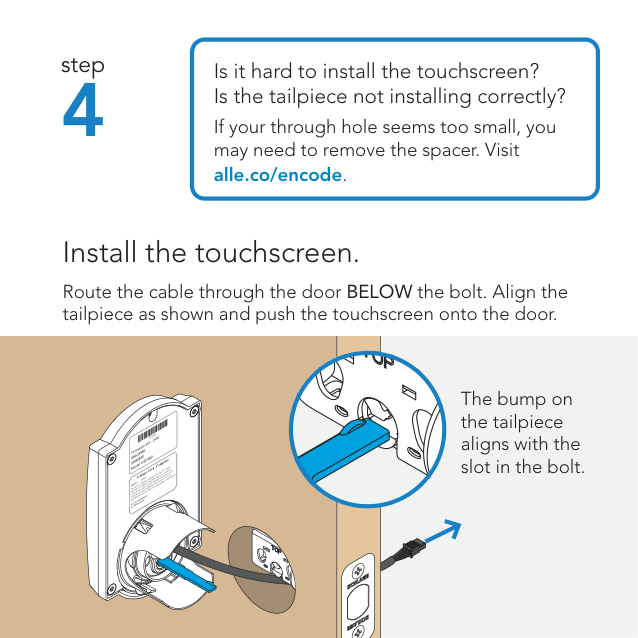
4
Is it hard to install the touchscreen? Is the tailpiece not installing correctly?
If your through hole seems too small, you may need to remove the spacer. Visit alle.co/encode
######### Install the touchscreen.
Route the cable through the door BELOW the bolt. Align the tailpiece as shown and push the touchscreen onto the door.
The bump on the tailpiece aligns with the slot in the bolt.
You may damage your lock!
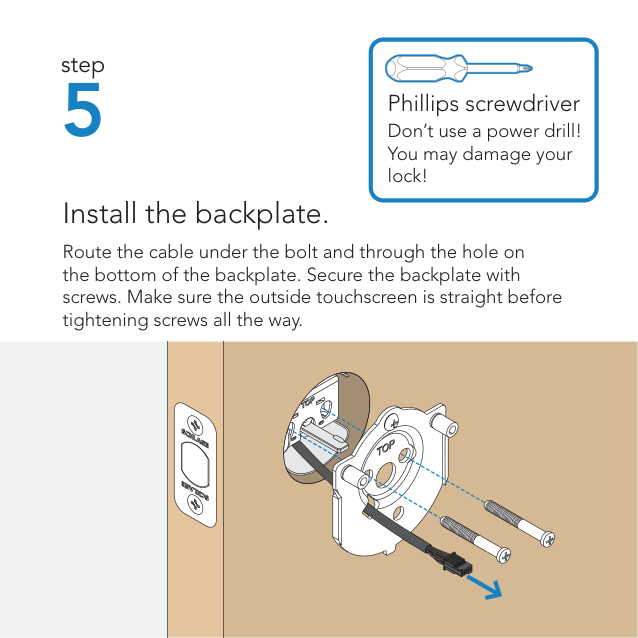
######### Install the backplate.
Route the cable under the bolt and through the hole on the bottom of the backplate. Secure the backplate with screws. Make sure the outside touchscreen is straight before tightening screws all the way.
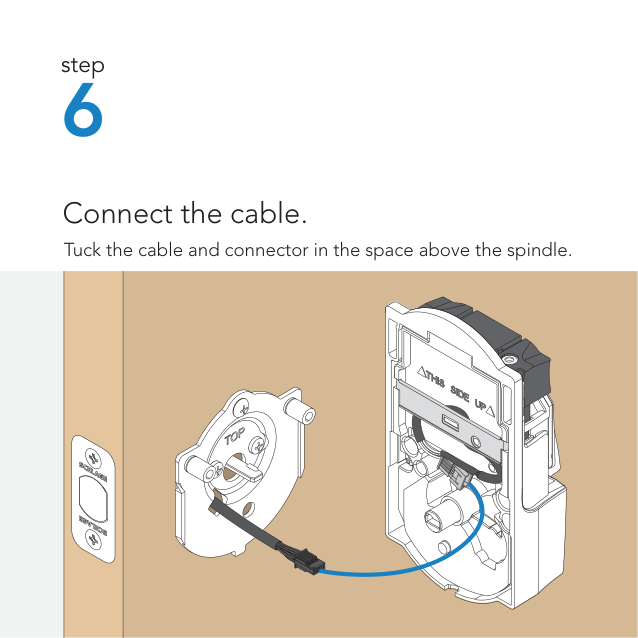
######### Connect the cable.
Tuck the cable and connector in the space above the spindle.
You may damage your lock!
| | | |---|---| | | |
######### Secure the lock to the door.
If the bump on the tailpiece doesn’t align with the slot in the back of the inside assembly, make sure your thumbturn is vertical (up and down).
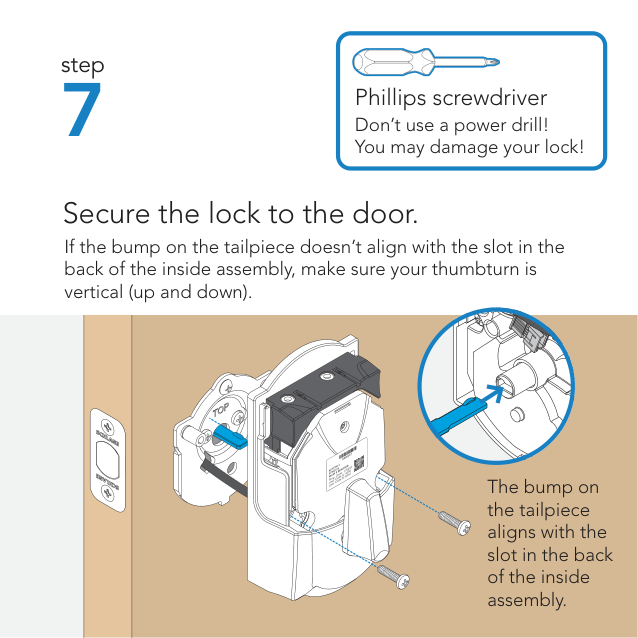

The bump on the tailpiece aligns with the slot in the back of the inside assembly.
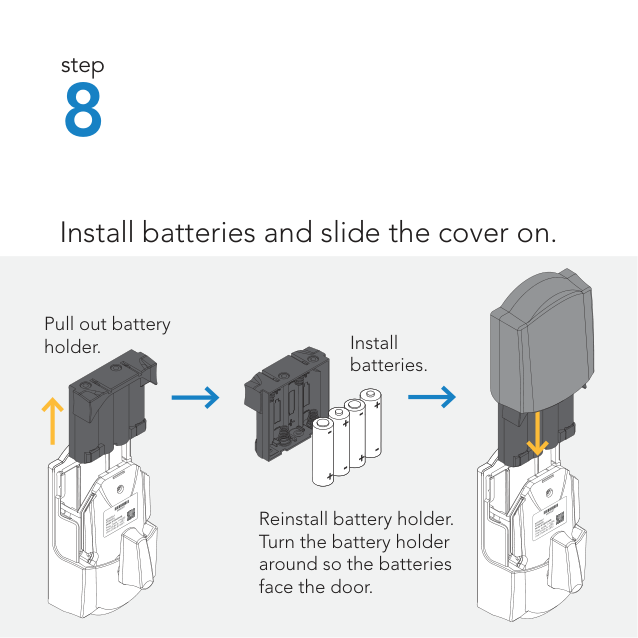
######### Install batteries and slide the cover on.
Pull out battery holder. Install
batteries.

Reinstall battery holder. Turn the battery holder around so the batteries face the door.

###### That wasn’t so bad, was it?
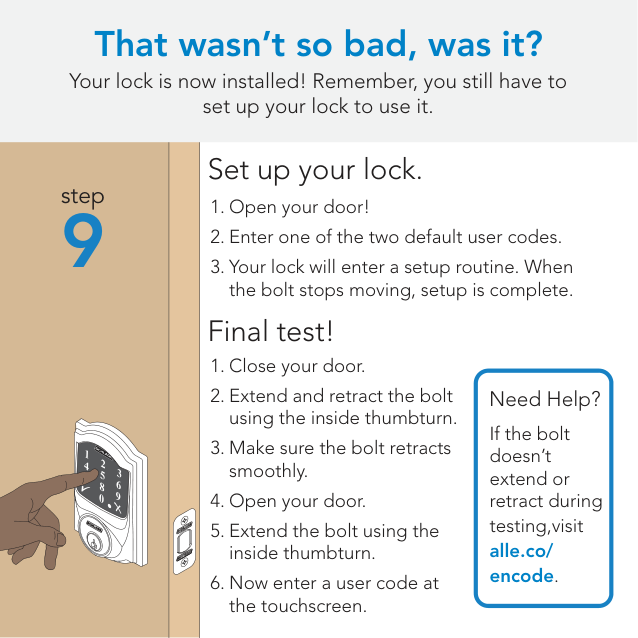
Your lock is now installed! Remember, you still have to set up your lock to use it.
step
9
Set up your lock.
Final test!
Need Help?
If the bolt doesn’t extend or retract during testing,visit alle.co/ encode.

#### Now that your lock is installed
you can use a smart home system to lock and unlock your door from anywhere and add user codes for guests and household members.
##### alle.co/encode
Visit alle.co/encode for a list of compatible smart home apps that allow you to control your
with your smartphone.

Lock and unlock
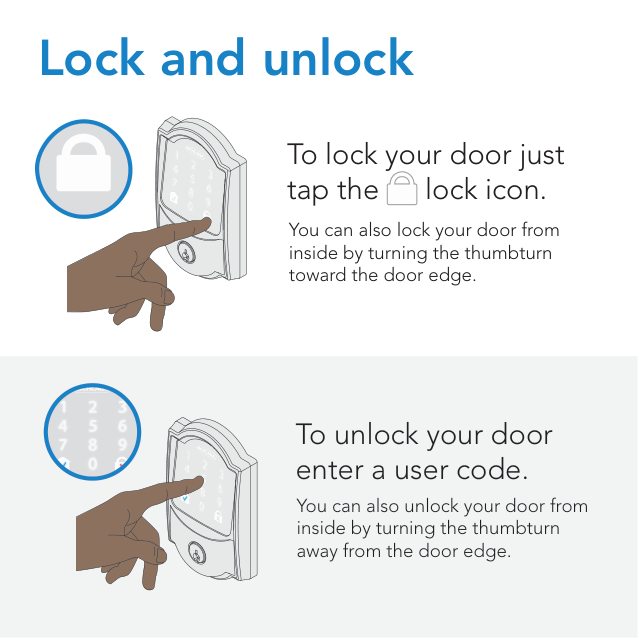
######### To lock your door just tap the lock icon.




You can also lock your door from inside by turning the thumbturn toward the door edge.




######### To unlock your door enter a user code.
You can also unlock your door from inside by turning the thumbturn away from the door edge.
PLACE LABEL HERE
These are your backup codes.
You will need these codes if you ever factory default reset your lock. Keep these safe!
Questions about your new
Smart WiFi Deadbolt?
####### Please don’t return it to the store!
Let us help you first!
######## alle.co/encode
© Allegion 2020 Printed in U.S.A. 47327841 Rev. 10/20-a
*47327841*
47327841