
Olimpia Splendid Rg57a4 Rg57a6 Remote Control
Ask AI
— answers from the official manualAnswers from the official manual.
Common questions
Common Questions
28 totalWhat precautions should I take when handling the remote controller?
Do not allow any liquid to fall into the remote controller, and do not expose it to direct sunlight or heat. Do not drop the remote controller, do not place heavy objects on it, and do not step on it. If the infrared signal receiver on the indoor unit is exposed to direct sunlight, use curtains to prevent sunlight from falling on the receiver. (Page 8)
How do I set the Timer ON function to start the air conditioner automatically?
Press the TIMER ON button to display the last auto-on setting time and the signal 'H' on the LCD. Press the TIMER ON button again to set the desired time — each press increases the time by 30 minutes between 0 and 10 hours, and by 1 hour between 10 and 24 hours. After setting, wait approximately 3 seconds for the remote controller to transmit the signal and return the temperature display. (Page 6)
What temperature range can be set using the remote control?
The temperature can be set within a range of 17°C to 30°C in 1°C increments using the UP and DOWN buttons. In FAN mode, the setting temperature is not displayed and room temperature cannot be controlled. (Page 5)
What is the FP function and how do I activate it?
The FP function can only be activated during heating operation (when the setting mode is HEAT), and causes the unit to operate at a setting temperature of 8°C. To activate it, press and hold the SILENCE/FP button for more than 2 seconds; press and hold it again for more than 2 seconds to disable it. The display window of the indoor unit will show 'FP', and pressing ON/OFF, SLEEP, FP, MODE, FAN SPEED, UP, or DOWN will cancel the function. (Page 3)
What is the effective signal receiving range of the remote controller?
The remote controller should be used within a distance of 8 meters from the appliance, pointing it towards the receiver. Reception is confirmed by a beep from the unit. (Page 8)
Can I use both the Timer ON and Timer OFF functions at the same time?
Yes, both timers can be set simultaneously for combined operation. For example, you can press TIMER OFF to set a stop time, then press TIMER ON to set a start time, and after 3 seconds both the 'TIMER ON' and 'TIMER OFF' indicators will remain on confirming both are activated. This is useful for scheduling the unit to stop after you go to bed and start again in the morning. (Page 7)
Show 22 more questions
What should I do if the air conditioner does not respond to the remote controller?
What batteries does the remote control require and how do I replace them?
How do I know when the batteries in the remote control need to be replaced?
How do I replace the batteries in my remote control?
What is the signal receiving range for the remote control?
How does the AUTO mode work on my air conditioner?
How do I activate Follow Me mode with my remote control?
What modes are available and how do I select them?
How do I use sleep mode on my air conditioner?
What will happen if I reset my remote control while changing batteries?
How can I initiate a timer operation on my air conditioner?
Can I use the FAN mode without setting a specific room temperature?
What happens when I set the silence function?
How can I disable or enable Follow Me mode using the remote?
How can I set up an auto-off timer for my air conditioning unit?
How do I configure both an on-time and off-time for my air conditioner?
What should I do if my air conditioner does not respond to remote control signals?
How can I program my unit to turn off at a specific time?
How do I cancel an active timer setting on my air conditioner?
How can I enable turbo mode on my air conditioner?
How do I enable self-clean mode on my air conditioner?
What is the signal reception range of this remote control?
Full Manual
9 pages

REMOTE CONTROL
OWNER'S MANUAL
The design and specifications are subject to change without prior notice for product improvement. Consult with the sales agency or manufacturer for details.
CR155-RG57A4(A6) 16117000A01288 20170601
Thank you very much for purchasing our air conditioner. Please read this owner's manual carefully before using your air conditioner. Make sure to save this manual for future reference.
|Remote Controller Specifications| |---|
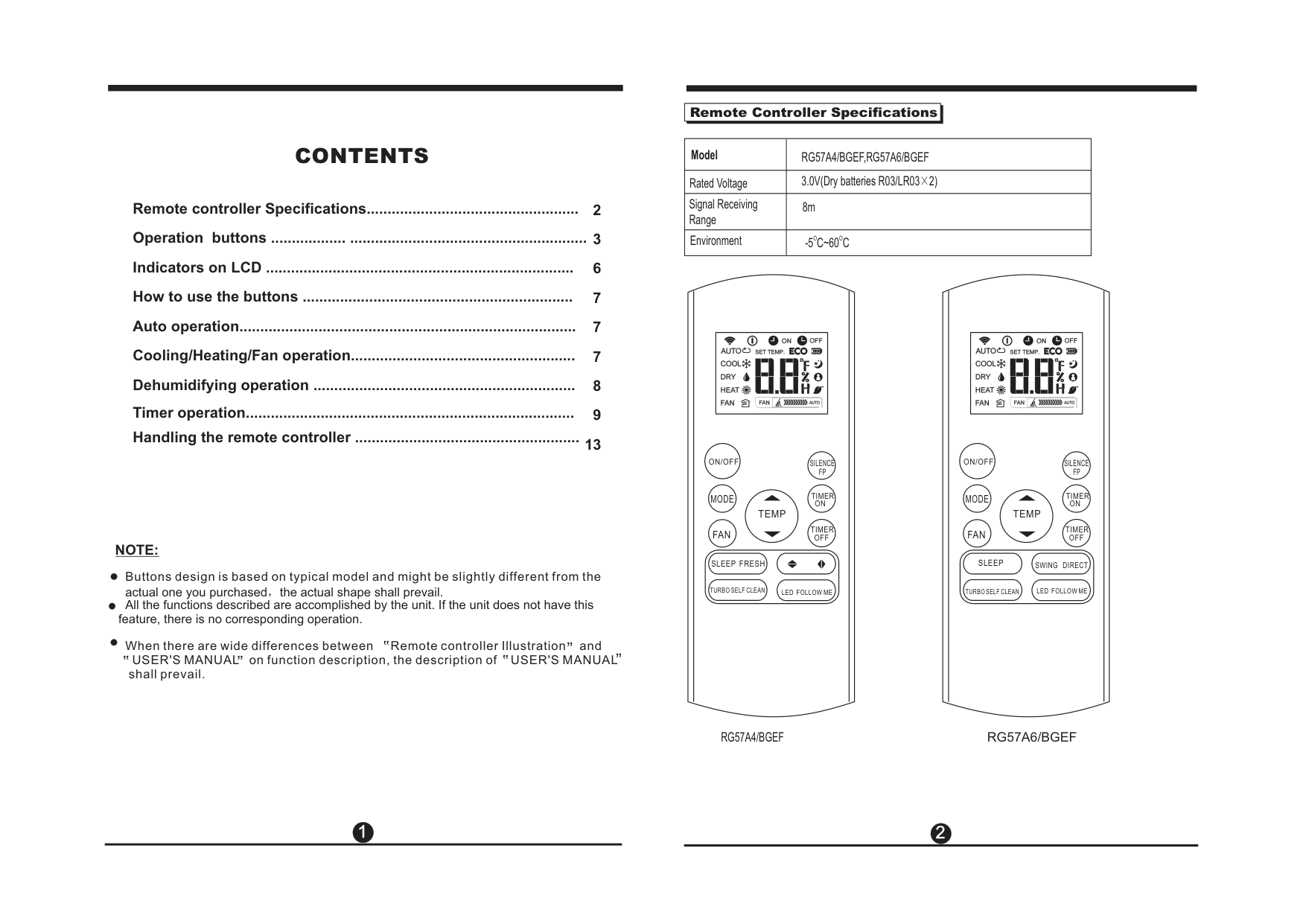
|Model|RG57A4/BGEF,RG57A6/BGEF| |---|---| |Rated Voltage|3.0V(Dry batteries R03/LR03×2)| |Signal Receiving Range|8m| |Environment|O O-5 C~60 C|
#### CONTENTS
Remote controller Specifications................................................... Operation buttons .................. ......................................................... Indicators on LCD .......................................................................... How to use the buttons ................................................................. Auto operation................................................................................. Cooling/Heating/Fan operation...................................................... Dehumidifying operation ............................................................... Timer operation...............................................................................
13Handling the remote controller ......................................................
ON/OFF ON/OFF SILENCE FP
SILENCE FP
TIMER ON
TIMER ON
MODE MODE
TEMP TEMP
######## TIMER OFF NOTE:
TIMER OFF
FAN FAN
SLEEP FRESH SLEEP SWING DIRECT
Buttons design is based on typical model and might be slightly different from the actual one you purchased,the actual shape shall prevail. All the functions described are accomplished by the unit. If the unit does not have this
LED FOLLOW ME LED FOLLOW METURBO SELF CLEANTURBO SELF CLEAN
feature, there is no corresponding operation. When there are wide differences between Remote controller Illustration and
,, ,, ,, ,, ,, ,,
USER'S MANUAL on function description, the description of USER'S MANUAL shall prevail.
RG57A4/BGEF
RG57A6/BGEF
1
2
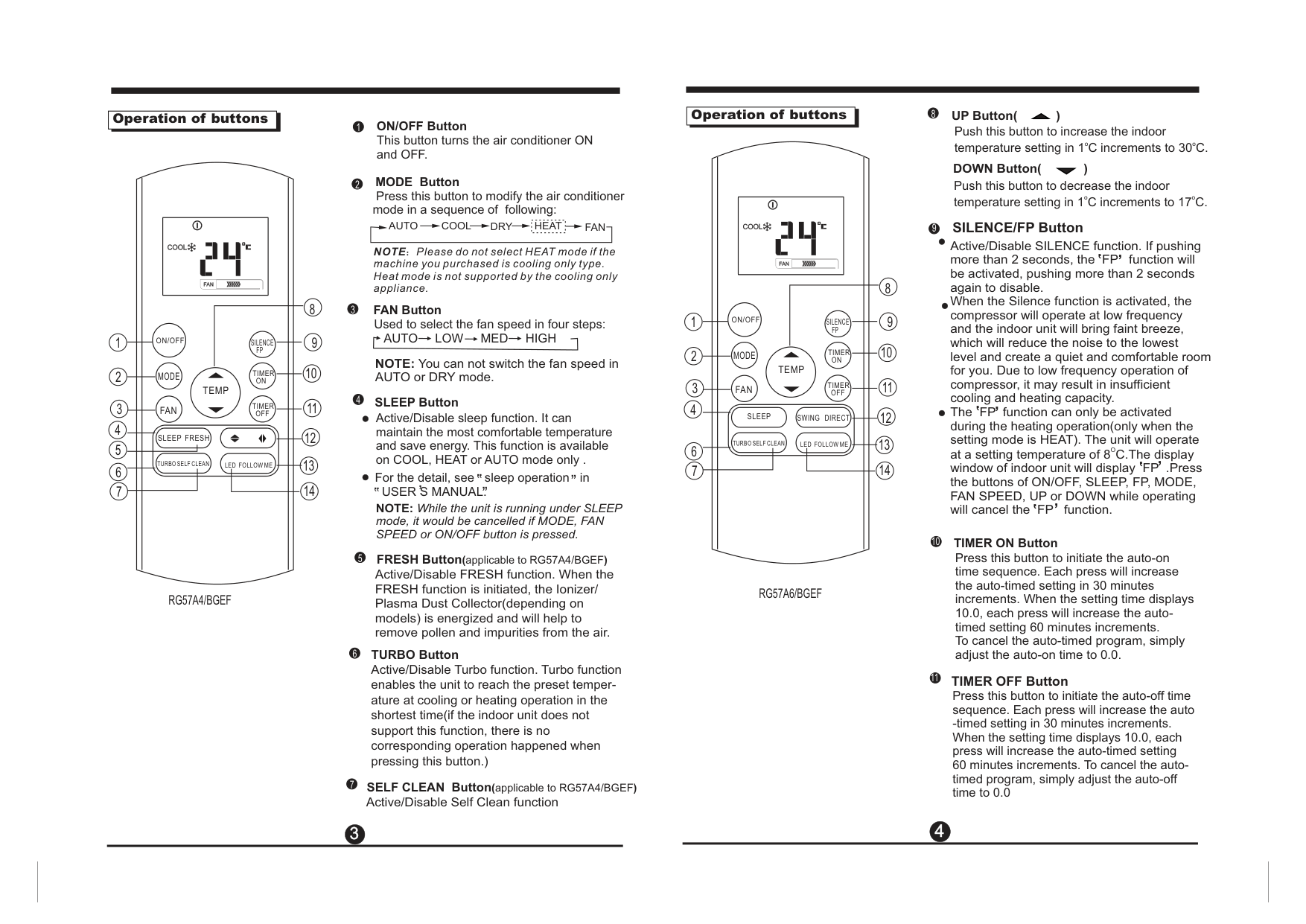
mode in a sequence of following:
MODE Button
ON/OFF Button This button turns the air conditioner ON and OFF.
AUTO COOL DRY
|HEAT| |---|
FAN
Used to select the fan speed in four steps: AUTO LOW MED HIGH
FAN Button
SLEEP Button
FRESH Button(applicable to RG57A4/BGEF)
NOTE: While the unit is running under SLEEP mode, it would be cancelled if MODE, FAN SPEED or ON/OFF button is pressed.
Active/Disable sleep function. It can maintain the most comfortable temperature and save energy. This function is available on COOL, HEAT or AUTO mode only .
Active/Disable When the FRESH function is initiated, the Ionizer/ Plasma Dust Collector(depending on models) is energized and will help to remove pollen and impurities from the air.
FRESH function.
For the detail, see sleep operation in
USER S MANUAL.,
,, ,,
,, ,,
NOTE:Please do not select HEAT mode if the machine you purchased is cooling only type. Heat mode is not supported by the cooling only appliance.
NOTE: You can not switch the fan speed in AUTO or DRY mode.
7 SELF CLEAN Button(applicable to RG57A4/BGEF) Active/Disable Self Clean function
| |Operation of buttons| | |---|---|---|
TIMER ON Button
TIMER OFF Button
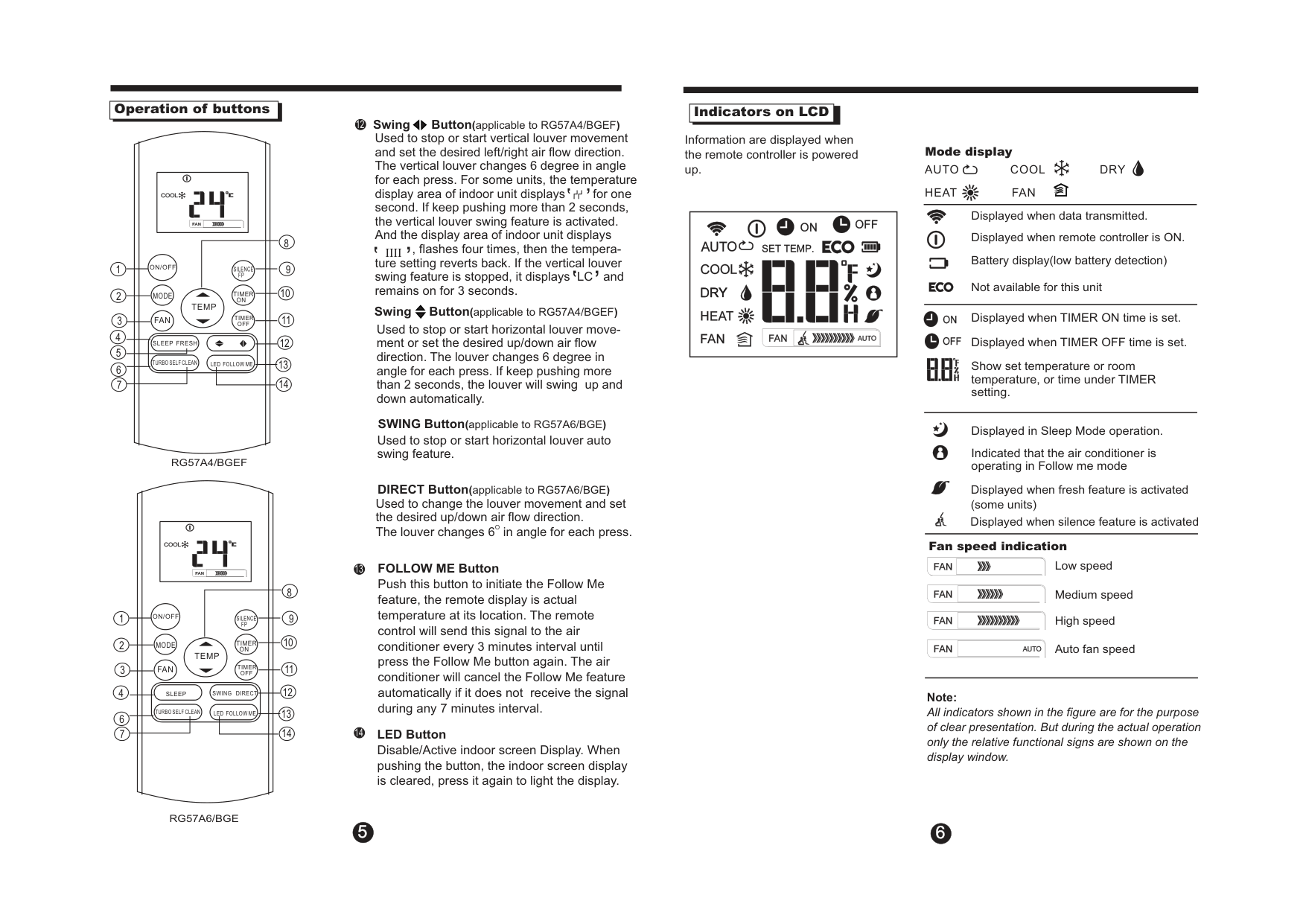
UP Button( )
Push this button to decrease the indoor o otemperature setting in 1C increments to 17C.
DOWN Button( )
Press this button to initiate the auto-on time sequence. Each press will increase the auto-timed setting in 30 minutes increments. When the setting time displays 10.0, each press will increase the autotimed setting 60 minutes increments. To cancel the auto-timed program, simply adjust the auto-on time to 0.0.
Press this button to initiate the auto-off time sequence. Each press will increase the auto
-timed setting in 30 minutes increments. When the setting time displays 10.0, each press will increase the auto-timed setting 60 minutes increments. To cancel the autotimed program, simply adjust the auto-off time to 0.0
Push this button to increase the indoor o otemperature setting in 1C increments to 30C.
| |Operation of buttons| | |---|---|---|
ON/OFF
SILENCE FP
2
ON/OFF
SILENCE FP
TIMER ON
MODE
TEMP
TIMER ON
MODE
TIMER OFF
FANTEMP
12
13
14
TIMER OFF
FAN
SLEEP
SWING DIRECT
4
3
3
10
8
8
7
SLEEP FRESH
TURBO SELF CLEAN
LED FOLLOW ME
TURBO SELF CLEAN
LED FOLLOW ME
RG57A6/BGEF
RG57A4/BGEF
SILENCE/FP Button Active/Disable SILENCE function. If pushing more than 2 seconds, the FP function will be activated, pushing more than 2 seconds again to disable. When the Silence function is activated, the compressor will operate at low frequency and the indoor unit will bring faint breeze, which will reduce the noise to the lowest level and create a quiet and comfortable room for you. Due to low frequency operation of compressor, it may result in insufficient cooling and heating capacity. The FP function can only be activated during the heating operation(only when the setting mode is HEAT). The unit will operate Oat a setting temperature of 8C.The display window of indoor unit will display FP .Press the buttons of ON/OFF, SLEEP, FP, MODE, FAN SPEED, UP or DOWN while operating will cancel the FP function.
,
,
,
,
,
,
,
,
####### 3 4
| |Operation of buttons| | |---|---|---|
4
3
8
8
ON/OFF
SILENCE FP
TIMER ON
MODE
TEMP
TIMER OFF
FAN
SLEEP FRESH
TURBO SELF CLEAN
LED FOLLOW ME
RG57A4/BGEF
ON/OFF
MODE
FAN
TEMP
SILENCE FP
TIMER ON
TIMER OFF
SLEEP
TURBO SELF CLEAN
SWING DIRECT
LED FOLLOW ME
RG57A6/BGE
14
Swing Button(applicable to RG57A4/BGEF)
Used to stop or start vertical louver movement and set the desired left/right air flow direction. The vertical louver changes 6 degree in angle for each press. For some units, the temperature display area of indoor unit displays for one second. If keep pushing more than 2 seconds, the vertical louver swing feature is activated. And the display area of indoor unit displays
, ,
,
,
, flashes four times, then the tempera-IIII ture setting reverts back. If the vertical louver swing feature is stopped, it displays LC and remains on for 3 seconds.
,
,
Swing Button(applicable to RG57A4/BGEF) Used to stop or start horizontal louver movement or set the desired up/down air flow direction. The louver changes 6 degree in angle for each press. If keep pushing more than 2 seconds, the louver will swing up and down automatically.
SWING Button(applicable to RG57A6/BGE)
Used to stop or start horizontal louver auto swing feature.
DIRECT Button(applicable to RG57A6/BGE) Used to change the louver movement and set the desired up/down air flow direction. OThe louver changes 6 in angle for each press.
LED Button Disable/Active indoor screen Display. When pushing the button, the indoor screen display is cleared, press it again to light the display.
| |Indicators on LCD| | |---|---|---|
Information are displayed when the remote controller is powered up.
Mode display
AUTO HEAT FAN
COOL DRY
Displayed when data transmitted. Displayed when remote controller is ON. Battery display(low battery detection) Not available for this unit
| | | |---|---| | | |
| | | |---|---| | | |
Displayed when TIMER ON time is set.
Displayed when TIMER OFF time is set. Show set temperature or room temperature, or time under TIMER setting.
Displayed in Sleep Mode operation. Indicated that the air conditioner is operating in Follow me mode
Displayed when fresh feature is activated (some units)
Displayed when silence feature is activated
Fan speed indication
Low speed Medium speed High speed Auto fan speed
############# Note:
All indicators shown in the figure are for the purpose
of clear presentation. But during the actual operation only the relative functional signs are shown on the display window.
5 6
| |How to use the buttons| |---|---| | | |
|| | |---| | | | |---|---|---| |LED FOLLOW ME
SILENCE FP
TIMER ON
TIMER OFF| | |
2
3 1
ON/OFF
MODE
TEMP
FAN
SLEEP FRESH
TURBO SELF CLEAN
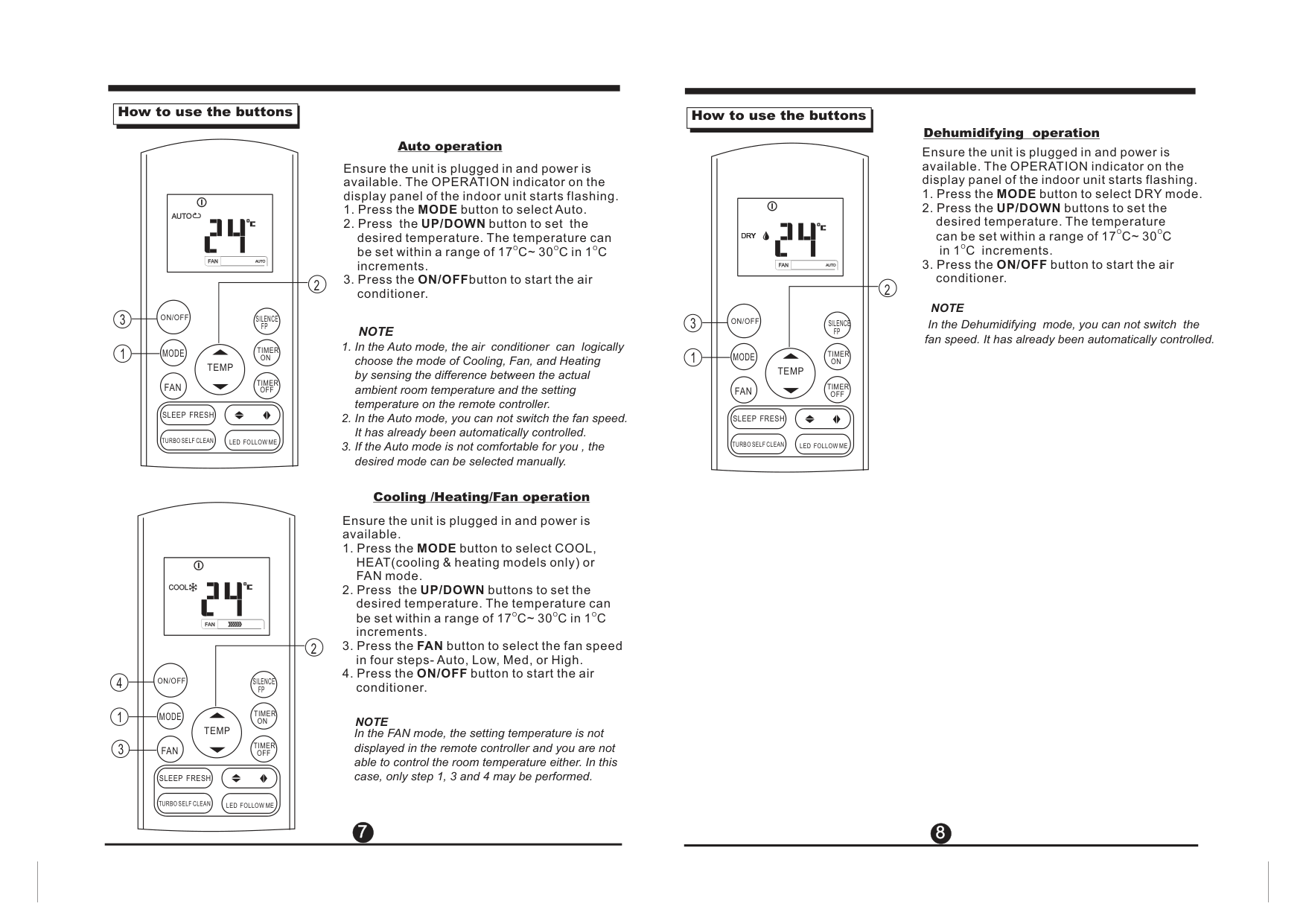
Auto operation
Ensure the unit is plugged in and power is available. The OPERATION indicator on the display panel of the indoor unit starts flashing.
############ NOTE
| |How to use the buttons| |---|---| | | |
|| | |---| | | | |---|---|---| |SILENCE FP
LED FOLLOW ME
TIMER ON
TIMER OFF| | |
2
ON/OFF3 1
MODE
TEMP
FAN
SLEEP FRESH
TURBO SELF CLEAN
Dehumidifying operation
Ensure the unit is plugged in and power is available. The OPERATION indicator on the display panel of the indoor unit starts flashing.
Oin 1C increments.
############## NOTE
In the Dehumidifying mode, you can not switch the fan speed. It has already been automatically controlled.
############ Cooling /Heating/Fan operation
Ensure the unit is plugged in and power is available.
| | | | |---|---|---| |LED FOLLOW ME
TIMER ON
TIMER OFF
SILENCE FP| | |
| | |---|
2
ON/OFF
MODE
NOTE
TEMP
In the FAN mode, the setting temperature is not displayed in the remote controller and you are not able to control the room temperature either. In this case, only step 1, 3 and 4 may be performed.
FAN
SLEEP FRESH
TURBO SELF CLEAN
###### 7 8
##### 7
| | |---|
ON/OFF
SILENCE FP
TIMER ON
MODE
1
TEMP
2
TIMER OFF
FAN
SLEEP FRESH
LED FOLLOW METURBO SELF CLEAN
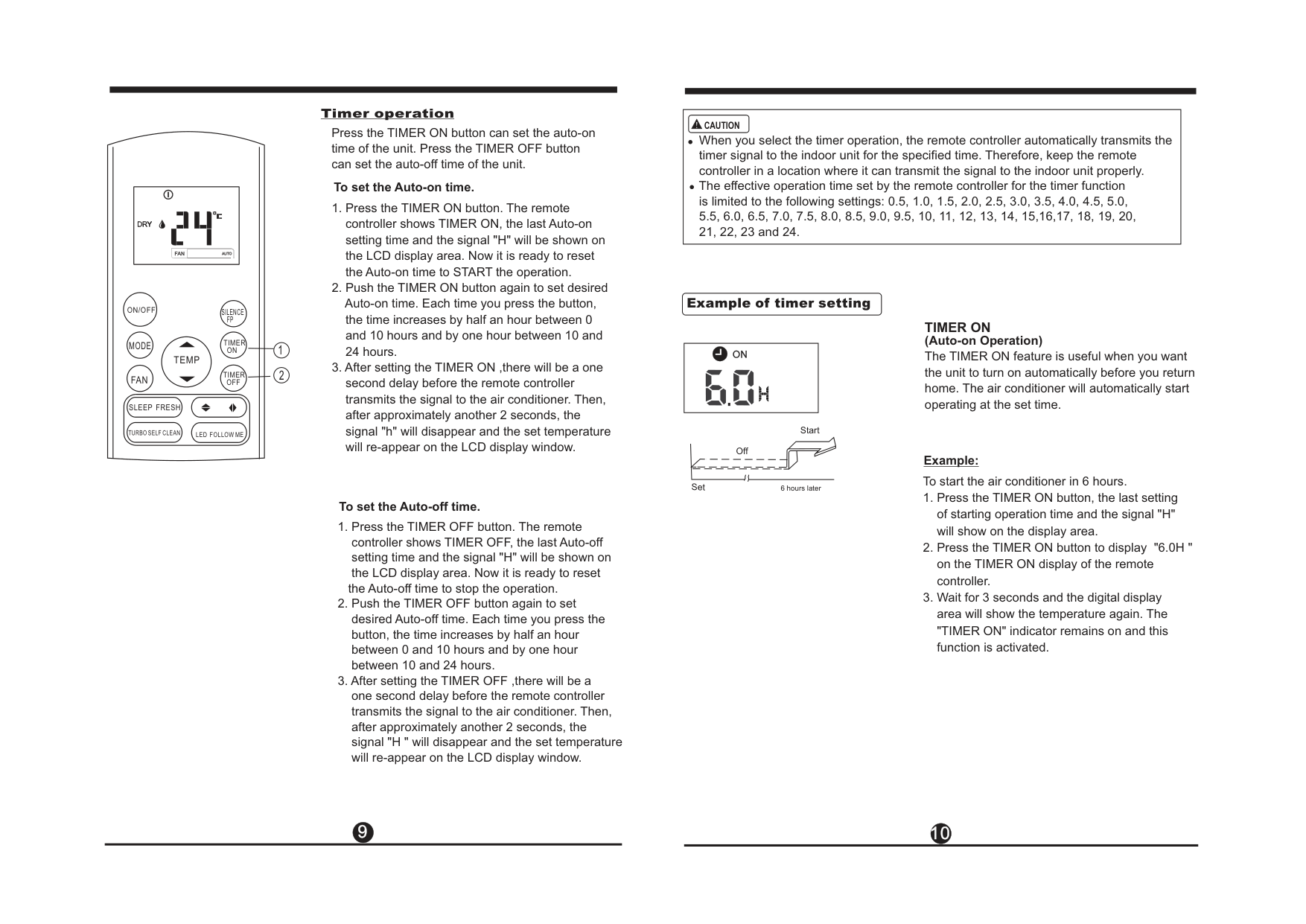
Timer operation Press the TIMER ON button can set the auto-on time of the unit. Press the TIMER OFF button can set the auto-off time of the unit.
To set the Auto-on time.
To set the Auto-off time.
the Auto-off time to stop the operation.
|When you select the timer operation, the remote controller automatically transmits the timer signal to the indoor unit for the specified time. Therefore, keep the remote controller in a location where it can transmit the signal to the indoor unit properly. The effective operation time set by the remote controller for the timer function is limited to the following settings: 0.5, 1.0, 1.5, 2.0, 2.5, 3.0, 3.5, 4.0, 4.5, 5.0, 5.5, 6.0, 6.5, 7.0, 7.5, 8.0, 8.5, 9.0, 9.5, 10, 11, 12, 13, 14, 15,16,17, 18, 19, 20, 21, 22, 23 and 24.
CAUTION!| |---|
########## Example of timer setting
######### TIMER ON
(Auto-on Operation) The TIMER ON feature is useful when you want the unit to turn on automatically before you return home. The air conditioner will automatically start operating at the set time.
Start Off
############ Example:
To start the air conditioner in 6 hours.
Set
6 hours later
9 10
TIMER ON → TIMER OFF (Off → Start → Stop operation) This feature is useful when you want to start the air conditioner before you wake up and stop it after you leave the house.
TIMER OFF
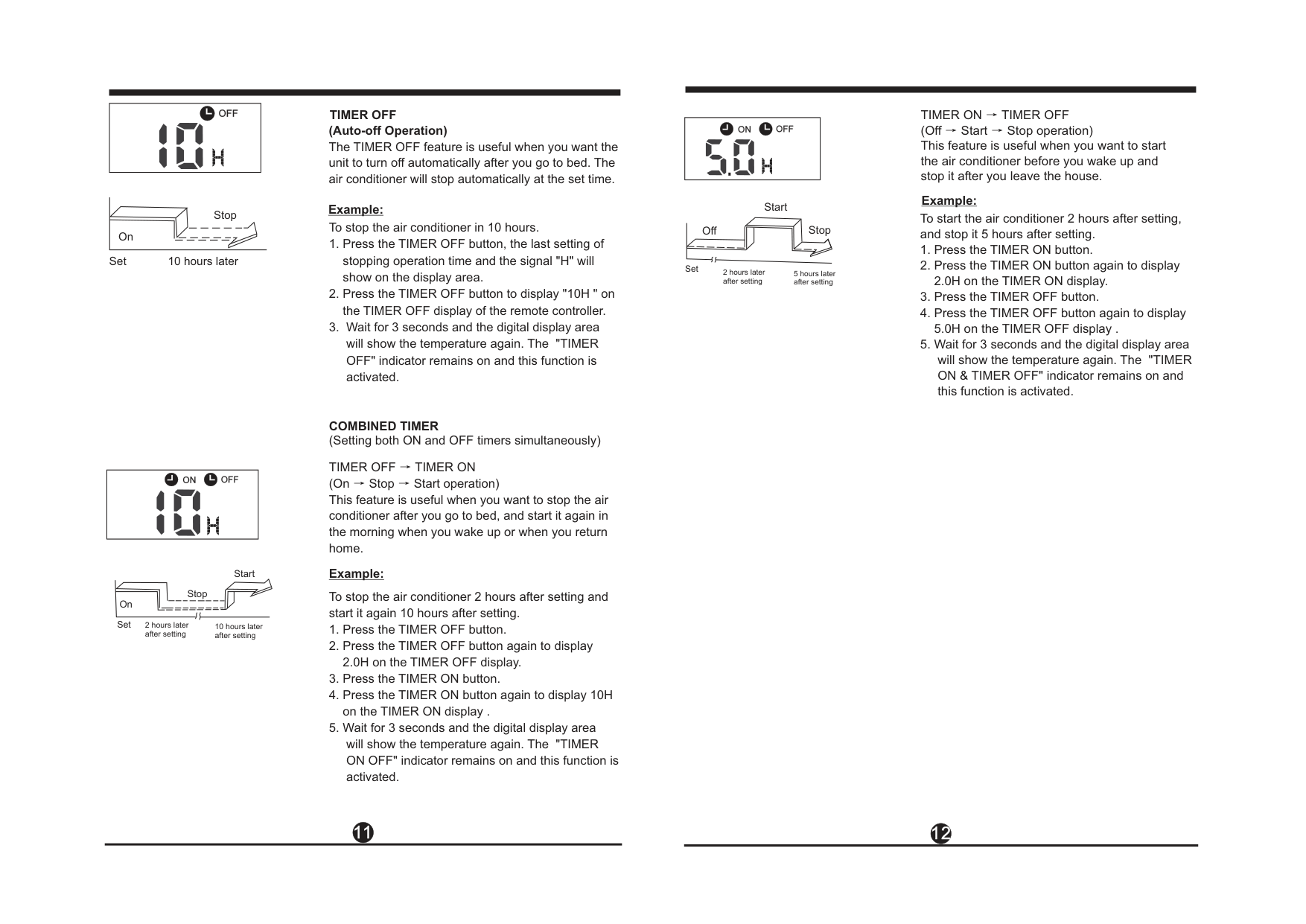
(Auto-off Operation) The TIMER OFF feature is useful when you want the unit to turn off automatically after you go to bed. The air conditioner will stop automatically at the set time.
Example:
Start
Example:
Stop On
To start the air conditioner 2 hours after setting, and stop it 5 hours after setting.
To stop the air conditioner in 10 hours.
Off Stop
Set 10 hours later
Set
2 hours later after setting
5 hours later after setting
COMBINED TIMER (S both ON and OFF )ettingtimers simultaneously
TIMER OFF → TIMER ON (On → Stop → Start operation) This feature is useful when you want to stop the air conditioner after you go to bed, and start it again in the morning when you wake up or when you return home.
Start
Stop
On
Set
2 hours later after setting
10 hours later after setting
Example:
To stop the air conditioner 2 hours after setting and start it again 10 hours after setting.
###### 11 12
##### 11 12
| |Handling the remote controller| | |---|---|---| | | | |
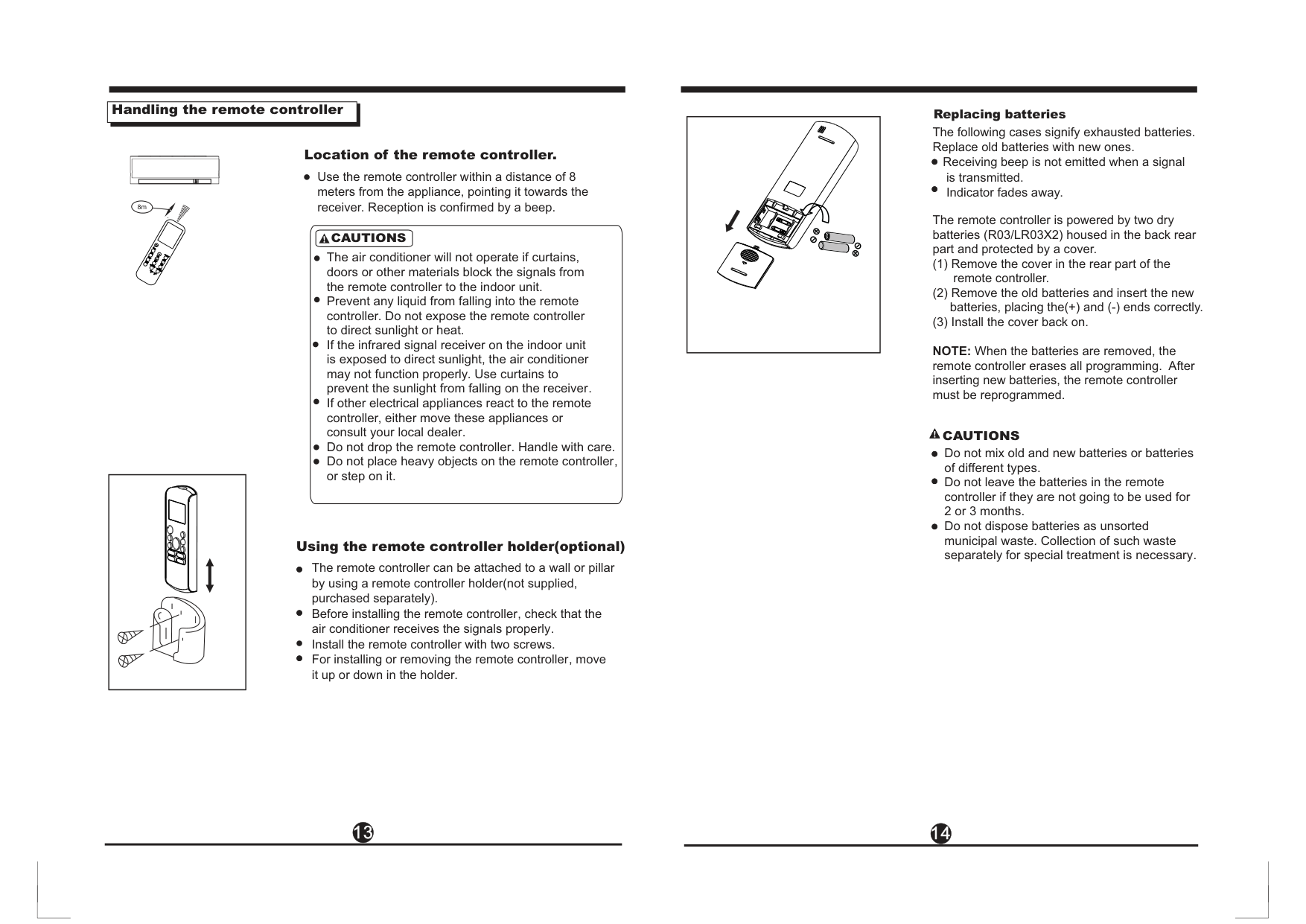
Replacing batteries
The following cases signify exhausted batteries. Replace old batteries with new ones.
Location of the remote controller.
Receiving beep is not emitted when a signal is transmitted. Indicator fades away.
Use the remote controller within a distance of 8 meters from the appliance, pointing it towards the receiver. Reception is confirmed by a beep.
8m
The remote controller is powered by two dry batteries (R03/LR03X2) housed in the back rear part and protected by a cover.
CAUTIONS
MODE
The air conditioner will not operate if curtains, doors or other materials block the signals from the remote controller to the indoor unit. Prevent any liquid from falling into the remote controller. Do not expose the remote controller to direct sunlight or heat. If the infrared signal receiver on the indoor unit is exposed to direct sunlight, the air conditioner may not function properly. Use curtains to prevent the sunlight from falling on the receiver. If other electrical appliances react to the remote controller, either move these appliances or consult your local dealer. Do not drop the remote controller. Handle with care. Do not place heavy objects on the remote controller, or step on it.
SWING
TEMP SHORTCUT
DIRECT
FAN SPEED
TIMERON
SLEEP FRESH
TIMEROFF
TURBO SELF CLEAN
LED FOLLOW ME
RESET
LOCK
| | | |---|---| | | |
NOTE: When the batteries are removed, the remote controller erases all programming. After inserting new batteries, the remote controller must be reprogrammed.
CAUTIONS Do not mix old and new batteries or batteries of different types. Do not leave the batteries in the remote controller if they are not going to be used for 2 or 3 months. Do not dispose batteries as unsorted municipal waste. Collection of such waste separately for special treatment is necessary.
| | |---|
Using the remote controller holder(optional)
The remote controller can be attached to a wall or pillar by using a remote controller holder(not supplied, purchased separately). Before installing the remote controller, check that the air conditioner receives the signals properly. Install the remote controller with two screws. For installing or removing the remote controller, move it up or down in the holder.
###### 13 14

OLIMPIA SPLENDID AUSTRALIA 80-84 BURLINGTON STREET OAKLEIGH VICTORIA 3166 AUSTRALIA PH: (03) 9563 2778
EMAIL: sales@olimpiasplendid.com.au Technical data and aesthetic characteristics of the products may change. Olimpia Splendid reserves the right to change them without notice.