
Ask AI
— answers from the official manualAnswers from the official manual.
Common questions
Common Questions
16 totalWhat power level is used for defrosting and how do I use the Defrost function?
The defrost setting automatically uses a power level of 30% (195W). To defrost, press the Defrost button — the display will show 'PL:30' — then press the Number buttons to enter the desired defrosting time, and press Start to begin. Food should be placed on a microwave-safe rack, plate, or shallow dish before defrosting. (Page 11)
What should I do if the oven display works but the power won't come on?
Make sure the door is closed securely and check that no packing material or other material is stuck to the door seal. Also check for door damage. Try pressing Cancel twice and re-entering all cooking instructions. (Page 19)
What are the power output and capacity specifications for this microwave?
The microwave has a power output of 650 watts and an oven cavity of 0.6 cubic feet. It operates on 120 VAC, 60 Hz power and offers 10 power levels including defrost. The timer can be set up to 99 minutes and 99 seconds. (Page 21)
How do I properly set up the microwave oven when first installing it?
Place the oven on a flat, sturdy surface and plug the cord into a grounded outlet, leaving at least four inches of space behind, above, and to the sides for ventilation. Open the door, wipe the inside with a damp cloth, then place the pre-assembled roller guide ring in the center indentation and set the glass tray on top so the three glass tabs fit securely into the tabs on the oven floor. (Page 6)
What is the warranty coverage for this microwave oven?
The microwave is covered by a one (1) year parts and labor warranty, plus an eight (8) year parts warranty specifically for the magnetron. The warranty begins on the original date of purchase and is valid only on products purchased and used in the United States. Warranty service can only be performed by a Samsung Authorized Service Center. (Page 22)
Why is there sparking or arcing inside my microwave?
Sparking or arcing is caused by metallic utensils, cookware, or metal twist-ties inside the oven. Remove any metallic items, and if using aluminum foil, use only narrow strips and allow at least one inch between the foil and the interior oven walls. (Page 19)
Show 10 more questions
How do I clean the inside of the microwave, especially baked-on food?
Can I use metal or aluminum foil in this microwave?
How do I pause or cancel cooking, and how do I correct a mistake I entered?
How can I defrost meat in my microwave?
How can I ensure my microwave oven stays clean inside?
How do I use the One Minute+ button?
What should I do if sparks occur during operation?
How do I arrange food on the turntable to cook evenly?
What safety precautions should I observe when using my microwave?
How do I set the clock on my Samsung microwave?
Full Manual
26 pages
One Minute + Popcorn
Instant Cooking
Pizza 1 2 3 4 5 6 7 8 9 0 Power Level Clock Start Defrost Pause Cancel Beverage Code No. : DE68-01931A-01 Owner’s Manual Microwave OvenMw640Wa
Mw640Ba
Mw650Wa
Mw650Ba
2
Save These Instructions
SafetyPrecautions To
Avoid Possible
Exposure To
Excessive
Microwave
Energy:
(a) Do not attempt to operate this oven with the door open since open-door operation can result in harmful exposure to microwave energy. It is important not to defeat or tamper with the safety interlocks. (b) Do not place any object between the front face of the oven and the door or allow soil or cleaner residue to accumulate on sealing surfaces. (c) Do not operate the oven if it is damaged. It is particularly important that the oven door close properly and that there is no damage to the 1) Door (bent or dented), 2) Hinges and latches (broken or loosened), 3) Door seals and sealing surfaces. (d) The oven should not be adjusted or repaired by anyone except properly qualified service personnel.Warning
Always observe Safety Precautions when using your oven. Never try to repair the oven on your own – there is dangerous voltage inside. If the oven needs to be repaired, call 1-800-SAMSUNG for the name of an authorized service center near you.Important Safety
Instructions
When using any electrical appliance, basic safety precautions should be followed, including the following:Warning
To reduce risk of burns, electric shock, fire, personal injury or exposure to excessive microwave energy: • Read all safety instructions before using the appliance. • Read and follow the specific “Precautions to Avoid Possible Exposure to Excessive Microwave Energy” on this page. • This appliance must be grounded. Connect only to properly grounded outlets. See “Important Grounding Instructions” on page 4 of this manual. • Install or place this appliance only in accordance with the installation instructions provided. • Some items, like whole eggs and food in sealed containers, may explode if heated in this oven. • Use this appliance only for its intended use as described in the manual. Do not use corrosive chemicals or vapors in this appliance. This type of oven is specifically designed to heat, cook, or dry food. It is not designed for industrial or laboratory use.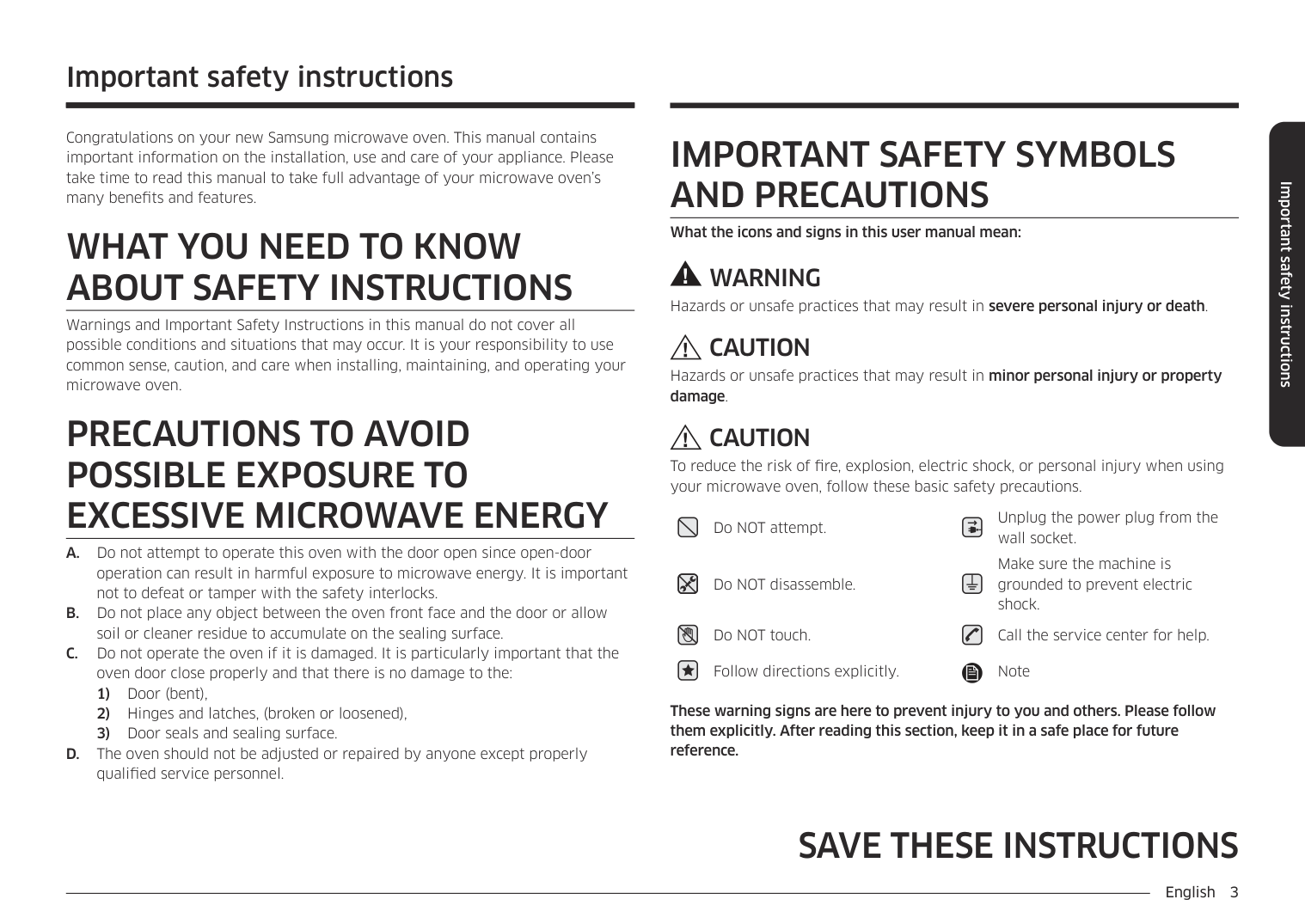
3
Save These Instructions
Safety Important Safety Instructions, continued • As with any appliance, close supervision is necessary when used by children. • Do not operate this appliance if it has a damaged cord or plug, if it is not working properly, or if it has been damaged. • This appliance should be serviced only by qualified service personnel. Contact the nearest authorized service facility for examination, repair, or adjustment. • Do not cover or block any of the openings on this appliance. • Do not store this appliance outdoors. Do not use near water – for example, near a kitchen sink, in a wet basement, or near a swimming pool, etc. • Keep the inside of the oven clean. Food particles or spattered oils stuck to the oven walls or floor can cause paint damage and reduce the efficiency of the oven. • Do not immerse cord or plug in water. • Keep cord away from heated surfaces. • Do not let cord hang over edge of table or counter. • When cleaning door and oven surfaces, use only mild, nonabrasive soaps or detergents applied with a sponge or soft cloth. • To reduce the risk of fire in the oven: a. Do not overcook food. Watch appliance carefully if paper, plastic, or other combustible materials are inside. b. Remove wire twist-ties from plastic cooking bags before placing bags in oven. c. If materials inside the oven ignite, keep the oven door closed, turn the oven off, disconnect the power cord, or shut off the power at the fuse or circuit breaker panel. d. Do not use the oven compartment for storage purposes. Do not leave paper products, cooking utensils, or food in the oven when not in use. • Do not try to preheat oven or operate while empty. • Do not cook without the glass tray in place on the oven floor. Food will not cook properly without the tray. • Do not defrost frozen beverages in narrow- necked bottles. The containers can break. • Dishes and containers can become hot. Handle with care. • Carefully remove container coverings, directing steam away from hands and face. • Remove lids from baby food before reheating. After heating baby food, stir well and test temperature by tasting before serving. • A short power-supply cord is provided to reduce the risk of becoming entangled in or tripping over a longer cord. Longer cord sets or extension cords are available and may be used with caution. • Do not operate any other heating or cooking appliance beneath this appliance. • Do not mount unit over or near any portion of a heating or cooking appliance. • Do not mount over a sink. • Do not store anything directly on top of the appliance when it is in operation.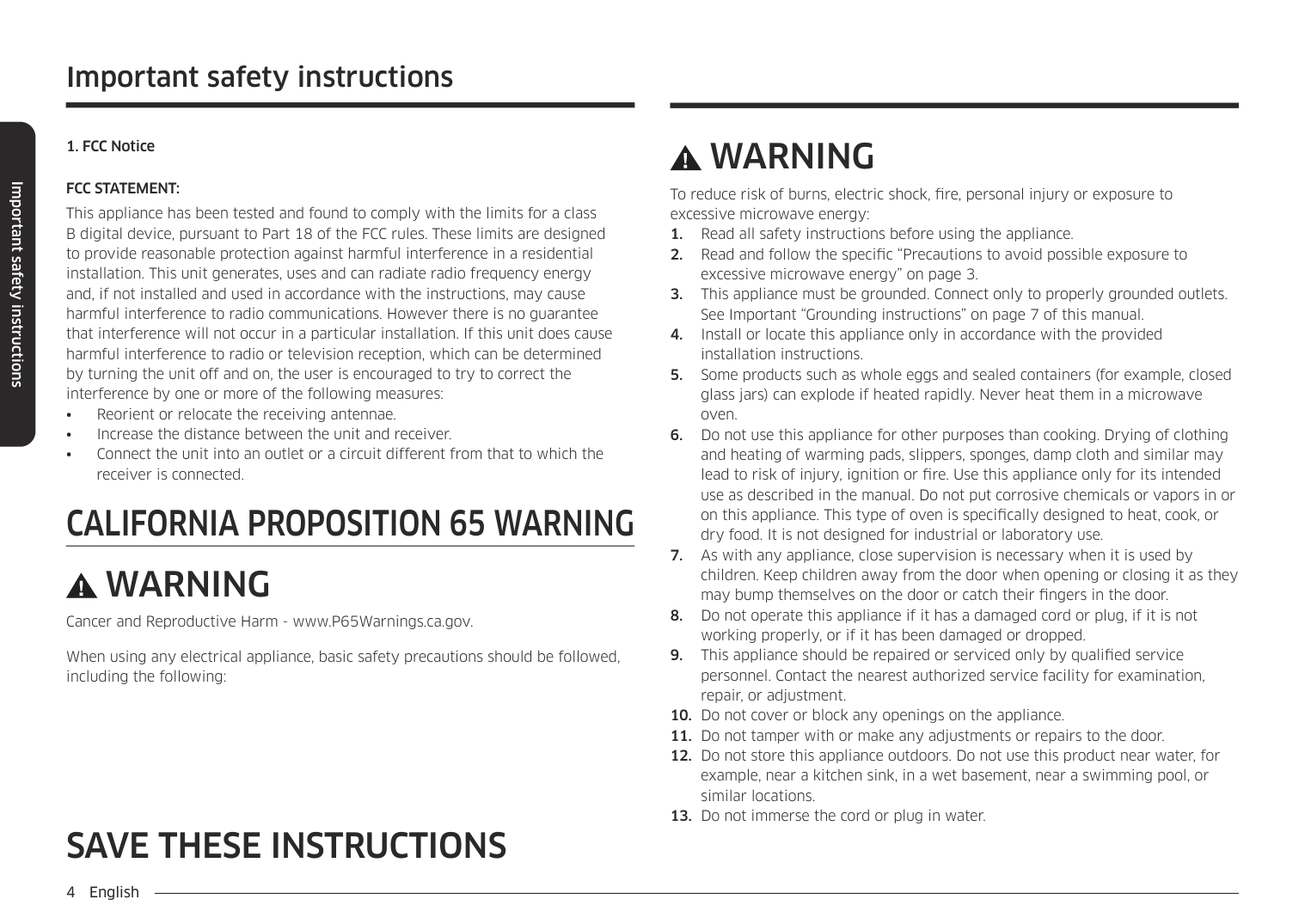
4
Save These Instructions
SafetyImportant
Grounding
Instructions
This appliance must be grounded. In the event of an electrical short circuit, grounding reduces the risk of electric shock by providing an escape wire for the electrical current. This appliance is equipped with a cord that includes a grounding wire and a grounding plug. The plug must be plugged into an outlet that is properly installed and grounded. Plug the three-prong power cord into a properly grounded outlet of standard 115-120 voltage, 60 Hz. Your oven should be the only appliance on this circuit.Warning
Improper use of the grounding plug can result in a risk of electric shock. Consult a qualified electrician or servicer if you do not understand the grounding instructions or if you are not sure if the appliance is properly grounded. Use of Extension Cords A short power-supply cord is provided to reduce the risk of becoming entangled in or tripping over a longer cord. Longer cord sets or extension cords are available and may be used if care is exercised in their use. If a long cord or extension cord is used:Warning
Do not cut or remove the third (ground) prong from the power cord under any circumstances.
5 Contents Safety .................................................................................................................... 2 Your New Microwave oven ................................................................................. 6 Checking Parts ................................................................................................... 6 Warranty and Service Information ...................................................................... 6 Setting Up Your Microwave Oven....................................................................... 6 Control Panel Buttons(MW640WA/MW640BA).................................................. 7 Control Panel Buttons(MW650WA/MW650BA).................................................. 8 Operation.............................................................................................................. 9 Setting the Clock................................................................................................. 9 Using the Pause/Cancel Button.......................................................................... 9 Using the Instant Cook Buttons .......................................................................... 9 Instant Cook Chart............................................................................................ 10 Using the One Minute+ Button.......................................................................... 11 Defrosting ......................................................................................................... 11 Setting Cooking Times & Power Levels............................................................ 11 Cooking Instructions......................................................................................... 12 Cooking Utensils............................................................................................... 12 Testing Utensils ................................................................................................ 12 Cooking Techniques......................................................................................... 13 General Tips ..................................................................................................... 13 Cooking Guide.................................................................................................. 14 Defrosting Guide............................................................................................... 16 Recipes............................................................................................................. 17 Appendix ............................................................................................................ 19 Troubleshooting Guide ..................................................................................... 19 Care and Cleaning............................................................................................ 20 Specifications.................................................................................................... 21 Warranty ............................................................................................................. 22 Guía Rápida..............................................................................Inside Back Cover Quick Reference ................................................................................ Back Cover
6 Your New Microwave oven Checking Parts Unpack your microwave oven and check to make sure that you have all the parts shown here. If any part is missing or broken, call your dealer. Warranty and Service Information To help us better serve you, please complete the enclosed registration card and promptly return it by mail. If the registration card is missing, you can call Samsung Electronics America, Inc., at 1-800-SAMSUNG (800-726- 7864), or register on-line at
Www.Samsungusa.Com
When contacting Samsung, please provide the specific model and serial number information which is usually located on the back or bottom of the product. Please record these numbers below, along with the other requested information. Keep this information in a safe place as a permanent record of your purchase to aid in identification in case of theft or loss, and a copy of your sales receipt as a proof of purchase if warranty service is needed.Model Number _________________
Serial Number _________________
Date Purchased _________________
Purchased From_________________
Warranty service can only be performed by a Samsung Authorized Service Center. If you should require warranty service, provide the above information with a copy of your sales receipt to the Samsung Authorized Service Center. For service assistance and the location of the nearest service center, please call 1-800- SAMSUNG (800-726-7864), or go on-line toWww.Samsungsupport.Com
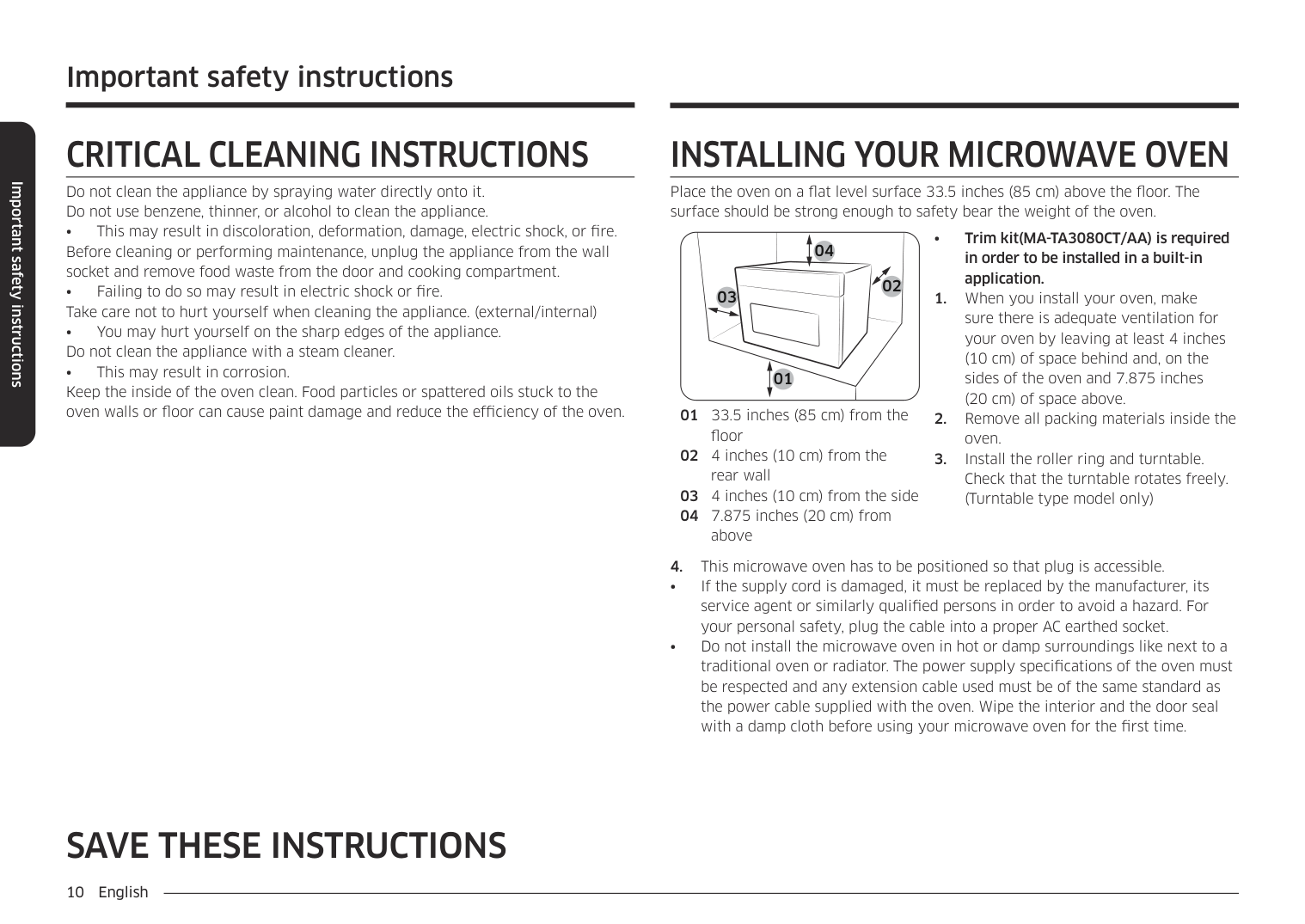
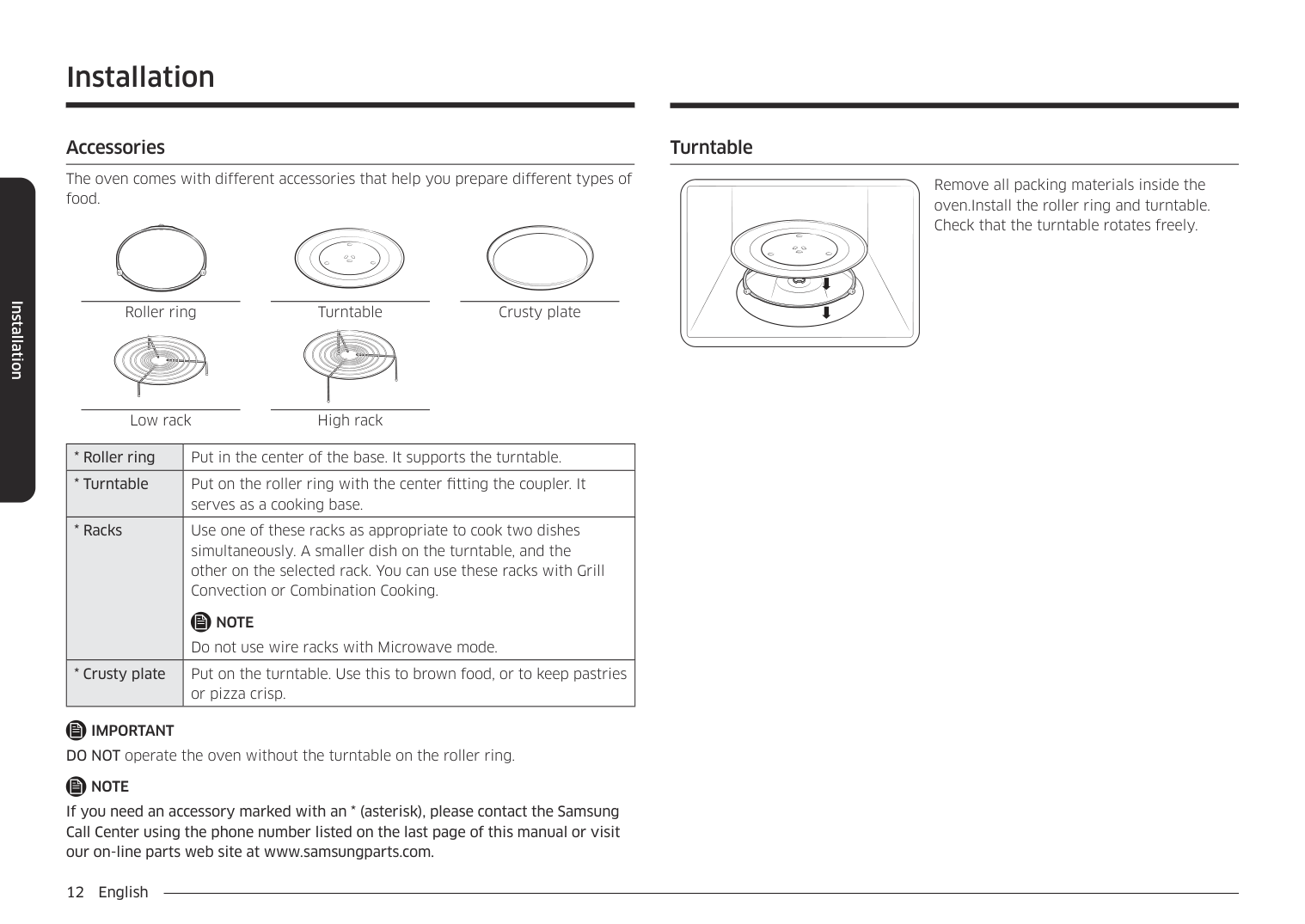
Setting Up Your Microwave Oven 1 Place the oven on a flat, sturdy surface and plug the cord into a grounded outlet. Once plugged in, the display on your oven will show: Make sure there is adequate ventilation for your oven by leaving at least four inches of space behind, above, and to the sides of the oven. 2 Open the oven door by pressing the button below the control panel. 3 Wipe the inside of the oven with a damp cloth. 4 Place the pre-assembled ring in the indentation in the center of the oven. 5 Place the glass tray on top of the ring so that the three glass tabs in the center of the tray fit securely into the tabs on the floor of the oven. microwave oven glass tray roller guide ring instruction manual registration card
7 Your New Microwave oven Control Panel Buttons
(Mw640Wa/Mw640Ba)
Instant Cooking
Pizza 1 2 3 4 5 6 7 8 9 0 Power Level Clock Start Defrost Pause Cancel Beverage 1 2 3 4 5 7 6 8
8 Your New Microwave oven Control Panel Buttons
(Mw650Wa/Mw650Ba)
Instant Cooking
Pizza Beverage Frozen Dinner 1 2 3 4 5 6 7 8 9 0 Power Level Clock Start Pause Cancel Defrost 1 2 4 3 5 7 6 8
9 Operation Setting the Clock 1 Press the Clock button. The display will show: 2 Use the Number buttons to enter the current time. You must press at least three numbers to set the clock. If the current time is 5:00 enter, 5,0,0. 3 Press Clock again. A colon will appear, indicating that the time is set. If there is a power interruption, you will need to reset the clock. You can check the current time while cooking is in progress by pressing the Clock button. Using the Pause/Cancel Button The Pause/Cancel button allows you to clear instructions you have entered. It also allows you to pause the oven’s cooking cycle, so that you can check the food.
10 Operation Instant Cook Chart Note The cooking time of 3.0 oz. microwave-popcorn depends on the brand. Cooking time is adjustable for desired taste by using the number pads and following the package instructions. Item Weight Remarks Popcorn 3.5 oz 3.0-3.5 oz
(Mw650Wa/
MW650BA only) 7-10 oz 10-12 oz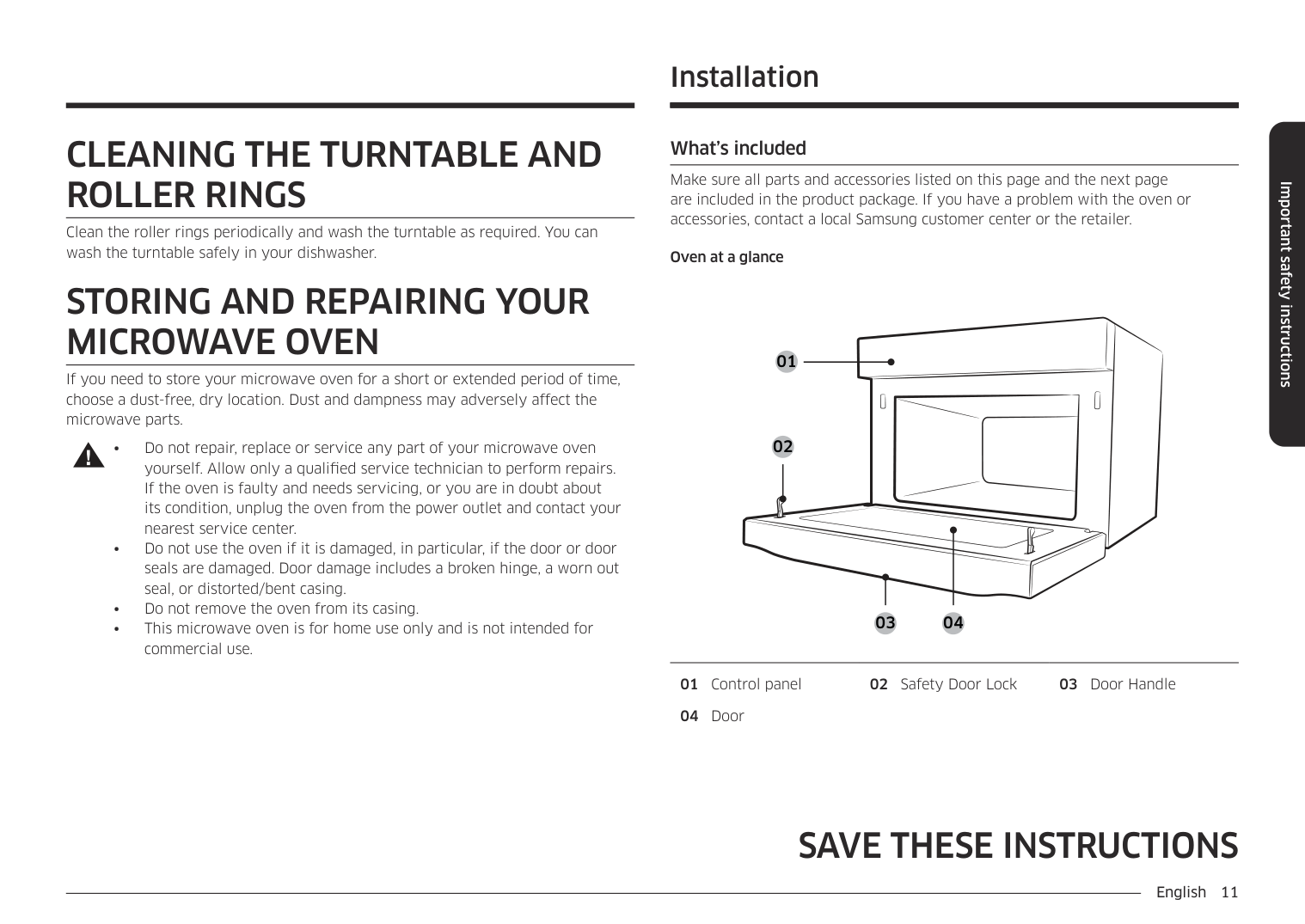
11 Operation Using the One Minute+ Button This button offers a convenient way to heat food in one-minute increments at the High power level. 1 Press the One Minute+ button once for each minute you wish to cook the food. For example, press it twice for two minutes. The time will display, and the oven starts automatically. Add minutes to a program in progress by pressing the One Minute+ button for each minute you want to add. Defrosting The defrost setting is designed for speedy thawing of frozen food and is one great advantage of the microwave oven. (Power level of 30% is automatically set for defrosting) 1 Press the Defrost button. The display shows “ PL:30”. 2 Press the Number buttons to enter the desired defrosting time. 3 Press the Start button to begin defrosting. • See page 16 for the Defrosting Guide. Setting Cooking Times & Power Levels The power level lets you control the heating intensity from Warm to High with the Power Level button. 1 Press the Power Level button. The power level is automatically set to high. If you want to set the power level to something other than High, press the Power Level button repeatedly. 2 Press the Number buttons sequentially to enter the desired cooking time. 3 Press the Start button to begin cooking. If you want to change the power level, press Pause/Cancel before you press Start, and re-enter all of the instructions. You can check the Power Level while cooking is in progress by pressing the Power Level button. Pad Touch Display Output Power Level Once PL:Hi
650W
TwicePl:90
585W
3 TimesPl:80
520W
4 TimesPl:70
455W
5 TimesPl:60
390W
7 TimesPl:50
325W
6 TimesPl:40
260W
8 TimesPl:30
195W
9 TimesPl:20
130W
10 TimesPl:10
65W
12 Cooking Instructions Cooking Utensils Recommended Use
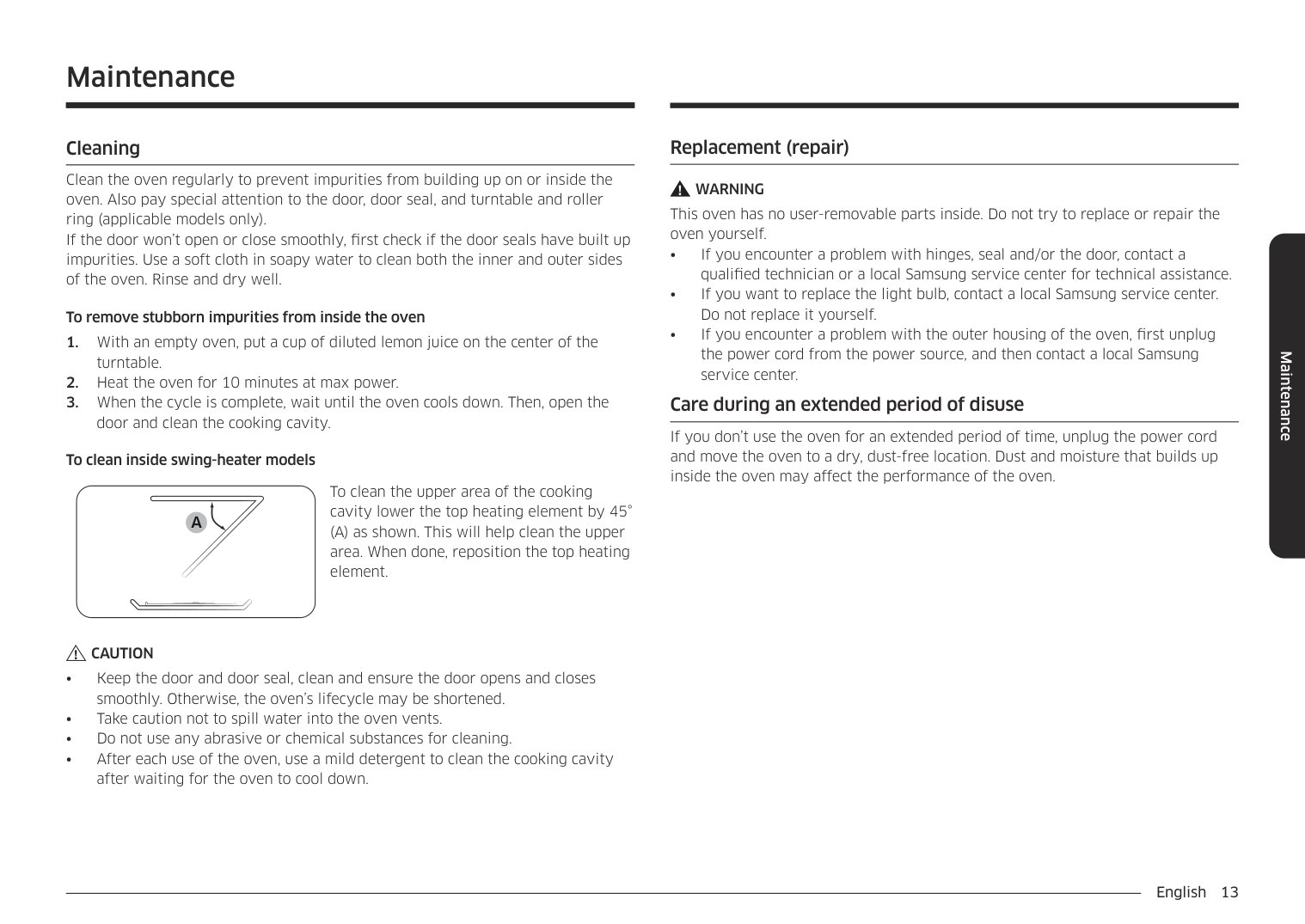
13 Cooking Instructions Cooking Techniques Stirring Stir foods such as casseroles and vegetables while cooking to distribute heat evenly. Food at the outside of the dish absorbs more energy and heats more quickly, so stir from the outside to the center. The oven will turn off when you open the door to stir your food. Arrangement Arrange unevenly shaped foods, such as chicken pieces or chops, with the thicker, meatier parts toward the outside of the turntable where they receive more microwave energy. To prevent overcooking, place thin or delicate parts toward the center of the turntable. Shielding Shield food with narrow strips of aluminum foil to prevent overcooking. Areas that need shielding include poultry wing-tips, the ends of poultry legs, and corners of square baking dishes. Use only small amounts of aluminum foil. Larger amounts can damage your oven. Turning Turn foods over midway through cooking to expose all parts to microwave energy. This is especially important with large items such as roasts. Standing Foods cooked in the microwave build up internal heat and continue to cook for a few minutes after the oven stops. Let foods stand to complete cooking, especially foods such as roasts and whole vegetables. Roasts need this time to complete cooking in the center without overcooking the outer areas. All liquids, such as soup or hot chocolate, should be shaken or stirred when cooking is complete. Let liquids stand a moment before serving. When heating baby food, stir well and test the temperature before serving. Adding Moisture Microwave energy is attracted to water molecules. Food that is uneven in moisture content should be covered or allowed to stand so that the heat disperses evenly. Add a small amount of water to dry food to help it cook. General Tips
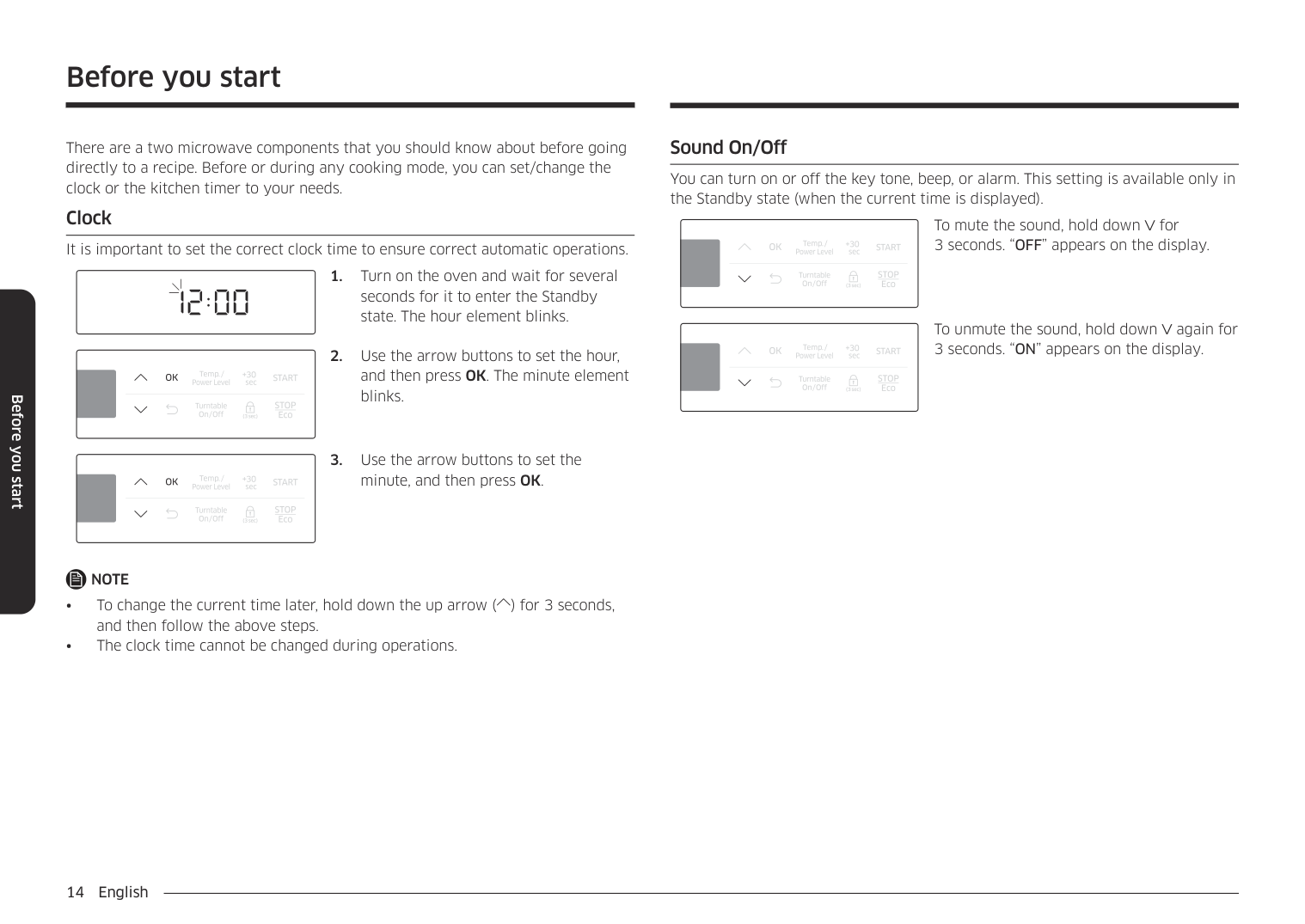
14 Cooking Instructions Cooking Guide Guide for Cooking Meat in Your Microwave
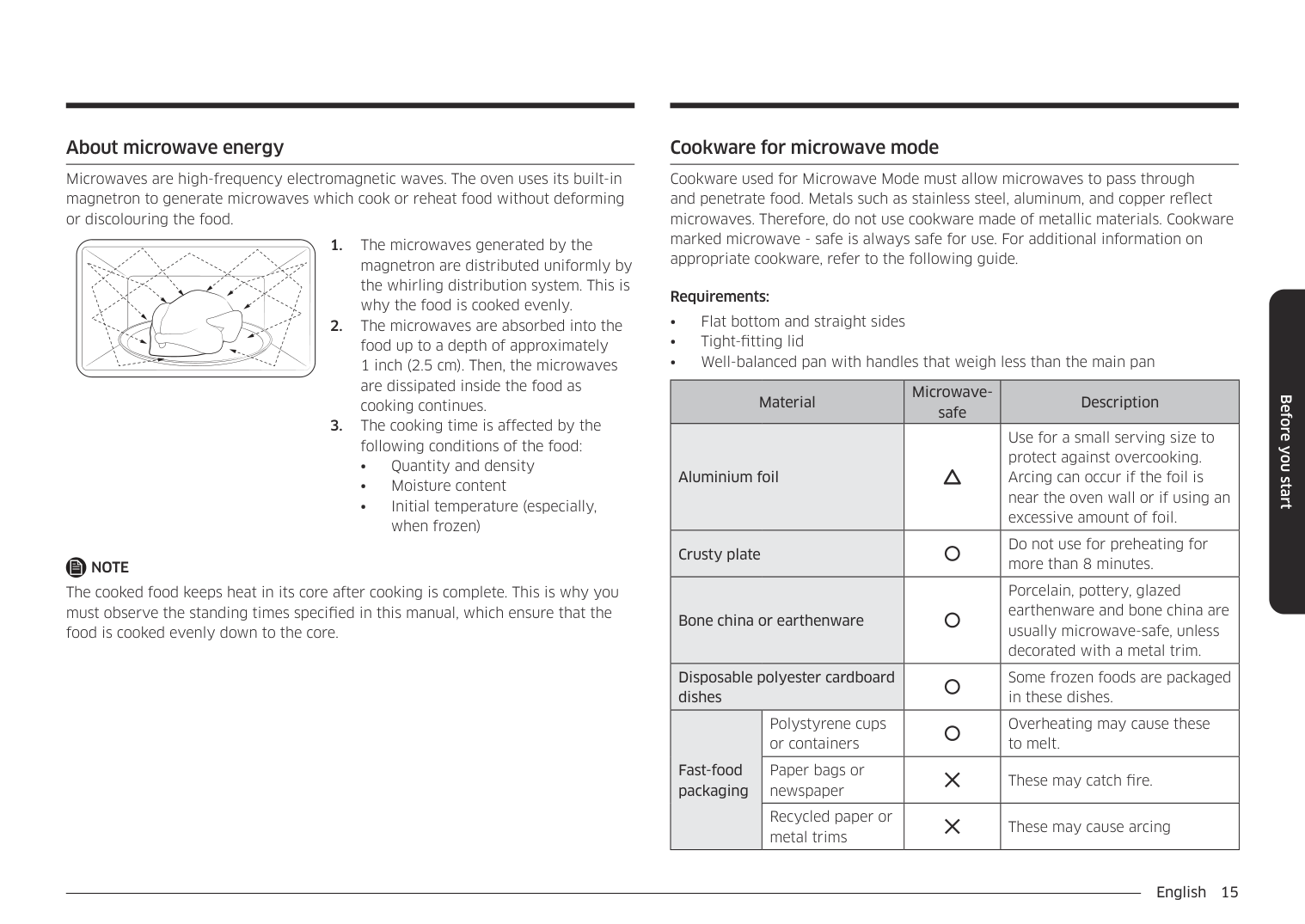
15 Cooking Instructions Guide for Cooking Seafood in Your Microwave
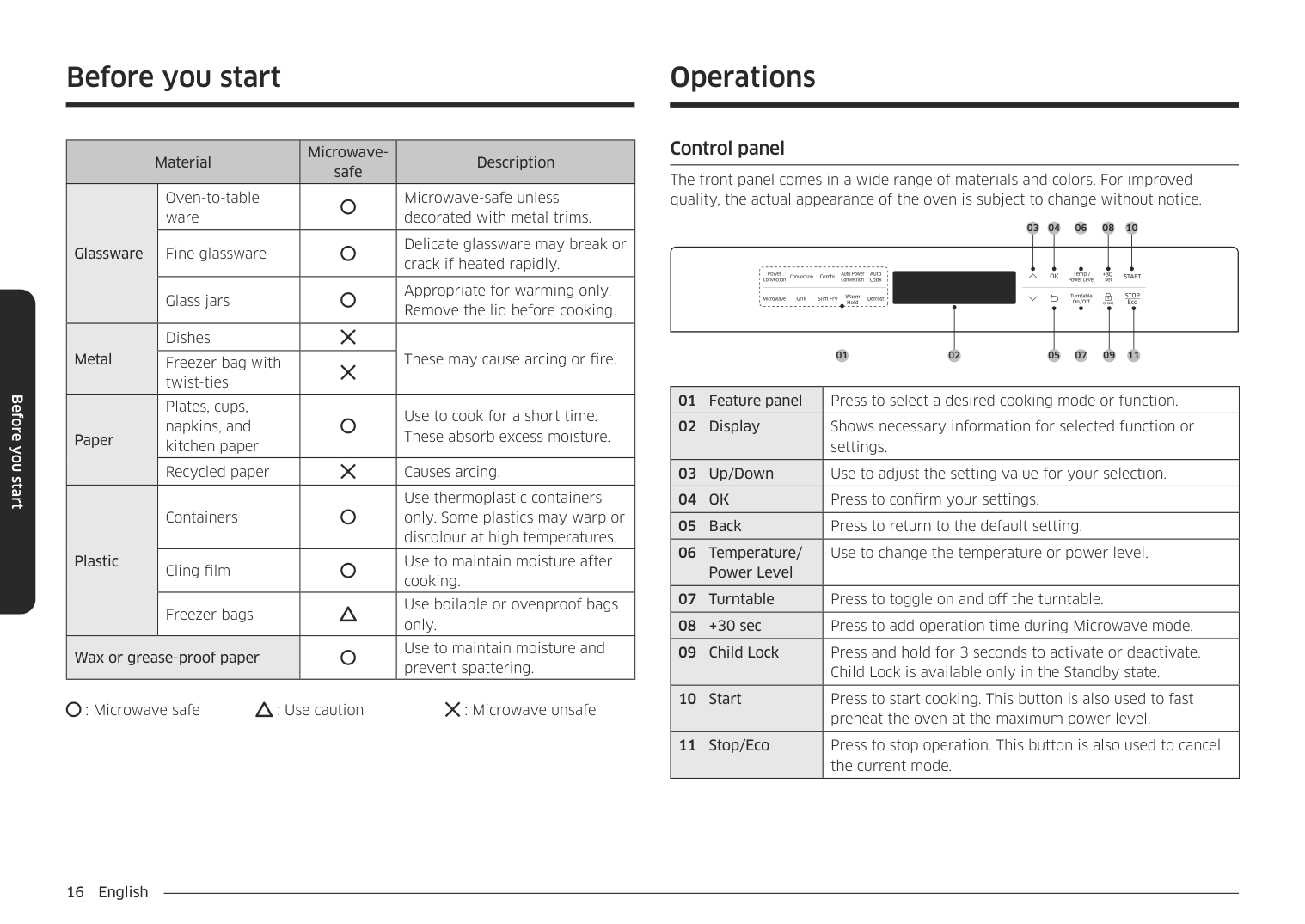
16 Cooking Instructions Defrosting Guide
17 Cooking Instructions Recipes Beef and Barley Stew 1½ lbs. beef stew cubes, cut into ½-inch pieces ½ cup chopped onion 2 Tbs. all-purpose flour 1 Tbs Worcestershire sauce 1 can (13.75-14.5 oz.) beef broth 2 medium carrots, cut into ½-inch slices (about 1 cup) ½ cup barley 1 bay leaf ¼ tsp. pepper 1 pkg. (9-10 oz.) frozen peas, thawed
18 Cooking Instructions Warm Potato Salad 2 lbs. small red potatoes, cut into ½-inch pieces 4 slices bacon (uncooked), cut into ½-inch pieces ¼ cup chopped onion 2 tsp. sugar 1 tsp. salt 1 tsp. flour ½ tsp. celery seed 1/8 tsp. pepper 2½ Tbs. apple cider vinegar
19 Appendix Troubleshooting Guide Before you call a repair person for your oven, check this list of possible problems and solutions. Neither the oven’s display nor the oven operate.
20 Appendix Care and Cleaning Follow these instructions to clean and care for your oven.
1-800-Samsung
21 Appendix Specifications Model Number
Mw640Wa/Mw640Ba/Mw650Wa/Mw650Ba
Oven Cavity 0.6cuft Controls 10 power levels, including defrost Timer 99 minutes, 99 seconds Power Source 120 VAC, 60 Hz Power Output 650 Watts Outside Dimensions189/64”(W) X 923/32”(H) X 1227/32”(D)
Oven Cavity Dimensions1113/32”(W) X 73/64”(H) X 127/16”(D)
Net/Gross Weight 22.2/24.4 lbs
22 Warranty
Samsung Microwave Oven
Limited Warranty To Original Purchaser
This SAMSUNG brand product, as supplied and distributed by SAMSUNG ELECTRONICS AMERICA, INC. (SAMSUNG) and delivered new, in the original carton to the original consumer purchaser, is warranted by SAMSUNG against manufacturing defects in materials and workmanship for a limited warranty period of: One (1) Year Parts and Labor, Eight (8) Years Parts Warranty for Magnetron This limited warranty begins on the original date of purchase, and is valid only on products purchased and used in the United States. To receive warranty service, the purchaser must contact SAMSUNG for problem determination and service procedures. Warranty service can only be performed by a SAMSUNG authorized service center. The original dated bill of sale must be presented upon request as proof of purchase to SAMSUNG or SAMSUNG’s authorized service center. Transportation of the product to and from the service center is the responsibility of the purchaser. SAMSUNG will repair or replace this product, at our option and at no charge as stipulated herein, with new or reconditioned parts or products if found to be defective during the limited warranty period specified above. All replaced parts and products become the property of SAMSUNG and must be returned to SAMSUNG. Replacement parts and products assume the remaining original warranty, or ninety (90) days, whichever is longer This limited warranty covers manufacturing defects in materials and workmanship encountered in normal, non-commercial use of this product and shall not apply to the following, including, but not limited to: damage which occurs in shipment; delivery and installation; applications and uses for which this product was not intended; altered product or serial numbers; cosmetic damage or exterior finish; accidents, abuse, neglect, fire, water, lightning or other acts of nature; use of products, equipment, systems, utilities, services, parts, supplies, accessories, applications, installations, repairs, external wiring or connectors not supplied or authorized by SAMSUNG which damage this product or result in service problems; incorrect electrical line voltage, fluctuations and surges; customer adjustments and failure to follow operating instructions, cleaning, maintenance and environmental instructions that are covered and prescribed in the instruction book; product removal and reinstallation; problems caused by pest infestations, and overheating or overcooking by user; glass tray or turntable; reduced magnetron power output related to normal aging. SAMSUNG does not warrant uninterrupted or error-free operation of the product.Limited Warranty To Original Purchaser
23 Warranty
There Are No Express Warranties Other Than Those Listed And
Described Above, And No Warranties Whether Express Or Implied,
Including, But Not Limited To, Any Implied Warranties Of
Merchantability Or Fitness For A Particular Purpose, Shall Apply
After The Express Warranty Periods Stated Above, And No Other
Express Warranty Or Guaranty Given By Any Person, Firm Or
Corporation With Respect To This Product Shall Be Binding On
Samsung. Samsung Shall Not Be Liable For Loss Of Revenue Or Profits,
Failure To Realize Savings Or Other Benefits, Or Any Other Special,
Incidental Or Consequential Damages Caused By The Use, Misuse Or
Inability To Use This Product, Regardless Of The Legal Theory On
Which The Claim Is Based, And Even If Samsung Has Been Advised Of The
Possibility Of Such Damages. Nor Shall Recovery Of Any Kind Against
Samsung Be Greater In Amount Than The Purchase Price Of The
Product Sold By Samsung And Causing The Alleged Damage. Without
Limiting The Foregoing, Purchaser Assumes All Risk And Liability For
Loss, Damage Or Injury To Purchaser And Purchaser’S Property And
To Others And Their Property Arising Out Of The Use, Misuse Or
Inability To Use This Product Sold By Samsung Not Caused Directly By
The Negligence Of Samsung. This Limited Warranty Shall Not Extend To
Anyone Other Than The Original Purchaser Of This Product, Is
Nontransferable And States Your Exclusive Remedy.
Some states do not allow limitations on how long an implied warranty lasts, or the exclusion or limitation of incidental or consequential damages, so the above limitations or exclusions may not apply to you. This warranty gives you specific legal rights, and you may also have other rights which vary from state to state. To obtain warranty service, please contact: SAMSUNG ELECTRONICS AMERICA, INC. -Www.Samsungusa.Com
Samsung Customer Service 400
Valley Rd., Suite 201,
Mt. Arlington, Nj 07856
Tel: 973-601-6000, Fax: 973-601-60011-800-Samsung (1-800-726-7864)
Www.Samsungsupport.Com
24 Warranty
Samsung Electronics
Nor Th American Limited Warranty Addendum
Subject to the requirements, conditions, exclusions and limitations of the Original Limited Warranty supplied with Samsung Electronics (SAMSUNG) products, and the requirements, conditions, exclusions and limitations contained herein, SAMSUNG will additionally provide Warranty Repair Service in the United States on SAMSUNG products purchased in Canada, and in Canada on SAMSUNG products purchased in the United States, for the warranty period originally specified, and to the Original Purchaser only. The above described warranty repairs must be performed by a SAMSUNG Authorized Service Center. Along with this Statement, the Original Limited Warranty Statement and a dated Bill of Sale as Proof of Purchase must be presented to the Service Center. Transportation to and from the Service Center is the responsibility of the purchaser. Conditions covered are limited only to manufacturing defects in material or workmanship, and only those encountered in normal use of the product. Excluded, but not limited to, are any original specified provisions for, in-home or on-site services, minimum or maximum repair times, exchanges or replacements, accessories, options, upgrades, or consumables. For the locations of a SAMSUNG Authorized Service Center in the United States and Canada, please contact SAMSUNG at:1-800-Samsung (1-800-726-7864)
Or on-line at: WWW.SAMSUNGUSA.COM and WWW.SAMSUNGCANADA.COMNorth American Limited Warranty Addendum
27 Guía Rápida Feature Operation Programar el Reloj
Quick Reference Feature Operation Set Clock