
Ask AI
— answers from the official manualAnswers from the official manual.
Common questions
Common Questions
20 totalHow do I set my PC to obtain an IP address automatically for the TOTOLINK router setup?
On Windows 10, click the network icon at the bottom right corner of the screen, then click the Properties button in the lower left corner. Double-click on 'Internet Protocol (TCP/IP)' and select 'Obtain an IP address automatically,' then click OK to save the configuration. (Page 1)
Can I manually set an IP address on my PC instead of obtaining one automatically to access the TOTOLINK router?
Yes, you can manually set your PC's IP address to 192.168.1.xxx (where xxx ranges from 2 to 254), with a Subnet Mask of 255.255.255.0 and a Gateway of 192.168.1.1. After entering these values, click OK to save the configuration. (Page 1)
How do I enter the TOTOLINK router's setting interface after reaching the login page?
After navigating to http://192.168.1.1, click the Setup Tool icon to enter the router's setting interface. Then log in using the default username and password, which are both 'admin.' (Page 1)
Which TOTOLINK router models are supported by this login guide?
This guide is suitable for a range of TOTOLINK models including N150RA, N300R Plus, N300RA, N300RB, N300RG, N301RA, N302R Plus, N303RB, N303RBU, N303RT Plus, N500RD, N500RDG, N505RDU, N600RD, A1004, A2004NS, A5004NS, and A6004NS. Refer to your specific model to confirm compatibility. (Page 1)
What are the default username and password to access my Totolink router's settings?
The default username and password for accessing your Totolink router’s settings interface is admin.
How do I reset my Totolink router to factory defaults?
Press and hold the Power button for 10 seconds until the LED flashes red. This clears all settings and returns the device to factory defaults.
Show 14 more questions
What should I do if I can't log into my Totolink router?
How do I configure my computer's IP address to access a Totolink router?
Can I log into the Totolink router using an IP other than 192.168.1.1?
How do I check my computer's automatically assigned IP address?
Where can I find detailed instructions for setting up my Totolink router?
What is the default IP address to log into my Totolink router?
How do I set up automatic IP addressing on my computer to connect to a Totolink router?
What is the default subnet mask for a Totolink router?
How do I connect my computer to the TOTOLINK router to access the settings interface?
What is the default IP address to log in to my TOTOLINK router's setting interface?
What are the default username and password for the TOTOLINK router's web setup interface?
What should I do if I cannot log in to my TOTOLINK router?
What is the default Subnet Mask for the TOTOLINK router?
How can I confirm that my PC is on the correct network segment to access the TOTOLINK router?
Full Manual
1 pages
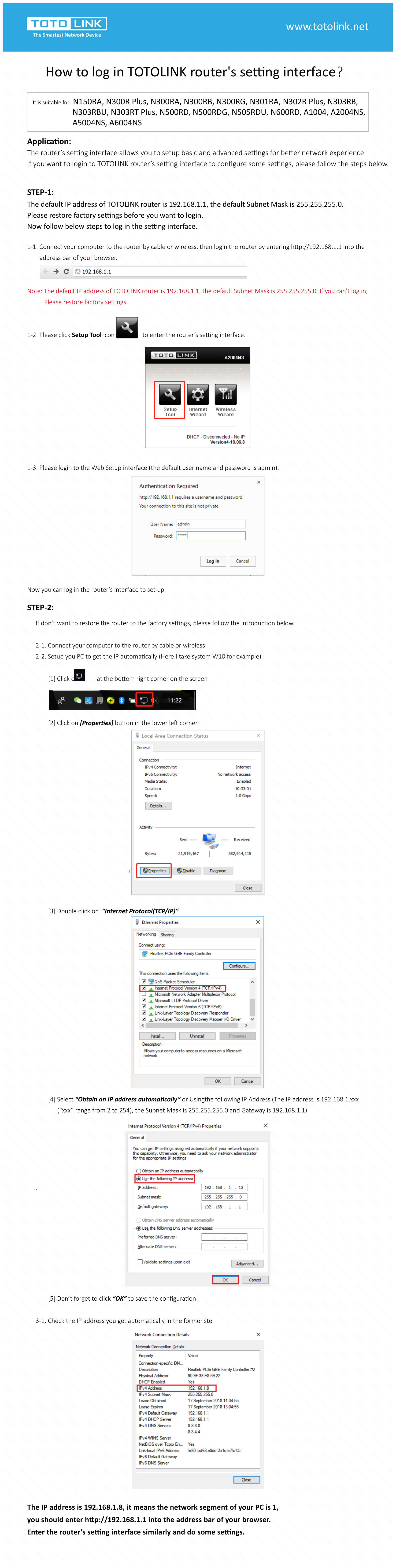
How to log in TOTOLINK router's setting interface? Application: The router’s setting interface allows you to setup basic and advanced settings for better network experience. If you want to login to TOTOLINK router’s setting interface to configure some settings, please follow the steps below. 1-1. Connect your computer to the router by cable or wireless, then login the router by entering http://192.168.1.1 into the address bar of your browser. Note: The default IP address of TOTOLINK router is 192.168.1.1, the default Subnet Mask is 255.255.255.0. If you can't log in, Please restore factory settings. 1-2. Please click Setup Tool icon to enter the router’s setting interface. 1-3. Please login to the Web Setup interface (the default user name and password is admin). Now you can log in the router’s interface to set up. If don’t want to restore the router to the factory settings, please follow the introduction below. 2-1. Connect your computer to the router by cable or wireless 2-2. Setup you PC to get the IP automatically (Here I take system W10 for example) [1] Click on at the bottom right corner on the screen [2] Click on [Properties] button in the lower left corner
[3] Double click on “Internet Protocol(TCP/IP)” [4] Select “Obtain an IP address automatically” or Usingthe following IP Address (The IP address is 192.168.1.xxx (“xxx” range from 2 to 254), the Subnet Mask is 255.255.255.0 and Gateway is 192.168.1.1) . [5] Don’t forget to click “OK” to save the configuration. 3-1. Check the IP address you get automatically in the former ste