
Ask AI
— answers from the official manualAnswers from the official manual.
Common questions
Common Questions
10 totalWhat should I do if my earbuds automatically turn off when placed back in the case?
Manually press and hold the MFB button for 4 seconds to turn off your earbuds before placing them in the charging case. This prevents unwanted power consumption.
What does a flashing blue LED on the charging case mean?
A single blue flash indicates that the battery level is between 1-25%. Two flashes for 25%-50%, three flashes indicate 50%-75%, and four flashes signify 75%-100% charge.
What should I do if I drop my earbuds or charging case?
If the product is damaged, stop using it immediately to avoid risks of electric shock, fire, or other injuries. Contact the service center for further assistance.
How do I turn on my earbuds manually?
Press and hold the MFB button for 2 seconds to power on your earbuds. They also automatically turn on when you take them out of the charging case.
How do I replace eartips with another size?
The package comes in three sizes (large, medium, small). Choose a replacement tip that fits your ear better and ensure it is securely placed.
How do I pair both earbuds with my phone?
Ensure the earbuds and your phone are within 3 feet of each other, turn on Bluetooth in your phone, take out the earbuds to enter pairing mode (LED flashes blue and white alternately), then choose 'D39-L' in your phone's list of Bluetooth devices to pair. If pairing fails, hold the MFB button until pairing mode starts again, then try pairing with 'D39-L'.
Full Manual
17 pages
Wireless Earbuds User Manual
Thank you for purchasing our products. This manual addresses the safety guidelines, warranty and operating instructions. Please review this manual thoroughly before operating your device.
SAFETY AND WARRANTY Important Safety Instructions
– never allow children to play with this product. Always store the product out of reach from children. The bags themselves or the many small parts they contain may cause choking if ingested.
WARRANTY We strives to build our products with the highest attention to detail and craftsmanship. However, sometimes there are occurrences of defect.
We are happy to offer 1-year hassle-free warranty to all our products as we continue to make amazing wireless product. Please contact us if you have any questions about our devices.
Package Contents
Wireless earbuds × 1 pair (left and right)
Charging case × 1
Eartips × 3 pairs (large, medium, small)
Micro USB cable × 1
User manual × 1
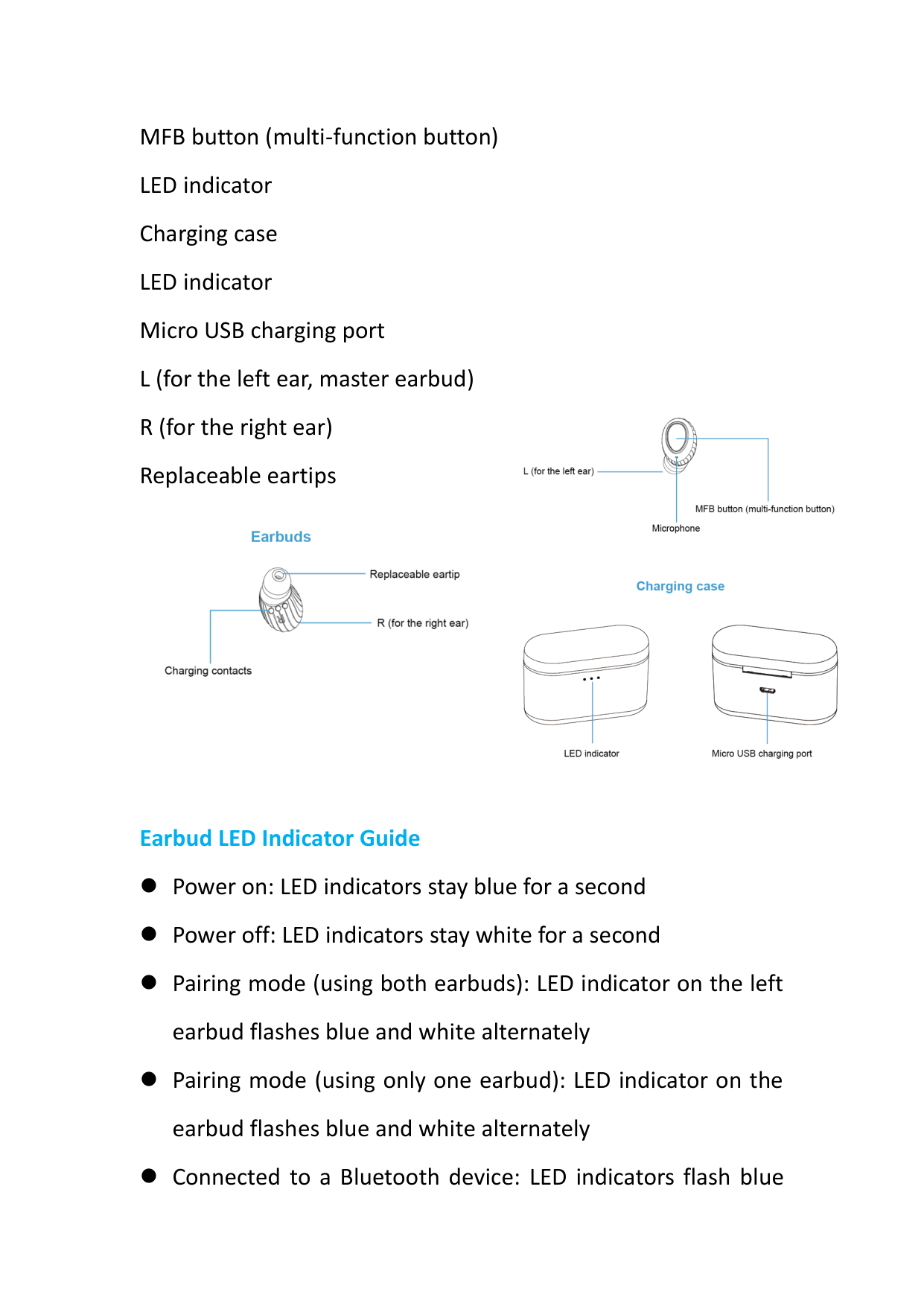
At a Glance Microphone
MFB button (multi-function button) LED indicator Charging case LED indicator Micro USB charging port L (for the left ear, master earbud) R (for the right ear) Replaceable eartips


Earbud LED Indicator Guide
Power on: LED indicators stay blue for a second
Power off: LED indicators stay white for a second
Pairing mode (using both earbuds): LED indicator on the left earbud flashes blue and white alternately
Pairing mode (using only one earbud): LED indicator on the earbud flashes blue and white alternately
Connected to a Bluetooth device: LED indicators flash blue
every 7 seconds
Low battery: LED indicators flash white every 5 seconds and a voice reminder prompts every 2 minutes
Earbuds are being charged: LED indicators stay white
Earbuds are fully charged: LED indicators are off
Charging Case LED Indicator Guide Earbuds are taken out of or put back into the charging case: 1-25% battery: LED indicator flashes blue once 25%-50% battery: LED indicator flashes blue twice 50%-75% battery: LED indicator flashes blue 3 times 75%-100% battery: LED indicator flashes blue 4 times Note: Charging case LED indicator is off when earbuds are being charged in the charging case.
Charging case is being charged: 1-25% battery: LED indicator flashes blue once every 2 seconds 25%-50% battery: LED indicator flashes blue twice every 2 seconds 50%-75% battery: LED indicator flashes blue 3 times every 2 seconds
75%-100% battery: LED indicator flashes blue 4 times every 2 seconds
Charging case is fully charged: LED indicator stays blue
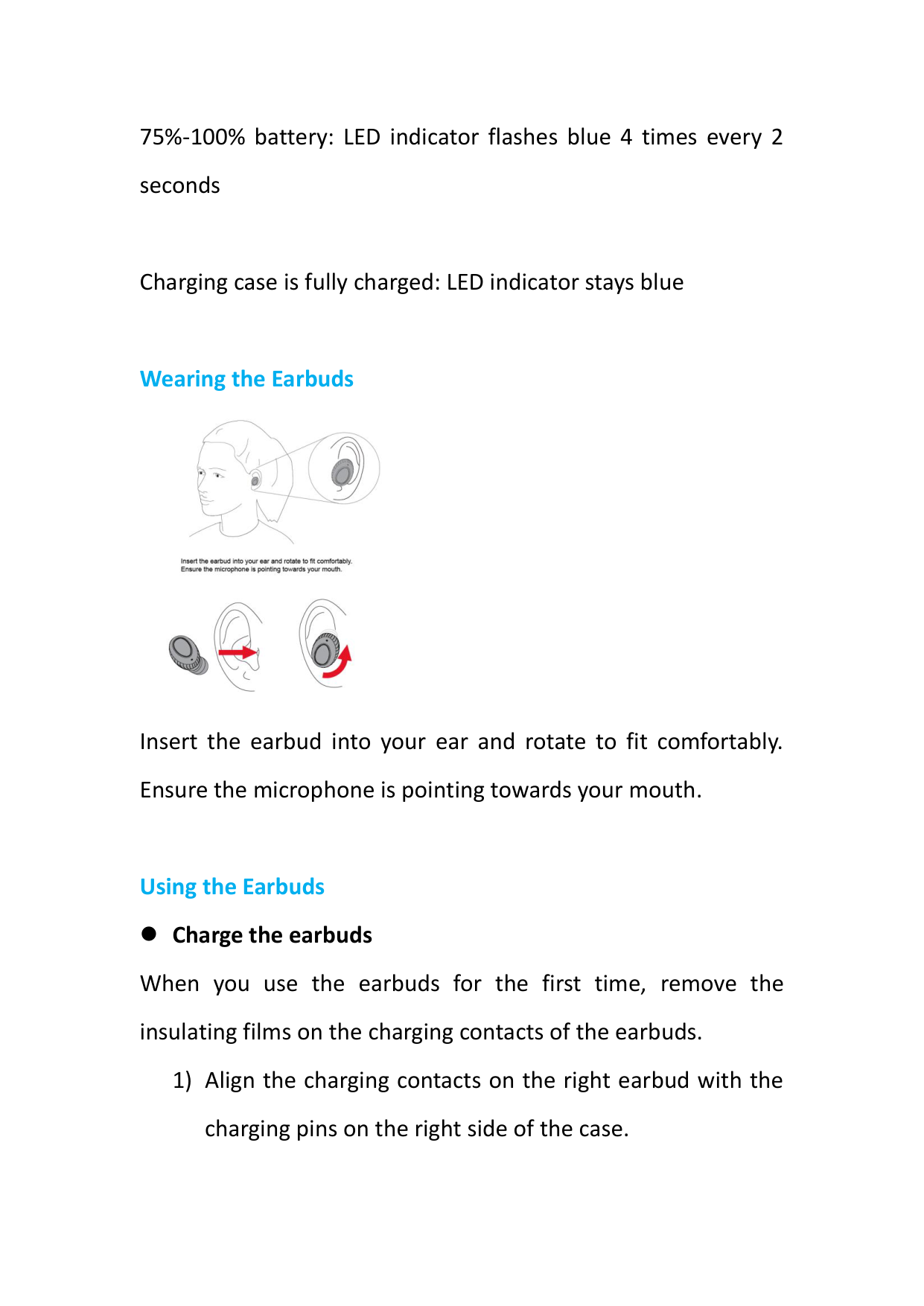
Wearing the Earbuds

Insert the earbud into your ear and rotate to fit comfortably. Ensure the microphone is pointing towards your mouth.
Using the Earbuds
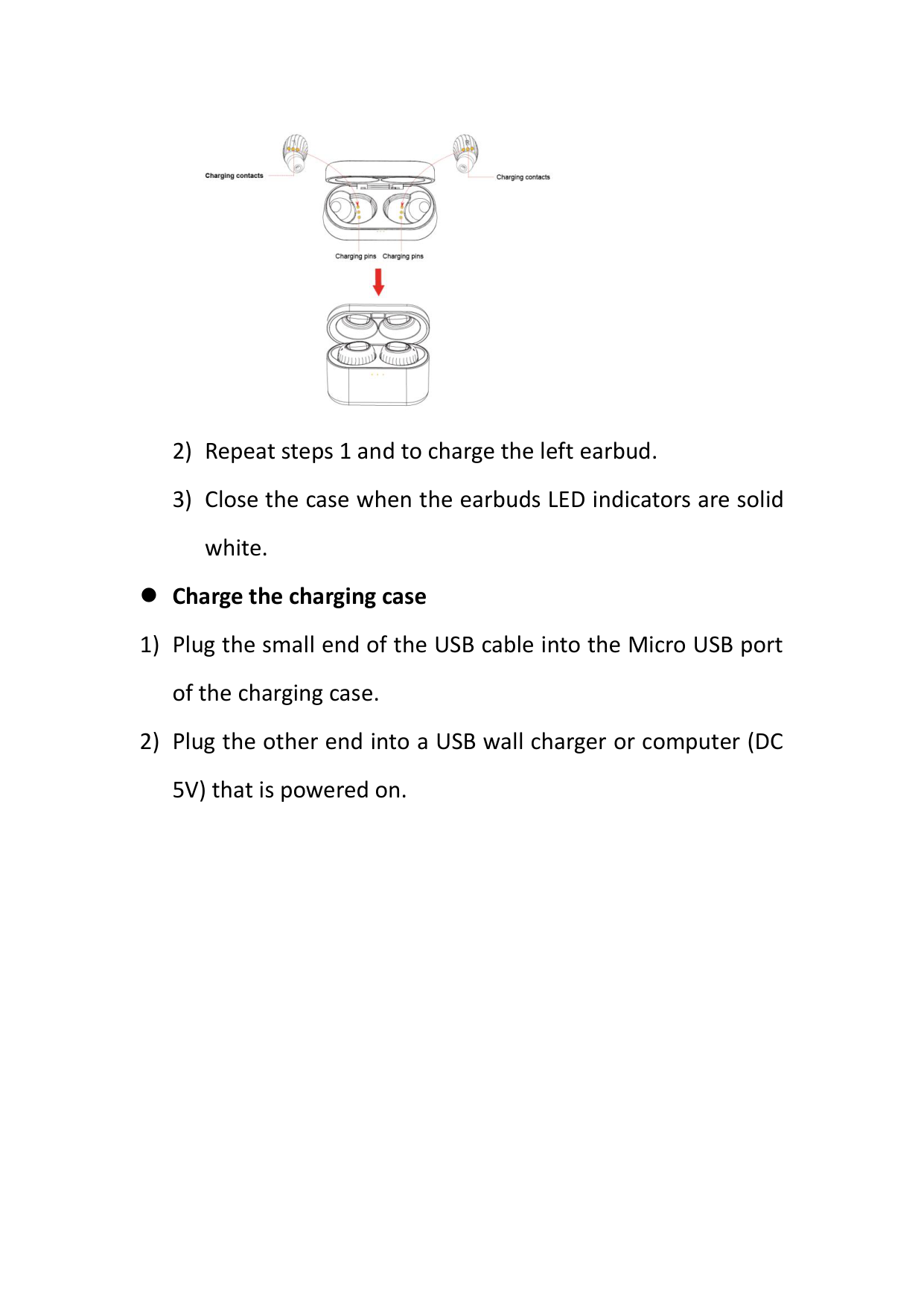
Charge the earbuds When you use the earbuds for the first time, remove the insulating films on the charging contacts of the earbuds.
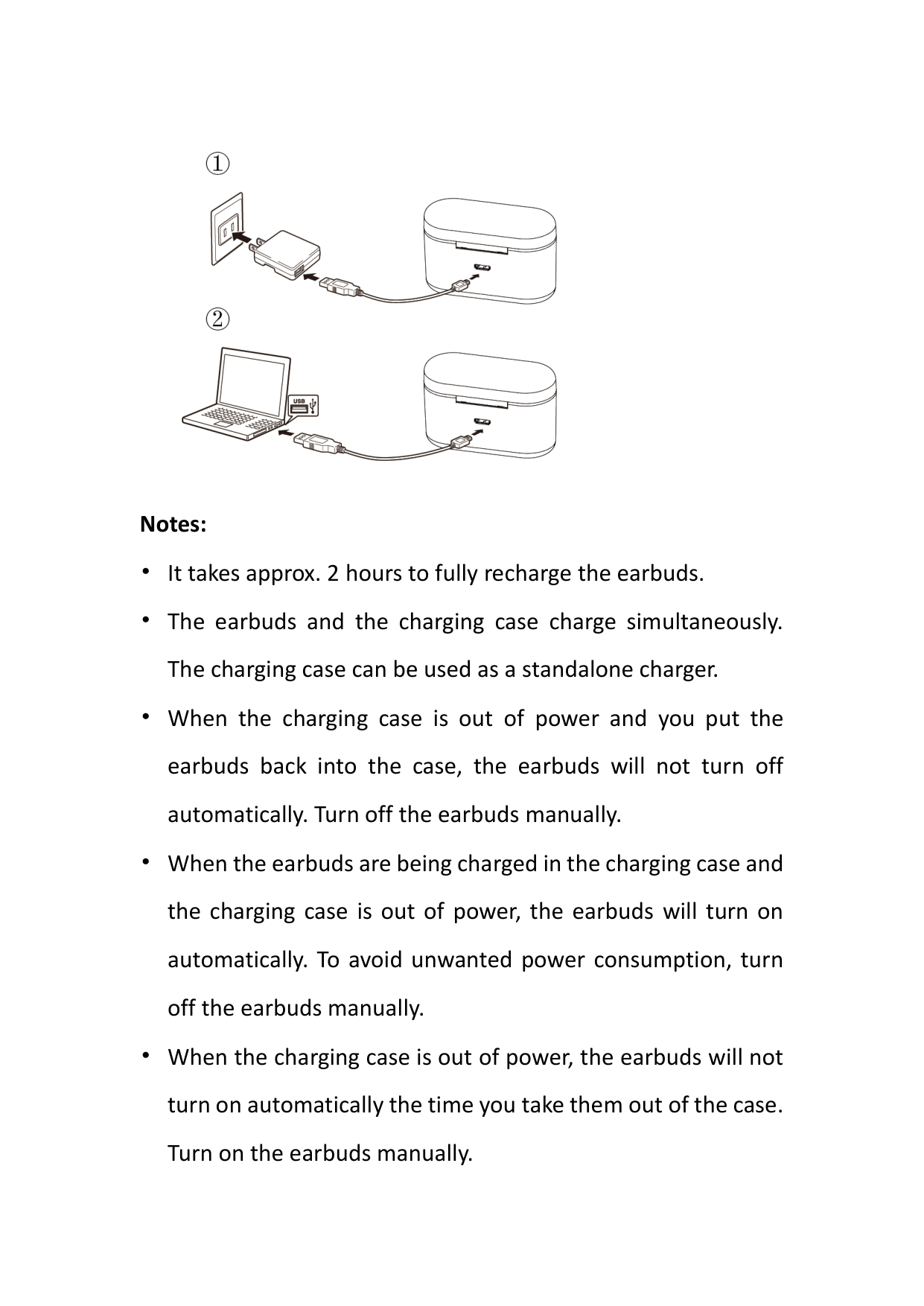

Charge the charging case

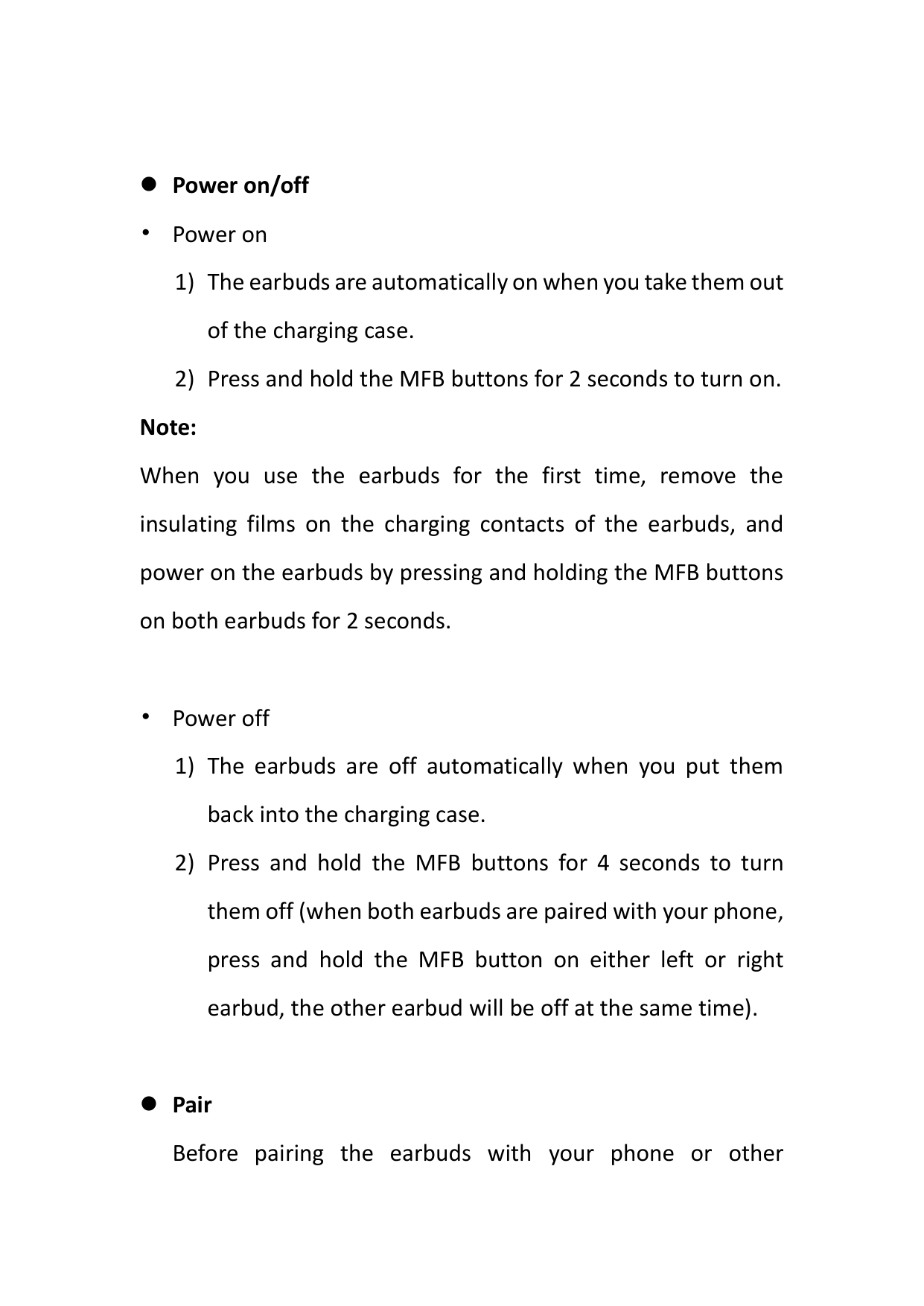
Notes:
Power on/off
• Power on
Note:
When you use the earbuds for the first time, remove the insulating films on the charging contacts of the earbuds, and power on the earbuds by pressing and holding the MFB buttons on both earbuds for 2 seconds.
• Power off
Pair Before pairing the earbuds with your phone or other
Bluetooth devices, make sure that the Bluetooth version of your phone or other Bluetooth devices are 4.0 or higher.
Pair both earbuds (Pair use)
Notes:
Pair ONE earbud (Mono Use) You can use both earbuds simultaneously or use either of the two earbuds alone.
Note:
When the left/right earbud is connected to your phone and you take the other earbud out of the charging case, earbuds will pair with each other and then link back to your phone automatically (in the condition that you have paired both earbuds with your phone before) .
Next song Press the MFB button on the left or right earbud twice to skip to the next song.
Play/pause playing songs
Press the MFB button to pause and press the MFB button again to resume playing songs.
Answer/hang up/reject calls
Press the MFB button or operate on your phone to answer an incoming call.
Press the MFB button or operate on your phone to hang up an ongoing call.
Press the MFB button twice to reject an incoming call.
Activate voice control of phone
In paired state, press and hold the MFB button for 2 seconds. (This function works only when your phone has voice control function; please refer to the instructions of your phone for details.)
Trouble Shooting Q: Pairing failed. A:
If the pairing still fails, check the following points:
Q: Earbuds are connected to phone A, but I want to pair earbuds with phone B when I am not able to disconnect earbuds from phone A.
Q: Connection is not stable.
A: Bluetooth signal is transmitted wirelessly and signals can be affected, which results in intermittent sound of earbuds, in the following conditions:
To resume stable connection between the earbuds and your Bluetooth device, try to avoid the above conditions and do the pairing again following the steps in "Pairing Failed".
Q: Power runs out fast.
A: The earbuds playtime varies according to volume level and audio content. The following conditions may cause fast power consumption:
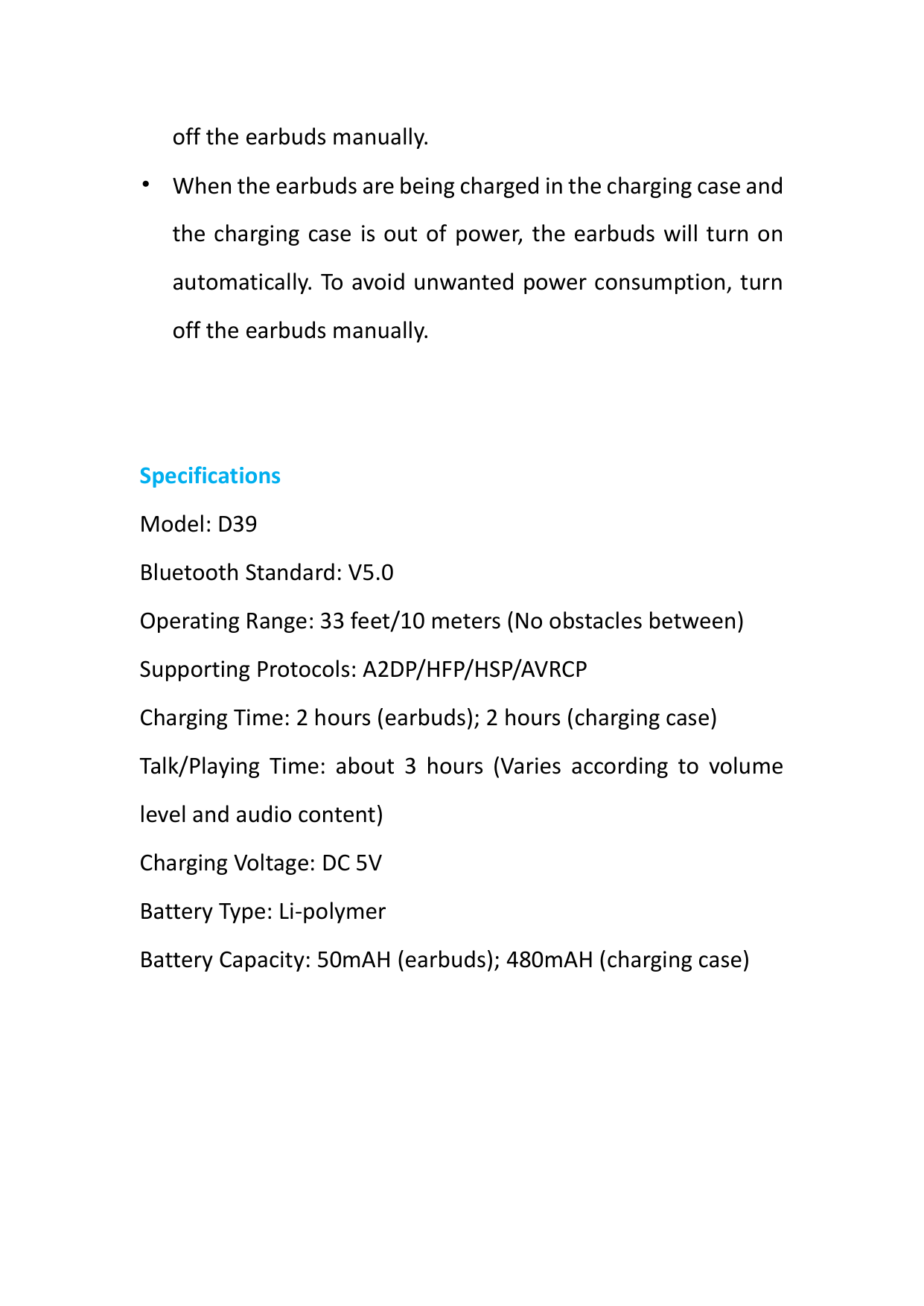
Specifications Model: D39 Bluetooth Standard: V5.0 Operating Range: 33 feet/10 meters (No obstacles between) Supporting Protocols: A2DP/HFP/HSP/AVRCP Charging Time: 2 hours (earbuds); 2 hours (charging case) Talk/Playing Time: about 3 hours (Varies according to volume level and audio content) Charging Voltage: DC 5V Battery Type: Li-polymer Battery Capacity: 50mAH (earbuds); 480mAH (charging case)