
Universal TV Remote RC G008 Universal Remote Control
Ask AI
— answers from the official manualAnswers from the official manual.
Common questions
Common Questions
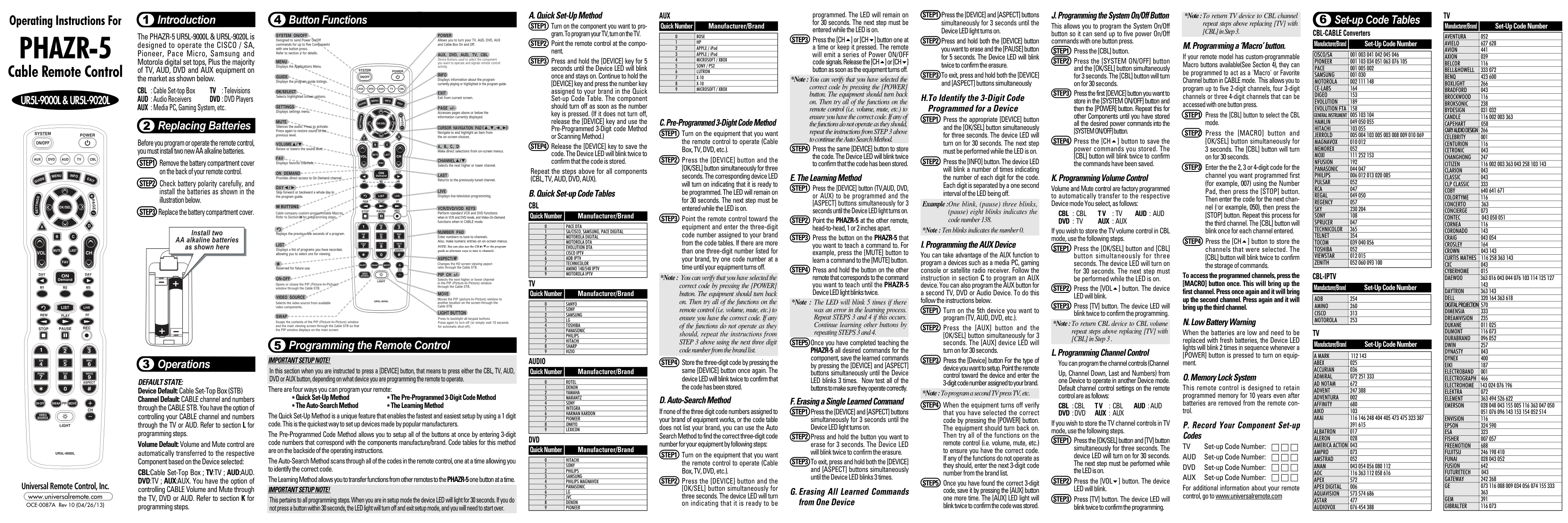
8 totalHow do I program volume control for cable mode to operate on TV?
To transfer CBL volume control to TV operation, press [OK/SEL] and [CBL], wait three seconds, then press [VOL5] followed by [TV]. Ensure the LED blinks twice to confirm programming. (Page 7)
What steps are involved in factory resetting the PHAZR-5?
Press and hold the Power button for 10 seconds until the red LED flashes, which clears all settings and returns the device to factory defaults. After resetting, re-pair connected devices. (Page 23)
How do I program channel control from one device mode to another?
To change channel controls between modes, follow these steps: Press [OK/SEL] and the desired Device button simultaneously for three seconds until the LED is on, then press [VOL6], followed by pressing the target mode button. Confirm success with a double blink of the device LED. (Page 8)
How do I program an 'AUX' device using the PHAZR-5?
To set up an AUX device, turn it on and press [AUX] button with [OK/SEL] simultaneously for three seconds. Select the component type by pressing [TV], enter its specific 3-Digit code from reference tables, and verify selection by testing power functions; final confirmation is a double blink of [AUX] LED after entry completion. (Page 12)
What steps should I follow to program the 'System On/Off' button?
For programming system on/off, press [CBL], then simultaneously hold [SYSTEM ON/OFF] and [OK/SEL] for three seconds. Enter initial power commands per each device you wish (i.e., CBL), [CH5] after finishing to confirm save with a double blink from [CBL]. The operation allows up to five On/Off Commands control via single button press. (Page 10)
How do I program volume controls for cable mode in TV mode?
To transfer TV volume control functions into Cable channel default settings, initiate by pressing [OK/SEL] and the [CBL] button simultaneously for three seconds to prepare. Then press [VOL5], followed immediately with a single press of the [TV] setting key before confirming success through a double LED blinks from corresponding device LED light (Page 7).
Show 2 more questions
Full Manual
2 pages
Introduction1
Operating Instructions For
PHAZR-5
The PHAZR-5 UR5L-9000L & UR5L-9020L is designed to operate the CISCO / SA, Pioneer, Pace Micro, Samsung and Motorola digital set tops, Plus the majority of TV, AUD, DVD and AUX equipment on the market as shown below.
Cable Remote Control
CBL : Cable Set-top Box TV : Televisions AUD : Audio Receivers DVD : DVD Players AUX : Media PC, Gaming System, etc.
UR5L-9000L & UR5L-9020L
Replacing Batteries2
Before you program or operate the remote control, you must install two new AA alkaline batteries.
Universal Remote Control, Inc. www.universalremote.com OCE-0087A Rev 10 (04/26/13)
Operations3
DEFAULT STATE: Device Default:Cable Set-Top Box (STB) Channel Default: CABLE channel and numbers through the CABLE STB. You have the option of controlling your CABLE channel and numbers through the TV or AUD. Refer to section L for programming steps.
Volume Default: Volume and Mute control are automatically transferred to the respective Component based on the Device selected:
CBL:Cable Set-Top Box ; TV:TV ; AUD:AUD. DVD:TV ; AUX:AUX. You have the option of controlling CABLE Volume and Mute through the TV, DVD or AUD. Refer to section K for programming steps.
Button Functions4
Programming the Remote Control5 IMPORTANT SETUP NOTE! In this section when you are instructed to press a [DEVICE] button, that means to press either the CBL, TV, AUD, DVD or AUX button, depending on what device you are programming the remote to operate. There are four ways you can program your remote:
The Quick Set-Up Method is a unique feature that enables the fastest and easiest setup by using a 1 digit code. This is the quickest way to set up devices made by popular manufacturers.
The Pre-Programmed Code Method allows you to setup all of the buttons at once by entering 3-digit code numbers that correspond with the components manufacture/brand. Code tables for this method are on the backside of the operating instructions.
The Auto-Search Method scans through all of the codes in the remote control, one at a time allowing you to identify the correct code. The Learning Method allows you to transfer functions from other remotes to thePHAZR-5one button at a time. IMPORTANT SETUP NOTE!
This pertains to all programming steps. When you are in setup mode the device LED will light for 30 seconds. If you do not press a button within 30 seconds, the LED light will turn off and exit setup mode, and you will need to start over.
Repeat the steps above for all components (CBL, TV, AUD, DVD, AUX).
CBL
Quick Number Manufacturer/Brand
|0|PACE DTA| |---|---| |1|SA/CISCO, SAMSUNG, PACE DIGITAL| |2|MOTOROLA DIGITAL| |3|MOTOROLA DTA| |4|EVOLUTION DTA| |5|CISCO IPTV| |6|ADB IPTV| |7|TECHNICOLOR| |8|AMINO 140/540 IPTV| |9|MOTOROLA IPTV|
######### TV
Quick Number Manufacturer/Brand
|0|SANYO| |---|---| |1|SONY| |2|SAMSUNG| |3|LG| |4|TOSHIBA| |5|PANASONIC| |6|PHILIPS| |7|HITACHI| |8|SHARP| |9|VIZIO|
######### AUDIO
Quick Number Manufacturer/Brand
|0|ROTEL| |---|---| |1|DENON| |2|YAMAHA| |3|MARANTZ| |4|SONY| |5|INTEGRA| |6|HARMAN KARDON| |7|PIONEER| |8|ONKYO| |9|LEXICON|
DVD
Quick Number Manufacturer/Brand
|0|HITACHI| |---|---| |1|SONY| |2|PHILIPS| |3|SAMSUNG| |4|PHILIPS MAGNAVOX| |5|PANASONIC| |6|LG| |7|JVC| |8|DENON| |9|PIONEER|
######### AUX
Quick Number Manufacturer/Brand
|0|BOSE| |---|---| |1|HP| |2|APPLE / iPod| |3|APPLE / iPod| |4|MICROSOFT / XBOX| |5|SONY / PS2| |6|LUTRON| |7|X-10| |8|X-10| |9|MICROSOFT / XBOX|
*Note : You can verify that you have selected the correct code by pressing the [POWER] button. The equipment should turn back on. Then try all of the functions on the remote control (i.e. volume, mute, etc.) to ensure you have the correct code. If any of the functions do not operate as they should, repeat the instructions from STEP 3 above using the next three digit code number from the brand list.
If none of the three digit code numbers assigned to your brand of equipment works, or the code table does not list your brand, you can use the Auto Search Method to find the correct three-digit code number for your equipment by following steps:
programmed. The LED will remain on for 30 seconds. The next step must be entered while the LED is on.
*Note :You can verify that you have selected the correct code by pressing the [POWER] button. The equipment should turn back on. Then try all of the functions on the remote control (i.e. volume, mute, etc.) to ensure you have the correct code. If any of the functions do not operate as they should, repeat the instructions from STEP 3 above to continue the Auto Search Method.
*Note : The LED will blink 5 times if there was an error in the learning process. Repeat STEPS 3 and 4 if this occurs. Continue learning other buttons by repeating STEPS 3 and 4.
#### H.To Identify the 3-Digit CodeProgrammed for a Device
Example :One blink, (pause) three blinks, (pause) eight blinks indicates the code number 138.
*Note : Ten blinks indicates the number 0.
##### I. Programming the AUX Device
You can take advantage of the AUX function to program a devices such as a media PC, gaming console or satellite radio receiver. Follow the instruction in section C to program an AUX device. You can also program the AUX button for a second TV, DVD or Audio Device. To do this follow the instructions below.
*Note :To program a second TV press TV, etc.
######## J. Programming the System On/Off Button
*Note :To return TV device to CBL channel repeat steps above replacing [TV] with [CBL] in Step 3.
This allows you to program the System On/Off button so it can send up to five power On/Off commands with one button press.
##### M. Programming a ‘Macro’ button.
If your remote model has custom-programmable Macro buttons available(See Section 4), they can be programmed to act as a 'Macro' or Favorite Channel button in CABLE mode. This allows you to program up to five 2-digit channels, four 3-digit channels or three 4-digit channels that can be accessed with one button press.
##### K. Programming Volume Control
Volume and Mute control are factory programmed to automatically transfer to the respective Device mode You select, as follows:
CBL : CBL T V :TV AUD : AUD DVD :TV AUX :AUX
If you wish to store the TV volume control in CBL mode, use the following steps.
To access the programmed channels, press the [MACRO] button once. This will bring up the first channel. Press once again and it will bring up the second channel. Press again and it will bring up the third channel.
##### N. Low Battery Warning
*Note :To return CBL device to CBL volume repeat steps above replacing [TV] with [CBL] in Step 3 .
When the batteries are low and need to be replaced with fresh batteries, the Device LED lights will blink 2 times in sequence whenever a [POWER] button is pressed to turn on equipment.
###### L. Programming Channel ControlYou can program the channel controls (Channel
Up, Channel Down, Last and Numbers) from one Device to operate in another Device mode. Default channel control settings on the remote control are as follows:
##### O. Memory Lock System
This remote control is designed to retain programmed memory for 10 years even after batteries are removed from the remote control.
CBL :CBL T V : CBL AUD :AUD DVD :DVD AUX :AUX
If you wish to store the TV channel controls in TV mode, use the following steps.
####### P. Record Your Component Set-upCodesTV Set-up Code Number:AUD Set-up Code Number:DVD Set-up Code Number:AUX Set-up Code Number:
For additional information about your remote control, go to www.universalremote.com
TVSet-up Code Tables6
Manufacturer/Brand Set-Up Code Number
######### CBL-CABLE Converters
|AVENTURA|052| |---|---| |AVIELO|627 628| |AVION|441| |AXION|039| |BELCOR|116| |BELL&HOWELL|333 072| |BENQ|423 600| |BOXLIGHT|266| |BRADFORD|043| |BROCKWOOD|116| |BROKSONIC|238| |BYDESIGN|031 032| |CANDLE|116 002 003 363| |CAPEHART|058| |CARY AUDIO DESIGN|266| |CELEBRITY|001| |CENTURION|116| |CETRONIC|043| |CHANGHONG|247| |CITIZEN|116 002 003 363 043 258 103 143| |CLARION|043| |CLASSIC|043| |CLP CLASSIC|333| |COBY|640 641 671| |COLORTYME|116| |CONCERTO|363| |CONCIERGE|073| |CONTEC|043 050 051| |CORNEA|116| |CORONADO|143| |CRAIG|043 054| |CROSLEY|164| |CROWN|043 143| |CURTIS MATHES|116 258 363 143| |CXC|043| |CYBERHOME|015| |DAEWOO
|363 016 043 044 076 103 114 125 127 143| |DAYTRON|363 143| |DELL|320 164 363 618| |DIGITAL PROJECTION|570| |DIMENSIA|333| |DREAMVISION|235| |DUKANE|011 025| |DUMONT|116 073| |DURABRAND|096 052| |DWIN|257| |DYNASTY|043| |DYNEX|400| |EIKI|187| |ELECTROBAND|001| |ELECTROGRAPH|466| |ELECTROHOME|143 024 076 196| |ELEKTRA|072| |ELEMENT|363 494 526 622| |EMERSON|028 048 043 155 005 116 363 047 050 051 076 096 143 153 154 052 514
| |ENVISION|116| |EPSON|324 590| |ESA|323| |FISHER|007 057| |FREEMOTION|688| |FUJITSU|246 198 410| |FUNAI|028 043 052| |FUSION|642| |FUTURETECH|043| |GATEWAY|242 268| |GE
|073 116 008 009 034 056 074 155 333 363| |GEM|391| |GIBRALTER|116 073|
Manufacturer/Brand Set-Up Code Number
|CISCO/SA|001 003 041 042 045 046| |---|---| |PIONEER|001 103 034 051 063 076 105| |PACE|001 005 002| |SAMSUNG|001 030| |MOTOROLA|002 111 148| |CE-LABS|164| |DIGEO|153| |EVOLUTION|189| |EVOLUTION FTA|158| |GENERAL INSTRUMENT|005 103 104| |HAMLIN|049 050 055| |HITACHI|103 055| |JERROLD|005 004 103 005 003 008 009 010 069| |MAGNAVOX|010 012| |MEMOREX|052| |MOXI|111 252 153| |NFUSION|192| |PANASONIC|044 047| |PHILIPS|006 012 013 020 085| |PULSAR|052| |RCA|047| |REGAL|049 050| |REGENCY|057| |SKY|230 204| |SONY|108| |SPRUCER|047| |TECHNICOLOR|365| |TELNET|354| |TOCOM|039 040 056| |TOSHIBA|052| |VIEWSTAR|012 015| |ZENITH|052 060 093 100|
######### CBL-IPTV
Manufacturer/Brand Set-Up Code Number
|ADB|254| |---|---| |AMINO|260| |CISCO|313| |MOTOROLA|253|
TV
Manufacturer/Brand Set-Up Code Number
|A MARK|112 143| |---|---| |ABEX|025| |ACCURIAN|036| |ADMIRAL|072 251 333| |AD NOTAM|672| |ADVENT|247 388| |ADVENTURA|002| |AFFINITY|680| |AIKO|103| |AKAI
|116 146 248 404 405 473 475 323 387 391 615| |ALBATRON|017| |ALERON|028| |AMERICA ACTION|043| |AMPRO|073| |AMSTRAD|052| |ANAM|043 054 056 080 112| |AOC|116 363 112 058 616| |APEX|572| |APEX DIGITAL|006| |AQUAVISION|573 574 686| |ASTAR|477| |AUDIOVOX|076 454 388|
######### TV
Manufacturer/Brand Set-Up Code Number
|GO VIDEO|026| |---|---| |GOLDSTAR|113 116 102 363 106 112 127 143| |GPX|674| |GRUNPY|028 043| |HAIER|363 501 623| |HALL MARK|363| |HANNSPREE|349 381| |HARLEY DAVIDSON|028| |HARVARD|043| |HAVERMY|081| |HELLO KITTY|076| |HIMITSU|043| |HISENSE|419 442 619 630 631| |HITACHI|011 166 009 010 012 023 075 143 158 072 363 250 587 613 670
| |HP|378 316 327 421| |HUMAX|518| |HYPERION|609| |HYUNDAI|337 338| |ILO|472 399| |INFINITY|164| |INFOCUS|333 230 547 548 470 532 564 595| |INITIAL|035 282| |INSIGNIA|350 400 052 164 403 454 457 604 617| |INTEQ|073| |JADOO TV|673| |JANEIL|002| |JBL|164| |JCB|001| |JCPENNEY
|024 116 008 009 030 065 258 143 333 363| |JENSEN|013| |JVC|038 034 001 083 199 210 533 581 639 406 668
| |KAWASHO|116 001| |KEC|043| |KENWOOD|116 001| |KLEGG|466| |KLOSS|002 059| |KMC|143| |KNOLL SYSTEMS|230 659| |KONKA|457| |KREISEN|530| |KTV|043 116 143 154| |KURAZAI|072| |LG
|363 113 116 102 106 112 127 143 569 284 648| |LITEON|268| |LODGENET|072| |LOEWE|164| |LOGIK|072| |LUXMAN|363| |LXI|166 007 138 052 251 333 164| |MAGNAVOX|164 059 116 003 060 061 363 127 022 333 094 226 390 467 431
| |MAJESTIC|333 072| |MARANTZ|116 164 281 562 584| |MATSUI|164| |MATSUSHITA|080| |MAXENT|242| |MEGATRON|116 011| |MEMOREX|007 072 363| |MGA|116 363 024 028 042| |MIDLAND|333 073| |MINTEK|362| |MINUTZ|008| |MISAKAI|052|
######### T V
Manufacturer/Brand Set-Up Code Number
|MITSUBISHI
|124 109 024 028 040 042 146 363 348 450 658| |---|---| |MONIVISION|017| |MONTGOMERY WARD|333 072| |MOTOROLA|081| |MTC|116 363 258| |MULTITECH|043| |NAD|138 025| |NEC
|272 197 134 116 040 016 024 056 019 262 236 281 575| |NET TV|242| |NEXUS|620 454| |NIKEI|043| |NIKKO|116| |NIKO|527| |NORCENT|390| |NORWOOD MICRO|027| |NTC|103| |NUVISION|351 567| |OLEVIA|432 363 333| |ONKING|043| |ONWA|043| |OPTIMUS|025| |OPTOMA|265 249| |OPTONICA|019 251| |ORION|096| |PANASONIC|080 034 056 164 208 359 552 524 607 664
| |PHILCO|116 003 059 060 164 363 024 056| |PHILIPS
|164 005 093 038 116 003 363 059 127 206 431 333 161 594 629| |PILOT|116| |PIONEER
|234 135 025 018 023 116 393 272 520 582 660| |POLAROID
|388 323 328 353 354 355 356 494 387 391 505 506 508| |PORTLAND|363 143| |PRINCETON|004| |PRISM|034| |PROSCAN|333| |PROTON|363 112 058 143 171 172 033 528| |PROTRON|392 398 498 499 500| |PROVIEW|494| |PROX|572| |PULSAR|116 073| |PYLE HOME|661 662| |QUASAR|034 056 606| |RADIO SHACK|019 363 143 043 127| |RCA
|333 065 116 363 024 056 152 023 074 161 588| |REALISTIC|007 019 043 047| |REVOLUTION HD|466| |RUNCO|182 073 395 416 072 342| |SAMPO|116 058 363 242| |SAMSUNG|258 050 089 105 363 127 143 333 228 229 515 655
| |SAMSUX|116| |SANSEI|076| |SANSUI|096 400 615| |SANYO
|166 007 020 053 057 082 187 511 266 657| |SCEPTRE|276| |SCOTCH|116| |SCOTT|028 043 048 143 363 497| |SEARS
|030 363 007 028 057 143 094 333 082 166 138| |SELECO|205 011| |SHARP|251 019 014 028 029 363 022 143 175 308 684|
######### TV-LCD & Plasma TVs
######### TV
######### TV-LCD & Plasma TVs
Manufacturer/Brand Set-Up Code Number
Manufacturer/Brand Set-Up Code Number
Manufacturer/Brand Set-Up Code Number
|AD NOTAM|672| |---|---| |ADVENT|247 388| |AKAI|404 405 473 475 323 387 391 615| |AOC|116 363 616| |APEX|572| |APEX DIGITAL|006| |AQUAVISION|573 574 686| |ASTAR|477| |AUDIOVOX|454 388 076| |AVION|441| |AXION|039| |BENQ|600| |CHANGHONG|247| |COBY|641 671| |CYBERHOME|015| |DAEWOO|076 363| |DELL|320 164 363| |DURABRAND|052| |DWIN|257| |DYNEX|400| |ELECTROGRAPH|466| |ELEMENT|363 494 526 622| |EMERSON|514 363 076 052| |ESA|323| |FREEMOTION|688| |FUJITSU|246 198| |FUNAI|052| |FUSION|642| |GATEWAY|242 268| |GO VIDEO|026| |HAIER|363 501 623| |HANNSPREE|349 381| |HISENSE|419 442 619 630 631| |HITACHI|011 363 613 670| |HP|378 316 327 421| |HUMAX|518| |HYPERION|609| |HYUNDAI|337 338| |ILO|472| |INFOCUS|547 470| |INITIAL|035 282| |INSIGNIA|350 400 052 164 403 454 457 604 617| |JVC|038 210 581 639 668| |KLEGG|466| |KONKA|457| |KREISEN|530| |LG|363 569 113 116 284 648| |LITEON|268| |LOEWE|164| |MAGNAVOX|164 363 226 390 467 431| |MARANTZ|116 164 281| |MAXENT|242| |MINTEK|362| |MITSUBISHI|124 363| |NEC|272 262 575| |NEXUS|620 454| |NIKO|527| |NORCENT|390| |NORWOOD MICRO|027| |NUVISION|351 567| |OLEVIA|432 363 333| |PANASONIC|080 164 208 552 524 664| |PHILIPS|164 363 431 161 594 629| |PIONEER|234 135 393 272 520 582 660| |POLAROID|388 323 328 353 356 494 387 391 505 506
| |PRINCETON|004|
|PROTON|033 528| |---|---| |PROTRON|392 398 498 499 500| |PROVIEW|494| |PROX|572| |PYLE HOME|661 662| |RCA|333 363 161 588| |REVOLUTION HD|466| |RUNCO|395 416| |SAMPO|363 242| |SAMSUNG|258 228 229 515 655| |SANSUI|096 400 615| |SANYO|166 007| |SCEPTRE|276| |SHARP|251 363 684| |SHERWOOD|349| |SONY|001 608 651| |SOVA|041| |SOYO|528 033| |SPECTRONIQ|499 500| |SUNBRITE|633 634 635 386| |SUNBRITE TV|605| |SVA|328|
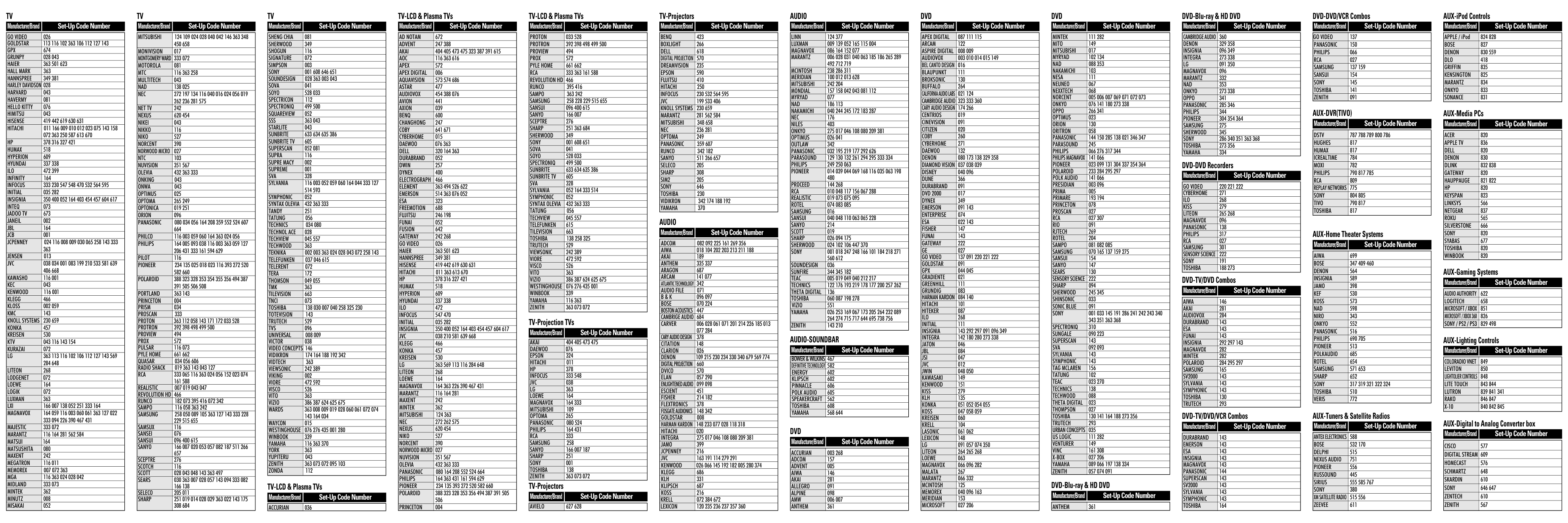
|SYLVANIA|052 164 333 514| |SYMPHONIC|052| |SYNTAX OLEVIA|432 363 333| |TATUNG|056| |TECHVIEW|045 557| |TELEFUNKEN|615| |TILEVISION|663| |TOSHIBA|138 258 325| |TRUTECH|529| |VIEWSONIC|242 389| |VIORE|472 592| |VISCO|526| |VITO|363| |VIZIO|386 387 624 625 675| |WESTINGHOUSE|076 276 435 001| |WINBOOK|339| |YAMAHA|116 363| |ZENITH|363 073 072|
|SHENG CHIA|081| |---|---| |SHERWOOD|349| |SHOGUN|116| |SIGNATURE|072| |SIMPSON|003| |SONY|001 608 646 651| |SOUNDESIGN|028 363 003 043| |SOVA|041| |SOYO|528 033| |SPECTRICON|112| |SPECTRONIQ|499 500| |SQUAREVIEW|052| |SSS|363 043| |STARLITE|043| |SUNBRITE|633 634 635 386| |SUNBRITE TV|605| |SUPERSCAN|052 081| |SUPRA|116| |SUPRE MACY|002| |SUPREME|001| |SVA|328| |SYLVANIA|116 003 052 059 060 164 044 333 127 514 593
| |SYMPHONIC|052| |SYNTAX OLEVIA|432 363 333| |TANDY|251| |TATUNG|056| |TECHNICS|034 080| |TECHNOL ACE|028| |TECHVIEW|045 557| |TECHWOOD|363| |TEKNIKA|002 003 363 024 028 043 072 258 143| |TELEFUNKEN|037 046 615| |TELERENT|072| |TERA|172| |THOMSON|049 055| |TMK|363| |TILEVISION|663| |TNCI|073| |TOSHIBA|138 030 007 040 258 325 230| |TOTEVISION|143| |TRUTECH|529| |TVS|096| |UNIVERSAL|008 009| |VICTOR|038| |VIDEO CONCEPTS|146| |VIDIKRON|174 164 188 192 342| |VIDTECH|363| |VIEWSONIC|242 389| |VIKING|002| |VIORE|472 592| |VISCO|526| |VITO|363| |VIZIO|386 387 624 625 675| |WARDS
|363 008 009 019 028 060 061 072 074 143 164 034| |WAYCON|015| |WESTINGHOUSE|076 276 435 001 280| |WINBOOK|339| |YAMAHA|116 363 370| |YORK|363| |YUPITERU|043| |ZENITH|363 073 072 095 103| |ZONDA|112|
TV-Projection TVs
Manufacturer/Brand Set-Up Code Number
|AKAI|404 405 473 475| |---|---| |DAEWOO|076| |EPSON|324| |HITACHI|011| |HP|378| |INFOCUS|333 548| |JVC|038| |LG|363| |LOEWE|164| |MAGNAVOX|164 333| |MITSUBISHI|109| |OPTOMA|265| |PANASONIC|080 524| |PHILIPS|164 431| |RCA|333| |SAMSUNG|258| |SANYO|166 007 187| |SHARP|251| |SONY|001| |TOSHIBA|138| |ZENITH|363 073 072|
TV-Projectors Manufacturer/Brand Set-Up Code Number
TV-LCD & Plasma TVs
Manufacturer/Brand Set-Up Code Number
|AVIELO|627 628| |---|---|
|ACCURIAN|036| |---|---|
######### TV-Projectors
Manufacturer/Brand Set-Up Code Number
|BENQ|423| |---|---| |BOXLIGHT|266| |DELL|618| |DIGITAL PROJECTION|570| |DREAMVISION|235| |EPSON|590| |FUJITSU|410| |HITACHI|250| |INFOCUS|230 532 564 595| |JVC|199 533 406| |KNOLL SYSTEMS|230 659| |MARANTZ|281 562 584| |MITSUBISHI|348 658| |NEC|236 281| |OPTOMA|249| |PANASONIC|359 607| |RUNCO|342 182| |SANYO|511 266 657| |SELECO|205| |SHARP|308| |SIM2|205| |SONY|646| |TOSHIBA|230| |VIDIKRON|342 174 188 192| |YAMAHA|370|
######### AUDIO
Manufacturer/Brand Set-Up Code Number
|ADCOM|082 092 225 161 269 356| |---|---| |AIWA|018 104 202 203 213 211 188| |AKAI|189| |ANTHEM|335 337| |ARAGON|687| |ARCAM|141 077| |ATLANTIC TECHNOLOGY|342| |AUDIO FILE|071| |B & K|096 097| |BOSE|070 224| |BOSTON ACOUSTICS|447| |CAMBRIGE AUDIO|684| |CARVER
|006 028 061 071 201 214 226 185 013 077 284| |CARY AUDIO DESIGN|378| |CITATION|148| |CLARION|026| |DENON|109 215 230 234 330 340 679 569 774| |DIGITAL PROJECTION|660| |DVICO|570| |ELAN|057 290| |ENLIGHTENED AUDIO|099 098| |ESCIENT|451| |FISHER|214 182| |FLEXTRONICS|378| |FOSGATE AUDIONICS|148 342| |GOLDSTAR|008| |HARMAN KARDON|148 233 077 028 118 318| |HITACHI|020| |INTEGRA|275 017 046 108 080 209 381| |JAMO|399| |JCPENNEY|216| |JVC|163 191 114 279 291| |KENWOOD|026 066 145 192 182 005 280 374| |KLEGG|686| |KLH|331| |KLIPSCH|687| |KOSS|216| |KRELL|072 384 672| |LEXICON|120 235 236 237 357 360|
######### AUDIO
Manufacturer/Brand Set-Up Code Number
|LINN|124 377| |---|---| |LUXMAN|009 139 052 165 115 004| |MAGNAVOX|086 164 152 077| |MARANTZ
|006 028 031 040 063 185 186 265 289 492 712 719| |MCINTOSH|238 286 311| |MERIDIAN|100 012 013 628| |MITSUBISHI|242 204| |MONDIAL|157 158 042 043 081 112| |MYRYAD|077| |NAD|186 113| |NAKAMICHI|040 244 245 172 183 287| |NEC|176| |NILES|403| |ONKYO|275 017 046 108 080 209 381| |OPTIMUS|026 041| |OUTLAW|342| |PANASONIC|032 195 219 177 292 626| |PARASOUND|129 130 132 261 294 295 333 334| |PHILIPS|249 250 063| |PIONEER|014 039 044 069 168 116 035 063 198 480
| |PROCEED|144 268| |RCA|010 048 117 156 067 288| |REALISTIC|019 073 075 095| |ROTEL|074 083 085| |SAMSUNG|016| |SANSUI|040 048 110 063 065 228| |SANYO|214| |SCOTT|019| |SHARP|026 094 175| |SHERWOOD|024 102 106 447 370| |SONY
|001 018 247 248 166 101 184 218 271 560 612| |SOUNDESIGN|036| |SUNFIRE|344 345 182| |TEAC|005 019 049 040 212 217| |TECHNICS|122 176 193 219 178 177 200 257 262| |THETA DIGITAL|136| |TOSHIBA|060 087 198 278| |VIZIO|551| |YAMAHA|026 253 169 067 173 205 264 232 089 264 274 715 717 644 695 738 756
| |ZENITH|143 210|
######### AUDIO-SOUNDBAR
Manufacturer/Brand Set-Up Code Number
|BOWER & WILKINS|467| |---|---| |DEFINITIVE TECHNOLOGY|582| |ENERGY|602| |KLIPSCH|602| |PINNACLE|606| |POLK AUDIO|605| |SPEAKERCRAFT|562| |TOSHIBA|608| |YAMAHA|568 644|
######### DVD
Manufacturer/Brand Set-Up Code Number
|ACCURIAN|003 268| |---|---| |ADCOM|157| |ADVENT|005| |AIWA|146| |AKAI|281| |ALLEGRO|091| |ALPINE|098| |AMW|006 007| |ANTHEM|361|
######### DVD
Manufacturer/Brand Set-Up Code Number
|APEX DIGITAL|087 111 115| |---|---| |ARCAM|122| |ASPIRE DIGITAL|008 009| |AUDIOVOX|003 010 014 015 149| |BEL CANTO DESIGN|016| |BLAUPUNKT|111| |BROKSONIC|130| |BUFFALO|264| |CALIFORNIA AUDIO LABS|021 124| |CAMBRIDGE AUDIO|323 333 360| |CARY AUDIO DESIGN|174 266| |CENTRIOS|019| |CINEVISION|091| |CITIZEN|020| |COBY|260| |CYBERHOME|271| |DAEWOO|132| |DENON|080 173 138 329 358| |DIAMOND VISION|037 038 039| |DISNEY|040 096| |DUNE|366| |DURABRAND|091| |DVD 2000|017| |DYNEX|349| |EMERSON|091 143| |ENTERPRISE|074| |ESA|022 143| |FISHER|147| |FUNAI|143| |GATEWAY|222| |GE|027| |GO VIDEO|137 091 220 221 222| |GOLDSTAR|091| |GPX|044 045| |GRADIENTE|021| |GREENHILL|111| |GRUNDIG|083| |HARMAN KARDON|084 140| |HITACHI|101| |HITEKER|087| |ILO|268| |INITIAL|111| |INSIGNIA|143 292 297 091 096 349| |INTEGRA|142 180 280 273 338| |JATON|046| |JBL|084| |JSI|047| |JVC|012| |JWIN|048 050| |KAWASAKI|149| |KENWOOD|151| |KISS|279| |KLH|135| |KONKA|051 052 054 055| |KOSS|047 058 059| |KREISEN|060| |KRELL|104| |LASONIC|061 062| |LEXICON|148| |LG|091 057 074 350| |LITEON|264 265 268| |LOEWE|063| |MAGNAVOX|066 096 282| |MALATA|267| |MARANTZ|066 332| |MCINTOSH|125| |MEMOREX|040 096 163| |MERIDIAN|153| |MICROSOFT|027 206|
######### DVD
Manufacturer/Brand Set-Up Code Number
|MINTEK|111 282| |---|---| |MITO|149| |MITSUBISHI|017| |MYRYAD|102 134| |NAD|088 353| |NAKAMICHI|103| |NESA|111| |NEUNEO|067| |NEXXTECH|068| |NORCENT|005 006 007 069 071 072 073| |ONKYO|076 141 180 273 338| |OPPO|266 341| |OPTIMUS|023| |ORION|130| |ORITRON|058| |PANASONIC|144 150 285 138 021 346 347| |PARASOUND|245| |PHILIPS|066 276 317 344| |PHILIPS MAGNAVOX|141 066| |PIONEER|023 099 131 304 337 354 364| |POLAROID|233 284 295 297| |POLK AUDIO|141 066| |PRESIDIAN|003 096| |PRIMA|005| |PRIMARE|193 194| |PRINCETON|078| |PROSCAN|027| |RCA|027 307| |RIO|091| |RJTECH|269| |ROTEL|204| |SAMPO|081 082 085| |SAMSUNG|070 165 137 159 275| |SANSUI|154| |SANYO|147| |SEARS|130| |SENSORY SCIENCE|222| |SHARP|094| |SHERWOOD|245 345| |SHINSONIC|033| |SONIC BLUE|091| |SONY|001 033 145 191 286 241 242 243 340 343 351 363 368
| |SPECTRONIQ|310| |SUNGALE|090 223| |SUPERSCAN|143| |SVA|092 093| |SYLVANIA|143| |SYMPHONIC|143| |TAG MCLAREN|156| |TATUNG|102| |TEAC|023 270| |TECHNICS|138| |TECHWOOD|088| |THETA DIGITAL|023| |THOMPSON|027| |TOSHIBA|130 141 164 188 273 356| |TRUTECH|293| |URBAN CONCEPTS|035| |US LOGIC|111 282| |VENTURER|149| |VINC|161 308| |X-BOX|027 206| |YAMAHA|089 066 197 138 334| |ZENITH|057 074 091|
DVD-Blu-ray & HD DVD
Manufacturer/Brand Set-Up Code Number
|ANTHEM|361| |---|---|
######### DVD-Blu-ray & HD DVD
Manufacturer/Brand Set-Up Code Number
|CAMBRIDGE AUDIO|360| |---|---| |DENON|329 358| |INSIGNIA|096 349| |INTEGRA|273 338| |LG|091 350| |MAGNAVOX|096| |MARANTZ|332| |NAD|353| |ONKYO|273 338| |OPPO|341| |PANASONIC|285 346| |PHILIPS|344| |PIONEER|304 354 364| |SAMSUNG|275| |SHERWOOD|345| |SONY|286 340 351 363 368| |TOSHIBA|273 356| |YAMAHA|334|
DVD-DVD Recorders
Manufacturer/Brand Set-Up Code Number
|GO VIDEO|220 221 222| |---|---| |CYBERHOME|271| |ILO|268| |KISS|279| |LITEON|265 268| |MAGNAVOX|096| |PANASONIC|138| |PHILIPS|317| |RCA|027| |SAMSUNG|301| |SENSORY SCIENCE|222| |SONY|191| |TOSHIBA|188 273|
DVD-TV/DVD Combos
Manufacturer/Brand Set-Up Code Number
|AIWA|146| |---|---| |AKAI|281| |AUDIOVOX|284| |DURABRAND|143| |ESA|143| |FUNAI|143| |INSIGNIA|292 297 143| |MAGNAVOX|282| |MINTEK|282| |POLAROID|284 295 297| |SAMSUNG|165| |SV2000|143| |SYLVANIA|143| |SYMPHONIC|143| |TOSHIBA|130| |TRUTECH|293|
DVD-TV/DVD/VCR Combos
Manufacturer/Brand Set-Up Code Number
|DURABRAND|143| |---|---| |EMERSON|143| |ESA|143| |INSIGNIA|143| |MAGNAVOX|143| |PANASONIC|144| |SUPERSCAN|143| |SV2000|143| |SYLVANIA|143| |SYMPHONIC|143| |TOSHIBA|164|
######### DVD-DVD/VCR Combos
Manufacturer/Brand Set-Up Code Number
|GO VIDEO|137| |---|---| |PANASONIC|150| |PHILIPS|066| |RCA|027| |SAMSUNG|137 159| |SANSUI|154| |SONY|145| |TOSHIBA|141| |ZENITH|091|
######### AUX-DVR(TIVO)
Manufacturer/Brand Set-Up Code Number
|DSTV|787 788 789 800 786| |---|---| |HUGHES|817| |HUMAX|817| |ICREALTIME|784| |MOXI|782| |PHILIPS|790 817 785| |RCA|809| |REPLAY NETWORKS|775| |SONY|804 805| |TIVO|790 817| |TOSHIBA|817|
AUX-Home Theater Systems
Manufacturer/Brand Set-Up Code Number
|AIWA|699| |---|---| |BOSE|347 409 460| |DENON|564| |INSIGNIA|589| |JAMO|398| |KEF|530| |KOSS|573| |NAD|598| |NIRO|343| |ONKYO|552| |PANASONIC|516| |PHILIPS|690 705| |PIONEER|513| |POLKAUDIO|685| |ROTEL|654| |SAMSUNG|571 653| |SHARP|652| |SONY|317 319 321 322 324| |TOSHIBA|510| |VERIS|772|
AUX-Tuners & Satellite Radios
Manufacturer/Brand Set-Up Code Number
|ANTEX ELECTRONICS|588| |---|---| |BOSE|532 170| |DELPHI|515| |NEXUS AUDIO|751| |PIONEER|556| |RUSSOUND|445| |SIRIUS|555 585 767| |SONY|380| |XM SATELLITE RADIO|515 556| |ZEEVEE|611|
######### AUX-iPod Controls
Manufacturer/Brand Set-Up Code Number
|APPLE / iPod|824 828| |---|---| |BOSE|827| |DENON|830 559| |DLO|418| |GRIFFIN|835| |KENSINGTON|825| |MARANTZ|834| |ONKYO|833| |SONANCE|831|
######### AUX-Media PCs
Manufacturer/Brand Set-Up Code Number
|ACER|820| |---|---| |APPLE TV|836| |DELL|820| |DENON|830| |DLINK|832 838| |GATEWAY|820| |HAUPPAUGE|821 822| |HP|820| |KEYSPAN|823| |LINKSYS|566| |NETGEAR|837| |ROKU|565| |SILVERSTONE|666| |SONY|820| |SYABAS|677| |TOSHIBA|820| |WINBOOK|820|
######### AUX-Gaming Systems
Manufacturer/Brand Set-Up Code Number
|AUDIO AUTHORITY|622| |---|---| |LOGITECH|658| |MICROSOFT / XBOX|851| |MICROSOFT / XBOX 360|826| |SONY / PS2 / PS3|829 498|
AUX-Lighting Controls
Manufacturer/Brand Set-Up Code Number
|COLORADIO VNET|849| |---|---| |LEVITON|850| |LIGHTOLIER CONTROLS|848| |LITE TOUCH|843 844| |LUTRON|839 841 341| |RAKO|846 847| |X-10|840 842 845|
AUX-Digital to Analog Converter box
Manufacturer/Brand Set-Up Code Number
|CISCO|577| |---|---| |DIGITAL STREAM|609| |HOMECAST|576| |SCHMARTZ|648| |SKARDIN|610| |SONY|646 647| |ZENTECH|610| |ZENITH|567|